A Novel Framework for Virtual Desktop Environment
with vApp
Tejaswi Avula
M.Tech, Dept of CSEK L University, India
Radhika Gudapati
M.Tech, Dept of CSE K L University, IndiaSubrahmanyam Kodukula
Professor, Dept of CSEK L University, India
ABSTRACT
Virtualization technology is transforming today‘s IT community, offering new possibilities to improve the performance and efficiency of IT infrastructure by a dynamic mapping of the PC resources, enabling to run several applications and operating systems on a single physical system. Virtualization also offers elevated ease of use and error recovery solutions by encapsulating entire systems into single files that can be replicated and restored on any destination machine. This paper brings new elements related to the concept of virtualization, presenting the principles, the new architectures and the advantages of the virtualization. A new framework has drawn for using different types of operating system(OS) with a vApp in a single operating system. Creating the vApp‘s in VMware Studio and using the vApp anywhere any time.
Keywords
Virtualization, vApp, VMware Studio, Operating System (OS).
1.
INTRODUCTION
Among the leading business challenges confronting CIOs and IT managers today are: cost-effective utilization of IT infrastructure; responsiveness in supporting new business initiatives; and flexibility in adapting to executive changes. Driving an additional sense of urgency is the continued climate of IT budget constraints and more stringent regulatory necessities. Virtualization [5] is a fundamental technological innovation that allows skilled IT managers to deploy creative solutions to such business challenges. Now a day‘s virtualization play‘s a major role in IT infrastructure.
2.VIRTUALIZATION OVERVIEW
Virtualization play‘s a major roll behind the cloud computing concept. For cloud computing virtualization is mind, because without virtualization there is no more cloud computing. Virtualization provides many key functions like resources allocation, data storage, network and many more.
2.1
Virtualization in a Nutshell
Simply put, virtualization [5] is an idea whose time has come. The term virtualization roughly describes the separation of a resource or request for a service from the underlying physical freedom of that service. With virtual memory, for illustration, computer software gains access to more memory than is physically installed, via the background swapping of data to hard disk storage. Similarly, virtualization techniques are capable ofapplied
to other IT infrastructure layers - together with networks, storage, laptop or server hardware, operating systems in addition to applications. This blend of
virtualization technology - or virtual infrastructure- provides a layer [1] of generalizationamong computing, storage and networking hardware, and the applications running on top of it. The exploitation of virtual infrastructure is non-disruptive, because the user experiences are largely unaffected. However, virtual infrastructure gives administrators the advantage of managing pooled resources across the enterprise, allowing IT managers to be quicker to respondon the way to dynamic organizational needs and to better leverage infrastructure reserves [4].
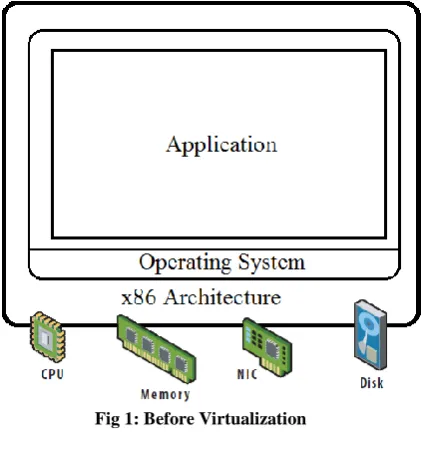
[image:1.595.320.532.349.575.2]In this type of architecture the physical machine runs only one host operating system. Physical machine is tended to do only one particular job.
Fig 1: Before Virtualization
Single OS image per physical machine
Software and hardware tightly attached to only one machine.
Running multiple applications on same machine often creates clash some time.
Underutilized resources, resources are not utilized properly.
International Journal of Computer Applications (0975 – 8887) Volume 71– No.12, June 2013
Fig 2:After Virtualization
Hardware-independence of operating system and applications ,can more than one physical Machine after virtualization
Virtual machines can be moveable to any system
Can manage OS and application as a single unit by encapsulating them into virtual machines
2.2
Using
virtual
infrastructure
solutions such those enterprises IT
managers
can
address
challenges
thatinclude
:
Server Consolidation and Containment– Eliminating
‗server sprawl‘ via deployment of systems as virtual machines (VMs)that can run safely and move transparently across sharedhardware, and increase server utilization rates are more comparing with before.
Test and Development Optimization– Rapidly
provisioning test and development servers by reusing pre-configuredsystems, enhancing developer collaboration and standardizingdevelopment environments.
Business Continuity– Reducing the cost and
complexity ofbusiness continuity (high availability and disaster recoverysolutions) by encapsulating entire systems into single filesthat can be replicated and restored on any target server,thus minimizing downtime.
Enterprise Desktop– Securing unmanaged PCs,
workstationsand laptops without compromising end userautonomy by layering a security policy in software arounddesktop virtual machines [1].
3.
VIRTUALIZATION
APPROACHES
While virtualization [1] has been a part of the IT scenery for decades, it is only recently (in 1998) that VMware delivered the benefits of virtualization to industry-standard x86-based platforms, which now form the preponderance of desktop, laptop and server shipments. A key benefit of virtualization is the ability to run multiple operating systems on a single physical system and share the underlying hardware resources – known as partitioning. Today, virtualization can apply to
ancollection of system layers,together with hardware-level virtualization, operating systemaltitudevirtualization, and sophisticated language virtual machines.The twoapproaches typically used with software-based partitioning arehosted and hypervisor architectures.
3.1Hosted Virtualization Approach
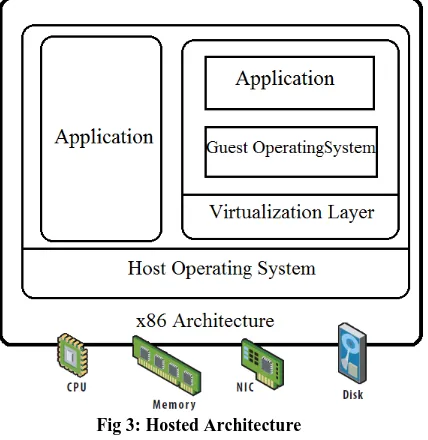
A hostedapproach provides partitioning armed forces on top of anordinaryoperating system and supports the broadest range of hardwareconfigurations[4][2].
Fig 3: Hosted Architecture
Installs and runs as an application
Relies on host OS for device support and physical resource management
3.2Hypervisor Virtualization Approach
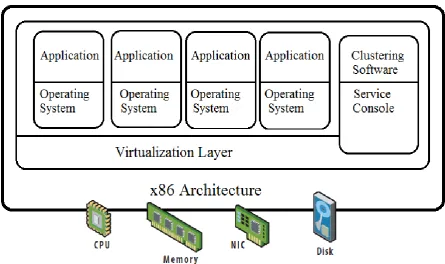
[image:2.595.321.535.194.414.2]Fig 4: Bare Metal (Hypervisor) Architecture
Lean virtualization-centric kernel, can many application under one Virtualization Layer.
Service Console for agents and helper applications, shareable with other‘s to get report about it.
4.
VIRTUAL APPLIANCES
DEFINED
Virtual appliances [5][7] are prebuilt software solutions comprising one or more virtual machines that are package, updated, maintained and managed as anentity. Software developers create virtual appliances by developing self contained and optimized application stacks that are customized for their workload and embedded with an operating system (OS) of choice. Virtual appliances are fundamentally changing how software is developed, distributed, deployed and managed. For developers [6] and the organizations that license their software, the reimbursement of virtual appliances include a cutback in development and distribution costs, accelerated time in the direction of market, a more protected software delivery system, and the aptitude to leverage industry-leading virtualization platforms.
In addition, virtual appliances [6] are more secure and reliable than traditional software and easier to install and manage. Because virtual appliances are preconfigured, they help organizations diminish the time and expense associated with application deployment—including the patching and ongoing management of the software. Organizations use virtual appliances to gain access to the advanced capabilities of virtualization [1] platforms—such at the same time as high availability, scalability, backup and live exodus—while gaining
greater flexibility and freedom of choice as to how and where they run their applications.
4.1 vApp
VMware newly introduce the vApp, a software solution optimized premeditated for cloud computing. A consistent entity composed of one or more virtual machines [8]; the vApp can be stimulated and managed as a unit. A vApp specifies and encapsulates mechanism of a multitier application as well as the operational policies as well as service levels unrelated by means of it. The vApp gives application owners a standard way to describe policies for an application, which singular datacenters can consistently interpret and run. The vApp is a kind of virtual applications that be capable of be build by ISVs, system integrators, significance‐added resellers, and onsite IT administrators.The Open Virtualization Format (OVF) [1] standard 1.0 is in use to represent a solo virtual machine or combination of numerous virtual machines. At the same time as implement, draft OVF standard 0.9 cannot symbolize more than one virtual machine. We can organize a vApp through vCenter Server among the vSphere Client, or with ovf tool. Virtual Center 2.5 and ESX/ESXi 3.5 support OVF 0.9 only. We can run all or part of a vApp on ESX/ESXi 3.5 if we deploy the vApp in the course of vCenter Server 4.
International Journal of Computer Applications (0975 – 8887) Volume 71– No.12, June 2013
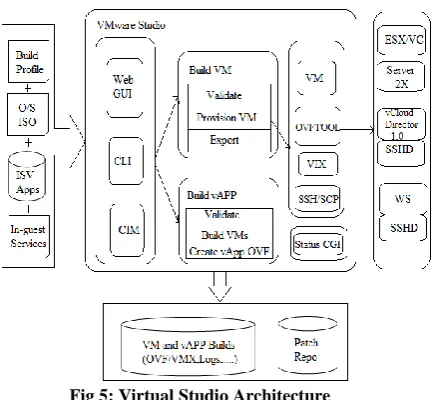
Fig 5: Virtual Studio Architecture
4.2 To Create Virtual Build Profile in
Virtual Studio
To create a VM or a vApp [1], you formulate a build profile using the VMware Studio Web console or Eclipse boundary. The build profile specifies the ISO image of a Linux or Windows operating system and the softwareapplications to run on that operating system. For a Linux‐based VM, the build sketch also specifies in‐guest services, in other words VAMI. The left side of fig shows inputs to the build system. Before you build a VM or vApp, VMware Studio[1] authenticates the build profile. To prerequisite a VM, the build system uses a VMware product platform to generate a virtual machine from the operating system ISO and the application set you specify. A successful VM build is exported in the direction of a network‐accessible location on the VMware Studio appliance. This VM contains the OS and appliance packages as amorphous in build profile. The VM also have boot scripts configured the in‐guest management sketch out embedded, and is customized according on the way to specifications of your build profile. On top of VMware product platforms that support the vSphere API [1] (formerly the VIM API), the build system uses the ovf tool to generate and move the VM. On VMware product platforms that do not support the vSphere API, the build system uses the VIX API to generate and move the VM. To build a vApp, the construct system takes a set of VM build profiles or successfully built VMs, and packages them together by means of an OVF descriptor [1]. Because the developer of a vApp, can specify start order and resource allocation for the constituent VMs and applications, but many aspects of the vApp remain bendable until the administrator decides at deployment time [7].
To create a build profile in VMware studio it should run this VMware workstation or in Virtual box. When run this it gives an ip address to open it on the browser. When running it will ask you the user name password to login in to it. Once login in to the VMware studio we can build ourown application in the VMware studio [1]. Like that for new frame work here we try to build new virtual application with different operating system to
rum in any type of environment. With this type of application we can run the any type of operating system on any environment. Its like bring one environment to another environment with help of vApp. This is built in the VMware studio.
5.
VIRTUALIZATION
SPIRIT
OF
CLOUD COMPUTING
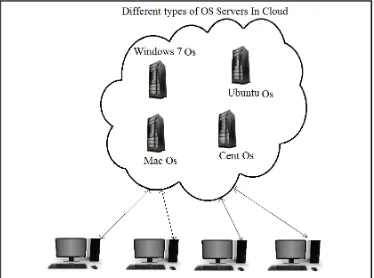
Cloud computing is the name which is getting arepresentation from the Internet, is becoming a popular term and has been used by an increasing number of organizations. In cloud computing environment, services are not provided by a single server or a small group of servers; instead, various computing and storage services are provided by some collection of data centers owned and maintained by a third party. This paper proposed a new frame work for different types of virtual servers. Approximating keep all virtual servers in cloud environment for providing the different types of operating system(OS) services in cloud environment. For providing different types of OS services in cloud is not a simple work. But by use of virtualization we can make it simple like creating vApp‘s using the VMware products like VMware Studio. With the help of VMware studio we can make different type OS vApp‘s. Virtualization makes difficult effort in to more simple toil. Here we are giving a new frame work for how different users can access any type of OS with help of virtualization concept. For example if user is running windows OS in his desktop but he wants to use the ubuntu OS for some for a application work. With the help of cloud computing concept we run the ubuntu OS window in his desktop. Main thing behind is virtualization.
5.1 A Framework for Deploying of
Different types OS in Cloud with help
of Virtualization
Fig 6: A Framework for different users using different OS with help of vApp
6.
COMPARATIVE ANALYSIS OF
EXISTING TECHNOLOGY
In existing there is no such a frame work to get new Operating System (OS) environment into present working system suddenly on demand to work on new platform. With this new design of frame work it‘s possible to shift in to new platform and work there with wasting of time to install the entire required environment.
Table1: Difference b/w Existingand Proposed System
Difference‘s
Time taken to change from one OS to other OS
Required to install the any type of OS in system
Existing System 10-15mins YES Proposed System 2-5mins NO
7.
CONCLUSION
This paper proposed a new design for a framework to usethe different operating system(OS) in cloud services with the help of virtualization vApp. Differentpeople can connect to cloud services and access the liked OS to run on their desktop which is not having on their desktop the OS. Concluding that creating a new virtual vApp in VMware Studio to implement a new vApp framework. Future scope is after successful creation of different virtual OS vApp‘s, calculating the performance of each individual virtual OS vApp, to know which virtual OS vApp isbetter to use in current running OS environment.
8.
REFERENCES
[1] VMware studio developer, http://www.vmware.com/studio_developer.pdf [2] VMwareVirtualization,www.vmware.com/pdf/virtu
alization.pdf.
[3] Radhika.G, Tejaswi.A ―Efficient Framework for Deploying Information in Cloud Virtual Datacenters with Cryptography Algorithms‖ in IJCTT- volume4Issue3- 2013 page no 375-380 [4] Logica Banica, Doina Rosca and Cristian Stefan
―Virtualization: an old concept in a new approach‖ online at http://mpra.ub.uni-muenchen.de/15236/ [5] VMware, http://www.virtualization.info
[6] VMware Public Virtual Appliances, http://www.vmware.com/appliances/, 2013. [7] Gabor Kecskemeti , ―Foundations of efficient
virtual appliance based servicedeployments.pdf‖ [8] Gabor Kecskemeti, Gabor Terstyanszky, "Towards