warwick.ac.uk/lib-publications
Original citation:Shonola, Shaibu Adekunle and Joy, Mike. (2016) Enhancing mobile learning security. International Journal on Integrating Technology in Education, 5 (3). pp. 1-15.
Permanent WRAP URL:
http://wrap.warwick.ac.uk/88216
Copyright and reuse:
The Warwick Research Archive Portal (WRAP) makes this work of researchers of the University of Warwick available open access under the following conditions.
This article is made available under the Creative Commons Attribution 4.0 International license (CC BY 4.0) and may be reused according to the conditions of the license. For more details see: http://creativecommons.org/licenses/by/4.0/
A note on versions:
The version presented in WRAP is the published version, or, version of record, and may be cited as it appears here.
E
NHANCING
M
OBILE LEARNING
S
ECURITY
Shaibu Adekunle Shonola and Mike Joy
Department of Computer Science, University of Warwick, CV4 7AL Coventry United Kingdom
A
BSTRACTMobile devices have been playing vital roles in modern dayeducation delivery as students can access or download learning materials on their smartphones and tablets, they can also install educational apps and study anytime, anywhere. The need to provide adequate security forportable devices being used for learning cannot be underestimated. In this paper, we present a mobile security enhancement app, designed and developedfor Android smart mobile devices in order to promote security awareness among students. The app can alsoidentify major and the most significant security weaknesses, scan or check for vulnerabilities in m-learning devices and report any security threat.
K
EYWORDSMobile Device, Mobile Learning Security, M-learning Security, Security app
1.
I
NTRODUCTIONThere have been many security incidents reported when using mobile gadgets ever since these devices have become popular, most especially in open operating systems [1]. With increasing use of mobile devices and applications for storing or accessing personal and sensitive information, many users are not aware of the growing security threats in using these devices and many users are also not aware thatsome mobile apps are not so secure. Asmore people use smartphones and tablets for their educational and financial activities, the more attractive these devices and their applications become targets to attackers with mischievous intents. Recent security surveys have reported a rapid increase in the number of mobile threats and the growing sophistication of the attacks. More worrisome is that an open and popular platform such as Android provides a comfortable environment to exploit and propagate security attacks [2].
To prevent or limit such undesirable attacks, Android developersare integrating security mechanisms and features that allow protection of users from malicious apps. Developing an effective and usable security model which is suitable for small portable devices is not an easy challenge. In fact, while addressing many security issues, the Android security model itself has many shortcomings [3], some of which are being addressed by Android security extensions such as Yet Another Android Security Extension [2].
Another issue on mobile device and m-learning security is lack of awareness or negligence among users as many learners do not regard security as important until an issue arises [4]. For example, despite the fact that the most widely used methods of authentication on mobile devices are PINs and passwords, a number of studies indicate that many mobile users are either unaware of, or do not bother to use, these security features [5]. A survey of 297 mobile phone users reported by Clarke and Furnell in [6] found that 34% of the participants did not use any PIN or password security,notwithstanding the fact that these security measures do not offer the best protection features.
International Journal on Integrating Technology in Education (IJITE) Vol.5, No.3, September 2016
2
of efforts on promoting security education among students for smart mobile devices; however, more efforts are still required in improving this security awareness, in term of designing and developing security enhancement apps for m-learning users to raise security awareness, scan devices for vulnerabilities and report any potential threats in their devices. This paper serves this purpose and it is organised as follows: section two presents related work on m-learning security, section three considers m-learning security app design, section four discusses the implementation and app evaluation of such an app, and section five and six present the results of the evaluation, section seven gives further discussion on the results and section eight presents the conclusion
2.
R
ELATEDW
ORKSResearchers are now focusing their attention on mobile security issues due to a sharp rise in the number of reported mobile operating systems vulnerabilities, particularly in the Android platform by publishing many of their work on inherent security issues in mobile devices and m-learning platforms. Cai et al. [9]emphasise threats and attacks on user privacy by sniffing the sensors in smartphones and tablets. The authorshave developed a threat model based on the use of sensors and have designed a mobile framework for a defense system. This framework consists of three modules: (i) policy engine, (ii) interceptor, (iii) user interaction. The policy engine is based on application monitoring and profiling without requiring much user intervention and they consideredseveral policies under this,such as white-listing, blacklisting and information-flow tracking. The interceptor is interposed between the application and the sensors, and/or between the application and the network, and it enforces the decision of the policy engine. When the policy prohibits an application from accessing the network, the interceptor simply denies such access. The user interaction is not a mandatory but a desirable component, since it simply notifies the user by asking for their decision. For each module, different mechanisms are explored and discussed by the authors, however no real implementation of their engine is presented.
Ruitenbeek et al. [10] study the propagation of smartphone viruses,in particular, the effects of multimedia messaging system (MMS) viruses that spread by sending infected messages to other devices and propose several response mechanisms to quantify the effectiveness of virus mitigation techniques. The authors present a virus model which“parameterized and represented a wide range of potential MMS virus behaviours and identified four MMS virus scenarios”: in each scenario the virus on the phone sends MMS messages with an infected attachment file to other phones, which are selected from the contact list of the infected phone as well as dialing a random phone number. If a user accepts the infected attachment file, the virus is installed, the target phone becomes infected and under the control of the attacker. The evaluated response mechanisms for each of the four scenarios are: (i) scan of all MMS attachments in MMS gateways to detect viruses; (ii) awareness promotion through user education; (iii) device immunization using software patches;(iv) monitoring for anomalous behavior and (v) blacklist of phones that are suspected of infection.Their experimental results revealed that any response mechanism must be quick enough to react rapidly to spreadingviruses. While their work is quite convincing, the authors acknowledged that an optimal virus response strategy must be able to address many different types of virus behaviour and there is room for evaluation extensions to their work.
for a smallfraction of the numbers of mobile devices worldwide. Also there are many other security issues apart from viruses which affect mobile gadgets [12].
This paper presents a practical mobile technology based learning approach to enhance security perception with a focus on students’ needs. The approach describes the development of a mobile security app, which covers fundamental and emerging security issues and threats in modular form. Since using smart devices is becoming an integral part of students’ daily activities, this approach provides a convenient and effective way for students to enhance the security of their devices.
3.
R
EQUIREMENTS,
D
ESIGN ANDF
UNCTIONALITIESIn order to understand the current security problems affecting smartphones and tablets being used for m-learning in developing countries, particularly in Nigeria, we investigated threats, vulnerabilities and attacks specific to these devices and examined ways in finding solutions to them. In particular, we reviewed literature, journal publications, policy documents and carried out surveys in higher education institutions, focusing our attention on high-level attacks. Having identified some issues, our intervention is to design and develop a mobile app that will enhance the security of any device that is installed on, through promoting awareness, scanning devices for vulnerabilities and reporting threats.
3.1 The App Architecture
The three main objectives of the intervention app are: 1) the security enhancement app helps students to understand not only classical in-built security models and solutions, but also problems in emerging areas of mobile security; 2) the app scansor checks students’ m-learning devices in order to identify possible vulnerability in such devices, and in case some security lapses are detected, it gives tips on how to resolve them; and 3) the app presents a report on the identified security threats to the users as well as recommendations on tackling the identified issues. With these objectives in mind, the app architecture which is based on our proposed security framework for mobile client [13], is designed as follows.
The app adopts an activity-list or modular structure that organizes all security issues into a sequence of self-contained modules; eachactivity-list focuses on a specific security area identified during our research study and those obtained from academicpublications which include lecture notes, survey questions and interviewsas well as case studies. There are tips and awareness on each m-learning security issue which are backed by current research. Following the tips comes asecurity scan or check facility to analyse the mobile device and its installed app for any infection and provide advice on how to deal with the issue.
The app is designed and developed based on the Android platform due to the following three reasons. Firstly, the Android platform dominated the world-wide smart phone market with 82.8% as at second quarter of 2015 according to data from the International Data Corporation (IDC) in [14] on Worldwide Quarterly Mobile Phone Tracker. Secondly, the platform is popular andopen-source having less restrictive market policy which makes it a prime target for malicious applications. Lastly, the Android platform, although it has big major backers such as Samsung and Google, is very affordable in comparison to other mobile computing platforms.
International Journal on Integrating Technology in Education (IJITE) Vol.5, No.3, September 2016
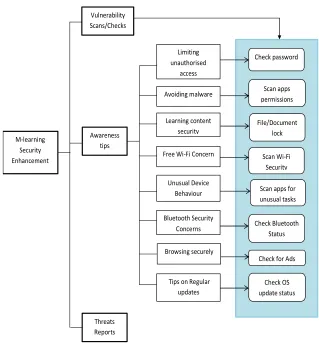
[image:5.612.150.469.100.443.2]4 Figure 1: System diagram of the architecture of the app
3.2 Module Functionalities
The functionality of each module of the app is described below. The first functionality of the app is ‘limiting unauthorised access’ to the m-learning device by checking for password security. Our previous research indicated that many students do not have simple mobile device screen lock mechanisms such as Pattern, Pin or Password which may prevent unauthorized access to the device as well as the learning content in it. The learning documents stored on the device can be locked using file-lock password encryption in order to ensure their confidentiality and integrity if the device is lost or stolen. The second functionality is ‘avoiding malware attack’ by monitoring permissions requested by apps during installation and paying attention to unusual device behaviour. This functionality scans for permissions granted to all installed apps and any suspicious app can be triggered for further analysis and subsequent removal if necessary. The functionality also scans the device for unusual activities in term of resource usage (memory and processing) and gives notifications to the users.
The functionality on ‘Free Wi-Fi Concern’ warns the students on the implication of connecting to free Wi-Fi provided to the public by unknown people or organization. It scan for the security of Wi-Fi which the device is connected. The ‘Bluetooth Security Concern’ functionality advises students on the importance of ensuring that Bluetooth connection is disabled after use and
M-learning Security Enhancement
Awareness tips
Threats Reports Vulnerability Scans/Checks
Limiting unauthorised
access
Avoiding malware
Learning content security
Free Wi-Fi Concern
Unusual Device Behaviour
Bluetooth Security
Concerns
Browsing securely
Tips on Regular updates
Check password
Scan apps permissions
File/Document lock
Scan Wi-Fi Security
Scan apps for unusual tasks
Check Bluetooth Status
Check for Ads
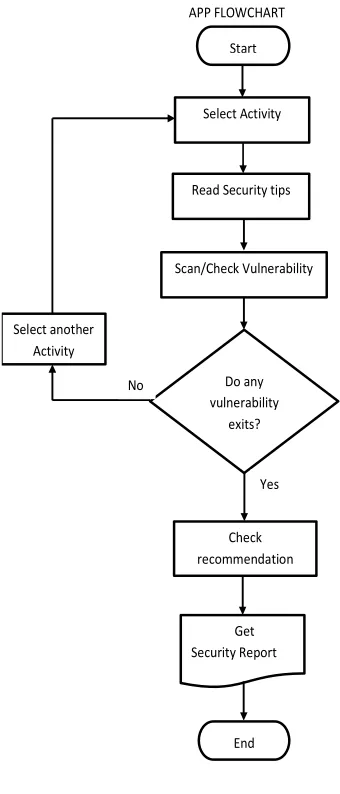
checking the Bluetooth status of the device if it is currently switched off or no. As research shows that adware, spyware and malware spread through adverts that pop up when browsing the internet or from freely downloaded apps [15], the functionality of ‘Browsing Securely’ module checks the device if an advert blocker is already installed, and if not its provides a link to download and install an advert blocker. Regular checks are performed on the device to check if the latest updates have been installed for the OS. This is beneficial as most mobile device updates come with new security features and fixes to existing vulnerability in the software. The last functionality is the reporting section, which provides reports on all identified security threats in the device as well as some recommendations in fixing them.The flowchartin the Figure 2 below shows the basicflow of activities within the app.
Figure 2: The app flowchart
4.
D
ESIGNThe development and implementation of them-learning security enhancement app as an intervention is the main goal of this research. The content of this app reflects users’ requirements which were gathered initial survey study [8]. The screen shots for home and activitypages of the
APP FLOWCHART
Start
Read Security tips Select Activity
Do any vulnerability
exits?
Check
recommendation Yes Scan/Check Vulnerability
Select another
Activity
No
Get Security Report
International Journal on Integrating Technology in Education (IJITE) Vol.5,
[image:7.612.148.472.445.651.2]app can be seen as shown below. From the home screen (Figure 3), users can move to the activity-list page by clicking on the “Security tips and scans” tab.
Figure 3: The app home page and activity list
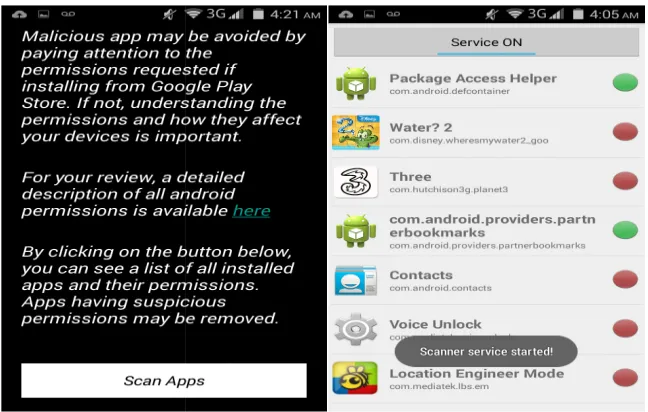
From the activity-list page, users can select which security activity to explore in order to learn more about it and scan for vulnerabilities. For example, if a user wishes to detect unusual device behaviour, they can select the “unusual device behaviour” activity and start the
clicking on the service button at the top on the page (Figure 4). This enables the app to start monitoring activities and sends notification if abnormal activity is detected.
Similarly, a user can check the security of the Wi concern” from the activity list and further select “Wi
International Journal on Integrating Technology in Education (IJITE) Vol.5, No.3, September
app can be seen as shown below. From the home screen (Figure 3), users can move to the list page by clicking on the “Security tips and scans” tab.
Figure 3: The app home page and activity list
page, users can select which security activity to explore in order to learn more about it and scan for vulnerabilities. For example, if a user wishes to detect unusual device behaviour, they can select the “unusual device behaviour” activity and start the
clicking on the service button at the top on the page (Figure 4). This enables the app to start monitoring activities and sends notification if abnormal activity is detected.
Figure 4: The app scan service
e security of the Wi-Fi connected to by selecting “Free Wi concern” from the activity list and further select “Wi-Fi Security” (Figure 5)
September 2016
6
app can be seen as shown below. From the home screen (Figure 3), users can move to the
page, users can select which security activity to explore in order to learn more about it and scan for vulnerabilities. For example, if a user wishes to detect unusual device behaviour, they can select the “unusual device behaviour” activity and start the scanner by clicking on the service button at the top on the page (Figure 4). This enables the app to start
Figure 5: The app activity document lock/Wi-Fi security
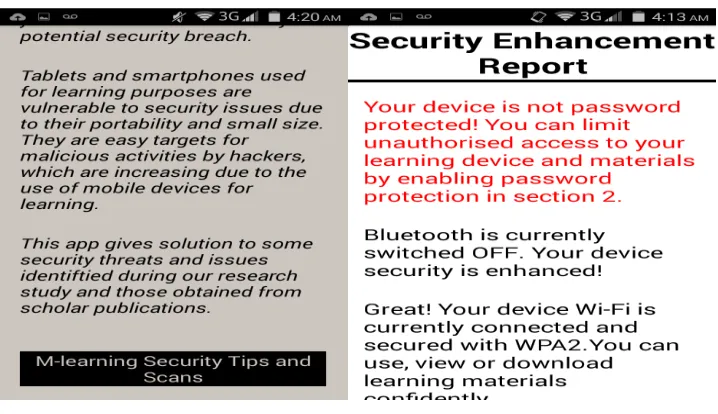
The security reportpresents some findings on weaknesses in the m-learning device as well as makingappropriate recommendations to avoid further security breaches in future (Figure 6).
Figure 6: The app tips and enhancement report
5.
A
PPI
MPLEMENTATION ANDE
VALUATION [image:8.612.131.490.371.578.2]International Journal on Integrating Technology in Education (IJITE) Vol.5,
issues of their smart devices and learned some protection mechanism to reduce the risk of being exploited. Attributed to the convenience of m
were more engaged in learning security and got insight of the security concepts through their hands-on practices and research studies cited in the app.
Evaluation took place after the app had been used for a couple of weeks in order to obtain feedback from the participants and to assess the app functionalities. As suggested by Miettine et al. [16]and Oyelere et al. [17],monitoring data in a mobile environment can be a challenge due to administrative, technical and conceptual limitations.While three methods are u
collection and evaluation, only two methods are analysed in this paper. The firstis a questionnaire/feedback form which is attached to a section of the app. This is expected to be completed by all users within a period of two weeks after i
to the questionnaire can be provided if requested by the participants. The secondmethod for data collection is a set of interview with certain participants who are very conversant with our research work. The group include tutors in higher education institutions in Nigeria and colleagues at the University of Warwick.
5.1 Result from questionnaire
A survey was carried out among 110 students, most of whom were undergraduates in Nigerian Universities as shownin Table 1
[image:9.612.119.495.333.403.2]old.
Table 1. Gender/Age group demography
Under 20 Female 9 Male 6 Total 15
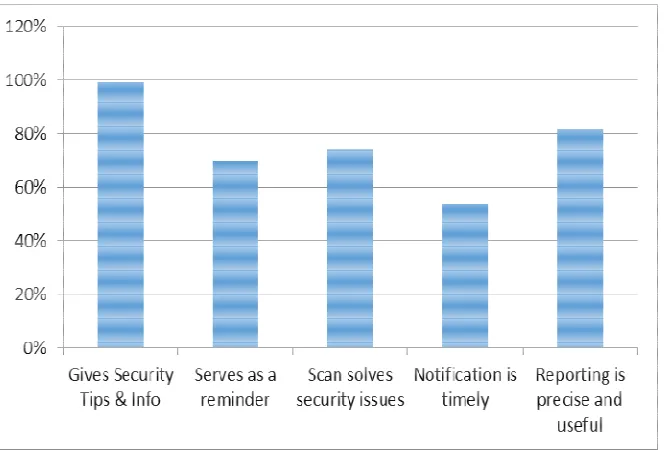
An initial question was about usefulness of the app. Almost all the participants said that their security knowledge improved by tips and information given by the app on how to keep their devices safe, as shown in Figure 7.
Figure 7: How the app is useful to the
International Journal on Integrating Technology in Education (IJITE) Vol.5, No.3, September
issues of their smart devices and learned some protection mechanism to reduce the risk of being exploited. Attributed to the convenience of m-learning and the daily use of their devices, students engaged in learning security and got insight of the security concepts through their on practices and research studies cited in the app.
Evaluation took place after the app had been used for a couple of weeks in order to obtain participants and to assess the app functionalities. As suggested by Miettine et al. [16]and Oyelere et al. [17],monitoring data in a mobile environment can be a challenge due to administrative, technical and conceptual limitations.While three methods are used for feedback collection and evaluation, only two methods are analysed in this paper. The firstis a questionnaire/feedback form which is attached to a section of the app. This is expected to be completed by all users within a period of two weeks after installation and first use. External link to the questionnaire can be provided if requested by the participants. The secondmethod for data collection is a set of interview with certain participants who are very conversant with our research nclude tutors in higher education institutions in Nigeria and colleagues at the
5.1 Result from questionnaire
[image:9.612.148.480.459.684.2]A survey was carried out among 110 students, most of whom were undergraduates in Nigerian below. Most of the participants are male between 20 to 25 years
Table 1. Gender/Age group demography
20 - 25 26 and over Prefer not to say Total 26 8 3
37 16 5 63 24 8
usefulness of the app. Almost all the participants said that their security knowledge improved by tips and information given by the app on how to keep their devices safe, as shown in Figure 7.
Figure 7: How the app is useful to the participants.
September 2016
8
issues of their smart devices and learned some protection mechanism to reduce the risk of being learning and the daily use of their devices, students engaged in learning security and got insight of the security concepts through their
Evaluation took place after the app had been used for a couple of weeks in order to obtain participants and to assess the app functionalities. As suggested by Miettine et al. [16]and Oyelere et al. [17],monitoring data in a mobile environment can be a challenge due to sed for feedback collection and evaluation, only two methods are analysed in this paper. The firstis a questionnaire/feedback form which is attached to a section of the app. This is expected to be nstallation and first use. External link to the questionnaire can be provided if requested by the participants. The secondmethod for data collection is a set of interview with certain participants who are very conversant with our research nclude tutors in higher education institutions in Nigeria and colleagues at the
A survey was carried out among 110 students, most of whom were undergraduates in Nigerian below. Most of the participants are male between 20 to 25 years
Total 46 64 110
Another question was asked about the features of each section of the app. The rating of the features from the participants is shown in Figure 8 below. All the functionalities except the summary section have above 70% ratings from the partici
An interesting question from the survey also asked if the participant has perceived or experienced any security threat on their
m-65.45% of the participants indicated that they had perceived/experienced threats before and 70.83% out of those participants said that the app addressed such security threats. An important feedback from the survey is if the security enhancement app meets the expectation of participants and 77.27% responded ‘Yes’ while a meagre 2.73% responded ‘No’ and 20% indicated that ‘They are not sure’. The last part of the questionnaire is to obtain the participants’ general opinions on the functionalities built into the app in ter
enhancement of their security, improvement in their awareness, ease to download/install and contribution to their security knowledge. The responses are shown in Figure 9 below.
Figure 9: Users’ opinions on the app
Another question was asked about the features of each section of the app. The rating of the features from the participants is shown in Figure 8 below. All the functionalities except the summary section have above 70% ratings from the participants.
Figure 8: The features of the app
An interesting question from the survey also asked if the participant has perceived or experienced -learning device before and if the app addressed the threat(s). ticipants indicated that they had perceived/experienced threats before and 70.83% out of those participants said that the app addressed such security threats. An important feedback from the survey is if the security enhancement app meets the expectation of participants and 77.27% responded ‘Yes’ while a meagre 2.73% responded ‘No’ and 20% indicated that ‘They are not sure’. The last part of the questionnaire is to obtain the participants’ general opinions on the functionalities built into the app in terms of fitness of purpose, enhancement of their security, improvement in their awareness, ease to download/install and contribution to their security knowledge. The responses are shown in Figure 9 below.
Figure 9: Users’ opinions on the app functionalities
Another question was asked about the features of each section of the app. The rating of the features from the participants is shown in Figure 8 below. All the functionalities except the
International Journal on Integrating Technology in Education (IJITE) Vol.5,
5.2 Results from Interview
[image:11.612.178.442.149.212.2]An evaluation interview was conducted with 15 academic staff in Nigerian Universities. Table 2 shows the demographic information about the interviewees.
Table 2: Gender/Age Group of interview participants
During the interview, four main questions were asked about the features which have been built into the app, some of which are similar to those in the questionnaire. The
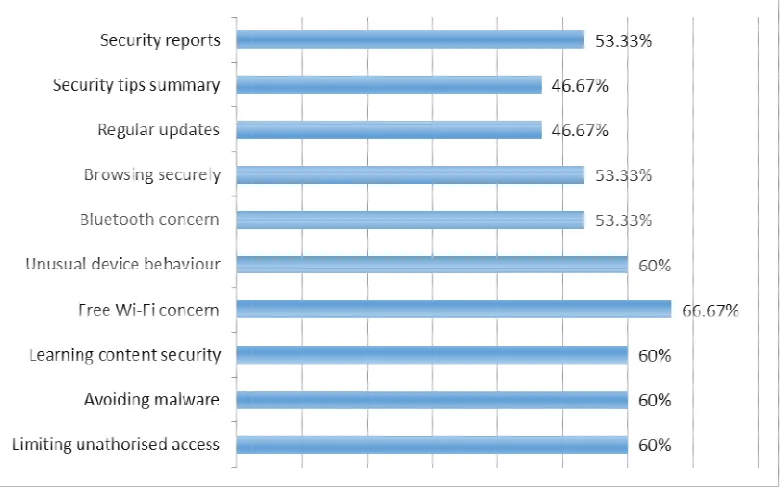
section of the app do you find very useful in terms of security?” and the response is plotted in Figure 10. Another question from the interview is, “which area does the app perform best in terms of awareness promotion, vulnerabilit
[image:11.612.115.506.316.560.2]considered the best with 66.67%, followed by vulnerability scan with 60% and lastly the report and alert with 53.33%
Figure 10: Users’ opinions on the section of the app in terms of security
Many participants also believed that all the sections of the app are purposeful because they address some of the prevalent security issues that are common among students in Nigerian Universities. They also found all the sections of the app very useful in term of
diagnostics and reporting. Based on various benefits of the app with reasons mentioned earlier, all the interview participants thought that the app improves the security of their devices and the learning content. They all confirmed that the secur
reasons given by the lecturer participants on why they think the app improves the security of their m-learning devices and why the app is fit for purpose are given in the conclusion section below.
Female Male Total
International Journal on Integrating Technology in Education (IJITE) Vol.5, No.3, September
An evaluation interview was conducted with 15 academic staff in Nigerian Universities. Table 2 shows the demographic information about the interviewees.
Table 2: Gender/Age Group of interview participants
During the interview, four main questions were asked about the features which have been built into the app, some of which are similar to those in the questionnaire. The first question is “which section of the app do you find very useful in terms of security?” and the response is plotted in Figure 10. Another question from the interview is, “which area does the app perform best in terms of awareness promotion, vulnerability scan and threat reporting?” Awareness promotion is the best with 66.67%, followed by vulnerability scan with 60% and lastly the report
Figure 10: Users’ opinions on the section of the app in terms of security
articipants also believed that all the sections of the app are purposeful because they address some of the prevalent security issues that are common among students in Nigerian Universities. They also found all the sections of the app very useful in term of
diagnostics and reporting. Based on various benefits of the app with reasons mentioned earlier, all the interview participants thought that the app improves the security of their devices and the learning content. They all confirmed that the security enhancement app is fit for purpose.Further reasons given by the lecturer participants on why they think the app improves the security of their
learning devices and why the app is fit for purpose are given in the conclusion section below. 30 - 39 40 - 49 50 - 59 Total
2 2 0 4 2 7 2 11 4 9 2 15
September 2016
10
An evaluation interview was conducted with 15 academic staff in Nigerian Universities. Table 2
During the interview, four main questions were asked about the features which have been built first question is “which section of the app do you find very useful in terms of security?” and the response is plotted in Figure 10. Another question from the interview is, “which area does the app perform best in terms y scan and threat reporting?” Awareness promotion is the best with 66.67%, followed by vulnerability scan with 60% and lastly the report
articipants also believed that all the sections of the app are purposeful because they address some of the prevalent security issues that are common among students in Nigerian Universities. They also found all the sections of the app very useful in term of security diagnostics and reporting. Based on various benefits of the app with reasons mentioned earlier, all the interview participants thought that the app improves the security of their devices and the ity enhancement app is fit for purpose.Further reasons given by the lecturer participants on why they think the app improves the security of their
6.
C
OMPARINGI
NTERVIEW ANDDue to similarity in some questions and feedback from questionnaires and interviews, it is necessary to compare them together in order to draw a logical correlation. First to be considered are the features of the app. Figure 11 below shows the findings between interview (lecturers) and questionnaire (students) feedbacks.
It can be observed that the students rated all the app features higher than the lecturers. Are the students more generous and the lecturers more factual?
In comparing the app functionalities and purpose between the feedback from lecturers and students, the Figure 12 below says it all. While the students rated the all app functionalities higher than the lecturers, except for notifications and alerts which they rated the same, all the lecturers (100%) indicated that the security enhancement app is fit for purpose. Only 78.7% of the students share the same view.
Figure 12: The app functionalities and purpo
NTERVIEW AND
Q
UESTIONNAIRER
ESULTSDue to similarity in some questions and feedback from questionnaires and interviews, it is necessary to compare them together in order to draw a logical correlation. First to be considered app. Figure 11 below shows the findings between interview (lecturers) and questionnaire (students) feedbacks.
Figure 11:The app security features
It can be observed that the students rated all the app features higher than the lecturers. Are the nts more generous and the lecturers more factual?
In comparing the app functionalities and purpose between the feedback from lecturers and students, the Figure 12 below says it all. While the students rated the all app functionalities higher urers, except for notifications and alerts which they rated the same, all the lecturers (100%) indicated that the security enhancement app is fit for purpose. Only 78.7% of the students
Figure 12: The app functionalities and purpose
Due to similarity in some questions and feedback from questionnaires and interviews, it is necessary to compare them together in order to draw a logical correlation. First to be considered app. Figure 11 below shows the findings between interview (lecturers) and
It can be observed that the students rated all the app features higher than the lecturers. Are the
International Journal on Integrating Technology in Education (IJITE) Vol.5, No.3, September 2016
12
7.
D
ISCUSSIONTaking the security features of the app in turn, some respondents indicated that ‘Limiting unauthorised access and learning content security’ are useful to the students because of its file-lock and password mechanism which are related to some area in computer security syllabus. 60% of the participants said that they found ‘Avoiding malware and unusual behaviour’ helpful because they have had issues with malware before and would do anything to avoid it. Some participants also think it is beneficial because of the scanning functionality for vulnerability of the installed apps and the notification alerts, after starting the service scanner, are good. Two-third of the participants indicated that ‘Free Wi-Fi Concern’ is the most useful part because they can connect to any available free hotspot without thinking about security. The app feature is also educative for many students who always look for free Wi-Fi to connect to regardless of security implications. Just above half of the participants found the Bluetooth security feature interesting because they often forget to disable Bluetooth after use and also browsing securely section because they have had issues with advert pops up on our devices before. Information on how to block pop ups is a good idea to them.
Significantly, many of the participants believed that all the sections of the app are equally good and useful since they perform different activities which are necessary in providing adequate security for m-learning devices and that all the sections of the app are educative, informative and valuable. Regarding the area in which the app performs best in terms of awareness promotion, vulnerability scans and threat reporting, some of the academic participants indicated that the best module of the app is the awareness promotion because of the following reasons:
• It improves students’ education on keeping their m-learning device.
• It complements their efforts in passing knowledge to the students because it enlightens the
students about their mobile device security.
• The awareness on the danger of learning the Bluetooth on and as well as the research figure to support your claim is educative.
• The awareness promotion reminds the students that adware and spyware spread while
downloading some free apps.
• From the tutors’ discussion with students who used the app, some of them (the students)
expressed that they have gained security knowledge through the use of the app.
• Some of the participants chose the vulnerability scan and check functionality because of
the following reasons.
• Scanning app permissions is an interesting way to detect suspicious or malware infected
app.
• The security scans/checks show the vulnerabilities and threats in their mobile device.
• The vulnerability scan performs best because it can detect potential security threats in apps and the device OS.
• Some are fascinated by the vulnerability scan as they use the check and scan to identify any
security issue.
• The vulnerability scan is the most important part because it is where the actual security
weakness identification and protection take place.
• One participant said, ‘through the app, I enjoy testing the Wi-Fi connection anywhere I go
by checking the Wi-Fi security’.
• Another participant said ‘with the use of the app, my knowledge on adware and spyware has improved. I have also installed advert blocker as recommended, thus prevent advert pop ups on my screen unnecessarily’.
lapses in their device at once and provides suitable recommendations. The report also serves as a summary of all the results of the scans/checks features of the app. One participant observed that the report is interesting because the threats are highlighted in red colour, making him to pay more attention to them.
In summary, the evaluation study was successful because it gave us some feedback on what the students and educators think about our m-learning enhancement app, helped us determine whether they find the features devices useful and their opinion on the role of securing m-learning in education. It should, however, be pointed out that the sample size of this study limits generalization of the results; nevertheless, it does give a first glimpse on understanding the importance of m-learning security in higher education with Nigerian students.
8.
R
ECOMMENDATIONS&
C
ONCLUSIONThere are many opinions which respondents made about the app, all of which are positive ones, the general opinion is that it is a good, simple, educative security app that is easy to use and understand by anyone who is interested in securing their sensitive information and learning contents, as they will find the app resourceful. Further, the app is excellent in reminding students about taking necessary precautions when using their devices and everyone who is security conscious will find the app impressive. Another opinion about the app that is worth mentioning is quoted as: ‘I really like the app functionalities and I believe it is relevant in providing security services. My general opinion is that the app can be relied upon as a good security tool in protecting mobile devices’.
8.1 Recommendation
Despite the good rating, some recommendations and suggestions on improving the app are as follow:
• Modern biometric security features may be incorporated into the app such as finger prints
and voice recognition instead of convectional file lockers and passwords mechanism
• Addition of more security notification alerts to other sections of the app aside the unusual
behaviour section.
• To include prompt notification alert to Bluetooth and Wi-Fi sections if possible, rather than scanning fully before alert.
• Security issues on copyright materials can be included in future. That is copyrighted soft copy should not be shared without the author’s permission, in form of DRM
• The app should distinguish real malware from other process and memory intensive app. • The developers should keep updating the app in line with future security threats.
These recommendations will be considered in the future releases of the app.
8.2 Conclusion
International Journal on Integrating Technology in Education (IJITE) Vol.5, No.3, September 2016
14
R
EFERENCES1. La Polla, M., Martinelli, F., &Sgandurra, D. (2013)“A survey on security for mobile devices”,Communications Surveys & Tutorials, IEEE, Vol. 15, No.1, pp 446-471.
2. Russello, G., Crispo, B., Fernandes, E., &Zhauniarovich, Y. (2011)“Yaase: Yet another android security extension. In privacy, security, risk and trust (PASSAT)” IEEEThird Inernational Conference on Social
Computing (SocialCom), pp. 1033-1040
3. Enck, W., Ongtang, M., & McDaniel, P. (2009) “Understanding android security”, IEEE security &
privacy, No.1, pp 50-57.
4. Shonola, S. A & Joy, M.S (2014) “Learners’ perception on security issues in m-learning (Nigerian Universities case study)”,Exchanges: the Warwick Research Journal, Vol. 2, No. 1, pp. 107 – 128 5. Kurkovsky, S., & Syta, E. (2010)“Digital natives and mobile phones: A survey of practices and attitudes
about privacy and security”, InProceedings of the IEEE International Symposium on Technology and
Society (ISTAS), pp. 441-449
6. Clarke, N. L., &Furnell, S. M. (2005) “Authentication of users on mobile telephones–A survey of attitudes and practices”, Computers & Security, Vol. 24, No. 7, pp 519-527.
7. Qian, K., Lo, C. T. D., Guo, M., Bhattacharya, P., & Yang, L. (2012) “Mobile security labware with smart devices for cybersecurity education”, In Integrated STEM Education Conference (ISEC), No2. pp. 1-3
8. Shonola, S. A & Joy, M.S (2014) “Mobile learning security concerns from university students’ perspectives”,8th International Conference on Interactive Mobile Communication Technologies and
Learning, Thessaloniki, Greece. pp. 165-172 http://dx.doi.org/10.1109/imctl.2014.7011125
9. Cai, L., Machiraju, S., & Chen, H. (2009, August) “Defending against sensor- sniffing attacks on mobile phones”,In Proceedings of the 1st ACM workshop on Networking, systems, and applications for mobile
handhelds pp. 31-36.
10. Van Ruitenbeek, E., Courtney, T., Sanders, W. H., & Stevens, F. (2007). Quantifying the effectiveness of mobile phone virus response mechanisms. In 37th Annual IEEE/IFIP International Conference on
Dependable Systems and Networks pp. 790-800
11. Cheng, J., Wong, S. H., Yang, H., & Lu, S. (2007)“Smartsiren: virus detection and alert for smartphones”,In Proceedings of the 5th international conference on Mobile systems, applications and
services, pp. 258-271.
12. Oyelere, S.S. &Oyelere, L. S(2015) “Users' Perception of the effects of viruses on computer systems – An Empirical Research”, African Journal of Computing and ICT, Vol. 8, No. 1, pp.121–130.
13. Shonola, S. A & Joy, M.S (2014) “Security framework for mobile learning environments”,Proceedings
of ICERI2014 Conference 17th-19th November 2014, Seville, Spain.
14. IDC (2015) “International data corporation smartphone OS market share, 2015” Q2 Worldwide Quarterly Mobile Phone Tracker. Available online at http://www.idc.com/prodserv/smartphone-os-market-share.jsp Accessed on [24-04-2016]
15. Le Thanh, H. (2013) “Analysis of malware families on Android mobiles: Detection characteristics recognizable by ordinary phone users and how to fix it” Journal of Information Security, Vol. 4, No.04,pp 213.
16. Miettinen, M., &Halonen, P. (2006)“Host-based intrusion detection for advanced mobile devices”,
In 20th International Conference on Advanced Information Networking and Applications- Vol. 2, pp.
72-76.
17. Oyelere, S.S. Paliktzoglou, V &Suhonen, J (2016) “M-learning in Nigerian higher education: an experimental study with Edmodo”, International Journal of Social Media and Interactive Learning
Authors
Shaibu Adekunle Shonola is a PhD student and researcher at the Computer Science
Department, University of Warwick, UK. His research interests include mobile computing and security, educational technology, computer science education, adaptive and human centred systems.
Mike Joy is an associate professor at the Computer Science Department, University of