$3.00
August-September 1985
TABLE OF CONTENTS
Why I Wrote A Debugger ... 4
Xerox Monitor Modifications ... 26
Direct BDOS Calls in CP
1M ...30
RS-232C: The Interface ... 35
Review: Media Master ... 45
Color Speedometer For The Kaypro ... 49
The 32-Bit Super Chips ... 50
The Definicon DSI-32 Co-Processor ... 52
Programming The 32032: Setting Out ... 58
Turbo Memory Assignments ... : ... 74
Modula II (excerpts from a talk by Niklaus Wirth) ... 76
Cheap DC To DC Converter ... 81
Extending RATFOR ... 85
Regular Features
The S-100 Bus ... 11
On Your Own ... 86
In The Public Domain ... 13
Technical Tips ... 90
C'ing Clearly ... 16
Culture Corner. . . 97
The Xerox 820 Column ... 21
86 World ... 38
The Kaypro Column ... 46
Future TenseFORTHwords ... 63
Tidbits ...
~... 98
NEW LOWER PRICES!
NEW LOWER PRICES!
NEW LOWER PRICES!
"BIG BOARD II"
4 MHz Z80·A SINGLE BOARD COMPUTER WITH "SASI"
HARD·DISK INTERFACE
$545 ASSEMBLED
&
TESTED
Jim Ferguson, the designer of the "Big Board" distributed by Digital Research Computers, has produced a stunning new computer that Cal-Tex Computers has been shipping for a year. Called "Big Board II", it has the following features:
• 4 MHz Z80-A CPU and Peripheral Chips
The new Ferguson computer runs at 4 MHz. Its Monitor code is lean, uses Mode 2 interrupts, and makes good use of the Z80-A DMA chip.
• 64K Dynamic RAM + 4K Static CRT RAM +
24K E(E)PROM or Static RAM
"Big Board II" has three memory banks. The first memory bank has eight 4164 DRAMs that provide 60K of user space and 4K of monitor space. The second memory bank has two 2Kx8 SRAMs for the memory-mapped CRT display and space for six 2732As, 2Kx8 static RAMs, or pin-compatible EEPROMS. The third memory bank is for RAM or ROM added to the board via the STD bus. Whether bought as a bare board or assembled and tested, it comes with a 2732 EPROM containing Russell Smith's superb Monitor.
• Multiple-Density Controller for SS!DS Floppy Disks
The new Cal-Tex single-board computer has a multiple-density disk controller. It can use 1793 or 8877 controller chips since it generates the side signal with TTL parts. The board has two connectors for disk signals, one with 34 pins for 5.25" drives, the other with 50 pins for 8" drives.
• Vastly Improved CRT Display
The new Ferguson SBC uses a 6845 CRT controller and SMC 8002 video attributes controller to produce a display rivaling the display of quality terminals. There are three display modes: Character, block-graphics, and line-graphics. The board emulates an ADM-31 with 24 lines of 80 characters formed by a 7x9 dot matrix.
• STD Bus
The new Ferguson computer has an STD Bus port for easy system expansion .
• DMA
The new Ferguson computer has a Z80-A DMA chip that will allow byte-wise data transfers at 500 KBytes per second and bit-serial transfers via the Z80-A SIO at 880 Kbits per second with minimal processer overhead. When a hard-disc subsystem is added, the DMA chip makes impressive disk performance possible.
CAL·TEX COMPUTERS, INC.
12788 HWY. 9 • BOULDER CREEK, CA 95006 • (408) 338-2572
$145 PC BOARD WITH 16 PARTS
SIZE: 8.75" x 15.5"
POWER: +5V @ 3A, +-12V @ 0.1 A
• "SASI" Interface for Winchester Disks
Our ""Big Board II"' implements the Host portion 01 the ""Shugart Associates Systems Interface." Adding a Winchester disk drive is no harder than attaching a lIoppy-disk drive. A user simply 1) runs a fifty-conductor ribbon cable from a header on the board to a Xebec controller that costs only $295 and implements the controller portion of the SASI interface. 2) cables the controller to a Seagate Technology ST-506 hard disk or one compatible with it. and 3) provides power for the controller-card and drive. Since our CBIOS contains code for communicating with hard-disks. that's all a user has to do to add a Winchester to a system!
• Two Synchronous! Asynchronous Serial Ports
With a Z80-A SIOIO and a Z80-A CTC as a baud-rate generator, the new Ferguson computer has two full RS232-C ports. It autobauds on both.
• A Parallel Keyboard Port + Four Other Parallel Ports for User 110
The new Cal-Tex single-board computer has one parallel port for an ASCII keyboard and four others for user-defined 1/0.
• Two Z80-A CTCs = Eight Programmable Counters!Tlmers
The new Ferguson computer has two Z80-A CTCs. One is used to clock data into and out of the Z80-A SIOIO, while the other is for systems and applications use.
• PROM Programming Circuitry
The new Cal-Tex SBC has circuitry for programming 2716s, 2732(A)s, or pin-compatible EEPROMs.
• CP!M 2.2**
CP/M with Russell Smith's CBIOS for the new Cal-Tex computer is available for $150. The CBIOS is available separately for $25.
··CP/M is a registered trademark of Digital Research.
MICRO CORNUCOPIA
P.O. Box 223 Bend, Oregon 97709 503-382-5060 Orders Only 503-382-8048 Tech. 9 - NoonEditor & Publisher David J. Thompson
Operations Manager David Pogue
Assistant Editors
Rebecca Ozrelic Gary Entsminger
Accounting Sandra Thompson
Graphic Design Craig Lannes
Graphic Production Michael Odell Tracey Braas
Technical Department Dana Cotant Eric Roby Bruce Berryhill Laine Stump
Larry Fogg
Advertising Director Alice Holbrow
Staff Assistants
Dorcas Dsenis Cary Gatton Laura Pendley Carla Miller
MICRO CORNUCOPIA supports systems programming languages and builders of single board and S-100 systems.
Application to mail at second class postage rates is pending at Bend, OR 97701 and additional entries. Published bimonthly by Micro Cornucopia Inc., 155 NW Hawthorne, Bend, OR 97701. Postmaster: Send address change to Micro Cornucopia, PO Box 223, Bend, OR 97709.
SUBSCRIPTION RATES:
1 yr. (2nd Class) $16.00 1 yr. (Canada & Mexico) $22.00 1 yr. (Other foreign) $30.00 Make all orders payable in U.S. funds on a U.S. bank, please.
ADVERTISING RATES: Available on re-quest (call Alice Holbrow).
CHANGE OF ADDRESS: Please send your old label and new address.
SOFTWARE, HARDWARE, AND BOOK VENDORS: We would very much like to review your software, Single Board, and S-100 products. Send materials to the Review Department, Micro Cornucopia.
Copyright 1985 by Micro Cornucopia Inc. All rights reserved
ISSN 0747-587X
•••
IICID CDllaCD.11
Aug. -Sept. 1985
The Micro Technical Journal
No. 25
Short
And ...
You may notice that this editorial is unusually short (at least for me). No, it isn't that Gary and Becky have finally found their delete keys; it's just that I've been very busy. I've spent a good deal of time speaking to groups around the Northwest - the Piper Cherokee that I rent has been getting a workout. (It's so old that its radio has a hand-crank.)
Plus, I've spent a number of hours poring over turgid tomes (not morbid gnomes) on Modula II. The language is downright neat. Niklaus Wirth has done himself proud.
The Modula II article in this issue is really a chat with Niklaus Wirth rather than a dry review of the language.
If you're familiar with Pascal, you should really enjoy Niklaus' ideas about it and Modulas. Even if you're just getting started with program-ming, I think you'll come away with- a better understanding of computer lan-guages in general. (A special thanks to Ken and Pam Benedict - plus all you Sacramento Micro C readers who invited me to come down for Niklaus' talk.)
New Processors
This issue has really turned into a new-processor issue. We have three articles covering the new 32-bit pro-cessors (mostly the 32032). Arnie Henden takes a close look in the FORTH column at how these fancy devices are designed. Plus, the Slicer column is broadening to cover the whole gamut of Intel chips (see below). Of course, Tidbits is still playing the "what's new" game. Only the editorial remains aloof - a quiet haven for
those of you whose sensibilities have been battered.
86 World
We have renamed and revised the Slicer Column to "S6 World." Actual-ly, the column has been changing for quite some time. Laine has written some really interesting stuff on 8086 assembly language and operating sys-tems, but since they've been hidden under the name of Slicer, very few of you have noticed them. (Watch for the new 801S6-based systems coming to the SOG.)
So we've taken Laine out of the closet and turned him loose on the whole field of S086, 80186, S0286, and S0386 ... operating systems, assem-blers, compilers, boards, you name it.
86 World is a particularly appropri-ate name for this column. You see, Laine's off to see the world. Right after SOG IV, he'll be spending a couple of years in Turkey where he
will be designing computer systems to help automate agriculture. He'll con-tinue doing his column during his stay there.
I'm sure he'll welcome cards, letters, and visits from anyone - especially visits from mobile hackers of the feminine set.
Running Off Is Running On
The response to the Pascal Runoff is absolutely super. A week after the first announcement of the contest, we had six entries - neat stuff, too -and submissions (proj ects for the underwater Navy) are continuing to roll in.
So take your keyboard in hand and submerge yourself in that one great program to end all programs. (Get a picture of your family to take with you so you'll be able to recognize them after you've finished.)
A Thorne By Any Other Name
Thorne EMI has found out what happens when you take reasonably good software packages and shoot them in the feet.
In Defense Of Well Written Prose Ever since the Issue 22 editorial, I've been thinking about how thor-oughly hung up one can become over some absurdly simple thing. I believe we readers could have eventually deduced the Thompson Algorithm for the half-fold then three-fold for reduc-ing 8 112" X 11" sheets to fit small envelopes, but I really can't claim credit for brilliance. As a matter of fact, I remembered how to do it.
I'm 73 years old, and when I was young there were no Size 10 envelopes (not where I worked, anyhow). If you didn't half-fold-three-fold, you couldn't mail a letter, so most of us puzzled out some solution to this environmental challenge. The Thomp-son Algorithm for Insertion Proce-dure, though, certainly does clear up what could be a tricky problem for someone younger.
This leads to another topic. One of the biggest defects in the documenta-tion of computer programs is an assumption on the part of the writer that the user actually knows some-thing. Simple directions do not have to be given in a condescending or a cutesy-pootsy manner. A little simple expository prose about the most ele-mentary things is often received with great appreciation, even by the cog-noscenti. I am not one of that elite group, but, as I said above, I'm 73, and I've been at this since card-sorters and the IBM 650. I spend a lot of time calling long-distance about things that should have been put in simple English in the first few pages of the manual.
Even in my professional work, I am surprised how often I am hung on some simple matter and can't find the answer in books which ought to contain the information. The following happened just a few nights ago as I was writing a report about a patient.
I came across a respiratory rate of 18 breaths per minute in the record. That's pretty fast breathing for a patient lying quietly in bed, I thought, so I wrote "tachypnea." That's medical hog-Graeco-Latin for fast breathing. Then I got to thinking,
2
LBTTBRS
this report is for a nonphysician. I ought to document the normal range of respiratory rate. I looked in two brand-new textbooks of medicine (which I had just recently purchased for $75 each), but the information was not there. I looked in a two-volume loose-leaf text of medicine for which I annually pay $100 for monthly up-dates. No luck. I used to teach physiology. I looked in three fat textbooks of human physiology. No go. There was lots of talk about tachypnea in all of these works, but not word one about a formal definition of what IS tachypnea, in numbers, that is.
(Just so you won't lie awake all night wondering, I found the follow-ing in a German textbook: mean respiratory rate, men, resting: 11.7 breaths per minute; 95% range: 10.1-13.1; Fruhmann, G., Zeitsch Exp Med, 1964;138:1.)
I suppose if you can't find some of the elementary facts of life in six medical textbooks, it's too much to hope to find the simple but necessary facts in a program document.
George R. Meneely, MD 514 Southfield Rd. Shreveport LA 71106
Editor's note:
Thanks, George. Your letter is a
breath of fresh air (11.7 times a
minute).
Using WordStar With Patches I have WordStar version 3.3 and found a piece of public domain soft-ware called ANYCODE which is a patch that steals calls to W ordStar' s print routine and allows a custom interpretation of printer control codes imbedded in your text. However, I found that the area the patch was designed to go into was already being used in some way to support the Kaypro 4. I then tried to add the patch outside of W ordStar and en-large the W ordStar load module to include it. WordStar, being much brighter than I, knows how big it is supposed to be. Hence, the patch
works only under certain circum-stances and is entirely destroyed un-der other conditions.
. How do I arbitrarily increase the size of WordStar to include patches? Or is there a better way?
Roger G. Fordham 4050 E. Sacaton St. Phoenix AZ 85044
High On Micro C
It was with great joy that I greeted the arrival of Issue 23. I leafed. through it and read the articles of immediate interest, then tucked it into my bag for the flight home. The flight was delayed (something about not being able to screw the right wing back on properly), so much so, that by the time we queued up for the takeoff, we had already been in the plane three hours. Out of kindness (or perhaps to keep from getting lynched) the flight attendants opened up the bar. When we arrived we were so well lubricated that we had not only forgiven, but forgotten everything.
I awoke with a jolt that night when I remembered my issue of Micro C was still in the seat pocket on the airplane, between the plastic safety card and the funny little bag with the twist tie across the top.
I had a lousy weekend.
I come to you now with a tear in my eye and a check in my hand and ask that you send me another issue #23.
I will never drink and read Micro C again.
Julian R. Bryttan 1926 Prairie Square #311 Schaumburg IL 60195
Editor's note:
It staggers me to think what Micro
C drives some folks to do. If you are
now subscribing because of an issue #23 you found in an airline pocket, you might send Julian something as a
thank you (anything but a drink).
Kaypros In Zaire
I have found your publication very interesting and most helpful, but a
little overwhelming at my present stage. I suppose this would be true of anyone who read 11 issues in a little over a week. Much of it is way over my head, but I have found that just reading, even when I do not complete-ly understand, is a great help in expanding my horizons. I have learned a lot about my Kaypro II from the tips and suggestions in Micro C, and have even done a few of the modifications.
There are about 10 Kaypro users here in Kinshasa, Zaire, and all are as new to computers as I am. We have a very informal Kaypro users group, but only one of us is technically oriented and he's leaving soon, so we are really hurting. It's kind of like the blind leading the blind.
Most of what I get now is from manuals, but as you have pointed out, manuals are not the best way to learn about computers or programs. So I have a question for you. I would like to upgrade my Kaypro II to a 4 and install the Pro-8 ROM for possible future expansion. Since I already have the Pro-Monitor II on the machine, do I have to do the 4 mod first before I install the 8, or can I go directly to the 8?
Gordon L. Bottemiller C.B.Z.O.
P.B.4728
Kinshasa II, Rep. of Zaire
Editor's note:
You obviously have an 83 Kaypro II (with a real Kaypro II processor board). You will have to do the II to 4 upgrade in order to run the Pro-8 monitor. You won't have to change your drives right away, however.
Also, don't let your problems with Micro C drive you to drink. It'll only make things worse (see the previous letter).
Disk Box Stash
I recently replaced two full-height SSDD drives with two half-height DSQD TEACs (you guessed it: from Cal. Digital). This left a large empty cavern where drive B used to be. I
LETTERS
found this space to be a perfect place to stash two boxes of diskettes during transportation. Furthermore, by using a blank drive bezel (leftover from an IBM PC upgrade) which snaps per-fectly into place, everything can be hidden away safe and sound (kind of like an Osborne pocket).
Roy Trevino 709 Kofa Avenue Parker AZ 85344
Editor's note:
Look closely at your screen, Roy. If the letters are really tiny and the system displays only 52 columns, I'd take out the disk holder.
Turbo Utilities For CP/M·80
I am programming in Turbo Pascal under CP/M 80. I would like to contact others who are using CP/M 80 so as to exchange ideas, tips, and utilities. There seems to be a flood of IBM Turbo utilities, but very little for CP/M 80. Thanks for your help. Ralph E. Freshour
Box 7000-309
Redondo Beach CA 90277
Editor's note:
There's also a Turbo section on the Micro C bulletin board. There isn't much there yet, but if you'll log on and share ideas and programs, there'll be more. The number is 503-382-7643. It's 300 and 1200 baud, 8 bits per char, no parity, 1 stop bit, 24 hours.
Kaypro Lockup Problem
Last year I managed to speed up myoid (1982) Kaypro II from 2.5 to 5MHz, with a toggle switch between the two speeds. I even added a muffin fan in the back.
For many months all went well. But yesterday, while in Perfect Writer/ PluPerfect at 5MHz for less than an hour, I got keyboard lockup! No way could I save the partial letter in memory. I toggled to 2.5MHz, reset, and everything seemed to be OK again.
Today, it's locking up on both
Micro Cornucopia, Number 25, August-September 1985
speeds. What could it be??
I can't remember all the mods I've made with your help, so what I'm asking for is a list of all the new chips in best "final" configuration - what you have learned from subscribers and experience to be the best new compo-nents. For example, U67 should have a Z80B SIO made by Zilog, etc., etc.
I'm sure I have installed most of these, but perhaps not all, and such a list would enable me to see what remains to be modified.
Harald S. Gibson
444 -36th St.
Manhattan Beach CA 90266-3208
Editor's note:
Your problems don't seem to be speed sensitive (at least your comput-er-related problems). A number of people have written to us about problems with power connectors (e.g.,
between the power supply and the main board, the drives, and the video monitor). Some good contact spray cleaner and exercising of all the plugs (pushups) wouldn't hurt at all.
Also, you might want to try firmly seating (or reseating) all the socketed chips on your board, especially the larger ones. (Keep your seat and read
the following letter.)
In Search Of Exo
I have recently purchased a used Exo single board computer and did not get the wiring and interface documentation with it. It also had an excellent set of business programs (AP, AR, GL and Payroll) for which I would like to get the source code and documentation. The programs were written in C-BASIC and are the best I've seen. I wonder if any readers might know how to contact Exo, if they are still around, or might have the documentation.
J. E. McMurray P.O. Box 6772 Columbia SC 29260
(continued on page 88)
Why I Wrote A Debugger
By Richard Amyx
If you are using a Z80-based CP/M system and are programming in as-sembly language (or you plan on trying your hand at this sport), then a debugger should be part of your toolkit.
What Is A Debugger, Anyway? "Debugger" is the slang term for a program monitor, a special routine that lets you interrupt the execution of a program and observe the condi-tion of the CPU registers - examine the contents of memory - modify the contents of the CPU registers and memory - and perform other tests to help you find the source of program-ming errors.
Why Use A Debugger?
When you're writing and testing a program in a high-level language and you encounter unexpected results or strange answers, it's usually easy to track down the problem. In many cases, the language provides you with messages that tell you the kind of mistake you've made and its location in the program.
With an interpreted language such as MBASIC, for example, you can break into the program at any point and display the values of variables. . With a compiled language, the
compi-ler will usually indicate syntactic or structural errors, and you can easily include "print" or "write" statements in your source to check the progress of your program.
But with assembly language pro-grams, you don't get any help beyond identification of language errors that prevent the assembler from doing its job.
Once you begin executing your assembled program, you're on your own. Sometimes, you may simply get unexpected results. Other times,a program may get "lost." That is, it may be misdirected to an area of memory that does not contain an executable instruction, and the results can be bizarre, amusing, or destruc-tive (usually it's all three).
You could write diagnostic mes-sages into the program, but that's quite tedious to do in assembly code,
4
even if you knew exactly where to put the diagnostic message.
Why Not DDT?
After all, it comes with every CP/M system. There is one strong reason against using DDT: a debugger must be written specifically for the system CPU. DDT was written for the 8080 and is of limited use in Z80 systems. In particular, the Z80 has more reg-isters than the 8080 and it instruction set is quite a bit larger. What you need is something that will do for the Z80 what DDT does for the 8080.
Enter DEBUG!
Shortly after I began using Micro C's CROWECPM assembler to do some experimenting with the video controller chip in my Kaypro 4-84, I wished I had a Z80 debugger to help with the task. I shopped around and quickly decided that, as a hobbyist. just wanting to experiment, I could not justify the cost of one of the professional assembler/debuggers. Af-ter mulling the situation over for a while, I decided that writing a debug-ger shouldn't be too difficult and that it might be an interesting exercise. The results of my efforts - called DEBUG! - serve as illustration for the remainder of this article.
994 N. Second Street
San Jose CA 95112 408-287-8572
The Assembled Listing
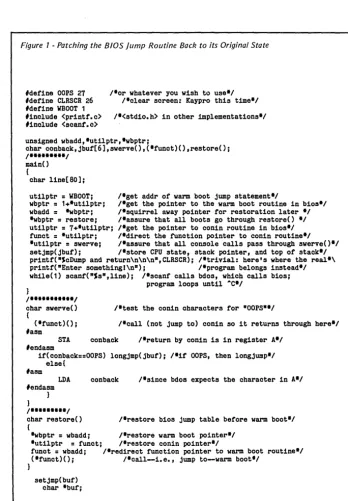
In order to use a debugger effective-ly, you must have an assembler listing of the program you're debugging. Figure 1 shows the assembler listing for a short demonstration program.
First, let's take a look at the information you get from the assem-bled listing. The leftmost column shows the addresses at which the instructions or storage areas are locat-ed. The second column shows the assembled machine code for the mne-monic instruction, with addresses in low byte-high byte order (for example, 312401, the first executable instruc-tion (31), is the Z80 machine code meaning "put the value 0124H into the SP register"). The third column contains labels. The fourth and fifth columns contain the source code in-structions, and anything to the right of a semicolon is a comment.
Following the source code is the symbol table which shows the location of all the labels. (Labels are to assem-. bly language what line numbers are to
BASIC. They are places you can access or jump to.)
[image:6.615.227.572.517.742.2]The line-by-line comments (they fol-low the semicolons) describe what happens in each step of the program. If you can't yet read assembly code well enough to be able to understand
Figure 1 -Assembled listinu. of demonstration program
0000 TITLE 'DEBUG DEMO'
0100 ORG 100H
0100 312401 LO SP,STACK ; USE OUR STACK, NOT CP/M'S. 0103 FF RST 38H ; I NVOKE DEBUG.
0104 AF XOR A ; THIS SETS Z(ERO) FLAG. 0105 3Ell LO A,llH ; PUT SOMETH I NG
0107 013322 LO BC,2233H ; VISIBLE IN THE 010A 115544 LO OE,4455H ; REGISTERS, 0100 217766 LO HL,6677H ; THEN SHOW 0110 C5 PUSH BC ; BC AND DE ON THE
0111 05 PUSH DE ; STACK, TOO.
0112 08 EX AF,AF' ; NOW EXCHANGE
0113 09 EXX ; THE REGISTERS,
01143E02 LO A,2 ; THEN ADD 3 + 2 SO 0116 010300 LO BC,3 ; THE RESULT WILL
0119 81 ADD A,C ; SHOW IN A~
011A C30000 JP 0 ; THAT'S ALL WE WANT
0110 ; TO DO; WARM BOOT.
0110 OEFS 7 ; A 4-WORD STACK
0124 00 STACK: OEFB 0 ; START! NG HERE.
0000 END ; OF OBUGDEMO.
STACK 0124
all the details, don't worry about it. The point of the program is this: the load (LD) instructions put hex values 11, 2233, etc., into the A, BC, etc., registers. We fill them with these values so they are easy to spot when we use DEBUG! to look at the register status.
Similarly, the two PUSH instruc-tionsput (push) the contents of the BC and DE register pairs onto the stack so the stack will contain some-thing easy to identify.
Then the EX and EXX instructions exchange the Z80's regular and prime registers. This moves the previously loaded values to the second (prime) set of registers. This second register set appears in the upper portion of the register display. (Note: We will specify the the main register set as letters such as A and F, while the second, or prime set will be followed by single quotes such as A' and F'.)
[image:7.618.43.384.506.734.2]Next, 2 is loaded into the A register and 3 into the BC register pair. Loading 3 into BC puts the 3 in C and a 0 in B - kind of a cheap trick to make the 3 stand out. Finally, the ADD instruction combines the con-tents of the A and C registers and places the result in A. So, if all goes well, the DEBUG! display will show 5 in the A register.
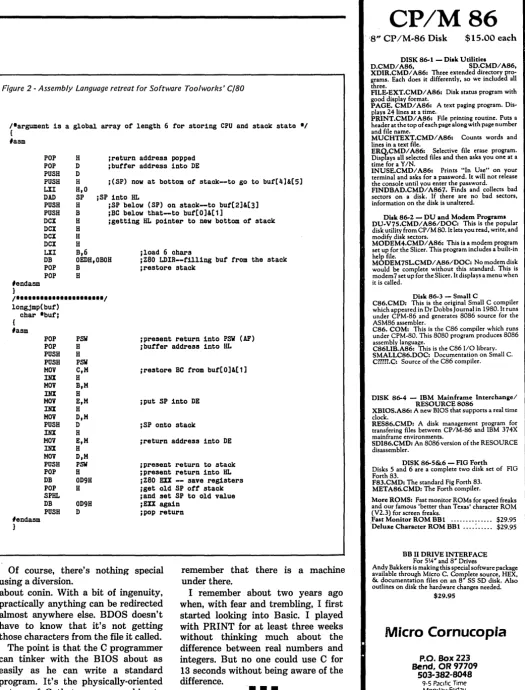
Figure 2 - DEBUG! Screen Display
AF : 05 00
--x-x---Displaying DEBUG!
Figure 2 is a screen dump of the DEBUG! display with execution halt-ed at address OllAH, just after the addition and just before the jump to a warm boot. The RST 38H, the second instruction in the program, halted program execution and invoked DE-BUG! More about that later. While it was stopped, I set a breakpoint (roughly equivalent to a STOP in BASIC) at OllAH, then issued a "Go" command to have the program continue execution to the breakpoint.
What It Means
The upper portion of the display shows the contents of the CPU reg-isters and the register indirects. The contents of the addresses are dis-played next to the addresses in the. registers.
For example, DE contains the value F8AEH. Address F8AEH contains the value 08H, address F8AFH con-tains the value EDH, address F8BOH contains the value 7BH, and so on, through the end of the l6-byte line following each register. The stuff to the right of the numbers is the ASCII representation of the memory con-tents.
A period indicates that a byte does not have an ASCII representation.
BC : 00 03->81 00 C3 06 E8 FF FF FF FF FF FF FF FF FF FF FF
DE : F8 AE->08 ED 7B 40 F9 DB 14 CB BF 03 14 08 C9 E3 7E 23 •• IM ••••••••••• , HL : FF FB->C5 F8 F2 F6 00 C3 03 F6 81 00 C3 06 E8 FF FF FF
AF': 11 44
-Zx-xP--BC': 22 333->FF FF FF FF FF FF FF FF FF FF FF FF FF 00 00 00 ••••••••••••••• DE': 44 55->58 20 3A 20 24 49 59 20 3A 20 24 53 50 20 3A 20 X: SlY : SSP: HL': 66 77->00 00 00 00 00 00 00 00 00 94 FF FF FF FF FF FF
IX : FF FF->OO C3 03 F6 81 00 C3 06 E8 FF FF FF FF FF FF FF ••••••••••••••••
IY : FF FF->OO C3 03 F6 81 00 C3 06 E8 FF FF FF FF FF FF FF •••••••• ~ •••••••
SP : 01 20->55 44 33 22 00 00 00 00 00 00 00 00 00 00 00 00 UD3" ••••••••••••
PC : 01 lA->C3 00 00 AD lB 01 55 44 33 22 00 00 00 00 00 00 •••••• UD 3" ••••••
0100->31 24 01 FF AF 3E 11 01 33 22 1155 44 21 77 66 1$ ••• > •• 3".UDlwf 0110->C5 05 08 09 3E 02 01 03 00 81 C3 00 00 AD lB 01 •••• > •••
0120->55 44 33 22 00 00 00 00 00 00 00 00 00 00 00 00 UD3" •••• => 0130->00 00 00 00 00 00 00 00 00 00 00 00 00 00 00 00
0140->00 00 00 00 00 00 00 00 00 00 00 00 00 00 00 00 0150->00 00 00 00 00 00 00 00 00 00 00 00 00 00 00 00 0160->00 00 00 00 00 00 00 00 00 00 00 00 00 00 00 00 0170->00 00 00 00 00 00 00 00 00 00 00 00 00 00 00 00 Breakpoints: 011A 0000 0000 0000 0000 0000
Convnand?
Micro Cornucopia, Number 25; August-September 1985
This kind of display is the same for all the registers except AF and A'F'.
(Note: the contents of a register pair may not be an address, e.g., if you are using the B and C registers to hold two 8-bit integers, you wouldn't care what l6-bit "address" BC was pointed to, or the contents of that "address.")
In this example, BC contains 0003H, a value for calculation, as explained above. The special registers SP and PC, however, always contain addresses, and the interpretation of the contents of the addresses (the indirect values) is special to those two registers.
Stack Pointer
The SP (Stack Pointer) register shows the current address of the stack. Our program loads the stack pointer with 0124H, but we've pushed four bytes onto the stack so the SP shows 0120H (the address at which the next byte pushed will be stored).
Because the SP decrements with each push, the addresses above its current value show what's on the stack. And, sure enough, the display shows the contents of the BC and DE registers, now on display as the alternate register set (stored low byte first).
Program Counter
The PC (Program Counter) register shows the address of the next instruc-tion to be executed. The breakpoint is set at OllAH; the PC shows OllAH. According to the assembled program listing, the instruction at OllAH is JP
o
(C30000), and the indirects following the PC display are C3 00 00.The AF Registers
The AF and A'F' registers are not register pairs in the same sense as the others.
The A (Accumulator) register is a one-byte register whose contents can be manipulated in a variety of ways. Conversely, the F (Flag) register is a special register used by the CPU to indicate conditions resulting from
cer-(continued on page 7)
6
Attention Modem Buyers!!!
We Guarantee Lowest Price
and Best Support Around!!
SIGNALMAN MARK 12 WESTRIDGE
64/20
This 300-1200 baud Hayes com- This 300 baud auto-dial/auto-patible smartmodem comes with RS- answer modem is designed for Com-232 cable, 12v power supply and modore 64 computers. It comes com-phone cable. plete with software on disk and phone
SPECIAL: $219.95 cable.
NOW ONLY: $59.95
•••
SIGNALMAN MARK 10
This 300 baud smartmodem is Hayes compatible and comes with RS-232 cable, 9v power supply and phone cable.
NEW PRICE: $99.95
•••
VOLKSMODEM 300
Now at its lowest price ever this 300 baud answer/originate modem only needs a cable and battery and it's ready to communicate!
LOWEST PRICE: $55.95
•••
FREE!!
To First 100 Buyers
of the Month!!
$50.00 WORTH
of Time on
NEWSNET!!
(Must purchase by the 20th day of the month)
VOLKSMODEM
1200 BAUD
• 300-1200 baud smartmodem • Hayes compatible
• auto-dial/auto-answer • 5 year warranty
NOW ONLY:
$179.95
•••
SIGNALMAN "EXPRESS"
This modem is an EXACT to the Hayes 1200. PLUS ... has storage ability of 10 number of 48 digits. An-chor Automations "top-of-the-line" ... for those who will only have a Hayes!
TODAY ONLY: $299.95
•••
SIGNALMAN MARK 7
A 300 baud auto-dial/auto-answer modem which comes with RS-232 cable, RJ-11 cable and power supply.
DISCOUNTED: $79.95
•
••
VOLKSMODEM CABLE
Needed for Volksmodem 1200 and 300. Available for most computers ... price may vary with computer type.
MOST ONLY: $9.95
•••
CASE R1224
(2400 baud now in stock!!!) This top-of-the-line modem meets the new 2400 baud CCITT V.22 stand-ard and is Asychronous/sychronous 2400/1200/300 bps. We have these in stock ready to deliver upon request!!
2400 BAUD TO DELIVER TODAY: $599.95
Call Now Toll Free: 1-800-922-2329
IN KANSAS: (316) 264-5068
TECHNICAL SUPPORT: (316) 264-5589
We Service What We Sell!!!
•
We Will Match Any Price!!! SPECIALIZING IN DATA COMMUNICATIONSOMNICOM-440 MAPLE
•
WICHITA, KS
•
67213
TERMS: C.O.D. acceptable. add $1.90. Personal checks require two weeks for clearance. Visa and MasterCard accepted. All prices reflect 3% cash discount. Add 3% for shipping and handling. Kansas residents add 3% sales tax. All orders returned or refused are subject to a 10% restocking fee. Prices subject to change without notice.
WHY I WROTE A DEBUGGER _ _ _ _ _ _ _ _ _ _ _ _ _ _ _ _ _ _ _ _ _ _ _ _
_
(continued from page 5)
tain CPU operations. The numbers following the AF and A'F' register names show their contents.
Note that the A register does indeed contain 5, the result of adding 2 and 3. But the 44 in the F' register cannot be interpreted so quickly. Therefore, the letters (or dashes) to the right of the numeric values are used to show the status of· the bits (flags) in the F register. Performing an exclusive OR on the A register (now the A' register, with the registers exchanged) created a zero result; hence, bit 6, the zero (Z)
flag, was set to 1.
Also, beca~se the exclusive OR resulted in an even number of bits (zero) in the accumulator, the parity (P) flag was set. Other flags indicate Sign, Half-carry, Negative, and Carry. The "x" in bits 5 and 3 means that those bits are not used by the CPU; a dash means that the flag for that bit is not set (is 0).
If you're just getting started· in assembly language programming, some of this explanation may border on gobbledygook. (Maybe more than border.)
Fortunately, there are two books that spell everything out in detail and that I highly recommend: "The Z80 Microcomputer Handbook" by Wil-liam Barden, Jr. (Howard W. Sams. & Co., Inc.), and "Z80 and 8080 Assem-bly Language Programming" by Kathe Spracklen (Hayden Book Com-pany, Inc.). The Spracklen book is especially helpful to CP/M users be-cause it presents 8080 code and Z80 code side by side, and even if you do have a Z80 system you will inevitably run up against 8080 code somewhere along the line.
Back To Figure 2
The clump of numbers toward the bottom of the display ~hows the contents of a 128-byte "page" of memory (and what's on display here is the demo program, starting at 010()H). Below the memory display is a line showing the breakpoints that are set; the last line is used for command entry and error message reporting. There are a number of things you can do with DEBUG! when the display is active:
- Page memory display forward or back
- Continue from the current break-point
- Single-step through the program under test
- Clear all breakpoints or a speci-fied breakpoint
- Set a breakpoint
- Display a specified area of memo-ry
- Perform hexadecimal arithmetic - Jump to a specified address - Fill an area of memory with a specified byte
- Modify the contents of a specified address
- Change the value in any register pair
- Search memory for a string of bytes
- Move the contents of one area of memory to another.
These functions let you see exactly the condition of the CPU and memory at any time and make changes for "what if" testing. The single-stepper is a particularly powerful tool when you're not sure what's happening in a program.
A debugger is an extremely valua-ble instructional aid. When I first began working with assembly pro-gramming, I found it quite abstract in comparison to high-level language pro-gramming. I read and reread explana-tions of what the various instrucexplana-tions did, but for a long time I was left with a "so what?" feeling. Sure, I could understand what happened with any instruction, but I had a tough time relating that to what I wanted to do.
My bro~her, who has dabbled with assembly language, dropped by while I was working on the debugger. When I finished explaining to him what I was doing, he remarked, "Gee, I wish I'd had this when I was fiddling with the assembler. It sure makes things clear."
How Does A Debugger Work?
So what's the big mystery about debugge:rs? Actually, there isn't much of a mystery, or I wouldn't have been able to write one.
Implementing DEBUG! involved one trick, one standard procedure, and
Micro Cornucopia, Number 25, August-September 1985
one item of caution throughout. The trick is to make the program "self-calling," a misnomer in itself. While there are several ways a debugger could be invoked initially, there has to be a way for it to call itself for breakpoints or single-stepping (which is an internally set breakpoint at each executable instruction).
The Z80 provides eight one-byte reset (RST) instructions, which CP/M has chosen not to implement. The reset instructions direct the CPU to preset addresses, with the additional characteristic of pushing the address of the next program instruction onto the stack, just as a call does.
RST 38H, the one I chose to use, transfers program execution to ad-dress 38H, the same adad-dress DDT uses. The initialization portion of DEBUG! overwrites the jump-to-DDT instruction at 38H with a jump to DEBUG!. In this way, the RST 38H (OFFH) coded into the program invokes DEBUG!.
After that, any time a breakpoint is set, the program code byte at the breakpoint address is replaced by FFH, and when that instruction is encountered, DEBUG! becomes active (and the substituted code byte is restored). Thus, DEBUG! is not really self-calling: the user program code is altered to create the call. The stan-dard procedure is to "preserve the user's environment."
Protecting The User
What this means is that the abso-lute first thing DEBUG! does is save the user's SP, PC, and contents of the PC (the return address pushed onto the stack by the RST instruction) and push all the user's register values onto the DEBUG! stack. This is exactly the same thing that's done in any interrupt-driven program. Once the user's environment is preserved, DE-BUG! can skitter around and do pretty much whatever it wants, as long as it doesn't mess up the user's program or the system.
The caution throughout is to be very sure that the stack is restored upon completion of any action. The last thing DEBUG! does before
re-(continued on page 9)
P SComputers Presents the ...
For those of you that mistook me for Bill Gates from Microsoft, let me clarify things. I'm Dave Carlin of PS Computers in Palm Springs, California. The differences are pretty basic. Bill reads the Wall Street Jour-nal, wears glasses and writes great soft" ware. I read USA Today, wear soft con-tacts and build great hardware.
Now that you know who I am, or at least who I am not, let's get to the point.
Problem. Since I got into computers two years ago they have been a constant source of fascination and frustration.
Fascination due to the immense power and control that the personal computer has allowed me over my daily business activities; frustration due to the hundreds of hours I've spent making hardware and software cooper~te with one another.
No doubt about .it, once you get all the pieces put together correctly you have at your command an incredible tool. There is absolutely no limit to the number and type of tasks that you can accomplish with greater speed, better accuracy and stronger impact; all with far less effort. The trade off however has been the time, ener-gy and uncertainty involved in finding the. best buy on the right equipment, then get-ting all the parts to function as one.
Because I have personally gone through hours of long distance phone calls to hard-ware manufacturers and waited days for call backs that never happened. Because I have found myself so many times in front of a screen filled with meaningless greek characters at 2 AM unable to get the com-puter to print a simple business letter. Be-cause I would not wish this type of agony on anyone. This is why I have put together the PS Turbo 640.
Solution. What happened was ... a few months ago I discovered a source of com-puter mother boards that run IBM type' software faster than the IBM PC. They're a genuine product of Taiwan and they are beautiful. I bought cases, keyboards, cables and disk drives; built the Turbo 640 and put it to work. Right now I have three PS Turbo 640s linked as a network running Dbase III and Lotus day in and day out in my business. The PS Turbo 640 works, it works well and it works faster than the IBM PC.
An oral surgeon friend saw my network and asked me to build one up for him. One of the Turbo 640's on the network is in his operatory. It runs a program I wrote in Tur-bo Pascal for his anesthesia records - not a single glitch. (The 640 seems totally im-mune to the effects of Nitrous Oxide.)
More than compatible. Though I have a private pilot's license and quite a few hours flYing high performance aircraft, I've never taken the time to learn to use the Flight Simulator program from Microsoft. Some of my friends have and it runs beautifully on the 640.
The phrase "IBM compatibility" is an understatement with my computers; the PS Turbo 640 is just flat out a better ma-chine.
Peter Norton publishes a program that rates computers as to speed and com-patibility with the IBM PC. In the normal mode of operation the PS Turbo 640 rates a 1.0 which indicates a 1 to 1 equivalency. In the high speed mode (selected with two keystrokes, no switches or rebooting) the 640 scores a 1.4; that's 40% faster than an IBM PC.
National Order Line 800-654-7650
California Order Line 800-231-8701
PS Turbo 640
The specs. 640 K of memory (the max-imum contiguous memory that the PC can address - and they're all 150 nanosecond chips). A keyboard that is very similar to the Key Tronics 5151 (yes all the horror stories about the keyboards that come. stock with IBM PCs are true). Two serial ports, a parallel printer port and a game· port (you can't beat that). Battery powered clock (keeps track of the time and date while the computer.is off). A monochrome graphics card that gives you crisp monochrome text and lets you use color and graphic software on a monochrome monitor displayed as sixteen shades of grey (amber). An amber monitor (very chic). Two 360 K disk drives (AKA Half Height Double Sided Double Density). Two front panel LEOs (one to indicate that you left the computer on from the night before [it's ok, that doesn't hurt it] and the other to tell you if the processor is in the high speed mode or just going IBM speed). Eight expansion slots (two are used by the multifunction card and monitor card, four full sized and two short slots are available) Five available ROM sockets and two buss connection pOints (load pro-grams stored on your own ROMs). 135 watt power supply ~ready for upgrading to a hard disk). User s book and complete technical information (the user's part is easy - the tech part is very technical).
A computer without software is basically a solid state boat anchor and a rather poor . one at that. When you buy the Turbo 640 I want you to be able to start using it the moment you take it out of the box.
All this and software too. First there's Microsoft DOS. DOS is the program that brin9s the computer to life. Typically some version of it is run on all IBM PCs prior to running application programs. "And it came to pass that this was called booting the computer". I'm not crazy about the term, but everyone does it. The full DOS manual from Microsoft is included.
There is complete software for the multi-function card that allows you to partition your memory into RAM disks and a printer buffer.
Perhaps you've heard about Sidekick from Philippe Kahn at Borland. InfoWorld voted it the Software Product of the Year. Well it's good code but I'm not including it with the Turbo 640. What I am including is a prod-uct that I like better, has essentially the same functions but in my opinion is easier to use - PopUps from Bellsoft. Regardless of how deep into your spreadsheet, data-base or master's theSIS (revisions) you might be, two key strokes will put a note-pad, calculator or any of 5 other utilities on your screen. Make notes, perform calcula-tions, set an alarm, check your calendar or perform DOS functions. When you're finished just hit the escape key; the Pop-Ups disappear from the screen and you're back into your program. This is the PopUp Deskset from Bellsoft, it's potent software and it's part of the PS Turbo 640 system.
Don't wait. If you're ready for this kind of computing then the PS Turbo 640 is the machine you need. Call me with your American Express Card account number or mail me a cashier's check. I will per-sonally see to it that a Turbo 640 is shi pped to you via UPS the next business day. Open the box, plug the monitor and the keyboard into the computer then plug the computer into the wall socket. Turn the computer and monitor on, stick in any soft-ware designed to run on the IBM PC and go to work. No chips to put in backwards, no little multicolored wires to push onto the wrong connector and no switches to set.
Money back. If the PS Turbo 640 doesn't perform like I've said then return it to me. Just put one copy of your invoice in the box and send it back. I will make sure that credit is issued on your credit card or a cashier's check is mailed out to you, the same business day that we receive the' unit.
I've told you quite a bit about what you get when you buy the Turbo 640; now let me tell about something you won't get. You won't get put on hold if you have occasion to call the technical support division num-ber. That's because there isn't a technical support number. Once the machine is on it looks like, acts like and runs like a properly configured IBM PC, just a little faster.
This is the part where I have to get a little tough. I've sold you what I feel is the ideal configuration of an IBM type PC. You have gotten the absolute best buy for your money on earth. I can not however, learn how to use it for you. Follow the directions in the book, remember that no matter how much you pay for your software it's prob-ably not perfect, and most of all don't give up - whatever time it takes to get proficient at your particular software application will ultimately be all worthwhile.
Warranty. The warranty on the Turbo 640 is simple. If anything goes wrong in the first six months, send it back. The unit will be repaired and shipped back to you two days after we receive it.
In case of an out of warranty hardware problem (how many million dollars does it cost for the space shuttle to place de-fective satellites into random orbit?) or if you have a question concerning operation (that isn't answered by the manual), you have three options:
One, write me a card or letter. These are answered the same day as received via MCI Mail. Two, sign onto the PS Computer 24 hour bulletin board, post your message and then sign on later for the answer. (admittedly hard to do if you didn't decide to get a modem or the computer I sold you broke \see option onel) Or three, find out where live (probably tlie least convenient for both of us).
PS Computers
200 West San Rafael Road
Palm Springs, CA 92262
PlaCing your order. The 800 number puts you in touch with an operator here at PS Computers whose function is to take the necessary information, quickly and-accur-ately, period. I've given you the highlights of the system in this ad. If you need to know more about specific features drop me a line. Sure it seems like it might be a bit more trouble than calling; but you won't be reaching a busy signal and your answer will be in writing.
You have my word that the PS Turbo 640 has been accurately represented on this page and is in fact the absolute best buy for your dollars. If for any reason you don't like the 640 then you also have my word that upon our receiving the system, those dollars will be returned to you, im-mediately.
Safe bet. If you want to know for sure if the 640 is the computer for you, buy it. The local book is 100 to one that after you use the PS Turbo 640, you'll never part with it.
PS Turbo 640 System
51,700
P S Turbo 640 System
with 10 Meg Internal Hard Disk 52.200
The (really) fine print:
Microsoft OOS and Flight Simulator are trademarks of Micro-soft Corporation. lotus is a trademark of lotus Oevelopmeni Corporation. Dbase III is a trademark of Ashton-Tate. Turbo Pascal and Sidekick are trademarks of Borland International. The PopUp series of software are trademarks of Bellsoft. IBM is a trademark of a company called International Business Machines.lnfoWorld, The Wall Street Journal and USA Today are nationally distributed publications.
Local Order Line 619-325-4856
DEBUGGER ______________ _
(continued from page 7)
turning control to the user program is restore the user's environment to the registers and the stack.
Otherwise, virtually everything DE-BUG! does is just various arrange-ments of memory moves or standard algorithms. Single-stepping is inter-esting in that it is a software emula-tion of CPU acemula-tion. DEBUG! looks ahead one step to see what the CPU's going to do next, then sets a break-point at the appropriate address. A bit tedious to code, perhaps, but hardly magical or mysterious.
DEBUG!, which takes up 3042 bytes, is completely relocatable above address ODA6H. This means that if I am working on a program that will reside at the bottom of memory, DEBUG! can sit at the top of memory (I usually keep it just below EOOOH, the top of the TP A in the 4-84). If I'm working on a program that runs in high memory, I can move DEBUG! down to a spot where it will be out of the way.
For example, I used Micro C's DUMP484 to make the printed dis-play used in Figure 2. DUMP484 resides at the top of memory, and the demo program is at the very bottom. So I relocated DEBUG! to end at 5000H, well below DUMP484 and well above the demo program. I also made the maximum possible use of standard CP/M calls in writing DEBUG! so it would run on any CP/M system with an addressable cursor. It is custom-ized for the Kaypro to the extent of a few cursor locations and the cursor positioning routine - elements that can easily be changed.
DEBUG! was written for CROW-ECPM, which makes use of only standard Z80 instructions, so a macro is not required to assemble it. Yes, DEBUG! could contain many more features and functions. A debugger seems to be one of those programs onto which you could add bells and whistles until there was no memory left for a program to use it. What I've got now suits my (current) needs -and the price was absolutely right.
Editor's note: DEBUG! (along with other goodies) will be on Micro C User Disk K37.
•••
S100
BARE BOARDS
ANY COMBINA TlON OF 3 BARE BOARDS
$150
B/B KIT ACT 256K DYNAMIC MEMORY
64K TO 256K TO 1 MEGABYTE
$75
256K/510CAPACITY ... 64K/360 FDC-1 FLOPPY DISK CONTROLLER
$70
8" & 5114" DRiVES ...
$245
N/A Z80 CPU4 MHZ/2 MHZ SELECTABLE ...
$65
$245
N/A 1.0. BOARD - 4 SERIAL PORTUSES 8251 US ART ...
$65
N/A N/A S100 CLOCK/CALENDAR WITH$50
$99
ON BOARD BATTERY BACKUP ...
$135
SOURCE CODE MONITOR ON STANDARD 8" DISKUSED WITH CPM 2.2 ...
$25
MONITOR IN PROM - 2716 ... ~ ...
$25
BUY ANY COMBINATION OF 4 BOARDS & RECEIVEFREE MONITOR PROM
All Manuals Included· All Parts Available· CA Residents Add Sales Tax· $4 Min. Shipping· Add $1.65 COD
We Accept Credit Cards I
COMPUTIME
8614 HAMILTON AVE., HUNTINGTON BEACH, CA92646 • (714) 536-5000 Business Hours 10-5 Monday through Thursday
THE WORLD'S FASTEST
5L
·
"Ae
lMMOST POWERFUL 8080
RELOCA TING MACRO
ASSEMBLER
$49
95
ONLY
•
AT THIS PRICE, SHOULD YOU BE WASTING YOUR TIME USING SOMETHING ELSE?
This is what they said about Z80ASM, our Z80 assembler. Now the same features and performance are available in our Intel Mnemonic product. SLRMAC is compatible with M80 in .8080 mode, with many extensions. Too many features to list here.
To order or to find out more about our complete family of development tools, call or write:
..s
LR
_ _
'ystems_.
1622 N. Main St., Butler, PA 16001 (800) 833-3061, (412) 282-0864 Telex 559215 SLR SYSI.)
~ C.O.D., Check ort.iiii!Il
Money Order Accepted.Add $3 shipping .
Z80 CPIM compatibility required.
u •.• a breath of fresh air •. "
Computer Language, Feb. 85
u •• in two words, I'd say speed &
flexibility",
Edward Joyce, Nov. 84 Microcomputing
NORMALIZED PERFORMANCE 1.0 1 ' " - Assemble
ZCPR3 to create a
.75 ~ 0
~ HEX file.
:E
a: 0
...J ~
.50-• (J) 0
:E co 0 t-- :E
C! C'4 N
....
.25-- _C'4
n
1:10 4:24 5:19 2Mhz
8"SS/SD
~
0
<
:e
a: -'
(J)
0 0 ~ ~ co
:E
:e
.,... N ~ ""':
I
:05 :41 :42
8Mhz
RamDisk
I
10
ERAC
co.
8280
Clairemont Mesa Blvd., Suite
117
San Diego, California
92111
,(619 569-1864
Ie BL W UTI
CPU/SUPPORT
MC68000-8 CPU ... $16.00
l80 CPU ... 1.00
l80 PIO ... 3.50
l80 SID ... 7.50 l80A CPU ... 2.50 l80A PIO ... 3.50 l80A SID ... 10.00 l80A DMA ... 10.00 8088 ... 19.00 08742 CPU/EPROM 1'2 MHz ... 20.00 08288 ... 22.00 4164-15 ... 1.50
MODEM/DIALER
TMS 99532 (Modem) ... $12.00 TMS 99531 (Dialer) ... 8.00
FLOPPY CONTROLLER
WD 1791 ... $9.00 WD 1793 ... 9.00 WD 1797 ... 16.00
BAUD GENERATOR
WD 8116 ... $8.00
MISCELLANEOUS
WD9216 Synch - Sep ... $7.50 MM58167A Clock Chip ... 8.50
CA301 Op Amp ... , .35
CA083 Op Amp " ... , .45
2N3055 ... 1.00 Voltage Regulators LM323K + 5V - 3A ... 4.50 LM78H12 +12V-5A ... 5.00 6116 2Kx8 Static Ram, ... 3.00 VIDEO CONTROLLER 6545 ... , ... ,$7.00 6545A-1 ... , ... 8.00 6845 ... , ... , ... 6.00 EPROMS 2716 ... , ... $3.50 2732 ... ,.,., ... 3.75 2764 .. , .... , .. , . , ... , ... 4.00 2764-25, ... 5.00 74LS SERIES LS 125 ... , ... $ .40
LS 373 ... , ... , .95
LS 375 ... , ... , . , .. 60
4073 ... , ... , ... 35
BATTERIES
Nicad 4 Pack AA .. , ... , ... $3.25 Lead Acid 0 Cell 2V - 2.5A .. , .... 1.50
Gates or equivalent
CONNECTORS
S100 - 100 Pin ... $3.75 S 100 - Extension Board ... 25.00 S 100 - Termi nator Board ... , .. 33.00
PRINTERS
Centronics 703 '.,., ... ,., .. $395.00 Centronics 588 "., ... ,., .... 225.00 Centronics P1 ... , .. ,., .... 105.00 Teletype 43KSR ... , . , ... , .300.00 NEC 2000 with Single Bin
Cut Sheet Feeder, .... , .. , .1500.00 Transtar 315 Color ... ,., ... 375.00
KAYPRO EQUIPMENT
9" Green Monitor ... $35.00 81 Series ROM's ... 7.00 Keyboard (new) ... 65.00
KAYPRO MAINBOAROS
K2 With Sockets ... $20.00 K2 Populated - Tested ... 175.00 K2 with PR08-2 Mod ... 299.00
This one runs at 2.4 & 5 MHz. up to 4 drives SS. DS. or Quad drives. New ROM has screen dump and step speed select.
With manual & software. tested and guaranteed 30 days,
K2 PR08-2 Mod. EXCHANGE ... 149.00 We will update your K2 or K4 as above, Mail working Main board.
We can install double or quad drives and check complete package ... CALL K10 Populated - Tested ... 250.00
MISC. CABLES
9" 50 Pin - 50 Pin Header ... $2.50 14" 40 Pin - 40 Pin Header ... 2.25 9" Hard Disk - 20 Pin Header ... 2.00 14" Duallnline 16 Pin Male (2) ... 2.00 I/O Connector for Keyboard ... 1.25
FLOPPY DISK CABLE
19" 2x51J4 " to 34 Pin Header .... $5.00 RS232 CABLE
36" M-M, M-F ... 15.00
LOW PROFILE IC SOCKETS
8 Pin 50 per Tube ... $2.50 14 Pin 25 per Tube ... $1.50 16 Pin 25 per Tube ... $2.25 18 Pin 25 per Tube ... , .... $2.50 20 Pin 20 per Tube ... $2.00 24 Pin 20 per Tube ... $2.50 40 Pin 10 per Tube ... $1.60
••••••••••••••••••••••••••••••••••••••
Cl..(I.lFd,MDtH MESA L:LlJI::p
\ NIII" "I<' L,'N[)
S100
CCS 2200 12 slot MF ... $375.00 CCS 2810A CPU ... 210.00 2065 64K RAM .... " ... 250.00 2422 FDC 51J4" & 8"' ... 325.00 2718 I/O 2 Ser., 2 Par ... 225.00
POWER SUPPLIES
WALL PLUG-IN TYPE 13.5VDC - .5A Regulated ... $4.25 12VDC - .3A ... 2.15 6VAC - .95A ... 1.35 LINEAR
Condor Model CP731 DC Power Supply
+ 14V-4A, + 5V-7A, ± 15V-.5A .. 16.00 Condor Model CP573 DC Power Supply
. +
5V-6A, ± 25V-3A .' ... 7.50 14KV DC/DC TV Power Supply .... 4.50+5V/1A, -5V/.2A, + 12V/1A, -12V/.2A, - 24V/.05A
Regulated 21J2x4x5" ... 15.00
SWITCHERS
5V-5A, 12-3A, 12-2A, -12-.5A .. 65.00 5V - 6A ... $20.00 5V - 10A ... 25.00 28V - 1.3A ... 25.00
FLOPPY DISK DRIVES
- 112
HEIGHT-Mitsubishi M4851 DSDD ... $99.00 Mitsubishi M4853 OS Quad .... 158.00. Dume Trak 142 51J4" DSDD .... 125.00 Tandon TM 848-1 8" SSDD .... 175.00 Tandon TM848-2 8" OS DO ... 275.00
STANDARD HEIGHT -Pertec FD200 51J4" DSDD ... $100.00 Shugart SA850 8" OS DO ... 225.00 Persci 277 2x8" ... 425.00 All Instruction Manuals ... 10.00 We Carry Standard TTL, LS, S, ECL
TERMINALS
InterTube II Smart (B&W) ... $225.00 InteColor 3602 Smart (Color) ... 395.00
X·y PLOTTERS
11 x 17 ... from $300.00
MISCELLANEOUS
Soldering Irons - 30W ... $5.95 5 Blade Muffin Fans ... 7.50 Joystick 4 Switches 1" Knob ... 5.50 Part Boxes - 6 Compartments .... ,2.00 NLS 41J2 Digit Panel Meter LCD
5VDC Power ... , ... 25.00 Elgar 400W Uninterruptable
Power Supply ... , ... 425.00 Varactor Tuner
All Band 24VDC Power. , .... , .10.00 Handheld 3112 Digit DMM LCD
KD55C ... , .. , .. , .. ,50.00 KD615 .... , ... , ... 56.00 lM-11U LCR Bridge ... , .. 125.00
VIDEO ARCADE GAME
Naughty Boy ... $40.00 .
The S-100 Bus
By
Dave
Hardy
As I mentioned last month, multi-processing is probably the greatest advantage of the S-100 (lEEE-696) bus. The S-100 bus performs its multi-processing magic by using something called Temporary Master Access (TMA).
An integral part of the IEEE-696 standard, TMA is the process that lets another processor take over the system to perform data transfers between itself and other devices at-tached to the S-100 bus.
How The Magic Works
The S-100 bus is designed to sup-port up to 16 processors, and it selects between them by using a simple Request/Acknowledge/Transfer proto-col. The whole process works like this: First, the processor that wants to take temporary control of the bus issues a request by asserting the S-100 bus's HOLD* line. It then waits for the permanent bus master to finish its current bus cycle and re-spond with the Hold Acknowledge signal, called pHLDA.
Once it sees the pHLDA signal, the requesting processor turns off the permanent master's bus drivers, and turns on its own drivers to take control of the address, data, control, and status busses. After it has done all that, it is in total control of the S-100 bus, and can function exactly as if it were the only processor on the bus. At this point, the requesting proces-sor is called the Temporary Master because it controls the entire S-100 bus, but it must return control to the Permanent Master when it has fin-ished using the bus.
The point of all of this (in case you missed the June/July issue), is that TMA makes it possible for several separate computers to operate in the same S-100 box at the same time, and share all of the S-100 frame's peripher-als, including hard disks, printers, modems, and just about anything else that can be plugged into the S-100 bus, without any hardware conflicts.
Several manufacturers make tempo-rary master processor boards de-signed to operate in the S-100 TMA environment. These complete
single-board computer systems are called slave boards, because of their relation-ship to the S-100 master processor.
Virtually all of these slave boards are designed to run a CP/M-like operating system called TurboDos that allows each of the slave proces-sors to appear to its operator as a single-user CP/M machine. Because of the low cost of these boards (typically $300-$600), a powerful multi-user sys-tem can be built in the S-100 bus at a fraction of the cost of any other method.
Some Alternatives
If you don't like multi-processing, the S-100 bus can also be set up as part of a network. Unlike multi-processing, where several CPUs live in the same S-100 box, networking re-quires just one processor, and lets your S-100 machine share files and data with other computers that may be miles away.
There are several networking schemes that can be used on an S-100 machine. Probably the most versatile is EtherNet, a high-speed coaxial network used on many large comput-ers. Although it is more expensive than multi-processing, EtherNet has the advantage of letting your machine talk to other computers that are not plugged into the S-100 bus.
S-100 Toolbox
Like all bus-oriented, plug-in sys-tems, S-100 boards and frames have connectors that sometimes get dirty. In fact, about 50 percent of all of the S-100 problems I have had in the last 10 years have been because of dirty edge connectors on S-100 boards, or damaged sockets in an S-100 frame.
There's not much you can do about a bad socket (except replace it), but edge connectors can be cleaned with some isopropyl alcohol and a rag. Because the pads on most edge con-nectors are plated with a few mils of gold, it is not a good idea to simply rub off the dirt and tarnish with an eraser.
Having been the victim of bad edge connectors that had been erased by well meaning users, even the idea of
Micro Cornucopia, Number 25, August-September 1985
736 Notre Dame Grosse Pointe MI 48203
using a pencil eraser on a gold-plated connector used to make me cringe, not only because of the damage to the gold plating, but also because of the oily residue left behind by the eraser.
But about a year ago, I discovered that one eraser, the Mars Staedtler Rasor 52730, not only cleans the connector without damage to the gold plating, but also leaves no residue.
Since that time, I have used the Mars eraser with excellent results, and have decided to make it a perma-nent resident in my S-100 toolbox.
Handy Circuits
Readers have sent me a few exam-ples of simple circuits that can be used to trouble-shoot sick S-100 ma-chines. Future columns will be devot-ed to these suggestions, but the following circuit is mentioned here because it is so simple that I have overlooked it in the past (just as-sumed that everybody has one, I guess).
Figure 1 shows a super-simple "pulse catcher" that you can use to see a pulse on any TTL line. To catch a negative-going pulse, just connect an inverter in front. I have logic probes and analyzers all over the place here, and have just never thought of mentioning what is probably the sim-plest piece of test equipment around. In spite of its simplicity, this circuit (or any pulse catcher/logic probe) is often invaluable.
Next Time
Next time, we're going to get into the technical aspects of mUltiple pro-cessors on the S-100 bus, including the IEEE-696 bus arbitration proce-dure, and a circuit that will let older S-100 boards use bus arbitration; plus, a simple battery backup circuit for an S-100 machine, and some reader feed-back.
•••
PC WEEK'S PRODUcr OF THE YEAR
PC MAGAZINE'S AWARD FOR TECHNICAL EXCELLENCE
Borland Introduces
the Laws of
TURBO
DYNAMlCS™
Laws That Work Like Magic.
Whether considering
/~~;j:~=!~·i~~.~~;~,:'::-~:~"
Turbo Dynamics Applies to Turbo Pascal.
:~::c~c~ ~~~~~~ce:~~r~in:~ov:~OT£,c:
..
~;yr·'ill~r;;A~.'" "1,~r~~;:~-!:~~o~~:;~~~~
ra::.
not copy-protection,
.0Z)~~1?~~::.
',';
:
~Y',~;:5Rl2::
LAWi ..
',.:~
You can now join
licensing agreements,
NOTCOPY~PROTECTED:" . . , ' , " "~,hundreds of
thou-site licenses, 60 day
:
","SQFrivARiLt\N~,:,<:,:'7<
,t '
sands of users
money-back guarantee
'
RFASQNABLEt;lC~~~,
~"
and enter the
AG~ENTS.,·, ,':;'
-Borland is cthlearl
y
W,e WillalWa)'Soffer:noi' ' , ' sU.'r~~.
,a,·.t ..,~,O~Willlove.
,0. ',ur,."" .. ,~ '~~~"."""
world' of Thrbo
recognl'zed as e
'
, copy-protected.versio.iis of oll,r. . , ,software that all ' ' . ,of our pro-" " ' , :.,:,;lPascal program
-software industry
software:A1so,our:iicehsinlr> ' d' .••. ' : b' k dlth ~)"m, .ing. And
,agreement is now sosimple " ",' ucts'now come. ace w
ill'.'
' .'::
leader, The following
that evena
child can under-' .a66,
daYJuoney-back"<.,~';::,
remember,
all
three laws of
"1ltrbo~dil;
" , " <~~anmt""N.~?!,,~:~/
'c
three laws of
DynamicS'
™ exemplify\~;;Jl:r~~!ff:~!I'r:'Ip,",:;~~~,;
.
"''"~I'~~I''! ; •. ilt'".iiIlX.,.1 ;.,.J" .. ". . ...Thrbo Dynamics
our pledge for excellence.
apply to all Borland products.
TURBO PASCAL™ $69.95
The /nduslryslandarrJ. With more than 3SO,(XX) users worldwide Thrbo Pascal is the indus-try's de facto standard. Thrbo Pascal Is U,t'~';'.,','~;jf"1~."':~~ praised. by more engineers, hobbyiSts,
~l .. ~;;.;;;;;:;;,~.:;;t students. and professional programmers
than any other development environment . in the history of microcomputing. And yet,
_""~~:."'.oi.," •• "~.M. Thrbo Pascal is simple and fun to use. Free
spreadsheet