Cue-based Authentication on Situated Displays
MOHAMED KHAMIS,
University of Glasgow, United Kingdom and LMU Munich, GermanyLUDWIG TROTTER,
Lancaster University, United Kingdom and LMU Munich, GermanyVILLE MÄKELÄ,
University of Tampere, FinlandEMANUEL VON ZEZSCHWITZ,
University of Bonn, GermanyJENS LE,
LMU Munich, GermanyANDREAS BULLING,
University of Stuttgart, GermanyFLORIAN ALT,
Bundeswehr University Munich, Germany, LMU Munich, Germany, and University of Applied Sciences Munich, GermanySecure authentication on situated displays (e.g., to access sensitive information or to make purchases) is becoming increasingly important. A promising approach to resist shoulder surfing attacks is to employ cues that users respond to while authenticating; this overwhelms observers by requiring them to observe both the cue itself as well as users’ response to the cue. Although previous work proposed a variety of modalities, such as gaze and mid-air gestures, to further improve security, an understanding of how they compare with regard to usability and security is still missing as of today. In this paper, we rigorously compare modalities for cue-based authentication on situated displays. In particular, we provide the first comparison between touch, mid-air gestures, and calibration-free gaze using a state-of-the-art authentication concept. In two in-depth user studies (N=37) we found that the choice of touch or gaze presents a clear trade-off between usability and security. For example, while gaze input is more secure, it is also more demanding and requires longer authentication times. Mid-air gestures are slightly slower and more secure than touch but users hesitate to use them in public. We conclude with three significant design implications for authentication using touch, mid-air gestures, and gaze and discuss how the choice of modality creates opportunities and challenges for improved authentication in public.
CCS Concepts: •Security and privacy→Authentication; •Human-centered computing→Human computer in-teraction (HCI);Interaction techniques;Interaction design;
Additional Key Words and Phrases: Privacy; Eye Tracking; Public Displays; Pursuits; SwiPIN
ACM Reference Format:
Mohamed Khamis, Ludwig Trotter, Ville Mäkelä, Emanuel von Zezschwitz, Jens Le, Andreas Bulling, and Florian Alt. 2018. CueAuth: Comparing Touch, Mid-Air Gestures, and Gaze for Cue-based Authentication on Situated Displays. , (Decem-ber 2018), 21 pages. https://doi.org/10.1145/3287052
1 INTRODUCTION
There are many situations in which users have to authenticate on situated displays in public spaces. Examples include but are not limited to accessing sensitive information (e.g., checking emails at public terminals in Internet
Authors’ addresses: Mohamed Khamis, [email protected], University of Glasgow, Glasgow, G12 8RZ, United Kingdom, LMU Munich, Munich, 80333, Germany; Ludwig Trotter, [email protected], Lancaster University, United Kingdom, LMU Munich, Munich, 80333, Germany; Ville Mäkelä, [email protected], University of Tampere, Tampere, 33100, Finland; Emanuel von Zezschwitz, [email protected], University of Bonn, Bonn, 53115, Germany; Jens Le, LMU Munich, Munich, 80333, Germany; Andreas Bulling, [email protected], University of Stuttgart, Stuttgart, 70569, Germany; Florian Alt, [email protected], Bundeswehr University Munich, Germany, LMU Munich, Munich, 80333, Germany, University of Applied Sciences Munich, Germany.
© 2018
cafes or hotel lobbies), making purchases (e.g., public transport tickets at a vending machine, goods in a retail store, or making payments above the limit allowed under “tap & pay”), as well as secure access (e.g., staff accessing the security area of an airport). Such situations pose considerable challenges to authentication mechanisms, since attackers can uncover a user’s login credentials through a variety of means. For example, an adversary can shoulder-surf a user during authentication [20]. Smudge [6] and thermal attacks [1] can also be effective in uncovering passwords from the oily residues and heat traces left on touchscreens after authentication.
To resist these attacks, researchers have proposed schemes in which users authenticate by responding to on-screen cues [10, 34, 56]. We refer to this type of schemes as cue-based authentication. At the same time, novel sensors enable the security of such schemes to be further enhanced. In particular, motion sensors and eye trackers, which are available at <100$ and are hence cheaper than some touchscreens, enable using new input modalities for authentication. Already today, off-the-sheld RGB cameras integrated with many ATMs and public displays. allow for accurately detecting gestures and gaze [54].
Research in usable security has explored a range of modalities that promise both more secure and usable user authentication, such as mid-air gestures [5], gaze [21, 39], or combinations of touch and gaze [34]. However, to date, it remains unclear how these different modalities perform compared to each other. Understanding the benefits and drawbacks of commonly used authentication modalities is crucial for determining their practical usefulness and suitability for different settings and contexts. A modality that optimizes for security at the expense of usability impacts its acceptance, and could limit the contexts of its use to situations where privacy aware users feel observed [19]. For example, a system may recommend authenticating in a crowded train station using a secure but less usable method; another modality could be used when it is less crowded.
In this work we report on a comparative evaluation of three implementations of cue-based authentication using touch, mid-air gestures, and gaze. We extend a state-of-the-art touch-based scheme, SwiPIN [56], to also allow for input using mid-air gestures and gaze on situated displays. We detect coarse mid-air gestures using a Kinect, while an eye tracker is used to detect smooth pursuit eye movements [55]. We report on results of (1) a usability study (N=17) in which participants entered PINs using all three modalities, and (2) a security study (N=20) in which participants took the role of attackers and tried to observe the entered PINs. Quantitative and qualitative results show that while gaze input is significantly more secure than touch input, it requires significantly longer authentication times. We also found that mid-air gestures are slightly slower, more error prone, and more secure than touch, however users are skeptical towards using them in public. Touch, as the currently most common input modality, is fastest and least error prone but also least secure. A number of these results is surprising: 1) Gaze is often argued to be fast [51]. Yet we found that gaze is slower than touch for cue-based authentication. 2) Despite the larger movements performed by the arms compared to touch, cue-based authentication via mid-air gestures is more secure due to the larger distance to the display, which complicates shoulder surfing by requiring the attacker to switch focus between the user and the display. 3) Our results highlight the importance of socially acceptable authentication. And finally, 4) gaze performs surprisingly well against repeated video attacks while the vast majority of knowledge-based authentication schemes fail completely against said attacks [56].
In summary, the contributions of this work are three-fold. First, we report on the results of a user study in which we compared cue-based authentication using touch, mid-air gestures and gaze on a situated display. Second, we compare the security of the three methods regarding their observation resistance against one-time attacks and repeated video attacks. Third, we derive a set of design implications to guide researchers and practitioners in utilizing touch, mid-air gestures, and gaze to build usable and secure authentication schemes.
2 RELATED WORK
2.1 Touch, Mid-Air Gestures & Gaze Interaction
Previous work compared touch, mid-air gestures, and gaze as input modalities. Touch was compared with mid-air gestures for selecting targets on a large display [28], and with gaze for interacting with an intelligent shop window [29]. While touch was faster and less error prone, the authors noted promising potential for mid-air gestures and gaze given that technologies are becoming more robust and accurate. Chatterjee et al. evaluated different gaze and gesture conditions for a point-and-select task on desktops and found that a combined multimodal approach outperforms each of them individually [13]. More recently, Mäkelä et al. compared touch, mid-air gestures, gaze, and a multimodal combination of the latter two for transferring content from public displays to mobile devices [42]. They found that touch and mid-air gestures are fastest for transferring a single item, while touch and the multimodal approach are fastest for transferring multiple items. They also found that users favor gaze over other modalities when discretion about transferred items is desired. In the context of authentication, Khamis et al. compared PIN entry using touch to a multimodal combination of gaze gestures and touch that they referred to as GazeTouchPIN [34]. They found that the multimodal GazeTouchPIN is more secure but slower than touch-based PINs. We are not aware of prior work that compared touch, mid-air gestures and gaze in authentication scenarios. Additionally, while the approaches we compare build over previous work as we indicate in the next section, their application on situated displays is novel and therefore resulted in novel insights.
2.2 Authentication Modalities
Acknowledging the need for secure authentication, researchers designed a plethora of authentication schemes to resist different attacks. Researchers developed methods for touch-based authentication on interactive surfaces and public displays. For example, Pressure-Grid exploited the low visibility of finger pressure for shoulder-surfing resistant authentication on a multi-touch surface [37], and mobile devices [38]. Similar to today’s Android Lock Patterns, PassShapes allows users to authenticate on public terminals using a series of touch gestures [59]. Touch biometrics can also be exploited to authenticate users as they interact with touchscreens [17, 22].
Compared to other modalities, mid-air gestures are less explored for authentication. George et al. employed mid-air gestures for authentication in virtual environments [23]. Prior work also exploited biometric approaches when using mid-air gestures for authentication [5, 26].
The subtle nature of gaze encouraged researchers to explore ways to employ it for authentication. EyePassShapes uses gaze gestures for authentication [16] while others investigated the use of gaze for secure authentication using graphical passwords defined on images [12]. EyePIN, GazeTouchPIN, and EyePassword use gaze for PIN selection [34, 39]. CGP is a cued-recall graphical password scheme where users authenticate by dwelling at certain positions on given pictures [21]. GTmoPass combines gaze and touch input for authentication on public displays [33]. Other works exploit eye behavioral biometrics for implicit authentication [52, 53].
In contrast to biometric schemes which often require sharing personal data with third parties, the credentials in our schemes consist of information that the user knows—a four-digit numerical PIN. This makes it is straight forward to integrate our methods into existing backends that already accept numerical PINs for authentication. Compared to prior research, this work is the first to compare the three modalities for authentication.
2.3 Cue-based Authentication
attacker by requiring them to track the randomized cues as well as users’ response to them. In our work, we compare three implementations of cue-based authentication using touch, mid-air gestures, and gaze.
2.4 Authentication on Situated Displays
Multiple approaches were proposed for secure authentication on situated displays. A body of work proposed knowledge-based schemes, i.e., authentication schemes that rely on “something the user knows”, such as a PIN or an alphanumeric or a graphical password. Knowledge-based schemes that employ touch [48], mid-air gestures [45], and gaze [16] were proposed for public terminals. In other works, researchers opted for possession-based authentication, i.e., relying on “something the user has’, such as a key, personal ID, or a verifiable personal mobile device. For example, several works proposed authenticating users through the MAC addresses of their smartphones [15, 49], or wearable devices [50], which are detected as users approach the public display. A third category is biometric authentication, which relies on the inference factor, i.e., “something the user is”. Examples of these are behavioral biometric schemes [17] and facial recognition [25].
The three aforementioned authentication factors can be combined for multi-factor user authentication on situated displays. The most typical example of those can be seen on ATMs, where the user is required topossess
the ATM card, and toknowthe PIN. The use of personal mobile devices to interact with pervasive displays has been researched extensively for several applications. One of the most promising applications of which is the use of personal mobile devices alongside passwords for secure multi-factor authentication. Examples of such systems that were deployed for public displays are LuxPass [8], GTmoPass [33], and Tandem authentication [27].
While multi-factor authentication has a lot of advantages, there are many situations in which taking the phone out of one’s pocket or bag could be cumbersome and could interrupt the interaction flow [42].
3 AUTHENTICATION USING TOUCH, GESTURES & GAZE
In this work we focus on authentication on situated displays, such as public internet terminals, check-in counters, ticket vending machines, and ATMs. We extended a state-of-the-art scheme, SwiPIN [56], to a situated display setting (see Figure 2). Although SwiPIN was introduced for touch-based authentication on mobile devices, we chose it for our setup because (1) it is fast and resilient to observations, (2) it uses PINs as passwords, to which many users are already accustomed, and can be integrated into existing backends that use PINs for authentication, (3) its reliance on visual cues and touch-based gestures for input makes its concept applicable to a wider range of modalities, such as mid-air gestures and gaze, and (4) it was replicated and re-studied in follow up work by other researchers [60]. In addition to adapting SwiPIN to situated displays, we extended it to accept mid-air gestures and eye gaze movements as input.
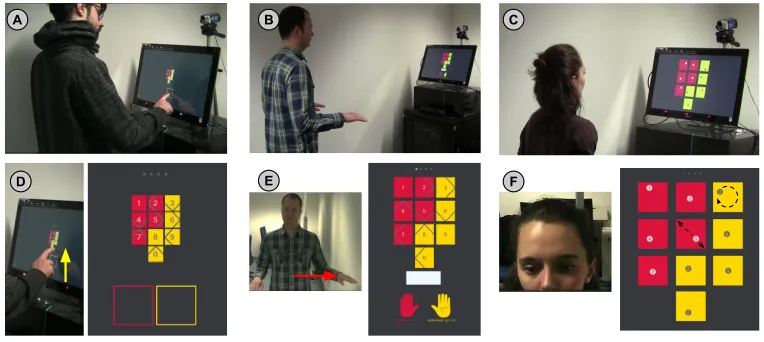
The underlying concept of the examined schemes is to display visual cues on the screen. For touch and mid-air gestures, arrows are shown to indicate a gesture in the respective direction, while the absence of an arrow indicates that users have to tap in case of touch, or perform a mid-air gesture to the front. In case of gaze, we employed Pursuits [55], a state-of-the-art technique for calibration-free gaze interaction. Similar to the work of Cymek et al. [14], each digit floats in a unique trajectory; eye movements are then compared to the trajectory of the moving objects to determine which digit the user is looking at without the need for calibration. The cues are randomly distributed across the digits every time the user provides an input (cf. Figures 1D and 1E). The user then reacts to the cue associated with the digit she would like to input. Hence, for adversaries to find the password, they would have to observe (1) the on-screen cues, and (2) the user’s input in response to the cue.
3.1 Touch-based Input
A B C
[image:5.612.118.500.103.274.2]D E F
Fig. 1. We report on our implementations of cue-based authentication on situated displays using different input modalities. We evaluate and compare the use of touch (A, D), mid-air gestures (B, E), and gaze (C, F) to respond to on-screen cues. To enter “0” via touch, the user observes that the cue overlaid at digit “0” in Figure D is pointing upwards, hence the user provides an upward touch gesture in the yellow box. In Figure E, a user performs a mid-air gesture to the left with his left hand to input “7”. In Figure F, each digit moves in distinct trajectory, and a user selects “3” by following its circular movement. The size of the interface was adapted depending on the modality to account for the different interaction distances. 3.1.1 Concept.In order for a user to input a digit via touch, the user would: (1) observe which cue is shown on the digit (see Figure 1D); an arrow means a touch gesture to the direction it is pointing to is required (i.e., swipe), while the absence of an arrow means that the user should tap, (2) perform the respective touch gesture in the red or yellow box, depending on whether the digit is on the left (red area) or on the right (yellow area). The input is provided on a 23” touchscreen. There are no restrictions on which hand to use. For example, in order to select the digit “5” in Figure 1D, the user would swipe to the right in the red box.
3.1.2 Implementation.Touch gestures are detected by (1) logging the point at which the user’s finger touches the screen, (2) logging the point at which the user’s finger breaks contact with the screen, then (3) measuring the distance between the two points, and deciding the outcome based on the following equation:
Input=
(
Riдht, i f T<dx
Le f t, i f dx <−T; Up, i f T<dy; Down, i f dy<−T; Tap, otherwise;
(1)
wheredis the distance between the touch point and the release point on the x- and y-axes.Tdefines a threshold area that was set to 25 pixels (0.62◦of visual angle) based on pilot tests.
3.2 Mid-air Gestures-based Input
Interaction using mid-air gestures is attractive for public displays, and has hence been studied extensively in previous work. For example, researchers studied teaching public display users how to perform mid-air gestures for input [2, 57], and their suitability for item selection on public displays [58]. The modality is particularly useful when the display is unreachable (e.g., behind a glass window), or for hygienic contact-free interaction.
gesture is performed using the left hand if the digit is on the left (red area), and using the right hand if it is on the right (yellow area). In the absence of an arrow, the user performs a forward gesture. For example, in order to select 6 in Figure 1E, the user would perform a mid-air gesture to the bottom using the right hand.
3.2.2 Implementation.Mid-air gestures are detected with a Kinect One sensor and the Kinect SDK 2.0. The skeleton closest to the sensor is always tracked for input, and other possible skeletons are ignored. The starting point for gestural input is situated relative to the user’s elbows, i.e., the hands would be raised so that they are roughly parallel to the elbows on the x and y axes. A small threshold area (T =15cm, determined through pilot tests) for both hands around this point was defined, inside which no input is triggered. When either hand moves outside this area, a corresponding gesture is triggered based on Equation 1. After a gesture, both hands need to be brought back to the starting point before a new gesture is accepted. To accommodate for natural slight changes in the participant’s stance and hand positions, the starting point is reset each time both hands returned to the area.
3.3 Gaze-based Input
Gaze is increasingly gaining popularity for interaction with public displays. In general, gaze-based interaction is intuitive and faster than pointing [51]. Additionally, being an indicator of visual attention, and allowing interaction at a distance, gaze is an attractive modality for public displays [35].
3.3.1 Concept.Rather than implementing a gaze-based version of SwiPIN (i.e., tracking up/down/right/left gaze gestures) we opted for defining a gaze gesture per digit. The reason is as follows: the original SwiPIN requires distinguishing two forms of swipes in each direction, e.g., red swipe up vs yellow swipe up. While this is doable in the touch and mid-air gesture versions of the system by defining an area in which the gesture would be performed, doing it via gaze would require the user to (1) examine the cue, (2) gaze at the center of the respective box, and then (3) perform the gaze gesture. Step (2) requires accurate gaze estimation that can only be achieved after calibration (i.e., a procedure to map eye movements to positions on the screen). Calibration is discouraged on public displays [46, 55] because it consumes time in a setting where interactions are typically rather short [44]. Therefore, we employed Pursuits [55], a state-of-the-art technique for calibration-free gaze interaction. The Pursuits technique relies on displaying moving targets and matching their trajectory to that of the user’s smooth pursuit eye movements that humans perform when following moving targets with their eyes. The technique naturally requires an on-screen stimulus to detect input; we exploit this fact by leveraging the stimulus as a cue. Since the technique does not require accurate on-screen gaze estimations, users can simply walk up to a display and start interacting without the need for calibration. For example, to select “5” in Figure 1F, the user would have to gaze at the digit that is moving in a linear trajectory across the diagonal of the digit’s square.
3.3.2 Implementation.We use the Pearson correlation coefficient to determine how similar the user’s eye movements are to the moving stimuli. This is calculated as follows:
corrx=E[(Eyex−σEye¯x)(Stimx−Stim¯ x)] EyexσStimx
(2)
whereEye¯x,Stim¯ xandσEyex,σStimx are the means and standard deviations of the horizontal eye and stimulus positions respectively.corryis also calculated in the same way. The final correlation is the mean ofcorrxand
corry. The stimulus with the highest correlation to the user’s eye movements is deemed to be the one the user
Eye Tracker
[image:7.612.183.431.106.246.2]Kinect Touchscreen
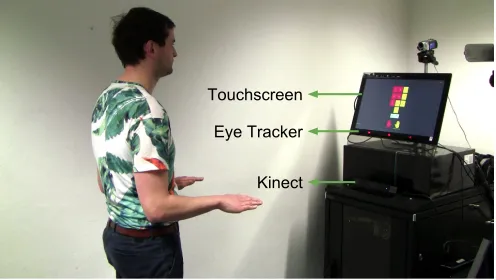
Fig. 2. We used an Acer T232HL touchscreen, a Tobii eye tracker, and a Microsoft Kinect in the study.
4 EVALUATION
To compare the performance of the three methods we conducted a usability and a security study. We opted for a lab study to minimize any external influences and ensure a controlled setting [3].
4.1 Usability Study
We designed a user study in which participants had to provide 16 PINs using each modality. This number was chosen to ensure comparability with the original study of SwiPIN, where participants entered 15 PINs [56].
4.1.1 Apparatus. We deployed the authentication application on a display in our lab. Participants had to stand 60 cm, 145 cm, and 85 cm from the display when providing input using touch, mid-air gestures, and gaze respec-tively. The squares that contained the digits were of sizes 64 px, 152.3 px, and 200 px in the touch, mid-air gestures and gaze conditions respectively (1.59◦, 1.59◦, and 3.54◦ in degrees of visual angle). We used relatively larger areas in the gaze condition to ensure enough space for distinct trajectories. As shown in Figure 2, we used a Microsoft Kinect One and a Tobii eye tracker (both 30 Hz) for detecting mid-air gestures and gaze. We deployed the application on a 23” touchscreen (1920×1080 pixels).
4.1.2 Participants.We recruited 20 participants (13 females) with ages ranging from 18 to 33 years(M=24.1,
SD=3.9). All participants had normal or corrected-to-normal vision, and none of them had used cue-based authentication before. The heights of participants ranged from 147 cm to 183 cm(M=168.9cm,SD=9.2cm). Participant 1 did not perform mid-air gestures well due to unusual standing posture, while participants 8 and 15 did not complete all trials due to the study taking longer than expected. Hence, the results of these 3 participants were excluded from the analysis.
4.1.3 Study Design.The study was designed as a repeated measures experiment. There was one independent variable, the input modality, with three conditions that all participants went through: 1) touch-based input, 2) mid-air gestures, and 3) eye gaze. Each participant went through three blocks in total, one per condition. The order of blocks was counter balanced using a Latin square.
entering 16 PINs, the participant filled in a NASA TLX questionnaire to asses the perceived workload of the experienced input modality. The same was repeated for the other modalities. We concluded with a questionnaire and a semi-structured interview.
4.1.5 Limitations.In our study participants had to remember the PIN they heard until they enter it. Also they had to authenticate multiple consecutive times. This likely has an influence on the reported feedback and perceived workload. In a real-world scenario, users would authenticate fewer times and hence we cannot rule out that the perceived workload is slightly overrated by our participants. Second, the error rates and entry times are influenced by the setup and our implementation of the modalities. Advances in computer vision algorithms and tracking hardware will result in better performance of mid-air gestures and gaze in particular. While we do not claim that rerunning the study in a different setup would yield similar quantitative results, we expect the relative results to be similar. For example, we expect gaze input to remain more secure yet slower than touch input in cue-based authentication. A final limitation is that our participants’ performance in the touch condition might be better due to it being a common input modality on today’s mobile devices.
4.2 Usability Study Results
We logged 16 PINs×3 input modalities×20 participants=960 authentications. We measured 1) thesuccessful entry rate: the percentage of times the correct input was detected. , 2) theentry timein milliseconds to compare entry time across the conditions, and 3) theperceived workloadusing the NASA TLX.
In our analysis, we used repeated measures ANOVA to check for significance. In cases where the assumption of sphericity is violated, we used Greenhouse-Geisser correction. Post-hoc tests were done using t-tests with Bonferroni corrected p-values.
4.2.1 Successful Entry Rate.A repeated measures ANOVA revealed a significant main effect of input modality on successful entry rates (F2,34=4.7,p=0.16,η2p =0.227). Post hoc Bonferroni corrected t-tests showed significant
differences in success rates between touch(M =93.38%,SD=26.05%)and gaze(M =82.72%,SD =38.53%),
(p=0.018). No significant differences were found between mid-air gestures(M=84.19%,SD=39.1%)and the other two modalities(p>0.05). This means that input using touch is significantly less error prone compared to gaze. Overall, the results show high successful entry rates for all three modalities (all>82%). No order effects resulting from the counter balancing were found (SD=3%). Treating the order as an independent variable, a repeated measures ANOVA did not show any significant main effect of the order on authentication time(p >0.05).
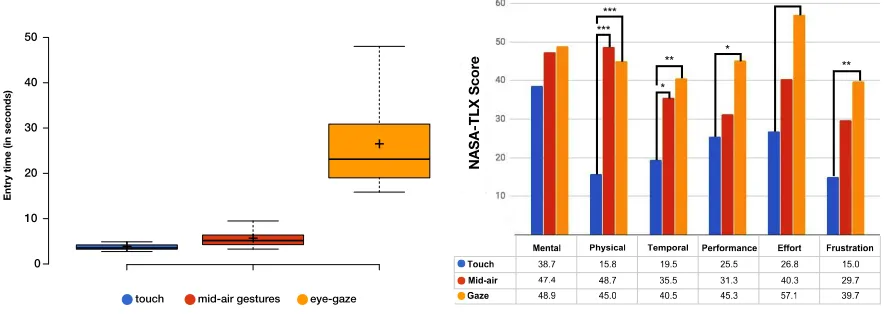
4.2.2 Entry Time.We measured the time participants needed to authenticate. A repeated measures ANOVA revealed a significant main effect of input modality on entry time (F2,34=34.6,p <0.001,η2p=0.671). Post hoc Bonferroni corrected t-tests showed significant differences in entry time between touch(M =3.73s,SD=0.98s)
0 10 20 30 40 50
+ +
+
Entry time (in seconds)
(a) Users authenticate significantly faster using touch com-pared to mid-air gestures and gaze.
***
*
** **
**
* ***
(b) The mean Task Load index score of participants as indi-cated in the NASA TLX questionnaire.∗,∗∗, and∗∗∗denote
[image:9.612.85.527.112.269.2]significance ofp<0.05,p<0.01, andp<0.001respectively. Fig. 3. The figures illustrate the results of the usability study. Figure 3a shows the entry time in seconds, while Figure 3b summarizes the perceived workload according to the participants’ responses to the NASA TLX questionnaire.
By considering the successfully entered PINs only, entry time is fastest when using touch(M =3.74,SD=0.98), followed by mid-air gestures(M =5.1,SD=2.04), and then gaze(M=26.46,SD=21.82).
4.2.3 Perceived Workload. We used a NASA TLX questionnaire to evaluated the perceived workload. We opted for NASA TLX because of its demonstrated reliability in measuring perceived workload when using novel authentication schemes, and for comparability with previous work [9, 10]. We ran multiple repeated measures ANOVA tests to investigate if there is an effect of the modality on the perceived workload. When significant main effects were found, post-hoc pairwise comparisons were performed with Bonferroni correction. A significant main effect was found for modality type on the physical demand (F1.56,29.16=16,p <0.001,η2p=0.457),
tem-poral demand (F1.55,29.41=11.88,p <0.001,η2p=0.385), performance (F2,28=4.15,p=0.023,η2p=0.179), effort
(F2,38=7.83,p=0.01,η2p=0.292), and frustration (F2,38=5.2,p =0.01,ηp2 =0.215). Mauchly’s Tests of
Spheric-ity indicated that the assumption of sphericSpheric-ity had been violated for physical demandχ2(2)=6.51,p=0.039 and
temporal demandχ2(2)=6.22,p=0.045, and thereby the ANOVA’s p-value was corrected using
Greenhouse-Geisser. . Figure 3b shows the mean scores and the pairs that are significantly different. The results show that gaze and mid-air gestures are more physically and temporally demanding compared to touch. The additional physical demand is due to having to move the arms or the eyes, while the additional temporal demand is inline with the measured entry times, which show that authenticating using touch is faster than using the other modalities. Gaze was also found to be less performant, more frustrating and require more effort than touch.
4.2.4 Qualitative Feedback.We collected feedback through a semi-structured interview and a questionnaire. Feedback was transcribed and we employed thematic analysis to cluster it based on procedures described by Guest et al. [24] and Miles et al. [43]. We used an exploratory (content driven) approach that allowed us to determine frequently discussed topics, concerns and suggestions highlighted by the participants. The codes were clustered and subcategories from which four main themes emerged1.
Theme 1: Exposure to the Modalities: Participants are frequently exposed to touch input (e.g., personal smart-phones, ATMs), but 6 indicated to have never used mid-air gestures, and 11 never used gaze. While 11 participants reported using gestures in private contexts (e.g., gaming consoles such as Nintendo Wii) only one reported using gaze on a personal device. Exposure to gaze (9 participants) and mid-air gestures (3 participants) was mostly
through user studies. The prior exposure and the context of use is reflected in the participants’ preconception of the interaction technique: Touch was described asfamiliar(4) andnatural(3), whereas mid-air gestures that are popular for gaming were described asplayful(4),funny(2), andinteractive(2). In contrast, comments to eye-gaze where more pragmatic and descriptive, for example.discrete(12),secure(11), andstationary(7).
Theme 2: Perception of the Techniques: We grouped codes with positive and negative connotations to understand the perception of techniques. The gaze-based method is associated with positive (44) attributes e.g.,easy(15),fast
(11). In only 8 instances, participants named negative attributes e.g.,unresponsiveness(4) andovertness(2). While the quantitative results and the Likert questions suggest gestures to be favored over gaze, the highest number of positive connotations (45) were assigned to gaze (21 instances for gestures), while the highest number of negative connotations (48) is associated with the gesture-based method (39 instances for gaze). Mid-air gestures were reported to beeasy(5) andfast(4), but suffered fromovertness(10) and were calledawkward/weird(9), while gaze input, is e.g.,discrete(12) andsecure(11) but on the downside it isslow(16) and causesstraining eyes(7). Participants’ attitude towards gestures is influenced by social acceptability.
Theme 3: Usability: In general, participants reported that all input modalities were either feeling natural and intuitive or are perceived to be easy to learn. P18 felt that the more often she provides input using any modality, the faster she can authenticate. This observation is backed up the quantitative results (see Section 4.2.2). Our data shows that touch-based authentication was preferred from the usability perspective. We assigned 38 code instances to the subcategory effortless (5 burden). It is generally perceived as secure, easy and fast, but participants did not name unique features/advantages. Mid-air gestures were criticized for beingexhausting(4),
slow(4),unnatural(4), and the “lack of space for elaborate gestures in crowded stations” (P12). Some criticized the hand position required to calibrate the base point and one complained that she would have to put down her shopping bags when in a mall. On the other hand, participants admired that they do not need to touch the display when using mid-air gestures; P5 and P18 quoted hygienic advantages. Gaze-based input was criticized for being
slow(16), to causestraining eyes(7) and to beexhausting(6). However, in addition to being perceived asdiscrete
(12) andsecure(11), gaze was praised for not requiringphysical movements(7), that it is hands-free (P2, P7), and that it allows input for people with limited mobility (P10).
Theme 4: Enhancements: This theme summarizes participants’ suggestions for enhancements, that were clustered in the two subcategoriessecurityandinteraction. Participants suggested color changes as an additional security feature (2) for touch input, and criticized that touch input on situated displays requires more pressure than on smartphones (3). For midair gestures, they suggested to replace the forward movement (2) with an alternative gesture. They were also concerned with the overtness of mid-air gestures within public spaces (9), and 6 of them suggested using more subtle gestures such as finger gestures (3). For gaze, participants proposed using different trajectories (3) and the introduction of a slight delay between the digits of a PIN to allow for refocusing (2). A common theme highlighted across all three input techniques is the users’ demand for a more prominent (visual or audio) feedback [touch (4), gaze (3), mid-air gestures (2)]. In 3 instances (touch) and 2 instances (mid-air gestures), participants proposed input correction by providing an undo functionality. While the feasibility of some recommendations are limited to the availability of appropriate technologies (i.e., better sensors), the majority of suggestions are valid. In particular, improving feedback and input correction (e.g., undo functionality) can be considered for future designs.
Questionnaire: Overall, the collected feedback mostly aligns with the answers to the Likert questions (see Figure 4). When answering the questionnaire, participants indicated that they found touch input to be easier, more natural, pleasant, faster, and suitable for public use. Although mid-air gestures are preferred over gaze in the majority of the aspects, gaze was found to be more usable and comfortable in public, and more natural to use.
Fig. 4. Participants rated aspects of the three modalities on 5-point Likert Scales (1=Strongly Disagree;5=Strongly Agree).
56), followed by mid-air gestures (weighted score = 33) and finally the gaze-based method (weighted score = 31). This matches the results from the perceived entry time and error rate (Figure 4) and the measured entry time and error rate (Sections 4.2.1 and 4.2.2).
4.3 Security Study
To evaluate the methods against possible threats, we designed a study in which participants took over the role of an attacker, and tried to observe PINs entered using each modality.
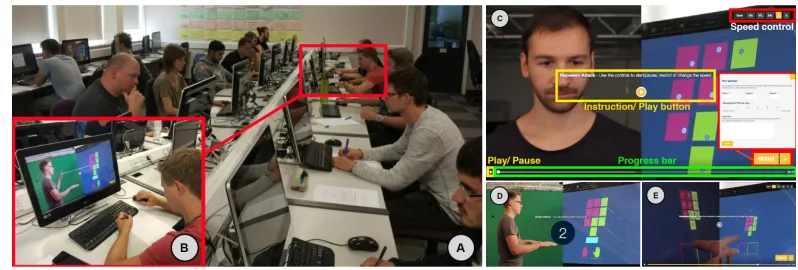
4.3.1 Threat Models.We considered two threat models. In both models the attacker knows how the system works and has an optimal view of the user’s input and the on-screen view. To ensure optimal attacking conditions, the attacker has a view of both the user’s input and the on-screen cues (see Figure 5B). In a real scenario, this can be achieved by observing from an optimal angle that shows both the cues and the input, or by using mirrors and/or video cameras. The exact models are: 1)Single attack: the attacker has a chance to observe the situation only once, and 2)Repeated video attack: the attacker has unlimited time to perform the attack and can pause the video, rewind, etc. The latter simulates attacks that involve the use of a video camera, which is a present-day growing threat [61].
4.3.2 Software Tool.To run the security evaluation we created a software using web-technologies(HTML5, CSS3, JavaScript PHP). The tool 1) keeps track of the user’s guesses and attack duration, 2) prevents users from being distracted by switching videos, and 3) collects input and manages the order of conditions.
Fig. 5. We invited 22 participants to take the role of attackers in the security study (A). They watched videos of users authenticating using each modality (B), and provided their guesses through a tool that we developed (B). Our software tool displayed instructions and the videos to attack. In case of repeated video attacks, video controls were shown to the user (C). The user could provide up to 3 guesses for each observed PIN. Figure (C) shows a user authenticating via gaze, Figure (D) shows a user authenticating via mid-air gestures, and Figure (E) shows a user authenticating via touch. Each video showed a synchronized view of the user’s input on the left, and the screen on the right.
4.3.4 Participants. We recruited 22 participants(4 females)with ages ranging from 14 to 43 years(M=26.9,
SD =8.1). None had attended the usability evaluation. Participants were compensated with an online shop voucher. All participants took part in a draw to win an additional voucher. Participants were aware that chances of winning increased with the number of successfully attacked PINs. We excluded 2 out of 22 participants: P9 and P14 stated after the study that they misunderstood some of the concepts; this was reflected in their poor performance in all tasks (0 out of 24 successful attacks).
4.3.5 Design.Our study employed a repeated measures design, where all participants went through all conditions. The study included two independent variables: 1)input modality and 2)threat model. The input modality incorporates all three conditions assessed previously(touch-based, mid-air gestures, and gaze). The threat model covers the two types of attacks: single attack and repeated video attack. Each participant went through three blocks, consisting of 8 attacks per input modality. The type of attack was alternating, resulting in 4 attacks for each threat model and input method. The order of the input-modalities was counter balanced using a Latin square. Every block begins with a repeated video attack which is, in addition to the training, an advantage for the attackers to become familiar with each of the input methods before performing the single attack.
4.3.6 Procedure.The study was conducted in two sessions with 15 and 7 participants respectively. It started with an introduction, where attackers were tutored about all three input methods and signed a consent form. Each of the three blocks started by a detailed explanation for the upcoming input method. Participants were encouraged to ask questions and were strictly advised to only proceed once they fully understood how the current method works. Each block displayed 8 PINs, alternating between the two threat models. No participant attacked the same PIN more than once. For each attacked PIN, the participant was allowed to provide up to three guesses and to rate their confidence of the guesses using a five-point Likert scale. Participants were required to submit at least one guess and at most three. The study was concluded with a questionnaire and semi-structured interview.
4.4 Security Study Results
Overall, we analyzed 4 PINs×2 threat models×3 input methods×20 participants = 480 attacks.
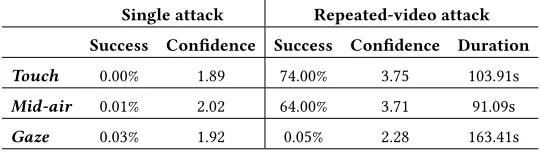
Table 1. Single attacks against all three modalities fail almost all the time. Repeated video attacks succeed slightly more often against touch compared to mid-air gestures, but only 0.05% of gaze-based PINs were uncovered. Attacking gaze-based PINs require more time compared to other modalities. This is also reflected by the perceived confidence of attackers (5=very confident;1=not confident at all).
Single attack Repeated-video attack Success Confidence Success Confidence Duration Touch 0.00% 1.89 74.00% 3.75 103.91s
Mid-air 0.01% 2.02 64.00% 3.71 91.09s
Gaze 0.03% 1.92 0.05% 2.28 163.41s
confidence. Single attacks were mostly unsuccessful with a few exceptions. Repeated video attacks were highly successful against touch and mid-air gestures, but only 0.05% of PINs entered via gaze were successfully ob-served. This is also reflected by the attacker’s confidence (see Table 1). A two-way repeated measures ANOVA revealed a significant effect of the threat model (F1,19=144.6,p <0.001,η2p=0.884)and the input modality
(F2,38=72.36,p<0.001,ηp2 =0.792)on success rate. We also found a significant interaction effect between the
threat and the modality (F2,38=95.07,p <0.001,η2p=0.833), which led to further analysis to distinguish the
impact of each independent variable. One-way repeated measures ANOVA tests were run to understand the effect of each modality when used against each of the two threats. In case of the single attack threat model, no significant effects were found(p>0.05). On the other hand, we found that the input modality has a significant main effect on success rate in case of video attacks (F2,38=91.35,p<0.001,ηp2 =0.828). Post hoc Bonferroni
corrected t-tests showed that attacks against touch input are significantly more successful(p <0.001)than attacks against gaze input (74% vs 0.05%), and that attacks against mid-air gestures are significantly more successful
(p <0.001)compared to attacks against gaze input (64% vs 0.05%). No significant differences were found in the third pair. No order effects resulting from the counter balancing were found (SD=4%). Treating the order as an independent variable, a repeated measures ANOVA did not show any significant main effect of the order on authentication time(p>0.05).
4.4.2 Levenshtein Distance.We also measured theLevenshtein distancebetween every PIN and the guesses against it, to better understand how far the attacker’s guesses are from the actual PIN. In cases where more than one guess was provided by the participant, we only considered the guess closest to the actual PIN. A two-way repeated mea-sures ANOVA revealed a significant effect of both: the type of the threat (F1,19=183.92,p<0.001,η2p =0.906),
and the modality (F1.464,27.811=31.9,p <0.001,η2p=0.627). We also found a significant interaction effect
be-tween the threat and the modality (F2,38=70.8,p <0.001,η2
p=0.788), which means that further analysis is
needed to distinguish the impact of each independent variable. Mauchly’s Test of Sphericity indicated that the assumption of sphericity had been violated for the modalityχ2(2)=8.214,p =0.016, but not for threat×modality
χ2(2)=2.636,p =0.268, thus Greenhouse-Geisser correction was applied in case of modality only. The variable
“threat” has only two levels, thus the test for sphericity is not applicable. We ran one-way repeated measures ANOVA tests to understand the effect of each modality when used against each of the two threats. We could not find any significant effect of input modality on the Levenshtein distance in case of single attacks(p >0.05). Table 1 shows that participants performed poorly against PINs entered using all modalities. In repeated video attacks, a repeated measures ANOVA revealed a significant main effect of input modality on Levenshtein distance (F2,38=5.52,p <0.01,η2p=0.225). Post hoc Bonferroni corrected t-tests showed significant differences in
mid-air gestures(M =0.64,SD =1.11)and gaze(M =2.63,SD =1.10),(p <0.05). The third pair (touch vs mid-air gestures) was not significantly different(p >0.05). This means that guesses against gaze-based PINs are farther from the original PIN compared to those against PINs entered via touch and mid-air gestures. No order effects resulting from the counter balancing were found (SD=0.35). Treating the order as an independent variable, we did not find any significant main effect of the order on authentication time(p>0.05).
4.4.3 Attack Duration. We measured the time taken to perform the repeated video attacks in order to evaluate the required work to find the PINs compared across the three conditions. A repeated measures ANOVA with Greenhouse-Geisser correction showed a significant main effect for the input modality on attack duration
(F1.33,28=6.48,p=0.04,η2p =0.236). Mauchly’s Test of Sphericity indicated that the assumption of sphericity
had been violated for the modalityχ2(2)=13.778,p=0.001. Thus, Greenhouse-Geisser correction was used to correct the ANOVA’s p-value. Post hoc Bonferroni corrected t-tests revealed significant differences between mid-air gestures(M =91.1s,SD=62.6s)and gaze(M =163.4s,SD=176.4s). Mean attack duration in case of touch input is(M =103.9s,SD=70.5s). However no significant differences were found between touch, and either of gaze or mid-air gestures. Overall, the results suggest that gaze requires the longest time to attack.
4.4.4 Attackers’ Confidence.After each attack, participants were asked to indicate how confident they are about their guess on a 5-point likert scale (5=very confident;1=not confident at all). The mean confidence values are summarized in Table 1. A repeated measures ANOVA indicated a significant main effect of threat model (F1,19=21.1,p <0.001,η2p=0.526)and modality (F1.303,24.753 =13.536,p =0.001,ηp2 =0.416)on the confidence. Mauchly’s Test of Sphericity indicated that the assumption of sphericity had been violated for the modality
χ2(2)=13.791,p =0.001, and thus Greenhouse-Geisser correction was applied. The variable “threat” has only two
levels, thus the test for sphericity is not applicable. Post hoc analysis using Bonferroni corrected t-tests revealed that participants are significantly more confident about their guesses in repeated-video attacks(M=3.25,SD=1.31)
compared to single attacks(M =1.98,SD=1.08). In case of single attacks, no significant differences were found between any modalities – confidence is generally low for all three modalities (see Table 1). In case of repeated-video attacks, Bonferroni corrected t-tests showed that participants are significantly less confident about their guesses against gaze-based passwords(M =2.28,SD=1.15)compared to touch-based passwords(M=3.75,SD=1.09) (p=0.003), and to mid-air passwords(M =3.71,SD=1.16) (p=0.004). However no significant differences were found between mid-air passwords and touch-based passwords(p >0.05).
4.4.5 Qualitative Analysis. We collected feedback through a questionnaire with open and Likert scale questions, and a semi-structured interview. We transcribed the feedback and applied thematic analysis.
Unlike the thematic analysis that was done for the usability study, where we were aiming to identify common topics using an exploratory approach, here we predefined three main areas of interest (themes). The aim was to get insights into theirattacking strategy, theirperception of security, and theirperception of the input technique. We grouped all statements related to the themes and extracted the key insights.
keypad is clearly visible before and after the video sequence. Several participants had difficulties attacking mid-air gestures. P9 reported that the quick response of the system made it hard to derive the PIN. P17 and P21 stated that mid-air gestures are harder to observe than touch due to the need to switch attention from the user’s arms to the screen, which were far apart. In repeated-video attacks, PINs were attacked by pausing and rewinding the clip. Eye-movements were reported to be very subtle and difficult to distinguish in both the single and repeated-video attacks. Here, the most common strategy was to estimate the focus point on the screen using the view angle and head position (11 instances), with only three participants reporting to match eye and screen trajectories. This suggests that security can be improved if digits are closer to each other.
Theme 2: Perception of Security: The perception of security by the participants derived from their attack performance and confidence. The majority believed that all three methods are robust against spontaneous shoulder surfing attacks. However, they speculated that they would perform better over time (11). Participants perceived gaze to be significantly more secure than touch and mid-air gestures. However, even though participants implied that touch is easier to attack than mid-air gestures, they believed that touch is safer than gestures. We believe this perception is rooted in the overtness of gestures. Four participants recommended shielding touch inputs with the hand, P9 suggests to wear “a cap” to prevent camera recordings of the eye gaze.
Theme 3: Perception of the Input Techniques: Overall, participants of the security study share a similar attitude towards the individual input modalities with participants of the usability study. Since none of the security study participants took part in the usability study, we see this as confirmation of our previous analysis. Touch input was described as quick, easy, natural and familiar. Participants were reserved towards the social acceptability of mid-air gestures. They frequently described the method as too overt (7) and awkward (9). Gaze was perceived to be very secure and discrete, but was also criticized for being slow.
5 DISCUSSION AND DESIGN IMPLICATIONS
In our implementation of the three modalities, authentication via touch is fastest, least error prone, and the most well perceived by users. Authentication via mid-air gestures is slower and more physically demanding than when using touch, but it is generally well perceived except for use in public space. On the other hand, gaze-based authentication is more comfortable in public, yet slower and slightly less accurate than mid-air gestures. Higher performance of touch input compared to the other modalities can be attributed to the users’ familiarity with touch input. Gaze, on the other hand, is slower due to the requirement of achieving a high correlation between the user’s eye movements and the movements of the on-screen cues. The threshold, which is 0.8 in our implementation, can be reduced to decrease selection time. However decreasing the threshold could also increase the chances that the system detects wrong selections. The choice of threshold in Pursuits implementations presents a trade-off; higher thresholds result in higher accuracy but require longer time to reach, while lower ones are less accurate but are faster to reach [35, 36]. We also found that users authenticate faster as they enter more PINs. But 15 out of 17 participants achieved fastest entry time after 12 or less entries, suggesting that peak performance is already achieved in 16 runs.
The results show that all proposed implementations are highly secure against casual shoulder surfing attacks. This is because the attacker has to keep track of multiple entities. In case of touch, the attacker needs to keep track of (1) the displayed cues, (2) in which area the input is provided, and (3) the performed touch gesture. Similarly, in case of mid-air gestures, the attacker needs to keep track of (1) the cues, (2) which hand is used, and (3) the performed mid-air gesture. Finally, in case of gaze, the attacker needs to keep track of the user’s eye movements as well as the displayed cues.
and the display would split the observer’s attention to the user’s hands/eyes, and the on-screen cues. Splitting the observer’s attention is known to significantly complicate shoulder surfing attacks [30]. Even though we accounted for that in our security study and ensured optimal conditions for attackers by providing them with synchronized videos recorded from optimal angles (Figure 5), mid-air gestures and gaze still outperform touch in observation resistance in case of repeated video attacks. Attackers also require significantly more time to attack gaze-based passwords, which implies that the attacks are harder to perform.
5.1 Trade-off between Usability and Security
Although touch input is fast, less error-prone, and generally well-perceived, it is the least secure among the discussed modalities. We attribute the high performance of touch to the familiarity of users with touch input. The subtle nature of gaze input makes it secure. However it requires significantly longer authentication times and is prone to more entry errors due to technical limitations of sensors. In our implementation, we display 10 cues for Pursuits selection. While Pursuits allows calibration-free gaze interaction, a disadvantage is that its accuracy drops as more cues are shown simultaneously [55].
While the low usability of gaze-based authentication impacts its adoption, research suggested that privacy-aware users are willing to take additional measures to increase security [19]. Hence we expect privacy-privacy-aware users to be still willing to use gaze despite being slow. This was echoed by some of our participants who acknowledged that gaze is slow yet praised its security benefits.
The trade-off between usability and security has been discussed in previous literature: optimizing for security often results in lower usability, while higher usability is often associated with lower security. Our results indicate that the choice of touch or gaze presents such a trade-off.
Design Implication 1:Employ touch for cue-based authentication to optimize for usability; and use gaze input whenever authentication frequency is low and the need for subtle authentication is high.
5.2 At-a-Distance Interactions
The use of mid-air gestures or gaze is particularly useful when the interactive display is not physically reachable. For example, displays are often deployed behind glass windows. Touchless interaction also comes with hygienic benefits. In terms of authentication, mid-air gestures are faster yet less secure than gaze.
Design Implication 2:Use mid-air gestures for authentication when displays are unreachable. For increased security at the expense of longer entry time, allow gaze-based authentication.
5.3 Public Interactions
Authentication via mid-air gestures is faster and less error prone compared to authentication using gaze. On the downside, some participants of our study reported feeling skeptical towards performing mid-air gestures in public. This is in-line with previous work, which showed that the use of mid-air gestures in public can be embarrassing [11]. One participant reported she would not use mid-air gestures when carrying shopping bags. Mäkelä et al. reported similar challenges when interacting with gesture-controlled displays, where items, such as coffee cups, sometimes interfered with interaction [40]. In these cases switching to another modality, such as gaze, can be useful. Gaze is also useful when handicapped users are expected to interact.
5.4 Further Threat Models
In our work we evaluated the schemes against casual shoulder surfing (single attack) and repeated video attacks. The usable security literature discusses various other types of attacks, such as smudge and thermal attacks. An advantage of mid-air gestures and gaze input over touch, is that they are not vulnerable to smudge [6] and thermal [1] attacks because they do not result in exploitable traces.
Schemes that employ multiple modalities are often evaluated against iterative attacks, in which the attacker exclusively observes one modality at a time, and then combines the observations [30]. We employed synchronized videos for both the user input and the system’s output (the cues). This makes our threat models stronger than iterative attacks because attackers do not have to worry about combining observations from different views.
Another relevant threat model is the insider threat model, in which an attacker can observe the user on multiple occasions and gradually construct the password [60]. For example, to perform this attack against our implementation of cue-based authentication using mid-air gestures, the attacker could observe which hands the user moves in one occasion, then in a second occasion the attacker would observe a particular set of digits, and so on. Wiese and Roth [60] evaluated SwiPIN [56] against the insider attack model to find that SwiPIN can be successfully attacked after 6 consecutive observations. This type of attack is likely to succeed against our implementations of cue-based authentication using touch and mid-air gestures. However, we expect that performing it against gaze input would still be challenging due to the large number of cues that the attacker would have to observe, in addition to the eye movements. Another direction for future work is to evaluate our methods against other observation-based threat models, such as the insider model [60], and the case of having multiple attackers observation the user simultaneously [31]. The latter is particularly relevant for public displays, where it is typical that a group surrounds the user during interaction [32].
Finally, recent works showed that computer vision approaches can be employed to uncover authentication patterns. For example, Abdelrahman et al. analyzed thermal traces to uncover PINs and patterns [1], while Ye et al. [61] and Aviv et al. [7] tracked the user’s fingers in video-based attacks to uncover Android lock patterns. Tracking fingers and hands could also facilitate attacks against touch and mid-air gestures. Similarly, an attacker may run gaze estimation algorithms on recordings of gaze input to determine which digits were looked at.
5.5 PIN Length
In our work, we experimented with PINs of length 4. This makes it easier to compare our results to prior work, since most evaluations considered passwords consisting of 4 symbols [23, 30, 34, 56]. Furthermore, many existing systems, such as ATM cards and SIM cards, limit the PIN’s length to 4. However, we believe the observation resistance of all schemes would be stronger if PIN consists of more digits. An interesting direction for future work is to investigate the effect of the PIN’s length on each individual input modality. For example, it could be that entering a PIN of length 10 via touch makes it is equally resilient to shoulder surfing compared to entering a PIN of length 4 via gaze.
5.6 From Mobile Devices to Public Displays
cue-based authentication does not require additional devices, it can be preferred over two-factor authentication when the user is performing certain transactions (e.g., bank transfers less than 500 USD, or purchasing daily train tickets), while the lower user experience of two-factor authentication can be tolerated when more sensitive actions are being preformed (e.g., canceling flights, or purchasing annual tickets).
5.7 Future Work
One direction for future work is to investigate the performance and security of multimodal approaches. While previous work showed that the use of gaze and touch for authentication on mobile devices is more secure than both gaze only and touch only approaches [33, 34], the use of mid-air gestures in combination with gaze and/or touch for authentication has not been explored before.
Furthermore, some technical improvements could optimize the performance of some modalities. For example, to overcome the embarrassment issues associated with authenticating using mid-air gestures in public, future work can investigate subtle, one-handed interactions. We plan to investigate the use of one-handed pinch-and-drag interactions for authentication. The user would provide the gestures in one of two regions in mid-air, to indicate whether the left or right set of digits is being selected. Since the increased number of on-screen cues decreases the accuracy of Pursuits selections [55], future work can exploit the user’s coarse gaze direction to activate a subset of the cues. This would result in fewer cues to select from at a time, and hence increase accuracy. Once accuracy has been improved, different correlation thresholds can be experimented with to reduce the selection time. Future work could also investigate how to automate design implication 3; using knowledge about the context and current status of the deployment (e.g., how many people surround the user), the system could dynamically decide which modality to employ to reduce social embarrassment.
6 CONCLUSION
In this work we compared the use of touch, mid-air gestures, and gaze for cue-based authentication on situated displays. We compared the usability and security of all three approaches. We found that the choice of touch or gaze for authentication presents a trade-off between usability and security. Mid-air gestures are more usable than gaze, and more secure than touch, however they are embarrassing to perform in public. Based on the analysis of our results and on prior work, we derived three design implications to guide the development of systems for authentication in public space.
ACKNOWLEDGMENTS
This work has been partially funded by
• the UK EPSRC under grant number EP/N023234/1 (PETRAS IoT Research Hub – Cybersecurity of the Internet of Things)
• the Ministry of Culture and Science of the German State of North Rhine- Westphalia within the funding program “Digitale Sicherheit” in Germany.
• the Cluster of Excellence on Multimodal Computing and Interaction (MMCI) at Saarland University, Germany.
• the Bavarian State Ministry of Education, Science and the Arts in the framework of the Center Digitiza-tion.Bavaria (ZD.B) in Germany.
• the German Research Foundation (DFG), Grant No. AL 1899/2-1.
REFERENCES
[2] Christopher Ackad, Martin Tomitsch, and Judy Kay. 2016. Skeletons and Silhouettes: Comparing User Representations at a Gesture-based Large Display. InProceedings of the 2016 CHI Conference on Human Factors in Computing Systems (CHI ’16). ACM, New York, NY, USA, 2343–2347. https://doi.org/10.1145/2858036.2858427
[3] Florian Alt, Stefan Schneegaß, Albrecht Schmidt, Jörg Müller, and Nemanja Memarovic. 2012. How to Evaluate Public Displays. In
Proceedings of the 2012 International Symposium on Pervasive Displays (PerDis ’12). ACM, New York, NY, USA, Article 17, 6 pages. https://doi.org/10.1145/2307798.2307815
[4] Carmelo Ardito, Paolo Buono, Maria Francesca Costabile, and Giuseppe Desolda. 2015. Interaction with Large Displays: A Survey.ACM Comput. Surv.47, 3, Article 46 (Feb. 2015), 38 pages. https://doi.org/10.1145/2682623
[5] Ilhan Aslan, Andreas Uhl, Alexander Meschtscherjakov, and Manfred Tscheligi. 2016. Design and Exploration of Mid-Air Authentication Gestures.ACM Trans. Interact. Intell. Syst.6, 3, Article 23 (Sept. 2016), 22 pages. https://doi.org/10.1145/2832919
[6] Adam J. Aviv, Katherine Gibson, Evan Mossop, Matt Blaze, and Jonathan M. Smith. 2010. Smudge Attacks on Smartphone Touch Screens. InProceedings of the 4th USENIX Conference on Offensive Technologies (WOOT’10). USENIX Association, Berkeley, CA, USA, 1–7. http://dl.acm.org/citation.cfm?id=1925004.1925009
[7] Adam J. Aviv, Flynn Wolf, and Ravi Kuber. 2018. Comparing Video Based Shoulder Surfing with Live Simulation. (2018). arXiv:cs.HC/1809.08640
[8] Andrea Bianchi. 2011. Authentication on Public Terminals with Private Devices. InProceedings of the Fifth International Conference on Tangible, Embedded, and Embodied Interaction (TEI ’11). ACM, New York, NY, USA, 429–430. https://doi.org/10.1145/1935701.1935815 [9] Andrea Bianchi, Ian Oakley, and Dong Soo Kwon. 2010. The Secure Haptic Keypad: A Tactile Password System. InProceedings of the
SIGCHI Conference on Human Factors in Computing Systems (CHI ’10). ACM, 1089–1092. https://doi.org/10.1145/1753326.1753488 [10] Andrea Bianchi, Ian Oakley, and Dong Soo Kwon. 2012. Counting Clicks and Beeps: Exploring Numerosity Based Haptic and Audio PIN
Entry.Interact. Comput.24, 5 (Sept. 2012), 409–422. https://doi.org/10.1016/j.intcom.2012.06.005
[11] Harry Brignull and Yvonne Rogers. Enticing people to interact with large public displays in public spaces. InProc. INTERACT ’03. 17–24. [12] Andreas Bulling, Florian Alt, and Albrecht Schmidt. 2012. Increasing the Security of Gaze-based Cued-recall Graphical Passwords Using
Saliency Masks. InProceedings of the SIGCHI Conference on Human Factors in Computing Systems (CHI ’12). ACM, New York, NY, USA, 3011–3020. https://doi.org/10.1145/2207676.2208712
[13] Ishan Chatterjee, Robert Xiao, and Chris Harrison. 2015. Gaze+Gesture: Expressive, Precise and Targeted Free-Space Interactions. InProceedings of the 2015 ACM on International Conference on Multimodal Interaction (ICMI ’15). ACM, New York, NY, USA, 131–138. https://doi.org/10.1145/2818346.2820752
[14] Dietlind Helene Cymek, Antje Christine Venjakob, Stefan Ruff, Otto Hans-Martin Lutz, Simon Hofmann, and Matthias Roetting. 2014. Entering PIN codes by smooth pursuit eye movements.Journal of Eye Movement Research7, 4 (2014). https://bop.unibe.ch/index.php/ JEMR/article/view/2384
[15] Nigel Davies, Marc Langheinrich, Sarah Clinch, Ivan Elhart, Adrian Friday, Thomas Kubitza, and Bholanathsingh Surajbali. 2014. Personalisation and Privacy in Future Pervasive Display Networks. InProceedings of the 32Nd Annual ACM Conference on Human Factors in Computing Systems (CHI ’14). ACM, New York, NY, USA, 2357–2366. https://doi.org/10.1145/2556288.2557287
[16] Alexander De Luca, Martin Denzel, and Heinrich Hussmann. 2009. Look into My Eyes!: Can You Guess My Password?. InProceedings of the 5th Symposium on Usable Privacy and Security (SOUPS ’09). ACM, New York, NY, USA, Article 7, 12 pages. https://doi.org/10.1145/ 1572532.1572542
[17] Alexander De Luca, Alina Hang, Frederik Brudy, Christian Lindner, and Heinrich Hussmann. 2012. Touch Me Once and I Know It’s You!: Implicit Authentication Based on Touch Screen Patterns. InProceedings of the SIGCHI Conference on Human Factors in Computing Systems (CHI ’12). ACM, New York, NY, USA, 987–996. https://doi.org/10.1145/2207676.2208544
[18] Alexander De Luca, Emanuel von Zezschwitz, and Heinrich Hussmann. 2009. Vibrapass: Secure Authentication Based on Shared Lies. InProceedings of the SIGCHI Conference on Human Factors in Computing Systems (CHI ’09). ACM, New York, NY, USA, 913–916. https://doi.org/10.1145/1518701.1518840
[19] Serge Egelman, Sakshi Jain, Rebecca S. Portnoff, Kerwell Liao, Sunny Consolvo, and David Wagner. 2014. Are You Ready to Lock?. InProceedings of the 2014 ACM SIGSAC Conference on Computer and Communications Security (CCS ’14). ACM, New York, NY, USA, 750–761. https://doi.org/10.1145/2660267.2660273
[20] Malin Eiband, Mohamed Khamis, Emanuel von Zezschwitz, Heinrich Hussmann, and Florian Alt. 2017. Understanding Shoulder Surfing in the Wild: Stories from Users and Observers. InProceedings of the 35th Annual ACM Conference on Human Factors in Computing Systems (CHI ’17). ACM, New York, NY, USA. https://doi.org/10.1145/3025453.3025636
[21] Alain Forget, Sonia Chiasson, and Robert Biddle. 2010. Shoulder-surfing Resistance with Eye-gaze Entry in Cued-recall Graphical Passwords. InProceedings of the SIGCHI Conference on Human Factors in Computing Systems (CHI ’10). ACM, New York, NY, USA, 1107–1110. https://doi.org/10.1145/1753326.1753491
[23] Ceenu Goerge, Mohamed Khamis, Emanuel von Zezschwitz, Marinus Burger, Henri Schmidt, Florian Alt, and Heinrich Hussmann. 2017. Seamless and Secure VR: Adapting and Evaluating Established Authentication Systems for Virtual Reality. InProceedings of the Network and Distributed System Security Symposium (USEC ’17). NDSS. https://doi.org/10.14722/usec.2017.23028
[24] Greg Guest, Kathleen M. MacQueen, and Emily E. Namey. 2012. Applied Thematic Analysis. (2012). https://doi.org/10.4135/9781483384436 [25] Udit Gupta. 2015. Application of Multi factor authentication in Internet of Things domain.CoRRabs/1506.03753 (2015). arXiv:1506.03753
http://arxiv.org/abs/1506.03753
[26] Eiji Hayashi, Manuel Maas, and Jason I. Hong. 2014. Wave to Me: User Identification Using Body Lengths and Natural Gestures. InProceedings of the SIGCHI Conference on Human Factors in Computing Systems (CHI ’14). ACM, New York, NY, USA, 3453–3462. https://doi.org/10.1145/2556288.2557043
[27] Tommi Heikkinen, Jorge Goncalves, Vassilis Kostakos, Ivan Elhart, and Timo Ojala. 2014. Tandem Browsing Toolkit: Distributed Multi-Display Interfaces with Web Technologies. InProceedings of The International Symposium on Pervasive Displays (PerDis ’14). ACM, New York, NY, USA, Article 142, 6 pages. https://doi.org/10.1145/2611009.2611026
[28] Mikkel R. Jakobsen, Yvonne Jansen, Sebastian Boring, and Kasper Hornbæk. 2015. Should I Stay or Should I Go? Selecting Between Touch and Mid-Air Gestures for Large-Display Interaction. In15th IFIP TC 13 International Conference on Human-Computer Interaction – INTERACT 2015. Springer, 455–473. https://doi.org/10.1007/978-3-319-22698-9_31
[29] Angelique Kessels, Evert van Loenen, and Tatiana Lashina. 2009. Evaluating Gaze and Touch Interaction and Two Feedback Techniques on a Large Display in a Shopping Environment. In12th IFIP TC 13 International Conference on Human-Computer Interaction – INTERACT 2009. Springer, Berlin, Heidelberg, 595–607. https://doi.org/10.1007/978-3-642-03655-2_66
[30] Mohamed Khamis, Florian Alt, Mariam Hassib, Emanuel von Zezschwitz, Regina Hasholzner, and Andreas Bulling. 2016. GazeTouchPass: Multimodal Authentication Using Gaze and Touch on Mobile Devices. InProceedings of the 2016 CHI Conference Extended Abstracts on Human Factors in Computing Systems (CHI EA ’16). ACM, New York, NY, USA, 2156–2164. https://doi.org/10.1145/2851581.2892314 [31] Mohamed Khamis, Linda Bandelow, Stina Schick, Dario Casadevall, Andreas Bulling, and Florian Alt. 2017. They are all after you:
Investigating the Viability of a Threat Model that involves Multiple Shoulder Surfers. InProceedings of the 16th International Conference on Mobile and Ubiquitous Multimedia (MUM ’17). ACM, New York, NY, USA, 5. https://doi.org/10.1145/3152832.3152851
[32] Mohamed Khamis, Christian Becker, Andreas Bulling, and Florian Alt. 2018. Which one is me? Identifying Oneself on Public Displays.. InProceedings of the 36th Annual ACM Conference on Human Factors in Computing Systems (CHI ’18). ACM, New York, NY, USA, 12. https://doi.org/10.1145/3152832.3157813
[33] Mohamed Khamis, Regina Hasholzner, Andreas Bulling, and Florian Alt. 2017. GTmoPass: Two-factor Authentication on Public Displays Using GazeTouch passwords and Personal Mobile Devices. InProceedings of the 6th International Symposium on Pervasive Displays (PerDis ’17). ACM, New York, NY, USA, 9. https://doi.org/10.1145/3078810.3078815
[34] Mohamed Khamis, Mariam Hassib, Emanuel von Zezschwitz, Andreas Bulling, and Florian Alt. 2017. GazeTouchPIN: Protecting Sensitive Data on Mobile Devices using Secure Multimodal Authentication. InProceedings of the 19th ACM International Conference on Multimodal Interaction (ICMI 2017). ACM, New York, NY, USA, 5. https://doi.org/10.1145/3136755.3136809
[35] Mohamed Khamis, Ozan Saltuk, Alina Hang, Katharina Stolz, Andreas Bulling, and Florian Alt. 2016. TextPursuits: Using Text for Pursuits-based Interaction and Calibration on Public Displays. InProceedings of the 2016 ACM International Joint Conference on Pervasive and Ubiquitous Computing (UbiComp ’16). ACM, New York, NY, USA, 274–285. https://doi.org/10.1145/2971648.2971679
[36] Mohamed Khamis, Ludwig Trotter, Markus Tessmann, Christina Dannhart, Andreas Bulling, and Florian Alt. 2016. EyeVote in the Wild: Do Users Bother Correcting System Errors on Public Displays?. InProceedings of the 15th International Conference on Mobile and Ubiquitous Multimedia (MUM ’16). ACM, New York, NY, USA, 57–62. https://doi.org/10.1145/3012709.3012743
[37] David Kim, Paul Dunphy, Pam Briggs, Jonathan Hook, John W. Nicholson, James Nicholson, and Patrick Olivier. 2010. Multi-touch Authentication on Tabletops. InProceedings of the SIGCHI Conference on Human Factors in Computing Systems (CHI ’10). ACM, New York, NY, USA, 1093–1102. https://doi.org/10.1145/1753326.1753489
[38] Katharina Krombholz, Thomas Hupperich, and Thorsten Holz. 2016. Use the Force: Evaluating Force-Sensitive Authentication for Mobile Devices. InTwelfth Symposium on Usable Privacy and Security (SOUPS 2016). USENIX Association, Denver, CO, 207–219. https://www.usenix.org/conference/soups2016/technical-sessions/presentation/krombholz
[39] Manu Kumar, Tal Garfinkel, Dan Boneh, and Terry Winograd. 2007. Reducing Shoulder-surfing by Using Gaze-based Password Entry. InProceedings of the 3rd Symposium on Usable Privacy and Security (SOUPS ’07). ACM, New York, NY, USA, 13–19. https: //doi.org/10.1145/1280680.1280683
[40] Ville Mäkelä, Tomi Heimonen, Matti Luhtala, and Markku Turunen. 2014. Information Wall: Evaluation of a Gesture-controlled Public Display. InProceedings of the 13th International Conference on Mobile and Ubiquitous Multimedia (MUM ’14). ACM, New York, NY, USA, 228–231. https://doi.org/10.1145/2677972.2677998