BACHELOR THESIS — ADDING VOICE INTERACTION TO A WEARABLE
Adding Voice Interaction To A Wearable
Matthias Cordes
Supervisors:
Khiet Truong and Randy Klaassen
24. April 2018
University of Twente
BACHELOR THESIS — ADDING VOICE INTERACTION TO A WEARABLE
Abstract
This report is about the bachelor graduation project “Adding voice interaction to a
wearable”. It documents the steps that have been conducted in order to answer the research question: “How should voice interactions be designed for wearables in the context of habitual change?”. A high potential is being seen in the field of voice interaction technology and many opportunities can be spotted on how this technology can improve our lives by making
conducting certain tasks more efficient. After firstly investigating, what the the state of the art of different context relevant subjects like voice interaction technology, voice interaction design, wearables and habitual change is, an initial project idea has been developed within an ideation phase. The generated idea has then been used as the foundation for a first user test using a
lo-fi prototype. After that the user and system requirements have been specified in the specification phase. Subsequently, a second prototype has been developed in the realization phase. Finally, in the evaluation phase, the hi-fi prototype has been used in the context of a user study. The results of the study have been discussed and recommendations for future work been
BACHELOR THESIS — ADDING VOICE INTERACTION TO A WEARABLE
Acknowledgements
I want to thank my project supervisors Khiet Truong and Randy Klaassen for their guidance, constructive criticism and friendly advice during the time of working on this project. Besides, I want to thank all the participants of the conducted user studies within this project for their time and their trust.
BACHELOR THESIS — ADDING VOICE INTERACTION TO A WEARABLE
Table of Contents
1. Introduction 7
2. State of the Art 9
2.1. Background research 9
2.1.1. Voice Interaction Technology 9
2.1.2. Voice Interaction Design 12
2.1.3. Wearable Technology 13
2.1.4. Habitual Change 14
2.2. Discussion and Problem Analysis 15
2.3. Conclusion 16
3. Ideation 17
3.1. Introduction 17
3.2. Creative Idea 18
3.3. User and System Requirements 19
3.4. Lo-Fi Prototype 20
3.4.1. Description 20
3.4.2. The Flow Diagram 21
3.4.3 Setup 23
3.5. User Study 23
3.5.1. Goal 23
3.5.2. Procedure 24
3.5.3. Participants 25
3.6.4. Results 26
3.6.4.1. Usability Test 26
3.5.4.2. Interview 27
3.6. Conclusion 28
4. Specification 29
4.1. Introduction 29
4.2. Updated user and system requirements 29
4.3. Conclusion 31
5. Realisation 32
5.1. Introduction 32
5.2. The Hi-Fi prototype 32
5.2.1. Prototype Description 32
BACHELOR THESIS — ADDING VOICE INTERACTION TO A WEARABLE
5.2.3. Designing the Interaction Using Google Dialogflow 34
5.2.3.1. Intents 34
5.2.3.2. Entities 35
5.2.3.3. Integrations 35
5.2.4. Setup 36
5.3. Conclusion 37
6. Evaluation 38
6.1. User study 38
6.1.2. Goal 38
6.1.2. Procedure 38
6.1.3. Participants 41
6.2. Results 42
6.2.1. Interaction with the smartwatch without speech output 42
6.2.2. Interaction with the speaking smartwatch 42
6.2.3. Interaction with the smartphone 43
6.2.4. Device comparison and general remarks by the participants 43
6.3. Discussion 44
7. Conclusion 48
7.1. Summary 48
7.2. Discussion 48
7.3. Future Work 49
Appendix A: Information Brochure - Lo-Fi Prototype User Study 51
Appendix B: Information Brochure - Hi-Fi Prototype User Study 52
Appendix C: User Study Consent Form 53
Appendix D: Hi-Fi Prototype User Study - Context Information 55
BACHELOR THESIS — ADDING VOICE INTERACTION TO A WEARABLE
List of Figures
- Figure 1: Flow diagram for the voice interaction with a smartwatch. - Figure 2: Charles Duhigg's Conception of the pepsodent habit loop. - FIgure 3: Google Assistant indicating that it is listening.
- Figure 4: User Interface of Dialogflow for defining intents. - Figure 5: Parameters for the cue isolation in Dialogflow.
List of Tables
- Table 1: Prompts for two different dialogues strategies.
- Table 2: Demographics of participants that participated in the ideation phase user study. - Table 3: Results of the ideation phase user studie.
- Table 4: Overview of relevant feedback by participants during the first interview session. - Table 5: Prompts for the hi-fi prototype.
- Table 6: Devices that the interaction has been tested with.
BACHELOR THESIS — ADDING VOICE INTERACTION TO A WEARABLE
1. Introduction
Voice technology has become increasingly popular not only as a way of retrieving information from the web, but also as a tool to effectively communicate with machines. When thinking of voice technology, smart speakers such as Amazon Echo or Google Home are often being associated with it. These devices are equipped with virtual assistants that have been available for smartphones for quite some time already, but are rarely being used by the consumer (Milanesi, 2016). Voice interactions often felt awkward and are rather an entertaining gadget than a serious solution for the communication between humans and their smartphones. Nowadays, companies like Amazon, Google, Microsoft and Apple compete on the technology market by developing different products, equipped with their constantly improving intelligent assistants. These are often being used with other devices in the household in order to control for example lights, heating or even the coffee machine. Due to the increasing amount of functionalities and the efficient accessibility of voice controlled assistants, they might have a strong impact on the way we communicate with intelligent machines in everyday life. Current market forecasts can support these assumption, suggesting that the majority of households in the US will own a virtual home assistant (Perez, 2017).
Given that technology is evolving quickly and machines consequently become more intelligent over time, trending virtual assistants will be used in many different fields of application. Besides, they will be used on many devices, like for example smartwatches. However, until today voice technology is rarely being used in wearable devices. Designers and developers for coaching technology currently hardly take the possibilities to implement voice assistants in wearables into account. There is a vast number of emerging areas, where voice interaction can be very useful, since it makes conducting certain tasks more efficient and users will consequently save their most valuable resource, time.
BACHELOR THESIS — ADDING VOICE INTERACTION TO A WEARABLE
neurological and psychological foundations of habits have been made (Duhigg, 2014, p. 224). It is known now, how much impact habits can have on individuals and how they can be changed. By identifying routines we can influence how much we eat, get us to do more sports, work more efficient or eat healthier (Duhigg, 2014, p. 224). Valuable data can be retrieved through voice interaction and in combination with modern technology, intuitive interactions and latest insights on habits, it might become way easier to achieve our goals by changing our habits for good.
BACHELOR THESIS — ADDING VOICE INTERACTION TO A WEARABLE
2. State of the Art
The first section of this chapter will discuss the state of the art of the following domains: Voice interaction technology, voice interaction design, wearable technology and habitual change. The investigations will help to understand what kind of technology is available today and what has been done in these fields already. Subsequently the findings will be discussed in the second section. In the third and final section of this chapter the findings will be used as a foundation for the idea generation of the project (chapter 3).
2.1. Background research
2.1.1. Voice Interaction Technology
BACHELOR THESIS — ADDING VOICE INTERACTION TO A WEARABLE
technology works in a way where a request by the user gets send to the cloud, is them being processed and an response given by the assistant to the user.
Various fields of applications of voice technology can give valuable ideas of how this technology might be used in the the future: M.J. Callagahan for example made use of the assistant alexa in an electrical engineering laboratory, which can be used to guide students, provide teaching resources and help controlling instrumentations. However, if this technology will be useful in practice did not become clear yet. Only suggestions for further explorations have been made by the author (M.J. Callagahan et al., p. 670, p. 670). Attempts have also been made in order to help elderlies, suffering for example from dementia. ‘Robin’ is a skill developed for the virtual assistant alexa that is meant to enable independence for individuals with cognitive disabilities by helping with their routines. “Robin will alleviate the pressure on caregiver to be continuously amiable for day-today assistance” (Carol et al., 2017, p. 51). From a study conducted by the MIT Media Lab with several kids of different ages it turned out that the children perceive virtual assistants differently than adults do. During the study the participants believed that they could teach the agents and learn from them (Druga, 2017, p. 5). This leads to the question, how these voice controlled virtual assistants can help children as learning companions in the near future. Unfortunately, for all these mentioned examples, the practicality of the applications is doubtful.
BACHELOR THESIS — ADDING VOICE INTERACTION TO A WEARABLE
standard methods to measure the usability of interactive speech-based systems in vehicles yet (Chen et al., 2010, p. 199). Applications in cars seem to be promising, although it is important that the interactions become more human-like and machines more intelligent in order to make interactions effective. A proper visual display could be given in order to make complex speech navigations easier. Thereby, the cognitive load for the users will be lowered and the interactions be more natural and less frustrating. If these challenges will be tackled, proposed concepts might find effective use in practice.
In times where social robots are a rapidly-expanding category of robots, the role of voice interaction technology should not be neglected. Soon, robots might have to potential to help us in our everyday lives. Already today they are partly being used in education, training and in healthcare (Markowitz, 2017, p. 2). Scientists try to find out how to increase the acceptance of social robots by making them more human-like. Therefore, the communication via voice is an important skill to take into account. What has been found out is that social robots that have a voice which sounds human-like and besides sounds similar to the gender of the user itself, have a higher acceptance (Eyssel et al, 2012, p. 126). Another important insight is the impact of affect in social robots. Within a study by Scheutz et al. (2006) it has been shown that if a robot is affective and allowed to express urgency, the team performance with a human was better. It can be seen that voice technology, is also in the field of social robots a feature that is highly in demand. It is a valuable asset that is relevant in order to get a higher acceptance for robotos and to integrate them in our everyday life. Research in this field provides useful cues in order to design voice user interfaces. Still, it seems like the highest advantages in the field of voice have been made in the field of virtual assistants.
BACHELOR THESIS — ADDING VOICE INTERACTION TO A WEARABLE
emotions in human minds" and further "Agreement among researchers is a prerequisite to satisfaction in attempting to build an effective machine for the task of automatic emotion recognition. (Chul Min Lee, 2005, p. 293)". Despite all challenges, speech emotion recognition seems to be an exciting and new field that will ad a lot the to the performance of computers understanding the most natural way of human communication.
2.1.2.Voice Interaction Design
BACHELOR THESIS — ADDING VOICE INTERACTION TO A WEARABLE
“Speech system developers are often not accustomed to working with human factors professionals” (Hura, 2018, p. 2014). Besides, when testing current voice interaction systems, Aseffi et al. suggests that delay, affected by packet loss and jitter can occur in recent systems. A problem that should be solved in order to enable real time cloud speech recognition applications for “more critical tasks (Aseffi et al, 2015, p. 6)“. From this different perspectives on voice interaction it can be conclude that technological advanced still need to be me made in order to design more natural interactions for different devices such as home assistants, smartphones or smartwatches.
2.1.3. Wearable Technology
Before looking into the field of wearable technology it should be clear, what exactly a wearble is. According to the oxford dictionary this is: “Denoting or relating to a computer or other electronic device that is small or light enough to be worn or carried on one's body.” There are 1
many fields of application, where a wearable technology can be beneficial in combination with voice assistants. For example: If a user wants to interact with an assistant while holding a child's hand and walking down a busy street, it would be desirable to access the voice assistant via a wearable like for example a smart watch instead of a smartphone (Kubo, 2017, p. 1). A smartwatch is a mobile device with a touchscreen display, designed to be worn on the wrist. 2
There it needs to be taken into account that a cross-device interaction, for instance with the smartphone screening additional large amount of information is not possible. Besides, there are different kinds of data available that can be valuable for the interaction. A smartwatch for example is often equipped with numerous sensors (Kubo, 2017, p. 2) that could be used to track the users arm posture or other context information. As Vinciarelli (2015) states, there is a growing number of applications that can "track user activity, sleeping and eating habits and covert and overt signals such as blood pressure, heart rate, skin temperature, speech, location, movement […]” (Vinciarelli, 2015, p. 11). Also the article of Pantelopoulos (2010) gives a comprehensive overview of how wearable technology can be used in the context of health monitoring. Pantelopoulos came to the conclusion “WHMS (wearable health-monitoring systems) have the potential to revolutionize healthcare by providing low-cost solutions for
BACHELOR THESIS — ADDING VOICE INTERACTION TO A WEARABLE
ubiquitous, all-day, unobtrusive personal health- monitoring and are expected to enable early detection and better treatment of various medical conditions as well as disease prevention and better understanding and self-management of chronic diseases. (Pantelopoulos, 2010, p. 9)“ However, there are several technical and design challenges that need be solved. In conclusion it can be said that there is much potential for wearable technology to improve our lives in very different situations. Two main fields of applications have been identified: Firstly, whenever it is more convenient to use a wearable instead of a non-wearable technical device such as for example smartphone. Secondly, in the context of health, whenever biosensing can help to track the patiences health.
2.1.4.Habitual Change
BACHELOR THESIS — ADDING VOICE INTERACTION TO A WEARABLE
habits. Examples are the applications ‘Momentum Habit Tracker’ , ’Productive - Habit Tracker’ ,3 4
’Strides: Habit Tracker’ or ‘Done: A Simple Habit Tracker’ . These apps all work in similar ways5 6 and often include goal setting and reminder functionalities. However, the do not make use of advanced psychological methods to change them. In conclusion it can be said, that several frameworks to change habits exist, although it is not always clear in what situation they will effectively help the user. Besides, functionalities of current apps can track habits but have a lack of functionality that actually help to change them.
2.2. Discussion and Problem Analysis
The state of the art and the future of voice technology seem to be very promising for designing interactions for many different fields of application. When getting more familiar with the subject, it becomes clear that virtual home assistants such as Amazon Alexa and the Google Assistant are the latest trends in the world of voice interaction technology. They are easy to use and can be extended by third party services, often referred to as skills or actions . 7 8
Research shows that there are many concrete examples of application for voice interaction technology. However, literature on voice interaction between users and wearables, such as smartwatches is rare, which is not surprising, since it is a very new field and voice interaction technology only recently gained a lot of popularity. Although, it might take some time, till voice interaction with machines will reach a state of enabling natural human-like conversation, there are clearly some fields where current voice interaction technology can be handy. So far it seems that there are many attempts being made to push this technology, in order to discover situations and ways to make the technology beneficial. Not only the technology itself (speech processing, language understanding, etc.) is crucial for a great user experience, but also the way voice user interfaces are being designed. In order to create a great user experience, it is essential to design the interaction as smooth and effective as possible so that they help to acquire the user's goal. Within this project that will be the main challenge.
3 Source:
https://itunes.apple.com/us/app/momentum-habit-tracker-routines-goals-rituals/id946923599?mt=8
4 Source: https://itunes.apple.com/us/app/productive-habit-tracker/id983826477?mt=8 5 Source: https://itunes.apple.com/us/app/strides-habit-tracker/id672401817?mt=8
6 Source: https://itunes.apple.com/us/app/done-a-simple-habit-tracker/id1103961876?mt=8 7 Source: https://developer.amazon.com/alexa-skills-kit
BACHELOR THESIS — ADDING VOICE INTERACTION TO A WEARABLE
There are a some benefits of interacting with a smartwatch over interacting with a smartphone. One outstanding advantage is that smartwatches are very easily accessible, especially when using voice. While having to operate smartphones using hands and often also the eyes, a voice controlled smartwatch would more easily be accessible. Today not many tools or guidelines are available in order to design and test voice user interfaces, which makes the design process not only more challenging, but also very valuable for future research in the field of HCI. So far, mainly documentations by companies inventing virtual assistants provide useful guidance in order to design voice user interfaces. Although, a few guidelines could have been identified that can be beneficial for the application of voice interaction technology: Firstly, voice interaction works very well in situations where the user can not use its hands or eyes to interact with a machine (in healthcare, people with disability, people conducting practical work). Secondly, it is more efficient, if the demanded cognitive load is small and the interaction faster than with a traditional UI (i.e. typing messages using a virtual keyboard).
While the subject of personal development and hence habitual change is generally getting more popular, having a virtual assistant that can help the user by forming or changing habits might be very beneficial. For example losing the habit of chewing fingernails, or forming the habit of going running each morning. But these are just a couple of very specific examples where a voice controlled coaching technology might be helpful. Books like ‘The power of habit’ 9
by Charles Duhigg give a great overview on studies that have been conducted in the field of habit change and serve as a good foundation to design interactions between humans and smartwatches in the specific context of behavioral change. From the current standpoint, it can be investigated how these technologies and methods can be applied in order to create the initial design idea for a project.
2.3. Conclusion
After the conduction of research on the state of the art of the previously discussed domains, some relevant information have been discovered. The gained insights help to make a conclusion about the benefits and limitations of latest voice interaction technology and design in
BACHELOR THESIS — ADDING VOICE INTERACTION TO A WEARABLE
the given context. When looking at voice technology, there are many applications out there and many advances being made in the field. Still, systems are not perfect and have a long way to go to enable fluent and natural conversations. How practical current applications are, is often doubtful, since virtual assistants are simply not intelligent enough to communicate in a way humans do. Although, when looking at the progress being made, it can be assumed that this is a problem that might get solved soon, at least to a certain extent. Speech emotion recognition seems promising still too limited in order be be relevant for the topic of this project. Research methods for designing voice interactions are still very rare. Especially, when it comes to designing voice user interfaces for wearables, like for example smartwatches, there has not been much research being done yet. However, situations have been identified, where the interaction with wearables, like smartwatches can be very useful (i.e. hands-busy or eyes-busy situations). Methods from psychology for behaviour change have not yet been applied in wearable devices like smart watches yet.
Based on previous discussion in the different domains, the following research question has been developed: 'How should voice interactions be designed for wearables in the context of habitual change.' The goal will be to find out, how current voice technology can be applied in order to design a friendly voice user interface for a smartwatches in the context habitual change, that helps to improve lifestyle and therefore the quality of the users health.
3. Ideation
3.1. Introduction
Based on the identified research question “How should voice interactions be designed for wearables in the context of habitual change?” the process of designing the envisioned interaction will begin. All the steps that have been conducted in order develop the product idea will be stated within this chapter. Afterwards, initial user and system requirements will be defined. Based on the findings, new user and system requirements will be developed and a lo-fi prototype for a first user test be created.
BACHELOR THESIS — ADDING VOICE INTERACTION TO A WEARABLE
3.2. Creative Idea
After comparing different tools in order to design voice interactions, there was one option that seemed to be most promising in order to efficiently achieve the goal of designing the interaction and building a prototype: The is tool called ‘Google Dialogflow' . The method used 10
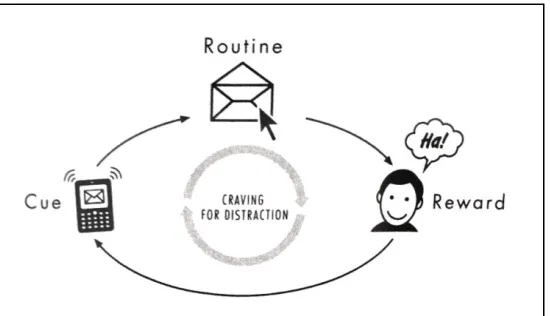
on the smartwatch to help the user changing his or her habit is based on the book ‘The power of habit’ by Charles Duhigg. Duhigg explains that in order to change a person's habit, it is important to identify its underlying neural loop. This loop consists out of three different elements: A cue that triggers the user to follow his or her habit, a routine and a reward (Duhigg, 2012, p. 336). In order to change a habit, it can be helpful to first isolate the cue of the it and therefore ask the user a few questions about his situation when currently having the desire to follow his or her habit. For this project these questions will be asked by an assistant on smartwatch (instead of pen and paper being used by the user). Below an overview of the steps that need to be conducted in order to change a habit is given:
1. Finding out what the reward is that you are looking for (by experimenting with different ones)
a. What is the actual desire? Experiment with different rewards, by changing routine a little.
b. If you try 4-5 different rewards, write them down and search for patterns like feelings or thoughts. Check 15 minutes later if you still have the desire (the writing forces attention).
c. Find out what the REAL desire (and reward) is. 2. Isolating the cue
a. Often in one of the five categories: Location, time, emotional state, other people or a preceding activity. So everyday you should answer these questions:
i. Where are you? ii. What time is it? iii. How do you feel? iv. Who else is with you?
v. What did you just do?
b. After a view days testing it should be clear what's the cue is. 3. Making a plan
10 Dialog Flow is an end-to-end development suite for building conversational interfaces for websites,
BACHELOR THESIS — ADDING VOICE INTERACTION TO A WEARABLE
a. Change the routine (add alarm, to make sure you do not forget it) b. Usually will feel better when it works
[image:19.612.192.467.143.301.2]c. Becomes a habit over time
Figure 2: Charles Duhigg's Conception of the pepsodent habit loop 11
3.3. User and System Requirements
When designing a new product it is important to understand, who the main stakeholders will be. In the context of this project this is basically everyone, who tries to change a specific habit and seeks help by an assistant. Typical habits could be for example exercising frequently, meditating every morning, starting a healthy diet or reading a book for 30 minutes a day. Of course, users might also want to use the product in order to change negative habits, like for example biting fingernails, following an unhealthy diet, smoking or drinking alcohol. No matter what the habit might be, the goal is to assist the user in achieving his or her goals and improve his quality of life. Another important point is that the interaction should be efficient. The interaction with the assistant on a smartwatch should be more convenient and let the user save time, compared to for example getting help by using a notebook, a real life assistant (i.e. therapist, coach, etc.) or a text based assistant on a smartwatch.
11 Source:
BACHELOR THESIS — ADDING VOICE INTERACTION TO A WEARABLE
It is important that the system can be used by as many diverse people as possible. No matter what age, gender, familiarity with new technology and so on. The technology should be self explaining. Potential users should understand, how to interact with the assistant on the smartwatch. Different tools are available on the market that offer the possibility to easily design the system. The two most popular tools are Google Dialogflow (as mentioned earlier) and the Alexa Skills Kit . These tools do not only help to design voice interactions, but also allow to12 develop and deploy them. A less complex and therefore more user friendly alternative would be Sayspring , a tool to create voice interfaces for Amazon Alexa and Google Assistant. While13 writing this report, many new tools are in the making and will probably be available soon, PullString is one example. After comparing different tools, it initially was the plan to work with14 Sayspring for creating a frist lo-fi prototype. However, after getting more familiar with the platform, it turned out that in terms of functionalities, this program has been too limited in order to effectively create voice user interfaces and fulfill the system requirements. Consequently, Google Dialogow has been a better choice for creating VUIs, since there are less limitations and many options to test the interactions. Further requirements that the system should fulfill are the ability to store the information given by the user, to understand what the user is saying and also make the user feel comfortable interacting with the assistant.
3.4. Lo-Fi Prototype
3.4.1. Description
In this section it will be investigated how the user will interact with the a virtual assistant using latest voice interaction technology. Therefore, a simple flow diagram (section 3.4.2) has 15
been designed first, in order to help to visualize the idea of possible interactions. After that a lo-fi prototype has been designed. The goal for the prototype is to conduct a first, quick user study. The interactions will be designed using Google Dialogflow. The Google Dialogflow project will then be deployed to a smartphone and be accessed by the Google Assistant smartphone
12 Source: https://developer.amazon.com/alexa-skills-kit 13 Source: https://www.sayspring.com/
14 Source: https://www.pullstring.com/
BACHELOR THESIS — ADDING VOICE INTERACTION TO A WEARABLE
application . The users will have to answer a few simple questions asked by a virtual assistant,16 in this case the google assistant. The questions that are being asked are relevant for the context of habitual change. The methods for changing habits will be based on the one used in the book by Hopkins Duhigg mentioned earlier.
3.4.2. The Flow Diagram
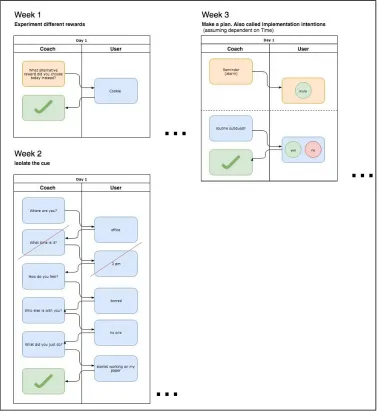
In order to design voice user interfaces it can be helpful to first visualize all the possible paths that can be taken through a VUI system. Below it can be seen how an interaction with an assistant on a smartwatch in the context of habitual change could look like. The flow diagram includes dialogues of different stages of the procedure to change a habit (more details are being provided in the next chapter). Possible prompts that can be used by the assistant and by the user are shown in the diagram as well.
BACHELOR THESIS — ADDING VOICE INTERACTION TO A WEARABLE
Figure 1: Flow diagram for the voice interaction with a smartwatch.
BACHELOR THESIS — ADDING VOICE INTERACTION TO A WEARABLE
3.4.3 Setup
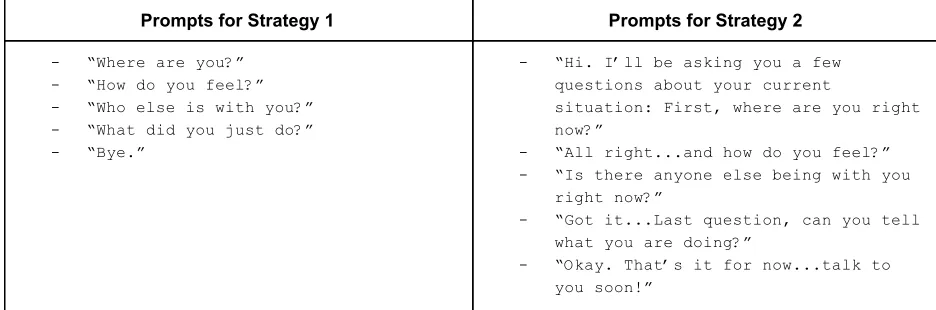
There are many different ways, to formulate one and the same question. Therefore, it will be explored what voice dialogue strategie might work best by comparing two different dialogue strategies within a user test. One strategy will be designed in a way that makes the interaction very direct and efficient, using only a small amount of words. The other version will be designed in a more human-like way, containing more so called “conversational markers” (Pearl, 2017, p. 39) that make the conversation more engaging. Besides, the assistant will always acknowledge answers by the user with short phrases, instead of jumping straight to the next question. In the table below the strategies will be used, can be seen:
Prompts for Strategy 1 Prompts for Strategy 2
- “Where are you?” - “How do you feel?” - “Who else is with you?” - “What did you just do?” - “Bye.”
- “Hi. I’ll be asking you a few questions about your current
situation: First, where are you right now?”
- “All right...and how do you feel?” - “Is there anyone else being with you
right now?”
- “Got it...Last question, can you tell what you are doing?”
[image:23.612.70.538.301.456.2]- “Okay. That’s it for now...talk to you soon!”
Table 1. Prompts for two different dialogues strategies.
3.5. User Study
3.5.1. Goal
BACHELOR THESIS — ADDING VOICE INTERACTION TO A WEARABLE
3.5.2. Procedure
The chosen environment, where the study will be conducted is a quiet room, so the user does not get distracted by surroundings like for example other people or background noises. The user will be seated on a chair with a table in front of him and interact with the agent on a smartphone. This will help to make comparisons later on in order to identify what is specifically important when designing VUIs for a smartwatch. The phone will be placed on the table in front of the user, ready to get interacted with. The conductor of the user study will sit at another location in the room, in order to observe but not distract the user. A camera will be used to gain more insights about the user behaviour during the interaction. The following steps will be conducted during the user study:
1. Before the test begins, the user will be asked to sit down on a chair and to sign a general
consent form before participating. After that all necessary preparations for the interaction will be conducted. The user will be provided with following information:
“This study is about interacting with a virtual assistant that helps the user to change their behavior by adopting good habits or loosing bad ones. The goal is to find out how to make the voice interaction with the agent that will be used on a smartwatch as efficient and intuitive as possible. Your participation will help to achieve this goal. In
this session you will be working with a simple prototype in order to test different dialogue strategies. You will be asked to perform tasks that typical users of the assistant might have to conduct, such as answering questions about your current location or mood. After the user test you will be asked some general questions by the researcher about how the
interaction went.”
Besides, there will be some additional general information about the study be provided, which can be found in the appendix of this report.
BACHELOR THESIS — ADDING VOICE INTERACTION TO A WEARABLE
dialogue. Everytime the assistant recognizes an answer given by the user, it will respond with a follow-up questions till every question has been successfully answered or the user got stock at a specific step of the conversation.
3. After the interaction has been completed, the user will be asked a few interview questions by the conductor of the experiment. The questions will be asked in order to get more valuable feedback from the user on how he felt during the interaction and what his thoughts are. This is especially important when it comes to testing user interfaces, since strategies like the ‘think out loud’ strategy are difficult to apply, if a virtual assistant is listening. The following questions are the ones that will be asked:
● “How old are you?”
● “What is your profession or study?” ● “How did the overall interaction go?”
● “Was it clear to understand what the assistant wanted you to do?” ● “Was there something specific challenging?”
● “What do you think about the questions, that you have been asked?” ● “How did the assistant react, if it did not understand you?”
● “Was it complicated to get back on track if the interaction failed?” ● “Do you think the assistant was friendly?”
● “Did something annoy you?”
● “Did you notice a difference between the two strategies?” ● “If yes, what way of interaction would you prefer and why?”
3.5.3. Participants
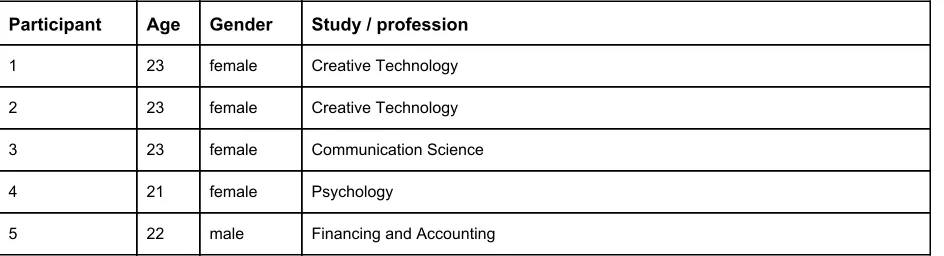
For the user study five participants have been randomly selected and asked to participate. Five users should be enough in order to find most of the usability problems . It can 17 be assumed that all the participants all have a general understanding about technology. The age range of the participants is from 21 to 23 years and all of them are students in Netherlands.
BACHELOR THESIS — ADDING VOICE INTERACTION TO A WEARABLE
However, there nationalities and gender differs. The interaction with the assistant will take place in english.
Participant Age Gender Study / profession
1 23 female Creative Technology
2 23 female Creative Technology
3 23 female Communication Science
4 21 female Psychology
[image:26.612.73.545.137.265.2]5 22 male Financing and Accounting
Table 2: Demographics of participants that participated in the ideation phase user study.
3.6.4. Results
3.6.4.1. Usability Test
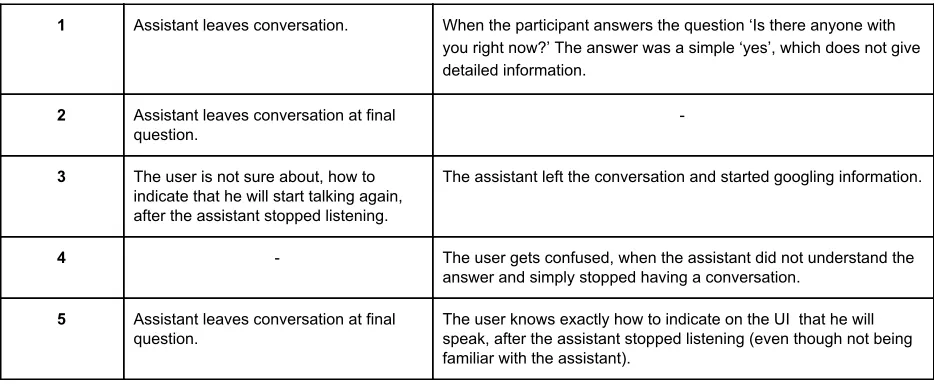
The results of the user study are listed in the table below. It shows, how each of the five users recovered from errors during the interaction. Within this usability test everytime the interaction does not work correctly it has been referred to as an error. For example: After the assistant did not recognize the answer of participant number one during the test of the first dialogue strategy, the user simple repeated the answer. Besides, some more general problems that occurred during the interaction are mentioned in the column on the very right.
Participant Error recovery General remarks
Dialogue Strategy 1
1 User gives same answer several times. -
2 User gives same answer several times. -
3 User phrases answer differently. The final question has not been understood by the assistant.
4 User phrases answer differently. The final question has not been understood by the assistant. Besides, the user has been insecure and wondering if the assistant would understand the answer.
5 User phrases answer differently.
BACHELOR THESIS — ADDING VOICE INTERACTION TO A WEARABLE
1 Assistant leaves conversation. When the participant answers the question ‘Is there anyone with you right now?’ The answer was a simple ‘yes’, which does not give detailed information.
2 Assistant leaves conversation at final question.
-
3 The user is not sure about, how to indicate that he will start talking again, after the assistant stopped listening.
The assistant left the conversation and started googling information.
4 - The user gets confused, when the assistant did not understand the answer and simply stopped having a conversation.
5 Assistant leaves conversation at final question.
[image:27.612.72.539.77.270.2]The user knows exactly how to indicate on the UI that he will speak, after the assistant stopped listening (even though not being familiar with the assistant).
Table 3: Results of first user study.
The usability test helped to gain many new insights on how users behave when interacting with a virtual assistant. There are a few issues have been revealed that should be solved in order to make the interaction more fluent and less frustrating for the user. The user study showed, how users react and what errors occurred during the interaction therefore should be improved.
3.5.4.2. Interview
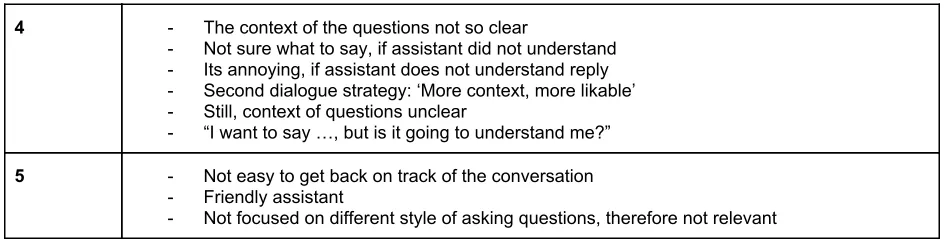
From the conducted interviews there were more relevant information gained by the answers of the participants. The most important ones are stated in the table below (table 4):
Participant Feedback
1 - It was not possible to get back on track of the conversation - Assistant has been perceived as friendly
- There was no big or relevant difference between two types of strategies
2 - It was not awkward to communicate with the assistants - The Intentens by assistant were clear
- “Should I say the same again?” or “Should I rephrase” - The feedback on an error was clear
- Communication might be annoying on daily bases - No difference noticed between two dialogue strategies
3 - It was complicated to get back on track - The assistant was not friendly
- “I did not know what to do at all”
BACHELOR THESIS — ADDING VOICE INTERACTION TO A WEARABLE
4 - The context of the questions not so clear
- Not sure what to say, if assistant did not understand - Its annoying, if assistant does not understand reply - Second dialogue strategy: ‘More context, more likable’ - Still, context of questions unclear
- “I want to say …, but is it going to understand me?”
5 - Not easy to get back on track of the conversation - Friendly assistant
[image:28.612.70.543.77.198.2]- Not focused on different style of asking questions, therefore not relevant
Table 4: Relevant feedback by user study participants during the interview session.
3.6. Conclusion
BACHELOR THESIS — ADDING VOICE INTERACTION TO A WEARABLE
4. Specification
4.1. Introduction
In the specification phase the results from the previously conducted user study will be analyzed and used in order to define updated user and system requirements. These requirements will be the foundation for the realisation of a hi-fi prototype that is being developed during the next phase of the design process (chapter 5).
4.2. Updated user and system requirements
One of the design problems that should be solved is that the assistant sometimes tends to leave a conversation. This should not be an option in the given context. When talking to the assistant, only the input by the user matters. The user should finish answering all questions or explicitly indicate that he wants to end the conversation by using a prompt like for example “Stop asking me questions”. From the interview questions, it became clear that if once a user gets of track of the conversation, it was not possible to get back on track. This problem will be solved with the next prototype. A possible solution would be to make sure, the assistant will be more capable of understanding the user. This will be accomplished by giving the user more freedom in giving answers. The assistant will acknowledge and save any kind of answer without depending on specific keywords (words, the assistant is taking action on) that the user needs to trigger. After the user gave an answer, the assistant will simply go to the next question.
BACHELOR THESIS — ADDING VOICE INTERACTION TO A WEARABLE
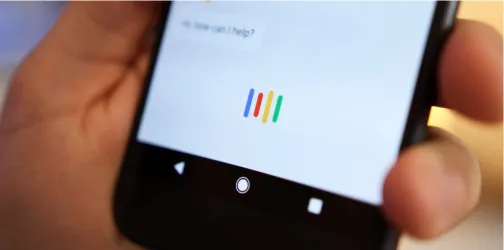
Figure 3. Google Voice assistant indicating that it is listening. 18
Although, the indication seem to be clear to most of the users, some users might not be familiar with voice interactive technology. Therefore, an easy fix would be to simply increase the amount of time, the assistant is actively listening, even though the user is not replying immediately.
Another problem to point out is that if the goal of an interaction with an assistant is to gain precise answers from the user, simple ‘yes’ or ‘no’ questions should not be used. When asking the question “Is there anyone with you right now?” one of the users simply answered ‘yes’ without further stating, who is with him. The question will be rephrased for the next prototype. Another question that caused problems was the question ‘Where are you?’. Some users tend to answer this question very general by for example saying “I am in the Netherlands”. Even though this answer is not wrong, it is still way to broad for the given therapeutical context. For the next study the question could simply be rephrased by adding the adverb ‘exactly’. This might help to get a more precise answer to the question.
Often, users were confused, why the assistant did not understand them. Especially, when the words said by the user were detected correctly by the assistant (as indicated on the smartphone screen). Consequently, the users were not sure if they should simply repeat there answer, as requested by the assistant, or phrase them differently. The reason why the assistant in this prototype sometimes did not understand the answers by the user, is because it was necessary to define keywords for possible answers. For Example: If a user says “I am at the university” but the word “university” has not been defined in google dialogue platform as an
BACHELOR THESIS — ADDING VOICE INTERACTION TO A WEARABLE
intent, in order to be recognised by the assistant. To fix this issue, the plan is to design the assistant for the next prototype in a way that it simply accepts any answer by the user, without having to understand the meaning of each recognized word in the given context.
While 2 out of 5 users clearly stated that the difference between the two dialogues was not relevant or important to them and one did not even notice it at all, still two out of the five users mentioned that the second strategy gave ‘more context’ and was more ‘likeable’. The only question that provided more context was the first one “Hi. I’ll be asking you a few questions about your current situation: First, where are you right now?”. However, the assistant also gave more feedback on if he understood a question (by for example saying ‘Got it [...]’) it can be concluded that a given context seems to be very beneficial to begin the dialogue with. Although, the context in a real world scenario would be more clear beforehand, it can be suggested to provide the user more context information at least for the first few interactions with the assistant until he gets more familiar to the questions (the user will have to go through the same questions each day for several weeks). The plan for the next prototype is to provide more information at the beginning of the interaction and orientate more on the style that has been used in the second dialogue strategie.
4.3. Conclusion
BACHELOR THESIS — ADDING VOICE INTERACTION TO A WEARABLE
5. Realisation
5.1. Introduction
After building the lo-fi prototype, conducting the first user study and specifying new user and system requirements, the next step will be to develop the hi-fi prototype based on these requirements. The hi-fi prototype will then be used for a second user study in order to find further usability problems in the interaction between the user and the virtual assistant that could be improved.
5.2. The Hi-Fi prototype
5.2.1. Prototype Description
The hi-fi prototype will be an improved and extended version of the lo-fi prototype. Same as for the lo-fi prototype, Google Dialogflow will be used as a tool to design a interaction between the user and the virtual assistant. The following things will be improved for this prototype:
● The dialogue strategy used for the prototype will be improved by using a combination of the two strategies used in the ideation phase. However, it will mainly be based on the second strategy, since that one has been preferred by most of the users.
BACHELOR THESIS — ADDING VOICE INTERACTION TO A WEARABLE
● User Information that are provided while the user interacts with the system will be stored, so they can be accessed and analyzed at a later point. This is not only helpful for the user of the envisioned system in order to analyze the progress, but also for a user study that will be conducted in the following section.
● The prototype will be used within a usability test. The interaction will therefore take place on three different devices: A smartphone and two different smartwatches, one silent watch and one with speech output. More details about user study are provided in the section 6.1.
5.2.2. Voice User Interface
In a real world scenario the user would experiment with different rewards for a few days or weeks, until it is clear what the actual desire is that the user follows. Everytime the user noticed that he or she is about the follow a specific habit, a different reward should be tried out and be tracked by using the assistant on the smartwatch. After the actual desire of the user has been identified, the cue that triggers the habit will analyzed. Therefore, different questions about the current situation of the user will be asked. Once, the desire and the cue of the habit have been identified, a plan will be made, so the user will get reminded to implement a new routine. If the habit is depending on a specific time of the day for example, the user could always set a reminder, in order to get reminded by the smartwatch to follow the new routine. The following prompts will be used for the assistant in order to help the user going through the mentioned process:
Reward experim entation
● "Hey, how are you? I am helping you to identify the desire that is responsible for your habit. How did you change your routine this time?"
● "Got it. How are you doing right now? Any particular thoughts or feelings?"
● "All right, thank you!"
Isolatin g the cue
● “Hi. I’ll be asking you a few questions about your current situation:
First, where are you right now?”
● “All right. And how do you feel?”
● “Who is being with you right now?”
● “Got it. Last question, can you tell me what you are doing?”
BACHELOR THESIS — ADDING VOICE INTERACTION TO A WEARABLE
Making a Plan
● "At what time would you like me to remind you, following your new routine?"
● "Reminder set."
Table 5: Prompts used for the hi-fi prototype.
5.2.3. Designing the Interaction Using Google Dialogflow
5.2.3.1. Intents
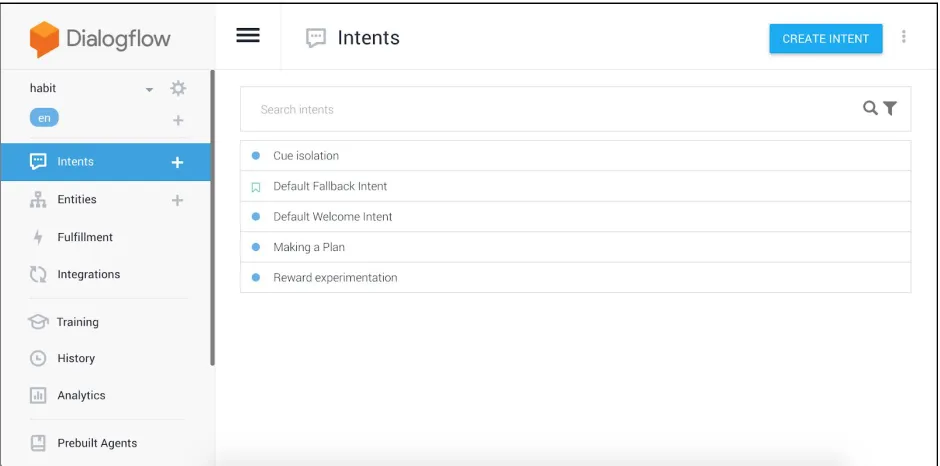
As mentioned earlier, the tool Google Dialogflow is being used in order to build the conversational experience with the assistant. Within the tool, different intents can be defined for the interaction. An intent can be seen the action the user wants the assistant to conduct, like for example checking weather information. As defined by google "An intent represents a mapping between what a user says and what action should be taken by your software." Therefore, the 19
three dialogs "reward experimentation", "cue isolation" and "making a plan" have been used as intents in the context of this project. Besides, a default fall back intent will be used, that will be triggered, if the assistant did not understand correctly, what the user said. For each intent different training phases have been entered into the system. These help dialogflow to understand, how the user might express their intent. For "cue isolation" these phrases are for example "start isolating the cue" or "help to isolate the cue for my habit".
BACHELOR THESIS — ADDING VOICE INTERACTION TO A WEARABLE
Figure 4:. User Interface of dialogflow for defining intents.
5.2.3.2. Entities
For each intent, different so called ‘entities’ have been defined. Entities are used as specific parameter values that can be identified from a natural language input. If for example the user triggers the intent "cue isolation", it can be defined that before ending the conversation, all parameters like the users location, mood or current activity have had to be mentioned during the interaction. If those parameters are not recognized by the assistant, it will ask for them in descending order (see example below).
[image:35.612.73.546.522.668.2]BACHELOR THESIS — ADDING VOICE INTERACTION TO A WEARABLE
As soon as all parameters have been detected, the assistant answers to the user with a response that is defined as the end of a conversation. At the example of the cue isolation this will be the prompt "All right that's it for now. Goodbye." Entities offer a great alternative to the procedure used earlier in the lo-fi prototype, where each question has been defined as a new (follow-up) intent. The hi-fi prototype works more in a way of 'checking the boxes', which makes designing the dialogues way more simple and intuitive.
5.2.3.3. Integrations
While designing the interactions in Dialogflow they can simultaneously be tested within the web browser. Alternatively, an integration function can be used in order to make the application available on all different devices that support the google assistant and are used with the same google account that is being used for dialogflow project. These devices can be smartphones, wearables, earphones or even in cars.
5.2.4. Setup
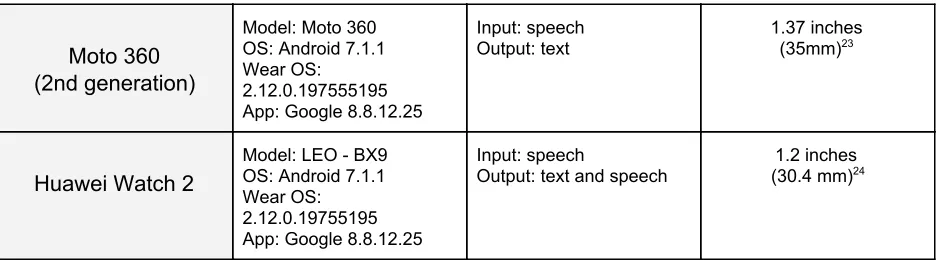
For the user study with the hi-fi prototype in the next chapter, the VUI will not only be used on a smartphone, but for this time additionally on two different smartwatches. For the study a within subject design has been chosen, which means that all participants are going to test the interaction on all three devices. The devices that the application for the google assistant will be running on are the smartwatch Moto 360 (2nd generation) , the Huawei Watch 2 and a20 smartphone, the iPhone 6s . In the table below it is being stated what software versions have21 been used:
Device Technical
Specification
User Interface Screen size
Apple iPhone 6s
Model: MKQJ2ZD/A OS: iOS 11.4
App: Google Assistant, 1.3.2110
Input: speech
Output: text and speech
4.7 inches (11.94 cm)22
20 More information: https://www.motorola.com.au/products/moto-360 21 More information: https://www.apple.com/iphone-6s/specs/
BACHELOR THESIS — ADDING VOICE INTERACTION TO A WEARABLE
Moto 360 (2nd generation)
Model: Moto 360 OS: Android 7.1.1 Wear OS: 2.12.0.197555195 App: Google 8.8.12.25
Input: speech Output: text
1.37 inches (35mm) 23
Huawei Watch 2
Model: LEO - BX9 OS: Android 7.1.1 Wear OS: 2.12.0.19755195 App: Google 8.8.12.25
Input: speech
Output: text and speech
[image:37.612.73.542.77.207.2]1.2 inches (30.4 mm) 24
Table 6: Devices that the interaction has been tested with.
While in practices it could take a few weeks in order to change the users routine, in the experimental setup the participant will simply answer the questions on the prototype one after another, since the focus of the study lies on the interaction and the user experience. Speech output enables a more human-like interaction. It is closer to the natural way of how humans communicate. However, this does not necessarily mean that the user will prefer this way of interaction. Users might for example feel uncomfortable having a device talking to them. This is why two different watches will be used and the interaction compared. Besides, a smartphone will be used for the interaction. The phone will help to make a comparison of using the virtual voice assistants on different devices (phone and wearable).
5.3. Conclusion
The concept of designing voice interaction is very different to designing for example regular interfaces. For many designers this can be a very new and different way of designing interactions that might take some time to get familiar with. However, after getting a understanding of the key concepts, tools like dialogflow can be very helpful to designers and developers in order to test and develop conversational experiences. Especially, the possibility to make use of google's machine learning plattform is very valuable, since it helps the assistant to understand answers by the user even though they are not completely identical with the phrases within the application. Still, it has to be kept in mind that the system is not always as smart as
23 Source:
https://www.smartwatchspex.com/comparison/motorola-moto-360-2nd-gen-42mm-vs-46mm-spces/
BACHELOR THESIS — ADDING VOICE INTERACTION TO A WEARABLE
BACHELOR THESIS — ADDING VOICE INTERACTION TO A WEARABLE
6. Evaluation
6.1. User study
6.1.2. Goal
The purpose of the hi-fi prototype is to use it within a user study and to find what device the user prefers for the interaction. The interaction will be tested on two different smartwatches and a smartphone. One smartwatch will have a speech output, which means that it is actually talking to the user, the other watch will not speak and simply display text messages. The smartphone will as well have a speech output. It will help to find out what is specifically important when designing voice interactions for a smartwatch and how it can be improved. Another thing that would be interesting to find out, would again be the errors that might occur during the interaction. Also, do people speak differently, using different devices? Is it more convenient to talk to a smartphone (handheld device) instead of an smartwatch (wearable) because the users are more familiar with phone? Once the the user interacted with the assistant on the different devices, a few general questions will be asked in order to gain more information by the user on how the overall interaction went. Based on the findings of this study using the hi-fi prototype, the results will be discussed in the next chapter.
6.1.2. Procedure
The testing procedure will be qualitative, because most of the questions that are tried to be answered are about the user experience that can be observed by the conductor during the interaction an by interview questions. There are no quantitative measurements like time compilation time or number of errors. Besides, the qualitative procedure will offer the possibility to gain more insights by the user trough asking more detailed question and being more flexible. According to the Nielsen Norman Group, 7 - 8 participants are often enough in order to find most of the usability problems . For this study a total of 10 participants will be used. The 25 environment, in which the study will be conducted will be simple, so the user does not get
BACHELOR THESIS — ADDING VOICE INTERACTION TO A WEARABLE
distracted by surroundings like for example other people, but focuses on the interaction. The user will be seated on a chair with a table in front of him and interact with the agent on a smartphone and on a smartwatch. The devices will be placed on the table in front of the user, ready to get interacted with. The conductor of the user study will sit at another location in the room, in order to observe but not distract the user. The order of the interaction with the different devices will be balanced between the user. A camera will be used to gain more insights about the user’s behaviour during the interaction and to document answers to interview questions.
1. Before the study begins, the user will be asked to sit down on a chair and after that read and sign a general consent form before participating. After that, all necessary preparations for the interaction will be conducted. Further, the user will be provided with following information:
"Imagine the following scenario: You are suffering from a habit that you would like to change. The process to change it can take up to several weeks. A virtual assistant will
help you to change your habit. Therefore, three different conversations will be held on regular basis. During this user study you are now going through all the three conversations.
Conversation 1:
Part of a method that will be used in order to help you, is by changing your routine a little in order to identify your actual desire. For example: After having the desire to smoke a cigarette you ate a gum instead. Please imagine for a moment that you just had the
desire to follow your habit, but chose a different reward instead.
Conversation 2:
In the second dialog, the assistant will ask you a few questions about your current
situation. These will help to isolate the cue that triggers a habit. Please simply answer the questions.
BACHELOR THESIS — ADDING VOICE INTERACTION TO A WEARABLE
Please assume the following: After getting a better understanding of your habit, you now made a plan to change it. Please answer the questions by the assistant.”
2. As soon as the user wears the watch on his wrist, the interact with the prototype will begin. The prompts that have been defined will be used to enable the dialogue between smartwatch and user. Before each of the three dialogues (as mentioned in the section above) the user will be provided with additional information in order to understand the context of the questions that are being asked. Everytime the assistant recognizes a given answer by the user, it will respond with follow-up questions until all questions has been successfully answered, or the user got stock at a specific step in the conversation.
3. After each of the three interactions with the different devices, the user will be asked questions about the the interaction. The questions are being asked in order to get more valuable feedback from the user on how he experienced the interaction. The following questions are being asked:
● How would you say the overall interaction with the device did go? ● What did you like about the interaction?
● How did you perceive the assistant and why? ● What errors occurred and what could be improved?
● Was it complicated to get back on track, if the interaction failed? ● How did you feel, talking to the device?
After all the interactions have been completed on all three different devices, the user will be asked comparison questions and some on his or her demographics:
● How familiar with voice interaction technology in general are you? ● Which device did you prefer for the interaction and why?
● Did you prefer the text or speech output by the assistant and why?
BACHELOR THESIS — ADDING VOICE INTERACTION TO A WEARABLE
● Could you imagine to use a voice controlled virtual assistant on a smartwatch in your everyday life?
● Do you see benefits of using voice interaction particular on a smartwatch? ● In what situations could you imagine to use it and where wouldn’t you use it? ● How old are you?
● What do you study? ● Where are you from? ● What's your gender?
6.1.3. Participants
For the user study 10 participants will be randomly selected at a university campus and asked to participate in the study. There were no specific criteria when it came to selecting participants, it only has been tried to keep balance variables like gender, nationality and educational background. Like for the previous user study, it can be assumed that all the participants have a general understanding of using technology. The age range of the participants is 20 to 30 years and all of them are students in Netherlands. Their nationalities and gender can differ. All interactions will take place in english language.
Particip ant
Age Gender Study Nationality Familiarity with voice
interaction technology
1 23 male Creative Technology German Known from the Smartphone, but not used regularly
2 23 female Social Work German Not familiar
3 23 male Creative Technology Indian Not familiar
4 21 female Creative Technology Bulgarin Not familiar
5 21 female Communication Science German Known from the Smartphone, but not used regularly
6 22 male Creative Technology Dutch Relatively familiar
7 25 male Psychology German Not familiar
8 21 male Psychology Dutch Not familiar
BACHELOR THESIS — ADDING VOICE INTERACTION TO A WEARABLE
[image:43.612.74.540.78.111.2]10 26 male Social work German Known from the Smartphone, but not used regularly
Table 7: Demographics of participants that participated in the user study with the hi-fi prototype.
6.2. Results
From the conducted user studies some interesting discoveries have been made. The answers to the interview questions have been collected in a spreadsheet. All the relevant results are stated in this chapter and will hopefully help to eliminate future usability problems in the field of voice interaction on wearables.
6.2.1. Interaction with the smartwatch without speech output
When asking the participants, how they would say the overall interaction with the device did go, many users (6 out of 10) stated that it worked not so well. From observing the interaction it became clear that the speech recognition did not work as good as on the other two devices. Besides, one user mentioned the delay that occured when the spoken word by the user have been processed. When asking the users, how they felt, talking to the device, they used terms like ‘awkward’, ‘stupid’, ‘lonely’, ‘weird’’. There were positive no positive responses to this question. However, there was one positive feedback this type of interaction got: "It is good that it does not always speak". Another, issue that occured by two users, was that they were not sure, if the device was listening or not. They have not been sure in the beginning how to indicate that they were going to speak again. One user mentioned that it would be better "(...) if you can have a real conversation, so (the assistant) speaks to you".
6.2.2. Interaction with the speaking smartwatch
BACHELOR THESIS — ADDING VOICE INTERACTION TO A WEARABLE
positive and friendly way. Speech recognition errors still occurred sometimes. When asking participants, how they felt, talking to the device they some descipred their feelings as ‘strange’, ‘weird’ or ‘awkward’, others said that it was okay. Recovering from errors has not been a problem. For one user there were some minor errors in the recognition. He said that it was not difficult. If the conversation failed "I could simply try again". One user further noticed that the assistant is not listening while it is talking. One user mentioned, that timing was a problem. At some points the watch stopped waiting for an the users answer.
6.2.3. Interaction with the smartphone
When asking participants, how the overall interaction with the device did go, they responded positively, although two participants mentioned the performance of the speech recognition still as a negative point. Three participants mentioned that they like the conversational, messenger-like layout which helps to read the past interactions (prompts that have been used by the user and by the assistant). Same as for the other two devices, the reaction the the question about how the assistant has been perceived was positive (10 out of 10 users). One user however mentioned that the assistant sounded ‘robotic’ and another one said that it sounded ‘choppy’. One user said that it was difficult to get back on track, if the conversation failed. Another participant mentioned that the assistant moved on to the next question, even though the the recognition failed (the recognized sentence did not make sense). When asking about how the user felt during the interaction, only one out of ten users stated that he felt awkward.
6.2.4. Device comparison and general remarks by the participants
BACHELOR THESIS — ADDING VOICE INTERACTION TO A WEARABLE
more efficient and gave the possibility to read along with the conversation. Two users stated that their familiarity with a phone might have an influence on their choice. However, there were also some clear statements being made on why the interaction with the with smartwatch would be beneficial: The smartwatch is light weight, easier to access and therefore the interaction sometimes more efficient (i.e. tasks like setting reminders). One user even stated that the smartwatch feels like a part of the body, while a smartphone is perceived more as an external device. Some specific situations where the watch can be very beneficial is during sports, in emergency, for setting reminders, making grocery lists, setting alarms, when the user is in the rush or if the user has a disability that makes accessing a smartwatch easier than accessing a phone.
Some participants (4 out of 10) mentioned that they would not use the device in public spaces, because they might feel awkward talking to a watch when other people are around or they would be concerned about the functionality due to background noise. However, 8 out of 10 users stated that they could imagine to use a virtual assistant on a smartwatch in their everyday life, under the conditions, that it works well and getting used to the way of interaction.
Even though the error rate of the speech recognition is relatively low and improves over time, it is still not advanced enough to be as good as humans. Sometimes it happens that assistant processes an answer by the user, even though one or more words have not been recognized correctly. Since, the user is limited in understanding the context of the conversation, it does not realize that some words in the sentence simply make no sense at all.
6.3. Discussion
The results from the observative user study, provided some interesting insights on what users like about voice interaction in general, what could be improved, what technical errors and also what design errors can occur. In the following the main points will be discussed.