281 | P a g e
ANALYSIS OF RECENT WD MYCLOUD
INFORMATION SYSTEM INSTALLATION
PROCEDURES AND ITS FEATURES
Muhammad Qarish Ismail Bin Muhammad Isa
1,
Ganeshwara Shanmugam
2,Joshua Nathaniel Jude
31,2,3
Diploma Students, Asia Pacific University, Kuala Lumpur, Malaysia
ABSTRACT
This research is conducted because, Western Digital Corporations, the biggest manufacturer of hard disk in the
world is still not known by many people. Furthermore, the WD My cloud, created by WD, is a very useful and
innovative device that people can use in their daily lives. Instead of paying for extra cloud storage, people can
now own personal cloud storage. The research methods used to obtain information for the research are Internet
research, Interviewing employees and researcher as participant. Through the research conducted, we were able
to learn more about the information system (IS) and the WD My cloud device. The findings included the
hardware and software used by the selected information system, components of the Information System and also
the problems faced by the IS and the solutions to resolve the issues.
Keywords: Cloud, Computer Systems, Digital Corporation, Information Systems
I INTRODUCTION
Western Digital Corporations (WD) is one of the largest hard disk manufacturers in the world. Established in
1970, Western digital started as a manufacturer of metal oxide semiconductor test equipment but quickly change
direction to focus in the data storage market [1]. As a storage pacesetter, the company produces reliable,
high-performance hard disk drives and solid state drives. These drives are deployed by OEMs and integrators in
desktop and mobile computers, enterprise computing system, embedded systems and consumer electronics
applications, as well as by the company in providing its own storage products. WD’s leading storage devices
and systems, networking products, media players, and software solutions empower people around the world to
easily save, store, protect, share and experience their content on multiple devices. [2]. The Information System
that has chosen from WD is the WD My cloud. The WD My cloud is a private storage unit that plus into your
home network. It automatically backs up and centralizes all your content in one safe place no one can see but
you. And with Internet connectivity, you can quickly access your WD My cloud unit and share whatever you
want, from wherever you are [2]. Users can login to the WD My cloud using their computer or smart mobile
282 | P a g e
II COMPONENTS OF INFORMATION SYSTEM
In WD’s daily operation, there are 5 components that are taken into consideration for the success of the product.
The 5 components are data, hardware, software, procedure and people.
2.1 Data and Information
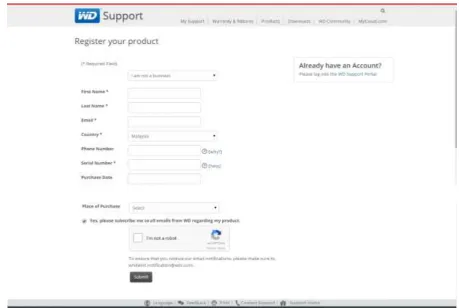
During product registration, customers are required to fill in an online form. Customers have to provide data
such as First name, Last Name, Email, country, phone number, product serial number, date and place of
purchase.
The data that is filled in this form are text and numbers only. The quality of the data that inserted is accurate,
verifiable, and also cost-effective. The data is accurate because the data is typed by the customer. If there are
errors in the serial number, then the system will prompt that the serial number is invalid and will ask the user the
key in the serial number correctly. The data is also verifiable, customers have to provide where they bought their
WD My cloud device. The data is also cost-effective as it is done online instead of hastily filling up paper
forms.After the data is collected, the system compiles all these data and stores it as the product information. The
information can be accessed by the organization to keep track of the products and also send information about
the device. User can also use WD Support to learn more and ask question regarding their WD My cloud device.
283 | P a g e
2.2 People
People are one of the most important and expensive components to the Western Digital. The people are the ones
play a big role in maintaining and constantly interacting with the Information System. There two main users of
WD’s information system. That is, the customers and the employees
2.3 Hardware
Hardware is something that can be physically touched [3].There are two types of hardware used in WD’s
Information System that is input devices and output devices.
2.3.1 Input devices
An input device is a peripheral used to provide data and control signals to an information processing system
such as Keyboard, Mouse and WD My Cloud Device [4].
2.3.2 Output devices
An output device is any devices such as Monitor and WD My Cloud Device used to send data from a computer
to any other device or user [5].
2.4 Software
Software is a collection of instruction that enable thee users to interact with a computer [6].
2.4.1 System software
System software is a type of computer program that is designed to run a computer’s hardware and application
programs [7]. An operating system is an example of system software. The operating system that is used by
default by the employees in the company is the Windows 7. The WD My Cloud can be used in both the
Windows, Mac, android and iOS operating system. The WD My Cloud device itself is running on embedded
Linux operating software.
2.4.2 Application software
Application software is programs that perform specific tasks for user [8]. Internet browsers are a type of
application software. Internet browsers such as Internet explorer and Google Chrome are used to do product
registration, access the My Cloud Dashboard, to access the cloud facility (if did not install the application), and
to help and support customer question and problems.
2.5 Procedure
To ensure that the device is up and running there are certain procedures that the customer need to follow a few
procedures.
2.5.1 User and device registration
For first time use of the product the user is required to register the product with the device model and serial
284 | P a g e
register themselves by providing some of their personal details such as name, e-mail address and date of
birth.(Western Digital Corparations, 2015)
2.5.2 Device set up
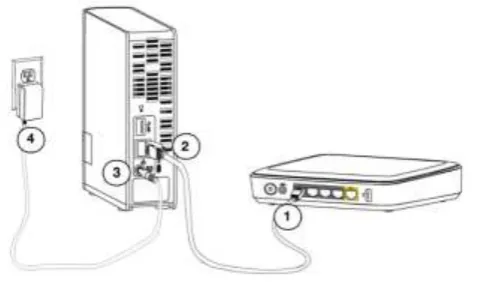
Firstly, connect the Ethernet cable to the internet modem or router then connect the other end of the Ethernet
cable to the device. Then, connect power cable to the device and plug the power adapter the power source [9].
III MULTIMEDIA
3.1 Text
Text is the basic element of the multimedia. Text is the most flexible means of presenting information on screen
and conveying ideas. It involves the use of text types, sizes, colours, and background colour [10].
3.1.1 Text in the selected IS
Figure 3.1.1
Western Digital’s logo was made using the AR DESTINE font for WD. Underneath the logo is the phrase which says ‘A Western Digital Company.’ The logo is hyperlinked to the home page. It has no special animation. The
letters WD is white in colour and put in a rounded rectangle shape which is blue in colour. The other text are
using Calibri and Arial Black. The words ‘My Cloud’ is hyperlinked to the My Cloud sign in page. The My Cloud OS is hyperlinked to the My Cloud OS page which shows all the information for My Cloud OS. Under
the word ‘Products’ which is hyperlinked to all the products being sold. The words ‘Learning Centre’ is
hyperlinked to a page which has all the manuals on how to use each product. The word ‘Developer’ is hyper
linked to a page where they talk about the developers.
285 | P a g e
3.2 Images
An image is a visual representation of something. An image is a picture that has been created or copied and
stored in electronic from [11].
3.2.1 Images from the Information System
Figure 3.2.1 displays the image of scenery that gives a relaxed impression to the website. There is laptop in the
image that shows the user interface of the WD My cloud.
3.3 Audio and Video
Video is a recording, manipulating, and displaying moving images in a format that can be presented [12] while
audio is sound available within the acoustic range of humans. With these forms of multimedia, explanations and
tutorials become easy to be used and accessed.
3.3.1 Videos from the IS
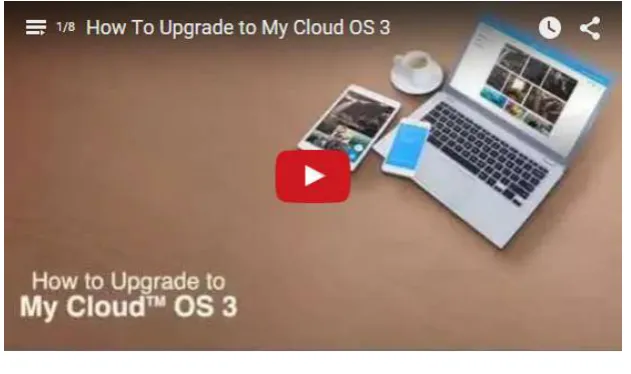
There are video tutorials in the webpage to help, introduce and explain about the product and its functionality.
Figure 3.3.1
In this video the WD My cloud users are shown how to upgrade their device to the latest firmware that is OS 3.
286 | P a g e
the WD My cloud app available for the mobile devices. The WD My cloud device can also be update by using a
computer by accessing the WD My cloud dashboard. The new operating system installation for the device may
take a while. There are other videos in the website that teaches users step-by-step on how to setup the WD
My cloud device and briefing on the My Cloud operating system the “My Cloud OS 3”. There are also video
tutorials on how to use the WD Sync to backup files and also how to upload files to the My Cloud. Video
tutorials in the website include on how to use the mobile application to operate the WD My Cloud device and
also using the WD My Cloud’s user interface to add and monitor users of the device.
3.3.2 Interactive
Interactive multimedia is a special multimedia that accepts inputs from users by means of input devices and
perform actions as per user input.
Figure 3.3.2
In this navigation panel, when you’re in the“My Cloud” page, an underline will appear under the My cloud
marking that you are in that page. When you want to click to move to another page, than underline will appear
under the wordings that you have selected that particular page to be directed to.
IV PROBLEMS, SOLUTIONS AND RECOMMENDATIONS
4.1 Problems found in current IS
4.1.1 Very slow or blank Dashboard
The dashboard is the main frame of the WD My cloud device where the users can make changes to their account
and device configurations. According to WD Communityforum, many users have compliant that this particular
page does not appear once they have set-up and login to their device. The page appears to be blank and user
sometimes receive messages that the connection has timed out.
4.1.2 The Blinking White Light
On the WD My cloud device there is a light that indicates the system status. Several users have claimed to see
the white light keeps blinking and the drive does not appear on their computers or mobile devices. (Western
Digital, 2015)
4.1.3Time Machine backup with Mac
Time Machine is a backup software application distributed with the Apple OS X computer operating system.
The software is designed to work with Apple’s Time Capsule as well as other internal and external hard disk drives (HDD’s). Users complain that the WD My cloud does not backup any data from the time machine backup
287 | P a g e
4.2 Solutions to the problems faced by the IS users
4.2.1 Solution to the very slow or blank dashboard
The cause of this problem is because the WD My cloud devices begins its media scan every time you access the
device, turn-on media serving or added a new connection the cloud device. This is common in the OS3
operating system as it is to ease the information flow from device to device. Thus, this result in slow dashboard
or blank sometimes when the scans are not complete. Hence, it is recommended that the users to change the
device setting so that the device scans are performed manually by the users.
4.2.2 Solution for blinking white light
The blinking white light indicates that the device is establishing the connection with the network. When the light
stops blinking and turn blue, it indicates that the device has is ready to be used. This could take time but it also
depends the internet connection. If the My Cloud white light keep blinking, the user have to press the reset
button then wait. If the device still doesn’t respond, then the user has to unplug the device for 10 seconds then
plug it in back. The device should be up working. If it does not work, the device itself control board may have
some issues. The user may return or exchange for a new product the retailer purchased.
4.2.3 Solution for Time Machine Backup with the Mac
Users must first make sure that their internet connection is steady. If not try troubleshooting the network. There
is nothing to troubleshoot in the WD My cloud if the internet cannot be connected to the device. Secondly, turn
on the Mac Backup settings in the WD My cloud by turning on the Mac Backups/Time Machine ON. This
way the WD My cloud device will auto-run the setup with time machine backup app in the Mac.
4.3 Recommendation
For the slow dashboard loading, the company should alter the new operating system to minimise the loading
time by setting the device to allow user to access the dashboard first then begin the scanning. This will help the
user to get real time information and also able access the dashboard and make changes during the scans.Second
recommendation would be test run each hard disk drive before installed into the device. This will avoid the
usage of failure drives installed in the WD My cloud and also reduce customer disappointment against the
product.Lastly, its recommended and requested by some people on the community to ease the firmware and
software upgrading procedure. This can be done by the allowing the WD My cloud to instantly download and
save the upgrades received first than ask the users permission for the installation.
V CONCLUSION
Through this research, uses and capabilities of the device were able to learn. The WD My cloud device is a very
innovative and useful product manufactured by WD. The developer software that is available on the WD
Support website allows users to integrate functions that is preferred by them. The product is suitable for all
users. It is also able keep all your precious data and memories safely without fear. There might be few bumps in
the system but with future upgrades and updates, WD has promised to keep make the device a better product too
288 | P a g e
ACKNOWLEDGEMENT
The authors acknowledge Dr Jothi Sophia, Principal, CSI JACON, Madurai, India for their constant
encouragement and motivation to contribute this paper in International Conference, India.
REFERENCES
[1]About Tech, 2015. About Tech. [Online]
Available at: http://components.about.com/od/Companies/p/The-History-Of-Western-Digital.htm
[Accessed 24 November 2015].
[2] Western Digital, 2015. Western Digital Store. [Online]
Available at: http://store.westerndigital.com/store/wdus/en_US/pd/ThemeID.21986300/productID.292209200
[Accessed 2 January 2016].
[3] Study.com, 2015. Study.com. [Online]
Available at:
http://study.com/academy/lesson/what-is-computer-hardware-components-definition-examples.html
[Accessed 12 December 2015].
[4] Bussiness Dictionary, 2015. Businessdictionary.com. [Online]
Available at: http://www.businessdictionary.com/definition/input-device.html
[Accessed 15 December 2015].
[5] Technopedia, 2015. Technopedia. [Online]
Available at: https://www.techopedia.com/definition/3538/output-device
[Accessed 31 December 2015].
[6] Computerhoope, 2015. Computer Hope. [Online]
Available at: http://www.computerhope.com/jargon/s/software.htm
[Accessed 11 January 2016].
[7] WhatIS.com, 2016. WhatIs.com. [Online]
Available at: http://whatis.techtarget.com/definition/audio
[Accessed 13 January 2016].
[8] Shelly Cashman Series, 2003. [Online]
Available at: https://www.d.umn.edu/~rmaclin/cs1011/notes/L03_C03_App_Software.pdf
[Accessed 13 January 2016].
[9] Western Digital Corparations, 2015. setup.wd2go. [Online]
Available at: http://www.wdc.com/wdproducts/library/UM/ENG/4779-705103.pdf
[Accessed 13 November 2015].
[10] EMMUS, 1999. Text in multimedia. [Online]
Available at: http://www.ucc.ie/hfrg/emmus/guidelines/d41text.html
289 | P a g e
[11] Rouse, M., 2005. WhatIs.com. [Online]
Available at: http://whatis.techtarget.com/definition/image
[Accessed 12 January 2016].
[12] Webopedia, 2016. Webopedia. [Online]
Available at: http://www.webopedia.com/TERM/V/video.html