Colour Pass System for user Authentication
Alan Peter Biju Aliya Azad
Department of Computer Science and Engineering Department of Computer Science and Engineering Amal Jyothi College Of Engineering, MG University Amal Jyothi College Of Engineering, MG University
Jesline Justine Shiney Thomas
Department of Computer Science and Engineering Department of Computer Science and Engineering Amal Jyothi College Of Engineering, MG University Amal Jyothi College Of Engineering, MG University
Abstract
Passwords are the most commonly used form of user authentication. But they are always vulnerable to many attacks. One of the most common attacks to these passwords is shoulder surfing attack. Shoulder surfing is using direct observation techniques, such as looking over someone's shoulder, to get information. The proposed system mainly focuses on preventing password leakage through shoulder surfing attacks. In the proposed system a special colour coding is used so that the original pin will never be revealed. This will be easy to use and less complicated.
Keywords: colour table, pin, shoulder surfing
________________________________________________________________________________________________________
I. INTRODUCTION
The use of the Internet and smart devices are constantly increasing and many new ways of using it are constantly appearing. A lot of personal data are exposed on millions of websites and mobile phones. Since the Internet is so easily accessible to anyone, it can be a very dangerous place. Cyber criminals will try to take advantage of the user by getting their information. The shoulder surfing is a way through which intruders obtain the user’s password by watching over the user’s shoulder as he enters his password [3]. Conventional password schemes are vulnerable to shoulder surfing. The number of security risks to the user information is increasing rapidly.
Authentication is the process where system identifies the genuine user. Password based authentication is one of the widely accepted methods. Most users are more familiar with textual passwords than graphical passwords. There are different login methods, basically fully and partial observable.
The proposed scheme is simple and easy to learn for users and can efficiently login to the system. It can reduce the problem of shoulder surfing up to a limit. In this system user will have four colour pins as password. User will get four challenges each time he tries to login to the system. Then the user has to enter four corresponding responses and this will be verified.
The main aim of this system is to prevent shoulder surfing attack. Since the challenges are generated randomly each time the pins will be different each time and the intruder or the person looking during password entering will not be able to identify the actual pin.
II. RELATED WORKS
In 2013 Yi-Lun Chen et.al [3] proposed A Simple Text Based Shoulder Surfing Resistant Graphical Password Scheme using colours and text. During the registration phase user has to set a textual password and one colour has its pass colour. When the user requests to login the system, the system displays a circle composed of 8 equally sized sectors. All the displayed characters can be simultaneously rotated by clicking the “clockwise” button or by clicking the “counter clockwise” button. In 2014 Wei-Chi Ku et.al [4] proposed An Enhanced Capture Attacks Resistant Text-Based Graphical Password Scheme, user password include pass string and pass colour shape. When the user requests to login it displays an onscreen keyboard. If the background colour of the running pass string is not same as the pass colour shape, then user is requested to press any of the responding button that having the same shape as the pass colour shape, it reassign the background colour. In 2012 Yu-Chang Yeh, [6] proposed An Enhanced Simple Secure Remote Password Authentication Scheme without Using Cryptography, user has to set a textual password and choose one icon among six icons as his start icon. During the login on screen keyboard and 5 colour buttons excluding the white are randomly displayed in an invisible matrix. User has to find out the background colour of the running pass character. If the colour is white, then user can click any button; otherwise user has to click the button with the same colour as the background colour of the running pass string.
III. THE PROPOSED SCHEME
The user will be giving responses to challenges generated by the system. Thus the attacker will not be aware of the actual pin, since the challenges will be different during each login procedure. The challenge mode can selected by the user, it could be through SMS or an audio which can only be heard through a headset. In the following section we will discuss about the user password features, login and about COLOUR tables and how authentication is done.
Characteristic of User Password:
The user has to set his password of length four during registration time. These colours are stored in the database and will be used later for validation. User choose four colours from the given ten colours during registration. Colours can be repeated. Since we are using colours for password purpose it will be easier to remember and probability for someone to guess them will be more.
Login Phase :
The user requests to login the system, and the system displays ten tables of 10 equally sized cells with numbers from 0 to 9. The colours of the cells are different, and there will be ten different colours. The tables will be different where the order of the numbers will vary.
Steps of Login Procedure
- User enters his username
- System checks that the username exists then it will generate colour Tables using Algorithm I. - User will be asked to select a mode to receive the challenges. (SMS or audio)
- System gives four random challenge values which range from 1 to 10 (colour table numbers). - User will have to give response to those challenge values .
- Response will be evaluated by system using Algorithm II.
- System will check whether the user is genuine or not using Algorithm III.
User interface for login and Algorithms used in the above procedure, have been described in below sections. In order to login user has to give a unique username , his mobile number and chose four colours as password During login this username will be checked and the challenge values are send to this corresponding mobile.
Characteristic of Feature Tables:
Login interface consists of 10 different Colour Tables which are numbered from 1 to 10. Each cell of a table is represented by a pair < Ci, Vi>. Here Ci denotes the colour of the cell i and Vi indicates the digit corresponding to cell i.
Ci is unique to a Feature Table. Thus no colour occupies in more than one cell. So for a particular table there will be ten different colour cells. The positions of colour cells are shown in Table III and this is fixed for every table. So if first cell of a table is filled with C1 then first cell of all other tables are also filled with C1.
Table – 2
Identifying Each Cells in Xth Table 0
1 2 3 4 5 6 7 8 9
x
All cells in a table also contain a unique cell value from 0,1,...,9. Another important characteristics is that in each cell i, the pair < Ci, Vi> is unique with respect to all the cells in all the ten tables. Thus if first cell of First Feature Table contains < C1, 0 > then first cell of any other Feature Table will not contain < C1, 0 >. The orientation of these colours and digits in those cells are also fixed for every session. All the ten Feature Tables are shown below. The numbers written in bold denotes the table number of each Feature Table. The empty cells in the tables denote nothing.
C0(0)
C1(1) C2(2) C3(3) C4(4) C5(5) C6(6) C7(7) C8(8) C9(9)
1
C0(1)
C1(2) C2(3) C3(4) C4(5) C5(6) C6(7) C7(8) C8(9) C9(0)
2
C0(2) C1(3) C2(4) C3(5) C4(6) C5(7) C6(8) C7(9) C8(0) C9(1)
3
C0(3) C1(4) C2(5) C3(6) C4(7) C5(8) C6(9) C7(0) C8(1) C9(2)
4
C0(4) C1(5) C2(6) C3(7) C4(8) C5(9) C6(0) C7(1) C8(2) C9(3)
5
C0(5) C1(6) C2(7) C3(8) C4(9) C5(0) C6(1) C7(2) C8(3) C9(4)
6
C0(6) C1(7) C2(8) C3(9) C4(0) C5(1) C6(2) C7(3) C8(4) C9(5)
7
C0(7) C1(8) C2(9) C3(0) C4(1) C5(2) C6(3) C7(4) C8(5) C9(6)
8
C0(8) C1(9) C2(0) C3(1) C4(2) C5(3) C6(4) C7(5) C8(6) C9(7)
9
C0(9) C1(0) C2(1) C3(2) C4(3) C5(4) C6(5) C7(6) C8(7) C9(8)
Algorithm for Generating Tables :
Input to this algorithm is ten different colours {c0,c1,....c9} which is stored in an array Colour[].There are ten COLOUR tables and each one is denoted as FT[m] where m varies from 0 to 9.In each COLOUR table there are ten cells and each cell is represented as Cell[n] where n varies from 0 to 9.For each cell there is a Value and a Colour. The Value can range from 0 to 9.To access the colour of the first cell of the first COLOUR table we use
the representation
FT[0].Cell[0].Colour;
To access the value of the first COLOUR table of the first cell, we use the representation FT[0].Cell[0].Value;
Algorithm I Generating tables in Colour Lock System
Input: This algorithm will take array Colour [0,1,...9] as input. Output: It will generate COLOUR Tables FT(0) ・・・ FT(9) for m = 0 to 9 do for n = 0 to 9 do
FT(m).CELL(n).Colour ← Colour[n]; FT(m).CELL(n).Value ← (m+n) mod 10; end for
end for
Thus by using this algorithm ten different COLOUR table will be generated with unique colour and digit combination in each cell.
PIN Entry Mechanism:
In our proposed model, user has to choose four colours as the pin in the registration phase. And also give username and mobile number during the registration. During the login phase, user has to enter the username. If the username is valid, then the user can choose two options. That is through headset or through SMS. User get the challenge only through the selected option. The challenge can be access by the user only because it is send through a secured media.
Challenge value is generated by using the random function and its value ranges from 0 to 9. Based on the challenge value the user has to select the corresponding COLOUR table. For example, if the challenge value is 2 then the user has select the second COLOUR table. For each colour of his pin the user will get the challenge.
User has to select the COLOUR table correspond to the challenge he get. After that user has to locate the cell that have the colour of his pin. After locating that cell he has to enter the digit correspond to that cell as his response tothe challenge. Similarly user will get three more challenges and give respond to each challenge. Thus the login procedure will complete. User is authenticated based on the response to each challenge. User authentication is done as below.
Table – 2
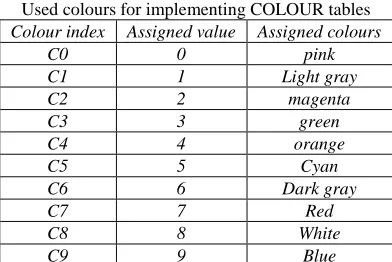
Used colours for implementing COLOUR tables Colour index Assigned value Assigned colours
C0 0 pink
C1 1 Light gray
C2 2 magenta
C3 3 green
C4 4 orange
C5 5 Cyan
C6 6 Dark gray
C7 7 Red
C8 8 White
C9 9 Blue
User has to choose four colour from ten colours. Each colour has been assigned a number from 0 to 9 as shown in TABLE. If user chooses four colours (say) C1C7C9C3, the system database stores user PIN as 1793.This PIN is stored in an array PIN[i] where i varies from 0 to 3.Four challenges are generated and are stored in array CHAL[j],where j varies from 0 to 3.For each challenge user has to give response which is stored in an array RESP[k] where k varies from 0 to 3.There is an array RES[m] where m varies from 0 to3. . The array RES is initialized to zero. If the response to the challenge is valid then RES array is set to one. The algorithm for validating the response is given below.
Algorithm II Evaluating User Response in Colour Lock
System
Input: This algorithm will take array PIN, array RESP and array CHAL as input.
Output: This algorithm will update value of array RES by 1 for each valid response. for i = 0 to 3 do K ← CHAL[i] − 1
if RESP[i] := Valid then RES[i] ← 1 end if end for
Algorithm III User Authentication
Input: This algorithm will take array RES as input after executing Algorithm 2.
Output: Decides whether user is allowed to Login. Initialize R := 0 for i = 0 to 3 do if RES[i] := 1 then R ← 1 else R ← 0 break end if
end for if R := 1 then Allow user to Login else Disallow the user end if
For example user pin is C1C7C9C3 and he get the challenge value 5260.The user go to the fifth COLOUR table enter the digit correspond to the colour 5.For the second challenge he go to the seventh COLOUR table and enter the digit correspond the colour 8. Valid response to each challenge is shown in the table.
Table – 3
User response table for a given challenge User chosen colour Challenge Response
C1 5 6
C7 2 9
C9 6 5
C3 0 3
IV. USER INTERFACE OF COLOUR PASS
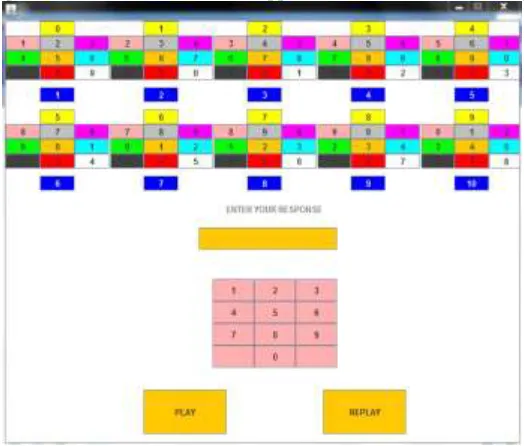
In our user interface we have assigned unique colours to each cell Ci where i varies from 0 to 9.. Ten colours are easily distinguishable from each other. . The actual interface is shown in Fig. We number each COLOUR table by using the blue font. Colour in each COLOUR table is fixed only the number in each cell get changed.
As the colour in each cell is fixed, user can locate the colour easily. There is a keypad to enter the response to each challenge. The user can choose the mode in which challenge has to generate. Challenge can be obtained through headset or through SMS. During the registration phase user can choose the application to which this colour lock system to be used. There is a setting option in which user can change colour password, Mobile Number and application. The interface is designed in a user friendly manner.
Fig. 1: User Interface of login and response screen
V. CONCLUSION AND FUTURE WORK
REFERENCES
[1] Nilesh Chakraborty, SamratMondalColour Pass: An Intelligent User Interface to Resist Shoulder Surfing Attack, 2014.
[2] C. Y. Chen, C. Y. Gun A Fair and Dynamic Password Authentication System, 2011
[3] Yi-Lun Chen, Wei-Chi Ku*, Yu-Chang Yeh, and Dun-Min Liao ,A Simple Text-Based Shoulder Surfing Resistant Graphical Password Scheme 2013