University of New Orleans University of New Orleans
ScholarWorks@UNO
ScholarWorks@UNO
University of New Orleans Theses and
Dissertations Dissertations and Theses
Summer 8-11-2015
Creating Volatility Support for FreeBSD
Creating Volatility Support for FreeBSD
Elyse Bond
University of New Orleans, [email protected]
Follow this and additional works at: https://scholarworks.uno.edu/td
Part of the OS and Networks Commons
Recommended Citation Recommended Citation
Bond, Elyse, "Creating Volatility Support for FreeBSD" (2015). University of New Orleans Theses and Dissertations. 2033.
https://scholarworks.uno.edu/td/2033
This Thesis-Restricted is protected by copyright and/or related rights. It has been brought to you by
ScholarWorks@UNO with permission from the rights-holder(s). You are free to use this Thesis-Restricted in any way that is permitted by the copyright and related rights legislation that applies to your use. For other uses you need to obtain permission from the rights-holder(s) directly, unless additional rights are indicated by a Creative Commons license in the record and/or on the work itself.
Creating Volatility Support for FreeBSD
A Thesis
Submitted to the Graduate Faculty of the University of New Orleans in partial fulfillment of the Requirements for the degree of
Master of Science in
Computer Science Information Assurance
by
Elyse Bond
B.S. Southeastern Louisiana University, 2012
Table of Contents
List of Figures ... iii
Abstract ... iv
Chapter 1 - Introduction ...1
Chapter 2 – Related Work...2
Chapter 3 – Foundation ...3
3.1. Profile Creation ...3
3.2. Overlay Creation and Profile Interpretation ...4
Chapter 4 – Plugins ...6
4.1. Process List ...6
4.1.1. Motivation ...6
4.1.2. Process List Implementation in FreeBSD ...6
4.1.3. Volatility Plugin: freebsd_pslist ...6
4.2. Mounted File Systems ...7
4.1.1. Motivation ...7
4.1.2. Implementation of Mounted File Systems in FreeBSD ...7
4.1.3. Volatility Plugin: freebsd_mount ...8
4.3. Network Connections ...8
4.1.1. Motivation ...8
4.1.2. Implementation of Network Connection in FreeBSD ...8
4.1.3. Volatility Plugin: freebsd_network_conns ...9
Chapter 5 – Current Progress ...11
5.1. Motivation ...11
5.2. Implementation ...11
5.3. Volatility Plugin: freebsd_list_files ...11
5.4. Future Work ...12
Chapter 6 – Conclusions ...13
6.1. Overview ...13
6.2. Future Work ...13
References ...14
Vita ...15
List of Figures
Figure 1: FreeBSD 10.1 kernel debug information and resulting vtypes ...3
Figure 2: FreeBSD 10.1 system map compiled from the kernel.symbols file ...3
Figure 3: FreeBSD overlay in Volatility 2.4 ...4
Figure 4: Finding the FreeBSD DTB value ...5
Figure 5: freebsd_pslist plugin output from a FreeBSD 10.1 memory image ...7
Figure 6: freebsd_mount plugin output from a FreeBSD 10.1 memory image ...8
Figure 7: freebsd_network_conns plugin output from a FreeBSD 10.1 memory image ...10
Figure 8: freebsd_list_files plugin output from a FreeBSD 10.1 memory image ...12
Abstract
Digital forensics is the investigation and recovery of data from digital hardware. The field has grown in recent years to include support for operating systems such as Windows, Linux and Mac OS X. However, little to no support has been provided for less well known systems such as the FreeBSD operating system.
The project presented in this paper focuses on creating the foundational support for FreeBSD via Volatility, a leading forensic tool in the digital forensic community. The kernel and source code for FreeBSD were studied to understand how to recover various data from analysis of a given system’s memory image. This paper will focus on the base Volatility support that was implemented, as well as the additional plugins created to recover desired data, including but not limited to the retrieval of a system’s process list and mounted file systems.
Digital Forensics, Data Recovery, FreeBSD, Volatility, Kernel, Memory Image
Chapter 1 – Introduction
The need for digital forensic analysis has essentially been around since the beginning of the digital age. Where there is digital information, there are those that wish to exploit it, or those that need to utilize it for investigative purposes. Despite the necessity of the field, it is still somewhat in its beginnings. There is a surprising lack of support for all but the most popular of the operating systems.
One substantial effort at data recovery is the Volatility project (Volatility, 2015). Volatility utilizes the kernel debug information and kernel symbols of an operating system to build a profile for analyzing a system’s memory image. These profiles can be created quickly for each version of an operating system, such as Windows XP and Windows 7. The ease of this process is substantial in supporting future version support for each operating system.
Once a profile has been created for an operating system, Volatility recovers the actual data from a system’s memory image via the use of plugins. Each plugin is designed by studying and utilizing the volatility types, or vtypes, created with the system’s profile. These vtypes are built from the operating system’s data structures, making it easier to access those structures needed for data recovery.
With the relative simplicity of Volatility’s recovery approach in mind, it seemed the obvious choice for use in creating digital forensic support for FreeBSD.
FreeBSD, while obscure or unheard of to many, is still a widely used operating system. Its open source policy leads to an increased number of bug fixes and security updates by the community, but also opens the operating system up to exploitation by those who care to utilize its documentation for negative purposes. The need for forensic support was seen as necessary, and has even been requested by those in the FreeBSD community. The following project seeks to set the foundation for those needs.
Chapter 2 – Related Work
FreeBSD has received little to no attention from the digital forensic community. Support has mostly been devoted to the more popular operating systems: Windows, Linux, OS X and Android. Despite its similarity to both Linux and OS X, FreeBSD also has no support in the Volatility project.
One attempt at creating support for FreeBSD was released in 2011, by the name of Volafunx (Volafunx, 2011). As the name suggests, it was a derivative of Volatility. Volafunx greatly changed the way in which Volatility creates and interprets profiles, resulting in an excess of hard coded code. While the project did succeed in recovering various data elements, there was no support beyond the initial hard coded versions of the systems, including 7.X and 8.X. At the time of this paper’s writing, FreeBSD is already at 10.X, and no longer works correctly with Volafunx. However, the effort was useful in providing a bit of insight into FreeBSD’s structural workings.
Considering that Mac OS X is derived in large part from BSD, forensic support for OS X was heavily consulted in preparation for creating similar support for FreeBSD.
In 2010, the first substantial research effort for Mac OS X was presented by Matthew Suiche at Black Hat DC (Suiche, 2010). The effort focused on the data structures and relevant background information needed for supporting data recovery for the operating system.
Shortly after Suiche’s presentation, Volafox was released in 2011 (Volafox, 2015). Another derivative of Volatility, Volafox was created by Kyeong-Sik Lee, the same individual who created Volafunx. While Volafox was largely successful in its efforts, it included similar limitations to those found in Volafunx. The architecture was greatly altered from Volatility, resulting in a more complicated process of designing plugins, and severely limiting future version support. However, it was successful in recovering and listing process lists, mounted file systems, network connections and other relevant data.
The Volafox effort, despite its limitations, did influence Volatility’s own OS X support, released the very next year in 2012. Volatility continues with OS X support today, currently offering well over fifty plugins for the operating system. Volatility’s plugins and base support were largely referenced for creating both foundational and plugin support for FreeBSD.
Chapter 3 – Foundation
In this section we discuss the foundational support created for FreeBSD in Volatility. This includes the kernel symbol and system map recovery from FreeBSD 10.1 for profile creation, the vtype generation for use in creating plugins, and the resulting basic memory image analysis accomplished by Volatility.
3.1. Profile Creation
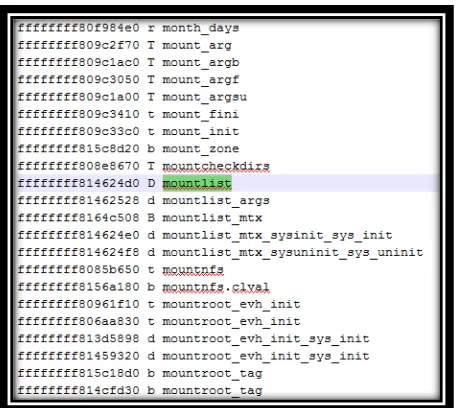
Volatility differentiates between operating systems by identifying profiles. Profiles are a combination of the given system’s kernel debug information and kernel symbols. The kernel debug information is parsed into a file containing volatility types, or vtypes. The FreeBSD vtypes are made up of the system’s struct objects and their members. Some members are simply a variable, while others are pointers to another struct object. See Figure 1 below for a comparison of the debug info and resulting vtypes. The kernel symbols are compiled into a file referred to as
system.map, seen below in Figure 2.
Figure 1: FreeBSD 10.1 kernel debug information and resulting vtypes
Figure 2: FreeBSD 10.1 system map compiled from the kernel.symbols file
To create an initial profile for FreeBSD, we need to recover the kernel debug information and kernel symbols for the given version, in this case 10.1. This information is all that is needed to create additional profiles for both past and future versions of the operating system.
FreeBSD stores the kernel debug information in a file called kernel.debug, under
/usr/obj/usr/src/sys/GENERIC/. In the case that a custom kernel has been created for the system, the kernel.debug file can be found under /usr/obj/usr/src/sys/[custom kernel]/. The kernel.debug
file is in the format of an ELF executable binary file. By using the dwarfdump command on this kernel module with debugging enabled, we are able to generate the necessary vtypes, seen above in Figure 1. The dwarfdump application utilizes the libdwarf libraryto convert dwarf data into a legible format. The resulting vtypes are the first piece used in creating the FreeBSD profile.
The second piece we need to create is the system map. In Linux, there is already a file included with the kernel symbols called System.map. This file can be used as-is in creating a Linux profile. In FreeBSD, there is no such file. However, it can be easily created by performing
nm on the kernel.symbols file also located at /boot/kernel/. The command nm on a Unix based system extracts the symbols from an object file.
Now we have the two files necessary for our FreeBSD Volatility profile,
freebsd10_vtypes.py and system.map. Zipping these files together, we are now ready to create an overlay in Volatility to interpret the profile.
3.2. Overlay Creation and Profile Interpretation
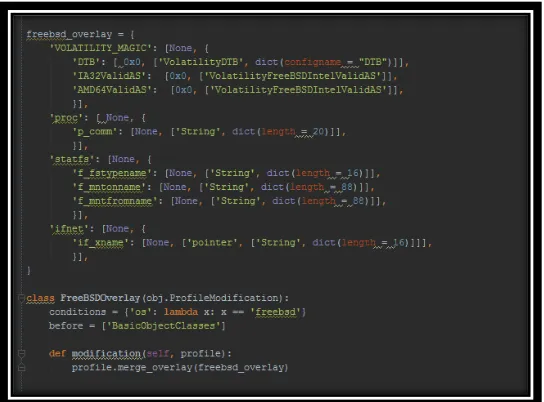
To handle different operating system types, Volatility uses overlays tailored to the specific operating system in question. An overlay is a python file specifically coded to process the FreeBSD profile and interpret the unique structure of its architecture. These overlays are created for each operating system Volatility supports. To introduce FreeBSD into Volatility, a FreeBSD overlay was created with the approach further discussed in this section, part of which can be seen below in Figure 3.
Figure 3: FreeBSD overlay in Volatility 2.4
Volatility uses a parser to interpret the dwarfdump output of the profiles for Linux, called
dwarf.py. Since we used the same format for the FreeBSD profile, we can use this same parser, with a few modifications to account for variable types not found in the Linux profiles.
Once the profile has been parsed, Volatility needs the DTB, the kernel’s cr3 value for Intel architectures. The DTB is the directory table base, or the address of the operating system’s page directory. Volatility needs this value to translate kernel virtual addresses to physical addresses properly. The address for the page table mapping in FreeBSD is stored in the symbol
kernel_pmap_store located in our system.map file. The offset for the cr3 value itself is then a member of the kernel_pmap_store symbol, called pm_cr3. Adding the cr3 offset to the page mapping address gives us the approximate address of the cr3 value. However, we still need to account for the 64-bit architecture, so we subtract a preset shift of 0xffffffff80000000. We can then unpack this result to retrieve the exact address of the kernel’s cr3 value. See the related code in Figure 4.
Figure 4: Finding the FreeBSD DTB value
Now that we have the cr3 value, Volatility needs to check that the value is valid. We do this by mapping a physical address found in the system.map file to the virtual address calculated by Volatility. Pulling the address stored in system.map for some symbol, in this case the version
symbol, we compare that to the address provided by Volatility. If the two addresses match, then we have correctly translated the kernel virtual addresses.
Now that we are translating addresses correctly, we can begin writing plugins to recover the actual data.
Chapter 4 – Plugins
Plugins can be written to address numerous data recovery needs, ranging in difficulty depending on the data being retrieved. For the purposes of demonstrating the potential for future FreeBSD support, we will present and discuss three different plugins that have been
implemented for the operating system.
4.1. Process List
4.1.1. Motivation
One of the necessary and most insightful bits of data that can be retrieved is the system’s process list. The process list can give a quick look into the given machine’s state at the time of the memory image’s capture. From the data recovered from the system’s process list, especially if the process IDs can be retrieved, the trail can begin for finding more information stored on the machine.
4.1.2. Process List Implementation in FreeBSD
FreeBSD stores the addresses for its processes in a struct object called the proclist. A pointer to the beginning of the system’s process list can be found in the kernel symbol allproc. The address for the first process stored in the process list is referenced by the proclist list entry member lh_first.
The process struct objects themselves, designated proc, contain the following relevant members:
p_comm
p_pid
p_numthreads
p_ucred.cr_uid
These members make up the process’s name, process ID, number of threads and user ID, respectively. In the case of the p_comm member, this variable is actually a character array. We define p_comm in the FreeBSD overlay as a string dict of length twenty, to allow Volatility to more easily parse the member’s contents. Each process also contains a list entry member called
p_list, containing pointers to the addresses for both the previous and next process entries in the process list, or proclist.
4.1.3. Volatility Plugin: freebsd_pslist
To begin, we need to find the process list starting address for Volatility. By consulting the FreeBSD documentation, we find that a pointer to this starting address is stored in the allproc
symbol found in the system.map file. Now we need to know the address for the process list itself. In FreeBSD, the process list is stored in the proclist struct object found in our vtypes file. By referencing this object and providing the pointer we retrieved from the allproc symbol, we are able to get the address for the first process in the process list. We are then able to recover each individual process by iterating through the proc objects. Starting with the address found in the
proclist list entry member lh_first, we can then access each subsequent process by referencing the member p_list.le_next from the current proc struct object.
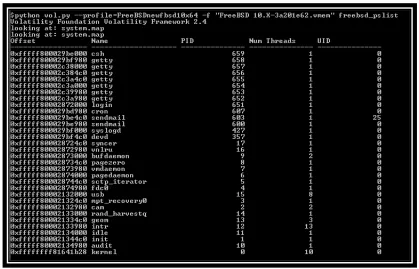
The proc object also stores several more members that could be of interest, depending on the desired information to be recovered. The plugin can be easily modified to provide this information in addition to what is seen in Figure 5 below.
Figure 5: freebsd_pslist plugin output from a FreeBSD 10.1 memory image
4.2. Mounted File Systems
4.2.1. Motivation
When analyzing a memory image for forensic purposes, it is helpful to know which file systems were mounted at the time of image capture. By reviewing the list of mounted devices, it can also be discovered whether any file systems were mounted via an external source.
4.2.2. Implementation of Mounted File Systems in FreeBSD
FreeBSD stores the file system information under /boot/etc/fstab. It can be queried from within the operating system, simply by entering the command “fstab” into the terminal.
However, for our purposes, the file systems for FreeBSD are stored in a doubly linked list, a struct object called mntlist. Each individual entry has an instance record stored in another struct object designated mount. These entries are linked to one another by the mount object’s member mnt_list.
Much of the relevant information for each mounted device is stored under a struct object called statfs, linked to by the mount object’s member mnt_stat.
Under the statfs object can be found the following members:
f_mntonname
f_mntfromname
f_fstypename
These members refer to the file system’s device name, mount point and file system type, respectively.
4.2.3. Volatility Plugin: freebsd_mount
First we need to find the address for the beginning of the list of mounted file systems. This can be found via the symbol mountlist in our system.map file. With this address, we reference the tailq_head struct object mntlist, and we find the address stored in its member
tqh_first.
At this point we can begin looping through the mounted devices. Using the individual mount object’s tailq_entry member mnt_list, we can access each subsequent device in the list via
mnt_list.tqe_next.
As with the pslist plugin, there are many additional members stored within the mount object that could be useful depending on the information desired. This data can be added easily in the future, in addition to those members found in Figure 6 below.
Figure 6: freebsd_mount plugin output from a FreeBSD 10.1 memory image
4.3. Network Connections
4.3.1. Motivation
Another very useful piece of digital forensic data is the network information found on the system. Recovering a list of connections the machine possessed at the time of image capture can be very useful in analyzing the given system’s purpose and/or activities.
4.3.2. Implementation of Network Connections in FreeBSD
FreeBSD stores its network layer state for TCP, UDP and raw IPv4 and IPv6 sockets in a struct called inpcb. Pointers to all local and foreign host table entries and socket numbers can be found in or referenced through this object.
A terminal line command to access some of this information can be entered directly in the operating system, as netstat.
Some of the relevant members stored within, or accessed through, the inpcb object are as follows:
s_addr (local)
ie_lport
s_addr (foreign)
ie_fport
t_state
These members are the network connection’s local IP address, local port, foreign IP address, foreign port and TCP state in the case the connection is a TCP protocol.
4.3.3. Volatility Plugin: freebsd_network_conns
To begin accessing the network connection information for FreeBSD, we start with the symbols tcbinfo, udbinfo and ripcbinfo found in our system.map file. These symbols provide the addresses for the three different types of inpcb objects we will be recovering, if present on the system. The tcbinfo symbol refers to a TCP connection, and the udbinfo symbol refers to a UDP connection.
Next we provide these addresses for the struct object inpcbinfo. This object contains a member inpcb_listhead pointing to the struct object inpcbhead. This object contains the member
lh_first pointing to the first in the list of inpcb objects found on the system. As before, we are now able to loop through the objects via the list_entry member inp_list.le_next or
inp_list.le_prev.
As we reference each object in the list, we are able to gather the IPv4 information for the object. This information is linked through a long list of struct objects listed below.
Local IP:
inp_inc
inc_ie
ie_dependladdr
ie46_local
ia46_addr4
s_addr
Local Port:
inp_inc
inc_ie
ie_lport
Foreign IP:
inp_inc
inc_ie
ie_dependfaddr
ie46_foreign
ia46_addr4
s_addr
Foreign Port:
inp_inc
inc_ie
ie_fport
Finally, we get the state information for TCP connections. Through the member inp_ppcb we access a tcpcb struct object containing the state information stored as t_state. For connections other than TCP, we leave the state blank.
The information shown below in Figure 7 can be expanded if more information is desired. As in the case of the previous two plugins, freebsd_network_conns is easily modifiable.
Figure 7: freebsd_network_conns plugin output from a FreeBSD 10.1 memory image
Chapter 5 – Current Progress
Currently in progress is a plugin to list the files found on the FreeBSD memory image. In this section we will discuss the plugin itself, as well as its completion status and expected output.
5.1. Motivation
When recovering data from a memory image, there are many cases where it is important to be able to find or see a list of files stored there. Even if the file itself cannot be recovered, it is helpful to know which files were open or cached on the system at the time of image capture.
5.2. Implementation
FreeBSD has utilized UFS/UFS2, the Unix File System, as its default file system since FreeBSD version 5.0. Starting with FreeBSD 7.0, the Z File System, or ZFS, has also been available.
For every active file or current directory in Unix based systems, there is an associated unique vnode. A vnode, or virtual node, is an internal representation of a file or directory. FreeBSD stores its file information in relation to each of these vnodes.
The path or name for a particular file is resolved through a struct object called the
namecache, or the name lookup cache. Each vnode stores a link to the associated namecache
entry for the file in question. However, the namecache utilizes a least recently used (LRU) algorithm to store its information. In other words, only the most recently used or accessed files will have their information stored in the namecache. Hence not all vnodes will find a namecache
entry to return.
5.3. Volatility Plugin: freebsd_list_files
To start listing the files found on the system, we begin with the mounted file systems. Each file system will have its own list of associated vnodes. The mounted file systems can be accessed via the mountlist symbol discussed in the freebsd_mount plugin.
Each file system references its list of vnodes via the mnt_nvnodelist member. To find the beginning of the list, we access the mnt_nvnodelist.tqh_first member. Each vnode contains a member called v_nmntvnodes, with a tqe_next member pointing to the next vnode in the list. We are then able to enumerate the list of vnodes found on the given file system.
For each individual vnode, we need to print its filename and file path, if the information is present on the system. The vnode’s entry in the namecache can be accessed via the
v_cache_dd member, pointing to the namecache struct object. If the vnode is a file, we attempt to recover the file’s name and path.
To retrieve the filename, we need only return the nc_name member. To rebuild the file path, we must iterate upward through the hierarchy of parent vnodes. Each of these vnodes will be directory entries making up the complete path to the file from root. The namecache entry for each vnode contains a link to the parent, if one exists, called nc_dvp. Once we’ve accessed the parent vnode, we retrieve the filename as we did for the child, using the nc_name member. We
continue in this manner until we have reached the top of the tree. Combining the returned names together, we are able to build the full file path for the vnode in question.
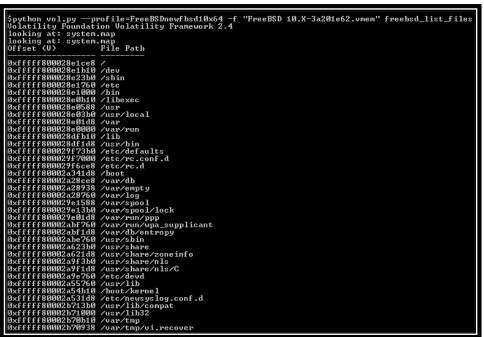
An example of data returned from the current freebsd_list_files plugin can be seen below in Figure 8.
Figure 8: freebsd_list_files plugin output from a FreeBSD 10.1 memory image
5.4. Future Work
Due to the nature of the namecache’s method for storing information, the LRU algorithm, many of the vnodes return a null entry. For the future, the author hopes to implement a more reliable method for returning file information.
The author also hopes to more robustly test the above plugin to further verify its reliability.
Chapter 6 – Conclusions
6.1. Overview
The foundational analysis and supporting plugins discussed in this paper were tested on FreeBSD 10.1.
Testing was performed on memory samples obtained from virtual machines generated during the research of this project. Virtual machine guests’ memory was captured using snapshots on VM Ware Workstation 11.
This paper has demonstrated that forensic support is possible for the FreeBSD operating system, specifically within the Volatility project. We discussed several situations in which pertinent data was successfully recovered from a FreeBSD memory image. The data recovered included the system’s running processes, mounted file systems, network connections and cached files. The data was recovered by studying the operating system’s source code and relevant kernel information, as well as developing Volatility base support and plugins to automate the process.
For the foundational support, we built a Volatility profile for FreeBSD using the
operating system’s kernel debug information and kernel symbols. This profile was interpreted by utilizing and building onto the existing Volatility dwarf parser. We further studied the kernel symbols and memory addresses to determine correct virtual to physical address translation within Volatility.
For each plugin that was developed, we studied the operating system’s source code to determine how and where the relevant data was stored within the memory image. The resulting information determined which symbols and memory addresses and offsets we would need to access to recover the data in question.
The Volatility support for FreeBSD and its related plugins will be freely available after the publication of this project.
6.2. Future Work
The foundation for FreeBSD forensic support is now in place within Volatility. The plugins discussed earlier in this paper build upon this foundation and significantly demonstrate the type of data that can be accessed via this project. For the future, we aim to continue creating and improving upon support for the FreeBSD operating system. As with the other operating systems Volatility supports, we are confident that the forensic community will also be able to contribute additional plugins and support to the FreeBSD portion of the Volatility project.
References
Suice, M., 2010. Advanced Mac OS X physical memory analysis. In: Blackhat DC Security Conference.
Volafox, 2015. Volafox memory analysis framework. https://code.google.com/p/volafox/.
Volafunx, 2011. Volafunx memory analysis framework. https://code.google.com/p/volafox/.
Volatility, 2015. Volatility memory analysis framework. https://github.com/volatilityfoundation/volatility.
Vita
The author was born in New Orleans, Louisiana. She obtained her Bachelor’s degree in computer science from Southeastern Louisiana University in 2012. She joined the University of New Orleans computer science graduate program to pursue a Master of Science degree in information assurance, and currently works for NASA as a programmer analyst.