Build and Evaluate a Free Virtual Cluster on Amazon
Elastic Compute Cloud for Scientific Computing
https://doi.org/10.3991/ijoe.v13i08.7373
Jie Xiong!!"
Yangtze University, Jingzhou, China; Mississippi State University, Starkvill, MS, USA
Shen-Han Shi
Yangtze University, Jingzhou, China
Song Zhang
Mississippi State University, Starkvill, MS, USA
Abstract—Scientific computing requires a huge amount of computing re-sources, but not all the scientific researchers have an access to sufficient high-end computing systems. Currently, Amazon provides a free tier account for cloud computing which could be used to build a virtual cluster. In order to in-vestigate whether it is suitable for scientific computing, we first describe how to build a free virtual cluster using StarCluster on Amazon Elastic Compute Cloud (EC2). Then, we perform a comprehensive performance evaluation of the virtu-al cluster built before. The results show that a free virtuvirtu-al cluster is easily built on Amazon EC2 and it is suitable for the basic scientific computing. It is espe-cially valuable for scientific researchers, who do not have any HPC or cluster, to develop and test their prototype system of scientific computing without pay-ing anythpay-ing, and move it to a higher performance virtual cluster when neces-sary by choosing more powerful instance on Amazon EC2.
Keywords—Virtual cluster, Amazon Elastic Compute Cloud (EC2), Evalua-tion, Scientific computing, StarCluster, High Performance Computing (HPC)
1
Introduction
Scientific computing is the key to solve the great challenges in many domains and has provided advances in diverse fields of science [1]. Scientific computing has been dependent on High Performance Computing (HPC) and parallel processing, since running large simulation requires a huge amount of computing resources. However, not all scientific researchers have an access to sufficient high-end computing systems [2]. Moreover, some scientific researchers in developing country even do not have any cluster at all.
as on demand services based on a pay-as-you-go model [3]. Some academic and commercial HPC users are looking at clouds as a cost effective alternative to dedicat-ed HPC clusters [1]. Renting rather than owning a cluster avoids the up-front and operating expenses associated with a dedicated infrastructure [4]. As one of the cloud computing vendors, Amazon provides a web service named Elastic Compute Cloud (EC2) [5] which could be used to build a virtual cloud cluster [6][7][8]. Currently, Amazon provides a free tier account for cloud computing, allowing users to use for free in 12 month. It is a good news for the scientific researchers who need HPC or cluster but do not have it.
Creating a cluster on Amazon EC2 without a tool is somewhat tedious. StarCluster [9], developed by the Massachusetts Institute of Technology, is a powerful toolkit to automate and simplify the process of building, configuring, and managing clusters of virtual machines on Amazon EC2 cloud. We can easily create a cluster computing environment on the Amazon cloud for scientific computing using StarCluster.
Since the Amazon EC2 could be used to build a virtual cluster for free, it is im-portant to answer the follow question: Is is suitable for scientific computing? This paper is dedicated to build a free tier virtual cluster on Amazon cloud with StarClus-ter, and evaluate its performance for the scientific computing.
2
Building a free tier virtual cluster on Amazon EC2
2.1 Amazon EC2 Instance Types
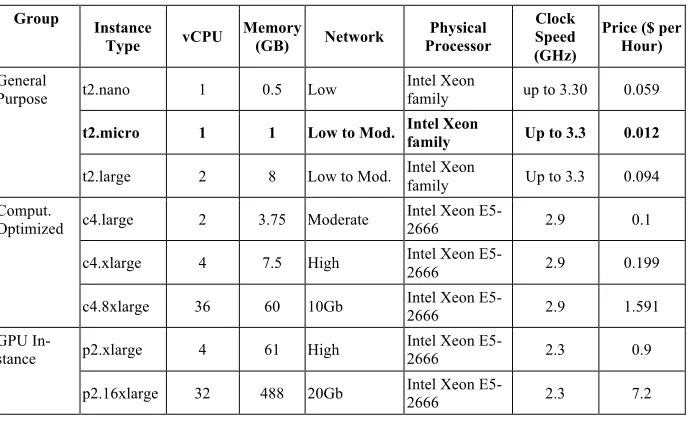
Amazon EC2 is a web services which provides resizable compute capability in the Amazon cloud. It provides a wide selection of instance types optimized to fit different use cases. Instance types comprise varying combinations of CPU, memory, storage, and networking capacity and give user the flexibility to choose the appropriate mix of resources for your applications. Each instance type includes one or more instance sizes, allowing user to scale the resources to the requirements of your target workload. The current configuration and price [10] of some typical instance types are listed in Table 1.
Table 1. Configuration and price of several typical instance types Group Instance
Type vCPU Memory (GB) Network Processor Physical
Clock Speed (GHz)
Price ($ per Hour) General
Purpose t2.nano 1 0.5 Low Intel Xeon family up to 3.30 0.059
t2.micro 1 1 Low to Mod. Intel Xeon family Up to 3.3 0.012
t2.large 2 8 Low to Mod. Intel Xeon family Up to 3.3 0.094
Comput.
Optimized c4.large 2 3.75 Moderate Intel Xeon E5-2666 2.9 0.1
c4.xlarge 4 7.5 High Intel Xeon E5-2666 2.9 0.199
c4.8xlarge 36 60 10Gb Intel Xeon E5-2666 2.9 1.591
GPU
In-stance p2.xlarge 4 61 High Intel Xeon E5-2666 2.3 0.9
p2.16xlarge 32 488 20Gb Intel Xeon E5-2666 2.3 7.2
2.2 Install StarCluster on Client PC
StarCluster is a utility for creating and managing general purpose computing clusters hosted on Amazon EC2. It minimizes the administrative overhead associ-ated with obtaining, configuring, and managing a traditional computing cluster used in research labs or for general distributed computing applications.
StarCluster is available through the Python Package Index (PyPI). There are three steps to install StarCluster on Linux operation systems (Ubuntu 14.04 as an example) described as following:
(1) Install newest setup tools
$ sudo apt-get install python-pip $ sudo pip install -U setuptools
(2) Install dependence packages
$ sudo apt-get install python-dev, libffi-dev, libssl-dev (3) Install StarCluster
$ sudo easy_install StarCluster
2.3 Build a free virtual cluster on Amazon EC2
“~/.starcluster/config”. It is made up of various sections, including three neces-sary sections [aws info], [keypair], and [cluster], as well as some optional sections [volume], [plugin], [permission] and so on.
There are 5 steps to build and configure a free tier virtual cluster on Amazon EC2.
Step 1: Configure the accounting information of Amazon by modifying the [aws info] section of configuration file.
[aws info]
aws_access_key_id=#your aws access id here
aws_secret_access_key=#your secret aws access key here aws_user_id=#your 12-digit aws user id here
Step 2: Create and configure key.
Create a key file by following shell command.
$ starcluster createkey mykey -o ~/.ssh/mykey.rsa
Input information of key by modifying the [key] section in configure file. [key mykey]
KEY_LOCATION=~/.ssh/mykey.rsa
Step 3: Configure EBS Volume and MPI plugin [volume mydata]
VOLUME_ID=vol-xxxxxx MOUNT_PATH=/home [plugin mpich2]
SETUP_CLASS=mycluster.mpich2.MPICH2Setup Step 4: Configure the Cluster information.
[cluster smallcluster] KEYNAME=mykey
CLUSTER_SIZE=8
MODE_INSTANCE_TYPE=t2.micro NODE_IMAGE_ID=ami-6b211202 VOLUMES=mydata
Step 5: Start the cluster.
$ starcluster start mycluster
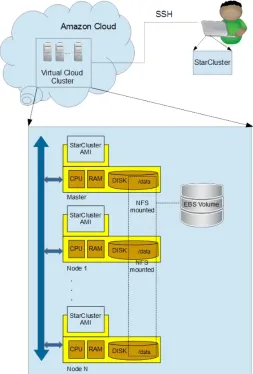
Fig. 1. Architecture of the virtual cluster on Amazon EC2
3
Evaluating the performance of free virtual cluster
3.1 Evaluation methodology
The performance metrics for the experiments are based on the critical require-ments of scientific applications. We need to evaluate not only the computed per-formance of the instance in case of running compute intensive applications, but also the performances of memory, network, I/O, which are also important factors on the performance of scientific computing.
Experimental testbed. We use free tier instance (t2.micro) to build a virtual cluster. The configuration of t2.micro instance is listed in Table 1. In order to compare the raw performance of t2.micro instance with commodity PC, we also test the raw performance of a comparing PC, whose configuration is Intel i7 6500u CPU, 8GB DDR III Memory, 250GB SSD hard disk.
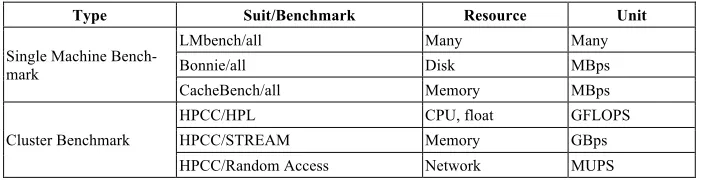
Benchmarks. It is important for us to use wide-spread benchmarking tools that have been used in the field of the scientific computing. Currently, there is no sin-gle accepted benchmark for scientific computing environments [11]. To deal with this problem, our method both uses traditional benchmarks comprising suites of jobs to be run in isolation and replays workload traces taken from real scientific computing scenario. We design two types of test workloads: Single instance benchmark and Cluster benchmark. These two types workloads all involve exe-cuting one or more from a list of four open-source benchmarks: LMbench [12], Bonnie [13], CacheBench [14], and the HPC Challenge Benchmark (HPCC) [15]. The characteristics of these benchmarks are summarized in Table 2.
Table 2. The benchmarks used for cloud performance evaluation
Type Suit/Benchmark Resource Unit
Single Machine Bench-mark
LMbench/all Many Many
Bonnie/all Disk MBps
CacheBench/all Memory MBps
Cluster Benchmark
HPCC/HPL CPU, float GFLOPS
HPCC/STREAM Memory GBps
HPCC/Random Access Network MUPS
3.2 Single-Machine Benchmarks
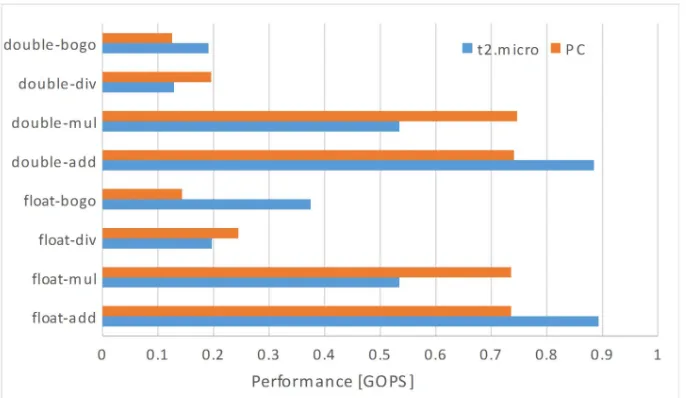
In this set of experiments we measure the raw performance of the CPU, I/O, and memory hierarchy of free tier instance and comparing PC using the Single Instance Benchmarks listed in Table 2.
Fig. 2. LMbench results of the performance of t2.micro instance and PC
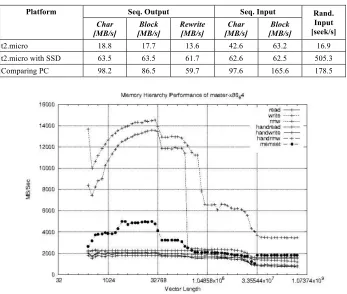
I/O performance. We assess the I/O performance of free tier instance with Bonnie benchmarks in two steps. The first step is to determine the smallest file size that invalidates the memory cached I/O, by running the Bonnie suite for elev-en file sizes from 1 MB to 2000MB. The result of the rewrite with sequelev-ential output benchmark, which involves sequences of readseek- write operations of data blocks that are dirtied before writing, is plotted in Figure 3. From Figure 3 we can see that a performance drop begins with the 50 MB test file and ends at 500 MB, which indicates a capacity of the memory-based disk cache of 1000MB (twice of 500 MB). Thus, the results obtained for the file sizes above 1000MB correspond to the real I/O performance of the system, while lower file sizes would be served by the system with a combination of memory and disk operations.
In the second step, we analyze the I/O performance obtained for file size above 1000MB, and summarize the results in Table 3. We also summarize the result of t2.micro with SSD volume and PC. The results show that the I/O performance of free tier instance is much lower than comparing PC. However, we could upgrade the HD volume to the SSD volume, which has the comparable I/O performance with comparing PC. The price for the SSD volume is \$0.1 per GB-month, which is affordable for most scientific researchers.
Fig. 3. Bennie rewrite benchmark result. The performance drop indicate the capacity of memory-based disk cache
Table 3. The I/O performance of Amazon EC2 free tier Instance (t2.micro), t2.micro with SSD and comparing PC
Platform Seq. Output Seq. Input Rand.
Input [seek/s]
Char
[MB/s] [MB/s] Block Rewrite [MB/s] [MB/s] Char [MB/s] Block
t2.micro 18.8 17.7 13.6 42.6 63.2 16.9
t2.micro with SSD 63.5 63.5 61.7 62.6 62.5 505.3
Comparing PC 98.2 86.5 59.7 97.6 165.6 178.5
3.3 Multi-Machine Benchmarks
HPL performance. The performance achieved for the HPL benchmark on the vir-tual clusters based on free tier instance is plotted in Figure 5. The cluster with one node is able to achieve the performance of 8.447 GFLOPS. For 16 nodes (instances), the performance of cluster achieve 94.37 GFLOPS, which is sufficient for most basic scientific computing.
Fig. 5. The HPL (LINPACK) performance of free (t2.micro-based) virtual clusters
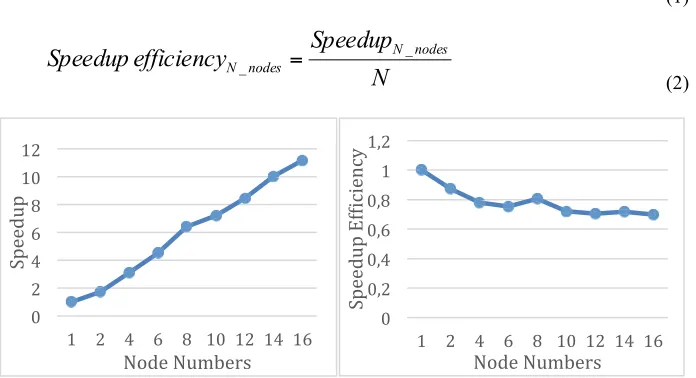
To investigate the scalability of the virtual cluster, we calculate the HPL perfor-mance speedup and speedup efficiency defined by equations (1)(2), and draw the result in the Figure 6.
node
one
of
e
performanc
HPL
nodes
N
of
e
performanc
HPL
speedup
N_nodes=
_
_
(1)
N
Speedup
efficiency
Speedup
N nodesnodes
N_
=
_(2)
Fig. 6. The speedup and speedup efficiency of HPL (LINPAK) performance of free (t2.micro-based) virtual clusters
#$ %$ &$ '$ ($ )#$ )%$
)$ %$ &$ '$ ($ )#$ )%$ )&$ )'$
*+,,-.+$ /0-,$/.12,34$ #$ #5%$ #5&$ #5'$ #5($ )$ )5%$
)$ %$ &$ '$ ($ )#$ )%$ )&$ )'$
*+,,-.+$6789:9,;:<$
From Figure 6 we can see that the speedup increases almost linear and the speedup efficiency is decrease slowly as the number of nodes growing. The speedup efficiency is as higher as the 69.8% for the 16 nodes (instance) virtual cluster. The results indi-cate that we can build a virtual cluster on Amazon EC2 with a perfect scalability. (2) HPCC performance
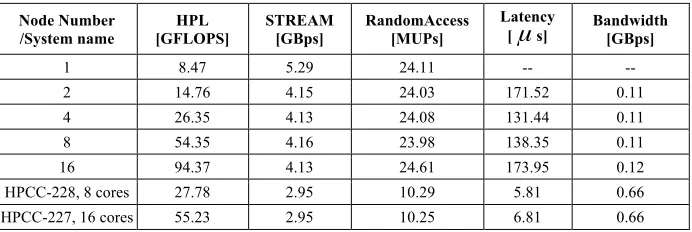
To obtain the performance of virtual cluster on Amazon EC2, we run the HPCC benchmarks on virtual cluster with different nodes. Table 4 summarizes the obtained results and results published by HPCC for similar size HPC clusters [11]. The per-formances for the HPL, STREAM, and RandomAccess of the free virtual cluster are better than the published HPCC result, which means the virtual cluster is suitable for the basic scientific computing which has the characteristics of heavy computing. However, due to the poor capacity of the network (listed in Table 1), the virtual clus-ter has much higher latency which has an important negative impact on some scien-tific computing exchanging data between different nodes frequently. For these heavy data transfer applications, scientific researcher could develop and test their prototype system of scientific computing on the free virtual cluster first, and move to a higher performance virtual cluster when necessary by choosing more powerful instance type listed in Table 1.
Table 4. The HPCC performance of free cluster on Amazon EC2 and other similar size plat-forms
Node Number
/System name [GFLOPS] HPL STREAM [GBps] RandomAccess [MUPs]
Latency
[
µ
s] Bandwidth [GBps]1 8.47 5.29 24.11 -- --
2 14.76 4.15 24.03 171.52 0.11
4 26.35 4.13 24.08 131.44 0.11
8 54.35 4.16 23.98 138.35 0.11
16 94.37 4.13 24.61 173.95 0.12
HPCC-228, 8 cores 27.78 2.95 10.29 5.81 0.66
HPCC-227, 16 cores 55.23 2.95 10.25 6.81 0.66
4
Conclusion
compu-ting at large, it still appeals the scientific researchers who need computation resources immediately and temporarily. The free virtual cluster built on Amazon EC2 is a suita-ble for the scientific researcher to develop and test their prototype system of scientific computing without paying anything. They can move to a higher performance virtual cluster when necessary by choosing more powerful instance type on Amazon EC2.
5
References
[1]Galante G, Bona L.C.E.D, Mury A.R. et al., (2016). “Utilizing Skype for providing learn-ing support for Indonesian distance learnlearn-ing students: An analysis of public clouds elastici-ty in the execution of scientific application: a survey”, Journal of Grid Computing, vol.14, no.2, pp.193-216. https://doi.org/10.1007/s10723-016-9361-3
[2]Sadooghi I, Martin J.H. Li T. et al., (2015). “Understanding the performance and potential of cloud computing for scientific applications”, IEEE Transactions on Cloud Computing, vol. PP, no. 99, pp.1-13.
[3]Coutinho E.F., Flavio R., Sousa C., et al., (2015). “Elasticity in cloud computing: a sur-vey”, Annals of Telecommunications, vol.70, no.7, pp.289-309. https://doi.org/10.1007/s1 2243-014-0450-7
[4]Gupta A., Kale L.V., Gioachin F., et al., (2013). “The who, what, why and how of high performance computing in the cloud”, 2013 IEEE 5th International Conference on Cloud Computing Technology and Science, 2-5 Dec. 2013, Bristol, UK. https://doi.org/10.1109/ CloudCom.2013.47
[5]Amazon EC2, https://aws.amazon.com/ec2/, (Jun. 30, 2017, last accessed).
[6]Yi S, Andrzejak A, and Kondo D, (2012). “Monetary Cost-Aware Checkpointing and Mi-gration on Amazon Cloud Spot Instances”, IEEE Trans. on Services, vol.5, no.4, pp.512-524. https://doi.org/10.1109/TSC.2011.44
[7]Hwang K, Bai X, Shi Y, et al., (2016). “Cloud performance modeling with benchmark evaluation of elastic scaling strategies”, IEEE Transactions on parallel and distributed sys-tems, vol.27, no.1, pp.130-143. https://doi.org/10.1109/TPDS.2015.2398438
[8]Iosup A, Ostermann S, Yigitbasi M N, (2011). “Performance Analysis of Cloud Compu-ting Services for Many-Tasks Scientific CompuCompu-ting”, IEEE Transactions on parallel and distributed systems, vol.22, no.6, pp.931-945. https://doi.org/10.1109/TPDS.2011.66 [9] http://star.mit.edu/cluster/, (Jun. 30, 2017, last accessed).
[10]https://aws.amazon.com/ec2/pricing/on-demand/, (Jun. 30, 2017, last accessed).
[11]Ostermann S, Iosup A, Yigitbasi N, et al., (2010). “A Performance analysis of EC2 Cloud Computing Service for Scientific Computing”, Lecture Notes of the Institute for Computer Science, Vol.34, pp115-131. https://doi.org/10.1007/978-3-642-12636-9_9
[12]McVoy L, Stelin C, “LMbench - tools for performance analysis”, http://www.bitmover.com/lmbench/, (Jun. 30, 2017, last accessed).
[13]Bray T, (Jun. 30, 2017, last accessed). “Bonnie”, http://www.textuality.com/bonnie/. [14] Mucci P J, London K S, (1998). “Low level architectural characterization benchmarks for
parallel computers”,Technical Report UT-CS-98-394, Tennessee.
6
Acknowledgments
This work is support by the National Science Foundation of China (No. 61273179, No. 61673006), and Science and Technology Research Project of Education Depart-ment of Hubei Province of China (No. D20131206, No. B2016034, No. 20141304).
7
Authors
Jie Xiong (corresponding author) received his Ph.D. Degree in geophysics and Information Technology from China University of Geosciences in 2012. He was a visiting professor at Department of Computer Science and Engineering, Mississippi State University, USA during 2016. He currently is a associate professor at School of Electrical Information, Yangtze University, China. His research interest inlude cloud computing, scientific visualization, and applied geophysical inversion theory.
Shen-Han Shi is a Master Degree Candidate in Electronics and Information at School of Electrical Information, Yangtze University, China. His research interest inlude cloud computing, scientific visualization, and Web application development.
Song Zhang received his M.S and Ph.D Degree in Computer Science from Brown University in 2000, 2006, respectively. He has been associate professor at Department of Computer Science and Engineering, Mississippi State University, USA. His re-search interests include scientific visualization, data analysis, medical imaging, and computer graphics.