Computer Laboratory Teaching Management System for
Improving Teaching and Learning
https://doi.org/10.3991/ijoe.v14i09.8535
Siham Gaber Farag Middle East College, Oman [email protected]
Abstract—Rapid advancements in technology in today’s world have been accompanied by the need for equipping classrooms with the best educational technology. The biggest challenge in incorporating technology into learning is allowing students to take advantage of learning technology while ensuring that the class is productive and well managed. The main objective of this paper is to study the effects of using a classroom management system in computer lab ses-sions for smooth technology integration and effective computer lab manage-ment. The practice was evaluated through comparative analysis of the student performance, survey results and feedback from teachers, students, and IT man-agement staff. Generally, the responses of participants were positive, more than 90% of them agreed that the system enhances the learning environment. The re-sults analysis showed that there is a noticeable increase in student performance.
Keywords—E learning, Collaborative Learning, Technology, Civil Engineer-ing
1
Introduction
1.1 Scope of The Problem
Managing a computer based classroom is not the same as managing a traditional classroom. The individual attention required by students involves walking from one student to another is demanding work and not quite effective. This normally results in the rest of students starting to lose interest, or staying indolent till the teacher finishes attending to other students. Also, computers bring with them unexpected technical problems that can divert students’ attention and focus from the topic being taught in the class. The teacher may need to share student work with other students. As a result, the teacher will lose a lot of valuable time moving from one student to another, and not all the students will receive the same attention from the instructor [7]. Thus, the need to use an application that can solve these problems is important. The application of CMS (classroom management system software) examined in this study enables teachers to educate, monitor, and communicate with the entire class from one central computer. CMS standardizes the lab management, and frees staff from heavy work pressure and improves the learning environment.
The main objective of this study is to explore the significance of using a classroom management system in a computer lab session at Middle East College, Sultanate of Oman to ensure smooth technology integration and effective computer lab manage-ment. This was conducted through a survey and feedback from both teachers, stu-dents, and IT management on the effectiveness of using a classroom management software in enhancing the learning environment and improving students’ perfor-mance. Moreover, a comparative analysis of students’ performance during the semes-ter was undertaken to assess the impact of implementing the CMS.
2
Literature Review
Previous studies have shown a positive relationship between engaged time, appro-priate academic activities, and high academic achievement, and well-structured class-rooms [3,4,7]. Kounin ,(1970, p. 63) defined effective classroom management as “producing a high rate of work involvement and a low rate of deviancy in academic settings” [15]. The computer lab management software was identified in different ways, it can be software like Fortres that shuts down the computer and only allows users access to limited software features. Recently, computer management software have been defined as programs used by a teacher in computer labs to keep student attention and enhance instructional delivery [3]. Monitor sharing is a distinctive fea-ture of lab management software that allows the teacher's computer monitor or anoth-er student's monitor to be shared with othanoth-er computanoth-ers in the lab [3].
Chong-qing City Management College,China. A Smart Laboratory Real-Time Management System (SLRTMS) was developed in the University of Teknologi, Malaysia. The system increases the efficiency of learning, management and student monitoring by using a client-server approach [11]. A survey on “thin client technology” for comput-er labs in educational environments wcomput-ere presented by to set out the advantages and disadvantages of this technology, and identified different educational scenarios where this technology could be a better choice[9].
There are many types of commercial software that can be adapted to educational institutions such as NetSupport School, SynchronEyes and NetOp School Software [5]. Generally, they share some common features that include; (1) having an ability to allow an instructor to lock a student’s computer during class time, (2) easy supervi-sion and interaction with their students individually, in groups, or with the entire class, (3) and sharing a particular computer screen with everyone in the lab. Moreo-ver, they can save time by launching applications and files at the same time on all classroom computers, taking attendance, monitoring student activities and improve-ment, testing students, and collecting feedback from them. Acer Classroom Manager (ACM) is another classroom management software that developed with the different needs of teachers, students and technical staff [3].
3
Methodology
To achieve the objective of the study, an interview were conducted before imple-menting the practice with three teachers through a semi- structured interview format. The list of topics discussed with the teachers include: the difficulties in teaching lab sessions, objectives of classroom management, and reasons for using CMS. Another interview with two of IT staff were conducted regarding the implementation of this system with the college server and how this system could help them in managing the lab through the CMS feature. Two workshops were conducted to explain to the teach-ers the use of the CMS in computer labs. The Classroom Management software was installed by IT Staff in the CAD Lab and implemented in three Lab sessions of two modules; Design and Visualization and Project Management. The decision to use NetSupport School software in the study was made by the IT department staff in the college. A total of 109 students who registered in the two modules in the spring 2017 semester were involved in this study. In these modules, students are familiarized with programs such as AutoCAD, Revit Structure, and MS Project. The study approach implemented comprises both qualitative, and quantitative approaches [1]. the quanti-tative method implies the use of two questionnaire surveys one was for the student sand the teachers. Second, comparative analysis of student performance in CW and final exam. The qualitative method include interview and feedback from teachers, students, and IT Staff.
3.1 Comparative analysis
The comparative analysis of the students’ performance in this study used a "be-tween-group quasi-experimental” design [14]. In the application part; the CMS was implemented in two lab sessions out of four in the Design and Visualization module and one lab session out of three in the Project Management module. The three Lab sessions that were chosen to implement the CMS was considered as “experimental group” while the others were considered as belonging to the “control group”. The number of students in control group was 56 while the total number in the experi-mental group was 53 students.
3.2 The Questionnaire Survey
A descriptive survey approach was adopted in this study. The survey targeted the experimental group students and teachers. The sample for this study included a total of 53 students and 20 teachers. The questionnaire survey for students consisted of five different categories that included: CMS for better management; the CMS for easier assistance from the teacher; enhanced concentration in the class; encouragement of classroom collaboration; and promotion of an enhanced learning environment. The questionnaire for teachers included: CMS facilitating teacher support, enhancing focus in the classroom, encouragement of class collaboration, enhancing learning environment, and finally ease of use. Responses to the questionnaire are made on a five-point scale that include strongly disagree, disagree, somewhat agree, agree, and strongly agree.
4
Result Analysis
4.1 Students Response
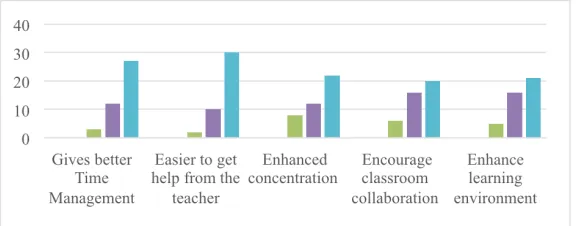
42 out of 53 students completed the feedback forms. Figure 1 shows the students’ response.
The results showed that 92 % agreed that the CMS gives better management of time during the class; 95 % agreed that it is easier to get help from the teacher with CMS, 80 % agreed that CMS helps them to focus on task and pay attention, 85 % agreed that it encourages classroom collaboration, and 88% agreed that it enhances the learning environment
4.2 Teachers Response
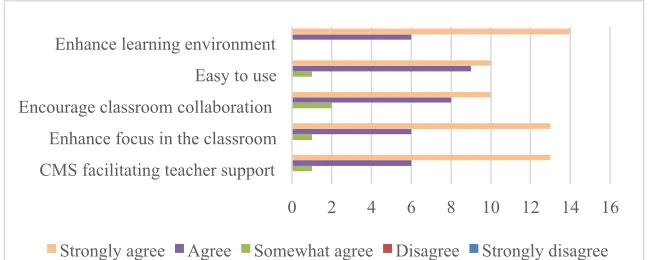
20 staff members completed the feedback during the workshops. Figure 2 shows the faculty response.
Fig. 2. The teachers’ response
The results shows that; 95 % agreed that the CMS empowers teachers with the ability to monitor student computers, 90 % agreed that it enables better time man-agement and easy classroom manman-agement, 90 % agreed that it helps the teacher to test student comprehension using on time survey, 95 % agreed that it helps the teacher to keep students on task, 90 % agreed that it encourages classroom collaboration, 95 % found that the software is easy to use, and 100% agreed that it enhances the learning environment.
4.3 Students’ Performance
The average marks for each module were computed and analyzed to determine stu-dents’ performance in each group. Design and visualization module is 100% course-work and the formative assessment includes 3 projects using AutoCAD and Revit structure. Project management module consist of two formative assessments; the internal assessment is 50% coursework and 50% external assessment final exam. The coursework included 25% lab reports and 25% project using MS project. The com-parative analysis of students’ marks was considered for the internal marks only (Lab reports and Project 50.00). Table 1 and 2 show the average marks for both control and experimental groups in Project Management and design and visualization respective-ly.
0 2 4 6 8 10 12 14 16
CMS facilitating teacher support Enhance focus in the classroom Encourage classroom collaboration Easy to use Enhance learning environment
Table 1. The average marks for both control and experimental groups in Project Management
Control Group Experimental Group
Session Average Marks (50) Session Average Marks (50)
Session-A 36.53
Session-B 41.41
Session-AA 35.81
Session-C 36.36
The experimental group obtained higher average marks (average=41.41, SD=1.82), while students from the control group scored lower average (M=37.03, SD=10.11).
Table 2. The average marks for both control and experimental groups in Design and Visuali-zation module
Control Group Experimental Group
Session Average Marks (50) Session Average Marks (50)
Session-C 65.07
Session-A 74.02
Session-B 78.27
Session-E 69.55
The experimental group obtained higher average marks (average=74.14, SD=13.08), while students from the control group scored lower average marks (M=65.07, SD=12.05).
4.4 Feedback Analysis
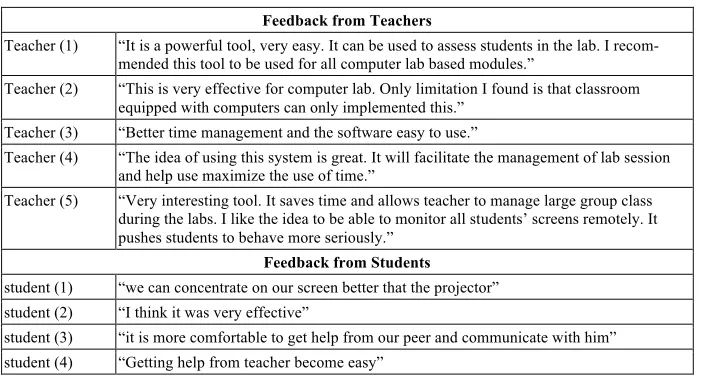
Feedback was collected through printed survey, online feedback using Padlet, and face to face interview. Table 3 show the responses feedback.
Table 3. The responses‘ feedback. Feedback from Teachers
Teacher (1) “It is a powerful tool, very easy. It can be used to assess students in the lab. I recom-mended this tool to be used for all computer lab based modules.”
Teacher (2) “This is very effective for computer lab. Only limitation I found is that classroom equipped with computers can only implemented this.”
Teacher (3) “Better time management and the software easy to use.”
Teacher (4) “The idea of using this system is great. It will facilitate the management of lab session and help use maximize the use of time.”
Teacher (5) “Very interesting tool. It saves time and allows teacher to manage large group class during the labs. I like the idea to be able to monitor all students’ screens remotely. It pushes students to behave more seriously.”
Feedback from Students
student (1) “we can concentrate on our screen better that the projector” student (2) “I think it was very effective”
student (5) “I can concentrate on my computer and follow the teacher” student (6) “I can see better from my screen”
Mentor Feedback
Mentor “Lab class started with the introduction of a software tool, called ‘Net Support’ for remote desktop control. Effective classroom management was done with this tool, Clear communication, Delivery met the student's requirements, considering the student atten-tion and interacatten-tion, 100% is ideal and rare case”.
IT Staff feedback
IT Staff It is easy to install software one time and solve any technical problem from our office without moving to the lab and interrupt the class”.
5
Discussion
Overall the evaluation of using the CMS tool confirms that it was effective in en-hancing the E-learning environment and improving students’ performance. More than 90% agreed that the CMS enhances the learning environment and enables teacher controlling, monitoring and communicate with entire class from one central computer.
The feedback from all the respondents showed appreciation of the practice and confirmed its effectiveness. Finally, students’ grades in the experimental group showed improvement compared to the control group. The results analysis showed that there is a noticeable increase in student’s performance by about 20% in the experi-mental group.
6
Conclusion
Overall the evaluation of using the CMS tool confirms that the system has the po-tential to improve the teaching delivery method. It enhances student engagement, increases teacher-to-student interaction and is effective for flip teaching. It helps the teacher to demonstrate, communicate with the students via chat sessions, and keep the students on-task. It is perfect in saving teachers’ time and reducing work load, allows group learning and collaboration, and promotes knowledge sharing. Also, students can communicate with the instructor without interrupting other students. It is recom-mended to expand computer lab management system to other disciplinary laboratories and establish combined management on all laboratories through IT management de-partment. Also it allow IT staff to install software and solve any particular problem without moving to the class and interrupt the educational process.
7
Acknowledgment
8
References
[1]Cohen, L., Manion, L., & Morrison, K. (2000) Research Methods in Education, 5 th ed. London: Routledge
[2]Deepak, N. & Surendrasingh, G. (2013). Innovation of Computer Technology and Its Im-pact for the Classroom Management International Journal of Research in Management & Technology 36, Volume II.
[3]Edwin D. G, Zianna. A. P. C, Juan. P.V. V, Gerome M. R, Coleen. S. C. S, Ryan R. G., Coleen. S.S & Ryan. R.G. (2017). Computer Laboratory Management with Mobile Appli-cation (CLMMA). International Journal of Advances in Electronics and Computer Sci-ence, ISSN: 2393-2835 Volume-4, Issue-1.
[4]Evertson, C. M. & Weinstein, C. S. (Eds.) (2006). Handbook of classroom management. Research, practice, and contemporary issues. Mahwah, NJ: Larence Erlbaum Associates, Inc issues (pp.17-43).
[5]Fryer, W. A (2001). School Computer Lab Management Software Available online at: http://www.wtvi.com/teks/exchange/ netop/default.htm.
[6]Guiyang, H. (2014). System design and realization based on open computer laboratory teaching management. Bio Technology. An Indian Journal. BTAIJ, 10(14), 2014 [7636-7642].
[7]Ian, Q. (2010). Class Management Systems Monitor Students. Monitors.education week digital dirction. Retrieved from https://www.edweek.org/dd/articles/2010/06/16/ 03monitors.h03.html
[8]Inner and C. Burak, !. (2014). Problems and Recommendations on Using a Restricted Computer Environment for Exams on Moodle. Journal of Educational and Instructional Studies in the World, V(4) Issue: 1 No: 01.
[9]Jes´us, M.M, Susana,M.H &David, P.R.( 2010). A Discussion of Thin Client Technology for Computer Labs. Proceedings of the Multi-Conference on Innovative Developments in ICT, pages 119-124.
[10]Jones, V.F. & Jones, L. S. (2012). Comprehensive classroom management, creating com-munities of support and solving problems (10th ed). Upper Saddle River, NJ: Pearson. [11]Maarof M. A. (2007).Optimization of Computer Labs Usage in Schools: A Case Study of
Smart-School. UPP final report VOT 71660 February 15th.
[12]Rehan,S.A & Mohammad,U. N. (2016). The Significance of Educational Technology in Teaching Learning Process.The International Journal of Indian Psychology ,V(4), Issue 1, No. 79.
[13]Waterfield, J. & West, B. (2008). Meeting the specific requirements of Blind and Partially Sighted Students studying in Higher Education. UK, University of Plymouth.
[14]Yamauchi, L G, (2008).Effects of multimedia instructional material on students' learning and their perceptions of the instruction. Retrospective Theses and Dissertations. 15324. http://lib.dr.iastate.edu/rtd/15324.
[15]Kounin, J. S. (1970). Discipline and Group Management in Classrooms. New York: Holt, Rinehart and Winston.
9
Author
Siham Gaber Farag is Senior Lecturer at the Civil Engineering Department, Mid-dle East College, Oman.