Implementation Basic Network Design with Netkit For
Evaluation of Network Learning
https://doi.org/10.3991/ijoe.v15i08.9795
Yuri Ariyanto (*), Budi Harijanto, Yan Watequlis S. State Polytechnic of Malang, East Java, Indonesia
Abstract—A virtual laboratory with a network emulator environment using NetKit is one of series of basic network laboratories on basic computer network competencies where students are given practical trial opportunities at low costs and little effort in their implementation. Teaching computer network subjects to be easily understood by students needs an instructional media as a tool in deliv-ering material. This media uses computer virtualization technology, i.e. creating a virtual laboratory, as a means of students in conducting experiments from the material that has been obtained. In virtual laboratories it is possible to imple-ment network topology designs based on actual network topologies. This im-plementation is used as a testing tool before the network topology is imple-mented on the actual network. Therefore, errors can be identified first without disturbing the system that is already running. For testing, the students are given training using a basic network design consisting of the implementation of rout-ing tests, firewalls, ftp server implementation and web server. This paper is aimed at describing ways to develop a virtual laboratory with a network emula-tor environment using NetKit. Moreover, several exercises on network topology implementation that are applied directly to the real world with NetKit are intro-duced, such as describing laboratory settings, describing the main parts of the lab, illustrating lab instructions, and reporting lab feeds.
Keywords—Virtual Laboratories, Learning Media, Computer Networks, Net-work Design, Netkit.
1
Introduction
In the era of the development of virtualization technology, network virtualization plays an important role in its use as a learning medium. In addition, network virtualization is effectively adopted in many other contexts where the function of the emulator is useful as a test before implementation, scenario evaluation, research trials. [1]
lightweight network design, implementation and testing targeted at actual implementation.
Moreover, in this study the writers make a network topology design that describes the basic competencies that students must possess after taking part in computer network learning. To get the results of this study, a trial is conducted to obtain an analysis of the design that has been implemented based on the existing scenario. It is expected from the results of this study that teachers and students can use virtual laboratories as learning media for computer networks. Besides, the students can get an overview of the basic competencies of computer networks that must be possessed after implementing virtual laboratories using Netkit.
2
Literature Review
2.1 Network emulator
A network emulator is software in its environment mimicking the functions and habits of the original network [1].
Network emulators are implemented as machine virtualization. The use of virtual-ization machines in the class of computer networks, is used to provide an experi-mental environment in network practicums. With this network emulator, it can be used as a solution in learning computer networks [2].
2.2 User mode linux (UML)
User Mode Linux (UML) is a Linux virtual machine running on Linux. Technical-ly, UML is a port connection from Linux to Linux. Linux has connected ports to many different processors, including X86, Sun's SPARC, IBM and Motorola's Pow-erPC, DEC's (Compaq and HP) Alpha and various other processors [3].
UML has been widely used for network system administrators, network system de-velopers and users. UML is different from other virtualization technologies because it is a Virtual Operating System (OS), but to call UML can be done virtually. UML technologies such as VMWare are truly virtual machines by copying physical forms, from the CPU to the device, even though the running OS on the physical plat-form also runs on the emulator platplat-form provided by VMWare. In VMWare any OS that runs on a platform can be booted under VMWare, otherwise UML can only be a guest OS on Linux [4].
2.3 Netkit
con-nected to form a network on one PC. The network equipment is virtual but has many original characteristics including the configuration interface [4-8].
2.4 Linux iptables
The Linux kernel’s network packet processing subsystem is called Netfilter, and iptables is the command used to configure it. Iptables is software firewall that is in-cluded with most Linux distributions by default [9-10].
The iptables architecture groups network packet processing rules into tables by function (packet filtering, network address translation, and other packet mangling), each of which have chains (sequences) of processing rules. The rules consist of matches (used to determine which packets the rule will apply to) and targets (that determine what will be done with the matching packets). Iptables operates at OSI Layer 3 (Network). For OSI Layer 2 (Link), there are other technologies such as ebta-bles (Ethernet Bridge Taebta-bles) [9,11].
3
System Design Virtual Laboratory
At this stage, the needs of computer hardware specifications used to design and implement virtual laboratories using Netkit will be explained. Hardware and software requirements are as follows:
• OS Debian 7, RAM 2 GB, Hardisk 320 GB, Processor Intel Dual Core
• Emulator Netkit (2.8.tar.bz2, Netkit filesystemi386-F.2.tar.bz2, Netkit-kernel-i386-K2.8.tar.bz2)
3.1 Network topology
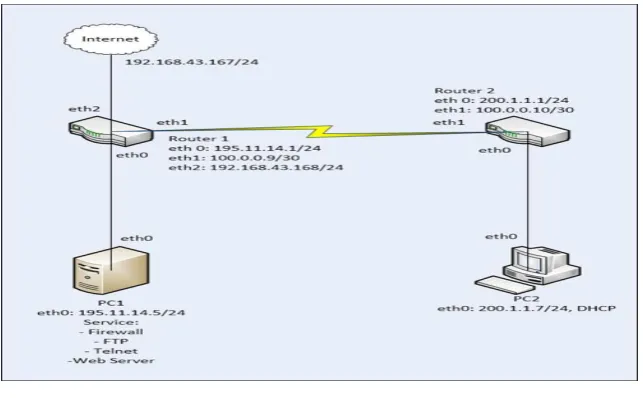
Fig. 1. Network Topology
The description of lab network topology at lab. linux server is shown in table 1.
Table 1. Design Details
No Computer Name Lan Card Ip Address
1 PC1 eth0 195.11.14.5/24
2 PC2 eth0 200.1.1.7/24
3 Router1 eth0 195.11.14.1/24
Router1 eth1 100.0.0.9/30
Router1 eth2 192.168.43.168/24
4 Router2 eth0 200.1.1.1/24
Router2 eth1 100.0.0.10/30
5 Internet eth0 192.168.43.167/24
4
Virtual Laboratory Scenario
At this stage, the lab is described. The virtual lab. linux server is created using netkit emulator. Virtual labs are implemented on a network basis with the network topology design in Fig. 1. The testing scenario of virtual laboratory implementation is shown in the following stages.
4.1 Create a file lab.conf
Fig. 2. lab.conf
In lab.conf to connect connections between NIC every computer is virtually used collosion domain. Collosion domains are symbols that connect virtually between NICs on a Netkit emulator. Implementation of the virtual lab. linux server consists of a virtual machine as a linux computer with scenario pc1, pc2 , r1 and r2.
4.2 Configure virtual machine (VM) in lab.conf
At this stage, the writers configure the .startup file on Netkit. This file is required for the configuration and service to run when the virtual machine is started.
• Configuring VM pc1
Create a pc1.startup file is shown in Fig. 3.
Fig. 3. A screenshot of pcl.startup
File and configuration for virtual machine are shown in Fig. 3, with ip address eth0 195.11.14.5/24 and route add ip gateway 195.11.14.1 with device eth0 therefore the pc1 virtual machine can be connected to the router r1 virtual machine.
• Configuring VM pc2
Create a pc2.startup file is shown in Fig. 4.
File and configuration for virtual machine are shown in Fig. 4, with ip address eth0 200.1.1.7/24 and route add ip gateway 200.1.1.1 with device eth0 therefore the pc2 virtual machine can be connected to the router r2 virtual machine.
• Configuring VM r1.startup
Create a r1.startup file is shown in Fig. 5.
Fig. 5. A screenshot of r1.startup
File and configurations for router virtual machine r1 are shown in Fig. 5, with ip address eth0 195.11.14.1/24, eth1 100.0.0.9/30 and route add network ip address 200.1.1.0/24 default gateway 100.0.10 with device eth1, so that r1 can connect to r2. Adds the command iptables -t nat -A Postrouting -o eth2 -j MASQUERADE, so eth2 devices can run and connect to the internet. Then the route command adds the stand-ard gateway 192.168.43.1 with eth2 devices so that r1 can connect to the internet that passes through eth2 device.
• Configuring VM r2.startup
Create a r1.startup file is shown in Fig. 6.
Fig. 6. A screenshot of r2.startup
File and configurations for router virtual machine r2 are shown in Fig. 6, with ip address eth0 200.1.1.1/24, eth1 100.0.0.10/30 and route add network ip address 195.11.14.0/24 default gateway 100.0.0.9 with device eth1, so that r2 can connected to r1.
5
Virtual Laboratory Implementation
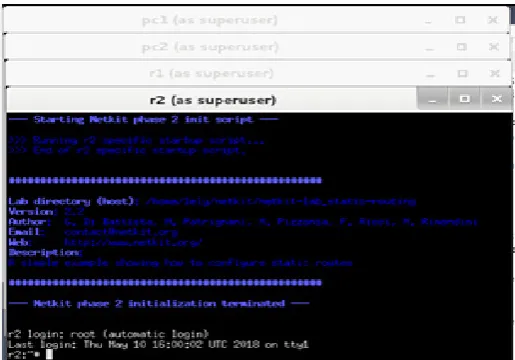
Fig. 7. Virtual Lab.Linux Server in Netkit Emulator
The results of virtual lab implementation are described as follows. Lab. Linux server is shown in Fig. 7. In the lab virtual machine ip address is configured.
Configuration checks that run on the virtual pc1.startup laboratory are shown in Fig. 8.
Fig. 8. Running Configuration pc1.startup
Fig. 9. Running Configuration pc2.startup
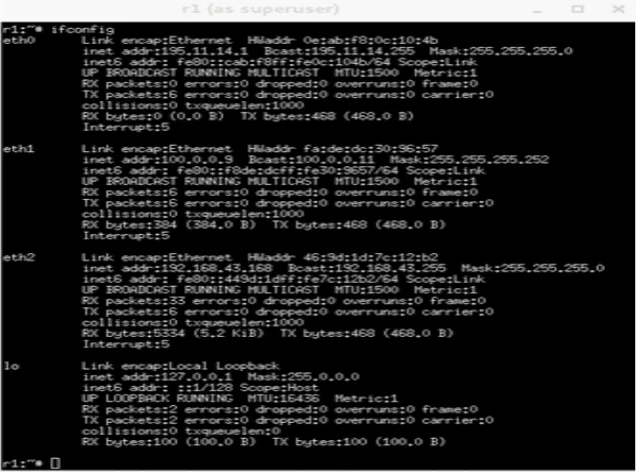
Configuration checks that run on virtual labs r1.startup are shown in Fig.10
Fig. 10.Running Configuration r1.startup
Fig. 11.Running Configuration r2.startup
6
Testing and Analysis Virtual Laboratory Linux Server
6.1 Testing virtual laboratory linux server
At this stage the virtual lab is tested where Linux server is run for FTP server, Telnet, web server, dhcp.
FTP server: To run the ftp server on pc1 and pc2, the command is executed to
activate the ftp service, with the command #/etc/init.d/proftpd restart.
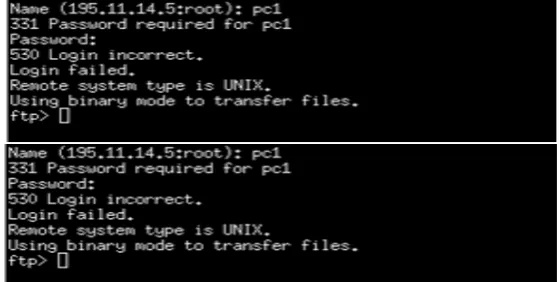
FTP service testing is done by testing from PC2 to PC1 to start exchanging files. The test results are shown in Fig. 12, shown that the FTP connection is successful.
Telnet server: To run the telnet remote server on pc1 and pc2, the command is executed to activate the telnet service, with the command #/etc/init.d/openbsd-inetd restart.
Remote telnet service testing is done by testing from PC2 to PC1 to start remote computer. Test results and telnet remote commands are shown in Fig. 13.
Fig. 13.Pc2 successfully remote Pc1
Web server: To run a web server on PC1, the command is executed to activate the web service server, with the command # /etc /init.d /apache2 restart.
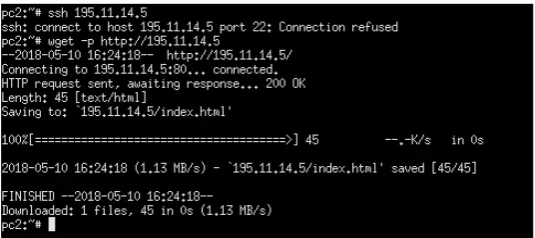
Web server testing is done by testing from pc2 to pc1 with the wget command to download the web page. The test results are shown in Fig. 14.
Fig. 14.Web access command use wget
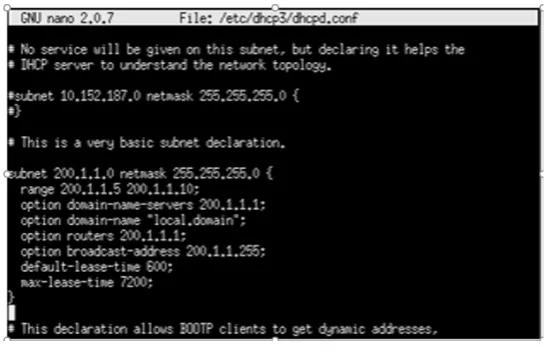
Fig. 15.Configure dhcp.conf
The next step, r2 does the domain setting in the resolv.conf file. To change the file, the nano command in /etc/resolv.conf which will be used to manage domains and nameservers on the DHCP Server is used. The configuration is shown in Fig. 16.
Fig. 16.Configure resolv.conf
Fig. 17.Configuration Ip DHCP on Pc2.
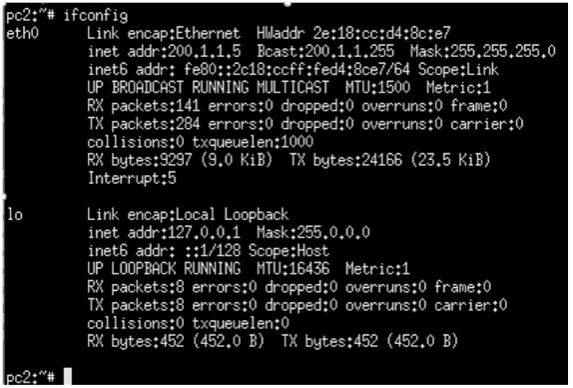
The next step is to restart the network service on pc2 with command #etc / init.d / networking restart. The last step is checking ip on pc2 from dhcp server r2, as shown in Fig.18.
Fig. 18.Ipconfig Pc2
6.2 Analysis virtual lab. linux server
Analysis of virtual machine experiment in virtual Lab. Linux Server in table 2.
Table 2. Analysis of Linux Server Service Testing
No VM1 Client VM2 Server Service Server Status
1 pc2 pc1 ftp Running
2 pc2 pc1 telnet Running
3 pc2 pc1 web Running
4 pc2 r2 dhcp Running
7
Conclusion
8
References
[1]Maurizio Pizzonia1 and Massimo Rimondini.Netkit: network emulation for education. SOFTWARE—PRACTICE AND EXPERIENCE Softw. Pract. Exper. 0000; 00:1–34 Pub-lished online in Wiley InterScience (www.interscience.wiley.com). https://doi.org/10.1002/spe.2273
[2]Paulo H. M. Gurgela*, Luiz H. C. Brancob, Ellen F. Barbosaa,Kalinka R. L. J. C. Brancoa. Development of a practical computer network course through Netkit virtualization tool. 2013 International Conference on Computational Science. Procedia Computer Science 18 ( 2013 ) 2583 – 2586. Publisher: Available online at www.sciencedirect.com. https://doi.org/10.1016/j.procs.2013.05.445
[3] Dike, Jeff. User Mode Linux. Prentice Hall, Apr 2006.
[4]University of Roma Tre Computer Networks Research Group. Netkit. http://www.netkit.org. accessed on 2 April 2018.
[5]Fermin Galan, David Fernandez, Javier Ruiz, Omar Walid, and Tomas de Miguel. Use of Virtualization Tools in Computer Network Laboratories. In Proc. 5th International Confer-ence on Information Technology Based Higher Education and Training (ITHET 2004), pages 209{214, Jun 2004. https://doi.org/10.1109/ithet.2004.1358165
[6]Maurizio Pizzonia, Massimo Rimondini. Easy Emulation of Complex Networks on Inex-pensive Hardware. Proc. 4th International Conference on Testbeds and Research Infra-structures for the Development of Networks & Communities (TRIDENTCOM 2008), Innsbruck, Mar 2008. https://doi.org/10.4108/tridentcom.2008.3155
[7]Massimo Rimondini. Emulation of Computer Networks with Netkit. Technical Report RT-DIA-113-2007, Roma Tre University, Jan 2007.
[8]Hung Nguyen, Matthew Roughan, Simon Knight, Nick Falkner, Olaf Maennel, Randy Bush. How to Build Complex, Large-Scale Emulated Networks. Proc. 6th International Conference on Testbeds and Research Infrastructures for the Development of Networks & Communities (TRIDENTCOM 2010), Berlin, May 2010. https://doi.org/10.1007/978-3-642-17851-1_1
[9]Gregor N. Purdy. Linux Iptables Pocket Refences. O’Reilly.www.oreilly.com.2004. [10]Qing-Xiu Wu. The Research and Application of Firewall based on Netfilter. 2012
Interna-tional Conference on Solid State Devices and Materials Science. Procedia Computer Sci-ence 18 (2013) 2583 – 2586. Publisher: Available online at www.sciSci-encedirect.com. [11]Larry Peterson, Bruce Davie. Computer networks - A systems approach, 3rd
Edi-tion.Morgan Kauffman, 2004.
9
Authors
Yuri Ariyanto, State Polytechnic of Malang, Indonesia. Interst in research is net-work technology, cloud computing, security system and information technology.
Budi Harijanto, State Polytechnic of Malang, Indonesia. Interst in research is in-formation systems.
Yan Watequlis S, State Polytechnic of Malang, Indonesia. Interst in research is in-formation systems.