STRATAGY 4/6/24 INSTALLATION AND MAINTENANCE MANUAL SEPTEMBER 1994
INSTALLATION
AND MAINTENANCE
MANUAL
SECTION 1 - GENERAL DESCRIPTION
SECTION 2 - INSTALLATION
Chapter 1 _ _ _ _ _ _ _ _ _ _ _ _ _ _ _ _ _ _ _ Chapter 2 _ _ _ _ _ _ _ _ _ _ _ _ _ _ _ _ _ _ _ Chapter 3 _ _ _ _ _ _ _ _ _ _ _ _ _ _ _ _ _ _ _ Chapter 4 _ _ _ _ _ _ _ _ _ _ _ _ _ _ _ _ _ _ _ Chapter 5 _ _ _ _ _ _ _ _ _ _ _ _ _ _ _ _ _ _ _ Appendix A _ _ _ _ - - - _ _ - - - - _
SECTION 3 - PROGRAMMING
Chapter 1 _ _ _ _ _ _ _ _ _ _ - _ _ _ _ _ _ _ _ Chapter 2 _ _ _ _ _ _ _ _ _ _ _ _ _ _ _ _ _ _ _ Chapter 3 _ _ _ _ _ _ _ _ _ _ _ _ _ _ _ _ _ _ _ Chapter 4 _ _ _ _ _ _ _ _ _ _ _ _ _ _ _ _ _ _ _ Chapter 5 _ _ _ _ _ _ _ _ _ _ _ _ _ _ _ _ _ _ _ Chapter 6 _ _ _ _ _ _ _ _ _ _ _ _ _ _ _ _ _ _ _ Chapter 7 _ _ _ _ _ _ _ _ _ _ _ _ _ _ _ _ _ _ _ Chapter 8 _ _ _ _ _ _ _ _ _ _ _ _ _ _ _ _ _ _ _ Chapter 9 _ _ _ _ _ _ _ _ _ _ - _ _ _ _ - _ _ _ Appendix A _ _ _ _ - - - - Appendix B _ _ _ _ - - - -
SECTION 4 -FAULT FINDING
CHAPTER 1 - Fault Finding
Introduction
Before You Install Installing the Hardware Accessing Stratagy
Configuring and Backing Up Stratagy Checklists and Forms
Introduction
How Stratagy Operates Accessing and Using Stratagy Customizing User ID Mailboxes Special Greeting User ID Mailboxes Token Programming Language Generating Reports
Backup and Filecopy
System Administrator’s User ID Customization Forms
Customization Examples
SECTION 5 -MAINTENANCE AND UPGRADES
Chapter 1 _ _ _ _ _ _ - _ _ _ - - - - _ - - - - Maintaining the System Chapter 2 _ _ _ _ _ _ _ _ _ _ _ _ _ _ _ _ _ _ _ Upgrading the System
SECTION 6 - OPERATING PROCEDURES
VOICE PROCESSING SYSTEMS
GENERAL DESCRIPTION
I AtoZ
KELLATRONICS,
INC,
0 COPYRIGHT 1994 TOSHIBA AMERICA INFORMATION SYSTEMS, INC.
All rights reserved. No pat-t of this manual, covered by the copyrights hereon, may be reproduced in any form or by any means-graphic, electronic, or mechanical, including recording, taping, photocopying, or information
STRATAGY 4/6/24 AUGUST 1994
TOSHIBA SYSTEM PRACTICES
STRATACY 4,6,
and
24
GENERAL END USER INFORMATION
The STRATAGY Voice Processing Systems are registered in
accordance with the provisions of Part 68 of the Federal
Communications Commission’s Rules and Regulations.
FCC REQUIREMENTS
Means of Connection: The Federal Communications
Commission (FCC) has established rules which permit
STRATAGY systems to be connected directly to the
telephone network. Connection points are provided by the
telephone company-connections for this type of
customer-provided equipment will not be provided on coin
lines. Connections to party lines are subject to state
tariffs.
Incidence of Harm: If the system is malfunctioning, it may
also be disrupting the telephone network. The system
should be disconnected until the problem can be
determined and repaired. If this is not done, the telephone
company may temporarily disconnect service. If possible,
they will notify you in advance, but, if advance notice is not practical, you will be notified as soon as possible. You will be informed of your right to file a complaint with the FCC.
Service or Repair: For service or repair, contact your local
Toshiba telecommunications distributor. To obtain the
nearest Toshiba telecommunications distributor in your
area, call Toshiba America Information Systems, Inc.,
Telecommunication Systems Division in Irvine, CA (714)
583-3700.
Telephone Network Compatibility: The telephone company
may make changes in its facilities, equipment, operations, and procedures. If such changes affect the compatibility
or use of the STRATAGY system, the telephone company
will notify you in advance to give you an opportunity to
. maintain uninterrupted service.
Notification of Telephone Company: Before connecting a
STRATAGY system to the telephone network, the
telephone company may request the following:
1. Your telephone number. 2. FCC registration number:
1 A92PJ-10975-VM-E
VOICE PROCESSING SYSTEMS
3. Ringer equivalence number: 0.6B. The ringer equivalence number (REN) is useful to determine the quantity of
devices which you may connect to your telephone line
and still have all of those devices ring when your number is called. In most areas, but not all, the sum of the RENs of all devices connected to one line should not exceed five (5.08). To be certain of the number of devices you may connect to your line, as determined by the REN, you should contact your local telephone company to ascertain the maximum REN for your calling area.
4. Network connection information USOC jack required:
RJ14C.
RADIO FREQUENCY INTERFERENCE
Warning: This equipment generates, uses, and can radiate
radio frequency energy and if not installed and used in
accordance with the manufacturer’s instruction manual, may
cause interference to radio communications. It has been tested and found to comply with the limits for a Class A computing
device pursuant to Subpart J of Part 15 of FCC Rules, which
are designed to provide reasonable protection against such
interference when operated in a commercial environment.
Operation of this equipment in a residential area is likely to
cause interference, in which case, the user, at his own
expense, will be required to take whatever measures may be
required to correct the interference.
This system is listed with Underwriters Laboratory.
LISTED
TABLE
OF CONTENTS
CHAPTER 1 PAGE
SYSTEM OVERVIEW . . . l-l General . . . ... l-1 System Capacities . . . l-l System Technology . . . l-l
CHAPTER 2
SYSTEM ARCHITECTURE.. ... 2-l Hardware ... 2-l Internal Components ... 2-l Software.. ... 2-l Call Processing Control ... 2-2 Administrative Menus ... 2-2
CHAPTER 3
SYSTEM DEFINITIONS AND APPLICATIONS ... 3-l System Definitions.. ... .:. 3-l Basic Applications.. ... 3-l Advanced Applications ... 3-2
CHAPTER 4
FEATURES.. ... 4-1 Overview.. ... 4-l System Features.. ... 4-l Administration Features.. ... 4-5 User Features ... 4-8
CHAPTER 5
SYSTEM SPECIFICATIONS . . . 5-1 Stratagy 4 . . . .. 5-l Stratagy 6 . . . .. 5-1 Stratagy 24 . . . 5-1
FIGURE
LIST
FIGURE TITLE PAGE
l-l Stratagy Applications.. ... l-2 2-l Stratagy 4 and Stratagy 6 System.. ... 2-3 2-2 Stratagy 24 System ... 2-4
TABLE
TABLE 4-l
LIST
,
TITLE PAGE
List of Features... . . . .. 4-12
STRATAGY 4/6/24 AUGUST 1994
CHAPTER
1
SYSTEM OVERVIEW
GENERAL
The Stratagy system is a multi-application voice processing system, which is tailor-made for small- to large-sized businesses. It has been designed to be flexible and easy to use, while offering a full range of features. (Refer to Figure l-1 .)
The Stratagy system easily integrates with most telephone systems, providing call coverage and routing for your entire organization. Stratagy also provides enhanced integration with Toshiba telephone systems. Chapter 4 includes general information on all Stratagy features and integration capabilities with telephone systems.
Stratagy provides basic applications such as Automated Attendant to answer incoming calls, Call Routing to direct calls, Telephone Answering to take messages when an individual is unavailable or busy, and Voice Messaging to create, send, receive, forward, and save voice messages.
Additionally, Stratagy’s Token Programming Language provides the flexibility to design custom individual
features and custom applications such as Fax
Integration, Interactive Voice Response, and more. Stratagy is a turn-key voice processing system that runs on a personal computer (PC) based platform. All service, including installation and maintenance, is performed by an authorized Toshiba dealer.
SYSTEM CAPACITIES
Stratagy can be configured in various ways using three different platforms. The Stratagy 4 and Stratagy 6 are designed for small- to medium-sized businesses, and the Stratagy 24 is designed for larger businesses.
STRATAGY 4
The Stratagy 4 can be configured with 2 or 4 ports, with six hours of message capacity. It consists of a 486 computer with 2MB of RAM. The Stratagy 4 integrates with the Strata DK8 and DK16 telephone systems only. It does not have a monitor or keyboard; it requires a lap-top computer for local and remote access. An optional external 2400 baud modem is available for remote
maintenance.
STRATAGY 6
The Stratagy 6, can be configured with 2,-4 or 6 ports, with six hours of message capacity. It consists of a 486 computer with 2MB of RAM. The Stratagy 6 integrates with most telephone systems. It does not have a monitor or keyboard; it requires a lap-top computer for local and remote access. An optional external 2400 baud modem is available for remote maintenance.
STRATACY 24
The Stratagy 24, can be configured up to 24 ports, with a storage capacity of 6, 20 or 33 hours. It consists of a 486 computer with 4MB of RAM. The Stratagy 24 integrates with most telephone systems. It comes with a monitor and keyboard for local access. An optional external 2400 baud modem is available for remote maintenance, which also requires a lap-top computer. It has full fax capabilities
SYSTEM TECHNOLOGY
The Stratagy system uses the following technology: PC-based Architecture: The Stratagy system uses standard PC-based architecture to form the basis of its design. It uses a half and full length slot, PC bus form factor motherboard. From two to four MB of RAM are included, depending upon the configuration. DOS, Stratagy’s operating system, and the Stratagy customer’s configuration information, greetings and messages (database) are’stored on an internal hard drive.
Microprocessor: A 486SX, 25 MHz CPU is the
microprocessor for all Stratagy systems.
Voice Board: Stratagy uses a PC-based voice board to convert, compress and store analog voice signals on the internal hard disk drive.
POWER REQUIREMENTS
The Stratagy system has an input power source which can be switched to 110 VAC or 220 VAC at 50-60 Hz.
MAINTENANCE
Stratagy systems are easy to maintain by an authorized Toshiba dealer. Additionally, procedures for backing up, restoring and maintaining the system software and/or database are efficient and easy to perform.
TELEPHONE ANSWERING
CALL SCREENING
SINGLE DIGIT MENUS
----
_
_---
/-
,..--
s
REPORTSAUTO-ATTENDANT VOICE CALL
MESSAGING ROUTING
INTERACTIVE
VOICE RESPONSE (IVR)
CENTREX INTEGRATION
TELEPHONE SYSTEM
INTEGRATION
FACSIMILE
STRATA DK8 & DK16 STRATA DK280 PAGING MAINTENANCE REMOTE
TOSHIBA PLUG AND PLAY
Figure l-1
Stratagy Applications
SUPPORTING DOCUMENTATION includes System Administration forms and instructions to
You can find additional detailed information about configure the system.
Stratagy in the following manuals: Stratagy User Guide- Provides the procedures
Feature Description Manual-Describes in detail each necessary to operate the Stratagy System.
feature of the Stratagy System. Quick Reference Guide-Provjdes a quick reference of
Installation and Maintenance Manual-Provides frequently-used features.
installation requirements and documents installation and maintenance procedures for the Stratagy system. Also
STRATAGY 4/6/24 AUGUST 1994
CHAPTER
2
SYSTEM ARCHITECTURE
This sections describes the main components of the Stratagy System. It provides general descriptions of the following:
n System Hardware n System Software
n Call Processing Software n System Administration
,
HARDWARE
The hardware for the Stratagy system varies depending upon the configuration. All telephone system connectors and wiring are customer-supplied.
STRATAGY 4
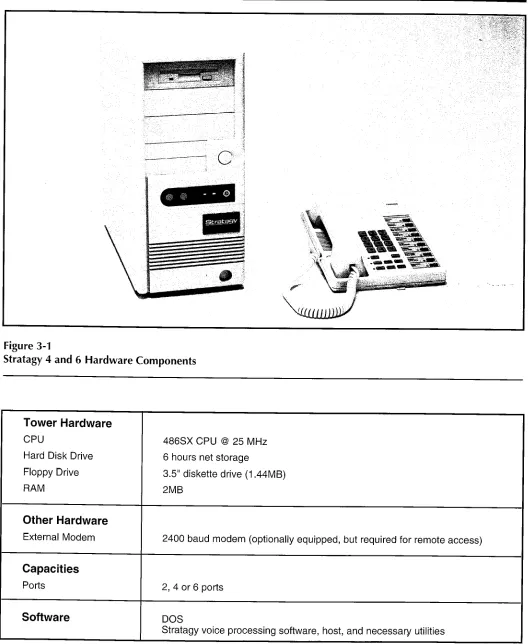
Hardware: The Stratagy 4 consists of a standard DOS- compatible 486 PC housed in a mini tower. The PC comes equipped with 2 MB of RAM, a 3.5” disk drive, and a hard disk drive, allowing up to 6 hours of message storage. It supports 2 or 4 ports that connect to the telephone system. There is no keyboard or monitor. An optional 2400 baud external modem is available for remote operation. Because it uses the same hardware, the Stratagy 4 can be easily upgraded to a Stratagy 6.
Refer to Figure 2-1 for an illustration of the Stratagy 4 system.
STRATAGY 6
Hardware: The Stratagy 6 consists of a standard DOS- compatible 486 PC housed in a mini tower. The PC comes equipped with 2 MB of RAM, a 3.5” disk drive, and a hard disk drive, allowing 6 hours of message storage. It supports 2, 4, or 6 ports that connect to the telephone system. There is no keyboard or monitor. An optional 2400 baud external modem is available for remote operation.
Refer to Figure 2-1 for an illustration of the Stratagy 6 system.
STRATAGY 24
Hardware: The Stratagy 24 consists of a standard DOS-
compatible desktop 486 PC. The PC comes
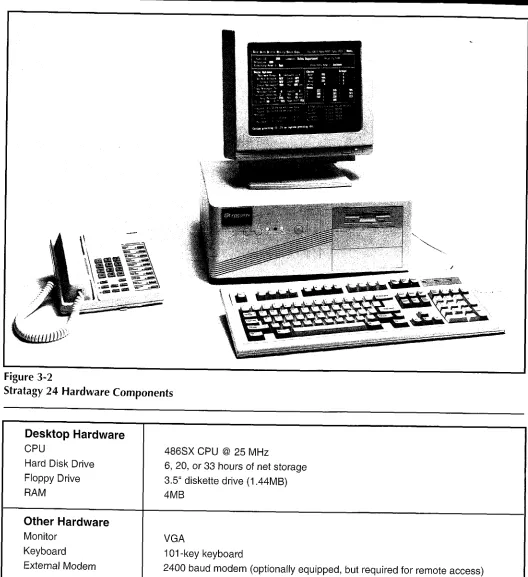
equipped with 4 MB of RAM, a 3.5” disk drive, a choice of 3 different hard disk drives allowing 6, 20 or 33 hours of storage, and expansion slots for up to 24 ports that connect to the telephone system. An optional 2400 baud external modem is available for remote operation.
Monitor and Keyboard: The Stratagy 24 comes
equipped with a monochrome monitor used to
display Stratagy systems data. The accompanying keyboard allows the System Administrator to input commands and other information into the Stratagy system.
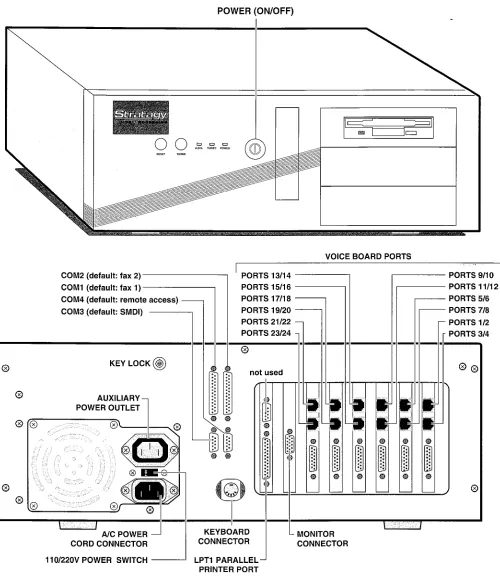
Refer to Figure 2-2 for an illustration of the Stratagy 24 system.
INTERNAL COMPONENTS
The following provides a brief description of Stratagy’s internal components.
MotherBoard: A 486SX, 25 MHz motherboard is
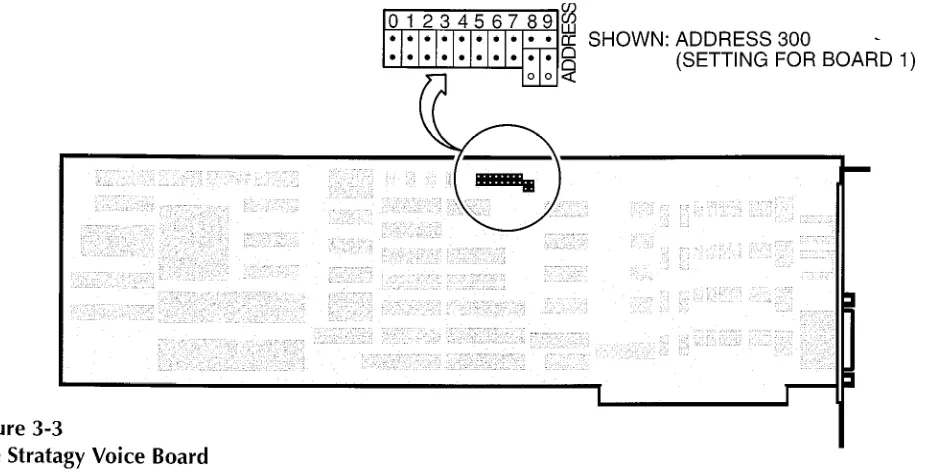
standard in all configurations of the Stratagy system. Voice board: A voice board is used to convert, compress
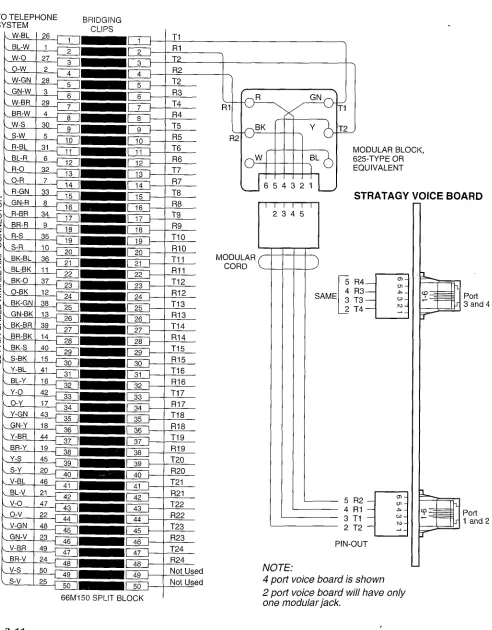
and store analog voice signals on the internal hard drive. The telephone system must be physically connected to each voice board using the boards RJ- 14 type connectors. A voice board has one or two connectors, and each connector supports two ports. Power Supply: The power supply is a standard PC type
power supply, requiring a 110 VAC or 220 VAC input. Hard Disk Drive: The Stratagy 4 and Stratagy 6 come
equipped with a 6 hour hard disk drive. The Stratagy 24 is equipped with either a 6, 20, or 33 hour hard disk drive.
Floppy Disk Drive: The Stratagy system is equipped with a 3.5” floppy disk drive.
SOFTWARE
The Stratagy system’s flexibility is largely a result of its software. The following provides a brief overview of the Stratagy system software.
Operating System: Controls all real-time voice processing functions through the use of simple administrative menus as well as diagnostics, system activity, and collection and reporting of data.
Installation Program: Used to create the database for telephone system and specific customer information.
It is used when installing a new Stratagy system. A SETUP Utility is also used during the installation process for system configuration. Routine additions, changes, and deletions of information are done through this program. Refer to the Stratagy Installation and Il/laintenance A&nua/ for more detail.
I
Diagnostic Programs: On-line diagnostic tests run continuously to detect and report any errors in operation. The tests run in the background and don’t interfere with normal system operation. Other
diagnostic tests may be run upon demand, either from a directly-connected or remote terminal. Refer to the Stratagy Installation and Maintenance Manual for more detail.
CALL PROCESSING CONTROL
Call processing in Stratagy involves mailboxes (User IDS), a Token Programming Language, and a series of administrative menus.
MAILBOXES
Mailboxes, also called User IDS, are an important part of the Stratagy system. Mailboxes, which are set up by the System Administrator, determine what a caller hears and call processing of Stratagy. For example, the initial company greeting is defined by a mailbox. What a caller hears is simply what you have recorded as the greeting for this mailbox.
All of Stratagy’s mailboxes are uniquely numbered from 0 - 99,999,999. When a caller enters an extension, the Stratagy system always accesses the same mailbox. Thus, you cannot have two mailboxes with the same number.
Mailboxes can be set up to fall into one of three general categories:
User Mailbox - A typical mailbox is configured to record messages from callers. A user periodically checks the mailbox for messages, or a variety of automatic
notification methods may be employed. There is
generally one user for each mailbox, although several mailboxes may share a single extension when the users share a single phone line.
Information Mailbox - An information mailbox is one which does not accept messages from callers. Instead, its greeting is played to callers to provide them with information such as the company’s hours of business, its location, etc. No real user or phone extension corresponds to this type of mailbox.
Control Mailbox - This type of mailbox allows the Stratagy to provide control over the flow of a call. Typically, it interacts with the caller in some way, then directs the call to one or more additional mailboxes for processing using the Token Programming Language.
TOKEN PROGRAMMING LANGUAGE
Stratagy’s Token Programming Language allows
expansion of the standard capabilities of the Stratagy System by using a series of tokens that tell the system what actions to perform. Using this token language allows Stratagy to perform the advanced applications described in Chapter 3 of this General Description, and more.
Tokens are used as field values in the administrative menus. To program these fields, the installer or the System Administrator enters a series of Programming Language tokens which instruct Stratagy what actions to perform.
ADMINISTRATIVE
MENUS
A series of Stratagy menus allow an installer or the System Administrator to customize system configuration options and individual User IDS. These menus, along with the call processing control structures discussed above, are what provide voice processing capabilities for telephone users and multiple application solutions for customers. Refer to the Stratagy installation and Maintenance Manual for more detail on Administrative Menus.
STRATAGY 4/6/24 AUGUST 1994
Figure 2-1
Stratagy 4 and Stratagy 6 System
,
,
Figure 2-2
Stratagy 24 System
L . .
/
STRATAGY 4/6/24 AUGUST 1994
CHAPTER
3
SYSTEM DEFINITIONS
AND
APPLICATIONS
,
This chapter contains a list of terms that are commonly used when discussing the Stratagy system. The second part of the chapter describes some basic and advanced applications which can be created using Stratagy. Chapter 4 includes a brief description of all Stratagy features. Refer to the Strategy Feature Description AYanualfor feature details.
SYSTEM DEFINITIONS
PBIUPhone System - The Stratagy system integrates with most business telephone systems: Private Branch Exchange (PBX), Centrex (usually used to refer to a Central Office located exchange), and hybrid key systems. For convenience, the terms “phone system” or “PBX” refer to the telephone systems to which the Stratagy system connects.
Integration
Dual Integration
Normally, all of a Stratagy system’s ports will be attached to a single telephone system. But it is possible to configure both the Stratagy 6 and the Stratagy 24 systems on a per-port basis to work with two different telephone systems simultaneously. Because the system can operate with different telephone systems simultaneously, it is appropriate for use in offices where, possibly, two different companies, with two different phone systems, would like to share the costs and benefits of a single Stratagy system.
lnband Integration
Many telephone systems (PBXs) can be configured to provide information to the Stratagy system about an incoming call by preceding it with one or more DTMF digits. These DTMF strings are known as lnband Integration or lnband Signaling. The Stratagy system can be configured to receive and interpret these DTMF strings. With this information, the Stratagy system may answer the call with a company greeting, direct the call to begin recording a message for a user who is unavailable, etc.
SMDI/RS-232 Integration
SMDI integration is available on both Stratagy 6 and Stratagy 24 systems. SMDI is an industry standard method of integrating a PBX with Voice Mail and other peripheral systems. This interconnection is
made via RS-232 data connections dependent upon the PBX capabilities. Data is passed in both directions: the PBX informs the auto attendant/voice mail system about each incoming call, and the voice mail system can send instructions to the PBX to turn message waiting lights on or off, as appropriate. User and User ID - The subscriber of a mailbox. May also be called subscriber and mailbox user. The User ID indicates the number (0 to 99,999,999) for that user. Mailbox - Mailboxes are a central element of the Stratagy system. Messages, greetings, and other information are recorded, stored, and activated in a mailbox. Each extension receiving messages is assigned a mailbox. The mailbox number represents the digits a caller enters, usually the same as the extension number. Not all mailboxes have associated extensions. Some don’t even receive messages such as company greeting mailboxes, and information mailboxes.
Extensions - Extensions are telephones connected to the telephone system. In the Stratagy system’s configuration, extension is also used to mean the digits that the system dials. These digits are usually an extension number, but they may be any sequence that can be dialed on the PBX. This includes speed dial numbers or access digits, such as 9, used to access outgoing lines for calls.
Ports - The Stratagy system is connected to the phone system as a series of DTMF tone dialing single-line extensions (2500-type sets). The number of ports configured determines the maximum number of calls the
Stratagy system can handle simultaneously.
Company Greetings - The Company Greeting is the announcement callers hear after the Stratagy system answers. A simple version is provided with the system: “Thank you for calling. Please stay on the line for assistance, or if you know the extension you wish to reach, please dial it now.” A new company greeting can be recorded to replace the default greeting. The greeting can be specific to a group of ports.
Different greetings can also be used during different times of day, different days of the week, and for holidays.
BASIC APPLICATIONS
This section describes the three basic Stratagy
applications: Automated Attendant, Telephone
Answering, and Voice Messaging.
AUTOMATED ATTENDANT
Stratagy’s automated attehdant application can be set up to solve various answering requirements.
n Answer company lines: Callers don’t have to wait when the operator is busy with other calls. Company
n
n
n 4
lines are answered quickly and courteously by customized, automated greetings. If callers have a rotary phone or don’t know the extension, they are directed to an operator for assistance.
Be available all of the time: Callers can reach Stratagy from any tone dialing telephone 24-hours-a- day, 36.5days-a-year.
Call Routing
Provides callers with information: Callers may receive recorded information such as the company address, directions, product specifications or service offerings and price information (also described as an Audiotext feature). Menus make it easy for callers to get the information they need.
Once a call is answered by the Stratagy system, callers are routed to the extension, department, etc., they enter. If the extension number is not known, a company directory may be used by dialing a name. Stratagy can also be set up to direct rotary callers to a live assistant. Additionally, if the line is unanswered or busy, the call can be routed to another extension, to the company operator or to a personal operator set up for that particular mailbox (see Personal Operator in the Advanced Applications section.)
If all extensions are unavailable, a caller can hold or hang up. If they hold, they may be placed in a queue. They are then periodically told of their position in the queue and can be offered options to hold for the next available assistant, leave a message or dial another extension.
If a fax tone is detected, Stratagy, can automatically transfer to a fax machine connected to a telephone system extension.
TELEPHONE ANSWERING
Stratagy offers comprehensive message taking
capabilities which provide telephone answering when an individual is busy or unavailable to answer the telephone. Up to seven greetings per mailbox may be recorded and scheduled to play at various times of the day. This ensures coverage 24-hours-a-day, seven-days-a-week. When extensions are busy or don’t answer, Stratagy
returns to the caller. Depending on how the mailbox is configured, the system states that the extension is busy or that the extension or person doesn’t answer. The caller is offered the choices of leaving a private message, calling another extension, or reaching assistance.
VOICE MESSAGING
Stratagy voice messaging features allow users to create, send, receive and save voice messages. Users can access their messages from any tone dialing phone.
Users can play, edit, replay and discard messages. They can also forward messages to additional users and perform many other voice messaging capabilities. In addition, Stratagy 24 users can perform many of the same features for fax messages as an option.
ADVANCED APPLICATIONS
The following is a partial list of the advanced applications supported by Stratagy. Refer to Chapter 4 of this General Description and the Stratagy Feature Description Manual for more information.
CALL QUEUING
When Stratagy tries a user’s extension and finds that it is busy, it may offer the caller the option of either leaving a message or holding until the called extension becomes available. If the caller opts to hold, then Stratagy may play one or more pieces of “on-hold music” (which may, in fact, not be music at all, but instead it could consist of company, product, or other information). If more than one caller chooses to hold for the same extension, then Stratagy will queue the callers in the order that their calls were received. In addition to the “on-hold music,” callers will be informed of their position in this queue.
FAX MESSAGING
A Stratagy 24 system may be optionally configured with one or two external fax modems. These modems may be used for a variety of purposes, including Fax Messaging. With Fax Messaging, the system accepts a fax document in place of a voice message. Just as with the voice recording, the fax is “recorded” and stored in the recipient’s mailbox. When the user subsequently picks up messages, messages containing faxes will be identified to the user. If the user is calling from a fax machine (or other device capable of receiving a fax), then the user may request that the fax be transmitted (printed) on the same phone connection. Alternatively, the user may direct the Stratagy system to transmit the fax to another phone number with a separate phone call.
FAX ON DEMAND/FAXBACK
A Stratagy 24 system may optionally be configured with one or two fax modems. One use which can be made of these modems is to provide fax documents to callers. By using features similar to Audiotext as described in Chapter 4 of this General Description, the caller may select which fax document(s) are to be transmitted. The transmission may be done over the same phone call (“single-call”), or the Stratagy system may queue the fax for later transmission (a “two call” arrangement, which may make better use of a single fax modem). Depending on how the system is programmed, multiple fax documents may be transmitted in a single fax phone call.
STRATAGY 4/6/24 AUGUST 1994
FAX TONE DETECTION
PERSONAL OPERATOR
The Stratagy Automated Attendant listens for incoming fax tone when answering incoming lines. If fax tone is detected Stratagy will transfer the fax call to the destination extension designated by the User ID of the connected fax machine.
The Stratagy system lets users specify a personal operator extension to provide live, personal call coverage when they are unavailable. If desired, callers can be automatically transferred to this extension, or can have the option of leaving a private message or being transferred to company operator assistance.
INTERACTIVE VOICE RESPONSE (IVR)
The Stratagy 6 and Stratagy 24 systems provide a number of powerful features which allow it to be used for Interactive Voice Response (IVR) applications, in addition to Auto Attendant and Voice Messaging. Programming tokens exist which allow the system to prompt the user for input (using a custom prompt), wait for the user to enter a DTMF response, which will be stored into a variable, and then use that information to access a database to formulate a response. Databases may be on the hard disk of the Stratagy system, accessed remotely over a network, or accessed through the serial ports of the Stratagy system, possibly connecting to a mainframe or other data server. Queries can be constructed in a free-form fashion, by using data in variables that is entered by the caller.
TOKEN PROGRAMMING
Once a response has been determined from the
database, the Stratagy system may be programmed to play this data back to the caller in a number of different ways: as a date, time, monetary value (in dollars and cents), or simply as a number. The value may be combined with other custom-recorded prompts, so that the system could, for example, respond to a caller with the message “Your order for 6 items will be shipped on July 17, 1994.” The number six and the date in this example would be provided by the database, while the phrases “Your order for” and “items will be shipped on” would be recordings that the System Administrator would make.
An important aspect of the Stratagy system is the Token Programming Language feature. While the Stratagy system allows easy configuration of User IDS for standard applications (Automated Attendant, Telephone Answering, Voice Messaging, dialing a standard extension, etc.), more sophisticated applications can be developed using the same concepts by making use of additional programming tokens. Besides the conventional DTMF digits, Stratagy supports over forty additional
programming tokens. These tokens can perform
functions as simple as a hook flash, and as complicated as sending a fax document in the background. But the real power of the Token Programming Language is that the tokens and the User IDS can be combined innew and sophisticated ways to provide application solutions.
REPORTING
The System Administrator may generate an almost unlimited number of different reports of system activity
and programming. Reports can contain columns
representing each of the fields of the User screen, and they can cover either all or a subset of User IDS in the system.
MULTIPLE SYSTEM LANGUAGES
The Stratagy system can be configured with any of a number of different audio prompt files. The standard file provides prompts in American English. The default prompt file to use when a call first comes in can be configured, and with appropriate system programming, the caller can select a preferred language by entering DTMF digits. Thus, Stratagy can be communicating in different languages on different ports simultaneously. Contact Product Marketing for the availability of other languages.
CHAPTER
4
FEATURES
OVERVIEW
,
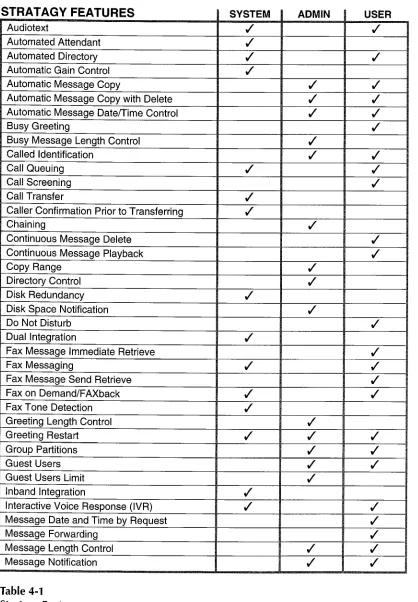
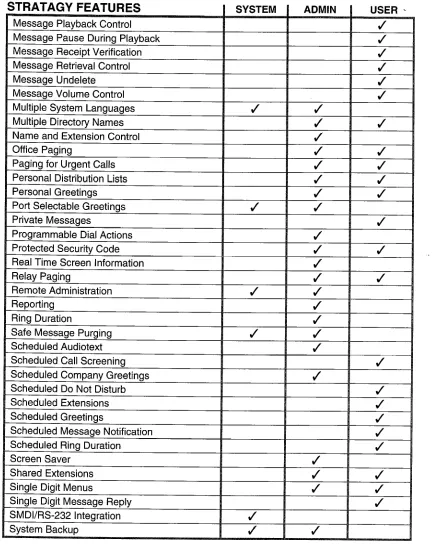
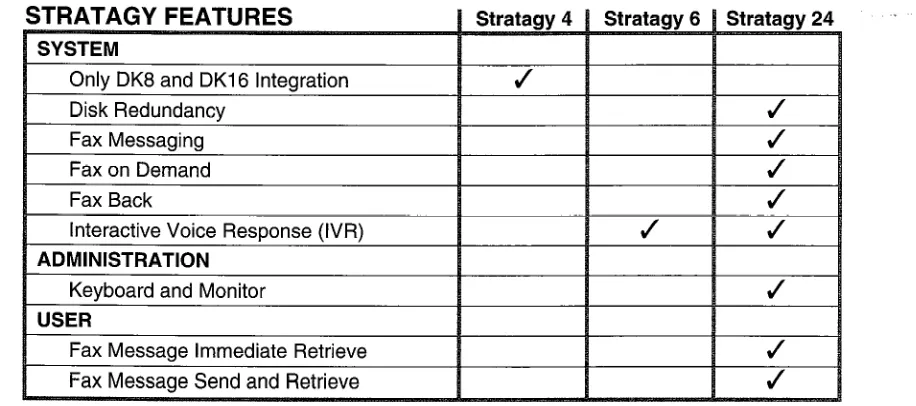
This section presents an overview of all features that are available on Stratagy systems. All features are categorized as System, Administration, or User features. Some features apply to more than one category. See Table 4-1 for an alphabetical list of these features. Some features are not available on all Stratagy systems, see Table 4-2 for a list of these features.
In addition, Stratagy 24 systems support four out of five serial communication port (RS-232) options:
n n n q n A
Fax Modem 1 Fax Modem 2 Remote Maintenance IVR Host Connectivity SMDI Integration
maximum of up to 4 of these options may be configured for each Stratagy 24 system.
SYSTEM FEATURES
AUDIOTEXT
Allows a caller to retrieve audio information from the Stratagy system. To obtain this information, the caller merely enters DTMF digits, as directed by audio prompts, and the appropriate information is then played. This information could consist of general information about the company, such as its address, phone number, fax number, etc., or it could include specific product descriptions or other information that may be of interest to callers.
AUTOMATED ATTENDANT
The Stratagy system answers incoming lines and allows callers to route their own calls. The caller merely enters the User ID of the desired party. If that User ID is recognized by the system, then the call will be handled according to the configuration of that User ID. This configuration may direct the Stratagy system to dial an extension and, possibly after performing Call Screening, pass the call on to the user. If the user is in Do Not Disturb mode, then Stratagy may play a prerecorded greeting and record
a message from the caller.
AUTOMATED DIRECTORY
The Stratagy Automated Directory allows a caller to enter DTMF digits corresponding to the first few letters of a user’s first or last name. Stratagy will then play back the recorded spoken name and extension of each User ID that matches the entered digits.
AUTOMATIC GAIN CONTROL
While recording a message from a caller or user, Stratagy can perform Automatic Gain Control (AGC). AGC helps to compensate for variations in voice volume, telephone handsets, and other factors which can cause messages to be recorded at low or varying volumes. A message recorded using AGC will be played back at a consistent, standard volume level. This means that the user playing back messages will not have to constantly adjust the playback volume.
CALL QUEUING
When Stratagy tries a user’s extension and finds that it is busy, it may offer the caller the option of either leaving a message or holding until the called extension becomes available. If the caller opts to hold, then Stratagy may play one or more pieces of “on-hold music” (which may, in fact, not be music at all, but instead it could consist of company, product, or other information). If more than one caller chooses to hold for the same extension, then Stratagy will queue the callers in the order that their calls were received. In addition to the “on-hold music,” callers will be informed of their position in this queue.
CALL TRANSFER
The Stratagy Automated Attendant call routing capability provides for a supervised or blind and other types of call transfers to the destination extension in the telephone system. All Stratagy system call transfers are controlled by User IDS and the extension field. Entering just the destination extension into the extension field will cause a supervised call transfer. Other call transfer types are implemented with Tokens.
CALLER CONFIRMATION PRIOR TO
TRANSFERRI NC
When a caller stays on the line and does not enter any DTMF digits, the Stratagy system assumes that the caller is using a rotary phone. Therefore, the call will be transferred to the operator for live assistance. It is also possible that the caller has hung up, but for some reason the telephone system has not detected the hangup. Therefore; Stratagy can be configured to ask the caller to confirm orally that someone is still on the line before transferring to the operator. Stratagy may be configured to hang up if there is no response.
STRATAGY 4/6/24 AUGUST 1994
DISK REDUNDANCY
A Stratagy 24 system may be optionally configured with two hard disks, rather than the standard single hard disk. Under special software control, the contents of the second hard disk will be an exact duplicate of the first hard disk. This duplication is performed in real time as changes are made to the primary hard disk (recordings are made, settings changed, messages deleted, etc.). Should the primary hard disk develop a bad sector, the secondary hard disk is then automatically used.
DUAL INTEGRATION
Normally, all of a Stratagy system’s ports will be attached to a single telephone system. But it is possible to configure both the Stratagy 6 and the Stratagy 24 systems on a per-port basis to work with two different telephone systems simultaneously (two systems with lnband Integration or one system with lnband Integration and one system with SMDI/RS232 Integration). Because the system can operate with different telephone systems simultaneously, it is appropriate for use in offices where, possibly, two different companies, with two different phone systems, would like to share the costs and benefits of a single Stratagy system.
FAX MESSAGING
A Stratagy 24 system may be optionally configured with one or two external fax modems. These modems may be used for a variety of purposes, including Fax Messaging. With Fax Messaging, the system accepts a fax document in place of a voice message. Just as with the voice recording, the fax is “recorded” and stored in the recipient’s mailbox. When the user subsequently picks up messages, messages containing faxs will be identified to the
user. If the user is calling from a fax machine (or other device capable of receiving a fax), then the user may request that the fax be transmitted (printed) on the same phone connection. Alternatively, the user may direct the Stratagy system to transmit the fax to another phone number with a separate phone call.
FAX ON DEMAND/FAXBACK
A Stratagy 24 system may optionally be configured with one or two fax modems. One use which can be
made of these modems is to provide fax documents to callers. By using features similar to Audiotext, the caller may select which fax document(s) are to be transmitted. The transmission may be done over the same phone call (“single-call”), or the Stratagy system may queue the fax for later transmission (a “two call” arrangement, which may make better use of a single fax modem). Depending on how the system is programmed, multiple fax documents may
be transmitted in a single fax phone call.
FAX TONE DETECTION
>,,
1
The Stratagy Automated Attendant listens for incoming fax tone when answering incoming lines. If fax tone is detected, Stratagy will transfer the fax call to the destination extension designated by the User ID of the connected fax machine.
”
GREETING RESTART
After a caller has left a voice message for a User ID, the call may either be transferred back to the initial “company” greeting User ID or the system may say “Thank you for calling, Good-bye” and disconnect. Callers often appreciate the ability to return to the User’s Main Menu so that they can leave a message for another system user.
INBAND INTEGRATION
Many telephone systems (PBXs) can be configured to provide information to the Stratagy system about an incoming call by preceding it with one or more DTMF digits. These DTMF strings are known as lnband Integration or lnband Signaling. The Stratagy system can be configured to receive and interpret these DTMF strings. With this information, the Stratagy system may answer the call with a company greeting, direct the call to begin recording a message for a user who is unavailable, etc. Data is passed in
both directions: the PBX informs the auto
attendant/voice mail system about each incoming call, and the voice mail system can send instructions to the PBX to turn message waiting lights on or off, as appropriate.
INTERACTIVE VOICE RESPONSE (IVR)
The Stratagy 6 and Stratagy 24 systems provide a number of powerful features which allow them to be
used for Interactive Voice Response (IVR)
applications, in addition to Auto Attendant and Voice Messaging. There are programming tokens which allow the system to prompt the user for input (using a custom prompt), wait for the user to enter a DTMF response, which will be stored into a variable, and then use that information to access a database to formulate a response. Databases may be on the hard disk of the Stratagy system, accessed remotely over a network, or accessed through the serial ports of the Stratagy system, possibly connecting to a mainframe or other data server. Queries can be constructed in a free-form fashion, by using data in variables that is entered by the caller.
Once a response has been determined from the database, the Stratagy system may be programmed to play this data back to the caller in a number of different ways: as a date, time, monetary value (in dollars and cents), or simply as a number. The value may be combined with other custom-recorded
prompts, so that the system could, for example, respond to a caller with the message “Your order for 6 items will be shipped on July 17, 1994.” The number six and the date in this example would be provided by the database, while the phrases “Your order for” and “items will be shipped on” would be recordings that the System Administrator would make.
MULTIPLE SYSTEM LANGUAGES
The Stratagy system can be configured with any of a number of different audio prompt files. The standard file provides prompts in American English. The default prompt file to use when a call first comes in can be configured, and with appropriate system programming, the caller can select a preferred language by entering DTMF digits. Thus, Stratagy can be communicating in different languages on different ports simultaneously.
Contact Product Marketing for the availability of other languages.
PORT-SELECTABLE GREETINGS
The Stratagy system may be configured to begin processing new calls by starting with a given User ID. New callers will first hear the greeting recorded for this User ID. Each different audio port in the Stratagy system may be configured to begin processing with a different port, and thus different ports may hear different initial greetings, which may have different menu options available, which may follow different processing paths, etc., depending on how the User IDS are programmed. This feature might be used, for example, by two companies sharing the same Stratagy system.
REMOTE ADMINISTRATION
An optional external 2400 baud modem is required for this feature on all Stratagy systems. The remote administrator has full screen access to the system, protected by two different passwords, with every system feature available. The remote administrator may use this feature at any time simply by dialing into the system from any PC running the Stratagy remote access software and with an appropriate modem.
SAFE MESSAGE PURGING
The Stratagy system may be configured to “purge” messages some time after they have been heard. This time period is a system configuration parameter expressed in days. The default value for this parameter is 0, meaning that no purging will ever be performed. The purge parameter is system-wide. Stratagy performs the purge on a per-User ID basis, only when the user is logging out of the system.
When the user logs into the system, Stratagy announces the number of messages-in the User ID that are to be purged, if any. This gives the user ample warning that the messages will be deleted upon logout. Messages are never purged at any other time. Messages that have not been heard are never purged, no matter how old they are.
SMDI/RS-232 INTEGRATION
SMDI integration is available on both Stratagy 6 and Stratagy 24 systems. SMDI is an industry standard method of integrating a PBX with Voice Mail and other peripheral systems. This interconnection is made via RS-232 data connections dependent upon the PBX capabilities. Data is passed in both directions: the PBX informs the auto attendant/voice mail system about each incoming call, and the voice mail system can send instructions to the PBX to turn message waiting lights on or off, as appropriate.
SYSTEM BACKUP
This feature allows customer configuration database information, greetings, and messages to be backed- up onto floppy diskettes. Database information,
greetings, and messages may be backed-up
individually or in various combinations. Stratagy will estimate the number of floppy diskettes required for the System Backup procedures.
TOKEN PROGRAMMING
An important aspect of the Stratagy system is the Token Programming feature. While the Stratagy system allows easy configuration of User IDS for standard features (Audiotext, Automated Attendant, Voice Messaging, dialing a standard extension, etc.), more sophisticated applications can be developed
using the same concepts, by making use of
additional programming tokens. Besides the
conventional DTMF digits, Stratagy supports over forty additional programming tokens. These tokens can perform functions as simple as a hook flash, and as complicated as sending a fax document in the background. But the real power of the Token Programming Language is that the tokens and the User IDS can be combined in new and sophisticated ways to provide application solutions.
TOSHIBA PLUG AND PLAY
Stratagy systems have been preconfigured for out of box plug and play use with certain Toshiba telephone systems: Stratagy 4 with Strata DK 8, Stratagy 6 with Strata DK16, and Stratagy 24 with Strata DK 280 A. The installer does not have to understand or program inband integration strings, ringback patterns, or make other system configuration changes. In addition the above Strata DK default extension numbers are also preprogrammed in Stratagy as the User ID and
STRATAGY 4/6/24 AUGUST 1994
extension numbers, plus default user parameters. Complete integration with other Toshiba telephone systems (without default User IDS and extension mailbox installations) is available from a menu.
UNIVERSAL PORTS
‘
Frequently, notification is performed by dialing out on one of the Stratagy audio ports, perhaps to send a page or light a message waiting light by transmitting the correct sequence of DTMF codes. Stratagy provides several methods of allocating audio ports for the notification process. With the first method, one or more ports are dedicated to perform out dialing for notification. This method has the advantage that there can never be a collision between dialing out to perform a notification and an incoming call which happens to be routed to the same port at the same time. With the second method, all of the Stratagy ports are configured to accept incoming calls, but Stratagy can also use any one of them which is not currently in use to perform an outdial. This method has a clear advantage over the first, particularly for small systems with only a limited total number of ports. However, it introduces the possibility of a collision. The third method is similar to the second, except that Stratagy is restricted to choosing only one particular port to perform notifications. Should that one port be busy, then Stratagy will wait until it is free rather than use one of the remaining ports.
UNLIMITED USER IDS
The Stratagy system provides User IDS of up to eight digits, or 100 million different possible User IDS. User IDS may be prefixes of other User IDS. That is, both “111” and “1111” could be separate User IDS, and both could be used by the system. Thus, no User IDS are ever precluded. Stratagy uses a very efficient method of accessing its database, so that system response is not diminished when the database contains a very large number of User IDS. No matter how large a Stratagy system might grow to be, it likely will never run out of available User IDS.
VARIED SAMPLING RATES
The Stratagy system may be configured-to make different types of recordings at different “sampling rates.” In general, the higher the sampling rate, the more accurate the digital recording of the incoming sound will be, and thus, the better the reproduction. However, using a high sampling rate means that more disk space will be consumed for a given recording. Because companies wish to present the best possible “appearance” to their callers, and because greetings usually represent only a small fraction of the system’s disk space, Stratagy systems are configured to record greetings at a higher sampling rate (64K) than regular voice messages (32K). However, the sampling rate for greetings and for voice message recordings can be individually set during system installation and configuration by the System Administrator.
VOICE MESSACI NC
In addition to the Automated Attendant feature, each Stratagy system includes Voice Messaging. Each User ID may be configured to store messages individually. Voice Messaging functions may be controlled by the System Administrator or the individual user. See both Administration and User Features for details.
ADMINISTRATION
FEATURES
IMPORTANT NOTE:
Stratagy 4 and Stratagy 6 systems require a laptop computer with Stratagy remote software installed to perform all Administration Features locally or remotely (using an optional external modem). The Stratagy 24 system may perform all Administration Features in the same manner as above or use the keyboard and monitor supplied with the system. Refer to the Stratagy Installation and Maintenance manual for details.
AUTOMATIC
MESSAGE COPY
Each User ID “A” can be configured to place a copy of any message received into a separate User ID “B’s” queue of messages. User ID “A” will retain a copy of each message. Messages sent directly to “B” remain unaffected.
AUTOMATIC
MESSAGE COPY WITH DELETE
This feature is very similar to Automatic Message Copy. When activated, a User ID “A” is configured so that any messages received will be copied to User ID “B.” Furthermore, “A” is configured not to store messages at all. This means that the copy of each message sent to “B” is in reality the only copy of the message in the system. Messages sent directly to “B” would not be affected by this change, nor would any messages already stored in “A.”
AUTOMATIC
MESSAGE DATE/TIME CONTROL
The System Administrator may configure each User ID or group of User ID’s to automatically play the date and time of each message before playing the “body” (contents) of the message.
BUSY GREETING LENGTH CONTROL
The System Administrator may specify each User ID maximum length of time in seconds for the custom busy greeting which the user may record. This feature may be used to limit the total time (and thus, system disk space) which can be used for busy greetings. Setting this field to zero prevents the user from recording or changing a custom busy greeting.
CALLED IDENTIFICATION
Allows one person to answer for both “Sales” and “Service” calls. The person who answers the call will know how to greet each caller, since they will hear “Sales” or “Service” before being connected to the caller. Message Pooling could also be used in this case, since this person would presumably like all messages left after hours to be stored in a single User ID, rather than have to check multiple User IDS for messages. The System Administrator sets this feature on a per User ID basis.
CHAINING
Stratagy’s chaining feature allows the-flow of control during call processing to be directed from one User ID to another, based on the results of dialing the Extension field (if the User ID is not configured in Do Not Disturb mode). The System Administrator may define each of the three possible chaining conditions: Busy, Ring No Answer (RNA), or Done. Combined with Stratagy’s Token Programming Language, this feature allows sophisticated call processing and IVR applications to be created.
COPY RANGE
The Copy Range feature allows the System
Administrator to copy one existing User ID to create a number of new User IDS, each within a defined range of ID numbers.
DIRECTORY CONTROL
Each User ID may have Automated Directory names entered by the System Administrator. Some users may not wish to be listed in the Automated Directory. Furthermore, some User IDS are used for special purposes, and they should not appear in the directory listings. Such User IDS would include “back door” access numbers, User IDS used purely for Stratagy programming, etc. The Automated Directory allows callers to determine the correct extension for
someone by entering the DTMF digits which
correspond to the first few letters of the name.
DISK SPACE NOTIFICATION
The Stratagy system can be configured to send an automatic notification whenever system disk space falls below a defined threshold. During system
installation and configuration, the System
Administrator defines the percentage of disk space remaining below which the disk notification should be activated. Under normal conditions, the system is checked automatically once per hour to determine the remaining disk space storage.
GREETING LENGTH CONTROL
The System Administrator may determine the
maximum recording time, in seconds, for the seven different greetings of each User ID. This feature may be used to limit the total time (and thus, system disk space) which can be allotted for user greetings. Setting this field to zero prevents the user from recording or changing the “current” user greeting.
GROUP PARTITIONS - CALL BLOCKING
Each User ID may belong to as many as four different “groups.” The System Administrator defines the group(s) to which a User ID belongs. When the Stratagy system transfers a call to a new User ID, it
STRATAGY 4/6/24 AUGUST 1994
first determines if that User ID has any groups in common with the current User ID. If it does, then the transfer of processing to the new User ID will proceed. Otherwise, Stratagy will switch to a default User ID for processing based on the current system port number, blocking or rerouting the call. Group Partitions are most often used to control Guest User IDS and Shared Tenant applications.
GUEST USERS LIMIT
Each user of the Stratagy system may potentially create one or more
Guest
User IDS. These User IDS might be used by that person’s customers, friends, clients, etc. They can be deleted by the same user who created them or by the System Administrator. The System Administrator can also limit the number of Guest User IDS which a particular User ID is allowed to create.MESSAGE LENGTH CONTROL
The System Administrator can set the maximum Message Length in seconds of each incoming message for a given User ID, or messages may be unlimited in length. If a caller attempts to leave a message longer than the maximum, the system will stop recording and inform the caller that the maximum message length has been reached.
MESSAGE NOTIFICATION
Stratagy allows each User ID to have up to ten different programmable notification records. The System Administrator programs the notification records of each User ID with a specific notification method such as lights, stutter dialtone, pagers, voice, etc., for the times of the day and the days of the week and the repeat count and interval for retrying that notification. Each notification method is a flexible dial string allowing the Stratagy system to be used with almost any kind of PBX or notification method including cascade notification.
MULTIPLE DIRECTORY NAMES
Each User ID can have associated with it up to two different names. These names are entered into the Stratagy system’s automatic directory by the System Administrator. Each User (Extension) may have more than one User ID to improve the Automated Directory for commonly misspelled names. The Automated Directory can allow callers to determine the correct extension for someone by entering the DTMF digits which correspond to the first few letters of either one of the two (or more) different names. Thus, normally, the two different directory names will be the first and last names of the user associated with each User ID.
NAME AND EXTENSION CONTROL
Normally, a user may record a “spoken name”-a recording of the user’s name and extension. The System Administrator, however, can configure User IDS on an individual basis so that a user cannot record, or change the recorded name and extension. If no name and extension has been recorded for a User ID, then the Stratagy system will play “User ID...” followed by the number of that User ID.
PROGRAMMABLE DIAL ACTIONS
The Stratagy system will attempt to dial the string specified in the Extension field. This string may consist simply of the extension number of the user, in which case Stratagy will dial that extension and continue processing based on the results of that call
if not in the Do Not Disturb mode. But the extension field may actually contain many more “programming tokens” which can have effects ranging from the simple (such as performing a hook flash) to the complex (accept an incoming fax for the current user). These programming tokens can be combined by the System Administrator in a desired way to create an almost unlimited number of application solutions.
REAL-TIME SCREEN INFORMATION
The Administrator’s Main Menu on each Stratagy 24 system shows, among other things, the activity on each audio port, the activity of any connected fax modems, the amount of free disk space, etc. The Stratagy 24 system helps the System Administrator
better understand and manage the system as
changes occur. This information is instantly updated as long as the Main Menu is displayed.
RELAY PAGING
Relay Paging streamlines Message Notification permitting the caller to enter a phone number while the user’s greeting is being played. The Stratagy system still pages the user, but instead of displaying the usual information, only the phone number entered by the caller is displayed on the pager. The System Administrator may enable this feature individually for each User ID. This allows the user to return the call much sooner by not calling into the Stratagy system since no voice mail message is left.
REPORTS
The System Administrator may generate an almost unlimited number of different reports of system activity and programming. Reports can contain columns representing each of the fields of the User screen, and they can cover either all or
a subset
of User IDS in the system.RING DURATION
The System Administrator may define, on a per-user
ID basis, how many rings of that user’s extension the Stratagy system should wait before concluding that the user is unavailable (Ring No Answer, or RNA). Then the Stratagy system can send callers to voice mail to leave a message. This value may also be changed automatically via the Auto Scheduler, again on a per-User ID basis.
SCREEN SAVER
Standard feature on Stratagy 24 systems. Video monitors, such as those used as the console display of the Stratagy 24 system, should not have the same image displayed on them constantly. Such an image can become “burned in” on the phosphor display, and it will then be visible even when other information is being displayed-the monitor is then permanently damaged. To avoid burn-in, the Stratagy system can
be configured to blank the screen automatically after a predetermined period of keyboard inactivity. As soon as something is again typed on the keyboard,
however, the screen is instantly reactivated, and any information which would have been on the screen is made visible.
SHARED EXTENSIONS
This feature is typically used when more than one person, each with a separate Stratagy User ID, shares a single phone extension. If the call is answered, the called name is announced. If not answered, a private message may be recorded. Stratagy announces ‘&This call is for...” followed by the recorded name of the called User ID. The System Administrator sets this feature on a per User ID basis. In addition, the System Administrator may also turn on the Call Screening feature to enhance this feature.
SINGLE-DIGIT MENUS
Each User ID may define one or more single-digit menu keys. If a caller enters one of these DTMF digits while listening to the greeting for that User ID, then Stratagy will immediately transfer processing to the User ID associated with that menu item rather than process the digit as part of another User ID
number. The System Administrator defines the single-digit menu numbers for each User ID.
SCHEDULED AUDIOTEXT
The Stratagy Auto Scheduler can be used to implement Audiotext with a combination of single- digit menus and greeting recordings. The System Administrator would record the greetings in each of the applicable User Ids and configure the system to
change the Audiotext contents on an automatic, scheduled basis.
SCHEDULED COMPANY GREETINGS
The System Administrator may program the
company greetings using the Stratagy Auto
Scheduler to make changes based on the time of day or day of week. The changes can include the current greeting number, extension, Do Not Disturb setting, etc.
SYSTEM DISTRIBUTION
LISTS
In addition to personal distribution lists, Stratagy supports system-wide distribution lists. A user sends a message to a system distribution list rather than a personal distribution list by prepending a * to the list number. The “list comment” for the selected system list is played to confirm that the right list has been chosen, just as with personal distribution lists. The System Administrator creates the system Distribution Lists using the same method as the personal lists, but for the System Administrator User ID.
URGENT MESSAGE NOTIFICATION
The System Administrator programs the notification type set to URGENT. When a message-marked Urgent is received, then the Stratagy system first checks if one or more notification records exist for that User ID with notification type URGENT. If so, then those records are activated, and otherwise, any NORMAL notification records are used. Users might, for example, want to be notified by pager only when an Urgent message arrives.
USER OPTION LOCKS
Many user options can normally be changed by users themselves by selecting the appropriate DTMF commands over the telephone, such as toggling the Do Not Disturb attribute, changing the current greeting number, toggling Call Screening, etc. The System Administrator can disallow a user from changing each of these settings on an individual basis.
VOICE FORMS
The Stratagy system can be configured to prompt a caller with a series of questions. The voice
responses that the caller gives are then
concatenated and are stored as a single message in the associated User ID. The Voice Forms feature is activated by the System Administrator simply by using the “Q” (Question and Answer) token when programming the User ID. Each question is recorded as a greeting, either in that User ID or in others. The “Q” token specifies which greetings should be played to callers and the order in which they should be
played. ,