Quad Nx 56/64
Module
Part Number 1200184L1
USER MANUAL
901 Explorer Boulevard P.O. Box 140000 Huntsville, AL 35814-4000
(205) 963-8000 © 1997 ADTRAN, Inc.
FEDERAL COMMUNICATIONS COMMISSION RADIO FREQUENCY INTERFERENCE STATEMENT:
This equipment has been tested and found to comply with the limits for a Class A digital device, pursuant to Part 15 of the FCC Rules. These limits are designed to provide reasonable protection against harmful interference when the equipment is operated in a commercial environment. This equipment generates, uses, and can radiate radio frequency energy and, if not installed and used in accordance with the instruction manual, may cause harmful interference to radio frequencies. Operation of this equipment in a residential area is likely to cause harmful interference in which case the user will be required to correct the interference at his own expense.
Shielded cables must be used with this unit to ensure compliance with Class A FCC limits.
61200.184L1-1 Quad Nx 56/64 Module User Manual i
Table of Contents
Chapter 1: Introduction... 1
Quad nx 56/64 Module overview ... 1
Features... 1
Interfaces ... 1
Module Specifications ... 2
DTE Interface... 2
Rates... 2
Tests ... 2
Test Pattern... 2
1s Density Protection... 2
Connector... 2
Physical Description ... 2
Adapter Cable... 2
Chapter 2: Installation... 3
Unpack and Inspect ... 3
ADTRAN Shipments Include... 3
Customer Provides ... 3
Installing the Quad Nx 56/64 Module... 4
Wiring ... 5
Power-Up Testing and Initialization... 5
Chapter 3: Operation ... 7
Overview ... 7
TERMINAL Menu Structure ... 7
Menu Description... 8
Slt... 8
Type ... 8
Menu... 9
Alarms ... 9
Test... 9
State... 9
Status ... 9
Hardware Revision... 9
Quad Nx 56/64 Module Menu Options ... 10
Quad Nx Info... 10
Part Number... 10
Serial Number ... 10
Quad Nx Alarms... 10
SLIP... 10
PLL... 10
ZERO ... 10
NO EXT CLK... 11
DTE Status... 11
RTS... 11
CTS... 11
DTR... 11
DSR ... 11
DCD ... 11
RI ... 11
TD... 11
RD ... 11
Data Rate... 11
Inband... 11
ID... 11
PASS ... 11
CRC... 11
Table of Contents
ii Quad Nx 56/64 Module User Manual 61200.184L1-1
RX... 12
PLL/Fifo... 12
Lock... 12
RXE ... 12
RXF... 12
TXE... 12
TXF... 12
Configuration ... 12
Name ... 12
Clk (+/-) (TX Clock Polarity) ... 12
Clk Srce (Clock Source)... 12
Data (Data Format)... 12
CTS... 13
DCD ... 13
DSR ... 13
DTR... 13
0 Inh (Zero Inhibit) ... 13
Test... 14
Loopbk... 14
Loopback Status... 14
511 (511 Test Pattern) ... 14
511 Result... 14
Inject (Inject Error)... 15
511 Clr (Clear Results)... 15
Appendix A: Quad Nx 56/64 Dial Plan Interface Configuration ... 17
Interface Configuration ... 17
Nx56/64 Option Module Interface Configuration... 18
Nx56/64 Option Module (User Termination) ... 18
Ports Available... 18
61200.184L1-1 Quad Nx56/64 Module User Manual 1
Chapter 1
Introduction
QUAD Nx 56/64 MODULE OVERVIEW
The Quad Nx (pronounced “N-by”) 56/64 Module provides four syn-chronous V.35 DTE ports, each of which can operate at any rate that is a multiple of 56 or 64 kbps, up to 1.536 Mbps. The Quad Nx 56/64 Module can be installed in any option slot of the ATLAS chassis.
Features
• Each port operates using 1 to 24 DS0s
• Includes an elastic store for absorption of rate variations • Any port can be used as a timing source for the entire system • Outputs a 50 percent duty-cycle output clock at all rates • Generates and responds to V.54 looping codes
• Generates and checks 511 test patterns • Bidirectional loopbacks:
- Port (toward the network) - DTE (toward the DTE)
Loopbacks can be invoked locally or remotely (V.54).
Interfaces
• CCITT V.35 electrical (differential)
Chapter 1. Introduction
2 Quad Nx56/64 Module User Manual 61200.184L1-1
Module Specifications
DTE Interface
CCITT V.35 Synchronous
Rates
56 kbps to 1.536 Mbps in 56K or 64K steps
Tests
Local Loopback (Bilateral) Remote Loopback (V.54) Self Test
Test Pattern
511 with errored seconds display and error inject capability
1s Density Protection
Connector
DB-37 with cables to convert to Winchester female connectors
Physical Description
The Quad Nx 56/64 Module can plug into any available option slot in the ATLAS 800 chassis (see Figure 1-1).
The module has an indication under each D-shell connector referring to the port on the card.
Figure 1-1
Quad Nx 56/64 Module
Adapter Cable
61200.184L1-1 Quad Nx 56/64 Module User Manual 3
Chapter 2
Installation
UNPACK AND INSPECT
Carefully inspect the option module for any shipping damage. If damage is suspected, file a claim immediately with the carrier and then contact ADTRAN Technical Support. (See the last page of this manual for infor-mation on contacting Technical Support.) If possible, keep the original shipping container for use in shipping the option module back for repair or for verification of damage during shipment.
ADTRAN Shipments Include
• The Quad Nx 56/64 Module
• The Quad Nx 56/64 Module User Manual (to be inserted into the appro-priate section of the ATLAS 800 User Manual)
• Two DB-37 to dual V.35 Winchester adapter cables
Customer Provides
Chapter 2. Installation
4 Quad Nx 56/64 Module User Manual 61200.184L1-1
INSTALLING THE QUAD NX 56/64 MODULE
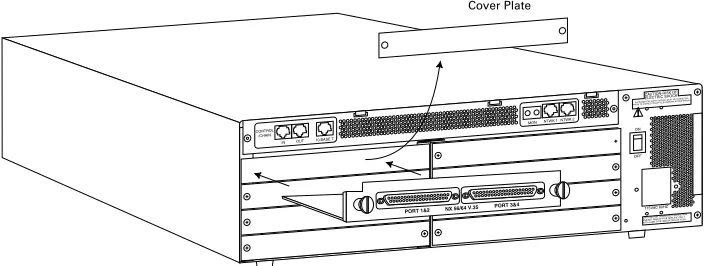
Figure 2-1is representative of the action required for proper placement of the Quad Nx 56/64 Module. Perform the following steps to install the option module:
1. Remove the cover plate (corresponding to the slot in which the Quad Nx 56/64 Module will be installed) from the ATLAS 800 chassis rear panel.
2. Slide the Quad Nx 56/64 Module into the ATLAS 800 chassis until the module is positioned firmly against the front of the ATLAS unit. 3. Fasten the thumbscrews at both edges of the option module. 4. Connect the cables to the associated device (s).
5. Complete installation of remaining modules and Base Unit as specified in the Installation chapter of the ATLAS 800 User Manual.
Figure 2-1
Chapter 2. Installation
61200.184L1-1 Quad Nx 56/64 Module User Manual 5
WIRING
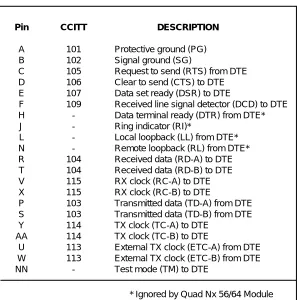
Each port of the Quad Nx 56/64 Module has a V.35 Winchester-style connection (via the supplied adapter cables) as defined in Table 2-A.
Table 2-A
V.35 Winchester Pin Connection
POWER-UP TESTING AND INITIALIZATION
The Quad Nx 56/64 Module executes a self test during the power-up sequence, as described in the ATLAS 800 User Manual. Upon power-up, any previously configured setting for the Quad Nx 56/64 Module is auto-matically restored.
When the self test is completed and the configuration is successfully restored, the LED labeled OK in the Module group on the front panel turns On. If any alarms are detected during operation, the red LED labeled ALARM in the Module group on the front panel turns On. If the power-up self test is not successful, refer to the Troubleshooting sec-tion of the ATLAS 800 User Manual to diagnose and correct the problem. Return to Chapter 2 (Installation) of the ATLAS 800 User Manual to con-tinue system set-up.
DESCRIPTION
Protective ground (PG) Signal ground (SG)
Request to send (RTS) from DTE Clear to send (CTS) to DTE Data set ready (DSR) to DTE
Received line signal detector (DCD) to DTE Data terminal ready (DTR) from DTE* Ring indicator (RI)*
Local loopback (LL) from DTE* Remote loopback (RL) from DTE* Received data (RD-A) to DTE Received data (RD-B) to DTE RX clock (RC-A) to DTE RX clock (RC-B) to DTE
Transmitted data (TD-A) from DTE Transmitted data (TD-B) from DTE TX clock (TC-A) to DTE
TX clock (TC-B) to DTE
External TX clock (ETC-A) from DTE External TX clock (ETC-B) from DTE Test mode (TM) to DTE
CCITT 101 102 105 106 107 109 -104 104 115 115 103 103 114 114 113 113 -Pin A B C D E F H J L N R T V X P S Y AA U W NN
Chapter 2. Installation
61200.184L1-1 Quad Nx 56/64 Module User Manual 7
Chapter 3
Operation
OVERVIEW
The Quad Nx 56/64 Module can be configured and controlled from a variety of sources, including:
• The ATLAS 800 Front Panel, providing minimal configuration and sta-tus support
• The terminal menus, allowing detailed configuration, status, and diag-nostics
• SNMP, used primarily for reporting alarm conditions and system sta-tus
The terminal menu is accessed using either a VT 100 Terminal attached to the ATLAS 800 Base Unit’s control port, or through a Telnet session, established through the Base Unit’s Ethernet port. Detailed instructions on the operation of each of the supported management approaches are presented in the ATLAS 800 User Manual.
In order to edit items in the terminal menus, you must have the appropriate pass-word level. Each menu description in this section indicates the required passpass-word level required for write and read access. See the section Access Passwords in the ATLAS 800 User Manual for detailed information on working with passwords. Security level 1 users can view and edit every available field. Security level 5 users can view any field but cannot edit.
The remainder of this section describes the menu items presented when managing the Quad Nx 56/64 Module via the terminal menus.
TERMINAL MENU STRUCTURE
The ATLAS 800 uses a form of hierarchical menus to access all features. The topmost menu level leads to submenus which are grouped by func-tionality. All menu items display in the terminal window.
Chapter 3. Operation
8 Quad Nx 56/64 Module User Manual 61200.184L1-1
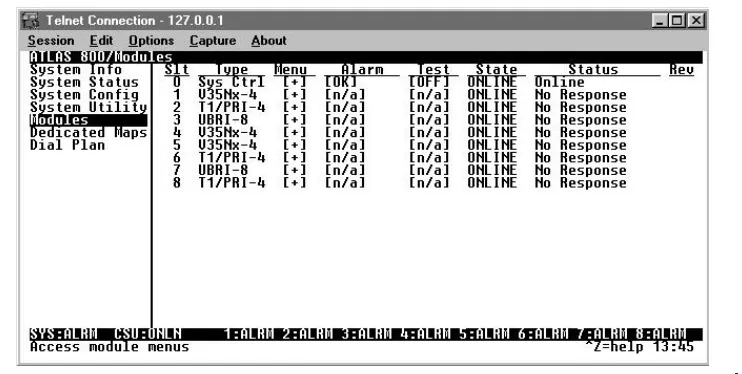
The ATLAS 800 System Controller automatically detects the presence of the Quad Nx 56/64 Module when it is installed in the system. To see the menus for the Quad Nx 56/64 Module via the terminal menu, use the arrow keys to scroll to the Modules menu and press Enter to access the module choices. Figure 3-1 shows the Modules menu. The following sec-tions describe all the menu opsec-tions.
Figure 3-1
Modules Menu
Menu Description
Slt
Read security: 5
Displays the number of all the available slots in the ATLAS 800 chassis. Slot 0 refers to the ATLAS 800 base unit. This field is read-only.
Type
Write security: 3; Read security: 5
Displays the type of module actually installed in the slot or the type of module you plan to install in the slot. If a Quad Nx 56/64 Module is installed, the Type field will automatically default to V35Nx-4 (the Quad Nx 56/64 Module). You can use this field to pre-configure a system before actually installing modules by simply specifying the module that you want to install in each slot.
If you install a module in a slot, then want to install a different type of module in the slot, you must set this field to Empty before selecting another module type.
Chapter 3. Operation
61200.184L1-1 Quad Nx 56/64 Module User Manual 9
Menu
Selecting this item displays additional status and configuration menus about the selected module. (To access the submenus for this item, use the arrow keys to scroll to the Menu column for the module you want to edit, and press Enter.) For detailed information on each submenu item, see the section Quad Nx 56/64 Module Menu Options on page 10.
Alarms Read security: 5
This field displays whether there is an alarm condition on the Quad Nx 56/64 Module. Press Enter in this field to activate the Alarm menu.
Test
Read security: 5
This field displays whether the Quad Nx 56/64 Module is executing a test. Press Enter in this field to activate the Test menu.
State
Write security: 3; Read security: 5
Even though a module is physically installed, it must be marked Online for it to be considered an available resource. This parameter allows an installed module to be marked Offline, which may be useful in system troubleshooting.
Status
Read security: 5
This is a read-only field presenting status information on the Quad Nx 56/64 Module. The following messages may display:
Hardware Revision Read security: 5
This is a read-only field that displays the hardware revision of the Quad Nx 56/64 Module.
Online: The module is enabled, and is responding to the Sys-tem Controller’s status polls. This is the normal response of the system.
No Response: The module is enabled, but is not responding to the System Controller’s status polls. This response indi-cates either a problem in the system or that the mod-ule is not installed.
Empty: The System Controller has not detected the presence of a module in the slot, nor has a module been manu-ally enabled for this option slot.
Offline The module is installed, but has been taken Offline by a user. The module is still responding to controller polls.
Offline/
Chapter 3. Operation
10 Quad Nx 56/64 Module User Manual 61200.184L1-1
Quad Nx 56/64 Module Menu Options
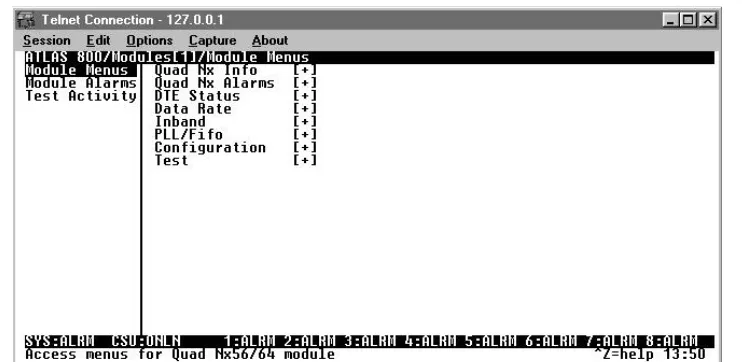
Figure 3-2 shows the menu options available for the Quad Nx 56/64 Module. The following sections describe these options.
Figure 3-2
Quad Nx 56/64 Module Menu Options
Quad Nx Info
Read security: 5
The Quad Nx 56/64 Info submenu indicates the status of the module.
Part Number
Displays the part number of the module. This field is read-only.
Serial Number
Displays the Quad Nx 56/64 Module’s serial number. This field is read-only.
Quad Nx Alarms
Read security: 5
This option displays any active alarms. These fields are read-only.
SLIP
A rate mismatch exists between the DTE clock and the network-side clock (as set by DS0 assignment).
PLL
The Nx port is not able to lock onto the clock provided by the network interface.
ZERO
Chapter 3. Operation
61200.184L1-1 Quad Nx 56/64 Module User Manual 11
NO EXT CLK
The DTE is not providing an external transmit clock (only if the V.35 Nx port is configured to get transmit clock from the DTE.)
DTE Status
Read security: 5
Shows the status of key DTE interface signals. The following signals are monitored (these options are read-only):
RTS
Request To Send from DTE
CTS
Clear To Send to DTE
DTR
Data Terminal Ready from DTE
DSR
Data Set Ready to DTE
DCD
Data Carrier Detect to DTE
RI
Ring Indicate to DTE
TD
Transmit Data from the DTE
RD
Receive Data toward the DTE
Data Rate
Read security: 5
Displays the data rate at which each Nx port is currently operating. A port’s data rate is determined by the number of DS0s assigned to it and the rate per DS0 associated with the active maps.
Inband
Read security: 5
ID
Correct Unit ID
PASS
Correct Password
CRC
Chapter 3. Operation
12 Quad Nx 56/64 Module User Manual 61200.184L1-1
TX
Active Transmit
RX
Active Receive Data
PLL/Fifo
Read security: 5
Lock
Phase Lock Loop is locked
RXE
Receive data FIFO Empty
RXF
Receive Data FIFO Full
TXE
Transmit Data FIFO Empty
TXF
Transmit Data FIFO Full
Configuration
The CONFIG submenu configures the Quad Nx 56/64 Module.
Name
Write security: 3; Read security: 5
Allows you to enter a descriptive alpha-numeric name for each port.
Clk (+/-) (TX Clock Polarity) Write security: 3; Read security: 5
Controls the clock used by the Quad Nx 56/64 Module to accept the trans-mit (TX) data from the DTE. This is usually set to Normal. If the interface cable is long, causing a phase shift in the data, the clock can be set to In-verted. This switches the phase of the clock, which should compensate for a long cable.
Clk Srce (Clock Source) Write security: 3; Read security: 5
Selects the source for the DTE transmit clock, either Internal or DTE.
Data (Data Format)
Write security: 3; Read security: 5
Chapter 3. Operation
61200.184L1-1 Quad Nx 56/64 Module User Manual 13
CTS
Write security: 3; Read security: 5
Clear to Send. Used to control characteristics of CTS (see Table 3-A). Choose from Normal or Forced On.
DCD
Write security: 3; Read security: 5
Data Carrier Detect. Indicates to the DTE when a valid signal is being re-ceived at the Network Interface (see Table 3-A). Choose from Normal or Forced On.
DSR
Write security: 3; Read security: 5
Data Set Ready. This signal indicates to the DTE when the DCE is turned
On and ready for operation (see Table 3-A). Choose from Normal or Forced On.
DTR
Write security: 3; Read security: 5
Data Terminal Ready. This parameter determines whether the ATLAS 800 treats a connection as permanent (DTR=Ignore) or to connect only when DTR is active (DTR=Connect On DTR). Select either Ignore or Connect on DTR.
0 Inh (Zero Inhibit)
Write security: 3; Read security: 5
When the port detects an uninterrupted string of 0s being transmitted for more than one second, setting this parameter to ON will cause the ATLAS 800 to send 1s toward the network.
Table 3-A
Normal Mode Operation (conditions which cause the port control signal to be deactivated)
SIGNAL RTS V.54 LOOPBACK 511 TEST ON SELF TEST ACTIVE NETWORK TEST ACTIVE
NO DS0 MAPPED
NETWORK ALARM
CTS Follows Off Off Off Off Off Off
DCD — — — Off Off Off Off
DSR — Off Off Off Off Off —
— = Do not care
Chapter 3. Operation
14 Quad Nx 56/64 Module User Manual 61200.184L1-1
Test
This menu item is used to activate testing of specific data ports. It also con-trols the activation of loopbacks and the initiation of data test patterns. Test results are displayed on the ATLAS 800 front panel.
The execution of Port Tests disrupts normal data flow in the port being tested.
Loopbk
Write security: 4; Read security: 5
Controls the activation and deactivation of loopbacks.
Loopback Status Read security: 5
This read-only option indicates a port’s current loopback status by dis-playing any of the following status messages:
• No loopback active • Looping up remote unit • Remote unit looped back • Looping down remote unit • Remote loopup failed
• Port looped from remote source • Port loopback active
511 (511 Test Pattern) Write security: 4; Read security: 5
Controls the activation of the 511 test pattern generator and detector.
511 Result Read security: 5
Displays the results of the 511 test. This option is read-only.The results are in the form of the number of errored seconds.
No Loopback The loop is deactivated.
Local Loopback The Nx port activates both a local loopback (back to-ward the DTE) and a port loopback when invoked. Remote Loopback The remote loopback causes a V.54 loopback code to
be sent to the far end. If the device at the far end sup-ports V.54, the device activates a loopback on detec-tion of the V.54 code.
Off Turns off the 511 test pattern generator and detector. On Turns on the 511 test pattern generator and detector.
Sync Y (yes), N (no)
Chapter 3. Operation
61200.184L1-1 Quad Nx 56/64 Module User Manual 15
Inject (Inject Error)
Write security: 4; Read security: 5 Injects a 511 pattern error.
Chapter 3. Operation
61200.184L1-1 Quad Nx 56/64 Module User Manual 17
Appendix A
Quad Nx 56/64 Dial Plan Interface Configuration
INTERFACE CONFIGURATION
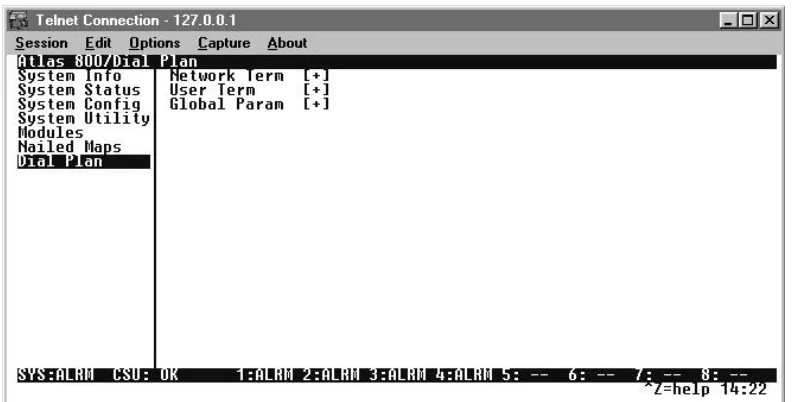
The Interface Configuration option for the Dial Plan menu sets configura-tion parameters for the end point. These parameters will vary by the type of port selected. The following section describes the configuration options available for the Quad Nx 56/64 Module. The Dial Plan menus are only accessible when using terminal mode. To access these options, select Dial Plan from the top level menu.
Figure A-1
Appendix A: Nx 56/64 Dial Plan Interface Configuration
18 Quad Nx 56/64 Module User Manual 61200.184L1-1
Nx56/64 Option Module Interface Configuration
This section describes the User Termination configuration settings for the Quad Nx56/64 Module when using the Dial Plan menus.
The Nx56/64 can only serve as a User termination end point.
Nx56/64 Option Module (User Termination)
When you are working in the User Termination section of the Dial Plan menu, the Slot is defined as a Nx56/64 module, the following configura-tion opconfigura-tions are available:
Ports Available
Indicates which of the four ports of the Quad Nx56/64 module have already been defined either in another switched end point (indicated by “s”) or in a Dedicated Map (indicated by “n”). This field is read-only.
Number of Ports
Defines to ATLAS how many of the ports could be used to answer calls to the number(s) defined in the Accept Call list. You can enter numbers 1 through 4. The ports are contiguous beginning with the Port number select and the number of ports.
61200.184L1-1 Quad Nx 56/64 Module User Manual 19
Index
Numerics
511
pattern
14
test results
14
A
adapter cable
2
alarm PLL
10
status
10
zero
10
alarms
9
C
clear results
15
clear to send
13
clock source
12
configuration
12
connection pins
5
CTS
11, 13
D
data carrier detect
13
data format
12
data rate
11
data set ready
13
DCD
11, 13
description physical
2
dial plan configuration
17
DSR
11, 13
DTE status
11
DTR
11
F
features
1
H
hardware revision
9
I
inband
11
initialization
5
inject error
15
installation
3
installing the module
4
interface configuration
17
interfaces
1
L
local loopback
14
loopback
14
local
14
none
14
remote
14
status
14
loopbk
14
M
menu
description
8
options
10
Quad Nx 56/64
10
structure
7
submenu items
10
N
name
12
no ext clock
11
no loopback
14
O
operation
7
overview
7
overview
1
P
physical description
2
pin connections
5
PLL alarm
10
PLL/Fifo
12
Index
20 Quad Nx 56/64 Module User Manual 61200.184L1-1
Q
Quad Nx 56/64 features
1
installing
4
interfaces
1
menu options
10
overview
1
physical description
2
specifications
2
Quad Nx alarms
10
Quad Nx info
10
R
RD
11
remote loopback
14
RI
11
RTS
11
S
self test
14
slip
10
specifications
2
state
9
status
9
alarm
10
T
TD
11
terminal menu structure
7
test
9, 14
testing
5
TX clock polarity
12
type
8
W
wiring
5
Z
zero alarm
10
Product Support Information
Presales Inquiries and Applications Support
Please contact your local distributor, ADTRAN Applications Engineering, or ADTRAN Sales:
Post-Sale Support
Please contact your ADTRAN account representative first. If your ADTRAN account representa-tive cannot help, please contact ADTRAN Technical Support and have the unit serial number avail-able.
Repair and Return
If ADTRAN Technical Support determines that a repair is needed, Technical Support will coordi-nate with the Return Material Authorization (RMA) department to issue an RMA number. For in-formation regarding equipment currently in house or possible fees associated with repair, contact RMA directly at the following number:
Identify the RMA number clearly on the package (below address), and return to the following ad-dress:
ADTRAN, Inc. RMA Department 901 Explorer Boulevard Huntsville, Alabama 35806
RMA # _____________
Applications Engineering (800) 615-1176
Sales (800) 827-0807