ABSTRACT
PRICE, THOMASON WILLIAM. iSnap: Data-driven Support for Novice Programming Informed by Evaluations of Hint Quality and Investigations of Student Help-seeking Behavior. (Under the direction of Tiffany Barnes.)
Growing national interest in Computer Science (CS) education has fueled efforts to recruit a
larger and more diverse group of computing students. These efforts frame programming as a way to create meaningful, creative and impactful artifacts. This approach has resonated with learners,
and the number of undergraduate CS majors hastripledin the past decade. However, CS can be a notoriously unforgiving subject, with the highest 4-year college attrition rate of any STEM field and CS1 pass rates at 60-70%. CS students are struggling and need additional support that can scale to
modern computing classrooms, especially when instructors are unavailable.
I present research that addresses these challenges through the development and evaluation of iSnap, a novice programming environment that automatically supports students with next-step
hints and feedback. iSnap’s help is generated using SourceCheck, a data-driven algorithm that
leverages the correct solutions of previous students to guide new students towards a correct solution. SourceCheck is also designed to support longer and more open-ended programming tasks, which
are popular in computing curricula for novices. iSnap integrates these help features with a
block-based programming interface, which allows students to construct programs with drag-and-drop blocks of code, minimizing the challenges of syntax.
In this work I investigate four research questions, concerning: 1) the design of the iSnap
pro-gramming environment; 2) the generation of data-driven propro-gramming hints; 3) how to evaluate the quality of these data-driven hints; and 4) what factors influence students’ willingness to seek
and use this help when programming. I present three evaluation studies of iSnap, which address
these questions. I find that iSnap’s hints are relatively high-quality, often matching human-authored hints, but that their quality can also vary considerably. My results show that when students receive
lower-quality hints, they are less likely to ask for additional help, even if they are struggling on an
assignment. I present methods for benchmarking and comparing data-driven hint quality, so that improvements to hint generation algorithms can be more easily evaluated. Using these methods, I
show that the quantity and source of data significantly impact the SourceCheck algorithm’s hint quality. However, I also find that many students never ask for help in the first place and that a variety
of factors besides hint quality impact students’ willingness to seek help. These include students’
desire for independence, their previous experiences with computer-based help, and the accessibility and salience of the help.
The contributions of this work include the iSnap programming environment and the
effectively integrate intelligent, data-driven support into a novice programming environment.
Addi-tionally, it contributes methods for evaluating the quality of data-driven hints and evidence linking this hint quality to students’ help-seeking outcomes. Lastly, it identifies additional factors that
influ-ence students’ help-seeking behavior and translates these factors into design recommendations for
more effective programming support features. Each of these contributions inform future directions for research on data-driven programming support, as it progresses beyond the next-step hints
© Copyright 2018 by Thomason William Price
iSnap: Data-driven Support for Novice Programming Informed by Evaluations of Hint Quality and Investigations of Student Help-seeking Behavior
by
Thomason William Price
A dissertation submitted to the Graduate Faculty of North Carolina State University
in partial fulfillment of the requirements for the Degree of
Doctor of Philosophy
Computer Science
Raleigh, North Carolina
2018
APPROVED BY:
James Lester II Sarah Heckman
Roger Azevedo Tiffany Barnes
BIOGRAPHY
Thomason (Thomas) Price was born in Chapel Hill, N.C., to a family that encouraged his curiosity and questioning. He quickly found that computers offered him an unrivaled source of exploration
and creativity, and he spent many of his formative years stumbling through the process of learning to
program. Thomas attended Elon University to study Computer Science, where he grew to understand the level of privilege that he shared with many of his fellow students, which had allowed him the time
and freedom to come to love programming on his own. Thomas chose to focus his undergraduate thesis on mobile game development to promote STEM education, with the hope that educational
technology could give more students that same experience of finding their passion in an academic
field. This experience led Thomas to pursue a Ph.D. at North Carolina State University, where he was quickly drawn to the research of Dr. Tiffany Barnes. Thomas’ graduate work focused on developing
educational technologies that would make programming more accessible to a broader population
of students. At NCSU, Thomas was a leader in the STARS Computing Corps, working to build community within the Computer Science department and broaden participation in computing. He
served as co-president for 2 years and led the SPARCS@NCSU Computer Science middle school
outreach group. While pursuing his degree, Thomas also worked with NCSU’s Khayrallah Center to develop an educational game to teach players about the experience of immigrating to the U.S.
Thomas continues to look for ways to share his favorite hobby – programming – with others and to
ACKNOWLEDGEMENTS
This work is the result of four invaluable years working with and learning from Dr. Tiffany Barnes, an experience for which I will alway be grateful. Thank you for your unshakable belief in me and for
modeling how to mix research with passion to make an impact on the world.
I would also like to thank the other members of my committee, Dr. James Lester, Dr. Sarah Heckman
and Dr. Roger Azevedo, for the many meetings, suggestions and thoughtful critiques that made this document stronger and made me a better researcher.
Thanks also to:
• The many faculty who have shaped my research through advise, collaboration and mentorship:
Dr. Min Chi, Dr. Stephen Cooper, Dr. Collin Lynch, Dr. Jennifer Albert and Dr. R. Michael Young
• My coauthors who contributed directly to the work presented here: Yihuan Dong, Dragan
Lipovac, Rui Zhi, Zhongxiu Aurora Liu, Dr. Veronica Cateté and Nicholas Lytle
• My invaluable colleagues: Jennifer Tsan, who made essential contributions to the research
presented in Chapter 7, and David Warren, who tested and improved iSnap and tirelessly explored many research directions with me
• ToniAnn Marini and Dana Lasher, who worked with me to deploy and evaluate my research in
an authentic classroom context
• My collaborators, who have helped give this work meaning and context: Benjamin Paaßen, Dr.
Kelly Rivers, Dr. Neil C. C. Brown and Dr. Akram Khater
• My friends, who kept me going with game nights, trivia outings, Ultimate Frisbee and coffees-hop counseling
My most heartfelt thanks goes to my family: Mom, Dad, James and Bridget, who supported me with
love, presence and bravery.
This work was completed with support from the National Science Foundation under Grant #1623470:
TABLE OF CONTENTS
LIST OF TABLES . . . vii
LIST OF FIGURES. . . .viii
Chapter 1 Introduction. . . 1
1.1 Motivation . . . 1
1.2 Research . . . 3
1.2.1 Research Questions . . . 3
1.3 Contributions . . . 4
Chapter 2 Related Work . . . 5
2.1 Novice Programming Environments . . . 5
2.1.1 Examples and Evaluations of Novice Programming Environments . . . 6
2.1.2 Evaluations of Alternative Novice Programming Interfaces . . . 9
2.1.3 Intelligent Support in Novice Programming Environments . . . 11
2.2 Hints and Feedback in ITS . . . 12
2.2.1 Generation of Tutor Feedback . . . 13
2.2.2 The Effectiveness of Tutor Feedback . . . 14
2.3 Automated Hint Generation . . . 15
2.3.1 Data-driven Hint Generation . . . 16
2.3.2 Automated Hint Generation without Data . . . 20
2.3.3 Evaluations of Automated Hints . . . 21
2.4 Help-seeking Behavior . . . 23
2.4.1 Help-Seeking in the Classroom . . . 23
2.4.2 Help-seeking in Intelligent Tutoring Systems . . . 24
Chapter 3 iSnap: Intelligent Support for Novice Programming Environments . . . 26
3.1 Introduction . . . 27
3.2 iSnap . . . 28
3.2.1 On-demand Hints . . . 28
3.3 Methods and Analysis . . . 29
3.4 Hints in Action . . . 31
3.5 Challenges . . . 33
3.5.1 Bottom-up Programming . . . 33
3.5.2 Reliance on Help . . . 35
3.5.3 Understanding Hints . . . 35
3.6 Conclusions and Future Work . . . 36
3.7 The Evolution of iSnap . . . 37
3.7.1 Designing to Address Challenges . . . 39
Chapter 4 SourceCheck: Data-driven Hint Generation for Open-Ended Programming . . 42
4.1 Introduction . . . 44
4.2.1 Solution Matching . . . 45
4.2.2 Edit Inference . . . 47
4.3 Methods . . . 47
4.3.1 Human Feedback Generation . . . 49
4.4 Analysis and Results . . . 49
4.4.1 Results . . . 50
4.4.2 A Closer Look . . . 51
4.5 Discussion . . . 53
4.6 Conclusion . . . 53
Chapter 5 Study 1: The Effect of Hint Quality on Help-Seeking Behavior . . . 55
5.1 Introduction . . . 56
5.2 Methods . . . 57
5.2.1 Submission Grading and Hint Rating . . . 58
5.3 Analysis . . . 59
5.3.1 Hint Use in iSnap . . . 59
5.3.2 Help Use and Performance . . . 60
5.3.3 Hint Quality and Immediate Hint Use . . . 61
5.3.4 Hint Quality and Future Hint Use . . . 62
5.4 Discussion . . . 63
5.5 Conclusion . . . 64
Chapter 6 Study 2: The Impact of Data Quantity and Source on Data-driven Hint Quality for Programming . . . 66
6.1 Introduction . . . 67
6.2 Method . . . 68
6.2.1 Data . . . 68
6.2.2 Assessing Hint Quality . . . 69
6.2.3 Cold Start Procedure . . . 71
6.2.4 Comparing with Expert-authored Data . . . 71
6.3 Results . . . 72
6.4 Discussion . . . 74
6.4.1 Considerations . . . 76
6.5 Conclusion . . . 77
Chapter 7 Study 3: Factors Influencing Students’ Help-Seeking Behavior while Program-ming. . . 79
7.1 Introduction . . . 80
7.2 Method . . . 81
7.2.1 Population . . . 81
7.2.2 Procedure . . . 81
7.2.3 Qualitative Analysis . . . 83
7.3 Results . . . 84
7.3.1 Inputs . . . 85
7.3.3 Attributes of Help . . . 89
7.4 Discussion . . . 91
7.4.1 Differences and Design Implications . . . 91
7.4.2 Hypotheses . . . 93
7.4.3 Limitations . . . 93
7.5 Conclusion and Future Work . . . 94
Chapter 8 Conclusion. . . 95
8.1 Research Questions . . . 95
8.1.1 Research Question 1 . . . 95
8.1.2 Research Question 2 . . . 97
8.1.3 Research Question 3 . . . 98
8.1.4 Research Question 4 . . . 99
8.2 Contributions . . . 100
8.3 Future Work . . . 101
Bibliography . . . .103
APPENDICES . . . .117
Appendix A Assignments . . . 118
A.1 iSnap Assignments . . . 118
A.1.1 Polygon Maker . . . 118
A.1.2 Squiral . . . 119
A.1.3 Guessing Game 1 (GuessingGame) . . . 119
A.1.4 Guessing Game 2 . . . 119
A.2 ITAP Assignments . . . 120
A.2.1 HelloWorld . . . 120
A.2.2 FirstAndLast . . . 120
A.2.3 OneToN . . . 120
A.2.4 IsPunctuation . . . 120
A.2.5 KthDigit . . . 120
Appendix B Hint Rating Rubric . . . 121
Appendix C Think-aloud Programming Assignment Instructions . . . 123
LIST OF TABLES
Table 3.1 A comparison of the two versions of iSnap presented and evaluated in this document. . . 41
Table 5.1 For each assignment with hints available, the number of attempts submitted (N), the number of attempts with one or more hint requests (H), the mean grade with SD, and the agreement (κ) for the graders. . . 58 Table 5.2 Mean attribute ratings (with standard deviation) for first and second hints of
LIST OF FIGURES
Figure 2.1 A block-based Snap!program (left) and its corresponding graphical output (right). . . 8 Figure 2.2 A comparison of the textual (left) and block (right) interfaces used in[PB15a].
The interface for both consists of a work area (left), an output canvas where the game can be played (top-right) and a palette of usable blocks or code (bottom-right). . . 10 Figure 2.3 A simple example of an interaction network from a hypothetical algebra ITS.
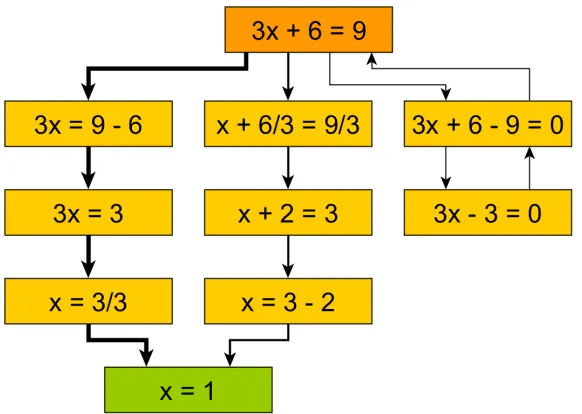
All students start in the same state (top) and attempt to achieve a goal state (bottom). Edge weight (thickness) corresponds to the frequency of students who took a given path. Multiple solution paths can lead to a given goal state, though some paths result in backtracking (right), indicative of a possible mistake. . . 17
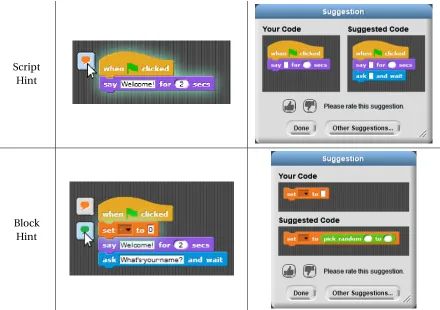
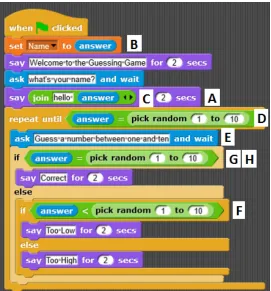
Figure 3.1 The two primary types of hints offered by iSnap: script hints (top) and block hints (bottom). In both cases, a student can select a ‘hint bubble’ (left), which causes a hint dialog to display (right), suggesting the addition of an ‘ask’ block (top) or a ‘pick random’ block (bottom). . . 30 Figure 3.2 Anna’s code near the completion of her program. Letters mark where Anna
followed hints. . . 32 Figure 3.3 An example of a hint for a “test script” that recommends modifying it like a
main script. . . 33 Figure 3.4 An example of a hint to delete an ‘if’ block that is outside of a loop. . . 34 Figure 3.5 A hint to properly nest an ‘if’ block that was not followed. . . 36 Figure 3.6 iSnap now highlights a student’s code to indicate possible errors. The magenta
highlight (second line, ‘answer’) suggests removing a block, and the yellow highlight (6th line, ‘pick random’) suggests moving a block. . . 37 Figure 3.7 iSnaps now displays next-step hints using “plus” buttons and blue-outlined
input slots. The student can click on either to see a script hint or block hint dialog, respectively, as shown in Figure 3.1, right. . . 38 Figure 3.8 Informational dialogs explain the two types of feedback offered by isnap: error
highlighting and next-step hints. . . 40
Figure 4.1 The percentage of tutor Phase I edits predicted by SourceCheck (SC) and TC (the recall) for each edit type on the GuessingGame (GG) and Squiral (SQ) assignments. Bars are labeled with the total number of Phase I edits of each type (bottom) and the number of correctly labeled edits (top). . . 51 Figure 4.2 The recall for Phase II edits (top), as well the the percentage of SourceCheck
Figure 5.1 A student’s code is annotated with hint buttons (left). Upon clicking a button, a hint window suggests a change to the student’s code (right). . . 57 Figure 5.2 Violin plots comparing grade distributions for F0 and F1 attempts at both the
Squiral (left) and Guessing Game 2 (right) homeworks. Inside each plot is a boxplot, and a red dot indicating average grade. . . 61
Figure 6.1 Cold start curves for the iSnap dataset (black) with uniform hint weights (solid) and voting-based weights (dotted). ALLEXPERT(green) and ONEEXPERT (blue) baselines are shown for comparison. . . 72 Figure 6.2 Cold start curves for the ITAP dataset (black) with uniform hint weights (solid)
CHAPTER
1
INTRODUCTION
1.1
Motivation
Over the past decade demand for computing education has increased dramatically. The number
of students enrolling in undergraduate Computer Science (CS) degree programs at U.S. doctoral-granting universities has tripled from 2006 to 2015[Com17]. At the same time, there is a national effort in the U.S. to increase the availability of computing education in K-12 schools. The National
Science Foundation has funded efforts to train 10,000 K-12 teachers in 10,000 high schools[Cun11], leading to large-scale professional development efforts[Cod15; Goo14; Gra15; Mor15a; Pri16c]. Partially as a result of these efforts, over 47,000 students enrolled in the new AP Computer Science Principles course and took the AP exam in 2017, more than doubling AP CS participation by females
and underrepresented minority students[Cod17]. These K-12 trends suggest that undergraduate enrollment will continue to increase.
Once students enroll in CS degree programs, however, many struggle to succeed. A 2013 study by
the National Center for Education and Statistics[CS13]showed that 59% of students entering Com-puter/Information Science Bachelor’s Degree (B.S.) programs left the program before graduating, with 31% leaving postsecondary education entirely. This is the highest attrition rate of any STEM B.S.
program. Most student who left their programs did so in their first year, which may be due to the
There is also little evidence to suggest that this trend is improving[WL14]. While these estimates are based on a limited sample of institutions, it seems clear that many novices are struggling to learn in CS classrooms.
The growing popularity of computing education and the challenges faced by computing students
both point to a clear need for better support for novice learners that can scale well to modern computing classrooms. Instructors play an important role in providing this support, but this can be
a challenge for the growing number ofnewly-trainedK12 CS teachers[Cod15; SC17], for instructors of MOOCS with thousands of students[Wan17], or in informal learning settings[Mal08]with no trained instructor. In these situations, students need a source of support that is always available. To
address this, many technologies have been developed to ease the challenges of learning to program
and to improve student learning. Two technologies in particular have shown promise in empirical studies: intelligent tutoring systems and novice programming environments.
Intelligent tutoring systems (ITSs) are computer systems designed to approximate the role
of a human tutor, using AI and data-mining to support students as they work independently on assignments. Many ITSs have been developed in the domain of computer programming (e.g.[Ger16; Gro14b; Hol09; Mit98; RK17; WB01]), and a variety of empirical studies have shown an overall advantage of ITSs over large group instruction and other forms of computer-based instruction in the domain of computing education[Nes14]. A key feature of any ITS is the ability to give students context-sensitive feedback during problem solving, often in the form of hints[Van06]. In the domain of programming, this feedback has been shown to improve students’ performance, both inside the tutor and on subsequent assessments[CA01].
Despite positive empirical evaluations, these specialized ITSs are rarely used in introductory programming classes outside of research studies. In particular, new introductory Computer Science
(CS) curricula, such as CS Principles1and Exploring CS2are increasingly incorporating novice programming environments (NPEs) into their lessons. NPEs are systems with features specifically designed to aid novices in learning to program, such as Scratch[Res09], BlueJ[Köl03]and Snap!
[Gar15]. NPEs engage students in creating open-ended projects, such as games, stories and simulati-ons[Utt10]. These environments often include drag-and-drop, block-based programming interfaces that improve student performance and learning by minimizing the challenges of syntax[PB15b; WW17]. NPEs offer improved outcomes over traditional instruction, such as increased retention [Coo03; Mos04]and improved test scores[Dan12].
Aside from some preliminary research[Coo12; Dia17; Gus17], little effort has been made to bring the intelligent features of ITSs to these NPEs. This is due in part to the large investment of time
required by domain experts to create ITSs, which can range from tens to hundreds of hours to create one hour of intelligent content[Mur99]. Further, the use of open-ended programming assignments,
which makes these environments so appealing to students and teachers[Gar15], also serves as a major barrier to providing intelligent, adaptive feedback. These assignments often have multiple, interdependent objectives that emphasize the ill-defined nature of programming and make it
difficult to construct ITSs. The research presented in this document takes steps towards overcoming
these challenges, combining the empirically-driven support features of ITSs with the popularity, accessibility and effectiveness of NPEs. The motivating goal of this work is to create intelligent
support features that work in modern classrooms by integrating with existing programming tools,
curricula and teacher training, and by scaling to new assignments using data-driven methods, rather than relying on experts.
1.2
Research
The research in this document presents the design, evaluation and implications of iSnap, a novice
programming environment that offers intelligent support to students, specifically data-driven
hints and feedback. I begin in Chapter 2 with a review of the relevant literature on ITSs, NPEs and data-driven programming hints. In Chapter 3, I present the design of iSnap and discuss challenges
identified in a pilot study of the system, as well as how the system has evolved to address these
challenges. In Chapter 4, I present SourceCheck, the data-driven hint generation algorithm that iSnap employs, and I evaluate the quality of these data-driven hints using expert tutors.
In Chapter 5, I discuss results from an evaluation of iSnap, which investigates the relationship
between the quality of the data-driven hints that students received and their future help-seeking behavior. In Chapter 6, I present a methodology for comparing the quality of different data-driven
hint generation approaches. I use this methodology to investigate the impact of the data quantity
and data source (collected from students or expert-authored) on the quality of data-driven hints. In Chapter 7, I investigate other factors, besides hint quality, that impact students’ willingness to
seek and use help from both humans and computers. Chapter 8 closes with a discussion of the
implications of these results on my research questions, the contributions of this research, and important directions for future work.
1.2.1 Research Questions
This work investigates 4 high-level research questions:
RQ2 How can we leverage student data to automatically generate hints for open-ended program-ming problems?This RQ is addressed in Chapters 4 and 6, which discuss the SourceCheck algorithm used to generate iSnap’s data-driven hints and how to address the challenges of
hint generation using student data.
RQ3 How can we evaluate and compare the quality of techniques for generating data-driven hints? This RQ is addressed in Chapters 4, 5 and 6, which present novel methods for evaluating and comparing the quality of data-driven hints. These chapters also discuss how these methods
can be used to inform our design of hint generation algorithms.
RQ4 What factors impact students’ willingness to seek and use programming help?This RQ is addressed by Chapters 5 and 7, which use classroom and laboratory studies to identify
barriers that discourage students from seeking help on programming tasks when they need it, as well as factors that encourage help-seeking. Both chapters suggest how these barriers
can inform our design of help systems.
1.3
Contributions
This work makes the following primary contributions:
1. The iSnap programming environment, which is the first to combine the support features of block-based programming and automatically generated hints.
2. The SourceCheck data-driven hint generation algorithm for programming, which is the first
to support multiple programming languages and the more open-ended problems used in
NPEs.
3. Evidence that highlights the importance of data-driven hint quality and its impact on students’ willingness to use a help system.
4. Novel methods for evaluating the quality of data-driven hints using experts, which allow
researchers to benchmark and compare hint generation algorithms.
5. Results identifying factors that influence students’ willingness to seek and use help when
CHAPTER
2
RELATED WORK
This section will review the diverse body of related work that serves as the foundation for the research
presented in this document. The goal of that research is to leverage the scaffolding and popularity of existing, novice programming environments (NPEs) and combine this with the effective support
features of intelligent tutoring systems (ITSs), specifically data-driven hints and feedback. This
section therefore begins with a review of NPEs, ITSs for programming, and the empirical support for each. It then reviews existing techniques for automatically generating programming hints and
how these techniques have been evaluated. This section closes with a review of research on how
students seek and use help in the classroom and in ITSs.
2.1
Novice Programming Environments
Novice programming environments (NPEs) broadly encompass systems with features specifically designed to aid novices in learning to program. While NPEs are diverse, they generally share the
goals of creating a more engaging context for programming and reducing the initial challenges of
programming syntax through novel programming interfaces. A full review of novice environments is beyond the scope of this document, though Guzdial[Guz04]and Kelleher et al.[KP05]both offer a good review of less recent systems. Instead, this section highlights three examples of popular NPEs
presents a review of evaluations of these interfaces. It closes with a discussion of research towards
bridging NPEs with ITSs.
2.1.1 Examples and Evaluations of Novice Programming Environments
Scratch[Res09], developed by researchers at MIT, is one of the best-known NPEs. It was designed to be “more tinkerable, more meaningful, and more social” than previous environments, such as
LOGO[Pap99]. To that end, Scratch features a drag-and-drop, block-based programming inter-face, which allows users to construct programs by composing atomic blocks of code together to
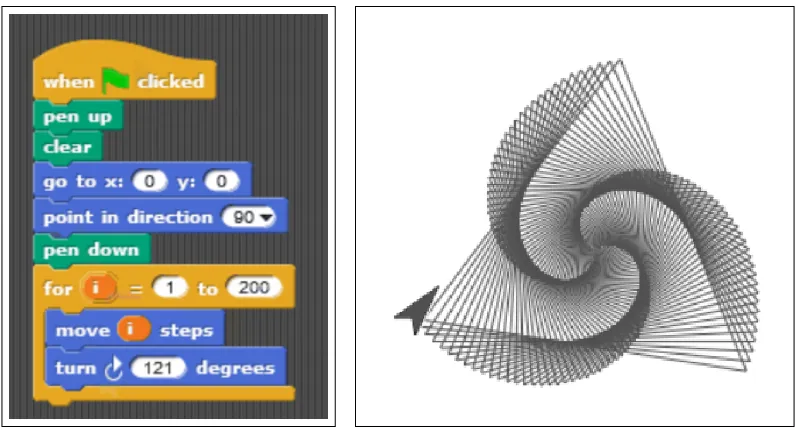
form program structure (an example of block-based programming is shown later in Figure 2.1).
These blocks may represent high-level structures, such as methods or loops, or low-level operators such as multiplication or equality comparison. Scratch’s output is primarily graphical, allowing
users to create and manipulate 2D sprites, while adding music, animation and interactivity. The Scratch website allows users to upload, share and remix each other’s programs, adding social and
collaborative elements to the environment[Fie13]. Scratch is also notable for its use of executable program fragments. Scratch programs can be built in small chunks, and any piece of Scratch code can be individually executed, with its effects immediately visible. Scratch has become a widely used
programming language. As of January 2018, it ranks 17th on the TIOBE index1, which measures programming languages’ popularity based on search engine results.
Classroom evaluations of Scratch have shown evidence that it can be an effective tool for
K-12 learning when integrated into a programming curriculum but that it also presents specific
challenges for students. Meerbaum-Salant et al.[MS10]designed a semester-long 9th grade Scratch curriculum and observed its implementation in two ninth grade classrooms. An analysis of student
scores on a pre- and post-test of CS concepts showed significant improvement after using Scratch,
though students did struggle with more abstract concepts such as initialization, variables and concurrency. However, the authors also found evidence that learning with Scratch could lead to
less desirable programming habits, such as bottom-up programming with little consideration for
larger program structure and extremely fine-grained programming[MS11]. Similarly, Grover et al. [Gro16]developed a 7-week FACT curriculum based on Scratch for middle school students, which significantly improved students’ computational thinking (CT)[Win06]skills. They also found that while Scratch made programming easier than its textual counterparts, students still came away with specific misconceptions about loops, variables and boolean logic, some of which may have
been exacerbated by the programming environment[Gro17b]. For example, they found that many students held the misconception that loops produced theexact sameoutput at each iteration, a notion which may have been reinforced by using Scratch’s “repeat” loop, which does not have a
changing counter variable.
Scratch has also been evaluated outside of the classroom in informal and independent learning
settings. Maloney et al.[Mal08]describe their experience using Scratch in an urban after-school center and their analysis of the programs created. They found that Scratch was popular, and students
used it voluntarily and more frequently than any other available design software, forming
commu-nities with informal, peer-to-peer mentoring[PK07]. While around 20% of the projects included only media manipulation without code, about half of the remaining programs employed loops and
user interaction, and their programs increased in complexity over time. Aivaloglou and Hermans [AH16]investigated 250,000 projects in the Scratch online community, many of which are created in informal and independent learning settings. Similar to Maloney et al., they found that Scratch users
commonly employed loops, and to a lesser extent, conditionals and variables (in 77%, 40% and 32%
of projects, respectively). However, users employed more advanced concepts, such as procedures, less frequently. The informal learning settings investigated in these studies highlight how NPEs are
often used when instructors may not be available, and the automated, intelligent support of an ITS
would be useful.
Alice2[Coo03], and its successor Alice 3[Dan12], are NPEs which allow users to program within a 3D environment. Alice was one of the first novice programming environments to adopt a
drag-and-drop interface. It employs an event-based, object-oriented paradigm, allowing users to add objects to their scene, manipulate the objects’ attributes and call their methods. Alice offers a library
of 3D objects, animations and sounds, making it a media-rich experience. Alice uses drag-and-drop
controls for manipulating lines of code and some expressions, but relies more heavily on menus to give the user access to the many manipulable properties of each object. Alice’s interface shares the
goal of many NPEs of simplifying programming by removing the capacity for syntax errors. Evaluations of Alice have focused on its use in the classroom, where it has been shown to improve
students’ grades[Coo03; Dan12]and retention[Coo03; Mos04]over traditional curricula. Moskal et al.[Mos04]developed an introductory college curriculum using Alice. They compared students who underwent this course prior to or concurrently with their first CS1 course to students who took
only the CS1 course. They found that the Alice course significantly improved students’ grades in
the CS1 course, as well as retention in CS over a two-year period. They found these trends more apparent with “high-risk” students, who had less math experience and no programming experience
prior to college. A similar study by Cooper et al.[Coo03]supports these findings, showing that an Alice-based curriculum helped achieve improved grades and retention. Kelleher et al.[Kel07] found that Alice could be further adapted to young female students by adding features to facilitate
storytelling programs, such as easier animations and more character-driven methods. Dann et al. [Dan12]used Alice 3 in an introductory undergraduate CS course, and transitioned from Alice’s original block interface to a Java implementation of the Alice API. Students were given a test at the
end of the course, which used Java code in its questions. The authors compared students’ scores
Figure 2.1A block-based Snap!program (left) and its corresponding graphical output (right).
on average at least one grade level higher than the previous pure Java classes on each section of the
test.
Snap![Gar15]is a web-based NPE based on Scratch, which adds features such as higher order functions, a web API, javascript interoperability and accessibility features. Figure 2.1 shows a Snap!
program and corresponding graphical output. Snap!is most notable for its tight integration with the Beauty and Joy of Computing (BJC)[Gar15], an AP Computer Science Principles course taken by over 3500 students in 2017, which focuses on creating interesting computational artifacts through creative
and collaborative assignments. The curriculum is backed by a successful BJC teacher professional development course that has trained hundreds of teachers and sparked over 80 BJC courses[Pri16b]. A primary goal of the course is to broaden participation in computing, and survey data supports
the notion that the course (which relied heavily on Snap!) is equally appealing to and effective for diverse students[Pri15]. Snap!is a popular programming environment, actively used in high school and college classrooms, as well as in informal learning contexts – settings where students would benefit from additional help. The iSnap environment, presented in Chapter 3, attempts to address
this need by extending Snap!with data-driven support features.
Other popular NPEsinclude MIT App Inventor[PV13], which allows users to design and program Android apps in a block-based web application. It has been evaluated in K-12 classrooms and
summer camps, suggesting it is a powerful, motivational and accessible tool[Mor11], which can serve as a bridge to textual coding in Java[Wag13]. Greenfoot[Köl10]and BlueJ[Köl03]are Java-based environments designed for novice and intermediate programmers, allowing them to design
supports novices in performing data analysis on real-work datasets from the CORGIS project[Bar17b]. While most NPEs are developed in academic settings, others, such as Code.org’s Code Studio2and Processing3, have been developed by industry, nonprofit organizations and individuals. For example,
LEGO Mindstorms NXT are customizable LEGO robotics, which can be programmed using a simple
block-based programming environment. They have been used to teach programming to middle school students[Cat14]and in introductory undergraduate CS courses[Cli06].
2.1.2 Evaluations of Alternative Novice Programming Interfaces
The above studies focus on the general evaluation of NPEs and the curricula that use them, but
other studies have looked at the effects of specific design choices of NPEs. A growing community of researchers have evaluated the alternative programming interfaces found in many NPEs, especially
based programming interfaces. Taken together, these studies show clear evidence that block-based programming offers benefits over textual programming for novice programmers, including
increased performance, learning and reduced difficulty with syntax errors.
Many studies have compared the outcomes of learners working in block-based and textual pro-gramming environments. Booth and Stumpf[BS13]worked with adult end-users learning to program Arduino boards. They compared the outcomes of two groups, one using Java in the Arduino IDE,
and the other using the block-based ModkitAlpha programming environment. They found that the block group perceived the interface to be more friendly and experienced lower perceived workload.
Lewis[Lew10]compared the block-based Scratch environment to the textual Logo environment in a 5th grade summer camp and found that students perceived exercises to be equally difficult with both environments and that each environment was better suited to teach different programming
topics. Weintrop and Wilensky[WW15a]compared students’ perceptions of the block-based Snap!
and textual Javascript languages. They found that students perceived Snap!to be easier, in part due to it being easier to read, with better natural layout. However, they also perceived Snap!to be less
powerful, authentic and efficient to work with. The authors also compared student learning under
these block and text conditions and found that while the block interface led to increased learning on most CS topics, the exact reasons for improved performance are complex and merit further study [WW15b]. Kolling and McKay[KM16]applied three sets of heuristics, designed to identify usability problems in programming environments, to Scratch and two textual environments, Greenfoot (Java) [Köl10]and Visual Basic, which are also used in educational settings. In total, they identified 58 problems in Scratch, compared to 57 for Visual Basic and 65 for Greenfoot, though for any given
heuristic, Scratch had the fewest (or tied for fewest) identified problems. One of these heuristics was designed specifically for NPEs and included factors such as engagement, consistency, appropriate
abstractions and feedback.
Figure 2.2A comparison of the textual (left) and block (right) interfaces used in[PB15a]. The interface for both consists of a work area (left), an output canvas where the game can be played (top-right) and a palette of usable blocks or code (bottom-right).
More recently, researchers have begun to compare block-based and textual programming
inter-faces directly. Price and Barnes[PB15a]compared the performance of novices using a block-based and textual programming interface for a web-based Hour of Code activity, designed to introduce the fundamentals of programming. Unlike previous work, this study controlled all aspects of the
programming environment and activity between the block and text conditions, except for the
pro-gramming interfaces themselves, shown Figure 2.2. They found that the block group completed significantly more objectives in less time and spent significantly less time idle compared to the
text group. They also found no significant difference in students’ perceived difficulty during the
programming task and hypothesized that while the text group was challenged in part by syntax, the block group was challenge by the inherent difficulty of programming. This hypothesis would
support the need for intelligent support in NPEs, despite their block interfaces.
Price et al.[Pri16a]performed a similar experiment, comparing the frame-based programming interface, Stride[Köl15], to a textual programming interface in the Greenfoot[Köl10]programming environment. Like block-based programming, frame-based programming attempts to ease the
challenges of syntax and syntax errors by removing many syntactic elements (e.g. semicolons, brackets), but it still uses the keyboard as the primary input method. Price et al. found that middle
school novice programmers using Stride progressed through an activity significantly more quickly, spent significantly less time making purely syntactic edits, and spent less time with uncompilable
code.
Weintrop and Wilenski[WW17]evaluated isomorphic block-based and textual versions of the Pencil.cc programming environment. They performed a quasi-experiment, comparing two sections
of a high school introductory programming course over 5 weeks, where each section used either
size was almost twice as large for the block group, with significantly higher post-test scores. Unlike
Price and Barnes[PB15a], they found that students in the block group did rate programming tasks as significantly easier than the text group.
Other work has investigated thetransitionfrom blocks to textual programming. Wagner et al. [Wag13]introduced K-12 students at a summer camp to programming through MIT App Inventor, but they transitioned after two days to the Java Bridge, a Java implementation of the App Inventor
API. They found that by repeating exercises first using a block interface and then a textual interface,
students were able to mentally map familiar block procedures to the new textual procedures. As noted earlier, Dann et al.[Dan12]designed a curriculum to mediate transfer from Alice to textual Java programming using “bridging” and “hugging” techniques that helped students abstract concepts
and apply them in multiple programming environments. Increasingly, block-based programming environments support dual-modality programming, in which students can freely switch between
blocks and text (e.g.[Bar17a; HN14]), and a number of studies[Bar17a; Mat15; WH17]have investi-gated how students use these dual-modality environments. Results suggest that students migrate from blocks to text at varying rates[Mat15]and also transition back to blocks to accomplish a variety of tasks more easily[WH17].
2.1.3 Intelligent Support in Novice Programming Environments
The NPEs reviewed in this section are popular and accessible systems. Many have been empirically
evaluated with positive results, both in general and with respect to their interfaces and associated
curricula. However, despite the ingenuity of their design, none of these systems offer the intelligent support features of ITSs (discussed in more detail in Section 2.2). In addition to the work presented
in this document, some preliminary research has investigated how NPEs might provide this support.
Cooper et al.[Coo12]added a series of guided tutorials to Alice, which relied on “buggy” worked examples to preemptively correct or prevent common mistakes and misconceptions. However,
while the authors call the system an ITS, their work focused more on creating tutorial content “to
support the ITS,” rather than its intelligent, adaptive features. BlockPy[Bar17a]is a block-based NPE that offers students sophisticated feedback, but this feedback also relies heavily on instructors
to manually author the feedback and the conditions under which it should be presented[Gus17]. Diana et al. created a real-time dashboard to support Alice teachers in detecting struggling and idling students[Dia17]. The dashboard used a predictive model to estimate students’ learning outcomes using historical data, relating Alice programming log data to a subsequent assessment.
Using the same dataset, Grover et al.[Gro17a]developed a framework for identifying evidence of computational thinking from log data, based on an Evidence Centered Design methodology.
use hints and feedback to support students and how these systems have been evaluated.
2.2
Hints and Feedback in Intelligent Tutoring Systems
Intelligent tutoring systems (ITSs) are computer systems designed to approximate the role of a
hu-man tutor, using AI and data-mining to support students as they work independently on assignments.
In the domain of programming, these systems have shown much promise, with a 2014 meta-analysis by Nesbit et al. indicating that ITSs for programming produced an aggregate 0.46 standard deviation
improvement over other, traditional forms of instruction[Nes14]. Other research provides overviews of ITSs for programming[CLr18]and AI-supported programming instruction[Le13], so this section focuses specifically on how these systems support users with hints and feedback.
The ability to offer contextualized feedback to students during problem solving is a key feature of ITSs in many domains, comprising part of the “inner-loop” and an ITS[Van06]. While this feedback can take a variety of forms, two of the most common are next-step hints, which guide the student
through completing the next step of a multi-step problem, and error-specific feedback, which identifies errors in the student’s work and explains how to fix them. Both types of feedback often
come in multiple “levels,” where each level gives increasingly specific advice, until a “bottom-out”
level, in which the tutor tells the student exactly what to do. For example, the Andes tutoring system [Van05]operates in the domain of physics and guides students through selecting and applying appropriate domain principles. It offers both next-step and “what’s wrong” (error-specific) help in
three levels: first a pointing hint, which directs a student’s attention to the location of their error; then a teaching hint, which informs the students about a relevant domain principle; and finally a
bottom-out hint, which tells the student exactly what to do next.
In the domain of programming, Le et al.[Le16]have further classified adaptive feedback in educational systems into 5 categories: 1) yes/no feedback, which simply tells the student if their program is correct, e.g. through test cases; 2) syntactic feedback, which augments the compiler’s
syntactic error checking, e.g. with better explanations; 3) semantic feedback, which helps the student understand and complete the requirements of the programming task; 4) layout feedback, which
helps with style and coding conventions; and 5) quality feedback, which identifies ways the student’s
code could be made more efficient. This document focuses largely on semantic feedback, as do most of the systems classified by Le et al.[Le16]. The remainder of this section focuses on how programming feedback has historically been generated in ITSs and evaluations of the impact of this
2.2.1 Generation of Tutor Feedback
Historically, ITSs have generated feedback using an expert model, which encodes domain knowledge in a structured way that a computer can apply to the student’s work. These models have historically
been constructed through extensive knowledge engineering, for example by using cognitive task
analysis[MG88]to learn the structure of domain knowledge from subject matter experts. This process can be very time consuming, but it can be made more efficient with authoring tools such as
the Cognitive Tutor Authoring Tools (CTAT)[Ale09].
Model-tracing tutors use an expert model to “trace” a student’s solution path, providing feedback to ensure that the student remains aligned to an expert solution. The expert model is encoded as
a set of production rules[And93], which define appropriate problem-solving strategies using if-then rules. The ACT Programming Tutor (APT; formerly the LISP Tutor)[And89]is a model-tracing cognitive tutor for the LISP programming language and one of the first ITS for programming. The
APT uses a structured code editor, which prevents students from leaving this expert path, and it provides feedback if their actions would do so. Students can also request similar feedback on
demand through a next-step hint. The Ask-Elle tutor[Ger16]for the Haskell programming language is a more modern example of a model-tracing tutor, which allows an expert (e.g. a teacher) to define correct programming behaviour using a “strategy language,” rather than production rules. Ask-Elle
augments traditional model-tracing error feedback with property-based testing, a sort of automated
unit testing framework that finds examples of input which produce incorrect output for a student’s program.
Constraint Based Modeling (CMB)[Mit07]employs an expert model consisting of a set of con-straints, which describe correct behavior for a given problem or domain. Like production rules, these constraints are encoded as if-then rules, but they describe properties of a correct solution,
rather than strategies for deriving one. SQL-Tutor[MO99]was the first ITS to employ CBM, though unlike the next-step hints of the previously discussed tutors, it waits until a student has submitted a programming assignment before offering feedback. SQL-Tutor identifies constraints which apply to
a student’s submitted solution but are not satisfied, and it then offers feedback on how to satisfy
them using an expert-authored help message for each constraint. This work has been extended through other constraint-based programming tutors, which offer similar feedback upon program
submission, including J-LATTE[Hol09]for the Java programming language and INCOM[LM07], a web-based tutor for the Prolog programming language.
While next-step hints and error feedback are the most common forms of intelligent feedback
provided by programming systems, other approaches do exist. ELM-PE[Web96]and its web-based successor ELM-ART[WB01]are intelligent learning environments for the LISP programming lan-guage. These systems offer example-based help, in which students struggling on a programming
systems use both domain knowledge of the LISP programming language and episodic knowledge of
the student’s behavior on previous programming exercises to recommend the most appropriate example. This example-based support is feedback, in that it is responsive to the student’s past
actions, but it is much less contextual than the feedback discussed above. Gross et al.[Gro14b] created an ITS which addresses this by combining example-based feedback with next-step hints. The system uses a database of expert- and user-authored solution traces, broken down into steps.
When a student asks for help, the system searches this database for the closest matching solution
step and presents part of this solution to the student as an example. Paaßen et al.[Paa15]extended this work by creating an adaptive distance metric that can be trained using a dataset of programs
labeled with the strategy being used. The distance metric is then able to distinguish between various
programming strategies for a given assignment.
2.2.2 The Effectiveness of Tutor Feedback
There is relatively good evidence to suggest that ITS feedback does provide a benefit to students,
both generally and specifically in the domain of programming. Stamper et al.[Sta13]compared two version of the Deep Thought logic tutor, one with on-demand hints and one without, across
two semesters of data and found that the Hint group completed significantly more of the tutor, had
significantly less dropout and had a significantly higher final course grade than the control group. Beck et al.[Bec08]used data mining to evaluate the effect of help on student performance in the Project LISTEN reading tutor. They trained a modified Bayesian Knowledge Tracing model, which
distinguished between instances of practice where the tutor did and did not elect to offer feedback. They found evidence in their model that when students received help, the probability of learning
a skill was marginally higher, and the probability of demonstrating that skill was much higher,
indicating that the help somewhat improved learning, and definitely scaffolded performance. In the domain of computer programming, there is similar evidence in support of hints. Corbett
et al.[CA01]compared a variety of help mechanisms in the ACT Programming Tutor, including immediate feedback, on-demand hints and debugging feedback, and found that students who received feedback during tutoring completed the tutor faster and completed a subsequent
pro-gramming assessment in significantly less time and with significantly fewer errors. However, it is
important to note that unlike in the feedback condition, students in the no-feedback condition were permitted to give up on problems without submitting a correct solution, which they did 30% of
the time, meaning these students had less total exposure to the learning content (despite spending
more time in the tutor). Holland et al.[Hol09]evaluated their J-LATTE system in a small study comparing a version with and without error feedback. The feedback group completed significantly
et al.[Fos15]developed 5 versions of the iList ITS to teach linked lists, which offered increasingly advanced forms of hints and feedback. They compared students working each version of iList to students who worked with a human tutor and students who received no instruction. They found
that students using the most advanced version of the ITS learned significantly more than students
who received no instruction, and they also learned the same amount as students who had human tutoring. Section 2.3.3 further discusses the effectiveness of hints for programming, with a focus on
evaluatingautomatically generatedhints.
Despite the large number of ITSs which offer hints and feedback to students during problem solving, as well as the empirical evidence above in support of these features, researchers are still
trying to determine when and how this helpactually helps. Aleven et al.[Ale16]reviewed the literature on principle-based hints in ITSs and reflected on their own experience building the Help Tutor, designed to teach students to make better use of this help (discussed further in Section 2.4.2). They
concluded that “hints and help-seeking can help students learn, but that they are not the strong
influence on student learning that we once thought they were”[Ale16]. A study by Roll et al.[Rol14] on data from the Geometry Cognitive Tutor provides some evidence for this idea, showing that hints
may only be effective for some students. They found that hints were most effective for students
with an intermediate skill level on a given problem but not effective for students with a low skill level for that problem. Regardless of their impact on learning, hints may be necessary in many
ITSs, especially “bottom-out” hints that allow a student to progress when stuck in order to reach
subsequent learning content. A study by Shih et al.[Shi08]suggests that these bottom-out hints may be useful for learning when students take time to self-explain the meaning of the hint, but
such instances of spontaneous self-explanation are rare, suggesting a need for the ITS to scaffold this self-explanation process. These studies temper the earlier results of the benefits of tutor help,
suggesting that its role is nuanced and not fully understood, and emphasizing the need for more
work across domains.
2.3
Automated Hint Generation in Programming
The model tracing and constraint-based ITSs described earlier are effective when expert content
authors are available, and when programming assignments are easily defined by a set of constraints or production rules. However, this work focuses on NPEs, where a diversity of curricula and
con-texts makes it infeasible to support each assignment with expert-authored content. Further, the
assignments themselves are often open-ended4and creative, with multiple, interdependent goals, making it difficult to author ideal programming behavior without restricting students’ solutions.
This section describes automated approaches to generating feedback for programming,
specifi-cally programming hints. These approaches focus less on knowledge-engineered domain models, relying instead on examples, test cases and data to generate hints. These systems are specific to
the domain of programming and come from the ITS, Artificial Intelligence, Human-Computer
Interaction and Software Engineering research communities. This is a quickly growing field of research, with few papers published before 2014, and over 25 published between 2014 and 2017.
The remainder of this section reviews data-driven and automated methods for hint generation in
programming with a focus on how hints aregeneratedandevaluated.
2.3.1 Data-driven Hint Generation
Data-driven hint generation uses a database of correct solutions to a given programming problem
to automatically generate hints for students. This section primarily focuses on next-step, edit-based hints, which suggest edits (e.g. insertions or deletions) that will bring a student’s code closer to a
correct solution, but it also briefly discusses other forms of data-driven hints. Some hint generation
algorithms take as input a database of final, complete solutions to a problem, while others utilize a database of solutiontraces, which describe each step in constructing the solution program. Typically, these solutions or traces come from other students, for example from a previous semester, who
correctly solved the problem. However, as explored further in Chapter 6, the data could also come from experts. Algorithms often represent solutions and partial solutions using an Abstract Syntax
Tree (AST), a directed, rooted tree where each node represents a program element, such as a function
call, control structure or variable, and the hierarchy of the tree represents how these elements are nested together.
2.3.1.1 The Hint Factory and Graph-based Approaches
Many data-driven hint generation methods are based on the Hint Factory[BS10], an algorithm for generating next-step hints for students working on multi-step problems in a variety of domains. It operates on a data-structure called an interaction network[Eag12], which is built from log data of the interactions between students and a learning environment for a given problem. The interaction
network is a directed graph, where each vertex represents a state of the problem. In programming a state usually corresponds to a snapshot of the student’s current code. States are connected by edges,
which represent student actions, such as adding, editing or deleting code, which transform one
state into another. Each student attempt is traced from a start state to its final state, and is added to the interaction network. If this final state is a correct solution, it is labeled as a goal state. By
combining all students’ attempts into a single network and weighting edges with the number of
Figure 2.3A simple example of an interaction network from a hypothetical algebra ITS. All students start in the same state (top) and attempt to achieve a goal state (bottom). Edge weight (thickness) corresponds to the frequency of students who took a given path. Multiple solution paths can lead to a given goal state, though some paths result in backtracking (right), indicative of a possible mistake.
interaction network from a hypothetical algebra tutor.
The Hint Factory uses the interaction network for a given problem to generate hints for new students working on that problem. When a student requests a hint, the algorithm matches that
student to an existing state in the network and then calculates the best path from that state to a goal
state. Once a solution path is calculated, it is typically used to provide a next-step hint, which points the student towards the next state on the solution path. The Hint Factory uses a Markov Decision
Process (MDP) to calculate this solution path[BS10], but other techniques can also be used, which are more effective in some contexts. For example, Stamper and Barnes[SB09]found that using the frequency of solution steps to assign values to states in the interaction network produced hints
that an expert rater preferred to MDP-based hints. Additionally, Piech et al.[Pie15]developed two “desirable path” hint policies for suggesting programming hints using a graph structure similar to an interaction network. The “Poisson Path” policy directed students down the path with the lowest
expected time to reach a correct solution, and the “Independent Probable Path” policy directed
students down the path that the average successful student was most likely to have taken. The authors found that both policies outperformed an MPD policy, as discussed in Section 2.3.3.
The domain of computer programming presents a serious challenge for the Hint Factory. Even
in the interaction network. To address this lack of overlap, Rivers and Koedinger[RK17]extended the Hint Factory in their ITAP tutor, using a strategy called path construction to generate a path from a student’s current state to a previously observed goal state, rather than relying on observed student
paths. Their approach computes a change vector of all edits needed to transform the student’s
current state into the goal state, and tests to see if any closer solutions are discovered along the way. Hicks and Peddycord III[Hic14; Ped14]applied the Hint Factory to a programming game called BOTS, but rather than representing a student’s state using an AST (acodestate), they used the state of the game world after running the student’s program (aworldstate). The authors found considerably more overlap among worldstates than codestates, allowing more hints to be generated; however,
these hints may be more challenging for students to use.
Others have used graph-based hint generation approaches very similar to the Hint Factory. Fossati et al.[Fos15]employed a graph-based approach in their iList ITS, which offers reactive and proactive feedback on linked-list problems. Min et al.[Min14]proposed an adaptive scaffolding system for a programming game, which would use Hint-Factory-style hints during problem solving that are adaptive to the learning policy being employed by the “outer loop” of the system[Van06]. Chow et al.[Cho17]also developed a path-based hint generation technique for programming, but their approach does not match a hint-requesting student to a single state in the graph. Instead, they use test cases to match the hint-requester to other code states that failed the same set of test cases,
which have structurally similar code. They identify which of these code states come from students
with similar attributes to the hint-requester, such as edit style, progression speed and consistency. They then recommend edits based on what themajorityof those similar students did to fix the failing test.
Most methods for hint generation, especially graph-based methods, benefit from increased
overlap among student programs, making it easier to connect various solution paths. This overlap
can be increased through “canonicalization,” which standardizes thesyntaxof programs, while maintaining theirsemanticmeaning. For example, the expressiona>b can be rewrittenb<a wit-hout changing its meaning. Rivers and Koedinger[RK12]developed a comprehensive technique for canonicalization, which standardizes programs in a variety of ways, such as normalizing arithmetic and boolean operators, removing unreachable and unused code and inlining helper functions. Jin
et al.[Jin12]used a different approach, representing a student’s program as a Linkage Graph, where each vertex is a code statement, and each directed edge represents an ordering dependency. This removes some semantically unimportant ordering information from the program, allowing for more
2.3.1.2 Solution-based Approaches
While graph-based approaches like the Hint Factory focus on problem-solving paths, other
ap-proaches focus instead on complete solutions and the syntactic structure of students’ code. The most straightforward of these approaches is to identify a correct solution that is similar to a
hint-requesting student’s current code and suggest edits to transform that code into the target solution
(e.g.[ZR15; Wan17]). Others cluster student solutions and use these clusters to generate hints (e.g. [Gro14a; Hea17]). An alternative approach is to focus on patterns in the student’s code to identify possible bugs or missing elements (e.g.[Laz17]). Many of these hint generation techniques, including graph-based approaches (e.g.[Cho17; Hea17; LB14; Per14; RK17]), require that a problem can be checked with a set of test cases, which allows the algorithm to determine how a student’s code is
failing and to test whether a suggested edit will correct that problem.
A common solution-based hint generation approach is to use a single target solution in the database for hint generation. Zimmerman and Rupakheti[ZR15]use a pq-Gram tree edit distance algorithm to match a student’s program to its closest counterpart in a database of expert-curated
solutions, though one could imagine just as easily applying this method to a database of student so-lutions. They use the PQ-gram output to identify the set of node insertions, deletions and relabelings
necessary to transform the student’s AST into this solution. Similarly, the iGrader system[Wan17] searches a database of correctstudentsolutions for the best match and infers edits between the student’s code and the selected solution to generate hints. To facilitate the search process, iGrader
only searches for solutions that share the same control flow structure of the hint-requesting student.
Others use clustering to identifya set of solutions in the database that closely match a hint-requesting student’s code and use this cluster to generate hints. Gross et al.[Gro14a]cluster their database of student solutions, with the intention that each cluster represents a different “solution
strategy.” They identify thecluster to which the hint-requesting student belongs and generate a “prototype” solution for that cluster to use for hint generation. They identify two methods for
generating hints from this exemplar: F1, which highlights lines where the hint-requesting student’s code differs from the exemplar and encourages reflection; and F2, which shows the student the part
of the exemplar code which contrasts with the student’s own code. These feedback strategies differ
from the other edit-based hints in this section, and may be more effective for some students; however, this method could also easily be adapted for edit-based hint generation. The MistakeBrowser[Hea17] identifies edits in historical data that caused a formerly failing test case to pass and then clusters
students based on whether this same edit similarly fixes the same test case. This edit can then be provided as a hint to any new student who is assigned to the same cluster. MistakeBrowser also
contains an interface by which an instructor can browse these clusters and author textual feedback
to be presented along with the hint.
the pieces individually. Lazar and Bratko[LB14]generate hints based on single lines of code. To generate a hint for a given program, they look up the individual lines in their database of solutions and suggest the most common transformation for that line. Lazar et al.[Laz17]later took a different, rule-based approach to hint generation. They extracted common AST patterns from a dataset of
both correct and incorrect student attempts, and they attempted to identify conjunctions of patterns (“rules”) that predicted correct (positive rules) or incorrect programs (negative rules). They generated
hints to address the presence of a negative rule (a “buggy hint”) or the absence of a positive rule (an
“intent hint”).
2.3.1.3 Other Data-driven Hints
This section has focused primarily on next-step, edit-based, semantic programming hints, which
suggest how a student can edit their code to bring it closer to a correct solution, but some
data-driven systems provide other types of hints. The AutoStyle system[Mog15]suggests how students can improve theiralready correctsolutions with better style. AutoStyle shows students examples of other student solutions that are similar but have a better style rating, computed automatically
using static analysis. Choudhury et al.[Cho16]extend this approach by clustering solutions into different “approaches” to solving the problem. They then asked instructors to label each cluster
with a quality rating, an exemplar solution, and a natural language hint, which are used to present
style hints. HelpMeOut[Har10]and BlueFix[Wat12]are social recommender systems that focus on helping students resolve compiler error messages by showing students with errors examples of how
other students resolved the errors. The DeepFix system[Gup17]also helps students resolve compiler errors, but it used deep learning with a recurrent neural network to learn these fixes from student data. TraceDiff[Suz17b]visualizes execution traces for a student’s program and can highlight where the student’s trace diverges from a corrected version of their program. In addition to their edit-based
hints, the system designed by Chow et al.[Cho17]also offers input-based hints that suggest test inputs for a student’s code that the student has not yet tried and which similar students did try.
2.3.2 Automated Hint Generation without Data
Others have employed methods from software engineering literature to generate hints. Rather than relying on a database of solutions, these methods use a model of knowledge about the
program-ming language, paired with a set of test cases, to transform a student’s solution until errors have
been corrected. Singh et al.[Sin13]use program synthesis to generate a new solution from the stu-dent’s current program. They use an expert-provided Error Model, which defines a set of potential
transformations to a student’s code for a given problem, to generate a set of edits which lead to a
of the programming assignment, and as such can discover a wider variety of possible solutions.
Phothilimthana et al.[PS17]extend this work by creating a simpler language for encoding error models. They also add a “case analyzer” which offers hints informing students if they are missing a
conditional statement that is present in the instructor’s solution.
Perelman et al.[Per14]also employ program synthesis to search for a set of transformations from the student’s current program to a solution program. They use a domain-specific language (DSL),
which allows authors to define possible program transformations; however, they show that this
DSL can also be automatically generated from previous student solutions. Yi et al.[Yi17]adapted automated program repair (APR) to the task of providing programming hints on introductory
assignments. They found that without modification, APR is insufficient to fix the many bugs found
in student programs but that when modified to produce partial program repairs, APR is almost twice as effective.
2.3.3 Evaluations of Automated Hints
Authors have developed a number of approaches for evaluating data-driven hints. Most of these aretechnical evaluations, which estimate the value of hints using historical data. Unless otherwise specified, the authors usedall historical data in their evaluations (or a specific subset, such as incorrect attempts), weighting all attempts equally. The results may therefore not represent the reality that some students are more likely to requests hints than others. These evaluations can be
classified into the following categories:
Availability: This is the simplest evaluation method, which estimates how frequently hints would be available to requesting students. Perelman et al.[Per14]found that their test-driven synthesis algorithm could generate hints for 65% of player attempts in a dataset from the CodeHunt
programming game, while the iGrader system[Wan17]could generate hints for 54% of incorrect attempts in a C# online course. A common approach for measuring hint availability is to perform
a “cold start” analysis[BS10]to investigate how much student data is necessary to achieve high hint coverage for students. Many authors of data-driven hint systems have performed this analysis [Cho17; Ped14; RK17; BS10], and this approach is discussed further in Chapter 6.
Correction: For programming environments that use test cases to measure correctness, a similar
![Figure 2.2 A comparison of the textual (left) and block (right) interfaces used in [PB15a]](https://thumb-us.123doks.com/thumbv2/123dok_us/1537053.1188521/22.612.97.532.70.212/figure-comparison-textual-left-block-right-interfaces-used.webp)