SPLIT: Smart Preprocessing (Quasi) Language Independent Tool
Mohamed Al-Badrashiny, Arfath Pasha
†, Mona Diab, Nizar Habash
‡Owen Rambow
†, Wael Salloum
†, and Ramy Eskander
†Department of Computer Science, The George Washington University {badrashiny,mtdiab}@gwu.edu
†Center for Computational Learning Systems, Columbia University
†{arfath,rambow,wael,reskander}@ccls.columbia.edu
‡Computational Approaches to Modeling Language Lab, New York University Abu Dhabi
Abstract
Text preprocessing is an important and necessary task for all NLP applications. A simple variation in any preprocessing step may drastically affect the final results. Moreover replicability and comparability, as much as feasible, is one of the goals of our scientific enterprise, thus building systems that can ensure the consistency in our various pipelines would contribute significantly to our goals. The problem has become quite pronounced with the abundance of NLP tools becoming more and more available yet with different levels of specifications. In this paper, we present a dynamic unified preprocessing framework and tool, SPLIT, that is highly configurable based on user requirements which serves as a preprocessing tool for several tools at once. SPLIT aims to standardize the implementations of the most important preprocessing steps by allowing for a unified API that could be exchanged across different researchers to ensure complete transparency in replication. The user is able to select the required preprocessing tasks among a long list of preprocessing steps. The user is also able to specify the order of execution which in turn affects the final preprocessing output.
Keywords:Text Preprocessing, NLP, Corpus Linguistics
1.
Introduction
Text preprocessing and preparation plays an important role in all NLP tasks. Uysal and Gunal (2014) show that choos-ing the appropriate preprocesschoos-ing tasks significantly im-proves classification accuracy. Therefore in any NLP re-search project, experimenting with different preprocessing schemes is an important component of the research space. But due to the various possibilities for text cleaning and preparation, this task could be a significant source of er-ror not to mention pain. Actually, it could also be a source of poor system performance if a certain preprocessing step has been implemented erroneously. Furthermore, differ-ent implemdiffer-entations of preprocessing steps, however mi-nor, could very well result in variation which could impact research replication.
It is worth noting that some preprocessing steps are appli-cable only to some genres/languages. For example in the task of punctuation segmentation in English words such as an attached apostophe should not be blindly applied to ro-manized Arabic used in social media known as Arabizi as some of these punctuation marks are in fact part of the or-thography.
Such difficulties motivate the need for a simple standard preprocessing framework that has a unified implementation of the most important preprocessing steps taking into con-sideration the different behaviors of various languages and genres. This enables the researcher to focus more on the research point. Some attempts toward this objective have been introduced. PRETO is a preprocessing tool devel-oped specifically for preprocessing Turkish texts only (Tu-nali and Bilgin, 2012). JPreText is another tool that fo-cuses on stemming, stopword removal, and term weighting (TF/IDF) for English text (Nogueira et al., 2008). Grover
et al. (2000) introduced a tool called “A Flexible Tokeni-sation Tool” that includes ready-made components to seg-ment text into paragraphs, sentences, words and other kinds of tokens. GetItFullis a tool for downloading and prepro-cessing full-text journals. It performs various commonly used preprocessing steps and puts the output in a structured XML document for each article with tags identifying the various sections and journal information articles (Natara-jan et al., 2006).AraNLPis a preprocessing tool developed specifically for preprocessing Arabic texts. It includes a sentence detector, tokenizer, light stemmer, root stemmer, part-of-speech tagger, and a punctuation and diacritic re-mover (Althobaiti et al., 2014).
In this paper, we introduceSPLIT, the Smart Preprocess-ing (Quasi) Language Independent Tool. By language in-dependence we mean that the tool is built in allows it to be as flexible as possible and not be restricted to a certain lan-guage. The tool consists of a list of commands. Where each of them performs only one task. The users can then build their own preprocessing pipeline using a simple configu-ration file. This list of commands can easily be expanded just by adding a file that contains the code of the new pre-processing task to the source directory of the tool. SPLIT is then able to use the new file automatically without any need to make changes in the tool itself. The ultimate goal ofSPLITis to provide a standard preprocessing framework which can work with most of the commonly used languages and text encodings.
SPLITis currently at version 1.01. This version focuses on different Arabic text encodings; UTF8 Arabic script (e.g.,
num-bers, dates, emails, emoticons, URL, and time markers). We offer the tool to the community from the following link with an open source license, so that researchers who are working on different languages can contribute to the tool and share their work with the community.1
2.
Approach
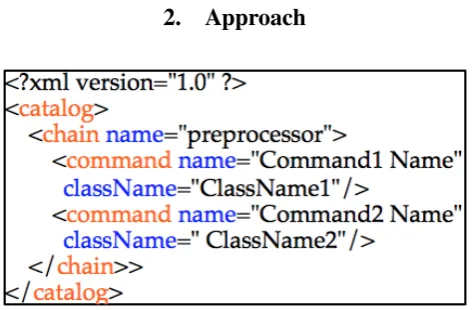
Figure 1: The configuration file template
SPLIT, uses the popular chain of responsibility technique as “Apache Commons Chain”.2 This technique is used for organizing the execution of complex processing flows. Ac-cordingly, the tool is not restricted by a predefined sequence in executing the various preprocessing steps. Instead, the users are able to define their own preferred preprocessing pipeline using a simple xml file. In this file, the user selects the preprocessing steps and their order of execution. Figure 1 shows an example of a configuration file. The fig-ure shows that each preprocessing step is being defined us-ing a “command” xml tag, where the “name” and “class-Name” properties represent the name and the class name of the required preprocessing step. The commands are then processed in the same order presented in the xml pipeline file.
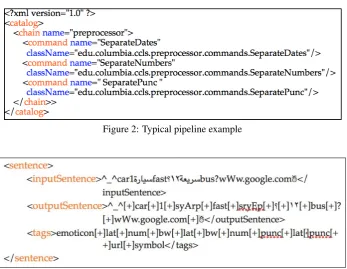
Figure 2 shows an example of a preprocessing pipeline. In this example, the tool separates dates first, then numbers, and finally punctuation marks.
3.
Usage
SPLIT can be used in two modes: standalone mode using a command line interface (CLI) and an API mode. The standalone mode is provided for testing the application and getting familiar with its interface independent of any inter-process communication. The API mode enables the user to integrate the tool in any Java application and use it as a function.
SPLIT yields two outputs: the input text after applying the preprocessing pipeline alongside a tag for each token based on the required steps. If there are some remaining tokens without tags at the end of the pipeline, they get assigned the final encoding of the output text. For example, if the input is in Arabic UTF8 script, the remaining untagged tokens at the end of the pipeline are assigned a UTF8 tag. But if the
1http://care4lang1.seas.gwu.edu/split.php
2http://commons.apache.org/proper/
commons-chain/
configurations are set to convert from UTF8 to BW, then the remaining untagged tokens are tagged with a BW tag. In some situations, the alignment between the text before and after the preprocessing step could be important. There-fore, we add a configurable flag in the tool to enable or disable input/output alignment. Hence, the number of to-kens remains the same. But if some toto-kens are required to be separated during the preprocessing pipeline, they get linked through a user defined separator (the default value is [+]) to indicate the splitting point.
CLI Mode To execute SPLIT in the standalone mode, we simply call it from the Windows Command Prompt or Unix/Linux Shell. It takes the input plain text file name, the output file name, the input character encoding (BW, UTF8, or Arabizi), and the preprocessing pipeline.
java -jar Preprocessor.jar -i inputFile -o
outputFile -e encoding -p pipelineFile.xml
The -i argument is used to specify the input plain text file name, the -o argument is used to specify the output file name, and the -e argument is used to specify the input chacters encoding (BW, UTF8, or Arabizi). Finally, the -p ar-gument is optional. It is being used to override the default preprocessing pipeline.
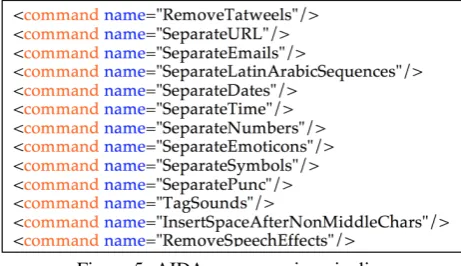
The output is then written in a simple xml format as shown in figure 3.
API Mode To use the API functionality ofSPLIT, the user needs to add the SPLIT Jar file to the referenced li-braries in a Java application. The user will then be able to define a new object of SPLIT and call it as a regular java function.
Preprocessor preprocessor=new
Preprocessor(pipelineFile);
And to run the tool on a certain sentence, the user can use the following command:
OutputObj procContext =
preprocessor.preprocessStream (inputStream,
textEncoding);
Where “inputStream” is an InputStream object of the input sentence and “textEncoding” is the encoding of the input text. It could be (Encoding.utf8, Encoding.bw, or Encod-ing.arabizi). “OutputObj object” is the output object from the tool. It can be read as shown in figure 4
4.
Pipeline Commands
SPLIThas 21 preprocessing commands. Each handles only one task. However, we offer SPLIT as an open source framework to encourage researchers to integrate their own preprocessing commands and share them with the commu-nity.
ConvertBWToUTF8 changes the character encoding into Arabic UTF8 script.
ConvertUTF8ToBW changes the character encoding into BW encoding.
Figure 2: Typical pipeline example
Figure 3: A sample of an output file from the CLI mode. [+] is used as a separator to indicate splitting in order to keep the alignment between the input and the output
Figure 4: Accessing the processed data in the API mode
Input Output
`a, ˆa, and ¨a a
˜n n
¨o o
¨u u
¨y y
`e or ´e e
ˆı or ¨ı i
c¸ c
1
2 oe
x{FEF5}or x{FEF6} convert one symbol Lam Alef-Mad to two characters Lam+Alef-Mad x{FEF7}or x{FEF8} convert one symbol Lam
Alef-Hamza above to two characters Lam+Alef-Hamza above
x{FEF9}or x{FEFA} convert one symbol Lam Alef-Hamza below to two characters Lam+Alef-Hamza below
x{FEFB}or x{FEFC} convert one symbol Lam Alef to two characters Lam+Alef
Table 1: The non-standard character mapping
InsertSpaceAfterNonMiddleChars inserts a space after the characters that cannot appear in the middle of a word (taa marbuta (p) or alef maksura (Y)). All repetitions of the same letter are treated as a single letter (e.g., hdYYYYmn becomes hdYYY mn). The repetition can be handled af-ter that by RemoveSpeechEffects command. However, The command must be used before the RemoveSpeechEffects command.
NormalizeAlef normalizes Alef “|, >, <,and{” become “A”. The command is recommended to be at the end of the pipeline and has no effect on Arabizi inputs.3
NormalizeYaa normalizes yaa “Y and y” become “y”. The command is recommended to be at the end of the pipeline and has no effect on Arabizi inputs.
NormalizeTaaMarbuta normalizes taa-marbuta “p and h” become “h”. The command is recommended to be at the end of the pipeline and has no effect on Arabizi inputs.
RemoveDiacritics removes all diacritic characters from an input string. If the input string is nothing but diacritics, the command replaces it by “@@deleted@@” and tags this deleted string as “diacritics”. This command has no effect on Arabizi input. The command is recommended to run be-fore the RemoveSpeechEffects command, and has no affect on Arabizi inputs.
RemoveTatweels removes the “tatweel” character from an input string. If the input string is nothing but “tatweel”, the command keeps it unchanged and tags this string as “tatweel”. This command has no effect on Arabizi input. The command is recommended to run after the Separa-teEmoticons command, and has no effect on Arabizi inputs.
RemoveSpeechEffects removes the speech effects (also known as elongation) from an input string. For the best performance, this command should be used at the end of the preprocessing pipeline after all (separate and remove) commands. If the input encoding is Arabizi, this command limits any character repetition to only two. But if the input is UTF8 or BW, it applies the following rules:
3For more information on Arabic-specific NLP issues, see
1. Convert “{” to “A”
2. Reduce any repetition of (Y, p, |, <,&,}, and ’ ) to a single occurrence
3. For all “AA” cases (exactly two A’s):
(a) The “yA” case: Every word that starts with yAA\S (where\S is an Arabic letter) should be split after the first A, e.g., yAAbw→yA Abw
(b) Finally, the default case is to reduce all remaining AA+ occurrences to a single A.
4. For the cases of three or more repetitions, we conducted an analysis on ∼ 392M of Egyptian words from the LDC catalog numbers: LDC2012E30, LDC2012E51, LDC2012E94, LDC2012E96, LDC2012E75, LDC2012E77, LDC2012E107, LDC2012E19, LDC2012E54, and LDC2012E17. We found that the top 400 elongated types are contributing to 73% of elongated tokens, where 371 types have repetitions that are reduced into a single letter, while the rest (29 = 7%) have repetitions that are either reduced into two letters or special cases (e.g.: mmm+tAz→mmtAz and mkrrr+ → mkrr). We also analyzed the bottom 100 cases to see whether these percentage are preserved or not. It was found that all the repetitions in them were reduced into a single letter. Therefore, we decided to put the 29 (7%) cases in a lookup table and reduce all the other repetitions into a single letter.
SeparateDates splits all date patterns. It is recommended to be used before SeparateNumbers and SeparatePunc com-mands. This command can match the following patterns:
• month/day/year, month\day\year, month-day-year, month.day.year
• day/month/year, day\month\year, day-month-year, day.month.year
• year/month/day, year\month\day, year-month-day, year.month.day
SeparateDates validates the detected date if the validation flag is on. For example, a date that is 29/02/2014 gets re-jected. But if the flag is set to off, only the date format is checked.
SeparateEmoticons splits emoticons patterns. The com-mand is recommended to be used before the SeparatePunc, SeparateURL, and SeparateEmails commands.
SeparateEmails splits email patterns. The command is recommended to be used before the SeparateNumbers and SeparatePunc commands.
SeparateURL splits URL patterns. The command is rec-ommended to be called before the SeparateNumbers and SeparatePunc commands.
SeparateLatinArabicSequences splits any Arabic or Latin sequence from one another. If the input encoding is Arabizi or BW, it separates the Arabic sequences and tags them as ”utf8”. And if the input encoding is UTF8, it sepa-rates the Latin sequences and tags them as “lat”. The com-mand is recommended to be used after the ConvertArabic-ToBW command if the input is a mixture of BW and UTF8.
SeparateNumbers splits all numerical patterns including fractional numbers. The command is recommended to be used after the SeparateDates command and before the Sep-aratePunc command. Examples: (ABC123DEF → ABC 123 DEF, abc1.5gfd→abc 1.5 gfd, and abc1/2gfd→abc 1/2 gfd). Furthermore, the command can be configured to normalize all tagged numbers into a certain fixed value.
TagNumbers is exactly like the SeparateNumbers com-mand, but it only tags numerical patterns that are not con-nected to letters.
SeparatePunc separates any punctuation mark from their attached words in the sentence. The command takes the en-coding of the input sentence into consideration as follows:
• “bw”: The special punctuation marks of “bw” do not get separated out;
• “utf8”: All punctuation marks get separated out; • “arabizi”: The special punctuation marks of “arabizi” do
not get separated out.
SeparatePunc is recommended to be used after the Sepa-rateSymbols, SeparateEmoticons, SeparateDates, Separate-Time, SeparateURL, and SeparateEmails commands.
SeparateSymbols splits any characters other than Latin characters, punctuation marks, numbers, and Arabic char-acters. The command recommended to be used after the FixNonStandardCharacters command.
SeparateTime splits the time pattern “hh:mm:ss”, where “hh” corresponds to the hours as a range from zero to 23, while “mm” and “ss” indicate the minutes and seconds, re-spectively, both of which ranging from zero to 59. This command is recommended to be used before the Sepa-rateNumbers and SeparatePunc commands.
TagSounds detects sound patterns in an input String (e.g., hmmm, ahh, etc.).
5.
Case Study
Figure 5: AIDA preprocessing pipeline
Figure 6: MADAMIRA preprocessing pipeline
6.
Conclusions
In this paper, we introduced version 1.01 of SPLIT. The tool provides the most preprocessing tasks that are needed to clean and prepare Arabic texts, where it handles different Arabic encoding scripts; UTF8 Arabic script, BW, and Ara-bizi. The approach of implementing a small preprocessing unit per command makes the tool easily extensible to cover other languages just by adding new commands. SPLIT is intended to be a unified platform for text preprocessing for the most commonly used languages.
7.
Acknowledgments
This paper is based upon work that was partially sup-ported by the Defense Advanced Research Projects Agency (DARPA) under Contract No. HR0011-12-C-0014. Any opinions, findings and conclusions or recommendations ex-pressed in this paper are those of the authors and do not necessarily reflect the views of DARPA.
8.
Bibliographical References
Al-Badrashiny, M., Eskander, R., Habash, N., and Ram-bow, O. (2014). Automatic transliteration of romanized dialectal arabic. InProceedings of the Eighteenth Con-ference on Computational Natural Language Learning, CoNLL 2014, Baltimore, Maryland, USA, June 26-27, 2014, pages 30–38.
Al-Badrashiny, M., Elfardy, H., and Diab, M. (2015). Aida2: A hybrid approach for token and sentence level dialect identification in arabic. In Proceedings of the Nineteenth Conference on Computational Natural Lan-guage Learning, pages 42–51, Beijing, China, July. As-sociation for Computational Linguistics.
Figure 7: 3ARRIB preprocessing pipeline
Althobaiti, M., Kruschwitz, U., and Poesio, M. (2014). Aranlp: a java-based library for the processing of ara-bic text. In Nicoletta Calzolari (Conference Chair), et al., editors, Proceedings of the Ninth International Conference on Language Resources and Evaluation (LREC’14), Reykjavik, Iceland, may. European Lan-guage Resources Association (ELRA).
Eskander, R., Al-Badrashiny, M., Habash, N., and Ram-bow, O. (2014). Foreign words and the automatic pro-cessing of arabic social media text written in roman script. In Proceedings of the First Workshop on Compu-tational Approaches to Code-Switching. EMNLP 2014, Conference on Empirical Methods in Natural Language Processing, October, 2014, Doha, Qatar.
Grover, C., Matheson, C., Mikheev, A., and Moens, M. (2000). Lt ttt - a flexible tokenisation tool. In Proceed-ings of the Second International Conference on Lan-guage Resources and Evaluation (LREC-2000), Athens, Greece, May. European Language Resources Associa-tion (ELRA). ACL Anthology Identifier: L00-1070. Habash, N., Soudi, A., and Buckwalter, T. (2007). On
Ara-bic Transliteration. In A. van den Bosch et al., editors, Arabic Computational Morphology: Knowledge-based and Empirical Methods. Springer.
Habash, N. (2010). Introduction to Arabic Natural Lan-guage Processing. Morgan & Claypool Publishers. Natarajan, J., Haines, C., Berglund, B., DeSesa, C., Hack,
C., Dubitzky, W., and Bremer, E. (2006). Getitfull - a tool for downloading and pre-processing full-text jour-nal articles. In EricG. Bremer, et al., editors, Knowl-edge Discovery in Life Science Literature, volume 3886 of Lecture Notes in Computer Science, pages 139–145. Springer Berlin Heidelberg.
Nogueira, B. M., Moura, M. F., Conrado, M. S., Rossi, R. G., Marcacini, R. M., and Rezende, S. O. (2008). Winning some of the document preprocessing challenges in a text mining process. In Anais do IV Workshop em Algoritmos e Aplicac¸˜oes de Minerac¸˜ao de Dados -WAAMD, XXIII Simp´osio Brasileiro de Banco de Dados-SBBD, page 10–18. Porto Alegre : SBC, Porto Alegre : SBC.
Pasha, A., Al-Badrashiny, M., Diab, M., Kholy, A. E., Es-kander, R., Habash, N., Pooleery, M., Rambow, O., and Roth, R. M. (2014). MADAMIRA: A Fast, Comprehen-sive Tool for Morphological Analysis and Disambigua-tion of Arabic. InProceedings of LREC, Reykjavik, Ice-land.
Confer-ence on Computer Systems and Technologies, CompSys-Tech ’12, pages 134–140, New York, NY, USA. ACM. Uysal, A. K. and Gunal, S. (2014). The impact of