A Mechanism to Provide Language-Encoding Support and an NLP Friendly
Editor
Anil Kumar Singh
Language Technologies Research Centre IIIT, Hyderabad, India
Abstract
Many languages of the world (some with very large numbers of native speakers) are not yet supported on computers. In this pa-per we first present a simple method to pro-vide an extra layer of easily customizable language-encoding support for less comput-erized languages. We then describe an ed-itor called Sanchay Eded-itor, which uses this method and also has many other facilities useful for those using less computerized lan-guages for simple text editing or for Nat-ural Language Processing purposes, espe-cially for annotation.
1 Introduction
A large number of languages of the world are still not supported on computers. Some of them are spo-ken by a tens or hundreds of millions of people, so they will probably be supported in the near future. However, many languages may not be, simply be-cause the number of people using them on comput-ers, for whatever reason, is not large. Those who want to use these languages on computers, includ-ing the researchers workinclud-ing on those languages, will need support for these languages. A related problem is that of support for encodings, as many of these less computerized languages do not have one stan-dard encoding that is used by all. Therefore, there is a need of a simple and easily customizable method of adding support for a new language or encoding. Such a method should require minimum technical knowledge from the user. In this paper, we will
present a method of providing language and encod-ing support for less computerized languages.
Another need which we address in this paper is of an editor that not only makes use of the above men-tioned method of language and encoding support, but also has many facilities useful for Natural Lan-guage Processing (NLP) researchers and linguists.
2 Language-Encoding Support
There is no exhaustive, commonly agreed upon list of encodings for many languages. Even the list of languages is not without dispute (e.g., whether Bho-jpuri is a language or not). This implies that the conventional deterministic approach to language-encoding support based on the assumption that the possible languages and encodings are known in ad-vance is not enough if we do not want to prevent the possibility of using any language or encoding used by a significant number of people, or even a rarely used endangered language.
Even though with the increasing use of Unicode based encodings, the problem has reduced for many languages, we still require a facility that can allow convenient use of new languages which are not cov-ered in Unicode.
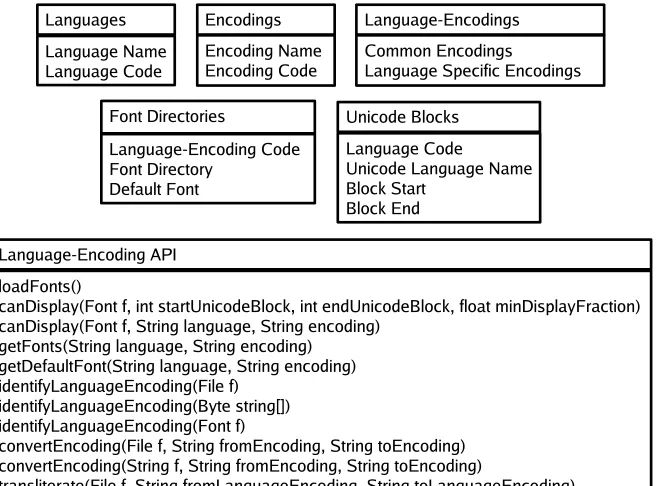
appropri-Figure 1: A customizable design for language-encoding support
ate font. This seems to be very simple, but the prob-lem is that the user may not know which font to use. Moreover, providing basic support so that you can type once you have selected the font is not enough. The user might not even know what encoding some existing text is in. Then, the user might want to save the text in some other encoding. To provide user friendly support for language-encodings in a situa-tion like this requires a more intelligent design.
Figure-1 shows a design for language-encoding support which addresses these problems. The main elements of this design are:
• Properties files listing languages, encodings, fonts, and their connections
• Language-encoding identification for text
• Language-encoding identification for fonts
• A language-encoding API
• Encoding converters
Currently, 15 languages and 10 encoding are sup-ported. These are mostly all South Asian languages, apart from English, since the users till now were mostly from South Asia. A large number of freely
available fonts have also been included in the distri-bution, but the user would probably like to add more fonts, which can be done easily just by adding the paths of the new fonts in a properties file. There is no need to install these fonts, irrespective of the op-erating systems. Also, more languages and encod-ings can be added quite easily. In most cases, to add a new language-encoding, the user just has to follow these steps:
1. Make a new entry in the properties files for each of these three: languages, encodings and language-encodings.
2. Specify the paths of all the fonts for that language-encoding in the properties file for fonts. These fonts just have to be on the system and their paths have to specified in the prop-erties file. However, it may be preferable (for convenience) that they be stored infonts direc-tory of Sanchay.
3. Specify the default font in the properties file for default fonts.
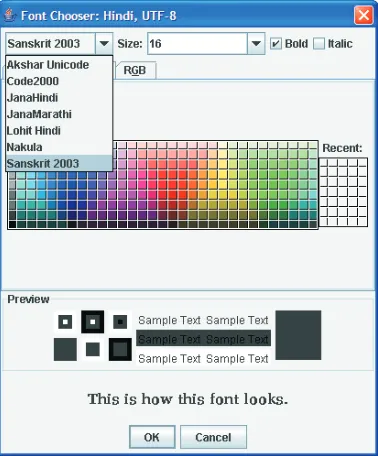
[image:2.612.146.476.72.315.2]corre-Figure 2: A font chooser listing fonts relevant to a specific language encoding pair
sponding to that language. This is not compul-sory, but it will allow language specific listing of fonts for language-encoding pairs involving Unicode encodings.
In future, we will make this even more easy by providing a graphic user interface based wizard to go through these steps.
The editor can also use any input methods avail-able from the operating system. New input meth-ods can also be added as Java libraries. Such exter-nal Java libraries have just to be copied to thee xt-lib directory of Sanchay. It is also possible to eas-ily switch among input methods (Figure-4), whether provided by the operating system or included into (or add to) Sanchay. So, it is possible to enter text in multiple languages.
Note that, right now, this support for language-encodings is in the form of an extra platform inde-pendent layer on top of the support provided by op-erating systems. Such a layer could possibly be inte-grated into operating systems in future. This might, of course, require porting of the code for different operating systems and can be in-built into the oper-ating system.
2.1 A More Intelligent Listing of Fonts
In the design used on all operating systems so far, when you want to view the list of fonts, what you get is a list of all the fonts installed on the sys-tem or at least all the fonts found by the operating system or the user program. This is not very user friendly for less computerized languages, because most of the fonts listed may not be meant for the language-encoding the user is interested in. What the user needs is the list of fonts relevant to the specific language-encoding she is interested in. In our design, this is what the user will see (Figure-2), when the user views the list of fonts. Of course, we can also give the user the option to see all the fonts installed on the system.
2.2 Language-Encoding Identification
[image:3.612.212.401.72.300.2]data required for training is very small and it has been found to be one of the most accurate language-encoding systems currently available. The user can make it even faster by removing those language-encodings which she may not be interested in. This will require only a change in the relevant properties file.
2.3 Encoding Conversion
There is also a wrapper module for calling any in-stalled or built in encoding converter for languages which use more than one encodings. The user can easily convert the encoding of the text depending on her needs and the availability of a relevant encod-ing converter. It is also possible to easily add new encoding converters.
3 Sanchay Editor
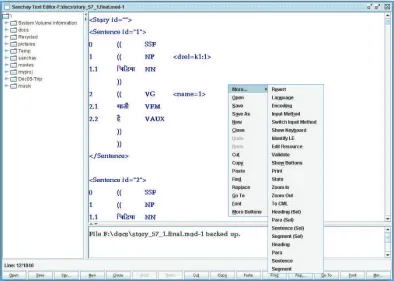
Although numerous text editors, even free and open source ones, are available, the simple open source editor that we are going to describe in this section (Figure-3) is based on the language-encoding sup-port mentioned earlier and is also closely integrated with Sanchay1, a collection of tools and APIs for NLP. The editor is implemented as a customizable GUI component that can be easily included in any Java application. The notable features of this editor are:
- Uses customizable language-encoding support as described earlier.
- Can automatically identify language-encoding of the text using a byte based n-gram
modeling (Singh, 2006a).
- The font chooser (Figure-2) shows only the fonts applicable for the language-encoding.
- Text can be preprocessed for NLP or annotation purposes from this editor.
- The formats used for annotation can be detected and validated from the editor.
- Specialized annotation interfaces can be launched to edit the annotated files (in text format) opened in this editor.
- Since the editor is implemented in Java, it can be used on any platform on which Java (JRE or JDK version 1.5 or higher) is installed.
1http://ltrc.iiit.ac.in/anil/Sanchay-EILMT and http://source
forge.net/projects/nlp-sanchay
Some of the facilities are described in the follow-ing sub-sections.
3.1 Validation of Annotation Formats
If the user is directly editing a document which is annotated with POS tags, chunks or is syntactically annotated, it is possible to automatically validate the annotation format of the document. A text box be-low the main editing panel shows the errors in for-mat, if any. Usually, annotation is performed by us-ing some annotation interface, but since the anno-tated data is stored as simple text, the document can be edited or annotated directly from a text editor. The format validation facility has been included to ensure that after any such editing or annotation, the document is still in the correct format, as it is easy for users to make format related mistakes.
3.2 Format Conversion
Sanchay annotation interfaces allow annotation at various levels like POS tagging, chunking, syntac-tic (treebank) annotation etc. Currently four dif-ferent formats are recognized by the system: raw text without annotation, POS tagged format where each sentence is simply a sequence of word and POS tag pairs separated by some symbol like underscore, ‘bracket form’ which allows POS tagged and chun-ked data to be represented (including recursion), and Shakti Standard Format (SSF)2. The editor allows the user to convert the data from one format to an-other.
3.3 Document Statistics
The user can also get a statistics about the document, such as the number of words, the number of sen-tences, the number of characters, and their respec-tive frequencies etc. These statistics are according to the format of the document, i.e., if the document is in SSF format, then the document will be parsed and the statistics will be about the annotated document and the elements of the format, e.g. <Sentence> tag will not be counted: only actual words (or POS tags etc.) in the annotated document will be counted. Such statistics can also be obtained for a number of documents, i.e., a corpus, not just the current docu-ment. This can be a very useful facility for working on annotated corpus.
Figure 3: A multipurpose editor for NLP for South Asian languages
[image:5.612.186.427.476.662.2]3.4 Integration with Annotations Interfaces
The editor is built into Sanchay in such a way that it is possible to open different views of a document, depending on the annotation format. For example, if the currently opened document is in SSF format, then the same document can be opened in the San-chay Syntactic Annotation Interface just by clicking on a button or a context menu item. The opposite is also possible, i.e., if a document is open in the Syn-tactic Annotation Interface, then it can be directly opened into the Sanchay Editor as a simple text file.
3.5 Some Other Facilities
Apart from the above mentioned facilities, Sanchay Editor also has the usual facilities available in text editors such as find and replace (with regular ex-pressions and also in the batch mode), reverting to the saved version, automatic periodic backup etc.
4 Facilities Being Integrated
Some other facilities that have already been imple-mented and are going to be integrated into the San-chay Editor include a better spell checker for South Asian languages based on a Computational Phonetic Model of Scripts or CPMS (Singh, 2006b). This model provides a method to calculate the phonetic and orthographic similarity (surface similarity) of words or strings. Another facility is the identifi-cation of languages and encoding in a multilingual document (Singh and Gorla, 2007a). This is an ex-tension of the language-encoding identification tools described earlier and is the first systematic work on the problem of identification of languages and encoding in a multilingual document. When this tool is integrated into the editor, the user will be able to open a multilingual document and the sys-tem will automatically identify the sections in dif-ferent languages and display them accordingly, even if the document has not been encoded using Uni-code. Of course, identification is not 100% accu-rate at present, but we are working on improving it. Another already implemented facility that is go-ing to be added is fuzzy text search (Sgo-ingh et al., 2007c). It is also mainly based on the idea of cal-culating surface similarity using the CPMS. Fuzzy text search based on this method performs better than the traditional methods. Yet another facility
to be added is a more discerning mechanism for transliteration (Surana and Singh, 2008). The first important idea in this mechanism is to use different methods for transliteration based on the word origin (identified using a modified version of the language-encoding tool). The second major idea is to use fuzzy text matching for selecting the best match. This method also has outperformed other methods.
There is a plan to extend the editor to allow direct annotation. We will begin by providing support for discourse annotation and other similar annotations.
5 Conclusions
In this paper we presented a simple but effective method of providing an easily customizable extra layer of language-encoding support for less comput-erized languages. We also described Sanchay Ed-itor, which uses this method of language-encoding support and has many other facilities that may be useful for NLP researchers as well as those who just need a simple text editor for language-encodings not usually supported on computers. Sanchay Editor is closely integrated with a collection of NLP tools and APIs called Sanchay.
References
Anil Kumar Singh and Jagadeesh Gorla. 2007a. Identi-fication of languages and encodings in a multilingual document. In Proceedings of the 3rd ACL SIGWAC
Workshop on Web As Corpus, Louvain-la-Neuve,
Bel-gium.
Anil Kumar Singh, Harshit Surana, and Karthik Gali. 2007c. More accurate fuzzy text search for languages
using abugida scripts. In Proceedings of ACM
SI-GIR Workshop on Improving Web Retrieval for Non-English Queries, Amsterdam, Netherlands.
Anil Kumar Singh. 2006a. Study of some distance mea-sures for language and encoding identification. In
Pro-ceedings of ACL 2006 Workshop on Linguistic Dis-tance, Sydney, Australia.
Anil Kumar Singh. 2006b. A computational phonetic model for indian language scripts. In Constraints on
Spelling Changes: Fifth International Workshop on Writing Systems, Nijmegen, The Netherlands.
Harshit Surana and Anil Kumar Singh. 2008. A more discerning and adaptable multilingual transliteration mechanism for indian languages. In Proceedings of