IST-2000-25153
Deliverable D7
Description of Implementations of the Clinical Testbeds
Contractual Date of Delivery to the European Commission:
December 2001
Actual Date of Delivery to the European Commission: January 2002
Editor(s): Dr Dipak Kalra, UCL
Participant(s): UCL: D Kalra, T Austin, A O’Connor, D Lloyd, D. Ingram, D Patterson
UKT: M Rall
RUS: P Christ, Y Scheerer, Y Liang
UMM: K Zielinski, A Koprowski, D Radziszowski, P Rzepa
Workpackage: 5
Title of Deliverable: Description of Implementations of the Clinical Testbeds
Security: IST
Nature: R
Version: 1.0
Number of pages: 83
Executive Summary
The 6WINIT project aims to validate the introduction of the new mobile wireless internet in Europe.
Three clinical sites have been chosen to represent the early marketing targets within the healthcare domain as demonstrator sites:
• John Paul II Hospital, Krakow, Poland
• Eberhard-Karls University, Tübingen, Germany • Whittington Hospital, London, UK
These sites were chosen partly because they have a longstanding relationship with three of the technical partners in the project (UCL, RUS and UMM respectively), and partly because the applications they proposed were useful tests of the type of services which could be provided well in the mobile environment.
This deliverable presents the technical architecture envisaged at each site, including the 6WINIT partner components that will be demonstrated and an overview of the clinical applications that will exploit the overall 6WINIT IPv6 solutions.
The deliverable consists of three similarly-structured sections, one describing each site. Each site description in turn comprises:
1. The clinical scenarios to be demonstrated, including (where known) the locations, devices and kinds of information services to be accessed.
2. A brief summary of the overall technical architecture, fuller descriptions of which were provided in Deliverable 3.
3. A structured analysis of the functional requirements and proposed technical solutions for each site, presented as a set of small tables, one per functional requirement.
4. A description of the clinical applications being developed, with an indication of the progress and expected completion of this work.
A slight exception to this is the report of the Tübingen site. A considerable effort has recently gone into this site in preparation for the IST Demonstration in Düsseldorf (December 2001). This site report describes the clinical applications and scenarios in terms of that demonstration, which was a realistic exemplar of the intended real demonstration at that site.
Table of Contents
1 Introduction... 4
2 London Clinical Demonstrator ... 4
2.1 User Scenarios ... 4
2.2 Technical Architecture ... 8
2.3 Technical Component Descriptions ... 9
2.4 Clinical Applications ... 21
3 Krakow Clinical Demonstrator ... 33
3.1 User Scenarios ... 33
3.2 Technical Architecture ... 40
3.3 Technical Component Descriptions ... 41
3.4 Clinical Applications ... 52
4 Tübingen Clincal Demonstrator ... 64
4.1 Guardian-Angel-System (GANS)... 64
4.2 Technical Architecture ... 65
4.3 Technical Component Descriptions ... 67
4.4 GANS at IST 2001 - towards clinical applicability ... 73
1
I
NTRODUCTION
This Deliverable describes separately the three clinical demonstrators that are being developed in London, Krakow and Tübingen. In fact the demonstrators are not that separate; there is detailed interaction between them. Moreover, they all use different components from the technical workpackages. Thus, for example, the London and Krakow demonstrators both use the 6WIND routers from WP6 and D8, and are collaborating (with their technical support at UCL and UMM) in the testing and evaluation of the routers. Several of them will be using the same IPAC terminals for some of their work; again they are all collaborating with the IPAC implementations being carried out in WP7 and D10.
Similarly the clinical demonstrators are very sensitive to the need for transitioning between IPv4 and IPv6 regimes. For this reason, there has been considerable interaction between the trajectory proposed by the clinical demonstrators, and the transition techniques described in D9.
While this Deliverable is written entirely from the viewpoint of clinical demonstrators, it will be clear from the technical components in each case that they are making heavy use of the developments in the technical workpackages. For example all the security infrastructure, Mobile IP, and network support comes from these workpackages. It would, however have been tedious to have put cross-references at all times between the developments in WP4, WP6, WP7 and WP8 and these demonstrators.
So far we are describing only three demonstrators; the Project Work Plan also made mention of a demonstrator at the University Hospital of Basel (UHB). The work at UHB has been carried out under another project (Möbius). There have been discussions with them, and a proposal for UHB will be discussed at the Annual Review. Up to the time covered by this Deliverable, the talks are not yet conclusive. For this reason no mention of a UHB Demonstrator is made in the remainder of this report.
2 L
ONDON
C
LINICAL
D
EMONSTRATOR
2.1
User Scenarios
The following access scenarios describe the various technical settings in which healthcare staff or patients may need to access electronic health record information via 6WINIT networks. (A fuller description of the London clinical scenario was published in 6WINIT Deliverable 3.)
2.1.1
Roadside emergency access to patient’s medical summary
Clinical information requirement The doctor, nurse or ambulance worker needs to review (but not change) the basic medical summary of an accident victim or other emergency care patient, held on the CHIME record server, from any public location including the street. A web-based (WAP) application is being developed for this.
Security The user will need to be authenticated and verified (e.g. via token and PKI), and their connection needs to be secured (i.e. encrypted).
Telecommunications pathway The hand-held will need connection to a GPRS service, and onward routing to the server at CHIME via UCL Computer Science.
QoS The need here is primarily for reliability of connection. The data are character based and performance or bandwidth are not of concern.
Intended demonstration It is intended to demonstrate this GPRS access from test-bed locations in Ipswich and London (provided by BT) and later from Berlin (provided by DTAG), using 6WINIT CHIME clinical staff in lieu of real users. A more forward-looking demonstration is also intended using UMTS facilities at the Ericsson “Kista Ring”: CHIME and Ericsson staff (mimicking real emergency clinicians) will access medical summary information using a PDA or mobile phone from within the Kista shopping centre.
2.1.2
Hospital outpatient access to patient’s medical summary
Clinical information requirement The cardiologist or nurse specialist needs to add, review or update the basic medical summary of a patient attending a cardiac outpatient clinic, accessing the record server based at CHIME. A web-based (html) application is being developed for this. Device and location They will need to use the existing networked PC workstations situated in the Whittington hospital. There is no mobility requirement.
Security The user will already be authenticated (by the hospital), and a trustworthy mechanism needs to be established for their user profile to be forwarded with their data request. The connection needs to be secured (i.e. encrypted).
Telecommunications pathway The workstations, connected to a legacy IPv4 network inside the wider NHSnet, will need to access the CHIME IPv6 server via an NHSnet managed gateway to the public Internet.
QoS The need here is primarily for reliability of connection. The data are character based and performance or bandwidth are not of concern.
Intended demonstration It is intended to demonstrate this legacy access actually from the Whittington Hospital, by clinical staff users of equivalent real applications.
2.1.3
Patient access to their medical summary and personal health diary
Clinical information requirement Patients may wish to review their basic medical summary as it is held by their GP or hospital. They may wish to add information about their present symptoms or to record the results of period home monitoring tests. The records will need to be accessed from the CHIME record server, potentially from any public location including the home or place of work. A web-based (WAP) application is being developed for this.
Telecommunications pathway The hand-held will need connection to a GPRS service, and onward routing to the server at CHIME via UCL Computer Science.
QoS The need here is primarily for reliability of connection. The data are character based and performance or bandwidth are not of concern.
Intended demonstration It is intended to demonstrate this GPRS access from test-bed locations in Ipswich and London (provided by BT) and Berlin (provided by DTAG), using 6WINIT CHIME clinical staff in lieu of real patients.
2.1.4
Hospital outpatient access to cardiovascular applications
Clinical information requirement The cardiologist or nurse specialist needs to add, review or update the medical record of a patient attending a cardiac outpatient clinic, accessing the record server based at CHIME. A web-based (html) application is being developed for this.
Device and location They will need to use the existing networked PC workstations situated in the Whittington hospital. There is no mobility requirement.
Security The user will already be authenticated (by the hospital), and a trustworthy mechanism needs to be established for their user profile to be forwarded with their data request. The connection needs to be secured (i.e. encrypted).
Telecommunications pathway The workstations, connected to a legacy IPv4 network inside the wider NHSnet, will need to access the CHIME IPv6 server via an NHSnet managed gateway to the public Internet.
QoS The need here is primarily for reliability of connection. The data are character based and performance or bandwidth are not of concern.
Intended demonstration It is intended to demonstrate this legacy access actually from the Whittington Hospital, by clinical users of equivalent real applications.
2.1.5
Ward (bedside) access to cardiovascular applications
This scenario is identical to 2.1.4 above, except that the clinical staff need to use a tablet-style device to access the same cardiovascular applications at the patient’s bedside, connected via WLAN.
Intended demonstration As there is no WLAN provision in the hospital as yet, this access will be simulated using a conventional laptop connected to the WLAN at the UCL Computer Science Department. This will be an IPv6 connection, thereby demonstrating a future rather than legacy technical scenario for this kind of access.
2.1.6
Access to cardiovascular applications from a patient’s home
This scenario is identical to 2.1.4 above, except that the clinical staff need to use a tablet-style device to access the same cardiovascular applications at the patient’s bedside, connected via WLAN.
2.1.7
Hospital outpatient access to cardiovascular investigation results
2.2
Technical Architecture
Figure 1: Network architecture of the London demonstrator site
Figure 1 above shows the principal clinical application (health record) services, located at CHIME, being delivered via an IPv6 stack infrastructure, communicated to UCL Computer Science and routed forward to the public Internet and to 6BONE or UK6X.
The communications pathway involves the use of some IPv4 networks, such as the UCL Intranet connecting CHIME in north London to Computer Science in central London, and the public Internet. IPv6 networks exist within UCL Computer Science, including WLAN, and at nominated wireless demonstrator locations in London (GPRS, provided by BT), Adastral Park (Ipswich), Berlin (GPRS, provided by DTAG) and Kista (UMTS, provided by Ericsson).
IPv6 transition mechanisms are an important component of this demonstrator, since each scenario described above will need at minimum to utilise one IPv6/IPv4 tunnel for the UCL Intranet. Hospital staff (scenarios 2.1.2, 2.1.4 and 2.1.5) will require translation to enable IPv4 “legacy” access from existing devices and networks.
2.3
Technical Component Descriptions
Note: this section draws on previously published material in 6WINIT Deliverables 1 and 2, and new Deliverables 8, 9 and 10. References are given to additional technical descriptions in these deliverables, using the notation style [D1 Section x.y.z].
2.3.1
IPv6 Transition Mechanisms
2.3.1.1 Tunnelling
Functional Requirement
Native IPv6 services from the main application server will need to be tunnelled via IPv4 from CHIME (north London) to Computer Science (central London) using UCL’s main University Intranet. Additional tunnel(s) may be required for remote connectivity to other IPv6 islands via 6BONE.
Proposed Technical Solution: 6WIND IP Edge Device
The 6WIND IP Edge Device implements the v4-v6 migration mechanisms over a dual stack entirely developed by 6WIND. Several types of tunnels are available, especially 6in4, 4in6 and 6to4. This dual stack also integrates IPv6 features such as DiffServ and IPSec. [D1 Section 6.5.2.3,D2 Section 2.2.1, D9 Section 2.2.2]
One Edge device will be configured and installed at CHIME, and another at UCL Computer Science. It is not yet clear if 6WIND will be the Edge Device provider at other 6WINIT site locations.
Outstanding Issues - none Industrial Benefit
This installation provides proof of concept validation of the IPv6/4 tunnelling mechanisms within the Edge Device.
2.3.1.2 Translation
Functional Requirement
a) IPv6 to 4 translation may be required to permit hand-held (PDA) access to the native IPv6 services via GPRS.
b) Some scenarios involve users having access to the native IPv6 services using IPv4 clients from within IPv4 networks (e.g. from inside a hospital Intranet, accessed via an NHSnet managed gateway to the public Internet).
Proposed Technical Solution: a) BT Ultima b) 6WIND IP Edge Device
a) Ultima is a BTexact Technologies IP product that provides interworking between IPv4 and IPv6. NAT-PT (Network Address Translator - Protocol Translator) provides a translation facility between IPv4 and IPv6. Translation is bi-directional (i.e. can be initiated at either IPv6 or IPv4 host) without any modifications to either the IPv4 or the IPv6 host protocol stacks, and the operation of the translator is totally transparent to the end user. Translation is initiated via the initial DNS exchange; this requires the addition of a special DNS translator (DNS ALG) to the standard NAT-PT packet translation process. [D2 Section 2.5, D9 Section 2.6]
address rather than the IPv6 address of the main clinical server. [D2 Section 2.1.1] Outstanding Issues
Interoperation between 6WIND and BT Ultima devices Industrial Benefit
2.3.2
Security Mechanisms
2.3.2.1 VPNs using IP Routers
Functional Requirement
To provide an encrypted channel of communication between the clinical applications server and the end-user (possibly including the use of wireless devices). Certificate-based key management needs to be implemented e.g. via PKI. [D10 Section 4.1]
Proposed Technical Solution: 6WIND IP Edge Device
6WIND routers are able to create IPsec tunnels over IPv6 connections, including also the possibility of being certified by a PKI. [D8 Section 3.1.1, D10 Section 4.2]
The 6WIND IP Edge Device supports IPSec and IKE functionality compliant with the corresponding RFCs. Different configurations can be accommodated: IPSec with static keys; IPSec with IKE pre-shared keys; IPSec with IKE certificates. All the security features proposed in the IP Edge Device are available for the both IPv4 and IPv6 versions with similar management interfaces. [D2 Section 3.2.1]
Because IPSec VPNs are complex to configure, 6WIND provides a management tool called Network Management System (NMS). [D1 Section 6.1.1, D2 Section 3.2.1.2]
6WIND provides a tool to produce and manage certificates. This tool could be sufficient for small or medium configurations. [D2 Section 3.2.1.3]
UCL-CS also has experience of using the Public Key Infrastructure of the University of Murcia, based on the design and implementation of a complete and robust group of IPv6-enabled certification services. The interoperation of this PKI with the 6WIND Edge Device will also be explored. [D10 Section 4.1.3]
The key management methodology for the demonstrator will be decided later, balancing the practical needs to provide a small and stable number of certificates with the wish to demonstrate a realistic and scalable scenario. A VPN will be established between CHIME and UCL Computer Science, to users connected via fixed LAN and WLAN. Ideally the VPN will extend to remote users connected via the Internet both using a fixed address and using GPRS.
Outstanding Issues
How to establish a VPN through to fixed and mobile users using native IPv4 devices connected via the public Internet (and possibly GPRS).
Industrial Benefit
Proof of concept verification of the Edge Device IPSec functionality and demonstration of a secure infrastructure for future adoption by regional health care networks.
2.3.2.2 Road Warrior
Functional Requirement
Proposed Technical Solution: IABG in partnership with 6WIND
IABG and 6WIND will collaborate to validate a mechanism to support the authentication and certificate/key management approach for mobile users whose IP address is allocated only at the time of connection. [D8 Section 3.2]
Outstanding Issues - none Industrial Benefit
The collaboration will verify a technical approach that could inform IETF on potential modifications to IPSec to support Mobile IP. Component interoperability between IABG and 6WIND might lead to other future collaborations.
2.3.2.3 Firewall
Functional Requirement
The CHIME-hosted clinical applications server (running SuSe Linux 7.2) needs to be protected from hostile attack including unauthorised access and denial of service attack.
Proposed Technical Solution: 6WIND IP Edge Device
The 6WIND IPSec VPN will limit access to authorised users and from known IP addresses (the Mobile IP scenario is a specific exception, to be protected separately). This will provide firewall protection by way of packet filtering.
The 6WIND Edge Device provides IPv4 and IPv6 Packet Filtering mechanisms that have been recently implemented and that are available in version 4.1. This Firewall functionality is used to protect local networks when they are interconnected with non-secure networks, like Internet. [D10 Section 4.3.1]
Outstanding Issues
Mobile IP security measures will need to be managed separately Industrial Benefit
2.3.3
Mobile IPv6
2.3.3.1 MIPv6 Home Agent
Functional Requirement
Users need to be able to reliably connect to the clinical applications server from a mobile (non-roaming) device whose Care of (IP) Address is dynamically provided by an ISP or other foreign network. [D8 Section 2, D10 Section 2.2.1]
Proposed Technical Solution: 6WIND IP Edge Device
A native IPv6 mobility is included in a prototype of the IP Edge Device, though this function is not currently included in commercial version of the IP Edge Device. The “Home Agent” functionality is implemented according to the IETF draft [Joh01]. Like the implementation of other providers, all the aspects have not yet been taken into account mainly because they are not well defined at the moment. [D2 Section 4.1.1, D2 Section 4.2.1, D1 Section 7.3, D8 Section 2.2.3, D10 Section 2.3.4].
The practical demonstration of this will be considered later in the project.
UCL-CS is also prototyping Helsinki University’s mobile IPv6 stack implementation
(www.mipl.mediapoli.com) on the mobile hosts, since this is widely believed to be amongst the
most progressive work on mobile IPv6 stacks. [D8 Section 2.2.1] Outstanding Issues
This function is work in progress. Industrial Benefit
6WIND will study how to add security over the mobility and will see if the privileged location at the boundary of the network can be exploited by the Edge Device to solve the problem of security and mobility. [D2 Section 4.2.2.1]
2.3.3.2 802.11b Access
Functional Requirement
Users need to be able to reliably connect to the clinical applications server from a wireless LAN, using a laptop, hand-held or tablet device.
Proposed Technical Solution: 6WIND IP Edge Device
The 6WIND IP Edge Device can be used at the border between wired and wireless networks. WLAN technology like 802.11b has been tested and proved to be compatible with IPV6 networks…. The Aironet kit from Cisco has been used in the preliminary experiments. [D2 Section 4.2.1.2]
The deployment of the Edge Device to enable WLAN users to access the CHIME clinical applications will build on early work carried out at UCL in the ANDROID project.
Outstanding Issues
This function is work in progress. Industrial Benefit
2.3.3.3 GPRS
Functional Requirement
Users need to be able to reliably connect to the clinical applications server from a mobile (non-roaming) hand-held device. This will include the need for wireless access via GPRS.
Proposed Technical Solution: 6WIND IP Edge Device
This is very new (emerging) functionality within the 6WIND Device, and its demonstration will be confirmed later in the project. [D1 Section 4.1.2.2, D2 Section 4.2.1.2] It will ideally be verified eventually at the 6WINIT partner GPRS test-beds in Ipswich and London and Berlin. Outstanding Issues
This development work is in progress. Router compatibility (e.g. 6WIND/Ericsson-Telebit) will need to be verified in order to confirm that these demonstrations are feasible.
Industrial Benefit
2.3.4
QoS
2.3.4.1 TAG
Not required at this site
2.3.4.2 JMF
Not required at this site
2.3.4.3 DiffServ
Functional Requirement
The proposed London user scenarios place only a limited demand for QoS functionality, primarily for reliability. However, future planned clinical applications will include the use of multimedia data requiring high bandwidth and high performance capability, so an opportunity to test this could be engineered.
Proposed Technical Solution: 6WIND IP Edge Device
The 6WIND IP Edge Device implements the standard mechanisms and is compliant with the “RFC 2475 Architecture for Differentiated Services”. It implements flow classification, queues management and scheduling mechanisms. All the QoS mechanisms of the Edge Device can be applied on the two versions of IP, IPv6 and IPv4. [D1 Section 2.2.1, D2 Section 5.2, D10 Section 5.1, D10 Section 5.1.2]
The 6WIND Edge Device implementation of DiffServ allows interoperability with IPSEC/IKE functions and Migration mechanisms (tunnels) also provided by this equipment. [D10 Section 5.1.2.3]
Plans for exploiting this in the demonstrator will be considered later. Outstanding Issues – none
Industrial Benefit To be confirmed
2.3.5
Signalling Gateways – SIP
2.3.5.1 SIP
Not required at this site
2.3.6
Multimedia Conferencing Gateways
2.3.7
WAP Gateways
Functional Requirement
There is considerable attraction to making a patient’s medical summary available to them using a WAP phone or a PDA using a WAP connection, since this is present-day and widely-available technology. However, there may be secondary benefit in showing the advantage of Mobile IP as a successor to WAP if both options are capable of demonstration.
Proposed Technical Solution – to be confirmed
During clinical application development at CHIME a commercial ISP will be used as the WAP provider to enable rapid testing of the basic screen design and to establish performance.
An independent WAP gateway has been recommended by the 6WINIT partners [in D2 Section 8.5] as a means of enhancing security (many commercial WAP providers cache customer WML pages for some days before deletion, which may not be secure). The Krakow (Poland) site has indicated an intention to pursue a secure WAP solution, and their experience will be sought before confirming the approach of the London site.
Outstanding Issues Unknown as yet Industrial Benefit
2.3.8
Access Network Provision
2.3.8.1 GPRS
Functional Requirement
Wireless GPRS network access is required to demonstrate the “roadside” access to clinical applications. In practice this will be simulated from GPRS test-bed locations.
Proposed Technical Solution
1) The BT GPRS test-bed located at Ipswich and London (UK) 2) The DTAG GPRS test-bed located at Berlin (Germany)
Additional test locations might become available towards the end of the project. However, the above sites will be sufficient to provide proof-of-concept verification.
Outstanding Issues
The availability of GPRS cards (“mobile modems”) for each client and drivers for each operating system.
Industrial Benefit
Demonstration of the value of GPRS for the rapid and reliable retrieval of health information via wireless, to help stimulate a health care market for such solutions.
2.3.8.2 WLAN
Functional Requirement
Wireless (WLAN) network access is required to demonstrate the “bedside” access to clinical applications. Although IPv4 WLAN is becoming prevalent now, in the future this is likely to be IPv6. In 6WINIT this kind of access will be simulated from the IPv6 WLAN network at UCL Computer Science.
Proposed Technical Solution
The Lucent Orinoco Wireless LAN and Cisco’s Aironet WLAN architectures are described in D1 Section 5.1.
The Wireless 802.11b LAN operational at UCL Computer Science will be the primary test location for the London demonstrator. Secondary connection to other islands of wireless access at other partner sites may be attempted later, possibly utilising 6BONE (see below) or 6NET. Outstanding Issues – none
Industrial Benefit
Demonstration of an IPv6 wireless methodology suitable for use inside hospitals in the vicinity of medical devices.
2.3.8.3 IPv4 WANs
Functional Requirement
Proposed Technical Solution
Clinical application web services routed from CHIME via UCL Computer Science and the JANET national academic network to the Internet and the NHSnet. 6WIND translation mechanisms have been described above. Security provisions described above might not be fully implementable when using IPv6to4 translation.
Outstanding Issues
The NHS firewall may not permit IP access to the CHIME demonstration server. If this is a problem alternative Internet locations will be used to simulate hospital-based access.
Industrial Benefit
Demonstration of a viable migration approach, and of rigorous IP translation mechanisms.
2.3.8.4 IPv6 WANs
Functional Requirement
Native IPv6 distributed access is required to validate the future scenario of widely available IPv6 networks within hospitals. In practice this will be demonstrated within UCL Computer Science using local IPv6 networks, and from fixed connections at other clinical sites such as RUS (Stuttgart), via 6BONE.
Proposed Technical Solution
The UCL IPv6 LAN is well-established, and is connected to the UCL Intranet. With the use of 6WIND IP Edge Devices (described in earlier sections of this report) the CHIME and Computer Science IPv6 islands will be connected through an IPv4 tunnel. This will be in turn connected to the IPv6 LAN at RUS in Germany, via 6BONE. This tunnelled interconnection of IPv6 islands will simulate a homogenous IPv6 WAN.
Outstanding Issues – none Industrial Benefit
Demonstration of a migration solution that would permit distributed organisations to upgrade their sites to IPv6 without loss of organisation-wide connectivity.
2.3.8.5 UMTS
Functional Requirement
Wireless UMTS network access is required to demonstrate the next-generation “roadside” access to clinical applications. In practice this will be simulated from a UMTS test-bed location.
Proposed Technical Solution: Ericsson “Kista Ring”
The routing of network traffic via 6BONE described above can be extended to include the UMTS test-bed near Stockholm (Sweden).
Outstanding Issues To be identified later Industrial Benefit
2.3.9
Access Devices
2.3.9.1 Terminals
Functional Requirement
The various London user scenarios require four different user access devices. 1) an IPv4 desktop workstation, running a web browser
2) an IPv6 desktop workstation, running a web browser 3) a laptop simulating a tablet client, running a web browser
3) a hand-held device, such as a PDA, running a web browser (both IPv4 and IPv6 versions) Proposed Technical Solutions
Compaq iPAQ: running Linux, IPv4/IPv6 and a web/WAP browser, with a wireless GPRS connection (or UMTS, in Stockholm) or a Wireless LAN connection.
Laptops: running Linux or other operating systems, IPv6, with fixed Ethernet or Wireless LAN connection.
PC: various platforms, running IPv4 or IPv6 or dual stack, a browser, with connection either to IPv6 LAN or IPv4 LAN within a legacy environment.
All the mobile devices (iPAQ and laptop) will require a mobile IPv6 stack. Currently development is being done by the 6WINIT partners with the University of Helsinki’s Mobile IPv6 stack (HUT) which is explored in Deliverable 10. The basic functions have been used with both laptops and iPAQs.
Outstanding Issues
IPv6 operating systems and browsers supporting IPSec are not yet available for all devices. Industrial Benefit
A spectrum of devices is important to show the compatibility of 6WINIT solutions with a wide range of user needs.
2.3.9.2 Security Devices
Functional Requirement
The ideal requirements are for strong authentication and user certification (including access control role-based profiles). A comprehensive security solution would add credibility to the overall 6WINIT technical architecture.
Proposed Technical Solution: PKI’s and Smart Cards
Certificate handling has been described above. Coupling the proposed architecture with strong authentication tools (e.g. using tokens or biometric devices) would be ideal.
Outstanding Issues
This may add an unnecessary complexity to the demonstrator Industrial Benefit
2.3.10
Location Awareness
2.4
Clinical Applications
The primary CHIME clinical application services are a set of middleware components providing controlled access to patient electronic healthcare records (EHRs). Access to these EHRs is provided through a set of web-based applications, each written as Java Servlet scripts executing on the same server as the middleware components. The persistent repositories are themselves distributed within a local area network and accessed by the middleware components using Jini. This overall component architecture has been described in 6WINIT Deliverable 3. The technical configuration of the main server running these components, and serving them via IPv6, is summarised in Section 1.1 of this Deliverable.
Three sets of clinical web applications are under development:
1. Medical summary for hospital care (web browser version) 2a. Medical summary for emergency care (PDA version)
2b. Medical summary and personal diary for patient use (PDA version similar to 2a above)
3. Outpatient clinic application for chest pain and heart failure management (web browser version).
Each of these applications is briefly summarised below, and illustrated using some real screen captures and some mock up screens (as this is work in progress). A previously-developed web application for anticoagulant therapy management was described in Deliverable 3. This is running live at the Whittington Hospital and available as a demonstration application from CHIME to permit early testing of the server configuration whilst the new web applications are being developed.
These applications focus on the collection and presentation of health record information, and are not intended to act as an internal departmental system to manage clinic sessions, human or other material resources. The focus of these applications is the support of clinical interactions with the patient’s record in an electronic form, for which secure distributed access is of clinical value. Some elements of the cardiovascular record are being designed in parallel with General Electric / Marquette, relating to the capture of multi-media investigations.
2.4.1
Medical summary for hospital care (web browser version)
2.4.1.1 Demographics
Consultant cardiologist name {local drop-down list} Usual Clinic Location {local drop-down list} Transport required {leave blank if none}
Ethnicity
OPCS category {British A, Irish B, Other C, White and Black Caribbean D, White and Black African E, White and Asian F, Any other mixed background G, Indian H, Pakistani I, Bangladeshi K, Any Other Asian Background L, Caribbean M, African N, Any other Black background P, Chinese R, Other S, Not Stated Z}
Ethnicity description {text}
2.4.1.2 Medical Summary
Several tables all on one scrolling screen. All tables will have the ability to edit an individual row (formal revision process) or to add a new entry (row). Sort order will be on date added in descending order (most recent at the top) unless proposed otherwise below. Many of these summary tables have a fairly rich set of columns, which would not be filled in on every occasion.
Nota Bene
Date Nota Bene
{text box}
This is a set of dated text boxes for critical information that any clinician should know when they see the patient. This section could include patient wishes for things like resuscitation policy.
Allergies
Date added Allergen name Reaction Emergency treatment
Precautions to take
date text Text Text text
Clinical Conditions
Date added Condition name Date of onset Date ended Current Problem Current concerns date Drop-down list to
be confirmed
date Date {Y/N} text
Although a drop-down box will initially limit this table to cardiac conditions, the wider use of the record server may in the long-term mean that other disciplines share this part of the record. It will be important for a whole person perspective to be retained, but also to permit a focus on cardiology for this clinic. If the diagnosis changes over time as more information about patient emerges, the user will have two options:
• to revise the original entry if it now appears to be inappropriate (the original entry will be hidden, but retained in the audit trail), or
• to edit the entry and give it an end date with a comment stating that the condition has evolved, and to create a new entry with the new diagnosis.
Excluded Conditions
Date excluded Condition name Date Drop-down list as
above
There seems little point in offering any richer data-set for excluded conditions. Clearly, though, entries can be deleted if the condition subsequently occurs!
Family Conditions Date added Condition name Relationship to patient Date of Birth Age today (yrs)
Age at onset (yrs)
Age at death (if appropriate)
Significance
Lifestyle information
Date recorded
Date began
Date ended Lifestyle item
Amount Description Education or advice given Autofilled
today
date date Drop-down e.g. smoking, alcohol, occupation, exercise Text e.g. 12 units/week, 20/day, swimming, piano tuner text Text
(one day a patient screen might also include a URL)
Optionally sort this table on date ended (to show active lifestyle items first i.e. with no end date, then those in the recent past) or on lifestyle item then date ended (to show trends in smoking, occupation etc over time). The benefit of this table is the consolidated and flexible approach to capturing any kind of lifestyle information. The downside is that the amounts etc. will be free text.
Social services and special needs
Date recorded Service or need Date started Date ended Comments
date Text date Date text
2.4.1.3 Medication and prescriptions
Date added Indication Drug name Description of: Strength, units, formulation, route and frequency Date commenced Quantity usually prescribed Any problems, side effects Date discontinued May also be coded: Read, Multilex, BNF ?
As free text for now
Table could be sorted on date discontinued, then date commenced to show recently-prescribed active medication first, or on date discontinued then indication to permit grouping of active drugs by clinical use.
Drug name could initially be free text or a drop-down list of common cardiac and diabetes drugs. I would favour a drop-down list with ability to then manually put in dose, frequency etc.
2.4.1.4 Investigation results
Completed tests
Date Procedure Test
Indication Value Result Details Interpretation Reference or URL
date text text text Text text Later, could
be a hyperlink to CARDDAS or a Path lab record system
2.4.1.5 Education and Self-management
Date Topic Areas
covered
Materials given
Self-management goal
Outstanding issues
Date text text text Text text
2.4.2
Medical summary for emergency care (PDA version)
PDA screens will be needed for user log-in and searching for patients using a PDA.
Two variants of the PDA summary are being developed: one for emergency clinicians and one for patients. The results of a patient search might take the user to a differently structured patient home page (the root of their “PDA summary record”) depending on their role (patient or clinician).
EHR Summary home page Fred Bloggs (18 Sep 1956)
Nota Bene Demographic Medical Summary Medication Investigations
Patient search Logout
The patient PDA view would have two additional links, and no Nota Bene:
Patient Record Summary home page Fred Bloggs (18 Sep 1956) Demographic
Medical Summary Medication Investigations
Self management plan Patient diary
Patient search Logout
The demographic detail screen could be similar to upper (main) portion of the desktop equivalent, but with GP details below the patient details to enable this to fit.
Medical Summary Fred Bloggs (18 Sep 1956)
Allergies Penicillin Elastoplast Conditions Heart failure Diabetes Mellitus Nephropathy Excluded conditions Tuberculosis Family history Hypertension Diabetes Mellitus Lifestyle factors
Smoking = 20.day Alcohol = nil
Occupation = Psychologist
Social services & needs
Meals on wheels Needs wheelchair
Self management plan
Urine check for sugar, daily Weekly weight Patient search Patient home Logout Notes
Allergies: display all allergen names, in reverse date order (most recent first) Conditions, all condition names with Date Ended = Null, in reverse date order Excluded conditions: display all condition names, in reverse date order Family conditions: display all condition names, in reverse date order
Lifestyle factors: display each Lifestyle Item then <space<>equals<>space> then most recent content value of Amount (if possible! If not then all instances sorted by Lifestyle Item then by date)
Social service & need: Service or Need with Date Ended = Null, in reverse date order
Self management plan: all instances of Topic and Self Management Goal, sorted in reverse date order
Allergies (2) Fred Bloggs (18 Sep 1956)
Penicillin
Reaction = Skin rash
Emergency treatment = Oral antihistamines
Elastoplast
Reaction = Skin rash
Emergency treatment = Calamine lotion
Precautions to take = Use Micropore
Patient search
Patient home
Logout
Similarly for condition, excluded condition, family conditions, lifestyle information, social services. Blank entries (e.g. Penicillin has no Precautions to take) are not shown, to save space.
Medication Summary Fred Bloggs (18 Sep 1956) Bendrofluazide Ventolin Aspirin Allopurinol Patient search Patient home Logout
Drug names in reverse date order. Hyperlinks take you to the relevant detail screen for that drug.
Investigation Summary Fred Bloggs (18 Sep 1956)
1.09.2001 Full blood count
Result summary = Normal
21.08.2001 Chest x-ray
Result summary = left pleural effusion
Patient search
Patient home
Logout
Investigations sorted in reverse date order. Top line of display (hyperlink to detail) is date plus Procedure Test name. Result summary value taken from Value Result.
Self Management Plan – no need for an intermediate level summary: go straight to the detail screen
2.4.3
Application for chest pain and heart failure management
2.4.3.1 Cardiovascular service referral
Recording date/time {date time}
Clinic type {Chest pain, heart failure, OPD, etc.} Referral source {Patient’s GP, A&E, ward, …?} Date on the referral letter {date}
Indication for referral {text or drop-down list?}
Referral received: via {post/fax/e-mail/phone/via-patient}
On {date}
Date of first appointment {date/time}
Reason for any subsequent postponement Drop-down list to be confirmed
Hyperlinks to previous referral pages for this patient
DNA Management
Date Date of appointment
Clinic type Reason for DNA
Actions taken Now due to be seen on: date date Anticoagulant
etc. (drop-down?)
2.4.3.2 Cardiovascular Presentation
Date Default to today’s date
Contact with {user name from login screen info?} Type of consultation {local or generic drop-down list?} Location of consultation {local or generic drop-down list?}
Episode name {text}
Background information { large text box}
Cardiovascular symptoms
Chest pain/discomfort symptoms? {yes,no} Approximate month of initial onset {mm/yyyy} Description of chest discomfort {large text box}
Heart failure symptoms {large text box}
Other cardiac symptoms {large text box}
Respiratory symptoms {large text box}
Other symptoms {large text box}
Angina checklist
Canadian angina score {I, II, III, IV}
Heart failure checklist
No of previous admissions with HF {number, default zero} Date of most recent admission {dd/mm/yyyy} Planned date of discharge (if an inpatient) {dd/mm/yyyy}
NYHA Class {I, II, III, IV}
Hyperlinks to previous cardiovascular presentation pages for this patient
The large text boxes are intended to provide the user with an open environment to record positive or important features of the symptoms. We have presently avoided introducing a specific set of boxes separately to capture chest pain location, radiation, duration, severity, precipitating or aggravating factors such as exertion or eating, relieving factors such as GTN etc.. If a checklist is useful, this could be added above the box as a textual checklist and not necessarily presented as a highly structured template.
2.4.3.3 Cardiovascular Examination
Cardiovascular Examination Current values
“Please repeat if the same as last time”
Most recent past values
Past values
etc
Date {greyed out, as date already above)
Height (m) numeric
Weight (Kg) numeric
“Calculate BMI” button Fills in:
height/(weight squared) Respiratory rate (per min) numeric
BP: systolic numeric BP: diastolic phase 4 numeric BP: diastolic phase 5 numeric Clinically anaemic {yes / no}
Stigmata of hyperlipidaemia {none, corneal arcus, xanthoma, xanthesalma}
Chest wall tenderness {present / absent}
Oedema extent {none, ankles only, below knees, to the knees, above knees, sacral oedema, anasacra}
JVP height (cm) numeric
Carotid pulse rhythm {regular, regular with ectopics, totally irregular}
Carotid pulse character {normal, weak, collapsing, slow-rising}
Apex Beat {normal, displaced, impalpable} Peripheral Pulses {normal, abnormal}
Site of any arterial bruits {text}
Lung crepitations {absent, bases only, beyond bases}
Other abnormal respiratory system findings
{large text box}
Other abnormal examination findings
{large text box}
Heart Auscultation
Date Murmur site Murmur type Added heart sound {apex, lower left sternal
edge, upper left sternal edge, right upper sternal edge}
{ejection systolic, pan-systolic, late pan-systolic, early systolic, mid systolic, soft systolic, short systolic}
{third, fourth, third and fourth, ejection click, late systolic click, opening snap, pericardial rub}
2.4.3.4 Assessment and Management
Conclusion {large text box}
Further assessment details {large text box}
What the patient has been told {large text box}
Review plans
Date {date time}
Where {GP/outpatients/Home visit/Admit now/By phone}
By whom {text}
Items for review {large text box}
Hyperlinks to previous assessment and management pages for this patient
Planned tests
Date planned Procedure Test
When planned
Intended location
Intended actor
Indication Planning status
date text Date time text Text text {Intended
Scheduled Cancelled Done}
2.4.4
Progress and intended timescale
The web applications described above are intended both as demonstrators for 6WINIT and as real operational applications at the Whittington Hospital. The data model, screen layout and functionality of the applications have all been designed in partnership with the anticipated real clinical users at the hospital, and confirmed and documented by the development team.
Java servlet development is in progress, alongside some performance and concurrency improvements in the record server middleware components themselves.
3 K
RAKOW
C
LINICAL
D
EMONSTRATOR
3.1
User Scenarios
The following access scenarios describe the various technical settings in which healthcare staff or patients may need to access medical information (radiology and personal data) and hospital medical services via 6WINIT networks. An earlier description of the Krakow clinical scenarios was published in 6WINIT Deliverable 3. Figure 2 sketches the four clinical applications at Krakow site and the nine scenarios of their usage depending on the available connectivity and end-device.
Figure 2: The nine user scenarios at Krakow clinical site
Krakow site
Scenarios
Advanced Booking of Clinical Services
(m-bookMed)
Clinical Appointment System (CAS)
Teleconsultation Intranet: WLAN, LAN
Intranet: WLAN, LAN
Roadside: WAP
Roadside: WLAN, GPRS
Radiology Data (e.g. NetRAAD)
Intranet: WLAN, LAN
Roadside: WLAN, GPRS Intranet: WLAN, LAN
Roadside: WAP
3.1.1
Hospital intranet access to advanced clinical services booking system
(m-bookMed)
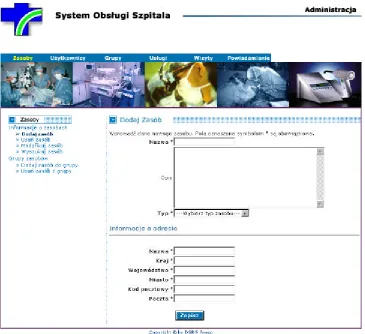
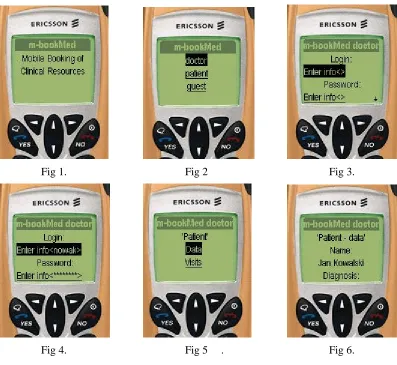
Clinical information requirement Hospital staff needs easy access to information on availability of the medical examination equipment and to booking examinations on this equipment, alongside with the time of personnel: doctors, nurses or helper staff operating this equipment. A possibility of entering emergency information like equipment failures, staff absence, etc. with automatic generation of appropriate messages for all parties involved (patient, doctor, nurses, etc.) is also desired. A Web-based application called m-bookMed is being developed for this purpose. It will be available throughout a wired and wireless network infrastructure for desktop PCs, laptops and PDAs (iPAQ PocketPCs).
Device and location The m-bookMed system will be installed in JP II hospital. It will be available inside the hospital’s intranet from all computers connected to the hospital LAN and WLAN. There is no additional mobility requirements in this scenario.
Security All intranet users of m-bookMed will be authenticated by the hospital’s LDAP-based users’ database. The web browser – web server connection needs to be secured (i.e. encrypted), e.g. by means of https protocol suite.
Telecommunications pathway The desktop PCs, laptops and iPAQs will be connected to the IPv6 wired and/or wireless network infrastructure in the JP II Hospital, so they will be able to access the m-bookMed system directly over the hospital IPv6 intranet.
QoS The need here is primarily for reliability of connection. The data are mostly character based and performance or bandwidth are not of concern. Some small amount of graphics will be applied to provide a good-looking and to ease the use of web pages. The speed of both 802.11b wireless LAN and 100BaseT wired LAN is much more than the system can make use of.
Intended demonstration It is intended to demonstrate operation of the m-bookMed system over the WLAN and LAN networks in the JPII hospital.
3.1.2
Home/street multi-access to clinical services booking system (m-bookMed)
Clinical information requirement: The GP-doctor, nurse or patient needs to make, check or update the clinical services booking information for a particular patient from any public location including the patient’s home or a street. A Web-based application called m-bookMed is being developed for this purpose. It will be available throughout WLAN and GPRS for laptops and PDAs (iPAQ PocketPCs) equipped with appropriate extension cards.
Device and location: When users need to view the data on a PDA, they may be kilometres away from their own place of work and then a connection via GPRS is used or they may be very close to the hospital or any other public place (e.g. an airport), where a WLAN connectivity is active. It is assumed that they will not need to roam while connected. It is planned that the GPRS connection of iPAQs will be implemented with the GISMO network adapters which can operate both on 802.11b and GPRS.
Telecommunications pathway The PDA will be connected to a WLAN or a GPRS service. The connection between a GPRS phone and PDA may be implemented in two ways, depending of the PDA’s operating system. For Linux (the only one which supports IPv6) UMM will use:
- GISMO card for IPAQ (no test with Linux done yet)
- IRDA or Bluetooth connection to the GPRS phone (no test with Linux done yet)
Tunnelling of IPv6 packets in IPv4 is envisaged as currently IPv6 connections cannot be delivered natively by GPRS.
QoS The need here is primarily for reliability of connection. The data are mostly character-based and performance or bandwidth are not of concern. Some small amount of graphics will be applied to provide a good-looking and to ease the use of web pages.
Intended demonstration It is intended to demonstrate this WLAN or GPRS access from test-bed locations in Krakow. It will be also possible to expand the demonstration to other sites if 6Bone connectivity to the GEANT IPv6 network is provided.
3.1.3
Roadside (WAP) access to the m-bookMed clinical services booking system
Clinical information requirement The GP-doctor, nurse or patient needs to check (but not change) the data held by the m-bookMed clinical services reservation system (including e.g. appointments and medical examinations booked by the patient), running on a server in the JP II Hospital, from any public location including the street. A WML-based (WAP) application is being developed for this.
Device and location They will need to view the data on a hand-held device (mobile phone), and may be some kilometres from their own place of work but will not need to roam while connected. Security The user will need to be authenticated and verified. LDAP is used in the m-bookMed medical system for patient/doctor authentication. The connection needs to be secured (i.e. encrypted). To this end SSL (Secure Socket Layer) and WTLS (Wireless Transfer Layer Security) is used.
Telecommunications pathway The hand-held device will need a connection to a GPRS service provided by a GSM/GPRS operator, and onward routing to the server at JP II Hospital via the WAP Server at UMM Computer Science.
QoS The need here is primarily for reliability of connection. The data are character based and performance or bandwidth are not of concern.
Intended demonstration It is intended to demonstrate this GPRS access from test-bed locations in Krakow and probably in Ipswich or London, if BT or other UK operator provides a 6Bone connectivity to the GEANT IPv6 network.
3.1.4
Hospital Appointment Clerk's intranet access to Clinical Appointment System
(CAS)
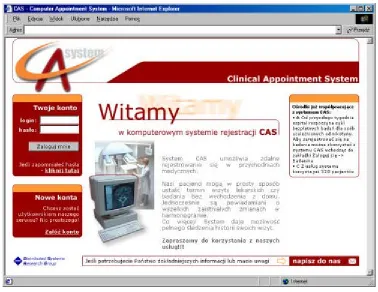
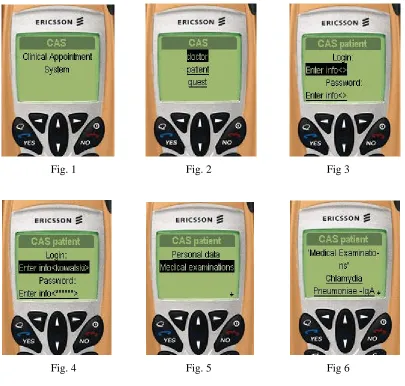
Device and location The CAS system will be installed in JP II hospital. It will be available inside the hospital’s intranet from all desktop PCs, laptops or iPAQ PocketPC computers connected to the JP II Hospital LAN and WLAN. There is no additional mobility requirements in this scenario. Security The appointment clerk must be authenticated – here CAS will use methods such as login/password and/or smart cards with PKI. Each request performed by the clerk will be authorized according to the policy based on the accessibility of respective web pages. The web browser – web server connection needs to be secured (i.e. encrypted), e.g. by means of https protocol suite.
Telecommunications pathway The desktop PCs, laptops and iPAQs will be connected to the IPv6 wired and/or wireless network infrastructure in the JP II Hospital, so they will be able to access the CAS server directly over the hospital IPv6 intranet.
QoS The need here is primarily for reliability of connection. The data are mostly character based and performance or bandwidth are not of concern. Some small amount of graphics will be applied to provide a good-looking and to ease the use of web pages. The speed of both 802.11b wireless LAN and 100BaseT wired LAN is much more than the system can make use of.
Intended demonstration It is intended to demonstrate operation of the CAS system over JPII hospital WLAN and LAN networks.
3.1.5
Home/street multi-access to CAS (Clinical Appointment System)
Clinical information requirement The patient needs to check and change its medical appointment data held in the CAS web-based clinical appointment system at the JP II Hospital server, from any public location including a patient home or a street.
Device and location When users need to view the data on a PDA, they may be kilometres away from their own place of work and then a connection via GPRS is used or they may be very close to the hospital or any other public place (e.g. an airport), where a WLAN connectivity is active. It is assumed that they will not need to roam while connected. It is planned that the GPRS connection of iPAQs will be implemented with the GISMO network adapters which can operate both on 802.11b and GPRS.
Security The user will need to be authenticated and verified (e.g. via login/password and/or PKI), and their connection needs to be secured (i.e. encrypted, e.g. by means of https protocol suite). The authorization is based on the accessibility of respective web pages.
Telecommunications pathway The PDA will be connected to a WLAN or a GPRS service. The connection between a GPRS phone and PDA may be implemented in two ways, depending of the PDA’s operating system. For Linux (the only one which supports IPv6) UMM will use:
- GISMO card for IPAQ (no test with Linux done yet)
- IRDA or Bluetooth connection to the GPRS phone (no test with Linux done yet)
Tunnelling of IPv6 packets in IPv4 is envisaged as currently IPv6 connections cannot be delivered natively by GPRS.
QoS The need here is primarily for reliability of connection. The data are mostly character-based and performance or bandwidth are not of concern. Some small amount of graphics will be applied to provide a good-looking and to ease the use of web pages.
3.1.6
Roadside (WAP) access to Clinical Appointment System
Clinical information requirement The patient needs to check (but not change) the data held by the CAS outpatient booking system (including e.g. patient’s personal data, a list of available medical examinations, visits requested by the patient), running on a server in the JP II Hospital, from any public location including the street. A WML-based (WAP) application is being developed for this. Device and location They will need to view the data on a hand-held device (mobile phone), and may be some kilometres from their own place of work but will not need to roam while connected. Security The user will need to be authenticated and verified. Standard login/password mechanism is used in the CAS medical system for patient authentication. The connection needs to be secured (i.e. encrypted). To this end SSL (Secure Socket Layer) and WTLS (Wireless Transfer Layer Security) is used.
Telecommunications pathway The hand-held device will need a connection to a GPRS service provided by a GSM/GPRS operator, and onward routing to the server at JP II Hospital via the WAP Server at UMM Computer Science.
QoS The need here is primarily for reliability of connection. The data are character based and performance or bandwidth are not of concern.
Intended demonstration It is intended to demonstrate this GPRS access from test-bed locations in Krakow and probably in Ipswich or London, if BT or other UK operator provides a 6Bone connectivity to the GEANT IPv6 network.
3.1.7
Hospital intranet access to medical radiology database
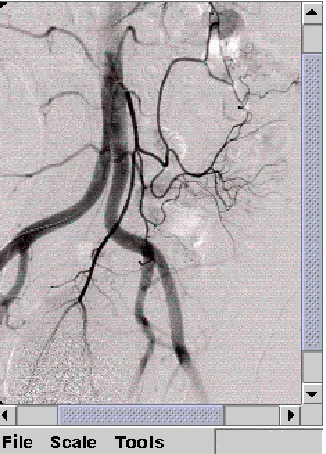
Clinical information requirement The cardiologist or nurse specialist needs to add, review or update the radiology medical data of patients (e.g. those attending a cardiac outpatient clinic) by accessing the NetRAAD server and its database (which are operational at the JP II Hospital) via a web browser. NetRAAD has been adapted for this purpose to work under IPv6. Alternatively, a Java-based client application able to display DICOM images and text tags (see 3.1.8) could be used, e.g. in emergency cases for consultations, as it will be possible to run it either on a laptop or a PDA. This Java-based client application is currently under development at UMM.
Device and location The users will use laptops or desktop PCs situated in the JP II Hospital’s LAN in most cases, but – occasionally – there will be a need to access NetRAAD from a device (typically a PDA) placed in the hospital’s WLAN connectivity area.
Security The accessibility of particular information will be based on authentication by means of users logins and passwords. The connections need to be secure (i.e. encrypted). NetRAAD itself covers the authentication issues, while transmission path encryption is going to be performed by a HTTP server.
Hardware requirements For diagnostic purposes, high resolution of end-user terminal screen is required as well as its compliance with the DICOM 3.0 specification (see its Chapter 14: Greyscale Standard Display Function). It is also worth noticing that most of contemporary handheld devices do not meet these standards. Moreover, it has been observed that the iPAQ's power consumption is extremely high when working in a WLAN environment.
Intended demonstration It is intended to demonstrate accessing the NetRAAD database with usage of both a web browser and the Java-based client application inside the John Paul II Hospital LAN and WLAN intranet.
3.1.8
Home/street emergency multiaccess to patient’s medical radiology database
Clinical information requirement The GP doctor, nurse or ambulance worker needs to review (but not change) the DICOM encoded radiology data and basic medical summary of an accident victim or other emergency care patient, held on the NetRAAD radiology database server in JP II Hospital, from any location. In such cases, the hospital’s data would be helpful when accessed for reference. A lightweight DICOM viewer integrated with hospital database browser dedicated to PDA devices is being implemented for this application. In some cases, the client can be used inside the hospital, as described in 3.1.4.
Device and location In this scenario, handhelds will be the most frequently used devices. Occasionally, the medical staff could use laptop computers. GPRS can seen as the most frequently available communication infrastructure nowadays, although we expect WLAN to become more available in public places in the near future.
Security Due to public network usage, the security mechanisms should be very strong. The user will need to be authenticated and verified (e.g. via token or PKI), and the connection needs to be secure (i.e. encrypted). The authentication issues are covered by NetRAAD itself, while transmission path encryption is going to be assured by means of https protocol suite performed by an HTTP server.
Telecommunications pathway A mobile device will need connection to GPRS service, which will be provided by GSM/GPRS service providers (Polkomtel Plus GSM in demonstrations). A gateway to the NetRAAD system working at the John Paul II Hospital will be provided, operated and maintained by the Institute of Computer Science of UMM.
QoS The most important needs of this application area are reliability and quality of connection. The volume of radiology data could result in very large DICOM files, thus making bandwidth a critical issue. In order not to make the client very bandwidth consuming (especially due to low bandwidth of GPRS networks), NetRAAD provides them with lower quality (JPEG compressed) reference images useful for browsing over the database. It is under consideration to implement a mechanism allowing users to specify their area of interest on DICOM image thus decreasing amount of data to be downloaded.
Hardware requirements For diagnostic purposes, high resolution of end-user terminal screen is required as well as its compliance with the DICOM 3.0 specification (Part 14: Grayscale Standard Display Function). It is also worth noticing that most of contemporary handheld devices do not meet these standards. Moreover, it has been observed that the iPAQ's power consumption is extremely high when working in a WLAN environment.
3.1.9
Video/audio streaming from emergency action place in hospital area
Clinical information requirement The doctors, nurses need to communicate by sending video and audio between different wards/departments/buildings in the hospital. It could be important when an urgent consultation is required during emergency action and the specialist staff is not in the same building. It is often necessary to send not only audio but also video to the specialist PDA or laptop and get the advice back. For this solution a Java-based teleconference/teleconsulting application is being developed.
Device and location The teleconferencing application takes mainly the advantages of JMF, Jini and Jiro. The staff will need to use PC, laptop or iPAQ Pocket PC devices situated in the WLAN of JPII Hospital in order to communicate with each other. There will also be a PC dedicated for Lookup Service, Deployment Station with installed Teleconferencing Service. This PC will also be the centralised downloading point for Teleconferencing Java jar files. There are no mobility requirements for this application.
Security The user will be authenticated and authorised. Instead of using Jiro’s Security Service it is desirable to exploit LDAP solution over hospital Ipv6 intranet. The present implementation of Jiro’s Security Service is neither stable nor mature.
Telecommunications pathway The laptops and iPAQs, connected to IPv6 WLAN network inside the JP II Hospital will communicate with each over. The communication will be established after prior registration into the system. Each device will have installed a Lookup Service browser that enables downloading of Teleconsulting Service’s proxy. The Teleconsulting Service will keep track of all events in the system, especially of appearance of new users that want to hold a conference. After agreement on parameters among conference participants the audio/video streaming is accomplished via JMF-RTP API.
QoS There is a need here for high bandwidth of connection. The connection should support high quality to transport video and voice without substantial degradation. Also the demand is on high performance devices that need to handle real-time coding/decoding of streams. It is a very hardware-demanding application.
3.2
Technical Architecture
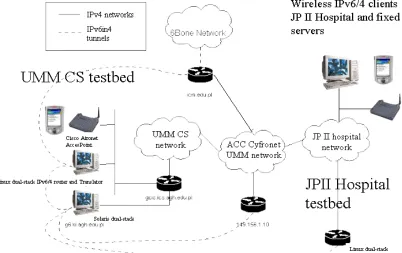
Figure 3 below shows the architecture of the Krakow site. The actual testbeds are: fixed and wireless networks of UMM Computer Science (development and first phase of testing) and the intranet of John Paul II Hospital (the actual demonstrator). The clinical application services located at JP II Hospital are delivered through IPv6 infrastructure routed in 6in4 tunnels via the UMM network and onward to 6Bone.
Figure 3: Network architecture of the Krakow demonstrator site
The communications pathway involves the use of some IPv4 networks, such as the UMM campus network (actually the Krakow MAN ATM backbone) IPv6 networks exist within the JP II Hospital and UMM Computer Science, including wired and wireless LAN based on 802.11b standard.
Linux with iproute package and IPv6 support has been used for Ipv6 traffic tunnelling when the transmission is made over existing IPv4 networks. Among all available technologies the 6in4 tunnelling in SIT technology has been used. On a Linux system located in UMM (CS Department) there are two access tunnels to 6BONE network configured. On the other side, tunnelling between JP II Hospital, ACC Cyfronet and UMM is done via software run on the Solaris 8 dual stack platform located in UMM CS. Between both systems (tunnel endpoints) – Linux and Solaris – an internal tunnel is also set up as they are located in different IPv4 networks. WAP access scenarios will require translation to enable IPv4 “legacy” access from WAP phones to IPv6 servers. A Socks64 translator running on Linux is situated at UMM CS
3.3
Technical Component Descriptions
Note: this section draws on previously published material in 6WINIT Deliverables 1 and 2, and new Deliverables 8, 9 and 10. References are given to additional technical descriptions in these deliverables, using the notation style [D1 Section x.y.z].
3.3.1
IPv6 Transition Mechanisms
3.3.1.1 Tunnelling
Functional Requirement
Native IPv6 services from the main application server will need to be tunnelled via IPv4 from UMM Computer Science to JP II Hospital using MAN internet access Intranet. Additional tunnel(s) may be required for remote connectivity to other IPv6 islands via 6BONE.
Proposed Technical Solution: iproute tool run on Linux platform, Sun Solaris 8
Linux with iproute package and IPv6 support has been used for Ipv6 traffic tunnelling when the transmission is made over existing IPv4 network. Among all available technologies the 6in4 tunnelling in SIT technology has been used.
On a Linux system located in UMM (CS Department) there are two access tunnels to 6BONE network configured. On the other side, tunnelling between JP II Hospital, ACC Cyfronet and UMM is done via software run on Solaris 8 dual stack platform located in UMM CS. Between both systems – Linux and Solaris – an internal tunnel is also set up.
Outstanding Issues - none Industrial Benefit
This installation provides proof of concept validation of the IPv6/4 tunnelling mechanisms within the Linux system and Sun Solaris.
3.3.1.2 Translation
Functional Requirement
a) IPv6 to IPv4 translation may be required to permit access from hand-held (PDA) running WindowsCE and from cellular phones to the native IPv6 services via GPRS transmission.
b) Some scenarios involve users having access to the native IPv6 services using only IPv4 clients from within IPv4 networks (e.g. from inside a JP II hospital intranet, accessed via UMM gateway to the public Internet and to 6BONE network).
Proposed Technical Solution: a) Socks64 Translator or b) 6WIND IP Edge Device [D2 Section 2.5, D9 Section 2.6]
b) The dual stack in the Edge Device should soon include a translation mechanism that allocates a temporary IPv4 address to a dual stack host in the IPv6 network when it is required for IPv4 communication. IPv4 user devices will access clinical applications via this temporary IPv4 address rather than the IPv6 address of the main clinical server. [D2 Section 2.1.1]
Outstanding Issues
Interoperation between 6WIND, Socks64 Translator and other IPv4 applications. Industrial Benefit
This installation provides proof of concept validation of the translation mechanisms within the 6WIND Edge Device and Socks64 Translator.
3.3.2
Security Mechanisms
3.3.2.1 VPNs using IP Routers
Functional Requirement
To provide an encrypted channel of communication between the clinical applications server and the end-user (possibly including the use of wireless devices). Certificate-based key management needs to be implemented e.g. via Public Key Infrastructure. [D10 Section 4.1]
Proposed Technical Solution: a) 6WIND IP Edge Device or b) CISCO IOS (IP Plus) and c) some PKI implementation (to be decided)
6WIND routers are able to create IPsec tunnels over IPv6 connections, including also the possibility of being certified by a PKI. [D8 Section 3, D10 Section 4.2] Usage of these devices will be considered if they are made available to Krakow site by 6WIND. This will be negotiated at the Basel project meeting.
Solutions available in the CISCO IOS will be also considered and evaluated.
UMM is also investigating several software PKI implementations to be used throughout the project, including the one from the University of Murcia.
The key management methodology for the demonstrator will be decided later, balancing the practical needs to provide a small and stable number of certificates with the wish to demonstrate a realistic and scalable scenario. A VPN will be established between JPII Hospital and the UMM Computer Science, to users connected via fixed LAN and WLAN. Ideally the VPN will extend to remote users connected via the Internet both using a fixed address and using GPRS.
Outstanding Issues
How to establish a VPN through to fixed and mobile users using native IPv4 devices connected via the public Internet (and possibly GPRS).
Industrial Benefit