A SURVEY ON VIRTUALIZATION TECHNOLOGY
IN CLOUD COMPUTING
Miss.Pratima D.Nerkar
1, Prof.Suresh B.Rathod
21,2
Department of Computer Engineering, Sinhagad Academy of Engineering, Pune University, (India)
ABSTRACT
Cloud computing is the latest distributed computing paradigm and it offers tremendous opportunities to solve large-scale scientific problems. Virtualization has been an essential technique for Cloud resources and data centers not only to decrease operating costs, but also to improve the system reliability. Cloud computing -a favourite computing system today.It’s a new paradigm which delivers computing services to users as utilities in a pay-as-you-go manner. It’s not a new technology; it’s just a way of using old services effectively. To solve an emerging real time service
management problem in cloud computing, live virtual machine (VM) migration is needed. Live migration of virtual machine is a major factor in cloud computing.
Keywords: Cloud Computing, Virtualization, Live Virtual Machine Migration, Real Time Service.
I INTRODUCTION
Expansion of internetworking coupled with Service Oriented Architecture gave birth to new concepts like Cloud
Computing which cater exponentially increasing demand of data generation, storage, integration and
communication. The key concept operating at lower level of cloud computing stack is Virtualization.
―Virtualization, in computing, is the creation of a virtual (rather than actual) version of something, such as a hardware platform, operating system, a storage device or network resources‖ [1]. Basically it is a technique that
divides a physical computer into several isolated machines known as virtual machines (VM). Multiple virtual
machines can run on a host computer, each possessing its own operating system and applications. This gives an
illusion to the processes running on virtual machines as if they are using dedicated hardware resources, but in reality
they are sharing the physical hardware of the host machine. The task of seamlessly isolating VMs and managing
timely allocation of resources is done by an additional software component called Hypervisor or Virtual Machine
Monitor (VMM).Virtualization can be used to club together applications running on different servers, on a single
host under different virtual machines (termed as sever virtualization)[[2]. For the success of server virtualization
Hypervisor or Virtual Machine Monitor, should ensure CPU, memory, network and IO virtualization (different
multiplexing). This reduces infrastructure required and eventually operational and maintenance cost[3][4]. In
addition to cost effectiveness virtualization brings many benefits like high availability, scalability, less power
consumption etc.
II VIRTUALIZATION
Virtualization was first developed in 1960’s by IBM Corporation, originally to partition large mainframe computers into several logical instances and to run on single physical mainframe hardware as the host. This feature was
invented because maintaining the larger mainframe computers became cumbersome. This capability of partitioning
allows multiple processes and applications to run at the same time, thus increasing the efficiency of the environment
and decreasing the maintenance overhead. Due to the benefits it offers virtualization has become fundamental
building block for today’s computing. As desktop and server processing capacity has consistently increased year
after year, virtualization has proved to be a powerful technology to simplify software development and testing, to
enable server consolidation, and to enhance data centre agility and business continuity. As it turns out, fully
abstracting the operating system and applications from the hardware and encapsulating them into portable virtual
machines has enabled virtual infrastructure features which are not possible with hardware alone.
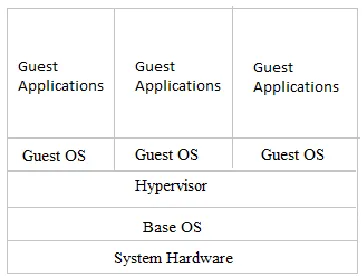
Figure 1: Components of Server Virtualization
As mentioned in Fig.1 the basic components of virtualized environment are
Host Machine Hardware – This includes normal physical computer system hardware like CPU, memory, network
interface, data buses, secondary storage etc.
Host Machine Operating System (Base OS) – This is applicable for Type 2 hypervisors, where hypervisor leverages
certain functionalities of OS like memory management, resource allocation scheduling, time sharing and provides
only add-on functionalities like maintaining VM state, virtual to physical memory mapping, requesting resources for
VM etc.
Hypervisor – It is abstraction layer between bare metal hardware of host machine and virtual machine. This software
CPU) with the underlying hardware.
Guest OS – Guest OS is any normal operating system which is installed on virtual machine instead of physical host.
It can be unmodified OS (as in case of Full Virtualization) or modified one (as in case of Para-Virtualization).
Guest Application – It is normal application developed providing certain business functionality and deployed on
virtual machine OS.
2.1 Virtual Machine Monitor (VMM) / Hypervisor
The software component called Hypervisor allows multiple operating systems to share a single hardware host. It is
an abstraction layer between host machine hardware and virtual machine OS. (Guest OS). Each guest OS appears to
have the host's processor, memory, and other resources all to itself. However, the hypervisor is actually controlling
the host processor and resources, allocating what are needed to each operating system in turn and making sure that
the guest operating systems (called virtual machines) cannot disrupt each other.
There are two types of hypervisors
1. Type 1 (or native, bare metal) hypervisors run directly on the host's hardware to control the hardware and to
manage guest operating systems. A guest operating system thus runs on another level above the hypervisor as shown
in Fig. 2 Examples are Oracle VM Server for SPARC, the Citrix Xen Server, KVM, VMware ESX/ESXi, and
Microsoft Hyper-V hypervisor.
F
Fiigguurree22: : TTyyppee 11 FFiigguurree33:: TTyyppee 22
2. Type 2 (or hosted) hypervisors run within a conventional operating system environment. With the hypervisor
layer as a distinct second software level, guest operating systems run at the third level above the hardware. as shown
in Fig. 3 .Examples are VMware Workstation and VirtualBox.
2.1.1 Hardware Support
To implement a Virtual Machine Monitor on a x86 architecture, hardware assistance is needed. The privilege levels
implemented by the CPU to restrict tasks that processes can do, are one aspect. Another one is the memory
management that is emulated by the VMM which tends to be inefficient. Hardware support could lead to an
increased performance of the virtual machines by supporting a VMM.
2.1.2 Privilege levels
drivers or access the hardware directly, for example. To restrict all running applications to only a subset of the
resources, the OS and the CPU conspire using privilege levels as shown in Fig.4 A x86 CPU runs in a specific
privileged level at any given time. Figure 3 shows these levels as rings. Ring 0 is the most privileged and ring 3 is
the least privileged. The resources that are protected through the rings are: memory, I/O ports and CPU instructions.
The operating system typically runs in ring 0. It needs the most privileged level to do resource management and
provide access to the hardware. All the applications run in ring 3. Ring 1 and 2 are widely unused. From a OSs point
of view ring 0 is called kernel-mode and ring 3 user-mode. The VMM needs to access the memory, CPU and I/O
devices of the host. Since only code running in ring 0 is allowed to perform these operations, it needs to run in the
most privileged ring, next to the kernel. An operating system installed in a VM also expects to access all the
resources and in order of that running in ring 0 like the VMM does. Due to the fact that only one kernel can run in
ring 0 at the same time, the guest OSs have to run in another ring with less privileges or have to be modified to run
in user-mode. Intel and AMD realized that this is a major challenge of virtualization on the x86 architecture. So they
introduced Intel VT and AMD SVM as an extension of the IA-32 instruction set for better support of virtualization.
These extensions allow the VMM to run a guest OS that expects to run in kernel-mode, in a lower privileged ring.
Figure 4: CPU privilege levels
2.1.3 Memory Management
In order to run several VMs on top of a server, a multiple of the amount of memory that is attached to a common
server is needed. Since each VM runs an entire operating system and applications on that, it is recommended to
assign as much memory to a VM as a comparable physical machine would have. The VMM splits the physical
memory of the host into contiguous blocks of fixed length and maps it into the address space provided to a VM.
Most modern systems are using virtual memory management. This technique al- lows to provide the previously
mentioned contiguous blocks of memory to a VM, although it is fragmented all over the physical memory or even
partially stored on the hard disk. In this case it has to be copied back to memory by the virtual memory management
first, when accessed. Since a VM is unaware of the physical address of its address space, it can’t figure out whether a
part of its virtual memory has to be copied or not. To achieve that, the VMM holds a so called shadow page table
that stores the physical location of the virtual memory of all VMs. Thus, any time a VM writes to its memory, the
operation has to be intercepted to keep the shadow pages up to date. When a swapped address is accessed the VMM
virtual and physical memory. This reduces the overhead of holding shadow pages and increases the performance of
a VMM.
2.2 Types of virtualization
There are three types of hardware virtualization
Full virtualization - In full virtualization almost complete simulation of the actual hardware is done by hypervisor,
which typically consists of a guest operating system, to run unmodified. One of the ways deployed to do this is
binary in which nonvirtualizable instructions are replaced with new sequences of instructions that have the intended
effect on the virtual hardware Ex – VMWare Workstation, VirtualBox
Para virtualization - In para virtualization a hardware environment is not completely simulated by hypervisor but
certain changes are made in guest operating system to adaptit to run in virtual environment. The guest OS is
modified to change non virtualizable privileged instructions with hypercalls to the hypervisors. Ex - Xen
Hardware-assisted virtualization - Hardware-assisted virtualization is a way of improving the efficiency of hardware
virtualization. It involves employing specially designed CPUs and hardware components that help improve the
performance of a guest environment. Ex – Intel-VT, AMD-V with hypervisors like KVM, Xen
2.3 Virtual Machine Migration Strategies
In this section, we will consider the most common setting for Live VM Migration [6][7] a clustered server
environment. The three main physical resources that are used under such conditions are memory, network and disk.
While memory can be copied directly from one host to another, local disk and network interface migration are not
trivial. To be able to preserve open network connections and to avoid network redirection mechanisms, a VM should
retain its original IP address after migration. If the migration is within the same LAN, which is the norm in a
clustered server environment, this can be done by generating an unsolicited ARP reply advertising the new location
for the migrated VM's IP.Local disk migration should not be needed inside a server farm. Data centers use
network-attached storage (NAS) devices, which can be accessed from anywhere inside the cluster. Thus, secondary storage
doesn't have to be migrated with the VM. Consequently, in a clustered server environment, the Live VM Migration
problem is reduced to finding a way of consistently transferring VM memory state from one host to another[12].
2.3.1 Memory migration
Memory Migration can be divided into three phases:
Push phase-The source VM continues running while certain pages are pushed across the network to the new
destination. To ensure consistency, pages modified during this process must be resent. Stop-and-copy phase-The
source VM is stopped, pages are copied across to the destination VM, then the new VM is started.
Pull phase-The new VM starts its execution and, if it accesses a page that has not yet been copied, this page is
faulted in across the network from the source VM.Most migration strategies select either one or two of the above
stop-and-copy.
2.3.2 Pre-Copy
Xen uses pre-copy as its live migration strategy. The pre-copy algorithm uses an iterative push phase, followed by a
minimal stop-and-copy. The iterative nature of the algorithm is the result of what is known as dirty pages: memory pages that have been modified in the source host since the last page transfer must be sent again to the destination
host. At first, iteration i will be dealing with less dirty pages than iteration--1.Unfortunately, the available bandwidth
and workload characteristics will make it so that some pages will be updated at a faster rate than the rate at which
they can be transferred to the destination host. At that point, the stop-and-copy procedure must be executed. A 5-step
view of the pre-copy technique is shown in Fig. 5. The stop-and-copy phase is when the CPU state and any
remaining inconsistent pages are sent to the new host, leading to a fully consistent state. Determining the time to
stop the pre-copy phase is non-trivial, since there exists a trade-off between total migration time and downtime. If it
is stopped too soon, more data must be sent over the network while both the source and the destination are down,
leading to a larger downtime. Nonetheless, if stopped too late, sometime will be wasted on pages that are written too
often and defeat any pre-copy efforts. As explained by, most server work- loads exhibit a small, but frequently
updated set of pages known as writable working set (WWS) or hot pages that can only be transferred during the
stop-and-copy stage. Depending on the workload characteristics, registered downtimes with the pre-copy technique
of only 60 ms and 210 ms with normal applications, and a worst-case 3.5 second downtime with an intentionally
‖diabolical‖ workload.
Stage0:Pre-Migration: We begin with an active VM on physical host A. To speed any future migration, a
tar- get host may be preselected where the resources required to receive migration will be guaranteed.
Stage1: Reservation: A request is issued to migrate an OS from host A to host B. We initially confirm that
the necessary resources are available on B and reserve a VM container of that size. Failure to secure
resources here means that the VM simply continues to run on A unaffected.
Stage2: Iterative Pre-Copy: During the first iteration, all pages are transferred from A to B. Subsequent
iterations copy only those pages dirtied during the previous transfer phase.
Stage3: Stop-and-Copy: We suspend the running OS in- stance at A and redirect its network traffic to B. As
described earlier,CPU state and any remaining in consistent memory pages are then transferred. At the end
of this stage there is a consistent suspended copy of the VM at both A and B. The copy at A is still
considered to be primary and is resumed in case of failure.
Stage4: Commitment: Host B indicates to A that it has successfully received a consistent OS image. Host A
acknowledges this message as commitment of the migration transaction: host A may now discard the
original VM, and host B becomes the primary host.
Stage5: Activation: The migrated VM on B is now activated. Post-migration code runs to reattach device
ensures that at least one host has a consistent VM image at all times during migration. It depends on the
assumption that the original host remains stable until the migration commits, and that the VM may be
suspended and resumed on that host with no risk of failure. Based on these assumptions, a migration
request essentially attempts to move the VM to a new host, and on any sort of failure execution is resumed
locally, aborting the migration.
III LIVE MIGRATION
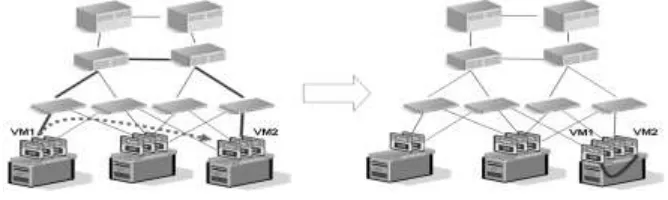
Live migration shown in Fig.5 moves running virtual machines from one physical server to another with no impact
on virtual machine availability to users. By pre-copying the memory of the migrating virtual machine to the
destination server, live migration minimizes the transfer time of the virtual machine[7] [9] [10]. A live migration is
deterministic, which means that the administrator, or script, that initiates the live migration determines which
computer is used as the destination for the live migration. The guest operating system of the migrating virtual
machine is not aware that the migration is happening, so no special configuration for the guest operating system is
needed.
Figure 5: live migration process
After initiating a live migration, the following process occurs: Live migration setup occurs. During the live
migration setup stage, the source server creates a connection with the destination server. This connection transfers
the virtual machine configuration data to the destination server. A skeleton virtual machine is set up on the
destination server and memory is allocated to the destination virtual machine. Memory pages are transferred from
the source node to the destination node. In the second stage of a live migration, the memory assigned to the
migrating virtual machine is copied over the network to the destination server. This memory is referred to as the
―working set‖ of the migrating virtual machine. A page of memory is 4 KB. For example, suppose that a virtual machine named ―test virtual machine‖ configured with 1024 MB of RAM is migrating to another server running
Hyper-V. The entire 1024 MB of RAM assigned to this virtual machine is the working set of ―test virtual machine.‖
The utilized pages within the ―test virtual machine‖ working set are copied to the destination server. In addition to
copying the working set of ―test virtual machine‖ to the destination server, Hyper-V monitors the pages in the
pages ―test virtual machine‖ has modified after the copy of its working set has begun. During this phase of the
migration, the migrating virtual machine continues to run. Hyper-V iterates the memory copy process several times,
with each iteration requiring a smaller number of modified pages to be copied. After the working set is copied to the
destination server, the next stage of the live migration begins. Modified pages are transferred. The third stage of a
live migration is a memory copy process that duplicates the remaining modified memory pages for ―test virtual machine‖ to the destination server. The source server transfers the CPU and device state of the virtual machine to the destination server. During this stage, the network bandwidth available between the source and destination servers
is critical to the speed of the live migration. Using a 1 Gigabit Ethernet or faster is important. The faster the source
server transfers the modified pages from the migrating virtual machines working set, the more quickly the live
migration is completed. The number of pages transferred in this stage is determined by how actively the virtual
machine accesses and modifies the memory pages. The more modified pages there are, the longer it takes to transfer
all pages to the destination server. After the modified memory pages are copied completely to the destination server,
the destination server has an up-to-date working set for ―test virtual machine.‖ The working set for ―test virtual
machine‖ is present on the destination server in the exact state it was in when ―test virtual machine‖ began the
migration process. The storage handle is moved from the source server to the destination server. During the fourth
stage of a live migration, control of the storage associated with ―test virtual machine,‖ such as any virtual hard disk
files or physical storage attached through a virtual Fiber Channel adapter, is transferred to the destination server.
(Virtual Fiber Channel is also a new Hyper-V feature in Windows Server 2012.)The virtual machine is brought
online on the destination server. In the fifth stage of a live migration, the destination server now has the up-to-date
working set for ―test virtual machine,‖ as well as access to any storage used by ―test virtual machine.‖ At this point ―test virtual machine‖ is resumed. Network cleanup occurs. In the final stage of a live migration, the migrated virtual
machine is running on the destination server. At this point, a message is sent to the network switch. This message
causes the network switch to obtain the new the MAC addresses of the migrated virtual machine so that network
traffic to and from ―test virtual machine‖ can use the correct switch port. The live migration process completes in
less time than the TCP time-out interval for the virtual machine being migrated. TCP time-out intervals vary based
on network topology and other factors. The following variables may affect live migration speed:
The number of modified pages on the virtual machine to be migrated—the larger the number of
modified pages, the longer the virtual machine will remain in a migrating state.
Available network bandwidth between source and destination servers.
Hardware configuration of source and destination servers.
Load on source and destination servers.
Available bandwidth (network or Fiber Channel) between servers running Hyper-V and shared
storage.
The live migration process for a virtual machine inside a cluster (when the virtual machine is stored on a CSV
practically identical[13].
When performing a live migration of a virtual machine between two computers with no shared infrastructure, the
first thing that Hyper-V does is perform a partial migration of the virtual machines storage, as follows:
Throughout most of the move operation, disk reads and writes go to the source virtual hard disk.
While reads and writes occur on the source virtual hard disk, the disk contents are copied over the
network to the new destination virtual hard disk.
After the initial disk copy is complete, disk writes are mirrored to both the source and destination
virtual hard disks while outstanding disk changes are replicated.
After the source and destination virtual hard disks are completely synchronized, the virtual
machine live migration is initiated, following the same process that is used for live migration with
shared storage.
Once the live migration is complete and the virtual machine is successfully running on the
destination server, the files on the source server are deleted.
IV REAL TIME SERVICE
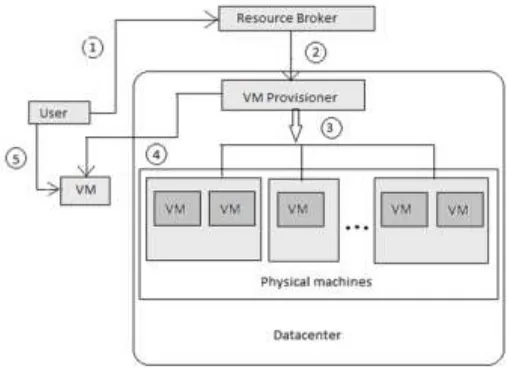
The steps for a real-time service are as follows Fig. 6.
Requesting a virtual platform
Generating a RT-VM [11] from real-time applications
Requesting a real-time VM
Mapping physical processors
Executing the real-time applications
V CONCLUSION
We hope this study can provide insights into the performance aspect of various streaming technologies and offer
guidelines to cloud operators and end users in implementing them. The Virtualization has brought a new additional
feature to cloud computing.
REFERENCES
[1] ―Cloud computing,‖ http://www.ibm.com/cloud-computing/us/en/whatis-cloud computing.html.
[2]Zhiming Shen, Zhe Zhang, Andrzej Kochut, Alexei Karve, Han Chen, Minkyong Kim Hui Lei, Nicholas
Fuller, ―VMAR: Optimizing I/O Performance and Resource Utilization in the Cloud‖.
[3]―Cloud Computing,‖ http://en.wikipedia.org/wiki/Cloud computing.
[4] M. Armbrust, A. Fox, R. Griffith, A. D. Joseph, R. Katz, A. Konwinski, G. Lee, D. Patterson, A. Rabkin, I.
Stoica, and M. Zaharia. ―Above the Clouds: A Berkeley View of Cloud Computing,‖ Technical Report
EECS-2009-28, EECS Department, Univ.of California, Berkeley, 2009.
[5] K. H. Kim, W. Y. Lee, J. Kim, R. Buyya. ―SLA-Based Scheduling of Bag-of- Tasks Applications on
Power-Aware Cluster Systems,‖ IEICE Transactions on Information and Systems, Issue 12, pp. 3194-3201,
2010.
[6]P. Padala, ―Understanding live migration of virtual machines.‖ Available: http://tinyurl.com/24bdaza, Jun.
2010.
[7]D. Breitgand, G. Kutiel, and D. Raz, ―Cost-aware live migration of services in the cloud,‖ in 2011 USENIX
Workshop on Hot Topics in Management of Internet, Cloud, and Enterprise Networks and Services.
[8]VMWare, ―VMmark Virtualization Benchmarks,‖ http://www.vmware.com/products/vmmark/, Jan. 2010.
[9] S.Hacking and B. Hudzia, ―Improving the live migration process of large enterprise applications,‖
inProceedings 2009 International Workshop on Virtualization Technologies in Distributed Computing
[10] A. Beloglazov, R. Buyya. ―Energy Efficient Allocation of Virtual Machines in Cloud Data Centers,‖ 10th
IEEE/ACM International Conference on Cluster, Cloud and Grid Computing, pp. 577-578, 2010.
[11] Carlo Mastroianni, Michela Meo, and Giuseppe Papuzzo,‖ Probabilistic Consolidation of Virtual
Machines in Self-Organizing Cloud Data Centers,‖ IEEE TRANSACTIONS ON CLOUD COMPUTING,
VOL. 1, NO. 2, JULY-DECEMBER 2013
[12] Mladen A. Vouk,‖ Cloud Computing – Issues, Research and Implementations,‖ Journal of Computing
and Information Technology - CIT 16, 2008, 4, 235–246
[13] T.Swathi, K.Srikanth, S. Raghunath Reddy,‖ VIRTUALIZATION IN CLOUD COMPUTING,‖