CS100: Introduction to
Computer Science
Lecture 2: Data Storage -- Bits, their storage and main memory
Review: History of Computers
q Mainframes
q Minicomputers
q Personal Computers & Workstations
Review: The Role of Algorithms
n Algorithm: n Program: n n Programming: n Software: n n Hardware:How are data stored inside computers?
n1.1 Bits and Their Storage
n
1.2 Main Memory
Bits and Bit Patterns
nBit: Binary Digit (0 or 1)
n
Bit Patterns (strings of 0 and 1s) are used to
represent information.
q Numbers q Text characters q Images
Sound
Bits and Boolean Operations
n Boolean Operation: An operation thatmanipulates one or more true/false values
n
Specific operations
q AND q OR
q XOR (exclusive or) q NOT
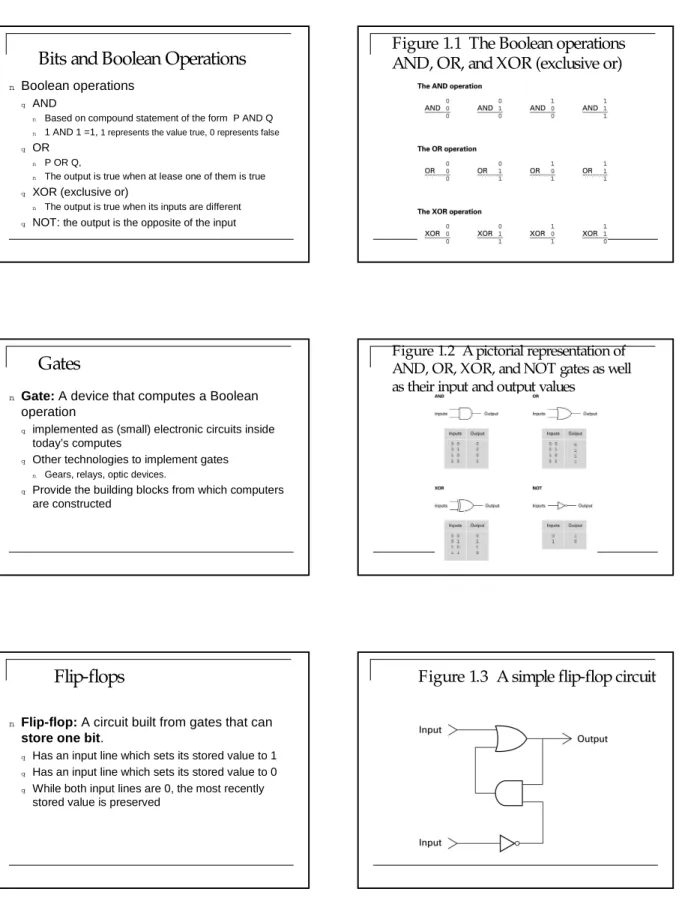
Bits and Boolean Operations
nBoolean operations
q AND
n Based on compound statement of the form P AND Q n 1 AND 1 =1, 1 represents the value true, 0 represents false
q OR n P OR Q,
n The output is true when at lease one of them is true q XOR (exclusive or)
n The output is true when its inputs are different q NOT: the output is the opposite of the input
Figure 1.1 The Boolean operations
AND, OR, and XOR (exclusive or)
Gates
n
Gate: A device that computes a Boolean
operation
q implemented as (small) electronic circuits inside
today’s computes
q Other technologies to implement gates n Gears, relays, optic devices.
q Provide the building blocks from which computers
are constructed
Figure 1.2 A pictorial representation of
AND, OR, XOR, and NOT gates as well
as their input and output values
Flip-flops
n
Flip-flop: A circuit built from gates that can
store one bit.
q Has an input line which sets its stored value to 1 q Has an input line which sets its stored value to 0 q While both input lines are 0, the most recently
stored value is preserved
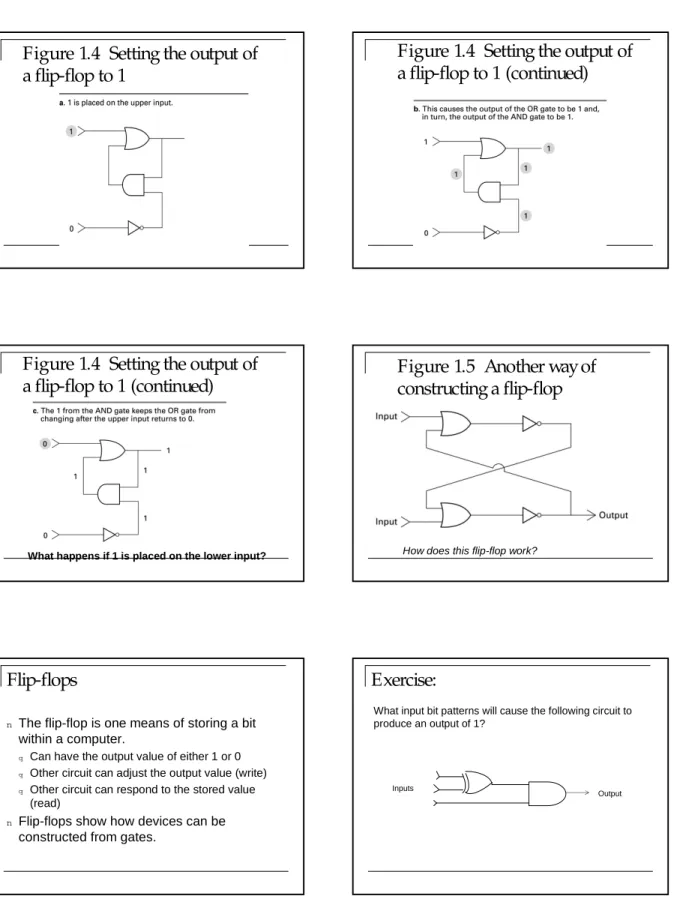
Figure 1.4 Setting the output of
a flip-flop to 1
Figure 1.4 Setting the output of
a flip-flop to 1 (continued)
Figure 1.4 Setting the output of
a flip-flop to 1 (continued)
What happens if 1 is placed on the lower input?
Figure 1.5 Another way of
constructing a flip-flop
How does this flip-flop work?
Flip-flops
n
The flip-flop is one means of storing a bit
within a computer.
q Can have the output value of either 1 or 0 q Other circuit can adjust the output value (write) q Other circuit can respond to the stored value
(read)
n
Flip-flops show how devices can be
Exercise:
Inputs
Output
What input bit patterns will cause the following circuit to produce an output of 1?
Main Memory
n A collection of integrated circuits to store data (such as
flip-flops)
n Needs to have electrical power in order to maintain its
information
n Computer can manipulate only data that in main
memory
q Copy programs into main memory from a storage device to
execute
q Copy files into main memory to access
n The amount of main memory is crucial
q How many programs can be executed
q How much data can be readily available to a program?
Main Memory Cells
n
Cell: A unit of main memory (typically 8 bits
which is one byte)
q Most significant bit: the bit at the left (high-order)
end of the conceptual row of bits in a memory cell
q Least significant bit: the bit at the right
(low-order) end of the conceptual row of bits in a memory cell
Figure 1.7 The organization of a
byte-size memory cell
Main Memory Addresses
n
Address: A “name” that uniquely identifies
one cell in the computer’s main memory
q The names are actually numbers.
q These numbers are assigned consecutively
starting at zero.
q Numbering the cells in this manner associates an
order with the memory cells.
Figure 1.8 Memory cells arranged by
address
Measuring Memory Capacity
n Kilobyte: 210bytes = 1024 bytes
q Example: 3 KB = 3 ×1024 bytes q Sometimes “kibi” rather than “kilo”
n Megabyte: 220bytes = 1,048,576 bytes
q Example: 3 MB = 3 ×1,048,576 bytes q Sometimes “megi” rather than “mega”
n Gigabyte: 230 bytes = 1,073,741,824 bytes
q Example: 3 GB = 3 ×1,073,741,824 bytes q Sometimes “gigi” rather than “giga”
Questions:
n
If the memory cell whose address is 5
contains the value 8, what is the difference
between writing the value 5 into cell number
6 and moving the contents of cell number 5
into cell number 6?
Questions:
n
Suppose we want to interchange the values
stored in memory cells 2 and 3. Does the
following algorithm perform the task
correctly?
q Step1: Move the contents of cell number 2 to cell
number 3.
q Step 2: Move the contents of cell number 3 to cell
number 2.
Questions:
n
How many bits would be in the memory of a
computer with 4KB memory
n
What is the amount of main memory inside
your computer?
Main Memory Technologies
n RAM (Random Access Memory)q Allow the stored data to be accessed in any order q No physical movement of the storage medium or a physical
reading head
q Any piece of data can be returned quickly and in a constant time
n Modern computers use other technologies to
improve the performance of main memory (size, respond time)
q DRAM (Dynamic RAM) q SDRAM (Synchronous DRAM)
q DDR-SDRAM (Double Data Rate-SDRAM ) (doubled
standard SDRAM efficiency)
Summarization
nBoolean operations
nGates
n
Flip-flops (store a single bit)
nMain memory (RAM)
q Cell, Byte, Address
Next Lecture:
n
Mass (or secondary) storage & representing
information