Innovations in Education and Teaching Intemational s j Routledae Vol. 42, No. 2, May 2005, pp. 181-194
A model for synchronous learning using the
Internet
Nian-Shing Chen^, Hsiu-Chia Ko^, Kinshuk * and Taiyu Lin
^National Sun Yat-sen University, Taiwan; Massey University, New ZealandImprovements in technology and the increasing bandwidth of Internet access have led to an increasing popu-larity for synchronous solutions for instruction. Not only do they provide savings in terms of time and cost, in many situations they can also outperform both asynchronous online instruction and traditional facc-to-face education. However, until now, the lack of a pedagogical framework for synchronous instruction has limited the effective use of this medium. This paper describes an online synchronous learning model that aims to pro-vide guidelines for teachers and students to conduct synchronous instruction. The model propro-vides a broad range of scenarios to suit individual requirements and covers both synchronous lecturing and 'office-hours' modes.
Introduction
Traditional distance education has typically been constrained by the limitations of time and location, making it difficult for instructors and students to perform educational activities satis-factorily (Sauve, 2000). Recent advances in distance education, however, provide a bridge between teachers and students and enable them to communicate more easily and interact more flexibly.
In recent years, Internet technologies have matured significantly. These advances, combined with the Internet's inherent characteristics of information availability through unrestricted time and space, means that it can now provide a uniform access medium for both asynchronous and synchronous learning. The technological advances include not only the rapid growth of infor-mation technologies but also the increasing availability of broadband Internet access, hence solving the problem of insufficient bandwidth. This technological growth has also resulted in the development of a variety of applications for online learning. For example, teachers can now use synchronous or asynchronous instruction methods in their courses—as deemed appropri-ate. Furthermore, one of the traditional teaching activities, namely 'office-hours' (where students meet their teachers in order to get individual responses to their queries) can now be * Corresponding author. Advanced Leaming Technologies Research Centre, Information Systems Department, Massey University, Private Bag 11-222, Palmcrston North, New Zealand. Email: [email protected]
ISSN 1470-3297 (print)/ISSN 1470-3300 (online)/05/020181-14 <:•• 2005 Taylor & Francis Group Ltd
182 N.S. Chen etal
performed over the Internet, resulting in enhanced and timely learning interactions and better online classroom management.
Currently, the majority of research described in the literature has focused on the asynchro-nous mode of instruction, with very little discussion on the issues related to online synchroasynchro-nous instruction. The literature that does exist on synchronous instruction mostly focuses on the implementation aspects rather than on the pedagogical issues.
The main objective of this paper is to discuss the pedagogical aspects of online synchronous learning. A synchronous learning model is then proposed. In addition, a new method to perform online instruction and online 'office-hours' activities is also proposed. Finally, two case studies of online synchronous instruction and 'office-hours' activities are discussed to demonstrate the feasibility of the proposed methods.
Background
The mode of interaction for online instruction can be categorised into asynchronous and synchronous. Asynchronous learning allows the sequence of interaction between a teacher and a student to happen at different times. 'Research on the effectiveness of asynchronous online learning, which includes case studies, student/educator surveys, and behavioural analysis, has indicated that there is a need for learning tools that support synchronous communications' (Hotcomm, 2003).
Synchronous learning requires the presence of both parties at the same time for teaching and learning to take place (It-analysis, 2001). It is therefore also referred to as 'live' or real-time instruction. Due to the limitation of network bandwidth and less complex technology involved in asynchronous learning (Hotcomm, 2003), the tools available for asynchronous learning outnumber those for synchronous learning; for the latter, the simplest form usually includes only a variation of some form of text-based chat facility (Scavo et al., 1998).
It seems, on the surface, that synchronous learning imposes more restrictions on both teachers and students in the time dimension, but its similarity to traditional classroom interaction in both time and psychological dimension endows it with many benefits that asynchronous learning would have difficulty in achieving. The trend of online learning is towards a blended mode combining asynchronous and synchronous delivery, which increases flexibility. Without synchronous learning this blended mode would not be possible.
There are still some instances in the literature reflecting the use of synchronous learning meth-ods by educators. For example, synchronous learning was applied in the learning of probability theory in a simulation tool called Kansas (Scanlon et al., 1997). This provided a 2D virtual space for all the students to move around and meet others, and facilitated real-time links among the students, such as video, audio and shared application, so that the students can form groups and work with each other. Synchronous learning was also applied in the learning of a computational science course using TANGO (Scavo et al., 1998). This was a Java-based collaborative tool that included a shared browser, a whiteboard, 2D/3D chat tools, and enabled two-way video and audio streaming. Synchronous learning has been considered as a solution for the difficulties encoun-tered in distant music education—where non-verbal and synchronous interaction is critical for the success of learning (Ruippo, 2002).
Synchronous leaming using the Intemet 183 • Immediate feedback can be provided to students so that they can immediately correct them-selves or strengthen what they have learned. This is especially essential for activities such as group decision making, brain storming and analysis (Hotcomm, 2003).
• Increased level of motivation and an obligatiofi to be present and participate which in turn would increase students involvement in learning activities, hence resulting in better learning experi-ences (It-analysis, 2001).
The systems identified above support synchronous learning only in terms of technical function-ality. Kansas (Scanlon ei al., 1997) only provided a virtual space with synchronous collaboration tools so that students could get together freely. Similarly, TANGO (Scavo et al..^ 1998) included some synchronous collaboration tools to convert a large repository of digital teaching material to online synchronous courses. However, since these systems achieved positive results by the mere inclusion of synchronous collaboration tools, it is not hard to see how the benefits of synchronous learning could be multiplied if an appropriate pedagogical framework was available to analyse synchronous learning situations in different dimensions.
Evidence is also available in the literature to support the fact that synchronous instruction using the Intemet not only facilitates the tasks of a traditional face-to-face learning environ-ment, but also has some distinct advantages over the conventional approaches. These advan-tages can be grouped into three major categories: logistical, instructional and economic (Hannum, 2001). Logistical advantages have to do with case of distribution and use. The greatest logistical advantage of online synchronous instruction perhaps is its flexible, distrib-uted delivery that allows learners and instructors to take part in a learning/instruction process from any geographic location. An obvious instructional advantage of online synchronous instruction is the ability of learners to interact with rich multimedia resources (McManus, 1996), which is virtually impossible to achieve in face-to-face instruction. Of course, it is not necessary to have all multimedia elements in all lessons, but when used appropriately, these elements enhance instruction and leaming (Bagui, 1998). An additional benefit of online synchronous instruction over asynchronous learning is that it also eliminates the costs related to travel and time away from home or worksite (Hannum, 2001), while still providing immedi-ate interaction among teachers and students. Synchronous instruction also allows team teach-ing where experts from different parts of the world could teach together without havteach-ing to spend time and money in travel and other such non-educationally related activities.
In the next section, a model for synchronous learning that can serve as a pedagogical frame-work is proposed. The model contains several modes suitable for different educational situations.
A model for synchronous learning
Synchronous leaming employs videoconferencing and other multimedia techniques to allow teachers and students to interact with each other at the same time even if they are not at the same place. Synchronous learning management systems (SLMS) such as the National Sun Yat-sen Cyber University (NSYSU-CU) and K12 Digital School are now available (Chen, 1997, 2000). These systems facilitate various functionalities that are crucial to synchronous leaming. For instance, a digital whiteboard provides many functions for teachers to explain course content, and a roll-call book helps teachers mark the attendance register. In addition, SLMS also
184 N.S. Chen el a\.
provides discussion rooms that allow students to ask questions and share ideas online. During the discussion period, teachers can observe the interaction among students and the discussion content of the whole class, and give students appropriate support whenever needed.
In order to prevent the problems of distraction during the course program, teachers can also ask students to answer some questions by text or audio. All such conversations along with course programs and contents can be recorded using tools such as Anicani-Live (Chen & Huang, 2002) and made available to the students for review either after completion of the class or in the form of course material for asynchronous learning. This possibility does not exist in traditional face-to-face teaching. Synchronous delivery can therefore provide a far greater variety of teaching modes.
Despite the varied benefits of synchronous learning, the lack of pedagogical research in this area has meant that effective online management techniques are still to be developed for the vari-ous activities that mimic traditional instruction such as lectures and 'office-hours'. In this regard, an online synchronous learning model is proposed that classifies various possible synchronous learning modes. By considering how a traditional face-to-face instructional process could be facilitated in a corresponding synchronous manner using the Internet, five dimensions of the model can be identified. These are: role (teacher, student), participant (individual, group), venue (specific, any), interaction (one-way, two-way) and delivery (playback, live). These are shown in Table 1.
In online synchronous learning activities, there are two major 'role' players: teachers and students. Both teachers and students are expected to use the teaching and learning environ-ment flexibly and freely; the only requireenviron-ment for them is that they should be using the online classroom at the same time. They can be situated anywhere, either in their own environment in any part of the world or in a specific laboratory location provided by the educational insti-tution. Hence, the 'venue' dimension can be either any or specific. If people are situated in their own environment, then they participate within the conditions imposed by the environ-ment, such as distractions due to family at home, or distractions due to phone calls and knocks-on-the-door at the office. In a laboratory location, people might participate in groups with physical interaction possible with their peers. Therefore, the 'participant' dimension includes individual and group. The instruction in synchronous environments can either be one-way, just as a broadcast of the lectures, or two-way with interaction between teachers and students and even communication among students. Therefore the 'interaction' dimension can be one-way or two-way.
Finally, the 'delivery' dimension includes the ways in which the course material is delivered to the students: live, video-on-demand (VOD) and hybrid. When teachers lecture remotely in real time, the delivery is referred to as live mode. If teachers opt to play the pre-recorded video, either of themselves or of other experts, then this constitutes the VOD playback delivery mode. Of course, teachers may also employ a combination of these two modes to provide better flexibility, hence the hybrid mode.
Table 1 summarises the main facets of the synchronous learning model. Each cell of this table represents one synchronous learning mode. The model is intended to provide options for teachers in terms of possible modes—once they have identified one or more constraints in their teaching situation.
Synchronous leaming using the Intemet 185 Table 1. Facets of the online synchronous learning model
Mode
Dimension
Role Participant Venue Interaction Delivery
1 2 3 4 5 6 7 8 9 10 11 12 13 14 15 16 17 18 19 20 21 22 23 24 25 26 27 28 29 30 31 32 T T T T T T T T T T T T T T T T S S S S
s
s
s
s
s
s
s
s
s
s
s
s
I I I I I I I I G G G G G G G G I I I I I I I I G G G G G G G Gs
s
s
s
A A A A Ss
s
s
A A A A Ss
s
s
A A A A S S Ss
A A A A P L P L P L P L P L P L P L P L P L P L P L P L P L P L P L P L Key: Role: S, student;T, teacher. Participant: G, group; I, individual. Venue: A, any; S, specific.Interac-tion: 1, one-way; 2, two-way. Delivery: L, live; P, playback.
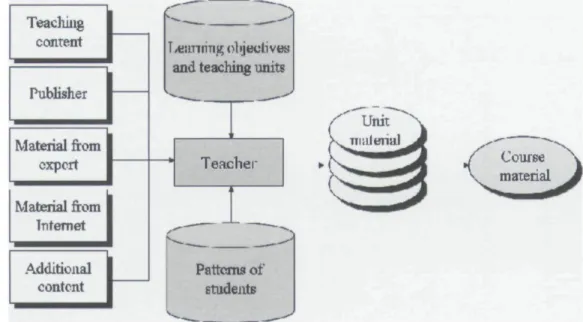
In order to illustrate the application of the model, an online synchronous live instruction mode and an 'office-hours' activity mode have been designed. Initially, in the online synchro-nous live instruction mode, teachers perform the role of teaching material editors—similar to traditional teaching. The sources of the course materials include a large variety that contain lectures that were recorded by the teachers themselves or others, material from publishers (such as books, films and teaching manuals), CDs and content that is available in the public domain
186 N.-S. Chen etal Teaching content Publisher MateriaJ from expert Material from Internet Additional content
and teaching units
./" Unit Teaclier
T
Patterns of
Figure 1. Teaching material editing task
on the Internet. This approach ensures the sharing and reuse of the teaching resources (see Figure 1).
Scenario 1: online synchronous live instruction mode
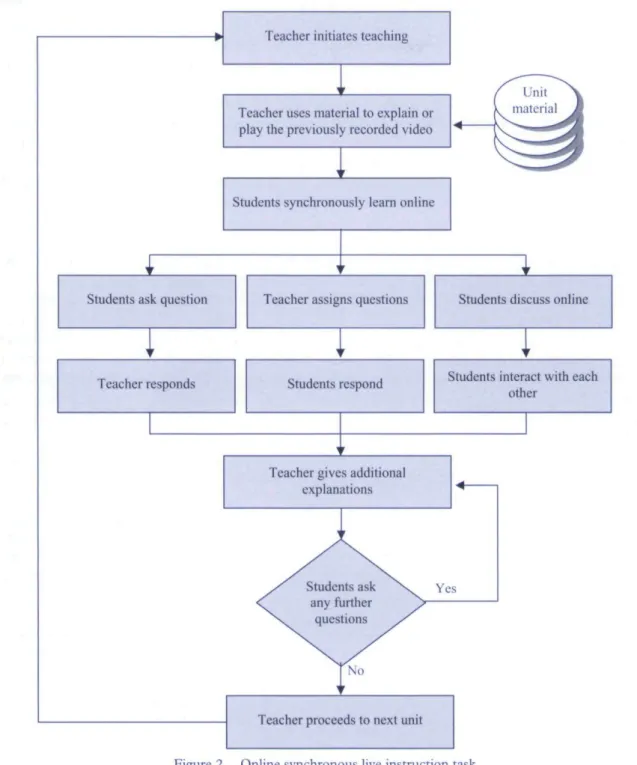
During the online instruction task, through the assistance of a synchronous leaming manage-ment system and videoconferencing tools, teachers and students interact synchronously. This kind of teaching mode is called online synchronous live instruction ('live' because the teachers orchestrate the instruction process in real-time; it is not a pre-determined sequence). Besides playing the previously edited teaching material, teachers can also give additional explanation of the content using annotation tools such as free-hand writing, drawing line, circle or rectangle, and so on. After a teaching segment finishes, teachers can either ask students if they have any questions, or assign a question and ask students to discuss it in an online chat room for a brief period of time and reply back. If students have any other queries, teachers can give another explanation or play back other teaching materials to address students' confusion. Once the queries have been answered, teachers can continue playing the next teaching material online and undertaking other teaching tasks (see Figure 2).
Teachers in online synchronous instruction situations are expected to create a leaming environment that is interesting for the learners and which suits their learning process. The diver-sified and interesting nature of online synchronous instruction not only enhances the learners' interest and involvement but also allows them to perceive that they are not alone and that there are many other learning partners around them (Tuckman, 2004). The interactions with peers and tutors enable the re-evaluation of the information perceived through association, integra-tion, validation and appropriaintegra-tion, thus allowing deep learning to take place (Armitt et al.,
Synchronous learning using the Internet 187
Teacher initiates teaching
Teacher uses material to explain or play the previously recorded video
Students synchronously learn online
Students ask question Teacher assigns questions Students discuss online
Teacher responds Students respond Students interact with each other
Teacher gives additional explanations
Students ask any further
questions
Teacher proceeds to next unit
Figure 2. Online synchronous live instruction task
2002). Hence, the students in the online synchronous instruction mode benefit from interesting and high-level interactions with many online learning partners, resulting in a more participative and better-quality learning process managed by a human teacher (Roshan, 2002). The reuse and sharing of teaching resources also ensures that the teaching load on the teachers is reduced.
188 N.-S. Chert Qtal
Scenario 2: online synchronous 'office-hours' activity mode
Traditional 'office-hours' activity allows students to discuss their questions with teachers on a one-to-one basis. Therefore, this task is as important in the online leaming environment as it is in traditional methods of instruction.
'Office-hours' activity can be classified according to two dimensions: media richness of discus-sion content (text, audio and video) and the role of users (teachers,, students and teaching assis-tants). T h e classification is shown in Table 2. This shows that there are nine feasible 'office-hours' interaction modes in the model. T h e s y m b o l ' T ' means that interaction is by way of text; 'A' means that interaction is by means of audio—however, users can combine text and audio if they wanted to. T h e symbol ' V indicates that teachers, students and teaching assistants employ video to interact with each other—but they could also combine text and audio.
Because of its lower bandwidth requirements, text is more accessible than audio, and audio is more accessible than video. From the network bandwidth limitation and the cost points of view, it is natural for users to use text more than audio and video, and audio more than video. Since teachers have institutional equipment available, it is more likely for teachers to have higher spec-ification equipment available than students and even teaching assistants. As represented in Table 2, the scenario in Mode 1 is most likely to happen even if it is the least desirable scenario due to the least possible channels of interaction (only text). On the other hand, the scenario in Mode 9 is least likely, due to the requirement of the highest specification equipment, despite the fact that it provides the most channels of interaction (text, audio and video). It should be noted that Table 2 represents only those modes that are found feasible in our experience of running online 'office-hours' at N S Y S U - C U for the last five years (Chen, 1997).
In the first mode in Table 2, text is used as the way of the interaction. It is similar to the discus-sions that take place in the online chat rooms. T h e roles in the discussion room include teachers, students and teaching assistants.
T h e third mode means that the students employ text whereas the teachers and teaching assis-tants use both text and audio for the interaction. This mode has more interaction than the first one. In the fifth mode, the students employ text and the teachers and teaching assistants use text, audio and video to communicate. In this mode, the interaction among students, teachers and
Table 2. Synchronous 'office-hours' mode used in the course Mode 1 2 3 4 5 6 7 8 9 Students T T T T T A A A V Teaching assistants T T A A V A A V V Teachers T A A V V A V V V Tool used Chat room Anicam-Live Anicam-Live Anicam-Live Anicam-Live JoinNet JoinNet JoinNet JoinNei Used status Yes Yes No No Yes No Yes Yes Yes
Synchronous leaming using the Internet 189 teaching assistants is more varied. For example, if students' questions are of an operational nature, teachers can choose to show the steps of the operation by synchronously transmitting the images or video of the functions performed in those steps whereas teaching assistants can follow up with audio communication. Furthermore, with the help of assistant tools, such as
Join-Net (httpiZ/wvi-w.homemeeting.com/) or Anicam-Live (http://anicam.elearn.com.tw/), teachers
could use their computers as the blackboards. In the sixth mode, the students, teachers and teaching assistants all employ audio to communicate. In the eighth mode, the students use audio and the teachers and teaching assistants use video. Finally in the ninth mode, the students, teachers and teaching assistants all use video for interaction.
Now we shall describe two concrete case studies to illustrate how to achieve the online synchronous live instruction and 'office-hours' activities in a cyber university environment.
Case studies and evaluation
In order to test the synchronous learning model described in this paper, we implemented it in a Computer Network and Internet course at the NSYSU-CU in Taiwan (http://cu.nsysu.edu.tw). In this course, we employed the online synchronous live instruction mode and mixed many different 'office-hours' modes to conduct the course. The instructional tools we used were
Anicam-Live (Chen & Huang, 2002) and JoinNet; the functions of these tools were integrated
within the NSYSU-CU in Taiwan. The whole teaching process was completed synchronously. A more detailed description of these two examples of the online synchronous learning model is given below. It should be noted that the attempt here is not to generalise the results over inter-national student population but to verify the feasibility of the model. Further future studies, focused on a diverse student population, would be needed in order to assess the generalisation issues.
Case study 1: live instruction mode
We deployed the online synchronous live instruction mode using a tool called Anicam-Live (Verhaart, 2003). This tool provides many functions suitable for synchronous teaching. For example, it enables teachers to use their computer screen as a blackboard to explain course content and provides 'canvas' functions—such as a painting brush and blackboard eraser to be used on the blackboard. In addition, all of the course presentation and interaction processes can be recorded synchronously and can be provided to students for review after the class is over.
The synchronous learning environment was implemented within the Cyber University, and various tools (such as the camera, microphone and handwriting board) were developed in this system. Then, the existing teaching material was converted into HTML format and put into the environment so that students could access it prior to the start of the teaching.
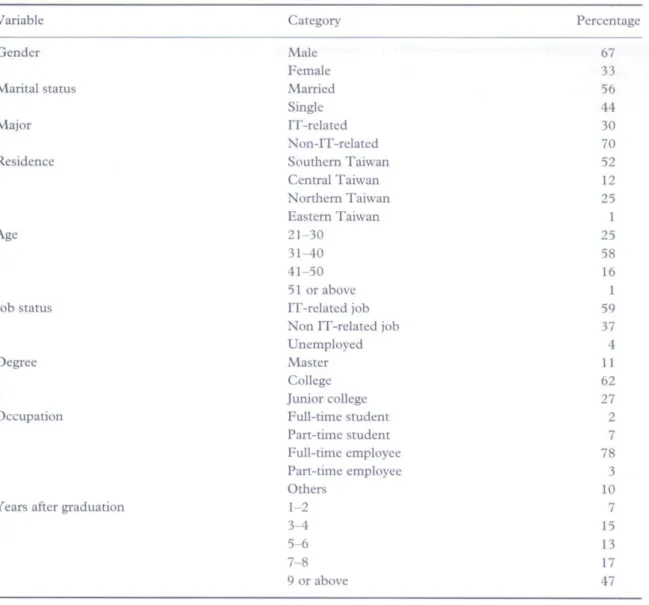
Seventy students enrolled in the Computer Networks and Internet course. The duration of the course was one semester (four months). There was one instructor and three teaching assistants. Most of the students were working adults. More details about these students are included in Table 3. In order to attend the online synchronous lectures, students had to log into the Cyber University and enter the Computer Networks and Internet course room. The teacher could then register their attendance through the roll-call area at any time. The teacher then delivered the teaching
190 N.S. Chen etal.
Table 3. Profile of participants (n = 70)
Variable Category Percentage
Gender Marital status Maior Residence Age Job status Degree Occupation
Years after graduation
Male Female Married Single IT-related Non-IT-related Southern Taiwan Central Taiwan Northern Taiwan Eastern Taiwan 21-30 31-40 41-50 51 or above IT-related job Non IT-related job Unemployed Master College Junior college Full-time student Part-time student Full-time employee Part-time employee Others 1-2 3-4 5-6 7-8 9 or above 67 33 56 44 30 70 52 12 25 1 25 58 16 1 59 37 4 11 62 27 2 7 78 3 10 7 15 13 17 47
session. All the teacher's actions, such as typing words, live images, and the teacher's voice were recorded and delivered to the online students' computers synchronously through the media server. Moreover, if students had any questions, they could discuss these using text chat in the discussion room. During the synchronous session the teacher could navigate to the discussion room to see whether students had any queries. Overall, the teacher had control over building an interesting learning environment, including the way in which the class should be run and managed.
Case study 2: 'office-hours'
The synchronous online 'office-hours' modes that were employed in the above course are shown in Table 2. The first mode was employed to perform the textual discussion. The teachers,
Synchronous leaming using the Intemet 191 students and teaching assistants were all required to enter into the discussion room and they were asked to specify individual colours for the text they typed in order to separate the diverse identities. This made it easy to discriminate between the questions asked by the students and the answers provided by the teachers and the teaching assistants.
In Modes 2-5, the main tool used was Anicam-Live, which allowed teachers to enable or disable his/her live image from the CCD. Disabling the live image constituted Mode 2, whereas when the teacher enabled the live image, Mode 5 came into operation, similar to the online synchronous live instruction modes.
In Modes 6-9, the main tool used was JoinNet. This allowed online videoconferencing. In this situation, the teacher acted in the role of the host of the meeting, where all students and teaching assistants could join the meeting to discuss questions and share ideas. As long as students had a CCD camera and microphone (or just a microphone) attached to their computers, they could ask to speak. The host could decide who should talk at any given time. JoinNet also enabled groups of four people to discuss at the same time. In addition. It also provided the functionality to allow information sharing, where everyone could upload their documents to the whiteboard and discuss their queries and share ideas. The teacher could also upload his/her teaching mate-rials in order to address students' queries and to give any other additional explanations.
When the students had access to only a microphone. Modes 6, 7 and 8 were employed. But if the students had both microphone and CCD camera, then Mode 9 was employed. As mentioned before, we found that through Modes 6-9, students showed more willingness to ask questions and discuss their queries with others.
Evaluation of online synchronous instruction
In order to understand students' leaming outcomes and satisfaction with online synchronous live instruction, a survey was conducted in the above-mentioned Computer Networks and Inter-net course in 2003. Out of 70 students, 50 students participated in the survey. Table 3 shows the profile of the participants.
The students were given a questionnaire to evaluate their learning experience at the end of the course (see Appendix 1). This appendix also shows the percentage responses to each question in the questionnaire. Students were also invited to give free-form comments. According to the survey results, 97% of students responded that they were satisfied with the online synchronous live instruction mode and 89% of students responded that the live instruction mode could provide very good interactions among teachers and students. Furthermore, considerable posi-tive feedback was also found in the form of free-form comments, for example (translated from Chinese):
I can feel that all participants have a high commitment to this live class even when we are all logged-in NSYSU-CU from different locations.
Live instruction enables me to concentrate more; actually it is not easy to be distracted because teacher could call anyone's name for response to questions.
I like this kind of live instruction mode. The feeling is just like I went back to school for class. I prefer live instruction mode, because the feeling is just like in a real class with the atmosphere of face-to-face lecture and the opponunity for interaction is higher.
192 N.S. Chen etal
Some students did experience difficulties like 'my computer is not powerful enough to carry multimedia applications'. Some of them were using dial-up access with only 50 kbps band-width—which is impossible for the Anicam-Live lectures. Sometimes the network traffic caused so much congestion that they could not hear the audio very clearly. Some found navigating multiple windows at the same time somewhat annoying. These comments were taken on board while developing later versions of the tools used in the instruction.
Based on the survey results shown above, we believe this kind of online synchronous live instruction mode and online 'office-hours' activities provide excellent learning outcomes and satisfaction for online courses.
Conclusion
Synchronous leaming is becoming more and more important with the improvements in technol-ogies such as broadband Intemet access and video compression techniques. This paper has described an online synchronous learning model which attempts to classify different online synchronous learning modes. We have also described and discussed the design and implemen-tation of two examples of this approach; the online synchronous live instruction mode and the online 'office-hours' mode. In our examples, we used Anicam-Live and JoinNet as teaching tools. Teachers could use any other tools they were familiar with—provided those tools contained similar functions to support them in running and managing the synchronous instruction programs.
In terms of future research, work is required to enhance the functionality of the synchronous leaming management system (SLMS) and build a more flexible, easy and convenient leaming environment for teachers and students. The effects of students' learning styles and teachers' teaching styles are also significant factors that need to be considered in order to improve the students' leaming processes (Kinshuk et al.^ 2001).
Acknowledgement
This research was supported by the National Science Council, Taiwan (NSC92-2511-S-l 10-001-X3).
Notes on contributors
Nian-Shing Chen has been a professor with the Department of Information Management, National Sun Yat-sen University, Taiwan since 1996. He been strongly involved in the development of the Taiwan Academic Network (TANet) for more than 14 years. His research areas include e-learning, knowledge management and the use and development of online and wireless technologies to enhance learning.
Hsiu-Chia Ko is a Ph.D. student in the Department of Information Management at National Sun Yat-sen University in Taiwan. Her research areas include knowledge management, e-leaming, information security and electronic commerce.
Kinshuk is Associate Professor of Information Systems at Massey University, New Zealand. He also directs the Advanced Leaming Technology Research Centre. His research interests
Synchronous leaming using the Internet 193
include adaptivity in e-leaming and mobile learning. He is the editor of the Educational
Technology & Society journal and Leaming Technology Newsletter.
Taiyu Lin is a postgraduate researcher at the Advanced Leaming Technologies Research Centre in Massey University, New Zealand. His research interests include student modelling, adaptive hypermedia systems and instructional design. He is an assistant editor of the
Educational Technology & Society journal.
References
Armitt, G,, Slack, F., Green, S. & Beer, M. (2002) The development of deep learning during a synchronous collaborative on-line course, paper presented at the CSCL 2002 Conference, Boulder, CO. Available online at: http://newmedia.Colorado.edu/cscl/70,pdf (accessed 30 April 2004).
Bagui, S. (1998) Reasons for increased leaming using multimedia, Joumai of Educational Multimedia and
Hypermedia, 7(1), 3-18.
Chen, N. S. (1997) National Sun Yat-sen University—Cyber University. Available online at: http:// cu,nsysu.edu.tw/ (accessed 18 April 2004).
Chen, N, S, (2000) K12 Digital School. Available online at: http://ds.kl2.edu.tw/ (accessed 18 April 2004). Chen, N. S. & Huang, S. Y. (2002) Applying evolutionary prototyping model in developing stream-based
lecturing systems, Joumai of Interactive Educational Multimedia, 4, 62-75.
Hannum, W. (2001) Web-based training: advantages and limitations, in: B. H. Khan (Ed.) Web-based training (Englewood Cliffs, NJ, Educational Technology Publications), 13-20,
Hotcomm (2003) Synchronous tools and the emerging online leaming model. Available online at: http:// www.hotcomm.com/tec/dlwp.pdf (accessed 18 April 2004).
It-analysis (2001) Synchronous vs asynchronous leaming. Available online at: http://www.it-analysis.coni/ article.php?articleid=2236 (accessed 7 November 2004).
Kinshuk, Hong, H., Patel, A., Oppermann, R, & Russell, D. (2001) Role of human teacher in web-based intelligent tutoring systems, Joumai of Distance Leaming, 6(1), 26-35.
McManus, T. F. (1996) Delivering instmction on the World Wide Web. Available online at: http://www.csuhay-ward.edu/ics/htmls/Inst.btml (accessed 18 April 2004).
Roshan, V. (2002) How one corporation got a charge out of e-leaming—Internet review. Available online at: http:// www,cpsnet.com/reprints/2002/02/eleaming.pdf (accessed 30 April 2004).
Ruippo, M. (2002) Music studies in synchronous leaming environments. Available online at: http://www.tukkk.fi/ tutu/Vision/Papers/MattiRuippo,pdf (accessed 18 April 2004).
Sauve, V, L. (2000) Issues, challenges and altematives in teaching adult ESL (Don Mills, ON, Oxford University Press).
Scanlon, E., O'Sbca, T,, Smith, R. B. & Li, Y. (1997) Supporting the distributed synchronous learning of probability: learning from an experiment, paper presented at the CSCL 97 Conference, Available online at: http://www.oise,utoronto.ca/cscl/papers/scanlon.pdf (accessed 18 April 2004).
Scavo, T., Bemholdt, D. E., Fox, G. C , Markowski, R,, McCracken, N. J. & Podgomy, M. (1998) Synchro-nous leaming at a distance experiences with TANGO, paper presented at the SC98 Conference. Available online at: http://grids.ucs.indiana,edu/ptliupages/publications/disted/tr_9829.pdf (accessed 18 April 18 2004).
Verhaart, M. (2003) Software review: Anicam: developing stream based teaching resources. Educational
Technology & Society, 6(4), 173-176,
Tuckman, B. W. (2004) The effect of motivational scaffolding on the effectiveness of distance leaming, paper presented at the AERA Conference, San Diego, CA. Available online at: bttp://all.successcenter.ohio-state.edu/references/ScaffDist-Procras%20AERA%2004.htm (accessed 30 April 2004).
194 N.S. Chen etal
Appendix L Student evaluation questionnaire (originally in Chinese)
Student response (%) 9. 21 16 21 7. 52 .43 .67 .43 14 61.90 57.14 57.14 42.86 57.14 26. 19. 23. 26. 28. 19 05 81 19 57
Student evaluation of synchronous online courses SD" D U A SA 1. I gained much benefit from questions/responses raised 0 2.38
by other students during the JoinNec office-hour
2. I was able to communicate effectively with teachers and 0 2.38 classmates during the jfoitiNei office-hour
3. JoittNet office-hours enabled the teacher [o more easily 0 2.38 answer my questions than in text-based office-hours
4. It was easier to ask questions by speaking than by text 0 9.52 typing during the JainNct office-hour
5. I was able to concentrate more during Anicam-Live in- 0 7.14 struction (lecture sessions) than pre-recorded
instruc-tion (lecture)
6. I understood the teacher's explanations hetter when we 0 2.38 7.14 59.52 30.95 used JoinNet office-hours than when we used text-based
office-hours
7. Participating in/Iw/ttim-L/i'£'instruction (lecture ses- 0 9.52 19.05 47.62 23.81 sions) is much like panicipating in a traditional
class-room
8. Anicam-Live instruction (lecture sessions) allowed me 0 0.00 14.29 38.10 47.62 to make up classes I missed and to review the whole
in-struction again and again
9. Anicant-Live instruction (lecture sessions) was just as ef- 0 9.52 fective as traditional classroom instruction
10. Participating inJomA'L'f office-hours helped my learning 0 0.00 in this course
11. Participating in ^e Anicam-Live lecture sessions helped 0 0.00 my learning in this course
12. Overall, I was satisfied with the quality of the Anicam- 0 2.38 Live instruction (lecture). Please also explain your
rea-son in the open-ended text-area
13. Overall, I was satisfied with the quality of the JO/HA'^T of- 0 2.38 16.67 61.90 19,05 fice-hour. Please also explain your reason in the
open-ended text-area
•"SD = strongly disagree; D = disagree; U ~ unsure (no commeni); A = agree; SA - strongly agree.
21 9. 9. 9. .43 52 52 52 42 61 64 61 .86 .90 .29 .90 26.19 28.57 26.19 26.19