V.V. Das, E. Ariwa, and S.B. Rahayu (Eds.): SPIT 2011, LNICST 62, pp. 282–286, 2012. © Institute for Computer Sciences, Social Informatics and Telecommunications Engineering 2012
for Large Sized RDBMS Tables
Prabin R. Sahoo and Chetan Phalak Tata Consultancy Services, Yantra Park, Thane,Maharashtra, India
{prabin.sahoo,chetan1.phalak}@tcs.com
Abstract. Data loading into RDBMS is a common phenomenon over decades. Over the years RDBMS has dominated in the enterprise world. Conventional file systems are seen to be replaced with popular RDBMS such as Oracle ®, UDB ®, and Sybase ® etc. This has necessitated the need for data loading while migrating from file systems to RDBMS. In some cases data loading is an everyday activity, for example, dataware housing projects involving data gathering, mining and analysis. No matter what type of data loading it may be, the goal is common i.e. how to achieve high speed in data loading for large sized table to minimize the down time. In this paper we are demonstrating how we can achieve high speed data loading into large RDBMS tables.
Keywords: RDBMS, Loader, Partitions, Parallelism, Queries, Performance, sqlldr.
1
Introduction
High speed data loading is required to reduce the down time of business operations. While data loading involves a lot of preparation such as data gathering, transformations, mining which requires substantial time but in this paper we will be discussing on the data loading activity only. Our focus is to achieve high speed data loading for large sized tables. We assume that data is ready for our loading procedure to take off. We have used Oracle 10g ® as our target database and source is a comma separated data file. We are also using Oracle sqlldr utility [1, 2, 4] for our data loading activity. This utility provides several options as command line parameters for speed up of data loading. Parallel loading is one of the features for high speed data loading. In general when a table is loaded in parallel, DBMS may try to load the data from the loaders synchronizing with lock mechanism especially when the table is not partitioned. This can affect the performance of loading. We have demonstrated in this paper how we can achieve high speed data loading using parallelism.
2
Literature Review
High speed data loading into RDBMS using sqlldr [2] is not much being discussed directly. In [3] the authors have discussed about data load procedure for DB2 database
and have cited the reason for using alternative methods for load and unload. In addition the authors have mentioned that the regular migration methods cannot be used “when a large amount of data needs to be transferred from one system to the target system, when there is a big release differences between them and when time is limiting factor” [3]. We have referred this article as we are also using standard load utility of Oracle and our aim is to load large database tables. However, our implementation approach is different and our focus is on the high speed data loading to reduce the down time. In [5] the author mentions various options for data loading. We have used the SQL* Loader with direct path option in our experiment. The author mentions “For all of its awkwardness, SQL*Loader still seems to be about the fastest and most efficient way to get flat file data into Oracle. By default, SQL*Loader uses what it calls conventional path loading–bulk inserts, basically. The performance is not phenomenal, and there are faster alternatives. However, with a simple "direct=true" on the command line, you can invoke "direct path" loading. In a direct path load, SQL*Loader writes rows directly into new data blocks above the table's
high water mark” [5]. Though direct option is efficient way to go, but using this
option is not pretty straight forward for large files specially while loading into a table for optimal loading. We have shown in our model how to use it effectively.
3
Model and Architecture
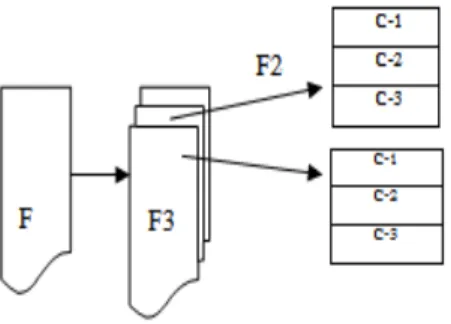
In our model we are assuming our input is having comma separated text file and each table in the target database has one text file. In Fig.1 “F” represents the file corresponding to a table in the target database. For parallel loading into a table we need the following conditions to be true in our high speed load model; a) Table structure should be such that loaders should be able to load concurrently these files. If tables are not large, there is no need to go for partitions. However, in this paper we are dealing with large file, so we are discussing about partitioning of tables [9]. Oracle provides partition option in the loader control file [8]. We assume that loading into partitioned table reduces the locking possibilities which can improve more parallelism in data loading. We are using range partition feature in our model. We do not claim on any other types of partitions. We further assume that as per reference [10] Oracle allows more than one partition loading at a time, and table size is large enough to qualify for partitions and direct option is applicable. b) Split files (F2, F3) which can be loaded in parallel. The table level file “F” can be split into multiple files. The split is not just straight forward. The split is based on a rule. For example if we are dealing with employee data, we can split the big file “F” into smaller files with a range of employees, employee staring with employee number 1 to 10000 in one file F1, 10001 to 20000 in F2, 20001 to 30000 in F3 and so on. It is based on the number of partitions [6] required for a table for optimal query performance with respect to the business need. However our focus in this paper is on data loading. So as a thumb rule we will split the file as per the number of partitions. If 5 partitions required for a table, then 5 split files are required. This we call the partition level of split, and for simplicity we would refer these as partitioned file. c) Addressing the Memory
overflow Challenge for large files. If the database server does not have much memoryto hold large files while loading with direct option, the loader may run into memory overflow. In a typical data loading scenario if the loader is loading a large file and has taken substantial hours for loading the data into the table, and it ran out of memory, there is a waste of time as the loading process needs to be restarted from the beginning. In our experiment, we got “ORA-39776: fatal Direct Path API error loading table”. We looked for this error, although there are alternatives like changing memory related parameters, moving to higher configuration server etc, we have used our chunk approach to resolve this error.As shown in fig 1, a split file F2 can be further split to smaller size which we call chunk file in our case. The chunk file is an internal split and is faster. Unix split command can be used for this. The chunk files can run be loaded in parallel from corresponding partitions. C1 from F2 and C1 from F3 can be loaded in parallel. d) Determining the optimum number of loaders to run in parallel [7] in a given environment. This step is a difficult one to deal with. As a thumb rule one may say number of partitions equals to the number of loaders since in our model we have number of partitions equals to the number of partitioned files. To determine the number of loaders we conducted an incremental experiment with 5GB data size as shown in fig. 2.
Fig. 1. Model and Architecture of high speed data loader
4
Case Study
Step 1. Split a large file (90GB) into 5 parts i.e F1, F2, F3, F4 and F5 with size 18GB which can be mapped into 5 partitions (We determined by using queries that 5 partitions are required for our test).
Step 2. Do chunk split into 3 each having 6 GB, invoke 5 loaders in parallel with direct option (We have determined by incremental experiment with 5 GB file that 5 loaders are optimal for 5 partitions as shown in fig.2).
Step 3. Each loader processes the partitioned file with direct option. Loop, till chunk files are loaded.
Fig. 2. Split and load time of simulation in secs
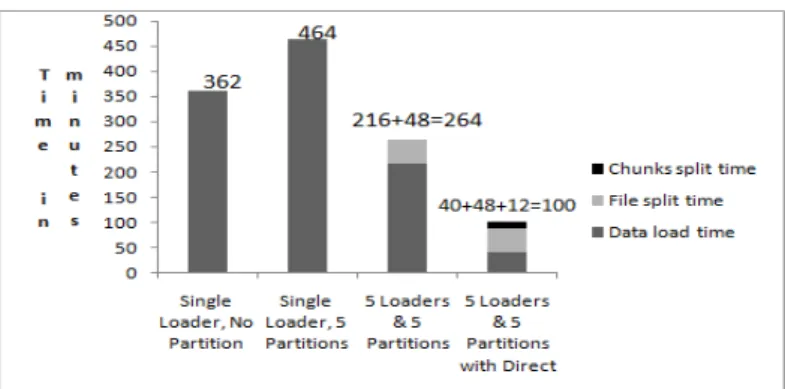
Fig. 3. Results of case study for high speed data loading time in minutes while loading 90GB data with various options
From fig. 3, it can be seen that having 5 loaders and 5 partitions with direct option, loading time has been decreased considerably. This is the optimum data loading performance for a given configuration in our experiment. The total time including file split, chunk split and loading takes 100 minutes with a speed up of about 3X compared to single loader without partition and a speed up of about 4X for single loader with partitions without direct option. The experiment was conducted in an Intel ® server with each processor having 2 cores.
5
Conclusions
We can see from our experiment with Oracle, using our model of splitting the files into partition files, chunk files and using the “direct” option in the SQL* Loader utility, and determining optimal number of parallel loaders, high speed data loading is achieved. Further, we have shown how to use chunk files in cases where the memory is less for loading with direct option. Though database partitions, parallel and direct options are well known to the database developers, however, determining the optimal numbers of loaders, numbers of partitions are few challenges which require deeper analysis.
References
1. Loney, K., Koch, G.: Oracle8i: The Complete Reference, pp. 440 – 452 (2000) ISBN 0-07-041167-0
2. Oracle 9i Database Utilities, SQL *Loader Concept,
http://download.oracle.com/docs/cd/B10501_01/server.920/ a96652/ch03.htm#1004621 (retrieved on August 2011)
3. Branimir, P., Zoran, S.: Database Migration Using Standard Data Unload and Load Procedures On z/OS Platform, 259 – 266 (July 2007) 953-184-111-X
4. Gennick, J., McCullough-Dieter, C., Linker, G.-J.: Oracle8i DBA Bible, ch. 10. John Wiley & Sons (2000)
5. Schrag, R.: Load Your Data Faster (2005),
http://www.dbspecialists.com/files/presentations/ load_faster.html
6. Baer, H.: Partitioning with Oracle Database 11g Release 2 Oracle Corporation, USA (2010),
http://www.oracle.com/technetwork/database/focus-areas/
bi-datawarehousing/twp-partitioning-11gr2-2010-10-189137.pdf
7. Wikipedia, Multiprocessing (July 2011),
http://en.wikipedia.org/wiki/Multiprocessing 8. Oracle, SQL*Loader Concepts,
http://download.oracle.com/docs/cd/B19306_01/server.102/ b14215/ldr_concepts.htm#i1004652 (retrieved on August 2011) 9. Oracle, Partitioned Tables and Indexes,
http://download.oracle.com/docs/cd/B10500_01/server.920/ a96524/c12parti.html (retrieved August 2011)
10. Oracle, Oracle8i Utilities Release 8.1.5, SQL *Loader: Conventional and Direct Path Loads, Chapter 8,
http://www.cs.umbc.edu/portal/help/oracle8/server.815/ a67792/ch08.htm#1665 (retrieved August 2011)
11. CentOS, CentOS 5.4 Release Notes,
http://wiki.centos.org/Manuals/ReleaseNotes/CentOS5.4 (retrieved August 2011)