Beyond Constant Comparison Qualitative Data Analysis:
Using NVivo
Nancy L. Leech University of Colorado Denver
Anthony J. Onwuegbuzie Sam Houston State University The purposes of this paper are to outline seven types of qualitative data analysis techniques, to present step-by-step guidance for conducting these analyses via a computer-assisted qualitative data analysis software program (i.e., NVivo9), and to present screenshots of the data analysis process. Specifically, the following seven analyses are presented: constant comparison analysis, classical content analysis, key-word-in-context, word count, domain analysis, taxonomic analysis, and componential analysis. It is our hope that providing a clear step-by-step process for conducting these analyses with NVivo9 will assist school psychology researchers in increasing the rigor of their qualitative data analysis procedures.
Keywords:qualitative data analysis, NVivo, qualitative research, computer-assisted qualitative data analysis software
School psychology researchers have many available tools in order to complete successfully their research. For example, it is commonly known that school psychology researchers can utilize published surveys, web-based data col-lection tools (e.g., Zoomerang), and quantitative computer programs (e.g., SPSS) to assist with their analyses. These tools are extremely bene-ficial for school psychology researchers because they assist them with many of the steps required in a quantitative research study. Unfortunately, available tools for qualitative research studies are less commonly known, which may contrib-ute to there being relatively few purely qualita-tive studies published in the area of school psychology (Powell, Mihalas, Onwuegbuzie, Suldo, & Daley, 2008). Indeed, Powell et al. (2008) documented that of the 438 empirical articles published in the four leading school psychology journals (i.e., School Psychology Quarterly,School Psychology Review, Psychol-ogy in the Schools,Journal of School
Psychol-ogy) between 2001 and 2005, only 6 repre-sented qualitative research articles. Yet, utiliz-ing these tools, such as QDA Miner, Ethnograph, and NVivo (QSR International Pty Ltd, 2008), can increase the rigor of a qualita-tive study (Onwuegbuzie & Leech, 2007), es-pecially those with large data sets.
For many school psychology researchers, the most complicated step in the research process is that of analysis (Gliner, Morgan, & Leech, 2009; Leech & Onwuegbuzie, 2007). Knowing which analysis to use with different types of research questions and various types of data can be very confusing, especially for a novice re-searcher. This is even a more prominent issue with qualitative data because many school psy-chology researchers have not had much training in qualitative methods, and they are often not knowledgeable about different qualitative data analysis techniques (Leech & Goodwin, 2008). Consistent with our assertion, Powell et al. (2008) reported that of the 57 National Associ-ation of School Psychology-approved graduate-level school psychology programs, only 1 (1.75%) appeared to require that students enroll in one or more qualitative courses, and 11 (19.3%) appeared to offer one or more qualita-tive courses as an elecqualita-tive.
For school psychologists who conduct quali-tative research, there is available guidance and tools to assist in analysis. When looking for
Nancy L. Leech, School of Education and Human De-velopment, University of Colorado Denver; Anthony J. On-wuegbuzie, Department of Educational Leadership and Counseling, Sam Houston State University.
Correspondence concerning this article should be ad-dressed to Nancy L. Leech, University of Colorado Denver, School of Education and Human Development, Campus Box 106, PO Box 173364, Denver, CO 80217. E-mail: [email protected]
guidance, there are numerous texts wherein the authors discuss qualitative research in general (e.g., Eisner, 1998; Glesne & Peshkin, 1992); yet, many of these texts include only one chap-ter on data analysis (e.g., Berg, 2004; Bogdan & Biklen, 2003; Creswell, 2007; Schram, 2003; Shank, 2002). There are several textbooks that focus solely on qualitative data analysis (Coffey & Atkinson, 1996; Dey, 1993; Grbich, 2007; Miles & Huberman, 2004; Phillips & Jor-gensen, 2002; Silverman, 2001). Yet, all of these texts, with a few exceptions (e.g., Grbich, 2007; Miles & Huberman, 1994) focus on a singular analysis (e.g., discourse analysis; Phil-lips & Jorgensen, 2002). Therefore, these texts do not present a comprehensive review of multiple types of available qualitative data analysis techniques, and none of these texts present how to conduct these analyses using computer software.
Leech and Onwuegbuzie (2007) go further than do most authors of these textbooks by describing seven types of analyses, namely, constant comparison analysis, classical content analysis, keyword-in-context, word count, do-main analysis, taxonomic analysis, and compo-nential analysis; and they outline how to con-duct each manually. These authors have also created a compendium of 18 qualitative analy-ses to assist the school psychology researcher in choosing the appropriate analysis for their works (Leech & Onwuegbuzie, 2008).
Fortunately, such guides (e.g., Leech & On-wuegbuzie, 2007, 2008) can assist the school psychology researcher with conducting qualita-tive analyses manually. Yet, with large data sets, conducting qualitative data analysis man-ually typically is not practical or desirable. Over the past decade or so, the availability of com-puter software to conduct qualitative data anal-ysis has increased (Ulin, Robinson, & Tolley, 2005). Today, there are programs such as QDA Miner, Ethnograph, NVivo (QSR International Pty Ltd, 2008), and Atlas/ti to assist researchers with their analyses. These programs, in many respects, are very similar to one another and facilitate many of the same analyses to be con-ducted; yet, each tends to have its own unique features (Fielding & Lee, 1998; Tesch, 1990; Weitzman & Miles, 1995). Using a computer-assisted qualitative data analysis software (CAQDAS) program can take qualitative data analysis much further than is possible compared
to conducting the analysis manually (Bazeley, 2006, 2007; Fielding & Lee, 1998; Kelle, 1996; Tesch, 1990; Weitzman & Miles, 1995). For example, these programs assist the researcher in recording, storing, indexing, sorting, and coding qualitative data (Morse & Richards, 2002). One especially helpful feature of CAQDAS is their ability efficiently to compare categories and codes in a relatively short amount of time (Bazeley, 2006).
Many researchers who use qualitative data analyses software typically use the software to conduct some form of constant comparison analysis (Glaser & Strauss, 1967; Strauss & Corbin, 1998). Doing so limits the researcher to finding codes throughout the dataset; other types of relationships in the data are not iden-tified and might be overlooked. Computer soft-ware tools are capable of assisting the qualita-tive researcher with multiple types of analyses, so that the underlying theories and relationships in the data can emerge.
It is important to keep in mind that when conducting qualitative research, the researcher is the main tool for analysis (Denzin & Lincoln, 2005). Thus, CAQDAS programs, along with all types of analysis software (e.g., SPSS, SAS), do not analyze the data for the researcher. Rather, the researcher utilizes the computer pro-gram to assist in the analysis.
Table 1
Types of Qualitative Research Designs
●Ethnography ●Auto-ethnography ●Life history ●Oral history ●Ethnomethodology ●Case study ●Participant observation
●Field research or field study
●Naturalistic study
●Phenomenological study
●Ecological descriptive study
●Descriptive study
●Symbolic interactionist study
●Microethnography ●Interpretive research ●Action research ●Narrative research ●Historiography ●Literary criticism ●Grounded theory
Unfortunately, there is little guidance for school psychology researchers connecting the available types of analysis with CAQDAS pro-grams. The excellent textbooks written by Ba-zeley and Richards (2000) and BaBa-zeley (2007) present information on how to use NVivo, but do not discuss the multiple types of available data analysis techniques and how to conduct each type with CAQDAS programs. More re-cently, a few authors have examined the use of qualitative data analysis software (Dennis & Bower, 2008; Peters & Wester, 2006) in relation to analysis, but none of them provide step-by-step guidance in conducting specific traditional qualitative data analysis techniques. Indeed, to date, no qualitative software provides explicit guidelines as to how to conduct an array of traditional qualitative data analyses. As such, analysts have difficulty in tailoring their com-puter-assisted qualitative data analysis tech-niques to specific analyses of interest (e.g., con-stant comparison analysis) (cf. Onwuegbuzie, Leech, et al., 2009). For example, an analysis of
manuals of leading qualitative software pro-grams (e.g., NVivo, Atlas-ti) revealed no ex-plicit information as to how to use the software to facilitate a constant comparison analysis. This is surprising, considering this analysis is one of the most utilized analyses undertaken by qualitative researchers (Leech, 2004) because not only does this analytical technique allow qualitative researchers to analyze the four major sources of data in qualitative research—namely, talk, observations, drawings/photographs/ videos, and documents (Leech & Onwuegbuzie, 2008)— but it also allows virtually any partic-ular size or unit of text to be analyzed (e.g., one paragraph, one transcript, one document, mul-tiple documents).
With this in mind, the purpose of this paper is to outline seven types of qualitative data anal-ysis, specifically constant comparison analanal-ysis, classical content analysis, keyword-in-context, word count, domain analysis, taxonomic analy-sis, and componential analysis; to present step-by-step guidance for conducting these analyses Table 2
Using NVivo To Conduct Constant Comparison Analysis If a node exists that you would like to reuse:
Highlight selected text.
Right click to open a list of choices. SelectCode Selection.
SelectAt Existing Nodes. TheSelect Project Itemswindow will appear. Check the box next to the node you would like to reuse.
Click onOK. Your selected text is now coded. If there is not an existing node to reuse:
Highlight selected text.
Right click to open a list of choices. SelectCode Selection.
SelectAt New Node. TheNew Nodewindow will appear.
Type the name of the new node in the box next toName. You can also include a description of the node under Description.
Click onOK. Your selected text is now coded.
Once your text is coded, you can create Tree Nodes. These are groupings of your Free Nodes. First, click onNodes(located in the bottom left hand corner). Your Free Nodes will be displayed.
Look through your free nodes and identify nodes that are similar. If you are unsure, you can double click on the node to bring up the data that have been coded with the node.
Highlight and drag your free nodes that are similar over toTree Node(located in the upper left hand corner). Once you have moved all the similar free nodes, click onTree Nodes. TheTree Nodeswill now be displayed. Right click and selectNew Tree Node.Type in the name of your new Tree Node. Then, click on the nodes that are
included in this Tree Node and drag them into the new category. Once your Tree Nodes are organized:
Each Tree Node can then be written as a theme (perform this step outside of the NVivo program). To see the frequency of used codes in one source:
Click onView⫽Coding Stripes.
Select with type of strips you would like to view (None, Selected Items, Nodes Most Coding, Nodes Least Coding, Nodes Recently Coding). The coding stripes will appear to the right of the data window.
with a CAQDAS program; and to present screenshots of the data analysis process. These seven techniques for analysis were chosen based on their being the earliest formalized qualitative data analysis techniques (e.g., con-stant comparison analysis; Glaser & Strauss, 1967; domain analysis, taxonomic analysis, componential analysis; Spradley, 1979; key-word-in-context; Luhn, 1960; classical content analysis; Berelson, 1952) and also some of the most commonly used analysis (e.g., constant comparison analysis). In fact, of the 60 qualita-tive data analysis procedures identified by On-wuegbuzie, Leech, and Collins (2010), these seven analytical techniques are among the old-est. The qualitative data analysis program NVivo (QSR International Pty Ltd, 2008) was chosen as the CAQDAS program because it is commonly used by educational researchers; yet, these analyses can be conducted with other CAQDAS programs. It is our hope that provid-ing a clear step-by-step process for conductprovid-ing these analyses with NVivo, along with real data that have been analyzed, will assist school psy-chology researchers to increase the rigor of their qualitative data analysis procedures.
Descriptions and Computer Guides of a Variety of the Available Analysis Tools
To help the school psychology researcher in undertaking analysis of large sets of qualitative data, CAQDAS programs, such as NVivo, can be utilized. Seven types of analysis will be presented, namely, constant comparison analy-sis, keywords-in-context, word count, classical content analysis, domain analysis, taxonomic analysis, and componential analysis. For each type of analysis, we will present a guide for using NVivo software and figures of what will be seen when using the computer program. It is important to choose the analytical techniques, considering which analysis will be helpful un-derstanding the data at a deeper level. Regard-less of the type of qualitative data (e.g., inter-view data, survey data, observational data, personal journals, diaries, permanent records, transcription of meetings) or the type of re-search design (see Table 1), NVivo can be used to conduct the analysis.
Leech and Onwuegbuzie (2007) present a framework for choosing among the seven anal-yses. Once an analysis has been chosen and it
has been determined that using qualitative data analysis software would be helpful, the guide-lines presented will assist the school psychol-ogy researcher in conducting the analysis. In order to conduct these analyses using NVivo, it would be best to have rudimentary knowledge of the program. A few words that are unique to NVivo, and which are helpful to understand,
include nodes, tree nodes, and free nodes. Nodes are similar to codes in constant compar-ison analysis (described in detail below). Thus, nodes are what a researcher uses to place mean-ing on different parts of the text. Tree nodes are groupings of nodes. As more nodes are created, the researcher can organize the nodes into tree nodes. Finally, free nodes are nodes that have
Figure 2. Constant comparison analysis: Tree nodes and associated free nodes.
Table 3
Using NVivo To Conduct Keyword-In-Context (File Under Queries)
●Click on theQueriestab on the left bottom of the screen. Or on the main menu, click on theExploretab and then selectNew Query.
●The working window (above the data window) will be blank if this is the first time you have run a query. If it is not the first time, the past queries will be listed.
●Click on theExploretab and then selectQueries.
●Click onNew Query. Select the type ofQueryyou wish to run (Text Search, Coding, Compound, Word Frequency, Matrix Coding, Coding Comparison, Group).
●To conduct a KWIC analysis, click onText Search. TheText Search Querywindow will open.
●In theSearch forbox type in the word for which you wish to search.
●Click onRun.A new window will open with the results. A list of sources will be given that include the searched word. You can click on the specific source to see where each word is (it will be highlighted in the text) and the words that come before and after the keyword.
●If you wish to save your Query, click onExplore⫽Last Run Query.
●TheText Search Query Propertieswindow will appear. Check the box next toAdd To Project
●Type the name of the query in the box next toName. You can include a description of the query in the box next to Description.
not been added to a tree. In the following sec-tions, the seven analysis techniques are pre-sented, along with guidelines for utilizing NVivo software for each type of analysis. Fi-nally, real data from Hess, Molina, and Kozleski (2006) have been analyzed and screen-shots of what would appear with NVivo8 are included.
Constant Comparison Analysis
One of the most commonly used qualitative data analysis techniques is constant comparison analysis developed by Glaser and Strauss (1967). Table 2 presents guidelines for using NVivo to conduct an analysis using constant comparison.
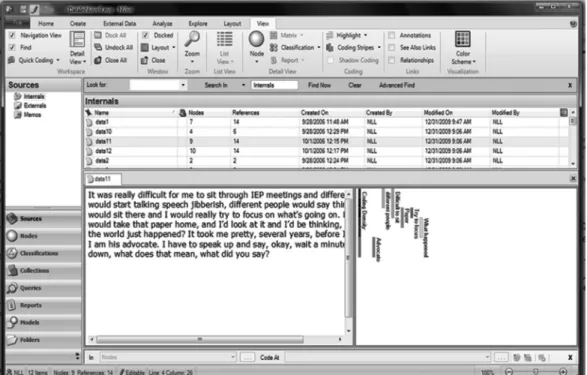
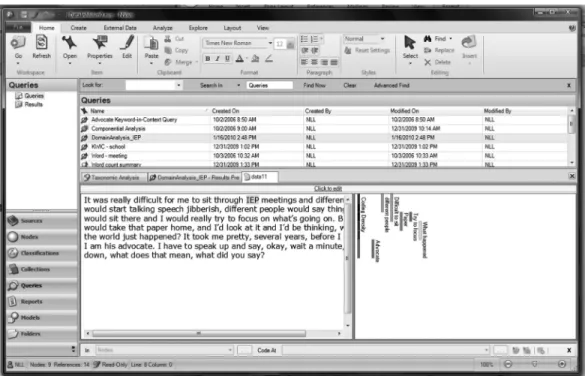
Figure 1 shows one of the excerpts from the data. In the right bottom pane, the codes can be seen as stripes. These stripes correspond with the text that has been coded. For this set of data, there are eight codes. We have highlighted the text “I am his advocate. I have to speak up . . . say, okay, wait a minute, slow down, what does that mean, what did you say?” that
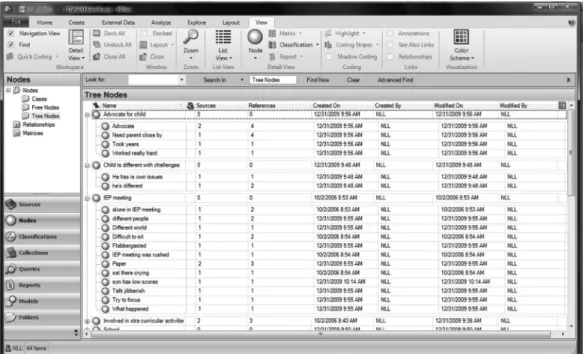
was coded as “advocate.” The stripes help the researcher to see what text has been coded with the different codes. Figure 2 presents Tree Nodes. This is a list of the codes after they have been grouped together. For example, with these data, one theme that could be found from the codes under “IEP meeting” might be “IEP meetings can be an emotional experience that is difficult to understand with many different peo-ple involved.”
Keywords-in-Context
When a school psychology researcher is in-terested in how participants use language, key-words-in-context (KWIC; Fielding & Lee, 1998) is a data analysis method that can assist in increasing their understanding. When the school psychology researcher has data that include short, one-phrase responses or when there are specific words of interest that the researchers would like to understand better how they are utilized by participants, KWIC can be a bene-ficial analysis. It is important to utilize multiple words around a keyword because using too few
words can create a loss of content around the keyword.
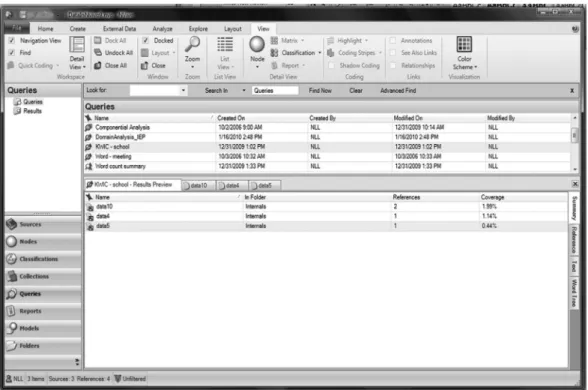
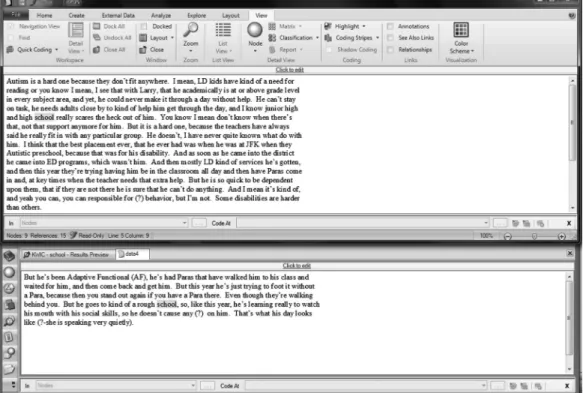
Table 3 presents guidelines for using NVivo to conduct an analysis using KWIC. Figure 3 presents the word count for the keyword “school.” We identified three participants’ re-sponses that included the keyword. Figure 4 shows the responses, which indicate the follow-ing phrases were used with the keyword “school”—(a) “school really scares the heck out of him,” (b) “he goes to a rough kind of school,” and (c) “you know when you are in a school that has a lot of special needs kids.”
Word Count
School psychology researchers who are in-terested in understanding differences among participants may want to conduct a word count. Instead of using terms in the final report of a study such asmany,most, orsome, qualitative school psychology researchers can obtain the actual counts to reportin addition to—as opposed to instead of—the
descrip-tions of the phenomenon (Sandelowski, 2001). Although use of word count is not always justified, as surmised by Miles and Huberman (1994), there are at least three rea-sons for counting in qualitative data analysis: (a) to identify patterns more easily, (b) to verify a hypothesis, and (c) to maintain ana-lytic integrity.
Table 4 presents guidelines for using NVivo to conduct an analysis using word count. Figure 5 presents the results of a word count analysis. We requested a count of all the words in the data and we identified that the word “he” was used the most (46 times/5.98% of the words) and “different” was utilized seven times/0.91% of the words.
Classical Content Analysis
Classical content analysis is similar to con-stant comparison analysis, except with classi-cal content analysis themes or codes are counted, whether they are created a priori or a posteriori. With datasets that have codes
emerging multiple times, classical content analysis can assist the school psychology re-searcher in understanding what concepts were predominantly discussed. When conducting a classical content analysis, codes can be iden-tified either deductively, inductively, or abductively.
Table 5 presents guidelines for using NVivo to conduct classical content analysis. Figure 6 pres-ents the tree nodes and free nodes associated with each. It can be seen that the code “advocate” was used a total of four times in two sources.
Domain Analysis
Domain analysis is based on the concept that language incorporates symbols (Spradley, 1979). A symbol is defined as “an act, sound, or object having cultural significance and the capacity to excite or objectify a response” (Merriam-Webster, 2009). Symbols include three basic elements: (a) the symbol itself, which Spradley (1979) labeled the cover term; (b) to what the symbol refers, which Spradley (1979) named the included term; and (c) the relationship between the symbol and the referent, which Spradley (1979) gave the des-ignation of the semantic relationship.
When conducting a domain analysis, a school psychology researcher would search for cultural
knowledge through what Spradley (1979) calls domains. These domains are extracted via identi-fying a set of cover terms, included terms, and the semantic relationships. Spradley (1979) presented nine semantic relationships. Through a six-step process domains are identified and labeled.
Table 6 presents guidelines for using NVivo to conduct a domain analysis. Figure 7 presents re-sults of a domain analysis utilizing the domain “IEP.” In conducting the domain analysis, the researcher began by choosing a domain: in this example, the domain is “IEP.” Next, the searcher searched the data using the semantic re-lationship of attributive which is described as “X is defined with respect to one or more attributes of Y” (Spradley, 1979, p. 110). Thus, the researcher read through the data and found attributes of an IEP, such as “different people” and “took years.” Shown in the right hand box are the attributes from the data that include this domain.
Taxonomic Analysis
After conducting a domain analysis, if a school psychology researcher wants or needs further analysis, a taxonomic analysis can be conducted. Taxonomic analysis assists the re-searcher in understanding how specific words have been utilized by the participants. This Table 4
Using NVivo To Conduct Word Count To locate specific words in the data:
Click on theQueriestab on the left bottom of the screen. Or on the main menu, click on theExploretab and then selectNew Query.
The working window (above the data window) will be blank if this is the first time you have run a query. If it is not the first time, the past queries will be listed.
Right click or click on theExploretab and selectNew Query.
Click theText Searchoption. TheText Search Querydialog box will be displayed. Under theText Search Criteriatab, in theSearch forbox, type the words you wish to count.
If you want to save the query, click theAdd to Projectcheckbox at the top of the dialog. Enter a name and description in the General tab.
Click onRun.
To count the number of times a specific word is found in the data:
Click on theQueriestab on the left bottom of the screen. Or on the main menu, click on theExploretab and then selectNew Query.
The working window (above the data window) will be blank if this is the first time you have run a query. If it is not the first time, the past queries will be listed.
Right click or click on theExploretab and selectNew Query.
Click theWord Frequencyoption. TheWord Frequency Querydialog box will be displayed. You can select the text to search (all the data or a subset of the data).
If you want to save the query, click theAdd to Projectcheckbox at the top of the dialog. Enter a name and description in the General tab.
analysis is based on the concept that words can have different meanings and distinct conno-tations for each person. Spradley (1979) de-fined a taxonomy as a classification system that sorts the domains through a flowchart that presents the relationships among the terms in the domain.
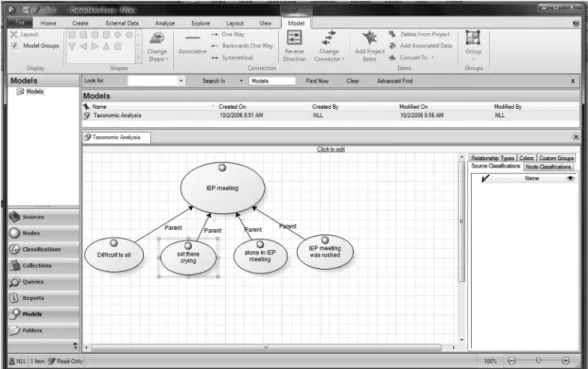
Table 7 presents guidelines for using NVivo to conduct a taxonomic analysis. Figure 8 pres-ents the taxonomy for one participant’s re-sponse regarding the IEP meeting. To generate Figure 8, the researcher first conducted a do-main analysis to identify the dodo-main “IEP meet-ing” and the terms that were in relationship to the domain (i.e., difficult to sit, sat there crying, etc.). Next, the researcher utilized NVivo to draw the relationship via a flowchart. As shown in the figure, the parent portrayed the following
concepts for the IEP meeting: (a) it was difficult to sit, (b) emotional (i.e., crying), (c) feeling alone, and (d) being rushed.
Componential Analysis
If a school psychology researcher is inter-ested in understanding the relationship among words used by a participant(s), and after a do-main analysis has been completed, a componen-tial analysis can be conducted. The advantage to conducting a componential analysis is that the results can assist the school psychology researcher in finding and presenting the sim-ilarities and differences among participants’ understandings.
Table 8 presents guidelines for using NVivo to conduct a componential analysis.
Figure 5. Word count analysis.
Table 5
Using NVivo To Conduct Classical Content Analysis
●Click onNodesin the left hand bottom corner. Select eitherFree NodesorTree NodesunderNodes. We selected Tree Nodesbecause most of our codes were included here.
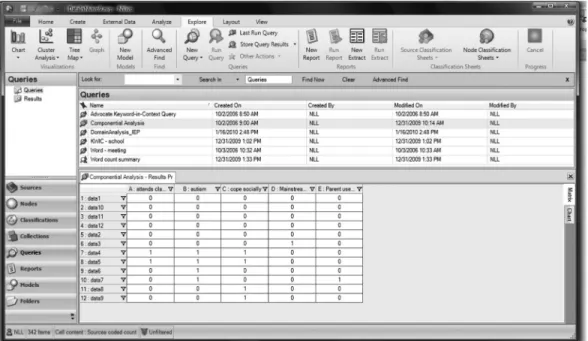
Figure 9 presents the componential analysis where the researcher was interested in under-standing how the different participants’ re-sponses varied in their use of the following five concepts: (a) attending classes without support, (b) autism, (c) coping socially, (d) being mainstreamed, and (e) parents’ use of email. As seen in the analysis, autism was found in four of the data sources, whereas being mainstreamed and parents’ use of email was extracted from one data source. The re-searcher may choose to go back to the partic-ipants to understand better these last two concepts.
Where to Go From Here
School psychology researchers have many tools available to assist them with their re-search, regardless of the type of research con-ducted (i.e., quantitative, qualitative, mixed). It is unfortunate that more school psychology re-searchers do not publish qualitative studies— and perhaps one reason for this is the difficulty in analyzing large qualitative data sets. Thus, the purpose of this paper was briefly (i.e., within the space constraints of School Psychology Quarterly) to outline seven types of qualitative data analysis techniques, specifically constant
Figure 6. Classical content analysis.
Table 6
Using NVivo To Conduct Domain Analysis
This analysis is conducted similarly to keywords-in-context.
●Find the keyword (domain) and then look for cover term, included term, and semantic relationship.
●Alternatively, once you have identified your cover terms, you can make each cover term a free node and then include the cover terms as the text within the nodes and use the memo function to record the semantic relationship.
●Alternatively still, using Spradley’s (1979) nine semantic relationships (i.e., strict inclusion, spatial, cause-effect, rationale, location for action, function, means-end, sequence, and attribution), you can set up a node for each type of semantic relationship and then code accordingly.
comparison analysis, classical content analysis, keyword-in-context, word count, domain anal-ysis, taxonomic analanal-ysis, and componential analysis; and to present step-by-step guidance
and screenshots for conducting these analyses using a CAQDAS program.
There are four important caveats that it behooves us to mention at this point. First, we
Figure 7. Domain analysis.
Table 7
Using NVivo To Conduct Taxonomic Analysis (File Under Models)
●Click on theModelstab on the left bottom of the screen or select theModeltab at the top of the screen.
●The working window (above the data window) will be blank if this is the first time you have created a model. If it is not the first time, the past models will be listed.
●Place the cursor in theModelspane and right click to open a list of choices.
●SelectNew Model. TheNew Modelwindow will appear.
●Type in the name of the new model next toName. You can include a description of the query in the box next to Description.
●Click onOK. The Model window will appear in the bottom half of the screen. If you wish to have a bigger window in which to work, you can click in the Model window then click onWindow⫽Docked. This will create a new separate window.
To create the model:
●Click in the working area to open theModeltab. SelectAdd Project Items . . .
●The Select Project Items window will open.
●From the left hand box, select the wordsFree NodesorTree Nodes,whichever you wish to add to the model. This will change the choices in the right box.
●From the right hand box, add a check to the nodes you wish to use. If you have set up tree nodes, one tree node will produce a taxonomy.
●Click onOK.TheAdd Associated Datawindow will open.
●SelectChildren. This will create a model with the Tree Node name as the top and the underlying codes as the bottom.
are not suggesting that all qualitative data should be analyzed via some form of CAQ-DAS program. However, we do believe that, especially for large qualitative datasets—
which typifies a significant proportion of qualitative studies—CAQDAS programs pro-vide a useful tool for recording, storing, in-dexing, and sorting qualitative data (Morse &
Figure 8. Taxonomic analysis.
Table 8
Using NVivo To Conduct Componential Analysis
●Click on theQueriestab on the left bottom of the screen.
●The working window (above the data window) will be blank if this is the first time you have run a query. If it is not the first time, the past queries will be listed.
●Right click to open a list of choices.
●Click onNew Query. Select theMatrix Coding(alternately you can selectExplore⫽New Query⫽Matrix Coding).
TheMatrix Coding Querywindow will open.
●UnderDefine More Rows, you can select what you would like in your rows.
●Once you select the type of information, click onSelectand you can choose the specific pieces you would like to include.
●Click onAdd to List.
●Click on theColumnstab.
●UnderDefine More Columns, you can select what you would like in your rows.
●Once you select the type of information, click onSelectand you can choose the specific pieces you would like to include.
●Click onAdd to List.
●Click onRun.A new window will open with the results.
●If you wish to save your Query, click onExplore⫽Last Run Query.
●TheMatrix Coding Query Propertieswindow will appear. Check the box next toAdd To Project
●Type the name of the query in the box next toName. You can include a description of the query in the box next to Description.
Richards, 2002). Indeed, as noted by Bazeley (2007).
The use of a computer is not intended to supplant time-honored ways of learning from data, but to increase the effectiveness and efficiency of such learning. The computer’s capacity for recording, sorting, matching, and linking can be harnessed by the researcher to assist in answering their research questions from the data, without losing access to the source data or contexts from which the data have come (p. 2)
Our second caveat is that we are not sug-gesting that all qualitative researchers who decide to use CAQDAS programs should use NVivo. In fact, we encourage school psychol-ogy researchers to explore other CAQDAS programs, which include the following: AT-LAS.ti 6 (http://www.atlasti.com/), HyperRE-SEARCH
2.8.3 (http://www.researchware.com/products/ hyperresearch.html), MAXQDA 2007 (http:// www.maxqda.com/), QDA Miner 3.2 (http://www .provalisresearch.com/QDAMiner/QDAMiner Desc.html), Qualrus (http://www.ideaworks.com/ qualrus/index.html?gclid ⫽ CLn83KzDtp0CFZ-JM5QodzReMiw), and Transana 2.30 (http:// www.transana.org/). However, we selected NVivo because it is one of the most widely used CAQDAS programs, with as many as 400,000 users in more
than 150 countries (QSR International Pty Ltd, 2009).
Third, the NVivo commands that we pro-vide in the tables do not represent the only way to conduct each of the selected seven qualitative analysis programs. In fact, we en-courage school psychology qualitative re-searchers not only to explore other ways to use NVivo to conduct each of these analyses, but also to document and share the results of their explorations. Fourth, as declared by Leech and Onwuegbuzie (2007), CAQDAS programs can help researchers to analyze their data, but they cannot analyze the data for researchers. Further, in using CAQDAS pro-grams, flexibility, creativity, insight, and in-tuition should never be replaced by a system-atic and mechanical analysis of qualitative data (Dey, 1993). The researcher is the main tool for analysis, regardless of whether a computer program is used to assist in the analysis (Denzin & Lincoln, 2005).
Despite these caveats, we believe that pro-viding a clear, step-by-step process for con-ducting qualitative data analyses with NVivo hopefully will assist school psychology re-searchers in conducting rigorous studies that can be published.
References
Bazeley, P. (2006). The contribution of computer software to integrating qualitative and quantitative data and analyses.Research in the Schools, 13(1), 64 –74.
Bazeley, P. (2007). Qualitative data analysis with NVivo qualitative project book. Thousand Oaks, CA: Sage.
Bazeley, P., & Richards, L. (2000).The NVivo qual-itative project book.Thousand Oaks, CA: Sage. Berelson, B. (1952). Content analysis in
communi-cative research.New York, NY: Free Press. Berg, B. L. (2004).Qualitative research methods for
the social sciences(5th ed.). Boston, MA: Pearson. Bogdan, R. C., & Biklen, S. K. (2003).Qualitative research for education: An introduction to theories and methods(4th ed.). Boston, MA: Pearson. Coffey, A., & Atkinson, P. (1996).Making sense of
qualitative data: Complementary research strate-gies.Thousand Oaks, CA: Sage.
Creswell, J. W. (2007). Qualitative inquiry and re-search design: Choosing among the five traditions (2nd ed.). Thousand Oaks, CA: Sage.
Dennis, B. W., & Bower, T. (2008). Using content analysis software to analyze survey comments. Libraries and the Academy, 8,423– 437.
Denzin, N. K., & Lincoln, Y. S. (2005). Introduction: The discipline and practice of qualitative research. In N. K. Denzin & Y. S. Lincoln (Eds.),The Sage handbook of qualitative research (3rd ed., pp. 1–32). Thousand Oaks, CA: Sage.
Dey, I. (1993). Qualitative data analysis: A user-friendly guide for social scientists.London, Eng-land: Routledge.
Eisner, E. W. (1998).The enlightened eye: Qualita-tive inquiry and the enhancement of educational practice.Upper Saddle River, NJ: Merrill Prentice Hall.
Fielding, N. G., & Lee, R. M. (1998). Computer analysis and qualitative research.Thousand Oaks, CA: Sage.
Glaser, B. G., & Strauss, A. L. (1967).The discovery of grounded theory: Strategies for qualitative re-search.Chicago, IL: Aldine.
Glesne, C., & Peshkin, A. (1992). Becoming quali-tative researchers: An introduction.White Plains, NY: Longman.
Gliner, J. A., Morgan, G. A., & Leech, N. L. (2009). Research methods in applied settings: An inte-grated approach to design and analysis(2nd ed.). New York, NY: Taylor & Francis.
Grbich, C. (2007).Qualitative data analysis: An in-troduction.Thousand Oaks, CA: Sage.
Hess, R., Molina, A., & Kozleski, E. B. (2006). Until somebody hears me: Parental voice and advocacy in special education decision-making. British
Journal of Special Education, 33, 148 –157. doi: 10.1111/j. 1467– 8578.2006.00430.x
Kelle, U. (Ed.). (1996). Computer-aided qualitative data analysis.Thousand Oaks, CA: Sage. Leech, N. L. (2004).Types of qualitative and
quan-titative analyses used by faculty researchers. Un-published manuscript, University of Colorado Denver.
Leech, N. L., & Goodwin, L. D. (2008). Building a methodological foundation: Doctoral- level meth-ods courses in colleges of education. Research in the Schools, 15(1), 1– 8.
Leech, N. L., & Onwuegbuzie, A. J. (2007). An array of qualitative analysis tools: A call for data anal-ysis triangulation. School Psychology Quar-terly, 22, 557–584. doi:10.1037/1045–3830 .22.4.557.
Leech, N. L., & Onwuegbuzie, A. J. (2008). Quali-tative data analysis: A compendium of techniques for school psychology research and beyond. School Psychology Quarterly, 23, 587– 604. doi: 10.1037/1045–3830.23.4.587
Luhn, H. P. (1960). Keyword-in-context index for technical literature.American Documentation, 11, 288 –295.
Merriam-Webster. (2009).Merriam-Webster Online Dictionary. Retrieved from http://www.merriam-webster.com/dictionary/symbol
Miles, M. B., & Huberman, A. M. (1994). Qualita-tive data analysis: An expanded sourcebook(2nd ed.). Thousand Oaks, CA: Sage.
Morse, J. M., & Richards, L. (2002).Read me first for a user’s guide to qualitative methods. Thousand Oaks, CA: Sage.
Onwuegbuzie, A. J., & Leech, N. L. (2007). Validity and qualitative research: An oxymoron?Quality & Quantity: International Journal of Methodol-ogy, 41, 233–249. doi:10.1007/s11135-006 – 9000-3.
Onwuegbuzie, A. J., Leech, N. L., & Collins, K. M. T. (2010). Toward a new era for conducting mixed analyses: The role of quantitative dominant and qualitative dominant crossover mixed analy-ses. In W. P. Vogt & M. Williams (Eds.), The handbook of methodological innovation.Thousand Oaks, CA: Sage. Manuscript submitted for publication.
Onwuegbuzie, A. J., Leech, N. L., Slate, J. R., Stark, M., Sharma, B., Frels, R., Harris, K., & Combs, J. P. (2009, February).A model for teaching and learning qualitative research. Paper presented at the annual meeting of the Southwest Educational Research Association, San Antonio, TX.
Peters, V., & Wester, F. (2006). How qualitative data analysis software may support the qualitative anal-ysis process. Quality & Quantity, 41, 635– 659. doi:10.1007/s11135-006 –9016-8
Phillips, L. J., & Jorgensen, M. W. (2002):Discourse analysis as theory and method. Thousand Oaks, CA: Sage.
Powell, H., Mihalas, S., Onwuegbuzie, A. J., Suldo, S., & Daley, C. E. (2008). Mixed methods research in school psychology: A mixed methods investi-gation of trends in the literature.Psychology in the Schools,45, 291–309. doi:10.1002/pits. 20296 QSR International Pty Ltd. (2008). NVIVO:
Ver-sion 8. Reference guide.Doncaster Victoria, Aus-tralia: Author.
QSR International Pty Ltd. (2009).Our history. Re-trieved from http://www.qsrinternational.com/ about-qsr_history.aspx
Sandelowski, M. (2001). Real qualitative researchers don’t count: The use of numbers in qualitative research.Research in Nursing & Health, 24,230 – 240.
Schram, T. H. (2003).Conceptualizing qualitative in-quiry: Mindwork for fieldwork in education and the social sciences.Upper Saddle River, NJ: Pearson.
Shank, G. D. (2002). Qualitative research: A per-sonal skills approach. Upper Saddle River, NJ: Merrill Prentice Hall.
Silverman, D. (2001).Interpreting qualitative data. London, England: Sage.
Spradley, J. P. (1979). The ethnographic interview. Fort Worth, TX: Holt, Rinehart & Winston. Strauss, A., & Corbin, J. (1998).Basics of
quali-tative research: Techniques and procedures for developing grounded theory. Thousand Oaks, CA: Sage.
Tesch, R. (1990). Qualitative research: Analysis types and software tools. London, England: Falmer.
Ulin, P. R., Robinson, E. T., & Tolley, E. E. (2005). Qualitative methods in public health: A field guide for applied research.San Francisco, CA: Jossey-Bass.
Weitzman, E., & Miles, M. B. (1995). Computer programs for qualitative data analysis.Thousand Oaks, CA: Sage.
Online First Publication
APA-published journal articles are now available Online First in the PsycARTICLES database. Electronic versions of journal articles will be accessible prior to the print publication, expediting access to the latest peer-reviewed research.
All PsycARTICLES institutional customers, individual APA PsycNET威database pack-age subscribers, and individual journal subscribers may now search these records as an added benefit. Online First Publication (OFP) records can be released within as little as 30 days of acceptance and transfer into production, and are marked to indicate the posting status, allowing researchers to quickly and easily discover the latest literature. OFP articles will be the version of record; the articles have gone through the full production cycle except for assignment to an issue and pagination. After a journal issue’s print publication, OFP records will be replaced with the final published article to reflect the final status and bibliographic information.