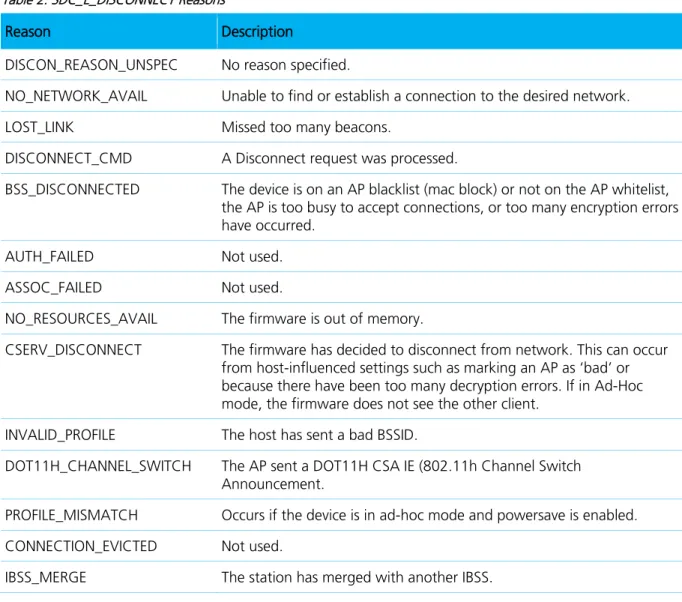
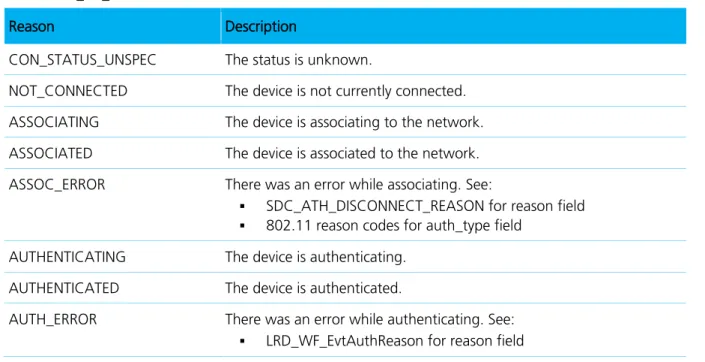
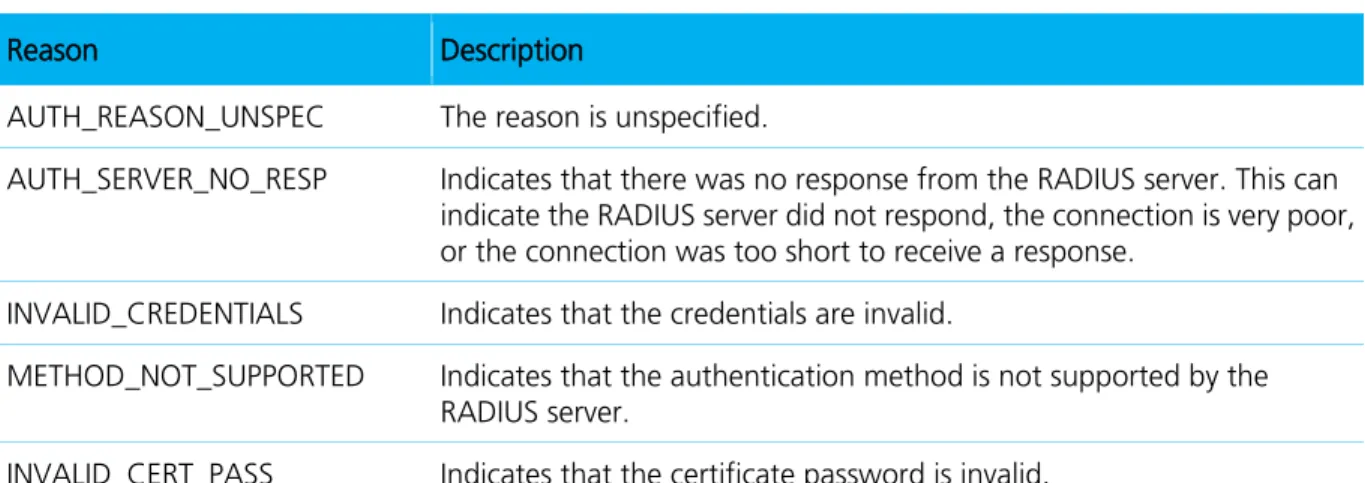
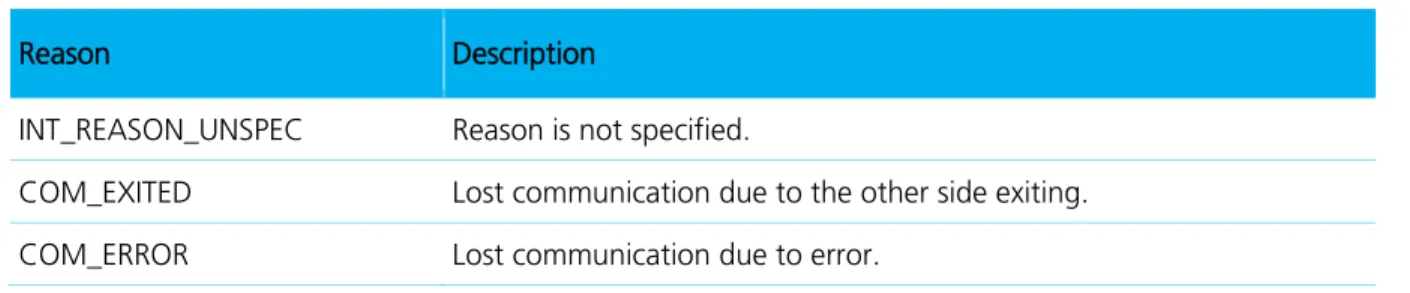
Americas : +1-800-492-2320 Option 2 Europe : +44-1628-858-940
Hong Kong : +852-2268-6567 x026 www.lairdtech.com/wireless
Summit Software Developer’s Kit
User’s Guide
Americas: +1-800-492-2320 Option 2 Europe: +44-1628-858-940 Hong Kong: +852-2268-6567 x026 www.lairdtech.com/wireless 2 CONN-GUIDE-WiFi-SDKg
R
EVISION
H
ISTORY
Revision Date Description
3.0 11 June 2013 Converted to Laird Formatting, Inclusion of “Getting Started” with Linux, Edited for SCU references (New SCU), Minor updates
3.1 07 November 2013 Documented Linux Specific Functions. 3.2 03 March 2014 Removed all references to the following:
GetCerts(TRUE, 2, userCert); GetCerts(FALSE, 1, caCert);
3.5 September 2014 Added Platform Independent Layer (PIL) (Linux only) and Events (linux only) sections
Added APIs: LRD_WF_GetaLRSBitmsk, LRD_WF_GetaLRSChannels, LRD_WF_GetbLRSBitmask, LRD_WF_GetbLRSChannels,
LRD_WF_GetDHCPLease, LRD_WF_GetBSSIDList, LRD_WF_GetFipsStatus, LRD_WF_GetPilInfo, LRD_WF_GetSSID, GetWAPICertCred,
Americas: +1-800-492-2320 Option 2 Europe: +44-1628-858-940 Hong Kong: +852-2268-6567 x026 www.lairdtech.com/wireless 3 CONN-GUIDE-WiFi-SDKg
C
ONTENTS
Revision History ... 1 Introduction ... 8SDK Usage and Operation ... 8
API Reference ... 8
SDK Usage and Operation ... 9
Getting Started ... 9
Linux Specific Functions ... 9
Getting started with Windows ... 9
Getting Started with Linux ... 10
Global Settings Management ... 10
Related Structures for Global Settings ... 10
Related Global Settings Functions ... 11
Profile Management ... 11
Edit a Profile: Set a Single Static WEP Key ... 11
Edit a Profile: Set Four Static WEP Keys ... 12
Edit a Profile: Configure LEAP ... 12
Related Structures for Configuration Profiles ... 13
Related Profile Management Functions ... 13
Monitoring and Status ... 14
Obtain Status Information ... 14
Determine Signal Quality ... 14
Related Structures for Monitoring and Status ... 15
Related Monitoring and Status Functions ... 15
ThirdPartyConfig (Windows-only feature) ... 15
Related Structures for ThirdPartyConfig ... 15
Related ThirdPartyConfig Functions ... 15
Regulatory Domains ... 15
Related ENUM for Regulatory Domains ... 15
Related Regulatory Domains Functions ... 15
FCC (Windows only feature) ... 15
Related ENUM for FCC ... 15
Related FCC Functions ... 15
Events (Linux only feature) ... 16
Events Code Example ... 16
Implementing DHCP Events on MSD/SSD products ... 16
Related Events Functions ... 17
Platform Independent Layer (Linux only feature) ... 17
API Reference ... 18 Functions ... 18 Function Descriptions ... 19 ActivateConfig ... 19 AddConfig ... 19 CreateConfig ... 20 DeleteConfig ... 20 exportSettings ... 21
FirstFCCTest (Windows only) ... 21
FlushAllConfigKeys ... 22
FlushConfigKeys ... 22
Americas: +1-800-492-2320 Option 2 Europe: +44-1628-858-940 Hong Kong: +852-2268-6567 x026 www.lairdtech.com/wireless 4 CONN-GUIDE-WiFi-SDKg GetAllConfigs ... 23 GetBSSIDList ... 23 GetConfig ... 24 GetConfigFileInfo ... 24 GetCurrentConfig ... 24 GetCurrentDomain ... 25 GetCurrentStatus ... 25 GetEAPFASTCred ... 26 GetEAPTLSCred ... 26 GetEAPTTLSCred ... 27 GetGlobalSettings ... 27 GetLEAPCred ... 28 GetMultipleWEPKeys ... 28 GetNumConfigs ... 29 GetPEAPGTCCred ... 29 GetPEAPMSCHAPCred ... 29 GetPEAPTLSCred ... 30 GetPSK ... 31 GetSDKVersion ... 31 GetUserCertPassword ... 31 GetWAPICertCred ... 32 GetWEPKey ... 32 importSettings ... 33 LRD_WF_GetaLRSBitmask ... 33 LRD_WF_GetaLRSChannels ... 34 LRD_WF_GetbLRSBitmask ... 34 LRD_WF_GetbLRSChannels ... 35
LRD_WF_GetDHCPLease (Linux only) ... 35
LRD_WF_GetBSSIDList (Linux only) ... 36
LRD_WF_GetFipsStatus (linux only) ... 36
LRD_WF_GetPilInfo (linux only) ... 36
LRD_WF_GetSSID ... 37
ModifyConfig ... 37
NextFCCTest (Windows only) ... 38
QueryOID ... 38
RadioEnable ... 38
RadioDisable ... 39
Set3rdPartyConfig (Windows only) ... 39
SetAllConfigs ... 39 SetDefaultConfigValues ... 39 SetEAPFASTCred ... 40 SetEAPTLSCred ... 40 SetEAPTTLSCred ... 41 SetGlobalSettings ... 42 SetLEAPCred ... 42 SetMultipleWEPKeys ... 43 SetOID ... 44 SetPEAPGTCCred ... 44 SetPEAPMSCHAPCred... 45 SetPEAPTLSCred ... 45 SetPSK ... 46 SetUserCertPassword ... 46
Americas: +1-800-492-2320 Option 2 Europe: +44-1628-858-940 Hong Kong: +852-2268-6567 x026 www.lairdtech.com/wireless 5 CONN-GUIDE-WiFi-SDKg SetWAPICertCred ... 47 SetWEPKey ... 47
testTxData (Windows only) ... 48
updateSROM (Windows only) ... 48
Validate_WEP_EAP_Combo ... 48 Structures... 50 CF10G_STATUS ... 50 CRYPT ... 51 SDCConfig ... 52 SDCGlobalConfig ... 53
SDC3rdPartyConfig (Windows only) ... 57
LRD_WF_Pil_Info(linux only) ... 58
DHCP_LEASE ... 58
LRD_WF_COMPONENT_VERSIONS (Windows only) ... 59
LRD_WF_SSID ... 60 LRD_WF_SCAN_ITEM_INFO ... 60 LRD_WF_BSSID_LIST ... 61 Enumeration Types ... 62 AUTH ... 62 BT_COEXIST ... 62 CARDSTATE ... 63 CCX_FEATURES... 63 CERTLOCATION ... 63 EAPTYPE ... 63 FCCTEST ... 64 GSHORTSLOT ... 64 INTERFERENCE ... 64 LRD_WF_BSSTYPE ... 64 PING_PAYLOAD ... 64 POWERSAVE ... 65 PREAMBLE ... 65 RADIOMODE ... 65 RADIOTYPE ... 65 REGDOMAIN ... 66 ROAM_DELTA ... 66 ROAM_PERIOD ... 66 ROAM_TRIG ... 67 RX_DIV ... 67 SDCERR ... 67 TTLS_INNER_METHOD ... 68 TX_DIV ... 68 TXPOWER ... 68 WEPLEN ... 69 WEPTYPE ... 69
Platform Independent Layer (PIL) (linux only) ... 70
Structures ... 70 pil_info ... 70 Functions ... 70 LRD_WF_PIL_Init ... 70 LRD_WF_PIL_Deinit ... 70 LRD_WF_PIL_GetRegDomain ... 70 LRD_WF_PIL_SetRegDomain ... 71
Americas: +1-800-492-2320 Option 2 Europe: +44-1628-858-940 Hong Kong: +852-2268-6567 x026 www.lairdtech.com/wireless 6 CONN-GUIDE-WiFi-SDKg LRD_WF_PIL_GetDHCPLease ... 71 Events ... 72 Functions ... 72 SDCRegisterForEvents ... 72 SDCRegisteredEventsList ... 72 SDCDeregisterEvents ... 72 Structures ... 73 sdc_ether_addr ... 73 SDC_EVENT ... 73 Enumerated Types ... 73 SDC_EVENTS ... 73 SDC_ATH_DISCONNECT_REASON ... 75 SDC_ATH_CMDERROR_REASON ... 76 LRD_WF_EvtConStatus... 76 LRD_WF_EvtAuthStatus ... 76 LRD_WF_EvtAuthReason ... 77 LRD_WF_EvtDHCPStatus ... 77 LRD_WF_EvtDHCPReason ... 78 LRD_WF_EvtIntStatus ... 78 LRD_WF_EvtIntReason ... 79 LRD_WF_EvtFwErrorReason ... 79 Defines ... 79 802.11 Reason Codes ... 79 Sample Code ... 82
ActivateConfig Sample Code ... 82
AddConfig Sample Code ... 82
CreateConfig Sample Code ... 83
DeleteConfig Sample Code ... 83
exportSettings Sample Code ... 84
FlushAllConfigKeys Sample Code ... 84
FlushConfigKeys Sample Code ... 85
Get3rdPartyConfig Sample Code ... 85
GetAllConfigs Sample Code ... 85
GetConfig Sample Code ... 86
GetConfigFileInfo Sample Code ... 86
GetCurrentConfig Sample Code ... 86
GetCurrentDomain Sample Code ... 86
GetCurrentStatus Sample Code ... 87
GetEAPFASTCred Sample Code ... 87
GetEAPTLSCred Sample Code ... 87
GetEAPTTLSCred Sample Code ... 88
GetGlobalSettings Sample Code ... 88
GetMultipleWEPKeys Sample Code ... 89
GetNumConfigs Sample Code ... 89
GetPEAPGTCCred Sample Code ... 89
GetPEAPMSCHAPCert Sample Code ... 90
GetPEAPTLSCred Sample Code ... 90
GetPSK Sample Code ... 91
GetSDKVersion Sample Code ... 91
GetWEPKey Sample Code ... 91
importSettings Sample Code ... 92
Americas: +1-800-492-2320 Option 2 Europe: +44-1628-858-940
Hong Kong: +852-2268-6567 x026 www.lairdtech.com/wireless
7 CONN-GUIDE-WiFi-SDKg
LRD_WF_GetaLRSChannels Sample Code ... 92
LRD_WF_GetbLRSBitmask Sample Code ... 93
LRD_WF_GetbLRDChannels Sample Code ... 93
LRD_WF_GetDHCPLease Sample Code ... 93
LRD_WF_GetBSSIDList Sample Code ... 94
LRD_WF_GetFIPSStatus Sample Code ... 96
LRD_WF_GetPilInfo Sample Code ... 97
LRD_WF_GetSSID Sample Code ... 97
ModifyConfig Sample Code ... 97
QueryOID Sample Code ... 98
RadioEnable Sample Code ... 98
RadioDisable Sample Code ... 99
Set3rdPartyConfig Sample Code ... 99
SetAllConfigs Sample Code ... 100
SetDefaultConfigValues Sample Code ... 101
SetEAPFASTCred Sample Code ... 101
SetEAPTLSCred Sample Code ... 102
SetEAPTTLSCred Sample Code ... 102
SetGlobalSettings Sample Code ... 103
SetLEAPCred Sample Code ... 103
SetMultipleWEPKeys Sample Code ... 104
SetOID Sample Code ... 104
SetPEAPGTCCred Sample Code ... 105
SetPEAPMSCHAPCred Sample Code ... 105
SetPEAPTLSCred Sample Code ... 106
SetPSK Sample Code ... 106
Americas: +1-800-492-2320 Option 2 Europe: +44-1628-858-940 Hong Kong: +852-2268-6567 x026 www.lairdtech.com/wireless 8 CONN-GUIDE-WiFi-SDKg
I
NTRODUCTION
This document is a reference guide for the software developer’s kit (SDK) for Summit radio modules and cards from Laird. For an overview of Summit radio modules and cards, go to http://www.lairdtech.com/wi-fi. Summit utilities, such as the Summit Client Utility (SCU), use the SDK to interact with other components of Summit software. Those components are:
A device driver for the operating system running on the computing device that houses the radio. An integrated IEEE 802.1X supplicant.
The registry, which is used to store configuration information.
SCU is designed for end users and administrators of mobile devices that use a Summit radio module. Using SCU, an administrator can configure radio and security settings in a configuration profile. An administrator also can use SCU to define a set of global settings which apply to all profiles and to SCU.
Note: For details on SCU functions, profile settings, and global settings, consult the SCU User’s Manual. Visit www.lairdtech.com/wi-fi and click Summit Documentation.
On Windows platforms, SCU provides a GUI for access to all of its functions. On Linux platforms, the command line utility sdc_cli provides access to these functions. Access to these functions is also available through the Summit SDK, which can be used to manage the radio from other applications. This guide explains how to use the SDK from an application.
This SDK Programmer’s Guide includes the following sections:
SDK Usage and Operation
Getting Started
Global Settings Management
Profile Management
Monitoring and Status
ThirdPartyConfig
Regulatory Domains
FCC
Events (Linux only feature)
Platform Independent Layer (Linux only feature)
API Reference
Functions
Function Descriptions
Platform Independent Layer (PIL)
Events
Enumeration Types
Americas: +1-800-492-2320 Option 2 Europe: +44-1628-858-940
Hong Kong: +852-2268-6567 x026 www.lairdtech.com/wireless
9 CONN-GUIDE-WiFi-SDKg
SDK
U
SAGE AND
O
PERATION
Getting Started
For instructions on installing Summit software and a Summit radio on your development device, consult the Summit User’s Guide accessible from the documentation page of the Summit website:
http://www.lairdtech.com/Products/Embedded-Wireless-Solutions/Documentation/.
Once Summit software and a Summit radio are installed on a device, you can use that device to write and test an application that uses the SDK.
Note: Before incorporating any Summit files, make sure that you have downloaded the latest files from the Summit website.
Linux Specific Functions
Some functions of the SDK are exclusive to Linux, or may behave differently in Linux. These functions are labelled as such within the document with a note as follows:
Note: This command is ONLY supported in Linux.
Getting started with Windows
If you want to use the SDK from a .NET application, you must create a wrapper DLL for the SDK. Summit does not provide a static library (LIB file) or dynamic link library (DLL file) for .NET.
To use the SDK from Visual Studio, you must add the Summit SDK to a new Visual Studio project as follows: Step 1: Navigate to the tool bar and go to Project > Properties
Step 2: Link to the libraries (Project > Settings).
On the Link tab, in the Object/library modules box, enter: sdk.lib ws2.lib iphlpapi.lib
Note: sdk.lib static library – Summit’s SDK.
ws2.lib and iphlpapi.lib – Microsoft libraries (available in the standard Microsoft SDKs) Make sure that you use the appropriate sdk.lib file for your platform.
Americas: +1-800-492-2320 Option 2 Europe: +44-1628-858-940
Hong Kong: +852-2268-6567 x026 www.lairdtech.com/wireless
10 CONN-GUIDE-WiFi-SDKg
Getting Started with Linux
To use the SDK in a Linux application:Step 1: Use a Makefile to build an application. Make sure to include directories for header and library. CFLAGS = -I$(SDKPATH)/include
LIBS = -L$(SDKPATH)/libs
Step 2: Include the header file in your source file (xxx.cpp or elsewhere): #include "sdc_sdk.h"
Step 3: Link to the library. -lsdc_sdk
Global Settings Management
Global settings include radio and security settings for all profiles and settings that apply to the configuration of the radio.
Global settings affect all properties and are applied whether a ThirdPartyConfig or a user profile is active. Note: There is only one global configuration. Global settings always replace the existing settings. When changing global settings using the SetGlobalSettings functions, the changes take effect immediately if the function returns successfully. Some settings, such as the WMEenabled setting, require a power-cycle if the radio is inserted.
Global settings are accessed using the GetGlobalSettings and SetGlobalSettings functions.
Related Structures for Global Settings
Structure: SDCGlobalConfig
The global settings are stored in the SDCGlobalConfig structure.
Note: Although all global settings may be retrieved and set via the SDK, some global settings are not relevant to user applications. For example, the adminPassword is used only for the SCU application (adjusting this global setting changes the SCU password).
Generally, to modify global settings, it is best to retrieve existing global settings, make changes, and then save global settings.
SDCGlobalConfig gc;
memset(&gc, 0, sizeof(gc)); //retrieve existing settings GetGlobalSettings(&gc); //make changes gc.fragThreshold = ; gc.roamTrigger = ; //set changes SetGlobalSettings(&gc);
Americas: +1-800-492-2320 Option 2 Europe: +44-1628-858-940
Hong Kong: +852-2268-6567 x026 www.lairdtech.com/wireless
11 CONN-GUIDE-WiFi-SDKg
Related Global Settings Functions
SDK global settings functions include: GetGlobalSettings SetGlobalSettings RadioEnable testTxData updateSROM
Profile Management
Profile settings are radio and security settings that are stored in the registry as part of a configuration profile. When a profile is selected as the active profile, the settings for that profile become active.
Note: When the profile named ThirdPartyConfig is selected, a power cycle also must be performed. On the Manage Profiles window (or Profile tab in previous releases of SCU), an administrator can:
Define up to 20 profiles, in addition to the special ThirdPartyConfig profile Change the settings in any profile
Delete any profile except the special ThirdPartyConfig profile and the active profile Profile changes made on the window are saved to the profile only when Commit is tapped. Here are the primary profile management functions:
Select and edit the applicable profile Create and edit a new profile Rename a profile
Delete a profile
Scan for additional radios
Using the SDK to perform profile functions is covered in the following subsections.
Edit a Profile: Set a Single Static WEP Key
Use the WEPKey structure.
Set the length of the WEP key with WEPLEN_40BIT or WEPLEN_128BIT.
To specify which key to transmit, set the XMITBIT flag (using the bitwise-OR operator) in WEPKey’s length member.
Put this structure into the myConfig.WEPKeys.buffer[0] spot. Starting at the buffer[0] spot it is assumed to be an array of 4 WEPKey structures packed on a single byte boundary instead of just one WEPKey structure. The buffer should always be zeroed before filling it in.
For example:
unsigned char yourActiveWepKey[13] =
{0x11,0x11,0x11,0x11,0x11,0x11,0x11,0x11,0x11,0x11,0x11,0x11,0x11}; SummitCfg.wepType= WEP_ON;
Americas: +1-800-492-2320 Option 2 Europe: +44-1628-858-940 Hong Kong: +852-2268-6567 x026 www.lairdtech.com/wireless 12 CONN-GUIDE-WiFi-SDKg SummitCfg.WEPKeys.size = sizeof(WEPKey); SummitCfg.WEPKeys.offset = 0; WEPKey *wKey;
wKey = (WEPKey *) &SummitCfg[0].WEPKeys.buffer[0];
wKey->length = WEPLEN_128BIT | XMITBIT; //this is the transmit key, not just a stored key
memmove(&wKey->data[0], yourActiveWepKey, 13);
Edit a Profile: Set Four Static WEP Keys
Copy all four WEP keys to the SDCConfig’s WEPKeys.buffer[0]. WEPKeys.buffer[0] is assumed to be the start of an array of four WEPKey structures packed on a single byte boundary instead of just a single WEPKey structure. Use a WEPKey pointer to navigate through the buffer and set the data for each key. To specify which key to transmit, set the XMITBIT flag (using the bitwise-OR operator) in WEPKey’s length member.
WEPKey *wepK; int nTransmitKey;
unsigned char myWEPKey[13] =
{0x11,0x11,0x11,0x11,0x11,0x11,0x11,0x11,0x11,0x11,0x11,0x11,0x11};
// The WEPKeys buffer contains all 4 keys. // Set pointer to the first key.
wepK = (WEPKey *) &myConfig.WEPKeys.buffer[0];
// Which of the 4 WEP keys to transmit nTransmitKey = 4;
for (int index=0; index<4; index++) {
//set length
wepK->length = WEPLEN_128BIT;
//or WEPLEN_40BIT or WEPLEN_NOT_SET
//copy the key over
memmove(&wepK->data[0], myWEPKey, 13); //is this the transmit key?
if (index == nTransmitKey) wepK->length |= XMITBIT;
// Advance to the next key wepK++;
}
Edit a Profile: Configure LEAP
Set the SDCConfig eapType to EAP_LEAP. You can specify the LEAP credentials in the SDCConfig’s userName and userPwd:
char credUser[65]; char credPwd[65];
Americas: +1-800-492-2320 Option 2 Europe: +44-1628-858-940 Hong Kong: +852-2268-6567 x026 www.lairdtech.com/wireless 13 CONN-GUIDE-WiFi-SDKg memcpy(myConfig.userName.buffer, credUser, 65); memcpy(myConfig.userPwd.buffer, credPwd, 33);
Related Structures for Configuration Profiles
Structure: SDCConfig
The structure SDCConfig is for a configuration profile. It stores information such as SSID, ClientName, BitRate, and all encryption and EAP credential information.
Structure: CRYPT
The structure CRYPT stores secure information that must be encrypted for storage in the registry (such as WEP keys, PSKs, EAP usernames and passwords). It is better to use functions such as SetWEPKey and
SetEAPFAStCred rather than modify CRYPTs directly.
Related Profile Management Functions
Profile functions include:
ActivateConfig AddConfig CreateConfig DeleteConfig GetAllConfigs GetConfig GetCurrentConfig GetEAPFASTCred GetEAPTLSCred GetEAPTTLSCred GetLEAPCred GetMultipleWEPKeys GetNumConfigs GetPEAPGTCCred GetPEAPMSCHAPCert GetPSK GetUserCertPassword GetWAPICertCred GetWEPKey ModifyConfig SetAllConfigs SetDefaultConfigValues SetEAPFASTCred SetEAPTLSCred SetEAPTTLSCred SetLEAPCred SetMultipleWEPKeys SetPEAPGTCCred SetPEAPMSCHAPCred SetPSK SetUserCertPassword SetWAPICertCred SetWEPKey Validate_WEP_EAP_Combo
Americas: +1-800-492-2320 Option 2 Europe: +44-1628-858-940
Hong Kong: +852-2268-6567 x026 www.lairdtech.com/wireless
14 CONN-GUIDE-WiFi-SDKg
Monitoring and Status
SCU includes various mechanisms for monitoring and status. The following sections illustrate how to implement SCU monitoring features in the SDK.
Obtain Status Information
To tell when you have entered an area where the SSID is available, use our SDK to poll the status. Once the AP/SSID is available, the status will change from ‘not associated’ to ‘associated.’ Check the cardState member of the CF10G_STATUS structure returned by the GetCurrentStatus function:
SDCERR GetCurrentStatus(CF10G_STATUS *status); typedef enum _CARDSTATE {
CARDSTATE_NOT_INSERTED = 0, CARDSTATE_NOT_ASSOCIATED, CARDSTATE_ASSOCIATED, CARDSTATE_AUTHENTICATED, CARDSTATE_FCCTEST, CARDSTATE_NOT_SDC , CARDSTATE_DISABLED, CARDSTATE_ERROR, CARDSTATE_AP_MODE, } CARDSTATE;
When the status is CARDSTATE_ASSOCIATED or CARDSTATE_AUTHENTICATED, the network is available. CARDSTATE_AP_MODE is only available on Linux and only on radios that support AP mode (45 series)
Determine Signal Quality
Determining signal quality requires three values in CF10G_STATUS: unsigned long DTIM (range 1-100; no associated unit) 1.
unsigned long beaconPeriod (range 20-4000 Kusec or roughly 20-4000 msec) 2.
unsigned long beaconsReceived 3.
The SDK or driver fills in these values each time UpdateStatus is called. SCU calls UpdateStatus every 1500 ms. It keeps track of the last four readings and averages them to display Signal Quality.
To determine signal quality, your application should get beacons on one of the following intervals: In CAM powerSave mode, every beaconPeriod
In PSP powerSave mode, every (beaconPeriod * DTIM) Notes and Usage Tips:
In PSP, you can get more beacons than expected if the radio is transmitting data, so always round down to 100% signal quality. You'll see this especially the first 20 seconds or so.
When the driver roams or connects for the first time, beaconsReceived will be reset to zero. If (beaconPeriod * DTIM) > sampling interval, then you should display signal quality only if there is
Americas: +1-800-492-2320 Option 2 Europe: +44-1628-858-940
Hong Kong: +852-2268-6567 x026 www.lairdtech.com/wireless
15 CONN-GUIDE-WiFi-SDKg
Related Structures for Monitoring and Status
TBDRelated Monitoring and Status Functions
GetCurrentStatus
ThirdPartyConfig (Windows-only feature)
Related Structures for ThirdPartyConfig
Structure: SDC3rdPartyConfig
The structure SDC3rdPartyConfig is a subset of the structure SDCConfig, because the special profile ThirdPartyConfig supports only certain configuration elements. Other elements are configured through Windows Zero Config or another application.
Related ThirdPartyConfig Functions
Get3rdPartyConfig
Set3rdPartyConfig
Regulatory Domains
Related ENUM for Regulatory Domains
REGDOMAIN
Related Regulatory Domains Functions
GetCurrentDomain
FCC (Windows only feature)
Related ENUM for FCC
FCC_TEST
Related FCC Functions
FirstFCCTest
Americas: +1-800-492-2320 Option 2 Europe: +44-1628-858-940
Hong Kong: +852-2268-6567 x026 www.lairdtech.com/wireless
16 CONN-GUIDE-WiFi-SDKg
Events (Linux only feature)
SDK Events is an event driven mechanism that allows programs to monitor the wireless subsystem.
Events can aid in developing a connection manager or allow for better debugging of the wireless subsystem. Laird supplies an example program with source called Event Monitor (event_mon) that outputs events as they occur to console or syslog. The Event Monitor source is an exhaustive example on how to use SDK Events. The following is a simple example on of how to use SDK Events .
Events Code Example
int quit = 0;unsigned long long eventMask = SDC_E_READY | SDC_E_ASSOC | SDC_E_ROAM; SDCERR event_handler(unsigned long event_type, SDC_EVENT *event)
{
if (event_type == eventMask) {
printf(Found a registered event”); quit = 1;
}
return SDCERR_SUCCESS; }
int main(int argc, char *argv[]) {
rc = SDCRegisterForEvents(eventMask, event_handler); if(rc != SDCERR_SUCCESS) {
printf("Failed to Register for Events with rc (%d)", rc); SDCDeregisterEvents();
return 1; }
SDCRegisteredEventsList(&eventMask);
printf("Current Registered Bitmask 0x%016llX\n", eventMask); while(!quit)
sleep(1);
SDCDeregisterEvents(); exit(0);
}
Implementing DHCP Events on MSD/SSD products
DHCP Injector
Laird supplies a command line program called DHCP Injector (dhcp_injector) to inject DHCP events into programs using SDK Events. Using dhcp_injector by calling it with the flag -s or --s with the appropriate status listed in LRD_WF_EvtDHCPStatus.
Americas: +1-800-492-2320 Option 2 Europe: +44-1628-858-940 Hong Kong: +852-2268-6567 x026 www.lairdtech.com/wireless 17 CONN-GUIDE-WiFi-SDKg Example: dhcp_injector -s BOUND Reason Code
In order for SDK Events to determine if the IP address is the same or different, the PIL function LRD_WF_PIL_GetDHCPLease must be implemented.
Related Events Functions
SDCRegisterForEvents SDCDeregisterEvents SDCRegisteredEventsListPlatform Independent Layer (Linux only feature)
The platform independent layer (PIL) is used to supply functionality that is platform dependent and supplied by the developer. This is functionality that will allow the developer to use their own methods to accomplish the desired action.
The PIL functionality is provided by the use of a customer’s supplied library. The library is created with the name liblrd_pil_wf.so. The SDK looks for this library and when found will use the functions within for the PIL functionality.
Currently the PIL is required in order to set and retrieve regulatory domain information, and retrieve DHCP Lease information. Regulator information should be stored in a manner that allows the protection of the setting should the user remove the profiles, in order to be persistent. To accommodate the DHCP client the customer uses, DHCP Lease information retrieval will need to be adjusted.
There are required portions that must be created in the library as well as optional portions. Optional functions that are not desired need not be instantiated in code.
Americas: +1-800-492-2320 Option 2 Europe: +44-1628-858-940 Hong Kong: +852-2268-6567 x026 www.lairdtech.com/wireless 18 CONN-GUIDE-WiFi-SDKg
API
R
EFERENCE
This section describes the available functions in the SDK and provides sample code for each. Each function is provided with a description, usage parameters, returns, and additional information.
Functions
ActivateConfig AddConfig CreateConfig DeleteConfig exportSettings FirstFCCTest FlushAllConfigKeys FlushConfigKeys Get3rdPartyConfig GetAllConfigs GetBSSIDList GetConfig GetConfigFileInfo GetCurrentConfig GetCurrentDomain GetCurrentStatus GetEAPFASTCred GetEAPTLSCred GetEAPTTLSCred GetGlobalSettings GetLEAPCred GetMultipleWEPKeys GetNumConfigs GetPEAPGTCCred GetPEAPMSCHAPCred GetPEAPTLSCred GetPSK GetSDKVersion GetUserCertPassword GetWAPICertCred importSettings LRD_WF_GetaLRSBitmask LRD_WF_GetaLRSChannels LRD_WF_GetbLRSBitmask LRD_WF_GetbLRSChannels LRD_WF_GetDHCPLease (linux only)
LRD_WF_GetBSSIDList LRD_WF_GetFipsStatus LRD_WF_GetPILInfo LRD_WF_GetSSID NextFCCTest QueryOID RadioEnable RadioDisable SDCDeRegisterEvents SDCRegisterForEvents SDCRegisteredEventsList Set3rdPartyConfig SetAllConfigs SetDefaultConfigValues SetEAPFASTCred SetEAPTLSCred SetEAPTTLSCred SetGlobalSettings SetLEAPCred SetMultipleWEPKeys SetOID SetPEAPGTCCred SetPEAPMSCHAPCred SetPEAPTLSCred SetPSK SetUserCertPassword SetWAPICertCred SetWEPKey
testTxData (Windows Only)
updateSROM (Windows Only)
Americas: +1-800-492-2320 Option 2 Europe: +44-1628-858-940 Hong Kong: +852-2268-6567 x026 www.lairdtech.com/wireless 19 CONN-GUIDE-WiFi-SDKg
Function Descriptions
ActivateConfig
This function activates the configuration with the given name. SDCERR ActivateConfig(char *name)
Parameters:
[in] name – Name of the configuration to make the active one.
This function succeeds even if the card is not present so, when it is inserted, this becomes the active configuration.
To use a third party WLAN framework, pass in ‘ThirdPartyConfig’ for the name.
Note: In order for ThirdPartyConfig to work, a power cycle is required (going to or from it). Returns:
SDCERR_SUCCESS – Successful
SDCERR_INVALID_NAME – No match for the name
SDCERR_POWERCYCLE_REQUIRED – A power cycle is required for this to take effect ActivateConfig Sample Code
AddConfig
This function adds the configuration.
SDCERR AddConfig(SDCConfig *cfg) Parameters:
[in] cfg – Configuration. Returns:
SDCERR_SUCCESS – Successful.
SDCERR_INVALID_NAME – Name already exists.
SDCERR_INVALID_CONFIG – Configuration contains bad parameters.
SDCERR_FAIL – Internal error or the maximum number of configurations has been exceeded. AddConfig Sample Code
Americas: +1-800-492-2320 Option 2 Europe: +44-1628-858-940 Hong Kong: +852-2268-6567 x026 www.lairdtech.com/wireless 20 CONN-GUIDE-WiFi-SDKg
CreateConfig
This function creates a configuration from the default values. SDCERR CreateConfig(SDCConfig *cfg)
Rules:
You must allocate the config memory. You must add the config after it is created. Parameters:
[in] cfg – Configuration. Returns:
SDCERR_SUCCESS – Successful. SDCERR_FAIL – Internal error. CreateConfig Sample Code
DeleteConfig
This function deletes the configuration matching ‘name’. You are not allowed to delete the active configuration.
SDCERR DeleteConfig(char *name) Rules:
You are not allowed to delete the active configuration. ‘ThirdPartyConfig’ is not allowed with this function. NULL is not a valid name.
Parameters:
[in] name – Name of the configuration that you want to delete. Returns:
SDCERR_SUCCESS – Successful.
SDCERR_INVALID_NAME – Cannot match name.
SDCERR_INVALID_DELETE – Trying to delete the active configuration. DeleteConfig Sample Code
Americas: +1-800-492-2320 Option 2 Europe: +44-1628-858-940 Hong Kong: +852-2268-6567 x026 www.lairdtech.com/wireless 21 CONN-GUIDE-WiFi-SDKg
exportSettings
This function exports configurations, global settings, and third party config to the specified file. SDCERR exportSettings (char *filename, SDC_ALL *all)
Parameters:
[in] filename – A valid filename (required) [in] all – Specifies which information to export
- configGlobal – Either NULL to skip global config export or a valid pointer
- configThirdParty – Either NULL to skip third party config export or a valid pointer
- configs – Either NULL to skip configs export or a valid pointer to one or more SDCConfig structures
- numConfigs 0 – To skip all SDCConfigs or the number of configurations (SDCConfig) to export
Note: Don’t include configGlobal or configThirdParty in this count. Returns:
SDCERR_INVALID_PARAMETER – Invalid filename or all structure
SDCERR_INVALID_CONFIG – Invalid configuration (global, third party, or config) SDCERR FAIL – Other error
exportSettings Sample Code
FirstFCCTest (Windows only)
This function puts the radio into FCC testing mode on the next power cycle.
SDCERR FirstFCCTest(FCC_TEST test, BITRATE rate, int channel, TXPOWER testPower, unsigned long timeout)
Parameters:
[in] test – Type of test including: - 1 – Continuous transmit - 2 – Frequency accuracy - 3 – Continuous receive [in] rate – Test rate
[in] channel – Test channel [in] testPower – Test power [in] timeout – Test timeout Returns:
SDCERR_POWERCYCLE – Successful SDCERR_FAIL – Error
Americas: +1-800-492-2320 Option 2 Europe: +44-1628-858-940 Hong Kong: +852-2268-6567 x026 www.lairdtech.com/wireless 22 CONN-GUIDE-WiFi-SDKg
FlushAllConfigKeys
This function flushes all Summit configuration registry keys. Depending on the system, registry changes are flushed to disk after a system-specified interval of time and at shutdown. This function forces a flush so the Summit parameters are saved if a power-cycle occurs before the system flushes the registry.
Note: This is an expensive operation.
SDCERR FlushAllConfigKeys () Returns:
SDCERR_SUCCESS – Successful SDCERR_FAILURE – Error FlushAllConfigKeys Sample Code
FlushConfigKeys
This function flushes the specified registry keys. Depending on the system, registry changes are flushed to disk after a system-specified interval of time and at shutdown. This function forces a flush so the Summit
parameters are saved if a power-cycle occurs before the system flushes the registry. Note: This is an expensive operation.
SDCERR FlushConfigKeys (int configNumber) Parameters:
[in] configNumber – The configuration to flush - -1 – Flushes the Global Settings - 0 – Flushes the ThirdPartyConfig
- +1 – MAX_CFGS flushes the specified config number Returns:
SDCERR_SUCCESS – Successful
SDCERR_INVALID_PARAMETER – Invalid configNumber FlushConfigKeys Sample Code
Get3rdPartyConfig
The function retrieves the third party configuration settings.
SDCERR Get3rdPartyConfig(SDC3rdPartyConfig *cfg3rd) Parameters:
Americas: +1-800-492-2320 Option 2 Europe: +44-1628-858-940 Hong Kong: +852-2268-6567 x026 www.lairdtech.com/wireless 23 CONN-GUIDE-WiFi-SDKg Returns: SDCERR_SUCCESS – Successful SDCERR_INVALID_CONFIG - *gcfg is NULL SDCERR_FAIL – Internal error
Get3rdPartyConfig Sample Code
GetAllConfigs
This function retrieves all of the configurations (except ThirdPartyConfig).
SDCERR GetAllConfigs (SDCConfig *cfgs, unsigned long *num) Parameters:
[out] cfgs – Space for at least MAX_CFGS configs [out] num – Number of configurations
ignored – NULL Returns:
SDCERR_SUCCESS – Successful
Note: The order of configurations is always maintained when other configurations are added or deleted. For example, if you delete config #3, then config #4 moves into its spot (become config #3). Configs #1 and #2 do not change.
Newly added configurations are added to the end of the profile list. GetAllConfigs Sample Code
GetBSSIDList
This function gets a list of BSSIDs from a scan.
SDCERR GetBSSIDList(SDC_802_11_BSSID_LIST_EX *list, int *numBuffEntries) Parameters:
[out] list – pointer to an 802_11_BSSID_LIST_EX structure
[out] numBuffEntries – pointer to int with number of SCAN_ITEM_INFO elements in the srtructure Returns:
SDCERR_SUCCESS – Successful
SDCERR_INVALID_PARAMETER if invalide parameter
SDCERR_INSUFFICIENT_MEMORY if list structure is not large enough SDCERR_FAIL if error
SDCERR_NOT_SUPPORTED if not supported
Note: On Linux, Laird recommends the API LRD_WF_GetBSSIDList instead of GetBSSIDList as the former handles for non-ASCII SSIDs and returns multiple supported encryption types of each AP.
Americas: +1-800-492-2320 Option 2 Europe: +44-1628-858-940 Hong Kong: +852-2268-6567 x026 www.lairdtech.com/wireless 24 CONN-GUIDE-WiFi-SDKg
GetConfig
This function retrieves the configuration information for the configuration profile with the specified name. SDCERR GetConfig(char *name, SDCConfig *cfg);
Parameters:
[in] name – Name of the configuration to retrieve [out] cfg - Configuration
Rules:
Cannot be NULL
Cannot be “ThirdPartyConfig”; use the function Get3rdPartyConfig instead. Return values:
SDCERR_SUCCESS – Successful
SDCERR_INVALID_NAME – No profile has specified name SDC_INVALID_CONFIG – *cfg isn’t valid
SDCERR_FAIL – Internal error or *cfgs is NULL GetConfig Sample Code
GetConfigFileInfo
This function retrieves file details from a Summit configuration file.
SDCERR GetConfigFileInfo (char *filename, CONFIG_FILE_INFO *info) Parameters:
[in] filename – A valid filename (required)
[out] info – Pass in a pointer to an allocated CONFIG_FILE_INFO structure Returns:
SDCERR_INVALID_PARAMETER – Invalid filename or info SDCERR FAIL – Other error
GetConfigFileInfo Sample Code
GetCurrentConfig
This function returns the number and name of the active configuration profile. SDCERR GetCurrentConfig (unsigned long *num, char *name) Parameters:
[in] num – If NULL, item is skipped
- 0 – ThirdPartyConfig is active
- >0 – Number of active configuration profile
[out] name – If NULL, item is skipped. ‘ThirdPartyConfig’ if the ThirdPartyConfig is active, otherwise the name of the active profile is stored here.
Americas: +1-800-492-2320 Option 2 Europe: +44-1628-858-940 Hong Kong: +852-2268-6567 x026 www.lairdtech.com/wireless 25 CONN-GUIDE-WiFi-SDKg Returns: SDCERR_SUCCESS – Successful SDCERR_FAIL – Unsuccessful GetCurrentConfig Sample Code
GetCurrentDomain
Note: This command returns certain values ONLY in Linux. See the list below. This function returns the current regulatory domain set in the SROM.
REG_DOMAIN GetCurrentDomain() Returns:
REG_FCC – If the regulatory domain is FCC REG_ETSI – If the regulatory domain is ETSI REG_TELEC – If the regulatory domain is TELEC REG_KCC – If the regulatory domain is KCC REG_WW – If it is set in WorldWide mode. In Linux, this command may also return the following:
REG_CA – If using CA country code REG_FR – If using FR country code REG_GB – If using GB country code REG_AU – If using AU country code REG_NZ – If using NZ country code
Note: If set in REG_WW mode, it should be safe for all regulatory domains (but is not optimized for any particular domain).
Note 2: This is a lengthy call. It should not and need not be called frequently. The value is stored in SROM and it requires significant time to access it.
GetCurrentDomain sample Code
GetCurrentStatus
This function retrieves status for the card, IP information, MAC information, AP association information, etc. SDCERR GetCurrentStatus(CF10G_STATUS *status)
Parameters:
[out] status – Area to retrieve the card status information Returns:
SDCERR_SUCCESS – Successful
SDCERR_FAIL – Internal error or *status is NULL. GetCurrentStatus Sample Code
Americas: +1-800-492-2320 Option 2 Europe: +44-1628-858-940 Hong Kong: +852-2268-6567 x026 www.lairdtech.com/wireless 26 CONN-GUIDE-WiFi-SDKg
GetEAPFASTCred
This function retrieves the EAP-FAST credentials.
SDCERR GetEAPFASTCred (SDCConfig *cfg, char *username, char *password, char *pacfilename, char *pacpassword)
Parameters:
[in] cfg – Valid configuration (required)
[out] username – Pass a valid pointer with allocated buffer of at least USER_NAME_SZ characters. If NULL, this parameter is ignored
[out] password – Pass in a valid pointer with an allocated buffer of at least USER_PWD_SZ characters. If NULL, the parameter is ignored
[out] pacfilename – Pass in a valid pointer with an allocated buffer of at least CRED_PFILE_SZ characters. If NULL, this parameter is ignored
[out] pacpassword – Pass in a valid pointer with an allocated buffer of at least CRED_PFILE_SZ characters. If NULL, the parameter is ignored
Returns:
SDCERR_INVALID_PARAMETER – Invalid parameter SDCERR_INVALID_CONFIG – Invalid configuration SDCERR_FAIL – Other error
GetEAPFASTCred Sample Code
GetEAPTLSCred
This function retrieves the EAP-TLS credentials.
SDCERR GetEAPTLSCred (SDCConfig *cfg, char *username, char *password, CERTLOCATION certLocation, char *caCert)
Parameters:
[in] cfg – Valid configuration (required)
[out] username – Pass in a valid pointer with an allocated buffer of at least USER_NAME_SZ characters. If NULL, this parameter is ignored
[out] userCert – Pass a valid pointer with allocated buffer of at least 20 characters. If NULL, it is ignored [out] certLocation – Pass in a valid pointer. If NULL, this parameter is ignored
[out] caCert – Pass in a valid pointer with an allocated buffer of at least CRED_CERT_SZ characters. If NULL, this parameter is ignored.
Depending on the caCertLocation field, caCert will contain:
- CERT_NONE – caCert is NULL. Do not validate the server
- CERT_FILE – caCert will specify the cert filename, up to CRED_CERT_SZ characters - CERT_FULL_STORE – caCert is NULL. The full MS certificate store will be searched for a
valid certificate.
- CERT_IN_STORE – caCert is a 20-byte hash representing one specific cert from the MS-store
Returns:
SDCERR_INVALID_PARAMETER – Invalid parameter SDCERR_INVALID_CONFIG – Invalid configuration SDCERR_FAIL – Other error
Americas: +1-800-492-2320 Option 2 Europe: +44-1628-858-940 Hong Kong: +852-2268-6567 x026 www.lairdtech.com/wireless 27 CONN-GUIDE-WiFi-SDKg
GetEAPTTLSCred
This function retrieves the EAP-TTLS credentials.
SDCERR GetEAPTTLSCred (SDCConfig *cfg, char *username, char *password, CERTLOCATION *certLocation, char *caCert)
Parameters:
[in] cfg – Valid configuration (required)
[out] username – Pass in a valid pointer with an allocated buffer of at least USER_NAME_SZ characters. If NULL, this parameter is ignored
[out] password – Pass in a valid pointer with an allocated buffer of at least USER_PWD_SZ characters. If NULL, this parameter is ignored
[out] certLocation – Pass in a valid pointer. If NULL, this parameter is ignored
[out] caCert- Pass in a valid pointer with an allocated buffer of at least CRED_CERT_SZ characters. If NULL, this parameter is ignored
Depending on the caCertLocation field, caCert will contain:
- CERT_NONE – caCert is NULL. Do not validate the server
- CERT_FILE – caCert will specify the cert filename, up to CRED_CERT_SZ characters - CERT_FULL_STORE – caCert is NULL. The full MS certificate store will be searched for a
valid certificate
- CERT_IN_STORE – caCert is a 20-byte hash representing one specific certificate from the MS-store.
Returns:
SDCERR_INVALID_PARAMETER – Invalid parameter SDCERR_INVALID_CONFIG – Invalid configuration SDCERR_FAIL – Other error
GetEAPTTLSCred Sample Code
GetGlobalSettings
This function retrieves the global configuration settings.
SDCERR GetGlobalSettings(SDCGlobalConfig *gcfg) Parameters:
[out] gcfg – Global configuration Returns:
SDCERR_SUCCESS – Successful
SDCERR_INVALID_CONFIG - *gcfg is NULL SDCERR_FAIL – Internal error
Americas: +1-800-492-2320 Option 2 Europe: +44-1628-858-940 Hong Kong: +852-2268-6567 x026 www.lairdtech.com/wireless 28 CONN-GUIDE-WiFi-SDKg
GetLEAPCred
This function retrieves the LEAP credentials.
SDCERR GetLEAPCred (SDCConfig *cfg, char *username, char *password) Parameters:
[in] cfg – Valid configuration (required)
[out] username – Pass in a valid pointer with an allocated buffer of at least USER_NAME_SZ characters. If NULL, this parameter is ignored
[out] password – Pass in a valid pointer with an allocated buffer of at least USER_PWD_SZ characters. If NULL, this parameter is ignored
Returns:
SDCERR_INVALID_PARAMETER – Invalid parameter SDCERR_INVALID_CONFIG – Invalid configuration SDCERR_FAIL – Other error
GetMultipleWEPKeys
This function retrieves all four WEP keys.
SDCERR GetMultipleWEPKeys (SDCConfig *cfg, int *nTxKey, WEPLEN *key1Length, unsigned char *key1, WEPLEN *key2Length, unsigned char *key2, WEPLEN
*key3Length, unsigned char *key3, WEPLEN *key4Length, unsigned char *key4) Parameters:
[in] cfg – Valid configuration (required)
[out] nTxKey – Returns which key (1, 2, 3, or 4) is currently the transmit key [out]key1Length – Returns the length of key 1
[out] key1 – Pass in an allocated buffer of at least 26 (hex) characters [out] key2Length – Returns the length of key 2
[out] key2 – Pass in an allocated buffer of at least 26 (hex) characters [out] key3Length – Returns the length of key 3
[out] key3 – Pass in an allocated buffer of at least 26 (hex) characters [out] key4Length – Returns the length of key 4
[out] key4 – Pass in an allocated buffer of at least 26 (hex) characters Returns:
SDCERR_INVALID_WEP_TYPE – wepType is not WEP_ON or WEP_CKIP SDCERR_INVALID_EAP_TYPE – eapType is not EAP_NONE
SDCERR_INVALID_PARAMETER – Invalid parameter SDCERR_INVALID_CONFIG – Invalid configuration SDCERR_FAIL – Other error
Americas: +1-800-492-2320 Option 2 Europe: +44-1628-858-940 Hong Kong: +852-2268-6567 x026 www.lairdtech.com/wireless 29 CONN-GUIDE-WiFi-SDKg
GetNumConfigs
This function retrieves the number of configurations present. SDCERR GetNumConfigs(unsigned long *num) Parameters:
[out] num – Number of current configurations (‘ThirdPartyConfig’ is not counted as a configuration) Returns:
SDCERR_SUCCESS – Successful SDCERR_FAIL – Internal error GetNumConfigs Sample Code
GetPEAPGTCCred
This function retrieves the PEAP-GTC credentials.
SDCERR GetPEAPGTCCred (SDCConfig *cfg, char *username, char *password, CERTLOCATION *CAcertLocation, char *caCert)
Parameters:
[in] cfg – Valid configuration (required)
[out] username – Pass in a valid pointer with an allocated buffer of at least USER_NAME_SZ characters. If NULL, this parameter is ignored
[out] password – Pass in a valid pointer with an allocated buffer of at least USER_PWD_SZ characters. If NULL, this parameter is ignored
[out] CAcertLocation – Pass in a valid pointer. If NULL, this parameter is ignored
[out] caCert – Pass in a valid pointer with an allocated buffer of at least CRED_CERT_SZ characters. If NULL, this parameter is ignored
Depending on the caCertLocation field, caCert will contain: - CERT_NONE – caCert is NULL. Do not validate the server
- CERT_FILE – caCert will specify the certificate filename up to CRED_CERT_SZ characters
- CERT_FULL_STORE – caCert is NULL. The full MS certificate store is searched for a valid certificate - CERT_IN_STORE – caCert is a 20-byte hash representing one specific certificate from the MS-store Returns:
SDCERR_INVALID_PARAMETER – Invalid parameter SDCERR_INVALID_CONFIG – Invalid configuration SDCERR_FAIL – Other error
GetPEAPGTCCred Sample Code
GetPEAPMSCHAPCred
This function retrieves the PEAP-MSCHAP credentials.
SDCERR GetPEAPMSCHAPCred (SDCConfig *cfg, char *username, char *password, CERTLOCATION *CAcertLocation, char *caCert)
Americas: +1-800-492-2320 Option 2 Europe: +44-1628-858-940 Hong Kong: +852-2268-6567 x026 www.lairdtech.com/wireless 30 CONN-GUIDE-WiFi-SDKg Parameters:
[in] cfg – Valid configuration (required)
[out] username – Pass in a valid pointer with an allocated buffer of at least USER_NAME_SZ characters. If NULL, this parameter is ignored
[out] password– Pass in a valid pointer with an allocated buffer of at least USER_PWD_SZ characters. If NULL, this parameter is ignored
[out] CAcertLocation – Pass in a valid pointer. If NULL, this parameter is ignored
[out] caCert – Pass in a valid pointer with an allocated buffer of at least CRED_CERT_SZ characters. If NULL, this parameter is ignored.
Depending on the caCertLocation field, caCert will contain:
- CERT_NONE – caCert is NULL. Do not validate the server
- CERT_FILE – caCert will specify the cert filename, up to CRED_CERT_SZ characters - CERT_FULL_STORE – caCert is NULL. The full MS certificate store will be searched for a
valid certificate.
- CERT_IN_STORE – caCert is a 20-byte hash representing one specific cert from the MS-store
Returns:
SDCERR_INVALID_PARAMETER – Invalid parameter SDCERR_INVALID_CONFIG – Invalid configuration SDCERR_FAIL – Other error
GetPEAPMSCHAPCert Sample Code
GetPEAPTLSCred
This function returns the PEAPTLS credentials
SDCERR GetPEAPTLSCred (SDCConfig * cfg, char * username, char* userCert, CERTLOCATION* certLocation, char* caCert);
Parameters:
[in] cfg--a valid configuration, required
[out] username--pass in a valid pointer with an allocated buffer of at least USER_NAME_SZ characters. if NULL, this parameter is ignored
[out] userCert--pass in a valid pointer with an allocated buffer of at least CRED_CERT_SZ characters. if NULL, this parameter is ignored
[out] CAcertLocation--pass in a valid pointer. if NULL, this parameter is ignored
[out] caCert--pass in a valid pointer with an allocated buffer of at least CRED_CERT_SZ characters. if NULL, this parameter is ignored.
Depending on the caCertLocation field, caCert will contain:
- CERT_NONE – caCert is NULL. Do not validate the server
- CERT_FILE – caCert will specify the cert filename, up to CRED_CERT_SZ characters - CERT_FULL_STORE – caCert is NULL. The full MS certificate store will be searched for a
valid certificate.
- CERT_IN_STORE – caCert is a 20-byte hash representing one specific cert from the MS-store
Americas: +1-800-492-2320 Option 2 Europe: +44-1628-858-940 Hong Kong: +852-2268-6567 x026 www.lairdtech.com/wireless 31 CONN-GUIDE-WiFi-SDKg Returns:
SDCERR_INVALIDPARAMETER if an invalid parameter SDCERR_INVALID_CONFIG if an invalid config SDCERR_FAIL if other err
GetPEAPTLSCred Sample Code
GetPSK
This function retrieves the PSK.
SDCERR GetPSK (SDCConfig *cfg, char *psk) Parameters:
[in] cfg – Valid configuration (required)
[out] psk – Pass in an allocated buffer of at least PSK_SZ Returns:
SDCERR_INVALID_WEP_TYPE – webType is not WPA PSK or WPA2 PSK SDCERR_INVALID_EAP_TYPE – eapType is not EAP_NONE
SDCERR_INVALID_PARAMETER – Invalid parameter SDCERR_INVALID_CONFIG – Invalid configuration SDCERR_FAIL – Other error
GetPSK Sample Code
GetSDKVersion
This function returns the version of the SDK.
SDCERR GetSDKVersion (unsigned long *version) Parameters:
[out] version Returns:
SDCERR_SUCCESS – Successful SDCERR_FAIL – Error
GetSDKVersion Sample Code
GetUserCertPassword
This function retrieves the user certificate password.
SDCERR GetUserCertPassword(SDCConfig *cfg, char * userPswd) Parameters:
[in] cfg a valid configuration
Americas: +1-800-492-2320 Option 2 Europe: +44-1628-858-940 Hong Kong: +852-2268-6567 x026 www.lairdtech.com/wireless 32 CONN-GUIDE-WiFi-SDKg Returns: SDCERR_SUCCESS – Successful
SDCERR_INVALID_PARAMETER if an invalid parameter SDCERR_INVALID_CONFIG if an invalid config
SDCERR_FAIL – Error
GetWAPICertCred
This function retrieves the WAPI EAP credentials
SDCERR GetWAPICertCred(SDCConfig * cfg, char * username, char* userCert, CERTLOCATION* certLocation, char* caCert);
Parameters:
[in] cfg--a valid configuration, required
[out] username--pass in a valid pointer with an allocated buffer of at least USER_NAME_SZ characters. if NULL, this parameter is ignored
[out] userCert--pass in a valid pointer with an allocated buffer of at least 20 characters. if NULL, this parameter is ignored
[out] CAcertLocation--pass in a valid pointer. if NULL, this parameter is ignored
[out] caCert--pass in a valid pointer with an allocated buffer of at least CRED_CERT_SZ characters. if NULL, this parameter is ignored; depending on the caCertLocation field, caCert will contain:
- if CERT_NONE, caCert is NULL - don't validate the server
- if CERT_FILE, caCert will specify the cert filename, up to CRED_CERT_SZ chars Return:
SDCERR_SUCCESS if successful
SDCERR_INVALIDPARAMETER if an invalid parameter SDCERR_INVALID_CONFIG if an invalid config SDCERR_FAIL if other err
GetWEPKey
This function retrieves a WEP key.
SDCERR GetWEPKey (SDCConfig *cfg, int nWepKey, WEPLEN *keyLength, unsigned char *key, BOOLEAN *txKey)
Parameters:
[in] cfg – Valid configuration (required)
[out] nWepKey – Indicates which of the four stored WEP keys (1, 2, 3, or 4) to retrieve [out] keyLength – WEP key length. If NULL, this parameter is ignored
[out] key – Pass in an allocated buffer of at least 26 (hex) characters. If NULL, this parameter is ignored [out] txKey – Returns if this is the active transmit key. If NULL, this parameter is ignored
Returns:
Americas: +1-800-492-2320 Option 2 Europe: +44-1628-858-940
Hong Kong: +852-2268-6567 x026 www.lairdtech.com/wireless
33 CONN-GUIDE-WiFi-SDKg
SDCERR_INVALID_EAP_TYPE – eapType is not EAP_NONE SDCERR_INVALID_PARAMETER – Invalid parameter SDCERR_INVALID_CONFIG – Invalid configuration SDCERR_FAIL – Other error
GetWEPKey Sample Code
importSettings
This function imports Summit settings from the file and writes to the SDC_ALL structure. You must allocate the memory in the SDC_ALL structure - configGlobal, configThirdParty, and up to MAX_CFGS configs. SDCERR importSettings (char *filename, SDC_ALL *all)
Parameters:
[in] filename – Valid filename (required)
[in] all – Specifies which information to import (imported information will be saved in this file).
- configGlobal – NULL to skip global configuration import or a valid pointer to an allocated structure
- configThirdParty –NULL to skip ThirdPartyConfig import or a valid pointer to an allocated structure
- configs –NULL to skip configs import or a valid pointer to 1+ allocated SDCConfig structures
- numConfigs – Set to the number of configurations (SDCConfig) exported. This count doesn’t include configGlobal or configThirdParty.
Returns:
SDCERR_INVALID_PARAMETER – Invalid parameter SDCERR_FAIL – Other error
importSettings Sample Code
LRD_WF_GetaLRSBitmask
This function converts an array of a band channels to a bit mask for use in a SDCGlobalConfig structure SDCERR LRD_WF_GetaLRSBitmask(unsigned long numChannels, unsigned long *channels, unsigned long *bitmask)
Parameters:
[in] numChannels - number of channels in array [in] channels - array of channels
[in/out] bitmask - pointer to ulong; bit mask is valid if SDCERR_SUCCESS returned Returns:
SDCERR_SUCCESS if successful
SDCERR_INVALID_PARAMETER - if an channel given is invalid or not supported LRD_WF_GetaLRSBitmask Sample Code
Americas: +1-800-492-2320 Option 2 Europe: +44-1628-858-940 Hong Kong: +852-2268-6567 x026 www.lairdtech.com/wireless 34 CONN-GUIDE-WiFi-SDKg
LRD_WF_GetaLRSChannels
This function converts a channel bit mask to an array of a band channels.
SDCERR LRD_WF_GetaLRSChannels(unsigned long *numChannels, unsigned long *channels, unsigned long bitmask)
Parameters:
[out] numChannels - pointer to number of channels found from bitmask conversion [in] channels - array of channels to fill in
[in] bitmask to convert Returns:
SDCERR_SUCCESS if successful SDCERR_FAIL internal err
LRD_WF_GetaLRSChannels sample code
LRD_WF_GetbLRSBitmask
This function converts an array of b band channels to a bit mask for use in a SDCGlobalConfig structure SDCERR LRD_WF_GetbLRSBitmask(unsigned long numChannels, unsigned long *channels, unsigned long *bitmask)
Parameters:
[in] numChannels - number of channels in array [in] channels - array of channels
[in/out] bitmask - pointer to ulong; bit mask is valid if SDCERR_SUCCESS returned Returns:
SDCERR_SUCCESS
SDCERR_INVALID_PARAMETER - if an channel given is invalid or not supported LRD_WF_GetbLRSBitmask sample code
Americas: +1-800-492-2320 Option 2 Europe: +44-1628-858-940 Hong Kong: +852-2268-6567 x026 www.lairdtech.com/wireless 35 CONN-GUIDE-WiFi-SDKg
LRD_WF_GetbLRSChannels
This function converts a channel bitmask to an array of b band channels
SDCERR LRD_WF_GetbLRSChannels(unsigned long *numChannels, unsigned long *channels, unsigned long bitmask)
Parameters:
[out] numChannels - pointer to number of channels found from bitmask conversion [in] channels - array of channels to fill in
[in] bitmask - bitmask to convert Return:
SDCERR_SUCCESS if successful SDCERR_FAIL internal error LRD_WF_GetbLRSChannels sample code
LRD_WF_GetDHCPLease (Linux only)
This function returns the current dhcp lease information for the wifi interface SDCERR LRD_WF_GetDHCPLease(DHCP_LEASE *dhcpLease) Parameters:
DHCP_LEASE *dhcpLease - will contain the structure filled with the current DHCP lease. Returns:
SDCERR_SUCCESS - *dhcpLease has the current lease info SDCERR_FAIL - unable to find current lease in file
SDCERR_INVALID_FILE - error opening leases file
SDCERR_INSUFFICIENT_MEMORY - error allocating memory LRD_WF_GetDHCPLease sample code
Americas: +1-800-492-2320 Option 2 Europe: +44-1628-858-940
Hong Kong: +852-2268-6567 x026 www.lairdtech.com/wireless
36 CONN-GUIDE-WiFi-SDKg
LRD_WF_GetBSSIDList (Linux only)
This function returns a list of BSSIDs from a scan, and includes all supported encryption types SDCERR LRD_WF_GetBSSIDList(LRD_WF_BSSID_LIST *list, int *numBufEntries) Parameters:
[out] list – Pointer to a user supplied list of LRD_WF_BSSID_LIST elements,
[in/out] numBufEntries – user supplies the number of elelments available in the list. Function returns the number of BSSIDs elements required if not enough were supplied. See note below.
Returns:
SDCERR_SUCCESS if successful
SDCERR_INVALID_PARAMETER if invalid parameter,
SDCERR_INSUFFICIENT_MEMORY if list structure is not large enough (all data that will fit will be copied) SDCERR_NOT_IMPLEMENTED if not implemented on the platform
SDCERR_FAIL if internal err
Note: The number of elements returned is indicated in NumberOfItems. If an error occurs due to
insufficient memory, the total number of needed elements is returned in the numBufEntries entry of the LRD_WF_BSSID_LIST structure.
LRD_WF_GetBSSIDList sample code
LRD_WF_GetFipsStatus (linux only)
This function returns the status of FIPS based on the current state the supplicant was started, as well as the state that is set for the next invocation of wireless startup.
SDCERR LRD_WF_GetFipsStatus(char * current, char * nextStart); Parameters:
[out] current - pointer to a byte value. 1 is enabled, 0 is disabled, -1 indicates error [out] nextStart - pointer to a byte value. 1 is enabled, 0 is disabled
Returns:
SDCERR_INVALID_PARAMETER - if ether pointer is invalid SDCERR_FAILURE - unable to get status
LRD_WF_GetFipsStatus sample code
LRD_WF_GetPilInfo (linux only)
This function returns the LARD_WF_pilInfo structure
SDCERR LRD_WF_GetPilInfo(LRD_WF_PilInfo *pil_info); Parameters:
Americas: +1-800-492-2320 Option 2 Europe: +44-1628-858-940 Hong Kong: +852-2268-6567 x026 www.lairdtech.com/wireless 37 CONN-GUIDE-WiFi-SDKg Returns: SDCERR_SUCCESS if successful
SDCERR_INVALID_PARAMETER if pil_info is NULL SDCERR_FAIL is no PIL is registered.
LRD_WF_GetPilInfo sample code
LRD_WF_GetSSID
SDCERR LRD_WF_GetSSID(LRD_WF_SSID *ssid); This function returns the current SSID if associated. Parameter:
[out] SSID - a valid pointer to a ssidStruct Returns:
SDCERR_INVALID_PARAMETER - if parameter is NULL
SDCERR_SUCCESS - SSID structure is filled in with value and len of SSID SDCERR_FAIL - no SSID
Note: The returned ssid.val need not be a string and could contain null characters which are allowed in SSIDs. ssid.len will indicate the length of the ssid.val field. Do not treat ssid.val as a string. LRD_WF_GetSSID sample code
ModifyConfig
This function updates the config matching ‘name’. If this is the current config, then it restarts the driver with the new config.
SDCERR ModifyConfig(char *name, SDCConfig *cfg) Parameters:
[in] name – Name of the configuration to update. ‘ThirdPartyConfig’ is not modifiable with this function; use Set3rdPartyConfig
[in] cfg – Configuration Returns:
SDCERR_SUCCESS – Invalid parameter SDCERR_INVALID_NAME – Can’t match name
SDCERR_INVALID_CONFIG – Configuration data is invalid ModifyConfig Sample Code
Americas: +1-800-492-2320 Option 2 Europe: +44-1628-858-940
Hong Kong: +852-2268-6567 x026 www.lairdtech.com/wireless
38 CONN-GUIDE-WiFi-SDKg
NextFCCTest (Windows only)
This function changes the FCC test for a unit that is currently running in FCC test mode. A valid call to FirstFCCTest() followed by a power cycle puts the unit into FCC test mode.
SDCERR NextFCCTest(FCC_TEST test, BITRATE rate, int channel, TXPOWER testPower, unsigned long timeout)
Parameters:
[in] test – Test type including: - 1 – continuous transmit - 2 – frequency accuracy - 3 – continuous receive [in] rate – Test rate
[in] channel – Test channel [in] testPower – Test power [in] timeout – Timeout
Note: After FCC testing, a Warm Reset is required to bring the unit back to a normal state. Returns:
SDCERR_SUCCESS – Successful SDCERR_FAIL – Internal error
QueryOID
This function queries an NDIS OID with DeviceIOControl.
LONG QueryOID (ULONG ndis_oid, void *buffer, ULONG bufSize) Parameters:
[in] ndis_oid – Indicates the NDIS OID to query [out] buffer – In/Out
[in] bufSize – In/Out Returns:
0 – Failed (Call GetLastError for error information) Non-zero – Success
QueryOID Sample Code
RadioEnable
This function enables the radio. SDCERR RadioEnable() Returns:
SDCERR_SUCCESS – Successful SDCERR_FAIL – Internal error
Americas: +1-800-492-2320 Option 2 Europe: +44-1628-858-940
Hong Kong: +852-2268-6567 x026 www.lairdtech.com/wireless
39 CONN-GUIDE-WiFi-SDKg
RadioEnable Sample Code
RadioDisable
This function disables the radio. SDCERR RadioDisable() Returns:
SDCERR_SUCCESS – Successful SDCERR_FAIL – Internal error RadioDisable Sample Code
Set3rdPartyConfig (Windows only)
This function stores the third party configuration settings.
SDCERR Set3rdPartyConfig(SDC3rdPartyConfig *cfg3rd) Parameters:
[in] cfg3rd – Third party configuration Returns:
SDCERR_SUCCESS – Successful
SDCERR_INVALID_CONFIG - *gcfg is NULL or data is invalid SDCERR_FAIL – Internal error
Set3rdPartyConfig Sample Code
SetAllConfigs
This function sets all of the configurations (except ThirdPartyConfig) to the given list; all previous
configurations are lost. If the active configuration is not ThirdParty, it auto-resets to the first configuration. SDCERR SetAllConfigs(unsigned long num, SDCConfig *cfgs)
Parameters:
[in] num – Number of configurations [in] cfgs - Configurations
Returns:
SDCERR_SUCCESS – Successful
SDCERR_FAIL – Internal error or *cfgs is NULL, or number is 0 or > MAX_CFGS SetAllConfigs Sample Code
SetDefaultConfigValues
This function sets default values for new configurations.
Americas: +1-800-492-2320 Option 2 Europe: +44-1628-858-940 Hong Kong: +852-2268-6567 x026 www.lairdtech.com/wireless 40 CONN-GUIDE-WiFi-SDKg Parameters: [in] cfg – Configuration Returns: SDCERR_SUCCESS – Successful
SDCERR_INVALID_CONFIG – Configuration contains bad parameters SDCERR_FAIL – Internal error
SetDefaultConfigValues Sample Code
SetEAPFASTCred
This function sets the EAP-FAST credentials. It validates the configuration’s wepType and eapType.
SDCERR SetEAPFASTCred (SDCConfig *cfg, char *username, char *password, char *pacfilename, char *pacpassword)
Parameters:
[in] cfg – Valid configuration (required)
[in] username – Null-terminated username up to USER_NAME_SZ characters. If NULL, then the username field is cleared
[in] password – Null-terminated password up to USER_PWD_SZ characters. If NULL, then the username field is cleared
[in] pacfilename – Null-terminated filename up to CRED_PFILE_SZ characters. If NULL, then the pacfilename field is cleared
[in] pacpassword – Null-terminated password up to CRED_PFILE_SZ characters. If NULL, then the password field is cleared
Returns:
SDCERR_INVALID_WEP_TYPE – wepType is not WEP_AUTO, WPA_TKIP, WPA2_AES, CCKM_TKIP, or WEP_AUTO_CKIP
SDCERR_INVALID_EAP_TYPE – eapTYPE is not EAP_EAPFAST SDCERR_INVALID_PARAMETER – Invalid parameter
SDCERR_INVALID_CONFIG – Invalid configuration SDCERR_FAIL – Other error
SetEAPFASTCred Sample Code
SetEAPTLSCred
This function sets the EAP-TLS credentials. It validates the configuration’s wepType and eapType members. SDCERR SetEAPTLSCred (SDCConfig *cfg, char *username, char *userCert, CERTLOCATION certLocation, char *caCert)
Parameters:
[in] cfg – Valid configuration (required)
[in] username – Null-terminated username up to USER_NAME_SZ characters. If NULL, then the username field is cleared
Americas: +1-800-492-2320 Option 2 Europe: +44-1628-858-940
Hong Kong: +852-2268-6567 x026 www.lairdtech.com/wireless
41 CONN-GUIDE-WiFi-SDKg
[in] userCert – 20-byte hash representing one specific user cert from the MS-store. If NULL, then the user cert field is cleared
[in] certLocation – Specifies where the CA cert if stored. It determines the value of the caCert parameter [in] caCert – If NULL, this parameter is ignored.
Depending on the caCertLocation field, caCert contains:
- CERT_NONE – caCert should be NULL. Do not validate the server
- CERT_FILE – caCert specifies the cert filename, up to CRED_CERT_SZ characters
- CERT_FULL_STORE – caCert is NULL. The full MS cert store will be searched for a valid cert - CERT_IN_STORE – caCert is a 20-byte hash representing one specific cert from the
MS-store Returns:
SDCERR_INVALID_WEP_TYPE – wepType is not WEP_AUTO, WPA_TKIP, WPA2_AES, CCKM_TKIP, or WEP_AUTO_CKIP
SDCERR_INVALID_EAP_TYPE – eapType is not EAP_EAPTLS SDCERR_INVALID_PARAMETER – Invalid parameter SDCERR_INVALID_CONFIG – Invalid configuration SDCERR_FAIL – Other error
SetEAPTLSCred Sample Code
SetEAPTTLSCred
This function sets the EAP-TTLS credentials. It validates the configuration’s webType and eapType members. SDCERR SetEAPTTLSCred (SDCConfig *cfg, char *username, char *password,
CERTLOCATION certLocation, char *caCert) Parameters:
[in] cfg – Valid configuration (required)
[in] username – Null-terminated username up to USER_NAME_SZ characters. If NULL, then the username field is cleared
[in] password – Null-terminated password up to USER_PWD_SZ characters. If NULL, then the username field is cleared
[in] certLocation – Specifies where the CA cert is stored; it determines the value of the caCert parameter [in] caCert – If NULL, this parameter is ignored
Depending on the caCertLocation field, caCert will contain:
- CERT_NONE – caCert is NULL. Do not validate the server
- CERT_FILE – caCert will specify the cert filename, up to CRED_CERT_SZ characters - CERT_FULL_STORE – caCert is NULL. The MS certificate store will be searched for a valid
certificate.
- CERT_IN_STORE – caCert is a 20-byte hash representing one specific cert from the MS-store
Returns:
SDCERR_INVALID_WEP_TYPE – wepType is not WEP_AUTO, WPA_TKIP, WPA2_AES, CCKM_TKIP, or WEP_AUTO_CKIP
Americas: +1-800-492-2320 Option 2 Europe: +44-1628-858-940
Hong Kong: +852-2268-6567 x026 www.lairdtech.com/wireless
42 CONN-GUIDE-WiFi-SDKg
SDCERR_INVALID_PARAMETER – Invalid parameter SDCERR_INVALID_CONFIG – Invalid configuration SDCERR_FAIL – Other error
SetEAPTTLSCred Sample Code
SetGlobalSettings
This function sets the global configuration settings and restarts the card. SDCERR SetGlobalSettings(SDCGlobalConfig *gcfg) Parameters:
[in] gcfg – Global configuration Returns:
SDCERR_SUCCESS – Successful
SDCERR_INVALID_CONFIG - *gcfg is NULL or the data is invalid SDCERR_FAIL – Internal error
SetGlobalSettings Sample Code
SetLEAPCred
This function sets the LEAP credentials. It validates the configuration’s wepType and eapType. SDCERRSetLEAPCred (SDCConfig *cfg, char *username, char *password) Parameters:
[in] cfg – Valid configuration (required)
[in] username – Null-terminated username up to USER_NAME_SZ characters. If NULL, then the username field is cleared
[in] password – Null-terminated password up to USER_PWD_SZ characters. If NULL, then the username field is cleared
Returns:
SDCERR_INVALID_WEP_TYPE – wepType is not WEP_AUTO, WPA_TKIP, WPA2_AES, CCKM_TKIP, or WEP_AUTO_CKIP
SDCERR_INVALID_EAP_TYPE – eapTYPE is not EAP_EAPFAST SDCERR_INVALID_PARAMETER – Invalid parameter
SDCERR_INVALID_CONFIG – Invalid configuration SDCERR_FAIL – Other error
Americas: +1-800-492-2320 Option 2 Europe: +44-1628-858-940 Hong Kong: +852-2268-6567 x026 www.lairdtech