ages rapid innovation at far lower costs. But navigating the open source ecosystem is not an easy task, and Linux is different from the real-time operating systems, software development tools, and test frameworks that play a critical role in developing and deploying embedded devices. Thanks to the thousands of developers who strive to make it better, Linux constantly evolves and expands over time.
Based on the Yocto Project implementation of the OpenEmbedded Core (OE-Core) project, Wind River® Linux 6 leverages the velocity of open source innovation while enabling better control of the software stack. The Yocto Project uses the build instructions (recipes), con-figuration files, and other metadata to define the core platform project image, the applica-tions contained within the image, and the overall functionality provided by the resulting Linux distribution. The platform contains a fully tested, validated, and supported environment for creating a custom Linux distribution for embedded system needs. It includes the Linux kernel version 3.10 LTSI. Wind River Linux builds on this core functionality and adds Wind River– specific extensions, tools, and services to facilitate the rapid development of embedded Linux platforms.
TABLE OF CONTENTS
Wind River Linux 6 Changes and Enhancements . . . 2
Host Support . . . 3
Key Components . . . 3
Key Benefits . . . 4
New Use Cases and Enhanced Procedures . . . 4
Wind River Linux Platform Development . . . 5
Platform Project Image Development . . . 6
User Space . . . 8
Toolchain Integration . . . 8
Kernel . . . 9
Wind River Simulated Target Development . . . 10
Wind River Workbench and Development Tools . . . 11
Hardware Support . . . 11
Testing and Validation . . . 12
Legal Compliance . . . 13
Partner Ecosystem . . . 13
Wind River Professional Services . . . 13
Wind River Education Services . . . 14
Wind River Customer Support . . . 14
Lifecycle . . . 14
Appendix A: Moving from Yocto Project 1.2 to Yocto Project 1.5 . . . 14
From 1.2 to 1.3 . . . 15
Wind River Linux 6 supports:
• Straightforward platform project configuration, build, and deployment that simplifies Yocto Project development
• A range of popular board support packages (BSPs) to support most embedded hardware platforms
• An enhanced command-line interface (CLI) to the system
• A developer-specific layer for platform project development and management
• Platform project portability to copy or move platform projects, or create a stand-alone platform project
• A custom USB image tool for platform project images WIND RIVER LINUX 6 CHANGES AND ENHANCEMENTS
Wind River Linux supports all Yocto Project build commands, but also offers simplified config-ure and build commands. This functionality greatly reduces the learning curve, so users can start using the technology much more quickly. It also simplifies the development process by offering configurations that have been tested and options that have already been proven to work. Wind River Linux provides development environments for a number of host platforms and supports a large and ever-growing set of targets.
Wind River Linux 6 comes with a set of new and enhanced features:
• BSP cloning: Developers can clone BSPs for added testing and development convenience. • SDK support: Wind River Linux includes a software development kit (SDK) for application development on a Windows® host. In addition, a new installer helps simplify the importing of Linux SDKs.
• Kernel module debugging: Wind River Linux includes a debugging and analysis tool set. Kernel debugging can be done with KGDB using gdb from the command line.
• Quilt integration for patch management: Wind River Linux uses the quilt program for managing the application of patch files. For each package being patched, quilt keeps the patch files in a specified directory and a rollback database in another specified directory. • Late boot-time optimization: The time between launching the init process and
complet-ing the execution of the last start-up script has been optimized for faster boot times. • Creating multiple platform project images from a single build: Developers can create
multiple platform project images from a single build project by specifying the image type at project configuration.
• Creating initramfs-based project images: Wind River Linux expands on the initramfs sup-port in the Yocto Project by providing the ability to specify the contents of the image and also bundle the image with a kernel image.
• Creating and configuring a preemptible kernel: Wind River Linux provides a conditional real-time kernel type, preempt-rt, for certain board and file system combinations.
• Creating ISO images, and creating and burning project images directly to a USB device: Using the enable-bootimage option, developers can create a single, bootable image from which to boot a target device.
• Creating and deploying KVM host and guest platforms: Developers can create and deploy a Kernel Virtual Machine (KVM) guest image from a KVM host, and configure
Host Support
Wind River Linux can support a variety of modern Linux host operating systems. For convenience, Wind River pre-validates Wind River Linux on a subset of them (defined as validated hosts).
KEY COMPONENTS
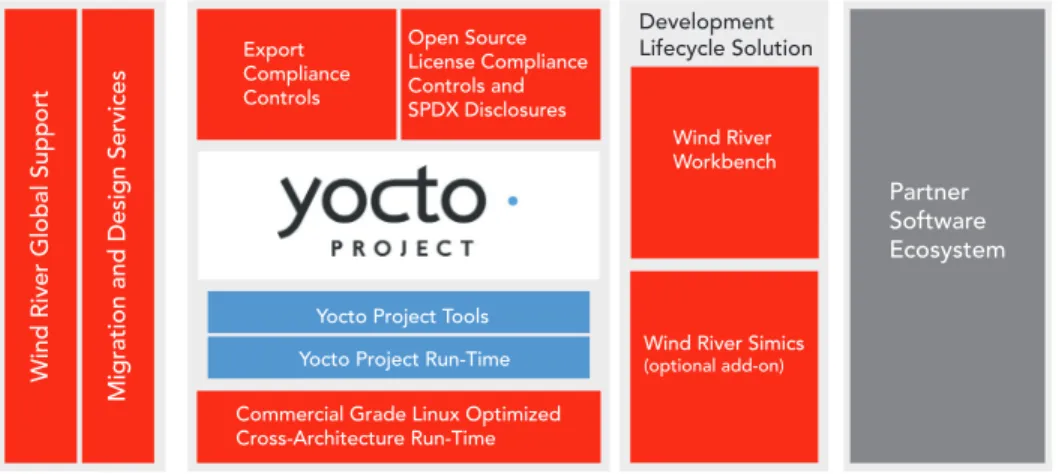
Figure 1 is an overview of the components of Wind River Linux. The product consists of source code and a build system that generates an optimized run-time image suitable for embedded devices. The components of the product are referenced by the developer to create a defined run-time image.
Wind River Linux contains the following components:
• Application packages: Hundreds of software packages that operate in protected Linux user mode
• Kernel source: The 3.10 Linux kernel with many fixes and feature enhancements • BSPs: Hardware enablement components
• Tools: Software development tools, including the award-winning, Eclipse-based Wind River Workbench development suite, or Wind River Simics®, an optional product offered by Wind River, that creates a high-performance virtual environment supporting
vir-Operating System Architecture
Red Hat Enterprise Linux Workstation 5, Update 9 x86 32-bit, x86 64-bit Red Hat Enterprise Linux Workstation 6, Update 4 x86 32-bit, x86 64-bit
OpenSUSE 12.3 x86 32-bit, x86 64-bit
Novell SUSE Linux Enterprise Desktop 11 SP3 x86 32-bit, x86 64-bit
Fedora 19 x86 32-bit, x86 64-bit
Ubuntu Desktop 12.04 x86 32-bit, x86 64-bit
Table 1: Validated Hosts for Wind River Linux 6 and Workbench 3.3.5
Figure 1: Major components of Wind River Linux
Partner Software Ecosystem Wind River
Workbench
Wind River Simics (optional add-on) Commercial Grade Linux Optimized
Cross-Architecture Run-Time Yocto Project Tools Yocto Project Run-Time Export Compliance Controls Open Source License Compliance Controls and SPDX Disclosures
Wind River Global Support
Migration and Design Services
Development Lifecycle Solution
• Build system: Yocto Project build system, which is used by the developer to compile and assemble these components
• Toolchain: Wind River GCC 4.8 toolchain based on OE-Core • Profiles: Pre-configured profiles for market-specific device types
Platform development creates a bootable Wind River Linux system for a target, including kernel, file system, and libraries.
KEY BENEFITS
The following are some of the competitive advantages of Wind River Linux:
• Commercial product quality with extensive testing and quality assurance, reliable service packs, and security patches with standard software product lifecycle support
• Yocto Project compatibility
• Lower costs due to the elimination of the need to build, support, and maintain the cus-tomer’s own Linux distribution, allowing them to focus on differentiating applications rather than on maintaining Linux itself
• Industry-specific profiles to support market requirements
• Rich tools and development environment support based on the Eclipse framework • Extensive hardware and software ecosystem support
• Lower total cost of ownership (TCO), with each Wind River Linux release bringing patches (monthly maintenance releases) and security vulnerability management
• Commercial grade intellectual property (IP) compliance review and disclosure documentation
• World-class global support coverage to address immediate and long term support needs for the lifetime of customer devices
• Predictable roadmap for long-term product planning
• Best-in-class embedded Linux professional services and education offerings • Complete and detailed documentation of software package license information NEW USE CASES AND ENHANCED PROCEDURES
Wind River Linux 6 is a flexible and expandable development environment that allows cus-tomers to configure, build, and customize Linux target distributions, and then develop appli-cations and packages tailored to their distribution. In addition, an extensive set of debug and analysis tools allows customers to optimize their results to produce a quality final product. New use cases and procedures are supported in Wind River Linux 6, including the following: • Package Manager: This feature allows developers to list dependencies and modify
pack-age lists so they can scale a platform project to add or exclude functionality by adding and removing packages. The Wind River front end of the Yocto Project/BitBake build system implements the concept of templates and individual packages that can be added to (and in some cases excluded from) a project, in addition to the packages specified in the BitBake recipes in the various layers that make up the project. Using these features, users can cus-tomize a platform project configuration, and as a result, scale their file system to include the minimal set of components for their application.
• Platform project portability: Wind River Linux uses variables to define the platform proj-ect’s location, making it possible to copy or move a platform project on the same build host to another location, or create a standalone project.
• Self-hosted support: To create a platform project image that users can develop on, Wind River Linux 6 includes a template that adds most of the native packages to the target file system, providing a target system with the ability to build itself.
• Automated package revision and new build history feature: Using the Package Revision server, Wind River Linux 6 enables the package build history feature to aid in package-related debugging.
• Shared state cache server: A remote shared state cache server helps customers acceler-ate builds in a shared development environment.
• Improved optimization options: Available script options will help minimize build environ-ment disk space.
• Improved platform project image password and group file management: Users can modify the password and group file construction process to produce custom password and group files.
• Ptest validation support: Wind River Linux includes a validated version of ptest to use as a basis for validating the packages that comprise the platform project image
• New glibc_tiny file system: glibc_tiny is a minimal file system, providing a small footprint of approximately 4 MB, that can be used as a starting point for developing very small dis-tributions for resource-constrained devices.
WIND RIVER LINUX PLATFORM DEVELOPMENT
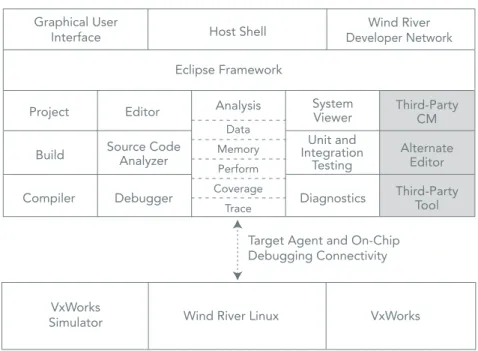
Figure 2: Working environment for developing Wind River Linux Target Agent and On-Chip Debugging Connectivity Wind River Workbench
VxWorks
Simulator Wind River Linux VxWorks
Graphical User
Interface Host Shell
Eclipse Framework Project Build Compiler Editor Source Code Analyzer Debugger Analysis System Viewer Unit and Integration Testing Diagnostics Third-Party CM Alternate Editor Third-Party Tool Data Memory Perform Coverage Trace Wind River Developer Network
With Wind River Linux, users can configure and build a platform project image to develop it according to their needs. There are a large number of options for the board, kernel configu-ration, user space configuconfigu-ration, and so on. Or the profile option may be used to select the kernel and user space configuration automatically, based on the selected BSP and profile combination.
Platform Project Image Development
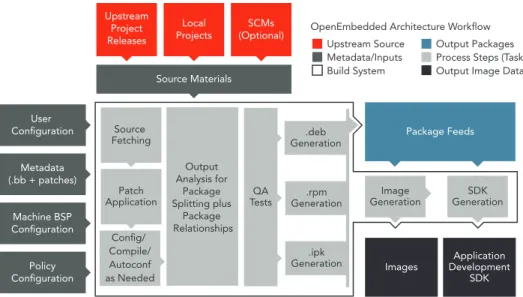
Users start by creating a project using either Wind River Workbench scripts or in-line com-mands. The build environment includes a combination of Yocto Project (BitBake build sys-tem—layers, recipes, and templates) and Wind River Linux components.
The build system uses metadata to define all aspects of the platform project image and its applications, packages, and features. Metadata resides in the development and build environments. From a build system perspective, metadata includes input from the following sources:
• Recipe (.bb) files: Wind River Linux 6 uses over 800 recipes to organize metadata. • Recipe appends (.bbappends): These allow changing recipe behavior from one or more
layers in an easily maintained way.
• Class (.bbclass) files: These common build instructions are used by the recipes and build system to control the build process.
The build system uses this metadata as one source of input for platform project image creation.
Configuration and Build
The Yocto Project BitBake build system with Wind River Linux allows users to create multiple builds, customized builds, and a strict version control system, while keeping the develop-ment environdevelop-ment pristine and intact.
There are four basic file systems available in Wind River Linux:
• glibc core: Smaller-footprint version of the glibc standard file system, including all pack-ages necessary to create a smaller file system that is not based on BusyBox
• glibc standard: Full file system, with glibc but without Carrier Grade Linux–relevant pack-ages or extensions
• glibc small: Much smaller, BusyBox-based file system, with glibc
• glibc standard Sato: Full file system with glibc, optimized for the Sato interface (Sato is part of Poky, the Yocto Project platform builder)
Layers
Layers provide a mechanism for separating functional components of the development environment. They are multiple independent collections of recipes, templates, code, con-figuration files, and packages, typically contained in a layer directory. Multiple layers may be included in a single project, and each layer can provide any combination of features, ranging from kernel patches to new user space packages.
A layer allows the addition of new files, such as the recipes that define a specific package or packages, and machine configuration files that define a board for a new BSP, without modi-fying the original development environment. Users can create their own layers and organize the content to better suit their development needs, and include or exclude the layers from the project configure and build.
In Wind River Linux, layers reside in the installation (development) environment and the build environment. When users configure and build a platform project image, the layers in the installation provide configuration information depending on their platform project configuration.
Recipes
If users want to include applications or packages in their platform project build, they must have a recipe file associated with them. The build options make it possible to copy and modify an existing recipe file, or create one from scratch.
Templates
Wind River Linux provides feature and kernel templates to simplify development. Once users configure a platform project, templates are added to their platform project directories.
Figure 3: Architecture workflow
QA Tests
Source Materials
Package Feeds
Images DevelopmentApplication SDK Output Analysis for Package Splitting plus Package Relationships User Configuration Metadata (.bb + patches) Machine BSP Configuration Policy Configuration Source Fetching Patch Application Config/ Compile/ Autoconf as Needed .deb Generation .rpm Generation .ipk Generation Image Generation GenerationSDK Upstream Project Releases Local Projects (Optional)SCMs Upstream Source Metadata/Inputs Build System Output Packages Process Steps (Tasks) Output Image Data OpenEmbedded Architecture Workflow
File System Layout Feature
The file system layout feature has been designed to allow users to view the contents of the target file system in Workbench as it will be generated by the platform project build system. Users have better control of the build by checking file meta-properties, adding files and directories to the file system, viewing and removing packages, adding devices to /dev and changing their ownership, viewing files and directories that have been “touched” or accessed on the target, and so on.
Because the file system layout feature makes the changes to the file system image after package dependency resolution, it has full power to redo the final image without having to alter the original packages (and their often complex and unyielding dependency graphs). User Space
Customers can use the Wind River Linux SDK to develop applications and cross-compile them for the intended target.
The Wind River Linux SDK is a development environment that provides all the necessary tools to cross-compile and deploy user applications on the intended target. The SDK is generated from a working Wind River Linux platform project and is therefore associated with the particular architecture and build options of the project.
In a typical scenario, users cross-compile their application and run it to verify its core func-tionality. This can be done on the target or on an emulator as well, such as QEMU. Any fur-ther testing may require deploying the applications on a real target, and finally integrating the binaries with the build system so that they are automatically deployed on the target’s image.
Users can even export the SDK they created on a different host (e.g., Windows for applica-tion development). Once tested, applicaapplica-tions can be added to an existing platform proj-ect image or to a root file system using changelist.xml. Additionally, applications can be imported using the Package Importer tool. This Workbench tool will add application pack-ages in various forms to the user’s platform project image.
Toolchain Integration
Users compile packages from source packages to binaries using the Wind River toolchain. The Wind River Linux toolchain, a GCC version 4.8, offers a number of additional features and modifications to the upstream projects, making exact version numbers non-compa-rable, but the core utilities are gcc 4.8, binutils 2.23, eglibc 2.18, and gdb 7.6. Additional support for specific embedded processors and extended functionality are included in the toolchain.
Among the new features are the following:
• binutils 2.23.2: Added support for various architectures and processors • GCC 4.8.1: Improved language implementation (C++)
• eglibc 2.18: Optimized functions and various other improvements • gdb 7.6: Added support for integrated python helpers and new targets
Kernel
Following are highlights of the new kernel features: • ARM64 and ARM KVM preliminary
• ARM big.LITTLE preliminary • Full user namespace • Uprobe (x86 and PowerPC) • More perf functionality
The code base of the Wind River Linux kernel supports many features that are available for specific applications but not necessarily suitable for all. Wind River provides predefined kernel styles that are specific to these applications.
Customizing the Linux kernel to better fit the particular details of a hardware implementa-tion is almost always a required step in an embedded software development cycle. Users can add or remove options to the Linux kernel by applying patches directly to the source code.
Kernel customization can take the form of simply enabling or disabling kernel configuration options, typically to enable specific drivers and to shrink the final kernel image and run-time load by removing unneeded functionality. Customization can also come in the form of patches, either in-house or third-party, applied to the source code to modify specific areas of kernel behavior.
Unlike other packages in the build system, the kernel is not single-purposed or targeted at a particular piece of hardware. It must perform the same tasks and offer the same APIs across many architectures and different pieces of hardware.
The key to managing a feature-based patching of the Linux kernel is to remove both the distributed control of the patches (subdirectory-based patches.list files) and the hand edit-ing of the patch files.
Replacing these two characteristics with script-based patch list generation and a method to control and describe the desired patches with a top-down approach eases the manage-ment of kernel patching complexity. Additionally, direct mapping between BSPs and pro-files is easy and increases maintainability. The scc script has been implemented to control the process of patch list generation and feature-based patching.
Wind River provides predefined kernel styles that are specific to users’ applications. The kernel styles shipped with the product are described here:
Tiny
Wind River Linux 6 introduces a new type of kernel. Inherited from the Yocto Project, Tiny is the most basic kernel configuration for bringing up the target, and has a small footprint. This option is only valid when using the corresponding glibc-tiny file system. As opposed to the standard configuration, it is intended to be a very small device starting point, and not a general purpose configuration.
preempt_rt
Wind River Linux provides a conditional real-time kernel type, preempt-rt kernel from the Yocto Project, for certain board and file system combinations. To enable the preemptible real-time feature, users must simply configure their project with the preempt-rt kernel option.
Highlights of this option include:
• Support on four architecture families: Intel®, ARM®, PPC, MIPS • Upstream 3.10 –rt11 base
• Extra defect fixes from Wind River
WIND RIVER SIMULATED TARGET DEVELOPMENT
Embedded systems are typically configured, programmed, and built on a host system and then deployed to a target system. If you have a physical target system or board, you will test your platform and application on that target. Your target might have a network interface and on-board tools through which you can deploy software.
You may not have the actual target available at all times, so it may be more convenient to use a target simulator on your host. Wind River Linux provides simulated target develop-ment with QEMU and Wind River Simics, in addition to supporting a range of hardware tar-get BSPs. Refer to the Wind River Linux Release Notes for information on supported BSPs. QEMU provides a simulated deployment environment for testing platform projects and applications. It supports many development boards, and does not require actual target board hardware or networking preliminaries. QEMU deployment offers a suitable environ-ment for application developenviron-ment and architectural level validation. User-space and kernel binaries are compatible with the real hardware. QEMU provides a means to rapidly test and debug platform projects and applications using Wind River Workbench or the command line.
Simics creates a high-performance virtual environment in which any electronic system— from a single board to complex, heterogeneous, multi-board, multiprocessor, multi-core systems—can be defined, developed, tested, and deployed. Simics removes hardware dependencies that slow product prototyping, facilitates hardware and software co-devel-opment, and makes it possible to test early and test often, improving product quality and eliminating late-in-the-game integration testing. Teams using Simics experience dramatic cost savings throughout the development lifecycle, reach market 18 months faster, cut a year’s time from ecosystem enablement, and produce higher-quality products. Simics also speeds and simplifies development on cutting-edge multi-core hardware. For more infor-mation, visit www.windriver.com/products/simics/.
WIND RIVER WORKBENCH AND DEVELOPMENT TOOLS
Wind River Workbench is a development suite that facilitates creating and building proj-ects, establishing and managing host-target communications, and developing, debugging, and monitoring operating system kernels as well as device software applications running on a real or simulated target.
Workbench and Wind River Linux make a number of analysis tools available to the devel-oper. Some are enhanced versions of open source tools related to profiling and memory usage, and some are specifically developed by Wind River:
• Performance analysis: Wind River Workbench Performance Profiler analyzes how a CPU is spending its cycles by providing a detailed function analysis that shows how individual routines within the processes consume those cycles. This feature is based on the open source tool OProfile, with additional visualization and integration in Workbench.
• Memory analysis: Wind River Workbench Memory Analyzer is a dynamic memory analy-sis tool that helps prevent and fix such problems as memory leaks, excessive numbers of memory allocations, and excessive memory allocation sizes. Memory Analyzer uses the open source tool mpatrol, with additional visualization in Workbench.
• Boot-time analysis: Wind River Linux uses the ftrace tool to provide lightweight function tracing and includes dynamic ftrace and early-ftrace for boot-time analysis.
• Code execution coverage: The code coverage analyzer feature of Workbench deter-mines the percentage of source code executed by a user’s software test case, and points to the sections of code that have not been fully tested.
• Valgrind: By running an application in a virtual machine, Valgrind tracks memory man-agement problems and threading bugs.
• LTTng: This tool provides tracing capabilities for both kernel and user space.
• System viewer: Wind River System Viewer supports visualization of multi-core systems; per-core filter and search facilities; the recording of a number of custom events, which use a printf-like format string; and graphical and tabular representations of various types of log file analyses such as CPU usage (aggregate and per core), system load, and per-core ready and running states. System Viewer also supports a host-driven upload method for log files, resulting in log transfer without interference from task CPU use. It also allows transfer of multiple logs, in addition to transfer without requiring users to call target functions.
HARDWARE SUPPORT
Wind River Linux BSPs are hardware enablement components that contain elements such as drivers and settings needed to make Wind River Linux support specific hardware. BSPs are separable configuration components that can be created and added to Wind River Linux at any time. In addition to the BSPs Wind River Linux ships with, boards are added continually according to customer demand and hardware availability. Such additional BSPs are available through the online Wind River Support Network to customers under an active platform subscription. Also, Wind River Professional Services can create customer specific BSPs for hardware that is not covered.
A typical BSP includes board-specific configuration files that overwrite or add configuration options defined by the common platform templates. Additional kernel patches included in the BSP can add new device drivers or apply necessary changes to existing Linux code. BSPs can also contain additional user space components or other files.
Wind River has validated proper operation of the Linux run time for each supported refer-ence board. The supported features are board-specific and depend on the availability and maturity of the code in the open source community.
Wind River Linux ships with a wide range of BSPs covering ARM, Intel, x86, MIPS, and PowerPC target processors.
BSPs are also created and shipped asynchronously, after the product is released. Contact Wind River to get an up-to-date supported BSP list with detailed descriptions of supported peripherals.
TESTING AND VALIDATION
Wind River is committed to providing quality products for both proprietary and open-source-based technologies. Our quality policies include formal code inspections, peer reviews, project reviews, program audits, and traceable requirements change management. Wind River Linux was created following a methodical process to thoroughly test key fea-tures on every supported reference configuration (defined by development host, kernel and package configurations, and supported board).
Wind River has developed a robust, scalable, and automated build and test infrastructure with more than 4,000 test cases and 140,000 test runs. More than 30 million lines of code were tested using this Test Automation Framework, which supports many processor archi-tectures and uses a combination of commercial, open source, and proprietary tests, includ-ing LTP Core, LTP Network, LSB, TAHI, and Open POSIX. Wind River uses coverage tools, such as gcov and lcov, to optimize test development and close gaps in existing test suites. Testing of Wind River Linux 6 includes the following:
• Sanity testing • Feature testing • Regression testing • Complete build testing • Full run-time testing • Documentation testing • Fix verification
• Out-of-box experience (OOBE) testing • Benchmark/performance testing
LEGAL COMPLIANCE
Wind River performs thorough legal reviews of the compilation and documentation of the General Public License (GPL) and other licenses that control each major release of Wind River Linux. Combining human legal expertise and proprietary automated tools, Wind River examines each open source package that comes into the product to identify and resolve potential intellectual property issues before the product is released. Customers receive extensive documentation to assist them in the protection of their intellectual property.
Using Linux Foundation’s standard format for recording and exchanging licensing informa-tion of a software package, Wind River uses the data generated by the software compli-ance review process and delivers Software Package Data Exchange® (SPDX®) information. Wind River supports the SPDX project in various ways:
• Actively contributes to the SPDX technical, legal, and business working groups • Utilizes SPDX data in software IP compliance review
• Provides a free cloud service where anyone can create SPDX files PARTNER ECOSYSTEM
The world-class Wind River partner ecosystem ensures tight integration between our core technologies and those of the premier hardware and software companies chosen to build out our solutions. Our partners help extend the capabilities of Wind River Linux by offering out-of-the-box integration and support for key technologies in a number of fast-moving markets. Our team is trained to troubleshoot partner technologies in use with Wind River products, making ours the best-supported ecosystem in the embedded and mobile soft-ware industry.
The Wind River partner ecosystem is constantly expanding. Contact us for more details or visit www.windriver.com/partners/.
WIND RIVER PROFESSIONAL SERVICES
A CMMI Level 3–certified organization, Wind River Professional Services offers a unique mix of embedded and vertical market expertise. We offer consultative thought leadership, deep technical capabilities, and innovative industry solutions to help you overcome your most strategic and pressing development challenges.
As part of our comprehensive solutions, Wind River offers a Linux Services Practice, with focused offerings that help customers meet strict market deadlines while keeping develop-ment costs down. Our industry-specific offerings span the entire project lifecycle, including architecture, design, development, porting, integration, and maintenance services; and we leverage our state-of-the-art platform simulation and test tools to accelerate deliverables and provide valuable reporting and documentation. Our global organization provides flex-ible engagement options for consulting, training, and support that will meet your proj-ect resourcing requirements and budget. For more information, visit www.windriver.com/ services.
WIND RIVER EDUCATION SERVICES
With more than 30 years of embedded software experience, Wind River provides education services in every region of the world. We offer flexible training options to meet your busi-ness and learning needs, including public, private, and custom courses. For your specific project challenges, Wind River Mentoring provides coaching by experienced engineers to help you integrate Wind River solutions into your environment. And when you’re too busy to attend a whole class, our on-demand learning options provide around-the-clock access to advanced and specialized topics. All of our education services are led by expert engineers who are closely connected to the Wind River technical community for access to specific expertise. For Wind River Linux we offer deeply technical hands-on courses, includ-ing RTOS to Linux Migration Essentials, Wind River Linux Application Development, Wind River Linux BSP Development, and many more. For more information, visit www.windriver. com/education.
WIND RIVER CUSTOMER SUPPORT
Wind River Linux is backed by our award-winning global support organization. With six major support centers, 21 additional support hubs, and more than 150 experts worldwide, you can get the help you need in the language and time zone that work best for you. Our online Wind River Support Network provides multifaceted self-help options, including an active Q&A Forum. Optional premium services, including designated support engineers and hosting of customer-specific environments, offer the fastest possible time-to-reso-lution. We are proud to have achieved Service Capability and Performance certification, recognized as the gold standard for delivering world-class customer support. For more information, visit www.windriver.com/support.
Lifecycle
Every major version of Wind River Linux is maintained and supported over several years. When customers want to continue running legacy versions of Wind River linux and wish to continue receiving maintenance and technical support services, Wind River Linux Long Term Support offers an extension of the product lifecycle. It includes e-Support, which pro-vides continuous access to the Wind River Support Network; Enterprise Support, which adds live support and maintenance; and customer-specific maintenance. For more informa-tion, contact your local account team or [email protected].
APPENDIX A: MOVING FROM YOCTO PROJECT 1.2 TO YOCTO PROJECT 1.5 The first Yocto Project Compatible Wind River Linux was Wind River Linux 5. This commer-cial Linux was based on the Yocto Project 1.2 release.
Based on the Yocto Project 1.5 release, Wind River Linux 6 represents a leap in this category. It incorporates six different components from the Yocto Project community, OE-Core being the biggest. The change from the 1.2 release to the 1.5 release translates into almost 6,000 commits. The most common modifications apply to recipes and classes, but also to addi-tional files like scripts and configurations, as can be seen below. Many of the features have also been back-ported into Wind River Linux 5.
The design of the Yocto Project BitBake build system offers several important advantages. • If a pre-built kernel and file system are satisfactory for deployment or current testing
and development, customers can build a complete run-time file system in minutes using prebuilt kernel and file system binaries.
• Customers can build specific parts from source files, saving time by building only the file system, or only the kernel, or a specific package—whichever element is of current interest.
• Builds cannot contaminate the original packages, layers, recipes, templates, and con-figuration files, because the development environment is kept separate from the build environment. All project changes are included in the projectDir/layers/local directory to simplify development.
• By using custom layers and templates, users can add packages, modify file systems, and reconfigure kernels for repeatable, consistent builds, yet still keep their changes confined for easy removal, replacement, or duplication.
• These last two features allow multiple builds, customized builds, and a strict version con-trol system, while keeping the development environment pristine and intact.
• Users can create the build environment as regular users with the configure script. It is in this environment that users build (make) their Wind River Linux run-time system, either default or customized, using software copied or linked from the development environment.
From 1.2 to 1.3
• sstate directory: The shared state cache (sstate-cache), as pointed to by SSTATE_DIR, by default now has two-character subdirectories to prevent issues rising from too many files in the same directory. Also, native sstate-cache packages will go into a subdirectory named using the distro ID string.
• meta-yocto layer: This layer now consists of two parts that correspond to the Poky reference distribution and the reference hardware BSPs, respectively: meta-yocto and meta-yocto-bsp.
• Python function white space: All Python functions must now use four spaces for inden-tation. Previously, an inconsistent mix of spaces and tabs existed, which made extending these functions using _append or _prepend complicated, given that Python treats white space as syntactically significant.
• SRC_URI: Any use of proto= in SRC_URI needs to be changed to protocol=. In particular, this applies to the following URIs: svn://, bzr://, hg://, osc://.
• nativesdk: The suffix nativesdk is now implemented as a prefix, which simplifies a lot of the packaging code for nativesdk recipes.
• Task recipes: These recipes are now known as “package groups,” and have been renamed fromtask-*.bb to packagegroup-*.bb.
• New “splash” IMAGE_FEATURES: Image recipes should include “splash” in IMAGE_ FEATURES in order to enable the boot-up splash screen.
• Removed recipes: These recipes were removed: libx11-trim, xorg-lite, xserver-kdrive, mesa-xlib, galago, gail, eggdbus, libgsmd, contacts, data, tasks, eds-tools. In addition, the meta-demoapps directory has also been removed because the recipes in it were not being maintained, and many had become obsolete or broken.
• Linux kernel naming: The naming scheme for kernel output binaries has been changed to now include PE as part of the filename.
From 1.3 to 1.4
• BitBake: If a comment ends with a line continuation (\) character, then the next line must also be a comment. Any instance where this is not the case now triggers a warning. Other changes are triggered by the package name overrides. The run-time package-specific variables RDEPENDS, RRECOMMENDS, RSUGGESTS, RPROVIDES, RCONFLICTS, RREPLACES, FILES, ALLOW_EMPTY, and the pre, post, install, and uninstall script func-tions pkg_preinst, pkg_postinst, pkg_prerm, and pkg_postrm should always have a pack-age name override.
• sstate: This no longer populates the sysroot if it was not required to complete the task, such as BitBake –c rootfs image.
• SRC_URI: This now uses FILESOVERRIDES instead of OVERRIDES for directory names. • Proxies and fetching sources: A new oe-git-proxy script has been added to replace
previous methods of handling proxies and fetching source from Git.
• Custom Interfaces file: Custom/network/interfaces previously appened to ‘netbase’ recipe, now need to be appended to ‘init-ifupdown- recipe instead.
• Remote debugging: Support for remote debugging with the Eclipse integrated devel-opment environment is now separated into an image feature (eclipse-debug) that cor-responds to the packagegroup-core-eclipse-debug package group.
• SANITY_TESTED_DISTROS: This variable now uses a distribution ID, which is composed of the host distributor ID followed by the release.
• SRC_URI: The PN, PF, P, and FILE_DIRNAME directories have been dropped from the default value of the FILESPATH variable, which is used as the search path for finding files referred to in SRC_URI.
• Target package management: “smart” replaces zipper.
• Recipes: The following were moved out of OE-Core: clutter-box2d, evolution-data-server, gthumb, gtkhtml2, gupnp, gypsy, libcanberra, libgdata, libmusicbrainz, metacity, polkit, zerconf, evieext, Gtk+ DirectFB, libxfontcache/xfontcacheproto, libxp/libxprint-apputil/libxprintutil/printproto, libxtrap/xtrapproto, linux-yocto 3.0 kernel, matchbox-stroke, matchbox-wm-2/matchbox-theme-sato-2, mesa-xlib, mutter, orinoco-conf, update-modules, web, xf86bigfontproto, xf86rushproto, zypper /libzypp/sat-solver. The following were renamed: lsbsetup was renamed to lsbtest, meta-dri was renamed to mesa.
From 1.4 to 1.5
• Requirements on the host system: The OpenEmbedded build system requires Python 2.7.3+, Tar 1.24+, Git 1.7.5+, patched version of Make if using 3.82 (or buildtools-tarball). • atom-pc BSP: atom-pc was replaced by genericx86 BSP. Additionally, a generic x86-64 BSP
has been added for 64-bit systems.
• BitBake: BitBake now supports _remove operator, so variables may no longer contain “_remove” in their names. BitBake no longer uses a global method pool (i.e., each recipe now has its own namespace). Additionally, P and PF are no longer automatically in the PROVIDES.
• Removed: The following were removed: “none” server backend and bitbake-runtask script • QA warnings: There is an additional QA check for /usr/share/info/dir.
• Build history: The build history enables checks for versions going “backward.” Additionally, it is now written to the “build” directory rather than TMPDIR.
• SDK installer: Output SDK installer files are now named to include the image name and tuning architecture through the SDK_NAME variable. Image and related files are now installed into a directory containing the machine name.
• Pkgdata: The pkgdata directory produced as part of the packaging process has been col-lapsed into a single machine-specific directory. This directory is located under sysroots and uses a machine-specific name (i.e., tmp/sysroots/<machine>/pkgdata).
• Shortened git SRCREV values: BitBake will now shorten git revisions from 40 chars down to 10.
• IMAGE_FEATURES: Now there is validation; invalid features will cause errors. Deprecated “apps-console-core” was removed. The image core-image-minimal no longer adds remove_packaging_data_files to ROOTFS_POSTPROCESS_COMMAND. When “pack-age-management” is not in IMAGE_FEATURES “package-management,” this is done auto-matically. Images will also be rebuilt only when changes occur, and not at each compilation. • Task recipes: task.bbclass has been removed (it was previously replaced by packagegroup.
bbclass).
• BusyBox: BusyBox is now split into two binaries, one that is suid root for those components that need it, and another for the rest of the components.
• Automated image testing: The testing framework has been added through the testim-age*.bbclass class. This framework replaces the older imagetest-qemu framework.
• Build history: installed-package-sizes for an image now records the size of the files installed. Dependency graphs now use action package names, and buildhistory-diff and buildhistory-collect-srcrevs utilities have improved commands.
• Udev: It no longer automatically includes udev-extraconf, pciutils-ids, or usbutils-ids. • Removed packages: The following packages were removed: linux-yocto 3.2, tinylogin,
web-webkit, imake, transfig-native, anjuta-remote-run.
• Renamed packages: The following were renamed: libtool-nativesdk was renamed nativesdk-libtool and external-python-tarball was renamed buildtools-tarball.