Open Research Online
The Open University’s repository of research publications
and other research outputs
Extending tabletops to support flexible collaborative
interactions
Conference or Workshop Item
How to cite:
Rogers, Yvonne; Lim, Youn-Kyung and Hazlewood, William (2006).
Extending tabletops to support flexible
collaborative interactions.
In: Proceedings of the First IEEE International Workshop on Horizontal Interactive
Human-Computer Systems, 5-7 Jan 2006, Adelaide, Australia, IEEE, pp. 71–78.
For guidance on citations see FAQs.
c
2006 The Authors
Version: Accepted Manuscript
Link(s) to article on publisher’s website:
http://dx.doi.org/doi:10.1109/TABLETOP.2006.13
Copyright and Moral Rights for the articles on this site are retained by the individual authors and/or other copyright
owners. For more information on Open Research Online’s data policy on reuse of materials please consult the policies
page.
Extending Tabletops to Support Flexible Collaborative Interactions
Yvonne Rogers, Youn-Kyung Lim, and William R. Hazlewood
School of Informatics, Indiana University
901 E. 10
thSt., Bloomington, IN 47408
{yrogers, younlim, whazlewo}@indiana.edu
Abstract
Tabletops have been used to support a range of co-located activities, from games to image sorting. However, their limited display space and resolution can restrict the kinds of collaborative interactions that take place. Our research is concerned with how to extend the tabletop by integrating it with other spaces and artifacts in the physical world. Our goal is to design workspaces that support a wider range of collaborative tasks, determining which are well suited to the tabletop and which are better performed using physical representations and spaces. We describe a physical-digital space that we built for this purpose and then a study that compared how groups collaborate on a design task when using this versus solely the tabletop. The findings showed that extending the tabletop into a physical space enabled groups to collaborate more easily and flexibly.
1. Introduction
Interactive tabletops have been used to support co-located groups for a range of activities. These include playing games, selecting and viewing images, sorting information and town planning. An assumption is that small groups of people can collaborate more naturally, comfortably and effectively around a tabletop display compared with sitting in front of PCs or other vertical displays [18, 23]. They do this by readily ‘diving in’; pointing at and selecting information that is being displayed, while simultaneously viewing theirs and the others’ interactions.
Tabletops are ideally suited to activities that involve looking down on information from above, such as visualizing, arranging and comparing. A key design challenge is to develop interaction styles that map onto these kinds of tasks that enable all the individuals sitting at different sides of the table to read, access, manipulate and pass to each other the information. Styluses, physical tokens and touch screens have been used as
input devices in place of mice that are awkward to use on a horizontal surface by multiple users [3]. One of the most innovative designs is MERL’s DiamondTouch touch surface, that allows direct hands-on interaction, where users simultaneously point, tap and slide their fingertips across the tabletop surface to select and manipulate information [3]. It also enables simultaneous interactions by interpreting input from multiple users by sending unique signals through them and into receivers located on the floor, which then send information back to the computer about which parts of the table surface each user is touching. The accompanying DiamondSpin software enables a range of novel finger-based interactions, including images being literally spun around the tabletop, and images being automatically expanded and switched orientation towards the person they are moved towards [8]. A very natural way of collaborating is afforded, where the surface invites people to reach out and touch the interactive surface using their fingers [23, 24].
However, touch surface tabletops can be limited in the kinds of interactions they can effectively support. While a number of finger gestures (e.g., tapping, stroking) can be effectively mapped onto a core set of interface commands (e.g., selecting, scrolling), it is less obvious how to adapt those that require a higher level of dexterity and precision. ‘Fat’ fingers are clumsier than pointing devices and hence can be more error-prone when performing precise operations. For example, sets of options that are represented via adjacent icons, menu lists or thumbnails are more awkward to select with a finger than when using a mouse. A further interface problem is that the use of projectors limits the amount and resolution of information that can be displayed, that in turn affects the amount of information that can be shared, compared and worked on at a given time [18, 20]. While groups work well together when interacting with small numbers of images at a tabletop it becomes more awkward for them to sort and manage larger sets [19].
To address these limitations we have been exploring how to extend the touch surface tabletop. Our approach
is to identify tasks that are well matched to tabletop interactions (e.g., arranging, visualizing, placing) together with those that are less than optimal (e.g., multiple menu selections and opening up of windows), and to consider how the latter might be more natural and easier to do using physical representations that are displayed in a physical space. An important concern is designing the ‘glue’ between the digital and physical worlds so that groups can switch effortlessly and fluidly between them. To this end, we built a physical-digital space that uses RFID technology to enable physical representations to be transformed into digital ones. A study was conducted to see how groups used it to collaborate for a design activity compared with using only a tabletop.
2. Background
Recently, there has been a growing interest in how large shared displays can be designed to facilitate small co-located group working, including the use of interactive wall displays and tabletop displays [9, 15, 21]. Compared with PCs, interactive tabletops have been found to encourage contributions from all group members and to support more equitable problem-solving and decision-making [18, 19]. Large surfaces like horizontal SmartBoards have also been found to foster more collaboration and awareness than smaller boards, because group members are forced to ask each other to pass objects and make menu selections, as it is not possible for them to reach all of the board themselves [8]. The size of the group also affects the form of collaboration that takes place: smaller groups have been found to share more the digital resources of a tabletop than larger groups, who alternatively, divide the task and table up and assign roles to each person [20].
Research concerned with extending the tabletop has focused on how to integrate it with other devices and displays, including personal computers, handhelds, tangibles, and augmented reality [e.g., 2, 5, 12, 10, 25]. UbiTable was designed to enable users to easily move information between their personal devices and the shared tabletop surface [23]. The CARETTA system combined a sensing horizontal surface as the shared space with PDAs for personal use [25]. The aim was to enable group members to switch between working individually and collaboratively and to be able to easily share and exchange personal digital information in a shared space.
In contrast, tangibles are used to bridge the tabletop with the physical world of objects: the objective being to enable co-located groups to work together using both physical and digital representations, rather than one or the other. Physical artifacts, like blocks, bricks, post-it
notes and pucks are used to both represent and control the digital information [12]. Examples include the SenseBoard [16], PITA-Board [4] and the Designers’ Outpost System [5]. Similarly, augmented reality (where 3D virtual imagery is laid over the real world) enables users to manipulate virtual models in a physical space while allowing for natural face-to-face conversations to take place [2].
Tangible and augmented reality interfaces can reduce the separation between the physical and digital domains. In so doing, they can support the ‘natural’ way people interact with everyday objects in the physical world, exploiting their well honed skills of physical manipulation. Moving physical objects around in one’s hand, (e.g., a set of cards) or on a surface (e.g., jigsaw pieces) can help offload some of the computation involved when solving problems making it easier to explore alternative solutions [14, 17]. Furthermore, physical objects afford certain kinds of perceptual, tactile and kinesthetic properties (e.g., shape, texture), that can be exploited to good effect during collaboration in ways that is difficult to accomplish in a digital space: they can act as thinking props, embodiments of abstract concepts and as communication media commanding attention [1]. They can also be held up to explicitly demonstrate or show a principle or idea and have been shown to facilitate the process of ‘exteriorization’ when planning [6, 7].
2.1. Extending the tabletop: The physical-digital
workspace
Our approach to extending the tabletop is to interlink the digital space with an array of physical artifacts placed around a room. The goal is to provide the best of both worlds: enabling co-located groups to perform tasks that are most suited to a physical space while using the tabletop for tasks most suited to digital representation.
Based on guidelines for supporting collaborative work using tabletop displays, that emphasize the importance of supporting shared access to physical and digital objects, the use of physical objects and fluid transitions between tabletop and external work [22], we developed a physical-digital workspace (see Figure 1). Essentially, it comprised a DiamondTouch tabletop embedded in a table and numerous tagged physical objects. The tagged objects bridge the digital world of the tabletop by acting as tangible tokens that when placed on the table are transformed into equivalent 2D digital representations (but with additional interactive properties). The physical models and cards, are read by a RFID tag reader, hidden under the table, using the etagit software and Mantara's Elvin Router. By transforming the 3D physical representations into
smaller 2D ones, a bird’s eye view can be obtained, making it easy to see and position large numbers of objects relative to one another.
3. The study
A study was designed to investigate how the physical-digital space affected collaborative interactions. A design activity was devised that involved planning, decision-making, weighing up of criteria, suggesting of alternative ideas, revising of ideas, and evaluating and reflecting upon designs. Groups had to browse and choose from a large number of objects and determine how best to place them in relation to one another. The particular task involved designing a layout plan for a public garden intended as part of a new university building. This is an ongoing activity at the University where members of the general public, staff, students and faculty are often asked for their opinions about the design of public spaces (but currently only in meetings). It was also a domain that the participants could readily relate to and have an opinion about and thus provoke debate. The task was designed at a level that anyone with some knowledge of amateur gardening (all our participants did) and experience of using public spaces could take part in.
The objects included a mix of common garden plants (e.g., flowers, trees, shrubs), garden furniture (e.g., benches, chairs) and ornaments (e.g., statues, bird bath). Each item was individually priced, ranging from $10 to $500. A budget of $3500 was given. This provided an authentic challenge and focus for the design activity but without making it overly complex.
3.1. Participants
A between subjects design was used where 6 groups of 3 participants took part in each of the two conditions. The groups were mixed according to age, gender, knowledge of the domain area, and familiarity with each other (as friends or work colleagues) and the mix of groups were balanced across conditions. All were familiar with using computers although not with the tabletop.
3.2. Conditions
Two conditions were designed (i) digital-physical (D+P) and digital only (D).
3.2.1. Digital-physical (D+P).The room was laid out
as a series of interconnected zones comprising a physical selection space, a digital layout space, a transform space and a holding space (see Figure 1c). The physical selection space consisted of walls and shelves situated at one end of the room. The objects, physical models and paper cards, were placed in these
(see Figures 1a and b). The cards were adhered, using magnets, to the walls and divided into two categories (spring plants and summer plants). The miniature models were also divided into two categories (garden furniture and trees) and placed on adjacent shelves. The reason for using two forms of physical representation is that they have different qualities. Images are good at depicting complex and sophisticated shapes, showing the overall effect of a border of flowers, for example while the physical models are good at showing the relational proportions and size of objects (such as garden furniture and trees and shrubs). Additional information about each option, i.e. its price, its common and Latin name, and handy growing tips (e.g., perennial, likes shade) appeared on the cards or model bases.
A schematic bird’s eye view of the proposed garden, showing existing walkways, was provided as the default plan to design in the digital layout space. A set of icons representing the objects were designed to be highly distinguishable and simplified representations of the physical objects (see Figure 2). The additional information about each object and a photographic image of it could also be obtained by double tapping the icon. This resulted in it appearing as a pop-up detail spread around the iconic representation of the object (see Figure 2). To avoid cluttering the display, the pop-ups could be made to disappear by tapping once on the image.
To move an icon of an object to a part of the layout plan involves a very simple action. A user places a fingertip on top of it and drags it to the desired place. The pop-ups can be slid around the tabletop and the text oriented towards other participants to read. An object can be removed from the garden plan by sliding its corresponding icon into any of three of the corners of the tabletop (colored as grey triangles).
The transform space was a marked area of the physical table next to the tabletop display where the physical objects were read by the tag reader and transformed into digital representations. The icons were designed to pop up in the same location in the digital layout space to enable the participants to know where to find them. Multiple copies of the same object could be added to the garden plan by lifting the card or physical model away from the transform space for a second and placing it down again. The holding space was provided to enable a partial selection of physical objects to be kept on hold and in close proximity to the digital layout space. A metal surface was used to mask the object’s tag, preventing it from being read multiple times when in close proximity to the tag reader.
(c)
Figure 1. (a) Physical card with RFID tag inserted in the back, (b) two miniature models with RFID tags placed
under their plinths and, (c) the physical-digital space
3.2.2. The digital condition (D).The same interactive
garden layout plan was used on the tabletop. Instead of selecting options from the physical browsing space the four categories of objects were represented as piles of icons around the garden plan and placed in the 4 corners of the tabletop (see figure 3). To select an icon the participant simply places their fingertip on top of an icon pile and drags the top one onto the garden plan. The additional information about each option could be obtained and removed using the same tapping operations as in the D+P condition. An object could be removed from the plan by sliding the icon from the design space back to the selection space.
3.3. Procedure
The groups of three participants were introduced to the task. They were told that the aim of the study was to investigate the benefits of using new technologies during group work. In both conditions they were shown how to use the selection and design spaces. In the D+P condition they were also shown how to use the transform and holding spaces. After a short familiarization session they were given 30 minutes to complete the task. This was followed by a 10-15
minutes open-ended group interview to discuss their experiences.
The sessions were videoed and the interactions at the tabletop recorded using screen capture software. The two streams of video data and screen capture data were combined. Two researchers reviewed them, independently, transcribing the talk, gestures, body movements and interactions at the tabletop and in the different spaces.
Figure 2. (Top) Bird’s eye view of one of the finished plans with a non-symmetrical design, including benches
placed next to trees for shade and flowers along the borders. (Bottom) A pop-up detail for a scarlet lily flower,
showing color photo, price and flowering details
Figure 3. Tabletop garden plan showing icon piles in the D condition
The analysis presented below focuses on the various collaborative interactions that took place. The data is presented as a combination of means and standard deviations to show relative trends; snippets of
conversation to indicate the nature of the discussions and observations of behaviors to highlight types of collaborative behaviors. Statistical analyses are not presented here since the goal of the study was not intended to look at isolated controlled effects, but to be exploratory, examining and identifying different aspects of collaborative interactions.
4. Findings
To explore how the groups collaborated in the two conditions, we initially counted the number of utterances and physical actions (e.g., selecting an option, moving an icon) made by each group member in the two conditions. There was very little difference between the total number of utterances per group (D=162, D+P=161) or physical actions (D=190.4, D+P=187.4). Groups in both conditions designed their garden plans using a number of criteria, including the need for shade, privacy, seating, cost, the importance of symmetry/asymmetry, color, light, combinations and the cost of maintenance. Where the groups showed a difference was in the strategies they adopted to select, share and compare the options when decision-making. Below we describe these in more detail with respect to (i) different tasks involved and (ii) the nature of the collaborative interactions.
Browsing and selecting items As hypothesized,
groups in the D+P condition spent far more time scanning, comparing and discussing options before placing them into the design space than the D condition. They were also much more methodical in exploring all of the options available. Specifically, in the D+P condition the groups began by scanning all of the objects, reading the information given, and using this to help decide upon their criteria. In contrast the groups in the D condition tended to discuss their criteria first (e.g., the need for a seating area) before trying to find the icons that would match them (e.g., a bench).
The groups in the D condition initially enjoyed the surprise of opening up the pop up details, especially when the groups discovered that the icon they had picked represented something quite different from what they had guessed, was unusual or expensive. But, if after two or three surprises, they still had not found what they were looking for, their enjoyment turned more into frustration. In these situations, the groups resorted to choosing one of the icons they had already looked at rather than continuing to search for the one they had hoped to find. Other times they just opened icons at random to see what they were and then decided whether to include them or not.
Several of the icons in each category were never opened meaning that the groups did not consider all the possibilities available to them when creating their
designs. Towards the end of the session, some of the participants resorted to adding flowers without opening them. In particular, one group member added 10-15 different summer flowers to the plan, without opening any of the pop up details. The action of sliding icons across the tabletop from the selection space to the design space was very easy and encouraged a ‘filling in’ strategy. This reduced the level of collaboration: group members tended to work on their own when in this mode.
The groups in the D+P condition were mostly guided in their selection of object by what was available although occasionally they tried to find a particular kind of plant they thought would be suitable for the garden (e.g., a fern for shady parts). They often read aloud to each other parts of the information provided on the cards and object plinths and discussed whether they met their criteria. While selecting cards or objects they also handed them to each other to look at or to take to the table. Hence, there was much sharing, comparing and passing of physical objects between themselves.
Arranging items The ways the designs were
arranged was also found to differ across the two conditions. In the D condition, after adding their first item to the layout and deciding on its location in the garden the groups then discussed what to add in relation to what had just been placed. For example, several of the groups started by selecting a bench or a table and discussing where best to place it in the garden, whether to make a picnic area or where to place it to enable privacy. This was then followed by a suggestion for the need for trees for shade, flowers to look at or trashcans for the rubbish. In contrast, in the D+P condition, more of the planning took place before adding any items to the layout plan. When choosing which items to add, the participants often held up the cards and objects, showing them to the others as a way of commanding their attention and getting their support.
Finding out more information There was a big
difference between the number of times a pop-up detail was opened on the tabletop to find out more information in the two conditions: the groups in the D condition opened up a pop-up window (M=25.67, SD=6.7) fives time more than in the D+P condition (M=4, SD=3.46). Obviously, the groups in the D condition had no choice but to tap on an icon to find out further information about an option whereas the D+P groups did. Rather than tap on the icons, however, the groups in the D+P condition nearly always looked at the information provided on the cards or models to find out the price and at the properties provided by the image/form when making decisions. There was also far more times in the D condition (M=10, SD=6.24) when group members asked each other what an icon they had already found
out about and placed in the garden plan meant compared with in the D+P group (M=1.5, SD=2.1).
Why was it that the groups in the D+P condition preferred to look back at the physical representations in the transform or holding space when working at the tabletop, rather than simply tap on an icon to open up a pop up detail? One reason is that the physical representations acted as shared reference points that could be easily referred back to by all when making decisions about what to do with an object in the plan. Pointing at them, glancing at them and reading the details were also easily achievable by all with little effort. The physical and digital representations also remained fixed. In contrast, more cognitive effort was required to open and read a pop-up detail, connect it with the object, close it down and then decide what to do with the icon – even though the actions in the digital layout space were relatively easy to achieve – simply requiring tapping. It appeared, therefore, that the coupling between the action of finding out information and the action of placing/moving an object in the garden plan was less fluid to accomplish using the same digital medium than when using two different media.
Choosing options The groups in the D+P
condition also used the properties provided by the physical representations to aid them during the task in ways not possible in the D condition. These included holding a set of 5 or 6 cards in a fan with one hand, shuffling them around, and comparing them before deciding which to select to add to the design space. Another way the physical representations were used was for participants to group specific types of physical objects together when considering what to add. For example, several participants in the D+P group held a chair model in one hand and a table model in the other to see how they fitted together. In contrast, when trying to combine objects in the D condition, the participants focused more on whether to have a category type of furniture with another (e.g., a bench or a chairs with a table) or certain flowers with bushes.
Next, we consider how the collaborative interactions varied across conditions.
Working simultaneously and separatelyThere was
little difference between groups in the two conditions when working at the tabletop, placing icons and arranging their designs. For 80% of the time when at the tabletop groups in both conditions took turns to add or move icons in the display area. Only 20% of the time did two or three members interact with the icons at the same time. This happened most when individuals worked on a section of the garden plan that was closest to them populating it with flowers.
Turn taking and turn-inviting In both conditions
turn-taking and turn-inviting was much in evidence. By this is meant encouraging someone to participate by
pointing to a part of the tabletop or offering a physical representation to the other [20]. For example, group members suggested to those who had not been doing anything for a while at the design space to add a flower or other object. This was accompanied with a gesture pointing at a group of icons on the tabletop or handing over a physical model to the person. The extent to which this happened was higher in the D+P condition (mean= 8.8, SD=5.6) than in the D condition (mean=4.5, SD=2.4), suggesting that being able to hand physical objects to someone compared with pointing at items on a digital surface may be easier to encourage someone to take a turn.
Coordination In the D+P condition, the groups also
evolved a highly coordinated way of working carrying out a particular task (e.g., selecting an item, placing it in the transform space) depending where the person was standing. The high level of coordination developed without any discussion as the activity progressed. Typically, one group member selected an object, returned to the table and handed it to the person standing closest to the transform space, who then placed it in the transform space. The other member of the group collected the digital representation as it popped up on the tabletop and moved it to a position in the garden plan.
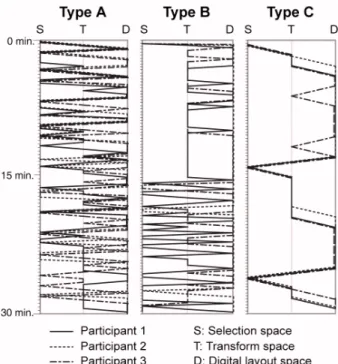
Figure 4. The trajectories of three different types of groups in the D+P condition over time
Figure 4 shows the range of trajectories for the groups over time. As can be seen, the group members moved frequently between the spaces, sometimes
moving in unison and other times as pairs or individually. Three types of trajectories were identified—continuous movements between the spaces from the beginning of the task to the end (Type A), an initial visit to the selection space and then revisiting this space later on (Type B), and highly coordinated movements between the spaces (type C). Among the 6 groups that participated in the D+P condition, half followed type A, two type B, and one type C, with no type dominating. The different types of trajectories reflect a range of collaborative interactions that the physical-digital space supports, including coordinated individual work, distributed activity and working in tandem in each space.
Groups in the D+P condition also tended to pass the baton of control on to one another during the selection and design phases. It was far more frequent for someone to place a physical representation on the transform space and for another to move its digital counterpart to the desired place in the design space (M=42.8, SD=36.6) than for the same person to do both (M=16.6, SD=11.1). This contrasts with the groups in the D condition where it was very rare for groups to hand over control to one other (M=1.33, SD=1.75). Instead, the same person added icons from the selection space to the design space and then moved them to the desired location in the garden plan (M=64.5, SD=8.31).
5. Discussion and conclusions
The findings from this exploratory study show how integrating the tabletop within a physical space enabled groups to browse and compare more thoroughly the options available to them during a collaborative design activity. Most notable was the systematic and frequent comparison of alternatives, the taking into account of more options, and the placing together of items when considering a part of the design. A main reason for this can be attributed to how information is presented and accessed by group members in this physical-digital set-up. In particular, it was always explicit, making collaboration more flexible and easy. Having the additional information appear on a physical object also made it easier for groups to weigh up and consider options compared with trying to do the same thing using the icons plus pop-up details at the tabletop. Moreover, being able to rapidly switch between physical and digital representations enabled the groups to explore the problem space from different perspectives; one in terms of specific details and the other in terms of creating an overall pattern that facilitated the decision-making and planning, especially during the early stages of the design task [cf. 13].
The findings suggests that tagged physical artifacts can be used effectively to extend the tabletop display to
support certain kinds of collaborative tasks that are cumbersome to achieve at a shared tabletop surface. Alternative technology solutions may also be possible for overcoming the limitations of existing tabletop displays. In particular, if the resolution and size of a tabletop could be increased, more images could be presented. However, increasing the size of a display affords partitioning of the display surface, where group members carve off their own space meaning they work more on their own [20]. Another solution is to place an adjoining vertical display besides the tabletop that could provide additional information via a scrolling list of thumbnails. However, this solution is also likely to encourage the partitioning of work, where one individual takes control of the pen/mouse for the additional display and adopts the role of look-up person for the duration of the task [18]. While a division of labor may be desirable for certain kinds of collaborative tasks (e.g., command and control), it reduces opportunities for equitable participation in idea exploration and decision-making – which we consider important for others (e.g., design, selection).
If it is considered a desirable goal for group members to be encouraged to participate more equitably in a group setting (be it work, educational, creative, therapeutic or other), then the following design implications can help in thinking about how best to configure the workspace.
• Tabletops are very effective at supporting arranging and manipulating type tasks
• Physical representations are good for holding up and handing around to others encouraging the discussion of options
• Physical selection spaces including walls and other surfaces allow group members to stand beside each other and systematically scan, evaluate, choose, show and compare items that are displayed in or on them
• On hold and on call spaces provide temporary structures that can enable participants to place things on keeping them ‘ready-at-hand’ for when an appropriate opportunity arises to refer or use them
• Not having fixed seating allows group members to change places and move freely between different parts of the space, encouraging fluid switching of activities between group members
• Physical-digital transforms enable rapid switching between physical and digital representations, encouraging different perspectives on the problem space.
In sum, one of the main benefits of extending the tabletop into a physical-digital space, is it opens up more opportunities for collaborative tasks, inviting all to browse, pick up, pass around and compare options. Moreover, there is less of a tendency for the space to afford partitioning into personal workspaces in the way
that other technological arrangements do. Finally, we would like to point out how a seemingly simple technological solution — interlinking digital representations with physical counterparts placed around a room— can extend a tabletop into a much larger working space, enabling a range of collaborative tasks to be carried out fluidly and flexibly using a combination of physical and digital representations.
6. Acknowledgement
We thank MERL for their donation of the DiamondSpin and DiamondTouch, and Chia Shen and Kathy Ryall for their support. Thanks to Ted Phelps for his help with Elvin and all the participants in the study.
7. References
[1] M. Brereton and B. McGarry, “An observational study of how objects support engineering design thinking and communication: implications for the design of tangible media,” in Proc. CHI 2000, pp. 217-224.
[2] M. Billinghurst, D. Belcher, A. Gupta and K. Kiyokawa, “Communication behaviors in collocated collaborative AR interfaces”. International Journal of Human Computer Interaction, 2003, 16(3), pp.395-423.
[3] P. Dietz and D. Leigh, “DiamondTouch: A Multi-User Touch technology,” in Proc. UIST 2001, pp. 219-226. [4] H. Eden, E. Hornecker, and E. Scharff, “Multilevel design and role play: experiences in assessing support for neighborhood participation in design,” in Proc. of DIS2002, pp. 387-392.
[5] K. Everitt, S.R. Klemmer, R. Lee, and J. A. Landay, “Two worlds apart: bridging the gap between physical and virtual media for distributed design collaboration,” in Proc. of CHI2003, pp. 553-560.
[6] G. Fitzmaurice, H. Ishii, and W. Buxton, “Bricks: Laying the foundations for graspable user interfaces,” in Proc of CHI1995, pp. 432-449.
[7] M. Fjeld, K. Lauche, M. Bichsel, F. Voorhorst, H. Krueger, and M. Rauterberg, “Physical and virtual tools: Activity theory applied to the design of groupware,”. Computer Supported Cooperative Work, 11, 2002, pp.153-180.
[8] C. Forlines, C. Shen, F.D. Vernier, and M. Wu, “Under my finger: human factors in pushing and rotating documents across the table,” To appear in Proc. Interact’05.
[9] F. Guimbretiere, M. Stone, and T. Winograd, “Fluid interaction with high-resolution wall-size displays,” in Proc. of UIST2001, pp. 21-29.
[10] E. Hornecker, “A design theme for tangible interaction: embodied facilitation.” To appear in Proc. ECSCW, Kluwer, The Netherlands, 2005.
[11] E.M. Huang and E.D. Mynatt, “Semi-public displays for small, co-located groups,” in Proc of CHI 2003, pp. 49-56. [12] H. Ishii and B. Ullmer, “Tangible bits: towards seamless interfaces between people, bits and atoms,” in Proc. of CHI 1997, pp. 234 – 241.
[13] R.J.K. Jacob, H. Ishii, G. Pangaro, and J. Patten, “A tangible interface for organizing information using a grid,” in Proc. of CHI2002, pp. 339-346.
[14] D. Kirsh, “Implicit and Explicit Representation,” Encyclopedia of Cognitive Science, 2003, 478-481.
[15] O'Hara, K., Perry, M., Churchill, E. and Russell, D. (eds.) Public and Situated Displays, Kluwer Publishers, 2003. [16] J. Patten, H. Ishii, J. Hines, and G. Pangaro, “SenseTable: A wireless object tracking platform for tangible interfaces,” in Proc. CHI2001, pp. 253-260.
[17] Y. Rogers and H. Brignull, “Computational offloading: Supporting distributed team working through visually augmenting verbal communication,” in Proc. of CogSci 2003, pp. 1011-1016.
[18] Y. Rogers and S. Lindley, “Collaborating around vertical and horizontal displays: which way is best?” Interacting With Computers, 2004, pp. 1133-1152.
[19] Y. Rogers, W.R. Hazlewood, E. Blevis, and Y. Lim, “Finger talk: collaborative decision-making using talk and fingertip interaction around a tabletop display,” in Proc. CHI'2004, pp. 1271-1274.
[20] K. Ryall, C. Forlines, C. Shen, and M.R. Morris, “Exploring the effects of group size and table size on interactions with tabletop shared-display groupware,” Proc. of CSCW2004, pp. 284-293.
[21] M. Scaife, J. Halloran, and Y. Rogers, “Let's work together: supporting two-party collaborations with new forms of shared interactive representations,” in Proc. of COOP 2002, pp. 123-138.
[22] S.D. Scott, K.D. Grant, and R.L. Mandryk, “System guidelines for collocated, collaborative work on a tabletop display,” in Proc. of ECSCW’2003, pp. 159-178.
[23] C. Shen, K.M. Everitt, and K. Ryall, “UbiTable: Impromptu Face-to-Face Collaboration on Horizontal Interactive Surfaces,” in Proc. UbiComp2003, pp. 281-288. [24] C. Shen, F. Vernier, C. Forlines, and M. Ringel, “DiamondSpin: an extensible toolkit for around-the-table interaction,” in Proc. of CHI 2004, pp. 167-174.
[25] M. Sugimoto, K. Hosoi, and H. Hashizume, “Caretta: A system for supporting face-to-face collaboration by integrating personal and shared spaces,” in Proc. CHI2004, pp. 41-48.