Designing science graphs for
data analysis and presentation
The bad, the good and the better
Dave Kelly, Jaap Jasperse and Ian WestbrookeDEPARTMENT OF CONSERVATION TECHNICAL SERIES 32
Department of Conservation Technical Series presents instructional guide books and data sets, aimed at the conservation officer in the field. Publications in this series are reviewed to ensure they represent standards of current best practice in the subject area.
Individual copies are printed, and are also available from the departmental website in pdf form. Titles are listed in our catalogue on the website, refer www.doc.govt.nz under Publications, then Science and research.
© Copyright November 2005, New Zealand Department of Conservation
DOC Science & Technical Publishing gratefully acknowledge the permissions we have been granted to reproduce copyright material in this report. We would particularly like to thank the following publishers: Blackwell Publishers (Figs 15 & 22); British Ecological Society (Figs 21 & 29); New Zealand Ecological Society (Figs 9 & 13); Ornithological Society of New Zealand (Figs 12 & A1.3); and Royal Society of New Zealand (Fig. 14). The sources of all material used in this publication are cited in the reference list. We have endeavoured to contact all copyright holders. However, if we have
inadvertently reproduced material without obtaining copyright clearance, please accept our apologies; if you contact us, we would be happy to make relevant changes in any subsequent editions of this report.
ISSN 1172–6873 ISBN 0–478–14042–8
This report was prepared for publication by Science & Technical Publishing; editing by Sue Hallas and layout by Amanda Todd. Publication was approved by the Chief Scientist (Research, Development & Improvement Division), Department of Conservation, Wellington, New Zealand.
In the interest of forest conservation, we support paperless electronic publishing. When printing, recycled paper is used wherever possible.
C O N T E N T S
Abstract 5
1. Introduction 6
1.1 Aims and target audience 6
1.2 Why use graphs? 6
1.3 Types of data 8
1.4 Graphs versus tables 8
1.5 History of graphs 9
1.6 The way forward 11
2. Principles of graphing 11
2.1 Assumptions about your target audience 11
2.2 We recommend: clear vision, no colour at first 12
2.3 Perception and accuracy 12
2.3.1 Weber’s Law 12
2.3.2 Stevens’ Law 14
2.3.3 Cleveland’s accuracy of decoding 14
3. Types of graph 18
3.1 Pie graph (univariate) 18
3.2 Vertical and horizontal bar charts / dot graphs 21
3.2.1 Notes on terminology 21
3.2.2 Vertical bar graph 21
3.2.3 Stacked and multiple bar graphs 22
3.2.4 Horizontal bar graph 25
3.2.5 Dot chart 25
3.3 Histogram and frequency polygon 25
3.4 Box-and-whisker plot (box plot) 26
3.5 x–y (bivariate, line or scatter) plot 29
3.6 Three-dimensional (multivariate) and two-dimensional-plus
graphs 32
3.6.1 Three-dimensional (multivariate) graph 32
3.6.2 Two-dimensional (2D)-plus graph 36
3.7 Multipanel graph 37
3.8 Scatterplot matrix 38
4. Graphical elements 40
4.1 Shape and size 40
4.1.1 Shape 40
4.1.2 Size 40
4.2 Axes and gridlines 41
4.3 Log scale 42
4.4 Titles and labels 44
4.5 Legends and keys 45
4.6 Type fonts 45
4.7 Symbols, lines and fills 45
4.7.1 Symbols or lines 45
4.7.2 Line types 46
4.7.3 Symbol types 46
4.7.4 Fill patterns and shading 47
4.8 Error bars 48
4.9 Superimposed versus juxtaposed 49
4.10 Captions and headings 49
4.11 Chartjunk 49
5. Computer software for graphs 50
5.1 Data sourcing 50
5.2 Microsoft Excel graphs 51
5.3 Statistical packages: SPSS and S-PLUS 51
5.4 Specialty graph packages 52
6. Presentation medium and production strategy 53
6.1 Medium 53
6.2 Iteration and improvement 54
7. Acknowledgements 54
8. Sources 55
8.1 References 55
8.2 Additional resources 55
8.3 Sources of figures 56
Appendix 1—Jaap Jasperse
Making Microsoft Excel default graphs suitable for scientific
publication 59
Appendix 2—Amanda Todd and Ian Westbrooke
© November 2005, New Zealand Department of Conservation. This paper may be cited as: Kelly, D.; Jasperse, J.; Westbrooke, I. 2005: Designing science graphs for data analysis and
presentation: the bad, the good and the better. Department of Conservation Technical Series 32. Department of Conservation, Wellington. 68 p.
Designing science graphs for
data analysis and presentation
The bad, the good and the better
Dave Kelly1, Jaap Jasperse2 and Ian Westbrooke3
1School of Biological Sciences, University of Canterbury, Private Bag 4800, Christchurch
2Research, Development & Improvement Division, Department of
Conservation, PO Box 10 420, Wellington (current address: Secretariat of the Pacific Regional Environment Programme, PO Box 240, Apia, Samoa)
3Research, Development & Improvement Division, Department of Conservation, PO Box 13049, Christchurch
A B S T R A C T
Graphs use spatial arrangement on the page or screen to convey numerical information; they are often easier to interpret than repetitive numbers or complex tables. The assumption seems to be made that creating good graphs is easy and natural; yet many bad or sub-optimal graphs encountered in the literature disprove this. We aim to help you to produce good graphs, and to avoid falling into traps that common computer software packages seem to encourage. A scientific culture is one where good graphs, and innovative and specialised approaches, are valued. Hence we explain some relevant psychology behind the interpretation of graphs. We then review a variety of graph formats, including some less common ones. Their appropriate uses are explained, and suggestions are given for improving the visual impact of the message behind the data while reducing the distraction of non-essential graphical elements. We argue against the use of pie charts and most three-dimensional graphs, prefer horizontal to most vertical bar charts, and recommend using box plots and multipanel graphs for illustrating the distribution of complex data. The focus of this publication is on preparing graphs for written communications, but most principles apply equally to graphs used in oral presentations. The appendices illustrate how to create better graphs by manipulating some of the awkward default settings of Microsoft Excel (2002 version) and illustrate the S-PLUS programming language (both programs are currently available on the computer network of the New Zealand Department of Conservation).
6 Kelly et al.—Publishing science graphs
1. Introduction
1 . 1
A I M S A N D T A R G E T A U D I E N C E
Graphs (or charts, another less common word for the same thing) are visual representations of numerical or spatial information: everybody knows that, and most people find them easier to read than repetitive numbers or complicated tables. There is an assumption that creating good graphs is easy and natural, not needing much study. For example, one of us (DK) taught in a 48-lecture third-year university course in biological statistics, which was designed to prepare the students for thesis research. The course content was entirely on methods of analysis. Observing that many thesis students were drafting poor graphs, DK decided that four lectures (8% of the course) on graphing theory and practice would be well worthwhile. The other course teachers were not enthusiastic, apparently believing that good graphs did not need to be taught. Undeterred, DK gave the lectures (which ultimately formed the structure of this publication), and the students said that they found them extremely helpful. This is because human visual cognition and perception, although very powerful, are complex processes. It takes suitable approaches to communicate the relationships inherent in data.
Modern computing allows the ready production of graphs—both good and, all too often, bad. This publication aims to help you to produce clear, informative graphs, and to avoid falling into traps that common computer software packages seem to encourage. Further, we aim to help create a culture where good graphs, and innovative and specialised approaches, are valued.
This guide is primarily targeted at staff of the New Zealand Department of Conservation (DOC), with examples taken from New Zealand conservation publications where possible. However, we believe that the application of the ideas herein goes well beyond that audience. We trust that the application of the proposed recommendations will help science communicators, students and established scientists alike, to improve the ways of conveying that message lying behind data.
The focus of this publication is on preparing graphs for written communications, but most principles apply equally to graphs used in oral presentations (see section 6).
1 . 2
W H Y U S E G R A P H S ?
A graph uses a spatial arrangement on the page (or screen) to convey numerical information. This has several advantages:
• Graphs can have very high information density, sometimes with no loss of data. By contrast, stating only the mean and standard deviation provides a summary that loses information about, for example, the number and position of outliers.
• The same graph can be viewed at multiple levels of detail (e.g. overall impression, close-up and exact location of several adjacent points).
• Graphs can clearly show complex relationships among multivariate data (in two, three, four, or even more dimensions).
For these reasons, good graphs are an important part of almost any experiment-or field-based thesis, research repexperiment-ort, scientific paper experiment-or conference presentation.
However, graphs also have some disadvantages, especially if done badly: • Graphs take up a lot of space if showing only a few data points. Hence they
are best not used if there are only a few numbers to present.
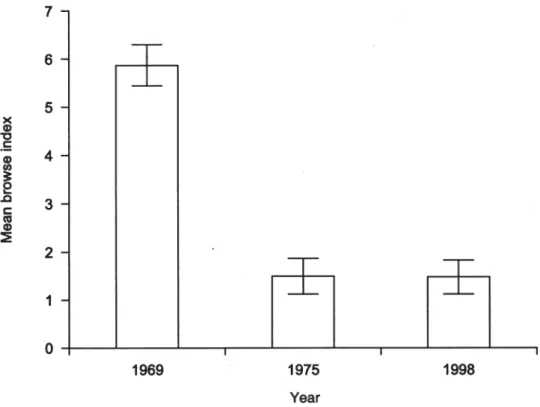
• A graph may misrepresent data, for example by plotting regularly spaced bars for irregular data intervals (Fig. 1).
• A line may suggest interpolation between data points where none applies. • It can be hard to read off exact numeric values, especially if badly chosen
axis scales are used. If exact numeric values are required, a table is best. Therefore, it is important to understand how to make the best of graphs. Note that it may not be necessary to display all available data in your graph. The key requirement is that the graph honestly and accurately represents the data you collected or want to discuss.
Figure 1. This simple bar graph misrepresents data by visually suggesting an equal interval between sampling dates: 6 and 23 years, respectively. The meaning of the error bars (standard error? 95% confidence interval?) was not explained in the accompanying caption, although it was in its source. The data are much more effectively and efficiently given in a tiny table (as shown to the left), or simply by the following sentence: ‘The mean browse index (± SEM) was 6 (± 0.5) in 1969, 1.5 (± 0.4) in 1975, and 1.5 (± 0.4) in 1998’.
Original caption: Mean browse index on plots in the Murchison Mountains over the last 30 years ([from] Burrows et al. 1999).
YEAR INDEX (± SEM) 1969 6 ± 0.5 1975 1.5 ± 0.4 1998 1.5 ± 0.4
8 Kelly et al.—Publishing science graphs
1 . 3
T Y P E S O F D A T A
Graphs are used to plot data, so it is useful to look at types of data first. There are two main types of variables: categorical / qualitative and numeric / quantitative.
Within these types are sub-categories that run along something of a continuum. Categories can be pure and unordered, e.g. species present at a sample site; complementary, e.g. male / female; or they can be in an ordered sequence, e.g. chick / juvenile / adult.
By contrast, numbers can have continuous values (e.g. for height or time) or discrete values (such as counts).
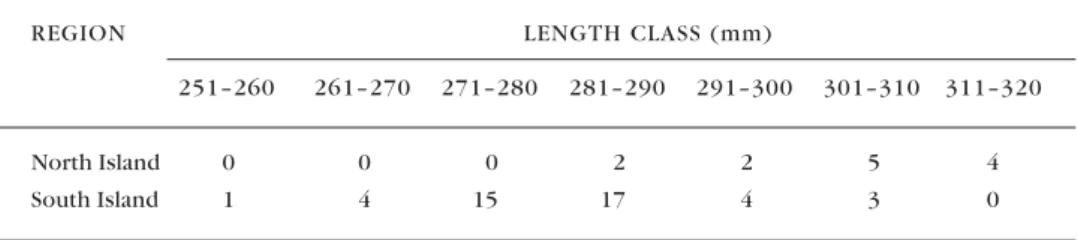
Quantitative variables can be grouped into categories, with some loss of information, but the reverse process is not generally possible. Table 1 illustrates this principle for the following dataset:
North Island: 284, 287, 296, 300, 302, 302, 304, 310, 310, 313, 315, 317, 319 South Island: 251, 264, 265, 265, 270, 271, 273, 273, 274, 275, 276, 276, 277, 277, 278, 279, 279, 280, 280, 280, 281, 282, 282, 283, 284, 284, 284, 284, 285, 285, 285, 285, 285, 287, 289, 289, 289, 291, 291, 292, 293, 301, 302, 304
REGION LENGTH CLASS (mm)
251–260 261–270 271–280 281–290 291–300 301–310 311–320
North Island 0 0 0 2 2 5 4
South Island 1 4 15 17 4 3 0
T A B L E 1 . T H E A B O V E D A T A S E T G R O U P E D B Y L E N G T H C L A S S .
1 . 4
G R A P H S V E R S U S T A B L E S
The first decision to be made when presenting numeric data is when to use a graph and when to use a table. A table is an array of regularly spaced numerals or words. Again there is a continuum, which we can split into three types: • Sentences listing a few numbers in the text (best for 1–5 numbers, where all
are values of the same variable; e.g. as in the caption to Fig. 1).
• Text-tables, i.e. indented text lines (3–8 numbers, for one or two variables; often shown as a list of bulleted points such as this one).
• A full table that can cope with 5–100 numbers (see previous paragraph). Tabling over 100 items or so becomes unwieldy; if the items need to be included, it may be best to put them in an appendix.
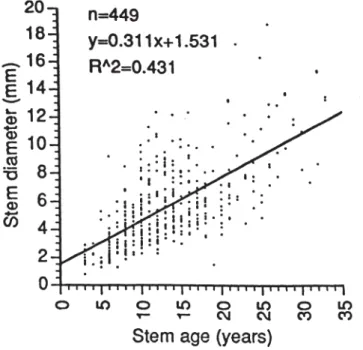
Figure 1 illustrates the mistake of graphing simple data where presenting data in a table or as a sentence would have been much better. By contrast, a well-planned graph can, at a glance, give insight into many hundreds or thousands of bits of information (Fig. 2).
Graphs and tables have different uses. In an oral presentation you would usually emphasise graphs, which get the main idea across more rapidly. In a thesis or research report, the detail, precision and archival value of tables may be more important. In a published paper, a mix of both will be used for different sets of data. It is considered bad practice to present the same data in two modes unless a very good reason warrants using the extra space. One instance where both may be justified is when highlighting a difference between the two modes of presentation (Fig. 1). In addition, occasionally it is advisable to have a graph in the main text showing the key points, and a full detailed table in an appendix giving the exact values for archival purposes.
1 . 5
H I S T O R Y O F G R A P H S
Have graphs always existed in scientific works? The answer is no. Despite a wealth of classic literature describing the world around us, graphs of abstract empirical data were rarely published or non-existent before the 18th century (Tufte 1983). The diagrams that did exist represented physical space—maps, or maps of the heavens (Fig. 3).
By the late 1700s, with the rise of industry and trade, large quantities of economic and social data were accumulating that needed to be studied. Some of the earliest known data graphs were those of William Playfair (Fig. 4). This represented a huge intellectual leap—the representation of abstract numbers in physical dimensions, taking advantage of humans’ highly developed visual processing abilities.
Figure 2. This graph summarises 449 data points. When drawing a regression line, it is best to show also the data points on which the regression is based (see section 4.7.2). Note that the graph could have been improved by having fewer ticks on the
x-axis, the x-axis values reading horizontally, and it may have been appropriate to constrain the line to go through the origin. Original caption: Simple regressions between stem age[, stem length,] and stem diameter of heather sampled in 64 plots on the north-western ringplain of Tongariro National Park.
10 Kelly et al.—Publishing science graphs
Figure 3. Illustration of planetary orbits, c. 950. This is the earliest known attempt to show changing values graphically.
1 . 6
T H E W A Y F O R W A R D
The biggest development in the last 30–40 years has been the advent of computing, which allows both the storage of vast amounts of data, and the easy creation and modification of graphs—both good and, all too often, bad. The present publication aims to help you to produce good graphs, and to avoid falling into common traps. This guide outlines some key principles derived from two excellent books: William Cleveland’s ‘The Elements of Graphing Data’ (1994, 2nd edition) and Edward Tufte’s ‘The Visual Display of Quantitative Information’ (1983). Either makes a very good read. The latter is an entertaining work, beautifully laid out in colour, and in a coffee-table format. Another excellent brief guide is ‘Editing Science Graphs’ published by the Council of Biology Editors (Peterson 1999), and the website ‘The Best and Worst of Statistical Graphics’ (www.math.yorku.ca/SCS/Gallery/, viewed 23 March 2005) is also useful. A new book ‘Creating More Effective Graphs’ (Robbins 2005) provides a very readable guide to creating graphs based on the principles laid out by Cleveland (1994) and Tufte (1983).
The present text is based on a lecture handout from the University of Canterbury (DK), DOC Science Publishing editorial guidelines (JJ), and material prepared for a series of Graphs workshops in DOC (IW and JJ).
We include appendices that will help you to create publication-quality graphs by manipulating some of the awkward default settings of Microsoft Excel (2002 version) and by using the S-PLUS programming language. Both programs are available on the computer network of the New Zealand Department of Conservation.
2. Principles of graphing
Before even planning a graph of your data, you need to consider several general points. Some of these are derived directly from psychological principles, but most are plain common sense.
2 . 1
A S S U M P T I O N S A B O U T Y O U R T A R G E T
A U D I E N C E
Assume your audience is intelligent. Expect, in particular, that they will read and understand axis labels: hence there is no need to always have zero marked on each axis if the data all span a short range a long way from zero. However, don’t overestimate your audience either: what may be a patently obvious relationship in your graph may need careful explanation in the caption (more about captions in section 4).
If the graph is to be published, assume that it will be reproduced at the smallest possible size to convey its information. This limits your choice of detail, font
12 Kelly et al.—Publishing science graphs
size, line weights, etc. (See section 4 for more on such graphical elements.) For oral presentations, assume that your audience may have difficulty reading and understanding lots of small print or complex data (section 6).
2 . 2
W E R E C O M M E N D : C L E A R V I S I O N , N O C O L O U R
A T F I R S T
Our recommendations for creating clear graphs are:
• Make the data stand out. It is the most important part of the graph. Anything that distracts from data is undesirable.
• Use clearly visible symbols, which are more noticeable than any other text on the graph, such as axis labels.
• Reduce clutter on the graph. For example, use relatively few tick marks: 4– 6 per axis is usually sufficient.
• Labels on the graph should be clearly offset from the data or even outside the axes, to ensure that they are not confused with the data; appropriate abbreviations can help to keep labels short.
• Keep notes and explanations outside the data region where possible. • Overlapping symbols or lines must be visually separable.
• Allow for reduction and reproduction, since most printed graphs will be reduced and photocopied at some stage: sometimes through several generations! If you can reduce a graph to 0.71 twice (i.e. reduce by 50%) and it is still readable, it will suit most presentation purposes.
• Try to design your graph without the use of colour. If it reproduces well in black and white it will be able to be reproduced in any medium. For example, while a colour graph may look impressive on a web page, pdf files are likely to be printed to a monochrome printer, or photocopied, which may result in lost detail. In some situations, you may add colour to your graph later for emphasis (e.g. for an oral presentation).
2 . 3
P E R C E P T I O N A N D A C C U R A C Y
There are several features of human perception that affect the relative accuracy with which different graph types can be read. Ignoring these principles may lead to incorrect perception and incorrect decoding of the data by the end user. 2.3.1 Weber’s Law
According to Weber’s Law, the probability that an observer can detect an increment of a certain size in a line depends on the percentage increase of the increment, not its absolute size (Cleveland 1993). Figure 5 illustrates the principle.
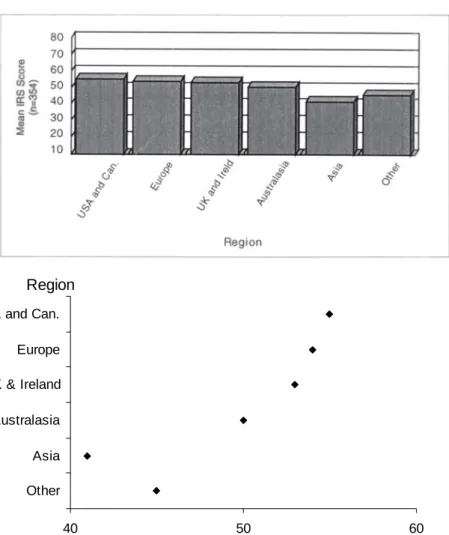
Therefore, based on Weber’s law, you should arrange graphs to show data with the largest relative changes possible. That means you can leave zero off the axis scale unless the numbers are close to it: see Fig. 6.
Figure 5A. Can you tell the difference in length between: 1. The black parts of both bars? 2. The white parts? Weber’s law predicts that it is much easier to tell the difference between the white areas because their percentage difference is bigger—even though both the black and the white pairs differ by the same absolute value.
Figure 5B. Adding a reference axis to Fig. 5A allows the comparison of each bar with the tick marks. Instead of trying to compare the lengths of whole black bars directly, you can compare smaller segments of the bars against the tick-mark segments.
40 50 60
USA and Can. Europe UK & Ireland Australasia Asia Other Region
Mean IRS score
Figure 6. Mean scores for individual responsibility by region, from a survey regarding hazard warning signs of visitors to Franz Josef and Fox Glaciers: original (A) and regraphed (B). The differences in bar lengths in the original are difficult to distinguish, made all the more difficult by false 3-dimensional representation. Values in the original dataset were between 11 and 77, so the axes, and the length of the bars, are slightly misleading. The new version below highlights the relative values for the different groups and gives a much tidier appearance by using horizontal, not oblique type. See Box 2, section 3.6.1 for guidelines on how to change the graph. Original caption for A: Mean scores for individual responsibility by region. B A A B 0 5 10 15 20 25 A B
14 Kelly et al.—Publishing science graphs
2.3.2 Stevens’ Law
Our perceptions of shapes and sizes are not always accurate, and our brains can be misled by certain features. Psychologists have found a general relationship between the perceived magnitude of a stimulus and how it relates to the actual magnitude (Stevens 1957).
Stevens’ empirical law states that P(x) = Cxa, where x is the actual magnitude of
the stimulus, P(x) is the perceived magnitude, and C is a constant of proportionality. Note the power relationship between magnitude and perceived magnitude, with the value of this power (a) varying with the task: for length, a is usually in the range 0.9–1.1; for area, a is usually 0.6–0.9; and for volume, a is usually 0.5–0.8. So, lengths are typically judged more accurately than either area or volume (the latter being judged least accurately).
Aspects of perception other than length, area and volume are also biased.
Angles: We tend to underestimate acute (sharp) angles and overestimate obtuse (wide) angles.
Slopes: Our eyes are affected by the angle of the line to the horizontal rather than its slope. (Slope or gradient is the vertical rise per unit of horizontal distance.) If asked to estimate relative slopes, we usually judge the ratio of the angles, meaning that slope is judged with considerable distortion. For example, a slope or gradient of 1 is equivalent to an angle of 45° (y = 1x) but a gradient of 4 has an angle of 76° (y = 4x). Hence, the slope increased fourfold, while the angle increased by only 69%.
2.3.3 Cleveland’s accuracy of decoding
Graphs communicate quantities best if they use the methods of presentation that people perceive most accurately, and which allow the viewer to assess the relationships between the values represented without distortion.
Cleveland & McGill (1985) provide a hierarchy of features that promote accuracy of decoding:
1st (best) Position on a common scale / axis
2nd Position on identical non-aligned scales / axes
3rd Length 4th equal Angle Slope 6th Area 7th equal Volume Density Colour saturation 10th (worst) Colour hue
For example, the same data may be much more readily interpreted as position on a single scale than as angles in a pie diagram. This is one reason why pie diagrams are best avoided (see section 3.1).
In honest illustrations, you also need to avoid distortion, i.e. when visual representation is not equal to the actual numeric representations. The most common graphical distortion is using area or volume to show change in length (Fig. 7).
This leads to another rule: do not use more dimensions in the graphical representation than are present in the data. If a series, for example level of funding, is one-dimensional (1D) then it should not be shown as area (two-dimensional, 2D) on a graph. By contrast, data on leaf areas (2D) should be represented in one dimension if total area is of key interest, or by showing the length and breadth on separate axes if they are of separate interest. Volume data (three-dimensional, 3D) could be shown as volume, area or length—in the last instance, possibly on a logarithmic scale (but the caveats above about biased estimation of areas and volumes compared to length apply here too).
The rules of visual perception apply primarily to representing quantitative
data. These data should be represented by methods with high perceptual decoding accuracy. Qualitative measures, which do not require quantitative decoding, can be represented using methods that are lower in the accuracy hierarchy, like shading, or non-quantitative representations, such as symbol shape or line type.
Box 1 illustrates an exercise in the DOC Graphs workshop series (held in 2003) in which participants were asked to rank the best ways of representing data. Although some personal preferences showed up in the middle section, rankings of the extremes were quite clear-cut. Also illustrated here is how the exercise was analysed using box plots (discussed in section 3.4).
Figure 7. Although DOC receives more than half ($125 million) of the Biodiversity funding spent by Government (c. $200 million), it appears much less on the graph by representing the linear dollar variable as a triangle (decoded as area: 2-dimensional) or even as a mountain (decoded as volume of cone: 3-dimensional). Original caption: Department funding as a proportion of Government spending.
16 Kelly et al.—Publishing science graphs Position on identical non-aligned scales 0 50 1 0 50 2 0 50 3 0 50 4 0 50 5 1 2 3 4 5 0 50 Position on a common scale 1 2 3 4 5 0 50 Length Angle 1 2 3 4 5 Slope 1 2 3 4 5 Area 1 2 3 4 5 1 2 3 4 5
Grey-scale List the seven graphs by how
easy it is to estimate the SIZE of the number represented 1 is easiest, 7 hardest 1 2 3 4 5 6 7
Box 1: DOC Graphs Workshop exercise
As an exercise, participants carried out an informal assessment of Cleveland’s recommended order of accuracy in graphical perception (Cleveland & McGill 1985), during a series of workshops in DOC in 2003. Colour and volume were excluded as too difficult to reproduce readily. An example of the exercise given out at the workshops is shown in the composite figure below, although the format varied between workshops. Participants, in groups of 2 to 4, were asked to order the seven graph types by how easy it was to estimate the size of the numbers represented. The results of the average ranking at each workshop are shown opposite.
Example of the exercise given, with varying formats, at a series of graph workshops in DOC in 2003. The seven graph panels are ordered from top right across, and then down, in the order advocated by Cleveland (Cleveland & McGill 1985). The bottom right panel gives instructions on ranking to participants. All panels attempt to represent, in order, the values 20, 10, 40, 30, 50.
Box-and-whisker plot of participants’ preferences from the visual perception exercise in the figure opposite. The graph types are listed in order of decreasing accuracy of decoding according to Cleveland & McGill (1985). Each box shows the upper and lower quartile, the central bar represents the median (midpoint), while the whiskers show the minimum and maximum for each category. The ranks displayed are the average for that type of graph at each of 11 DOC workshops on ‘Using Graphs to Analyse and Present Data’, held in April to July 2003.
Box 1—continued
This exercise worked well as a teaching tool about ways of representing quantitative data. However, the results are limited by the lack of scale for comparison except in the first three panels, although participants at most workshops were advised that each panel attempted to represent the same set of numbers. Further, it is important to note that the exercise assesses the respondents’ perceptions of how easy it to estimate size of the number represented, rather than directly the accuracy of estimation.
The key outcome of the test was that position on a common scale was universally ranked the highest at each workshop. The consistency in this ranking was very clear—and underlines the importance of using position on a common scale as the preferred method for representing quantitative variables. The participants’ rankings generally followed Cleveland’s ranking, but with some discrepancies, which may be due to the limitations of the exercise.