c
SECURITY THREATS TO ANDROID APPS
BY DONGJING HE
THESIS
Submitted in partial fulfillment of the requirements for the degree of Master of Science in Computer Science
in the Graduate College of the
University of Illinois at Urbana-Champaign, 2014
Urbana, Illinois Advisers:
Professor Carl A. Gunter Professor Klara Nahrstedt
ABSTRACT
Smartphones have become ubiquitous and smartphone users are increasingly relying on the mobile applications (app for short) to store and handle private information. The fluidity of mobile apps and mobile app markets has com-plicated mobile app security. Many new threats emerged are either because of the deficiency of mobile app development or the design ambiguities of the Android operating system.
In order to seek a better understanding of mobile app security, we present a systematic study on security threats to Android apps in two dimensions. First, we study Android apps from mobile health (mHealth for short) sector, in order to understand the prevalence of mobile app threats to that sector. In particular, we present a three-stage study of the mHealth apps to show that mHealth apps make widespread use of unsecured Internet communications and third party servers. Assuming that mobile apps are well protected by their developers, we ask a second question: are there any limitations in fundamental Android security design that can be used by malicious parties to disclose users’ sensitive information? We study a newly discovered threat, side-channel information leaks on Android devices, in detail. Particularly, we discover an unexpected channel of information leaks from per-app data-usage statistics and demonstrate that a malicious app can infer users’ identity or investment information with zero-permission by monitoring the channel. To mitigate these threats, we propose defense strategies for both widespread threats on mHealth apps and the side-channel information leaks on Android devices.
ACKNOWLEDGMENTS
First and foremost, I would like to express my special appreciation to my advisers Professor Carl A. Gunter and Professor Klara Nahrstedt, who have been offering tremendous helps to me. The extreme kindness, valuable oppor-tunities and learning experiences they have given me are deeply appreciated. Only under their guidance, I had the opportunity to be introduced to the current challenges in mHealth security and privacy which further motivated me to work in this field.
I am also grateful to Soteris Demtrious, Muhammud Naveed from the University of Illinois at Urbana-Champaign, Professor Xiaofeng Wang, Xi-aoyong Zhou and Rui Wang from the Indiana University Bloomington for being wonderful collaborators. I cherish the opportunity to learn from them and gain deeper insights into Android security during our weekly discussions and project meetings.
I deeply appreciate the friendship and the support from the two research groups I have worked with. I enjoy all the conversations I had with my lab-mates in the Multimedia Operating System and Networking Group, including Debish Fesehaye, Haiming Jin, Zhenhuan Gao, Hongyang Li, Shannon Chen, Ting-yu Wang, Wenyu Ren, Rauol Rivas, Ahsan Arefin, Rehana Tabassum, Phuong V. Nguyen, Zixia Huang, Anjali Sridhar, as well as labmates in the Illinois Security Lab, including Soteris Demetrious, Muhammud Naveed, Xun(Sean) Lu, Ting Wu, Se Eun Oh, Gaurav Lahoti, Siddharth Gupta, Vincent Bindschaedler, Ravinder Shankesi, Ji Young Chun, Lingyu Xu and Aston Zhang, and the deputy director from SHARPS, Antonios Michalos.
Above all, I would also like to thank my parents, who have always been supportive and caring. I appreciate Liang Xia, for his encouragements, un-derstandings, patience, and support during my research. Without their firm love and support, especially at those difficult moments, I would not have successfully made so far.
TABLE OF CONTENTS
LIST OF TABLES . . . vii
LIST OF FIGURES . . . viii
CHAPTER 1 INTRODUCTION . . . 1 1.1 Overview . . . 1 1.2 Problem Statement . . . 2 1.3 Our Approach . . . 3 1.4 Main Contributions . . . 5 1.5 Outline . . . 6 CHAPTER 2 BACKGROUND . . . 8
2.1 Android Operating System . . . 8
2.2 Android Security . . . 10
CHAPTER 3 PREVALENCE OF SECURITY CONCERNS IN ANDROID MHEALTH APPS . . . 12
3.1 Related Work . . . 12
3.2 Methodology . . . 14
3.3 Study 1: What are the Potential Attack Surfaces? . . . 18
3.4 Study 2: How Widespread is the Threat? . . . 21
3.5 Study 3: How Serious is the Threat? . . . 25
CHAPTER 4 SIDE-CHANNEL THREATS AGAINST ANDROID APPS . . . 28
4.1 Related Work . . . 28
4.2 Mechanism . . . 29
4.3 Identity Inference . . . 36
4.4 Investment Inference . . . 40
CHAPTER 5 MITIGATION TECHNIQUES . . . 42
5.1 Strategies for Side-channel Information Leakage . . . 42
CHAPTER 6 DISCUSSION . . . 48
6.1 Summary of Findings . . . 48
6.2 Limitations . . . 49
CHAPTER 7 CONCLUSION . . . 51
LIST OF TABLES
3.1 Description of attack surfaces . . . 15 3.2 Classification of popular free mHealth apps on Google Play . . 17 4.1 Performance overhead of the monitor tool: there the
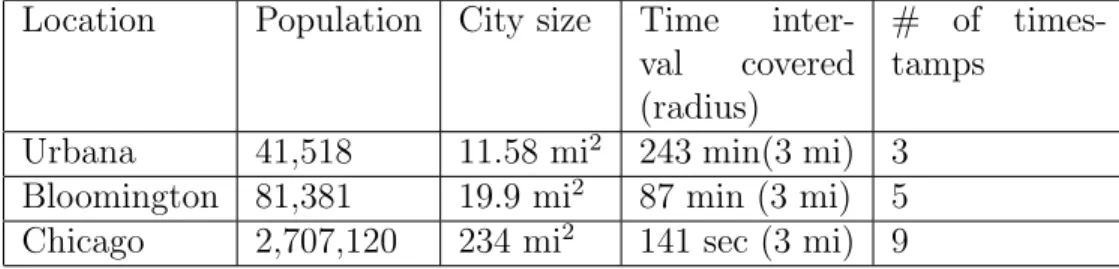
base-line is measured by AnTuTu [1] . . . 35 4.2 City information and Twitter identity exploitation . . . 39
LIST OF FIGURES
3.1 App selection flow graph for Study 2 . . . 16
3.2 App selection flow graph for Study 3 . . . 18
3.3 Network traffic from Doctor Online containing sensitive in-formation . . . 20
3.4 Log messages from CVS/pharmacy containing sensitive in-formation . . . 20
3.5 Access Noom Weight Loss Coach’s user workout history using Drozer . . . 21
3.6 Sensitive information distribution in the 22-app dataset for Study 3 . . . 26
4.1 Monitor tool precision . . . 35
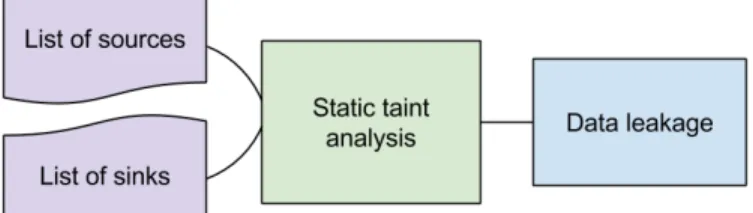
5.1 Data leakage detection with static analysis . . . 45
CHAPTER 1
INTRODUCTION
With the growing popularity of Android operating system, an enormous num-ber of Android apps has been developed in recent years. As smartphones are becoming a ubiquitous source of private and sensitive personal information, the quality of the booming apps can be a concern. Poorly programmed An-droid apps may contain information leakage that undermines mobile users’ privacy and security. In this chapter, section 1.1 gives an overview of the phenomenal trend of Android mobile system. Along with this trend, secu-rity concerns are also expressed and their relevant research studies regarding Android app security are listed in section 1.1. Section 1.2 refines the initial motivation and focuses our research questions on specific components in An-droid app security. Section 1.3 presents the approach to address the problem in two different directions as elaborated in sections 1.3.1 and 1.3.2. The main contributions of this master thesis are summarized in section 1.4. Section 1.5 gives the organization of this master thesis.
1.1
Overview
Today’s smartphones have as much computing resources and power as a high end computer only a few years ago and smartphones are becoming more and more popular these years. Current mobile operating system, such as Android, has gained tremendous popularity these years, with 81.4% market share in the mobile operating system market share [2] and more than one billion device activations [3]. Android allows users to run various apps developed by many independent developers downloaded from app markets, and more than one million apps are available on official Android app market, Google Play [4]. Unlike most of the PC apps, Android apps collect, process and store personal sensitive information, which may undermine users’ security and privacy.
Indeed, in recent years, we have seen waves of Android-based malware [5, 6] that exploit different vulnerabilities within this new computing plat-form, highlighting the security and privacy threats it is facing. Furthermore, Android’s security protection has been under scrutiny for years. A few weak-nesses of the system, such as permission re-delegation [7] and capability leaks [8], are revealed by researchers. Particularly, a recent blog [9] from Leviathan Security Group describes the malicious activities that could be performed by an app without any permissions, including reading from SD card, accessing a list of installed apps, getting some device and system information (GSM and SIM vendor ID, the Android ID and kernel version) and pinging through a Linux Shell. Most of the problems reported here are either implementation weaknesses or design ambiguities that lead developers to inadvertent expo-sures. Examples include SD card read and unauthorized ping, which have all been fixed. The rest turns out to be less of a concern, as they are al-most impossible to exploit in practice (GSM/SIM/Android ID, which leads to nothing more than mobile country code and mobile network code).
1.2
Problem Statement
Compared with the phenomenal progress in Android operating system and the apps on its platform, the ways Android devices are being used today are even more stunning. Increasingly, Android smartphones become primary devices not only for traditional phone calling, but for email checking, mes-saging, mapping/navigation, entertainment, social networking and even for activities as important as healthcare and investment management. The vast array of Android apps enables mobile users to store sensitive private infor-mation on their smartphones. As a large amount of new Android apps are constantly submitted to app markets and become instantly available to users, we believe Android device has become an increasingly attractive target for security attacks, which calls for several specific questions:
1. What are the most widespread and serious security concerns existing among Android apps?
2. Are the original security designs of smartphone systems, like Android, ready for those highly diverse, fast-evolving apps?
3. Given the findings of limitations in Android security design, what kind of vulnerabilities can be explored by malicious parties if they want to pilfer users’ secrets?
4. How is it possible to protect mobile phone users against security threats such as information leakage on the Android apps?
1.3
Our Approach
To answer the first question, we will choose a specific sector of Android apps, for example, mHealth, which usually contains highly sensitive information. By studying the Android apps in mHealth sector, we try to answer what the most widespread security concerns are and the approach is illustrated in section 1.3.1. After understanding what the widespread threats are, we are further asking if any loopholes exist in fundamental security designs of Android. If so, we want to further explore the possibility to pilfer users’ sensitive information with the finding of the security loopholes. We illustrate the approach to address the second and third questions in section 1.3.2. A fourth question naturally comes into our mind after exploring enough security threats on Android apps: how can we mitigate these threats? Two different mitigation techniques are to be proposed for the purpose of the above two distinct directions: one is for general security threats on Android, and another one is for a specific threat based on the finding of security loopholes on Android.
1.3.1
Study on Security Threats in mHealth
Advanced techniques based on mobile computing and communications tech-nology significantly improve health care quality and efficiency. Mobile devices greatly enable individuals and their hospital staffs to better monitor their health and deliver health care services. However, implementing these mo-bile health (mHealth) technologies brings up certain privacy concerns about users’ sensitive health care data. The proliferation of mHealth applications results in greater chance that applications are not being carefully examined in terms of privacy protection.
In our study, we choose mHealth sector as our study target, since new se-curity and privacy risks particular to mobile computing and communications technology abound in mHealth apps [10, 11] and the data from mHealth apps is particularly private and sensitive to mobile users. Furthermore, the aspects of mHealth make it different from other health information systems: First, mHealth apps allow a much larger amount of data being collected from the patient, as mobile devices can collect data over extended periods of time. Second, a much broader range of health-related data is being collected, as many mHealth apps collect patient activities and lifestyle, not only phys-iological data, but also include physical activity, location tracking, eating habits and diet details, social interactions and so on. Third, the nature of communications technology and mobile computing exposes many new attack surfaces to the outside world.
To answer what the most widespread and serious security concerns are among Android mHealth apps, we conduct our study with a narrow-down methodology: firstly, we prepare a list of attack surfaces by researching liter-ature and observing a large dataset of randomly sampled apps; second, from the above list, we study each one attack surface and find whether indeed the threat exists extensively in a small dataset; lastly, after locating the threats that are widespread in Android mHealth apps, we further explore how se-rious the threats can be by surveying a small dataset of randomly sampled apps. The study on security concerns of Android mHealth apps is elaborated in chapter 3.
1.3.2
Study Side Channel Threats against Android Apps
Actually, the design of Android takes security seriously. It is built upon a sandbox and permission model, in which each app is isolated from others by Linux user-based protection and required to explicitly ask for permissions to access the resources outside its sandbox before it can be installed on a phone. Compared with what security models are provided by conventional desktop-oriented OSes, even Linux on which Android is built, this security design looks pretty solid.
In our research, we are asking a different question: assuming that Android’s security design has been faithfully implemented and apps are well protected by
their developers, what can a malicious app still learn about the user’s private information without any permission at all? For such a zero-permission app, all it can access are a set of seemingly harmless resources shared across users (i.e., apps), which are made publicly available by Android and its underlying Linux, for the purpose of facilitating coordination among apps and simplify-ing access control. However, the rapidly-evolvsimplify-ing designs and functionalities of emerging apps, particularly their rich and diverse background informa-tion (e.g. social network, public online services, etc.), begin to invalidate such design assumptions, turning thought-to-be innocuous data into serious information leaks.
In chapter 4, we explore the possibility of Android turning public resources into sources of side-channel information leaks. For example, network data usage of an app is deliberately published by Android through its Linux public directory, aiming to help a smartphone user keep track of the app’s mobile data consumption. In our research, we try to prove that this piece of ap-parently harmless and also useful data can actually be used to fingerprint a user’s certain online activity, such as tweeting. This knowledge, combined with the background information that comes with the Twitter app (i.e., pub-lic tweets), can be used to infer the user’s true identity, using an inference technique we developed as described in section 4.2 and 4.3. As another ex-ample, a user’s investment interests can be inferred by fingerprinting the network usage statistics as described in section 4.4.
1.4
Main Contributions
Some of the major contributions are as follows:
• Understanding major security issues in Android mHealth apps. Through our multi-stage study, it shows some serious problems with the Android mHealth apps. The major issue is unencrypted communication over the Internet and the use of third party hosting and storage services. Our study shows that a significant number of mHealth apps from Google Play market have these issues. Many Android app developers are not security experts and using encrypted communication is more expensive than using unencrypted communication. Third party cloud and hosting services provide a very economical solution but have serious
implica-tions to host the app’s services and store users’ sensitive data. We believe that these issues need immediate attentions from both vendors and users.
• Understanding of information leaks from Android public resources. Dif-ferent from prior research that mainly focuses on implementation flaws within Android, our study contributes to a better understanding of an understudied yet fundamental weakness in Android design: the in-formation leaks from the resources that are not originally considered to be confidential and therefore made available for improving system usability. This has been achieved through a suite of new inference tech-niques designed to demonstrate that highly-sensitive user data can be recovered from the public resources, in the presence of rich background information provided by popular apps and online resources.
• First step toward mitigating information leaks from Android public re-sources. We have designed a new mitigation approach, aiming to pre-serve the utility of such public data to the legitimate parties while controlling the way that an adversary can use it to derive user secrets. • Proposing strategies for security concerns of mHealth apps. To auto-matically detect data leaks in Android mHealth apps, we have proposed a static analysis framework for mHealth apps to detect any possible links between private data and leakage sinks. We also present general compliance recommendations for mHealth app vendors to minimize se-curity risks to mHealth users.
1.5
Outline
Chapter 2 gives thorough background information on the mHealth technol-ogy, Android operating system and its security mechanisms. Section 2.1 ex-plains various important concepts in the Android operating system such as four components, inter-component communication, and permissions. Section 2.2 explains Android security mechanisms.
Chapter 3 aims to understand the security threats to Android apps in a specific sector, mHealth. Section 3.1 introduces the related work. Section
3.2 explains the methods to build datasets for the three stages of the study respectively. Sections 3.3, 3.4 and 3.5 highlight the results for the three-stage study. Section 3.3 provides a classification of Android mHealth apps and forms a list of attack surfaces that need attention. Section 3.4 investigates the list of attack surfaces and forms a subset of the attack surfaces are the most widespread. Then section 3.5 study the problems that are the most serious in section 3.4 and concludes that Android mHealth apps make widespread use of unsecured Internet and third party servers.
Chapter 4 introduces a newly-discovered side channel attack on Android, which uses per-app data-usage statistics to cause information leaks. Section 4.1 illustrates the related work. Section 4.2 describes the techniques we use to infer private information from public resources on Android with zero permission. Section 4.3 and section 4.4 highlight two attack instances using the techniques described in section 4.2. Section 4.3 demonstrates an instance of inferring a mobile user’s identity with combined usage of Twitter app data-usage statistics and publicly accessible Twitter API. Section 4.4 introduces an example of knowing a mobile user’s investment interests by monitoring the data-usage statistics of Yahoo! Finance.
Chapter 5 discusses mitigation strategies for the security risks introduced in chapter 3 and 4. Section 5.1 introduces strategies and enforcement frame-work on Android to mitigate the side channel inference from public resources on Android. The methods introduced are round up or round down and aggre-gation of data usage statistics on Android. Section 5.2 proposes a static anal-ysis framework to mitigate general information leaks from Android mHealth apps and provides compliance recommendations for the threats that are the most widespread and serious as concluded in chapter 3.
Chapter 6 discusses the summary of findings of this master thesis in section 6.1 and the limitations for our study in section 6.2.
Chapter 7 concludes the entire master thesis with the highlights of our work and potential future scope of this work.
CHAPTER 2
BACKGROUND
This chapter gives background information of the Android operating system and its security mechanisms. Section 2.1 explains the fundamentals of the Android operating system. Section 2.2 introduces Android security mecha-nisms.
2.1
Android Operating System
Android is an operating system based on Linux for mobile devices. It provides a rich application framework to allow developers to build apps written in Java. The Android operating system is a multi-user system, in which each app has a unique user ID (UID). All files in an app will be assigned to that apps UID and normally not accessible to other apps. Every app runs in its own Linux process on a separate Dalvik Virtual Machine isolated from other apps, so that apps must explicitly share data and resources. In this way, Android implements the principle of least privilege. That is, no application, by default, will have the permission to perform operations to adversely impact the system, other applications, or the user.
App components are the essential building blocks of an Android app. There are four different types of components, of which each serves a distinct pur-pose.
• AnActivity component is a single screen with user interface, which can interact with the user via touchscreen or physical keyboard. An app commonly contains multiple Activities, one for each screen presented to the user. The Activities work together to form a cohesive user expe-rience, and each one is independent of the others. A different app can start any one of these Activities (if it is allowed), possibly expecting a
return value. Only one Activity at a time on the screen has input and processing focus.
• A Service component provides background long-running operations or performs work for remote processes that continues even after its appli-cation loses focus. A Service does not provide a user interface. Another component, such as an Activity, can start a Service or interact with it. In order to interact with other component, Services define arbitrary interfaces for Remote Procedure Call (RPC), including method execu-tion and callbacks, which can only be called if the Service has been bound.
• AContent Provider component manages a shared set of app data. The app data could be either private to the app itself or shared with other apps, if they have the proper permissions. You can store the data in many different places: in the file system, a SQLite database, on the web, or any other persistent storage location. The Content Provider supports the basic CRUD (create, retrieve, update, and delete) func-tions, through which components in other apps can retrieve or modify the data according to the Content Providers schema. The data in a Content Provider is addressed via a content URI.
• A Broadcast Receiver component is asynchronous event mailbox that responds to system-wide broadcast announcements represented by ac-tion strings. Android defines many standard acac-tion string correspond-ing to system events for example, the screen has turned off, the battery is low, or the system has booted. Developers can define their own ac-tion strings for example, to let other apps know that some data has been downloaded is available for them to use.
Android uses Intent for inter-component communication in many ways: to start an Activity, to start a Service, or to deliver a Broadcast message. There are two types of Intents: explicit intent and implicit intent. Explicit intents specify the component to start by name, whereas implicit intents do not name a specific component, but instead declare a general operation to perform. An intent filter is an expression of action strings, in order to specify what type of intents the component would like to receive. Android provides a permission mechanism to enforce restrictions of inter-component
communication and access to system resources. Per-URI permissions can be granted to specify ad hoc accesses to specific pieces of data. Permissions are requested per application at its installation time. Once installed, this security policy cannot change.
Each application includes a manifest file. The manifest file describes the component of the app, including their types and intent filters. Note that Broadcast Receiver can be dynamically created in runtime, in addition to being statically defined in the manifest file. The manifest file declares which permissions the app must have in order to access protected parts of the API and interact with other apps.
2.2
Android Security
2.2.1
Android Security Mechanisms
Android is designed and built based on the Linux and it seeks to provide additional security controls over: user data protection, system resources pro-tection (including the network) and application isolation. To provide these additional security controls, Android supports these key extra security fea-tures:
Security at the OS level through the Linux kernel. As described in section 2.1, Android is based on Linux and the Linux kernel provides several key security features to Android, including a user-based permission model, process isolation and secure IPC and so on.
Secure inter-process communication. Processes are able to commu-nicate using any of the standard UNIX-style mechanisms. Android also provides new inter-process communication (IPC for short) mechanisms, in-cluding Binder, sssServices, Intents and Content Providers. Binder is a lightweight remote procedure call mechanism designed for high-performance in-process and cross-process calls. Services can provide interfaces directly ac-cessible using Binder. The concepts of Intents and Content Providers have been discussed in section 2.1.
Android permission model. By default, an Android app can only ac-cess a limited range of system resources. The acac-cess to sensitive resources is protected via a security mechanisms known as Permissions. It provides
pro-tected APIs for the sensitive resources, includingcamera, location, Bluetooth, telephony, SMS/MMS and network. To make use of the protected APIs, an app must declare APIs’ associated permissions in a manifest file and the per-missions are agreed upon at installation time by users. Once granted, the permissions are applied to the app as long as it’s installed.
Application sandbox. All applications on Android run in an application sandbox. As described in section 2.1, the Android assigns UID to each An-droid app and runs it as an individual user in a separate process. The kernel enforces security between applications through standard Linux facilities, such as UID-based permissions and process isolation. The application sandbox is implemented in the kernel, this security model extends to native code and operating system apps. Since all Android applications are sandboxed at the OS level, memory corruption is not an issue in Android.
Application signing. Application signing allows developers to identify the author of the application and enables updating applications without using complicated interfaces and permissions. Application signing is the first step to ensure the application sandbox mechanism. It signs certificates to ensure which UID is associated with which app and different apps run under different UIDs. When an app is installed on an Android device, the system verifies that the app has been properly certified.
CHAPTER 3
PREVALENCE OF SECURITY CONCERNS
IN ANDROID MHEALTH APPS
In this chapter, we aim to provide a deeper understanding of the security threats to Android apps by studying apps from a specific sector, mHealth. Section 3.1 illustrates the related work of mHealth technology and its secu-rity and privacy issues. Section 3.2 explains the main methods to conduct a systematic study on the security threats to Android mHealth apps. Specif-ically, it elaborates the methods of how we collect apps as our dataset for the three-stage study. Sections 3.3, 3.4 and 3.5 elaborate the findings for the three-stage study. Section 3.3 formulates a list of attack surfaces that need attention in mHealth apps. Section 3.5 focuses on the attack surfaces that are proven by section 3.4 for having significant issues in most of the apps. By analyzing a new randomly selected dataset, section 3.5 shows that mHealth apps make widespread use of unsecured Internet communications and third party servers, suggesting that increased use of mHealth apps could lead to less secure treatment of health data unless mHealth vendors make improvements in the way they communication and store data.
3.1
Related Work
3.1.1
mHealth Technology
Advanced techniques based on mobile computing and communications tech-nology significantly improve health care quality, improve efficiency and re-duce costs. Mobile health (mHealth) apps and medical devices greatly enable individuals to better monitor and manage their health conditions. Mobile apps for clinicians improve the way in which hospital professions interact with their patients and deliver health care services.
re-ported that there were about 97,000 mHealth apps across 62 app stores [12]. According to a report from MarketsandMarkets, the global mHealth market is predicted to grow from $6.21 billion in revenue in 2013 to $23.49 billion by 2018 at a compound annual growth rate (CAGR for short) of 30.5 percent over the five-year-period from 2013 to 2018. The mobile fitness and well-ness market is expected to grow at a CAGR of 36.7 percent from 2013 to 2018 [13]. This rising mHealth market threatens changes in the way signif-icant amounts of health data will be managed, with a paradigm shift from mainframe systems located in the facilities of healthcare providers to apps on mobiles and storage in shared cloud services. This trend is paralleled by a new openness in which devices that were once only available in hospitals become widely available to individuals outside the hospitals. Furthermore, flexible mHealth applications tempt clinicians away from the hospital-based systems they used in the past. This popular market will disruptively chal-lenge traditional approaches by being cheap and accessible.
The proliferation of mHealth apps is radically changing the way healthcare services are delivered. In mHealth, mobile devices connected to portable or embedded medical sensors will enable long-term continuous medical or health monitoring for many purposes [14, 15, 16, 10]: for outpatients to monitor their chronic medical conditions, for individuals to increase physical activities and to change their eating habits, for athletes to track their training activities and performance, or for physicians to remotely monitor their patients’ health conditions and to respond to emergencies in a timely manner.
3.1.2
Security and Privacy of mHealth
Despite the great potential and benefits that mHealth creates, new security and privacy risks abound in mHealth apps [10, 17, 18]. Security and pri-vacy of health data could be significantly affected by the mHealth trend. Freed from the bonds of HIPAA, mHealth apps are free to handle data using lower assurances than those typically applied to HIPAA entities. However, the data they handle is often as sensitive as the data handled by HIPAA entities. Typical Google Play apps such as Self-help Anxiety Management, iCardio, Epocrates CME, and Clinical Advisor provide assurance with men-tal health concerns, activity monitoring, and information services that reveal
user interests in particular symptoms or diseases. To exercise enforcement discretion on the emerging mHealth market, the Food and Drug Administra-tion (FDA for short) issued guidelines for mobile medical applications [19] in September 2013, intending to apply its regulatory oversight to ”mobile medi-cal applications”. Section III.C of the FDA guidance defines ”mobile medimedi-cal applications” as those”to be used as accessories to regulated medical devices or to transform into a regulated medical devices”. The FDA only regulates a small subset of mHealth apps that connect to and act as an extension of medical devices, and mobile apps that transform mobile platforms into reg-ulated medical devices, such as an app that turns a mobile device into an electrocardiography (ECG) machine. It doesn’t regulate mHealth apps in a broader range. Based on the incompleteness of FDA regulatory scopes, it is important to develop guidelines for the security and privacy of mHealth apps that suit a dynamic market while assuring that the growth of mHealth does not lead to a cavalier vendor attitude toward personal data.
3.2
Methodology
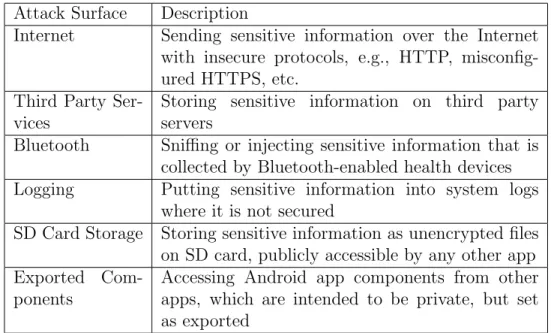
We carry out a three-stage study of the security and privacy status of free mHealth apps offered on Google Play. In the first study we classify the top 160 free mHealth apps in Google Play and examine them to formulate a list of six attack surfaces that need attention in mHealth apps. These are shown in Table 3.1. We then select a random sample of 27 apps from the top 1080 apps and analyze them with respect to these six attack surfaces. We find significant issues with three attack surfaces: Internet, Logging, and Third Party Services. The concerns we find with Logging will be addressed to a significant degree by the deployment of a version of Android, which is elabo-rated in section 6.2, so we focus our attention on the other two. We develop a random sample of additional 22 apps that involve Internet communications, analyze these 22 apps, and find a significant number of risks to security and privacy based on these two attack surfaces. Our primary conclusions are that the mHealth apps in Google Play commonly send sensitive data in clear text and store them on third party servers whose confidentiality rules may not be as strong as they need to be for the type of data being stored.
Table 3.1: Description of attack surfaces Attack Surface Description
Internet Sending sensitive information over the Internet with insecure protocols, e.g., HTTP, misconfig-ured HTTPS, etc.
Third Party Ser-vices
Storing sensitive information on third party servers
Bluetooth Sniffing or injecting sensitive information that is collected by Bluetooth-enabled health devices Logging Putting sensitive information into system logs
where it is not secured
SD Card Storage Storing sensitive information as unencrypted files on SD card, publicly accessible by any other app Exported
Com-ponents
Accessing Android app components from other apps, which are intended to be private, but set as exported
apps by answering the following three questions:
1. What are the potential attack surfaces for Android mHealth apps? 2. How widespread is the threat?
3. How serious is the threat?
In the first study, in order to understand what the potential attack surfaces are, we identify a total number of 160 apps by selecting the top 80 free apps in Health & Fitness category and another top 80 free apps in Medical category on Google Play. To get a sense of the context of Android mHealth apps and formulate a list of attack surfaces that need attention, we divide the 160 apps into two groups with regard to their target users and classify them into eight categories by their functionalities. By reviewing research papers [20, 21] and online documents [22, 23], and analyzing the problems we found directly in these 160 mHealth apps, we develop the following six attack surfaces that represent the primary areas needing protections: Internet, third party services, Bluetooth, logging, SD card storage, andexported components. After identifying the attack surfaces in Study 1, in Study 2, we aim to learn how widespread attack surfaces are. We choose the top 1080 free apps from the Medical and Health & Fitness categories on Google Play, 540 from
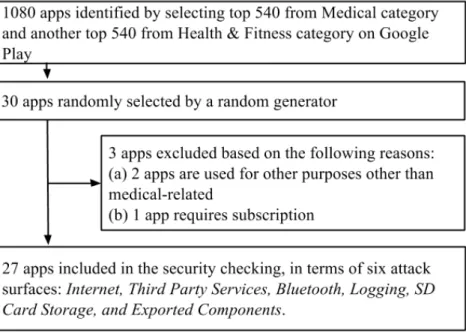
each. By using a random number generator without replacement, we select 27 apps as our dataset for Study 2. Of the 27 apps we have selected, we analyze them one by one in details regarding to the six attack surfaces we have identified in Study 1. As a result, three attack surfaces are identified as important ones: Internet, third party storage and logging, because the majority of the 27 apps suffer from the problems. Figure 3.1 shows how we include and exclude apps for the app selection process in Study 2.
Figure 3.1: App selection flow graph for Study 2
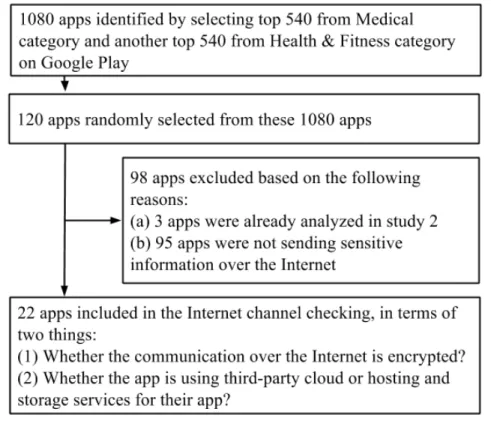
For Study 3, we want to have a deeper understanding of how serious the threat is with regarding to the most common attack surfaces we have identi-fied in Study 2. The app selection process here is similar to that of Study 2. We randomly select 120 apps from the top 1080 free mHealth apps on Google Play and exclude the apps that have already been studied in Study 2 and also exclude those are not sending sensitive information over the Internet. Then we analyze the included 22 apps in detail to understand how serious the threat is. Figure 3.2 shows how we include and exclude apps for the app selection process in Study 3.
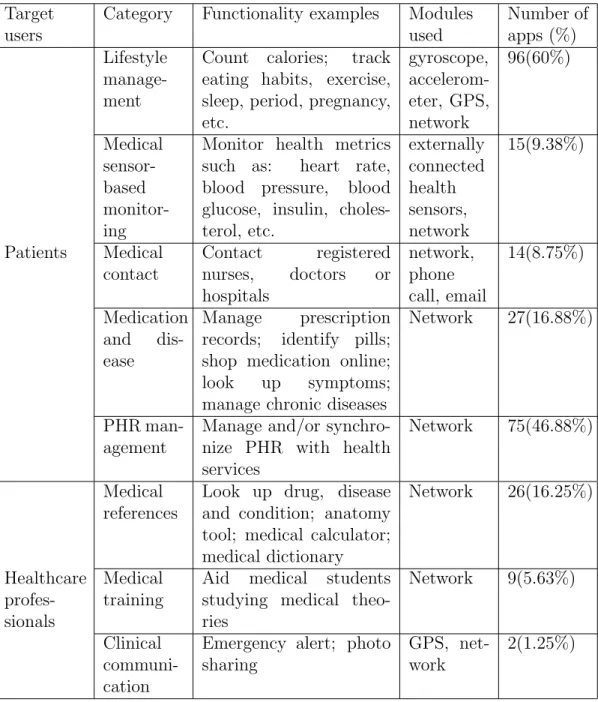
Table 3.2: Classification of popular free mHealth apps on Google Play Target
users
Category Functionality examples Modules used Number of apps (%) Lifestyle manage-ment
Count calories; track eating habits, exercise, sleep, period, pregnancy, etc. gyroscope, accelerom-eter, GPS, network 96(60%) Medical sensor-based monitor-ing
Monitor health metrics such as: heart rate, blood pressure, blood glucose, insulin, choles-terol, etc. externally connected health sensors, network 15(9.38%) Patients Medical contact Contact registered nurses, doctors or hospitals network, phone call, email 14(8.75%) Medication and dis-ease Manage prescription records; identify pills; shop medication online; look up symptoms; manage chronic diseases
Network 27(16.88%)
PHR man-agement
Manage and/or synchro-nize PHR with health services
Network 75(46.88%)
Medical references
Look up drug, disease and condition; anatomy tool; medical calculator; medical dictionary Network 26(16.25%) Healthcare profes-sionals Medical training
Aid medical students studying medical theo-ries
Network 9(5.63%)
Clinical communi-cation
Emergency alert; photo sharing
GPS, net-work
Figure 3.2: App selection flow graph for Study 3
3.3
Study 1: What are the Potential Attack Surfaces?
To investigate the potential attack surfaces, we first try to understand the context of Android mHealth apps. We summarize the classification of An-droid mHealth apps by studying the 160 apps collected as described in section 3.2. In Table 3.2, we divide the top 160 free mHealth apps into two groups by the expected user. Patient apps are the ones mainly used by the individual whose health is being monitored. In most cases the monitoring is done by the individual herself. Healthcare professional apps are the ones mainly used by physicians, nurses, medical students and other healthcare professionals mainly to support their activities, including the monitoring of patients. We further classify the apps into 8 categories according to their functionalities. These categories include Lifestyle management, Sensor-based health moni-toring, Medical contact, Medication and disease management, and Personal health record (PHR for short) management (Here we define PHR manage-ment as patients to sync and manage health records on an online service provider.) targeted for Patients, and Medical references, Medical training, andClinical communicationtargeted for Professionals. An mHealth app may
be useful for both the Patients and the Professionals (e.g., a pill identifier app can be used by a patient to organize pills or to be used by a pharmacist to prevent errors in dispensing medications). Besides, an mHealth app may belong to more than one category, since it may serve multiple functionali-ties (e.g., a fitness tracking app can monitor lifestyle data as well as manage PHR).
Most of the applications in the categories are appropriate for our study but we exclude one app because it lack a medical or healthcare purpose, and we exclude another app because its language is not English. Among the included 158 apps, we have 129 (81.65%) that are Patient-facing, 32 (20.25%) that are Professional-facing, and 3 (1.90%) apps, drug identifiers, are both. All the Patient-facing apps are from the Health & Fitness category and 41.03% of the apps from the Medical category are Professional-facing. From Table 3.2, we can see the majority (60%) of our selected apps belong to the Life man-agement category. Nearly half (46.88%) of the apps manage and synchronize user health records to online service providers. The average rating score for the Patient-facing apps have almost 4 times more user installations than Professional-facing apps.
We identify several attack surfaces as important when we review previ-ous literature [20, 21] and online documents [22, 23]. By studying the 160 apps, we have a sense of what commercial mHealth apps do and whether indeed there exist attack surfaces exposing vulnerabilities. We find real se-curity threats against many Android mHealth apps, and identity six potential attack surfaces as the most important: Internet, Third Party Services, Blue-tooth, Logging, SD Card Storage, and Exported Components. Here we show several example vulnerabilities found in Android commercial mHealth apps and demonstrate that they can lead to realistic and serious consequences.
Example 1(Unencrypted Internet). From Table 3.2, many mHealth apps send information and most of them send unencrypted information over the Internet. For example, both Doctor Online [24] (patients can contact doctors online) and Recipes by Ingredients [25] (patients can search recipes according their illness or ingredients suitable for their disease), are not only sending sensitive information over the Internet unencrypted but also are send-ing user email and password in cleartext over the Internet. Figure 3.3 shows the network traffic from Doctor Online captured by Wireshark that contains user’s name, email and password in cleartext.
Figure 3.3: Network traffic from Doctor Online containing sensitive information
Example 2 (Logging vulnerability). We find many mHealth apps put user’s sensitive information into logs. For example, CVS/pharmacy [26], a popular app with millions of users on Google Play, put user login creden-tials and other sensitive information in their apps’ log messages. Figure 3.4 shows the log messages with sensitive information from CVS/pharmacy. In Case 1, CVS/pharmacy logs prescription refill details from user input, in-cluding name, email address, store number, and Rx number. In Case 2, CVS/pharmacy puts login credentials in a debug log message. With the lo-gin credentials for CVS/pharmacy, anyone could view a user’s profile and prescription history, which can potentially lead to a medical identity theft. A malicious party can even conduct pharmacy online shopping with a user’s credit card information stored in the CVS/pharmacy online shopping store.
Figure 3.4: Log messages from CVS/pharmacy containing sensitive information
Note that in both cases, the sensitive information is in HTTPS URLs using a GET request method. Developers may have a misconception that all HTTPS requests, either using GET or POST, are sent over encrypted TCP connections so that sensitive information can be safely put into the HTTPS URLs. However, even if sensitive information won’t be seen during transition, it still remains visible in places like mobile app logs, server logs, browser history and etc. Developers should avoid putting sensitive information in any form of logs.
Example 3 (Exported components vulnerability). We find that sev-eral mHealth apps have security threats rooted from component exposures.
For instance, Noom Weight Loss Coach [27], an app with more than 10 million installations, exposes its Content Providers to external apps, which means any app can access the exposed Content Providers without declaring any per-mission. After searching for"content://"paths in Manifest and the source code decompiled from Noom Weight Loss Coach apk, we get a list of content URIs defined in the app. Figure 3.5 demonstrates using an automatic secu-rity analysis tool called Drozer [28] to read user workout history from Content Provider with the content URI"content://com.wsl.noom.exerciseinfo".
Figure 3.5: Access Noom Weight Loss Coach’s user workout history using Drozer
Example 4 (SD card storage vulnerability). We discover many sleep monitoring apps, such as SnoreClock [29] and Sleep Talk Recorder [30], record sound when users sleep and store the sleep recordings as un-encrypted audio files on an external storage. For example, the Sleep Talk Recorder explicitly stores sleep-recording audio files unencrypted on SD card as YYYY-MM-DD-HH-MM-SS.wav. A malicious app with read storage permis-sion can read the users’ sleep recordings; with internet permispermis-sion, it can further send out the files. Another example is that Urgent Care [31] stores system logs in an unencrypted file on SD card, which leaks out what symp-toms the patient looked up within this app.
3.4
Study 2: How Widespread is the Threat?
The complexity of Android system has led to numerous potential attack surfaces, which could be explored by a malicious party to gain unauthorized access to sensitive data in mHealth apps and cause serious consequences. Analyzing these attack surfaces help security specialists perform security assessments as well as help mHealth users/vendors understand and manage security risks. In Study 2, we analyze these attack surfaces with a new set of randomly selected apps. The 27 mHealth apps in Study 2 are identified as described in section 3.2.
Internet. Many apps access Internet either to transfer information to a remote server or to display ads. Information that is transferred over the Internet to the remote server is sensitive health information and ideally all such communication with the remote server should be encrypted. We analyze the randomly sampled apps to study why they require the Internet access (i.e. to transfer information or to display ads). Furthermore, we analyze if the encrypted communication is used to transfer the information to the remote server.
Any app can get access to the Internet using INTERNET permission. To study if the apps are using Internet for displaying ads or transferring infor-mation to the remote server, we study the description of the apps and check the functionality of the apps by installing and using them on a Samsung Galaxy SII phone. We observe that 85.2% (23/27) of all the apps have per-missions to access the Internet. 70.4% (19/27) use the Internet perper-missions to display ads, while 29.6% (8/27) of them use the Internet permissions to communicate information over the Internet.
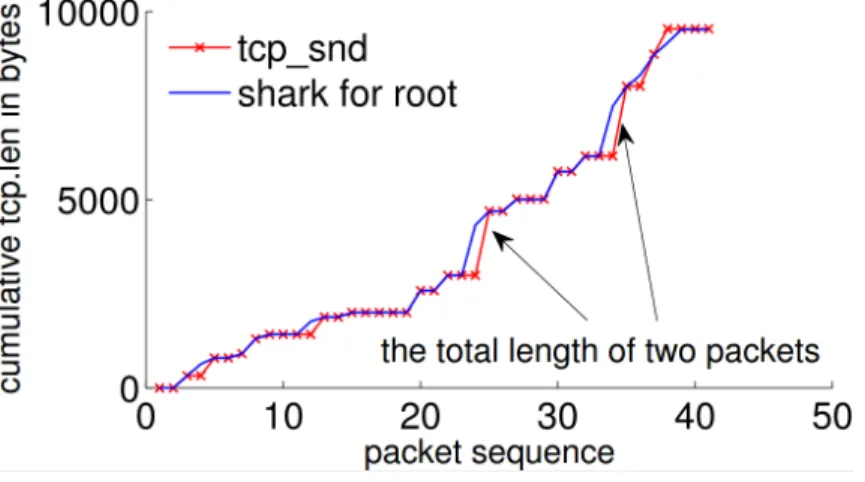
To study whether the communication with the remote server is encrypted, we install and use the apps. We capture their network traffic using “Shark for Root” app and analyze the network traffic in Wireshark to see if the traffic is encrypted. We find that 7.4% (2/27) of the apps allow the users to use the blog or social network associated with the app via Internet, of which only one of the apps is using encrypted communication. 25.9% (7/27) of all the apps transmit medical information to the remote server. 66.7% (4/6) of the apps use encrypted communication, while 50% (3/6) of the apps use unencrypted communication to transfer the sensitive health related information.
We further analyze if the three aforementioned apps sending unencrypted data over the Internet are sending sensitive information. And we find that one of the app is used to search for nearby pharmacies, doctors, etc., the second app is used to track exercise workouts, and the third (from Spain) is used to find and contact doctors online. The third app (Doctor Online) is sending email, username and even password unencrypted over the Internet.
Third Party Services. Android apps use storage and hosting services such as Amazon instead of maintaining their own infrastructure. This is an economical as well as scalable solution for mobile app vendors. But, storing sensitive health information on these third party services can have serious implications and that is why HIPAA does not allow storing unencrypted
data on third party cloud services. 22.2% (6/27) apps are sending sensitive data over the Internet. To study if these 6 apps that are actually transferring information to remote servers are hosted on the cloud or in-premises servers owned by the app vendors, we analyze the IP addresses of the apps from their communication with their respective servers. IP addresses have a publicly available record of to whom it belongs to and we use that information to find out from where the traffic is coming. We find surprising results: all six apps are hosted on third party services. Three of them are hosted on Amazon and the rest three are hosted on other hosting services. Note that these apps are using encryption for the communication only, we are not sure if data on the remote third party services is stored in a encrypted fashion such that the hosting companies do not have access to the data.
Bluetooth. Many Bluetooth sensing apps use Bluetooth primarily to col-lect data from health sensors to mobile devices. Out of the 27 apps in our dataset, one app (3.7%) connects to a Bluetooth health device to collect extra health information. Supporting Bluetooth devices is more common among the 160 most popular Android mHealth apps, where 15 (9.5%) provide op-tions to collect health data from external health sensors and all of them are Patient-facing apps. 12 of the 15 apps declare and use both BLUETOOTH and BLUETOOTH ADMIN permissions, so that they can use Bluetooth to connect to and collect data from external health sensors, while the remaining three apps collect health data via Internet or by connecting with other apps. All the apps we find with Bluetooth connectivity are Patient-facing apps. They collect various types of health information, including heart rate, respiration, pulse oximetry, electrocardiogram (ECG for short), blood pressure, body weight, body temperature, quality of sleep, exercise activities and etc. Ap-parently, Bluetooth is a major communication technology for sensor-based health monitoring in mHealth apps. Naveed et al. [20] present a problem of external-device misbinding (DMB for short), under the context of Bluetooth-enabled Android devices and health sensors. They show that a malicious app can stealthily collect user data from an Android device and also deploy a spoofed device that injects fake data into the original device’s app. We find one of the 27 apps actually connects to an external health sensor and uses a default PIN code 0000, which makes that app vulnerable to the DMB attack. To defend against the Bluetooth-based threats on mHealth apps, Naveed et al. [20] propose an OS-level protection, which generates secure
binding policies between a device and its official app and enforces these rules when establishing and unpairing Bluetooth connections.
Logging. Android logging system is designed for app developers to col-lect and view app debug output. The logging facility allows a system-wide logging, including application information and system events. If an app is granted READ LOGS permission, the app is allowed to read low-level system log messages. With the READ LOGS permission, a malicious app can monitor system logs from mHealth apps in the background and extract sensitive in-formation from the log messages. To discover logging vulnerability, we use a tool called logcat from Android Debug Bridge (ADB for short) shell to view system log messages.
In our dataset, we find 9 out of 27 apps (33.3%) include sensitive infor-mation in app logs. Among the 9 aforementioned apps, two (22.2%) dis-close GPS coordinates, three (33.3%) disdis-close Facebook friend information, one (11.1%) discloses the direction to the dentist office that a user inquires about. One (11.1%) discloses sensitive data that could lead to more serious consequences, that is disclosing user sign up data, including name, location and profession. That app also leaks the medical tests that user takes on this app. All the disclosure of private data from this app can potentially lead to a medical identity theft. Three (33.3%) apps leak disease and drug browsing history in the app logs. From the study on our 27-app dataset, we find a large number (33.3%) of mHealth apps leak sensitive information in system logs and many of them could cause serious problems.
SD Card Storage. Each Android app gets a dedicated part of file sys-tem where it can write its private data. However, if an app writes files to an external storage, such as an SD card, the files are not guaranteed to be protected. With READ EXTERNAL STORAGE orWRITE EXTERNAL STORAGE per-missions, any app can read or write files from an external storage. Note that before API level 19, the READ EXTERNAL STORAGEpermission is not enforced and all apps still have access to read from an external storage.
In our dataset, 66.7% (18/27) of the apps declare theWRITE EXTERNAL STO-RAGE permission, which means they write data to the external storage and the data is universally readable by any app with theREAD EXTERNAL STORAGE permission. Then, we use an existing tool Dex2jar [32] to decompile the 27 apps’ apk (application package) files to get their Java source code. After that, we search for "ExternalStorage" and "ExternalFiles" keywords in
the source code to construct all possible paths for any file to be stored on the SD card. Then, we execute all possible operations with the studied apps and go through these directories to check their file contents. As a result, we find none of the apps stores sensitive information as files on the external storage.
Exported Components. An Android app developer has the rights to specify if an app component (i.e. Activity, Service, Broadcast Receiver, or Content Provider) is public to external apps or not. A component is declared as exported, or public, if its declaration sets theEXPORTEDflag or includes at least one Intent Filter without any permission protection. However, setting a private component improperly as exported enables a malicious app to send unwantedIntents to the component, which can cause security problems [21]: broadcast injection, activity launch, or service launch. In addition, if the Content Provider isexported, a malicious app can read or write theexported Content Provider without declaring any particular permission. TheContent Provider supports basic "CRUD" (create, retrieve, update and delete) func-tions and the data in a Content Provider is addressed via a"content URI". Knowing the"content URI"from anexported Content Provider, a malicious app can retrieve or modify the data according to the Content Provider’s schema. We already showed an example of unauthorized access to an ex-ported Content Provider to read its sensitive information in Study 1.
3.5
Study 3: How Serious is the Threat?
Study 2 reveals three vulnerabilities that are common and serious: sending sensitive information unencrypted over the Internet, using third party ser-vices, and logging containing private data. Since logging can be fixed by Android version upgrade, we focus on the other two threats, which are the Internet traffic and third party services.
As only 6 apps in Study 2 are actually sending sensitive information over the Internet, we perform another study to understand the prevalence of the two threats. We randomly sample another 120 apps from the 540 top Health & Fitness apps and 540 top Medical apps (1080 in total) on Google Play. Then we manually analyze these apps to filter those are not sending any sensitive information over the Internet. The filtering results show that 22 apps are actually sending sensitive data over the Internet and we could
an-alyze their Internet traffic (some apps require subscription and we filter out those also). We install these 22 apps and capture their traffic using the same techniques described in Study 2. We find that 63.6% (14/22) of these apps are sending data unencrypted over the Internet and 81.8% (18/22) of them are using third party storage and hosting services such as Amazon’s cloud services. One of our randomly selected apps is Fitbit app and it is using en-cryption over the Internet, but is also using third party storage and hosting services. The four apps that are using their own servers to store and host their app data are big companies such as Aetna, United Healthcare, Caring Bridge and US Dept. of Health and Human Services. If third party services receive data in cleartext, there is no point in sending data in encrypted fash-ion. We do not have the ground truth, but we suspect that the apps that are doing encryption for the communication are storing data unencrypted on the clouds.
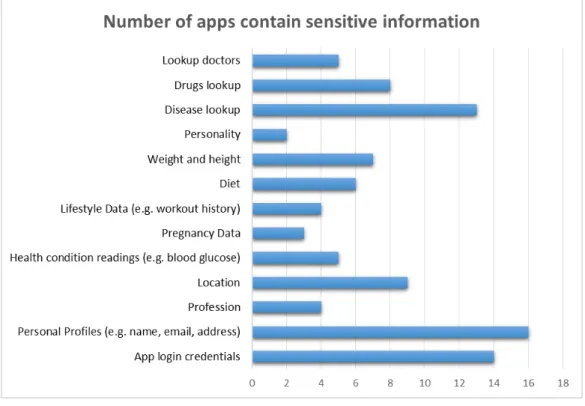
Figure 3.6: Sensitive information distribution in the 22-app dataset for Study 3
When used as intended, a variety of sensitive user data are collected, stored, or transmitted by these Android mHealth apps. Figure 3.6 shows the distri-bution of sensitive information in these 22 apps. Based on our study, these
include at least personal profiles, health sensor data, lifestyle data, medi-cal information browsing history, and third-party app data (e.g. Facebook account information). Depending on the type, sensitivity, and volume of mHealth data breaches, disclosure or tampering with these sensitive data may lead to serious consequences, such as loss of privacy, medical identity theft, and errors in healthcare decision-making. According to a report by World Privacy Forum [33], thefts have used stolen medical information for a resourceful collection of nefarious reasons. For example, a Colorado man whose Social Security number, name and address had been stolen received a bill for $44,000 he presumably owed to a hospital because his identity had been used by a thief to get medical services in his name. In another case, another identity thief in Missouri used the personal data of multiple victims to establish false driving licenses and was able to use them to obtain pre-scriptions in the victims’ names at a regional health center. All the above examples prove that leakage of health information can lead to serious conse-quences.
CHAPTER 4
SIDE-CHANNEL THREATS AGAINST
ANDROID APPS
After understanding the widespread security threats in Android mHealth apps in the last chapter, we ask a further question: are there any limita-tions in Android security design that could be utilized by malicious parties to pilfer mobile users’ private information on the phone? In this chapter, we introduce a newly-discovered side channel that can cause information leaks on Android, which is per-app data-usage statistics. By utilizing this side channel, a malicious party can divulge users’ private information on Android devices. This reveals the gap between the fundamental limitations of Android security design and the diversity in the ways the system is utilized by de-velopers. Section 4.1 illustrates the related work of side-channel information leaks on general platforms and Android devices. Section 4.2 describes the techniques we develop for learning private information from Android public resources with zero permission. More specifically, in section 4.2.1 describes the public resources on Android leaking out information, section 4.2.2 and 4.2.3 show how a zero-permission malicious app monitors and analyzes the public resources. Sections 4.3 and 4.4 demonstrate that we can actually uti-lize the public resources on Android to infer users’ identity (section 4.3) and investment interests (section 4.4).
4.1
Related Work
Side-channel information leaks have been studied for decades and new dis-coveries continue to be made in recent years [34, 35, 36]. Among them, most related to our work is the work on the information leaks from procfs, which includes using ESP/EIP data to infer keystrokes [37] and leveraging memory usage to fingerprint visited websites [38]. However, it is less clear whether those attacks pose a credible threat on Android, due to the high
non-determinism of its memory allocation [38] and the challenges in keystroke analysis [37]. In comparison, our work shows that the usage statistics under procfs can be practically exploited to infer an Android user’s sensitive infor-mation. The attack technique used here is related to prior work on traffic analysis [39]. However, those approaches assume the presence of an adver-sary who sees encrypted packets. Also, their analysis techniques cannot be directly applied to smartphone. Our attack is based upon a different adver-sary model, in which an app uses public resources to infer the content of the data received by a target app on the same device. For this purpose, we need to build different inference techniques based on the unique features of mobile computing, particularly the rich background information (i.e., social network) that comes with the target app.
Information leaks have been discovered on smartphone by both academia and the hacker community [7, 8, 9]. Most of known problems are caused by implementation errors, either in Android or within mobile apps. By compari-son, the privacy risks come from shared resources in the presence of emerging background information have not been extensively studied on mobile devices. Up to our knowledge, all prior research on this subject focuses on the privacy implications of motion sensors or microphones [40, 41, 38, 42, 43]. What has never been done before is a systematic investigation on what can be inferred from the public resources exposed by both Linux and Android layers.
New techniques for better protecting user privacy on Android also continue to pop up [44, 45, 8, 46, 47, 48, 7]. Different from such research, our work focuses on the new privacy risks emerging from the fast-evolving smartphone apps, which could render innocuous public resources related to sensitive user information.
4.2
Mechanism
An in-depth understanding of information leaks from Android public re-sources is critical, as it reveals the gap between the fundamental limitations of Android security design and the diversity in the ways the system is uti-lized by app developers. This understanding will be invaluable for the future development of securer mobile OSes that support the evolving utility. How-ever, a study on the problem has never been done before. In this chapter,
we report our first study on this crucial yet understudied direction.
Our study inspects public resources disclosed at both the Android and its Linux layers and analyzes the impact such exposures can have on the private information maintained by a set of popular apps, in the presence of the rich background information they bring in. This research leads to a series of stunning discoveries on what can actually be inferred from those public resources by leveraging such auxiliary information. Specifically, by monitoring the network-data usage statistics of high-profile Android apps, such as Twitter and Yahoo! Finance (one of the most widely-used stock apps), one can find out a smartphone user’s true identity and stocks one is interested in, without any permission at all.
All such information leaks are found to be strongly related to the fallacies of design assumptions instead of mere implementation bugs. Every piece of information here is actually meant to be disclosed by Android and most of such data has been extensively used by legitimate Android apps: for example, hundreds of data usage monitors are already out there [49], relying on the usage statistics to keep track of a user’s mobile data consumption.
4.2.1
Leaks from Public Resources
Android is an operating system based on Linux kernel. Its security model is based on Linux’s kernel level protection (process separation, file system access control). Specifically, each Android app is assigned with a unique user ID and runs as that user. Sensitive resources are usually mapped to special Linux groups such as inet, gps, etc. This approach, called appli-cation sandboxing, enables the Linux kernel to separate an app from other running apps. Within a sandbox, an app can invoke Android APIs to access system resources. The APIs that operate on sensitive resources, including camera, location, network, etc., are protected by permissions. An app needs to explicitly request (using AndroidManifest.xml) from the device’s user such permissions during its installation so as to get assigned to the Linux groups of the resources under protection, before it can utilize such resources.
Public resources on Android. Like any operating system, Android provides a set of shared resources that underprivileged users (apps without any permission) can access. This is necessary for making the system easy to
use for both app developers and end users. Following is a rough classification of the resources available to zero-permission apps:
• Linux layer: public directories. Linux historically makes available a large amount of resources considered harmless to normal users, to help them coordinate their activities. A prominent example is the process information displayed by the ps command (invoked through Runtime.getRuntime.exec, which includes each running process’s user ID, Process ID (PID), memory and CPU consumption and other statis-tics. Most of such resources are provided through two virtual filesys-tems, the proc filesystem (procfs) and the sys filesystem (sysfs). The procfs contains public statistics about process’s use of memory, CPU, network resources and other data. Under the sysfs directories, one can find device/driver information, network environment data (/sys/class /net/) and more. Android inherits such public resources from Linux and enhances the system with new ones (e.g. /proc/uid stat). For example, the network traffic statistics (/proc/uid stat/tcp snd and /proc/uid stat/tcp rcv) are extensively utilized [49] to keep track of individual apps’ mobile data consumption.
• Android layer: Android public APIs. In addition to the public resources provided by Linux, Android further offers public APIs to enable apps to get access to public data and interact with each other. An example is AudioManager.requestAudioFocus, which coordinates apps’ use of the audio resource (e.g., muting the music when a phone call comes in).
Privacy risks. All such public resources are considered to be harmless and their releases are part of the design which is important to the system’s normal operations. Examples include the coordination among users through ps and among the apps using audio resources through AudioManager.requestAudio-Focus. However, those old design assumptions on the public resources are becoming increasingly irrelevant in front of the fast-evolving ways to use smartphones. We find that the following design/use gaps are swiftly widen-ing:
• Gap between Linux design and smartphone use. Linux comes with the legacy of its original designs for workstations and servers. Some of
its information disclosure, which could be harmless in these station-ary environments, could become a critical issue for mobile phones. For example, Linux makes the MAC address of the wireless access points (WAP) available under its procfs. This does not seem to be a big is-sue for a workstation or even a laptop back a few years ago. For a smartphone, however, knowledge about such information will lead to disclosure of a phone user’s location, particularly with the recent devel-opment that databases have been built for fingerprinting geo-locations with WAPs’ MAC addresses (calledBasic Service Set Identification, or BSSID).
• Gap between the assumptions on Android public resources and evolving app design, functionalities and background information. Even more challenging is the dramatic evolution of Android apps. For example, an app is often dedicated to a specific website. Therefore, an adversary no longer needs to infer the website a user visits, as it can be easily found out by looking at which app is running (throughps for example). Most importantly, today’s apps often come with a plethora of background information like tweets, public posts and public web services such as Google Maps. As a result, even very thin information about the app’s behavior (e.g. posting a message), as exposed by the public resources, could be linked to such public knowledge to recover sensitive user data.
Information leaks. In our research, we carefully analyze the ways that public resources are utilized by the OS and popular apps on Android, to-gether with the public online information related to their operations. Our study discovered a new source of information leak, which is App network-data usage. We find that the network-data usage statistics disclosed by the procfs can be used to precisely fingerprint an app’s behavior and even infer its input data, by leveraging online resources such as tweets published by Twitter. To demonstrate the seriousness of the information leakage from those usage data, we develop a suite of inference techniques that can reveal a phone user’s identity from the network-data consumption of Twitter app and the stock she is looking at from Yahoo! Finance app. We build a zero-permission app that stealthily collects information for these attacks.
4.2.2
Zero-Permission Adversary
Adversary model. The adversary considered in our research runs a zero-permission app on the victim’s smartphone. Such an app needs to operate in a stealthy way to visually conceal its presence from the user and also minimize its impact on a smartphone’s performance. On the other hand, the adversary has the resources to analyze the data gathered by the app using publicly available background information, for example, through crawling the public information released by social networks, etc. Such activities can be performed by ordinary Internet users.
What the adversary can do. In addition to collecting and analyzing the information gathered from the victim’s device, a zero-permission malicious app needs a set of capabilities to pose a credible privacy threat. Particularly, it needs to send data across the Internet without the INTERNET permission. Also, it should stay aware of the system’s situation, i.e., which apps are currently running? This enables the malicious app to keep a low profile, start data collection only when its target app is being executed. Here we show how these capabilities can be obtained by the app without any permission.
• Networking. Leviathan’s blog describes a zero-permission technique to smuggle out data across the Internet [9]. The idea is to let the sender app use the URI ACTION VIEW Intent to open a browser and sneak the payload it wants to deliver to the parameters of an HTTPGETfrom the receiver website. We re-implement this technique in our research and further make it stealthy. Leviathan’s approach does not work when the screen is off because the browser is paused when the screen is off. We improve this method to smuggle data right before the screen is off or the screen is being unlocked. Specifically, our app continuously monitors /lcd power (/sys/class/lcd/panel/lcd power on Galaxy Nexus), an LCD status indicator released under the sysfs. Note that this indicator can be located under other directory on other devices, for example, sys/class/backlight/s6e8aa0 on Nexus Prime. When the indicator becomes zero, the phone screen dims out, which allows our app to send out data through the browser without being noticed by the user. After the data transmission is done, our app can redirect the browser to Google and also set the phone to its home screen to cover this operation.
• Situation awareness. Our zero permission app defines a list of target applications such as social network app and stock applications and monitors their activities. It first checks whether those packages are installed on the victim’s system (getInstalledApplications()) and then periodically calls ps to get a list of active apps and their PIDs. Once a target is found to be active, our app will start a thread that closely monitors the /proc/uid stats/[uid] and the /proc/[pid]/ of the target.
4.2.3
Usage Monitoring and Analysis
Mobile-data usage statistics. Mobile data usages of Android are made public under/proc/uid stat/(per app) and/sys/class/net/[interface] /statistics/ (per interface). The former is newly introduced by Android to keep track of individual apps. These directories can be read by any app directly or throughTrafficStats, a public API class. Of particular interest here are two files /proc/uid stat/[uid]/tcp rcv and /proc/uid stat /[uid]/tcp snd, which record the total number of bytes received and sent by a specific app respectively. We find that these two statistics are actually aggregated from TCP packet payloads: for every TCP packet received or sent by an app, Android adds the length of its payload onto the corresponding statistics. These statistics are extensively used for mo