V
isual Analysis forE
xtremelyLa
rge‐S
caleS
cientificCo
mputingD2.5 – Big data interfaces for data acquisition
Version 1.0
Deliverable Information
Grant Agreement no 619439
Web Site http://www.velassco.eu/
Related WP & Task: WP2, T2.4
Due date Mars 31, 2015
Dissemination Level
Nature
Author/s Benoit Lange, Toàn Nguyên
Contributors Alvaro Janda, Andreas Dietrich, Miguel Tinte, Jochen
Haenisch, Miguel Pasenau
Approvals
Name Institution Date OK
Author
Toàn Nguyên,
Andreas Dietrich,
Benoit Lange
INRIA 16/01/2015
Task Leader Benoit Lange INRIA
WP Leader Toàn Nguyên INRIA
Coordinator Change Log
Version Description of Change
Version 0.1 First draft version of the document
Version 1.0 First version of the document
Version 2.0 Update of the document with different contributions
Version 3.0 Added more contributions, comments, corrected styl,
numbering of sections, figures and foot‐notes
Table
of
content
1. Introduction _______________________________________________________ 5
2. Data Flow on the platform ____________________________________________ 8 2.1. Current state of the platform ____________________________________________ 9 2.2. Modules ____________________________________________________________ 11 2.2.1 Simulation ____________________________________________________________ 12 2.2.2 Ingestion ______________________________________________________________ 15 2.2.3 Storage _______________________________________________________________ 18 2.2.4 Access of Storage _______________________________________________________ 21 2.2.5 Analytics ______________________________________________________________ 22 2.2.6 Query Manager ________________________________________________________ 23 2.2.7 Visualization on the User Workstation ______________________________________ 25
3. Decomposition in Vqueries __________________________________________ 28 3.1. Session Queries ______________________________________________________ 28 3.2. Direct Result Queries __________________________________________________ 28 3.3. Result Analysis Queries ________________________________________________ 29 3.4. Data Ingestion Queries ________________________________________________ 29 4. Moving to HPC‐cloud _______________________________________________ 30 4.1. Simulation __________________________________________________________ 31 4.1.1 FEM simulations ________________________________________________________ 31 4.1.2 Discrete based simulations________________________________________________ 31 4.2. Ingestion ___________________________________________________________ 32 4.3. Storage _____________________________________________________________ 33 4.4. Access of Storage _____________________________________________________ 33 4.5. Analytics ____________________________________________________________ 34 4.6. Query Manager ______________________________________________________ 34 4.7. Visualization on the User Workstation ____________________________________ 34 5. Moving to Cloud ___________________________________________________ 35 5.1. Simulation __________________________________________________________ 36 5.2. Ingestion ___________________________________________________________ 36 5.3. Storage _____________________________________________________________ 36 5.4. Access of Storage _____________________________________________________ 37 5.5. Analytics ____________________________________________________________ 37 5.6. Query Manager ______________________________________________________ 37 5.7. Visualization on the User Workstation ____________________________________ 37 6. Conclusion _______________________________________________________ 38
7. References _______________________________________________________ 39
1.
Introduction
By 2020, the amount of produced information will be huge. Tools used by scientific
community (simulation tool, or observation tools) will be able to produce more data than
ever before.
In fact as stated in [16] , science produces information using three paradigms: observational
Data, Experimental Data and Simulation Data.
In the case of observational data, data comes from unexpected events.
For the experimental use case, the production of information is performed in a fully
controlled environment, and all parameters are well known by scientists. This strategy
enables to reduce noise produced by external sources. This solution for the production of
information is mainly focused on closed environment like laboratories.
The final strategy used to produce data is based on simulations. A simulation is an execution
of a mathematical model, which is solved by a specific process. This resolution is performed
by iterative computation. This solution produces data without the need of doing a real
experimentation.
This discovery process has also evolved in the past few years. In fact, simulation software is
not anymore reserved by some specific communities (chemical, astrophysical, engineering,
etc.), but this kind of application is now used in all research fields. This evolution was guided
by the transformation of computing hardware. HPC environments will not be anymore the
architecture reference, the computation will be moved to cloud IT systems. This
transformation is lead by the evolution of the cost of such a kind of system. In a cloud
environment, CPU time is becoming cheaper than ever before. CPU time is becoming an
affordable resource.
This increase in computational data will lead scientists to move their mind to a novel
paradigm. The production of information is not anymore a problem; simulation tools exist
for a wide variety of domains. Today’s challenge is the management of the produced data. In
fact, IO operations have not been a main interest of the research community, and this kind
of operation suffers from this lack of attention by R&D. IO operations have not been
optimized compared to the evolution of the computation on CPU or GPU. To avoid issues of
writing latency, simulation engines do not write all data into the file system. Users of these
applications can select how many time steps shall be stored. Intermediary time steps
between different computations are considered not to be necessary.
In this project, we aim to provide a specific platform, which can deal with engineering data
by avoiding deleting intermediary information. This work targets to deal with two kinds of
datasets: already produced information (owned by scientific community) and computed
data produced by simulation engines. An exhaustive list of available resources for this
project is presented in Figure 1. This table shows all the requirements for external data. The
providers have limited access to the storage, and they are already using some strategy to
computed data. In the case of our partner, the targeted simulation tools (used by CIMNE and
UEDIN), can perform multiple time steps per execution. These multiple iterations may
produce very large amounts of data; thus it is necessary to use reduction methods in order
to deal with the produced dataset.
In this deliverable, we enlarge the notion of data acquisition from the “data ingestion”
concept (described previously in Deliverables D2.1 to 2.4) to the production of data. We
study in this document the workflow of all components: simulation, analytics tools, etc. It is
therefore not limited to the ingestion of data produced by a specific large‐scale application
by the VELaSSCo user panel.
It is deemed important to take into account the large volumes of data that are likely to be
stored, processed, produced and exchanged between the various modules of the platform.
This has a direct impact on the way the modules interact, on the required communications
protocols and on the latency, fault‐tolerance and, hence, the performance issues.
Further, e‐Science applications targeted by the VELaSSCo project are simulations using FEM
and DEM modeling approaches. However, many large‐scale collaborative projects have
integrated data stores to support collaboration among sometimes many international
stakeholders. This implies the management and effective access to and storage of large
volumes of remote heterogeneous data.
First, that data is ingested then analyzed and processed before dissemination and
visualization (Figure 2).
Next, the data might originate from various sources using different methods and tools,
including streaming to batch processing and transfers using messages and packet‐based
communication protocols.
Also, the data can range from very large numeric arrays to complex documents that include
text, videos and complex hyperlinks to each other. These data sets have some requirements
related to the storage method used. And depending on the storage method and complexity
the storage system has a more or less efficient data access system. An overview of the most
used methods is presented in Figure 3.
This means that effective and standardized communications and transfers approaches must
be used, on top of high‐speed and low‐latency hardware devices. Hierarchical memory
devices are common today, including hard disk drives, SSD, DRAM and caches to support fast Figure 3. NIST Big Data Interoperability Framework: Data Complexity [8]
data accesses to data and compute demanding applications. Also, data replication is a must
today in order to support fast and locally stored data, as well as fault‐tolerance.
In the rest of this document, we will discuss the flow of information of a HPC deployment of
the platform. Then we will study the impact on this communication flow in a HPC‐cloud
architecture. And finally, we will discuss the move to a pure cloud infrastructure. This study
will introduce our workflow decomposition based on Vqueries. If we compare our proposed
architecture with the architecture provided by NIST (see Figure 4), we can see that our
proposed architecture is compatible with the NIST proposal.
2.
Data
Flow
on
the
platform
In this section, our interest is focused on the current state of the developed platform, and
then data flow of this platform. A simplified version of the architecture is presented in
Figure 5.
2.1.Current state of the platform
During the first year of the project, one solution has been elaborated upon by the
consortium to enable an early start the development of the VELaSSCo infrastructure. For this
solution, the hardware was provided by CIMNE; our compute platform is composed of two
dedicated nodes. The administration of these nodes has been given to VELaSSCo users in
order to be able to install all necessary software on the platform (without the HPC
restrictions) and for experimentation. These nodes are composed by two processors (Intel(R)
Xeon(R) CPU E5410 @ 2.33GHz), with 32Gb of memory. For the management of the
software stack, we have created a specific user named “velassco”, which was shared by
users of the platform. This user is used to store and start all necessary processes on the
platform.
Furthermore, as part of the deployment plan of the VELaSSCo platform, two dedicated
nodes for VELaSSCo platform have been already installed in the HPC cluster Eddie of the
University of Edinburgh. It is also expected to test the deployment of VELaSSCo platform on
this two nodes and later on the project to deploy the platform in Eddie HPC system involving
a large number of nodes. Currently, a refreshment of hardware and software stack is being
conducted in HPC Eddie systems by the cluster management team. Interestingly, the
refreshment actions of the Eddie are in line with the architecture designed for VELaSSCo
platform.
Our designed platform is decomposed into layers, and layers are split into components, see
Figure 5. Some of these components have already been described in previous deliverables, Figure 5. Schema of the VELaSSCo Architecture.
and their implementations already exist; thus the deployment of these specific parts can be
performed quickly. With the Hadoop ecosystem we are already covering a subset of
necessary tools, and some partners also provide some other tools for the platform.
For the simulation engine, CIMNE and UEDIN provide FEM and DEM simulation tools. These
tools already exist and are deployed on compute nodes outside of the VELaSSCo
architecture. This part of the project will not evolve; we will use a traditional strategy to
produce data.
The data layer is based of different components: Flume, HBase, Hive, a communication
component (Batch and RT), and HDFS (with HadoopAbstractFileSystem).
Flume is an existing tool, which can be used to aggregate information from multiple sources.
This tool is based on agents, they will gather information from one repository and store this
dataset into a targeted repository. These agents are in charge of merging data from multiple
sources. These agents are able to write data on different file systems or repositories. In the
case of this project we target to write information into HDFS (and from there further into
Jotne’s EDM after conversion into ISO 10303‐209) and HBase (a Big table system on top of
HDFS).
HBase is another piece of software used in this project. This tool offers a fast indexing
strategy for tabular data. This tool can be mapped on any file system, but was more suitable
for HDFS. This is used in the context of this project to offer a fast and efficient solution to
store and access data.
EDM (EXPRESS Data Manager) is an alternative storage of the VELaSSCo simulation data. It
does not follow the tabular paradigm, but the object‐oriented one that is specified in ISO
10303, STEP.
Hive is another tool used in the context of this project. This tool offers a simple query
language for a distributed file system. This method provides a query language based on SQL,
and offers, thus, the advantage of this simple language on top of HDFS. Hive enables to use
distributed computing with a well know query language. This tool is useful because it allows
interacting with a specific database stored on the file system, but it also enable to interact
with HBase. This solution offers a new strategy to interact with data stored in HDFS. Due to
its nature of supporting table‐based data, it is not applicable to the EDM‐use of the
VELaSSCo platform.
The storage layer of the platform is managed by the Hadoop infrastructure. Hadoop comes
with a dedicated File Storage system called HDFS. Using configuration files, it is possible to
use some other file system than HDFS Hadoop. An abstract layer on the Hadoop Java classes
brings this evolution of the platform. This strategy makes it possible to deploy different file
systems on a Hadoop ecosystem. We plan to use this feature to extend the Hadoop storage
system with the EDM DB.
The last component of the data layer is named “data query”. This component aims to
provide the necessary communication layout to interact with the storage layer. With this
component the engine layer of the platform will only use one communication protocol to
managing queries to the real‐time engine or the batch engine. This layer needs to be
developed.
The next layer of this platform is the engine layer. YARN, the resource scheduler and
manager of Hadoop is in charge of this layer. Four different modules compose this layer: a
query Manager Module, a monitoring module, a graphics module and an analytics module.
The monitoring module will use the existing zookeeper tool to monitor the platform. This
tool already exists and needs to be deployed for our own set of tools.
The analytics module is in charge of executing queries that process the stored data to extract
the information the scientist requests. For this purpose a specific computation is applied on
the existing data. An example of this feature is: extracting splines from a subset of the
model, extract a specific level of detail of the model, calculate the 0‐level iso‐surface of a
fluid simulation or the maximum damage result on a structural simulation. This component
can also write intermediary information to ensure a higher reactivity of the platform. This
extracted information is then passed to the graphics module.
The graphics module is in charge of prepare the Vquery results in a suitable way, so that the
information can be displayed by the visualization engines at high speed with minimal
latencies by using server side HPC compute and memory resources. To this end, the graphics
module converts the data into an internal representation. This module receives data from
the storage layer or from the analytics module, converts the extracted data set into a
specific format suitable for fast GPU rendering, and the resulting data structures are handed
over to the query manager module, which sends them back to the visualization client.
Moreover, the graphics module will handle streaming and progressive data transfer. Rather
than sending the complete data set of a query in one step, information is sent on demand in
small parts based on user input (e.g., depending on the position of a moving camera).
The final component of this platform is the query manager. This module is in charge of the
communication with the visualization client. This module offers a communication gateway to
the VELaSSCo platform. It is able to interact directly with the storage layer and to ask the
analytics module to do computation on some specific set of the stored data. This module is
also in charge of analyzing the complexity of a query to use the most suitable data flow
(direct access on the data or using the analytics module).
The last layer represents the visualization part of the platform. This layer is composed by a
single component and concerns the visualization part. This component is a plugin developed
by the consortium, which enables interaction between visualization software (iFX, GID) and
the VELaSSCo platform.
The next part of the document will provide a deeper description of each component and the
communication pipelines among them.
2.2.Modules
In this section we will discuss all the different workloads of the platform, with a special focus
2.2.1 Simulation
The data that is to be analyzed, processed and visualized using the VELaSSCo platform and
the visualization clients origins in numerical simulation programs that runs on HPC centers.
A simulation of a physical process is performed by solving the equations describing this
process using a discretization of the domain of the problem, depending on the method used
to solve these equations. Most numerical methods, like Finite Element Methods (FEM),
Finite Volumes (FV) are based on a discretization of the domain into small elements or cells
defining a mesh. These elements can be surface elements, such as triangles, or volume
elements, such as tetrahedrons. Other numerical methods like Discrete Element Methods
(DEM) use particles to represent the domain of the simulation. These particles can be circles,
spheres or can have more complex shapes. The output of these methods can be scalars,
vectors or tensors (that will be referred to as simulation results), which can be attached to
both nodes and elements. These simulation results can be viewed as attributes like typical
per‐face and per‐vertex attributes in computer graphics models: colours, normals, texture
coordinates, and so on. For example in the simulation of the aerodynamics of a racing car,
the domain to be represented is the air surrounding the car's body, and it can be
approximated using several millions of tetrahedrons.
The simulation program calculates the evolution of attributes like air pressure, velocity,
density or viscosity using this fixed volume mesh along all the time‐steps of the analysis.
Scientific simulations that run on High Performance Computing (HPC) clusters follow the
distributed memory paradigm and partition the huge domain meshes in small portions trying
to minimize the interface between these portions [17, 18] as shown in Figure 6. When the
simulation finishes, the post‐processing, i.e. result analysis and visualization, is usually
performed by merging these partitions, with their results, together in one single computer.
Figure 6. Simulation of the air flow around a telescope. The mesh with 24 million tetrahedrons was subdivided into 128 partitions in order to run on 128 cluster nodes as the colour map shows. Also the stream‐lines, lines tangent to the
2.2.1.1 FEMsimulations
Finite element simulation codes that run on HPC usually output their calculated results in
bursts, at each time‐step of the analysis. These results are stored, on a single file or on files
for each computation node that corresponds to one partition of the domain, on a
centralized, high efficient file system like Lustre, or NFS. In the case of the telescope
example, the central NFS file system contains all 128 files corresponding to the 128 sub‐
domains.
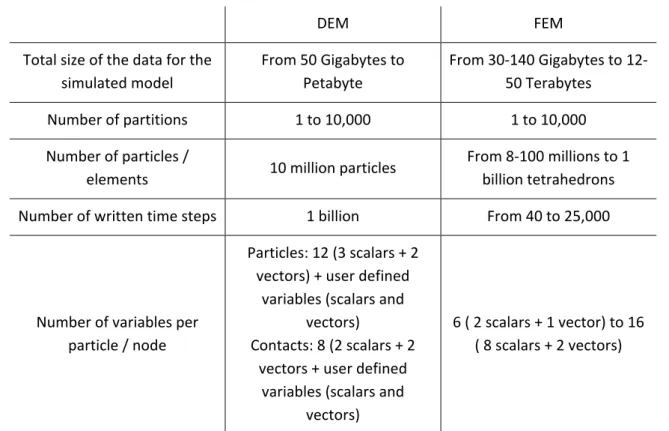
Table 1 shows for a single simulated model, the sizes of the data to be handled by the
system: size of the mesh, number of attributes per node or particle, number of expected
time‐steps, and number of sub‐domains for the single simulation.
DEM FEM Total size of the data for the simulated model From 50 Gigabytes to Petabyte From 30‐140 Gigabytes to 12‐ 50 Terabytes
Number of partitions 1 to 10,000 1 to 10,000 Number of particles /
elements 10 million particles
From 8‐100 millions to 1 billion tetrahedrons Number of written time steps 1 billion From 40 to 25,000
Number of variables per particle / node Particles: 12 (3 scalars + 2 vectors) + user defined variables (scalars and vectors) Contacts: 8 (2 scalars + 2 vectors + user defined variables (scalars and vectors) 6 ( 2 scalars + 1 vector) to 16 ( 8 scalars + 2 vectors)
Table 1 Characteristics of a single simulation to be handled by the VELaSSCo platform
A more detailed description of the simulation data was provided in the deliverable D1.3.
In the initial scenario of the project, the simulation data is already present and is to be
ingested in the platform from existing files.
To avoid the redundant storage of data both in files, from the simulation programs, and
inside the VELaSSCo platform, a more useful scenario contemplates that the results that are
being calculated by the calculation programs should be feed directly to the VELaSSCo
platform, by means of Flume agents.
To develop the last scenario, the project will also provide a Data Ingestion library that will
send the results to the platform at each time‐step of the simulation. The connection
Figure 7. Simulation program with the DataIngestion library to send results to the VELaSSCO platform.
Kratos Multi‐Physics is a free, open source framework for the development of multi‐
disciplinary solver and is being developed at CIMNE. This simulation program and was used
to generate the data provided by CIMNE by using the free GiDPost library. Kratos Multi‐
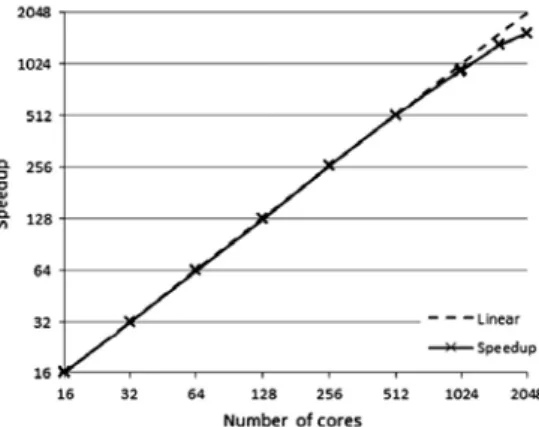
Physics has also been successfully ported to HPC environments as shown in Figure 8 [17].
Figure 8. Speedup achieved on the Telescope problem on the Marenostrum Supercomputer [19]
In this case, the VELaSSCo Data Ingestion library will be integrated in the GiD post library
that is already used by the simulation program to output the calculated results. This way the
interaction with the VELaSSCo platform will be transparent to the simulation code, requiring
only to set the destination of the results data (VELaSSCo_platform instead of
GiD_binary_files) and access credentials (user_name and password) in the unavoidably
initialization of the library.
This will constitute the test‐case for the previous mentioned scenario of ingesting simulation
data into the VELaSSCo platform from a running simulation program.
2.2.1.2 Discretebasedsimulations
In the case of discrete based simulations, the raw data is produced by a DEM simulation
solver. There already exist many different DEM simulation solvers that are extensively used
for both scientific and industrial applications. Some of them are commercial software such
as EDEM, PFC, StarCCM+ or DEMpack but there also available a wide range of open‐source
codes such as LAMMPS, LIGGGHTS, MercuryDPM or Yade. DEM computations are massively
parallelizable using space domain decomposition and data passing protocols such as MPI.
Therefore, most of the DEM simulation solvers are capable to work in distributed
environments such as traditional HPC systems.
In the case of DEM solvers, the calculation is computed based on discrete particles that
along the simulations is updated based on the forces acting on them by means of explicit
time integration of Newton laws. Thus, for each time‐step of the simulations, the solver
produces data related to the position, properties (mass, volume, …) and results (velocity,
angular velocity, …) of the particles and the contact forces network. A more detailed
description of the simulation data was provided in the deliverable D1.3.
The data writing process to files is conducted using a user predefined saving interval.
Typically, the simulation solver produces single files that contain the whole simulation data
for all time‐steps of the simulation or a data file per time‐step. Moreover, some of the DEM
solvers have the capability to save the data in a distributed way, i.e each node or processor
writes the data from the particles and contacts that it processes.
The data produced by the simulation solver needs to be ingested to VELaSSCo platform for
the post‐processing and analysis of the results. To this end, the simulation data is contained
in files that are read to ingest the data into the Big data table of VELaSSCo platform. For the
first prototype, it is considered that the simulations have already finished before the data
ingestion process is triggered. Nevertheless, for final version of the platform, it is expected
to explore the possibility to ingest the simulation data in a progressive way as the simulation
is running. In this latest case, a special triggering mechanism should be implemented in the
VELaSSCo. Platform.DataIngestion library (see Figure 7) in order to ingest the data into the
platform in an “on‐line” way.
2.2.2 Ingestion
This component is focused on the process of data ingestion. This module is in charge of the
communication between simulations nodes and the storage layer. This process performs a
formatting task for the dataset of the HPC nodes.
Figure 7 displays two main blocks that involved in the Ingestion process:
1. Simulation module in charge of generating simulation data files after each simulation
process completion. These files will be used as input for Ingestion and processing
module.
2. Ingestion & Processing part takes as input the simulation data files and processes
their information in order to store them into the database. To do so, this module
runs an ETL process1 where each simulation type is identified and processed in a
specific way.
Figure 9 shows that the simulation results being generated are ingested to the VELaSSCo
platform using the DataIngestion library and the Ingestion & processing module inserts this
data in the Storage module, which depending on the scenario store this data in HDFS or in
the EDM engine.
1
The implementation of the Ingestion module makes use of different tools and services to
achieve predefined functionalities. Basically, three functional blocks can be observed:
1. DataInjectorInstance component (described in VQueries chapter 3.4) will be
deployed as a RESTFul2 service. This first implementation allows asynchronous
communication between Simulation and Ingestion modules. This specific
communication pipeline comes from a web service, which uses callable through HTTP
Methods. Usually, a POST method will be used to send simulation data to processing
module. Example: URL: http://hpc_node:8080/DataInjectorInstance/rest/data/sendSimulData? Parameters: simulationName=DEM_box& analysisName=p3w& partId=003
2. The second tool used to store information in databases is Apache Flume3, which is in
charge of delivering large amounts of data through different agents. These
applications implement a simple and a flexible architecture based on streaming of a
data flow. Moreover, Flume provides an easy integration with some NoSQL
databases, like HBase4, which is the chosen one for our implementation.
In this context, it is important to describe how to integrate Apache Flume agents
regarding to the final data model. A flume agent has to be configured and deployed,
for this it is necessary to indicate the table and data model, which they are pointing
to. It can be configured through flume‐properties file:
2 http://en.wikipedia.org/wiki/Representational_state_transfer 3 http://flume.apache.org/index.html 4 http://hbase.apache.org/
Figure 9. VELaSSCo platform Ingestion sub‐workflow, from the simulation program, on the left, to the Ingestion & processing component and Storage module, in the Data Layer of the VELaSSCo platform.
The Flume agent configuration above specifies table name, column family, column
names and ROW_KEY information that HBase requires, in order to store the data
transported by the agent.
3. HBase is the NoSQL database chosen to represent simulation process information
and to provide access methods to retrieve such information efficiently. HBase is a
column‐oriented NoSQL database type which allows to insert information in different
column names within each column family (CF). Therefore, the number of CFs defined
in the Data Model is one of the important aspects in order to store and deliver this
information efficiently. Currently, three tables have been defined in order to satisfy
all data model requirements:
o VELaSCCo_Models: it stores general information regarding simulations already processed and stored, like size of the simulation and
validation/verification status.
# The configuration file needs to define the sources, the channels and the sinks.
# Sources, channels and sinks are defined per agent, in this case called 'agent'
agent.sources=avroSource agent.channels=channel1 agent.sinks=hbaseSink agent.sources.avroSource.type=avro agent.sources.avroSource.channels=channel1 agent.sources.avroSource.bind=0.0.0.0 agent.sources.avroSource.port=61616 agent.sources.avroSource.interceptors=i1 agent.sources.avroSource.interceptors.i1.type=timestamp agent.channels.channel1.type=memory agent.channels.channel1.capacity=100000 agent.channels.channel1.transactionCapactiy=10000 agent.channels.channel1.byteCapacityBufferPercentage=20 agent.channels.channel1.byteCapacity=800000 agent.sinks.hbaseSink.type=hbase agent.sinks.hbaseSink.channel=channel1 agent.sinks.hbaseSink.table=VELaSSCo_Models
# filling second column
agent.sinks.hbaseSink.columnFamily=TableInformation
agent.sinks.hbaseSink.batchSize = 5000
# splitting input parameters
agent.sinks.hbaseSink.serializer=org.apache.flume.sink.hbase.RegexHbaseEventSerializer agent.sinks.hbaseSink.serializer.regex=(.+)‐(.+)‐(.+)‐(.+)‐(.+)‐(.+)$ agent.sinks.hbaseSink.serializer.colNames=ROW_KEY,simulationID,boundingBox,validationSt atus,numberPart,otherData agent.sinks.hbaseSink.serializer.rowKeyIndex=0 agent.sinks.hbaseSink.serializer.ROW_KEY=ROW_KEY
o <simultation_ID>_metadata: It stores metadata information related to
simulations, like mesh type and result type information.
o <simulation_ID>_simulationData: It stores simulation data like coordinates, element connectivities, result values, etc. related to simulations.
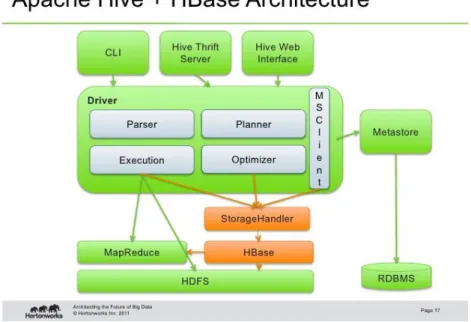
Besides this, HBase will provide a data service access layer, which could eventually be
offered on an accessible manner. In this context, it can be easily integrated with
other tools to provide an accessibility layer. For instance, Apache Hive5 facilitates
integration6 as well as querying and managing large datasets residing in distributed
storage:
Figure 10. Apache HBase and Hive integration6
2.2.3 Storage
Different tools are included in this component, which already exist, see Figure 11. These
applications are parts of the Hadoop ecosystem; in addition to the scenario where the
simulation data is stored using HBase tables on HDFS, we will use also the JOTNE repository
EXPRESS Data Manager (EDM) for storage of engineering objects. Using Hadoop provides a
fully extensible storage framework for the VELaSSCo platform. As stated in D2.1, Hadoop
already supports multiple file systems to store data. It is also possible to use some
alternative storage solutions, such as the EDM DBMS. Developers and research communities
have developed several extension to Hadoop based on traditional database systems. In the
5
https://hive.apache.org/
6
case of this project, we will use this extensibility to provide the most suitable storage
platform. We already have identified some plugins for indexing data and extending Hadoop
storage to support the EDM Database as a storage system.
Figure 11. Zoomed view on the data storage layer of the platform.
Hadoop provides all necessary tools to distribute data among several nodes. This operation
is available through HDFS, which is a part of the Hadoop ecosystem. HDFS is a virtual file
system developed for Hadoop. To not force the utilization of this virtual file system an
abstraction layer was developed and was named HadoopAbstratFileSystem. With this
methodology, it is possible to extend Hadoop storage using any kind of File system. Several
examples have already been developed: QFS7, or KFS8, etc. As stated in the reference
document of the NIST, presented in Figure 12, storage can be specialized into two
categories, based on a File System paradigm, or on an indexing methodology. In a file system
environment, it is possible to benefit from the organization: centralized compared to
distributed. And a file system also enables to have an organized structure for files. This
organization is controlled by a file storage strategy: delimited, with a fixed length parameter
and using binary storage. In an indexed paradigm, data can be retrieved efficiently using
different strategies: in the case of relational database, key‐value data, column data,
document oriented data and graph data. In VELaSSCo we will extend this indexed paradigm
to include object storage that is compliant with ISO 10303, STEP, using EDM.
With the extensibility of Hadoop, it has been possible to use multiple strategies to access
data. Several plug‐ins have been developed to extend the Hadoop File System; an example is
based on an indexing strategy linked to the HDFS. In order to increase the access speed,
multiple solutions can be used at the same time. In this project, we plan to use at least two
plugins for different data access strategies, which will offer different ways to increase data
access speed. This first one will be HBase, and another one can be Hive (these tools are
designed to access data in batch, a specific process will be necessary to extract content in
real time). To provide a faster access than these two tools (and that still fit with the real‐time
requirement), the accessing strategy can be extended by Phoenix.
7
https://www.quantcast.com/engineering/qfs
8
For the commercial version of the VELaSSCo platform, we will provide a plug‐ins for the
Jotne partner storage solution EDM database. Jotne has developed an object‐oriented
database specially designed to store engineering data. Hadoop will be extended by two EDM
plug‐ins.
As depicted in Figure 11 and in Figure 14, one EDM plugin will be developed to allow the
EDM DB to read files from the Hadoop File System and to write to it. The VELaSSCo test
models will be read, whereas the EDM indexed database files will be written to HDFS; the
latter will port the EDM DBMS to fit with the distributed storage infrastructure.
Figure 14 shows that the second plug‐in resides in the YARN module. It translated the Query
Manager queries into EDM compliant queries and returns results in a format that is readable
by the VELaSSCo YARN implementation.
Figure 13. EDM Plug‐in for the data injection and direct data access. Figure 12. NIST Big Data Interoperability Framework: Data Organization
These two EDM plug‐ins will be the gateway between Hadoop and EDM.
2.2.4 AccessofStorage
To avoid complex communication between the engine and data layers, an access component
will be developed. This component is in charge of receiving queries from the Engine layer
and mapping them to the correct access plugin (HBase, Hive, etc.). With this strategy, the
engine layer performs only one kind of query, and this query is directly mapped to the
correct access software. The management of Real‐time and batch queries is managed by
mapping to the correct module HBase, Phoenix, etc.
All the communications with this component are represented in Figure 15. This component Figure 15. External communication component for the storage layer.
will interact with sub modules using the thrift API provided by these applications. Only the
HDFS IO is performed using the cli, command line interface, API.
2.2.5 Analytics
The analytics module is in charge of analyzing and processing the stored data. This processes
aims to produce new information in order to answer a requirement from the Query Manger
(QM). To ensure a fast production of the desired data, the QM can ask to produce
information using two different methods. Thus analytics can be performed using multiple
solutions and these solutions can be triggered at the same time. The module will also
provide a cost estimation of the data analytic query to help the Query Manager evaluate in
which mode is the analytics to be evaluated. For time consuming queries the QM will trigger
two analytic queries at the same time: one over the simplified version of the model to
provide fast feedback to the user and another one over the full‐resolution model. In
collaboration with the graphics module the results of the queries will be returned to the
client using streaming, progressive and render efficient protocols and formats.
Figure 16. Analytics module and its relation with other VELaSSCo modules.
This component is in charge of some specific queries that have already been identified.
An example of this query is GetBoundaryOfAMesh(). This query consists of extracting the
boundary of a mesh from a simulation model data stored in VELaSSCo. Data.Layer. The
workflow of the query can be observed in Figure 17. In this specific example, the analytics
module is in charge of the operation CalculateBoundaryOfAMesh that is composed of
several components involving the data storage module and the analytics module (see Figure
18).
Following the MapReduce v2 (MR) in YARN , the computation pipeline of this query can be
described as follows:
2. In the map phase of the application: extract from the data storage the elements of the mesh and simulation that the user specified in the query (component GetElementsOfLocalMesh). 3. Still In the map phase of the application: From the elements data of the mesh extracted from the data storage, the analytics module computes the unique triangles/lines of the volume/surface mesh, i.e. the boundary of the mesh. 4. In the reduce phase of the application: All the partial unique triangles/lines computed in the previous step are joined together, and the repeated triangles/lines eliminated. 5. Now the while boundary mesh is formatted for drawing by Graphics module. Figure 17. Workflow of the VQuery
GetBOundaryOfAMesh().
Figure 18. Components of the CalculateBoundaryOfAMesh operation from the Analytics module.
The communication pipeline to compute this query includes communication between the
different modules of the platform: o Query Manager Analytics: the query manager requests the computation of the query to the analytics module together with the input parameters of the query previously specified by the user. o Analytics ↔ Data storage: the analytics module receives from the data storage module the data of the elements of the mesh o Analytics Query Manager: The analytics module sends the result of the computation to the query manager and it will send to graphics module from formatting. 2.2.6 QueryManager
The goal of this component is to manage the VELaSSCo platform by providing all the
necessary stuff to communicate with users (through visualization) and sub modules of the
platform. This component directly interacts with YARN (Hadoop scheduler). This module is
must understand the data flow of the platform and ensuring some feed‐back to the user
while time‐consuming queries are being executed. This component has a smart feature,
which enables to pre‐execute some queries in order to reduce the execution time of these
queries. For this module, we have targeted two kinds of queries: simple and complex ones.
This module is the manager module of VELaSSCo, all queries are redirected to this module. It
is in charge of providing all the necessary mechanisms to communicate with all components.
Its goal is to simplify the communication process between all modules, and also between
layers.
When a query sent by the visualization tool is received by the QM, this query is analyzed,
and decomposed into sub queries, operations. This decomposition depends on the topic of
the query and also on the desired response time. To ensure a faster solution to retrieve the
information, asynchronous queries can be triggered. This module studies the desired query
and executes desired computation on data. For example this module can extract information
from a coarse resolution of dataset in order to provide a faster result.
As stated earlier, this module decomposes queries. These produced queries can be twofold:
simple and complex. A simple query directly retrieves information from the storage layer,
while complex queries produce content from a computation.
This decomposition into multiple queries brings some complexity of the system; in fact it is
possible to express a query into different aggregation of queries. Thus, it will be necessary to
provide an evaluation utility to the QM to ensure the best decomposition of a query. But it
is necessary to know that even with this tool, performances can reach less performance than
planned.
The flow process of this module is depicted here: A query is received from the client. QM analyses this query and determines the most suitable decomposition of the query. In this case, multiple solutions are possible: o Gather directly data from the storage layer o Execute an analysis on stored data o Execute an Asynchronous query, which can be: Gather directly data from the storage layer Execute an analysis on stored data When the result is available a message from a previous process is executed, o QM asks the graphics module to gather the necessary information. Figure 19. Query Manager of VELaSSCo
o Graphics module gathers data, and compresses datasets to the suitable GPU friendly format.
o Information is sent back to the QM
QM receives this information and sends it to the visualization platform.
The communication process is presented in Figure 20. In this figure, two execution
workflows are presented, the workflow with black hexagones respresents the simulation
data flow (from compute nodes to the storage layer), while the workload composed by
purple circles represents the communicaiton pipeline between a user and the storage layer.
2.2.7 VisualizationontheUserWorkstation
A user accesses the VELaSSCo platform by operating a local visualization client (see Figure
22). The visualization client is separated from the database infrastructure, and
communicates remotely with the platform by sending queries and receiving results.
In order to exchange information with the platform, the visualization client makes use of the
VELaSSCo access library as a communication layer. The access library provides a specific
application programing interface (API) for managing queries and results. It can be linked to a
visualization engine, which handles user input and displays query results on a local
workstation. As part of the initial VELaSSCo implementation GiD (CIMNE) [14] and iFX
(Fraunhofer) [15] are employed as visualization engines. Both GiD and iFX feature a plugin‐
mechanism to enable extensions. To attach the access library to the visualization engines, a
plugin for each framework will be developed, where each plugin will be linked to the library.
Keeping platform access in a separated library allows for targeting other frameworks besides
GiD and iFX.
Figure 21. Graphics module in the
VELaSSCo platform
Figure 22. Visualization client with the Access library to communicate with the VELaSSCo platform
On the client side, a user interacts with the graphical user interface of one of the
visualization engines. User actions are translated by the plugin component into a query
message that is sent to the access library. To communicate with the engine layer, the library
will make use of Apache Thrift [13] which interchanges information between the access
library and the query manager module in the VELaSSCo engine layer (see above). Sending a
query will trigger either retrieving simulation results (to be visualized on the client), or the
computation of analysis algorithms over the simulation data (also to be rendered on the
client). It is also possible to retrieve partial simulation data to be post‐processed in the
visualization client. The resulting data is sent back the same way to the visualization engine,
which then displays or processes the data. The scheme in Figure 23 shows the steps that
follows a request initiated by the used with the visualization client. The request is mapped
and formatted to a Vquery, VELaSSCo query, which then is packed and send to the platform.
The platform then unpacks it and passes the Vquery to the QueryManager for its processing.
Figure 23. Workflow of an VQuery initiated by the user on the visualization client, blue box at the top, and received by the QueryManager module of the VELaSSCo platform, below.
Figure 24 shows the operations present in the platform access library that performs the
previous detailed steps.
Figure 24. Components involved in the operations conforming the PlatformAccess library, tied to the visualization client.
On the server side, the graphics module within the platform’s engine layer is responsible for
preparing query results. This is done in such a way that information can be displayed by the
visualization engines at high speed with minimal latencies. To this end, the graphics module
converts the data into an internal format. Data structures resulting from this conversion are
handed over to the query manager module, which sends them back to the visualization
client. This workflow is reflected in the scheme of Figure 25.
Figure 25. Workflow of the returning results of a processed VQuery, top white box, which are formatted, packed and sent to the platform access library, which in turns hands the data to the visualization client.
Figure 26 shows the components involved in the operations that handles the reception of
the results of the processed Vqueries on the client side.
3.
Decomposition
in
Vqueries
In this project, the workload execution is expressed by queries named: VELaSSCo queries
(VQueries). A VQuery is a global functionality of the VELaSSCo platform. A Vquery can
express functionality at the user level and also at the ingestion level. A VQuery is an
aggregation of operations (which is an aggregate of components), which can evolve at
different levels. The queries will be implemented for the two storage solutions in VELaSSCO:
Hbase and EDM. All of the preliminary queries are part of one of four classes. These classes
are presented and discussed in the rest of this section.
3.1.Session Queries
The group of session queries provides the frame for access to the simulation contents data.
They manage user login with corresponding session handling, control access to models and
maintain model meta‐data, such as, thumbnails and validation information.
The specification of the queries has shown the need for the following modules in the
VELaSSCo architecture:
‐ user access management ‐ session handling
‐ model administration.
All of those modules will be distinct building blocks of the VELaSSCo platform independent of
the storage solutions. Functionalities will need to be mapped to the corresponding modules
and data in EDM and Hbase.
3.2.Direct Result Queries
This VQuery class defines queries, which directly interact with the storage layer. This class is
currently decomposed into 12 queries, with two main objectives: extract information or
delete information.
The extracting queries of this class are dedicated to gather the information stored into the
storage layer. The information was stored in a hierarchical decomposition: The access point of a dataset is the model,
A model can may contain a static mesh and one or more analyses, An analysis contains one or several steps,
A Time Step may contain Meshes in the case of dynamic meshes, A mesh contains some elements.
The access of all sub‐parts of the data set can be performed using different queries, for
example, the extraction of a vertex can be performed by: it is ID, or it is coordinates.
For the deleting queries, different queries are implied to remove each part of the dataset.
3.3.Result Analysis Queries
The Result Analysis Queries (RAQ) include queries that conduct computation over the
simulation data in order to produce new results that help to understand original raw results
from the simulation solver. Currently, this VQ class is composed of 4 queries: GetBoundingBox
GetResultForPoints. GetBoundaryOfAMesh.
GetDiscrete2ContinuumOfAModel.
In all cases, the RAQ involve operations and/or components related to a Data Storage
module that extract the whole or part of simulation data models. The simulation data is
stored in the storage layer and the extraction of data is conducted depending on the input
arguments (model id, mesh id, time‐steps, …) of the RAQ specified by the user.
In some cases the new results produced by the RAQ need to be saved temporally or
permanently inside the platform. These new results will be stored in memory, in files or in
the HBase tables of the data storage layer depending of their size.
3.4.Data Ingestion Queries
Data Ingestion Queries (DIQ) is one of the VQuery families defined in this chapter. This
family focuses on the process of data insertion into persistence layer and it is composed by
one component and five operations described in workflow below:
As exposed on Figure 27, Data Ingestion Query family is composed by only one component
to satisfy all operations described. This component (DataInjectorInstance) is in charge of
managing all the logic associated to Data Ingestion process through five main operations:
GetInjectorInstance: this operation is based on the process of creating an instance of
DataInjector component deployed in HPC platform.
InjectSimulationData: once DataInjector component is instantiated, the process is
aimed to read and insert simulation data files into final databases.
RunETLProcess: this operation runs Extract Transformation and Load process, where
each type of simulation data information is processed properly to be sent to
databases
SendDataToPipeline: the process of sending data to datastores (HBase) is
implemented in this operation using Apache Flume as the software manager used to
synchronize events with simulation data and HBase database accesses.
WriteDataIntoNOSQLStorage: Finally, this operation writes data received from Flume
agents into HBase tables.
The workflow depicted represents the main functionalities identified during VQueries
definition. During implementation phase, the component will be deployed into HPC
4.
Moving
to
HPC
‐
cloud
As stated in D2.3, our plan is to provide a scalable software stack, which enables to move
from a HPC to a HPC‐cloud or a cloud architecture. Thus, our software stack need to suitable
to support a hardware architecture evolution.
This strategy is necessary due to the evolution of scientific computing cluster. A traditional
compute solution (based on HPC) used by scientific community is too expensive in term of
energy. Now, a computation on HPC cluster is only run if it is necessary, or mandatory
(because of energy cost). Another issue with HPC cluster is the deployment cost. This kind of
platform uses high‐end computation nodes, which are very expensive.
HPC systems are also under used: due to the number of scientists which are allowed to
access them, and also lack on programing skills necessary to use all features of these
systems. This underuse of these clusters comes from the size of scientific community. In
term of efficiency, nodes are also underuse because of the development complexity for
these new nodes (see XeonPhi). To reduce the complexity of the development and increase
the use of the institutional clusters, the architecture are evolving and moved to cloud
DataIngestion OP‐11.300. GetInjectorInstance CO‐11.01. DataInjectorInstance OP‐11.301. InjectSimulationData OP‐11.302. RunETLProcess OP‐11.303. SendDataToPipeline OP‐21.304. WriteDataIntoNOSQLStorage
systems. This new kind of ecosystem offer new models and new capabilities to the scientific
communities. With this strategy we hope to provide a new way to use efficiently IT
resources.
In the rest of this section, we will discuss on each component and evaluate the impact of
moving to a HPC‐cloud cluster.
4.1.Simulation
4.1.1 FEMsimulations
Kratos Multi‐Physics has been successfully ported to HPC environments [17]. In the article
“From Large Scale to Cloud Computing” [20] the authors analyze the similarities and
differences of porting the mould filing application of the Kratos Multi‐Physics framework
from traditional HPC clusters to cloud.
As mentioned earlier cloud computing is very interesting because of the scalability and
dynamic resources it provides. It also eliminates the big cost and effort of setting up an
initial HPC‐cluster, its later expansion and whose profitability is tied to a continuous
workload that uses all computational resources.
The same tools and paradigms used to take profit on large HPC infrastructure, like OpenMP,
MPI, etc., can also be used on HPC‐cloud. The HPC‐cloud environments are also more flexible
and configurable than traditional HPC clusters and provides more control over the software
stack and Operating System. On the other side, the user of the simulation codes have less
control over the hardware, which is fixed, less potent and is renovated by the cloud provides
at its own schedule. Another drawback is the communication speed and higher latencies
between the HPC‐cloud nodes and also with the local machine, when downloading the
results.
Being careful when choosing the HPC‐cloud configuration results in good HPC‐cloud
configuration, similar to small or medium HPC‐clusters [21, 22, 23].
In the article “From Large Scale to Cloud Computing” [20] the authors conclude that the
problems of porting a simulation code to HPC cloud are similar than porting the same code
to a traditional HPC cluster for large scale computing. Some tuning has to be done in order
to distribute optimally the work‐load to compensate the possible heterogeneous machines
and network configurations.
4.1.2 Discretebasedsimulations
Most of the previously mentioned DEM simulation solvers (see section Discrete based
simulations2.2.1.2) are compatible with an HPC cloud infrastructure. Therefore, moving to
HPC cloud the simulations does not represent any important problem. Concerning the
advantages of moving simulation to HPC Cloud systems, it can be mentioned the flexibility
on the amount of computational resources (for example number of nodes) so that they can
observed a lower performance of the simulations on HPC‐cloud respect to traditional HPC
systems when the same computational resources are used in both cases.
4.2.Ingestion
The Data Ingestion module will be firstly moved to HPC‐Cloud environment in order to take
advantage of some capacities offered by the cloud‐computing paradigm within an HPC
environment. This approach must be especially careful due to the special capacities that HPC
offers and should not be affected by virtualization process. In this context, there could be
several hybrid solutions in order to make use of benefits from both paradigms. For instance,
it is possible virtualizing Data Injection component whilst making use of HPC to host
distributed file system and databases. Below in Figure 28, it is displayed an example of this
mixed approach.
Figure 28 displays a tentative HPC‐Cloud architecture, which covers Data Ingestion
functionalities requirements. Despite this, there could be other implementations, more
sophisticated if needed, depending on the demands and customization of requirements for
each use case. Some implementations may use some a specific master node in the cluster Figure 28 HPC‐Cloud architecture example: virtual machines (VMs) are deployed on physical nodes. Data Ingestion logic


![Figure 2. NIST Big Data Interoperability Framework: Information Flow[8]](https://thumb-us.123doks.com/thumbv2/123dok_us/1352450.2680949/7.892.111.779.609.1001/figure-nist-big-data-interoperability-framework-information-flow.webp)
![Figure 4. NIST Big Data Interoperability Framework: Reference Architecture [39]](https://thumb-us.123doks.com/thumbv2/123dok_us/1352450.2680949/8.892.109.782.345.865/figure-nist-big-data-interoperability-framework-reference-architecture.webp)