Understanding Web application
security challenges.
Contents
2 What makes Web applications vulnerable?
3 Typical Web application attacks 4 Table 1: Common types of Web
application attacks
6 Basic guidelines for providing security for Web applications 7 Understanding the Web
application lifecycle
9 Security testing throughout the application lifecycle
10 Table 2: Relative cost of error fixes, based on time of discovery
10 Considering the right testing approaches
10 Table 3: Web application security testing approaches 12 Four strategic best practices
for protecting Web applications 15 Table 4: Inception — defining
security requirements 16 Table 5: Elaboration and
construction — modeling and coding for security measures
As businesses grow increasingly dependent upon Web applications, these
com-plex entities grow more difficult to secure. Most companies equip their Web sites
with firewalls, Secure Sockets Layer (SSL), and network and host security, but
the majority of attacks are on applications themselves – and these technologies
cannot prevent them.
This paper explains what you can do to help protect your organization, and it
discusses an approach for improving your organization’s Web application security.
What makes Web applications vulnerable?In the Open System Interconnection (OSI) reference model,
1every message
travels through seven network protocol layers. The application layer at the top
includes HTTP and other protocols that transport messages with content,
including HTML, XML, Simple Object Access Protocol (SOAP) and Web services.
This paper focuses on application attacks carried by HTTP—an approach that
traditional firewalls do not effectively combat. Many hackers know how to make
HTTP requests look benign at the network level, but the data within them is
potentially harmful. HTTP-carried attacks can allow unrestricted access to
databases, execute arbitrary system commands and even alter Web site content.
Without governance measures to manage security testing throughout the
applica-tion delivery lifecycle, software teams can expose applicaapplica-tions to HTTP-carried
attacks as a result of:
Analysts and architects viewing security as a network or IT issue, so that only
a few organization security experts are aware of application-level threats.
Teams expressing application security requirements as vague expectations
or negative statements (e.g., You will not allow unprotected entry points)
that make test construction difficult.
Testing application security late in the lifecycle—and only for hacking attempts.
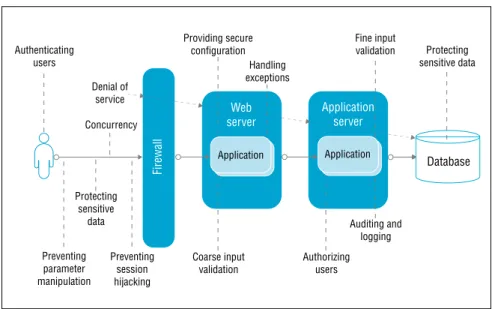
Typical Web application attacksA Web application’s specific vulnerabilities should dictate the technology you
use to defend it. Figure 1 shows many points within a system that might require
protection. Often, it is best to employ generic countermeasure concepts first
to help ensure that you choose the technology best suited to your needs rather
than one that claims to counter the latest hacking technique.
•
•
•
Database Web server Firewall Preventing parameter manipulation Preventing session hijacking Protecting sensitive data Authenticating users Providing secure configuration Denial of service Fine input validation Protecting sensitive data Handling exceptions Concurrency Coarse inputvalidation Authorizingusers
Auditing and logging Application
server Application Application
Figure 1: Web application security concerns
Highlights
To protect Web applications against attacks, enterprises should employ generic preventive approaches as well as targeted technologies.
Page
Highlights
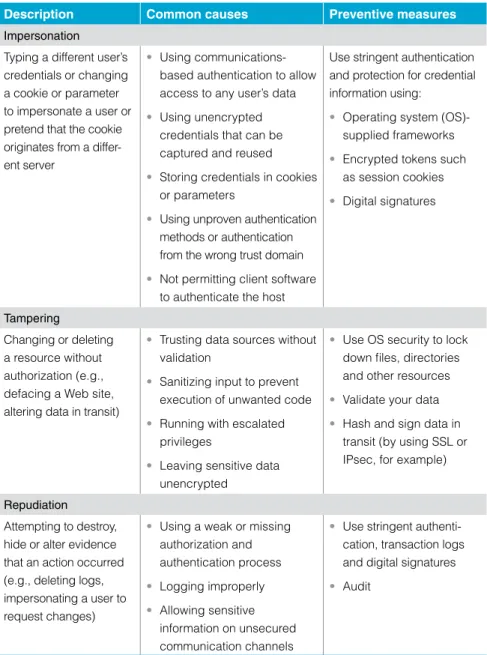
Table 1 shows common threats and preventive measures. However, specific
threats to your application may be different.
Table 1: Common types of Web application attacksDescription Common causes Preventive measures
Impersonation
Typing a different user’s credentials or changing a cookie or parameter to impersonate a user or pretend that the cookie originates from a differ-ent server
Using communications-based authentication to allow access to any user’s data Using unencrypted credentials that can be captured and reused Storing credentials in cookies or parameters
Using unproven authentication methods or authentication from the wrong trust domain Not permitting client software to authenticate the host •
•
• •
•
Use stringent authentication and protection for credential information using:
Operating system (OS)-supplied frameworks Encrypted tokens such as session cookies Digital signatures • • • Tampering Changing or deleting a resource without authorization (e.g., defacing a Web site, altering data in transit)
Trusting data sources without validation
Sanitizing input to prevent execution of unwanted code Running with escalated privileges
Leaving sensitive data unencrypted
• • • •
Use OS security to lock down files, directories and other resources Validate your data Hash and sign data in transit (by using SSL or IPsec, for example) •
• •
Repudiation
Attempting to destroy, hide or alter evidence that an action occurred (e.g., deleting logs, impersonating a user to request changes)
Using a weak or missing authorization and authentication process Logging improperly Allowing sensitive information on unsecured communication channels • • •
Use stringent authenti-cation, transaction logs and digital signatures Audit
•
• Enterprises can employ multi-
ple preventive measures against Web application breaches caused by impersonation, tampering and repudiation.
Highlights Description Common causes Preventive measures Information disclosure
Revealing personally identifiable information (PII) such as passwords and credit card data, plus information about the application source and/or its host machines
Allowing an authenti- cated user access to other users’ data Allowing sensitive infor- mation on unsecured communication channels Selecting poor encryption algorithms and keys •
•
•
Store PII on a session (transitory) rather than permanent basis Use hashing and encryption for sensitive data whenever possible Match user data to user authentication
•
•
• Denial of service (DoS)
Flooding—sending many messages or simultaneous requests to overwhelm a server Lockout — sending a surge of requests to force a slow ser- ver response by consuming resources or causing the appli-cation to restart •
•
Placing too many applications on a single server or placing conflicting applications on the same server
Neglecting to conduct comprehensive unit testing •
•
Filter packets using a firewall
Use a load balancer to control the number of requests from a single source
Use asynchronous protocols to handle processing-intensive requests and error recovery • • • Elevation of privilege Exceeding normal access privileges to gain administrative rights or access to confidential files
Running Web server processes as “root” or “administrator”
Using coding errors to allow buffer overflows and elevate application into a debug state •
•
Use fewest-privileges context whenever possible Use type-safe languages and compiler options to prevent or control buffer overflows •
• Preventive measures can also be
taken to ward off attacks that attempt to access sensitive information and overwhelm server resources.
Page
Highlights Basic guidelines for providing security for Web applications
By using security-specific processes to create applications, software
develop-ment teams can guard against security violations like those shown in table 1.
Specifically, you can apply several basic guidelines to existing applications
and new or reengineered applications throughout your process to help achieve
greater security and lower remediation costs, such as:
Discover and create baselines:
Conduct a complete inventory of
applica-tions and systems, including technical information (e.g., Internet Protocol [IP],
Domain Name System [DNS], OS used), plus business information (e.g., Who
authorized the deployment? Who should be notified if the application fails?).
Next, scan your Web infrastructure for common vulnerabilities and exploits.
Check list serves and bug tracking sites for any known attacks on your OS,
Web server and other third-party products. Prior to loading your application
on a server, ensure that the server has been patched, hardened and scanned.
Then, scan your application for vulnerabilities to known attacks, looking at
HTTP requests and other opportunities for data manipulation. And, finally,
test application authentication and user-rights management features and
terminate unknown services.
Assess and assign risks:
Rate applications and systems for risk — focusing
on data stores, access control, user provisioning and rights management.
Prioritize application vulnerabilities discovered during assessments. Review
organizational, industry and governmental policy compliance. And identify
both acceptable and unacceptable operations.
Shield your application and control damage:
Stay on top of known
security threats and apply available patches to your applications and/or
infrastructure. If you cannot fix a security issue, use an application firewall,
restrict access, disable the application or relocate it to minimize exposure.
Continuously monitor and review:
Schedule assessments as part of your
documented change management process. When you close one out,
immedi-ately initiate a new discovery stage.
•
•
•
•
By applying several basic practices, software development teams can help prevent common Web appli-cation security violations and reduce remediation costs.
Highlights Understanding the Web application lifecycle
Shown in figure 2, the IBM Rational
®Unified Process
®, or IBM RUP
®, solution
delivers a widely used iterative process framework for developing Web applications
based on industry best practices. The core phases of the framework (which may
require two or more iterations to complete) are:
Inception:
Establish a business case, scope and operational vision. Then,
create an initial use-case model, project plan, risk assessment and project
description, including core requirements, security requirements (such as
clarification of security compliance and policies), constraints, features and
prototype candidate architectures.
Elaboration:
Refine your vision, address architecturally significant
scenar-ios to establish a baseline architecture, and detail the use-case model. Then,
create and test one or more prototypes to mitigate technical risks.
Construction:
Develop detailed designs for specific components and their
interactions with other applications, continuously tracking against
require-ments. Generate code and test components for performance, reliability and
security — while tracking and resolving issues — and integrate tested
compo-nents into a first release.
Transition:
Deploy the application, train users and conduct beta testing to
verify security and performance and validate the application against
require-ments. Continuously monitor performance, reliability and security as the
application undergoes changes.
•
•
•
•
The Rational Unified Process delivers a comprehensive, iterative framework for developing Web applications based on industry best practices.
Page 8
Highlights
Iterations
Phases
Inception Elaboration Construction Transition
Initial E1 E2 C1 C2 Cn T1 T2
Major
milestones architectureLifecycle Initial operationalcapability Productrelease Lifecycle
objective
Business modeling Requirements Analysis and design Implementation Test Deployment Configuration and change management Project management Environment Disciplines
Figure 2: Phases, disciplines and milestones in the IBM Rational Unified Process Each of the four phases of the
Rational Unified Process — inception, elaboration, construc- tion and transition — spans multiple disciplines and may require multiple iterations.
Highlights
When marketplace pressures motivate organizations to push Web applications
through development phases without adequate security testing, serious
vulner-abilities can place the business at risk.
Security testing throughout the application lifecycle
By applying the RUP framework guidelines early in the Web application lifecycle,
you can discover and fix vulnerabilities when it is most cost-effective to do so.
As applications move through the development and delivery process, errors can
quickly become more complicated and expensive to remedy.
For example, teams that gather requirements during the inception and
elabo-ration phases may not understand common Web application security threats
and, therefore, neglect to specify requirements to prevent them. In construction,
without clear application-level security requirements, coders might reuse flawed
code or generate new code using a security-unaware integrated development
environment (IDE) wizard, and then fail to properly validate data or correctly
interpret security features in the application framework. In the transition phase,
organizations often entrust Web application review to a few security experts
who attempt to catch vulnerabilities before deployment, leading to process
bottlenecks. Moreover, flaws that experts discover at this stage are likely to be
expensive and time-consuming to fix.
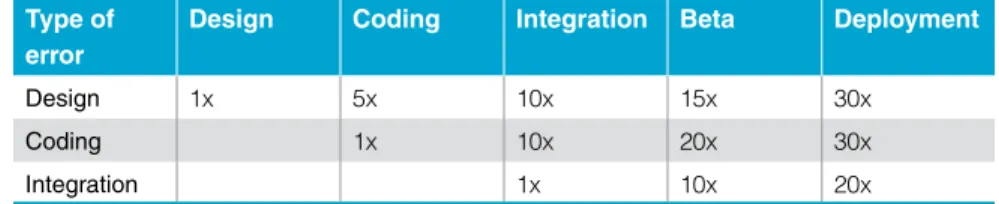
As the figures in table 2
2show, fixing a design error after a Web application is
available costs approximately 30 times more than addressing it during design.
And these estimates do not even factor in costs such as losses in marketshare,
reputation or customer satisfaction.
Enterprises can use the RUP framework throughout the Web application lifecycle to proactively discover and fix vulnerabilities before they become more costly to remedy.
Page 10
Highlights Table 2: Relative cost of error fixes, based on time of discovery Type of
error
Design Coding Integration Beta Deployment
Design 1x 5x 10x 15x 30x
Coding 1x 10x 20x 30x
Integration 1x 10x 20x
Considering the right testing approaches
To help prevent expensive fixes, organizations need to build application security
testing approaches, such as those shown in figure 3, into their development and
delivery process alongside other quality management measures.
Table 3: Web application security testing approaches
Description Pros Cons
Manual
Penetration or security acceptance testing by a small set of security experts using known tools and scripts
Generates well-targeted tests for specific application functions
Limits testing to experts, which may lead to bottlenecks Can lead to a high error rate and recurring costs
Limits application coverage due to time constraints •
• • Automated
Typically built in one of two ways:
Bottom up— Specific tests for individual functions, built by the code developer Top down — QA teams build tests from an end-user perspective •
•
Offsets expenses with improvements in quality, reduced effort for accep-tance testing and iterative development processes
Requires greater overhead to create and maintain than manual testing requires
Fixing a design error after a Web application has been deployed costs approximately 30 times more than addressing it during design.
To help prevent expensive fixes, enterprises can build application security testing approaches into their development and delivery process.
Highlights Description Pros Cons Black box or system
Looks only at system input and output, modifying normal user input to make the application behave in unintentional ways
Uses well-established automated test tools that require minimal application knowledge to use
Possible only when all application components are ready for testing (late staging or production environment) May produce transactions that are difficult to ignore or reverse through user input mutations Can obscure flaws by limiting visibility into the application •
•
• White box or source
Assesses individual components for specific functional errors, often in combination with code scanning tools and peer reviews
Uses tools that have established integrations with developer IDEs, enabling the well-defined discovery of flaws in tested functions
Does not uncover requirement and design flaws
May not uncover vulnerabilities to attacks involving multiple components or specific timing not covered by unit testing Assumes that coders are aware of needed security tests •
•
• Gray box (using an application-defined framework) Combines black- and
white-box testing to create tests unavailable via commercial tools
Provides the most comprehensive method by combining system- and unit-level testing Provides state- and timing-based tests, and uses agents or proxies Integrates the framework into the application to monitor data flows and conduct audits without affecting production data •
•
•
Requires that a framework be specified during the inception phase and design activities May require as much effort to build the test framework as to build the application
•
• Black-box and white-box testing
approaches can leverage commer-cial tools, while gray-box testing calls for a uniquely defined application framework.
Page 12
Highlights Four strategic best practices for protecting Web applications
To address security-related issues as they pertain to Web applications,
orga-nizations can employ four broad, strategic best practices.
1. Increase security awareness
This encompasses training, communication and monitoring activities,
prefer-ably in cooperation with a consultant.
Training
Provide annual security training for all application team members:
develop-ers, quality assurance professionals, analysts and managers. Describe current
attacks and a recommended remediation process. Discuss the organization’s
current security practices. Require developers to attend training to master the
framework’s prebuilt security functions. Use vendor-supplied material to train
users on commercial off-the-shelf (COTS) security tools, and include security
training in the project plan.
With help from a third-party consultant, enterprises can employ training, communication and monitoring activities to improve security awareness.
Highlights Communication
Collect security best practices from across all teams and lines of business in your
organization. Distribute them in a brief document and make them easily
acces-sible on an intranet. Get your IT security experts involved early and develop
processes that include peer mentoring. Assign a liaison from the security team
to every application team to help with application requirements and design.
Monitoring
Ensure that managers stay aware of the security status of every application
in production. Track security errors through your normal defect tracking and
reporting infrastructures to give all parties visibility.
2. Categorize application risk and liability
Every organization has limited resources and must manage priorities. To help
set security priorities, you can:
Define risk thresholds and specify when the security team will terminate
application services.
Categorize applications by risk factors (e.g., Internet or intranet vs. extranet).
Generate periodic risk reports based on security scans that match issues to
defined risk thresholds.
Maintain a database that can analyze and rank applications by risk, so you
can inform teams of how their applications stack up against deployed systems.
•
•
•
•
To allocate limited security resources, enterprises can prioritize risk and liability issues.
Page 1
Highlights . Set a zero-tolerance enforcement policy
An essential part of governing the development and delivery process, a well-
defined security policy can reduce your risk of deploying vulnerable or
noncompliant applications. During inception, determine which tests the
appli-cation must pass before deployment, and inform all team members. Formally
review requirements and design specifications for security issues during inception
and elaboration—before coding begins. Allow security exceptions only during
design and only with appropriate executive-level approval.
. Integrate security testing throughout the development and delivery process
By integrating security testing throughout the delivery lifecycle, you can have
significant positive effects on the design, development and testing of applications.
You should base functional requirements on security tests your application must
pass, making sure that your test framework:
Uses automated tools and can run at any point during the development and
delivery process.
Includes unit and system tests as well as application-level tests.
Allows for audit testing in production.
Includes event-driven testing.
Uses an agile development methodology for security procedures.
Can be run during coding, testing, integration and production activities.
•
•
•
•
•
•
To help govern development and delivery processes and to manage compliance, enterprises must establish a security program and set a zero-tolerance enforcement policy. By integrating security testing throughout the software delivery lifecycle, enterprises can improve application design, development and testing.
Highlights
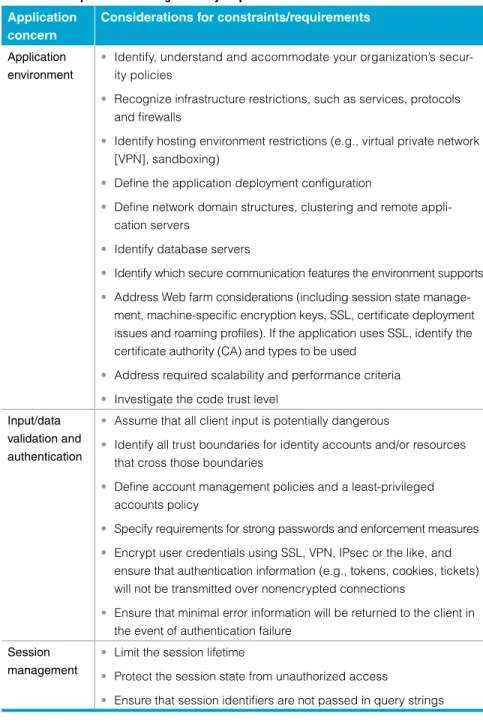
Table 4 suggests ways to structure requirements that address a spectrum of
application-level security concerns during the inception phase.
Table 4: Inception—defining security requirementsApplication concern
Considerations for constraints/requirements Application
environment
Identify, understand and accommodate your organization’s secur- ity policies
Recognize infrastructure restrictions, such as services, protocols and firewalls
Identify hosting environment restrictions (e.g., virtual private network [VPN], sandboxing)
Define the application deployment configuration
Define network domain structures, clustering and remote appli- cation servers
Identify database servers
Identify which secure communication features the environment supports Address Web farm considerations (including session state manage-ment, machine-specific encryption keys, SSL, certificate deployment issues and roaming profiles). If the application uses SSL, identify the certificate authority (CA) and types to be used
Address required scalability and performance criteria Investigate the code trust level
• • • • • • • • • • Input/data validation and authentication
Assume that all client input is potentially dangerous
Identify all trust boundaries for identity accounts and/or resources that cross those boundaries
Define account management policies and a least-privileged accounts policy
Specify requirements for strong passwords and enforcement measures Encrypt user credentials using SSL, VPN, IPsec or the like, and ensure that authentication information (e.g., tokens, cookies, tickets) will not be transmitted over nonencrypted connections
Ensure that minimal error information will be returned to the client in the event of authentication failure
• • • • • • Session management
Limit the session lifetime
Protect the session state from unauthorized access
Ensure that session identifiers are not passed in query strings •
• • During the inception phase,
enter-prises can structure requirements that address multiple application-level security concerns.
Page 1
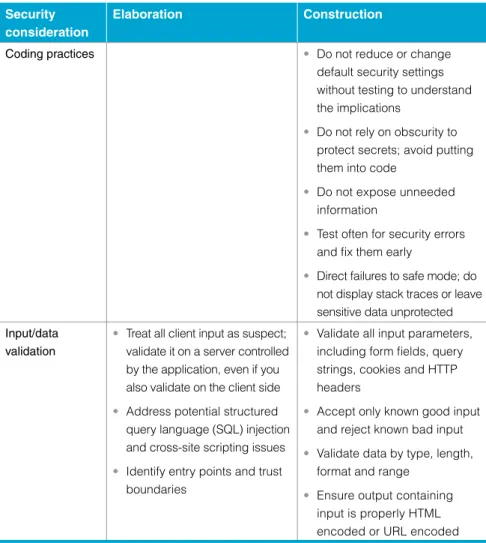
Table 5 details activities during elaboration and construction that align with
defined security requirements.
Table 5: Elaboration and construction—modeling and coding for security measures Security
consideration
Elaboration Construction
Coding practices Do not reduce or change
default security settings without testing to understand the implications
Do not rely on obscurity to protect secrets; avoid putting them into code
Do not expose unneeded information
Test often for security errors and fix them early
Direct failures to safe mode; do not display stack traces or leave sensitive data unprotected • • • • • Input/data validation
Treat all client input as suspect; validate it on a server controlled by the application, even if you also validate on the client side Address potential structured query language (SQL) injection and cross-site scripting issues Identify entry points and trust boundaries
•
•
•
Validate all input parameters, including form fields, query strings, cookies and HTTP headers
Accept only known good input and reject known bad input Validate data by type, length, format and range
Ensure output containing input is properly HTML encoded or URL encoded •
• • • Coding and data validation measures
can offer significant benefits during the elaboration and construction phases of the software development and delivery process.
Security consideration
Elaboration Construction
Authentication Separate access to public and restricted areas, ID accounts and resources that cross trust boundaries
Identify accounts that service or administer the application Ensure that user credentials are encrypted and stored securely Specify the ID for authenticating with the database
•
• • •
Store passwords as digests Return minimal error information with authentication failures Do not use HTTP header information for security purposes
• • •
Authorization Specify all IDs and resources that each can access Identify privileged resources and privileged operations Separate privileges for different roles (i.e., build in authorization granularity) Identify code-access security requirements
• • •
•
Restrict database logins to access-specific stored procedures; do not allow direct access to tables Restrict access to system-level resources • • Configuration management Protect administration interfaces and remote administration channels with strong authentication and authorization capabilities Provide role-based administrator privileges Use least-privileged process and service accounts •
• •
Secure configuration stores Do not hold confidential data in plain text configuration files •
• By improving authentication,
authorization and configuration management practices, enterprises can address security issues during the elaboration and construction phases.
Page 18 Security consideration Elaboration Construction Sensitive data and session protection
Avoid storing secret data; identify encryption algorithms and key sizes for any that you must retain
Identify protection mechanisms for sensitive data sent over the network
Use SSL to protect authenti-cation cookies and encrypt their contents
Identify a methodology to help secure encryption keys and use only known cryptography libraries and services Identify proper cryptographic algorithms and key size •
•
•
•
•
Do not store sensitive data in code
Do not store database connections, passwords or keys in plain text
Do not log sensitive data in clear text
Do not store sensitive data in cookies or transmit it as a query string or form field • • • • Exception management
Define a standard approach to structured exception handling Specify generic error messages to be returned to the client •
•
Disclose minimal information following an exception •
Auditing and logging
Identify key parameters for auditing and logging Specify storage, security and analysis features for log files Specify how to flow caller identity across multiple tiers— at the OS or application level •
• •
Do not log sensitive data •
Session protection, exception management, and auditing and logging can also provide opportunities for improving the security of Web applications.
In addition to making security an integral part of the application development
and delivery process, you can integrate security tests right into the
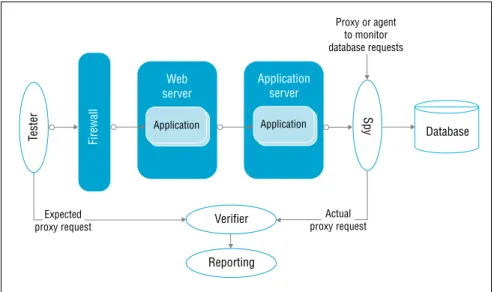
applica-tion you are building to conduct event-driven testing. In this case, where a user
makes a request and the application responds, the test compares the response to
an expected or previously stored response to determine whether the system is
operating properly. For example, in figure 3, an application uses a database as
its back-end component. The tester inserts a spy proxy and a verifier into the
request flow, telling the verifier what a normal request should be so that the
verifier can compare it with the spy proxy’s actual request.
Database Web server Firewall Application Application Application server Tester Spy Expected proxy request Actual proxy request Proxy or agent to monitor database requests Reporting Verifier
Figure 3: Security testing a Web application with a back-end database Through event-driven testing,
enterprises can integrate security tests right into the application being developed.
Any service, e-mail, XML or legacy service can serve as a back end. How you
implement the code to review requests depends on the application architecture.
For example, your spy component might be a mock data access object, a proxy
or a class that inherits from the front-end service. You can also create code
specifically for a test that you insert into the data stream to supply reporting
data needed by the testing framework. Coordinating the testing objects gives
you comprehensive, fine-grained control of a range of tests. You can perform
these tests using either black-box or white-box testing, improving your chances
of catching security problems early in the lifecycle—before they pose a serious
business risk.
For more information
To learn more about the IBM Rational methodology and how you can create
security-rich Web applications using IBM Rational automated lifecycle security
tools, please contact your IBM representative or visit:
ibm.com/software/rational/offerings/testing/webapplicationsecurity IBM Corporation Software Group Route 100 Somers, NY 10589 U.S.A.
Produced in the United States of America 01-08
All Rights Reserved.
IBM, the IBM logo, Rational, Rational Unified Process and RUP are registered trademarks of International Business Machines Corporation in the United States, other countries, or both. The information contained in this documentation is provided for informational purposes only. While efforts were made to verify the completeness and accuracy of the information contained in this documentation, it is provided “as is” without war-ranty of any kind, express or implied. In addition, this information is based on IBM’s current product plans and strategy, which are subject to change by IBM without notice. IBM shall not be responsible for any damages arising out of the use of, or otherwise related to, this documentation or any other docu-mentation. Nothing contained in this documentation is intended to, nor shall have the effect of, creating any warranties or representations from IBM (or its suppliers or licensors), or altering the terms and conditions of the applicable license agreement governing the use of IBM software.
IBM customers are responsible for ensuring their own compliance with legal requirements. It is the customer’s sole responsibility to obtain advice of competent legal counsel as to the identification and interpretation of any relevant laws and regula-tory requirements that may affect the customer’s business and any actions the customer may need to take to comply with such laws.
This publication contains other-company Internet addresses. IBM is not responsible for information found on these Web sites.
1 International Organization for Standardization; www.iso.org.
2 www.nist.gov/director/prog-ofc/report02-3.pdf.