International Journal of Innovative Technology and Exploring Engineering (IJITEE) ISSN: 2278-3075, Volume-8 Issue-10, August 2019
Abstract: The most important affecting factors to World economy include knowledge, proficiency and inventiveness of people. Education is allied with improved skills, and better human capacity to progress the quality of life. The development of country depends on the status of higher education in country. Every year, MHRD, India collects details about Higher Education from universities using AISHE Portal to plan National Policy on Education but in the existing AISHE system, user interface is not provided to the users; they are downloading PDF file from Portal and then after entering necessary details in PDF file offline they upload PDF file on portal. Here we have implemented Semantic Web Enabled System on Apache Jena Fuseki Server using Virtual Private Server (VPS). Researchers provide knowledge based AISHE user friendly system with GUI interface & implemented CRUD operation on VPS. Proposed AISHE system provides benefits of SW such as machine understandability, reusability, interoperability, inference of new knowledge, reduces development time etc; as Ontology is used for development.
Index Terms: Semantic Web, AISHE, Virtual Private Server, Apache Jena Fuseki Server, CRUD Operations.
I. INTRODUCTION ANDMOTIVATIO Today, global wealth is less concentrated in factories, lands, tools and machinery. The most important affecting factors to World economy include knowledge, proficiency and inventiveness of people. Education is allied with improved skills, higher efficiency, and better human capacity to progress the quality of life. One of the factors for development of any country depends on the status of higher education in country. Malcolm Gillis, President of Rice University said that - “Today, more than ever before in human history, the wealth or poverty of nations depends on the quality of higher education. Those with a larger repertoire of skills and a greater capacity for learning can look forward to lifetimes of unprecedented economic fulfillment.”
A. Introduction to AISHE
One of the factors for development of any country depends on the status of higher education in country. Being a developing country, India needs to stand with the other countries in the field of Education. Every year, Ministry of Human Resource Development Government of India (MHRD - Ministry of Human Resource Department) (MHRD, 2018) collects details about Higher Education from various
Revised Manuscript Received on August 06, 2019.
Dr.Priya Swamiaraya, Dean, Faculty of IT & Computer Science, Parul University, Vadodara,India.
Prof. Ronak Panchal, Assistant Professor BCA Department, Vidyabharti Trust College of BCA,Bardoli, India.
institutes, universities using AISHE Portal developed by National Informatics Center (NIC) to formulate the National Policy on Education
(AISHE_MHRD_Wikipedia, 2011). In Budget- 2016, Finance Minister Arun Jaitley announced a marginal increase of 4.8 per cent in the overall budget for education, with a bigger thrust on improving Higher Education. The government earmarked Rs 72,394 core for education against Rs 69,074 (budget estimate) provided last year. Among this, Rs 28,840 core went to higher education and Rs 43,554 crore to schools. In short, AISHE helps to MHRD for getting information about the status of higher education in India and formulating the National Policy on Higher Education. B. Review of Work Already Done
Researchers have studied AISHE Portal and find innovative way to collect data from Higher Education institutions and then MHRD plans National Policy on Higher Education by adopting emerging Technology – Semantic Web:
To depict the status of higher education in the India, Ministry of Human Resource Development (MHRD) has ventured to carry out an annual web-based All India Survey on Higher Education in India.
Education (AISHE) since 2010-11. The survey includes all the Institutions in the India engaged in imparting higher education. In the survey, various types of data are being collected on several factors such as programmes, students, teachers, examination results, infrastructure and finance. Indicators of educational development such as Institution Density, Gross Enrolment Ratio, Pupil-teacher ratio, Gender Parity Index, Per Student Expenditure are also calculated from the data collected through AISHE. These all are very much useful in finalizing policy decisions and research for development of education sector in country. National Informatics Center (NIC) has developed AISHE
Portal for getting information from academic institutes and universities.
Semantic Web based knowledge representation system doesn’t exist for AISHE Web Portal.
In this paper, the researchers make alternative AISHE portal using Semantic Web for collecting relevant information from Higher Education Institutions. In the proposed system – AISHE Portal will offer additional features and take advantages of Semantic Web Technology.
Semantic Web Enabled GUI SPARQL CRUD
operation on VPS with Integration of Apache
Jena Fuseki Server
Server
The Semantic Web technology has proven several benefits such as machine understandability, reusability of domain knowledge, interoperability, knowledge representation using schema, mapping of schema to an upper ontology, inference of new knowledge from existing, reduces development time, increases reusability etc.
II. PROPOSEDSYSTEM
In this paper, authors have proposed Semantic Web enabled system which supports SPARQL CRUD (Create, Read, Update and Delete) operations on Virtual Private Server (VPS) with the integration of Apache Jena Fuseki Server. It’s a user friendly GUI system.
A. Major steps for Implementation of Proposed System: 1) Development of AISHE Ontology using below sub
steps (Priya, 2012)
a.
Determine the scope of the Ontologyb.
Define concepts (classes) to be modeled in Ontology and relationship among themc.
Reuse concepts which are available in similar existing Ontology, if any.d.
Arrange the concepts in a hierarchy (sub class-super class hierarchy)e.
Determine attributes and properties (slots) for each class and constraints on their valuesf.
Define instance and fill the slot values for each class.Here authors have identified related entities such as University, Course, and Statutory Body etc. for the development of AISHE Ontology.
Here authors have developed ontology in rdf file format using protégé tool. Protégé is a knowledge based framework and Ontology Editor. It’s a free and open source tool for the
Ontology Development
(protegewiki.stanford.edu/wiki/Main_Page, 2015). The Protégé platform offers two different ways of ontologies development via the Protégé-Frames and Protégé-OWL editors. Protégé ontologies can be exported into a various format which include RDF, RDFS, OWL, and XML Schema (Stanford University, 2009).
Protégé is extensible and based on Java, and provides a plug-and-play environment that makes it more flexible for quick application and prototyping development (Stanford University, 2009).
2) Design front-end side GUI web based application in PHP (Hyper preprocessor) with use of EasyRDF library (Humfrey, 2018)
3) Design back-end which stores information in AISHE ontology dataset.
Note: Earlier authors used AISHE Ontology from localhost (Ronak & Priya, 2017) but as per the requirement of MHRD, information about Higher Education must be gathered from the heterogeneous environment. Then researchers asked many hosting providers such as GoDaddy, Amazon Web Server and many more, for uploading ontology dataset. But they do not have this facility in their control panel. Finally, authors have purchased Virtual Private Server (VPS) for implementation of Apache Jena Fuseki Server with domain name.
B. Implementation of Proposed System – Data Publishing and Access
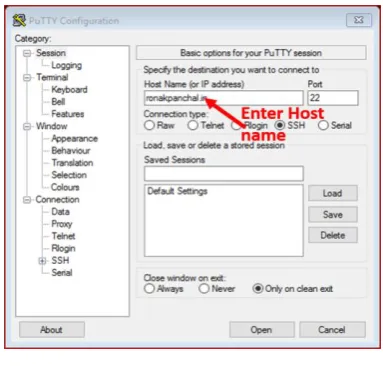
Researchers have collected details about Virtual Private Server and its FTP (File Transfer Protocol) from web hosting provider. Authors have used Putty Software to access Virtual Private Server. Researcher enters host name or IP address and 22 as port number in Putty server with connection type of SSH. As per the Wikipedia, “Secure Shell (SSH) is a cryptographic network protocol for operating network services securely over an unsecured network.” (SSH_Wikipedia, 2018)
[image:2.595.330.522.391.574.2]Step-1: Access Virtual Private Server using Putty with SSH Login
Figure 1: Login Page
Step-2: Download JAVA and install on Virtual Private Server.
Then download Java Development Tool Kit (32 bit or 64 bit - (http://oracle.com)
$wgethttps://...urllink..../jdk-8u181-linux-x64.tar.gz
(StackOverflow, 2018)
and extract tar.gz using tar command
International Journal of Innovative Technology and Exploring Engineering (IJITEE) ISSN: 2278-3075, Volume-8 Issue-10, August 2019
Then set java environment and checkjava –version.
Step-3: Now, Download Apache Jena Fuseki Server and
install on VPS
(LAMP_setup_on_VPS, 2018)
If java installation completely finished, then only download Apache Jena Fuseki Server from terminal, the steps are following:
After downloading successfully, save in your root.
$tar vzxf apache-jena-fuseki-3.8.0.tar.gz
Extract tar file and rename apache-jena-fuseki-3.8.0 file with fuseki name.
Step-4: Make necessary changes in shiro.ini file inside fuseki folder (Apache_Software_Foundation, 2018)
Then modify shiro.ini file which is in run folder and
/$/server =anon line above /4/** = localhostFilter. (Kaye, 2016)
[roles] [urls]
## exposed to any person
/$/status = anon /$/ping = anon
## and the rest are controlled to localhost. /$/server =anon
/$/** = localhostFilter
## Researcher provides the general configuration.
##If you want guideless, basic confirmation user/password ##Login Credencial
## on the operations,
## This configuration is very important when anyone setup apache jena fuseki server
## on virtual private server (VPS)
## 1 - set a recovering password in [users] above. ## 2 - comment out the "/$/** = localhost" line and use: ## "/$/** = authcBasic,user[admin]"
## or to allow any access.
##/$/(double-start)** = anon This line is very import in shiro.ini file
## without this configuration ##user is not able to see GUI # Everything else
/**=anon
Step-5: Create dataset and open Apache Jena Fuseki from Web Browser
Then run and create dataset in fuseki server on command line. Enter following statement on command line
./fuseki-server --update --mem /AISHE
Then open AISHE dataset (Ontology) in Web Browser by using http://ipaddressofvps:3030/
Open GUI of apache jena fuseki server then upload rdf or owl (Note: use only owl or rdf file)
Note: use either owl or rdf file and in this dataset we have uploaded rdf file.
OR
Alternative way to open apache jenafuseki server is to convert AISHE ontology into tdb. (Apache_Jena_Feseki, 2018)
step-1: ./fuseki-server --update --mem /aishephd (datasetname) step-2: create folder for dataset.tdb file (ontology rename and hosting in dataset folder)
step-3: owl file save as .tdb file and upload local tdb or url tdb file inside folder
step-4: java -Xmx1200M -jar fuseki-server.jar --loc=FolderName(like DBAISHE) /aishephd
step-5: fuseki server started (remotely)
[2018-08-31 12:30:35] Server INFO Running in read-only mode for /aishephd…..
[2018-08-31 12:30:35] Server INFO Apache Jena Fuseki 3.8.0………
[2018-08-31 12:30:35] Config INFO FUSEKI_HOME=/root/fuseki/……….. [2018-08-31 12:30:35] Config INFO FUSEKI_BASE=/root/fuseki/run………….. [2018-08-31 12:30:35] Config INFO Shiro file: file:///root/fuseki/run/shiro.ini...
[2018-08-31 12:30:36] Config INFO Template file: templates/config-tdb-dir……
[2018-08-31 12:30:36] Config INFO TDB dataset: directory=DBAISHE………..
[2018-08-31 12:30:38] Config INFO Register: /aishephd………
Server
[image:4.595.46.292.88.257.2]Now it provides access to GUI of Apache Jena Fuseki through IP address of virtual private server.
Figure 2: Access to Jena Fuseki Server thorough IP Address
III. ANALYSISMODULES
Researchers scrutinize ontology classes, Data Properties and object properties from AISHE existing portal and following is the snippets of AISHE Ontology.
<?xml version="1.0"?> <!DOCTYPErdf:RDF [
<!ENTITY owl "http://www.w3.org/2002/07/owl#" > <!ENTITY www "http://www.ronuphdswaishe.org/" > <!ENTITYxsd "http://www.w3.org/2001/XMLSchema#" > <!ENTITYrdfs "http://www.w3.org/2000/01/rdf-schema#" > <!ENTITYrdf
"http://www.w3.org/1999/02/22-rdf-syntax-ns#"> ]>
<rdf:RDFxmlns="http://www.ronuphdswaishe.org/" xml:base="http://www.ronuphdswaishe.org/"
xmlns:rdf="http://www.w3.org/1999/02/22-rdf-syntax-ns#" xmlns:owl="http://www.w3.org/2002/07/owl#"
xmlns:www="http://www.ronuphdswaishe.org/" xmlns:xsd="http://www.w3.org/2001/XMLSchema#" xmlns:rdfs="http://www.w3.org/2000/01/rdf-schema#"> <owl:Ontologyrdf:about="http://www.ronuphdswaishe.org/" />
<!-- //Example of Object Properties -->
<!-- http://www.ronuphdswaishe.org/isAffiliatedTo -->
<owl:ObjectPropertyrdf:about="&www;isAffiliatedTo"> <rdfs:domainrdf:resource="&www;Institution"/> <rdfs:rangerdf:resource="&www;University"/> </owl:ObjectProperty>
<!-- // Example of Data properties -->
<!-- http://www.ronuphdswaishe.org/codeOfCourse -->
<owl:DatatypePropertyrdf:about="&www;codeOfCourse"> <rdfs:domainrdf:resource="&www;Course"/>
<rdfs:rangerdf:resource="&xsd;integer"/> </owl:DatatypeProperty>
<!-- http://www.ronuphdswaishe.org/nameOfCourse -->
<owl:DatatypePropertyrdf:about="&www;nameOfCourse"> <rdfs:domainrdf:resource="&www;Course"/>
<rdfs:rangerdf:resource="&xsd;string"/> </owl:DatatypeProperty>
<!-- // Classes -->
<!-- http://www.ronuphdswaishe.org/Course --> <owl:Classrdf:about="&www;Course"/>
<!-- // Individuals -->
<!-- http://www.ronuphdswaishe.org/AICTE -->
<owl:NamedIndividualrdf:about="&www;AICTE"> <rdf:typerdf:resource="&www;StatutoryBody"/>
<codeOfStatutoryBodyrdf:datatype="&xsd;integer">1</cod e OfStatutoryBody>
<nameOfStatutoryBodyrdf:datatype="&xsd;string">All
India Council for Technical
Education</nameOfStatutoryBody> </owl:NamedIndividual>
</rdf:RDF>
<!-- Generated by the OWL API (version 3.5.0) http://owlapi.sourceforge.net -->
IV. ARCHITECTUREANDUSERINTERFACE A. Architecture
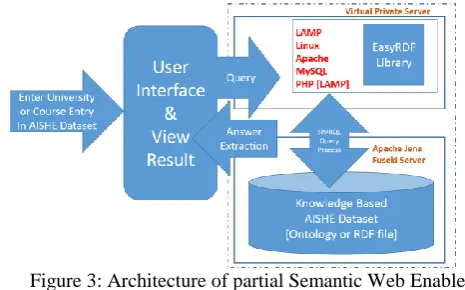
As shown in Figure – 3, the Web Application is hosted on Virtual Private Server and configures two servers on VPS (Humfrey, 2018). One is LAMP (Linux Apache MySql PHP) server and second is Apache Jena Fuseki Server. The EasyRDF Library configure on LAMP server & Knowledge based (such ontology owl and rdf file) AISHE dataset configure on Apache Jena fuseki Server. These two Servers communicate with each other by the SPARQL Query Process.
Figure 3: Architecture of partial Semantic Web Enabled AISHE system
B. User interface
[image:4.595.300.533.499.644.2]International Journal of Innovative Technology and Exploring Engineering (IJITEE) ISSN: 2278-3075, Volume-8 Issue-10, August 2019
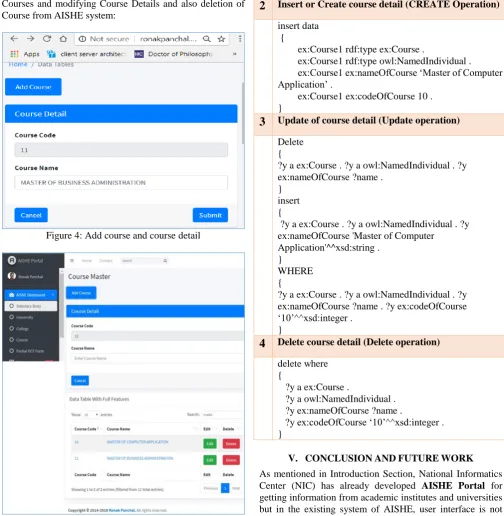
[image:5.595.45.550.53.570.2]Courses and modifying Course Details and also deletion of Course from AISHE system:
Figure 4: Add course and course detail
Figure 5: Modify and delete triplet of course
System use can also perform the CRUD (Create, Read, Update and Delete) operations and following are some of the snippets (Anandavala, 2013)
SPARQL Insert, Update, Delete and Display [CRUD] operation(Anandavala, 2013)
1
Display course information ( Display Operation) PREFIX ex: <http://www.ronuphdswaishe.org/> SELECT ?code ?cnameWHERE {
?x a ex:Course .
?x ex:codeOfCourse ?code . ?x ex:nameOfCourse ?cname . }
2
Insert or Create course detail (CREATE Operation) insert data{
ex:Course1 rdf:type ex:Course .
ex:Course1 rdf:type owl:NamedIndividual . ex:Course1 ex:nameOfCourse ‘Master of Computer Application’ .
ex:Course1 ex:codeOfCourse 10 . }
3
Update of course detail (Update operation) Delete{
?y a ex:Course . ?y a owl:NamedIndividual . ?y ex:nameOfCourse ?name .
} insert {
?y a ex:Course . ?y a owl:NamedIndividual . ?y ex:nameOfCourse 'Master of Computer
Application'^^xsd:string . }
WHERE {
?y a ex:Course . ?y a owl:NamedIndividual . ?y ex:nameOfCourse ?name . ?y ex:codeOfCourse ‘10’^^xsd:integer .
}
4
Delete course detail (Delete operation) delete where{
?y a ex:Course .
?y a owl:NamedIndividual . ?y ex:nameOfCourse ?name .
?y ex:codeOfCourse ‘10’^^xsd:integer . }
V. CONCLUSIONANDFUTUREWORK
[image:5.595.42.290.641.783.2]Server
REFERENCES
1. MHRD. (2018). AISHE_home. Delhi: NIC. Retrieved from http://aishe.nic.in/aishe/home
2. AISHE_MHRD_Wikipedia. (2011). All India Survey of Higher Education - Wikipedia. wikipedia. Retrieved from
https://en.wikipedia.org/wiki/All_India_Survey_ of_Higher_Education
3. SWAMINARAYANA PRIYA RAMESHBHAI (2012) “Study of an University System and its Ontology Development from the Semantic Web perspective” retrieved from http://hdl.handle.net/10603/39524 4. protegewiki.stanford.edu/wiki/Main_Page. (2015). Protege Wiki.
USA: wiki. Retrieved from http://protegewiki.stanford.edu/wiki/ 5. Prof. Ronak Panchal, Dr.Priya R.Swaminarayan (2017) “Execution of
SPARQL Query using Apache Jena Fuseki Server in AISHE Domain”, International Journal of Advance Engineering and Research Development Volume 4, Issue 9, September -2017
6. Stanford University. (2009). Protege - Semantic Web Standards. Http://Protege.Stanford.Edu/. Retrieved from
https://www.w3.org/2001/sw/wiki/Protege
7. Humfrey, N. (2018). EasyRdf - RDF Library for PHP. Retrieved from http://www.easyrdf.org/
8. SSH_Wikipedia. (2018). Secure Shell. Wikipedia.Org. Retrieved from http://en.wikipedia.org/wiki/Secure_Shell
9. StackOverflow. (2018). Downloading Java JDK on Linux via wget is shown license page instead-Stack Overflow
10.LAMP_setup_on_VPS. (2018). How to setup a web server on a virtual private server — Veesp. Retrieved from https://veesp.com/en/blog/how- to-setup-web-server-on-virtual-server 11.Apache_Software_Foundation. (2018). Apache Jena - Security in
Fuseki2.
12.Kaye, R. (2016). Fuseki Server Installation. Drug Disease Model Resources, 1(1.0), 1–11. Retrieved from
http://www.ddmore.eu/sites/ddmore/files/Fuseki_Server_Installation_ 0.pdf
13.Apache_Jena_Feseki. (2018). Apache Jena - Fuseki_ serving RDF data over HTTP.
14.Anandavala. (2013). Simple example of manipulating graph data using SPARQL Update_ anandavala. Retrieved from
https://anandavala.wordpress.com/2013/06/02/s parql-update-example-code-for-create-insert- delete-edit/
AUTHORSPROFILE
Dr.Priya Swamiaraya, Dean, Faculty of IT & Computer Science, Parul University, Vadodara,India. She is having 17 years of teaching experience, 10 years of research experience and 8 years of administrative experience. She has completed PhD in the field of Computer Science from Ganpat University in 2012. Her main research area lies in Semantic Web, Computer Network, Data Structure, Computer Graphics etc. Email ID: [email protected] [email protected]
Ronak Panchal, was born in 1986, received the Master's degree in computer science from Veer Narmard South Gujarat University, Surat, Gujarat, India. Now, he is studying for a PhD’s degree in computer science in the calorx teachers’ university. He is working as Assistant Professor at Vidyabharti Trust College of BCA, Bardoli, Surat. His main research interests lie in Semantic Web and Ontology integration. Email ID is