Rochester Institute of Technology
RIT Scholar Works
Theses Thesis/Dissertation Collections
7-2016
DigiTabs: Share. Learn. Play
Alfredo Lopez
Follow this and additional works at:http://scholarworks.rit.edu/theses
Recommended Citation
Alfredo Lopez
A thesis submitted in partial
fulfillment of the requirements for the degree of Master of Fine Arts in Computer Graphics Design
Rochester Institute of Technology College of Imaging Arts and Sciences School of Design
MFA Computer Graphics Design
Thesis Committee Approval:
Chief Adviser: Chris Jackson, Computer Graphics Design
Associate Adviser: Shaun Foster, Computer Graphics Design
School of Design Administrative Chair Approval:
Administrative Chair, School of Design: Peter Byrne
Thesis Candidate/Author: Alfredo Lopez
Signature of Chief Adviser Date
Signature of Associate Adviser Date
Table of Contents:
1. Foreword
1.1.Abstract
1.2.Acknowledgements 1.3.Introduction
1.3.1. Key features
2. Case Study
2.1. Threadless 2.2. Audio Jungle 2.3. Wikipedia 2.4. Ultimate Guitar
3. Research
3.1.Crowdsourcing & Social Networking 3.2.Technologies And Social Interaction 3.3.Sound Development
3.4.Interactivity And Usability
4. Process
4.1.Development 4.1.1. Initial Idea 4.2.Final Application 4.2.1. Branding
4.2.2. Information Architecture 4.2.3. Back-end Process
4.2.4. Design Process 4.2.5. Usability Testing
5. Conclusion 6. Appendix
Foreword
1.1 Abstract
This project focused on designing an effective online sharing network that
includes video tutorials and music tablatures of any original or pre-existing song, created and shared by fellow musicians. This network encourages people with little to no musical background to perform their own versions of songs by practicing and learning music theory in a pedagogical interactive environment.
1.2 Acknowledgements
This thesis is dedicated to my family, especially my mother and father.
1.3 Introduction
As a traditionally trained musician growing up in Ecuador, I always looked down on music created electronically. To me, it didn’t have the soulful connection between the musician and the music, and it could be seen as a “crutch” of sorts, or an easy way out for someone without the skill of playing a physical instrument. Digital music didn’t sound realistic when trying to reproduce specific
instruments and sounds.
However, once I traveled abroad I was forced to sell my instruments. I found myself still wanting to make music and had no choice but to use my computer to do it. Quickly, I realized that my abilities as a musician didn’t translate to this new digital medium, so I had to relearn music in order to create and perform. This allowed me to appreciate the advancements that had been created in the evolution of music technology such as sampling, and open my mind to the countless possibilities that modern digital music could provide.
With digital music, you can use sampling to source specific sounds to be reused as effects, notes, and more. Sampling provides musicians with the ability to make sounds that are more realistic, but can also be transformed. In addition to this, digital music gives the ability to create compositions that could use
countless instruments, which would be next to impossible in the traditional sense. For example, you can create a drum sequence that would be impossible for a human to play or recreate a full orchestra.
1.3.1 Key Features
This web-based application would allow users to register and submit samples of music created using software and tutorials on how to play the sample. For example, users can submit their sample of a popular song, and users can comment and vote on the accuracy of the sample. In addition, they can create their own original samples and users can comment and vote on how they feel about their work.
Once the voting period has ended, highly rated samples are spotlighted on the website along with the tablature to play the samples for other users to see and discover. This honor allows for bragging rights for the spotlighted, and faster connection to more accurate information for other users.
The key features are:
(1)User Participation
Users can create samples and tutorials to be seen by the community.
(2) Interactivity
Users can comment, vote, and create. (3)Discovery
Users can search for samples and tutorials, and read through any information shared by users.
(4) Gamification
2.0 Case Studies
Throughout the course of this thesis, these sources have been invaluable for information and inspiration.
2.1 Threadless
URL: http://www.threadless.com/
TAG: User voting, commenting, spotlight/feature artists
Description:
Threadless is a website selling shirts and other items with designs made and chosen by its community.
Relevance:
Threadless is a great example of how community-sourced content gives the power to community members to create, choose, and compete against each other for bragging rights and recognition.
2.2 Audio Jungle
URL: http://www.audiojungle.com/ TAG: Interactivity, spotlight/featured work
Description:
A market place where users can upload and sell their original auditory creations. Users can interactively play the samples, browse through samples, and buy them for their projects.
Relevance:
2.3 Wikipedia
URL: http://www.wikipedia.com
TAG: User generated content, moderated constantly updated content
Description:
Wikipedia is a crowd-sourced online encyclopedia where you can discover information, texts, images, and more of a particular topic.
Relevance:
Each entry in Wikipedia is a compilation of different approved user-generated content. Each edit is moderated and approved to create a final complete entry. Users can dispute the information and add their own with evidence.
2.4 Ultimate Guitar
URL: https://www.ultimate-guitar.com
TAG: User generated content, voting, discussions, lessons
Description:
Ultimate Guitar is a website where users can submit guitar tabs for songs, rate and comments on tabs, as well as read the latest news and interact on forums.
Relevance:
3.0
Research
3.1 Crowdsourcing & Social Networking
I researched the books “Crowdsourcing: Why The Power Of The Crowd Is Driving The Future Of Business (2008)” by Jeff Howe, “Building Virtual Communities: Learning and Change in Cyberspace (2002)” by K. Ann Renninger and Wesley Shumar, and “Handbook of Research on Socio-Technical Design and Social Networking Systems (2009)” by Brian Whitworth and Aldo De. Moor to better understand how different elements of crowdsourcing and social networking affect each other. From these resources, I was able to grasp the general concept of crowdsourcing and social networking to help move my project in a more
focused and successful direction.
For example, while crowdsourcing can be an invaluable resource, it is not a cure-all. You have to be careful to pick the right crowd and to give the correct
incentives to retain that crowd because at the end of the day, the community will create a website that is more what they want, and it might not reflect what you
wanted it to be. (Howe 2008)
3.2 Technologies and Social Interaction
For the elements of technologies and how they work with social interaction, I referenced “Technological Visions: Hopes and Fears That Shaped New
Technologies (2004)” by Marita Stirken and Douglas Thomas, and “Don’t Touch That Dial! – A History of Media Technology Scares, From Printing Press to Facebook (2010)” by Vaughan Bell.
For example, in the past, new technological discoveries and inventions have often been met by fear (Bell 2010). Many people think of technology as something that is hard to grasp or as a tool to do something extraordinary, but technology can affect us in our daily lives on a very mundane level. It can connect us to
communities around the world that focus on certain topics or answering certain questions that we may have. Instead of being something to fear, it can become a great resource that can connect users to others great distances away, making a previously impossible connection or resource everyday and common.
3.3 Sound development
For sound development, I referenced “Electronic and Computer Music (2003)” by Peter Manning to better understand how electronic music has evolved over the years up until our current state of today. For example, digital music in the late 1950’s and early 1960’s was nothing like the digital music of today. There wasn’t a lot you could do to make the music sound like a traditional instrument then, and was more or less constrained to sounding like the soundtrack to a
videogame, but the technology of today allows you to sample sounds and accurately mimic traditional, authentic-sounding instruments. (Manning 2003)
3.4 Interactivity & Usability
4.0 Process
4.1 Development
4.1.1 Initial Idea
My initial idea was to use Adobe Flash and to just focus on using GarageBand to create samples for the content. I chose Adobe Flash due to my proficiency in the application. I faced a few problems in the course of this thesis while using Flash, the most prevalent being perfecting user registration, user voting, and overall web functionality outside of user interactivity. Therefore, I decided to keep Flash for the audio content but switch to using HTML and PHP for the layout and overall functionality of the site.
Focusing on using GarageBand to create samples was an easy decision, as it enabled me to create a variety of samples with different instruments, styles of music, and sound effects. Furthermore, it comes pre-installed on Apple
4.2 Final Application
4.2.1 Branding
My original design appeared very similar to GarageBand in terms of aesthetics and layout, because I wanted to focus primarily on a GarageBand-friendly
[image:13.612.120.496.217.291.2]platform. I named my website: GarageTabs to reflect this ( Fig. 1 ).
Figure 1: Original Logo
However, as time progressed, I expanded my idea to include other applications for creating samples to be more inclusive to users with different applications. Because of this, I changed my name to Digitabs with the tag line “Share. Learn.
Play” ( Fig. 2 ).
[image:13.612.138.477.462.582.2]
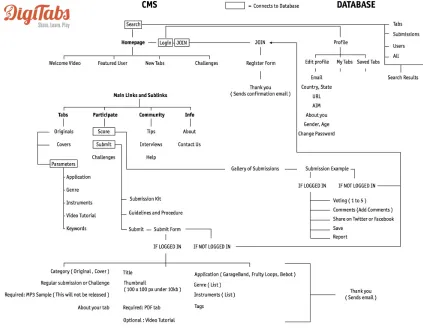
4.2.2 Informational Architecture ( Map of Connectivity )
Figure 3: Informational Architecture ( Map of Connectivity )
4 main links
• Tabs – User spotlights/featured samples for both originals and covers. • Participate – Users can vote on submissions and filter by different
categories and challenges. Users can also filter by content that they have/haven’t scored, content up for voting/not up for voting, featured submissions, and key words.
• Community – Users can explore interviews, tips, and help forums. • Info – Users can read different topics on Digitabs, it’s team, and
10 sub links
• Originals ( Tabs ) – Original sample submissions to explore. • Covers ( Tabs ) – Covers sample submissions to explore. • Score ( Participate ) – Users can score/vote on submissions
• Submit ( Participate ) – Users can submit their own samples for voting. • Tips ( Community ) – Users share helpful tips and tricks on a variety of
topics.
• Interviews ( Community ) – Users can read/watch/listen to interviews done
with various influential community members
• Help ( Community ) – Users can access assistance with their account. • About ( Info ) – Users can learn about the website and founder.
• Contact Us ( Info ) – Users can send a message for assistance, or to make a comment.
5 extra pages
• Join – New users can join and register.
• Rehearsal Piano – Users can practice their skills on this Flash-based
piano that utilizes their computer keyboard to input notes.
• Search Results – Users can search through interviews, tips, help forums,
samples, users, and more.
4.2.3 Back-end Process
Users can browse through the site without the need of registering. In order to submit or vote, users must register. There are five main tables in the database –
[image:16.612.99.515.197.279.2]active guests, active users, banned users, profile, and users ( Fig. 4 ).
Figure 4: Back-end Process
The table active_guests is for users that want to access the site and can
comment using the social network profile associated with that guest ( ex. Facebook, Google ), but are not registered and cannot vote. The table
active_users is for registered users that have submitted samples or other
content. The table users is for all registered users, regardless of their activity
level. Profile is a table for submissions of a given user, while banned_users are
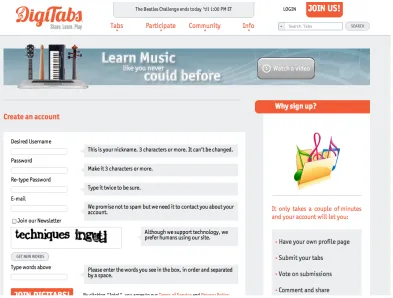
For the registration, users must fill out a form that will allow content to be saved
[image:17.612.112.505.123.421.2]to their account ( Fig. 5 ).
Figure 5: User registration page
The pages are built using PHP, which connect to the MySQL database to verify a user and load that users’ profile and their submissions. All data is stored in the
4.2.4 Design Process
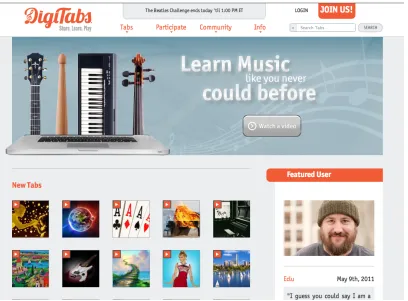
When designing the logo and choosing the color scheme, I knew I wanted to get the warm, inviting feeling you would get from a traditional recording studio, but keep with the modern technology to keep things current. Because of this, I choose a warm palette of orange, grey, and white.
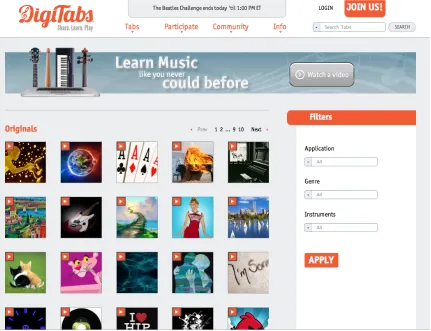
The website itself is clean, well spaced, with large icons, photos and copy. The sub links are positioned inside of dropdowns that appear on rollover to help de-clutter the main navigation space. Featured users or artists are shown with large images on the right of the page, and different submitted tabs/samples are
displayed by showing square icons in the main section of the page with an orange
“play” button in the upper left-hand corner of the displayed image ( Fig. 7 ). When
[image:18.612.105.513.384.685.2]users roll over this, information about the song and user is displayed. When you click the play button, the audio associated with the submission plays out without an additional page load and automatically stops if another audio sample starts playing.
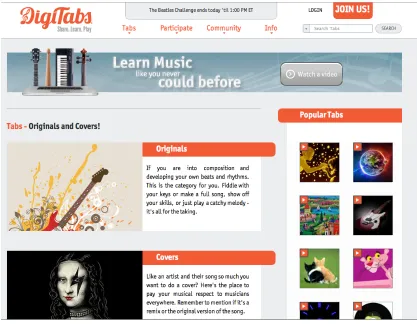
For different pages, the same pattern continues, but adds in elements specific to that particular page. For example, on the page for reviewing the Original and Covers samples, Popular samples are displayed on the right, while the sections
[image:19.612.98.515.175.499.2]for Originals and Covers are in the main section of the page ( Fig. 8 ).
Once you continue into the section (in this case, Originals), the area on the right hand side now shows filters users can utilize to find samples with specific attributes, while, like in the homepage, the tabs/samples are shown in a grid
[image:20.612.93.524.177.508.2]fashion on the main part of the screen ( Fig. 9 ).
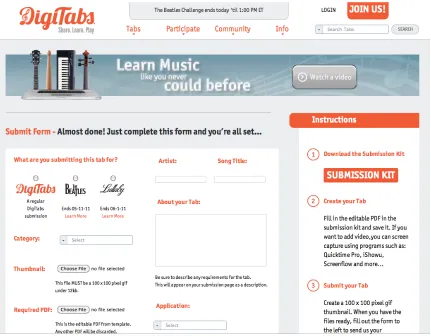
For the submission page, we again follow the same approach, and display the criteria for the submissions in the larger area, while displaying instructions for use on the right side. Users can choose if they want to submit for a specific
[image:21.612.92.523.175.511.2]contest/competition, or if they want to submit a general sample ( Fig. 10 ).
Figure 10: Submission page
Note: The page for registering a new user also follows this form/instructions
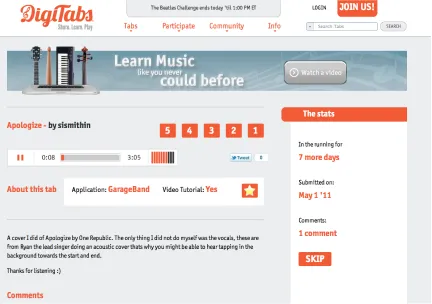
After a sample has been submitted, users come to the sample page showing an audio player, a voting system, and a variety of information about the sample. Users can then leave comments and vote on the sample, or skip it and move on
[image:22.612.92.524.177.481.2]to the next ( Fig. 11 ).
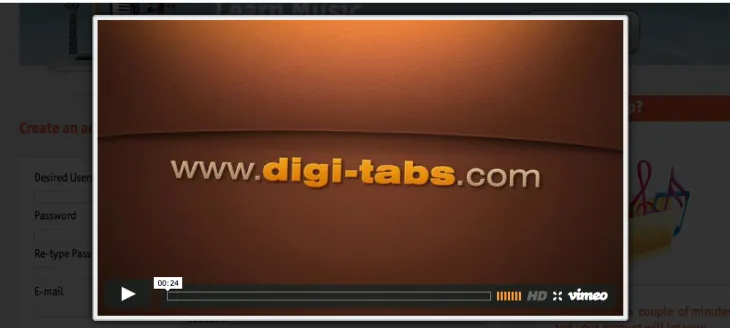
Users can also click on the “Watch a video” icon at the top of the screen, and the page will go dark as a video player will pop up and play an introduction to the
[image:23.612.125.490.141.305.2]website ( Fig. 12 ).
Figure 12: Video player pop up
Other pages, such as the “Featured User” page, follow this same setup, showing the featured user in the main section, with other featured users and a search bar
[image:23.612.98.516.411.696.2]The Rehearsal Piano is a page that shows a clean, sleek-looking piano with the same color scheme as the rest of the website. Users can practice with their computer keyboard in real time and see the notes they are hitting pop up on the
[image:24.612.89.525.156.474.2]display ( Fig. 14 ).
Other stand-alone pages may only feature one element, such as the pages below
( Fig. 15-17 ):
[image:25.612.120.493.131.421.2]
Figure 16: Password reset page
[image:26.612.120.495.398.696.2]
Logo
The logo itself ended up being orange to match the rest of the branding on the website. I used the typeface “Lobster” by Pablo Impallari due to its simple,
informal, and friendly appearance ( Fig. 18 ).
Figure 18: Typeface “Lobster” by Pablo Impallari
I wanted to add a musical component that would add to the design without being too distracting or overbearing, so the “D” of Digitabs features a G clef. Below is a snapshot of the progression of the logo design, with the final design at the
[image:27.612.120.488.445.734.2]4.2.5 Usability Testing
User testing was originally planned for the early stages, but unfortunately I was unable to test until later in the process. Fortunately, when I was able to test Digitabs with a group, I was able to test quickly with a variety of people with different levels of musical and technological understanding. I asked each tester to give feedback on a 1-10 rating for General Appearance, Ease of Use,
[image:28.612.183.434.269.514.2]Expectations, and Probability of Return. Below are the average of the ratings received, with 1 being the lowest possible rating and 10 being the highest ( Fig. 20 ).
Figure 20: Usability testing results
Takeaway
From the feedback collected, I was able to make slight changes to make user experience more enjoyable. One example was that I came to understand that some users didn’t like the format of the submission form, as it was one
continuous column. To fix this, I took the submission form and made it shorter by creating a two-column form using the same amount of input fields. Other
suggestions were minor, and involved various elements such as tweaking the spacing of elements or suggesting another hue of orange.
User Comments
While most test users did not leave a comment in addition to responding to the test questions, some did. Here are a few examples:
“I really like the setup and overall feel of the design.”
“I’ve played with GarageBand before for fun, but I think I can really learn a lot from this!”
“I love that there are competitions. I would definitely join in and submit some of my songs.”
5.0 Conclusion
At the beginning of this thesis, I knew I wanted to engage users that may not have realized that they had the necessary tools already at their disposal to make music. Not only do most users already have access to programs or applications that they can use to make digital music, they usually don’t engage much with a community that they may see as very serious and intimidating. Because of this, I wanted to make an intuitive and inviting website where both the novice and the expert could come together to share and learn.
Currently sites that offer great tab/sample resources are difficult to navigate, directed toward one specific group or instrument, and don’t offer the most accurate search results. Also, many places would show you the tabs, but you wouldn’t be able to hear the results unless you had a guitar or piano keyboard nearby and knew how to play them. I wanted to fix these problems by offering an easy-to-navigate layout, constantly updated results based on voting and
moderated tweaking of songs to ensure the most accurate information, and audio players that would allow users to instantly hear the results of the tabs submitted.
6.0 Appendix
6.1 Bibliography
Howe, Jeff. Crowdsourcing: Why the Power of the Crowd Is Driving the Future of Business. 1st ed. New York: Crown Business, 2008. Print.
Renninger, K. Ann., and Wesley Shumar. Building Virtual Communities: Learning and Change in Cyberspace. 1st ed. New York: Cambridge UP, 2002. Print.
Whitworth, Brian, and Aldo De. Moor. Handbook of Research on Socio-technical Design and Social Networking Systems. 1st ed. Hershey: Information Science Reference, 2009. Print.
Sturken, Marita. Technological Visions: The Hopes and Fears That Shape New Technologies. 1st ed. Philadelphia: Temple UP, 2004. Print.
Bell, Vaughan. "A History of Media Technology Scares, from the Printing Press to Facebook." Slate Magazine. N.p., 15 Feb. 2010. Web. 10 July 2011.
Manning, Peter D. Electronic and Computer Music. N.p.: n.p., 2003. Print.
Iuppa, Nicholas V. Interactive Design for New Media and the Web. 2nd ed. Boston: Focal, 2001. Print.
6.2 Thesis Proposal for the Master of Fine Arts Degree
Rochester Institute of Technology
College of Imaging Arts and Sciences
School of Design - MFA Computer Graphics Design
DigiTabs: A Community based website to share instructional music content
generated by computerized applications using Interactive Design.
Situation Analysis
Through changing times, the development of music has remained constant. Generally, music was primarily made by professional musicians and composers. However, the advances in technology have started to change music development. Now, anyone can use technology to create remark- able musical achievements without extensive knowledge or skill. This gives the musician more time and energy to invest on the conceptual importance of the musical piece. This project will focus on designing an effective online sharing network that will include video tutorials and music tablatures of any original or pre-existing song, created and shared by fellow musicians. This net- work will encourage people with little to no musical background to perform their own versions of songs by practicing
learning music theory in a pedagogical interactive environment.
Problem Statement
Would a community-based interactive website encourage musicians to share their knowledge?
These applications produce instruments that can range from electronic to a more natural artisan sound.
There are many web- sites that allow people to share the theory/tabs of each real instrument of a song, but without the necessary equipment, it is practically impossible to achieve anything of good quality. Also, many of these websites with a crowdsourcing model abuse their users by soliciting work from many, but only paying a few. This abuse ignores the main artistic drive of a user, their passion.
People who participate as members of the crowd do so for a variety of reasons
including peer-recognition, community interaction, and own amusement, not solely for economic gain. “Any system that allows participants to self-select in or out at their own discretion is, by definition, non-predatory”, permitting users to utilize a skill and a hobby that would be otherwise underappreciated.
Animators, Web Developers and Editors usually invest in stock music or work done by sound engineers/recording studios due to their lack of being able to create professional sound on their own. But, whenever a specific feature of a song is needed and all the versions do not fit the purpose. Dropping the song and looking for another is usually the procedure. At the same time, there are
musicians who are developing their albums with bundled applications such as GarageBand, Fruity Loops and Smart Sound, as well as musicians worldwide who can easily switch from a real instrument to the computer keyboard due to their knowledge of music theory. This seems like a hard endeavor for someone without this knowledge, but amateur musicians are mostly willing to learn and contribute. Eventually, amateurs will aspire to become one of them.
Objectives
- Identifying the specific needs of the target audience
- Research the standards of crowd sourcing and social networking - Design and develop a fully functional website
- Evaluate the user interface with a focus group of 10 people - Propose new possibilities and features
Target Audience
Personas
Dave Markowitz - Freelance Animator, 28 years old
Dave is a college graduate, and has been working on the field for 5 years. He listens to a lot of music and can identify genres and appropriate music for each project. He does not have a musical background besides playing drums in the school band.
Allison Freeman - Graphic Designer / Storyboard Artist, 30 years old
Allison does a lot of prototyping and storyboarding for several clients. She always looks for the best references possible for later development but sometimes she can’t find stock audio that fits her purpose and makes it difficult to envision projects.
Luke Lackner - Freshman / Major in Animation, 18 years old
Luke just moved to college majoring in Animation. He has musical background and used to play in a band. He was able to bring his guitar to college but is
unable to record due to the lack of hardware. He discovers plenty software but its difficult to translate his mindset from a real instrument to a computer keyboard.
Target Requirements
- A Computer with a keyboard, mouse and speakers.
- A Computer Software ( GarageBand , Fruity Loops, Smart Sound, etc. )
or
Methodology Approach
This project will be based on user interactive design. My aim is students and
professionals with both computer and software experience. The website will NOT
be focused on teaching the use of the software or application. It is a practical hands-on learning experience by video tutorials and tablatures.
Tools
Design Components
- User interface design
- Interactive Design
- Motion Graphics
Technical Components
- HTML / CSS
- FTP / Database server
- Flash interactivity
- Video upload / stream
Research
The research will be divided into 2 main parts :
Conceptual ( Survey of Literature )
Crowdsourcing & Social Networking
Howe, Jeff 2008 1st ed
New York: Crown Business
Crowdsourcing: Why the power of the crowd is driving the future of business.
An in-depth analysis of the rapidly growing phenomenon of crowdsourcing reflects on the dramatic economic, cultural, business, and political implications of applying the open-source idea to a variety of fields outside of software development and addresses the unique opportunities and problems of this expanding trend.
Renninger, K. Ann 2002
1st ed
New York : Cambridge University Press
Building virtual communities : Learning and change in cyberspace.
This study examines how learning and cognitive change are fostered by online
communities. The chapters provide a basis for thinking about the dynamics of Internet community building. They consider the role of the self or individual as a participant in virtual community, and the design and refinement of technology as the conduit for extending and enhancing the possibilities of community building in cyberspace. It is directed to educators, psychologists, sociologists, and researchers in human-computer interaction.
Whitworth, Brian and Aldo De. Moor 2009
1st ed
Hershey PA : Information Science Reference
Handbook of research on socio-technical design and social networking systems
Technologies and Social Interaction
Sturken, Marita May 17, 2004 1st ed
Temple University Press
Technological Visions: Hopes And Fears That Shaped New Technologies
The book as a whole should provoke lively discussions in courses that address the relationship
of technology, society, and culture. Virtual communities. Wired cities. Information societies. The World Wide Web. Concepts like these can underpin a movement for or against a technical feasibility. This book is for anyone interested in the social shaping of the history and future of information and communication technologies and their societal implications.
Bell, Vaughan Feb 15, 2010
http://www.slate.com/id/2244198
Don’t Touch That Dial! – A history of media technology scares, from printing press to Facebook.
Directed especially to people immersed in any type of technology. This useful article summarizes the patterns of phobias and the repetition o each new invention. It
accomplished a balanced look between modern and traditional examples and will serve as solid grounds for any new project to settle on.
Sound Development
Manning, Peter 2003
1st ed
Oxford ; New York : Oxford University Press Electronic and Computer Music
This book deals with the development of the medium from its birth to the 21st century. Covers electroacoustic music from its beginning at the turn of the century to 1945, the development of post-1945 ‘classical’ studios, development of voltage-controlled
Interactivity & Usability
Iuppa, Nicholas 2001
2nd ed
Woburn, Mass. : Focal Press/Butterworth-Heinemann Interactive design for new media and the web
This book covers the technology as well as the tools and practices of interactive design, including the creation of site maps and flow charts, and the writing of design
documents. It examines the latest interactive features of DVD, as well as the newest techniques and technologies for other forms of digital presentation.
Krug, Steve 2006 2nd ed
Indianapolis, Ind. : New Riders ; London : Pearson Education Don’t make me think! : a common sense approach to web usability.
Technical
References
• https://www.threadless.com
• https://envato.com
• http://tutsplus.com
Sketches
[image:38.612.129.498.99.473.2]:
Figure 20: Usability testing results
Strategy
Website Objectives
- Create 10 tutorial templates. - User / Password implementation.
- Create a total of 4 main links with 13 sub-links.
Hierarchy
Figure 20: Usability testing results Homepage
Welcome Video
Originals
Featured User
Covers
Score Submit Challenges
Tips Interviews Industry Digispotting
About Help Contact Us
New Tutorials Challenges
Tabs
Participate
Community
Thesis Timeline
Digi
Tabs:
A Community based
w
ebsi
te
using Interactive Design
to sha re in structional music con tent gene ra ted by compu terized applications. redo Lopez T itle: Flash 3D: te rs te rs Fall Win ter Spring W eeks G raduation May 20, 2011 1 2 3 4 5 6 7 8 9 10 11 1 2 3 4 5 6 7 8 9 10 11 1 2 3 4 5 6 7 8 9 10 11
[image:41.612.114.517.110.687.2]Evaluations ( User Testing )
In-progress
- Surveys
- Individual Interviews
Pre-launch
- Polls
- Focus groups
Marketing Plan Pre-launch
- Tech blogs
- Social networks ( Facebook, Twitter ) - College Newspapers
Post-launch
- Conferences ( SIGGRAPH )
Budget
- Domain name / hosting = $50
- Conference submissions = $300
- Copyright registration fee = $50
Bibliography
Marks, Chris Oct 15, 2010