Data Structures & Algorithms in Java
by Robert Lafore ISBN: 1571690956
Sams © 1998, 617 pages
Beautifully written and illustrated, this book introduces you to manipulating data in practical ways using Java examples.
Table of Contents
Back Cover
Synopsis by Rebecca Rohan
Table of Contents
Data Structures and Algorithms in Java - 4
Introduction - 7
Part I
Chapter 1 - Overview - 11 Chapter 2 - Arrays - 29
Chapter 3 - Simple Sorting - 63 Part II
Chapter 4 - Stacks and Queues - 80 Chapter 5 - Linked Lists - 142 Chapter 6 - Recursion - 200 Part III
Chapter 7 - Advanced Sorting - 243 Chapter 8 - Binary Trees - 280 Chapter 9 - Red-Black Trees - 311 Part IV
Chapter 10 - 2-3-4 Trees and External Storage - 335 Chapter 11 - Hash Tables - 372
Chapter 12 - Heaps - 416 Part V
Chapter 13 - Graphs - 438
Chapter 14 - Weighted Graphs - 476 Chapter 15 - When to Use What - 510 Part VI Appendixes
Appendix A - How to Run the Workshop Applets and Example Programs - 521 Appendix B - Further Reading - 524
Back Cover
• Data Structures and Algorithms in Java, by Robert Lafore (The Waite Group, 1998) "A beautifully written and illustrated introduction to manipulating data in practical ways, using Java examples."
• Designed to be the most easily understood book ever written on data structures and algorithms
• Data Structures and Algorithms is taught with "Workshop Applets+ - animated Java programs that introduce complex topics in an intuitively obvious way
• The text is clear, straightforward, non-academic, and supported by numerous figures
• Simple programming examples are written in Java, which is easier to understand than C++
About the Author
Object-Oriented Programming in C++, and C Programming Using Turbo C++. Earlier best-selling titles include Assembly Language Primer for the IBM PC and XT
and (back at the beginning of the computer revolution) Soul of CP/M.
Data Structures and Algorithms in Java
Mitchell Waite
PUBLISHER: Mitchell Waite
ASSOCIATE PUBLISHER: Charles Drucker
EXECUTIVE EDITOR: Susan Walton
ACQUISITIONS EDITOR: Susan Walton
PROJECT DEVELOPMENT EDITOR: Kurt Stephan
CONTENT EDITOR: Harry Henderson
TECHNICAL EDITOR: Richard S. Wright, Jr.
CONTENT/TECHNICAL REVIEW: Jaime Niño, PhD, University of New Orleans
COPY EDITORS: Jim Bowie, Tonya Simpson
MANAGING EDITOR: Jodi Jensen
INDEXING MANAGER: Johnna L. VanHoose
EDITORIAL ASSISTANTS: Carmela Carvajal, Rhonda Tinch-Mize
SOFTWARE SPECIALIST: Dan Scherf
DIRECTOR OF BRAND MANAGEMENT: Alan Bower
PRODUCTION MANAGER: Cecile Kaufman
PRODUCTION TEAM SUPERVISOR: Brad Chinn
COVER DESIGNER: Sandra Schroeder
PRODUCTION: Mike Henry, Linda Knose, Tim Osborn, Staci Somers, Mark Walchle
© 1998 by The Waite Group, Inc.®
Published by Waite Group Press™
200 Tamal Plaza, Corte Madera, CA 94925
Waite Group Press™ is a division of Macmillan Computer Publishing.
All rights reserved. No part of this manual shall be reproduced, stored in a retrieval system, or transmitted by any means, electronic, mechanical, photocopying, desktop publishing, recording, or otherwise, without permission from the publisher. No patent liability is assumed with respect to the use of the information contained herein. While every precaution has been taken in the preparation of this book, the publisher and author assume no responsibility for errors or omissions. Neither is any liability assumed for damages resulting from the use of the information contained herein.
All terms mentioned in this book that are known to be registered trademarks, trademarks, or service marks are listed below. In addition, terms suspected of being trademarks, registered trademarks, or service marks have been appropriately capitalized. Waite Group Press cannot attest to the accuracy of this information. Use of a term in this book should not be regarded as affecting the validity of any registered trademark, trademark, or service mark.
The Waite Group is a registered trademark of The Waite Group, Inc.
Waite Group Press and The Waite Group logo are trademarks of The Waite Group, Inc. Sun's Java Workshop, and JDK is copyrighted (1998) by Sun Microsystems, Inc. Sun, Sun Microsystems, the Sun logo, Java, Java Workshop, JDK, the Java logo, and Duke are trademarks or registered trademarks of Sun Microsystems, Inc., in the United States and other countries. Netscape Navigator is a trademark of Netscape Communications Corporation. All Microsoft products mentioned are trademarks or registered trademarks of Microsoft Corporation.
All other product names are trademarks, registered trademarks, or service marks of their respective owners.
Printed in the United States of America
98 99 00 10 9 8 7 6 5 4 3 2 1
Library of Congress Cataloging-in-Publication Data
International Standard Book Number: 1-57169-095-6
Dedication
This book is dedicated to my readers, who have rewarded me over the years not only by buying my books, but with helpful suggestions and kind words. Thanks to you all.
About the Author
current titles are C++ Interactive Course, Object-Oriented Programming in C++, and C Programming Using Turbo C++. Earlier best-selling titles include Assembly Language Primer for the IBM PC and XT and (back at the beginning of the computer revolution)
Soul of CP/M.
Acknowledgments
My gratitude for the following people (and many others) cannot be fully expressed in this short acknowledgment. As always, Mitch Waite had the Java thing figured out before anyone else. He also let me bounce the applets off him until they did the job and extracted the overall form of the project from a miasma of speculation. My editor, Kurt Stephan, found great reviewers, made sure everyone was on the same page, kept the ball rolling, and gently but firmly ensured that I did what I was supposed to do. Harry Henderson provided a skilled appraisal of the first draft, along with many valuable suggestions. Richard S. Wright, Jr., as technical editor, corrected numerous problems with his keen eye for detail. Jaime Niño, Ph.D., of the University of New Orleans, attempted to save me from myself and occasionally succeeded, but should bear no responsibility for my approach or coding details. Susan Walton has been a staunch and much-appreciated supporter in helping to convey the essence of the project to the nontechnical. Carmela Carvajal was invaluable in extending our contacts with the academic world. Dan Scherf not only put the CD-ROM together, but was tireless in keeping me up-to-date on rapidly evolving software changes. Finally, Cecile Kaufman ably shepherded the book through its transition from the editing to the production process.
Acclaim for Robert Lafore's
"Robert has truly broken new ground with this book. Nowhere else have I seen these topics covered in such a clear and easy-to-understand, yet complete, manner. This book is sure to be an indispensable resource and reference to any programmer seeking to advance his or her skills and value beyond the mundane world of data entry screens and Windows dialog boxes.
I am especially impressed with the Workshop applets. Some 70 percent of your brain is designed for processing visual data. By interactively 'showing' how these algorithms work, he has really managed to find a way that almost anyone can use to approach this subject. He has raised the bar on this type of book forever."
—Richard S. Wright, Jr.
Author, OpenGL SuperBible
"Robert Lafore's explanations are always clear, accessible, and practical. His Java program examples reinforce learning with a visual demonstration of each concept. You will be able to understand and use every technique right away."
—Harry Henderson
Author, The Internet and the Information Superhighway and Internet How-To
"I found the tone of the presentation inviting and the use of applets for this topic a major plus."
—Jaime Niño, PhD
Associate Professor, Computer Science Department,
Introduction
This introduction tells you briefly
•
What this book is about
•
Why it's different
•
Who might want to read it
•
What you need to know before you read it
•
The software and equipment you need to use it
•
How this book is organized
What This Book Is About
This book is about data structures and algorithms as used in computer programming. Data structures are ways in which data is arranged in your computer's memory (or stored on disk). Algorithms are the procedures a software program uses to manipulate the data in these structures.
Almost every computer program, even a simple one, uses data structures and algorithms. For example, consider a program that prints address labels. The program might use an array containing the addresses to be printed, and a simple for loop to step through the array, printing each address.
The array in this example is a data structure, and the for loop, used for sequential access to the array, executes a simple algorithm. For uncomplicated programs with small amounts of data, such a simple approach might be all you need. However, for programs that handle even moderately large amounts of data, or that solve problems that are slightly out of the ordinary, more sophisticated techniques are necessary. Simply knowing the syntax of a computer language such as Java or C++ isn't enough.
This book is about what you need to know after you've learned a programming language. The material we cover here is typically taught in colleges and universities as a second-year course in computer science, after a student has mastered the fundamentals of
programming.
What's Different About This Book
There are dozens of books on data structures and algorithms. What's different about this one? Three things:
•
Our primary goal in writing this book is to make the topics we cover easy to understand.
• Demonstration programs called Workshop applets bring to life the topics we cover, showing you step by step, with "moving pictures," how data structures and algorithms work.
•
The example code is written in Java, which is easier to understand than C, C++, or Pascal, the languages traditionally used to demonstrate computer science topics.
Easy to Understand
Typical computer science textbooks are full of theory, mathematical formulas, and abstruse examples of computer code. This book, on the other hand, concentrates on simple explanations of techniques that can be applied to real-world problems. We avoid complex proofs and heavy math. There are lots of figures to augment the text.
Many books on data structures and algorithms include considerable material on sofware engineering. Software engineering is a body of study concerned with designing and implementing large and complex software projects.
However, it's our belief that data structures and algorithms are complicated enough without involving this additional discipline, so we have deliberately de-emphasized software engineering in this book. (We'll discuss the relationship of data structures and algorithms to software engineering in Chapter 1," Overview.")
Of course we do use an object-oriented approach, and we discuss various aspects of object-oriented design as we go along, including a mini-tutorial on OOP in Chapter 1. Our primary emphasis, however, is on the data structures and algorithms themselves.
Workshop Applets
The CD-ROM that accompanies this book includes demonstration programs, in the form of Java applets, that cover the topics we discuss. These applets, which we call Workshop applets, will run on many computer systems, appletviewers, and Web browsers. (See the
readme file on the CD-ROM for more details on compatibility.) The Workshop applets create graphic images that show you in "slow motion" how an algorithm works.
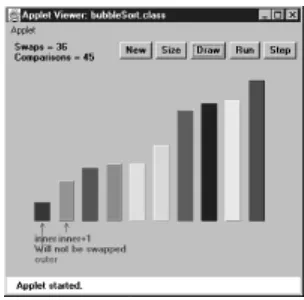
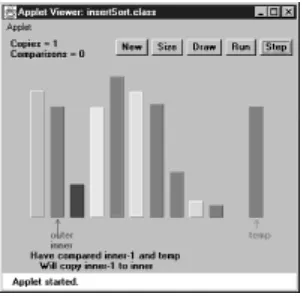
For example, in one Workshop applet, each time you push a button, a bar chart shows you one step in the process of sorting the bars into ascending order. The values of variables used in the sorting algorithm are also shown, so you can see exactly how the computer code works when executing the algorithm. Text displayed in the picture explains what's happening.
Another applet models a binary tree. Arrows move up and down the tree, so you can follow the steps involved in inserting or deleting a node from the tree. There are more than 20 Workshop applets—at least one for every major topic in the book.
These Workshop applets make it far more obvious what a data structure really looks like, or what an algorithm is supposed to do, than a text description ever could. Of course, we provide a text description as well. The combination of Workshop applets, clear text, and illustrations should make things easy.
These Workshop applets are standalone graphics-based programs. You can use them as a learning tool that augments the material in the book. (Note that they're not the same as the example code found in the text of the book, which we'll discuss next.)
Java Example Code
The Java language is easier to understand (and write) than languages such as C and C++. The biggest reason for this is that Java doesn't use pointers. Although it surprises some people, pointers aren't necessary for the creation of complex data structures and algorithms. In fact, eliminating pointers makes such code not only easier to write and to understand, but more secure and less prone to errors as well.
approach, and is quickly supplanting it for serious program development. Don't be alarmed if you aren't familiar with OOP. It's not that hard to understand, especially in a pointer-free environment such as Java. We'll explain the basics of OOP in Chapter 1.
Who This Book Is For
This book can be used as a text in a data structures and algorithms course, typically taught in the second year of a computer science curriculum. However, it is also designed for professional programmers and for anyone else who needs to take the next step up from merely knowing a programming language. Because it's easy to understand, it is also appropriate as a supplemental text to a more formal course.
Who This Book Is For
This book can be used as a text in a data structures and algorithms course, typically taught in the second year of a computer science curriculum. However, it is also designed for professional programmers and for anyone else who needs to take the next step up from merely knowing a programming language. Because it's easy to understand, it is also appropriate as a supplemental text to a more formal course.
The Software You Need to Use this Book
All the software you need to use this book is included on the accompanying CD-ROM.
To run the Workshop applets you need a Web browser or an appletviewer utility such as the one in the Sun Microsystems Java Development Kit (JDK). Both a browser and the JDK are included on the CD-ROM. To compile and run the example programs you'll need the JDK. Microsoft Windows and various other platforms are supported. See the readme
file on the included CD-ROM for details on supported platforms and equipment requirements.
How This Book Is Organized
This section is intended for teachers and others who want a quick overview of the contents of the book. It assumes you're already familiar with the topics and terms involved in a study of data structures and algorithms. (If you can't wait to get started with the Workshop applets, read Appendix A, "How to Run the Workshop Applets and Example Programs," and the readme file on the CD-ROM first.)
The first two chapters are intended to ease the reader into data structures and algorithms as painlessly as possible.
Chapter 1, "Overview," presents an overview of the topics to be discussed and introduces a small number of terms that will be needed later on. For readers unfamiliar with object-oriented programming, it summarizes those aspects of this discipline that will be needed in the balance of the book, and for programmers who know C++ but not Java, the key differences between these languages are reviewed.
Chapter 2, "Arrays," focuses on arrays. However, there are two subtopics: the use of classes to encapsulate data storage structures and the class interface. Searching, insertion, and deletion in arrays and ordered arrays are covered. Linear searching and binary searching are explained. Workshop applets demonstrate these algorithms with unordered and ordered arrays.
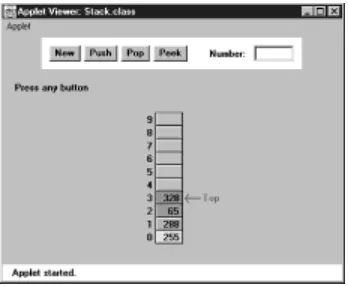
Chapter 4, "Stacks and Queues," covers three data structures that can be thought of as Abstract Data Types (ADTs): the stack, queue, and priority queue. These structures reappear later in the book, embedded in various algorithms. Each is demonstrated by a Workshop applet. The concept of ADTs is discussed.
Chapter 5, "Linked Lists," introduces linked lists, including doubly linked lists and double-ended lists. The use of references as "painless pointers" in Java is explained. A
Workshop applet shows how insertion, searching, and deletion are carried out.
In Chapter 6, "Recursion," we explore recursion, one of the few chapter topics that is not a data structure. Many examples of recursion are given, including the Towers of Hanoi puzzle and the mergesort, which are demonstrated by Workshop applets.
Chapter 7, "Advanced Sorting," delves into some advanced sorting techniques: Shellsort and quicksort. Workshop applets demonstrate Shellsort, partitioning (the basis of
quicksort), and two flavors of quicksort.
In Chapter 8, "Binary Trees," we begin our exploration of trees. This chapter covers the simplest popular tree structure: unbalanced binary search trees. A Workshop applet demonstrates insertion, deletion, and traversal of such trees.
Chapter 9, "Red-Black Trees," explains red-black trees, one of the most efficient balanced trees. The Workshop applet demonstrates the rotations and color switches necessary to balance the tree.
In Chapter 10, "2-3-4 Trees and External Storage," we cover 2-3-4 trees as an example of multiway trees. A Workshop applet shows how they work. We also discuss the relationship of 2-3-4 trees to B-trees, which are useful in storing external (disk) files.
Chapter 11, "Hash Tables," moves into a new field, hash tables. Workshop applets demonstrate several approaches: linear and quadratic probing, double hashing, and separate chaining. The hash-table approach to organizing external files is discussed.
In Chapter 12, "Heaps," we discuss the heap, a specialized tree used as an efficient implementation of a priority queue.
Chapters 13, "Graphs," and 14, "Weighted Graphs," deal with graphs, the first with unweighted graphs and simple searching algorithms, and the second with weighted graphs and more complex algorithms involving the minimum spanning trees and shortest paths.
In Chapter 15, "When to Use What," we summarize the various data structures described in earlier chapters, with special attention to which structure is appropriate in a given situation.
Appendix A, "How to Run the Workshop Applets and Example Programs," tells how to use the Java Development Kit (the JDK) from Sun Microsystems, which can be used to run the Workshop applets and the example programs. The readme file on the included CD-ROM has additional information on these topics.
Appendix B, "Further Reading," describes some books appropriate for further reading on data structures and other related topics.
Enjoy Yourself!
Part I
Chapter List
Chapter
1:
Overview
Chapter
2:
Arrays
Chapter
3:
Simple Sorting
Chapter 1:
Overview
Overview
As you start this book, you may have some questions:
•
What are data structures and algorithms?
•
What good will it do me to know about them?
•
Why can't I just use arrays and for loops to handle my data?
•
When does it make sense to apply what I learn here?
This chapter attempts to answer these questions. We'll also introduce some terms you'll need to know, and generally set the stage for the more detailed chapters to follow.
Next, for those of you who haven't yet been exposed to an object-oriented language, we'll briefly explain enough about OOP to get you started. Finally, for C++ programmers who don't know Java, we'll point out some of the differences between these languages.
Chapter 1:
Overview
Overview
As you start this book, you may have some questions:
•
What are data structures and algorithms?
•
What good will it do me to know about them?
•
Why can't I just use arrays and for loops to handle my data?
•
When does it make sense to apply what I learn here?
Next, for those of you who haven't yet been exposed to an object-oriented language, we'll briefly explain enough about OOP to get you started. Finally, for C++ programmers who don't know Java, we'll point out some of the differences between these languages.
Overview of Data Structures
Another way to look at data structures is to focus on their strengths and weaknesses. In this section we'll provide an overview, in the form of a table, of the major data storage structures we'll be discussing in this book. This is a bird's-eye view of a landscape that we'll be covering later at ground level, so don't be alarmed if it looks a bit mysterious. Table 1.1 shows the advantages and disadvantages of the various data structures described in this book.
Table 1.1: Characteristics of Data Structures
Data Structure Advantages Disadvantages
Array Quick insertion, very fast
access if index known Slow search, slow deletion, fixed size.
Ordered array Quicker search than
unsorted array. Slow insertion and deletion, fixed size.
Stack Provides last-in, first-out
access. Slow access to other items.
Queue Provides first-in, first-out access.
Slow access to other items.
Linked list Quick insertion, quick
deletion. Slow search.
Binary tree Quick search, insertion, deletion (if tree remains balanced).
Deletion algorithm is complex.
Red-black tree Quick search, insertion, deletion. Tree always balanced.
Complex.
2-3-4 tree Quick search, insertion, deletion. Tree always balanced. Similar trees good for disk storage.
Complex.
Hash table Very fast access if key
known. Fast insertion. Slow deletion, access slow if key not known, inefficient memory usage.
Heap Fast insertion, deletion, Slow access to other items.access to largest item.
Graph Models real-world
(The data structures shown in this table, except the arrays, can be thought of as Abstract Data Types, or ADTs. We'll describe what this means in Chapter 5, "Linked Lists.")
Overview of Algorithms
Many of the algorithms we'll discuss apply directly to specific data structures. For most data structures, you need to know how to
•
Insert a new data item.
•
Search for a specified item.
•
Delete a specified item.
You may also need to know how to iterate through all the items in a data structure, visiting each one in turn so as to display it or perform some other action on it.
One important algorithm category is sorting. There are many ways to sort data, and we devote Chapter 3, "Simple Sorting," and Chapter 7, "Advanced Sorting," to these algorithms.
The concept of recursion is important in designing certain algorithms. Recursion involves a method (a function) calling itself. We'll look at recursion in Chapter 6, "Recursion."
Definitions
Let's look at a few of the terms that we'll be using throughout this book.
Database
We'll use the term database to refer to all the data that will be dealt with in a particular situation. We'll assume that each item in a database has a similar format. As an example, if you create an address book using the Cardfile program, all the cards you've created constitute a database. The term file is sometimes used in this sense, but because our database is often stored in the computer's memory rather than on a disk, this term can be misleading.
The term database can also refer to a large program consisting of many data structures and algorithms, which relate to each other in complex ways. However, we'll restrict our use of the term to the more modest definition.
Record
Records are the units into which a database is divided. They provide a format for storing information. In the Cardfile program, each card represents a record. A record includes all the information about some entity, in a situation in which there are many such entities. A record might correspond to a person in a personnel file, a car part in an auto supply inventory, or a recipe in a cookbook file.
Field
and the rest of the data (below the line), which both hold text. Generally, each field holds a particular kind of data. Figure 1.1 shows the index line field as holding a person's name.
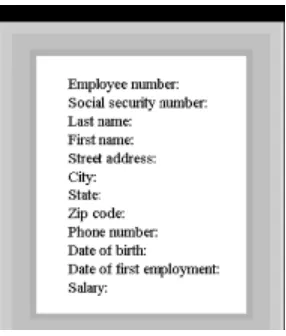
More sophisticated database programs use records with more fields than Cardfile has. Figure 1.2 shows such a record, where each line represents a distinct field.
In a Java program, records are usually represented by objectsof an appropriate class. (In C, records would probably be represented by structures.) Individual variables within an object represent data fields. Fields within a class object are called fields in Java (but
members in C and C++).
Key
To search for a record within a database you need to designate one of the record's fields as a key. You'll search for the record with a specific key. For example, in the Cardfile program you might search in the index-line field for the key "Brown." When you find the record with this key, you'll be able to access all its fields, not just the key. We might say that the key unlocks the entire record.
[image:14.595.98.241.371.539.2]In Cardfile you can also search for individual words or phrases in the rest of the data on the card, but this is actually all one field. The program searches through the text in the entire field even if all you're looking for is the phone number. This kind of text search isn't very efficient, but it's flexible because the user doesn't need to decide how to divide the card into fields.
Figure 1.2: A record with multiple fields
In a more full-featured database program, you can usually designate any field as the key. In Figure 1.2, for example, you could search by zip code and the program would find all employees who live in that zip code.
Search Key
The key value you're looking for in a search is called the search key. The search key is compared with the key field of each record in turn. If there's a match, the record can be returned or displayed. If there's no match, the user can be informed of this fact.
Object-Oriented Programming
This section is for those of you who haven't been exposed to object-oriented
to understand the example programs in the text. What we say here won't transform you into an object-oriented Java programmer, but it should make it possible for you to follow the example programs.
If after reading this section and examining some of the sample code in the following chapters you still find the whole OOP business as alien as quantum physics, then you may need a more thorough exposure to OOP. See the reading list in Appendix B, "Further Reading," for suggestions.
Problems with Procedural Languages
OOP was invented because procedural languages, such as C, Pascal, and BASIC, were found to be inadequate for large and complex programs. Why was this?
The problems have to do with the overall organization of the program. Procedural programs are organized by dividing the code into functions (called procedures or subroutines in some languages). Groups of functions could form larger units called modules or files.
Crude Organizational Units
One difficulty with this kind of function-based organization was that it focused on functions at the expense of data. There weren't many options when it came to data. To simplify slightly, data could be local to a particular function or it could be global— accessible to all functions. There was no way (at least not a flexible way) to specify that some functions could access a variable and others couldn't.
This caused problems when several functions needed to access the same data. To be available to more than one function, such variables had to be global, but global data could be accessed inadvertently by any function in the program. This lead to frequent programming errors. What was needed was a way to fine-tune data accessibility, allowing variables to be available to functions with a need to access it, but hiding it from others.
Poor Modeling of the Real World
It is also hard to conceptualize a real-world problem using procedural languages. Functions carry out a task, while data stores information, but most real-world objects do both these things. The thermostat on your furnace, for example, carries out tasks (turning the furnace on and off) but also stores information (the actual current temperature and the desired temperature).
If you wrote a thermostat control program, you might end up with two functions,
furnace_on() and furnace_off(), but also two global variables, currentTemp
(supplied by a thermometer) and desiredTemp (set by the user). However, these functions and variables wouldn't form any sort of programming unit; there would be no unit in the program you could call thermostat. The only such unit would be in the programmer's mind.
For large programs, which might contain hundreds of entities like thermostats, this procedural approach made things chaotic, error-prone, and sometimes impossible to implement at all.
Objects in a Nutshell
The idea of objects arose in the programming community as a solution to the problems with procedural languages.
Here's the amazing breakthrough that is the key to OOP: An object contains both functions and variables. A thermostat object, for example, would contain not only
furnace_on() and furnace_off() functions, but also currentTemp and
desiredTemp. Incidentally, before going further we should note that in Java, functions are called methods and variables are called fields.
This new entity, the object, solves several problems simultaneously. Not only does a programming object correspond more accurately to objects in the real world, it also solves the problem engendered by global data in the procedural model. The
furnace_on() and furnace_off() methods can access currentTemp and
desiredTemp. These variables are hidden from methods that are not part of
thermostat, however, so they are less likely to be accidentally changed by a rogue method.
Classes
You might think that the idea of an object would be enough for one programming
revolution, but there's more. Early on, it was realized that you might want to make several objects of the same type. Maybe you're writing a furnace control program for an entire apartment house, for example, and you need several dozen thermostatobjects in your program. It seems a shame to go to the trouble of specifying each one separately. Thus, the idea of classes was born.
A class is a specification—a blueprint—for one or more objects. Here's how a
thermostat class, for example, might look in Java:
class thermostat {
private float currentTemp(); private float desiredTemp();
public void furnace_on() {
// method body goes here }
public void furnace_off() {
// method body goes here }
} // end class thermostat
The Java keyword class introduces the class specification, followed by the name you want to give the class; here it's thermostat. Enclosed in curly brackets are the fields and methods (variables and functions) that make up the class. We've left out the body of the methods; normally there would be many lines of program code for each one.
C programmers will recognize this syntax as similar to a structure, while C++
programmers will notice that it's very much like a class in C++, except that there's no semicolon at the end. (Why did we need the semicolon in C++ anyway?)
Creating Objects
reference to it in a variable of suitable type; that is, the same type as the class.
What's a reference? We'll discuss references in more detail later. In the meantime, think of it as a name for an object. (It's actually the object's address, but you don't need to know that.)
Here's how we would create two references to type thermostat, create two new
thermostat objects, and store references to them in these variables:
thermostat therm1, therm2; // create two references
therm1 = new thermostat(); // create two objects and
therm2 = new thermostat(); // store references to them
Incidentally, creating an object is also called instantiating it, and an object is often referred to as an instance of a class.
Accessing Object Methods
Once you've specified a class and created some objects of that class, other parts of your program need to interact with these objects. How do they do that?
Typically, other parts of the program interact with an object's methods (functions), not with its data (fields). For example, to tell the therm2 object to turn on the furnace, we would say
therm2.furnace_on();
The dot operator (.) associates an object with one of its methods (or occasionally with one of its fields).
At this point we've covered (rather telegraphically) several of the most important features of OOP. To summarize:
•
Objects contain both methods (functions) and fields (data).
•
A class is a specification for any number of objects.
•
To create an object, you use the keyword new in conjunction with the class name.
•
To invoke a method for a particular object you use the dot operator.
These concepts are deep and far-reaching. It's almost impossible to assimilate them the first time you see them, so don't worry if you feel a bit confused. As you see more classes and what they do, the mist should start to clear.
A Runnable Object-Oriented Program
Let's look at an object-oriented program that runs and generates actual output. It features a class called BankAccount that models a checking account at a bank. The program creates an account with an opening balance, displays the balance, makes a deposit and a withdrawal, and then displays the new balance. Here's the listing for bank.java:
// demonstrates basic OOP syntax
// to run this program: C>java BankApp
import java.io.*; // for I/O
////////////////////////////////////////////////////////////////
class BankAccount
{
private double balance; // account balance
public BankAccount(double openingBalance) // constructor {
balance = openingBalance; }
public void deposit(double amount) // makes deposit
{
balance = balance + amount; }
public void withdraw(double amount) // makes withdrawal
{
balance = balance - amount; }
public void display() // displays balance
{
System.out.println("balance=" + balance); }
} // end class BankAccount
////////////////////////////////////////////////////////////////
class BankApp
{
public static void main(String[] args) {
BankAccount ba1 = new BankAccount(100.00); // create acct
System.out.print("Before transactions, ");
ba1.display(); // display balance
ba1.deposit(74.35); // make deposit ba1.withdraw(20.00); // make withdrawal
System.out.print("After transactions, ");
ba1.display(); // display balance
} // end main()
Here's the output from this program:
Before transactions, balance=100
After transactions, balance=154.35
There are two classes in bank.java. The first one, BankAccount, contains the fields and methods for our bank account. We'll examine it in detail in a moment. The second class, BankApp, plays a special role.
The BankApp Class
To execute the program from a DOS box, you type java BankApp following the C:
prompt:
C:java BankApp
This tells the java interpreter to look in the BankApp class for the method called
main(). Every Java application must have a main() method; execution of the program starts at the beginning of main(), as you can see in the bank.java listing. (You don't need to worry yet about the String[] args argument in main().)
The main() method creates an object of class BankAccount, initialized to a value of 100.00, which is the opening balance, with this statement:
BankAccount ba1 = new BankAccount(100.00); // create acct
The System.out.print() method displays the string used as its argument, Before transactions,, and the account displays its balance with the following statement:
ba1.display();
The program then makes a deposit to, and a withdrawal from, the account:
ba1.deposit(74.35); ba1.withdraw(20.00);
Finally, the program displays the new account balance and terminates.
The BankAccount
Class
The only data field in the BankAccount class is the amount of money in the account, called balance. There are three methods. The deposit() method adds an amount to the balance, withdrawal() subtracts an amount, and display() displays the balance.
Constructors
A constructor allows a new object to be initialized in a convenient way. Without the constructor in this program, you would have needed an additional call to deposit() to put the opening balance in the account.
Public and Private
Notice the keywords public and private in the BankAccount class. These keywords are access modifiers and determine what methods can access a method or field. The
balance field is preceded by private. A field or method that is private can only be accessed by methods that are part of the same class. Thus, balance cannot be accessed by statements in main(), because main() is not a method in BankAccount.
However, all the methods in BankAccount have the access modifier public, so they can be accessed by methods in other classes. That's why statements in main() can call
deposit(), withdrawal(), and display().
Data fields in a class are typically made private and methods are made public. This protects the data; it can't be accidentally modified by methods of other classes. Any outside entity that needs to access data in a class must do so using a method of the same class. Data is like a queen bee, kept hidden in the middle of the hive, fed and cared for by worker-bee methods.
Inheritance and Polymorphism
We'll briefly mention two other key features of object-oriented programming: inheritance and polymorphism.
Inheritance is the creation of one class, called the extended or derived class, from another class called the base class. The extended class has all the features of the base class, plus some additional features. For example, a secretary class might be derived from a more general employee class, and include a field called typingSpeed that the
employee class lacked.
In Java, inheritance is also called subclassing. The base class may be called the
superclass, and the extended class may be called the subclass.
Inheritance makes it easy to add features to an existing class and is an important aid in the design of programs with many related classes. Inheritance thus makes it easy to reuse classes for a slightly different purpose, a key benefit of OOP.
Polymorphism involves treating objects of different classes in the same way. For
polymorphism to work, these different classes must be derived from the same base class. In practice, polymorphism usually involves a method call that actually executes different methods for objects of different classes.
For example, a call to display() for a secretary object would invoke a display method in the secretary class, while the exact same call for a manager object would invoke a different display method in the manager class. Polymorphism simplifies and clarifies program design and coding.
For those not familiar with them, inheritance and polymorphism involve significant additional complexity. To keep the focus on data structures and algorithms, we have avoided these features in our example programs. Inheritance and polymorphism are important and powerful aspects of OOP but are not necessary for the explanation of data structures and algorithms.
In recent years, it has become fashionable to begin a book on data structures and algorithms with a chapter on software engineering. We don't follow that approach, but let's briefly examine software engineering and see how it fits into the topics we discuss in this book.
Software engineering is the study of how to create large and complex computer
programs, involving many programmers. It focuses on the overall design of the program and on the creation of that design from the needs of the end users. Software engineering is concerned with life cycle of a software project, which includes specification, design, verification, coding, testing, production, and maintenance.
It's not clear that mixing software engineering on one hand, and data structures and algorithms on the other, actually helps the student understand either topic. Software engineering is rather abstract and is difficult to grasp until you've been involved yourself in a large project. Data structures and algorithms, on the other hand, is a nuts-and-bolts discipline concerned with the details of coding and data storage.
Accordingly we focus on the nuts-and-bolts aspects of data structures and algorithms. How do they really work? What structure or algorithm is best in a particular situation? What do they look like translated into Java code? As we noted, our intent is to make the material as easy to understand as possible. For further reading, we mention some books on software engineering in Appendix B.
Java for C++ Programmers
If you're a C++ programmer who has not yet encountered Java, you might want to read this section. We'll mention several ways in which Java differs from C++.
This section is not intended to be a primer on Java. We don't even cover all the differences between C++ and Java. We're only interested in a few Java features that might make it hard for C++ programmers to figure out what's going on in the example programs.
No Pointers
The biggest difference between C++ and Java is that Java doesn't use pointers. To a C++ programmer this may at first seem quite amazing. How can you get along without pointers?
Throughout this book we'll be using pointer-free code to build complex data structures. You'll see that it's not only possible, but actually easier than using C++ pointers.
Actually Java only does away with explicit pointers. Pointers, in the form of memory addresses, are still there, under the surface. It's sometimes said that in Java, everything
is a pointer. This is not completely true, but it's close. Let's look at the details.
References
Java treats primitive data types (such as int, float, and double) differently than objects. Look at these two statements:
int intVar; // an int variable called intVar BankAccount bc1; // reference to a BankAccount object
In the first statement, a memory location called intVar actually holds a numerical value such as 127 (assuming such a value has been placed there). However, the memory location bc1 does not hold the data of a BankAccount object. Instead, it contains the
name bc1 is a reference to this object; it's not the object itself.
Actually, bc1 won't hold a reference if it has not been assigned an object at some prior point in the program. Before being assigned an object, it holds a reference to a special object called null. In the same way, intVar won't hold a numerical value if it's never been assigned one. The compiler will complain if you try to use a variable that has never been assigned a value.
In C++, the statement
BankAccount bc1;
actually creates an object; it sets aside enough memory to hold all the object's data. In Java, all this statement creates is a place to put an object's memory address. You can think of a reference as a pointer with the syntax of an ordinary variable. (C++ has reference variables, but they must be explicitly specified with the & symbol.)
Assignment
It follows that the assignment operator (=) operates differently with Java objects than with C++ objects. In C++, the statement
bc2 = bc1;
copies all the data from an object called bc1 into a different object called bc2. Following this statement are two objects with the same data. In Java, on the other hand, this same assignment statement copies the memory address that bc1 refers to into bc2. Both bc1
and bc2 now refer to exactly the same object; they are references to it.
This can get you into trouble if you're not clear on what the assignment operator does. Following the assignment statement shown above, the statement
bc1.withdraw(21.00);
and the statement
bc2.withdraw(21.00);
both withdraw $21 from thesame bank account object.
Suppose you actually want to copy data from one object to another. In this case you must make sure you have two separate objects to begin with, and then copy each field
separately. The equal sign won't do the job.
The
new
Operator
Any object in Java must be created using new. However, in Java, new returns a reference, not a pointer as in C++. Thus, pointers aren't necessary to use new. Here's one way to create an object:
BankAccount ba1;
ba1 = new BankAccount();
How do you release memory that you've acquired from the system with new and no longer need? In C++, you use delete. In Java, you don't need to worry about it. Java periodically looks through each block of memory that was obtained with new to see if valid references to it still exist. If there are no such references, the block is returned to the free memory store. This is called garbage collection.
In C++ almost every programmer at one time or another forgets to delete memory blocks, causing "memory leaks" that consume system resources, leading to bad performance and even crashing the system. Memory leaks can't happen in Java (or at least hardly ever).
Arguments
In C++, pointers are often used to pass objects to functions to avoid the overhead of copying a large object. In Java, objects are always passed as references. This also avoids copying the object.
void method1() {
BankAccount ba1 = new BankAccount(350.00); method2(ba1);
}
void method2(BankAccount acct) {
}
In this code, the references ba1 and acct both refer to the same object.
Primitive data types, on the other hand, are always passed by value. That is, a new variable is created in the function and the value of the argument is copied into it.
Equality and Identity
In Java, if you're talking about primitive types, the equality operator (==) will tell you whether two variables have the same value:
int intVar1 = 27; int intVar2 = intVar1; if(intVar1 == intVar2)
System.out.println("They're equal");
This is the same as the syntax in C and C++, but in Java, because they use references, relational operators work differently with objects. The equality operator, when applied to objects, tells you whether two references are identical; that is, whether they refer to the same object:
carPart cp1 = new carPart("fender"); carPart cp2 = cp1;
if(cp1 == cp2)
System.out.println("They're Identical");
In C++ this operator would tell you if two objects contained the same data. If you want to see whether two objects contain the same data in Java, you must use the equals()
carPart cp1 = new carPart("fender"); carPart cp2 = cp1;
if( cp1.equals(cp2) )
System.out.println("They're equal");
This works because all objects in Java are implicitly derived from the Object class.
Overloaded Operators
This is easy: there are no overloaded operators in Java. In C++, you can redefine +, *, =, and most other operators so they behave differently for objects of a particular class. No such redefinition is possible in Java. Instead, use a method such as add().
Primitive Variable Types
The primitive or built-in variable types in Java are shown in Table 1.2.
Table 1.2: Primitive Data Types
Name Size in Bits
Range of Values
boolean 1
true or false
byte 8
-128 to +127
char 16
'\u0000' to '\uFFFF'
short 16
-32,768 to +32,767
int 32
-2,147,483,648 to +2,147,483,647
long 64 -9,223,372,036,854,775,808 to +9,223,372,036,854,775,807
float 32
approximately 10-38 to 10+38; 7 significant digits
double 64 approximately 10-308 to 10+308; 15 significant
digits
Unlike C and C++, which use integers for true/false values, booleanis a distinct type in Java.
Type char is unsigned and uses two bytes to accommodate the Unicode character representation scheme, which can handle international characters.
Literals of type float use the suffix F (for example, 3.14159F); literals of type double
need no suffix. Literals of type long use suffix L (as in 45L); literals of the other integer types need no suffix.
Java is more strongly typed than C and C++; many conversions that were automatic in those languages require an explicit cast in Java.
All types not shown in Table 1.2, such as String, are classes.
Input/Output
For the console-mode applications we'll be using for example programs in this book, some clunky-looking but effective constructions are available for input and output. They're quite different from the workhorse cout and cin approach in C++ and
printf() and scanf() in C.
All the input/output routines we show here require the line
import java.io.*;
at the beginning of your source file.
Output
You can send any primitive type (numbers and characters), and String objects as well, to the display with these statements:
System.out.print(var); // displays var, no linefeed
System.out.println(var); // displays var, then starts new line
The first statement leaves the cursor on the same line; the second statement moves it to the beginning of the next line.
Because output is buffered, you'll need to use a println() method as the last
statement in a series to actually display everything. It causes the contents of the buffer to be transferred to the display:
System.out.print(var1); // nothing appears System.out.print(var2); // nothing appears
System.out.println(var3); // var1, var2, and var3 are all displayed
You can also use System.out.flush() to cause the buffer to be displayed without going to a new line:
System.out.print("Enter your name: "); System.out.flush();
Inputting a String
String input is fairly baroque. Here's how it looks:
public static String getString() throws IOException {
InputStreamReader isr = new InputStreamReader(System.in); BufferedReader br = new BufferedReader(isr);
String s = br.readLine(); return s;
}
This method returns a String object, which is composed of characters typed on the keyboard and terminated with the Enter key.
Besides importing java.io.*, you'll also need to add throws IOException to all input methods, as shown in the preceding code. The details of the
InputStreamReader and BufferedReader classes need not concern us here. This approach was introduced with version 1.1.3 of Sun Microsystems' Java Development Kit (JDK).
Earlier versions of the JDK used the System.in. object to read individual characters, which were then concatenated to form a Stringobject. The termination of the input was signaled by a newline ('\n') character, generated when the user pressed Enter.
Here's the code for this older approach:
public String getString() throws IOException {
String s = ""; int ch;
while( (ch=System.in.read()) != -1 && (char)ch != '\n' ) s += (char)ch;
return s; }
Here characters are read as integers, which allows the negative value –1 to signal an end-of-file (EOF). The while loop reads characters until an end-of-file or a newline occurs. You'll need to use this version of getString() if you're using older versions of the JDK.
Inputting a Character
Suppose you want your program's user to enter a character. (By enter we mean typing something and pressing the Enter key.) The user may enter a single character or (incorrectly) more than one. Therefore, the safest way to read a character involves reading a String and picking off its first character with the charAt() method:
public static char getChar() throws IOException {
String s = getString(); return s.charAt(0); }
characters being left in the input buffer. Such characters can cause problems with subsequent input.
Inputting Integers
To read numbers, you make a String object as shown before and convert it to the type you want using a conversion method. Here's a method, getInt(), that converts input into type int and returns it:
public int getInt() throws IOException {
String s = getString(); return Integer.parseInt(s); }
The parseInt() method of class Integer converts the string to type int. A similar routine, parseLong(), can be used to convert type long.
For simplicity, we don't show any error-checking in the input routines in the example programs. The user must type appropriate input or an exception will occur. With the code shown here the exception will cause the program to terminate. In a serious program you should analyze the input string before attempting to convert it, and also catch any exceptions and process them appropriately.
Inputting Floating-Point Numbers
Types float and double can be handled in somewhat the same way as integers, but the conversion process is more complex. Here's how you read a number of type double:
public int getDouble() throws IOException {
String s = getString();
Double aDub = Double.valueOf(s); return aDub.doubleValue();
}
The String is first converted to an object of type Double (uppercase D), which is a "wrapper" class for type double. A method of Double called doubleValue() then converts the object to type double.
For type float, there's an equivalent Float class, which has equivalent valueOf() and
floatValue() methods.
Java Library Data Structures
The Java java.util package contains data structures, such as Vector (an extensible array), Stack, Dictionary, and Hashtable. In this book we'll largely ignore these built-in classes. We're interested in teaching fundamentals, not in the details of a particular data-structure implementation.
situation.
Summary
•
A data structure is the organization of data in a computer's memory or in a disk file.
•
The correct choice of data structure allows major improvements in program efficiency.
•
Examples of data structures are arrays, stacks, and linked lists.
•
An algorithm is a procedure for carrying out a particular task.
•
In Java, an algorithm is usually implemented by a class method.
•
Many of the data structures and algorithms described in this book are most often used to build databases.
•
Some data structures are used as programmer's tools: they help execute an algorithm.
•
Other data structures model real-world situations, such as telephone lines running between cities.
•
A database is a unit of data storage comprising many similar records.
•
A record often represents a real-world object, such as an employee or a car part.
•
A record is divided into fields. Each field stores one characteristic of the object described by the record.
• A key is a field in a record that's used to carry out some operation on the data. For example, personnel records might be sorted by a LastName field.
•
A database can be searched for all records whose key field has a certain value. This value is called a search key.
Summary
•
A data structure is the organization of data in a computer's memory or in a disk file.
•
The correct choice of data structure allows major improvements in program efficiency.
•
Examples of data structures are arrays, stacks, and linked lists.
•
An algorithm is a procedure for carrying out a particular task.
•
In Java, an algorithm is usually implemented by a class method.
•
Many of the data structures and algorithms described in this book are most often used to build databases.
•
Some data structures are used as programmer's tools: they help execute an algorithm.
•
A database is a unit of data storage comprising many similar records.
•
A record often represents a real-world object, such as an employee or a car part.
•
A record is divided into fields. Each field stores one characteristic of the object described by the record.
• A key is a field in a record that's used to carry out some operation on the data. For example, personnel records might be sorted by a LastName field.
•
A database can be searched for all records whose key field has a certain value. This value is called a search key.
The Array Workshop Applet
Suppose that you're coaching a kids-league baseball team and you want to keep track of which players are present at the practice field. What you need is an
attendance-monitoring program for your laptop; a program that maintains a database of the players who have shown up for practice. You can use a simple data structure to hold this data. There are several actions you would like to be able to perform:
•
Insert a player into the data structure when the player arrives at the field.
•
Check to see if a particular player is present by searching for his or her number in the structure.
•
Delete a player from the data structure when the player goes home.
These three operations will be the fundamental ones in most of the data storage structures we'll study in this book.
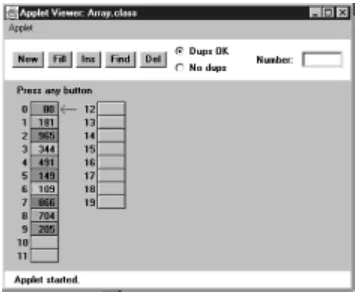
In this book we'll often begin the discussion of a particular data structure by demonstrating it with a Workshop applet. This will give you a feeling for what the structure and its algorithms do, before we launch into a detailed discussion and demonstrate actual example code. The Workshop applet called Array shows how an array can be used to implement insertion, searching, and deletion. Start up this applet, as described in Appendix A, with
C:appletviewer Array.html
Figure 2.1: The Array Workshop applet
This applet demonstrates the three fundamental procedures mentioned above:
•
The Ins button inserts a new data item.
•
The Find button searches for specified data item.
•
The Del button deletes a specified data item.
Using the New button, you can create a new array of a size you specify. You can fill this array with as many data items as you want using the Fill button. Fill creates a set of items and randomly assigns them numbers and colors. The numbers are in the range 0 to 999. You can't create an array of more than 60 cells, and you can't, of course, fill more data items than there are array cells.
Also, when you create a new array, you'll need to decide whether duplicate items will be allowed; we'll return to this question in a moment. The default value is no duplicates and the No Dups radio button is selected to indicate this.
Insertion
Start with the default arrangement of 20 cells and 10 data items and the No Dups button checked. You insert a baseball player's number into the array when the player arrives at the practice field, having been dropped off by a parent. To insert a new item, press the Ins button once. You'll be prompted to enter the value of the item:
Enter key of item to insert
Type a number, say 678, into the text field in the upper-right corner of the applet. (Yes, it is hard to get three digits on the back of a kid's shirt.) Press Ins again and the applet will confirm your choice:
Will insert item with key 678
A final press of the button will cause a data item, consisting of this value and a random color, to appear in the first empty cell in the array. The prompt will say something like:
Inserted item with key 678 at index 10
new item is always inserted in the first vacant cell in the array, and the algorithm knows where this is because it knows how many items are already in the array. The new item is simply inserted in the next available space. Searching and deletion, however, are not so fast.
In no-duplicates mode you're on your honor not to insert an item with the same key as an existing item. If you do, the applet displays an error message, but it won't prevent the insertion. The assumption is that you won't make this mistake.
Searching
Click the Find button. You'll be prompted for the key number of the person you're looking for. Pick a number that appears on an item somewhere in the middle of the array. Type in the number and repeatedly press the Find button. At each button press, one step in the algorithm is carried out. You'll see the red arrow start at cell 0 and move methodically down the cells, examining a new one each time you push the button. The index number in the message
Checking next cell, index = 2
will change as you go along. When you reach the specified item, you'll see the message
Have found item with key 505
or whatever key value you typed in. Assuming duplicates are not allowed, the search will terminate as soon as an item with the specified key value is found.
If you have selected a key number that is not in the array, the applet will examine every occupied cell in the array before telling you that it can't find that item.
Notice that (again assuming duplicates are not allowed) the search algorithm must look through an average of half the data items to find a specified item. Items close to the beginning of the array will be found sooner, and those toward the end will be found later. If N is the number of items, then the average number of steps needed to find an item is N/2. In the worst-case scenario, the specified item is in the last occupied cell, and N steps will be required to find it.
As we noted, the time an algorithm takes to execute is proportional to the number of steps, so searching takes much longer on the average (N/2 steps) than insertion (one step).
Deletion
To delete an item you must first find it. After you type in the number of the item to be deleted, repeated button presses will cause the arrow to move, step by step, down the array until the item is located. The next button press deletes the item and the cell
becomes empty. (Strictly speaking, this step isn't necessary because we're going to copy over this cell anyway, but deleting the item makes it clearer what's happening.)
Implicit in the deletion algorithm is the assumption that holes are not allowed in the array. A hole is one or more empty cells that have filled cells above them (at higher index numbers). If holes are allowed, all the algorithms become more complicated because they must check to see if a cell is empty before examining its contents. Also, the algorithms become less efficient because they must waste time looking at unoccupied cells. For these reasons, occupied cells must be arranged contiguously: no holes allowed.
example.
Figure2.2: Deleting an item
If the item in cell 5 (38, in the figure) is deleted, then the item in 6 would shift into 5, the item in 7 would shift into 6, and so on to the last occupied cell. During the deletion process, once the item is located, the applet will shift down the contents of the higher-indexed cells as you continue to press the Del button.
A deletion requires (assuming no duplicates are allowed) searching through an average of N/2 elements, and then moving the remaining elements (an average of N/2 moves) to fill up the resulting hole. This is N steps in all.
The Duplicates Issue
When you design a data storage structure, you need to decide whether items with duplicate keys will be allowed. If you're talking about a personnel file and the key is an employee number, then duplicates don't make much sense; there's no point in assigning the same number to two employees. On the other hand, if the key value is last names, then there's a distinct possibility several employees will have the same key value, so duplicates should be allowed.
Of course, for the baseball players, duplicate numbers should not be allowed. It would be hard to keep track of the players if more than one wore the same number.
The Array Workshop applet lets you select either option. When you use New to create a new array, you're prompted to specify both its size and whether duplicates are permitted. Use the radio buttons Dups OK or No Dups to make this selection.
If you're writing a data storage program in which duplicates are not allowed, you may need to guard against human error during an insertion by checking all the data items in the array to ensure that none of them already has the same key value as the item being inserted. This is inefficient, however, and increases the number of steps required for an insertion from one to N. For this reason, our applet does not perform this check.
Searching with Duplicates
Allowing duplicates complicates the search algorithm, as we noted. Even if it finds a match, it must continue looking for possible additional matches until the last occupied cell. At least this is one approach; you could also stop after the first match. It depends on whether the question is "Find me everyone with blue eyes" or "Find me someone with blue eyes."
Insertion with Duplicates
Insertion is the same with duplicates allowed as when they're not: a single step inserts the new item. But remember, if duplicates are not allowed, and there's a possibility the user will attempt to input the same key twice, you may need to check every existing item before doing an insertion.
Deletion with Duplicates
Deletion may be more complicated when duplicates are allowed, depending on exactly how "deletion" is defined. If it means to delete only the first item with a specified value, then, on the average, only N/2 comparisons and N/2 moves are necessary. This is the same as when no duplicates are allowed.
But if deletion means to delete every item with a specified key value, then the same operation may require multiple deletions. This will require checking N cells and (probably) moving more than N/2 cells. The average depends on how the duplicates are distributed throughout the array.
The applet assumes this second meaning and deletes multiple items with the same key. This is complicated, because each time an item is deleted, subsequent items must be shifted farther. For example, if three items are deleted, then items beyond the last deletion will need to be shifted three spaces. To see how this works, set the applet to Dups OK and insert three or four items with the same key. Then try deleting them.
Table 2.1 shows the average number of comparisons and moves for the three
operations, first where no duplicates are allowed and then where they are allowed. N is the number of items in the array. Inserting a new item counts as one move.
You can explore these possibilities with the Array Workshop applet.
Table 2.1: Duplicates OK Versus No Duplicates
No Duplicates Duplicates OK
Search N/2 comparisons N comparisons
Insertion No comparisons, one move No comparisons, one move
Deletion N/2 comparisons, N/2 moves
N comparisons, more than N/2 moves
The difference between N and N/2 is not usually considered very significant, except when fine-tuning a program. Of more importance, as we'll discuss toward the end of this
chapter, is whether an operation takes one step, N steps, log(N) steps, or N e2 steps.
Not Too Swift
One of the significant things to notice when using the Array applet is the slow and