USPEX
A
No part of this publication may be reproduced, in any form or by any means, without the prior written consent of Auspex Systems, Inc. Auspex Systems, Inc., reserves the right to revise this publication and make changes in content from time to time without obligation on the part of Auspex Systems to provide prior notification of such revision or change. U.S. GOVERNMENT RIGHTS: As specified in 48 C.F.R.12.212 of the FAR and in 48.C.F.R 227-7202-1 of the DFARS, the use, duplication or disclosure of licensed commercial software and documentation is subject to the Auspex System's license. Such rights and restrictions are similar to those set forth in FAR 52.227-19(c)(1)&(c)(2).
Trademarks
Auspex, Auspex logo design, Functional Multiprocessor, Functional Multi-processor, Functional Multi-processing, Functional Multiprocessing Kernel, FMK, and FMP are registered trademarks of Auspex Systems, Inc. NS 7000, NS 6000, NS 6002, NS 5500, NS 5502, NS 5000, NS 3000, NetServer, DataGuard, ServerGuard, Functional
Multiprocessing, NeTservices, and Thrive Carefully are trademarks of Auspex Systems, Inc.
AT&T is a registered trademark of AT&T Corporation. Microsoft, MS, MS-DOS, Windows, Windows NT, and Backoffice are either registered trademarks or trademarks of Microsoft Corporation. Sun, Sun Microsystems, the Sun Logo, Solaris, SunOS, ONC, ONC/NFS, and NFS are trademarks or registered trademarks of Sun Microsystems, Inc. All SPARC trademarks are used under license and are the trademarks or registered trademarks of SPARC International, Inc. in the United States and other countries. UNIX is a registered trademark in the United States and other countries of The Open Group. VMEbus is a trademark of VMEbus Manufacturers Group. DEC and VT 510 are trademarks of Digital Equipment Corp. ForeRunner is a trademark of FORE Systems, Inc. Acrobat is a trademark of Adobe Systems, Inc.
Auspex NetServer System Software is derived from UNIX® licensed from The Santa Cruz Operation, Inc. and SunOs™ 4.1.4 and ONC/NFS 4.1 licensed from Sun
Microsystems, Inc. Auspex NetServer System Software Version 1.10 incorporates AT&T’s Advanced Server for UNIX Systems. Auspex Optional Products Premier Software Series for NeTservices incorporates AT&T’s Advanced Server for UNIX Systems and
NETBIOS/ix. NETBIOS/ix is a registered U.S. trademark of Micro Computer Systems, Inc.
Microsoft may have patents or pending patent applications, trademarks, copyrights, or other intellectual property rights covering subject matter in this document. The furnishing of this document does not give you any license to these patents, trademarks, copyrights, or other intellectual property rights except as expressly provided in any written license agreement from Microsoft.
wrist strap provided with your network server when you come in contact with the system.
Publication Change Record
The following table records all revisions to this publication. The first entry is always the publication’s initial release. Each entry indicates the date of the release and the number of the system release to which the revision corresponds.
Part Number Date Description
Contents
Preface
Chapter 1 Overview of NetServer Features
About This Chapter . . . 1-1 Product Overview . . . 1-2 NetServer Hardware Architecture. . . 1-5 Host Processor (HP) . . . 1-5 Network Processor (NP). . . 1-6 Storage Processor (SP) . . . 1-6 I/O Cache Memory . . . 1-6 Enhanced VME Bus. . . 1-6 Optional Products . . . 1-7 ServerGuard . . . 1-7 DataGuard . . . 1-7 DriveGuard . . . 1-7 NeTservices . . . 1-7 EtherChannel . . . 1-8 ATM. . . 1-8 FTP on the Network Processor . . . 1-8 FastBackup . . . 1-8 Hardware Implementation of the FMP Architecture . . . 1-9 NetServer Software Architecture . . . 1-10 Advantages of the Auspex Environment . . . 1-11 SunOS Enhancements . . . 1-12 Chapter 2 Software Configuration
Running NSconfig . . . 2-11 SetupTty . . . 2-18 SetupExec . . . 2-20 Do You Need to Run SetupExec?. . . 2-20 What Does SetupExec Do? . . . 2-21 Things to Remember When Running SetupExec . . . 2-21 Running SetupExec. . . 2-22 SetupClient . . . 2-27 Do You Need to Run SetupClient?. . . 2-28 What Does SetupClient Do? . . . 2-28 Running SetupClient . . . 2-29 Root Login and File System Isolation . . . 2-31 100Base-T Ethernet Full-Duplex. . . 2-32 Chapter 3 Booting Up and Shutting Down the NetServer
About This Chapter . . . 3-1 Booting the NetServer . . . 3-2 Single-User Mode vs. Multiuser Mode. . . 3-2 Accessing the PROM Monitor . . . 3-3 Entering Monitor Mode When the System is Powered Off . . . 3-3 Entering Monitor Mode When the System is Running . . . 3-4 Booting the Server at the Monitor Prompt. . . 3-4 The Default Boot Device . . . 3-5 Using the Boot Command . . . 3-5 Exiting Single-User Mode to Multiuser Mode . . . 3-6 Booting From a CD-ROM . . . 3-6 Rebooting the Server to Multiuser Mode. . . 3-8 DataGuard and Rebooting . . . 3-8 Commands for Shutting Down the NetServer. . . 3-9 shutdown . . . 3-9 halt . . . 3-10 reboot. . . 3-10 fasthalt and fastboot . . . 3-11 Chapter 4 NetServer Storage Devices and File Systems
Auspex’s Modifications to /etc/fstab . . . 4-19 Specifying the File System Type. . . 4-19 Mapping LFS File Systems to File Processors . . . 4-20 Enabling Write Acceleration in /etc/fstab . . . 4-22 Other Commands Affected by LFS. . . 4-22 File Processor Constraints . . . 4-22 File System Formats Supported by UFS. . . 4-22 NFS Version 3 and UFS Limitations . . . 4-23 Specifying a Host Name in /etc/fstab . . . 4-24 Adding or Replacing a Drive . . . 4-25 Installing or Replacing a Drive After Booting. . . 4-26 Before You Start the Drive Installation Procedure . . . 4-26 Using ax_hot_plug to Add a Drive to the Server. . . 4-27 Installing or Replacing a Drive When the Operating System is Shut Down4-28 Configuring a New Disk Drive . . . 4-28 Removing a Drive . . . 4-31 Removing a Drive When the Operating System is Booted . . . 4-31 Before You Remove a Drive . . . 4-31 Using ax_hot_plug to Remove a Drive . . . 4-32 Removing a Drive When the Operating System is Shut Down . . . 4-33 Using ax_hot_plug to Add and Remove Multiple Drives. . . 4-33 Attaching Drives to the Host Processor SCSI Port . . . 4-35 Using the Format Command . . . 4-36 Running the Format Command in Single- or Multiuser Mode . . . 4-36 Accessing the Format Menu . . . 4-36 Defining a Disk Type . . . 4-37 Formatting a Disk Using the Format Option . . . 4-38 Changing the Partitioning on a Disk . . . 4-39 Using ax_label to Partition and Label a Disk . . . 4-41 Displaying a Disk’s Partitioning Information . . . 4-42 Chapter 5 Virtual Partitions
Expanding a One-Membered Striped Partition . . . 5-19 Expanding a Two-Membered Mirrored Partition. . . 5-19 Changing a Striped or Concatenated Partition to a Mirrored Partition . . . 5-19 Adding a New Member to an Existing Mirrored Partition . . . 5-21 Removing a Member from an Existing Mirrored Partition . . . 5-21 Moving a Striped or Concatenated Partition. . . 5-21 Moving a One-Membered Mirrored Partition. . . 5-22 Moving a Two-Membered Mirrored Partition With No Unmount . . . 5-22 Displaying Disk Configuration Information . . . 5-23 Chapter 6 Recovering From Disk or File System Failures
How the SP Maintains Drive Information . . . 7-4 Write Accelerator Restrictions . . . 7-5 Write Cache States and Commands . . . 7-6 Enabling the Write Accelerator . . . 7-8 Disabling the Write Accelerator . . . 7-9 Managing the Write Accelerator . . . 7-9 Recovering From Write Cache (BADCHECKSUM or DIRTY) Errors . . 7-9 Recovering From a Disk Media Error (DIRTY State) . . . 7-10 Recovering From a Disk Hardware Error. . . 7-10 Recovering From a Drive Configuration Change . . . 7-11 Chapter 8 Backing Up the NetServer
About This Chapter . . . 8-1 Using the Dump and Restore Commands . . . 8-2 Dump Command. . . 8-2 Restore Command. . . 8-3 Tape Drive Capacity . . . 8-5 Data Format on 4-mm Tapes . . . 8-5 Tape Drive Capacities. . . 8-5 The Size, Density, and Blocking Factor Options for Dump . . . 8-7 Backing Up With a Large Number of Disks. . . 8-10 Backing Up the Root Disk . . . 8-11 Online Backup . . . 8-12 Cloning a Virtual or Physical Partition . . . 8-12 Important Guidelines for Creating a Clone Partition . . . 8-13 Procedure for Cloning a Partition . . . 8-14 Dumping a Clone Partition to Tape . . . 8-15 Restoring a File With a Damaged Inode . . . 8-17 Restoring a File from 1.5.1-produced Tapes. . . 8-18 Common Tape Drive Errors . . . 8-19 Operator Errors . . . 8-19 I/O Error . . . 8-19 Write Error. . . 8-19 Blank Tape Error. . . 8-19 Memory Error . . . 8-20 End-of-tape Error . . . 8-20 Tape Media Errors. . . 8-20 Write Error. . . 8-21 Read Error . . . 8-21 Write Failure Error . . . 8-21 Tape Jam Error . . . 8-21 Tape Drive Errors . . . 8-22 Write Error. . . 8-22 Online Error. . . 8-22 Chapter 9 Measuring the NetServer’s Performance
FP Statistics Screen . . . 9-12 SP Statistics Screen . . . 9-13 Virtual Partition Statistics Screen . . . 9-15 Using a Filter File with ax_perfmon . . . 9-16 Creating a Filter File . . . 9-16 Specifying a Filter File on the ax_perfmon Command Line . . . 9-16 Displaying Performance Data in Histograms . . . 9-18 Overview. . . 9-18 Before Invoking ax_perfhist . . . 9-19 Starting ax_perfhist Interactively . . . 9-19 Loading Statistics From a File . . . 9-21 Clearing a Histogram . . . 9-22 Displaying Multiple Histograms . . . 9-23 Loading Statistics Using 2 Step Load. . . 9-24 Eliminating a Histogram from the Data Display Window. . . 9-24 Defining the Appearance of a Histogram . . . 9-24 Saving and Applying a Configuration File . . . 9-29 Examining Samples in Histograms . . . 9-32 Menu for Zooming In and Zooming Out . . . 9-34 Summing Parameters in Histograms . . . 9-35 Deleting an Input File. . . 9-37 Pull-Down Menu Displayed in the Input File List . . . 9-37 Printing Histograms . . . 9-38 Print Command. . . 9-38 Print Command Output. . . 9-40 Types of Statistics Displayed by ax_perfhist . . . 9-40 HP . . . 9-41 NP . . . 9-41 FP. . . 9-43 SP. . . 9-45 Starting ax_perfhist with Options and Arguments . . . 9-46 Analyzing Performance Monitor Data . . . 9-47 Chapter 10 Special Maintenance
Appendix A UNIX Manual Pages
About This Appendix . . . .A-1 User Commands . . . .A-2 System Calls . . . .A-3 Devices and Networking. . . .A-4 File Formats. . . .A-6 Maintenance Commands . . . .A-7 Appendix B Online Documentation
About This Appendix . . . B-1 Online Documentation . . . B-2 Installing Online Documentation . . . B-2 Starting the Online Documentation . . . B-5 Overview . . . B-5 Printing a Document. . . B-7 Appendix C Time Zones
World Time Zones . . . C-1 Appendix D Configuration Worksheets
About This Appendix . . . .D-1 Host Information Worksheet . . . .D-2 Client Information Worksheet . . . .D-4 Disk Drive Information Worksheet . . . .D-6 Virtual Partition Information Worksheet . . . .D-7 Appendix E Messages
Figures
Chapter 1 Overview of NetServer Features
Figure 1-1. Hardware implementation of Functional Multi-processing architecture 1-9 Figure 1-2. NetServer Functional Multi-processing architecture . . . 1-10
Chapter 2 Software Configuration
Figure 2-1. Flowchart for configuring the server for the first time . . . 2-3 Figure 2-2. Sample NSconfig form. . . 2-13 Figure 2-3. Flowchart for configuring a TTY port . . . 2-18 Figure 2-4. The SetupTty form . . . 2-19 Figure 2-5. Configure client information on the server using SetupExec . . . 2-20 Figure 2-6. Sample SetupExec form for a local tape device . . . 2-23 Figure 2-7. Sample SetupExec form for a local CD-ROM device . . . 2-23 Figure 2-8. Sample SetupExec form for a remote tape device . . . 2-24 Figure 2-9. Sample SetupExec form for a remote CD-ROM device . . . 2-24 Figure 2-10. Configure client information on the server using SetupClient . . . 2-27 Figure 2-11. The SetupClient form. . . 2-29
Chapter 3 Booting Up and Shutting Down the NetServer
Chapter 4 NetServer Storage Devices and File Systems
Figure 4-1. Partitioning a 9-GB disk using the default partition table . . . 4-9 Figure 4-2. Partitioning a 9-GB disk using the stripe partition table . . . 4-9 Figure 4-3. Partitioning a 4-GB disk using the root partition table. . . 4-9 Figure 4-4. The Auspex root file system . . . 4-13 Figure 4-5. The Auspex /var file system . . . 4-14 Figure 4-6. The Auspex /usr file system . . . 4-15 Figure 4-7. The Auspex /usr/openwin file system . . . 4-16 Figure 4-8. The /export file system for servers (with SunOS executables) . . . 4-17 Figure 4-9. The /exportN file system for clients . . . 4-17 Figure 4-10. Default fstab file . . . 4-20
Chapter 5 Virtual Partitions
Figure 5-10. Example ax_diskconf display . . . 5-24 Figure 5-11. Example ax_diskconf second table with -p option . . . 5-25
Chapter 6 Recovering From Disk or File System Failures
Figure 6-1. The NSinstall form . . . 6-31
Chapter 7 Write Acceleration
Figure 7-1. Write cache changing states after server power on . . . 7-7
Chapter 8 Backing Up the NetServer
Figure 8-1. Backup scheme for 42 drives. . . 8-10 Figure 8-2. Example of a clone of a mirrored partition . . . 8-14 Figure 8-3. 1.5.1 tape encoding . . . 8-18 Figure 8-4. 1.9 tape encoding . . . 8-18
Chapter 9 Measuring the NetServer’s Performance
Figure 9-1. Sample System Summary screen for an NS 7000/200 Series NetServer . 9-7 Figure 9-2. Sample System Summary screen for an NS 7000/600 Series NetServer . 9-7 Figure 9-3. Sample of an NP Statistics screen. . . 9-9 Figure 9-4. NP Protocol Statistics screen . . . 9-10 Figure 9-5. Sample FP Statistics screen . . . 9-12 Figure 9-6. Sample SP Statistics screen . . . 9-13 Figure 9-7. Example of a Virtual Partition Statistics screen . . . 9-15 Figure 9-8. Sample output file created by ax_perfmon with a filter file. . . 9-17 Figure 9-9. Data Display Window . . . 9-20 Figure 9-10. Buttons in the Data Display Window . . . 9-20 Figure 9-11. File Load Window . . . 9-21 Figure 9-12. Displaying the Data Display and File Load windows simultaneously . 9-22 Figure 9-13. Data Display Window showing two histograms simultaneously. . . 9-23 Figure 9-14. Histogram Properties Window. . . 9-25 Figure 9-15. Effects of Histogram Properties parameters on a histogram . . . 9-27 Figure 9-16. Server statistics plotted on a continuous graph . . . 9-28 Figure 9-17. Overall Properties Window . . . 9-28 Figure 9-18. Configuration Window . . . 9-30 Figure 9-19. Displaying six histograms as specified in a configuration file. . . 9-31 Figure 9-20. Pull-down menu for zooming samples between the markers . . . 9-33 Figure 9-21. Histogram showing samples after zooming. . . 9-34 Figure 9-22. Summing two histograms . . . 9-36 Figure 9-23. Print Options Window. . . 9-38
Chapter 10 Special Maintenance
Figure 10-1. How ax_config obtains configuration information. . . 10-3
Appendix A UNIX Manual Pages
Appendix B Online Documentation
Appendix C Time Zones
Appendix D Configuration Worksheets
Tables
Chapter 1 Overview of NetServer Features
Table 1-1. NetServer features . . . 1-3 Table 1-2. Changes to SunOS . . . 1-12 Table 1-3. Pointers to Sun documentation . . . 1-16
Chapter 2 Software Configuration
Table 2-1. Key files that contain site-specific information . . . 2-5 Table 2-2. Keys for editing configuration forms . . . 2-10 Table 2-3. The NSconfig form fields . . . 2-14 Table 2-4. Date and time formats . . . 2-17 Table 2-5. Files modified by NSconfig . . . 2-17 Table 2-6. The SetupTty form fields . . . 2-19 Table 2-7. Sun system architectures . . . 2-22 Table 2-8. The SetupExec form fields . . . 2-25 Table 2-9. The SetupClient form fields . . . 2-30
Chapter 3 Booting Up and Shutting Down the NetServer
Table 3-1. Examples of the b command . . . 3-6
Chapter 4 NetServer Storage Devices and File Systems
Table 4-1. CD-ROM naming conventions . . . 4-2 Table 4-2. Naming a 4-mm tape drive in slot 5 . . . 4-3 Table 4-3. Naming an 8-mm tape drive in slot 5 . . . 4-3 Table 4-4. Naming a DLT4000 tape drive in slot 7 . . . 4-3 Table 4-5. Default disk drive partition tables . . . 4-8 Table 4-6. Stripe drive partition tables . . . 4-8 Table 4-7. Root drive partition table (in MBs) . . . 4-8 Table 4-8. Example of disk partitioning among multiple disks . . . 4-12 Table 4-9. SCSI IDs and names for devices on the HP. . . 4-35 Table 4-10. Disk drive format verification time . . . 4-39
Chapter 5 Virtual Partitions
Table 5-1. Numbering virtual partitions . . . 5-10
Chapter 6 Recovering From Disk or File System Failures
Table 6-1. The NSinstall form fields . . . 6-31
Chapter 7 Write Acceleration
Table 7-1. ax_write_cache command options . . . 7-8
Chapter 8 Backing Up the NetServer
Table 8-2. Tape drive data capacities . . . 8-6 Table 8-3. Suggested dump and restore arguments . . . 8-7 Table 8-4. Dump and restore command examples . . . 8-9 Table 8-5. Differences between cloning and mirroring a partition . . . 8-12
Chapter 9 Measuring the NetServer’s Performance
Table 9-1. NP statistics . . . 9-9 Table 9-2. NP Protocol Statistics . . . 9-11 Table 9-3. Fields in the Histogram Properties Window . . . 9-25 Table 9-4. Fields in the Overall Properties Window . . . 9-29 Table 9-5. Options in pull-down menu in Data Display Window . . . 9-35 Table 9-6. Pull-down menu options displayed in the input file list . . . 9-37 Table 9-7. Differences between xwd and screendump . . . 9-40 Table 9-8. Options and arguments used in the ax_perfhist command . . . 9-46
Chapter 10 Special Maintenance
Appendix A UNIX Manual Pages
Appendix B Online Documentation
Appendix C Time Zones
Table C-1. Time zone listing . . . C-1 Table C-2. Additional time zone listings. . . C-4
Appendix D Configuration Worksheets
Appendix E Messages
Preface
About This Guide
This guide gives you detailed information about how to operate and manage an Auspex NetServer. It offers procedures and recommendations on how to run the NetServer software efficiently to ensure reliable and fast file service at your site.
Applicable Documentation
Because Auspex NetServers run the SunOS 4.1.4 operating system and are fully compatible with ONC/NFS, many Sun Microsystems documents are relevant to NetServer operations. This guide documents differences from SunOS and does not attempt to document SunOS or system administration in detail. For Auspex hardware information or SunOS administration information, refer to the appropriate manual in the following list:
▲ NS 7000 Model 150/250 Series Hardware Manual, Auspex Systems, Inc. ▲ NS 7000 Model 650 Series Hardware Manual, Auspex Systems, Inc. ▲ NS 7000 Model 700 Hardware Manual, Auspex Systems, Inc. ▲ NS 7000 Model 800 Hardware Manual, Auspex Systems, Inc. ▲ Storage Peripherals Manager’s Guide, Auspex Systems, Inc. ▲ Version 1.10 Hardware Release Note, Auspex Systems, Inc. ▲ Version 1.10 Software Release Note, Auspex Systems, Inc. ▲ System and Network Administration, Sun Microsystems, Inc.
Terminology
Several models of Auspex NetServers run NetServer version 1.10 software: the 200 series, 500 series, 600 series, 700 series, and 800 series. The NS 6000™ NetServer is also supported, but must be upgraded. Version 1.10 software does not support:
▲ Host Processor IV (HP IV) or earlier boards. ▲ Ethernet Processor (EP) boards.
▲ File Processor (FP) boards.
▲ Storage Processor I (SP I), Storage Processor II (SP II), or Storage Processor III (SP III) boards. SP III boards can be upgraded to supported SP III-E boards.
In this guide, where information applies to all Auspex network servers regardless of model or Host Processor type, the text uses the generic term NetServer. Where information applies to a particular model or Host Processor type, the text uses the specific model number or Host Processor type.
Typographical Conventions
In this guide, different typefaces indicate different kinds of information. The following table explains these typographical conventions.
Hexadecimal values in the text are preceded with “0x,” and leading zeros are not always shown. For example, the notation 0x68 is used to indicate the hexadecimal address 00000068.
Font Meaning
Typewriter Indicates a literal screen message.
Bold In a command line, indicates information to be entered exactly as shown. In text, indicates a command name or device name.
Special Messages
The following special messages are used in this guide:
Warning: Warnings alert you to the danger of personal injury and call attention to instructions you must follow for your personal safety.
Caution: Cautions call attention to instructions you must follow to prevent damage to system hardware or software or loss of system data.
Note: Notes call attention to important information you should be aware of as you follow the procedures described in this guide.
Recommendation: Recommendations call attention to an item or procedure that is not required but might help improve performance, ease of use, and ease of installation or configuration.
Tools
The tools icon identifies the tools you need to complete a task.
Terminology
Throughout this manual, certain terms refer to NetServer families generically. Where distinctions are necessary, the actual machine model is used.
Host Processor PROM monitor prompts are represented with “HP>” throughout this manual. Since this system prompt varies depending on the Host Processor model installed in the NetServer, the prompt that appears on your system might be different.
The generic term... Describes these models...
NS 7000/800 NS 7000 Model 800
NS 7000/700 NS 7000 Model 700, 710, and 720
NS 7000/600 NS 7000 Model 600, 602, 610, 612, and 650
NS 7000/200 NS 7000 Model 200, 210, 220, and 250
NS 7000/150 NS 7000 Model 150
Getting Help
Customer support and online help are described in this section.
Email Support
Customer service and help through electronic mail are available to North American and International customers at the following address:
North America Telephone Support
To reach Auspex customer service for North America at any time, dial 1-800-328-7739.
International Telephone Support
Customers within the countries and territory listed as follows can reach Auspex customer service at any time by dialing the appropriate telephone number.
International customers who purchase Auspex products from an authorized distributor or reseller should contact that distributor or reseller for support
To comment on the content of this online help facility, send email to Auspex Technical Publications:
Country or territory Telephone number Country or territory Telephone number
Australia 1-800-121-194 Luxembourg 0800-2721
Austria 0-660-7912 Malaysia 800-4509
Belgium 0800-1-0180 Netherlands 06-0222158
Denmark 80-01-03-60 Norway 800-1-1294
France 0800-91-21-32
(0800-26-38-22)*
* France has two toll-free numbers. The number in () is directed to the Paris office during the working day. Philippines 1-800-116-0005
Germany 0130-81-8306 Poland 00-800-441-1220
Hong Kong 800-4803 Spain 900-95-4445
Ireland 1800 55 3343 Sweden 020-797326
Israel 177 440 9285 Switzerland 0800-55-1339
Italy 1678-73541 Taiwan 0080-14-9580
Japan 0044-22-12-2414 United Kingdom 0800-28-7739
World Wide Web
For more information about Auspex Systems, Inc. and its products, use the following resource location on the World Wide Web:
http://www.auspex.com
Printing Online Documents
You can print individual pages or the entire contents of the online manual. To print individual pages, use the ax_docs command and choose Premier Software Series Menu in the Main Menu window. Choose the <opf product> documentation, and pull down the File menu when the document appears. The Print option allows you to print a particular page, a range of pages, or the entire document. The Print Setup option allows you to select a paper size, including A4.
Alternately, to print the whole <opf product> document, mount the Premier Software Series CD, and use the lpr -s command to print 100btatmbackupdguardftpraid.ps in the
1
Overview of NetServer
Features
About This Chapter
Product Overview
The Auspex NetServer is specifically designed to deliver industry-leading performance and reliability that meets the demands of large networks in real-world production environments. With its unique Functional Multi-processing® (FMP®) architecture, the NetServer delivers high-speed network I/O performance. The NetServer is also highly scalable—you can improve its performance by adding processor boards and storage devices as the number of network clients grows. In addition, the NetServer’s software, which is based on the Sun Microsystems SunOS 4.1.4, offers Auspex-specific system administration commands for minimizing system down time. Procedures such as drive replacement and file system backup can be completed while the server is in multiuser mode.
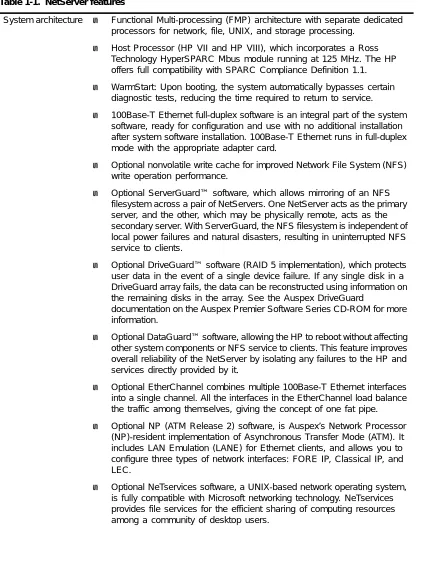
Table 1-1. NetServer features
System architecture ▲ Functional Multi-processing (FMP) architecture with separate dedicated processors for network, file, UNIX, and storage processing.
▲ Host Processor (HP VII and HP VIII), which incorporates a Ross Technology HyperSPARC Mbus module running at 125 MHz. The HP offers full compatibility with SPARC Compliance Definition 1.1.
▲ WarmStart: Upon booting, the system automatically bypasses certain diagnostic tests, reducing the time required to return to service.
▲ 100Base-T Ethernet full-duplex software is an integral part of the system software, ready for configuration and use with no additional installation after system software installation. 100Base-T Ethernet runs in full-duplex mode with the appropriate adapter card.
▲ Optional nonvolatile write cache for improved Network File System (NFS) write operation performance.
▲ Optional ServerGuard™ software, which allows mirroring of an NFS filesystem across a pair of NetServers. One NetServer acts as the primary server, and the other, which may be physically remote, acts as the secondary server. With ServerGuard, the NFS filesystem is independent of local power failures and natural disasters, resulting in uninterrupted NFS service to clients.
▲ Optional DriveGuard™ software (RAID 5 implementation), which protects user data in the event of a single device failure. If any single disk in a DriveGuard array fails, the data can be reconstructed using information on the remaining disks in the array. See the Auspex DriveGuard
documentation on the Auspex Premier Software Series CD-ROM for more information.
▲ Optional DataGuard™ software, allowing the HP to reboot without affecting other system components or NFS service to clients. This feature improves overall reliability of the NetServer by isolating any failures to the HP and services directly provided by it.
▲ Optional EtherChannel combines multiple 100Base-T Ethernet interfaces into a single channel. All the interfaces in the EtherChannel load balance the traffic among themselves, giving the concept of one fat pipe.
▲ Optional NP (ATM Release 2) software, is Auspex’s Network Processor (NP)-resident implementation of Asynchronous Transfer Mode (ATM). It includes LAN Emulation (LANE) for Ethernet clients, and allows you to configure three types of network interfaces: FORE IP, Classical IP, and LEC.
For hardware features such as the maximum number of network interfaces supported, amount of I/O cache memory, and storage capacity, refer to the hardware manual appropriate to your NetServer model.
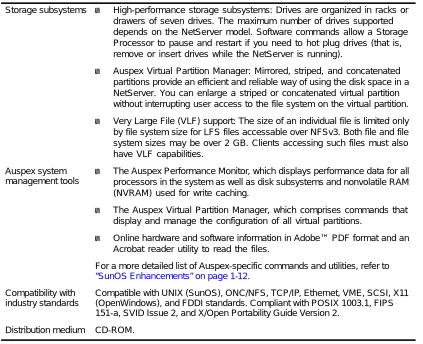
Storage subsystems ▲ High-performance storage subsystems: Drives are organized in racks or drawers of seven drives. The maximum number of drives supported depends on the NetServer model. Software commands allow a Storage Processor to pause and restart if you need to hot plug drives (that is, remove or insert drives while the NetServer is running).
▲ Auspex Virtual Partition Manager: Mirrored, striped, and concatenated partitions provide an efficient and reliable way of using the disk space in a NetServer. You can enlarge a striped or concatenated virtual partition without interrupting user access to the file system on the virtual partition.
▲ Very Large File (VLF) support: The size of an individual file is limited only by file system size for LFS files accessable over NFSv3. Both file and file system sizes may be over 2 GB. Clients accessing such files must also have VLF capabilities.
Auspex system management tools
▲ The Auspex Performance Monitor, which displays performance data for all processors in the system as well as disk subsystems and nonvolatile RAM (NVRAM) used for write caching.
▲ The Auspex Virtual Partition Manager, which comprises commands that display and manage the configuration of all virtual partitions.
▲ Online hardware and software information in Adobe™ PDF format and an Acrobat reader utility to read the files.
For a more detailed list of Auspex-specific commands and utilities, refer to “SunOS Enhancements” on page 1-12.
Compatibility with industry standards
Compatible with UNIX (SunOS), ONC/NFS, TCP/IP, Ethernet, VME, SCSI, X11 (OpenWindows), and FDDI standards. Compliant with POSIX 1003.1, FIPS 151-a, SVID Issue 2, and X/Open Portability Guide Version 2.
[image:26.612.53.476.82.426.2]Distribution medium CD-ROM.
NetServer Hardware Architecture
The combination of processor boards and drive subsystems within a NetServer varies from one configuration to another. However, on all NetServer models, the Auspex FMP architecture distributes performance-limiting I/O functions to multiple dedicated processors, bypassing the UNIX operating system to significantly reduce software overhead. As a result, Auspex’s FMP architecture delivers a dramatic improvement in network I/O performance.
An example of a processor board is the Network Processor (NP). An NP board contains one CPU for protocol processing and another for file system processing. When this guide uses a processor name (for example, “Network Processor”), it refers to the CPU that performs a specific processing function, whether or not the CPU shares a board with another CPU.
The following lists the major hardware subsystems in the NetServer: ▲ FMP processors (Host, Network, and Storage Processors)
▲ High-performance disk subsystem ▲ CD-ROM and tape drives
Note: NetServer Version 1.10 software supports only servers with HP VII and HP VIII, NP III and NP IV, and SP IV and SP V boards.
As more users join the network, processor and storage capacity can be added to accommodate the increased work load.
The following sections discuss the FMP processors, the shared cache memory, and the Enhanced VME Bus over which the processors communicate with each other.
Host Processor (HP)
The Host Processor performs these functions: ▲ Booting the system.
▲ Downloading software to the other processors. ▲ Running UNIX (SunOS) and applications. ▲ Exporting the standard Sun ONC services.
▲ Running the NetServer system utilities and diagnostics.
The HP manages NFS Version 2 services for requests to file systems mounted on the HP. Most NFS requests for Auspex Local File Systems (LFS) are processed by the NP.
The NetServer’s SPARC-based HP is binary-compatible with SPARC application environments and provides a compute capability independent of NFS loading.
Caution: The architecture of the HP VIII is aushp. Loading kernel modules compiled for an architecture different from that of the HP might cause the server to crash.
Network Processor (NP)
The Network Processor combines network-processing and file-processing functions, as well as onboard cache memory. An NP may have multiple, mixed network connections including Ethernet and FDDI connections. An FDDI NP can support either fiber or MLT-3 interfaces, and can be either a Single Attach Station (SAS) or a Dual Attach Station (DAS). (The DAS connection supports fiber only.)
NP network interface adapter boards supporting ATM, FDDI, and Fast Ethernet (100Base-T) interfaces are available as optional products.
For a complete list of supported network interface combinations, see the “Network Processor Configurations” section of the Version 1.10 Hardware Release Note.
Storage Processor (SP)
The Storage Processor operates multiple parallel SCSI channels. The SP V supports six 10-MB per second fast SCSI channels. The SP is responsible for SCSI channel management, SCSI drive control and optimization, DMA data transfers to the primary I/O cache memory, and virtual partition management.
Optionally, the SP supports write acceleration for NFS write operations through write caching, write coalescing, and redundant write elimination. Write acceleration can improve client NFS response time and NetServer throughput by reducing the response time involved in writing data to disk. The write cache on an SP V with the optional Write Accelerator III and current PROM Flash code contains 8 MB of NVRAM with battery backup to protect data when a power failure occurs.
I/O Cache Memory
The shared I/O cache memory, which resides on all NP boards, is used as a large disk cache. No processor instructions are stored in or fetched from this memory. Memory and backplane bandwidth are devoted exclusively to I/O.
Enhanced VME Bus
Optional Products
Auspex provides a system for installing optional software products on the NetServer. Software packages are immediately accessible through the acquisition of a decrypting key and license from Auspex. Optional product packages are located on the Auspex Premier Software Series CD-ROM. The packages must be installed with pkgadd(1M) onto the NetServer system software to run. Installation instructions are in the CD-ROM booklet and in the Version 1.10 Software Release Note.
Documentation for all the software packages is provided on the Auspex Premier Software Series CD-ROM. Installation and printing instructions for documentation are in the CD-ROM booklet and in Appendix B of this manual.
The following optional software products are available at the time of printing this manual. Refer to the Auspex Premier Software Series CD-ROM for the latest information.
ServerGuard
ServerGuard allows mirroring of an NFS filesystem across a pair of NetServers. One
NetServer acts as the primary server, and the other, which may be physically remote (anywhere in the world), acts as the secondary server. With ServerGuard, the NFS filesystem is independent of local power failures and natural disasters, resulting in uninterrupted NFS service to clients.
DataGuard
DataGuard permits HP only reboots. This confines operating system failures to the HP and
any services directly provided by it. DataGuard makes the NetServer more reliable by reducing the impact of UNIX operating system failures and improving the HP reboot time.
DriveGuard
DriveGuard (RAID 5 implementation) protects user data in the event of a single device
failure. If any single disk in a DriveGuard array fails, the data can be reconstructed using information on the remaining disks in the array. See the DriveGuard documentation on the Auspex Premier Software Series CD-ROM for more information.
NeTservices
NeTservices is a UNIX-based network operating system that is fully compatible with
Microsoft networking technology. NeTservices provides file services for the efficient sharing of computing resources among a community of desktop users. It incorporates the latest Microsoft technology to deliver powerful new network administration and
EtherChannel
EtherChannel combines multiple 100Base-T Ethernet interfaces into a single channel called
a fat pipe. All the interfaces in the EtherChannel load balance the traffic among themselves, giving the concept of one fat pipe.
The Auspex EtherChannel implementation takes care of traffic directed to a router through the same port, since EtherChannel does the load balancing based on IP addresses, MAC addresses, or with round robin algorithm. The Auspex EtherChannel is a software-only product. When the packet is ready to go out on the net, EtherChannel makes a decision at the driver level about which port to use.
ATM
NP (ATM Release 2) provides asynchronous communication from the NP board with data
transfer rates up to 155 MB per second. NP (ATM Release 2) includes LAN Emulation (LANE) for Ethernet clients, and allows you to configure three types of network interfaces: FORE IP, Classical IP, and LEC.
FTP on the Network Processor
FTP on the Network Processor improves File Transfer Protocol (FTP) transfer rates between
NetServer disk storage and a network. Data can flow directly from the SP to an NP, bypassing the HP. FTP (NP) handles all the Internet Transmission Control Protocol processing.
FastBackup
FastBackup increases the speed of Auspex systems doing full-system backups and restores.
Hardware Implementation of the
FMP Architecture
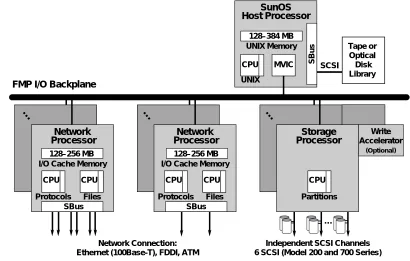
Figure 1-1 illustrates the NetServer hardware architecture. Remember that because you can mix and match some of the processor boards in one system, the configuration of your server may be different from the one shown. Also, there are restrictions on the maximum number of boards that can be installed in a system, depending on the board combination.
Figure 1-1. Hardware implementation of Functional Multi-processing architecture
Network Connection: Ethernet (100Base-T), FDDI, ATM
Independent SCSI Channels 6 SCSI (Model 200 and 700 Series)
FMP I/O Backplane
UNIX Memory 128–384 MB CPU MVIC UNIX
SBus
I/O Cache Memory 128–256 MB CPU CPU Protocols Files
Network Processor
SBus
I/O Cache Memory 128–256 MB CPU CPU Protocols Files
Network Processor
SBus
…
… … …
Write Accelerator
(Optional)
SCSI
Tape or Optical Disk Library
SunOS Host Processor
CPU Partitions
NetServer Software Architecture
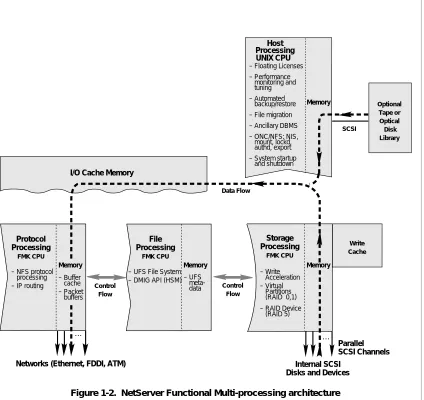
Figure 1-2 illustrates the software structure of the NetServer. Notice that the NetServer’s Functional Multiprocessing Kernel® (FMK®) executes on each Auspex processor.
Figure 1-2. NetServer Functional Multi-processing architecture
I/O Cache Memory
File Processing FMK CPU Host Processing Write Cache – Floating Licenses
– Performance monitoring and tuning – Automated backup/restore – File migration – Ancillary DBMS – ONC/NFS: NIS, mount, lockd, authd, export – System startup and shutdown Optional Tape or Optical Disk Library SCSI Memory Memory Control Flow Data Flow
Networks (Ethernet, FDDI, ATM)
Parallel SCSI Channels Internal SCSI
Disks and Devices
Memory Memory Control Flow … … Storage Processing FMK CPU
– UFS File System – DMIG API (HSM)
Protocol Processing
FMK CPU
– NFS protocol processing – IP routing
Advantages of the Auspex Environment
The Auspex environment is distinguished by its multiple processors, drives, and networks centralized in a single server. This feature provides several system management
advantages:
In administering the NetServer, be aware that some standard administrative practices are modified to take into account the number of devices and networks that exist in the centralized NetServer environment. Some procedures are altered to reflect the unique features of the NetServer environment. However, system administration procedures in many respects remain identical to those used for the SunOS operating system by Sun Microsystems, on which the Auspex operating system is based. Refer to the following section, “SunOS Enhancements”, for information about Auspex changes to SunOS. Consolidation The NetServer’s high-performance storage subsystems reduce
the need for maintaining and backing up multiple copies of files and programs spread across multiple conventional servers.
Balanced client traffic You can distribute client traffic more evenly for these reasons: ▲ Client data can be distributed among disk drives to
provide maximum I/O efficiency.
▲ The virtual partition capability allows you to distribute logical disk partitions over multiple physical disk drives, thus improving file access times to the file system
mounted on the partition. This feature provides a
dramatic performance improvement on heavily used file systems.
▲ The client load can be balanced among multiple networks. Distributing traffic on several networks reduces delays and increases efficiency.
Expandability If the number of clients outgrows the server’s current capacity, the server can be expanded to support more clients or
networks. The NetServer’s performance increases
proportionately with the increased number of drives and functional processors supported by the server.
Availability The NetServer offers uninterrupted service to network users when performing system administration procedures such as backing up file systems; adding, removing, or replacing drives; and reconfiguring or enlarging a virtual partition. The file system isolation capability ensures that a corrupted file system does not affect the operation of the entire server; the File Processor takes the file system offline so that you can repair it and make it available to users again.
SunOS Enhancements
Each NetServer runs a modified SunOS kernel that communicates with the intelligent Auspex processors to enhance NetServer performance. Most UNIX services come directly from SunOS for complete compatibility. However, Auspex makes some changes to the Sun operating system to integrate the Auspex processors into the standard operating system.
Note: The majority of the SunOS standard utilities and files remain
unchanged. This publication documents the changed portions of SunOS only; it does not document the unchanged portions. Consequently, it is very
important that you have the SunOS documentation. To obtain the latest
documentation, contact Sun Express at 1-800-USE-SUNX, or Auspex.
The most significant changes to SunOS are listed in Table 1-2. Not all of the changes are described in the rest of this guide because some changes (for example, the ax_statd(8) daemon) are transparent to the system administrator. For information about the more visible changes, see the appropriate man page.
Table 1-2. Changes to SunOS
Types of changes Description
For further information, see
Added or modified daemons
Three added daemons coordinate the processors:
ax_startup(8), ax_errd(8), and ax_timed(8). These
daemons, like init(8), must run even in single-user mode.
Additional daemons supporting the NetServer in multiuser mode are ax_statd(8), ax_statd2(8),
ax_keyenvoyd(8), ax_lfsd(8), ax_nfsd(8), and ax_vold(8).
Man pages for:
ax_startup ax_errd ax_timed ax_statd ax_statd2 ax_keyenvoyd ax_lfsd ax_nfsd ax_vold Networking commands and daemons
The nfsstat(8C) command is modified to obtain statistics for the NP and UNIX. Also, an added option (-Iinterface) displays NFS and RPC statistics about
a network interface.
A new command, ax_netstat(8C), displays NP network statistics.
A new command, stopnfsd(8), shuts down the NFS daemons on the NPs.
A new command, ax_arp(8C), displays or flushes the Address Resolution Protocol (ARP) table on an NP.
A new command, ax_fddistat(8C), displays status of FDDI and MLT-3 network interfaces.
Man pages for:
nfsstat ax_netstat stopnfsd ax_arp ax_fddistat Performance monitor commands
The Auspex Performance Monitor command,
ax_perfmon(8), gives the system manager the ability
to gather and display NetServer performance data.
The ax_perfhist(8) command displays server performance data in histograms.
Commands for virtual partitions
A disk management tool, ax_diskconf(8), displays NetServer disk configuration data, including information about virtual partitions.
vp(4) is the virtual partition device driver.
vpartab(5) is the virtual partition table.
ax_loadvpar(8) loads the partition table.
ax_vold(8) is a daemon that manages the state of
virtual partitions.
ax_vpstat(8) displays the status of virtual partitions.
ax_mattach(8) attaches a new member to a mirrored
partition.
ax_mdetach(8) detaches a member from a mirrored
partition.
ax_mconvert(8) converts a striped or concatenated
virtual partition to a one-membered mirrored partition.
ax_mrestore(8) restores mirrored partitions to an
active state.
“Virtual Partition Commands” on page 5-10
“Virtual Partition File” onpage 5-9
“Expanding a One-Membered Mirrored Partition” on page 5-18
vp man page
Commands for Auspex devices
The device ad (for Auspex disk and CD-ROM) was added to the device options that may be used with
boot(8S).
The command MAKEDEV.auspex defines Auspex-specific devices.
The dkinfo(8) and format(8) commands are modified to support Auspex disks; eject(8) supports acd (for Auspex CD-ROMs). Also, ax_label(8) partitions and labels a drive, and ax_lslabel(8) shows a disk’s label and partitioning.
The ax_hot_plug(8) command provides the ability to hot plug drives, that is, the ability to add, replace, or remove disk, tape, or CD-ROM drives while the operating system is running. Removing and adding drives can be done from a single command line. Two additional device commands, ax_add_device(8) and ax_remove_device(8), also provide hot-plug capabilities.
“Device Names” on page 4-2
“Using the Format Command”on page 4-36 for format
“Using CD-ROM Drives”on page 4-5 for
eject
“Adding or Replacing a Drive” on page 4-25
Man pages for:
MAKEDEV.auspex dkinfo
ax_lslabel ax_label
Naming conventions for storage devices
Auspex disk drives are named adn. Tape drives are named rastn or nrastn. CD-ROM drives are named
acdn. (n is the slot where the drive is installed.)
DriveGuard arrays are named ardn, where n is the number of the array.
“Device Names” on page 4-2
Table 1-2. Changes to SunOS (Continued)
Types of changes Description
File systems An added file system type, LFS, acts as an interface between the operating system and file systems mounted on the File Processor. In general, LFS remains transparent.
The NetServer uses the standard 4.2 file system type for its / (root), /usr, and /var file systems.
exports(5) is modified to add an option allowing
asynchronous writes to exported file systems. Many other standard utilities, including df and du, are modified to support LFS and 72-GB file system capacity.
A file system on a virtual partition can exceed 2 GB. Up to 72-GB file systems can be created on an Extended Virtual Partition (EVP).
ax_clonefs(8) creates a clone partition of a specified
physical or virtual partition to facilitate online backups.
When the server detects a corrupted LFS file system, the File Processor isolates the file system so it does not affect the operation of the server. When you are finished repairing the file system, use ax_fsutil(8) to put it back on line.
The ax_expand(8) command enlarges a file system on a concatenated or striped virtual partition.
fsck(8) allows you to repair a file system even when it
is mounted, provided the File Processor has taken the file system offline.
ax_kill(8) kills all processes sleeping on an isolated
file system. It is useful when the isolated file system can not be repaired by fsck and added back online. Once the processes are killed, you can unmount and replace the bad disk that caused the file system isolation.
“Mounting File Systems on the FP and HP” on page 4-18
“Maximum Size of a Virtual Partition” on page 5-3
“Online Backup” on page 8-12
“File System Isolation” on page 6-10
“Repairing an Isolated File System with fsck” on page 6-13
“Restoring a File System that Cannot Be Repaired” on page 6-15
Man pages for:
mount exports ax_expand Table 1-2. Changes to SunOS (Continued)
Types of changes Description
System
administration tools
Upon a system crash, the getcores.sh(8) command compresses and tars all core files for delivery to Auspex.
When enabled, the reporter.sh(8) command prepares and mails site reports to Auspex Customer Service.
When enabled, and in the event of a system crash, the corescreen.sh(8) command prepares and mails a subset of Processor board cores to Auspex Customer Service.
When enabled, mailmessages.sh(8) prepares and mails reboot messages to Auspex Customer Service.
The ax_admmsg(8) command searches for Auspex error messages and generates an error report.
The ax_config(8) command accesses configuration date and generates a configuration report.
The ax_load_flash(8) command downloads Flash PROM firmware to specified processor boards.
Man pages for:
getcores.sh reporter.sh corescreen.sh mailmessages.sh ax_admmsg ax_config
“Flash PROM Download Utility” on page 10-7
Other commands unique to Auspex systems
rc(8) is modified to download and start the Auspex
processors.
The ax_write_cache(8) command provides the system manager with a tool for managing and controlling the write cache. To use the write cache feature, you must install the Auspex Write Accelerator on the Storage Processor.
dump(8) is modified to allow you to specify the time
and file system name to be recorded in /etc/dumpdates. This change ensures that the appropriate information is recorded in /etc/dumpdates when you dump a partition created by ax_clonefs.
halt(8) and reboot(8) are modified to include the -s
option, which causes the system not to run sync(2) at reboot. With this change, reboot can complete even if the NetServer has a file system mounted from an unreachable machine. halt(8), reboot(8), and
fastboot(8) now include the -c option, which instructs
the system to perform a cold boot in which all diagnostics are performed.
shutdown(8) is modified with the -l option to send
warning messages only to logged-in users. The option speeds up the shutdown process if the list of machines mounting files is not up to date, or if machines mounting files do not have rwalld(8C) support.
Man pages for:
rc shutdown rwalld
Chapter 7, “Write Acceleration”
“Dumping a Clone Partition to Tape” on page 8-15
“halt”,“reboot” and “fasthalt and fastboot” on page 3-10
Table 1-2. Changes to SunOS (Continued)
Types of changes Description
For a complete list of files and programs added or modified in SunOS, see the auspex(8) man page, or Appendix A. To see a printed version of the man pages, refer to the Command
Reference Guide.
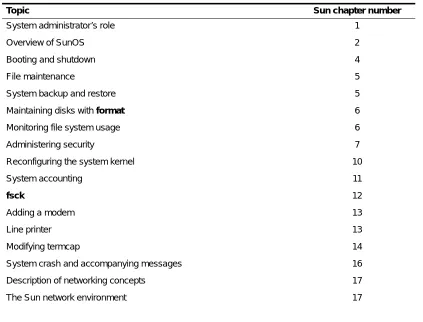
For each of the system management procedures described in this guide, the Sun Microsystems documentation can provide additional information. Table 1-3 lists basic system management topics and indicates which chapter to consult in Sun’s System and
Network Administration manual.
NeTservices commands
The asu(8) command allows an administrator to manually stop NeTservices, start NeTservices, or reset the daemons with a restart.
stop shuts down NeTservices on all interfaces.
start enables and starts NeTservices on all
interfaces.
restart stops NeTservices on all interfaces, then
immediately starts NeTservices again. This option is useful as a troubleshooting tool. If NeTservices is not functioning correctly, a restart may clear up problems.
help gives information about using the asu
command.
[image:38.612.52.475.406.728.2]NeTservices Product Guide, NeTservices Administration Guide, and NeTservices Concept and Planning Guide
Table 1-3. Pointers to Sun documentation
Topic Sun chapter number
System administrator’s role 1
Overview of SunOS 2
Booting and shutdown 4
File maintenance 5
System backup and restore 5
Maintaining disks with format 6
Monitoring file system usage 6
Administering security 7
Reconfiguring the system kernel 10
System accounting 11
fsck 12
Adding a modem 13
Line printer 13
Modifying termcap 14
System crash and accompanying messages 16
Table 1-2. Changes to SunOS (Continued)
Types of changes Description
NFS 18
The Name Information Service (NIS) 20
Domain Name Service 21
Electronic mail and communications 23
UUCP 22
sendmail 23
Monitor and boot program error messages Appendix E
Table 1-3. Pointers to Sun documentation (Continued)
2
Software Configuration
About This Chapter
This chapter describes how to configure your server for your environment. It assumes that the Version 1.10 root drive is already installed. If you are upgrading your system, refer to the Version 1.10 Software Release Note for information on updating your root drive to Version 1.10 before proceeding.
This chapter includes the following major topics:
▲ Booting the server, setting up the console, and changing some system files on a newly installed system.
▲ Overview of configuration commands and description of cursor control within configuration forms.
▲ Configuring the NetServer software for your network environment. The
configuration procedures are required after you install a new NetServer or when you change the server configuration.
Software configuration described in this chapter falls into two categories: ▲ Server-specific customization
Specifying local time zone; defining server and interface names and IP addresses; setting up services such as NIS, routing, and configuring TTY ports. The Auspex commands for server-specific customization are NSconfig and SetupTty.
▲ Client-specific customization
Installing architecture-dependent SunOS executables for client workstations that boot from the NetServer, and notifying the NetServer which client workstations can boot from the NetServer. The commands for client-specific customization are SetupExec and SetupClient.
New Installations
The following procedure outlines the steps for configuring your NetServer after you install the server for the first time with NSinstall(8) or NSupdate(8). See the Version 1.10 Software
Release Note for software installation instructions. The following sections provide details
about each configuration step. 1. Install your console terminal. 2. Boot the server to single-user mode. 3. Run NSconfig, and reboot the server. 4. Change the root password.
5. If appropriate, configure the server as an NIS master or slave in multiuser mode. 6. Modify site-specific files as necessary and reboot the server if needed.
7. Run SetupTty. 8. Run SetupExec. 9. Run SetupClient.
Installing the Console Terminal
With each NetServer, Auspex provides a DEC VT510 ANSI-compatible ASCII terminal as a system console. You can also use another model ANSI-compatible terminal, such as a Link terminal, as well as an X terminal or UNIX workstation. Using an X terminal or workstation allows you to view several windows simultaneously and invoke the online NetServer documentation. The exact procedure for setting up the console depends on the terminal type; the following procedure provides some general guidelines for setting up a console terminal.
1. Start with the NetServer powered off.
2. Set up the console terminal hardware, and attach the terminal to the server’s console port. (Refer to your NetServer’s hardware manual for more information.)
3. Set up the console terminal serial parameters. (Refer to your NetServer’s hardware manual for more information.)
Booting the NetServer
This section gives you enough information about booting the server so you can get started with the server configuration commands. For more information on booting, refer to “Booting the NetServer” on page 3-2.
1. After you power on the server, it displays the boot messages on the console screen and boots in multiuser mode by default. Refer to the NetServer’s hardware manual for information on how to power on the server.
Run NSconfig to Customize Your Server for the First Time
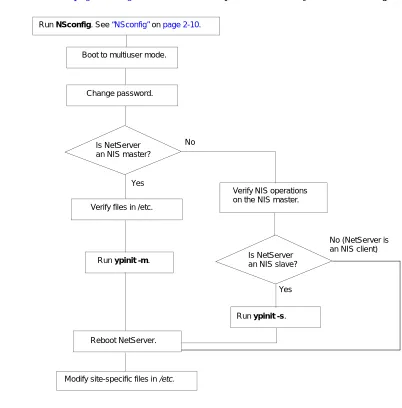
In single-user mode, run NSconfig to configure your server. For overall information on server configuration, refer to “NetServer Configuration Commands” on page 2-9; for information on the NSconfig command, refer to “NSconfig” on page 2-10. [image:43.612.138.540.157.565.2]After you are finished with NSconfig, continue with the procedure in “Changing the Root Password” on page 2-3. Figure 2-1 outlines the procedures after you run NSconfig.
Figure 2-1. Flowchart for configuring the server for the first time
Changing the Root Password
After running NSconfig and exiting to multiuser mode, enter the passwd root command to create a root password. This step is very important for system security.
No (NetServer is an NIS client) Run NSconfig. See “NSconfig” on page 2-10.
Boot to multiuser mode.
Change password.
Run ypinit -m.
Verify NIS operations on the NIS master.
Run ypinit -s. Is NetServer
an NIS master?
Modify site-specific files in /etc. Yes
No
Reboot NetServer.
Is NetServer an NIS slave?
Configuring the Server to Be an NIS Master or Slave Server
If you do not use the NIS name service at your site, skip to “Modifying Site-Specific Files” on page 2-5.Configuring the NetServer to Be an NIS Master
If you use the server as an NIS master, follow these steps:
1. Verify that the current versions of the NIS-related files (/etc/ethers, /etc/hosts, and
/etc/bootparams) are located in /etc on the NetServer.
2. Verify the domain name using the following command:
/bin/domainname
3. Run ypinit to build NIS maps for master and slave configurations:
/usr/etc/yp/ypinit -m
For more information on ypinit, refer to the man page.
4. Reboot the NetServer, which starts the NIS daemons, including ypbind and ypserv. For more information about NIS, refer to Sun’s System and Network Administration manual.
Configuring the NetServer to Be an NIS Slave
If you use the server as an NIS slave, follow these steps:
1. Edit the /etc/ethers, /etc/hosts, /etc/bootparams, and /var/yp/<domain>/ypservers files on the NIS master. The /etc/ethers and /etc/bootparams files on the master must contain the slave server client information. The /etc/hosts file on the master must contain the slave NetServer and slave client host name and IP address. The /var/yp/<domain>/ypservers file, which is a list of slave servers in the domain, needs the slave NetServer name. 2. Verify the domain name:
/bin/domainname
3. Enter the ypinit command on the master server as follows:
/usr/etc/yp/ypinit -m
Answer all the questions displayed by ypinit, and add the slave NetServer name to the list of servers. For more information on ypinit, refer to the man page. 4. If you want to make sure you have set the type of NIS service and domain name
properly in the NSconfig form on the slave server, enter NSconfig to display the form again. Verify the settings in the NSconfig form:
▲ slave for “Type of NIS service”
▲ NIS master’s domain for “Domain Name” 5. On the slave NetServer, run the ypinit command.
NetServers and UDP Checksumming
On the NetServer, no flag needs setting for UDP checksummed packets from clients. Auspex NetServers check the UDP flag in a packet and deal with the packet accordingly. Clients can send packets checksummed or not; the NetServer correctly deals with the packets and then sends replies in kind.
Modifying Site-Specific Files
In addition to the preceding procedures, you may also need to customize two types of site-specific files:
▲ The SunOS kernel
Reconfigure the kernel in two situations: if you need to add devices that are currently not supported by the generic kernel (/usr/sys/aushp/conf/AUSPEX1), or if you change the site-specific parameters in the kernel. Refer to Sun’s Network and System
Administration manual for more information on reconfiguring the kernel. Refer to
“Kernel Parameters” on page 2-6 for information about site-specific kernel parameters. See the section “Rebuilding the System Kernel” on page 10-9 for reconfiguration instructions.
[image:45.612.140.554.401.729.2]▲ Various files in the /etc directory
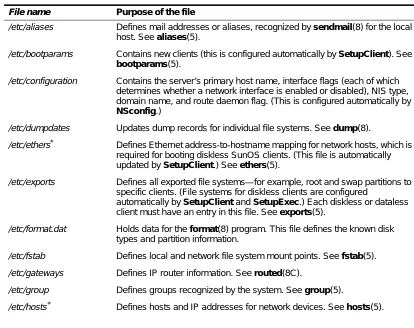
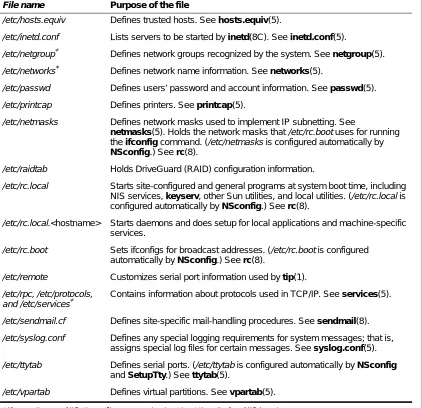
Table 2-1 lists the files that contain site-specific information such as mail aliases and trusted hosts. The table also describes the purpose of each file and lists man pages containing more information.
Table 2-1. Key files that contain site-specific information
File name Purpose of the file
/etc/aliases Defines mail addresses or aliases, recognized by sendmail(8) for the local host. See aliases(5).
/etc/bootparams Contains new clients (this is configured automatically by SetupClient). See
bootparams(5).
/etc/configuration Contains the server’s primary host name, interface flags (each of which determines whether a network interface is enabled or disabled), NIS type, domain name, and route daemon flag. (This is configured automatically by
NSconfig.)
/etc/dumpdates Updates dump records for individual file systems. See dump(8).
/etc/ethers* Defines Ethernet address-to-hostname mapping for network hosts, which is required for booting diskless SunOS clients. (This file is automatically updated by SetupClient.) See ethers(5).
/etc/exports Defines all exported file systems—for example, root and swap partitions to specific clients. (File systems for diskless clients are configured
automatically by SetupClient and SetupExec.) Each diskless or dataless client must have an entry in this file. See exports(5).
/etc/format.dat Holds data for the format(8) program. This file defines the known disk types and partition information.
/etc/fstab Defines local and network file system mount points. See fstab(5).
/etc/gateways Defines IP router information. See routed(8C).
/etc/group Defines groups recognized by the system. See group(5).
Kernel Parameters
A kernel has three site-configurable parameters. The parameters in the generic kernel
/usr/kvm/sys/aushp/conf/AUSPEX1 are maxusers and netinterfaces. Edit the file AUSPEX1
to change the parameters. Maxusers determines the approximate size of kernel data structures. Read the comments for maxusers in AUSPEX1 for guidance.
Additional TTYs
In order to provide logins for additional TTYs, in the generic kernel
/usr/kvm/sys/aushp/conf/AUSPEX1, change the parameter from pseudo-device pty to pseudo-device pty255. The default number of TTYs is 16.
/etc/hosts.equiv Defines trusted hosts. See hosts.equiv(5).
/etc/inetd.conf Lists servers to be started by inetd(8C). See inetd.conf(5).
/etc/netgroup* Defines network groups recognized by the system. See netgroup(5).
/etc/networks* Defines network name information. See networks(5).
/etc/passwd Defines users’ password and account information. See passwd(5).
/etc/printcap Defines printers. See printcap(5).
/etc/netmasks Defines network masks used to implement IP subnetting. See
netmasks(5). Holds the network masks that /etc/rc.boot uses for running the ifconfig command. (/etc/netmasks is configured automatically by
NSconfig.) See rc(8).
/etc/raidtab Holds DriveGuard (RAID) configuration information.
/etc/rc.local Starts site-configured and general programs at system boot time, including NIS services, keyserv, other Sun utilities, and local utilities. (/etc/rc.local is configured automatically by NSconfig.) See rc(8).
/etc/rc.local.<hostname> Starts daemons and does setup for local applications and machine-specific services.
/etc/rc.boot Sets ifconfigs for broadcast addresses. (/etc/rc.boot is configured automatically by NSconfig.) See rc(8).
/etc/remote Customizes serial port information used by tip(1).
/etc/rpc, /etc/protocols, and /etc/services*
Contains information about protocols used in TCP/IP. See services(5).
/etc/sendmail.cf Defines site-specific mail-handling procedures. See sendmail(8).
/etc/syslog.conf Defines any special logging requirements for system messages; that is, assigns special log files for certain messages. See syslog.conf(5).
/etc/ttytab Defines serial ports. (/etc/ttytab is configured automatically by NSconfig and SetupTty.) See ttytab(5).
/etc/vpartab Defines virtual partitions. See vpartab(5).
[image:46.612.56.478.87.495.2]* If your site uses NIS, these files are used only at boot time (before NIS is up).
Table 2-1. Key files that contain site-specific information (Continued)