STATISTISCHES AMT DER EUROPÄISCHEN GEMEINSCHAFTEN STATISTICAL OFFICE OF THE EUROPEAN COMMUNITIES OFFICE STATISTIQUE DES COMMUNAUTÉS EUROPÉENNES L-2920 Luxembourg - Tél. 43 01-1 - Télex: Comeur Lu 3423
B-1049 Bruxelles, bâtiment Berlaymont, rue de la Loi 200 (bureau de liaison) — Tél. 235 1 1 1 1
Eurostat hat die Aufgabe, den Informa tionsbedarf der Kommission und aller am Aufbau des Binnenmarktes Beteilig ten mit Hilfe des europäischen statisti schen Systems zu decken.
Um der Öffentlichkeit die große Menge an verfügbaren Daten zugänglich zu machen und Benutzem die Orientierung zu erleichtern, werden zwei Arten von Publikationen angeboten: Statistische Dokumente und Veröffentlichungen. Statistische Dokumente sind für den Fachmann konzipiert und enthalten das ausführliche Datenmaterial: Bezugsda ten, bei denen die Konzepte allgemein bekannt, standardisiert und wissen schaftlich fundiert sind. Diese Daten werden in einer sehr tiefen Gliederung dargeboten. Die Statistischen Doku mente wenden sich an Fachleute, die in der Lage sind, selbständig die benötig ten Daten aus der Fülle des dargebote nen Materials auszuwählen. Diese Daten sind in gedruckter Form und/oder auf Diskette, Magnetband, CD-ROM verfüg bar. Statistische Dokumente unterschei den sich auch optisch von anderen Veröffentlichungen durch den mit einer stilisierten Graphik versehenen weißen Einband.
Die zweite Publikationsart, die Veröffent lichungen, wenden sich an eine ganz bestimmte Zielgruppe, wie zum Beispiel an den Bildungsbereich oder an Ent-scheidungsträger in Politik und Verwal tung. Sie enthalten ausgewählte und auf die Bedürfnisse einer Zielgruppe abge stellte und kommentierte Informationen. Eurostat übernimmt hier also eine Art Beraterrolle.
Für einen breiteren Benutzerkreis gibt Eurostat Jahrbücher und periodische Veröffentlichungen heraus. Diese enthal ten statistische Ergebnisse für eine erste Analyse sowie Hinweise auf weiteres Datenmaterial für vertiefende Untersu chungen. Diese Veröffentlichungen werden in gedruckter Form und in Datenbanken angeboten, die in Menü technik zugänglich sind.
Um Benutzern die Datensuche zu erleichtem, hat Eurostat Themenkreise, d. h. eine Untergliederung nach Sachge bieten, eingeführt. Daneben sind sowohl die Statistischen Dokumente als auch die Veröffentlichungen in bestimmte Reihen, wie zum Beispiel „Jahrbücher", „Konjunktur", „Methoden", unterglie dert, um den Zugriff auf die statistischen Informationen zu erleichtem.
Y. Franchet Generaldirektor
It is Eurostat's responsibility to use the European statistical system to meet the requirements of the Commission and all parties involved in the development of the single market.
To ensure that the vast quantity of accessible data is made widely avail able, and to help each user make proper use of this information, Eurostat has set up two main categories of document: statistical documents and publications. The statistical document is aimed at specialists and provides the most com plete sets of data: reference data where the methodology is well established, standardized, uniform and scientific. These data are presented in great detail. The statistical document is intended for experts who are capable of using their own means to seek out what they re quire. The information is provided on paper and/or on diskette, magnetic tape, CD-ROM. The white cover sheet bears a stylized motif which distinguishes the statistical document from other publica tions.
The publications proper tend to be com piled for a well-defined and targeted public, such as educational circles or political and administrative decision makers. The information in these docu ments is selected, sorted and annotated to suit the target public. In this instance, therefore, Eurostat works in an advisory capacity.
Where the readership is wider and less well defined, Eurostat provides the infor mation required for an initial analysis, such as yearbooks and periodicals which contain data permitting more in-depth studies. These publications are available on paper or in Videotext data bases.
To help the user focus his research, Eurostat has created 'themes', i.e. a subject classification. The statistical documents and publications are listed by series: e.g. yearbooks, short-term trends or methodology in order to facili tate access to the statistical data.
Y. Franchet Director-General
Pour établir, évaluer ou apprécier les différentes politiques communautaires, la Commission des Communautés euro péennes a besoin d'informations. Eurostat a pour mission, à travers le système statistique européen, de répon dre aux besoins de la Commission et de l'ensemble des personnes impliquées dans le développement du marché unique.
Pour mettre à la disposition de tous l'importante quantité de données acces sibles et faire en sorte que chacun puisse s'orienter conectement dans cet ensemble, deux grandes catégories de documents ont été créées: les docu ments statistiques et les publications. Le document statistique s'adresse aux spécialistes. Il fournit les données les plus complètes: données de référence où la méthodologie est bien connue, standardisée, normalisée et scientifique. Ces données sont présentées à un niveau très détaillé. Le document statis tique est destiné aux experts capables de rechercher, par leurs propres moyens, les données requises. Les informations sont alors disponibles sur papier et/ou sur disquette, bande magnétique, CD-ROM. La couverture blanche ornée d'un graphisme stylisé démarque le document statistique des autres publications.
Les publications proprement dites peu vent, elles, être réalisées pour un public bien déterminé, ciblé, par exemple l'en seignement ou les décideurs politiques ou administratifs. Des informations sélectionnées, triées et commentées en fonction de ce public lui sont apportées. Eurostat joue, dès lors, le rôle de con seiller.
Dans le cas d'un public plus large, moins défini, Eurostat procure des éléments nécessaires à une première analyse, les annuaires et les périodiques, dans les quels figurent les renseignements adé quats pour approfondir l'étude. Ces publications sont présentées sur papier ou dans des banques de données de type vidéotex.
Pour aider l'utilisateur à s'orienter dans ses recherches, Eurostat a créé les thèmes, c'est-à-dire une classification par sujet. Les documents statistiques et les publications sont répertoriés par série — par exemple, annuaire, conjonc ture, méthodologie — afin de faciliter l'accès aux informations statistiques.
Luxembourg: Office for Official Publications of the European Communities, 1992 ISBN 92-826-4498-7
© ECSC-EEC-EAEC, Brussels · Luxembourg, 1992
Reproduction is authorized, except for commercial purposes, provided the source is acknowledged.
ΜΟΝΤΕΛΟ ΠΑΡΑΓΩΓΗΣ KAI ΕΙΣΟΔΗΜΑΤΟΣ ΤΟΥ ΑΓΡΟΤΙΚΟΥ ΤΟΜΕΑ MODELLO DELLA PRODUZIONE E DEI REDDITI DEL SETTORE AGRICOLO MODEL VAN DE PRODUKTE EN DE INKOMSTEN VAN DE LANDBOUWSECTOR MODELO DA PRODUÇÃO E DOS RENDIMENTOS DO SECTOR AGRICOLA
The concept of the SPELSystem was developed at the
Institut für Agrarpolitik, Marktforschung und
Wirtschaftssoziologie of the University of Bonn
by W. Henrichsmeyer, W. Wolf and H. J. Greuel.
The following Technical Documentation was composed by
A. Zintl and H. J. Greuel at the same institute and was edited
PART 1 : Basics
1. INTRODUCTION 2. IMPLEMENTATION
3. FORMAL STRUCTURING AND CODING 4. DATA MANAGEMENT
5. USER INTERFACE 6. SPELPROGRAMS 7. INDEX
PART 2: SPEL/EC Model
1. INTRODUCTION
2. MODEL COMPONENTS AND IMPLEMENTATION 3. DATA PREPARATION
4. MODEL CALCULATIONS 5. UTILITIES
6. EXPLOITATION
1. INTRODUCTION 13
2. IMPLEMENTATION 14
2.1. Users and operators 14 2.2. System software requirements 16
2.3. System initialization and environment 16
3. FORMAL STRUCTURING AND CODING 17
3.1. SPEL-Data dimensions and SPEL table subkeys 17
3.1.1. Region 19 3.1.2. Sub-region 19 3.1.3. Year 19 3.1.4. Periodicity 20 3.1.5. Status 20 3.1.6. Model area 20 3.1.7. Table column 20 3.1.8. Table row 21 3.2. CODES files currently in use 21
4. DATA MANAGEMENT 22
4.1. External data sources importation 22 4.2. SPEL standard data file formats 22
4.2.1. SPELIMP files 22 4.2.2. SDATA files 24 4.2.3. TABFILE files 26
5. USER INTERFACE 29
5.1. General program control 29 5.1.1. General control files (PARAM files) 29
5.1.2. Panels 30 5.1.3. On-line help information 34
5.1.4. Parameter file link panels 35
5.2. Special control files 36 5.2.1. ASSIGN files 36 5.2.2. REGSTE files 37 5.2.3. STEER files 39 5.2.4. SDATA files 39
6.2.1.1. Application abstracts 55 6.2.1.2. Types of data files 56 6.2.1.3. Control language structure 56
6.2.1.4. Control language details 57 6.2.1.5. Atypical EV session 82 6.2.2. Data format conversion (DATCON) 86
6.2.3. Selection and conversion of sequential standard file formats (FILTER) 86
6.2.4. Maintenance of TABFILE files (DASERV) 94 6.2.5. Print and export data from TABFILE file (DAOUT) 133
7. INDEX 143
1. INTRODUCTION
The SPEL approach is characterized by mutual interaction between model-builders and statisticians or policy-makers. There are different models to deal with different questions, e.g. the SPEL/EC Model for the agricultural sector of the EC Member States and the EC as a whole.
In general the SPEL system offers a systematically structured data system to be used for
- checking the consistency of agricultural statistics, - monitoring the present situation in agricultural sector, - ex-post analyses of sectoral developments, and
- forecasts and policy simulations of the effects of alternative policies from short-term and medium-term viewpoints.
The set of statistical data is not taken as final but subjected to consistency checks and critical investigations, which may lead to the jointly agreed revision of existing statistics and proposals for amendments and conceptual changes for new statistics. It is not assumed either that policy-makers are able to specify target variables before taking a closer look at the problems involved. Instead, the fundamental idea is that target priorities emerge during the process of policy dialog on trade-offs between target variables.
The principle technical approach for the whole SPEL system is transparency and flexible user interface. Transparency means that each data element can be traced back to the basic data sources and the underlying assumptions. The flexible user interface facilitates dialogue between policy-makers and the model.
For the methodological aspects see the methodological documentation.
The technical documentation of SPEL system consists of the following parts :
Basic information
- Part 1 : Operator/ User's Guide : Basics
Specific information for the SPEL/EC Model
- Part2: Operator/ User's Guide : SPEL/EC Model
2. IMPLEMENTATION
The SPEL software is designed to be implemented on the CMS dialog system on the Amdahl mainframe at Eurostat in Luxembourg. The programming language is FORTRAN 77.
2.1. Users and operators
To become familiar with the SPEL system it is important to know about the SPEL system structure and the work levels for SPEL operators and users.
Working with the SPEL system can be done on two levels (see figure 1 ) :
- Operator level - User level.
Operators are responsible for preparing original data and doing specific model calculations in line with the methodology.
Ex-post data and model results are offered to the users for reports and applications. A set of user-friendly programs is made available to users, who do not need to have detailed computer experience.
All development and revisions of SPEL software will be done by programmers.
Figure 1 : User and operator level
Module flow Data flow
Operator level
Data preparation
>
f
Model calculations
User k
^%
?
^ ^
îvel
Reports and applications
Reports and applications
Original data
2.2. System software requirements
System software required: IBM VS FORTRAN IBM GDDM
VMSORT IBM REXX
IBM XEDIT MINOS
Compiler
Graphical data display manager Sort program
Restructured Extended Executor Language
System Product Interpreter System Product Editor
Large-scale optimization system (linear and non-linear)
2.3. System initialization and environment
To set up the SPEL software and SPEL-Data for one of the SPEL models, a special procedure must be called before using any SPEL program. This procedure is implementation-dependent and is installed and maintained in Luxembourg by the Luxembourg team. For users the initialisation procedure starts a program selection shell as a user-friendly guide through the work steps.
For further detailed information see the documentation of the SPEL models (e.g. SPEL/EC Model)
3. FORMAL STRUCTURING AND CODING
In line with methodological concepts and data flow analysis the data in the SPEL system (SPEL-Data) are logically allocated to tables, each identified by a unique alphanumeric key. This key is divided into subkeys, each directly related to six of the SPEL-Data dimensions (see Figure 2). A table is defined by two dimensions, the column and row. All in all, SPEL-Data are characterized by eight dimensions.
Each table element is thus defined by its column and row.
The number of rows and columns, their sequence and definition are called the table structure.
There are two table structures : basic table structure and complementary table structure.
The basic table structure represents the modelling ideas. It is used for any results.1
The complementary table structure is more differentiated, responding to the original data and used to constitute the basic table structure.2
3.1. SPEL-Data dimensions and SPEL table subkeys
Each of the eight dimensions is assigned a methodological differentiation criterion.
Figure 2 : SPEL - Data dimensions
1
2
3
4
5
6
7
8
Dimension
Region
Sub-region
Year
Periodicity
Status < —
Model area
Table column
Table row
Translation rules
1 Base year
j
— / Origin and treatment"!
[Table structure type r
Table subkey
Region
Sub-region
Year
Periodicity
—
z?
base year
s> l y p s
Model area
1
2
3
4
5
6
7
The last two dimensions, table columns and table rows, are the dimensions of the SPEL tables.
The sequence and definition of the table rows and columns depend on the model.
N.B.:
In future technical revisions the dimension "Status" will be represented by a single table subkey "Status".
3.1.1. Region
Regions are defined by alphanumeric codes, each of up to three characters .
For the SPEL/EC Model the official Community codes are used for the Member States .
For example :
D Germany
IRL Ireland
F France
E12 EUR 12
For the SPEL/EC-ROW model the FAO-country numbers are used.
For example :
231 USA
059 Egypt
3.1.2. Sub-region
Two characters are used for the code. Currently the whole region is always used.
For example :
00 - the whole region
3.1.3. Year
In the SPEL system current years are used for ex-post data and projection years are used for simulation results.
The last two digits of the year numbers are used for the code.
Years 1941 to 1999 are coded as 41 to 99. Years 2000 to 2040 are coded as 00 to 40 For example:
3.1.4.
Periodicity
Two characters are used for the code.
00 whole year
01 ... 12 January... December
Q1 ... Q4 first quarter... fourth quarter
H1, H2 First half of a year, second half of a year
Currently the whole year is always used.
3.1.5.
Status
The status is defined by sixcharacter codes. The first two characters stand for the last two digits of the base year of simulation results. For the expost period, the code "NN" (no base year) is always used. The next three characters specify origin and treatment, the last character identifies the table structure type : B=basic table structure, C=complementary table structure.
For example :
NNZPAB Expost data from ZPA1 domain and belonging to table structure Β
NNEXPC Data from experts and belonging to table structure C
3.1.6.
Model area
Data which are specific to one model area can be distinguished by this subdimension. One character is used for the code.
For example :
D Demand (SPEL/EC)
S Supply (SPEL/EC)
Τ Trade (SPELÆCROW)
3.1.7.
Table column
Table columns are defined by alphanumeric codes, each of four characters.
For example :
SWHE production activity soft wheat
PRIC producer/purchase prices (unit value)
3.1.8. Table row
Table rows are defined by alphanumeric codes, each of four characters.
For example :
BARL product barley
LEVL production activity level
3.2. CODES files currently in use
All lists of codes (except the codes for years, which are self-evident) are included in a CODES file. For the user this file is just a further item of information and can not be modified, because it is also used to control a preprocessor for the FORTRAN 77 programs.
4. DATA MANAGEMENT
For data management SPEL system distinguishes between non SPEL data file formats and SPEL standard data file formats identified by standard file name extensions. All data which are to be imported into the SPEL system have to be converted from their own original format to a SPEL standard format.
4.1. External data sources importation
Most of the external data used in SPEL are originally stored on magnetic tapes and each orginator has its own data format.
The formats are :
Originator Format
CRONOS LRECL 22 (Code 18 bytes Data 4 bytes, binary floating)
FAO FAO STANDARD FORMAT (see AGROSTAT user tape description)
4.2. SPEL standard data file formats
Within the SPEL system only a few file formats are used and all external file formats are converted. In the CMS operating system the following file name extensions stand for the standard formats :
SPELIMP SDATA TABFILE
Files of those formats are further called SPELIMP files, SDATA files and TABFILE files.
External data on magnetic media coming from external originators is first converted to SPELIMP format, whilst data coming from listings, printed publications, experts' findings, etc are directly edited into SDATA files. ALL SPEL-Data are finally stored in a TABFILE file, except those stored in SDATA files and being used for special program control (e.g. scenario parameters).
4.2.1. SPELIMP files
The SPELIMP file is the standard type for importing external data into the system. It is optimized for fast item selection. SPELIMP files are the result of the format conversion program DATCON. Optionally the amount of data can be reduced by the FILTER program.
Data from SPELIMP files can be directly imported into the model work file(TABFILE file) by the ORIGIN import program.
File structure :
SPELIMP files are sequential files of fixed record length with a specifici record structure which is unique for all records:
where
rrrssyynmddddcccccccccfvvvinrv-vvvv\rwv
pos. 01-03 pos. 04-05 pos. 06-07 pos. 08-09 pos. 10-13 pos. 14-22
pos. 23
pos. 24-37
m
ss
yy
mm dddd ccccccccc
f
w w w w w w w
Region code Sub-region code Current year code Periodicity code
Originator type code (original domain name) Remaining data code (up to nine characters, left
aligned)
Data status flag as specified by originator if existent, otherwise blank
Numerical data anywhere in the field3
(e.g. 1.23456 -1234.5
12.3 E-10 123.E03
2E10 means 2*1010)
Example of SPELIMP file:
+ χ + 2 +
D 008000ZPA10002345 185. F 008000ZPA10002345 180.
3 + _. -4 —
NL 008000ZPA10002345 1 8 0 . 4
+ χ + 2 + 3 - - - + - - -4 —
The records are sorted according to columns 01-22 in character ascending order.
The remaining data code, the data status flag and originator type code 4 are usually the same as the
4.2.2. SDATA files
The SDATA file is used for all external data to be edited by the operator/user.
The data representation is in the form of tabulated sequential time series . SPEL table subkey codes (e.g. region , sub-region etc.) and SPEL table element codes (for column and for row) are supported. All subkey codes and table element codes are unequivocally interpreted. Additional comment lines are very helpful for the reader.
File structure:
SDATA files are sequential files of fixed record length and record structures which differ for six record types:
Comment records
begin with an '*' at the first character position and may occur anywhere in the file.
The file header record
is used to identify the file as an SDATA file. It contains $STANDARD
at the beginning of the line and must be the first non-comment record in the file.
Table header records
are used to mark the beginning of new time series tables.
Fixed identifier Blank
Region code Sub-region code Fixed 5
Base year code, currently "NN" for ex-post data Type code
Model area code (S=supply, T=trade, D=demand, (*) =undefined)
Column definition records
define the codes for the data columns in the following data records. They must follow the table header record and be written before data records. Additional column definition records may occur whenever data line column codes change.
$COLUMNS ccccllll cedili cecili! cecili! >
STABLE
where : pos. 01 -06 pos. 07-10 pos. 11-13 pos. 14-15 pos. 16-19 pos. 20-21 pos. 22-25 pos. 26-26
rrrss....bbddddm
STABLE
rrr ss
II II
bb dddd m
5 Filler to have the same layout as SPEL table keys (here years and periodicities)
where :
pos. 01-08 pos. 09-10 pos. 11-18
pos. 19 pos. 20-27
pos. 65-72
Data records
SCOLUMNS
ecce IIII
ecce IIII
ecce IIII
are used for enter numerical data.
Structure :
yymm aaaaaaaaabbbbbbbbb
where :
pos. 01 pos. 02-03 pos. 04-05 pos. 06-09 pos. 10-18
yy mm
aaaaaaaaa
Fixed identifier Blank
Code for data column 1
ecce - model table column code 1111 - model table row code Blank
Code for data column 2
Code for data column 7
• · · ggggggggg -->
Must be blank Current year code Current periodicity code Blank
Numerical data anywhere in the field must include a decimal point
(e.g. 1.23456; -1234.5;
12.3 E-10; 123.E03;
2E10 means 2*1010)
If the field is totally blank, it is interpreted as non-existing in the file
pos. 64-72 ggggggggg Numerical data
The end record
must be
SEND
Example of SDATA file 6:
+ 1 + 2 + 3 + 4 + 5 + 6 + 7 H
$STANDARD *
* Process level for Germany
*
STABLE D 00....OOZPAB*
$COLUMNS WHEALEVL BARLLEVL OATSLEVL 8600 99.9 99.9 99.9 8700 99.9 99.9 99.9 *
* Process level for France STABLE SCOLUMNS *8400 8500 8600 8700 SCOLUMNS 8400 8500 8600 8700 $END F 00 WHEALEVL 99.9 99.9 99.9 SUGBLEVL 99.9 99.9 99.9 99.9 00ZPABS BARLLEVL 99.9 99.9 99.9 RAPELEVL 99.9 99.9 99.9 99.9 OATSLEVL 99.9 99.9 99.9 SUNFLEVL 99.9 99.9 MAIZLEVL 99.9 99.9 99.9 OCERLEVL 99.9 99.9 99.9 PARILEVL 99.9 99.9 99.9 PULSLEVL 99.9 99.9 99.9
.__ + 1 + 2 + 3 + 4 + 5 + 6 +
7-4.2.3. TABFILE files
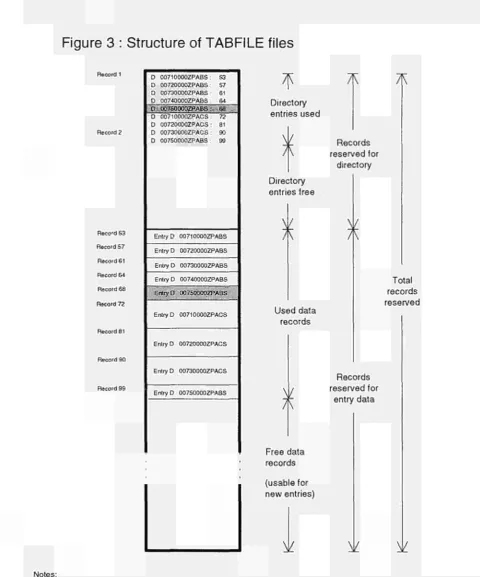
The TABFILE files are work files and contain original data as well as results of all SPEL work steps. Storing of all intermediate results permits re-execution at any time from any point in the work step sequence.
Work files are logically divided into entries which are the "SPEL tables" described in chapter "Formal structuring and coding".
The file structure ensures an acceptable execution speed, because tables are defined to be adapted to the data flow of SPEL programs and allow minimum disk access activities and high flexibility.
Each table is identified by an unique key. A table key "UK 00800000BASB" means : Region UK, Sub-region 00 (the whole Sub-region), Current year 80 (1980), Periodicity 00 (the whole year), Base year NN (no base year), Type BASB (result of work step BASEMOD, basic table structure), Model area S (supply).
General maintenance for TABFILE files can be done by the menu-driven utility program DASERV. It offers services for creating new files, listing the keys of all entries, printing entries, reorganizing files, copying and renaming entries as well as many others. New TABFILE files must be created by DASERV because SPEL programs can only access already existing TABFILE files.
All access of programs to these TABFILE files is done by the TABFILE file manager, which forms part of the SPEL programs.
6 The values in the table are for illustration only
A SPEL user never has to consider the format or internal file structure but has to consider the following:
- A file is static in its size, which is definitively fixed when created. Estimates of the maximum number of entries and the size of entries to be stored must be made when the file is created.
- Before accessing a new file by SPEL programs, the key structure should be defined or copied from another TABFILE file by using the appropriate DASERV service.
- A new entry is implicitly created during the first writing operation using the corresponding table key. The file size occupied by the entry is determined by the key size, an optional comment field size and the number of non-zero table elements. Zero elements in "sparse" tables do not occupy any disk space. The file size occupied by an entry is always continuous.
- During subsequent writing with the same entry key, the same location will be used as long as the new entry size fits the old one. If the new size exceeds the space reserved for the already existing entry, the latter is implicitly deleted and a new entry created.
- File areas occupied by entries implicitly or explicitly deleted by user action cannot be used immediately for new entries. This "unused space" must be freed by running a service of the DASERV utility.
- Utilization factors for numbers of entries in the file directory and for the stored data records are printed at the end of the log file of application programs; they can also be listed by the DASERV utility.
Figure 3 : Structure of TABFILE files
Record 1 Record 2 Reco'd 53 Record 57 Record 61 Record 64 Record 68 Record 72D 00710000ZPABS D 00720000ZPABS D 00730000ZPABS D 00740000ZPABS
S3 57 61 64
n.7.inrygf.EW ι.·
D 00710000ZPACS D 00720000ZPACS D 00730000ZPACS D 00750000ZPABS
72 81 90
Entry D 00710000ZPABS Entry D 00720000ZPABS Entry D 00730000ZPABS Entry D 00740000ZPABS D 0O7SOOOOZPABS
; : . ■ ■ ■ ■ ■ :::l · ' ;
Entry D 00710000ZPACS
Entry D 00720000ZPACS
Entry D 00730000ZPACS
Entry D 00750000ZPABS
*
Æ
Directory entries used
TK
Records reserved for directory Directory entries free ) ( ) ( Used data records Total records reservedV
A
Records reserved forentry data
Free data records
(usable for new entries)
Ψ
Ψ
Ψ
Notes:
An entry may consist of text or numerical data or both. The numerical data part is an array of data elements. In SPEL it is a table of size rows by columns; the text part is comment (e.g. including creation data and time). The table is interpreted as a vector of length rows multiplied by columns. To minimize storage space, the vector is packed (e.g. zero data are removed) and stored as a flow without any regard for record boundaries.
The entry references in the directory formed from the entry key and the number of the first entry record) are also stored as a flow.
In this figure "deleted" entries are marked by shading.
5. USER INTERFACE
The user interface comprises panels, general control files and special control files.
Special control files permit large sets of control statements which cannot be modified during run-time.
5.1. General program control
General program control is done by parameters which can be modified during run-time by panels. Presets for all these parameters are loaded from general control files.
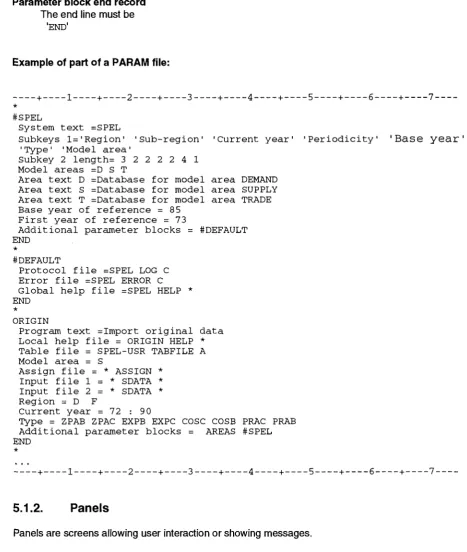
5.1.1. General control files (PARAM files)
General control files have the name extension PARAM, further called PARAM files. Once the SPEL system is implemented a DEFAULT PARAM file is installed by the operator. For all SPEL programs default presets for the program control parameters are included. The operator and user can create their own version with adapted parameters for special program applications. For further information see the following chapters on General program control.
PARAM files are sequential files of a fixed record length of 80 with a fixed record structure in free format.
Control parameters are grouped into parameter blocks according to their usage.
There are four different record structures:
Comment records
begin with an '*' at the first character position and may occur anywhere in the file.
The parameter block header record
includes the name of the parameter block. It is a character string of up to 20 characters in length. It indicates the beginning of a parameter block.
Parameter definition record(s)
include(s) the assignment(s) of a parameter value to a parameter name.
name-¡_ = value j
Parameter block end record
The end line must be
'END'
Example of part of a PARAM file:
+ ! + 2 + 3 + 4 + 5 + 6 + 7 *
#SPEL
System text =SPEL
Subkeys 1='Region' 'Sub-region' 'Current year' 'Periodicity' 'Base y e a r ' 'Type' 'Model area'
Subkey 2 length= 3 2 2 2 2 4 1 Model areas =D S Τ
Area text D =Database for model area DEMAND Area text S =Database for model area SUPPLY Area text Τ =Database for model area TRADE Base year of reference = 85
First year of reference = 73
Additional parameter blocks = #DEFAULT END
*
#DEFAULT
Protocol file =SPEL LOG C Error file =SPEL ERROR C Global help file =SPEL HELP * END
* ORIGIN
[image:32.595.63.531.107.660.2]Program text =Import original data Local help file = ORIGIN HELP * Table file = SPEL-USR TABFILE A Model area = S
Assign file = * ASSIGN * Input file 1 = * SDATA * Input file 2 = * SDATA * Region = D F
Current year = 7 2 : 90
Type = ZPAB ZPAC EXPB EXPC COSC COSB PRAC PRAB Additional parameter blocks = AREAS #SPEL END
*
+ ! + 2 + 3 + 4 + 5 + 6 + 7
5.1.2. Panels
Panels are screens allowing user interaction or showing messages.
Three kinds of panels can be distinguished :
- edit panels (control parameter and data edit)
- selection panels (item selection with cursor selection facilities)
- display panels (messages, help and data display).
When calling a program, the user will get a sequence of screen panels to verify and optionally update all program control parameters. Presets for input fields and top line text, except control level text, come from PARAM files.The panel layout is standardized.
The text which appears in bold in the panels can be either overtyped by the user or selected by cursor for the current run. The following examples show typical panel layout.
Edit Panel
The top line of the panel shows on the left the purpose of the running program, in the middle the current software name and possibly the version, and on the right the control level. The control level text issued by the program may be replaced by error messages and warnings. The active function keys (PF-keys) are displayed at the bottom.
The centre of an edit panel contains parameter fields with the parameter description on the left and the parameter value on the right. The bold-printed parameter values can be updated by user input. By pressing the ENTER key the input is tested for acceptability. When errors are detected a short error message will appear at the top right and the cursor will be placed on the erroneous input for correction.
Example: Work file selection
Import original data SPEL Work file selection Select work files
Table file => SPEL-USR TABFILE A
Assign file => * ASSIGN *
Input file 1 => * SDATA *
Input file 2 => * SPELIMP *
Enter= ok 1= Help 3= Quit 4= Exit 11= Save/load
Between the top line and the PF-key description lines additional comment lines may appear (e.g. "Select work file").
Selection Panel
The top and bottom lines have the same structure and the same functions as in the edit panel. In the centre of a selection panel there is a list of character items; below, a list of ASSIGN files is shown. To select one of these items the user has to put the cursor on the item line and press ENTER.
Example: Work file selection
Import o r i g i n a l data SPEL Work file selection
Assign file File name selection
IMP SDATA SUPPLY SUPPLY DEMAND DEMOLD PORTOGAL HELFEE HELFEE1 ASSIGN ASSIGN ASSIGN ASSIGN ASSIGN ASSIGN ASSIGN ASSIGN ASSIGN Bl Bl Dl Dl Gl Gl Gl Hl Hl
Select a file by moving the cursor to any file name above
Enter= ok 1= Help 3= Quit
Display Panel
Display panels show only text. Normally they are used to display help texts (see chapter "On-line help information") or listings of protocol and error files.
Example: Display of a log file
* Working for Member State: D sub-region: 00 **** Get regression
*** 240 record:
steering file
selected from regression steering file
**** Get time series
* Working
* Working * Working
* Working
* Working
Enter= ok 3= for for for for for type: ZPAC type: COSC type : PRAC
type: EXPC
type : ESTC
: Quit 4= Find 6= Bottom 8= Page down 11 = 1/2 p.down
In the example above an error has occurred in running the ORIGIN program. The user has pressed the help key and the protocol file is displayed to give more detailed information.
List of default PF-keys :
PF1 PF3 PF4 PF5 PF6 PF7 PF8 PF9 PF10 PF11 PF12
Usage of General PF keys
Help (call Help panel) Quit (back to previous control level)
Exit (program exit)
-Save/Load (save or load parameters) General files (modify name of general file)
Usage of
Paging facilities PF keys
-Find (search for keyword) Top (top of file) Bottom (bottom of file) Backward (one page back) Forward (one page forward)
Left (go to left side) Right (go to right side)
5.1.3.
Online help information
Contextsensitive online help is available for each panel field. The user merely has to place the cursor on any displayed text and press the help key (PF1).
Online help is also available for error messages currently displayed. After pressing the help key more detailed information is displayed in a display panel.
If the user has placed the cursor on the text "Table file" in the edit panel example given above and pressed PF1 the following screen will be displayed.
Example : Help information screen
-Tab] e file This file
All data stored as
To select wildcard
For furth see "Data
is used for
Help informations
output and
«rtiich fit the selection 'table' entries in thi
a file from a list of characters such as "*"
=r detailed Management"
information chapter in
Enter= ok
must be of TABFILE format (SPEL
criterion (next panel) will 3 file
existing files please use (e.g. ■* TABFILE *■)
about SPEL data file formats the Technical Documentation.
3= Quit 4= Find
work file)
To search for keywords in a large help text a "Find" key (PF4) is defined. When the information does not fit on to one screen, paging facilities are offered (PF7 PF8).
All help texts are collected in HELP files and are used by the online help system.
Two HELP files are accessed by each program :
the local HELP file
includes help information which are specific to the program
the global HELP file
includes help information used by several programs.
The names for the HELP files are defined in the parameter file.
The user/operator neither needs to know the structure of the HELP file type nor has to change any text in those files.
5.1.4. Parameter file link panels
As already mentioned above, presets for all control parameters ever used in panels are loaded from general control files, which are structured in named parameter blocks. The DEFAULT PARAM file is used when the program is called. If the user wants to use an own PARAM file, he can press the SAVE/LOAD-key to do this. Every main program has its own parameter block, the name of which is similar to the program name. Inside the parameter block all program-specific control parameter names are in accordance with the input field description displayed on the screen.
General parameters, used for most SPEL program panels, like protocol file names, are collected into separate parameter blocks. Access to those blocks can be provided by the special parameter 'Additional parameter blocks' defining additional parameter blocks to be loaded. The parameters appearing in the parameter block corresponding to a main program will always have priority, if the parameter is also defined in an additional parameter block.
If a parameter is not found, the related panel input field preset is blank.
In the example in the chapter "General control files", part of a PARAM file is shown. The parameter block called ORIGIN is the one specifically used by the ORIGIN main program. The last parameter 'Additional parameter blocks' extends access to the '#SPEL' parameter block.
If the user has changed some parameter values while revising the control panels, he can store the new parameter settings by pressing the PF11 =Save/load key. An edit panel will be displayed to define the name of the parameter file. All parameter values will be updated in the blocks they come from, with the exception of those coming from protected blocks with a name beginning with "#", like "#SPEL". If protected parameters have changed, they will be added to the program block. In the example the parameter "Protocol file" originally in the "#DEFAULT" block will be saved in the "ORIGIN" block, if the value has changed.
Example : Save/load panel
Import original data SPEL Save/load parameter
Please enter PARAM file name
Parameter file => DEFAULT PARAM F
5.2. Special control files
The programs documented in this volume often use a large amount of control information. It is quite clear that all these parameters should not be handled by panels. Special control files are allocated for retrieving them.
Four kinds of special control files are supported using the following file name extensions:
ASSIGN files for data selection used by the FILTER and ORIGIN programs REGSTE files for trend estimation control used by the TREND program STEER files for the EV evaluation utility.
SDATA files for special program control
5.2.1. ASSIGN files
The original data have to be selected for SPEL usage. General selections for regions, sub-regions, years, periodicity and types are done by control parameters coming from PARAM files revised by panels.
The ASSIGN format was created for selecting thousands of source data codes and assigning them to SPEL table element codes. The assignments are specified only once for each table structure and are implicitly used for all tables matching the general selections (regions, sub-regions ...).
ASSIGN files are sequential files with a fixed record length of 80 and fixed record structure in free format.
File structure :
There are two record types :
- Comment records
Beginning with an "*" at the first character position. Comments may occur anywhere in the file
- Assignment records
Each record contains one assignment statement of the following statement structure :
i ccccrrrr = ttttdd...dd fff....fff;
where
i Identifier for table structure i = Β means Basic table structure
i = C means Complementary table structure ecce SPEL table column code
rrrr SPEL table row code tttt Type code (domain)
dd...dd Data code, up to 9 characters (see SPELIMP files)
fff....fff Scale factor for all data belonging to this code, when the data are assigned to SPEL table element codes. If no factor is specified, 1. is assumed
; Semi-colon used as an assignment delimiter.
For ad hoc selections without any assignments to SPEL table element codes, a short form of assignment statements can be used as follows :
ttttdd...dd;
The remaining text following the delimiter is treated as a comment and ignored.
The interpretation of the assignment is related to its use (see ORIGIN and FILTER programs).
Example of an ASSIGN file:
+ χ + 2 + 3 + 4 + 5 + 6 + 7 +
---*Example
Β SWHELEVL = ZPA13112020 ; COSA0013406;
C PR01SWHE = PRAG3221120 10.;
+ χ + 2 + 3 + 4 + 5 + 6 + 7 +
---5.2.2. REGSTE files
REGSTE format is used to steer trend estimations in the TREND program. The files are sequential files with a fixed record length of 72.
File structure:
There are three record types:
- Comment records
Beginning with an '*' at the first character position. Comments may occur anywhere in the file.
- Definition block records.
This block is optional, but if used it must appear on top of the file. It specifies how to handle SPEL table elements not explicitly defined in the files regression steering records. The block consists of three records with identifiers beginning in the first column:
First record DEFINE
Second record INCLUDE or EXCLUDE
INCLUDE All SPEL table elements are implicitly included in the regression and trend estimation
EXCLUDE All SPEL table elements are implicitly excluded from the regression and trend estimation
Third record END
Regression steering records
All records have the following unique structure :
sss
xx ccccrrrr dddiii ff:mm:ll
where
pos. 01
pos. 02-04 sss pos. 05
pos. 06-07 xx pos. 08
pos. 09-16 ccccrrrr
must be blank Region code Blank
Sub-region code Blank
Table element code (col/row)
For all these positions wildcard characters such as '*' may be used.
The next positions are optional
pos. 18-23 dddiii
pos. 24 pos. 25-32
pos. 33 pos. 34-72
ff:mm:ll
Data transformation type
ddd dependent variable (aligned left) iii Independent variable (aligned left)
Blank means automatic selection by best fit with the following data transformation types:
LINLIN LININV LN INV LN LN LINLN LN LIN Blank
ff, mm and II are limits of the reference interval The interpretation is application dependend.
Blank
Reserved for special extensions, e.g. applications in work sector SFSS of the SPEL/EC Model.
All extensions are decribed with the documentation of these applications.
The data transformation types for "ddd" and "iii" are as follows: LIN LN LOG SQR REZ EXP POW QUA
Linear (no transformation) Natural logarithm
Logarithm base 10 Square root Inverse Exponential Power Square X' X' X' X' X' x' X' X' = X
= LOGe (x)
= LOG10 (x)
=
V~*
_1_
χ
= ex
= 10*
= x2
Example of a REGSTE file
+ χ + 2 + 3 + 4 + 5 + 6 + 7 —
*
* define default modus DEFINE
INCLUDE END
* regression steering definitions * (only format examples)
D 00 SWHELEVL LOGLIN 75:80:87 F 00 SWHELEVL LN LIN 76:80:87 NL 00 * * LINLIN
E 00 * * 80:85:90 *
+ χ + 2 + 3 + 4 + 5 + 6 + 7 —
5.2.3. S T E E R files
These control files include the statements of the control language for utility EV. The files are sequential files with a fixed record length of 80.
A detailed decription of the EV control language is given below.
5.2.4. SDATA files
SDATA files for special program control have the same structure and format as SDATA data files
6. SPELPROGRAMS
All SPEL programs are executed in a fixed order depending on the SPEL model. This volume only includes the description of multi-purpose programs and utilities which are used in all SPEL models.
The application sequence and all methodologically adjusted programs are described in the specific model documentation (e.g. SPEL/EC Model documentation).
6.1. Multi-Purpose Programs
There are two programs (the ORIGIN program and the TREND program) which have been specially designed for SPEL use and which have model based applications in different work steps.
6.1.1. Importing standardized sequential files into TABFILE work files (ORIGIN)
Whenever data from sequential files are to be imported into tables in a TABFILE work file, the ORIGIN program is used.
Up to eight SPELIMP and/or SDATA input files are supported.
A selection of input data is presented for each differentiation criterion (e.g. region, year, etc.). The user may define selection ranges.
If all input files are of the SDATA format, it is not necessary to specify any ASSIGN file. If at least one of the import files is of the SPELIMP format, then an additional ASSIGN file must be allocated.
The ASSIGN file is used for :
- selection of import data by codes,
- compilation of the original source codes into SPEL table element codes, - assignment of a table structure.
Only one assignment file can be defined for all SPELIMP input files. The set of all assignment statements in the ASSIGN file illustrates the unambiguous relationship between original source data and SPEL table elements.
ORIGIN can also be used to check an assignment file for legal SPEL table element codes. In this mode the program does not process any data.
Figure 4 : ORIGIN program flow chart
Program flow
Check assignments
Illegal
a s s i g n m e n t s ^ ^es
Data selection
Data flow
Parameter lile
Input file 1
Assignment tile
Work file
Global help
file
Local help file
Module startup screen
I M P O R T D A
Get original data select data items select table keys store tables in a
T A I N T O S Y S T E M D A T A B A S E
from files of SDATA or SPELIMP format,
with ASSIGN files (if original format is SPELIMP), by dialog input,
TABFILE.
Current settings for general files: Run time protocol : SPEL LOG C Error messages : SPEL ERROR C
Enter= ok 1= Help 3= Quit 12= Gener.file
This screen is for information only. By pressing the PF12 key, an edit panel will be displayed which will permit the changing of names of general files for the run time protocol (LOG-file) and error messages (ERROR-file).
In the LOG-file the user will find a copy of all messages displayed on screen during program execution. More detailed information about work steps will be included as well.
The ERROR-file contains the messages of any error conditions which may have occurred and which might have caused the program to stop prematurely.
It is always useful for the program user to check both general files after the program has ended.
Parameters:
None.
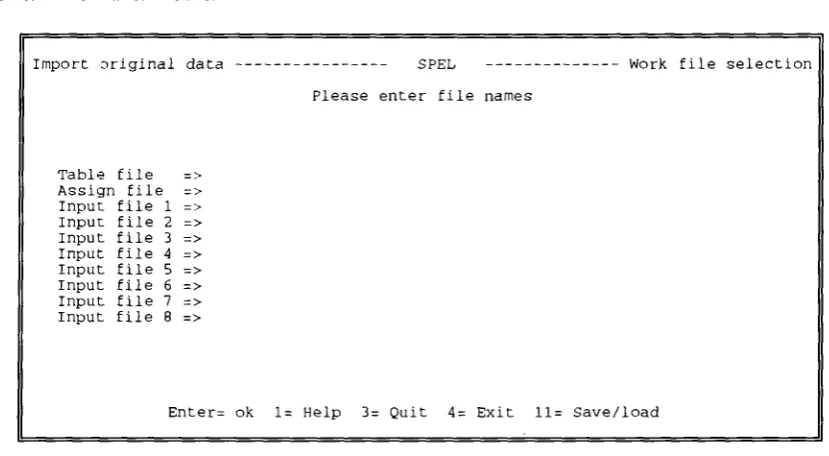
Work file selection screen
Import original data
Table file => Assign file => Input file 1 => Input file 2 => Input file 3 => Input file 4 => Input file 5 => Input file 6 => Input file 7 => Input file 8 =>
S P E L
Please enter file names
Work file selection
Enter= ok 1= Help 3= Quit 4= Exit 11= Save/load
[image:45.595.92.507.109.337.2]Parameters:
Table file
This file is used for output and must be of TABFILE format (SPEL work file).
All data which fit the selection criteria (next panel) will be stored as table' entries in this file.
Assign file
This file contains a set of assignment statements for selecting source data and converting source data codes to SPEL table element codes.
The ASSIGN file must be used if at least one of the input files is of the SPELIMP format. Only one ASSIGN file can be defined for all SPELIMP input files.
Input filei ... 8
File of one of the following two formats:
- SPELIMP - SDATA
Table key selection screen
Import origina 1
Please Region Sub-region Current year Periodicity Base year Type Model area data
make your key selection for output table file Subkey for base year is protected
( 3 ( 2 ( 2 ( 2 ( 2 ( 4 ( 1 Enter= ch.) ch. ) ch.) ch. ) ch.) ch. ) ch.) ok
=> Β : UK
= > 00
= > 85
= > 00
= > NN
=> ZPAB ZPAC EXPB EXPC
= > S
1= Help 3= Quit 4= Exit 11= Save/load
Parameters:
Region
Region selection. Specify one of the following:
- a sequence of region codes to be selected such as "D F NL" - a range defined by lower and upper bounds such as "AAA : ZZZ"
(alphanumerical expansion)
- a range defined by region codes such as "D - UK" (expansion according to definitions in the CODES file)
- a combination of sequences and ranges such as "D : F UK GR"
- use V to select all codes as defined in the CODES file
All codes and the range operands ":" and "-" must be separated by blanks.
The maximum number of regions that may be selected is 400.
Sub-region
Sub-regions are currently not used.
The whole region has the sub-region code "00".
Always specify "00".
Current year
Current year selection. Specify one of the following:
- a sequence of years to be selected such as "70 75"
- a range defined by lower and upper years such as "70 : 75" - a combination of sequences and ranges such as "70 75 80 : 87" All codes and the range operand ":" must be separated by blanks. The maximum number of years that may be selected is 50. Periodicity
Periodicity selection. Specify :
- a sequence of periodicity codes to be selected such as "01 06" or "Q1 Q2" - a range defined by lower and upper bounds such as "Q1 : Q4"
(alphanumerical expansion)
- a range defined by periodicity codes such as "Q1 - Q4" (expansion according to definitions in the CODES file) - a combination of sequences and ranges such as "01 : 06 Q4" - use '*' to select all codes as defined in the CODES file
All codes and the range operands ":" and "-" must be separated by blanks.
The whole year has the code "00". Other periodicity codes are currently not used. When using periodicities the maximum number to be selected is 19.
Base year
For putting original data into the SPEL work file the code for the subkey base year will be always "NN".
The subkey is protected for selection.
Type
Type selection. Specify one of the following :
- a sequence of type codes to be selected such as "ZPAB COSC" - a range defined by lower and upper bounds such as "AAAA : 9999"
(alphanumerical expansion)
- a range defined by type codes such as "ZPAC - COSC" (expansion according to definitions in the CODES file)
- a combination of sequences and ranges such as "ZPAB : COSC EXPC". - use '*' to select all codes as defined in the CODES file.
All codes and the range operands ":" and "-" must be separated by blanks. The maximum number of types that may be selected is 10.
Check selection screen
Import original data SPEL Check selection
A T T E N T I O N : Make sure that you have specified all input files which are necessary to fill the tables for the specified types. Otherwise there will be data missing in the tables, at the worst they will contain only zeros, even if those tables have been complete before. Please check the current selection.
Types to be created: ZPAC
Input files : CORR S DATA
Select an action by moving the cursor to any topic below
Continue doing the selection
Revise selections for types/input files
Enter= ok 1= Help 3= Quit 4= Exit 11= Save/load
The user may once more reflect if all input files which are necessary to fill the tables for the selected types are specified. Otherwise there will be data missing in the tables, at the worst they will contain only zeros, even if those tables have been completed before.
Parameters:
Continue doing the selection
Program execution continues selecting the input data for specified types.
Revise selection for types/input files
Program returns to the "Table key selectionTWork file selection" panel for new selections.
6.1.2. Trend estimations (TREND)
The TREND program does trend estimations by single regressions using ordinary least squares (OLS). It is designed to work with simple control for a large quantity of time seriess.
Input data comes from tables stored in a TABFILE work file. Estimation results are again stored in a work file.
Default parameters for regression control, the reference period and "best fit" criteria for automatic selection come from a PARAM file revised by panels.
On default for each time seriess, six OLS estimations are calculated with different data transformations for the dependent variable and the trend. The program automatically selects the results of the transformation which provides the best fit. Best fit criteria may be the coefficient of determination or Theil's coefficient7. The data transformations are:
1. 2. 3. 4. 5. 6.
dependent
linear linear logarithmic logarithmic linear logarithmic
trend
linear inverse inverse logarithmic logarithmic linear
Special regression control parameters for specific time seriess may be selected in the REGSTE control file.
Figure 5 : TREND program flow chart
Program flow
Data flow
( - )
Initialize program environment
/Display control panel^ / Get user input /
/
Read regression 7 control for /
table elements ƒ
Transformation and regression
Estimation of trend values
Loop for alternative transformations
yes
Y
/Store estimations for / / data missing or full / /est./comp. time series/
Loop for regions
and sub-regions
( " )
Regress, steering
file
Work file
Actual file names are specified as control parameters
during run time
Module startup screen
Trend estimation SPEL Module startup logo
T R E N D E S T I M A T I O N S B Y S I N G L E R E G R E S S I O N
Check and generation of data completeness in time or projection for simulation years.
Current settings for general files: Run time protocol : SPEL LOG C Error messages : SPEL ERROR C Print file : SPEL LISTING C
Enter= ok 1= Help 3= Quit 12= Gener.file
This screen is for information only. By pressing the PF12 key a special panel will be displayed which will permit changes to names of general files for run time protocol (LOG-file), error messages (ERROR-file) and documentation file (LISTING-file).
In the LOG-file the user will find ail messages ever displayed on screen during a program run. More detailed information about working steps will be included too.
The ERROR-file contains the list of errors which have occurred doing data transformations, regressions and trend estimations for some time seriess.
The detailed protocol for all estimation steps is stored in the LISTING-file
It is useful for the program user to check first the LOG- and ERROR-file after a program has ended to get a rapid overview of the success of estimations.
Parameters:
Work file selection screen
Please enter file names
Regression steering f. => FEED1 REGSTE F
Table file => SPEL-ÜSR TABFILE A
Add.table file (input) =>
Enter= ok 1= Help 3 = Quit 4= Exit 11= Save/load
Parameters:
Regression steering f.
This REGSTE file contains explicit definitions for data transformation types and reference intervals for selected time seriess.
The reference intervals are defined in the the panel "Regression steering" which follows.
Table file
This file is a direct access file containing SPEL tables for entries and is of TABFILE (TABFILE work file) format.
Add. table file (input)
Additional TABFILE input file only opened for read access. This file is to be accessed for tables not found in the first defined table file.
Remark:
If only the regression steering file name is specified, TREND will just check a set of trend estimation steering statements for legality. The set to be tested has to be specified by user's selection in the "Table key selection" panel (next panel)
Table key selection screen Trend estimat Region Sub-region Current year Periodicity Table types Model area ion Format Enter= for ( 3
( 2
( 2 ( 2 ( 4 ( 1 ok Please make table types: e.g. : or : ch. ch. ch. ch. ch. ch. 1 = ) => ) => ) => ) => ) => ) => Help D F 00
72 :
00
COMC
s
3 =
SPEL Table key selection
your selection
outputtype= inputtypel inputtype2 .... COMB = ZPAB C0SB
COMC = ZPAC COSC
89
= ZPAC EXPC ESTC
Quit 4= Exit 11= Save/load
Parameters:
Region
Region selection. Specify one of the following:
- a sequence of region codes to be selected such as "D F NL" - a range defined by lower and upper bounds such as "AAA : 777"
(alphanumerical expansion)
- a range defined by region codes such as "D - UK" (expansion according to definitions in the CODES file)
- a combination of sequences and ranges such as "D : F UK GR" - use V to select all codes as defined in the CODES file
All codes and the range operands ":" and "-" must be separated by blanks.
The maximum number of regions that may be selected is 400.
Sub-region
Sub-regions are currently not used.
The whole region has the sub-region code "00".
Current year
Current year selection. Specify one of the following:
- a sequence of years to be selected such as "70 75"
- a range defined by lower and upper years such as "70 : 75" - a combination of sequences and ranges such as "70 75 80 : 87"
All codes and the range operand ":" must be separated by blanks.
The maximum number of years that may be selected is 30.
Periodicity
Periodicity selection. Specify one of the following:
- a sequence of periodicity codes to be selected such as "01 06" or "Q1 Q2" - a range defined by lower and upper bounds such as "Q1 : Q4"
(alphanumerical expansion)
- a range defined by periodicity codes such as "Q1 - Q4" (expansion according to definitions in the CODES file)
- a combination of sequences and ranges such as "01 : 06 Q4" - use '*' to sleet all codes as defined in the CODES file
All codes and the range operands ":" and "-" must be separated by blanks.
The whole year has the code "00". Other periodicity codes are currently not used.
When using periodicities the maximum number that may be selected is 19.
Table types
Selection of table type codes for output and input tables
Syntax:
output type = inputtypel inputtype 2 ....
For outputtype specify one legal table type code.
For inputtypel, inputtype2 specify one table type code or sequence of codes to be
selected such as "ZPAC EXPC".
The maximum number of input type codes that may be selected is 10.
Model area
Select one of the following model area codes: "S" "D"
I1TII
S" for supply D" for demand T" fortrade
Regression steering screen
Trend estimation SPEL Regression steering
Please select parameters for regression steering
Regression interval
Significance coefficient
Documentation level
(start : endl : end2) => 72 : 85 : 89
(THEIL/DETERMINATION) => DETERMINATION
(FULL/ROUGH/MINIMUM/NONE) => MINIMUM
Output level (COMPLETED/FULL TREND/MISSING/NONE) => COMPLETED
Enter= ok 1= Help 3= Quit 4= Exit 11= Save/load
Parameters:
Regression interval
Define the years for short and long regression reference intervals.
Syntax:
start : endl : end2
start : endl will be the short interval start : end2 will be the long interval
For the short interval you must specify at least 4 years
endl and end2 may be the same year.
The start year has to precede the end years.
Significance coefficient
Select one of the folllowing for best fit criteria :
-THEIL - Theil's coefficient8
- DETERMINATION - coefficient of determination 9.
Documentation level
You can choose between the following documentation levels:
"FULL" provides, for each time seriess, documentation on - steering parameters
- original values for the whole of reference and output period - results of all data transformation alternatives
- the selected transformation type - the completed time series.
"ROUGH" provides, for each time seriess, documentation - on steering parameters
- original values for the whole of reference and output periods - the completed time series.
"MINIMUM" provides, for each time seriess, documentation on - original values for the whole of reference and output periods - the completed time series.
"NONE" nothing will be documented.
Output level
For output into the work file you can choose between four levels:
COMPLETED: time seriess including original values and estimates of missing data. FULL TREND: full trend time seriess
MISSING : only the estimated values for missing data NONE: nothing
8 THEIL - Sum of squares of deviation sum of squares of yearly changes
Source (THEIL): Henri Theil, Applied Economic Forecasting, Amsterdam 1971, page 28
9 DETERMINATION = Sum of squares explained
sum of squares total
6.2. Utilities
Utilities are general programs not specially designed for SPEL. Using control parameters of SPEL they are applied to several work steps.
6.2.1. General estimation and evaluation program (EV)
6.2.1.1. Application abstracts
The EV program offers general evaluations and single equation regression estimations based on the standard file formats TABFILE and SDATA supported by the SPEL system.
EV has its own command language for both batch and interactive operations. In interactive mode the commands are entered directly from the keyboard and executed immediately. For batch operations the commands are collected in a STEER control file.
The simplest use of the EV program is to obtain data, e.g. the production of wheat in a specific period for specified sequences of regions (e.g. Member States). Such data are provided in the form of tables for printing or listing on the screen. Growth rates and averages, etc. can be calculated.
The program also permits the analysis of data in the econometrical sense based on single equation regressions with one or more independent variables. Quality indicators of such regression estimates can be accessed on the basis of the coefficient of determination, correlation coefficient, T-value, F-value, standard of estimation error, Durbin-Watson coefficient, Theil's coefficient, etc.
In combination with large sets of commands collected in STEER files it is also used to carry out certain work steps of the SPEL system.
Most of the EV operations are defined at the "EV-tables" level.
These tables are not the same as SPEL tables in a SPEL work file. EV-tables normally have years as rows and regions as columns. The selection of years and regions is identical for all tables defined at the same time. Tables can be transposed by inverting the rows and columns. Each table is described by a code and, optionally, a descriptive text.
In SPEL the code of an EV-table is normally the code of an element of a SPEL table. In other words, all elements of one EV-table correspond to one (always the same) element of a set of SPEL tables. The number of SPEL tables in the set is equal to the number of elements in the EV-table. E.g. the data for wheat production for the years 80 to 85 and the regions D, F and NL form an EV-table, where the source data is obtained from 18 (= 6 years * 3 regions) SPEL tables.