City, University of London Institutional Repository
Citation
:
Ng, K.-C., Weyde, T., Larkin, O., Neubarth, K., Koerselman, T. and Ong, B.
(2007). 3d augmented mirror: a multimodal interface for string instrument learning and
teaching with gesture support. ICMI '07 Proceedings of the 9th international conference on
Multimodal interfaces, pp. 339-345. doi: 10.1145/1322192.1322252
This is the unspecified version of the paper.
This version of the publication may differ from the final published
version.
Permanent repository link:
http://openaccess.city.ac.uk/2964/
Link to published version
:
http://dx.doi.org/10.1145/1322192.1322252
Copyright and reuse:
City Research Online aims to make research
outputs of City, University of London available to a wider audience.
Copyright and Moral Rights remain with the author(s) and/or copyright
holders. URLs from City Research Online may be freely distributed and
linked to.
City Research Online:
http://openaccess.city.ac.uk/
[email protected]
The 3D Augmented Mirror: A Multimodal Interface for
Learning and Teaching String Instruments
Kia Ng
1, Tillman Weyde
2, Oliver Larkin
1, Kerstin Neubarth
2, Thijs Koerselman
1, Bee Ong
1 1ICSRiM - University of Leeds
School of Computing & School of Music,
Leeds LS2 9JT, UK
2
City University London
School of Informatics, Department of Computing,
Northampton Square, London N5 2TU, UK
email: [email protected] web: www.i-maestro.org
ABSTRACT
Multimodal interfaces can open up new possibilities for music education, where the traditional model of teaching is based predominantly on verbal feedback. This paper explores the development and use of multimodal interfaces in novel tools to support music practice training. The design of multimodal interfaces for music education presents a challenge in several respects. One is the integration of multimodal technology into the music learning process. The other is the technological development, where we present a solution that aims to support string practice training with visual and auditory feedback. Building on the traditional function of a physical mirror as a teaching aid, we describe the concept and development of an “augmented mirror” using 3D motion capture technology.
Categories and Subject Descriptors
J.5 [Computer Applications]: Arts and Humanities – Performing arts.
K.3.1 [Computers and Education]: Computer Uses in Education – Computer-assisted instruction (CAI)
H5.2 [Information Interfaces and Presentation]: User Interfaces – Auditory (non-speech) feedback, GUI
I.2.10 [Computer Methodologies]: Artificial Intelligence – Vision and Scene Understanding – 3D analysis, motion
I.5.5 [Computer Methodologies]: Pattern Recognition – Implementation – Interactive systems
General Terms
Human Factors, Design
Keywords
3D, motion capture, gesture, music, education, interface, multimodal, feedback, visualisation, visualization, sonification
1.
INTRODUCTION
The traditional form of teaching a musical instrument is one-to-one tuition, where the student performs, and the teacher gives verbal feedback. The i-Maestro EC IST project (see [1, 2], http://www.i-maestro.org), aims to use new developments in information technology, specifically multimodal interfaces, to enhance the learning and teaching of musical instruments. Multimodal interface technology can potentially broaden the repertoire of music pedagogy. However, it is not clear how this can be achieved. Particularly for instruments that are used mostly in traditional or classical western music, there is neither suitable hard- and soft-ware nor corresponding pedagogical concepts for their use available.
In i-Maestro we are focusing specifically on bowed string instruments such as the violin and cello. In essence, the mastering of these instruments involves complex relationships between the physical movement of the human body (including muscular control, posture, gesture, etc), the instrument and the music (interpretation, phrasing, etc).
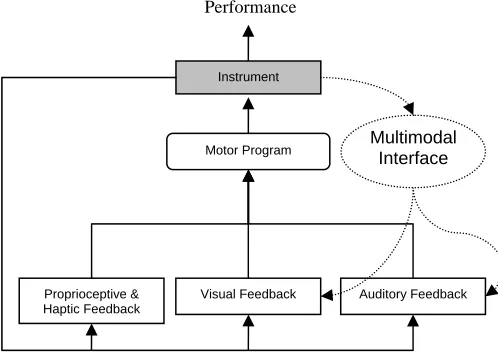
i-Maestro aims to support the learning and teaching process by inserting multimodal interfaces into the musical interaction (see Figure 1). We address multi-modality as an aspect that supports
movement, expressivity, and communication.
Figure 1. Inserting multimodal interfaces into the musical interaction.
Permission to make digital or hard copies of all or part of this work for personal or classroom use is granted without fee provided that copies are not made or distributed for profit or commercial advantage and that copies bear this notice and the full citation on the first page. To copy otherwise, or republish, to post on servers or to redistribute to lists, requires prior specific permission and/or a fee.
ICMI’07, November 12–15, 2007, Nagoya, Aichi, Japan.
Copyright 2007 ACM 978-1-59593-817-6/07/0011...$5.00.
Motor Program Instrument
Proprioceptive & Haptic Feedback
Visual Feedback
Performance
Auditory Feedback Multimodal
[image:2.612.316.565.496.673.2]The problem from the pedagogical side is that few concepts for the use of technology in string practice training (particularly the use of multimodal interfaces) have been developed so far. We have taken a systemic pedagogical approach, where we try to enhance feedback loops in performance and student-teacher interaction with multimodal interfaces.
The main feedback loop in traditional music tuition consists of the student playing and the teacher responding with verbal comments. This has been confirmed in interviews we have conducted with students and teachers and is supported by the study in [3]. One of the few tools used to give feedback in traditional music teaching is the mirror, which can be used to provide additional visual feedback to students. This is used especially for features of the performance that do not necessary lead to directly noticeable change in the produced sound, but bring other advantages such as reduced effort or improved control. We have therefore taken the mirror as a starting point for both our technical development and the pedagogical application of the technology.
1.1
New Interaction and Feedback Loops
3D motion tracking (also other methods of gesture capture such as sensors [4]), and the sonification [5] and/or visualisation of capture /analysis data can enhance the practising of movement control by displaying movement parameters that are not directly or objectively accessible to the student. For example, the perception of bow movement relative to the bridge may interfere with the student’s viewing perspective. 3D motion tracking can provide him/her with an objective recording of movement. It adds to the visual feedback, which can be used in adapting the motor program to achieve a particular goal (in this example, perpendicular bowing).
We believe these new feedback loops may enable the teacher to influence the internal control functions of the player. The student may adapt to the new conditions, and this adaptation could be used to raise awareness, or to fine-tune the player’s movement or auditory control. This can be seen as analogous to sports, where training of movements is often conducted under artificial conditions emphasising one specific difficulty (e.g. using additional weights, unbalanced numbers of players etc.).
Apart from the adaptation of the control systems, both visual and auditory feedback can be used to address the student on a conscious level. Discussing the movements involved in a 3D representation may help to raise awareness and lead to a better understanding of the involved mechanics.
Like a mirror in traditional learning and teaching we can introduce feedback loops, but, unlike a mirror, these feedback loops can be changed in their behaviour in a variety of ways. They can be used synchronously or asynchronously to the performance. This allows the teacher (or the student) to adapt the interaction to specific learning objectives and teacher and student to discuss the original interaction and its adaptation post-performance.
1.2
Processing and Output Generation
The processing of input data has a significant impact on the overall result. For educational use, there is an obvious interest in extracting the relevant information for a particular purpose. However, it is not necessarily straightforward what is relevant or how to extract it.
In the case of musicians’ movements/gestures it is very difficult (and perhaps un-desirable) to define what an ideal gesture is. Musicians are physically different and variety is part of what makes music performance so compelling. In most cases, music teachers define ideal movements/gestures in playing an instrument with a combination of loosely geometrical terms (e.g. parallel to bridge, circular motion, etc.) and in abstract terms, such as smooth, relaxed, etc. Any features of the performance that are extracted need to be relevant to the performer in question. One approach that may help in these situations is based on clustering techniques which look at a set of feature vectors to represent more abstract terms. In this way it may be possible to measure similarities and differences between different performers. Despite these issues there are common characteristics that may be similar for all, for example maintaining a parallel relationship between the bow and the bridge.
Visualisation and sonification offer different advantages. Visualisation allows a teacher to directly illustrate a specific issue of the performance after it has taken place. Sonification may be particularly useful for representing analysis parameters in real-time. As the time resolution in auditory perception is faster than in visual perception, sonification is appropriate for training movement control, as opposed to conscious understanding through visualisation. Here the question would be “what mapping of spatial measurements to sonic parameters would best support motor learning?”
Sound cues are present in dance and rhythmic cues are also used in sports (most modern fitness training programmes are designed with rhythmical background music). Motion in reaction to music is another ongoing research area (see [6]). Related research on sonification and motion has been done in sports, e.g. [7, 8]. Also it has been shown that a sense of motion can be induced by sound [9], which further corroborates the perceptual link between sound and motion.
From a general perspective, the output of visualisation and/or sonification system can serve different functions. For example it may be a continuous audio/visual stream that monitors a particular feature of the performance, or a discreet notification that only occurs when some value has fallen under a threshold, indicating that something unwanted has happened or a goal has been reached. The use of multi-modal feedback in music practice training is an under-explored area and there are many questions that need to be answered surrounding its implementation.
2.
THE 3D AUGMENTED MIRROR
performance in 3D, the system also records and plays back synchronised video and audio. Different data analyses can be performed on the 3D motion data in real time or offline situations.
2.1
Background
3D motion capture has been used in [10] to assist in piano pedagogy by visualising the posture of a professional performer and comparing it to that of the student. It has been featured in a double bass instruction DVD [11] to help illustrate elements of bowing technique. It is also being used in the field of biomedical science to study health problems experienced by string players such as overuse syndrome [12].
The use of auditory feedback to teach musical instrument skills has been discussed in [13]. For related research on the sonification of motion data, see [8] and [14]. For the mapping of motion data to music see [15].
2.2
System Design
We use a VICON 8i optical 3D motion capture system (www.vicon.com), which features twelve high-speed, infra-red cameras that track the location of markers in 3D space with a theoretical accuracy of +/- 0.02mm. The markers are small (1cm diameter) plastic balls that are covered with reflective tape. The twelve cameras allow flexibility in terms of subject positioning, although the system will work with fewer cameras.
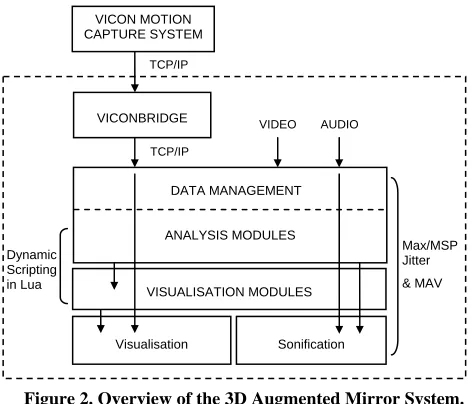
[image:4.612.52.289.441.643.2]The AMIR application is being developed using the Max MSP / Jitter multimedia programming environment by Cycling ‘74 (www.cycling74.com). The motion data analysis and visualisation tasks are performed by a collection of C objects/externals and a shared library that we call the i-Maestro Motion Analysis and Visualisation Framework (MAV) (see section 2.2.1).
Figure 2. Overview of the 3D Augmented Mirror System.
We use the Lua scripting language (www.lua.org) to dynamically script the MAV objects inside Max MSP depending on the analysis task in hand. Lua also gives us low-level access to the Open GL API for visualisation purposes.
AMIR interfaces with the VICON system over Ethernet using TCP/IP. We developed an application (called VICONbridge), which streams the 3D co-ordinates of each marker to Max MSP in real-time. Data is received and processed at 200fps and this data rate is preserved wherever possible throughout our software. Since we use only the basic marker data, in the future it should be possible to adapt the system to work with different (more affordable and portable) motion capture devices.
A fast firewire camera and a non-obtrusive contact pick up (e.g. a piezo transducer) are used to record the video and audio. Also for audio playback and Sonification purposes an amplifier and loudspeakers are required. A low latency, full duplex soundcard is necessary.
2.2.1
The MAV Framework
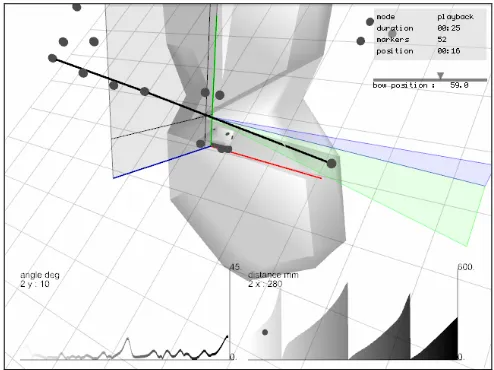
The MAV objects can communicate and share data, which allows their functionality to be combined for different applications. For example, one analysis object extracts marker movement features such as speed, acceleration, and distance travelled. Another calculates bowing segmentation points (up/down strokes). These can be combined to visualise the distance travelled by the bow over each bow stroke (seeFigure 6). The objects work in both real time and offline modes, so that if a particular configuration has been set up, it can be used to provide a summary of the number of times a criterion was met in the capture (or in a certain section of the capture).
2.3
Capturing String Performance
We attach markers to the bow, the instrument, and to the upper body in order to study various elements of the performer’s gesture and posture. Currently we are focussing on gestures related to bowing technique (e.g. right arm, hand and bow movements) and for posture we look at the angles and relationships of the bowing arm, shoulder and neck.
Figure 3. A photo of a motion capture session with the markers highlighted.
VICONBRIDGE TCP/IP
TCP/IP
AUDIO VIDEO
Visualisation
ANALYSIS MODULES
Sonification VISUALISATION MODULES
Dynamic Scripting in Lua
DATA MANAGEMENT
Max/MSP Jitter & MAV VICON MOTION
[image:4.612.326.548.453.619.2]Since during a string instrument performance the bow and the body move considerably, markers must be placed strategically in order to:
1. minimise the risk of their displacement 2. minimise interference with the performance
3. maximise the chances of the marker being tracked by the cameras
4. minimise damage to the instrument
5. provide the necessary information for the required data analyses.
On string instruments (especially the violin and viola) there are a limited number of areas where markers can be placed without the cameras being obstructed by the performer’s movements. Important marker placements (e.g. bridge and string positions) can easily interfere with normal playing (markers are hit by the bow). Also in performance it is desirable to use as few markers as possible to reduce the processing load on the system. In order to solve these problems, before the performance takes place we create a static model of the object to be tracked, using a large number of markers (see Figure 4). During the performance we use a simplified arrangement of markers, which we refer to as the
performance model (see Figure 5). Our system reconstructs the missing marker positions in real time by calculating the offset from the remaining markers to the markers that were removed from the static model.
[image:5.612.316.563.345.530.2]Figure 4. Violin body static model
Figure 5. Violin body performance model
2.3.1
Dynamic Coordinates System
The data from the motion capture system gives us the absolute location of each marker. To perform several of the desired analyses, it is necessary to derive a local co-ordinates system based on specific markers rather than using arbitrary world co-ordinates. For example, to monitor bowing, the local coordinates system will typically be positioned on the instrument body in order to focus on the interactions between the bow and the instrument (see Figure 6).
2.4
Analyses and Visualisation
Through our own experience, our discussions with teachers, and by studying existing string pedagogy literature we have identified areas of interest for studying string performance using motion capture. Below we list some of the main ways in which AMIR provides feedback about the performance.
2.4.1
Viewing the Performance in 3D
At the most basic level we want to allow users to be able to study the performance in 3D very intuitively. This means allowing a large amount of manipulation of the 3D environment including magnification, rotation, changing the camera location and viewpoint. The instrument is visualised in the environment using a 3D model (see Figure 6).
2.4.2
Bow Stroke Identification and Segmentation
In string performance, playing with an appropriate bowing pattern is important both in the interpretation of phrasing and in order to allow complex passages to be played. We analyze the direction of the bowing stroke and report the moment at which it changes, which can indicate the regularity of bowing motion. This information can be used with other analyses to provide information about each stroke. It allows the teacher or student to only look at data for certain strokes e.g. “all up bows”.
Figure 6. Screenshot from the AMIR visualisation window showing 3D model, bow angles and graphs of analysis data. The graph on the left shows the bowing angle over time, the one on the right shows the distance travelled by the bow for
each stroke.
In our algorithm for bow stroke identification we also check to see if the bow is on the strings or not. This allows us to enable/disable visualisation and sonification automatically.
2.4.3
Movement Features
[image:5.612.67.281.373.558.2]2.4.4
Bow Section
The part of the bow that is used is important in the effective playing of different bowing techniques. Bowing technique literature often features exercises where the student must use a particular part of the bow, and several teachers have agreed on this approach which helps the student to learn to be economical and accurate in their bow movements. This data is visualised with a 2D representation with a horizontal line to represent the bow and a moving triangle to indicate the part of the bow that touches the string (see Figure 9).
2.4.5
Bowing and Joint Angles
A common problem experienced by students learning to play string instruments is “parallel bowing”. This is the student’s ability to play with the bow parallel to the bridge. AMIR analyses the angle of the bow and visualises it directly in the 3D environment (see Figure 6). The analysis can also be shown using a graph. This technique can also be applied to joint angles for studying elements of posture.
2.4.6
Bowing Trajectories
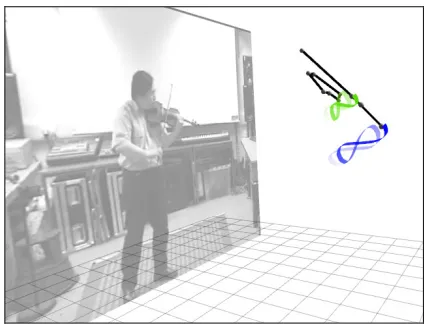
[image:6.612.67.280.418.580.2]Pedagogic literature on string/bowing technique often includes 2D illustrations of bowing movements [e.g. 16, 17]. Several string teachers we have spoken to tell us that they instruct students to try to bow with a certain shape (for example a “figure of eight”). However it is sometimes difficult for the student to grasp these ideas. AMIR can render the 3D motion trajectories traced by markers and illustrate precisely what the “figure of eight” means (see Figure 7). Trails may be drawn for one or several markers at variable lengths. It is also possible to freeze the trails, zoom in and study them for detailed analysis.
Figure 7. Screenshot from the AMIR visualisation window showing motion trajectories.
2.5
Sonification
Max MSP provides a powerful environment for the development of sonification algorithms and mapping strategies, with numerous objects available for data analysis, processing and sound synthesis. We are experimenting with several approaches to sonifying analysis data, which we describe below.
The input to the Sonification module is a continuous data stream from the MAV analysis modules. This includes values for active analysis parameters. For instance in the case of parallel bowing, the Sonification module receives the angle of the bow, the “bow section” (a float between 0. and 1. where 1 implies tip of the bow) and the bow-stroke (where 0 = bow off strings 1 = up bow, 2 = down bow).
2.5.1
Parallel Bowing Sonification
We sonify the angle of the bow in relation to the bridge to provide real-time feedback to the student. This allows them to monitor their bowing without having to look at a mirror or directly at the bow.
The sonification module provides the option to only notify the performer when the angle is greater than a user defined threshold. This allows small deviations to be excluded from the sonification, and means that the sonification can interject only when necessary, in order to reduce disturbance of the performance. This method is known as Bandwidth Knowledge of Results, and has been shown to be particularly effective for motor learning [18].
Sonification may be continuous or discreet. Discreet sonification allows two separate settings to monitor (user defined) “correct” and “incorrect” angles of the bow. In discreet mode, when the bow goes over the threshold a sound is emitted. This is a kind of “auditory icon” [5], which notifies that there was a mistake. We have used a simple bell sound to signify this and also use processing of the input audio, which we believe may offer a more relevant and useable feedback in the context of an instrumental lesson. For example, we use a pitch-shifting effect to harmonise the audio input (instrument sound) when the bow goes over the threshold. The user can choose different musical intervals for the harmonisation (dissonant and consonant).
Another approach we have used is to switch on and off an audio treatment such as a “ring modulator”, depending on the angle of the bow. This has the effect of distorting the input sound if the bowing angle is “incorrect”. Again this can be applied as two discreet on/off settings or continuously by gradually cross- fading the unprocessed and processed sound.
In continuous mode, the angle of the bow can be mapped to the pitch of an oscillator or to the pitch of the pitch-shifted version of the instrument sound. The degree of deviation is used as a pitch multiplier. In the case of the oscillator, when the bow is parallel, the pitch is maintained at around a default pitch (e.g. 440Hz), when the bow is pointing upwards the pitch will be increased and when it’s pointing downwards the pitch will be decreased. Here the objective would be to try to maintain as close as possible to the 440Hz tone, and hence keep a parallel bow.
Figure 8. Bow Angle Interface
We are exploring the idea of changing the dynamic of the sonification depending on how often the student makes errors. This provides an “accumulative sonification” that is more noticeable when the student is making a lot of mistakes.
2.5.2
Bowing Rhythm Sonification
Another approach we are using is to sonify the rhythm of the bowing movements. Every time a bowing segmentation point is detected, a short percussive sound is played. This is useful for appropriate for very fast passages, which may be difficult to play with a steady rhythm. By slowing down a recording of the performance the accuracy of the timing is revealed.
3.
FIRST USER TESTS
The 3D Augmented Mirror system has been presented to a number of string teachers and students and preliminary tests have shown very positive results. The test subjects (which have included professional performers) were enthusiastic to study their performance using the system. Some have even discovered interesting characteristics of their playing that they were not aware of before using the system.
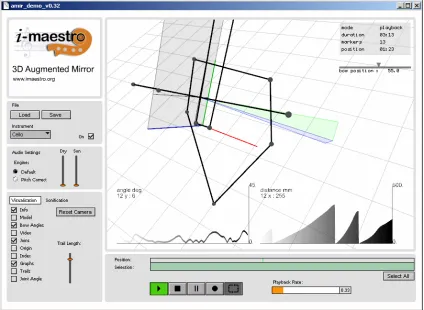
There have been many mixed opinions about the sonification of gesture data. Some teachers think that it distracts too much from the sound of the instrument, whilst others think that it can be a useful tool for certain situations. There were also different opinions on the types of sonification used, with some preferring the simple bell sound indication and others preferring the approaches based on processing the sound of the instrument. It is clear from our discussions with teachers and students that the system needs to be as easy to use as possible if it is to be effective. It must also be robust and reliable. There is a huge variety of methods used by teachers and so it is important that the system can be customised to a particular situation or user’s preference. Taking the above into account, we have designed the interface of the AMIR software (see Figure 9) to be simple and easy to use. It comes with a number of preset configurations for different analysis and different instruments but settings may be adjusted if the user wishes.
[image:7.612.94.518.371.681.2]4.
CONCLUSION AND FUTURE WORK
We have discussed multimodal interfaces for music learning and teaching, which is as yet an under-explored field. The development of the Augmented Mirror application described in this paper is the first step in the direction of effective support for music students and teachers though the use of 3D motion capture, motion analysis, visualisation and sonification. We presented the technical aspects of the system and discussed the pedagogical application.
The next major stage in our work is to do further user testing, particularly testing the system in real pedagogical situations to see how teachers and students interact with the technology.
Work in hand includes the integration of AMIR with other components of the i-Maestro framework such as MPEG SMR [19] and score/gesture following [4]. Primarily we are interested in ways of annotating gesture analysis data onto the score and indexing motion capture recordings to musical phrases to enhance link between musical theory and practice.
5.
ACKNOWLEDGMENTS
The i-Maestro project is partially supported by the European Community under the Information Society Technologies (IST) priority of the 6th Framework Programme for R&D (IST-026883, www.i-maestro.org). Thanks to all i-Maestro project partners and participants, for their interest, contributions and collaboration.
6.
REFERENCES
[1] Ng, K., Ong, B., Khan, A., Bellini, P., Nesi, P., Mitolo, N. Technology Enhanced Learning with Interactive Multimedia Environment for Music Edutainment. In Proceedings of the EDEN 2006 Annual Conference - E-Competences for Life, Employment and Innovation, "E" is more! E-learning Enabling Education in Evolving Europe, European Distance and E-Learning Network, Vienna, Austria, 2006, 182-187. [2] Ng, K. Creative Multimedia Interfaces and Collaborative
Technology Enhanced Environment for Music Playing and Learning. In Proceedings of The Reflective Conservatoire: Sorcerers and Apprentices Conference, London, UK, 2006 [3] West, T., and Rostvall, A-L. A Study of Interaction and
Learning in Instrumental Teaching. International Journal of Music Education. 40,1, 2003 16-27.
[4] Bevilaqua, F., Guedy, F., Schnell, N., Flety, E., Leyroy, N. Wireless Sensor Interface and Gesture-Follower for Music Pedagogy. In Proceedings of the International Conference on New Interfaces for Musical Expression 2007 (NIME’07). New York, USA. 2007.
[5] Kramer, G. (ed.), Auditory Display: Sonification, Audification and Auditory Interfaces. Proceedings of the First International Conference on Auditory Display (ICAD) 1992
[6] Styns, F., van Noorden, L., Leman, M. Some basic observations on how people move on music and how they relate music to movement. Second International Conference on Music and Gesture, Manchester, UK. 2006.
[7] Effenberg, A. Zum Potential Komplexer Akustischer Bewegungsinformationen für die Technikansteuerung, In
Leistungssport 5, 19-25.
[8] Hermann, T., Höner, O., Ritter, H. AcouMotion - An Interactive Sonification System for Acoustic Motion Control. In Gibet, S., Courty, N., and Kamp, J.-F., (Eds.):Gesture In Human-Computer Interaction and Simulation - 6th
International Gesture Workshop, (GW’2005), Berder Island, France, 2005, Series LNCS/LNAI 3881, Springer, 312–323. [9] Väljamäe, A., Larsson, P., Västfjäl, D., Kleiner, M.
Travelling Without Moving: Auditory Scene Cues for Translational Self-Motion. In Proceedings of the
International Conference on Auditory Display (ICAD’05). Limerick, Ireland, 2005.
[10]Mora, J., Won-Sook, L., Comeau, G., Shirmohammadi, S., El Saddik., A. Assisted Piano Pedagogy through 3D Visualization of Piano Playing. In Proceedings of the IEEE International Workshop on Haptic Audio Visual
Environments and Their Applications(HAVE’ 2006), Ottawa, Canada, 2006.
[11]Sturm, H., Rabbath F. The Art of the Bow DVD, 2006 [12]Shan, G. Visentin, P. A Quantitative Three-Dimensional
Analysis of Arm Kinematics in Violin Performance. In
Medical Problems of Performing Artists, 18, 1. 2003, 3-10. [13]Ferguson, S. Learning Musical Instrument Skills through
Interactive Sonification. In Proceedings of the International Conference on New Interfaces for Musical Expression 2006 (NIME’06), Paris, France, 2006
[14]Verfaille, V., Quek., O, Wanderley M.M. Sonification of Musicians’ Ancillary Gestures, in Proceedings of the International Conference on Auditory Display (ICAD’06), London, UK, 2006
[15]Bevilaqua, F., Ridenour, J. and Cuccia. D. 3D Motion Capture Data: Motion Analysis and Mapping to Music. In
Proceedings of the Symposium on Sensing and Input for Media Centric Systems (SIMS). Santa Barbara, USA. 2002 [16]Rolland, P. The Teaching of Action in String Playing.
Illinois String Research Associates.1974
[17]Gerle, R. The Art of Bowing Practice: The Expressive Bow Technique. Stainer & Bell, 1991
[18]Winstein, C. Knowledge of Results and Motor Learning – Implications for Physical Therapy. Physical Therapy 71, 2. 1991, 140-149.
[19]Bellini, P., Nesi, P., and Zoia, G. Symbolic music