
This is a repository copy of
Mobile group dynamics in large-scale collaborative virtual
environments
.
White Rose Research Online URL for this paper:
http://eprints.whiterose.ac.uk/4948/
Proceedings Paper:
Dodds, T.J. and Ruddle, R.A. (2008) Mobile group dynamics in large-scale collaborative
virtual environments. In: Proceedings of IEEE Virtual Reality. IEEE Virtual Reality 2008, 8
-12 March 2008, Reno, Nevada, USA. IEEE , pp. 59-66. ISBN 978-1-4244-1971-5
https://doi.org/10.1109/VR.2008.4480751
[email protected]
https://eprints.whiterose.ac.uk/
Reuse
See Attached
Takedown
If you consider content in White Rose Research Online to be in breach of UK law, please notify us by
Mobile Group Dynamics in Large-Scale Collaborative Virtual
Environments
Trevor J. Dodds∗ Roy A. Ruddle†
Visualization and Virtual Reality Research Group School of Computing, University of Leeds, UK.
ABSTRACT
We have developed techniques called Mobile Group Dynamics (MGDs), which help groups of people to work together while they travel around large-scale virtual environments. MGDs explicitly showed the groups that people had formed themselves into, and helped people move around together and communicate over ex-tended distances. The techniques were evaluated in the context of an urban planning application, by providing one batch of par-ticipants with MGDs and another with an interface based on con-ventional collaborative virtual environments (CVEs). Participants with MGDs spent nearly twice as much time in close proximity (within 10m of their nearest neighbor), communicated seven times more than participants with a conventional interface, and exhibited real-world patterns of behavior such as staying together over an ex-tended period of time and regrouping after periods of separation. The study has implications for CVE designers, because it shows how MGDs improves groupwork in CVEs.
Keywords: Collaborative interaction, experimental methods, dis-tributed VR, usability
Index Terms: C.2.4 [Computer-Computer Communication Net-works]: Distributed Systems—Distributed applications; H.1.2 [Models and Principles]: User/Machine Systems—Human factors; Software psychology; H.5.1 [Information Interfaces and Presen-tation]: Multimedia Information Systems—Artificial, augmented and virtual realities; H.5.3 [Information Interfaces and Presenta-tion]: Group and Organization Interfaces—Collaborative comput-ing; Computer-supported cooperative work; Synchronous interac-tion; I.3.7 [Computer Graphics]: Three Dimensional Graphics and Realism—Virtual Reality
1 INTRODUCTION
Collaborative virtual environments (CVEs) are three dimensional electronic worlds that combine shared information (e.g. 3D design models) with mechanisms that allow multiple people to co-exist, be aware of each other’s presence (e.g. through avatars) and communi-cate. CVEs are used for games and social communication, but more general usage is inhibited by current mechanisms for collaborative interaction.
Our goal is to allow people to interact in CVEs as effectively as they do in the real world. We aim to achieve this by devel-oping techniques that support ‘group dynamics’ (the processes by which people form themselves into groups and operate), as people travel around (i.e. are mobile) and work together in a large-scale shared space. Large-scale spaces are those in which ‘Multiple van-tage points must be occupied in order for the space to be visually apprehended in its entirety.’ [20] (p. 42). This introduces extra
∗e-mail: [email protected]
†e-mail: [email protected]
challenges, because not only do individuals get easily disoriented when they navigate a large-scale VE, it is also all too easy to lose track of the whereabouts of one’s collaborators.
This paper describes the implementation of mobile group dy-namics (MGDs), and its evaluation using an urban planning sce-nario in which one group of participants were provided with MGD functionality and another (‘control’) group were not. First, how-ever, aspects of group dynamics that we often take for granted in the real world are reviewed along with methods used to support group work in both publicly accessible CVEs and research applications.
2 BACKGROUND
The field of group dynamics has long been studied within a socially driven context in real life (e.g. [12]), and the much-cited model of
forming, storming, normingandperforminghas been constructed to describe group processes that are involved [19]. Storming and norming are the processes by which individuals’ roles within a group become refined, whereas forming and performing govern the creation of groups and their ability to do work. It is these latter two processes that are most relevant to implementing MGDs.
2.1 Forming
Four key points about group formation need to be considered. These are the method of joining (implicit vs. explicit), how members are identified, the structure of the group (e.g. sub-groups/hierarchy), and the way that the group is represented (e.g. aggregate views of the group as a whole).
When people meet and communicate informally in the real world they gather together into circles to hear each other. The groups are organized using spatial positioning so membership is implicit, and social etiquette applies when people join or leave. For example, new members may be invited to join by existing members’ body language (e.g. stepping back to allow a newcomer into the circle), and when members leave the group they would often give an appro-priate verbal indication or gesture (e.g. say or wave goodbye).
Active Worlds1 is a chat-based CVE in which users form
im-plicit groups. If users are too far apart, the chat text isn’t displayed, so they are forced to gather together into rough circles to ‘hear’ each other. Groups can make themselves open to new members by gathering around the entrances to the worlds, or groups can govern themselves by agreeing a time and place to meet. The environ-ments are large enough for this to provide privacy from users who were not invited because a group is unlikely to be found by acci-dent. However, a disadvantage of this implicit approach is that the system maintains no record of the makeup of each group, so mem-bers may be unaware if they met by chance in another part of the CVE.
On the other hand, people can be part of explicit groups for ex-ample a guest list for a wedding, a university society or sports club. Explicit groups maintain a formal record of their membership. In some cases membership is open (any student can join a society, they just need to sign up) but in others it is dictated by members
1http://www.activeworlds.com/ (Accessed 2 August 2007)
IEEE Virtual Reality 2008 8-12 March, Reno, Nevada, USA
who have special privileges (e.g., a couple deciding who they will invite to their wedding).
Social networking sites such as Facebook2use explicit groups.
Membership can be decided by a group administrator (as in the guest list example) or it can be open to anyone (as in a society or club).There3is a chat-based CVE that implements explicit groups in a similar way to social networking sites. It uses a web based in-terface to allow the forming and joining of groups for people with a particular common interest. However, there is no way of identify-ing who belongs to one of these groups from the 3D environment, or from the appearance of users’ avatars. The only way to identify members is by consulting the group membership lists.
Group members can also be identified by spatial positioning or color schemes. The former approach is used by real-time chat groups in There. A group is started after one user has chatted with another for a short period of time and the camera automatically switches to a special ‘chat mode’ that shows the users’ two avatars aligned side-by-side, giving a better view of the group. New mem-bers can join by walking up to the group, clicking on an icon associ-ated with it, and selecting the join option from a menu that appears. As more people join the avatars are arranged into a semi-circle, so each user can see all the group members in one view on screen. The disadvantage of this approach is it only works when the group remains in one location.
A soccer team provides a good example of the real-world use of color schemes. Membership is decided explicitly before the match starts, and it is communicated by the players wearing their team’s colors. There is no question who is on which team, and it is straight-forward to identify who is a member from a distance. A similar approach is used in entertainment CVEs such as Wolfenstein: En-emy Territory4where members of the two opposing armies can be identified from the uniform worn by users’ avatars.
Even if there is only one group in the environment, it may change structure. For example, consider an office meeting. The people present may divide themselves into subgroups to carry out certain tasks, or someone may talk to the person next to them, using ‘side-channels’ of communication [3] rather than addressing the group as a whole. Functionality to support changes to a group’s structure have rarely been implemented in CVEs, but a recent exception was [13], who allowed users to form subgroups explicitly using menu-based selection.
Finally, the way a group is represented can change. This is spe-cific to CVEs. For example, MASSIVE-2 [9] implemented a con-cept of ‘third party objects’ – objects that affect the awareness be-tween other objects (i.e. users). In their ‘Arena’ work, they used third party objects to hold crowds of users. Members of a crowd could see other individual members, but non-members saw an ag-gregate view instead (a large avatar).
2.2 Performing
Performing is the stage in which the group carry out the task. When a group of people work together in a large-scale space in the real world, they communicate and move around the environment. Com-munication can take place when members are collocated, or when they are physically separated (e.g. communicating using a mobile phone). The Robust Audio Tool (RAT) used in the COVEN project is an example of an audio system that is independent of the spatial positioning of users in a CVE [17]. All users hear each other at all times, as in a typical audio conference. Other CVEs use much more realistic audio, such as the binaural sound system used by Tsingos et al. [18] in which a user wearing headphones can pinpoint the source of each sound. The advantage of RAT style audio is that
2http://www.facebook.com (Accessed 1 August 2007) 3http://www.there.com (Accessed 1 August 2007) 4http://www.splashdamage.com/ (Accessed 2 August 2007)
users can continue communicating wherever they are in the envi-ronment. However, this type of audio doesn’t scale well because of the noise of users talking over each other. The advantages of an environment using 3D audio include helping the user comprehend who is talking (because one can mentally map the source of the sound to the visual avatar), and reducing noise from multiple users by culling the distant sound sources, so that listeners only hear their neighbors.
Movement around an environment in the real world can be in-dividual (people split up and divide the task between them), as a group (to get a shared understanding), or require meeting at a point of interest [21]. Moving as individuals or as a group both have their advantages. Dividing the environment up between group members is a quicker way of covering the space, but navigating together al-lows the sharing of ideas – ‘two heads are better than one’ – and mistakes in the task are less likely to go unnoticed. The group can take a hybrid approach and divide into subgroups, increasing speed of task performance and still benefiting from a small amount of groupwork.
Moving as a group in a virtual world is a non-trivial task, due to the small field of view in desktop environments (it is easy to lose track of where other users are). An over-the-shoulder perspective helps when compared to a first-person perspective: users can see others relative to their avatar [6]. However, moving the camera behind the avatar just provides a bit more context, not a larger field of view, and difficulties still occur [11]. One solution is to use an abstract device to provide an indication of where others are (e.g. a radar, or 3D arrows pointing to targets [7]).
3 IMPLEMENTINGMOBILEGROUPDYNAMICS
The MGD techniques were designed to make it easier for groups to form in the CVE, and to support their operation as they performed the task. They differed from prior work by using a novel ‘group graph’ metaphor for users to keep track of each other (Section 3.1) and an easy mechanism for switching between moving as individu-als vs. a group (Section 3.2). We describe the techniques here, and Section 4.1.4 gives full details of the interface controls.
3.1 Forming
Forming or joining a group could be done implicitly or explicitly, under one of the following conditions:
• Implicit:Moving within 1m of another participant’s avatar. • Explicit:Selecting another participant’s avatar.
A new group was formed if neither participant was already in a group. The group was joined if one participant was not in a group and the other was. If both participants were in different groups, then the implicit condition had no effect. For the explicit condition, one selection would move the participant out of their current group, and a second selection (or satisfying the implicit condition) was required to move them into the other’s group.
The group system was hierarchical, and this worked with ex-plicit selection only. A subgroup was formed if selection occurred and both participants were already in the same group. Leaving the group happened one step at a time. First participants would be re-turned to their parent level of the hierarchy if they were in a sub-group, and they would be removed from their group altogether if they were at the top-level.
The lines between avatars in each group graph provided an indi-cation of where others were in the environment (e.g. the loindi-cation of fellow group members). This was particularly clear in a birds-eye view, when the groups could be seen as independently colored graphs, with the names of participants at the nodes. Delaunay trian-gulation was used to determine which graph edges should be drawn, thereby reducing clutter in the environment. The consequences of this were that participants didn’t necessarily have a line from their avatar to every group member, and the edges changed as partici-pants moved.
3.2 Performing
Techniques were implemented to support groups as they communi-cated and moved around the environment.
A suite of functionality was provided to assist movement as a group. Participants could automatically follow a group member or move to the mean location of their group, and another benefit of this functionality was that it could be used to rapidly move to a group member’s location. During automatic movement participants still had full control of their orientation, so they could look around while being ‘taken’ somewhere. This meant that they could get an understanding of where they were heading, and continue to look at things in the environment while the automatic movement carried them along. To stop the automatic movement (e.g. to stop following someone), participants simply pressed one of their movement keys. Collision detection remained enabled during the movement to the mean location of the group because the mean location might have resided in an out of bounds area (e.g. a building). A sliding algorithm smoothly moved participants along walls/fences.
Finally, the communication model provided 3D audio communi-cation (see Section 4.1.2). This had two benefits. Firstly, partici-pants had a clearer indication of the the location of someone who was talking, from the direction of the sound (particularly helpful if their avatar was out of sight). Secondly, for people in the same group, the volume level was not affected by the distance between people, which helped collaboration continue even when they were far apart in the environment. However, distance attenuation was implemented for inter-group communication, to reduce the overall noise levels.
4 EXPERIMENT
Participants were asked to review a 3D representation of a resi-dential estate that was presented in a CVE system, and complete an urban planning report. The experiment was carried out in two batches. Participants in the first batch were provided with the MGD functionality that we’d developed to aid collaboration in large-scale VEs (MGDs condition), whereas in the second batch MGDs were disabled so functionality was typical of current CVEs (a ‘control’ condition).
4.1 Method
The experiment took place in an undergraduate computing labora-tory. Each participant used two adjacent computers, one for the CVE, and the other for the write-up of their urban planning report. Participants were spaced out across the laboratory so they could only communicate using audio and text communication from within the environment.
4.1.1 Participants
All participants were undergraduate students from the School of Computing. Ten participants were recruited for each run, but two participants for the MGDs condition were unavailable on the day of the experiment. The remaining eight participants (5 men and 3 women) had a mean age of 20.8 (SD=2.0). The ten participants (9 men and 1 woman) in the control condition (MGDs disabled) had a mean age of 22.0 (SD=3.5).
All the participants volunteered for the experiment, gave in-formed consent and were paid an honorarium for their participation.
4.1.2 CVE application
The software was written in C++ using OpenGL and OpenAL, pro-grammed by the first author. The system allowed multiple partic-ipants to connect simultaneously to the environment, be aware of the position and orientation of each other, and communicate using audio and text mediums.
The software used a client-server architecture, using UDP/IP for voice communication and TCP/IP for all other data (e.g. movement, MGD information, text communication). The method for sending data was based on the Protocol Data Unit (PDU) system from the Distributed Interactive Simulation (DIS) protocol [16]. Each data unit had a header identifying the user that the unit originated from and the type of data being sent, followed by the data itself (e.g. positional data consisted of 5 floating point numbers: x, y and z coordinates followed by heading and pitch). The server recorded all the data to a log file, with timestamps so sessions could be played back at their original speed.
Audio communication was implemented using OpenAL 1.1, us-ing the ‘inverse distance clamped’ model, a reference distance (refdist) of 30m and a roll-off factor (rolloff) of 6. This means that for distances (dist) of up to 30m the gain was 1.0, between 30 and 85m the gain was defined by the equationre f dist+rollo f f(distre f dist
−re f dist)
[10]. This gave a gain of 0.08 at 85m, and beyond this the gain was set to zero.
The stereo channels were used to help participants pinpoint the sound source. If a source was to the right of the listener or central, then the gain of the right stereo channel was kept the same (the gain calculated by the attenuation model). As the source moved to the left of the listener, the right channel gain was reduced from 100% (central) to 0% (directly to the left of the listener), and vice-versa for the left channel. This is calculated by the OpenAL implementa-tion.
Distance attenuation was turned off for communications between members of the same group in the MGDs condition. This helped group members communicate as they traveled to different parts of the estate.
To further help participants identify who was talking, an icon was placed above a participant’s avatar when they were talking, as a visual cue.
The experiment took place on a Linux platform across a 100 Mbit/s LAN. However, the system (including audio transmission) was tested and ran successfully on Linux and Windows platforms across the Internet on a home broadband connection (2Mbit/s).
4.1.3 Environment
The environment was a residential estate that was based on a real estate in Leeds. The estate was chosen after a murder took place which highlighted one way in which the estate’s design didn’t fol-low present UK urban planning guidelines. It occurred in a private space that was only partially enclosed – it was not separated from a public footpath that ran along side it, and on the other side of the footpath was a public park. This broke the following guideline:
‘Clearly defining and enclosing private space at the back of buildings provides for better privacy and secu-rity.
• Back yards or inner courtyards that are private or
communally shared space are best enclosed by the backs of buildings.
• The rear gardens of houses are more secure if they
The incident served as a reminder of the importance of good de-sign. Unfortunately, the pressures for short term financial savings have been known to compromise good design, and mistakes remain for years to come [8].
[image:5.612.317.565.52.238.2]All participants were represented in the environment with a pho-tographic avatar (using four photos: front, back, left and right, see Figure 4). Participants were given an over-the-shoulder perspec-tive, with the option of switching to and from a bird’s-eye view. An over-the-shoulder perspective meant that participants could see each other relative to their avatar, and be more aware of how others perceived them [6].
Figure 1: A map of the estate. The estate had an entrance road in the middle (pointA), which acted as a dividing line between two styles of building. On the left-hand side of the entrance road, there were brown-bricked terraced houses (see Fig 4), which were mostly horse-shoe shapes creating partially enclosed private space (e.g. pointB). The front gardens were bordered by high fences, and there were six garages in the road (C). There was an archway under one of the terraces (D). On the right-hand side of the entrance road there were red-bricked bungalows (single story buildings shown in Fig 2) along the edge of the curved road, with gardens bordered by low brick walls (e.g. E). There was a single-story care home for elderly people (F, the large building in Fig 2), with a car park to the left with space for six cars (G), and a hedge-row above it partly separating private land around the care home from public parkland (H). Points 2 & 3 show the position and direction of view used for Figs 2 & 3, respectively.
4.1.4 User Interface
The participants used desktop workstations, and a two-handed con-trol method, with one hand on the keyboard and the other hand on a 3-button mouse. By holding down appropriate arrow keys a partici-pant could move forward/backward/left/right at 6 m/s, and heading and pitch could be changed by moving the mouse. This is a com-mon gaming control method (e.g. [5]).
The ‘Insert’ key was used to take screenshots, the ‘Home’ key to toggle between over-the-shoulder and bird’s-eye views, and hold-ing down the ‘Page Down’ key allowed the participant to use voice communication.
Text communication was achieved by simply typing letters or numbers, which were transmitted the moment each was typed, ap-pearing in a speech bubble above the participant’s avatar. The text expired after approximately ten seconds from the moment the enter key was pressed. Each participant was provided with a stereo head-set for audio communication. The default recording and playback volumes were automatically set using a shell script.
Figure 2: A screenshot from MGDs condition, showing two groups, each linked by different colored lines
MGD functionality used three mouse buttons, and the ‘Delete’ key to move up one level in the group hierarchy. The display had a crosshair in the middle used for selection. Selecting an avatar with the left mouse button formed/joined a group. Selecting the avatar of a fellow group member with the right mouse button rapidly moved to their location and automatically followed them. Pressing the middle mouse button anywhere moved to the mean location of the group.
Figure 4: A screenshot showing a close-up of the avatars of three participants from the control condition, in front of some terraced houses
4.1.5 Procedure
Several days before the experiment, each participant attended a ten minute preparation meeting, to have photos taken for their avatar, ask questions about the experiment, and read an introductory sheet containing extracts from government urban planning guidelines.
[image:5.612.54.302.177.362.2] [image:5.612.318.565.380.551.2]Figure 3: A chart showing which team the MGD participants were in over time. Each team is shown in a different color.
• Question 1, Permeability: (a) How many entrance and exit
points are there around the estate? What are these for (i.e. cars or pedestrians)? (b) What reduces the speed/volume of traffic? (c) Are there suitable pedestrian routes around the environment? (d) Are the blocks small enough or do you have to walk too far before you reach a choice of direction?
• Question 2, Character:(a) Which parts of the environment
follow the same pattern/building structure? (b) Find a part of the environment that is not consistent with the layout of the estate. (c) Is this acceptable or should it be changed? (d) Does the estate have character?
• Question 3, Safety & Security:(a) Comment on the safety
and security of the estate based on your own thoughts, the information in the guidelines and your discussion with other participants. (b) Find examples of where public and private space is clearly distinguished and where it isn’t. (c) Discuss which part(s) of the estate you think are least safe. (d) Can you find any blank walls that you think should be overlooked to improve the feeling of safety and help prevent graffiti? (e) Try to suggest some improvements with regard to the safety and security of the estate.
The first 15 minutes of the experiment were used for training. Participants were instructed to experiment with all the controls available to them, with the experimenter and assistant on hand to clarify anything if necessary. Participants logged into a training en-vironment. This contained a 3D representation of a city, of which an area of approximately 75x75m could be explored. There was a main road area, surrounded by large tower-blocks, with small alley ways around the back of them. Two of the tower-blocks could be entered, one from the road, and the other by descending some steps and going under the road in a subway. There was a lift up to the top of one of the blocks.
The next 35 minutes were allocated for the main task – the re-view of the residential estate. Participants logged into the test envi-ronment and traveled around the estate to answer the questions and complete their urban planning report. If a participant came across something relevant to the report, they could take a screenshot of it. The screenshot would simply capture what they were looking at, in the same view that the participant had (i.e. over-the-shoulder, or bird’s-eye).
The participants received verbal warnings when there were 10 minutes and 5 minutes remaining on the main task, to encourage them to finish writing up the report. The final 10 minutes were allocated to submitting the report, filling in a questionnaire, and receiving payment.
5 RESULTS
The data collected can be divided into two categories, taskwork and teamwork – ‘the work of working together’ [1]. The sources of
data were the participants’ urban planning report sheets, the ques-tionnaires and the server’s recording of everything that took place in the environment (text and audio communication, movement, and the makeup of the teams). The report sheets provided data about the taskwork, and the questionnaires and server’s recording provided data about the teamwork.
The server’s recording was in the form of a log file. It could be played back, either forwards or backwards (rewinding) at vari-ous speeds, and with the ability to move the viewpoint around the environment to view the playback at any position or orientation.
Statistical analyzes were performed using independent samples t-tests to compare participants who had been provided with the MGD functionality with those who had not.
5.1 Taskwork
The reports were marked like an exam, according to a mark scheme with example answers.
The mean marks were 16.9 out of 24 (SD=5.1) for the MGDs condition, and 17.3 (SD=4.0) for the control condition. An in-dependent samples t-test showed there was not a significant dif-ference in the taskwork scores of the two groups of participants,
t(16) =0.20,p> .05.
The task itself was only of modest difficulty, so it was to be ex-pected that performance would not differ between the two condi-tions. However, our primary interest lay in how MGDs affected the way in which participants tackled the task.
5.2 Teamwork
The analysis of teamwork consisted of a combination of two meth-ods based on those in [15]. The first method was quantitative, in which the communication and spatial positioning between partic-ipants were analyzed, and the results for the MGDs and control conditions were compared. The second method was qualitative, an ‘analysis of interaction fragments’ [15] (p. 661), in which the paths of the core participants in the MGDs condition were analyzed to draw out patterns of interaction.
5.2.1 Quantitative analysis
The data about participants’ movements through the environ-ment were used to calculate how far each participant was from their nearest neighbor every second during the experiment. This was then used to determine the percentage of time participants spent sepa-rated by given distances from the other participants (see Figure 5). These data show that participants spent nearly twice as much time within 10m of others when MGDs were provided.
The mean distance to the nearest neighbor was calculated for each participant in both conditions. The overall means were 19.7m for the MGDs condition (SD=4.2) and 25.4m for the control con-dition (SD=3.8). An independent samples t-test showed that there was a significant difference in the distances to the nearest neighbor for the two conditions,t(16) =3.05,p< .01.
[image:7.612.316.567.51.226.2]The questionnaire was used to gather data on the use of MGDs. In particular, the automatic following mechanism could be used to rapidly move to a group member’s location. Six out of the eight participants said they used the functionality in this way.
Figure 5: Proportion of time participants spent within given distance of their nearest neighbor
For each batch of participants (the MGDs and control con-ditions), participant’s spoken and text communication was tran-scripted and analyzed using a communication coding approach [4] to classify each utterance as one of the following:
(a) Greetings(e.g. ‘HelloR!’, ‘How you doing?’)
(b) Functionality– communication regarding the system and the groups (e.g. ‘Dare you following me?’, ‘Press home to get a better view’, ‘Can everyone hear me even though we’re in different groups?’)
(c) Environment– discussion about the 3D world, but not in re-lation to the task (e.g. ‘So is this meant to be an actual part of Leeds?’, ‘There’s Leeds city council bins’)
(d) Task related(e.g. ‘What do you think reduces the speed round here?’, ‘I’ve found a bit of the estate that doesn’t re-ally match the rest’)
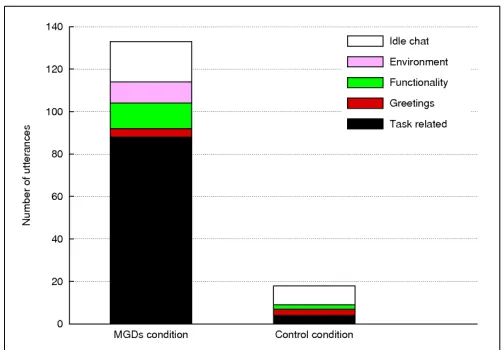
(e) Idle chat(e.g. ‘DI can actually read what’s on your T-shirt!’) Overall there were 133 utterances in the MGDs condition, of which 40 were text-based and 93 were spoken. The utterances oc-curred in 22 blocks of conversation and in 15 of these, all the speak-ers were in the same team. There were 18 utterances in the control condition, of which 16 were text-based and 2 were spoken. These utterances occurred in 3 blocks of conversation. These data show that there was much more communication in the MGDs condition, and most of it was task-related (see Figure 6).
Figure 6: The number of utterances in each communication category for the two conditions
5.2.2 Paths during teamwork
In the MGDs condition, the most persistent combination of team members wasD,KandG, in the green team, andP,I,R,BandJ, in the blue team (see Figure 3).
DandKwere identified as the core members of the green team because they communicated the most. Dspoke 29 utterances,K
spoke 22 butG(the third member) only spoke 12 utterances.
RandBwere identified as the core members of the blue team.R
spoke 41 utterances andBspoke 19, which was far greater than the other membersP,IandJwho spoke 5, 0 and 5 utterances respec-tively.
The paths of these core participants from the MGDs condition were analyzed in detail and showed that they sometimes moved to-gether around the environment answering a question, and on other occasions split up to explore their surroundings, and then regrouped to discuss their findings. By contrast, participants in the control condition communicated far less and spent little time in close prox-imity (see section 5.2.1).
The following paths and communication from the green team il-lustrate the types of behavior that occurred when MGDs were pro-vided. Figure 7(a): The two core members of the green team started at the entrance to the estate (shown with a timestamp [00:00] in the diagram), navigated around the environment together in a clockwise direction, and returned to the starting point.Dwas followingK us-ing the automatic followus-ing MGD functionality. Their conversation was based on the functionality of the system (the leader/follower mechanism), and the real world location of the virtual environment. The points at which the conversation took place are shown by times-tamps on the diagrams and in the extracts below.
[01:38] K: D are you following me? [01:42] D: I am, yes!
[01:45] K: Wicked!
[01:50] R: I think I can see my house from here!
[02:00] D: So is this meant to be an actual part of Leeds?
Figure 7(b): The core members returned to their starting point [03:00]. Theysplit up[03:50] and navigated one side of the estate each, until they regrouped again in the middle [05:00].
[image:7.612.53.295.236.401.2](a) 0-3 mins
(b) 3-5 mins
(c) 5-9 mins
(d) 17-20:12 mins
Figure 7: Paths of the core membersKandDfrom the green team.
KandDare represented by green and red lines respectively
[05:47] R: What do you reckon stops the volume of traffic?
[05:57] B: I don’t know
[06:03] R: Could it be that it’s so windy?
[06:07] K: Dead ends as...
[06:11] R: Was that... was that J? [06:14] K: No that was K!
The two core members of the green team regrouped at time [07:46]. One of the core members of the blue team,R, was with them and joined in their conversation.Rreported the findings from the blue team.
[07:46]/Text D: Hadn’t we better start answering some of the questions? [08:07]/Text K: i already ahve [08:10]/Text K: haahhha [08:18]/Text G: probably
[08:36]/Text R: we did the first two! [08:38]/Text G: how many exits are there?
[08:46] D: I’ve only found one. [08:49] R: One what?
[08:52] D: One exit.
[08:54] R: We found four pedestrian and one for cars.
[09:05] R: It’s a small world. [09:08] D: Too true.
The time from [09:08] to [17:00] has been omitted because there was little communication between the core members of the green team throughout this time (two utterances fromDand one fromK). Figure 7(d): The two core members of the green teamsplit up,
Dfound something of interest [17:45], theyregrouped[18:39],D
showed the rest of the team the point of interest from a distance using the bird’s-eye view [19:18].
[18:39] D: I’ve found a bit of the estate that doesn’t really match the rest. [18:42] K: Yeah. So have I.
[18:46] D: What have you put for that? [18:49] K: One of the two level houses has got a different color wall to the [K is referring to the brown fence around the terraced houses (determined from K’s report)]
[18:55] D: Oh, is that it?
[18:57] K: Yeah. Why? What have you got?
[19:00] D: If you press ‘Home’ and follow me I’ll show you.
[19:03] K: OK.
DleadK(andGwho was listening in) to the large building, and stopped by the side of it to talk [19:18]. (Pressing the ‘Home’ key toggled bird’s-eye view).
[19:18] D: If you all look to my left now, and have a look with ‘Home’... [19:23] K: OK.
[19:24] D: It’s laid out a completely different way and there’s a dead end in the middle.
[19:33]/Text G: ah yeah i see [19:34] K: Oh yeah!
KandGthen followedDto the point of interest.
[image:8.612.78.271.51.698.2]6 DISCUSSION
Our goal was to develop techniques for Mobile Group Dynamics that helped people work together over an extended period of time, in a large-scale space. MGDs had a neutral effect on task performance (the task was achievable by oneself) but did produce fundamental changes in the way participants went about performing the task and the quantity of teamwork that took place. In particular, this was shown by the amount of time that participants spent near each other, the way they continued to collaborate after periods of separation, and the amount of communication that took place.
Participants in the MGDs condition spent much more time in close proximity (within 10m of their nearest neighbor for 40% of the experiment) than participants in the control condition (21%), and two aspects of MGDs contributed to this. Firstly, participants could easily identify fellow group members because lines between group members indicated the location of others and each group was given a unique color (see soccer team analogy in Section 2.1). Sec-ondly, the automatic following functionality helped people remain together while they traveled, and also provided an easy way of re-grouping with one’s fellow members (75% of the MGDs partici-pants used the functionality in this way).
It is suggested that ‘cognitive ease’ as well as functionality af-fects group behavior in CVEs [2], and this may explain why MGDs were so successful at helping participants collaborate over an ex-tended time that included periods of separation. Firstly, allowing groups to form automatically via spatial proximity minimized the effort involved of initially forming a collaboration with other par-ticipants (80% of groups were formed in this way). Secondly, the explicit indication of who was in each team (see above) and the fact that audio communication within a group was not attenuated by dis-tance meant that participants did not lose contact if they wandered away from their fellow group members. Thirdly, leaving or switch-ing groups had to be done explicitly and, therefore, was effortful.
There were over seven times the number of utterances in the MGDs condition, compared to the control condition. This is the result of the suite of techniques as a whole. It could be argued that the very presence of MGDs would have given participants an idea of how to work together effectively [13] and, with 66% of the conversation being task related, this was representative of the extra teamwork taking place.
Finally, although participants could communicate with group members wherever they were in the environment, they still pre-ferred to spatiallyregroup to discuss their findings. When there was a point of interest, it seemed important for everyone to see it from the same viewpoint and get a shared understanding of it (see the dialog in Section 5.2.2, for Figure 7(d)). We plan to address this by further research into techniques to improve awareness of who can hear you and who is talking, allow rapid movement to another location by teleporting, and provide multiple views so participants can see what their group members are looking at.
ACKNOWLEDGEMENTS
The first author is funded by a Doctoral Training Grant Studentship from the School of Computing, University of Leeds.
REFERENCES
[1] K. Baker, S. Greenberg, and C. Gutwin. Empirical development of a heuristic evaluation methodology for shared workspace groupware. InProceedings of the 2002 ACM conference on Computer Supported Cooperative Work, pages 96–105, New Orleans, Louisiana, USA, November 16-20 2002. ACM.
[2] B. Becker and G. Mark. Social conventions in computer-mediated communication: A comparison of three online shared virtual envi-ronments. In R. Schroeder, editor,The Social Life of Avatars: Pres-ence and Interaction in Shared Virtual Environments, pages 19–39. Springer, London, 2002.
[3] J. Blascovich. A theoretical model of social influence for increasing the utility of collaborative virtual environments. InProceedings of the 4th International Conference on Collaborative Virtual Environments (CVE ’02), pages 25–30, Bonn, Germany, September 30-October 2 2002. ACM.
[4] C. A. Bowers, F. Jentsch, E. Salas, and C. C. Braun. Analyzing com-munication sequences for team training needs assessment. Human Factors, 40(4):672–679, 1998.
[5] B. Brown and M. Bell. CSCW at play: ‘There’ as a collaborative virtual environment. InProceedings of the 2004 ACM Conference on Computer Supported Cooperative Work (CSCW ’04), pages 350–359, Chicago, Illinois, USA, November 2004. ACM.
[6] L. Cheng, S. Farnham, and L. Stone. Lessons learned: Building and deploying shared virtual environments. In R. Schroeder, editor,The Social Life of Avatars: Presence and Interaction in Shared Virtual Environments, pages 90–111. Springer, London, 2002.
[7] L. Chittaro and S. Burigat. 3D location pointing as a navigational aid for virtual environments. InProceedings of the 7th International Conference on Advanced Visual Interfaces (AVI ’04), pages 267–274, Gallipoli, Italy, May 2004. ACM.
[8] Commission for Architecture and the Built Environment. The cost of bad design. http://www.cabe.org.uk/AssetLibrary/ 8125.pdf, 2006. (Accessed 27 April 2007).
[9] C. Greenhalgh and S. Benford. Supporting rich and dynamic commu-nication in large-scale collaborative virtual environments. Presence: Teleoperators and Virtual Environments, 8(1):14–35, 1999. [10] G. Hiebert. Openal 1.1 specification and reference.
http://www.openal.org/openal webstf/specs/ OpenAL11Specification.pdf, 2005. (Accessed 17 July 2007).
[11] J. Hindmarsh, M. Fraser, C. Heath, S. Benford, and C. Green-halgh. Object-focused interaction in collaborative virtual envi-ronments. ACM Transactions on Computer-Human Interaction, 7(4):477–509, 2000.
[12] K. Lewin. Resolving social conflicts : selected papers on group dy-namics. Research Center for Group Dynamics, University of Michi-gan. Harper & Brothers, New York, 1948. Gertrud Weiss Lewin, Ed. [13] J. M. Linebarger, C. D. Janneck, and G. D. Kessler. Leaving the world
behind: Supporting group collaboration patterns in a shared virtual environment for product design.Presence: Teleoperators and Virtual Environments, 14(6):697–719, 2005.
[14] Office of the Deputy Prime Minister. Urban design in the planning system: Towards better practice. http://www.odpm.gov.uk/ index.asp?id=1145239, 2000. (Accessed 8 February 2006). [15] R. Schroeder, I. Heldal, and J. Tromp. The usability of collaborative
virtual environments and methods for the analysis of interaction. Pres-ence: Teleoperators and Virtual Environments, 15(6):655–667, 2006. [16] S. Singhal and M. Zyda.Networked virtual environments : design and
implementation. Addison-Wesley, Reading, MA ; Harlow, England, 1999.
[17] A. Steed, M. Slater, A. Sadagic, A. Bullock, and J. Tromp. Leader-ship and collaboration in shared virtual environments. InProceedings of the IEEE Virtual Reality (VR ’99), page 112, Houston, TX, USA, March 13-17 1999. IEEE.
[18] N. Tsingos, E. Gallo, and G. Drettakis. Perceptual audio rendering of complex virtual environments. ACM Transactions on Graphics, 23(3):249–258, 2004.
[19] B. W. Tuckman. Developmental sequence in small groups. Psycho-logical Bulletin, 63(6):384–399, 1965.
[20] D. L. Weatherford. Representing and manipulating spatial information from different environments: Models to neighborhoods. In R. Cohen, editor,The Development of Spatial Cognition, pages 41–70. Lawrence Erlbaum Associates, Florence, Kentucky, 1985.


![Figure 7(d): The two core members of the green team split upDshowed the rest of the team the point of interest from a distance found something of interest [17:45], they, regrouped [18:39], Dusing the bird’s-eye view [19:18].](https://thumb-us.123doks.com/thumbv2/123dok_us/8011217.212011/8.612.78.271.51.698/figure-members-green-split-updshowed-distance-regrouped-dusing.webp)
