Pienapple Search: an integrated search interface to support
finding, refinding and sharing
Martynas Buivys
University of Glasgow
Glasgow, United Kingdom
[email protected]
Leif Azzopardi
University of Strathclyde
Glasgow, United Kingdom
[email protected]
ABSTRACT
Pienapple is a search interface that aims to combine bookmark-ing and searchbookmark-ing within a blended experience to facilitate improved access, serendipity, and sharing. While personal and social bookmarking platforms already exist, they are often separated from the search system, resulting in an increased effort and complexity because two or more systems need to be used. Instead, Pienapple attempts to lower the overall ef-fort of bookmarking, (re)accessing and sharing by bringing these activities together to provide a more supportive search interface.
Author Keywords
Interactive Information Retrieval, Re-finding, Collaborative Search, Social Search
INTRODUCTION
The World Wide Web contains a vast amount of information, where typically people use search engines to discover and sur-face content. Once found people employ a variety of tools and employ various strategies to re-find the information discov-ered, either by re-querying or saving the information (or a link to) for later use and re-visitation (Sellen et al., 2002; Jhaveri, 2004; Jones et al., 2001; Wen, 2003; Obendorf et al., 2007; Aula et al., 2005). Re-finding using a search engine and the use of bookmarks are among the most common re-visitation tech-niques (Aula et al., 2005; Jhaveri, 2004; Obendorf et al., 2007; Jones et al., 2001). Bookmarks, also known as favourites or hotlists, were invented more than two decades ago and were used as internet shortcuts in browsers like Internet Explorer, Mozilla Firefox, and Mosaic. Over the years, bookmarks have evolved into portable collections and social sharing platforms which allow remote access and management over the internet through the use of websites and browser extensions.
Now bookmarks and search are coming together, though, there is much scope for improvements and developments in this area. For instance,Google Chrome Bookmark Manageris a browser extension for organising bookmarks. However, this
This is the space reserved for copyright notices.
ASIST 2016, October 14-18, 2016, Copenhagen, Denmark.
Author Retains Copyright. Insert personal or institutional copyright notice here
bookmarking system is akin to the one provided by browsers, and so users have to go through the process of creating and organising newly added bookmarks. Furthermore, although the extension supports bookmark search it is not integrated into the standard web search interface, nor does it provide access to social bookmarks. On the other hand,Delicious, for example, is a popular social bookmarking tool that helps “...manage information traditionally kept on personal machines, while allowing for sharing with the community at large” (Lee, 2006). Although Delicious is portable and supports social exploration, bookmark search is isolated from web search. This separation requires the user to put in extra effort to visit the Delicious website in order to access and manage his/her bookmark collection. So rather than have a bookmarking tool and a search tool, we explore the possibility of making bookmarking activities, such as saving, re-finding and sharing, part of the web search experience. In this demonstration paper, we presentPienapple Search, a tool that integrates searching, bookmarking and sharing into one interface in a seamless manner. Our goal is to develop an interface that:
1. minimises the effort of bookmarking and re-finding
2. supports personal information management
3. enables collaborative and social search
In the remainder of this paper, we describe prior tools and efforts regarding personal information access, re-finding and bookmarking to provide the context and background for our novel interface. Then we outline thePienapple Search inter-face and the design rationale along with the findings from a usability study involving 26 participants.
BACKGROUND
such as emailing the URL of interest, printing or saving the web page, entering the URL directly and re-finding using a search service were among the re-access strategies employed by their subjects. Interestingly, the built-in browser tools such as bookmarks and the browsing history were not frequently used. These findings are consistent with the survey performed by Aula et al. (2005), who also noted that bookmarks are “...commonly used, but their frequency of use varies a lot”. Further, they pointed out that people use a variety of strategies to re-access information and that existing tools fail to ade-quately support users. When using search engines to re-find information, they found that searchers find it “...difficult to remember the query terms used when finding the information in the first place” (Aula et al., 2005). Teevan, Adar, Jones, and Potts (2006) analysed the search behaviour of 114 users over 365 days using the Yahoo! search engine. By monitoring users’ queries and clicks, it was discovered that “...forty per-cent of all observed queries (5216/13,060) led to a click on a result that was also clicked during another query session by the same user”. These findings were confirmed in the follow-up paper (Teevan et al., 2007), and the authors concluded there is a need for a tool that can effectively support finding and re-finding activities. Consequently, there has been a number of attempts to develop a variety of tools to help users.
Jhaveri and Räihä (2005) developedSession Highlightsto support users as they search - letting them drag and drop URLs to a separate workspace. Thumbnails of the pages were stored in the workspace so that users could re-access previously visited pages (and thus alleviate the medium-term re-visitation problem). M. R. Morris and Horvitz (2007a) developedS3, which was aimed at supporting the resump-tion of paused search activities (i.e. searching over multiple sessions). This prototype stored both the queries issued and pages the user marked as useful. This prototype served as the basis forSearchTogether(M. R. Morris & Horvitz, 2007b), which aims to support collaborative web search by sharing the queries and pages found. The interface was designed to support query awareness, division of labour and persistent rep-resentation of search among small groups of people working on the same task. It also included an instant messaging system and result recommendation to enable communication between participants. More closely related to our demonstration, is
SearchBar, which was developed by D. Morris, Morris, and Venolia (2008). SearchBar is a search-focused browsing his-tory tool, which was suggested by Obendorf et al. (2007). Its goal is to improve the user experience of resuming suspended search activities and re-finding previously encountered results. It aims to assist users in regaining the context of multi-session investigations. The SearchBar implicitly registers all user’s search queries and results visited and categorises them by the search topic which has to be manually created by the user. However, this introduced the problem of having to manage all the recorded queries and history. The authors try to address this problem by using a hierarchical display and rating-based filtering. In our system, we do not implicitly save and store queries and results (though that would be possible). Instead, we focus on integrating explicit bookmarking activity into the search experience. Of course, there have been numerous efforts associated specifically with bookmarking.
Delicious1is a social computing website which allows users to
store, annotate, manage and share links to useful resources on the web (Marlow et al., 2006). A Delicious bookmark contains information about the owner, the URL and the title of the re-source and an optional description. All bookmarks are public by default; however users have the option to mark a bookmark as private and opt out from participating in the community. Saved bookmarks are organised by tags which are manually chosen by the user. Tags are typically only useful for the cre-ator of the bookmark and not others. Wash and Rader (2007) interviewed twelve regular users of Delicious and discovered that tags do not help during information-seeking activities and established that “...in social discovery, it is the user and not the topic that is of interest”. There are many other online book-marking services similar to Delicious. For example,Diigo2
andPinboard3are two popular alternatives. Diigo enables users to bookmark and organise their online collections, as well as capture and annotate on-page elements. Similarly, Pinboard provides quick bookmarking and full-text search on bookmarks.Kippt4was a collaborative bookmarking ap-plication which was implemented as a browser extension. It allowed the user and his/her collaborators to archive various on-page elements such as videos, articles, and images. Each saved item could be searched for, shared and discussed with collaborators.Pocket5is another variant, which allows users to save articles they would like to read in the future. Thus, the application aims to support short-term re-visitation. However, these application did not integrate bookmarking into the user’s everyday search activities.
On the other hand, browsers provide support for bookmarking and re-finding. For example, theGoogle Chrome Bookmark Manager is an extension for the Google Chrome browser which stores the user’s bookmarks in the cloud so they can be accessed anywhere using any device. The process of book-marking a page is similar to using a browser’s bookbook-marking functionality. The user needs to select where the bookmark is saved too, give the bookmark a name (if they like), enter the name of the folder it is to be saved to, etc. Bookmarks are presented as big thumbnails to provide visual cues. The application allows you to search your bookmark collection easily using the URL bar and quickly re-find saved informa-tion. Other browsers such as Edge, Firefox and Safari also provide similar support.
As outlined above, there has been a variety of different book-marking applications. However, we posit, that because they are not fully integrated with how or when bookmarks are actu-ally used and when they are useful - this limits the utility of bookmaking. Said another way, the effort involved in booking and re-finding through a separate interface typically outweighs the benefit of doing so, especially when it is possible to re-query for the information. Our aim in developing Pienapple is to reduce the effort required, and provide more seamless access through an integrated search interface.
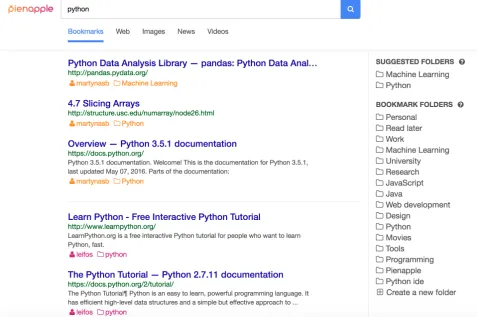
Figure 1. Pienapple Search interface (www.pienapple.com). When the user starts typing a query (i.e. “python”), results from their own bookmarks are recommended (personal space), along with recommendations from other users (social space). Folders relevant to the query are also recommended in the top right. If the user hits return or pressed the search button, then a web search is conducted (see Figure 2).
Figure 2. Pienapple Search interface (www.pienapple
.com) on the web vertical for the query “python”. The user can drag and drop results to folders, or visit them as usual, and use the browser extension to bookmark pages into their Pienapple folders.
PIENAPPLE SEARCH
Pienapple Searchaims to integrate bookmark search and man-agement within a typical web search interface. The system is deployed in the public domain, and it can be accessed by visitingwww.pienapple.com. The interface was designed to: (i) minimise changes to the standard web search interface, (ii) minimise the effort of the user’s bookmarking actions, and (iii) minimise the amount of effort involved in re-finding. An additional aim was to facilitate social exploration and sharing of bookmarks. Therefore, the Pienapple Search interface is similar to traditional web search interfaces: a query box, ten blue links of results and tabs to display the verticals (i.e. web, images, news and videos), see Figure 2. The look and feel are consistent with the minimalism of search engines such as Google and Bing. The modifications to the interface are as fol-lows: (i) a bookmarks vertical, (ii) a list of bookmark folders (on the right), and (iii) snippets on the bookmarks vertical also include who “owns” the bookmark, i.e. Pienapple username and folder name are shown (see Figure 3).
[image:3.612.53.302.450.626.2]hits search, the request is then submitted to the web vertical, and the web results are returned. This seamlessly integrates bookmark search and web search together.
Bookmarking:To do this, we first made the bookmark folders visible on the search interface and provided instant access to bookmarks by providing an additional tab (bookmarks). To facilitate access to bookmarks, as the user enters a querying, relevant bookmarks are displayed, until the user hits return or the search button, in which case a web search is performed. To reduce the effort of bookmarking, we provide a number of features: the ability to drag and drop results to folders from within the search interface, or if on a web page, the user can click the Pienapple extension to bookmark it. To further reduce the cost, as the user types a query we automatically suggest folders that are likely to be relevant to the query and suggest the creation of new folders based on the query.
Folder suggestion happens at two levels: (i) suggesting ex-isting folders and (ii) suggesting new folders. For example, if the user had folders about programming, i.e. “python”, “perl”, etc., and the query was “programming”, then these fold-ers would be recommended. If they added “python” to the query, then only the python folder would be suggested. In the second case, the interface would also suggest the create of a new folder, “python programming” as another possible folder to store bookmarks. The idea with these suggestions is again to minimise the effort of folder creation and bookmark organisation. Currently, two folders are recommended.
Sharing: To share bookmarks, a user needs to mark their folder as public. Then the list of bookmarks can be accessed by visiting: www.pienapple.com/<username>/<folder -name>. Sharing also happens implicitly. When searching on the bookmark vertical, bookmarks saved by other users are also recommended. These “social” bookmarks are indicated by including the username of the owner and the folder name. The idea here is that by showing such links to users will enable users to explore bookmarks others have found. Currently, we have only implemented public and private options. So it would be interesting to explore how such an option could be integrated with social networks to constrain where or which bookmarks are recommended.
Figure 3. Bookmark Snippet includes the owner (leifos) and folder name (django). These can be selected by the user to find other related bookmarks by the owner and in the folder.
Implementation
Pienapple Search project is implemented as a component-based system, consisting of seven independent services6:Web Client, an API service,MongoDBdatabase, ElasticSearch
6www.mongodb.org, www.elastic.co, redis.io, www.alchemyapi.com,
datamarket.azure.com/dataset/bing/search
bookmark search service,Redisqueue,AlchemyAPI services,
Microsoft Bingsearch service.
The Web Client is the user interface the user interacts with to search the web and manage the bookmarks. It is built using theReact JSframework and utilises theFacebook’s Flux
architecture. The Client is an independent component that communicates with the API through aRESTfulinterface by sending and receiving JSON payload. In addition, the Client is responsible for logging all user’s actions. The advantage of using a client-side logger over a server side logger is that it can capture richer data about how a user interacts with the interface.
The Pienapple API provides a public interface for clients to access the MongoDB database and the ElasticSearch book-mark search service. It also orchestrates the Redis job queue for background workers responsible for bookmark indexing. The API is implemented usingNode JSlanguage and runs on
Expressframework. It is plugged intoTravis CI, a continuous integration framework, which automatically runs a set of tests against all API endpoints to ensure the newly committed code does not break the application. The ElasticSearch bookmark search service is responsible for retrieving bookmarks based on a given search query. The client does not have direct access to the search service. Instead all requests by the client are proxied through the Pienapple API. Similarly, the Microsoft Bing search service is responsible for supporting searches in four different verticals: web, news, images, and videos. The API delegates the Client’s search requests in these verti-cals to Microsoft Bing Search API and returns the results in JSON format. Redis queue is used by the API for background jobs. For example, when a Pienapple Search user creates a bookmark, a few background jobs will be created. When a background worker becomes available, a request will be sent to the Alchemy API service to extract the content of the book-marked page. After that, the bookmark will be indexed by ElasticSearch search service. Alchemy API is used by the background workers to extract the text and named entities from bookmarked pages. The extracted content is then pushed to the ElasticSearch bookmark search service to improve the quality of the search results.
USABILITY STUDY
Given the Pienapple interface described above we conducted a usability study to determine what areas could be improved and to receive feedbacks on the application. At our university, we recruited 28 master’s students to perform a task based usability study. The participants were briefly introduced to the interface and then asked to perform a simulated leisure task, where participants had to imagine that they were hosting an Italian night for their friends. They were asked to find, bookmark, and then later re-find pizza recipes that would appeal to their friends. Participants answered a number 5-point Likert questionnaire about features of the interface (see Table 1), a standard 10-item System Usability Scale (SUS) questionnaire (Brooke, 1996) for measuring the perceived system usability, and three open-ended questions.
recommenda-Table 1. Likert Questions on Pienapple Usability (1-strongly disagree to 5-(1-strongly agree).
Question Mean (Std)
Good Integration 4.27 (0.92)
Good Recommendations 4.12 (0.91)
Easy to Manage 4.23 (0.91)
Preferred over other bookmarking tools 4.04 (0.82) Preferred over other search engines 3.23 (1.11)
Easy to Use 3.58 (1.14)
tions (i.e. suggesting folders into which URLs can be saved). They also felt it was it was relatively easy to manage their bookmarks. Participants felt it was a better bookmarking tool that other tools that they had previously used, but were mixed about whether it was better than existing search engines. There was also less agreement regarding whether it was easy to use. This was re-confirmed by the SUS questionnaire results where the interface was rated as 77 out of 100, which is considered to be good as the minimum usability score is considered to be 68 (Brooke, 1996). However, of the 28 participants, five rated the system below 60, with the lowest being 30. So this suggests that there is much room for improvement.
We asked three open-ended questions regarding what they most liked, least liked, and what they would improve in the system. We do not have space to detail all the points, and so below we provide a summary of the feedback. Re-affirming the Likert questions participants mentioned that liked the book-mark creation (N=4), organisation (N=6), and search (N=4). In addition, the participants liked the drag and drop bookmarking (N=3) and the Google Chrome extension to quickly bookmark the current page (N=2). For the least favourite features of the system, participants listed the limited sharing capability (i.e. currently a web link to the bookmarks as oppose to via social media) (N=2) and no obvious delineation between the personal bookmark search results and the results from other users. The participants also provided some suggestions on how to improve the interface. These included: nested folder support (N=3), the ability to re-arrange bookmarks folders (N=2), more intuitive or explicit ways to bookmark, as drag-ging and dropping was not obvious to some participants, and improved folder permissions (e.g. making it more obvious that folders can be made private or public) and highlighting whether a bookmark is personal or social. The suggestions by participants indicated more work is needed to make the experience more seamless and the interface more intuitive.
SUMMARY AND FUTURE WORK
In this demonstration paper, we have presented Pienapple Search, which aims to combine personal, social and web search together in a blended experience. From our usabil-ity study, while generally quite positive, we have identified a number of issues that need to be addressed before deploying the system and undertaking task-based evaluations and nat-uralistic studies. Once deployed we will focus our attention
on more backend IR problems: (i) bookmark folder sugges-tion (ii) bookmark ranking and (iii) sharing and suggesting bookmarks to other users.
References
Aula, A., Jhaveri, N., & Käki, M. (2005). Information search and re-access strategies of experienced web users. In
Proc. of the 14th www conference(pp. 583–592). Brooke, J. (1996).Sus: A quick and dirty usability scale.
Jhaveri, N. (2004).Intermediate and post-session web page revisitation techniques and tools(Unpublished master’s thesis). Department of Computer Sciences, University of Tampere, Finland.
Jhaveri, N., & Räihä, K.-J. (2005). The advantages of a cross-session web workspace. InChi ’05 extended abstracts
(pp. 1949–1952).
Jones, W., Bruce, H., & Dumais, S. (2001). Keeping found things found on the web. InProc. of the 10th cikm conference(pp. 119–126).
Lee, K. J. (2006). What goes around comes around: An analysis of del.icio.us as social space. InProc. of the 20th cscw conference(pp. 191–194).
Marlow, C., Naaman, M., Boyd, D., & Davis, M. (2006). Ht06, tagging paper, taxonomy, flickr, academic article, to read. InProc, of the 17th hypertext conference(pp. 31–40).
Morris, D., Morris, M. R., & Venolia, G. (2008). Searchbar: A search-centric web history for task resumption and in-formation re-finding. InProc of the acm chi conference
(pp. 1207–1216).
Morris, M. R., & Horvitz, E. (2007a). S3: Storable, shareable search. InInteract(p. 120-123).
Morris, M. R., & Horvitz, E. (2007b). Searchtogether: An interface for collaborative web search. InProc. of the 20th acm uist symposium(pp. 3–12).
Obendorf, H., Weinreich, H., Herder, E., & Mayer, M. (2007). Web page revisitation revisited: Implications of a long-term click-stream study of browser usage. InProc. of the acm chi conference(pp. 597–606).
Sellen, A. J., Murphy, R., & Shaw, K. L. (2002). How knowledge workers use the web. InProc. of the acm chi conference(pp. 227–234).
Tauscher, L., & Greenberg, S. (1997). Revisitation patterns in world wide web navigation. InProc. of the acm chi conference(pp. 399–406).
Teevan, J., Adar, E., Jones, R., & Potts, M. (2006). History repeats itself: Repeat queries in yahoo’s logs. InProc. of the 29th acm sigir conference(pp. 703–704). Teevan, J., Adar, E., Jones, R., & Potts, M. A. S. (2007).
Information re-retrieval: Repeat queries in yahoo’s logs. InProc. of the 30th acm sigir conf.(pp. 151–158). Wash, R., & Rader, E. (2007). Public bookmarks and private
benefits: An analysis of incentives in social computing.
Proc. of the ASIST,44(1), 1-13.
[image:5.612.61.291.86.173.2]