V-Lab-Protein: Virtual Collaborative Lab for Protein Sequence Analysis
Jong Youl Choi
1, Youngik Yang
1, Sun Kim
2,3, Dennis Gannon
1 1Dept. of Computer Science
2School of Informatics
3Center for Genomics and Bioinformatics
Indiana University, Bloomington, IN 47404, USA
{jychoi, yiyang, sunkim2, gannon}@indiana.edu
Abstract
Recent development of genome and gene analysis technology enabled rapid accumulation of biological data. To utilize such huge data, a biologist needs to have resource-rich computing environment and user-friendly analysis tool invocation. To response such requirements, we designed and implemented a virtual lab, named Virtual Collaborative Lab (V-Lab-Protein), using an efficient and flexible computing resource management and workflow engine with a user-friendly graphical workflow composer. Utility of our system is demonstrated by analyzing sample protein sequence sets. This is the first system of its kind that combines flexible workflow systems and on-demand compute and data resources (Amazon EC2/S3 in this case). We be-lieve that this system design principle will be a new and effective paradigm for small biology research labs to handle the ever-increasing biological data.
1.
I
NTRODUCTIONRecent development of genome and gene analysis technology enables even a personal research laboratory to generate a large amount of raw sequence data, i.e., a whole bacteria genome sequence, using new high-throughput sequencing technologies such as Pyrose-quencing [12]. However, most biologists do not have computational skill to handle such large amount of se-quence data. In particular, there are two computational challenges.
The first challenge is to build a computing environ-ment to handle a large amount of data. Although com-puting cost is getting cheaper, it is still expensive to purchase and maintain computing resources for biolog-ical data analysis. More importantly, setting up and managing the computing environment is typically beyond the ability of a small group of biologists. The second challenge is to combine bioinformatics tools
and databases. Biologists use a Web-based system which is typically designed to serve a single computa-tional tool or database. Thus combining multiple tools and databases in the Web environment is a very chal-lenging task for biologists. To overcome these two problems, we designed and implemented a virtual computing lab where a scientist can assign a dedicated computing resource in an on-the-fly manner, use the instant resource to analyze the raw data, and save the results in persistent disk storage which can also be shared with collaborators.
In this paper, we present a virtual system for protein sequence analysis, called a virtual collaborative lab for protein sequence analysis, V-Lab-Protein in short. We address the following two challenges mentioned above: 1. To facilitate setting up and managing a high per-formance computing environment, we used Amazon's Elastic Computing Clouds, known as Amazon EC2, for virtual computing powers and Simple Storage Service, also known as Amazon S3, for persistent data storage.
2. To address the difficulty in combining multiple computational tools and databases, we used our in-house workflow management system: Generic Service Toolkit, known as Gfac [5], a wrapper which converts any command-line application in-to a Web application and XBaya [17], a user-friendly graphical workflow composer written in Java, which provides a workbench filled with Web applications converted by Gfac.
The rest of the paper is organized as follows: In Section 2, we introduce main features of our V-Lab-Protein system from a user’s perspective. The architec-ture of V-Lab-Protein system is presented in Section 3 and related work is discussed in Section 4. Finally, in section 5, we briefly summarize our V-Lab-Protein system and discuss our future work.
2.
P
ROTEINS
EQUENCEA
NALYSISU
SINGV-L
AB-P
ROTEINA typical procedure for analyzing and annotating protein sequences involves the use of multiple bioin-formatics applications, such as Gibbs [19], ClustalW [8], and ARCS [2], and needs to run several queries against annotation databases such as Prosite [13] and Pfam [16].
For novice users, it is hard to learn how to correctly use such various applications and databases and ex-ecute them in the right order. Furthermore, many of the applications provide only a command-line interface running on the text-based terminal environment that biologists are not familiar with. To overcome such a problem and provide a user-friendly interface, a workflow concept with a graphical workflow composer can be used. By using a simple graphical workflow composer, a user can easily construct a complex workflow with several mouse movements. Once a composed workflow is activated with a list of applica-tions and data input, a workflow engine automatically marshals the required compute and data resources needed to execute the pipeline. In our V-Lab-Protein system, we used the Generic Service Toolkit, known as Gfac [5], as a wrapper which converts any command-line application into a Web application and XBaya [17]
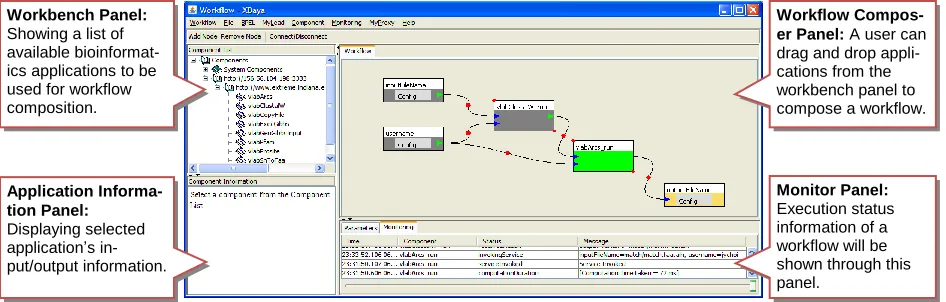
(Figure 1) as a user-friendly graphical workflow com-poser written in Java. Note that XBaya can be executed virtually in any computing environment for the use of Java GUI. Details are discussed in the next subsection. Another barrier to a novice user is the expensive cost for building computer infrastructure. Due to com-putation-rich characteristics of bioinformatics applica-tions, the need for higher computing powers is increas-ing. For this reason, a super computer or a Grid system, which is a group of multitude computing units, is wide-ly deployed and used among many bio research centers and institutes. However, the cost to build such powerful computing resources is still too expensive for a small group of researchers. On the other hand, cost of obtain-ing new biological data becomes cheaper and even a small lab can produce tons of protein sequences in an efficient way and thus the need for cheap and powerful computing resources is also increasing accordingly.
To respond this requirement, a virtual computing cloud service, which provides a collection of virtual computing instances in an on-demand manager, has been introduced by a few private sectors. The most prominent example is the Amazon Elastic Compute Cloud, which is a commercial pay-per-use service for anybody at surprising low cost. The model of dynami-cally loading a virtual machine onto a remote compu-ting resource is also under evaluation by the NSF Te-raGrid. By using a virtual computing cloud service, any computing resource can be dynamically assigned at any time. Instead of paying expensive cost for building or maintaining persistent computing resources, a user can pay only for the number of virtual computing instances he or she used in the cloud. In our V-Lab-Protein sys-tem, we use Amazon’s Elastic Computing Cloud (EC2) service as a virtual computing cloud.
Application Informa-tion Panel: Displaying selected application’s in-put/output information.
Monitor Panel:
Execution status information of a workflow will be shown through this panel.
Workbench Panel:
Showing a list of available bioinformat-ics applications to be used for workflow composition.
[image:2.612.72.545.76.227.2]Workflow Compos-er Panel: A user can drag and drop appli-cations from the workbench panel to compose a workflow.
Our V-Lab-Protein system for protein sequence analysis is designed to provide the followings:
A workflow engine with a user-friendly graphical workflow composer.
Flexible computing infrastructure by using a vir-tual computing cloud.
Simple Web interfaces.
In the following, we describe how to use our V-Lab-Protein system for protein analysis and annotation. We emphasize that ordinary users, biologists, do not have to know the details described in this section, which are described to explain how the system works.
2.1.
Application Services
To utilize the biological data for research projects, multiple tools should be combined. Thus, interoperabil-ity between tools is important. Unfortunately, however, most bioinformatics applications are not designed with such interoperability in mind. They are mostly stand-alone and platform-dependent. To overcome this prob-lem, application services have been proposed. An ap-plication service is, as defined in [5], a Web service which can invoke a command line application.
To invoke a Web service, a user can simply use Simple Object Access Protocol (SOAP) messages or Representational State Transfer (REST) messages, which is a standard Web service protocol. Thus, once deployed as an application service, bioinformatics ap-plications can be executed remotely through a unified way using SOAP or REST. Sometimes we call such a command-line application a Web application since the invocation is through the Web service.
To convert a bioinformatics application into an ap-plication service, we use a tool, called Generic Service Toolkit (Gfac) [5]. Gfac provides two services, a fac-tory service and a registry service. The Gfac’s facfac-tory service allows users to wrap any command-line bioin-formatics application to convert it into an application service and execute it by sending a Simple Object Access Protocol (SOAP) message.
To execute bioinformatics applications remotely through the Gfac’s factory service, a user needs to know which applications are available to execute and what their specifications of input and output parameters are to build a SOAP message. For this purpose, Gfac provides a registry service with which a user can dis-cover a list of available application services to execute and get information about input and output parameters. For example, by accessing Gfac’s registry service, a graphical workflow composer, called XBaya [17], can provide the list of available applications in its work-bench panel (Figure 1) and a user can use them to compose a workflow (More details are discussed in the next subsection).
In other words, to execute a command-line applica-tion through an applicaapplica-tion service, each command-line application needs to be registered with its input and output parameters’ specification through a registration process. For this purpose, the Gfac provides a registra-tion portlet which can be easily deployed in a Web portal. Registration is a one-time setup procedure which needs to be done by an administrator. Thus, normal users do not need to care about this procedure. For more detail information about registration process, we recommend readers refer to [5] and its user guide.
2.2.
Workflow Composition
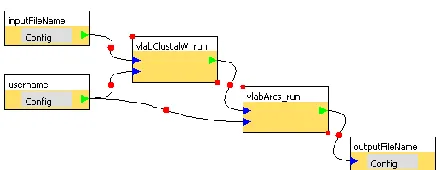
The workflow concept has been introduced in the scientific communities to execute a batch of multiple tasks by reducing a user’s involvement and enables a user to repeat the same task with ease. A workflow is a directed acyclic graph where each inner node is an ap-plication to execute and an edge between two nodes represents a flow of data. A starting node and an end node in a workflow graph correspond to an input and an output data respectively. An example of a workflow is shown in Figure 2.
[image:3.612.73.295.68.153.2]To build a workflow and execute it, our V-Lab-Protein system uses a graphical workflow composer, called XBaya [17]. In addition to the easy-to-use inter-face, the XBaya is coupled with Gfac to fetch the list of available Web applications or send a request to execute an application through a Web service standard protocol using SOAP messages. (Workflow execution is dis-cussed in the next subsection.)
A list of available Web applications to execute in the XBaya is shown in the workbench panel (Figure 1). To build a workflow, a user can simply do drag-and-drop one of the available applications from the work-bench panel as shown in Figure 3 (a). In the same way, input and output parameters can be added from the same panel. To create an edge between nodes, a user can simply push and release a mouse pointer over them
(Figure 3 (b)). For more information about using XBaya, we recommend readers refer to [17].
2.3.
Workflow Execution and Monitoring
Once a workflow is ready, a user can execute the workflow by using the XBaya. XBaya will follow a workflow sequences on the behalf of a user by sending an execution request to the Gfac’s factory service as discussed in 2.1.
When starting a workflow, the XBaya will prompt a dialog to a user to get necessary input data. After then, the XBaya will start to execute a workflow. For each execution in the workflow, it sends SOAP messages to the Gfac’s factory service which in turn invokes cor-responding Web applications.
After starting execution, XBaya can also monitor
(b) Creating an edge between two nodes (a) Adding a node
Drag-and-drop a component from the workbench panel.
Push the mouse button at the start point and release it at the end point.
Figure 3. Composing a workflow by using XBaya. A user can (a) add a node by doing drag-and-drop one of available applications from the workbench panel and (b) create an edge by pushing and releasing a mouse pointer between two nodes of a workflow.
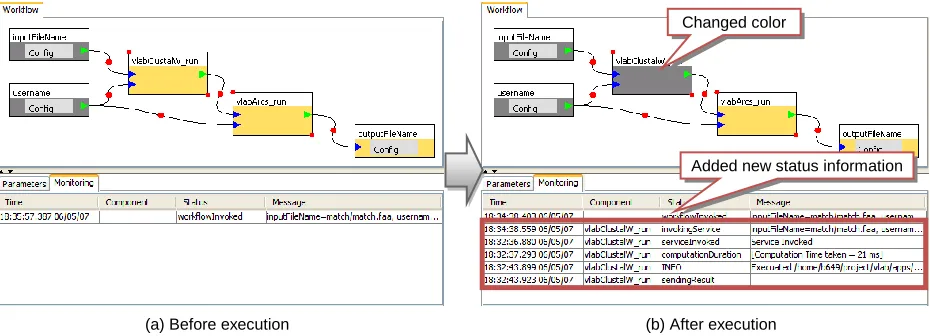
Changed color
Added new status information
(b) After execution (a) Before execution
[image:4.612.75.540.72.225.2] [image:4.612.74.539.499.667.2]the status of a workflow execution by using a standard publish-subscription (pub/sub) notification system as follows: (i) The XBaya subscribes to the pub/sub sys-tem to get the execution status information. (ii) For each invocation of an application service, the Gfac’s factory service will publish information about execu-tion status, such as time stamps, excepexecu-tions, parameters, elapsed times, to the pub/sub system which logs them and notify to subscribers like XBaya. (iii) Status mes-sages delivered by the pub/sub system are displayed in the monitor panel as shown in Figure 4 so that a user can check whether the execution goes well without any error.
2.4.
Computing Cloud
Running a bioinformatics application often requires that a user should use several computers, running in parallel, to save the computation time. To build such computing resources and manage them is very expen-sive, especially, to a small group of researchers. More-over, those computing environments are often persis-tent rather than flexible in that it is hard to change their capacities or configurations. To overcome this problem, we used virtual computing instances provided by a vir-tual computing cloud service, instead of using persis-tent and fixed computing resources.
In a virtual computing cloud, a user can have any number of computing units at any time and release them whenever a job is finished. The cost for a user is mainly depends on the number of computing resources he or she used and the duration of the service time. In this way, a user can achieve flexibility in using compu-ting resources and efficiency in the compucompu-ting costs.
The V-Lab-Protein system uses Amazon’s Elastic Computing Cloud (EC2) and Simple Storage Service (S3) as a computing cloud and a persistent storage re-spectively. EC2 provides a computing cloud service
where a user can have virtually any number of virtual computing instances at any time and S3 is a data sto-rage service inside the computing cloud, EC2. In EC2, data storage is volatile since the storage will be de-stroyed together as a virtual computing instance is ter-minated. However, storage in S3 is persistent and relia-ble as data saved in S3 can be accessirelia-ble at any time regardless of EC2.
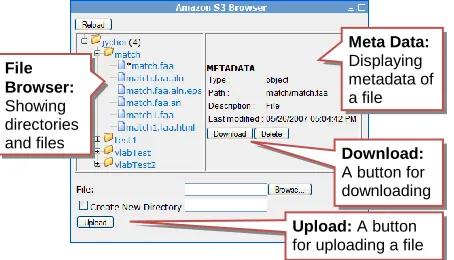
To access files saved in S3, we provides a Web in-terface, as shown in Figure 5, with which a user can upload input files to S3 or download outputs simply by using a Web browser.
Another important use of S3 is for the storage of an Amazon Machine Image (AMI) which contains all ne-cessary application files and data to be used by a vir-tual computing instance in EC2. Each virvir-tual compu-ting unit will be instantiated based on this image file. For our V-Lab-Protein system, we created a custo-mized AMI which contains Fedora Linux operating system plus all bioinformatics applications we used in this paper (see section 3.2).
In the V-Lab-Protein system, each bioinformatics application is to be executed in one of virtual compu-ting instances inside a compucompu-ting cloud, EC2, and all input and output data are saved in a persistent storage, S3. More precisely, when the Gfac’s factory service is called to execute a command-line application, it creates an instance of a virtual computing unit in the EC2 cloud and remotely executes the application in that instance. In our V-Lab-Protein system, we simply use a Secure Shell (SSH) client to perform the remote execu-tion. Any general remote execution application, such as rsh, Globus’ GRAM [9], and Condor-G [7], can be used as well.
When using an external and commercial computing cloud service, like Amazon EC and S3, a user should pay for what he or she consumes. Thus, it is also im-portant for a small group of users to efficiently manage the number of virtual computing instances in order to save the cost to pay. For this purpose, the V-Lab-Protein system has a broker component, called an “in-stance manager”, between the Gfac and the EC2 cloud. The instance manager will regularly check available resource status of running instances in EC2 and help Gfac to reuse one of instances which are idle or not heavily loaded to run another job. By using the instance manager, a user does not need to create an instance per every execution.
In our implementation, the instance manager simply counts the number of processes for running bioinfor-matics applications per each virtual instance in the EC2 cloud. If there is any instance whose process counter is lower than a user-defined threshold number, Gfac will reuse that instance to execute an application. Otherwise,
File Browser:
Showing directories and files
Meta Data:
Displaying metadata of a file
Download:
A button for downloading
Upload: A button for uploading a file
[image:5.612.73.300.79.209.2]the instance manager will create a new instance in an on-the-fly manner and Gfac will use the new one for execution of bioinformatics application.
From the user’s perspective, however, execution of an application is transparent in the V-Lab-Protein sys-tem in that creation of virtual computing instances and remote execution will be done behind the scenes.
3.
V-L
AB-P
ROTEINS
YSTEMA
RCHITECTUREIn this section, we describe the details of our V-Lab-Protein system.
3.1.
System Architecture Overview
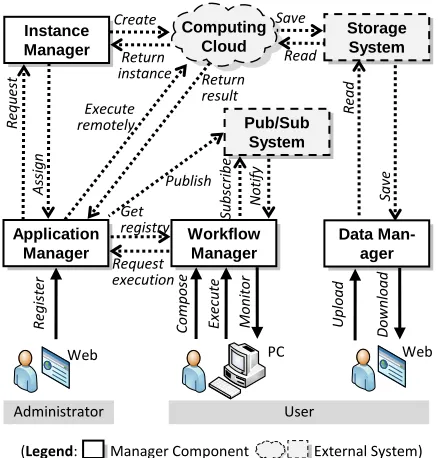
As shown in Figure 6, V-Lab-Protein system con-sists of 4 manager components: an application manager, a workflow manager, a data manager, and an instance manager. In addition, 3 external systems are used: a computing cloud system, a storage system, and a pub-lish/subscription (pub/sub) system. External systems are replaceable in that we can use any other similar system to provide the same functionalities.
Most of V-Lab-Protein’s components and systems are implemented in the form of Web services and ser-vice-oriented architectures, which allows our system to interoperate with other systems with easy. Thus, SOAP, REST or HTTP is the basis for our communication protocol. We use only Secure Shell (SSH) protocol for remote execution between the application manager and a virtual machine instance in the computing cloud. However, we can easily replace SSH with other Web
service-based protocols such as WS-GRAM in the Globus Toolkit [9].
In the next, we describe each component of our V-Lab-Protein system.
A.Application manager
The application manager provides two main servic-es: a registry service, which is to maintain the informa-tion of bioinformatics applicainforma-tions to serve, and a fac-tory service which is to execute an application in a re-mote virtual machine instance in the computing cloud upon receiving a request from the workflow manager.
Before executing an application remotely, the appli-cation manager can contact the instance manager to fetch the list of available instances that have extra pow-er to run the job. If thpow-ere is no such an instance, the instance manager will create a new one. In this way, we can efficiently control the number of virtual computing instances in the computing cloud to cut the costs. After execution, the application manager will publish execu-tion status to the pub/sub system in order for a user to be able to monitor execution status.
We use Gfac [5] for our application manager. Gfac also kindly provides a registry portlet, with which an administrator can manage registry information through any Web browser.
B.Workflow manager
The workflow manager enables a user to compose a workflow through a graphical user interface, execute a workflow on the behalf of the user, and monitor the status of execution.
When composing a workflow, a user needs to know the list of available bioinformatics applications to ex-ecute. This information is available through the appli-cation manager’s registry service. Before starting to execute a workflow, the workflow manager subscribes the execution status information to the pub/sub system where the application manager will publish such infor-mation. After completing subscription, the workflow manager begins to orchestrate the execution of a workflow. To execute an application, the application manager’s factory service is used. Due to the subscrip-tion, the workflow manager will either be notified the information about the execution status or can poll the information from the pub/sub system.
As our workflow manager, we use XBaya [17], which can be run virtually every platform since it is written in Java programming language.
C.Data manager
In our system, a user can upload and download in-puts and outin-puts of bioinformatics applications through the data manager, which is designed to provide a
con-M o n it o r R eg ist er Application Manager Workflow Manager Data Man-ager Instance Manager Co mp o se Up lo a d D o wn load Request execution Create R eq u est Return instance A ssi g n Execute
remotely R
ea
d
Sa
ve
Administrator User
Web PC Web
Get registry Execu te Pub/Sub System Su b scri b e N otify
(Legend: Manager Component External System)
[image:6.612.74.293.75.304.2]Computing Cloud Publish Return result Storage System Save Read
venient interface for users to access data stored in the storage service. We developed a Web interface so that a user can upload and download files simply by using a Web browser (Figure 5).
D.Instance manager
It is designed to manage the number of instances in a computing cloud service for saving the cost using a cloud service. Instead of creating a new instance for each request from the application manager, the instance manager tries to reuse available instances in the com-puting clouds in a way a user can save the cost for creating a new one. For this purpose, it monitors the instances in the computing cloud and their available resources.
E.Computing cloud service
We use Amazon’s Elastic Compute Cloud (EC2) as a computing cloud service. Amazon EC2 service pro-vides a resizable virtual computing cloud in which a user can request any number of virtual computing units at any time. Each instance predictably provides the equivalent of a system with a 1.7Ghz x86 CPU, 1.75GB of RAM, 160GB of local disk, and 250Mb/s of network bandwidth. Creating virtual computing in-stances in EC2 is very flexible and cheap. A user can create any number of units in minutes with less than 10 cents per instance-hour consumed.
F.Storage service
We use Amazon Simple Storage Service (S3) as a storage service. Amazon S3 is a persistent storage which is scalable, reliable, and inexpensive. A disk image for an instance of EC2, called Amazon Machine Image (AMI), and input and output files of bioinfor-matics applications are the main objects stored in S3. Costs are about $0.15 per GB-Month of storage plus $0.20 per GB of data transfer.
G.Publish/subscription (Pub/sub) system
A pub/sub system is used to deliver messages in a loosely coupled fashion. We use the pub/sub system to route execution status messages from the application manager to the workflow manager in a way the
applica-tion manager publishes execuapplica-tion status messages and the workflow manager subscribes them.
3.2.
Sequence analysis resources
The purpose of V-Lab-Protein is to provide com-mon tools and database applications to help gene anal-ysis process. For this purpose, we chose the most well-known and frequently used bioinformatics applications as shown in Table 1 and enabled a user to execute them in a virtual computing instance. The list is not final. An administrator can add, remove, and update any relevant application.
4.
R
ELATEDW
ORKIn recent years, a number of research projects on building a workflow system in the field of biology and bioinformatics have been conducted in order to provide biologists with an integrated workspace for using vari-ous bioinformatics applications. Those efforts to build such systems can be categorized under two main direc-tions: one is to develop efficient and user-friendly workflow composers and execution engines and the other is to use distributed and multiple computing re-sources, such as a Grid system, combined with a workflow system to enhance computing capability.
[image:7.612.66.543.87.168.2]Researches on bioinformatics workflows and workflow engines can be found in SIBIOS [11], Bi-oWBI [14], and KDE Bioscience [15]. SIBIOS (Sys-tems for the Integration of Bioinformatics Services) [11] has been developed in the focus of dynamic workflow execution and interoperability between dis-tributed and heterogeneous bioinformatics services. BioWBI (Bioinformatics Workflow Builder Interface) [14] is a Web tool to provide researchers with a virtual workspace for sharing data with collaborators and a graphical workflow composer. In addition to the graph-ical workflow composer, it also has a workflow execu-tion engine, called WEE, which is based on Web-service technology. KDE Bioscience (Knowledge Dis-covery Environment of Bioscience) [15] is a Java-based platform which integrates more than 60 bioin-formatics tools and provides a Java GUI-based workflow composer and its execution engine.
Table 1. The list of main bioinformatics applications installed in the V-Lab-Protein system.
Name Purpose
Gibbs Motif Sampler[18] To identify motifs or conserved regions within the given DNA or protein sequences as an input.
Prosite [12] To find a conserved pattern from a newly sequenced protein by assigning a protein family or domain to distinguish it from all other unrelated proteins.
WebLogo [4] Known as “Sequence Logo”. To get a graphical representation of an amino acid or nucleic acid multiple sequence alignment.
ARCS [2] To highlight the conserved regions among aligned biological sequences.
The other research direction to build a workflow system is to use a group of distributed and multiple computing resources, called Grid system, as a back-end computing resource. Among many efforts, Taverna [18], Triana [6], Kepler [1], GNARE [3], and RENCI-Bioportal [10] are worth mentioning. Taverna [18] has been developed as a part of the myGrid project and it is a workflow system running bioinformatics Web servic-es and existing bioinformatics applications over distri-buted resources. Triana [6] is designed to offer more a general approach to integrate with other Grid based systems, such as Globus and GridLab, or service oriented system like Web services. Kepler [1] is a scientific workflow system based on a dataflow-oriented model, so called an actor-dataflow-oriented model. To make the use of Grid systems, Kepler provides various ready-to-use proxies, call Grid actors. A user can easily combine these actors together to design a workflow. GNARE [18] is a bioinformatics server equipped with automated workflows and a Grid-based computational backend to perform high throughput analysis of ge-nomes with an aid of the workflow engine, GADU, which has access to thousands of CUPs from various large-scale Grid resources such as Open Science Grid (OSG) and TeraGrid.
Our V-Lab-Protein system shares similarity with the workflow systems such as Taverna [18], Triana [6], Kepler [1], and GNARE [3], for example, which are using a Grid system as a main computing resource. However, our V-Lab-Protein system is different from those systems in that we enable a user to use on-demand computing powers supplied from a virtual computing cloud service. Using virtual instances, in-stead of persistent resources, is more flexible and cost-efficient way for a small group of users to have such computing infrastructure for running computation-intensive bioinformatics applications.
5.
C
ONCLUSIONWe designed and implemented a virtual lab, named a virtual collaborative lab for protein sequence analysis (V-Lab-Protein), using an efficient and flexible compu-ting resources management and workflow engine with a user-friendly graphical workflow composer. This is the first system of its kind that combines flexible workflow management systems and on-demand compute and data resources (Amazon EC2/S3 in this case).
Utilizing the ever-increasing biological data is a huge challenge for small research labs and we believe that this system design principle will be a new and ef-fective paradigm for biology research that requires computational analysis of genome data. The prototype system presented in this paper is being extended signif-icantly in collaboration with biologists at Indiana.
6.
R
EFERENCES[1]B. Ludäscher, I. Altintas, C. Berkley, D. Higgins, E. Jaeger, M. Jones, E. A. Lee, J. Tao and Y. Zhao. Scientific workflow man-agement and the Kepler system: Research Articles. Concurr. Comput. : Pract. Exper. 18, 10:1039-1065, Aug. 2006. [2]B. Song, J. Choi, G. Chen, J. Szymanski, G. Zhang, A. Tung, J.
Kang, S. Kim, and J. Yang. ARCS: an aggregated related col-umn scoring scheme for aligned sequences. Bioinformatics 22, 19:2326-2332, Oct. 2006.
[3]D. Sulakhe, M. D’Souza, M. Syed, A. Rodriguez, Y. Zhang, E. Glass, M. Romine, and N. Maltsev. GNARE – A Grid-based Server for the Analysis of User Submitted Genomes. Accepted for publication in Nucleic Acids Res. (special issue). NAR-00335-Web-B-2007.R1, 2007.
[4]G. Crooks1, G. Hon, J. Chandonia and S. Brenner. WebLogo: A sequence logo generator. Genome Research, 14:1188-1190, 2004 [5]G. Kandaswamy, L. Fang, Y. Huang, S. Shirasuna, S. Marru, and D. Gannon. Building Web Services for Scientific Grid Applica-tions. IBM Journal of Research and Development, 50(2/3):249-260, 2006.
[6]I. Taylor, M. Shields, I. Wang and A. Harrison. Visual Grid Workflow in Triana. In Journal of Grid Computing, 3(3-4):153-169, September 2005.
[7]J. Frey, T. Tannenbaum, M. Livny, I. Foster and S. Tuecke. Condor-G: A Computation Management Agent for Multi-Institutional Grids. In Proceedings of HPDC ’01, August 2001. [8]J. Thompson, D. Higgins, and T. Gibson. CLUSTAL W: improv-ing the sensitivity of progressive multiple sequence alignment through sequence weighting, position-specific gap penalties and weight matrix choice. Nucleic Acids Res. 22:4673-4680, 1994. [9]K. Czajkowski, I. Foster, N. Karonis, C. Kesselman, S. Martin,
W. Smith, and S. Tuecke. A Resource Management Architec-ture for Metacomputing Systems. In Proceedings of the Work-shop on Job Scheduling Strategies For Parallel Processing. LNCS, 1459:62-82. Springer-Verlag, London, 1998.
[10]L. Ramakrishnan, M. Reed, J. Tilson, D. Reed. Grid Portals for Bioinformatics. Second International Workshop on Grid Com-puting Environments (GCE), Workshop at SC’06, 2006. [11]M. Mahoui, L. Lu, N. Gao, N. Li, J. Chen, O. Bukhres, Z.Miled.
A Dynamic Workflow Approach for the Integration of Bioin-formatics Services. Cluster Computing 8, 4:279-291, Oct. 2005. [12]M. Ronaghi, M. Uhlén, and P. Nyren. DNA SEQUENCING: A
sequencing method based on real-time pyrophosphate, Science, 281:363-365, 1998.
[13]N. Hulo, A. Bairoch, V. Bulliard, L. Cerutti1, E. Castro, P. Langendijk-Genevaux, M. Pagni1 and C. Sigrist. The PROSITE database. Nucleic Acids Res. 34:D227-D230, 2006.
[14]P. Leo, C. Marinelli, G. Pappada, G. Scioscia, L. Zanchetta. BioWBI: an Integrated Tool for building and executing Bioin-formatic Analysis Workflows, BioinBioin-formatics Italian Society Meeting (BITS 2004), Padova, 2004.
[15]Q. Lu, P. Hao, V. Curcin, W. He, Y. Li, Q. Luo, Y. Guo, and Y. Li. KDE bioscience: platform for bioinformatics analysis workflows. J. of Biomedical Informatics 39, 4:440-450, 2006. [16]R. Finn, J. Mistry, B. Schuster-Böckler, S. Griffiths-Jones, V.
Hollich, T. Lassmann, S. Moxon, M. Marshall, A. Khanna, R. Durbin, S. Eddy, E. Sonnhammer and A. Bateman. Pfam: Clans, Web Tools and Services. Nucleic Acids Research, 34:D247-D251, 2006
[17]S. Shirasuna and D. Gannon. Xbaya: A graphical workflow composer for the web services architecture. Technical Report 004, LEAD, 2006. (Available at http://www.extreme.indiana.edu/xgws/xbaya) [18]T. Oinn, M. Addis, J. Ferris, D. Marvin, M. Senger, M.
Green-wood, T. Carver, K. Glover, M. Pocock, A. Wipat, and P. Li. Taverna: a tool for the composition and enactment of bioinfor-matics workflows. Bioinforbioinfor-matics 20, 17:3045-3054, Nov. 2004. [19]W. Thompson, E. Rouchka and C. Lawrence. Gibbs Recursive