AUTOMATIC SORTING MACHINE USING USB CAMERA
WILLIAM TAM
This report is submitted in partial fulfillment of requirements for the award of Bachelor
of Electronic Engineering (Industrial Electronics) with Honours
Faculty of Electronic and Computer Engineering
Universiti Teknikal Malaysia Melaka
UNIVERSTI TEKNIKAL MALAYSIA MELAKA
FAKULTI KEJURUTERAAN ELEKTRONIK DAN KEJURUTERAAN KOMPUTER
BORANG PENGESAHAN STATUS LAPORAN
PROJEK SARJANA MUDA II
Tajuk Projek : Automatic Sorting Machine Using USB Camera Sesi
Pengajian : Januari 2009
Saya WILLIAM TAM____________________________________________________________ (HURUF BESAR)
mengaku membenarkan Laporan Projek Sarjana Muda ini disimpan di Perpustakaan dengan syarat-syarat kegunaan seperti berikut:
1. Laporan adalah hakmilik Universiti Teknikal Malaysia Melaka.
2. Perpustakaan dibenarkan membuat salinan untuk tujuan pengajian sahaja.
3. Perpustakaan dibenarkan membuat salinan laporan ini sebagai bahan pertukaran antara institusi
pengajian tinggi.
4. Sila tandakan ( √ ) :
SULIT*
(Mengandungi maklumat yang berdarjah keselamatan atau kepentingan Malaysia seperti yang termaktub di dalam AKTA RAHSIA RASMI 1972)
TERHAD* (Mengandungi maklumat terhad yang telah ditentukan oleh
organisasi/badan di mana penyelidikan dijalankan)
TIDAK TERHAD
Disahkan oleh:
__________________________ ___________________________________
(TANDATANGAN PENULIS) (COP DAN TANDATANGAN PENYELIA)
Alamat Tetap: No. 1661 Taman Bukit Kaya
70200 Seremban, Negeri Sembilan.
Tarikh: ……….. Tarikh: ………..
iii
“I hereby declare that this report is result of my own effort except for works that
have been cited clearly in the references.”
Signature : ………
Name : WILLIAM TAM
iv
“I hereby declare that I have read this report and in my opinion this report is
sufficient in terms of scope and quality for the award of Bachelor of Electronic
Engineering (Industrial Electronics) with Honours”
Signature : ………...
Supervisor’s Name : MS.FARAH SHAHNAZ FEROZ
v
ACKNOWLEDGEMENT
First of all, I would like to express my gratitude towards my family, friends,
lecturers and my lovely supervisor Miss Farah Shahnaz. Their guidance, ideas,
valuable knowledge and experiences have made my PSM gone a success, beyond my
expectation.
I appreciate Miss Farah for her support in my PSM. She accepted my PSM
title which I proposed at the initial stage. This was where my project started with a
kind and helpful supervisor. Although this topic is very new to Miss Farah and I, but
we believe in taking challenges through inventing and creating as one of our
directions and objectives to achieve in this PSM.
I have faced unlimited number of challenges in completing this project, from
paper work to technical part. In each development that I have gone through, not only
did I gain knowledge, but I also gained is that trust, believe and appreciation leads to
success. My PSM project not only worth 3 credit hours in my syllabus, to me it is
priceless.
Finally, I would like to thank everyone for their endless support and
vi
ABSTRAK
Jentera atau mesin yang bergantung pada penggunaan pengesan dalam
pengoperasian mempunyai had dalam melakukan perubahan seperti aplikasi,
penambahan baikan mesin dan juga perubahan bagi proses mesin tersebut.
Disebabkan masalah ini, ia bukan hanya menghadkan usaha jurutera-jurutera bagi
menghasilkan produk baru tetapi juga melibatkan pembaziran waktu bagi melakukan
penilaian setelah kaedah baru dilaksanakan. “PC Based Controller & Camera Vision”
akan menjadi revolusi pengesan pada masa hadapan, dimana akan mengantikan
pengesan konvensional seperti pengesan warna, infra-merah dan suis had pengesan
dalam membantu mengesan objek. Projek ini dapat diaplikasikan pada mana-mana
komputer peribadi dengan hanya memuat turunkan perisian LabView dan memasang
sebuah kamera. Perisian LabView, merupakan satu perisian yang mudah digunakan
dalam mereka dan merubah tanpa perlu menggunakan peralatan tambahan, dimana
jika dibandingkan dengan PLC yang memerlukan bantuan konsul bagi memasukan
arahan. Selain dari itu, LabView yang mempunyai kelebihan GUI memudahkan lagi
pengoperasian, aplikasi kawalan dan pemantauan. Diringkaskan, integarasi
penglihatan kamera dan computer boleh menjana satu alat yang dapat berfungsi bagi
apa jua jenis aplikasi dengan hanya melakukan pemprosesan imej atau analisis dan
melibatkan bersama sedikit pengatucaraan. Dalam penghasilan “Automatic Sorting
Machine”, keutamaan telah diberikan kepada kos, kualiti, kelajuan dan teramat
penting adalah mudah dikawal dan pantau. Konsep sistem penglihatan yang
digunakan dalam penghasilan produk kepada pengguna akan merupakan satu
daripada kejayaan yang terbaik dan teknologi ini akan dapat membantu kita dalam
vii
ABSTRACT
Machines that rely on sensors to run operations have certain limitations; such
as in terms of applications, machine upgrading, or when it comes to process change.
This matter has not only limited engineers’ development of new products, it is also
time consuming for engineers to perform product evaluations after a new
implementation has been done. PC Based Controller and Camera Vision are the next
revolution of sensors, replacing conventional sensors such as color sensor, infra red,
and limit switch for object detection, etc. Any normal PC with pre-installed
LabVIEW software and a connected camera could perform any of the
above-mentioned functions. LabVIEW programs could be created and modified easily
without the requirement of any additional device. Compared to PLC, a special
Handheld Console is needed to input commands. Besides that, GUI (Graphical User
Interface) makes the operation user-friendly and enhances monitoring features. In
short, the integration of Camera Vision and PC generates a powerful tool for
applications that require image processing or analysis, with minimum programming.
The priorities considered during the invention of this Automatic Sorting Machine are
cost, reliability, speed and most importantly, ease of use and simplicity. Using this
vision system concept to produce consumer gadgets would be another great
viii
TABLE OF CONTENTS
CHAPTER CONTENT PAGE
PROJECT TITLE i
REPORT DECLARATION FORM ii
STUDENT DECLARATION iii
SUPERVISOR DECLARATION iv
ACKNOWLEDGEMENT v
ABSTRAK vi
ABSTRACT vii
TABLE OF CONTENTS viii
LIST OF FIGURES xi
LIST OF TABLE xii
LIST OF BLOCK DIAGRAM xiii
LIST OF FLOW CHART xiv
I INTRODUCTION 1
1.1 Introduction 1
1.2 Project Objective 2
1.3 Problem Statement 2
1.3.1 The Conventional Method 2
1.3.2 Conventional Sensor Vs Vision System 3
1.4 Parallel Port 3
1.5 Scope of Work 4
II LITERATURE REVIEW 5
2.1 Introduction 5
2.2 LABVIEW as Programming Platform 5
2.2.1 Graphical Programming 5
ix
2.2.3 Reduces Cost and Preserves Investment 7
2.2.4 Multiple Platforms 8
2.2.5 Analysis Capabilities 8
2.2.7 Flexibility and Scalability 9
2.2.6 Visualization Capabilities 9
2.2.8 Research and Design 9
2.2.9 Development Test and Validation 10
2.2.10 Manufacturing Test 10
2.2.11 Manufacturing 11
2.2.12 Benefits of LabVIEW 11
2.3 Data Acquisition 13
2.3.1 Parallel Port 13
2.3.2 Function of Parallel Port 14
2.3.3 Parallel Port addresses 15
2.3.4 Program interface 16
2.3.5 Pinouts 16
2.3.6 Unidirectional parallel ports 17
2.4 Camera Vision System 17
2.4.1 Component of Machine Vision 19
2.4.2 Processing Method 20
2.4.3 Applications of machine vision 21
III METHODOLOGY 23
3.1 Introduction 23
3.2 Flow Chart 24
3.2.1 Work Flow Description 25
3.3 Hardware Development (H.D.) 26
3.4 Software Development (S.D) 27
3.5 List
Of Components 28
3.6 LABVIEW Development 28
3.6.1 NI Vision Module 30
3.7 IMAQ 31
x
3.9 Hardware and Software Integration 33
IV RESULT AND ANALYSIS 34
4.1 Introduction 34
4.2 Hardware Development 35
4.3 Software Development 43
4.3.1 Control Panel of ASM 43
4.3.2 Block Diagram of ASM 50
4.4 Analysis 54
4.4.1 Discussion 54
V CONCLUSION & SUGGESTION 56
5.1 Conclusion 56
5.2 Suggestion 56
REFERENCES 57
xi
LIST OF FIGURES
NO FIGURES PAGE
2.1 LabVIEW 7
3.1 While Loop 28
3.2 USB Acquisition 29
3.3 In Port 8bit 29
3.4 Out Port 8bit 29
3.5 LabVIEW Functions 29
4.1 Actual Product 35
4.2 Index Plate 36
4.3 I/O Board Controllers 38
4.4 Control Circuit 39
4.5 USB Hub 40
4.6 Steps Down Transformer 40
4.7 Image Captured Position 41
4.8 Index Plate Sensor Position 41
4.9 Loading Actuator 42
4.10 Loader Sensor 42
4.11 Control Panel 43
4.12 Statistics Analysis 44
4.13 Parameter 46
xii
LIST OF TABLE
NO TABLE PAGE
2.1 Printer Port Name 15
2.2 Printer Port Address 16
2.3 Printer Port Pinout 16
3.1 List of Components 28
4.1 List of Components 35
4.2 List of Container 37
4.3 Relay Connection 38
xiii
LIST OF BLOCK DIAGRAM
NO BLOCK DIAGRAM PAGE
3.1 Hardware and Software Integration 33
4.1 Generate a Pie Chart 45
4.2 Parallel Port Read/Write.vi 46
4.3 Unloader.vi 48
4.4 Loader.vi 49
4.5 Index Plate Origin.vi 49
4.6 Loader Check.vi 50
4.7 Index Plate Counter.vi 50
4.8 USB Acquisition.vi 51
4.9 Counter Reset.vi 52
4.10 IMAQ Learn Pattern.vi 52
4.11 IMAQ ReadFile.vi 53
xiv
LIST OF FLOW CHART
NO FLOW CHART PAGE
3.1 Development Step 24
3.2 Hardware Development 26
CHAPTER 1
INTRODUCTION
1.1 INTRODUCTION
Fully Automatic Sorting Machine (ASM) using USB Camera Vision is a
project that intends to help human work effectively. ASM sorts out items according
to category continuously without the assistance or monitoring of human. USB camera
is the main component in this whole project. The function of this camera is to capture
images of objects delivered by loader and send them to PC via USB cable. LabVIEW
is then used to analyze those images. A proper algorithm was designed to perform the
operation / analysis and generate output control signals to the respective hardware.
Finally, a rotary container was installed to collect items delivered by the conveyor.
This project intends to convey the general idea of vision systems.
The contribution of the idea of vision systems can be widely accepted and can
easily fit into any industry. This concept can be implemented in machine upgrading
or to improvise a current process. Besides that, the concept can also be used to design
a system that helps the disabled, mainly those with vision problems. The whole idea
2
1.2 OBJECTIVES
Sorting items or objects manually is a hassle - it consumes a lot of time and
the attention of the sorter. This translates to unnecessary high labor cost. Sometimes,
as the quantity of items increases, inconsistency in sorting happens due to worker
fatigue. These problems can be solved in an instant when machines are used for the
sorting process, replacing the manual work done by human.
The idea of Automatic Sorting Machine using USB Webcam (ASM) - my
PSM topic – can be used to handle the situation above. Processes such as
transferring, image processing and storage are part of ASM. human operation could
be replaced with higher reliability. The result clearly shows that it could reduce the
time consumed (tact time), cost, increase the safety and cleanliness.
Besides that, a simple modification on the current system could be used to
help the disabled especially those who are color blind. ASM can recognize the color
of an object and send the information to the blind in a pre-loaded sound. This is an
alternative way for them to get to know the color of an object.
Consumers are currently looking for user friendly and multipurpose products.
This project has a high demand value if it is implemented and marketed effectively.
In future, this machine could be resized to a handy device. Thus the blind could
easily bring it along just like the mobile phone that we carry everyday.
1.3 PROBLEM STATEMENT
1.3.1 The Conventional Method
Conventional machines rely on a variety of sensors to perform a single
3
to be time consuming when modifications are needed on a particular process. Besides
that, only qualified and experienced engineers manage to perform the modifications
smoothly. Other people who may need to follow up on the project in future require an
in-depth analysis and understanding of the process.
1.3.2 Conventional Sensor VS Vision System
Vision System is the revolution of sensors, replacing conventional color
sensor, motion sensor, vibration sensor, mechanical sensor and etc. Image analysis is
the most powerful tool to perform all of the above work. NI Vision Module is used to
perform image analysis in this project. This would thus reduce the cost of sensors
that could only perform certain functions, for example: color sensor has maximum
color determination up to 3 types. However, any colors could be detected without
limitations using vision system as long as the reference colors are well pre-set into
the database.
1.4 PARALLEL PORT
The main reason why I have selected Parallel Port as my interfacing port is
because Parallel Port can be found in any PC. Parallel Port is very common and can
easily interface with any hardware without additional devices or special drivers.
Besides that, the cost of parallel port is cheap compared to other DAQ (Digital
Acquisition) Input / Output offer in the market. The cheapest USB DAQ offered by
NI costs around RM500. In terms of cost, I probably can save up that sum for other
purposes. It is undeniable that Parallel Port has slower sampling rate, but it is more
than enough for my PSM. USB Camera would be more of a concern for me in this
4
1.5 SCOPES OF WORK
ASM requires a USB webcam, LabVIEW 8.5, NI Vision Module 8.5, Parallel
Port as I/O interfacing, and a PC. Each of the element mentioned above are essential
components to build the system. ASM costs below RM1000.00 with the student
version’s software, meaning to say that, the software is free for use under student
license and could not be used for commercial or profitable purpose. The costing and
budget allocation is focused to hardware parts. Any additional cost has been absorbed
into the sum above. However, any obligations of using National Instruments software
or designed program by student for commercial purposes require permission from the
appropriate authorities.
Parallel port interfacing with LabVIEW requires a special driver and also
knowledge on programming. I am required to understand the principle of writing a
program with arithmetic feature.
In order to use USB camera as the capturing device, NI vision module
software is used to work with LabVIEW 8.5. The license for this software is very
expensive, and the budget allocated by the faculty needs to be taken into
consideration. As a result, I will use the evaluation software to complete my task.
Besides that, I had concerns about the hardware part; to make it work
effectively with my program. Some of the parts were sent for manufacturing such as
CHAPTER II
LITERATURE REVIEW
2.1 INTRODUCTION
This chapter covers the background, advantages and disadvantages of the
software – LabVIEW used in my PSM. Parallel Port and Vision System interfacing
will be further discussed in this chapter as well.
2.2 LABVIEW AS PROGRAMMING PLATFORM
LabVIEW (short for Laboratory Virtual Instrumentation Engineering
Workbench) is a platform and development environment for a visual programming
language from National Instruments. The graphical language is named "G".
Originally released for the Apple Macintosh in 1986, LabVIEW is commonly used
for data acquisition, instrument control, and industrial automation on a variety of
platforms including Microsoft Windows, various flavors of UNIX, Linux, and Mac
OS.
2.2.1 Graphical Programming
6
development cycle. LabVIEW programs/subroutines are called virtual instruments
(VIs). Each VI has three components: a block diagram, a front panel, and a connector
pane. The last component is used to represent the VI in the block diagrams of other,
called VIs. Controls and indicators on the front panel allow an operator to input data
into or extract data from a running virtual instrument. However, the front panel can
also serve as a programmatic interface. Thus a virtual instrument can either be run as
a program, with the front panel serving as a user interface, or, when dropped as a
node onto the block diagram, the front panel defines the inputs and outputs for the
given node through the connector pane. This implies each VI can be easily tested
before being embedded as a subroutine into a larger program.
The graphical approach also allows non-programmers to build programs
simply by dragging and dropping virtual representations of lab equipment with which
they are already familiar. The LabVIEW programming environment, with the
included examples and the documentation, makes it simple to create small
applications. This has a benefit on one side, but there is also a certain danger of
underestimating the expertise needed for good quality "G" programming. For
complex algorithms or large-scale code, it is important that the programmer possess
an extensive knowledge of the special LabVIEW syntax and the topology of its
memory management. The most advanced LabVIEW development systems offer the
possibility of building stand-alone applications. Furthermore, it is possible to create
distributed applications, which communicate with a client/server scheme, and are
therefore easier to implement due to the inherently parallel nature of G-code.
To maintain clean and legible VI user interfaces, these tips need to be kept in
mind: keep panels simple and clean, maintain a consistent style, clean up wires
7
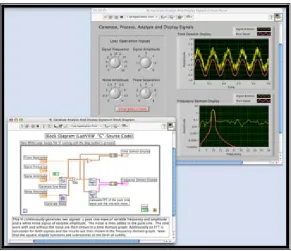
Figure 2.1 LabVIEW
2.2.2 Connectivity and Instrument Control
Virtual instrumentation software productivity comes about because the
software includes built-in knowledge of hardware integration. Designed to create,
test, measurement, and control systems, virtual instrument software includes
extensive functionality for I/O of almost any kind.
2.2.3 Reduces Cost and Preserves Investment
With LabVIEW, user can use single computer equipment for countless
applications and purposes. It is definitely a versatile and cost effective product.
Virtual Instrumentation with LabVIEW proves to be economical, not only in the
reduced development costs but also in its preservation of capital investment over a
long period time. When a user needs change, he / she can modify systems easily
without the need to buy new equipment of a single traditional, commercial
8
2.2.4 Multiple Platforms
The majority of computer systems use some variation of Microsoft Windows
operating system. Nevertheless, options offer clear advantages for certain types of
applications. Real-time and embedded development continues to grow rapidly in
most industries, as computing power is packaged into smaller and more specialized
packages. Minimizing losses resulting from changing to new platforms is important
and choosing the right software for this purpose is a key factor. LabVIEW minimizes
this concern, because it runs on Windows 2000, NT, XP, ME, 98, 95, and NT
embedded, as well as Mac OS, Sun Solaris, and Linux. LabVIEW complies code to
run on the VenturCom ETS real-time operating system through the LabVIEW
Real-Time Module. Given the important of legacy systems, National Instruments
continues to make available older versions of LabVIEW for Windows, Mac OS, and
Sun operating systems.
LabVIEW is platform independent; virtual instruments that have been written
in one platform can transparently be ported to any other LabVIEW platform by
simply opening the virtual instrument. Because LabVIEW applications are portable
across platforms; users can be assured that what works today will be applicable in the
future. As new computer technologies emerge, user can easily migrate the
applications to new platforms and operating systems. In addition, user can create
platform-independent virtual instruments by porting applications between platforms.
This can save development time and other inconveniences related to platform
portability.
2.2.5 Analysis Capabilities
Virtual instrumentation software requires comprehensive analysis and signal
processing tools; it is because the application does not just stop when the data is
collected. High speed measurement applications in machine monitoring and control
systems usually require order analysis for accurate vibration data. Closed-loop,
embedded control systems might need point-by-point averaging for control
9
included in Lab VIEW, National Toolset, the LabVIEW Sound and Vibration Toolkit,
and the Lab VIEW Order Analysis Toolkit to complement offerings.
2.2.6 Visualization Capabilities
LabVIEW includes a wide array of built-in visualization tools to present data
on the user interface of the Virtual Instrument for charting and graphing as well as
2D and 3D visualization. User can instantly reconfigure attributes of the data
presentation, such as colors, font size, graph types, and more, as well as
dynamically rotate, zoom, and pan these graphs with the mouse. Rather than
programming graphics and all custom attributes from scratch, user can simply
drag-and-drop these objects onto the instrument front panel.
2.2.7 Flexibility and Scalability
Engineers and scientists have the need and requirement that a system can be
used for a long time. By creating Virtual Instruments based on powerful
development software such as LabVIEW, user can design an open framework that
seamlessly integrates software and hardware.
This ensures that the applications not only work well today but the user can
easily integrate new technologies in the future as they become available, or extend
their solutions beyond the original scope, as new requirements are identified. Moreover,
every application has its own unique requirements that require a broad range of
solutions. Virtual Instruments provide significant advantages in every stage of the
engineering process, from research and design to manufacturing test.
2.2.8 Research and Design
In research and design, engineers and scientists demand rapid development
10
program, take measurements from an instrument to test a prototype, and analyze
results, all in a fraction of the time required to build tests with traditional instruments.
When user needs flexibility, a scalable open platform is essential, from
desktop, to embedded systems, to distributed networks. The demanding requirements
of research and development (R&D) applications require seamless software and
hardware integration. Whether the need is to interface stand-alone instruments
using GPIB, or directly acquire signals into the computer with a data acquisition
board and signal conditioning hardware, LabVIEW makes integration simple.
With virtual instruments, user also can automate a testing procedure, eliminating the
possibility of human error and ensuring the consistency of the results by not
introducing unknown or unexpected variables.
2.2.9 Development Test and Validation
With the flexibility and power of virtual instruments, user can easily build
complex test procedures. For automated design verification testing, you can create
test routines in LabVIEW and integrate software such as National Instruments Test
Stand, which offers powerful test management capabilities. One of the many
advantages these tools offer across the organization is reusable code. User can
develop code in the design process, and then plug these same programs into
functional tools for validation, test, or manufacturing.
2.2.10 Manufacturing Test
Decreasing test time and simplifying development of test procedures are the
primary goals in manufacturing test. Virtual instruments based on LabVIEW
combined with powerful test management software such as Test Stand deliver high
performance to meet those needs. These tools meet rigorous throughput requirements
with a high speed, multithreaded engine for running multiple test sequences in
parallel. Test Stand easily manages test sequencing, execution, and reporting based