Do students SQLify?
Improving Learning Outcomes with Peer Review and
Enhanced Computer Assisted Assessment of Querying
Skills
Michael de Raadt
Dept. Mathematics and Computing
University of Southern Queensland
Toowoomba, Qld, 4350, Australia
[email protected]
Stijn Dekeyser
Dept. Mathematics and Computing
University of Southern Queensland
Toowoomba, Qld, 4350, Australia
[email protected]
Tien Yu Lee
Dept. Mathematics and Computing
University of Southern Queensland
Toowoomba, Qld, 4350, Australia
[email protected]
ABSTRACT
In recent years a small number of web-based tools have been proposed to help students learn to write SQL query statements and also to assess students' SQL writing skills. SQLify is a new SQL teaching and assessment tool that extends the current state-of-the-art by incorporating peer review and enhanced automatic assessment based on database theory to produce more comprehensive feedback to students. SQLify is intended to yield a richer learning experience for students and reduce mark-ing load for instructors. In this paper SQLify is compared with existing tools and important new features are demonstrated.
Keywords
Peer Review, Computer Assisted Assessment, Web-based Learning, Databases, SQL.
1.
INTRODUCTION
SQL is the dominant language for defining and manipulating databases. SQL querying skills are highly valued in the comput-ing industry and as such teachcomput-ing of SQL in tertiary institutions rivals the importance of programming instruction.
Teaching students to write SQL queries has always been an onerous task for both instructors and students. Students suffer a number of identified difficulties in learning SQL (shown in section 1.1). To assist students in overcoming these difficulties several tools have been suggested which provide a simple envi-ronment for students to write and test queries against databases, receive immediate feedback which is more informative than what can be offered by a Database Management System (sec-tion 1.2).
For instructors, marking queries on paper can be tedious and error prone. Integrating tutoring systems into assessment sys-tems can allow instructors to mark the products of student learning in a more efficient and accurate manner.
Current systems for tutoring and assessment have proven their worth. A new system, SQLify, described here, combines most features present in existing systems.
Visualization of database schema
Visualization of query processing
Feedback on query semantics
Query assessment (using heuristics)
Consistent grading between students and markers
Relational Algebra expressions support
No single system other than SQLify combines all the features above.SQLify also incorporates several important new features to further improve learning outcomes for students and assist instructors.
Query assessment (using CQ query equivalence)
Scoring correctness beyond binary correct/incorrect
Use of peer review for assessment
1.1 Difficulties in Learning SQL
SQL has a simple syntax with a limited set of commands, yet it is possible to create complex queries with powerful results.
Even as early as 1978 Shneiderman [16] describes difficulties encountered by students. Shneiderman's study showed students can produce queries equally well in natural language and in, at that time, SEQUEL, but produced many more errors before achieving a correct artificial query.
Sadiq et al. [14] suggest the "straight forward syntax of the
SQL SELECT command is often misleading, and generates an
impression of simplicity in learners’ minds. Sadiq goes on to compare the declarative nature of programming languages, which require users to think in steps, with SQL, where users think in sets which can be difficult for learners.
Mitrovic [11] suggests learners struggle with the burden of having to memorize database schema and produce incorrect solutions because of this. Mitrovic also reports difficulty with grouping, join conditions and the difference between universal and existential quantifiers. These difficulties are also suggested by Kearns et al. [9].
1.2 SQL Tutoring and Assessment Systems
In efforts to overcome identified problems associated with learning SQL, a number of tools have been created at various institutions, each allowing practice with feedback beyond that of a normal DBMS. Additional interactive feedback is used to overcome semantic misunderstandings and oversimplifications. Visualization of schema and query processessing is used to overcome memorization problems. Some SQL teaching tools also offer integration with assessment in undergraduate courses. A number of such tools are described in literature.
SQLator, a tool created by the University of Queen-sland in 2004 and used extensively at the time [14].
AsseSQL, a tool created by the University of Technol-ogy, Sydney also in 2004 [12, 13].
SQL-Tutor, described in [11] and developed at the Uni-versity of Canterbury in Christchurch in 1998. This sys-tem atsys-tempts to provide intelligent feedback on stu-dents' attempts to create SQL queries.
eSQL, proposed in 1997 to help visualize the process of query processing [9].
RBDI is a command line tool allowing students to prac-tice their query writing skills in SQL, relational algebra and relational calculus. An extension of this, WinRBDI, is described in literature [8].
All systems are used to teach students to write SQL statements.
SQLator and AsseSQL are used to assess student queries and will be the focus of the remaining review.
Prior and Lister [13] present AsseSQL as an online tool which allows entry and execution of SQL queries by students. They suggest an electronic interface creates a more authentic task than writing queries on paper and may encourage a deeper learning approach. Students are allowed access to AsseSQL for practice, but the ultimate use of this system appears to be in closed examinations under supervised, time constrained condi-tions within a computer laboratory. As well as being given a problem to solve, students are shown the desired result of the query they are to write as part of the problem description; this is justified as an attempt to overcome students' poor English skills. Apart from being online, these conditions and aids ap-pear to create an unauthentic setting for student learning. Pro-fessional database users do write queries with computers, but not in these conditions. They will not know the results of a query before they create it. The system provides immediate feedback, but this is limited to the correctness of the solution provided by the student. No comments or suggestions for im-provement are provided. While this reduces the marking load on instructors, it does not correct students' misunderstandings or encourage further learning. Three forms of evaluation on As-seSQL are provided: results of a student attitudinal survey, evi-dence of a focus group and opinions of instructors. These evaluations show that an online SQL assessment tool is worth pursuing; however no validation of the system against student outcomes or results is suggested.
A clearer validation is presented by Sadiq et al [14] for SQLa-tor which showed student engagement through voluntary stu-dent practice statistics and improved results in final grades. TheSQLator system attempts to judge the correctness of sub-mitted queries and also provide intelligent feedback to "enhance [student's] learning experience." It is not clear how student results are used for assessment purposes or how students are motivated to use SQLator.
The papers describing the above mentioned tools focus on the resulting improvements in educational outcomes. None of these papers describe in detail the inner workings of their sys-tem and show minor regard to relational database theory. There is little mention of SQL teaching tools outside computing edu-cation.
BothAsseSQL and SQLator apply only a simple binary grading to queries submitted by students. While the creators of As-seSQL argue for the sufficiency of this right-or-wrong ap-proach, a greater objective discrimination of quality is possible using a more sophisticated grading system (see Section 2).
BothAsseSQL and SQLatoruse heuristic methods to evaluate queries entered by students. This involves running the submit-ted query on a test database, and comparing the output with that of the query included in the definition of the problem. It is
pos-sible for students to cheat by creating simple queries that pro-duce the desired output for the given database instance, which cannot be generalized to all instances of the database. For ex-ample, assume a student was asked to write a query to obtain names of employee who work in IT Department. With two ta-bles, an employee table and a department table, normally a join would be required to discover the department ID of the IT partment and then discover which employees are in that De-partment.
SELECT name FROM emp, dept WHERE
emp.deptno=dept.deptno AND dept.deptname=‘IT’;
A student, seeing an instance of the database and knowing that
thedeptno for the IT Department is 5, could cheat by writing
a query which produces the correct output without consulting thedept table.
SELECT name FROM emp WHERE deptno=5;
Sadiqet al. [14] suggest SQLator, using heuristic comparison, marks a query as correct in 95% of relatively easy test cases. The success of the heuristic depends in part on the database instance used in the test; a badly designed instance reduces the level of correctness of this method. In [13], Prior and Lister propose extending AsseSQL to run an additional test on a sec-ond database not shown to students. While this may increase the correctness of evaluation, it is still only another heuristic test.
In database theory it is well known that queries in the class of Conjunctive Queries (CQ) possess an important property: it is decidable whether two queries are equivalent. The CQ class is a significant subset of SQL excluding the set operators (union, difference, intersection) and grouping statements. In the intro-ductory Database Systems course at the University of Southern Queensland, more than 70% of the time spent on SQL is re-served for such queries. For this class of queries a computer assisted assessment tool should be able to evaluate correctness of submitted queries with 100% accuracy by examining the submitted queries alone. For queries that are not in CQ, a heu-ristic approach can still be used by comparing the output in-stance of the submitted query with that produced by the instruc-tor's set solution query. Such queries can then be flagged for instructor moderation.
Some practical considerations regarding database systems are also unaddressed in the existing literature. The use of the
DIS-TINCT keyword or sorting in a query makes it impractical to
test equivalence using only the heuristic described above. Fur-thermore, both AsseSQL and SQLatorseem vulnerable to SQL injection attacks. These include attempts to make unauthorised modifications to a database by taking advantage of the level of access provided by the interface. Care must be taken to check or rewrite a submitted query before it is evaluated by the data-base server.
The techniques used in automated SQL teaching and assess-ment tools can be readily used for relational algebra as well. This requires only a user-friendly (and, desirably, pedagogi-cally sound) interface for entering relational algebra statements, and additional logic to convert students' algebra expressions into SQL. This conversion process is a well-documented proce-dure. This is not used in SQLator or AsseSQL but is partially achieved in RBDI.
Accord-ing to Saunders [15] peer learnAccord-ing is advantageous as "it offers the opportunity for students to teach and learn from each other, providing a learning experience that is qualitatively different from the usual teacher-student interactions". Peer review can be conducted in a number of ways. The form used with SQLify
takes a student's submission and allows it to be reviewed by a number of student-peers, a process automated by the system and overseen by an instructor. Peer review allows students to evaluate the work of others which requires higher order think-ing skills [1] through evaluatthink-ing the work of peers and reflect-ing on their own work. With peer review, students also receive feedback from more than one source enriching the learning experience for students. Receiving feedback from peers can encourage a community of learning [2] which can in turn fur-ther encourage higher order thinking. Peer review involves students in the assessment process, encouraging increased en-gagement in the course and ultimately improved learning out-comes [4]. Peer review has been successfully incorporated in the assessment of student work in various fields, including computing [3, 4, 5, 10] with demonstrated improvements in students' learning outcomes. Peer review, when used as an assessment tool, can also reduce the assessment workload of instructors. Both AsseSQL and SQLator create only a single channel of communication between the student and the instruc-tor via the system. No other forms of communication (eg., peer to peer) are mentioned as being part of these systems or used along-side these systems.
In the next section, the SQLify system is proposed. The follow-ing section shows examples of a hypothetical implementation ofSQLify. In the final section, conclusions and possible future extensions of the system are suggested.
2.
THE SQLify PROPOSAL
Having compared and evaluated existing computer assisted learning and assessment tools, we now turn to the description of
SQLify (pronounced as squalify) which aims to improve on existing solutions on several different fronts. Specifically, the following requirements have driven the design of SQLify:
Provide rich feedback to students in an automated and semi-automated fashion;
Employ peer-review to enhance learning outcomes for students (through students conducting evaluations and receiving feedback from more sources);
Use database theory combined with peer review effec-tively to yield a wider range of final marks;
Judge the accuracy of reviews performed by students;
Reduce the number of necessary moderations conducted by instructors, freeing them for other forms of teaching.
Hence, the main focus of SQLify is computer assisted practice and assessment using a sophisticated automatic grading system in combination with peer review.
The current implemention of SQLify, with a demonstration of available functionality is viewable from the project website [6].
2.1 Use of SQLify
TheSQLify system is intended to assess a student's query writ-ing skills through an online interface in the context of assign-ments and preparing for assignassign-ments. Student use of the system can be seen to fall into a series of phases.
1. Trial and submission
2. Reviewing peers' submissions
3. Receiving feedback and marks
As show in Figure 1 a student will submit solutions to a number of problems. The value of their submission will be judged by peers, the SQLify system and ultimately by the instructor.
Correctness of Submission
Accuracy of Review
Final Mark
Correctness of Submission
Accuracy of Review
Correctness of Submission
[image:3.595.310.534.151.215.2]Accuracy of Review
Figure 1: Components of Student's Mark
Students complete reviews of (usually two) other students sub-missions for which they are awarded marks. The accuracy of their submission determines the mark they receive for review-ing.
Finally the marks they received for submission and the accu-racy of their reviews is summed for each question to form a final mark.
The following subsections describe in detail these three phases.
2.1.1 Trial and Submission
Students are able to develop and trial their query answers to a specific set of problems using SQLify and immediately see how the automatic grading system evaluates their work. The SQLify
system will give one of (a limited set of) the levels of correct-ness shown in Table 2. Students may trial their solutions in-definitely without submitting their query answers. The mark they are shown during this trial period is not necessarily what they will receive from the instructor for the correctness of their submission; this is given later by the instructor under advise-ment of the student's peers and the SQLify system. When the student is happy with their work they may proceed to submit-ting query answers to assignment problems.
Students completing assignments using SQLify will typically be given a number of English-language problems (say three to
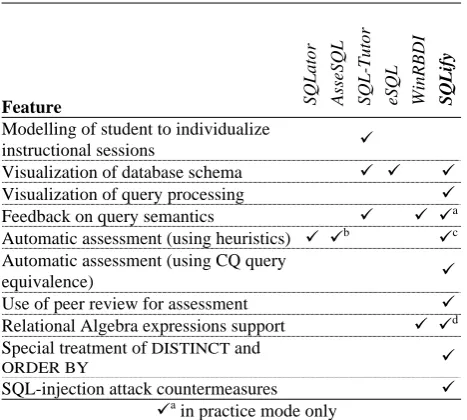
Table 1: Comparison of existing tools and SQLify
Feature SQLator AsseSQL SQL-Tutor eSQL WinRBDI SQLify
Modelling of student to individualize
instructional sessions 9
Visualization of database schema 9 9 9
Visualization of query processing 9
Feedback on query semantics 9 9 9a Automatic assessment (using heuristics) 9 9b
9c
Automatic assessment (using CQ query
equivalence) 9
Use of peer review for assessment 9
Relational Algebra expressions support 9 9d Special treatment of DISTINCT and
ORDER BY 9
SQL-injection attack countermeasures 9 9a
in practice mode only
9b
on two instances (proposal only) 9c
for queries not in CQ
9d
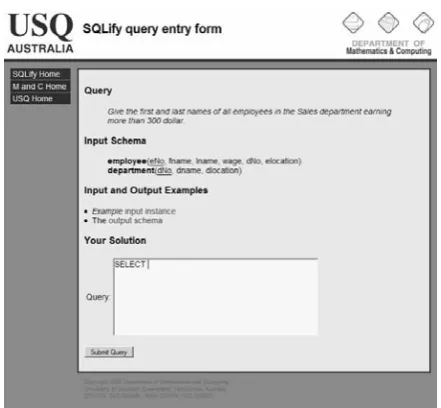
[image:3.595.310.544.539.749.2]five) that he or she would translate to SQL or Relational Alge-bra. The problems are well defined descriptions of authentic, real world problems. Students' query answers are submitted through a web form shown in Figure 2 which demonstrates a simple query description, the database schema, links to a visu-alization of an instance of the database and to an output schema, and a text area where the student can enter their query answer. The student can also be supplied with hints and com-ments, and also with the desired output schema for the query (not the desired output instance), if so determined by the creator of the problem.
To evaluate relational algebra expressions students use an inter-face that helps construct syntactically correct algebra expres-sions. An algorithm translates the submitted algebra expression to an equivalent SQL statement. The generated statement is then processed in the same way as a normal SQL statement.
Once a query is submitted to the system it is checked for SQL injection attacks. First, tables referenced in the FROM clause of the submitted statement need to appear in the source data-base schema, or the query will be rejected. Second, the WHERE clause is analyzed and possibly rewritten using mainstream SQL injection countermeasures.
Students are not notified if their submitted queries are syntacti-cally incorrect (although they should have been able to deter-mine this themselves by trialing their submission).
Students receive feedback about their submission in the final phase (see section 2.1.3).
2.1.2 Reviewing Peers' Submissions
SQLify is used with a pre-existing peer review system defined in [4] and integrated with SQLify as follows.
After submitting, most students will be able to immediately proceed to complete reviews allocated to them. A small pool of early-submitting students (usually four) will wait until enough submissions have accumulated before they can proceed to re-views.
This single step submit-review process has been successfully applied [4] and has several advantages over a two step process (submit before deadline, review after first deadline and before a second deadline):
only one deadline is needed,
the majority of students are not required to return to the site for the sole purpose of completing reviews,
students review the task they have just completed,
students receive feedback from peers sooner, and
students can work ahead in the course.
The system must facilitate reviewing in a way that maintains anonymity. The disadvantage of a single phase review alloca-tion system arises when students can predict who they will review, in which case collusion between students is possible. This can be countered by complicating the review allocation process and keeping its workings secret, by requiring each sub-mission to be reviewed by more than one peer and by compar-ing the accuracy of a student's review to a final correctness mark.
[image:4.595.315.536.80.284.2]When the system has allocated reviews to a student, reviewing can commence. The student is presented with a similar screen to what they used to input their query answer during the initial submission phase, but where they were previously able to enter their answer the system now shows a read-only query given by a peer. The reviewing student additionally sees the result of applying the query on the relevant database instance. The re-viewing student then selects a level described by a sentence from the list shown in Table 2 that best describes their assess-ment of the correctness of the query answer. The list of possi-ble levels given in Tapossi-ble 2 shows all availapossi-ble levels of which the reviewing student may choose levels marked with a tick in
Table 2: Levels implied by evaluation sentences. Different sentences may by used by reviewing students, the SQLify system, and the instructor. Internal assessment values (last column) are possible values for each level which may be set
by the instructor.
Level Description Student can use System can use Instructor can use Possible internal value for query
L0 Syntax, output schema, and
query semantics are incorrect 9 9 9 0%
L1 Syntax is correct, schema and
semantics incorrect 9 9 9 20%
L2 Syntax and schema correct,
semantics are incorrect 9 9 9 30%
L3
Syntax and schema correct, semantics are largely incor-rect
9 40%
L4
Syntax and schema correct, semantics seem largely incor-rect (not sure)
9 70%
L5 Syntax and schema correct,
semantics are just adequate 9 80%
L6
Syntax and schema correct, semantics seem largely cor-rect (not sure)
9 9 90%
L7 Syntax, schema, and
[image:4.595.56.286.89.415.2]seman-tics are correct 9 9 9 100%
the column titled "Student can use". No corresponding internal values are shown to the reviewing student. Reviewing students may express uncertainty by choosing a sentence that includes "I am not sure". This allows the system to assign a wider range of marks to reviews, but is also used to flag potential problems that need to be moderated by an instructor.
select ...
select ... SQLify
SQLify
Accuracy comparison
Accuracy comparison Instructor
Students being reviewed
[image:5.595.312.539.109.209.2]Reviewing Student
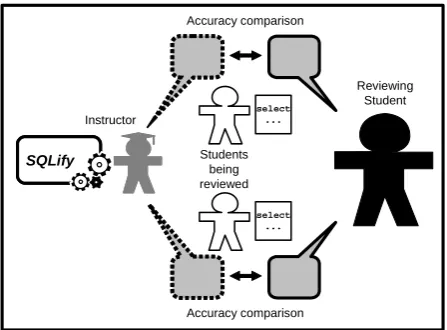
Figure 3: Checking Student's Peer Review Accuracy
By linking automatic assessment of queries with reviews given by students, it is not only possible to evaluate the correctness of queries, but also the accuracy of reviewers in judging that query. Students will review the work of two peers knowing that the reviews they perform will also be assessed as shown in Figure 3.
A student's review accuracy should be marked high when the level they selected for a peer's query answer is very similar to the level ultimately determined for that query answer by the instructor. Conversely, accuracy should be marked low when it differs greatly from the instructor's correctness mark. Hence, the formula for marking accuracy of a review performed by a student is quite simple.
accuracyMark =100 – | correctnessMark – studentMark |
In other words, the mark given to a reviewer for the accuracy of their review depends on the difference to the correctness mark assigned by instructor. Note that this formula has the additional effect that when a student has signaled uncertainty (by picking level L4 or L6) they will not be awarded full marks for this review.
Giving fellow students a false high or low level evaluation which differs for the mark applied by an instructor will lose marks for the reviewing student.
As well as judging correctness levels for their peer's query an-swers, reviewing students are also required to leave a comment. Students are encouraged to give comments of praise or positive suggestions for improvement. This is arguably the most valu-able part of the reviewing process for both the reviewer and the reviewee.
For the reviewer, peer reviewing is an opportunity to evaluate the work of a peer and in doing so, reflect on their own work. This requires higher order thinking skills [1] which will hope-fully encourage greater learning outcomes.
For the reviewee receiving peer feedback means they will re-ceive feedback from more sources than just the instructor or the system (see Figure 4). The information contained in comments
can encourage a more personal relationship among students (even anonymously) and between instructors and students [4].
select
... SQLifySQLify
Instructor giving feedback Peer giving feedback
Peer giving feedback Student receiving
[image:5.595.58.282.150.315.2]feedback
Figure 4: Feedback received by the student
For instructors, adding a comment allows elaboration on why a student may have lost marks and positive encouragement on their progress. The instructor may draw on a list of previously created comments to speed up the moderation process. This also provides consistency when multiple instructors are per-forming moderations.
It is important that students sense the instructor's involvement in the assessment process. They see the instructor as an author-ity and feel they deserve the attention of the instructor during the assessment process. It is possible for good students who produce excellent work, to be assessed equally by peers and the
SQLify system. In such cases the instructor may elect to assign a mark based on the agreed standard of the work without per-forming moderation. If a student achieves this consistently through the semester, they may miss the instructors input in their assessment; they may then feel cheated by the assessment approach. It is possible to track how many times a student has been moderated by an instructor and set target levels of mod-eration at various points through the teaching period. This way each student can be satisfied with the attention they are receiv-ing while still reducreceiv-ing the markreceiv-ing load on instructors.
Another potential of such a system is to allow students to flag peer reviews they believe to be incorrect for instructor interven-tion. Although quite often the instructor would be moderating such cases, this feature allows the student to express unhappi-ness with a review. This can remove some anxiety related to having their work assessed, in part, by peers.
2.1.3 Receiving Feedback and Marks
When all reviews of a student's work are complete, the instruc-tor allocates a mark for the student's work based on the levels suggested by peers and by the SQLify system. Instructors must attend to submissions that have been assessed differently by each peer or by the system. Past experience [5] has shown that in at least half of normal submissions, peers alone are able to achieve non-conflicting reviews, so this means moderation is most likely to be unnecessary. In most cases the system can determine a level for a solution with absolute certainty so this further eases the marking load of the instructor.
One of the clearest benefits of using a single-step peer review system it that students receive feedback about their submission as soon as a peer has completed their review. Compared with a normal instructor marked assignment where students must wait until after the assignment deadline for feedback, previous use of the approach suggested here returns feedback to students within hours [5].
The system suggests a final mark for a student's assignment. It does so by summing both the correctness marks for each query answer and accuracy marks for the reviews conducted by that student. The weighting of correctness and review accuracy for each problem in each assignment could be varied according to the effort for each. An example would be weighting the cor-rectness marks to 70% of the entire assessment and review ac-curacy marks to 30%. The instructor then chooses to accept or modify the suggested mark. Such marks may be released indi-vidually by the instructor or en masse. Details of how an accu-racy mark is determined by the system and how an instructor determines their accuracy mark are given in [7].
3.
EXAMPLE RUN THROUGH OF
SQLify SYSTEM
To illustrate the workings of SQLify, two query problems are presented together with a description of how they would be evaluated.
The problems make use of a database with the following schema.
employee(eNo, fname, lname, wage, dNo, elocation)
department(dNo, dname, dlocation)
3.1 Problem Example 1
The first query problem (QP1) is an example of a Conjunctive Query (a problem in class CQ). In this class it is possible to conclusively determine if a supplied query is correct without employing heuristic comparison.
Give the first and last names of all employees in the Sales department earning more than 300 dollars (QP1)
The instructor supplies a solution query that will be used by the system to test queries submitted by students.
SELECT fname, lname FROM employee E, department D WHERE E.dNo = D.dNo AND dname = 'Sales' AND wage > 300;
The following are two queries submitted by students. They are both different to the solution presented by the instructor, but both can be proved to be semantically equivalent to the instruc-tor's solution query and are therefore considered correct (refer to Table 2).
Table 3: Two correct query solutions (SA1 and SA2) in CQ class and how they were evaluated
Submitted query sys std1 std2
SELECT fname, lname FROM employee JOIN department ON dNo WHERE dname = 'Sales' AND wage > 300;
L7 L6 L7
SELECT fname, lname FROM employee E WHERE wage > 300 AND EXISTS (SELECT * FROM department D WHERE E.dNo = D.dNo AND dname = 'Sales');
L7 L7 L4
[image:6.595.305.550.97.153.2]The following query is an incorrect query answer to the above problem (QP1).
Table 4: An incorrect solution (SA3) in CQ class and how it was evaluated
Submitted query sys std1 std2
SELECT fname, lname FROM employee E WHERE dname = 'Sales' AND wage > 300;
L2 L6 L4
3.2 Problem Example 2
The next problem (QP2) involves a query that is not in CQ class.
List all locations where there is either an employee or a department. (QP2)
The following is an instructor's solution query for this problem.
(Select elocation From employee) UN-ION (Select dlocation From depart-ment);
Table 5 shows an incorrect solution to this problem.
Table 5: An incorrect solution (SA4) in CQ class and how it was evaluated
Submitted query sys std1 std2
Select loc FROM employee, department WHERE loc = elo-cation OR loc = dloelo-cation;
L2 L2 L3
3.3 Marking Query Correctness
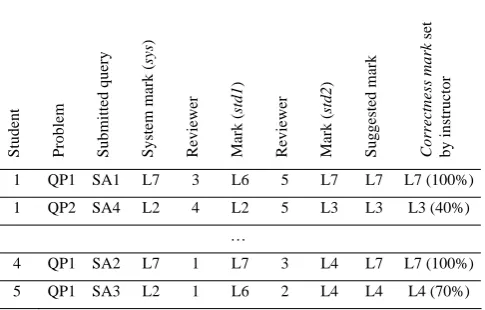
When the system has evaluated a submitted query and peer reviews are complete for that query the system will recommend a mark to the instructor. The instructor can then assign an ac-curacy mark for the query. Table 6 shows, for each row, the correctness marks for a particular query submitted by a student, as given by the system itself (sys), and two peers reviewing the query answer (std1 and std2). In addition, a suggested mark is shown calculated by SQLify on the basis of sys,std1 and std2. Refer to [7] for details on how this is achieved. Finally, the
accuracy mark assigned by the instructor is listed; this mark may or may not be the same as the suggested mark.
The internal values corresponding to levels given in Table 2 are not hard-coded into the system. The instructor using SQLify
[image:6.595.303.546.616.771.2]can set these values during use of the system. Hence, percent-ages given to query answers can be different in practice from the ones shown here.
Table 6: Correctness marks for submitted query answers
Student Problem Submitted query System mark (
sys
)
Reviewer Mark (
std1
)
Reviewer Mark (
std2
)
Suggested mark Correctness mark
set
by instructor
1 QP1 SA1 L7 3 L6 5 L7 L7 L7 (100%)
1 QP2 SA4 L2 4 L2 5 L3 L3 L3 (40%)
…
4 QP1 SA2 L7 1 L7 3 L4 L7 L7 (100%)
3.4 Checking Accuracy of Reviews
Table 7 lists one row per peer review that is performed in the context of an assignment. The first row, for instance, shows that student 1 was a reviewer for a query (SA2) submitted by stu-dent 4 in answer to query problem QP1. Stustu-dent 1 gave this query answer a correctness mark of L7. The accuracy mark for the submitted query answer given by the instructor was also L7. Hence, the accuracy mark for this particular review is 100. For the next review performed by this student there is a difference between the correctness mark given by this student and the accuracy mark set by the instructor. This difference causes their mark for accuracy to be reduced.
Table 7: Accuracy marks for reviews
1 4 QP1 SA2 L7 L7 0% 100%
1 5 QP1 SA3 L6 L4 20% 80%
…
3.5 Calculating a Final Mark
The last table below summarizes the various marks that a par-ticular student received for various query problems and for the reviews performed. A weighted final mark is given in the last row using the suggested weightings of 70% for correctness and 30% for accuracy of reviews.
Table 8: Final mark calculation Student: 1
Correctness marks QP1 100%
(Weight 70%) QP2 50%
QP3 70%
Review accuracy QP1 100%
(Weight 30%) QP2 80%
QP3 50%
Final Mark 74%
4.
CONCLUSIONS
In this paper a small set of existing tools used for teaching and assessing SQL writing skills was reviewed. The tools were evaluated from both from Computing Education and Database Theory perspectives, noting possible areas of enhancement.
A new tool called SQLify was introduced which is used for practice and submission of database query assignments. Central toSQLify is the use of an intricate automatic grading system and of peer review. The main reason for including peer review is to offer the students a richer learning experience. Addition-ally, the peer reviews will assist in the assessment of assign-ments.
SQLify uses a relatively complex method to suggest marks for assignments, designed to:
yield a much wider range of accuracy marks than sim-ply correct or incorrect;
employ peer review of assignment work by students en-couraging evaluation and producing more sources of feedback to students;
utilize database theory to enhance computer assisted grading;
set high quality demands for student reviews, yielding higher learning outcomes; and
reduce the number of necessary moderations by course instructors.
Each of these objectives must be made transparent to students. Students are informed of the possible learning benefits for stu-dents and the time-saving benefits for instructors. Stustu-dents must be made aware of how the marking approach will be used to assess their work and their reviews and how they must use the system to succeed in assessments.
SQLify has been prototyped and implemented and is ready to be used in a live course by the end of 2006, with the exception of Relational Algebra support. Student use of the system will be monitored. The usefulness of the system as perceived by stu-dents and instructors will then be evaluated. Any change in student outcomes will be measured.
With this new tool it will also be possible to effectively distin-guish specific problems within the areas of difficulty suggested in section 1.1, allowing feedback into the existing curriculum to improve teaching in these areas.
5.
REFERENCES
[1] Bloom, B.S., Taxonomy of Educational Objectives. Ed-wards Bros., Ann Arbor, Michigan, 1956.
[2] Brook, C. and Oliver, R., Online learning communities: Investigating a design framework. Australian Journal of Educational Technology, 19, 2, 2003, 139 - 160.
[3] Chapman, O.L. The White Paper: A Description of CPR. 2006 [cited February 23, 2006]; Available from: http://cpr.molsci.ucla.edu/cpr/resources/documents/misc/C PR_White_Paper.pdf
[4] de Raadt, M., Toleman, M., and Watson, R. Electronic peer review: A large cohort teaching themselves? In Pro-ceedings of the 22nd Annual Conference of the Austral-asian Society for Computers in Learning in Tertiary Edu-cation (ASCILITE'05). (Brisbane, December 4-7, 2005). QUT, Brisbane, 2005, 159 - 168.
[5] de Raadt, M., Toleman, M., and Watson, R., An Effective System for Electronic Peer Review. International Journal of Business and Management Education, 13, 9, 2006, 48 - 62.
[6] Dekeyser, S. and de Raadt, M. SQLify project website. 2006 [cited May 15, 2006, 2006]; Available from: http://www.sci.usq.edu.au/projects/sqlify/.
[7] Dekeyser, S., de Raadt, M., and Lee, T.Y. Computer As-sisted Assessment of SQL Query Skills. 2006 [cited 1st September, 2006]; Available from:
http://www.sci.usq.edu.au/research/workingpapers/sc-mc-0610.ps.
[8] Dietrich, S.W., Eckert, E., and Piscator, K. WinRDBI: a Windows-based relational database educational tool. In
Proceedings of the twenty-eighth SIGCSE technical sym-posium on Computer science education (San Jose, Cali-fornia, United States, February 27 - March 1, 1997). ACM Press, 1997, 126 - 130.
[9] Kearns, R., Shead, S., and Fekete, A. A teaching system for SQL. In Proceedings of the 2nd Australasian confer-ence on Computer sciconfer-ence education. (Melbourne, Austra-lia, 2 - 4 July 1997), 1997, 224 - 231.
[10] Kurhila, J., Miettinen, M., Nokelainen, P., Floreen, P., and Tirri, H. Peer-to-Peer Learning with Open-Ended Writable Web. In Proceedings of the 8th annual conference on In-novation and technology in computer science education ITiCSE '03. (Thessaloniki, Greece, June 30 - July 2, 2003). ACM Press, 2003, 173 - 178.
[11] Mitrovic, A. Learning SQL with a computerized tutor. In
Proceedings of the twenty-ninth SIGCSE technical sympo-sium on Computer science education SIGCSE '98. (At-lanta, United States, 25 - 28 Feb, 1998). ACM Press, 1998, 307 - 311.
[12] Prior, J. Online assessment of SQL query formulation skills. In Proceedings of the fifth Australasian conference on Computing education. (Adelaide, Australia, 4-7 Febru-ary, 2003). Australian Computer Society, 2003, 247 - 256.
[13] Prior, J. and Lister, R. The Backwash Effect on SQL Skills Grading. In Proceedings of the 9th annual SIGCSE conference on Innovation and technology in computer sci-ence education. (Leeds, UK, 28 - 30 June, 2004). ACM Press, 2004, 32 - 36.
[14] Sadiq, S., Orlowska, M., Sadiq, W., and Lin, J. SQLator: An Online SQL Learning Workbench. In Proceedings of the 9th annual SIGCSE conference on Innovation and technology in computer science education ITiCSE '04. (Leeds, UK, 28 - 30 June, 2004). ACM Press, 2004, 223 - 227.
[15] Saunders, D., Peer tutoring in higher education. Studies in Higher Education, 17, 2, 1992, 211 - 218.