Applied Microsoft .NET Framework
Programming
Jeffrey Richter PUBLISHED BY Microsoft Press
A Division of Microsoft Corporation One Microsoft Way
Redmond, Washington 98052-6399
Copyright © 2002 by Jeffrey Richter
All rights reserved. No part of the contents of this book may be reproduced or transmitted in any form or by any means without the written permission of the publisher.
Library of Congress Cataloging-in-Publication Data Richter, Jeffrey.
Applied Microsoft .NET Framework Programming / Jeffrey Richter. p. cm.
Includes index. ISBN 0-7356-1422-9
1. Microsoft .NET Framework. 2. Internet programming. I. Title. QA76.625 .R53 2002
005.2’76—dc21 2001056250
Printed and bound in the United States of America.
3 4 5 6 7 8 9 QWT 7 6 5 4 3 2
Distributed in Canada by Penguin Books Canada Limited.
A CIP catalogue record for this book is available from the British Library.
Microsoft Press books are available through booksellers and distributors worldwide. For further information about international editions, contact your local Microsoft Corporation office or contact Microsoft Press International directly at fax (425) 936-7329. Visit our Web site at www.microsoft.com/mspress. Send comments to [email protected].
Active Directory, ActiveX, Authenticode, DirectX, IntelliSense, JScript, Microsoft, Microsoft Press, MSDN, the .NET logo, PowerPoint, Visual Basic, Visual C++, Visual Studio, Win32, Windows, and Windows NT are either registered trademarks or trademarks of Microsoft Corporation in the United States and/or other countries. Other product and company names mentioned herein may be the trademarks of their respective owners.
The example companies, organizations, products, domain names, e-mail addresses, logos, people, places, and events depicted herein are fictitious. No association with any real company, organization, product, domain name, e-mail address, logo, person, place, or event is intended or should be inferred.
Acquisitions Editor: Anne Hamilton
To Kristin
I want to tell you how much you mean to me.
Your energy and exuberance always lift me higher.
Your smile brightens my every day.
Your zest makes my heart sing.
I love you.
Jeffrey Richter
Jeffrey Richter is a co-founder of Wintellect (http://www.Wintellect.com/), a training, design, and debugging company dedicated to helping companies produce better software faster. Jeff has written many books, including Programming Applications for Microsoft Windows (Microsoft Press, 1999) and Programming Server-Side Applications for Microsoft Windows 2000 (Microsoft Press, 2000). Jeff is also a contributing editor for MSDN Magazine, where he has written several feature articles and is the .NET columnist. Jeff also speaks at various trade conferences worldwide, including VSLive!, WinSummit, and Microsoft’s TechEd and PDC.
Jeff has consulted for many companies, including AT&T, DreamWorks, General Electric, Hewlett-Packard, IBM, and Intel. Jeff’s code has shipped in many Microsoft products, among them Visual Studio, Microsoft Golf, Windows Sound System, and various versions of
Windows, from Windows 95 to Windows XP and the Windows .NET Server Family. Since October 1999, Jeff has consulted with the .NET Framework team and has used the .NET Framework to produce the XML Web service front end to Microsoft’s very popular
TerraServer Web property (http://www.TerraServer.net/).
On the personal front, Jeff holds both airplane and helicopter pilot licenses, though he never gets to fly as often as he’d like. He is also a member of the International Brotherhood of Magicians and enjoys showing friends slight-of-hand card tricks from time to time. Jeff’s other hobbies include music, drumming, and model railroading. He also enjoys traveling and the theater. He lives near Bellevue, Washington, with his wife, Kristin, and their cat, Max. He doesn’t have any children yet, but he has the feeling that kids may be a part of his life soon.
Acknowledgments
I couldn’t have written this book without the help and technical assistance of many people. In particular, I’d like to thank the following people:
§ Members of the Microsoft Press editorial team: Sally Stickney, project editor and manuscript editor; Devon Musgrave, manuscript editor; Jim Fuchs, technical editing consultant; Carl Diltz and Katherine Erickson, compositors; Joel Panchot, artist; and Holly M. Viola, copy editor.
Morrison, David Mortenson, Yuval Neeman, Lance Olson, Srivatsan Parthasarathy, Mahesh Prakriya, Steven Pratchner, Susan Radke-Sproul, Jayanth Rajan, Dmitry Robsman, Jay Roxe, Dario Russi, Craig Schertz, Alan Shi, Craig Sinclair, Greg Singleton, Ralph Squillace, Paul Stafford, Larry Sullivan, Dan Takacs, Ryley Taketa, David Treadwell, Sean Trowbridge, Nate Walker, Sara Williams, Jason Zander, and Eric Zinda. If I’ve forgotten anyone, please forgive me.
§ Reviewers: Keith Ballinger, Tom Barclay, Lars Bergstrom, Stephen Butler, Jeffrey Cooperstein, Robert Corstanje, Tarek Dawoud, Sylvain Dechatre, Ash Dhanesha, Shawn Elliott, Chris Falter; Lakshan Fernando, Manish Godse, Eric Gunnerson, Brian Harry, Chris Hockett, Dekel Israeli, Paul Johns, Jeanine Johnson, Jim Kieley, Alex Lerner, Richard Loba, Kerry Loynd, Rob Macdonald, Darrin Massena, John Noss, Piet Obermeyer, Peter Plamondon, Keith Pleas, Mahesh Prakriya, Doug Purdy, Kent Sharkey, Alan Shi, Dan Vallejo, Scott Wadsworth, Beth Wood, and Steven Wort. § Wintellectuals: Jim Bail, Francesco Balena, Doug Boling, Jason Clark, Paula Daniels,
Introduction
Over the years, our computing lifestyles have changed. Today, everyone sees the value of the Internet, and our computing lifestyle is becoming more and more dependent on Web-based services. Personally, I love to shop, get traffic conditions, compare products, buy tickets, and read product reviews all via the Internet.
However, I’m finding that there are still many things I’d like to do using the Internet that aren’t possible today. For example, I’d like to find restaurants in my area that serve a particular cuisine. Furthermore, I’d like to be able to ask if the restaurant has any seating for, say, 7:00 p.m. that night. Or if I had my own business, I might like to know which vendor has a
particular item in stock. If multiple vendors can supply me with the item, I’d like to be able to find out which vendor offers the least expensive price for the item or maybe which vendor can deliver the item to me the fastest.
Services like these don’t exist today for two main reasons. The first reason is that no standards are in place for integrating all this information. After all, vendors today each have their own way of describing what they sell. The emerging standard for describing all types of information is Extensible Markup Language (XML). The second reason these services don’t exist today is the complexity of developing the code necessary to integrate such services.
Microsoft has a vision in which selling services is the way of the future—that is, companies will offer services and interested users can consume these services. Many services will be free; others will be available through a subscription plan, and still others will be charged per use. You can think of these services as the execution of some business logic. Here are some examples of services:
§ Validating a credit card purchase
§ Getting directions from point A to point B § Viewing a restaurant’s menu
§ Booking a flight on an airline, a hotel room, or a rental car § Updating photos in an online photo album
§ Merging your calendar and your children’s calendars to plan a family vacation § Paying a bill from a checking account
§ Tracking a package being shipped to you
I could go on and on with ideas for services that any company could implement. Without a doubt, Microsoft will build some of these services and offer them in the near future. Other companies (like yours) will also produce services, some of which might compete with Microsoft in a free market.
So how do we get from where we are today to a world in which all these services are easily available? And how do we produce applications—HTML-based or otherwise—that use and combine these services to produce rich features for the user? For example, if restaurants offered the service of retrieving their menu, an application could be written to query every restaurant’s menu, search for a specific cuisine or dish, and then present only those restaurants in the user’s own neighborhood in the application.
Note
To create rich applications like these, businesses must offer a programmatic interface to their business logic services. This programmatic interface must be callable remotely using a network, like the Internet. This is what the Microsoft .NET initiative is all about. Simply stated, the .NET initiative is all about connecting information, people, and devices.
Windows, provides a development platform that abstracts the application’s access to these peripherals. You can even think of these peripherals as services, in a way.
In this new world, the services (or peripherals) are now connected to the Internet.
Developers want an easy way to access these services. Part of the Microsoft .NET initiative is to provide this development platform. The following diagram shows an analogy. On the left, Windows is the development platform that abstracts the hardware peripheral differences from the application developer. On the right, the Microsoft .NET Framework is the
development platform that abstracts the XML Web service communication from the application developer.
Although a leader in the development and definition of the standards involved in making this new world possible, Microsoft doesn’t own any of the standards. Client machines describe a server request by creating specially formatted XML and then sending it (typically using HTTP) over an intranet or the Internet. Servers know how to parse the XML data, process the client’s request, and return the response as XML back to the client. Simple Object Access Protocol (SOAP) is the term used to describe the specially formatted XML when it is sent using HTTP.
In addition, the computers providing the services must be running an operating system that is listening for these SOAP requests. Microsoft hopes that this operating system will be Windows, but Windows isn’t a requirement. Any operating system that can listen on a TCP/IP socket port and read/write bytes to the port is good enough. In the not too distant future, mobile phones, pagers, automobiles, microwave ovens, refrigerators, watches, stereo equipment, game consoles, and all kinds of other devices will also be able to participate in this new world.
On the client or application side, an operating system must be running that can read/write to a socket port to issue service requests. The client’s computer must also be capable of supporting whatever features the user’s application desires. If the user’s application wants to create a window or a menu, the operating system must provide this functionality or the application developer must implement it manually. Of course, Microsoft hopes that people will write applications that take advantage of the rich feature set in Windows, but again, Windows is a recommendation, not a necessity.
What I’m trying to say is that this new world will happen whether Microsoft is a part of it or not. Microsoft’s .NET initiative is all about making it really easy for developers to create and access these services.
Today, we could all go write our own operating system and create our own custom Web servers to listen and manually process SOAP requests if we wanted to, but it’s really hard and would take a long time. Microsoft has taken on all this hard work for us, and we can just leverage Microsoft’s efforts to greatly simplify our own development efforts. Now we, as application developers, can concentrate and focus on our business logic and services, leaving all the communication protocols and plumbing to Microsoft (who has a lot of developers that just love to do this nitty-gritty stuff).
What Makes Up the Microsoft .NET Initiative
I’ve been working with Microsoft and its technologies for many years now. Over the years, I’ve seen Microsoft introduce all kinds of new technologies and initiatives: MS-DOS,
started hearing about Microsoft’s .NET initiative, I was surprised at how solid Microsoft’s story seemed to be. It really seemed to me that they had a vision and a plan and that they had rallied the troops to implement the plan.
I contrast Microsoft’s .NET platform to ActiveX, which was just a new name given to good old COM to make it seem more user friendly. ActiveX didn’t mean much (or so many developers thought), and the term, along with ActiveX controls, never really took off. I also contrast Microsoft’s .NET initiative to Windows DNA (Distributed InterNet Architecture), which was another marketing label that Microsoft tacked onto a bunch of already existing technologies. But I really believe in the Microsoft .NET initiative, and to prove it, I’ve written this book. So, what exactly constitutes the Microsoft .NET initiative? Well, there are several parts to it, and I’ll describe each one in the following sections.
An Underlying Operating System: Windows
Because these Web services and applications that use Web services run on computers and because computers have peripherals, we still need an operating system. Microsoft suggests that people use Windows. Specifically, Microsoft is adding XML Web serviceÐspecific features to its Windows line of operating systems, and Windows XP and the servers in the Windows .NET Server Family will be the versions best suited for this new service-driven world.
Specifically, Windows XP and the Windows .NET Server Family products have integrated support for Microsoft .NET Passport XML Web service. Passport is a service that authenticates users. Many Web services will require user authentication to access information securely. When users log on to a computer running Windows XP or one of the servers from the Windows .NET Server Family, they are effectively logging on to every Web site and Web service that uses Passport for authentication. This means that users won’t have to enter usernames and passwords as they access different Internet sites. As you can imagine, Passport is a huge benefit to users: one identity and password for everything you do, and you have to enter it only once!
In addition, Windows XP and the Windows .NET Server Family products have some built-in support for loading and executing applications implementing the .NET Framework. Finally, Windows XP and the Windows .NET Server Family operating systems have a new, extensible instant messaging notification application. This application allows third-party vendors (such as Expedia, the United States Postal Service, and many others) to
communicate with users seamlessly. For example, users can receive automatic notifications when their flights are delayed (from Expedia) and when a package is ready to be delivered (from the U.S. Postal Service).
I don’t know about you, but I’ve been hoping for services like these for years—I can’t wait!
Helpful Products: The .NET Enterprise Servers
As part of the .NET initiative, Microsoft is providing several products that companies can choose to use if their business logic (services) find them useful. Here are some of Microsoft’s enterprise server products:
§ Microsoft Application Center 2000 § Microsoft BizTalk Server 2000 § Microsoft Commerce Server 2000 § Microsoft Exchange 2000
§ Microsoft Host Integration Server 2000
§ Microsoft SQL Server 2000
It’s likely that each of these products will eventually have a “.NET” added to its name for marketing purposes. But I’m also sure that over time, these products will integrate more .NET features into them as Microsoft continues the initiative.
Microsoft XML Web Services: .NET My Services
Certainly, Microsoft wants to do more than just provide the underlying technologies that allow others to play in this new world. Microsoft wants to play too. So, Microsoft will be building its own set of XML Web services: some will be free, and others will require some usage fee. Microsoft initially plans to offer the following .NET My Services:
§ .NET Alerts
§ .NET ApplicationSettings § .NET Calendar
§ .NET Categories § .NET Contacts § .NET Devices § .NET Documents § .NET FavoriteWebSites § .NET Inbox
§ .NET Lists § .NET Locations § .NET Presence § .NET Profile § .NET Services § .NET Wallet
These consumer-oriented XML Web services are known as Microsoft’s “.NET My Services.” You can find out more information about them at
http://www.Microsoft.com/MyServices/. Over time, Microsoft will add many more consumer services and will also be creating business-oriented XML Web services.
In addition to these public Web services, Microsoft will create internal services for sales data and billing. These internal services will be accessible to Microsoft employees only. I
anticipate that companies will quickly embrace the idea of using Web services on their intranets to make internal company information available to employees. The implementation of publicly available Internet Web services and applications that consume them will probably proceed more slowly.
The Development Platform: The .NET Framework
Some of the Microsoft .NET My Services (like Passport) exist today. These services run on Windows and are built using technologies such as C/C++, ATL, Win32, COM, and so on. As time goes on, these services and new services will ultimately be implemented using newer technologies, such as C# (pronounced “C sharp”) and the .NET Framework.
Important
presented in this book is applicable to any and all of these application types.
The .NET Framework consists of two parts: the common language runtime (CLR) and the Framework Class Library (FCL). The .NET Framework is the part of the initiative that makes developing services and applications really easy. And, most important, this is what this book is all about: developing applications and XML Web services for the .NET Framework.
Initially, Microsoft will make the CLR and FCL available in the various versions of Windows, including Windows 98, Windows 98 Second Edition, and Windows Me as well as Windows NT 4, Windows 2000, and both 32-bit and 64-bit versions of Windows XP and the Windows .NET Server Family. A “lite” version of the .NET Framework, called the.NET Compact Framework, is also available for PDAs (such as Windows CE and Palm) and appliances (small devices). On December 13, 2001, the European Computer Manufacturers Association (ECMA) accepted the C# programming language, portions of the CLR, and portions of the FCL as standards. It won’t be long before ECMA-compliant versions of these technologies appear on a wide variety of operating systems and CPUs.
Note
Windows XP (both Home Edition and Professional) doesn’t ship with the .NET Framework “in the box.” However, the Windows .NET Server Family (Windows .NET Web Server, Windows .NET Standard Server, Windows .NET Enterprise Server, and Windows .NET Datacenter Server) will include the .NET Framework. In fact, this is how the Windows .NET Server Family got its name. The next version of Windows (code-named “Longhorn”) will include the .NET Framework in all editions. For now, you’ll have to redistribute the .NET Framework with your application, and your setup program will have to install it. Microsoft does make a .NET Framework redistribution file that you’re allowed to freely distribute with your application:http://go.microsoft.com/fwlink/?LinkId=5584.
Almost all programmers are familiar with runtimes and class libraries. I’m sure many of you have at least dabbled with the C-runtime library, the standard template library (STL), the Microsoft Foundation Class library (MFC), the Active Template Library (ATL), the Visual Basic runtime library, or the Java virtual machine. In fact, the Windows operating system itself can be thought of as a runtime engine and library. Runtime engines and libraries offer services to applications, and we programmers love them because they save us from reinventing the same algorithms over and over again.
The Microsoft .NET Framework allows developers to leverage technologies more than any earlier Microsoft development platform did. Specifically, the .NET Framework really delivers on code reuse, code specialization, resource management, multilanguage development, security, deployment, and administration. While designing this new platform, Microsoft also felt it was necessary to improve on some of the deficiencies of the current Windows platform. The following list gives you just a small sampling of what the CLR and the FCL provide:
§ Consistent programming model Unlike today, where some operating system facilities are accessed via dynamic-link library (DLL) functions and other facilities are accessed via COM objects, all application services are offered via a common object-oriented programming model.
§ Run once, run always All Windows developers are familiar with “DLL hell” versioning problems. This situation occurs when components being installed for a new application overwrite components of an old application, causing the old application to exhibit strange behavior or stop functioning altogether. The architecture of the .NET
Framework now isolates application components so that an application always loads the components that it was built and tested with. If the application runs after installation, then the application should always run. This slams shut the gates of “DLL hell.”
§ Simplified deployment Today, Windows applications are incredibly difficult to set up and deploy. Several files, registry settings, and shortcuts usually need to be created. In addition, completely uninstalling an application is nearly impossible. With Windows 2000, Microsoft introduced a new installation engine that helps with all these issues, but it’s still possible that a company authoring a Microsoft installer package might fail to do everything correctly. The .NET Framework seeks to banish these issues into history. The .NET Framework components (known simply as types) are not referenced by the registry. In fact, installing most .NET Framework applications requires no more than copying the files to a directory and adding a shortcut to the Start menu, desktop, or Quick Launch bar. Uninstalling the application is as simple as deleting the files. § Wide platform reach When compiling source code for the .NET Framework, the
compilers produce common intermediate language (CIL) instead of the more traditional CPU instructions. At run time, the CLR translates the CIL into native CPU instructions. Because the translation to native CPU instructions is done at run time, the translation is done for the host CPU. This means that you can deploy your .NET Framework
application on any machine that has an ECMA-compliant version of the CLR and FCL running on it. These machines can be x86, IA64, Alpha, PowerPC, and so on. Users will immediately appreciate the value of this broad execution if they ever change their computing hardware or operating system.
§ Programming language integration COM allows different programming languages to interoperate with one another. The .NET Framework allows languages to be
integrated with one another so that you can use types of another language as if they are your own. For example, the CLR makes it possible to create a class in C++ that derives from a class implemented in Visual Basic. The CLR allows this because it defines and provides a Common Type System (CTS) that all programming languages that target the CLR must use. The Common Language Specification (CLS) describes what compiler implementers must do in order for their languages to integrate well with other
languages. Microsoft is itself providing several compilers that produce code targeting the runtime: C++ with Managed Extensions, C#, Visual Basic .NET (which now
subsumes Visual Basic Scripting Edition, or VBScript, and Visual Basic for Applications, or VBA), and JScript. In addition, companies other than Microsoft and academic
institutions are producing compilers for other languages that also target the CLR. § Simplified code reuse Using the mechanisms described earlier, you can create your
own classes that offer services to third-party applications. This makes it extremely simple to reuse code and also creates a large market for component (type) vendors. § Automatic memory and management (garbage collection) Programming requires
great skill and discipline, especially when it comes to managing the use of resources such as files, memory, screen space, network connections, database resources, and so on. One of the most common bugs is neglecting to free one of these resources,
ultimately causing the application to perform improperly at some unpredictable time. The CLR automatically tracks resource usage, guaranteeing that your application never leaks resources. In fact, there is no way to explicitly “free” memory. In Chapter 19, “Automatic Memory Management (Garbage Collection),” I explain exactly how garbage collection works.
allow more than 10 bytes to be read. Type safety also means that execution flow will transfer only to well-known locations (that is, method entry points). There is no way to construct an arbitrary reference to a memory location and cause code at that location to start executing. Together, these measures ensure type safety eliminating many
common programming errors and classic system attacks (for example, exploiting buffer overruns).
§ Rich debugging support Because the CLR is used for many programming languages, it is now much easier to implement portions of your application using the language best suited to a particular task. The CLR fully supports debugging applications that cross language boundaries.
§ Consistent method failure paradigm One of the most aggravating aspects of Windows programming is the inconsistent style that functions use to report failures. Some functions return Win32 status codes, some functions return HRESULTs, and some functions throw exceptions. In the CLR, all failures are reported via exceptions— period. Exceptions allow the developer to isolate the failure recovery code from the code required to get the work done. This separation greatly simplifies writing, reading, and maintaining code. In addition, exceptions work across module and programming language boundaries. And, unlike status codes and HRESULTs, exceptions can’t be ignored. The CLR also provides built-in stack-walking facilities, making it much easier to locate any bugs and failures.
§ Security Traditional operating system security provides isolation and access control based on user accounts. This model has proven useful, but at its core assumes that all code is equally trustworthy. This assumption was justified when all code was installed from physical media (for example, CD-ROM) or trusted corporate servers. But with the increasing reliance on mobile code such as Web scripts, applications downloaded over the Internet, and e-mail attachments, we need ways to control the behavior of
applications in a more code-centric manner. Code access security provides a means to do this.
§ Interoperability Microsoft realizes that developers already have an enormous amount of existing code and components. Rewriting all this code to take full advantage of the .NET Framework platform would be a huge undertaking and would prevent the speedy adoption of this platform. So the .NET Framework fully supports the ability for the developer to access their existing COM components as well as call Win32 functions in existing DLLs.
Users won’t directly appreciate the CLR and its capabilities, but they will certainly notice the quality and features of applications that utilize the CLR. In addition, users and your
company’s bottom line will appreciate how the CLR allows applications to be developed and deployed more rapidly and with less administration than Windows has ever allowed in the past.
The Development Environment: Visual Studio .NET
The last part of the .NET initiative that I want to mention is Visual Studio .NET. Visual Studio .NET is Microsoft’s development environment. Microsoft has been working on it for many years and has incorporated a lot of .NET FrameworkÐspecific features into it. Visual Studio .NET runs on Windows NT 4, Windows 2000, Windows XP, and the Windows .NET Server Family servers, and it will run on future versions of Windows. Of course, the code produced by Visual Studio .NET will run on all these Windows platforms plus Windows 98, Windows 98 Second Edition, and Windows Me.
improvement is that there is now just one integrated development environment for all programming languages.
Microsoft also provides a .NET Framework SDK. This free SDK includes all the language compilers, a bunch of tools, and a lot of documentation. Using this SDK, you can develop applications for the .NET Framework without using Visual Studio .NET. You’ll just have to use your own editor and project management system. You also don’t get drag-and-drop Web Forms and Windows Forms building. I use Visual Studio .NET regularly and will refer to it throughout this book. However, this book is mostly about programming in general, so Visual Studio .NET isn’t required to learn, use, and understand the concepts I present in each chapter.
Goal of This Book
The purpose of this book is to explain how to develop applications for the .NET Framework. Specifically, this means that I intend to explain how the CLR works and the facilities it offers. I’ll also discuss various parts of the FCL. No book could fully explain the FCL—it contains literally thousands of types, and this number is growing at an alarming rate. So, here I’m concentrating on the core types that every developer needs to be aware of. And while this book isn’t specifically about Windows Forms, XML Web services, Web Forms, and so on, the technologies presented in the book are applicable to all these application types.
With this book, I’m not attempting to teach you any particular programming language. I’m assuming that you’re familiar with a programming language such as C++, C#, Visual Basic, or Java. I also assume that you’re familiar with object-oriented programming concepts such as data abstraction, inheritance, and polymorphism. A good understanding of these concepts is critical because all .NET Framework features are offered via an object-oriented paradigm. If you’re not familiar with these concepts, I strongly suggest you first find a book that teaches these concepts.
Although I don’t intend to teach basic programming, I will spend time on various programming topics that are specific to the .NET Framework. All .NET Framework developers must be aware of these topics, which I explain and use throughout this book.
Finally, because this is a book about the .NET Framework’s common language runtime, it’s not about programming in any one specific programming language. However, I provide lots of code examples in the book to show how things really work. To remain programming language agnostic, the best language for me to use for these examples would be IL (intermediate language) assembly language. IL is the only programming language that the CLR understands. All language compilers compile source code to IL, which is later processed by the CLR. Using IL, you can access every feature offered by the CLR.
However, using IL assembly language is a pretty low-level way to write programs and isn’t an ideal way to demonstrate programming concepts. So I decided to use C# as my programming language of choice throughout this entire book. I chose C# because it is the language Microsoft designed specifically for developing code for the .NET Framework. If you’ve decided not to use C# for your programming projects, that’s OK—I’ll just assume that you can read C# even if you’re not programming in it.
System Requirements
The .NET Framework will install on Windows 98, Windows 98 Second Edition, Windows Me, Windows NT 4 (all editions), Windows 2000 (all editions), Windows XP (all editions), and the Windows .NET Server Family servers. You can download it from
The .NET Framework SDK and Visual Studio .NET require Windows NT 4 (all editions), Windows 2000 (all editions), Windows XP (all editions), and the servers in the Windows .NET Server Family. You can download the .NET Framework SDK from
http://go.microsoft.com/fwlink/?LinkId=77. You have to buy Visual Studio .NET, of course. You can download the code associated with this book from http://www.Wintellect.com.
This Book Has No Mistakes
This section’s title clearly states what I want to say. But we all know that it is a flat-out lie. My editors and I have worked hard to bring you the most accurate, up-to-date, in-depth, easy-to-read, painless-to-understand, bug-free information. Even with the fantastic team assembled, things inevitably slip through the cracks. If you find any mistakes in this book (especially bugs), I would greatly appreciate it if you would send the mistakes to me at
http://www.Wintellect.com.
Support
Every effort has been made to ensure the accuracy of this book. Microsoft Press provides corrections for books through the World Wide Web at the following address:
http://www.microsoft.com/mspress/support/
To connect directly to the Microsoft Press Knowledge Base and enter a query regarding a question or issue that you may have, go to:
http://www.microsoft.com/mspress/support/search.asp
If you have comments, questions, or ideas regarding this book, please send them to Microsoft Press using either of the following methods:
Postal Mail:
Microsoft Press
Attn: Applied Microsoft .NET Framework Programming Editor One Microsoft Way
Redmond, WA 98052-6399
E-Mail:
Please note that product support is not offered through the above mail addresses. For support information regarding C#, Visual Studio, or the .NET Framework, visit the Microsoft Product Standard Support Web site at:
Part I:
Basics of the Microsoft .NET
Framework
Chapter List
Chapter 1: The Architecture of the .NET framework Development Platform
Chapter 2: Building, Packaging, Deploying, and Administering Applications and Types
Chapter 1: The Architecture of the .NET
Framework Development Platform
The Microsoft .NET Framework introduces many new concepts, technologies, and terms. My goal in this chapter is to give you an overview of how the .NET Framework is architected, introduce you to some of the new technologies the framework includes, and define many of the terms you’ll be seeing when you start using it. I’ll also take you through the process of building your source code into an application or a set of redistributable components (types) and then explain how these components execute.
Compiling Source Code into Managed Modules
OK, so you’ve decided to use the .NET Framework as your development platform. Great! Your first step is to determine what type of application or component you intend to build. Let’s just assume that you’ve completed this minor detail, everything is designed, the specifications are written, and you’re ready to start development.
Now you must decide what programming language to use. This task is usually difficult because different languages offer different capabilities. For example, in unmanaged C/C++, you have pretty low-level control of the system. You can manage memory exactly the way you want to, create threads easily if you need to, and so on. Visual Basic 6, on the other hand, allows you to build UI applications very rapidly and makes it easy for you to control COM objects and databases.
The common language runtime (CLR) is just what its name says it is: a runtime that is usable by different and varied programming languages. The features of the CLR are available to any and all programming languages that target it—period. If the runtime uses exceptions to report errors, then all languages get errors reported via exceptions. If the runtime allows you to create a thread, then any language can create a thread.
In fact, at runtime, the CLR has no idea which programming language the developer used for the source code. This means that you should choose whatever programming language allows you to express your intentions most easily. You can develop your code in any programming language you desire as long as the compiler you use to compile your code targets the CLR.
So, if what I say is true, what is the advantage of using one programming language over another? Well, I think of compilers as syntax checkers and “correct code” analyzers. They examine your source code, ensure that whatever you’ve written makes some sense, and then output code that describes your intention. Different programming languages allow you to develop using different syntax. Don’t underestimate the value of this choice. For
mathematical or financial applications, expressing your intentions using APL syntax can save many days of development time when compared to expressing the same intention using Perl syntax, for example.
Microsoft is creating several language compilers that target the runtime: C++ with managed extensions, C# (pronounced “C sharp”), Visual Basic, JScript, J# (a Java language
compiler), and an intermediate language (IL) assembler. In addition to Microsoft, several other companies are creating compilers that produce code that targets the CLR. I’m aware of compilers for Alice, APL, COBOL, Component Pascal, Eiffel, Fortran, Haskell, Mercury, ML, Mondrian, Oberon, Perl, Python, RPG, Scheme, and Smalltalk.
use the corresponding compiler to check the syntax and analyze the source code.
Regardless of which compiler you use, the result is a managed module. A managed module is a standard Windows portable executable (PE) file that requires the CLR to execute. In the future, other operating systems may use the PE file format as well.
[image:16.612.96.520.287.711.2]Figure 1-1 : Compiling source code into managed modules
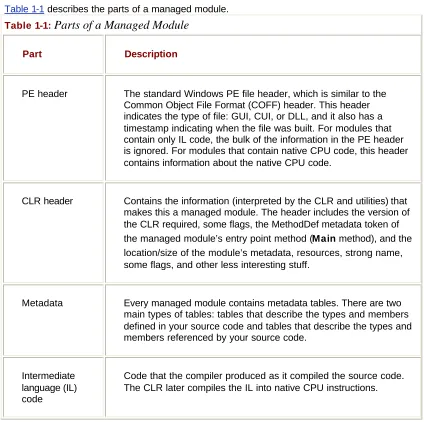
Table 1-1 describes the parts of a managed module.
Table 1-1:
Parts of a Managed Module
Part Description
PE header The standard Windows PE file header, which is similar to the Common Object File Format (COFF) header. This header indicates the type of file: GUI, CUI, or DLL, and it also has a timestamp indicating when the file was built. For modules that contain only IL code, the bulk of the information in the PE header is ignored. For modules that contain native CPU code, this header contains information about the native CPU code.
CLR header Contains the information (interpreted by the CLR and utilities) that makes this a managed module. The header includes the version of the CLR required, some flags, the MethodDef metadata token of the managed module’s entry point method (Main method), and the location/size of the module’s metadata, resources, strong name, some flags, and other less interesting stuff.
Metadata Every managed module contains metadata tables. There are two main types of tables: tables that describe the types and members defined in your source code and tables that describe the types and members referenced by your source code.
Intermediate language (IL) code
Most compilers of the past produced code targeted to a specific CPU architecture, such as x86, IA64, Alpha, or PowerPC. All CLR-compliant compilers produce IL code instead. (I’ll go into more detail about IL code later in this chapter.) IL code is sometimes referred to as managed code because the CLR manages its lifetime and execution.
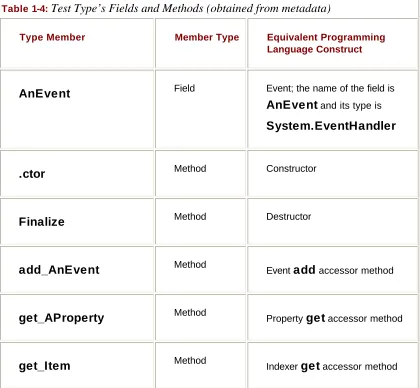
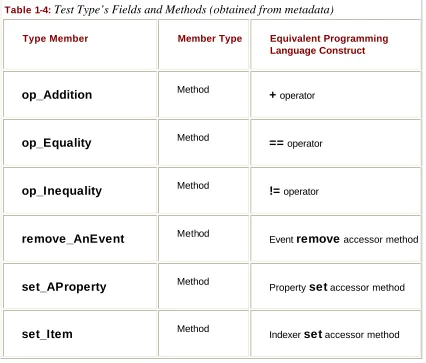
In addition to emitting IL, every compiler targeting the CLR is required to emit full metadata into every managed module. In brief, metadata is simply a set of data tables that describe what is defined in the module, such as types and their members. In addition, metadata also has tables indicating what the managed module references, such as imported types and their members. Metadata is a superset of older technologies such as type libraries and interface definition language (IDL) files. The important thing to note is that CLR metadata is far more complete. And, unlike type libraries and IDL, metadata is always associated with the file that contains the IL code. In fact, the metadata is always embedded in the same EXE/DLL as the code, making it impossible to separate the two. Because the compiler produces the metadata and the code at the same time and binds them into the resulting managed module, the metadata and the IL code it describes are never out of sync with one another.
Metadata has many uses. Here are some of them:
§ Metadata removes the need for header and library files when compiling since all the information about the referenced types/members is contained in the file that has the IL that implements the type/members. Compilers can read metadata directly from managed modules.
§ Visual Studio .NET uses metadata to help you write code. Its IntelliSense feature parses metadata to tell you what methods a type offers and what parameters that method expects.
§ The CLR’s code verification process uses metadata to ensure that your code performs only “safe” operations. (I’ll discuss verification shortly.)
§ Metadata allows an object’s fields to be serialized into a memory block, remoted to another machine, and then deserialized, re-creating the object and its state on the remote machine.
§ Metadata allows the garbage collector to track the lifetime of objects. For any object, the garbage collector can determine the type of the object and, from the metadata, know which fields within that object refer to other objects.
In Chapter 2, I’ll describe metadata in much more detail.
Microsoft’s C#, Visual Basic, JScript, J#, and the IL Assembler always produce managed modules that require the CLR to execute. End-users must have the CLR installed on their machine in order to execute any managed modules, in the same way that they must have the Microsoft Foundation Class (MFC) library or Visual Basic DLLs installed to run MFC or Visual Basic 6 applications.
By default, Microsoft’s C++ compiler builds unmanaged modules: the EXE or DLL files that we’re all familiar with. These modules don’t require the CLR in order to execute. However, by specifying a new command-line switch, the C++ compiler can produce managed modules that do require the CLR to execute. Of all the Microsoft compilers mentioned, C++ is unique in that it is the only language that allows the developer to write both managed and
unmanaged code and have it emitted into a single module. This can be a great feature because it allows developers to write the bulk of their application in managed code (for type safety and component interoperability) but continue to access their existing unmanaged C++ code.
The CLR doesn’t actually work with modules; it works with assemblies. An assembly is an abstract concept that can be difficult to grasp initially. First, an assembly is a logical grouping of one or more managed modules or resource files. Second, an assembly is the smallest unit of reuse, security, and versioning. Depending on the choices you make with your compilers or tools, you can produce a single-file or a multifile assembly.
In Chapter 2, I’ll go over assemblies in great detail, so I don’t want to spend a lot of time on them here. All I want to do now is make you aware that there is this extra conceptual notion that offers a way to treat a group of files as a single entity.
Figure 1-2 should help explain what assemblies are about. In this figure, some managed modules and resource (or data) files are being processed by a tool. This tool produces a single PE file that represents the logical grouping of files. What happens is that this PE file contains a block of data called the manifest. The manifest is simply another set of metadata tables. These tables describe the files that make up the assembly, the publicly exported types implemented by the files in the assembly, and the resource or data files that are associated with the assembly.
Figure 1-2 : Combining managed modules into assemblies
By default, compilers actually do the work of turning the emitted managed module into an assembly; that is, the C# compiler emits a managed module that contains a manifest. The manifest indicates that the assembly consists of just the one file. So, for projects that have just one managed module and no resource (or data) files, the assembly will be the managed module and you don’t have any additional steps to perform during your build process. If you want to group a set of files into an assembly, you’ll have to be aware of more tools (such as the assembly linker, AL.exe) and their command-line options. I’ll explain these tools and options in Chapter 2.
An assembly allows you to decouple the logical and physical notions of a reusable, deployable, versionable component. How you partition your code and resources into different files is completely up to you. For example, you could put rarely used types or resources in separate files that are part of an assembly. The separate files could be downloaded from the Web as needed. If the files are never needed, they’re never downloaded, saving disk space and reducing installation time. Assemblies allow you to break up the deployment of the files while still treating all the files as a single collection.
An assembly’s modules also include information, including version numbers, about
referenced assemblies. This information makes an assembly self-describing. In other words, the CLR knows everything about what an assembly needs in order to execute. No additional information is required in the registry or in Active Directory. Because no additional
Loading the Common Language Runtime
Each assembly that you build can be either an executable application or a DLL containing a set of types (components) for use by an executable application. Of course, the CLR is responsible for managing the execution of code contained within these assemblies. This means that the .NET Framework must be installed on the host machine. Microsoft has created a redistribution package that you can freely ship to install the .NET Framework on your customers’ machines. Eventually, the .NET Framework will be packaged with future versions of Windows so that you won’t have to ship it with your assemblies.
You can tell if the .NET Framework has been installed by looking for the MSCorEE.dll file in the %windir%\system32 directory. The existence of this file tells you that the .NET
Framework is installed. However, several versions of the .NET Framework can be installed on a single machine simultaneously. If you want to determine exactly which versions of the .NET Framework are installed, examine the subkeys under the following registry key:
HKEY_LOCAL_MACHINE\SOFTWARE\Microsoft\.NETFramework\policy
When you build an EXE assembly, the compiler/linker emits some special information into the resulting assembly’s PE file header and the file’s .text section. When the EXE file is invoked, this special information causes the CLR to load and initialize. The CLR then locates the application’s entry point method and allows the application to start executing.
Similarly, if an unmanaged application calls LoadLibrary to load a managed assembly, the DLL’s entry point function knows to load the CLR in order to process the code contained within the assembly.
For the most part, you don’t need to know about or understand how the CLR gets loaded. For most programmers, this special information allows the application to just run, and there’s nothing more to think about. For the curious, however, I’ll spend the remainder of this section explaining how a managed EXE or DLL starts the CLR. If you’re not interested in this
subject, feel free to skip to the next section. Also, if you’re interested in building an unmanaged application that hosts the CLR, see Chapter 20.
Figure 1-3 : Loading and initializing the CLR
When the compiler/linker creates an executable assembly, the following 6-byte x86 stub function is emitted into the PE file’s .text section:
JMP _CorExeMain
Because the _CorExeMain function is imported from Microsoft’s MSCorEE.dll dynamic-link library, MSCorEE.dll is referenced in the assembly file’s import (.idata) section. MSCorEE.dll stands for Microsoft Component Object Runtime Execution Engine. When the managed EXE file is invoked, Windows treats it just like any normal (unmanaged) EXE file: the Windows loader loads the file and examines the .idata section to see that MSCorEE.dll should be loaded into the process’s address space. Then the loader obtains the address of the
_CorExeMain function inside MSCorEE.dll and fixes up the stub function’s JMP instruction in the managed EXE file.
The process’s primary thread begins executing this x86 stub function, which immediately jumps to _CorExeMain in MSCorEE.dll. _CorExeMain initializes the CLR and then looks at the executable assembly’s CLR header to determine what managed entry point method should execute. The IL code for the method is then compiled into native CPU instructions, and the CLR jumps to the native code (using the process’s primary thread). At this point, the managed application’s code is running.
The situation is similar for a managed DLL. When building a managed DLL, the
compiler/linker emits a similar 6-byte x86 stub function in the PE file’s .text section for a DLL assembly:
JMP _CorDllMain
The _CorDllMain function is also imported from the MSCorEE.dll, causing the DLL’s .idata
CLR (if it hasn’t already been initialized for the process) and then returns so that the application can continue executing as normal.
These 6-byte x86 stub functions are required to run managed assemblies on Windows 98, Windows 98 Standard Edition, Windows Me, Windows NT 4, and Windows 2000 because all these operating systems shipped long before the CLR became available. Note that the 6-byte stub function is specifically for x86 machines. This stub doesn’t work properly if the CLR is ported to run on other CPU architectures. Because Windows XP and the Windows .NET Server Family support both the x86 and the IA64 CPU architectures, Windows XP and the Windows .NET Server Family loader was modified to look specifically for managed assemblies.
On Windows XP and the Windows .NET Server Family, when a managed assembly is invoked (typically via CreateProcess or LoadLibrary), the OS loader detects that the file contains managed code by examining directory entry 14 in the PE file header. (See
IMAGE_DIRECTORY_ENTRY_COM_DESCRIPTOR in WinNT.h.) If this directory entry exists and is not 0, the loader ignores the file’s import (.idata) section and automatically loads MSCorEE.dll into the process’s address space. Once loaded, the OS loader makes the process’s thread jump directly to the correct function in MSCorEE.dll. The 6-byte x86 stub functions are ignored on machines running Windows XP and the Windows .NET Server Family.
One last note on managed PE files: they always use the 32 bit PE file format, not the 64-bit PE file format. On 64-bit Windows systems, the OS loader detects the managed 32-bit PE file and automatically knows to create a 64-bit address space.
Executing Your Assembly’s Code
As mentioned earlier, managed modules contain both metadata and intermediate language (IL). IL is a CPU-independent machine language created by Microsoft after consultation with several external commercial and academic language/compiler writers. IL is much higher level than most CPU machine languages. IL understands object types and has instructions that create and initialize objects, call virtual methods on objects, and manipulate array elements directly. It even has instructions that throw and catch exceptions for error handling. You can think of IL as an object-oriented machine language.
Usually, developers will program in a high-level language, such as C# or Visual Basic. The compilers for these high-level languages produce IL. However, like any other machine language, IL can be written in assembly language, and Microsoft does provide an IL Assembler, ILAsm.exe. Microsoft also provides an IL Disassembler, ILDasm.exe.
IL and Protecting Your Intellectual Property
Some people are concerned that IL doesn’t offer enough intellectual property protection for their algorithms. In other words, they think you could build a managed module and someone else could use a tool, such as IL Disassembler, to easily reverse engineer exactly what your application’s code does.
Yes, it’s true that IL code is higher level than most other assembly languages and that, in general, reverse engineering IL code is relatively simple. However, when
If you’re concerned about any of the managed modules that you do distribute, you can obtain an obfuscator utility from a third-party vendor. These utilities “scramble” the names of all the private symbols in your managed module’s metadata. It will be difficult for someone to “unscramble” the names and understand the purpose of each method. Note that these obfuscators can only provide a little protection since the IL must be available at some point in order for the CLR to process it.
If you don’t feel that an obfuscator offers the kind of intellectual property protection that you desire, you can consider implementing your more sensitive algorithms in some unmanaged module that will contain native CPU instructions instead of IL and metadata. Then you can use the CLR’s interoperability features to communicate between the managed and unmanaged portions of your application. Of course, this assumes that you’re not worried about people reverse engineering the native CPU instructions in your unmanaged code.
Keep in mind that any high-level language will most likely expose only a subset of the facilities offered by the CLR. However, using IL assembly language allows a developer access to all the CLR’s facilities. So, should your programming language of choice hide a facility the CLR offers that you really want to take advantage of, you can choose to write that portion of your code in IL assembly or perhaps another programming language that exposes the CLR feature you seek.
The only way for you to know what facilities the CLR offers is to read documentation specific to the CLR itself. In this book, I try to concentrate on CLR features and how they are
exposed or not exposed by the C# language. I suspect that most other books and articles will present the CLR via a language perspective and that most developers will come to believe that the CLR offers only what the developer’s chosen language exposes. As long as your language allows you to accomplish what you’re trying to get done, this blurred
perspective isn’t a bad thing.
Important
I think that this ability to switch programming languages easily with rich integration between languages is an awesome feature of the CLR. Unfortunately, I also believe that developers will often overlook this feature. Programming languages such as C# and Visual Basic are excellent languages for doing I/O operations. APL is a great language for doing advanced engineering or financial calculations. Through the CLR, you can write the I/O portions of your application using C# and then write the engineering calculations part using APL. The CLR offers a level of integration between these languages that is unprecedented and really makes mixed-language programming worthy of
consideration for many development projects.
Another important point to keep in mind about IL is that it isn’t tied to any specific CPU platform. This means that a managed module containing IL can run on any CPU platform as long as the operating system running on that CPU platform hosts a version of the CLR. Although the initial release of the CLR runs only on 32-bit Windows platforms, developing an application using managed IL sets up a developer to be more independent of the underlying CPU architecture.
Standardizing the .NET Framework
Manufacturer’s Association) for the purpose of standardization. The ECMA accepted this proposal and created a technical committee (TC39) to oversee the standardization process. The technical committee is charged with the following duties:
§Technical Group 1 Develop a dynamic scripting language standard (ECMAScript). Microsoft’s implementation of ECMAScript is JScript.
§Technical Group 2 Develop a standardized version of the C# programming language. §Technical Group 3 Develop a Common Language Infrastructure (CLI) based on a
subset of the functionality offered by the .NET Framework’s CLR and class library. Specifically, the CLI will define a file format, a common type system, an extensible metadata system, an intermediate language (IL), and access to the underlying platform (P/Invoke). In addition, the CLI will define a factorable (to allow for small hardware devices) base class library designed for use by multiple programming languages.
Once the standardization is complete, these standards will be contributed to ISO/IEC JTC 1 (Information Technology). At this time, the technical committee will also
investigate further directions for CLI, C#, and ECMAScript as well as entertain proposals for any complementary or additional technology. For more information about ECMA, see http://www.ECMA.ch and http://MSDN.Microsoft.com/Net/ECMA.
With the standardization of the CLI, C#, and ECMAScript, Microsoft won’t “own” any of these technologies. Microsoft will simply be one company of many (hopefully) that are producing implementations of these technologies. Certainly Microsoft hopes that their implementation will be the best in terms of performance and customer-demand-driven features. This is what will help sales of Windows, since the Microsoft “best of breed” implementation will run only on Windows. However, other companies may implement these standards, compete against Microsoft, and possibly win.
Even though today’s CPUs can’t execute IL instructions directly, CPUs of the future might have this capability. To execute a method, its IL must first be converted to native CPU instructions. This is the job of the CLR’s JIT (just-in-time) compiler.
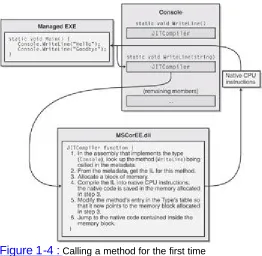
Figure 1-4 : Calling a method for the first time
Just before the Main method executes, the CLR detects all the types that are referenced by
Main’s code. This causes the CLR to allocate an internal data structure that is used to manage access to the referenced type. In Figure 1-4, the Main method refers to a single type, Console, causing the CLR to allocate a single internal structure. This internal data structure contains an entry for each method defined by the type. Each entry holds the address where the method’s implementation can be found. When initializing this structure, the CLR sets each entry to an internal, undocumented function contained inside the CLR itself. I call this function JITCompiler.
When Main makes its first call to WriteLine, the JITCompiler function is called. The
JITCompiler function is responsible for compiling a method’s IL code into native CPU instructions. Because the IL is being compiled "just in time," this component of the CLR is frequently referred to as a JITter or a JIT compiler.
When called, the JITCompiler function knows what method is being called and what type defines this method. The JITCompiler function then searches the defining assembly’s metadata for the called method’s IL. JITCompiler next verifies and compiles the IL code into native CPU instructions. The native CPU instructions are saved in a dynamically allocated block of memory. Then, JITCompiler goes back to the type’s internal data structure and replaces the address of the called method with the address of the block of memory containing the native CPU instructions. Finally, JITCompiler jumps to the code in the memory block. This code is the implementation of the WriteLine method (the version that takes a String parameter). When this code returns, it returns to the code in Main, which continues execution as normal.
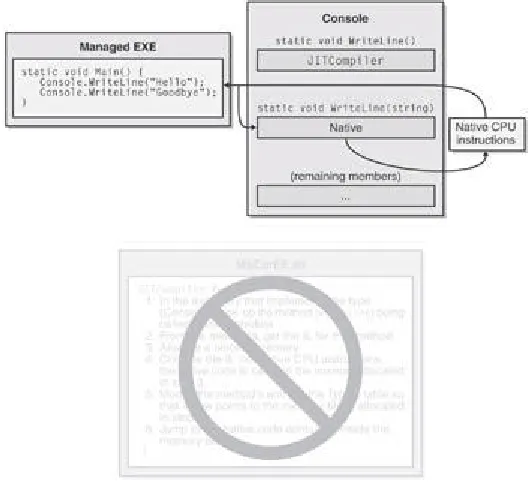
Main now calls WriteLine a second time. This time, the code for WriteLine has already been verified and compiled. So the call goes directly to the block of memory, skipping the
The JIT compiler stores the native CPU instructions in dynamic memory. This means that the compiled code is discarded when the application terminates. So, if you run the application again in the future or if you run two instances of the application simultaneously (in two different operating system processes), the JIT compiler will have to compile the IL to native instructions again.
[image:25.612.117.383.210.451.2]For most applications, the performance hit incurred by JIT compiling isn’t significant. Most applications tend to call the same methods over and over again. These methods will take the performance hit only once while the application executes. It’s also likely that more time is spent inside the method than calling the method.
Figure 1-5 : Calling a method for the second time
You should also be aware that the CLR’s JIT compiler optimizes the native code just as the back-end of an unmanaged C++ compiler does. Again, it may take more time to produce the optimized code, but the code will execute with much better performance than if it hadn’t been optimized.
For those developers coming from an unmanaged C or C++ background, you’re probably thinking about the performance ramifications of all this. After all, unmanaged code is compiled for a specific CPU platform and, when invoked, the code can simply execute. In this managed environment, compiling the code is accomplished in two phases. First, the compiler passes over the source code, doing as much work as possible in producing IL. But to execute the code, the IL itself must be compiled into native CPU instructions at run time, requiring more memory to be allocated and requiring additional CPU time to do the work.
Believe me, since I approached the CLR from a C/C++ background myself, I was quite skeptical and concerned about this additional overhead. The truth is that this second compilation stage that occurs at run time does hurt performance and it does allocate dynamic memory. However, Microsoft has done a lot of performance work to keep this additional overhead to a minimum.
If you too are skeptical, you should certainly build some applications and test the
Microsoft or others have produced and measure their performance. I think you’ll be surprised at how good the performance actually is.
In fact, you’ll probably find this hard to believe, but many people (including me) think that managed applications could actually outperform unmanaged applications. There are many reasons to believe this. For example, when the JIT compiler compiles the IL code into native code at run time, the compiler knows more about the execution environment than an unmanaged compiler would know. Here are some ways that managed code could outperform unmanaged code:
§ A JIT compiler could detect that the application is running on a Pentium 4 and produce native code that takes advantage of any special instructions offered by the Pentium 4. Usually, unmanaged applications are compiled for the lowest-common-denominator CPU and avoid using special instructions that would give the application a performance boost over newer CPUs.
§ A JIT compiler could detect that a certain test is always false on the machine that it is running on. For example, consider a method with code like this:
§if (numberOfCPUs > 1) {
§ ? }
This code could cause the JIT compiler not to generate any CPU instructions if the host machine has only one CPU. In this case, the native code has been fine-tuned for the host machine: the code is smaller and executes faster.
§ The CLR could profile the code’s execution and recompile the IL into native code while the application runs. The recompiled code could be reorganized to reduce incorrect branch predictions depending on the observed execution patterns.
These are only a few of the reasons why you should expect future managed code to execute better than today’s unmanaged code. As I said, the performance is currently quite good for most applications, and it promises to improve as time goes on.
If your experiments show that the CLR’s JIT compiler doesn’t offer your application the kind of performance it requires, you may want to take advantage of the NGen.exe tool that ships with the .NET Framework SDK. This tool compiles all an assembly’s IL code into native code and saves the resulting native code to a file on disk. At run time, when an assembly is loaded, the CLR automatically checks to see whether a precompiled version of the assembly also exists, and if it does, the CLR loads the precompiled code so that no compilation at run time is required.
IL and Verification
IL is stack-based, which means that all its instructions push operands onto an execution stack and pop results off the stack. Because IL offers no instructions to manipulate registers, compiler developers have an easy time producing IL code; they don’t have to think about managing registers, and fewer IL instructions are needed (since none exist for manipulating registers).
In my opinion, the biggest benefit of IL isn’t that it abstracts away the underlying CPU. The biggest benefit is application robustness. While compiling IL into native CPU instructions, the CLR performs a process called verification. Verification examines the high-level IL code and ensures that everything it does is “safe.” For example, verification checks that no memory is read from without having previously been written to, that every method is called with the correct number of parameters and that each parameter is of the correct type, that every method’s return value is used properly, that every method has a return statement, and so on.
The managed module’s metadata includes all the method and type information used by the verification process. If the IL code is determined to be “unsafe,” then a
System.Security.VerifierException exception is thrown, preventing the method from executing.
Is Your Code Safe?
By default, the Microsoft C# and Visual Basic compilers produce safe code. Safe code is code that is verifiably safe. However, using the unsafe keyword in C# or other
languages (such as C++ with Managed Extensions or IL assembly language), it’s possible to produce code that can’t be verifiably safe. The code might, in fact, be safe, but verification is unable to prove this.
To ensure that all your managed module’s methods contain verifiably safe IL, you can use the PEVerify utility (PEVerify.exe) that ships with the .NET Framework SDK. When Microsoft tests their C# and Visual Basic compilers, they run the resulting module through PEVerify to ensure that the compiler always produces verifiably safe code. If PEVerify detects unsafe code, Microsoft fixes the compiler.
You may want to consider running PEVerify on your own modules before you package and ship them. If PEVerify detects a problem, then there is a bug in the compiler and you should report it to Microsoft (or whatever company produces the compiler you’re using). If PEVerify doesn’t detect any unverifiable code, you know that your code will run without throwing a VerifierException on the end-user’s machine.
You should be aware that verification requires access to the metadata contained in any dependant assemblies. So, when you use PEVerify to check an assembly, it must be able to locate and load all referenced assemblies. Because PEVerify uses the CLR to locate the dependant assemblies, the assemblies are located using the same binding and probing rules that would normally be used when executing the assembly. (I’ll discuss these binding and probing rules in Chapters 2 and 3.)
Note that an administrator can elect to turn off verification (using the Microsoft .NET Framework Configuration administrative tool). With verification off, the JIT compiler will compile unverifiable IL into native CPU instructions; however, the administrator is taking full responsibility for the code’s behavior.
In Windows, each process has its own virtual address space. Separate address spaces are necessary because you can’t trust the application’s code. It is entirely possible (and unfortunately, all too common) that an application will read from or write to an invalid
memory address. By placing each Windows process in a separate address space, you gain robustness: one process can’t adversely affect another process.
application’s code. This means that you can run multiple managed applications in a single Windows virtual address space.
Because Windows processes require a lot of operating system resources, having many of them can hurt performance and limit available resources. Reducing the number of processes by running multiple applications in a single OS process can improve performance, require fewer resources, and be just as robust. This is another benefit of managed code as compared to unmanaged code.
The CLR does, in fact, offer the ability to execute multiple managed applications in a single OS process. Each managed application is called an AppDomain. By default, every managed EXE will run in its own, separate address space that has just the one AppDomain. However, a process hosting the CLR (such as Internet Information Services [IIS] or a future version of SQL Server) can decide to run AppDomains in a single OS process. I’ll devote part of Chapter 20 to a discussion of AppDomains.
The .NET Framework Class Library
Included with the .NET Framework is a set of .NET Framework Class Library (FCL)
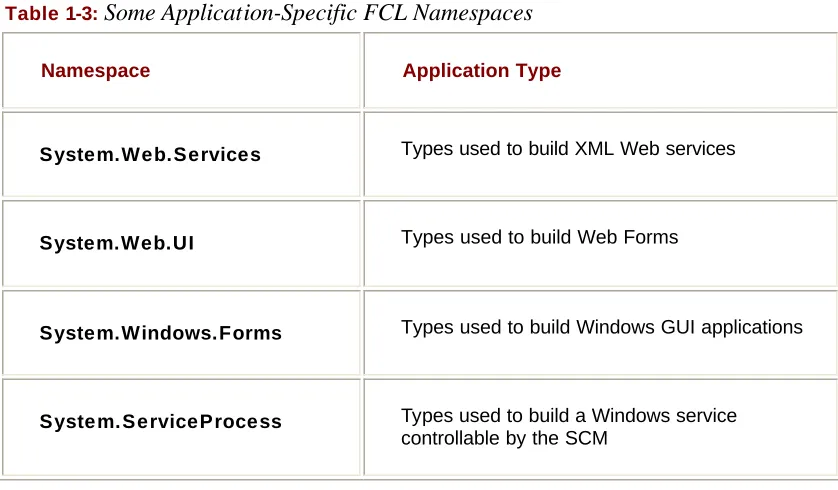
assemblies that contains several thousand type definitions, where each type exposes some functionality. All in all, the CLR and the FCL allow developers to build the following kinds of applications:
§ XML Web services Methods that can be accessed over the Internet very easily. XML Web services are, of course, the main thrust of Microsoft’s .NET initiative.
§ Web Forms HTML-based applications (Web sites). Typically, Web Forms applications will make database queries and Web service calls, combine and filter the returned information, and then present that information in a browser using a rich HTML-based user interface. Web Forms provides a Visual Basic 6 and Visual InterDev style development environment for Web applications written in any CLR language. § Windows Forms Rich Windows GUI applications. Instead of using a Web Forms
page to create your application’s UI, you can use the more powerful, higher
performance functionality offered by the Windows desktop. Windows Forms applications can take advantage of controls, menus, and mouse and keyboard events, and they can talk directly to the underlying operating system. Like Web Forms applications, Windows Forms applications also make database queries and call XML Web services. Windows Forms provides a Visual Basic 6Ðlike development environment for GUI applications written in any CLR language.
§ Windows console applications For applications with very simple UI demands, a console application provides a quick and easy way to build an application. Compilers, utilities, and tools are typically implemented as console applications.
§ Windows services Yes, it is possible to build service applications controllable vi a the Windows Service Control Manager (SCM) using the .NET Framework.
§ Component library The .NET Framework allows you to build stand-alone
components (types) that can be easily incorporated into any of the previously mentioned application types.
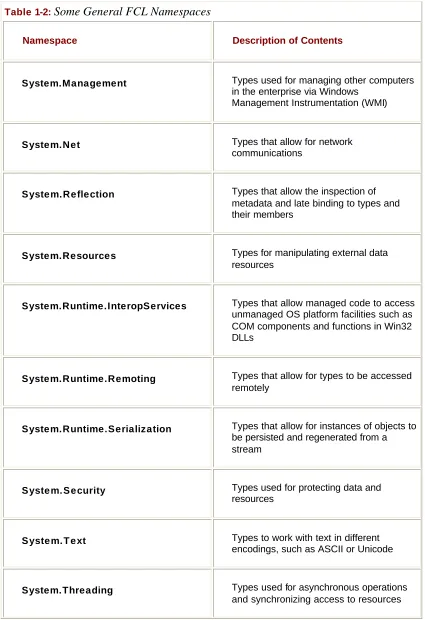
Because the FCL contains literally thousands of types, a set of related types is presented to the developer within a single namespace. For example, the System namespace (which you should become most familiar with) contains the Object base type, from which all other types ultimately derive. In addition, the System namespace contains types for integers,