Theses Thesis/Dissertation Collections
2-19-2013
Imaging methods for understanding and improving
visual training in the geosciences
Brandon May
Follow this and additional works at:http://scholarworks.rit.edu/theses
This Thesis is brought to you for free and open access by the Thesis/Dissertation Collections at RIT Scholar Works. It has been accepted for inclusion in Theses by an authorized administrator of RIT Scholar Works. For more information, please [email protected].
Recommended Citation
Improving Visual Training in the Geosciences
by
Brandon B. May
B.A. Mathematics & Physics Skidmore College,
A thesis submied in partial fulfillment of the requirements for the degree of Master of Science
Chester F. Carlson Center for Imaging Science College of Science
Rochester Institute of Technology Rochester, New York
February ,
Brandon B. May Date
R, N Y
C A
M.S. D T
T M.S. B B. M
M.S. I S
Dr. Nathan D. Cahill, esis Advisor Date
Dr. Jeff B. Pelz, Commiee Member Date
is research project would not have been possible without the support of many people. I’d like
to thank my advisor Nate Cahill and the rest of my thesis commiee, Jeff Pelz and Harvey Rhody, for their support and helpful suggestions in our weekly meetings as I discussed my progress and
developed my algorithms. anks also to Nate for providing valuable feedback on the initial dras of my thesis.
anks to Mitch Rosen for helping me to get started and involved with the GeoVis research project, and thanks for the efforts of Mitch, Jeff, John Tarduno, and Robbie Jacobs who first got
this project going.
For their great help while out imaging in the field I’d like to thank Dave Kelbe and Tommy
Keane. Each of them proved invaluable in assisting me to capture many panoramas and keeping me entertained during the long drives through California. I’d also like to thank Karen Evans,
Piyush Agarwal, and Jason Babcock for their work capturing the eye-tracking data during the field trips and for providing me with good company throughout our camping adventures. Karen
and Piyush also spent many hours with me in the CSI geing the projector system working well, for which I am very appreciative.
My ground truth analysis wouldn’t have been possible without the help of Tommy and a lot of manual clicking labor done by Sarah Piper, so thanks very much for that!
Finally, I’d like to thank my family for being supportive of my studies at RIT and always encouraging me to do my best.
RIT, February
Experience in the field is a critical educational component of every student studying geology.
However, it is typically difficult to ensure that every student gets the necessary experience be-cause of monetary and scheduling limitations. us, we proposed to create a virtual field trip
based off of an existing -day field trip to California taken as part of an undergraduate geology course at the University of Rochester. To assess the effectiveness of this approach, we also
pro-posed to analyze the learning and observation processes of both students and experts during the real and virtual field trips.
At sites intended for inclusion in the virtual field trip, we captured gigapixel resolution panora-mas by taking hundreds of images using custom built robotic imaging systems. We gathered data
to analyze the learning process by fiing each geology student and expert with a portable eye-tracking system that records a video of their eye movements and a video of the scene they are
ob-serving. An important component of analyzing the eye-tracking data requires mapping the gaze of each observer into a common reference frame. We have made progress towards developing a
soware tool that helps automate this procedure by using image feature tracking and registra-tion methods to map the scene video frames from each eye-tracker onto a reference panorama
for each site.
For the purpose of creating a virtual field trip, we have a large scale semi-immersive display
system that consists of four tiled projectors, which have been colorimetrically and photomet-rically calibrated, and a curved widescreen display surface. We use this system to present the
previously captured panoramas, which simulates the experience of visiting the sites in person. In terms of broader geology education and outreach, we have created an interactive website that
Contents
List of Figures
viii1 Introduction
12 Related Work
42.1 Mobile Eye-tracking . . . 4
2.2 Image Feature Detection and Matching . . . 6
2.3 Image Registration Using Homographies . . . 8
2.4 Projector Calibration . . . 10
3 Imaging in the Field
13 3.1 Robotic Imaging Systems . . . 143.1.1 Gigapan . . . 14
3.1.1.1 Modifications . . . 14
3.1.1.2 Panorama Capture Setup . . . 17
3.1.1.3 Shooting Pattern . . . 18
3.1.2 Panogear . . . 19
3.1.2.1 Modifications . . . 19
3.1.2.2 Panorama Capture Setup . . . 20
3.1.2.3 Shooting Pattern . . . 21
3.1.3 Stereo Imaging. . . 22
3.2 Imaging Augmented with GPS . . . 23
3.3 Scene Video from Eye-trackers . . . 24
4.1 Panorama Generation . . . 26
4.1.1 Projection Methods . . . 27
4.1.2 Rendering Methods . . . 29
4.2 Video to Panorama Registration . . . 30
4.2.1 SIFT Feature Tracking . . . 31
4.2.2 Keyframe Selection . . . 32
4.2.3 Final Homography Calculation . . . 34
4.2.4 Ground Truth Evaluation . . . 35
5 Virtual Field Trip
40 5.1 Semi-immersive Virtual Environment . . . 405.1.1 Multi-projector Calibration . . . 40
5.1.1.1 Geometric Registration . . . 41
5.1.1.2 Photometric and Colorimetric Calibration . . . 44
5.1.2 Rendering Images for Display . . . 45
5.1.3 Projector Tiling Solution. . . 46
5.2 Online Virtual Field Trip Interface . . . 47
5.2.1 Google Earth . . . 47
5.2.2 Site Pages . . . 48
5.2.3 Panorama Gallery . . . 49
6 Conclusions
52 6.1 Future Work . . . 53Appendix A Software
55List of Figures
. Students wearing the mobile eye-tracking system. . . 5
. Example visualization of SIFT features detected in an image. . . 8
. Example of image registration using SIFT and RANSAC with a homography model. 12 . Olympus camera electronic shuer release cable wiring diagram. . . 15
. GigaPan unit with support bracket aached. . . 16
. Extended camera mounting plate. . . 16
. Portable D-cell baery pack for the GigaPan. . . 17
. Second generation robotic imaging system. . . 20
. Optimized panorama shooting paern. . . 21
. Typical results from a successful panorama capture. is particular example is of Ubehebe Crater in California. . . 22
. Wide-baseline stereo capture of Monte Bello Ridge in California. Notice the tripod in the distance on the le and in the foreground on the right. . . 22
. A sample video frame from the eye-tracker scene camera, overlaid with the eye camera and gaze data. . . 24
. Equirectangular (spherical) rendering of the panorama taken at the Ubehebe Crater in California. e black areas represent portions of the sphere where image data was not captured. . . 28
. Spherical to Cylindrical Panorama Projection Diagram . . . 29
. Spherical to Planar Panorama Projection Diagram . . . 30
. A visualization of a frame of the scene video mapped onto the panorama via its
homography. . . 35
. e nine control points selected for use in the ground truth evaluation of the scene at Inspiration Point, Yosemite National Park, California. . . 36
. e geometric projection error in pixels on the panorama, computed from the man-ual points selected in each video frame corresponding to each of the nine control points. . . 36
. Plot of the mapped video points for each of the nine control points. . . 37
. Close-up views of the mapped video points for each of the nine control points. . . . 38
. Box plots of the statistical distribution of geometric projection errors corresponding to each of the nine control points. . . 39
. Flow chart describing the projector calibration algorithm. . . 41
. Typical arrangement of projectors, camera, and cylindrical projection surface. . . . 42
. e light paern used to geometrically calibrate the projectors and display wall. . . 42
. Cylindrical surface and world coordinate system. . . 43
. Local coordinate system for projector calibration. . . 44
. ree stages of projector calibration. . . 46
. Example of a tiled version of the panorama taken at Inspiration Point. . . 47
. A screenshot of the online virtual field trip interface. . . 48
. A pop-up is presented with additional information when a placemark icon is clicked. 49 . A screenshot of the site page for Inspiration Point. . . 50
. A screenshot of the panorama gallery; an alternative to the Google Earth view. . . 50
Introduction
Experience in the field is a critical educational component of every student studying geology.
However, it is typically difficult to ensure that every student gets the necessary experience be-cause of monetary and scheduling limitations. If anything, the field trip will be restricted to a
single-day with a small group of people. Perhaps in these cases it would be effective to bring the field experience to the students instead of sending the students out into the field. us, we
proposed to create a virtual field trip based off of an existing -day field trip to California taken
as part of an undergraduate geology course at the University of Rochester []. During the ten-day
field trip both geology students and expert geologists visit a number of geologic sites.
In order to create a virtual field trip that realistically simulates field experience, the
origi-nal sites must be carefully captured in such a way that later allows for a realistic simulation. erefore, at sites intended for inclusion in the virtual field trip, we captured gigapixel
resolu-tion panoramas by taking hundreds of images using custom built robotic imaging systems. e individual images were processed and stitched together at a later time to form high-resolution
panoramic images. To create the virtual field trip the panoramas are then projected for observa-tion in a semi-immersive display system.
An important part of this project is the ability to analyze the learning process during the real experience as compared to the virtual one as well as the educational effectiveness of each.
learning based on where they look. When both in the field and using the semi-immersive display,
each geology student is fit with a portable eye-tracking system that records a video of their eye movements and a video of the scene they are observing. Aerwards, these data can be processed
to determine where the person was looking (their gaze) and for how long. To provide a baseline for comparison, several expert geologists were present during the real and virtual field trips to
participate in the same experience as the students.
It is possible to compare the eye-tracking information from one observer to the next and from
the same observer to themselves over a period of time to evaluate information such as novice-expert differences, the learning process through time, and differences in the learning experience
between the real and virtual field trips. e ability to make these comparisons relies on having a common reference frame on which to compare the gaze data. Typically fixations are ploed
manually from each observers scene video onto a panorama of the scene, however this is a time consuming process. We have made progress towards developing a soware tool that helps
auto-mate this procedure by using video feature tracking and image registration methods to map gaze information from each video frame onto a reference panorama.
In terms of geology education and outreach, the panoramic images collected for the virtual field trip could be incorporated into a range of geoscience courses at every educational level. e
database of images could even prove useful to researchers in the field of computer vision for test-ing feature detection, image stitchtest-ing, structure from motion, and other techniques. Cognitive
science educators and researchers could also find value in the large database of video eye-tracking data of novices and experts viewing geological landscapes. Towards these goals, we have created
an interactive website that uses Google Earth as the interface for visually exploring the
panora-mas captured for each site []. It has the potential to incorporate additional data such as audio
recordings, eye-tracking data, and other information relevant for use as an educational tool. e rest of this thesis is focused on presenting the details of our work. In chapter we present
an overview of the prior work related to this research. We describe the tools and techniques for capturing gigapixel resolution panoramas out in the field in chapter . In chapter we describe the
environment and describe the online virtual field trip interface. We conclude and propose possible
directions for future work in chapter .
Novel contributions are presented in each of the chapters three through five. e following
summarizes these contributions according to each chapter:
Ch. : Imaging in the Field
• Built a portable gigapixel resolution robotic imaging system using a telescope mount, DSLR camera, baery pack, and wireless bluetooth control via tablet computer.
• Designed an efficient shooting paern on the sphere to minimize time of capture.
Ch. : Image Processing
• Developed a two-pass SIFT feature tracking algorithm for videos.
• Developed a feature matching algorithm that used a multiple level-per-octave SIFT ap-proach to be robust to very large differences in resolution and scale.
• Developed a video keyframe selection algorithm based on initial video frame to panorama homography computations.
• Developed a method to match video frames to a reference panorama by calculating a ho-mography by combining information from SIFT video tracking, multi-level feature
match-ing, and keyframe selection.
Ch. : Virtual Field Trip
• Created a semi-immersive virtual field trip by geometrically, photometrically, and colori-metrically calibrating a high-resolution multi-projector display system.
Related Work
is research covers a variety of topics and in what follows we provide a general overview of
the related work. First we discuss mobile eye-tracking and the portable systems we used in the field. Next we present a review of image feature detection and matching and how it can be
used to track features through a video sequence. We then discuss how image registration can be computed with these detected features using a specific image transformation model. Finally, we
review techniques for calibrating multiple projector display systems.
2.1 Mobile Eye-tracking
e first eye-tracking systems were created in the s and were based on mechanical devices
that recorded eye movements by aaching a device directly to the observer’s eye. A much less invasive technique was developed around which used photographic technology to record
eye movements by taking pictures of the reflection of a light source directed towards the eye, and this is at its essence the same technique used in our mobile eye-tracking systems, albeit less
sophisticated. ere have been many eye-tracking systems designed based on this technique, most of which require the user to stay relatively still, and certainly not be walking around. Some
examples are the lens and mirror systems used by Yarbus, electromagnetic coil systems,
In order to take eye-tracking out into the field, we use a portable and robust system designed
by Jason Babcock of Positive Science, who designed the first mobile prototype in while here
at the Multidisciplinary Vision Research Laboratory (MVRL) [, ]. is system uses the pupil
and corneal reflection method to track the eye of the person wearing it. e motion of the eye and a video of the scene are recorded using a piece of headgear that the observer wears. e
base of this headgear is the lightweight frame of a pair of glasses with the lenses removed. It has mounted on it a small video camera that records what the observer is seeing and another small
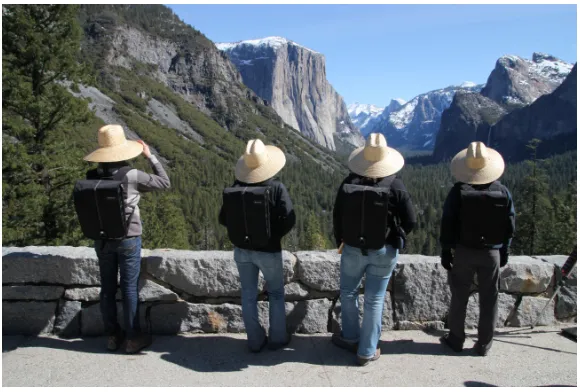
infrared camera mounted below the eye, illuminated by an infrared LED, that records and image of the eye and its reflections. e system is designed to be worn as a backpack that contains a
[image:15.612.161.451.313.509.2]laptop and various pieces of electronics that interface with the headgear (Figure.).
Figure .: Students wearing the mobile eye-tracking system.
e pupil and corneal reflection method used by this eye-tracking system works in the fol-lowing manner. e infrared LED mounted next to the eye camera on the headgear provides
il-lumination of the eye as well as a singular specular reflection off of the cornea, called the corneal reflection (also known as glint or the first Purkinje reflection). To estimate the gaze of the
ob-server the center of the dark pupil and the center of the corneal reflection must first be determined by some feature detection algorithm. As the eye moves, the relative location of the corneal
reflec-tion to the pupil center changes systematically and can thus be used to calculate gaze based on
the reflections of infrared light from the scene off the eye, which can make pupil and corneal
reflection detection difficult.
e system must be calibrated before use to be able to determine what the
pupil-to-corneal-reflection relationship is for accurate eye-tracking. is calibration is typically done by having the observer fixate one at a time on a set of known points in the scene. A transformation model
can then be computed from this data that allows the relative distance measurement to be mapped to a gaze location on the scene video. In the field each observer wore a hat to help prevent
sunlight from flooding the eye. Each time the eye-tracking system was worn, it was calibrated by having the observer fixate on a single point while moving their head through a ‘+’ and ‘x’
paern, pausing their motion several times in each segment. is procedure created the set of data points necessary for calibration the relative pupil-to-corneal-reflection distance to real gaze
information. It is this gaze information that gets mapped to the panorama via the scene video in the registration algorithm of Ch. .
2.2 Image Feature Detection and Matching
Image feature detection is the foundation for many algorithms that rely on the knowledge of anchor points whose locations are both stable and accurate, such as camera calibration, pose
estimation, D reconstruction [], object tracking, and image registration [–]. An important
example of local features are interest points (keypoints), which can be described by analyzing
the appearance of regions of pixels surrounding an particular point location. Another possibility is to use edge information that can be described by local appearance and orientation, or linked
together to form paerns of lines and curves. It is desirable in the case of matching images to have a feature detector that is robust to both geometric image transformations such as rotation,
scale, and viewpoint, as well as image noise [–]. To be robust to these transformations means
that the same feature can be reliably detected in an image both before and aer going through
these changes. is robustness makes it possible to match images that have similar content but were taken under different conditions (such as location, time, orientation, and hardware).
in Ch. , we use a local keypoint feature detector called SIFT, which stands for Scale Invariant
Feature Transform []. In particular, we use the version packaged with the VLFeat toolbox for
MATLAB [,]. e SIFT feature detection algorithm detects and converts regions of interest
into an invariant descriptor representation that can be used to find matches with other descrip-tors. For robustness, it looks for features that are stable over multiple resolution scales of the
image []. It uses a Gaussian function to create a multi-level image pyramid over each octave of
the original image. It then subtracts these levels to make a set of Difference of Gaussian (DoG)
images.
SIFT detects candidate features as extrema by comparing a pixel to the set of its neighbors
in the current level ( neighbors), next upper level ( neighbors), and previous lower level ( neighbors). Once this feature is identified, the gradient at each pixel in a x region around the
feature at the appropriate level is computed, weighted by the distance from the feature by another Gaussian function. is weighting helps to reduce the effect of gradients far from the center.
Looking at the histogram of gradients, the peak is assigned as the dominant orientation. Next, this region is divided into x areas combining the gradients into an -bin histogram (relative to
the dominant orientation) for each area. Computing the gradients this way is what makes the feature invariant to rotation. ese numbers form the raw descriptor of the feature keypoint.
is set of numbers is saved as a normalized vector, subject to a maximum component value of
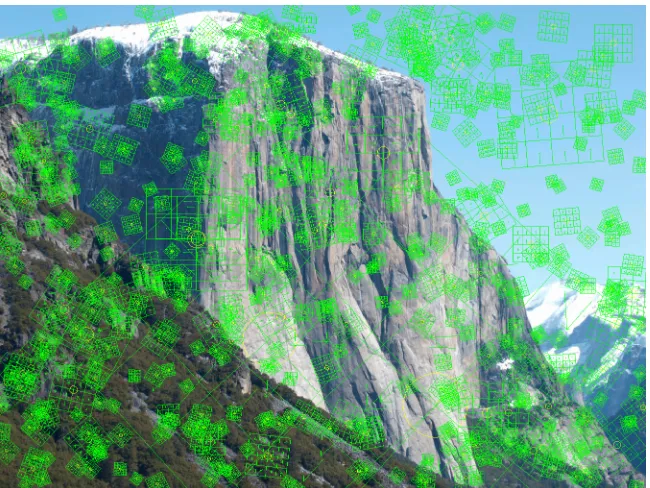
.. If any of the components are clipped, the vector is renormalized to unit length. Figure.
shows an image with a representation of its SIFT features ploed. e size of each grid represents the scale at which the feature was found, and its orientation represents the dominant gradient
at that location. e arrows within each subregion represent the dominant orientation of that section of the image [].
To determine how well particular SIFT feature descriptors match one another, the difference between the two -element vectors is measured with a Euclidean norm. When a single
descrip-tor is being matched to a set of other descripdescrip-tors, a match is defined as the nearest neighbor in the Euclidean sense, subject to the constraint that the ratio of the distance between the descriptor
Figure .: Example visualization of SIFT features detected in an image.
2.3 Image Registration Using Homographies
Image registration using local features finds applications ranging from panography and pose es-timation to structure from motion and augmented reality. It is also used when creating high
resolution maps by aligning and stitching together satellite imagery. When performing image registration, once the features have been detected in multiple images, a pairwise matching
algo-rithm can be run to determine a hypothetical set of feature matches between them. is initial set of feature matches is called the putative set because it remains to be determined which are
true matches and which are false positives. If a geometric transformation model is available, the matches can be fit to this model and kept only if they match the transformation sufficiently well.
is can be done by selecting a small sample set to compute the transformation based on the model, then expanding that test to include the rest of the matches. is process can be repeated
a number of times until a sufficiently close transformation restricted to the particular model is found, or stopped aer a number of iterations if not. e process of testing a small sample and
using it to verify the larger dataset is called random sample consensus (RANSAC) [].
most part the panoramas we capture are of distant scenes so that the relationship between the
panorama and a frame of video from the scene camera on the eye-tracker is just a pure rota-tion. is essentially means that the scene content we wish to match between the panorama and
the video is so far away, that the change in translational position between where the panorama was captured and where the video was captured introduced a negligible amount of parallax for
that region. e homography,𝑯, is an eight parameter matrix transformation model that allows
matching two images with a change in position, rotation, skew, and perspective. In general, the
homography transformation with point correspondances𝒙𝑖 ↔ 𝒙𝑖may be wrien as,
𝒙𝑖 = 𝑯𝒙𝑖. (.)
To enable a linear solution for𝑯, this equation can be rewrien in a form that makes use of the
cross product,
𝒙𝑖 × 𝒙𝑖 = 0 = 𝒙𝑖× 𝑯𝒙𝑖. (.)
If𝒙𝑖 = (𝑥𝑖, 𝑦𝑖, 𝑤𝑖)⊤ and the j-th row of the matrix𝑯 is denoted by𝒉𝑗, this may be rewrien as,
⎡ ⎢ ⎢ ⎣
𝟎⊤ −𝑤𝑖𝒙⊤𝑖 𝑦𝑖𝒙⊤𝑖
𝑤𝑖𝒙⊤
𝑖 𝟎⊤ −𝑥𝑖𝒙⊤𝑖 ⎤ ⎥ ⎥ ⎦ ⎡ ⎢ ⎢ ⎢ ⎢ ⎣ 𝒉1⊤ 𝒉2⊤ 𝒉3⊤ ⎤ ⎥ ⎥ ⎥ ⎥ ⎦
= 0 = 𝑨𝑖𝒉. (.)
Since each point correspondence yields two independent equations, at least four point
correspon-dences are necessary to find a solution for𝒉. For𝑛matches, stack the individual𝑨𝑖matrices into
a single matrix𝑨. To solve for𝒉, take the singular value decomposition of𝑨,
𝑨 = 𝑼𝑫𝑽⊤. (.)
e unit singular vector corresponding to the smallest singular value is the solution. If 𝑫 is
diagonal with positive entries arranged in descending order, then𝒉is the last column of𝑽. is
given a set of putative matches, it is necessary to perform filtration using RANSAC before trying
to compute a valid homography.
RANSAC works by selecting a random sample of descriptor matches to compute an initial
estimate for the particular model being used, in this case a homography, 𝑯. Using this model,
residuals are computed for all of the feature matches by computing the difference in the measured
and mapped points:
𝑟𝑖= 𝒙𝑖 − ̂𝒙𝑖 (.)
𝒙𝑖 = 𝑯𝒙𝑖 (.)
where𝑟𝑖is the residual,𝒙𝑖 are the locations mapped using the homography, and𝒙𝑖̂ are the
mea-sured locations from the feature points. It then counts the number of inliers that are within a
few pixels of their predicted location. is process repeats a for a certain number of trials
un-til returning the sample set that yields the model with the largest number of inliers. Figure.
shows an example of the result of image registration using SIFT feature descriptors and RANSAC with homography model. Before running RANSAC the putative match set has a large number of
outliers. Aerwards, a group of inliers is successfully selected and an accurate homography is computed.
2.4 Projector Calibration
In general, when registering multiple projectors on a non-planar surface, multiple cameras are
needed in order to reconstruct the D surface of the display. In [] they use a stereo camera
rig to reconstruct non-planar quadric surfaces using such techniques as conformal mapping and
quadric transfer to minimize distortion aer the geometric registration. Another method, [],
first achieves camera and projector calibration through D fiducials and then reconstructs the sur-face of the display by using many structured-light paerns. ere are other registration methods
that make use of only one camera for non-planar surfaces, however these are typically
the camera and avoids reconstructing the display geometry entirely.
Intra-projector variation, inter-projector variation, and overlap variation are the three main categories of spatial color changes in multiple projector displays. Most existing blending
meth-ods don’t address all of these issues and thus have suboptimal solutions. One of these methmeth-ods,
[], proposes a gamut matching method for tiled display walls, however gamut matching
sig-nificantly degrades the color quality of the display by restricting the common achievable gamut
[]. Another method, [], matches the luminance transfer functions to achieve a luminance
balancing without considering the projector chrominance variations.
In [], they present a technique to calibrate multiple casually aligned projectors on a
cylin-drical surface using a single camera, where the cylinder is a vertically extruded surface and the aspect ratio of the rectangle formed by the corners of the screen is known. ey achieve
ac-curate geometric calibration of multiple projectors on a cylindrical display without performing
an extensive stereo reconstruction. Our method, based on [], is likewise able to recreate the
D surface of the display using a single camera without needing to restrict the final viewpoint to
that of the cameras position. e constrained gamut morphing algorithm created by [] removes
variations due to differences in chromaticity gamuts across the projectors, the vigneing effect of each projector, and the overlap across adjacent projectors. ey demonstrate color seamlessness
across multiple projectors for both planar and curved displays.
Basing our approaches on [], the colorimeteric & photometric calibration steps we
imple-mented consider both spatial variations in luminance within the projectors and differences in
chromaticity between the projectors. By combining techniques from [] and [], we created a
(a) Scene video frame (b) Photo of El Capitan
(c) Putative SIFT feature matches (d) Filtered SIFT feature inliers
[image:22.612.82.539.123.424.2](e) Video frame registered to photo of El Capitan
Imaging in the Field
One of the main imaging goals during the field trip is to be able to capture a detailed visual
rep-resentation of each important geologic site. is serves several purposes, of which an important one is being able to recreate the experience as accurately as possible within a virtual environment,
while another is to use this data to aid in the eye-tracking analysis. It would also be useful to the geology education community to be able to utilize the data in a practical way for pedagogical
purposes. Deciding on what type of imaging system to use depends both on these desired results as well as the practicality of using the system while in the field.
It is necessarily the case that being on the field trip involves driving (and sometime walking) to remote locations that don’t have a readily available power source, visiting a potentially high
number of locations during the period of a day, and facing a wide range of weather conditions over the entire trip. us, the imaging system must be portable and have its own power source, and
because of the number of sites visited each day it must also assemble, function, and disassemble quickly and easily. e components that make up the system also need to operate well in both
hot and cold temperatures and be somewhat resistant to moisture and dust.
A simple imaging system that seems to satisfy the above conditions is to use a high resolution
Digital Single Lens Reflex (DSLR) camera mounted on a tripod to take an image of each site. However, the field of view for a camera with a typical lens that has a full-frame equivalent focal
elements usually cover a larger field of view it would be necessary to take multiple images to
cover them. If the images were taken by rotating the camera on the tripod head they could be processed into a large panoramic image of the scene. It turns out that there are robotic systems
for automating this image taking procedure which can yield enough data to create panoramas of up to several gigapixels in resolution.
3.1 Robotic Imaging Systems
3.1.1 Gigapan
e first robotic imaging system built for panoramic imaging on the field trip was based on the GigaPan EPIC designed by researchers at Carnegie Mellon University in collaboration with
NASA Ames Intelligent Systems Division’s robotics group []. e GigaPan unit itself can be
easily mounted on a tripod and consists mainly of a camera mounting bracket, two stepper motors
run by a micro-controller and the built in soware, a servo motor to physically press the camera’s shuer buon, and a six AA baery power supply brick. e camera chosen to be used with the
GigaPan was an Olympus E- DSLR with an - mm zoom lens and a megapixel CCD sensor. e two stepper motors control the horizontal and vertical rotations of the camera calculated by
the soware for the images needed to capture the panorama. e stock configuration of the GigaPan, however, needs a few modifications to make it more robust before it is ready to be used
in the field.
3.1.1.1 Modifications
Instead of using the built in servo to press the camera’s shuer buon it would be more effective to trigger a remote shuer release via a cable plugged into the camera. Otherwise the servo
tends to shake the camera while taking a picture, it draws an unnecessary amount of power, and it physically limits the placement of the camera. e EPIC has a seing to enable an electronic
empty remote port of the GigaPan to the camera.
is cable must be built and wired specifically for the model of camera being used to comply with the required shuer release signal. For example when using a Hitec Servo cable to interface
with the GigaPan remote port in conjunction with an Olympus camera multi connector to inter-face with the camera, the Olympus camera multi connector requires that both the “shuer full
press” (white) and “shuer half press” (yellow) wires be connected to the yellow Hitec wire and
the “shuer ground” (red) must be connected to the black Hitec wire (Figure.). With this
con-Figure .: Olympus camera electronic shuer release cable wiring diagram.
figuration, the camera shuer will fire automatically when the signal is sent through the remote
port without having any mechanical interactions.
e stock configuration also has some problems with handling heavier cameras like a DSLR
with a relatively heavy lens aached. One reason is because all of the weight is supported on one side of the unit where the camera mounting bracket is aached to the motor while the other
side of the bracket is le floating freely. Another is that the center of mass of the camera isn’t centered on the rotational axis of the vertical servo motor which causes the motor to work harder
to rotate the camera. To remedy this issue a support bracket was custom installed onto the side of
the unit to support the camera mounting bracket (Figure.). e slots on the camera mounting
plate were also extended so that the camera could be mounted further back to be able balance the camera about the vertical rotation axis so that very lile torque is required to rotate it up and
down (Figure.).
(a) Front view. (b) Side view.
Figure .: GigaPan unit with support bracket aached.
Figure .: Extended camera mounting plate.
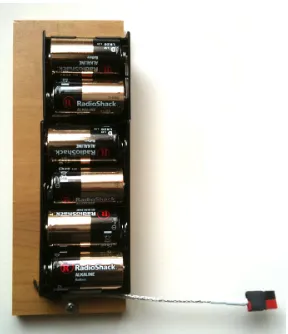
powering the GigaPan through shooting hundreds of images without having to replace the
bat-teries too oen. A baery pack that used D baeries was built for this purpose (Figure.). Since
it was too large to be aached to the GigaPan itself, it was mounted to the leg of the tripod and
power was routed to the unit through a meter long power cable terminated with “Anderson Powerpole” connectors to facilitate connecting and disconnecting the baery pack. e length
of the power cable allows the GigaPan the freedom to make360⋅rotations without geing tangled
in the tripod. With this power supply the GigaPan can be used for long periods of time without
Figure .: Portable D-cell baery pack for the GigaPan.
3.1.1.2 Panorama Capture Setup
To prepare the imaging system to capture a panorama requires assembling the components, set-ting the appropriate camera parameters, and configuring the GigaPan soware. First, the camera
is aached to the mounting bracket of the GigaPan and the remote shuer trigger cable is plugged in (aer making sure the baery pack is charged and enough space is le on internal storage to
hold the images for the panorama). en the GigaPan is clipped into the tripod head at which point the baery pack can be plugged into it. is system is carried to the desired location for the
point of view of the panorama, which is usually close to where the students viewing the scene will be standing. Once the tripod is setup and level, the camera parameters can be configured.
e camera should have a fixed focus, focal length, white balance and exposure throughout the entire image acquisition process to produce images that will blend together well to form the
final panorama. e aperture should be set small enough to have a large depth of field so that both distant features and close foreground appear in focus; in practice it was set to around f/.
For a consistent and easy to set focal length the lens was set to its maximum value of mm. is level of zoom allows for detailed visual information to be captured and generation of
high-resolution panoramas. Now the GigaPan soware needs to be given instructions on what type of panorama is desired so it can compute and execute the appropriate shooting sequence.
aer moving the camera to the next position for it to stabilize and signal it to take another. e
GigaPan soware calculates the field of view by having the user position the camera at two positions differing only by vertical rotation. e scene content at the top of the second position
must overlap slightly with the scene content that was present at the boom of the first position for an accurate estimate. Aer the field of view is set, it doesn’t need to change when using the
same camera and lens setup for each panorama. For the purposes of imaging in the field, the scenes were always bright enough to have a fast enough shuer speed so that the other delays
could be set to their minimum values.
Aer the initial setup, the panorama is taken using one of two methods. e first method is
to set the boundaries on the panorama by telling the soware where the upper le and lower
right corners should be. e second method is to tell the soware to take a360⋅ panorama and
define the top and boom of the vertical extent of the panorama. e shooting paern necessary for taking the panorama is then calculated and executed.
3.1.1.3 Shooting Pattern
e shooting paern is defined by a rectangular grid with a certain number of rows and columns to zig zag through to take the images. e number of columns is fixed for all rows based on the
amount needed to image at the horizon position with a minimum of % overlap between the images. is shooting paern can be rather inefficient because, for example, when the camera is
pointing in a direction above or below the horizon the amount of images needed is fewer than the amount at the horizon. is can lead to situations where the camera will be imaging the zenith
position many times over (equivalent to the number of columns) when in reality only one image is needed. ough the shooting paern is simple, it requires extra time to complete that wouldn’t
otherwise be needed. It was decided that for the following years field trip a new robotic system would be used that allowed more control over this aspect of the panorama imaging process in
3.1.2 Panogear
e next generation robotic imaging system was built based off of a design of the motorized
panoramic head called “Panogear” by Kolor []. We used a “Merlin-Orion TeleTrack GoTo”
al-tazimuth telescope mount aached to a tripod for the main body of the system. e original
purpose of this mount is to allow fine-controlled motorized tracking of celestial objects with a small telescope, however this basic functionality can be taken advantage of to provide precise
control over the orientation of a camera instead. e device comes with an “Orion GoTo” com-puterized hand controller, a telescope mounting bracket, and a volt power supply. For our
purposes, a bluetooth dongle was purchased to replace the hand controller. is dongle plugs into the data port on the Merlin and wirelessly communicates with a computer running control
soware called “Papywizard” []. is soware is designed for taking panoramas with the
Mer-lin and is able to instruct it to point in a particular direction and trigger the camera to take an
image. e physical trigger is sent via a cable connected from the “snap” port on the Merlin to the cameras control port. For this system the camera was upgraded to an Olympus E-PL DSLR
with a -mm zoom lens fied with an ultraviolet filter. ough it was custom built, a couple modifications were still necessary to make it more suitable for our needs.
3.1.2.1 Modifications
A metal mounting plate for the camera was fabricated in order to be able to aach the camera
to the Merlin at a vertical orientation and in such way that the principal point of the lens is centered on the horizontal and vertical rotation axes. Doing so eliminates nearly all parallax
effects between photos taken while pointing at different locations in the scene and makes it easier to create an accurate panorama from the constituent photos. Additionally, as was done with the
Gigapan, an external D-cell baery pack was built and aached to the leg of the tripod. is power supply allowed the unit to be portable and was able to operate the Merlin throughout the
3.1.2.2 Panorama Capture Setup
is system requires a quick setup before its ready to take a panorama. Assuming the Merlin has
been mounted to the tripod, the camera mounted to the Merlin with the snap cable connected, and the power switched on, the first thing to do is to make the connection to the bluetooth
hardware dongle from the computer running the Papywizard soware. Once the connection has been established, like with the Gigapan, the camera must have set a fixed focus, focal length,
white balance, and exposure. For ease of use and consistency a focal length of mm for the lens was used. To take the panorama a predefined shooting sequence (discussed below) is selected in
the Papywizard soware and the panorama capture is started. During the sequence the camera captured both RAW and JPEG images. e JPEG images can be used for faster processing in the
subsequent panorama stitching procedure, while the RAW images capture -bit data and may
be used to perform nondestructive adjustments of the photos. Figure.shows a typical setup of
[image:30.612.234.378.384.679.2]this robotic system.
3.1.2.3 Shooting Pattern
To capture the panorama, a sequence of overlapping images was taken by instructing the
tele-scope mount to follow a shooting paern specified to cover a spherical view of scene. e Papy-wizard soware will read in an XML file specifying the order of shooting based on pitch and yaw
angles. We developed an XML generator that creates this file using parameters such as the cam-era focal length and desired percentage overlap of images as input. e specific shooting paern
is designed to take advantage of the spherical geometry of the image capture. If a standard grid paern is selected, an excessive amount of images are taken at any vertical angle other than the
horizon. For example, if the camera is pointing away from the horizon its field of view captures a greater portion of the scene relative to the horizontal rotation axis than it does when level. us,
we designed our paern so that the minimum number of images was taken to guarantee coverage
and ensure the appropriate amount of image overlap (Figure.).
Figure .: Optimized panorama shooting paern.
e shooting paern is also specifically designed to shoot entire rows at a time alternating
about the horizon. For example, the horizon row would be captured first, then the row below the horizon, then the row above the horizon, and so on alternating back and forth until either
imagery. In this way the sites were captured more quickly and efficiently and less prone to error
due to technical glitches in the hardware or soware. e final set of images usually looks similar
[image:32.612.89.523.161.276.2]to what is shown in Figure..
Figure .: Typical results from a successful panorama capture. is particular example is of Ubehebe Crater in California.
3.1.3 Stereo Imaging
Typically, multiple panoramas of the same scene were captured simultaneously using two
identi-cal robotic systems placed a wide distance apart (Figure.). e distance was measured each time
Figure .: Wide-baseline stereo capture of Monte Bello Ridge in California. Notice the tripod in the distance on the le and in the foreground on the right.
[image:32.612.161.451.437.632.2]case one of the devices malfunctioned and prevented capture of a scene. Secondly, it provides an
option to choose which panorama is best suited for presentation in the virtual environment and that has best captured all of the features of geologic importance. On this note, one of the tripods
was placed very close to the perspective that the students would have while viewing the scene. is makes the task of mapping gaze data to the panoramas easier as well. Finally, it opens up
the possibility of generating some sparse D geometry about the scene from the widely separated pairs of images.
3.2 Imaging Augmented with GPS
Two identical hand-held Garmin GPS units, an “active” unit and a “base” unit, were used to mea-sure various pieces of location information particularly useful for the field trip. e base unit was
run continuously throughout the day in the vehicle taking a measurement every second to keep a record of where we went, when, and for how long. To increase the chances of an accurate signal
an external antenna was mounted to the roof of the vehicle and routed in through the driver side door to connect to the hand-held unit. Digital markers were set every time we arrived and le a
stop to make it easier to analyze the location information aerwards.
To augment our panoramas with ground truth location data, the active unit was used to keep
track of the position of each tripod as it was placed in the field at each site. is also provided a second measurement of the distance between tripods when stereo panoramas were being
cap-tured. e active unit was carried around at the site while taking individual photos of the imaging setup and scene to provide more reference frames for analyzing the geometry of the scene. e
times on the cameras were manually synchronized to the GPS time so that the locations of the photographs could be determined aerwards without having to manually mark them.
Because the GPS measurements have some error associated with them it would be desired to have a way to reduce the error by combining the measurements from the active and base units. By
calculating the fluctuations away from average in the base unit might be possible to compensate for any location data fluctuations in the active unit, yielding more accurate location information
3.3 Scene Video from Eye-trackers
In addition to the high-resolution image capture systems, there were video cameras aached to
the headgear of every eye-tracker to capture a view of what each person was observing. ey are typically used for calibrating and visualizing the gaze of each individual observer onto the
video of the scene (Figure.), but also provide another source of content that may eventually
[image:34.612.163.450.239.455.2]be incorporated into the virtual field trip. e fact that there are a large number of scene videos
Figure .: A sample video frame from the eye-tracker scene camera, overlaid with the eye camera and gaze data.
from slightly different viewpoints provides interesting possibilities for tracking the pose of each
observer and simultaneously visualizing the gaze of each observer in a common D reference frame. e scene videos are low resolution and have poor color fidelity, but have a wider than
typical field of view because of the use of a wide-angle lens. Unfortunately, because of this lens, there is a some amount of lens distortion present in the video which should be compensated
for before doing any image analysis. One way of doing this is to image a known object, like a checkerboard, and calculate the radial distortion model necessary to straighten out all of the
curved lines []. Due to the nature of the wide dynamic range that comes from being outdoors
perform comparisons between the video content and the ultra high fidelity panoramas. A portion
of the next chapter discusses a method for mapping observer gaze onto the panorama using their video as a guide despite this difficulty; a step towards realizing the goal of a common reference
Image Processing
4.1 Panorama Generation
Generating the high-resolution panoramas requires an image stitching and blending procedure
to combine all of the individual photographs from a particular capture into a unified representa-tion of the scene. Many soware packages are available for this procedure, but we have found
the Autopano Giga program by Kolor to be the fastest and most reliable for our needs []. is
soware detects and builds panoramas from an arbitrary set of input images. It uses SIFT feature
detection and matching to fit a similarity or homography image transformation model in con-junction with outlier rejection to generate the final image feature correspondences. If desired,
there is an option to simultaneously correct for any lens distortions that may be present in the images.
e Autopano Giga soware also has the ability to take into account the particular shooting paern used with either the GigaPan robot or PapyWizard soware when making its calculations.
For images taken with the GigaPan one may select the shooting paern that corresponds with what was setup in the GigaPan soware. For images taken using the Papywizard soware, the
XML file that specifies the shooting paern can be selected. In both cases a small preview is
these import options typically produces a more accurately stitched panorama. Once this stitching
step is completed, the panorama is visualized using one of several projection methods prior to the final rendering.
4.1.1 Projection Methods
When visualizing a spherically captured panorama, it is typical to use some projection method to represent the entire scene on a two dimensional image plane – analogous to creating a map of the
earth. Autopano Giga has several projection options, namely spherical, cylindrical, and planar. Also known as equirectangular projection, spherical projection is simply an angular
parameter-ization of the panorama. In a panoramaℎpixels tall and𝑤pixels wide, the𝑥and𝑦coordinates
are related to the longitude,𝜃, and the latitude,𝜙, by,
𝑥 = 𝑤
2 1 + 𝜃 𝜋
𝑦 = ℎ
2 1 − 2𝜙
𝜋 (.)
where−𝜋 ≤ 𝜃 ≤ 𝜋 and−𝜋 ⁄ 2 ≤ 𝜙 ≤ 𝜋 ⁄ 2. In the resulting panoramic image, the vertical axis
represents the latitude and the horizontal axis represents the longitude. is is the rendering method most easily used for creating interactive versions of the panorama in which the viewer
looks around the scene mapped onto a sphere, as if they were themselves in the location at which
the panorama was taken. Figure .shows an equirectangular rendering of the set of images
shown previously in Figure.. e black areas above and below the image content represent
regions of the scene that weren’t captured.
To compute a cylindrical projection, ray trace from the center of projection through a cylinder centered about that point out until an intersection with one or more images. en, color that
particular pixel on the cylinder with the color determined by the rendering algorithm for the
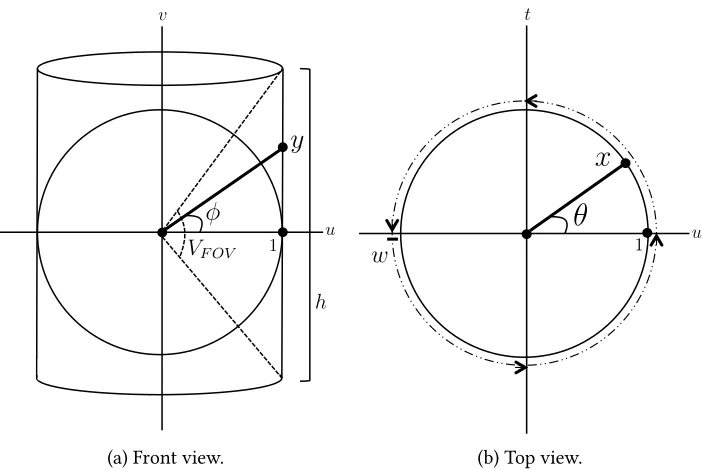
pixels from original images that lie along this ray (Figure.). For a cylindrical projection with
Figure .: Equirectangular (spherical) rendering of the panorama taken at the Ubehebe Crater in California. e black areas represent portions of the sphere where image data was not captured.
latitude,𝜙, by,
𝑥 = 𝑤
2 1 + 𝜃 𝜋
𝑦 = ℎ
2 1 − tan 𝜙 tan𝑉𝐹𝑂𝑉
2
(.)
where−𝜋 ≤ 𝜃 ≤ 𝜋 and−𝑉𝐹𝑂𝑉 ⁄ 2 ≤ 𝜙 ≤ 𝑉𝐹𝑂𝑉 ⁄ 2.
A similar procedure is used for planar projection, replacing the cylinder with a plane
gener-ating a particular field of view placed about the center of projection (Figure .). For a planar
projection with a vertical field of view,𝑉𝐹𝑂𝑉 < 𝜋 and a horizontal field of view𝐻𝐹𝑂𝑉 < 𝜋the𝑥
and𝑦coordinates are related to the longitude,𝜃, and the latitude,𝜙, by,
𝑥 = 𝑤
2 1 + tan 𝜃tan𝐻𝐹𝑂𝑉 2
𝑦 = ℎ
2 1 − tan 𝜙 tan𝑉𝐹𝑂𝑉
2
(.)
VF OV
y
u
h
1
(a) Front view.
1 u
x
✓
w [image:39.612.132.483.81.316.2](b) Top view.
Figure .: Spherical to Cylindrical Panorama Projection Diagram
Any of these methods naturally introduces some amount of geometric distortion. e trade off is between generating a physically accurate representation of the scene according to the human
visual system and creating a field of view large enough to be representative of the geology in the scene.
4.1.2 Rendering Methods
Aer choosing the desired projection method, the panorama can be rendered to an image file. Autopano Giga has a smart blending algorithm built in that automatically blends overlapping
photos from the panorama. e algorithm detects and removes ghosting and motion artifacts and guarantees a smooth transition between any exposure or color change between images. e
algorithm is multi-threaded and GPU accelerated which speeds up the process significantly. If ex-ported at full resolution, it is possible to create panoramas with resolutions of several gigapixels.
VF OV
y
u
h
1
(a) Front view.
u
1
x
✓
w
HF OV
[image:40.612.131.481.79.315.2](b) Top view.
Figure .: Spherical to Planar Panorama Projection Diagram
4.2 Video to Panorama Registration
e purpose of registering the scene video to the high resolution panorama is to be able to have a common reference frame for analysis of the eye-tracking data. What this means is that instead
of analyzing gaze data on an individual basis, the gaze data from a group of observers can be seen and analyzed simultaneously on a single reference image. e difficulty in doing this is in part
because every scene video and the panorama itself are captured from a different point of view relative to the scene and each other, and in part because the image quality of the scene videos is
vastly inferior to the image quality of the panorama.
A baseline method for accomplishing this task relies on the mathematical matrix
transforma-tion known as a homography. It is a linear projective mapping that takes points from one plane and maps them to another. When applied to images and video taken of a scene, it can transfer
points from one image to another via an intermediate scene plane. us, each video frame should have a homography mapping it to the panorama. It works under the assumption that the images
us-ing a spherical projection, and there usually isn’t a sus-ingle common scene plane present to identify
feature points with. Additionally, the different viewpoints create problems with occluded scene information. However, in many outdoor scenes the features of importance are far away and the
parallax between a given scene video and the panorama is negligible in that region. In this case it is the plane at “infinity” that acts as the intermediate scene plane. ough even if this isn’t the
case, the matching process can still be aempted.
4.2.1 SIFT Feature Tracking
Before matching video frames to the panorama, a scene video is analyzed to determine the frame
to frame image transformations. is allows for the calculation of temporally consistent and smooth results when matching individual video frames to the panorama. To do this, SIFT
fea-tures are computed and matched between each frame and its neighbor using the VLFeat toolbox. Generally there are a large number of outliers aer matching and they need to be filtered out
according to a specific image transformation model. Since the change in baseline frame to frame in a video is small with a negligible amount of parallax, a homography model can be used to
approximate the transformation from one frame to the next. Using functions from Peter Kovesi’s
computer vision and image processing toolbox [], the putative SIFT matches are passed to a
RANSAC procedure that uses this model to determine a set of matches which are inliers to the model. It is these matches that are used to compute the homography. A record is kept of the
inlier matches from frame to frame so that feature tracks can be determined during processing. e videos and initial SIFT data are put through a second-pass version of this method that
uses only the SIFT features that last through a minimum specified number of frames to recom-pute the frame-to-frame homography transformations. is method promotes the use of robust
SIFT features and ignores those noisy features which disappear quickly. Figure .graphically
demonstrates SIFT tracking performed on a particular video frame. e different colors represent
Figure .: A visualization of SIFT feature tracking on a video frame. e different colors repre-sent how many frames the tracks have survived.
4.2.2 Keyframe Selection
Now that the frame-to-frame homographies have been computed for the scene video, video to
panorama registration can be aempted. Each frame of the scene video needs to be related to the panorama by some kind of spatial transformation. As discussed above, a homography model
can be used to accomplish this. One way to do this for the entire video sequence is to select a single keyframe from the video that will act as a homography anchor to the panorama. Let
the keyframe be given by the 𝑘th video frame and let the current video frame be the 𝑗th. To
compute the appropriate homography for every other video frame, compose each frame-to-frame
homography between the given frame and the keyframe followed by applying the homography from the keyframe to the panorama,𝑯𝑘,𝑝. en (if𝑗 < 𝑘),
𝑯𝑗,𝑘 = 𝑘−1
𝑙=𝑗 𝑯𝑙,𝑙+1
𝑯𝑗,𝑝 = 𝑯𝑘,𝑝𝑯𝑗,𝑘. (.)
A similar procedure works for when 𝑗 > 𝑘. e first computation will yield a homography
relating the given frame to the keyframe, 𝑯𝑗,𝑘, and the second computation will upgrade that
ensures that the smoothness of the frame-to-frame transformations is preserved when mapping
each video frame to the panorama. e drawback, however, is that the further a given frame is from the keyframe that anchors the video to the panorama, the less accurate the transformation
becomes. is phenomenon is called dri (because the solution is driing away from what is desired) and is mainly caused by accumulations of very small errors in the frame-to-frame
ho-mographies summed over a large number of video frames. e errors themselves are due simply to imperfect data and noise when analyzing the video frames during the SIFT feature tracking
procedure.
To counteract dri in the solution, multiple video keyframes can be selected to anchor the
spatial transformation between the scene video and the panorama. is serves to “reset” the dri that has accumulated at each keyframe, yielding more accurate results. To implement this idea,
the keyframes need to be selected in such a way that they are distributed fairly well throughout the entire video sequence. One way to do this is to simply select a keyframe every certain number
of frames so that there is an anchor at equal time interval during the video.
A more sophisticated method is to use the results of the single keyframe method to inform
the algorithm where to place additional keyframes. By looking at the projective components of the homographies relating each video frame to the panorama, it is possible to determine which
frame in a given time interval is closest to an affine transformation and set it as a keyframe. is is done by analyzing the magnitude of the projective components over time and selecting the local
minima as the keyframes. To avoid geing a keyframe too oen, a parameter is used to smooth the data slightly before computing the local minima. is smoothing parameter essentially controls
the desired keyframe density of the result.
Once the set of keyframes has been selected, each of them needs to be matched to the panorama
with a homography transformation. is is done in the same way as computing the frame-to-frame transformations in the video sequence, with just a few changes. First, SIFT features are
computed for the panorama which will be used for every video keyframe analysis. en, for each keyframe, SIFT features are computed and RANSAC with a homography model is run to
frames and the panorama that this procedure as it stands will typically fail.
What has been found to work more robustly is to do SIFT feature detection going through ever increasing levels per octave of computation. us, the first computation compares SIFT
features detected at three levels per octave to see if a valid homography can be determined using RANSAC. If not, the procedure is repeated at four levels per octave all the way up until twelve
levels per octave if necessary. Once a valid homography is found, the process repeats for the next keyframe. In the case that no valid homography is found, the algorithm resorts to asking for a
manual selection of control points that match between the video frame and panorama. At this point the user also has the option of rejecting that particular keyframe entirely and moving onto
the next one.
4.2.3 Final Homography Calculation
Once the keyframe to panorama homographies have been calculated, the frame to panorama
homographies for all other video frames are computed by composing the frame-to-frame
homo-graphies with the neighboring keyframe to panorama homohomo-graphies. us, if𝑘1 represents the
previous keyframe,𝑘2represents the next keyframe and the current frame is the𝑗th, there will
be two frame to panorama homographies given by,
𝑯𝑗,𝑘
1 = 𝑘1+1
𝑙=𝑗 𝑯𝑙,𝑙−1
𝑯𝑗,𝑝1 = 𝑯𝑘1,𝑝𝑯𝑗,𝑘1 (.)
𝑯𝑗,𝑘2 = 𝑘2−1
𝑙=𝑗 𝑯𝑙,𝑙+1
𝑯𝑗,𝑝2 = 𝑯𝑘2,𝑝𝑯𝑗,𝑘2. (.)
To ensure a smooth transition between keyframes and to counter any errors due to dri, the
using its surrounding keyframes, weighted by the distance to each keyframe,
𝑯𝑗,𝑝 = 𝛼(𝑗)𝑯𝑗,𝑝1 + 𝛽(𝑗)𝑯𝑗,𝑝2 (.)
𝛼(𝑗) = 𝑘2− 𝑗 𝑘2− 𝑘1 𝛽(𝑗) = 1 − 𝛼(𝑗).
e final set of video frame to panorama homographies can then be used to visualize the scene
[image:45.612.90.524.271.381.2]video and eye-tracking data onto the panorama (Figure.).
Figure .: A visualization of a frame of the scene video mapped onto the panorama via its ho-mography.
4.2.4 Ground Truth Evaluation
To determine how well this algorithm is performing there needs to be a way of comparing its
results against a ground truth measurement. Unfortunately, accurate ground truth data isn’t available so the alternative is to visually create some approximate ground truth data. To do this,
nine control points representative of the important scene content were manually selected in a panorama of Inspiration Point that would be visible throughout a particular second video
sequence (Figure .). en, points were located manually in the video sequence that matched
the panorama control points (if visible) for every ten frames.
With this new set of data and the previous set of video to panorama homography
transfor-mations, a measurement of error can be computed. is error, 𝐸, is defined geometrically as
the Euclidean distance (in pixels) between the manually selected point in the 𝑗th video frame,
Point 3 Point 4 Point 5 Point 6 Point 7 Point 8 Point 9
Figure .: e nine control points selected for use in the ground truth evaluation of the scene at Inspiration Point, Yosemite National Park, California.
appropriate control point,𝒑, in the panorama [],
𝒙𝑗 = 𝑯𝑗,𝑝𝒙𝑗
𝐸 = 𝒑 − 𝒙𝑗 . (.)
Ideally they will each be the same point and the error value will reduce to zero pixels. In reality,
0 40 80 120 160 200 240 280 320 360 400 440 480 520 560 600 640 680 720 760 800 840 880 920 960 1000 0 5 10 15 20 25 Frame Number Error [pixels]
Geometric Projection Error
[image:46.612.94.521.77.186.2]Point 1 Point 2 Point 3 Point 4 Point 5 Point 6 Point 7 Point 8 Point 9
Figure .: e geometric projection error in pixels on the panorama, computed from the manual points selected in each video frame corresponding to each of the nine control points.
the results are not perfect and have a variable amount of error, as ploed in Figure.. e error
Point 3 Point 4 Point 5 Point 6 Point 7 Point 8 Point 9
Figure .: Plot of the mapped video points for each of the nine control points.
Most of the mapped video points lie within a distance of about pixels to their respective
control point on the panorama. It turns out the points that have errors that go high off the chart are due to user mistakes when finding the control points in the video sequence. Looking at the
raw data it is easy to see that a control point other than the one that was being worked on was
selected, causing those enormous errors. Figure .shows the mapped video points ploed on
the panorama for each of the control points and Figure. shows a close-up view of the area
around each control point. Notice how some of the control points have mapped points whose
colors do not match; this is due to the user error in selecting the correct control point. e rest of the data (ignoring mistakes) lie between a distance of about and pixels to their respective
control point. us, a majority of the mapped points are matched well to their control point, however around each there is a scaered amount of poorly matched points (within the pixel
range). Figure.shows box plots of the statistical distribution of geometric projection errors
corresponding to each of the nine control points. On each box, the center line represents the
median, the edges of the box are the th and th percentiles, the whiskers extend to the most extreme data points not considered outliers, and supposed outliers are ploed individually.
It should be possible to improve these results further by first removing the lens distortion present in the scene videos and by using a portion of the panorama that can be rendered
Point 1 Point 2 Point 3 Point 4 Point 5 Point 6 Point 7 Point 8 Point 9
(a) Control Point
Point 1 Point 2 Point 3 Point 4 Point 5 Point 6 Point 7 Point 8 Point 9
(b) Control Point
Point 1 Point 2 Point 3 Point 4 Point 5 Point 6 Point 7 Point 8 Point 9
(c) Control Point
Point 1 Point 2 Point 3 Point 4 Point 5 Point 6 Point 7 Point 8 Point 9
(d) Control Point
Point 1 Point 2 Point 3 Point 4 Point 5 Point 6 Point 7 Point 8 Point 9
(e) Control Point
Point 1 Point 2 Point 3 Point 4 Point 5 Point 6 Point 7 Point 8 Point 9
() Control Point
Point 1 Point 2 Point 3 Point 4 Point 5 Point 6 Point 7 Point 8 Point 9
(g) Control Point
Point 1 Point 2 Point 3 Point 4 Point 5 Point 6 Point 7 Point 8 Point 9
(h) Co