FREE Monthly
Technology Updates
One-year Vendor
Product Upgrade
Protection Plan
FREE Membership to
Access.Globalknowledge
CISCO
NETWORK
SECURITY
MANAGING
Russell Lusignan, CCNP, CCNA, MCSE, MCP+I, CNA Oliver Steudler, CCNA, CCDA, CNE
Jacques Allison, CCNP, ASE, MCSE+I
TECHNICAL EDITOR:
“Finally! A single resource that really
delivers solid and comprehensive
knowledge on Cisco security planning
and implementation. A must have for the
serious Cisco library.”
—
David Schaer, CCSI, CCNP, CCDA, MCSE, MCDBA,
MCNI, MCNE, CCA
President, Certified Tech Trainers
With over 1,500,000 copies of our MCSE, MCSD, CompTIA, and Cisco
study guides in print, we have come to know many of you personally. By
listening, we've learned what you like and dislike about typical computer
books. The most requested item has been for a web-based service that
keeps you current on the topic of the book and related technologies. In
response, we have created
[email protected], a service that
includes the following features:
■
A one-year warranty against content obsolescence that occurs as
the result of vendor product upgrades. We will provide regular web
updates for affected chapters.
■
Monthly mailings that respond to customer FAQs and provide
detailed explanations of the most difficult topics, written by content
experts exclusively for
[email protected].
■
Regularly updated links to sites that our editors have determined
offer valuable additional information on key topics.
■
Access to “Ask the Author”™ customer query forms that allow
readers to post questions to be addressed by our authors and
editors.
Once you've purchased this book, browse to
www.syngress.com/solutions
.
To register, you will need to have the book handy to verify your purchase.
MANAGING
CISCO
NETWORK SECURITY:
Syngress Publishing, Inc., the author(s), and any person or firm involved in the writing, editing, or production (collectively “Makers”) of this book (“the Work”) do not guarantee or warrant the results to be obtained from the Work.
There is no guarantee of any kind, expressed or implied, regarding the Work or its contents. The Work is sold AS IS and WITHOUT WARRANTY. You may have other legal rights, which vary from state to state.
In no event will Makers be liable to you for damages, including any loss of profits, lost savings, or other inci-dental or consequential damages arising out from the Work or its contents. Because some states do not allow the exclusion or limitation of liability for consequential or incidental damages, the above limitation may not apply to you.
You should always use reasonable case, including backup and other appropriate precautions, when working with computers, networks, data, and files.
Syngress Media® and Syngress® are registered trademarks of Syngress Media, Inc. “Career Advancement Through Skill Enhancement™,” “Ask the Author™,” “Ask the Author UPDATE™,” “Mission Critical™,” and “Hack
Proofing™” are trademarks of Syngress Publishing, Inc. Brands and product names mentioned in this book are trademarks or service marks of their respective companies.
KEY SERIAL NUMBER
001 AWQ692ADSE 002 KT3LGY35C4 003 C3NXC478FV 004 235C87MN25 005 ZR378HT4DB 006 PF62865JK3 007 DTP435BNR9 008 QRDTKE342V 009 6ZDRW2E94D 010 U872G6S35N
PUBLISHED BY
Syngress Publishing, Inc. 800 Hingham Street Rockland, MA 02370
Managing Cisco Network Security: Building Rock-Solid Networks
Copyright © 2000 by Syngress Publishing, Inc. All rights reserved. Printed in the United States of America. Except as permitted under the Copyright Act of 1976, no part of this publication may be reproduced or dis-tributed in any form or by any means, or stored in a database or retrieval system, without the prior written per-mission of the publisher, with the exception that the program listings may be entered, stored, and executed in a computer system, but they may not be reproduced for publication.
Printed in the United States of America 1 2 3 4 5 6 7 8 9 0
ISBN: 1-928994-17-2
Copy edit by: Adrienne Rebello Proofreading by: Nancy Kruse Hannigan Technical review by: Stace Cunningham Page Layout and Art by: Shannon Tozier Technical edit by: Florent Parent Index by: Robert Saigh
v
Acknowledgments
We would like to acknowledge the following people for their kindness and sup-port in making this book possible.
Richard Kristof, Duncan Anderson, Jennifer Gould, Robert Woodruff, Kevin Murray, Dale Leatherwood, Rhonda Harmon, and Robert Sanregret of Global Knowledge, for their generous access to the IT industry’s best courses, instructors and training facilities.
Ralph Troupe and the team at Callisma for their invaluable insight into the challenges of designing, deploying and supporting world-class enterprise net-works.
Karen Cross, Kim Wylie, Harry Kirchner, John Hays, Bill Richter, Kevin Votel, Brittin Clark, Sarah Schaffer, Ellen Lafferty and Sarah MacLachlan of
Publishers Group West for sharing their incredible marketing experience and expertise.
Mary Ging, Caroline Hird, and Simon Beale of Harcourt International for making certain that our vision remains worldwide in scope.
Annabel Dent, Anneka Baeten, Clare MacKenzie, and Laurie Giles of Harcourt Australia for all their help.
David Buckland, Wendi Wong, David Loh, Marie Chieng, Lucy Chong, Leslie Lim, Audrey Gan, and Joseph Chan of Transquest Publishers for the enthu-siasm with which they receive our books.
Kwon Sung June at Acorn Publishing for his support.
Ethan Atkin at Cranbury International for his help in expanding the Syngress program.
Special thanks to the professionals at Osborne with whom we are proud to publish the best-selling Global Knowledge Certification Press series.
vi
From Global Knowledge
At Global Knowledge we strive to support the multiplicity of learning styles required by our students to achieve success as technical professionals. As the world's largest IT training company, Global Knowledge is uniquely positioned to offer these books. The expertise gained each year from pro-viding instructor-led training to hundreds of thousands of students world-wide has been captured in book form to enhance your learning experience. We hope that the quality of these books demonstrates our commitment to your lifelong learning success. Whether you choose to learn through the written word, computer based training, Web delivery, or instructor-led training, Global Knowledge is committed to providing you with the very best in each of these categories. For those of you who know Global Knowledge, or those of you who have just found us for the first time, our goal is to be your lifelong competency partner.
Thank your for the opportunity to serve you. We look forward to serving your needs again in the future.
Warmest regards,
Duncan Anderson
vii
Contributors
Russell Lusignan (CCNP, CCNA, MCSE, MCP+I, CNA) is a Senior Network Engineer for Bird on a Wire Networks, a high-end dedi-cated and fully managed Web server/ASP provider lodedi-cated in Toronto, Canada. He is also a technical trainer for the Computer Technology Institute.
Russell’s main area of expertise is in LAN routing and switching technologies and network security implementations. Chapters 3, 4, and 6.
David G. Schaer(CCNA, CCDA, CCNP, CCSI, MCT, MCSE, MCP+I, MCNE, CCA) is President of Certified Tech Trainers, Inc., an organization specializing in the development and delivery of custom training for Cisco CCNA and CCNP certification. He has provided training sessions for major corporations throughout the United States, Europe, and Central America. David enjoys kayak fishing, horseback riding, and exploring the Everglades.
Oliver Steudler (CCNA, CCDA, CNE) is a Senior Systems Engineer at iFusion Networks in Cape Town, South Africa. He has over 10 years of experience in designing, implementing and troubleshooting complex networks.
viii
Jacques Allison(CCNP, ASE, MCSE+I) Jacques has been involved with Microsoft-related projects on customer networks ranging from single domain and exchange organization migra-tions to IP addressing and network infrastructure design and implementation. Recently he has worked on CA Unicenter TNG implementations for network management.
He received his engineering diploma in Computer Systems in 1996 from the Technicon Pretoria in South Africa. Jacques began his career with Electronic Data Systems performing desktop support, completing his MCSE in 1997.
Jacques would like to dedicate his contribution for this book to his fiancée, Anneline, who is always there for him. He would also like to thank his family and friends for their support.
Chapter 8.
John Barnes(CCNA, CCNP, CCSI) is a network consultant and instructor. John has over ten years experience in the implemen-tation, design, and troubleshooting of local and wide area net-works as well as four years of experience as an instructor.
John is a regular speaker at conferences and gives tutorials and courses on IPv6, IPSec, and intrusion detection. He is cur-rently pursuing his CCIE. He would like to dedicate his efforts on this book to his daughter, Sydney.
Chapter 2.
Russell Gillis (CISSP, MCSE, CCNA) is Associate Director of Networking at Kalamazoo College in Kalamazoo, Michigan. Prior to joining “K” College, Russ worked for 11 years in the pharmaceutical industry. His experience includes workstation support, system administration, network design, and information security.
ix
Pritpal Singh Sehmilives in London, England. He has worked in various IT roles and in 1995 launched Spirit of Free
Enterprise, Ltd. Pritpal is currently working on an enterprise architecture redesign project for a large company. Pritpal is also a freelance Cisco trainer and manages the Cisco study group www.ccguru.com. Pritpal owes his success to his family and life-long friend, Vaheguru Ji.
Chapter 7.
Technical Editor
Florent Parent is currently working at Viagénie, Inc. as a con-sultant in network architecture and security for a variety of orga-nizations, corporations, and governments. For over 10 years, he has been involved in IP networking as a network architect, net-work manager, and educator.
He is involved in the architecture development and deploy-ment of IPv6 in the CA*net network and the 6Tap IPv6 exchange. Florent participates regularly in the Internet Engineering Task Force (IETF), especially in the IPv6 and IPSec work groups. In addition to acting as technical editor for the book, Florent authored the Preface and Chapter 9.
Technical Reviewer
Stace Cunningham(CMISS, CCNA, MCSE, CLSE, COS/2E, CLSI, COS/2I, CLSA, MCPS, A+) is a security consultant cur-rently located in San Antonio, TX. He has assisted several
x
While in the Air Force, Stace was involved for over 14 years in installing, troubleshooting, and protecting long-haul circuits ensuring the appropriate level of cryptography necessary to pro-tect the level of information traversing the circuit as well the cir-cuits from TEMPEST hazards. This included American
equipment as well as equipment from Britain and Germany while he was assigned to Allied Forces Southern Europe (NATO).
Stace has been an active contributor to The SANS Institute booklet “Windows NT Security Step by Step.” In addition, he has co-authored or served as the Technical Editor for over 30 books published by Osborne/McGraw-Hill, Syngress Media, and Microsoft Press. He is also a published author in “Internet Security Advisor” magazine.
Contents
xi
Preface
xxi
Chapter 1 Introduction to IP Network Security
1
Introduction 2Protecting Your Site 2
Typical Site Scenario 5
Host Security 7
Network Security 9
Availability 10 Integrity 11 Confidentiality 12
Access Control 12
Authentication 13 Authorization 14 Accounting 15
Network Communication in TCP/IP 15
Application Layer 17
Transport Layer 18
TCP 18
TCP Connection 20
UDP 21
Internet Layer 22
IP 22 ICMP 23 ARP 23
Network Layer 24
Security in TCP/IP 24
Cryptography 24
Symmetric Cryptography 25
Asymmetric Cryptography 26
Hash Function 26
Application Layer Security 28 Pretty Good Privacy (PGP) 28 Secure HyperText Transport Protocol (S-HTTP) 28 Transport Layer Security 29
Secure Sockets Layer (SSL) and
Transport Layer Security (TLS) 29
Secure Shell (SSH) 30
Filtering 30 Network Layer Security 31 IP Security Protocols (IPSec) 31 Filtering (Access Control Lists) 34 Data Link Layer Security 34 Authentication 34
Terminal Access Controller Access
Control System Plus (TACACS+) 34 Remote Access Dial-In User Service (RADIUS) 35
Kerberos 36
Cisco IP Security Hardware and Software 37 Cisco Secure PIX Firewall 37 Cisco Secure Integrated Software 40 Cisco Secure Integrated VPN Software 40 Cisco Secure VPN Client 41 Cisco Secure Access Control Server 41
Cisco Secure Scanner 42
Cisco Secure Intrusion Detection System 42 Cisco Secure Policy Manager 43 Cisco Secure Consulting Services 43 Summary 44 FAQs 45
Chapter 2 Traffic Filtering on the Cisco IOS
47
Introduction 48
Access Lists 48
Access List Operation 49
Types of Access Lists 50
Standard IP Access Lists 52 Source Address and Wildcard Mask 53 Keywords any and host 56
Keyword log 57
Destination Address and Wildcard Mask 63 Source and Destination Port Number 63 Established 65
Named Access Lists 67
Editing Access Lists 69
Problems with Access Lists 70 Lock-and-Key Access Lists 71
Reflexive Access Lists 77
Building Reflexive Access Lists 79 Applying Reflexive Access Lists 82 Reflexive Access List Example 82 Context-based Access Control 84 The Control-based Access Control Process 86 Configuring Control-based Access Control 86
Inspection Rules 89
Applying the Inspection Rule 89 Configuring Port to Application Mapping 91
Configuring PAM 91
Protecting a Private Network 92 Protecting a Network Connected to the Internet 93 Protecting Server Access Using Lock-and-Key 94 Protecting Public Servers Connected to the Internet 96 Summary 97 FAQs 98
Chapter 3 Network Address Translation (NAT)
99
Introduction 100
NAT Overview 100
Overview of NAT Devices 100
Address Realm 101
NAT 101 Transparent Address Assignment 102
Transparent Routing 103
Public, Global, and External Networks 104 Private and Local Networks 105 Application Level Gateway 105
NAT Architectures 106
Traditional or Outbound NAT 106 Network Address Port Translation (NAPT) 108
Static NAT 109
Twice NAT 111
Configuring NAT on Cisco IOS 116 Configuration Commands 116 Verification Commands 121 Configuring NAT between a
Private Network and Internet 122 Configuring NAT in a Network with DMZ 124 Considerations on NAT and NAPT 127 IP Address Information in Data 127 Bundled Session Applications 127 Peer-to-Peer Applications 128 IP Fragmentation with NAPT En Route 128 Applications Requiring Retention of
Address Mapping 128
IPSec and IKE 129
Summary 129 FAQs 130
Chapter 4 Cisco PIX Firewall
131
Introduction 132 Overview of the Security Features 133 Differences Between IOS 4.x and 5.x 137
Initial Configuration 139
Installing the PIX Software 140
Basic Configuration 140
Installing the IOS over TFTP 143 Command Line Interface 145
IP Configuration 146
IP Address 147
Configuring NAT and NAPT 149 Security Policy Configuration 153
Security Strategies 153
Deny Everything That Is Not Explicitly Permitted 154 Allow Everything That Is Not Explicitly Denied 154 Identify the Resources to Protect 156 Demilitarized Zone (DMZ) 157 Identify the Security Services to Implement 158 Authentication and Authorization 158
Access Control 159
Securing Resources 165 URL, ActiveX, and Java Filtering 168 PIX Configuration Examples 170 Protecting a Private Network 170 Protecting a Network Connected to the Internet 172 Protecting Server Access Using Authentication 174 Protecting Public Servers Connected
to the Internet 176
Securing and Maintaining the PIX 182
System Journaling 182
Securing the PIX 184
Summary 185 FAQs 186
Chapter 5 Virtual Private Networks
189
Introduction 190
What Is a VPN? 190
Overview of the Different VPN Technologies 190
The Peer Model 191
The Overlay Model 192
Link Layer VPNs 192
Network Layer VPNs 193
Transport and Application Layer VPNs 194 Layer 2 Transport Protocol (L2TP) 195 Configuring Cisco L2TP 196 LAC Configuration Example 197 LNS Configuration Example 197 IPSec 198
IPSec Architecture 201
Security Association 202
Anti-Replay Feature 203
Security Policy Database 203 Authentication Header 204 Encapsulating Security Payload 205
Manual IPSec 205
Internet Key Exchange 206 Authentication Methods 207 IKE and Certificate Authorities 208
IPSec Limitations 209
Network Performance 209
Network Troubleshooting 210 Interoperability with Firewalls and Network Address
IPSec and Cisco Encryption Technology (CET) 210 Configuring Cisco IPSec 211 IPSec Manual Keying Configuration 212 IPSec over GRE Tunnel Configuration 218 Connecting IPSec Clients to Cisco IPSec 226 Cisco Secure VPN Client 226
Windows 2000 228
Linux FreeS/WAN 229
BSD Kame Project 230
Summary 231 FAQs 231
Chapter 6 Cisco Authentication, Authorization,
and Accounting Mechanisms
233
Introduction 234
AAA Overview 234
AAA Benefits 238
Cisco AAA Mechanisms 239
Supported AAA Security Protocols 239 RADIUS 239 TACACS+ 243 Kerberos 246 RADIUS, TACACS+, or Kerberos 254
Authentication 255
Login Authentication Using AAA 258 PPP Authentication Using AAA 261 Enable Password Protection for Privileged
EXEC Mode 263
Authorization 263 Configure Authorization 265 TACACS+ Configuration Example 266 Accounting 268 Configuring Accounting 269 Suppress Generation of Accounting Records
for Null Username Sessions 271 RADIUS Configuration Example 271 Typical RAS Configuration Using AAA 271 Typical Firewall Configuration Using AAA 276
Authentication Proxy 280
Configuring the HTTP Server 283 Configure Authentication Proxy 284 Authentication Proxy Configuration Example 285 Summary 286 FAQs 287
Chapter 7 Intrusion Detection
289
Introduction 290 What Is Intrusion Detection? 290 Network Attacks and Intrusions 290 Poor Network Perimeter/Device Security 291
Network Sniffers 291
Scanner Programs 291
Network Topology 292
Unattended Modems 292
Poor Physical Security 293 Application and Operating Software Weaknesses 293
Software Bugs 293
Web Server/Browser-based Attacks 293 Getting Passwords—Easy Ways in Cracking Programs 293 Trojan Horse Attacks 294 Virus or Worm Attacks 294
Human Failure 295
Poorly Configured Systems 295
Information Leaks 295
Malicious Users 296
Weaknesses in the IP Suite of Protocols 296
Layer 7 Attacks 298
Layer 5 Attacks 299
Layer 3 and 4 Attacks 300 Network and Host-based
Intrusion Detection 305
Network IDS 305
Host IDS 308
What Can’t IDSs Do? 308
Deploying in a Network 309
Sensor Placement 310
Network Vulnerability Analysis Tools 311 Cisco’s Approach to Security 311 Cisco Secure Scanner (NetSonar) 311
Minimum System Specifications for
Secure Scanner V2.0 311
Searching the Network for Vulnerabilities 312
Viewing the Results 314
Cisco Secure Intrusion Detection System (NetRanger) 320
What Is NetRanger? 320
Before You Install 324
Director and Sensor Setup 324
General Operation 327
nrConfigure 327 Data Management Package (DMP) 329 Cisco IOS Intrusion Detection System 331 Configuring IOS IDS Features 332
Associated Commands 335
Cisco Secure Integrated Software (Firewall Feature Set) 335 Summary 337 FAQs 337
Chapter 8 Network Security Management
341
Introduction 342
PIX Firewall Manager 342
PIX Firewall Manager Overview 342 PIX Firewall Manager Benefits 344 Supported PIX Firewall IOS Version Versus
PIX Firewall Manager Version 345 Installation Requirements for PIX Firewall Manager 346 PIX Firewall Manager Features 348 Using PIX Firewall Manager 352 Configuration 352 Installation Errors in PIX Firewall Manager 354 A Configuration Example 356 CiscoWorks 2000 ACL Manager 361
ACL Manager Overview 361
ACL Manager Device and Software Support 364 Installation Requirements for ACL Manager 364
ACL Manager Features 366
Using a Structure Access Control Lists
Security Policy 366
Increase Deployment Time for Access Control Lists 367 Ensure Consistency of Access Control Lists 367 Keep Track of Changes Made on the Network 368 Troubleshooting and Error Recovery 368 Basic Operation of ACL Manager 369
Using ACL Manager 372
The Benefits of Using Cisco Secure Policy Manager 379 Installation Requirements for Cisco
Secure Policy Manager 380 Cisco Secure Policy Manager Features 382 Cisco Firewall Management 382 VPN and IPSec Security Management 382 Security Policy Management 384 Network Security Deployment Options 385 Cisco Secure Policy Manager Device and
Software Support 386
Using Cisco Secure Policy Manager 388 Configuration 388 CSPM Configuration Example 389
Cisco Secure ACS 393
Cisco Secure ACS Overview 393 Cisco Secure ACS Benefits 394 Installation Requirements for Cisco Secure ACS 395 Cisco Secure ACS Features 395 Placing Cisco Secure ACS in Your Network 397 Cisco Secure ACS Device and Software Support 398 Using Cisco Secure ACS 399 Configuration 399 Cisco Secure ACS Configuration Example 401 Summary 405 FAQs 405
Chapter 9 Security Processes and Managing
Cisco Security Fast Track
407
Introduction 408 What Is a Managing
Cisco Security Fast Track? 408 Introduction to Cisco Network Security 408
Network Security 409
Network Communications in TCP/IP 409
Security in TCP/IP 410
Traffic Filtering on the Cisco IOS 412
Access Lists 412
Standard and Extended Access Lists 412 Reflexive Access Lists 413 Context-based Access Control 414 Network Address Translation (NAT) 414
Private Addresses 414
Network Address Translation 415
Traditional or Outbound NAT 416 Network Address Port Translation (NAPT or PAT) 416 Considerations 416
Cisco PIX Firewall 417
Security Policy Configuration 418 Securing and Maintaining the PIX 418 Virtual Private Networks (VPNs) 419 L2TP 419 IPSec 419 Network Troubleshooting 421 Interoperability with Firewalls and Network Address
Translation Devices 421
Cisco Authentication, Authorization and
Accounting Mechanisms 421
Authentication 422 Authorization 423 Accounting 423
Intrusion Detection 424
What Is Intrusion Detection? 424 Cisco Secure Scanner (NetSonar) 425 Cisco Secure NetRanger 425 Cisco Secure Intrusion Detection Software 426 Network Security Management 426 Cisco PIX Firewall Manager 427 CiscoWorks 2000 ACL Manager 427 Cisco Secure Policy Manager 428 Cisco Secure Access Control Manager 429 General Security Configuration Recommendations on Cisco 429 Remote Login and Passwords 429 Disable Unused Network Services 431
Logging and Backups 433
Traffic Filtering 433
Physical Access 435
Keeping Up-to-Date 435
Summary 437 FAQs 437
The Challenges of Security
Providing good internetwork security and remaining current on new hardware and software products is a never-ending task. Every network security manager aims to achieve the best possible security because the risks are real and the stakes are high. An enterprise must decide what level of security is required, taking into account which assets to protect as well as the impact of the measures on costs, personnel, and training. Perfectsecurity is an impossibility, so one must aim for the best possible security by devising a plan to manage the known risks and safe-guard against the potential risks. Defining the enterprise secu-rity policy is the first step in implementing good secusecu-rity.
Many security tools are available to help reduce the vulnerability of your network. For example, a firewall can be deployed at the network perimeter to offer an effective protection against many attacks. But a firewall is only one piece in the network security infrastructure. Good host security, regular assessment of the overall vulnerability of the net-work (audits), good authentication, authorization, accounting practices, and intrusion detection are all valuable tools in combatting network attacks and ensure a network security manager’s “peace of mind.”
Cisco Systems is the worldwide leader in IP networking solutions. They offer a wide array of market-leading network security products: dedicated appliances, routers, and switches, most of which come with some form of security software. Currently, Cisco products comprise much of the Internet’s backbone. An in-depth knowledge of how to con-figure Cisco IP network security technology is a must for anyone
Preface
working in today’s internetworked world. This book will provide you with the hands-on Cisco security knowledge you need to get ahead, and stay ahead.
About This Book
This book focuses on how to configure and secure IP networks utilizing the various security technologies offered by Cisco Systems. Inside are numerous configuration examples combined with extensive instruction from security veterans, that will provide you with the information you need to implement a network solution and manage any-sized IP net-work security infrastructure.
Although many books cover IP network security, we will concentrate specifically on security configurations using exclusively Cisco products. We supply you with exactly the information you need to know: what security solutions are available, how to apply those solutions in real-world cases, and what factors you should consider when choosing and implementing the technology.
Organization
Chapter 1: Introduction to IP Network Securityprovides an overview of the components that comprise system and network security. The chapter introduces some basic networking concepts (IP, TCP, UCP, ICMP) and discusses some of the security mechanisms available in TCP/IP. We also introduce some of the essential network security prod-ucts available from Cisco
Chapter 2: Traffic Filtering on the Cisco IOS focuses on access control through traffic filtering. We cover some of the different traffic filtering mechanisms available on the Cisco IOS such as the standard,
extended, and reflexive access lists, as well as Context-based Access Control (CBAC). Many configuration recommendations and examples are presented.
Chapter 3: Network Address Translation (NAT) provides detailed cov-erage of Network Address Translation (NAT) mechanisms with configu-ration examples on Cisco IOS and PIX firewall.
Chapter 4: Cisco PIX Firewall covers the main features of PIX firewall with recommendations on security policy configuration. Many configu-ration examples using advanced features such as AAA, NAT, and URL filtering are presented. Note that the PIX Firewall Manager graphical user interface is covered in Chapter 8.
Chapter 5: Virtual Private Networks provides an overview of Virtual Private Network (VPN) technologies available for the Cisco product line. A description of L2TP and IPSec protocols are presented and configura-tion examples using Cisco Secure VPN client and Windows 2000 are provided.
Chapter 6: Cisco Authentication, Authorization, and Accounting Mechanisms discusses the authentication, authorization, and
accounting (AAA) security services available on Cisco products. The dif-ferent security servers supported in Cisco, TACACS+, Radius and Kerberos are also explained. Note that the Cisco Secure Access Control Server is presented in Chapter 8.
Chapter 8: Network Security Managementprovides a look at the net-work security management tools available from Cisco: PIX Firewall Manager, CiscoWorks 2000 Access Control Lists Manager, Cisco Secure Security Manager (CSPM), and Cisco Secure Access Control Server.
Chapter 9: Security Processes and the Managing Cisco Security Fast Track provides a concise review of Cisco IP network security, detailing the essential concepts covered in the book. This chapter also includes a section on general security configuration recommendations for all net-works. You can use these recommendations as a checklist to help you limit the exposure and vulnerability of your security infrastructure.
Audience
This book is intended primarily for network managers and network administrators who are responsible for implementing IP network secu-rity in a Cisco environment. However, it is also useful for people who are interested in knowing more about the security features available in Cisco products in general. The book is designed to be read from begin-ning to end, but each chapter can stand alone as a useful reference should you want detailed coverage of a particular topic. Readers who want a quick understanding of the information contained in the book can read Chapter 9 first.
This book will give the reader a good understanding of what security solutions are available from Cisco and how to apply those solutions in real-world cases. These solutions will give the security managers and administrators the necessary tools and knowledge to provide the best protection for their network and data.
Editor’s Acknowledgement
I would like to thank Mark Listewnik from Syngress Publishing for his support; Marc Blanchet, colleague and friend, for his help, encourage-ment and guidance; all my colleagues and friends at Viagénie; and, especially, my wife Caroline for her exceptional support and patience.
Introduction to IP
Network Security
Solutions in this chapter:
■
Protecting Your Site
■
Network Communication in TCP/IP
■
Security in TCP/IP
■
Cisco IP Security Hardware and Software
Chapter 1
Introduction
The “2000 CSI/FBI Computer Crime and Security Survey,” conducted in early 2000 by the Computer Security Institute (CSI) with participation by the San Francisco office of the Federal Bureau of Investigation (FBI), showed that 90 percent of survey participants from large U.S. corporations, financial institutions, medical institutions, universities, and government agencies detected security breaches in 1999. About 70 percent of the par-ticipants experienced breaches more serious than viruses or employee Web abuse. Forty-two percent of survey participants (273 organizations) claimed financial losses totaling over 265 million dollars from cyber attacks. These security threats were composed of an assortment of attacks and abuses that originated both internally and externally to their network borders.
The CSI survey showed financial losses were larger than in any pre-vious year in eight out of twelve categories. The largest loss was attributed to theft of proprietary information, followed by financial fraud, virus, insider net abuse, and unauthorized insider access.
Many organizations are increasing their use of electronic commerce for business-to-business and business-to-consumer transactions. New initia-tives, such as Applications Service Providers (ASPs), expose vital corporate information and services to the Internet. People have altered the way that they work, now extending the workday or working full time from home. Telecommuters and mobile workers now require remote access to informa-tion resources normally protected within the organizainforma-tion’s network.
Businesses and individuals now depend upon information systems and data communications to perform essential functions on a daily basis. In this environment of increasingly open and interconnected communication systems and networks, information security is crucial for protecting pri-vacy, ensuring availability of information and services, and safeguarding integrity. These new technologies and increased connectivity via public access networks and extranets have allowed businesses to improve effi-ciency and lower costs, but at the price of increased exposure of valuable information assets to threats.
Protecting Your Site
Many network security failures have been widely publicized in the world press. An advantage to this unfortunate situation is the lowered resistance from upper management to support security initiatives. Getting upper management support is the first step in creating an effective net-work security program. Management must provide the authority to imple-ment security processes and procedures. Manageimple-ment commits to security of information assets by documenting the authority and obligations of departments or employees in an information security policy, and supports it by providing the resources to build and maintain an effective security program.
An effective security program includes awareness, prevention, detec-tion, measurement, management, and response to minimize risk. There is no such thing as perfect security. The determined and persistent attacker can find a way to defeat or bypass almost any security measure. Network security is a means of reducing vulnerabilities and managing risk.
Awareness should be tailored to the job requirements of employees. You must make employees understand why they need to take information secu-rity seriously. End-users choosing weak passwords or falling for social engineering attacks can easily neutralize the best technical security solu-tions. Upper management must provide for training, motivation, and codes of conduct to employees to comply with security measures.
NOTE
Don’t ignore the human factors in designing or implementing a security plan. Security is a tradeoff between productivity and protection. If you want to realize acceptance and cooperation, avoid unreasonable con-straints on end-users. If security measures are too cumbersome, people will circumvent them and take the path of least resistance to getting their work done. People will often fail before equipment fails.
Awareness also applies to network and system administrators. Information security covers an enormous range of skills and knowledge. Pursue your education on a continuous basis. You need to be aware of trends in attack methods, the threats that could damage your systems, and the safeguards that you can deploy to counter them.
Security is a continuous process that includes the stages of protect, detect, analyze, manage, and recover. This book covers many of Cisco’s security products that provide protection from threats, detection of net-work security incidents, measurement of vulnerability and policy compli-ance, and management of security policy across an extended organization. These are the tools that you have to mount defenses against threats.
Protection of assets must be cost effective. In analyzing your security needs, you first identify what assets you want to protect, and the value of those assets. Determine the threats that may damage these assets, and the likelihood of those threats occurring. Prioritize the relationships, so you concentrate on mitigating the risks with the highest potential damage, and greatest likelihood of occurring. To determine how to protect the asset, consider the cost of your protection measured against the value of the asset that you’re trying to protect. You don’t want to spend more for pre-venting a potential adversity than the asset is worth.
Monitor your network and systems to detect attacks and probes—and know what “normal” for your network and systems looks like. If you are not used to seeing normal behavior on your network, you may not recognize or be able to isolate an attack. Many systems on the network can provide clues and status information in their logs. Be sure to log enough informa-tion that you can recognize and record an attack, and examine these logs carefully. Use intrusion detection systems to watch the network traffic.
TIP
It is a good idea to synchronize the clocks of all your network devices and systems. Accurate time will help you compare logs that originate on different systems located in different parts of your network. You will be better able to reconstruct a complex sequence of events spanning mul-tiple systems. Synchronized clocks will also assist forensic investigators coordinating events that may occur in various parts of the Internet. Distributed attacks or relayed attacks can involve many systems in dif-ferent parts of the world.
Recovery is as important as protection. A planned response to recover from incidents or attacks is a necessary part of network security. Have a plan in place, so you know what to do when a security crisis arises. It is a lot easier to think about what needs to be done and who needs to be noti-fied while you’re not in the middle of a crisis. A well thought-out plan can help you make the right decisions, save valuable time, and minimize damage in an emergency.
Management of security requires coordination and planning. The perva-sive need for communications and the complexity of networks that support those needs has made security management a difficult task. Security will be only as good as the weakest link in the security chain. Security manage-ment tools that can create, distribute, and audit consistent security config-urations and policies are critical for large and distributed organizations.
Typical Site Scenario
Business needs and technology are both evolving rapidly. A revolution in the ways that people work and companies interact is being brought about by the capabilities provided by telecommunications. Networks have to pro-vide availability, integrity, and confidentiality under diverse conditions.
Networks must provide ubiquitous connectivity to all corners of your organization, including branch offices, mobile workers, and telecommuters. It may also include connections to business partners. Services made acces-sible to the public to improve availability and lower costs increase the expo-sure of some systems to millions of people. Figure 1.1 shows a typical site scenario.
The headquarters is a source of information vital to the operation of the organization. It also needs to collect data from all parts of the organization to conduct business, manage resources, and monitor the status of its busi-ness environment. This central site must accommodate many types of con-nections. It may use multiple wide area network (WAN) technologies to connect to branch offices or business partners. These connections may be permanent or on-demand. It should provide dial-up for mobile users or telecommuters. Most organizations also have an Internet connection to provide public information or business services.
Before the advent of virtual private network (VPN) technology, remote connections were usually through expensive dedicated lines, or smaller organizations may have used on-demand connection technologies such as dial-up over Integrated Services Digital Network (ISDN) or Public Switched Telephone Network (PSTN). VPN has allowed companies to shift their con-nections to the Internet and save money, but still provide confidentiality and integrity to their communication traffic.
Branch offices can be located on the other side of the city or scattered across a continent. They may exist to provide business services, distribu-tion, sales, or technical services closer to the location of customers. These offices can have one, two, or up to hundreds of employees. A branch office usually has business needs to access information securely at the head-quarters site or other branch offices, but due to its smaller size, is
con-Campus Network Central
Site
Internet Headquarters
Branch Office
Telecommuter
PDA
Business Partner Laptop
Laptop
[image:31.612.65.454.81.418.2]WAN
strained by cost for its connectivity options. When the cost or business needs are justified, the branch office would have a permanent connection to the central headquarters. Most branch offices will also have an Internet connection.
Business partners may be collaborative partners, manufacturers, or supply chain partners. Technologies such as Electronic Data Interchange (EDI) over proprietary networks have been used by large businesses to per-form transactions, but are difficult and expensive to use. Many companies have implemented extranets by using dedicated network connections to share data and operate joint business applications. Extranets and busi-ness-to-business transactions are popular because they reduce business transaction cycle times and allow companies to reduce costs and invento-ries while increasing responsiveness and service. This trend will only con-tinue to grow. Business-to-business interactions are now rapidly shifting to the Internet. Extranets can be built over the Internet using VPN technology.
Mobile users and telecommuters typically use dial-up services for con-nectivity to their headquarters or local office. Newer technologies such as Digital Subscriber Line (DSL) or cable modems offer permanent, high-speed Internet access to the home-based telecommuters.
TIP
It is well known that modems inside your campus network can create a backdoor to your network by dialing out to another network, or being left in answer mode to allow remote access directly to a workstation on your internal network. These backdoors bypass the firewall and other security measures that you may have in place.
The always-on Internet connections from home now offer the ability to create the backdoor remotely. It is possible to have an employee or contractor online with a modem to the corporate network remote access facility, while they still have an Internet connection through their DSL or cable modem. Attention to detail in the security policy, workstation con-figuration, and user awareness is critical to ensure that vulnerabilities don’t creep into your system.
Host Security
application software, server software, and even in security software or devices. Patches are implemented for these known bugs, but new vulnera-bility discoveries continue. Sometimes patches fix one bug, only to intro-duce another. Even open source software that has been widely used for ten years is not immune to harbouring serious vulnerabilities. In June 2000, CERT reported that MIT Kerberos had multiple buffer overflow vulnerabili-ties that could be used to gain root access.
Many sites do not keep up with applying patches and thus, leave their systems with known vulnerabilities. It is important to keep all of your soft-ware up-to-date. Many of the most damaging attacks have been carried out through office productivity software and e-mail. Attacks can be directed at any software and can seriously affect your network.
The default configuration of hosts makes it easy to get them up and running, but many default services are unnecessary. These unnecessary services increase the vulnerabilities of the system. On each host, all unnecessary services should be shut down. Misconfigured hosts also increase the risk of an unauthorized access. All default passwords and community names must be changed.
TIP
SANS (System Administration, Networking, and Security) Institute has created a list of the top ten Internet security threats from the consensus of a group of security experts. The list is maintained at www.sans.org/ topten.htm. Use this list as a guide for the most urgent and critical vul-nerabilities to repair on your systems.
This effort was started because experience has shown that a small number of vulnerabilities are used repeatedly to gain unauthorized access to many systems.
SANS has also published a list of the most common mistakes made by end-users, executives, and information technology personnel. It is available at www.sans.org/mistakes.htm.
The increased complexity of systems, the shortage of well-trained
administrators, and the lack of enough resources all contribute to reducing security of hosts and applications. We cannot depend on hosts to protect themselves from all threats.
to one part of it do not automatically get access to the rest of the system. Use firewalls to minimize the exposure of private servers from public net-works. Firewalls are the first line of defense while packet filtering on routers can supplement the protection of firewalls and provide internal access boundaries.
Access to hosts that contain confidential information needs to be care-fully controlled. Inventory the hosts on your network, and use this list to categorize the protection that they will need. Some hosts will be used to provide public access, such as the corporate Web site or online storefront; others will contain confidential information that may be used only by a single department or workgroup. Plan the type of access needed and deter-mine the boundaries of access control for these resources.
Network Security
The purpose of information and network security is to provide availability, integrity, and confidentiality (see Figure 1.2). These terms are described in the following sections. Different systems and businesses will place different importance on each of these three characteristics. For example, although Internet Service Providers (ISPs) may be concerned with confidentiality and integrity, they will be more concerned with protecting availability for their customers. The military places more emphasis on confidentiality with its system of classifications of information and clearances for people to access it. A financial institution must be concerned with all three elements, but they will be measured closely on the integrity of their data.
Availability Integrity Confidentiality
Information Asset
You should consider the security during the logical design of a network. Security considerations can have an effect on the physical design of the network. You need to know the specifications that will be used to purchase network equipment, software features or revision levels that need to be used, and any specialized devices used to provide encryption, quality of service, or access control.
Networks can be segmented to provide separation of responsibility. Departments such as finance, research, or engineering can be restricted so only the people that need access to particular resources can enter a net-work. You need to determine the resources to protect, the origin of threats against them, and where your network security perimeters should be located. Determine the level of availability, confidentiality, and integrity appropriate for controlling access to those segmented zones. Install
perimeter devices and configurations that meet your security requirements. Controlling access to the network with firewalls, routers, switches, remote access servers, and authentication servers can reduce the traffic getting to critical hosts to just authorized users and services.
Keep your security configuration up-to-date and ensure that it meets the information security policy that you have set. In the course of oper-ating a network, many changes can be made. These changes often open new vulnerabilities. You need to continuously reevaluate the status of net-work security and take action on any vulnerabilities that you find.
Availability
Availability ensures that information and services are accessible and func-tional when needed. Redundancy, fault tolerance, reliability, failover, backups, recovery, resilience, and load balancing are the network design concepts used to assure availability. If systems aren’t available, then integrity and confidentiality won’t matter.
Build networks that provide high availability. Your customers and end-users will perceive availability as being the entire system—application, servers, network, and workstation. If they can’t run their applications, then it is not available. To provide high availability, ensure that security pro-cesses are reliable and responsive. Modular systems and software, including security systems, need to be interoperable.
TIP
Having a good inventory and documentation of your network is impor-tant for day-to-day operations, but in a disaster you can’t depend on having it available. Store the configurations and software images of net-work devices off-site with your backups from servers, and keep them up-to-date. Include documentation about the architecture of your network. All of this documentation should be available in printed form because electronic versions may be unavailable or difficult to locate in an emer-gency. This information will save valuable time in a crisis.
Cisco makes many products designed for high availability. These devices are characterized by long mean time between failure (MTBF) with redundant power supplies, and hot-swappable cards or modules. For example, devices that provide 99.999 percent availability would have about five minutes of downtime per year.
Availability of individual devices can be enhanced by their configura-tion. Using features such as redundant uplinks with Hot Standby Router Protocol (HSRP), fast convergent Spanning Tree, or Fast Ether Channel provides a failover if one link should fail. Uninterruptible Power Supplies (UPSs) and back-up generators are used to protect mission-critical equip-ment against power outages.
Although not covered in this book, Cisco IOS includes reliability fea-tures such as:
■ Hot Standby Router Protocol (HSRP)
■ Simple Server Redundancy Protocol (SSRP)
■ Deterministic Load Distribution (DLD)
Integrity
Integrity ensures that information or software is complete, accurate, and authentic. We want to keep unauthorized people or processes from making any changes to the system, and to keep authorized users from making unauthorized changes. These changes may be intentional or unintentional.
Integrity also extends to the software images for network devices that are transporting data. The images must be verified as authentic, and they have not been modified or corrupted. When copying an image into flash memory, verify that the checksum of the bundled image matches the checksum listed in the README file that comes with the upgrade.
Confidentiality
Confidentiality protects sensitive information from unauthorized disclosure or intelligible interception. Cryptography and access control are used to protect confidentiality. The effort applied to protecting confidentiality depends on the sensitivity of the information and the likelihood of it being observed or intercepted.
Network encryption can be applied at any level in the protocol stack. Applications can provide end-to-end encryption, but each application must be adapted to provide this service. Encryption at the transport layer is used frequently today, but this book focuses on encryption at the Open Systems Interconnection (OSI) network layer. Virtual private networks (cov-ered in more detail in Chapter 5, “Virtual Private Networks”) can be used to establish secure channels of communication between two sites or between an end-user and a site. Encryption can be used at the OSI data link layer, but at this level, encryption is a point-to-point solution and won’t scale to the Internet or even to private internetworks. Every networking device in the communication pathway would have to participate in the encryption scheme. Physical security is used to prevent unauthorized access to net-work ports or equipment rooms. One of the risks at these low levels is the attachment of sniffers or packet analyzers to the network.
Access Control
Access control is the process of limiting the privilege to use system resources. There are three types of controls for limiting access:
Administrative Controlsare based upon policies. Information security policies should state the organization’s objectives regarding control over access to resources, hiring and management of personnel, and security awareness.
Physical Controlsinclude limiting access to network nodes, protecting the network wiring, and securing rooms or buildings that contain restricted assets.
Access control depends upon positively verifying an identity (authenti-cation), and then granting privilege based upon identity (authorization). The access could be granted to a person, a machine, a service, or a pro-gram. For example, network management using SNMP has access control through the use of community names. One community name gives non-privileged access and another gives non-privileged access by the management program into the network device. A person can access the same device in user mode or privileged mode using different passwords. Network access control can be provided at the edge of a security perimeter by a firewall or a router using ACLs.
Authentication
Authentication is the verification of a user’s, process’s, or device’s claimed identity. Other security measures depend upon verifying the identity of the sender and receiver of information. Authorization grants privileges based upon identity. Audit trails would not provide accountability without
authentication. Confidentiality and integrity are broken if you can’t reliably differentiate an authorized entity from an unauthorized entity.
The level of authentication required for a system is determined by the security needs that an organization has placed on it. Public Web servers may allow anonymous or guest access to information. Financial transac-tions could require strong authentication. An example of a weak form of authentication is using an IP address to determine identity. Changing or spoofing the IP address can easily defeat this mechanism. Strong authenti-cation requires at least two factors of identity. Authentiauthenti-cation factors are:
What a Person Knows Passwords and personal identification numbers (PIN) are examples of what a person knows. Passwords may be reusable or one-time use. S/Key is an example of a one-time password system.
What a Person Has Hardware or software tokens are examples of what a person has. Smart cards, SecureID, CRYPTOCard, and SafeWord are examples of tokens.
What a Person Is Biometric authentication is an example of what a person is, because identification is based upon some physical attributes of a person. Biometric systems include palm scan, hand geometry, iris scan, retina pattern, fingerprint, voiceprint, facial recognition, and signature dynamics systems.
use many of the identification examples listed previously. The strength of the techniques used to verify an identity depends on the sensitivity of the information being accessed and the policy of the organization providing the access. It is an issue of providing cost-effective protection.
Reusable passwords, by themselves, are often a security threat because they are sent in cleartext in an insecure environment. They are easily given to another person, who can then impersonate the original user. Passwords can be accessible to unauthorized people because they are written down in an obvious location or are easy to guess. The password lifetime should be defined in the security policy of the organization, and they should be changed regularly. Choose passwords that are difficult to guess and that do not appear in a dictionary.
Although the details are beyond the scope of this book, Cisco routers can authenticate with each other. Router authentication assures that routing updates are from a known source and have not been modified or corrupted. Cisco can use the MD5 hash or a simple algorithm. Several Cisco routing protocols support authentication:
■ Open Shortest Path First (OSPF)
■ Routing Information Protocol version 2 (RIPv2)
■ Enhanced Interior Gateway Routing Protocol (Enhanced IGRP) ■ Border Gateway Protocol (BGP)
■ Intermediate System-to-Intermediate System (IS-IS)
Authorization
Authorization is a privilege granted by a designated utility to enable access to services or information for a particular identity or group of identities. For highly secure systems, the default authorization should be no access, and any additional privileges are based on least privilege and need-to-know. For public systems, authorization may be granted to guest or anonymous users. You need to determine your security requirements to decide the appropriate authorization boundaries.
Accounting
Accounting is the recording of network activity and resource access
attempts. Though this information can be used for billing purposes, from a security perspective it is most important for detecting, analyzing, and responding to security incidents on the network. System logs, audit trails, and accounting software can all be used to hold users accountable for what happens under their logon ID.
Network Communication in TCP/IP
The Transmission Control Protocol/Internet Protocol (TCP/IP) suite has become the de facto standard for open system data communication and interoperability. The suite is made up of several protocols and applications that operate at different layers. Each layer is responsible for a different aspect of communication.
A Duty to Prevent Your Systems
from Being Used as
Intermediaries for Parasitic
Attacks
Parasitic attacks take advantage of unsuspecting accomplices by using their systems to launch attacks against third parties. One type of parasitic attack is the Distributed Denial of Service (DDoS) attack, like those used to bring down Yahoo! and eBay in February 2000. An attacker will install zombies on many hosts, and then at a time of their choosing, command the zombie hosts to attack a single victim, over-whelming the resources of the victim’s site.
Your responsibility is not just to protect your organization’s infor-mation assets, but to protect the Internet community as a whole. The following site www.cert.org/tech_tips/denial_of_service.html under Prevention and Response has recommendations that will help to make the Internet more secure for everyone.
In the future, we may see civil legal actions that will hold interme-diaries used in an attack liable for damages if they have not exercised due care in providing security for their systems.
The TCP/IP Internet model is organized into four layers as shown in Figure 1.3. The TCP/IP layers are compared to the equivalent layers in the seven-layer Open Systems Interconnection (OSI) reference model. The stan-dards for TCP/IP are published as Requests for Comments (RFC) and are available at www.rfc-editor.org/. RFCs are categorized as standards, draft standards, proposed standards, experimental, informational, and historical. The list of current standards RFCs can be found at www.rfc-editor.org/ categories/rfc-standard.html.
Layered protocols are designed so a specific layer at the destination receives the same object sent by the equivalent source layer. Each layer communicates with its corresponding layer on the other host. It does not worry about the parameters or formats used in the layers above or below it. Physically, a layer hands its data to the interface of the layer above or below on the same system. Figure 1.4 illustrates how the layers communi-cate. The vertical arrows show the physical communication within a host and the horizontal arrows show the logical communication between peer layers on different hosts.
As data is handed from the application, to transport, to Internet, and to the network, each protocol does its processing and prepends a header, encapsulating the protocol above it. On the system receiving this stream of information, the headers are removed as the data is processed and passed up the stack. This approach provides flexibility because, in general, upper layers don’t need to be concerned with the technology used in the layers below. For example, if the IP layer is encrypted, the TCP and applications remain unchanged. Figure 1.5 shows an example of encapsulation on the source host.
Figure 1.3
The layers of the TCP/IP protocol suite.Application Presentation
Session Transport Network Data Link Physical OSI Model
Transport Internet Application
Network TCP/IP Model
TCP, UDP IP, ICMP, ARP HTTP, Telnet, FTP, SMTP
Application Layer
The application layer provides file transfer, print, message, terminal emula-tion, and database services. Some of the protocols that operate at this
Figure 1.4
Logical and physical communication between protocol layers.Transport Internet Application
Network Host 1
Transport Internet Application
Network Host 2 Data
Segments Packets Frames Bits
Figure 1.5
Encapsulation of protocol layers.Ethernet Header
IP Header
TCP
Header Data
Ethernet Trailer IP
Header TCP
Header Data TCP
layer include HyperText Transfer Protocol (HTTP), Telnet, File Transfer Protocol (FTP), and Simple Mail Transfer Protocol (SMTP).
Transport Layer
The transport layer provides duplex, end-to-end data transport services between applications. Data sent from the application layer is divided into segments appropriate in size for the network technology being used. Transmission Control Protocol (TCP) and User Datagram Protocol (UDP) are the protocols used at this layer.
TCP
TCP provides reliable service by being connection-oriented and including error detection and correction. The connected nature of TCP is used only for two end points to communicate with each other. The connection must be established before a data transfer can occur, and transfers are acknowl-edged throughout the process. Acknowledgments assure that data is being received properly. The acknowledgment process provides robustness in the face of network congestion or communication unreliability. TCP also deter-mines when the transfer ends and closes the connection, thus freeing up resources on the systems. Checksums assure that the data has not been accidentally modified during transit. Figure 1.6 shows the format of the TCP header.
TCP ports are used to multiplex this protocol layer to the layer above with multiple applications on the same host. A source port and a destina-tion port are associated with the sending and receiving applicadestina-tions,
Figure 1.6
The TCP header.Source Port Destination Port Sequence Number
Acknowledgment Number
Urgent Pointer Options Padding
Data
0 4 16 31
respectively. The ports from 0 to 1023 are Well Known Ports, and are assigned by Internet Assigned Numbers Authority (IANA). Ports from 1024 to 49151 are Registered Ports, and ports from 49152 through 65535 are Dynamic/Private Ports. The Well Known and Registered Port numbers are available at www.isi.edu/in-notes/iana/assignments/port-numbers.
The sequence numbers allow recovery by TCP from data that was lost, damaged, duplicated, or delivered out of order. Each host in the TCP con-nection selects an Initial Sequence Number (ISN), and these are synchro-nized during the establishment of the connection. The sequence number is incremented for each byte of data transmitted across the TCP connection, including the SYN and FIN flags. Sequence numbers are 32 bits and will wrap around to zero when it overflows. The ISN should be unpredictable for a given TCP connection. Some TCP implementations have exhibited vul-nerabilities of predictable sequence numbers. Predicting the sequence number can allow an attacker to impersonate a host.
The acknowledgment number has a valid entry when the ACK flag is on. It contains the next sequence number that the receiver is expecting. Since every data segment sent over a TCP connection has a sequence number, it also has an acknowledgment number.
The following are flags used by TCP:
URG The urgent control bit indicates that Urgent Pointer is a valid offset to add to the Sequence Number. The sender of data can indicate to the receiver that there is urgent data pending.
ACK The acknowledgment control bit indicates that the Acknowledgment Number contains the value of the next sequence number the sender of the segment is expecting to receive. ACK is always set for an established con-nection.
PSH This indicates that all data received to this point has been pushed up to the receiving application. This function expedites the delivery of urgent data to the destination.
RST This TCP flag indicates that the connection is reset. This function flushes all queued segments waiting for transmission or retransmission, and puts the receiver in listen mode.
SYN This Synchronizes sequence numbers. The SYN control bit indicates that the Sequence Number contains the initial sequence number.
FIN This indicates that the sender has finished sending data. The FIN control bit is set by the application closing its connection.
Access Control Lists (ACLs) to check whether the ACK or RST flags are set. If either flag is set, the packet meets the test as established. If neither flag is set, the device at the source TCP address is trying to establish a new connection to the device at the destination TCP address.
HTTP, SMTP, FTP, Telnet, and rlogin are examples of applications that use TCP for transport. Applications that need reliability support from the transport layer use Remote Procedure Calls (RPC) over TCP. Applications that do not depend on the transport layer for reliability use RPC over UDP.
TCP Connection
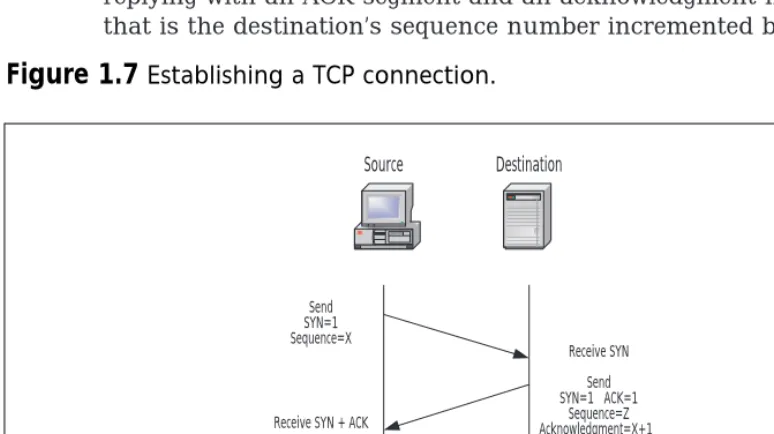
Figure 1.7 shows the establishment of a TCP/IP connection. Establishing a TCP connection requires three segments:
1. To initiate the connection, the source host sends a SYN segment (SYN flag is set) and an initial sequence number (ISN) in the sequence number field to the destination port and host address. 2. The destination host responds with a segment containing its initial
sequence number, and both the SYN and ACK flags set. The acknowledgment number will be the source’s sequence number, incremented by one.
[image:45.612.68.455.393.610.2]3. The source host acknowledges the SYN from the destination host by replying with an ACK segment and an acknowledgment number that is the destination’s sequence number incremented by one.
Figure 1.7
Establishing a TCP connection.Source Destination
Send SYN=1 Sequence=X
Receive SYN Send SYN=1 ACK=1
Sequence=Z Acknowledgment=X+1 Receive SYN + ACK
Send ACK=1 Acknowledgment=Z+1
Receive ACK Connection
Once a TCP connection between the two systems exists, data can be transferred. As data is sent, the sequence number is incremented to track the number of bytes. Acknowledgment segments from the destination host increment the acknowledgment number as bytes of data are received.
The states that TCP goes through in establishing its connection allows firewalls to easily recognize new connections versus existing connections. Access lists on routers also use these flags in the TCP header to determine whether the connection is established.
A socket is the combination of IP address and TCP port. A local and remote socket pair (quadruplet) determines a connection between two hosts uniquely:
■ The source IP address ■ The source TCP port ■ The destination IP address ■ The destination TCP port
Firewalls can use this quadruplet to track the many connections on which they are making forwarding decisions at a very granular level. During the establishment of the connection, the firewall will learn the dynamic port assigned to the client for a particular connection. For the period of time that the connection exists, the dynamic port is allowed through the firewall. Once the connection is finished, the client port will be closed. By tracking the state of a particular connection in this way, secu-rity policy rules don’t need to compensate for dynamic port assignments.
UDP
UDP is a simple, unreliable transport service. It is connectionless, so delivery is not assured. Look at the simple design of the UDP header in Figure 1.8, and you will understand the efficiency of this protocol. Since connections aren’t set up and torn down, there is very little overhead. Lost, damaged, or out of order segments will not be retransmitted unless the application layer requests it. UDP is used for fast, simple messages sent from one host to another. Due to its simplicity, UDP packets are more easily spoofed than TCP packets. If reliable or ordered delivery of data is needed, applications should use TCP.
overhead of UDP eases the network load when running time-sensitive data such as audio or video.
Secure Sockets Layer (SSL) was designed by Netscape in 1993 and pro-vides end-to-end confidentiality, authentication, and integrity at the
Transport layer (TCP). Transport Layer Security (TLS) is the IETF Internet standard version of SSL based on version 3. SSL and TLS are known mostly in the HTTP world, but the security features of SSL/TLS can be used for other protocols as well, such as Internet Mail Access Protocol (IMAP), Lightweight Mail Access Protocol (LDAP), and SMTP.
Internet Layer
The Internet layer is responsible for addressing, routing, error notification, and hop-by-hop fragmentation and reassembly. It manages the delivery of information from host to host. Fragmentation could occur at this layer because different network technologies have different Maximum
Transmission Unit (MTU). Internet Protocol (IP), Internet Control Message Protocol (ICMP), and Address Resolution Protocol (ARP) are protocols used at this layer.
IP
IP is an unreliable, routable packet delivery protocol. All upper layer proto-cols use IP to send and receive packets. IP receives segments from the transport layer, fragments them into packets, and passes them to the net-work layer.
The IP address is a logical address assigned to each node on TCP/IP network. IP addressing is designed to allow routing of packets across inter-networks. Since IP addresses are easy to change or spoof, they should not
Figure 1.8
The UDP header.0 16 31
Source Port Destination Port Length Checksum