This is a repository copy of
Use of scenario evaluation in preparation for deployment of a
collaborative system for knowledge transfer - the case of KiMERA
.
White Rose Research Online URL for this paper:
http://eprints.whiterose.ac.uk/1899/
Book Section:
Lau, L.M.S., Adams, C.A., Dew, P.M. et al. (1 more author) (2003) Use of scenario
evaluation in preparation for deployment of a collaborative system for knowledge transfer
-the case of KiMERA. In: Twelfth IEEE International Workshops on Enabling Technologies:
Infrastructure for Collaborative Enterprises, 2003. WET ICE 2003. Proceedings. (June
9-11, 2003 Johannes Kepler University of Linz, Austria). IEEE Computer Society , pp.
148-152. ISBN 0-7695-1963-6
[email protected] https://eprints.whiterose.ac.uk/
Reuse
See Attached
Takedown
If you consider content in White Rose Research Online to be in breach of UK law, please notify us by
Use of Scenario Evaluation in Preparation for Deployment of a
Collaborative System for Knowledge Transfer – the Case of
KiMERA
Lau, L M S (1); Adams, C A (2); Dew, P M (1) and Leigh, C M (3)
(1) School of Computing, (2) Knowledge Transfer Support Unit,
(3) School of Geography
University of Leeds, Leeds, LS2 9JT, United Kingdom.
Email:
[email protected],
[email protected],
[email protected],
[email protected]
Abstract
This paper presented an approach for the evaluation of a collaborative system, after the completion of system development and software testing but before its deployment. Scenario and collaborative episodes were designed and data collected from users role-playing. This was found to be a useful step in refining the user training, in setting the right level of user expectation when the system started to roll-out to real users and in providing feedback to the development team.
1. Introduction
Since the emergence of groupware and Computer-Supported Cooperative Work (CSCW) studies in the eighties, collaborative technology has become more accessible and 'matured'. Innovative use of email, bulletin boards, desktop conferencing and web-based environments for the sharing of information, pictures and sound started appearing. Model of interactions has extended from 'informing, co-ordinating, collaborating and cooperating' (Bair in [8]) to the ones that are more community-oriented [4], [13]. Community computing highlights new areas of challenge such as group formation and an increasing demand on the provision of personalisation and individual control.
In parallel with the above activities, the University of Leeds has been involved in the development and deployment of collaborative environments to support its knowledge transfer strategy. The aim is to provide a common platform for the exchanges of knowledge between the academic communities within the University and Industry. The Virtual Science Park (VSP), developed
in the nineties [7], was an early attempt. Feedback from a series of pilot studies (e.g. [5],[6]) led to the development of a second generation of collaborative system for the KiMERA (Knowledge Management for Enterprise and Reach-out Activities) project.
This paper outlines the underlying concepts in the KiMERA pilot system and discusses the challenges in its deployment. It then describes in detail the scenario-based evaluation which was used as a means to prepare for the roll-out of the KiMERA system. The paper concludes with a reflection on the evaluation process.
2. KiMERA
The KiMERA pilot system is a tool for supporting Knowledge Management for Enterprise and Reach-out Activities across the University of Leeds. It is a virtual environment to facilitate and support collaborative projects between Industry and the University. The intended users include academics, project managers and external collaborators. Facilitation is in terms of providing an 'expertise matcher' which can suggest potential people in the academic community whom might be interested to be involved in a project. A team workspace can be set up to support the follow-up activities in the project team. The usual collaborative toolset (email, discussion list, shared workspace for documents, calendar and contact book) is provided.
Experience from an earlier collaborative system, the Virtual Science Park at the University of Leeds, highlighted three other areas to be enhanced in the KiMERA system:
- the delegation of access control to individual groups as they emerged, and
- the provision of personal workspaces and the ability to move between team workspaces and the personal one.
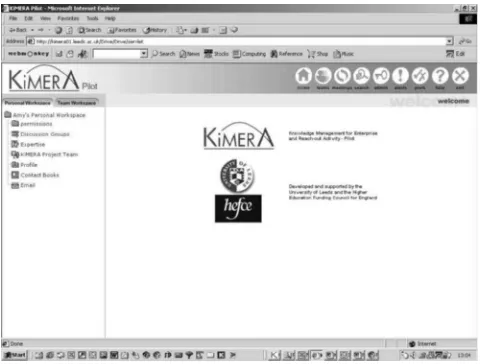
[image:3.612.60.300.176.358.2]See Figure 1 for a sample screen shot of KiMERA system. The underlying architecture and technology were also revamped.
Figure 1 A screen shot of KiMERA system
3. Challenges for the Deployment of
Collaborative Systems
To integrate a collaborative system into the workplace successfully requires a number of favourable conditions. These are technical, organizational, psychological, political, environmental or a combination of any of these [2]. Studies such as the ones undertaken by Suchman [15], Orlikowski [10] and Majchrzak et al [9] concurred that to make the best use of new technologies, an organization needs to adapt and respond to the 'evolving capabilities', 'emerging practices' and 'unanticipated outcomes' during the journey of deployment.
However, this can pose a problem to the designers and developers of collaborative systems as the requirements and usage cannot be fully predicted and designed for. Using the analogy of a European navigator and a Trukese navigator in an open sea [10] [15], the approach adopted by designer /implementor in the deployment of a collaborative system is similar to the European navigator who "begins with a plan, ...if unexpected events occur, he must alter the plan, then respond accordingly". The end-users, on the other hand, may behave more like Trukese navigators who "set off toward the objective and respond to conditions as they arise in an ad hoc fashion".
As an evaluative study of other collaborative systems illustrated, it would not take much to dissuade users from using a system [14]. Hence, before rolling out the KiMERA system, we were interested in
- reducing the likelihood of 'rejection' by examining the usability of the system from users’ viewpoint;
- checking how closely the users use the functionalities of the system as intended by the designer; and
- exploring if the users would come up with new ways of working, hence anticipating new requirements.
Scenario-based approach was chosen to evaluate the usability and functionalities of the system. Further analysis of the data would highlight new requirements and the adequacy of user training and documentation.
4. The Evaluation
The use of scenario in this study was inspired by Carroll et al [1]. A hypothetical yet realistic scenario was designed which covered a number of collaborative activities. There were seven groups of users in the study (role-played by a class of Masters students). Each group consisted of five roles and each role was given a set of 'objectives' to achieve without specifying how to achieve them using the system. To provide the context for the collaborative tasks, the scenario was further split into ‘episodes’ each of which had specific starting and finishing points. Feedback was collected from the user logs and by observation. The outcome was then analysed by the support team.
4.1. The Preparation
The preparation phase was perhaps the most crucial step as objectives of the evaluation were set and techniques for data collection determined. A range of techniques were possible contenders - observation, questionnaires, interviews, focus-group, use of video and so on [11]. As there were over thirty users involved, use of video recording would be too resource intensive. Questionnaires were also rejected as we were trying to capture the unexpected. As the scenarios would involve a number of episodes and sessions to be completed by different roles, it was decided that each role would be given a different template for each episode in order to log their immediate expectation and reaction while using the system. A ‘usability observer’ would also be used in some sessions. See figure 2 for an example of a template issued to a ‘Company Director’ at the first episode.
Secondly, seven different types of R&D projects were specified and roles assigned so that the class would split naturally into seven teams.
records, contact details etc.) to make the user experience more realistic.
Finally, an introductory session was planned and training material prepared for the users.
Template 1:
User: Company Director
Method: user logs outcome while performing the tasks Instructions on using the template:
- The tasks are already entered for you below. They specify what need doing but not how. You should briefly jot down the steps while you are completing a task. (e.g. click on ‘documents’ on LH panel; complete form; read system document again; ask for help from ‘helpdesk’; ask for help from colleagues etc.)
- If there is any time you have a particularly strong feeling about the software, note it down when it happens (e.g. frustrated, satisfying, rewarding, fun, tedious, nice surprise, where am I, etc..)
Company Director’s Name: Tasks:
- Locate an expert for your need - Email the expert regarding your intent
For each task, note the following Task :
Start time: Finish time:
Steps Comments
Figure 2 A template for user log
4.2. Scenario and Episodes
The scenario designed was one that involved an external company seeking a group of 'experts' from the University to solve an R&D problem. Three collaborative episodes were specified for evaluation.
- Team formation : This involved the company director using the Expertise Matcher to locate and email a suitable expert in the University. This expert, A , after looking at the problem, sought assistance from two other experts, B & C, in different departments of the University. Expert A temporarily led the group by organising a time for the first face-to-face meeting for the whole team and set up a team workspace for sharing information.
- Real-time collaboration - joint authoring of a document : Expert B and Expert C were tasked to draft a research proposal. Expert B produced
an electronic document with some possible content at the last minute and needed to get Expert C’s opinion quickly. B decided to use real-time conferencing to get the feedback. - Selective information provision and consultation
of group members : A Masters Project Co-ordinator was seeking new topics for dissertations. The co-ordinator came to know about this research project and would like to see if the team will be interested in proposing a spin-off Masters project. The team was approached and pointed to some information on the requirements of an MSc project (which is already in public domain). A decision was needed.
4.3. The Process
Firstly, the users were given an introductory session on KiMERA pilot system and a training document on ‘System Overview’. Users were given their role but they were not aware of who else would be the other members for their team. A series of laboratory sessions was organized for episode 1 – team formation. The ‘study’ team was also present to observe how users got on with finding the other members of the team and to ensure that the user logs were used appropriately.
Once the teams were formed, the users were left to proceed with the other episodes in their own time.
The user logs/reports were collected and analysed. The data were rich enough to give a feel on the urgency for further action - hence some issues received immediate development effort, some to be followed-up and the remaining with no planned action.
The individual comments from the episodes were grouped into the functionalities (or components) provided by the pilot system. The support team went through them and wrote down their response against the issues raised (see figure 3 for an example). Below are some of the typical responses and actions recommended:
- agreeing with the issue and further development is needed;
- do or do not agree but might be corrected by better /clearer training
- have identified a new user requirement
4.4. The Outcome
Compon ent
Issue Response Action
Client Uploading files using the client did not work because the file could not be found by using the browser (only folders).
Folder must be selected to upload all contained documents (and sob-folders) Update training
Wanted to see a way of locking a document so that only one person at a time can edit.
Development Required Developed and Implemented Docu-ment Manage-ment
Users cannot compare different versions of a document
simultaneously.
New user requirement
Added to user requirement list
Updating multiple shared documents is a pain, as each new location needs updating
Can create linked documents, one update updates all locations Update training Expertise Matcher
Simpler interface (basic search) would be more useful, but still allow access to an advanced search. Development Requirement No planned development Team Manage-ment
Cannot see a list of team members in team workspace (and whether they are logged on or not).
Development Required
[image:5.612.54.303.86.399.2]Under development
Figure 3 An extract of analysis
Component Assessed No: Issues Training Issues* Develop ment Issues* Unresolved Issues
Client 5 4 2 0 Document
Management
10 6 6 1
Email 9 3 6 2 Expertise
Matcher
8 0 8 8
Team Management
4 1 3 0
Discussions 3 1 2 0
Conferencing 10 8 3 1
Profile 1 0 1 0
Generic 6 2 3 (1
testing issue)
2
Contacts 1 0 1 0
Alerts 3 0 2 0 * Some items can be identified as both training and development issues
Figure 4 Summary of suggested enhancements
5. Reflection
The use of scenario and episodes was found useful in obtaining early feedback on the ‘usability, adequacy-of-functionality and training’ [3] for a collaborative system such as KiMERA. Instead of performing this kind of evaluation during the operational phase and involving the real users as suggested by Hall & Buckley [3], this was done before the roll-out of the system to the end-users to allow time to make the necessary improvements. Given the difficulties in predicting how users would use such a general collaborative environments, the scenario designed enabled the discovery of some un-matched user expectation and unexpected task sequences. The issues arisen from these could then be tackled systematically. However, experience showed that personal preferences sometimes came into play and conflicting messages could be received from the users. If personalization could not be offered as a solution, it remained as a ‘black art’ in deciding on an appropriate solution.
In this study, we introduced the concept of episodes in addition to the tasks-oriented scenarios [12] in order to provide more specific context to the collaborative activities. Within a scenario, a number of collaborative activities may take place to achieve a number of objectives. An episode in this study contained a subset of these collaborative tasks which were aimed for a specific team objective (e.g. forming a team). Although the scenario was designed only for this study, the objectives in the episodes were rather generic. Furthermore, there is room to add different scenarios and episodes of using KiMERA, but how would an evaluator know that the scenarios and episodes have provided adequate coverage? This raised the question of the possibility and desirability in compiling a collection (or handbook) of typical scenarios and episodes for benchmarking collaborative systems.
Finally, even in a small scale study such as this one, a significant amount of qualitative data were collected for analysis. As the number of users or scenarios/episodes increases, the amount of data may become unmanageable. Ways of ensuring methodical analysis of data are needed. There may be lessons to be learned from other disciplines.
6. Conclusion
[image:5.612.55.297.429.629.2]Effort being put in during the Preparation phase cannot be underestimated as it involved:
- designing the scenario/episodes which would be close to the usage in real life;
- defining the roles and providing enough guidance for the participants to role-play;
- ensuring the essential aspects for evaluation will be captured in a format that can be analysed later; and - paying attention to constraints of time and resources.
Once the plan was laid the second phase, Data Collection, only involved making logistic arrangements and hands-off monitoring.
During the Analysis phase in the study, the issues raised were summarised from the data collected and the support team documented their responses and suggested actions against each issue. There may be room to improve on the rigour in the identification of issues and their analysis.
The Feedback phase provided the fruit of the effort in the evaluation exercise. Suggested enhancements were split into training and/or development issues so they would be routed to the right places for action. Unresolved issues were also flagged so they were not forgotten.
References
[1} Carroll, J. (ed), Scenario-Based Design - Envisioning Work and Technology in System Development. Wiley, 1995.
[2] Diaper, D. and Sanger, C., CSCW in Practice: an Introduction and Case Studies, Springer-Verlag, 1993.
[3] Hall, T.J. and Buckley, K.B., “A practitioners guide for assessing collaboration systems”, in Proceedings of 10th IEEE International Workshop on Enabling Technologies: Infrastructure for Collaborative Enterprises (WET ICE 2001), IEEE, 2001, pp. 85 –90.
[4] Ishida, T. (ed), Community Computing - Collaboration over Global Information Networks, Wiley, 1998.
[5] Lau, L.M.S., Leigh, C.M., Dixon-Hardy, J.E., Lewis, W.E., Winnett, C.M., Curson, J.M. and Dew, P.M., “Requirements of a lifelong learning environment for executives and academics - the PETIS experience” in Journal of Continuing Engineering Education and Life-Long Learning, vol. 11, 2001, pp. 79-94.
[6] Lau, L.M.S., Curson, J.M., Drew, R., Dew, P.M. and Leigh, C. M., “Use of Virtual Science Park resource rooms to support group work in a learning environment” in Proceedings of GROUP'99 International ACM SIGGROUP Conference on Supporting Group Work, ACM Press, 1999, pp. 209-218.
[7] Leigh, C.M., Dew, P. M., Drew, R., Morris, D. and Curson, J., “The Virtual Science Park” in British Telecommunications Engineering Journal, 1996, pp.322-329.
[8] Lubich, H.P., Towards a CSCW Framework for Scientific Cooperation in Europe, Springer Verlag, 1995.
[9] Majchrzak, A., Rice, R.E., Malhotra, A., King, N., and Ba, S., “Technology Adaptation: the Case of a Computer-supported Inter-organizational Virtual Team” in MIS Quarterly, Vol.24, No.4, 2000, pp.569-600.
[10] Orlikowski, W.J. and Hofman J.D., “An Improvisational Model for Change Management: The Case of Groupware Technologies” in Sloan Management Review, Winter 1997, pp. 11-21.
[11] Pinelle, D. and Gutwin, C., “A Review of Groupware Evaluations” in Proceedings of IEEE 9th international workshops on enabling technologies: infrastructure for collaborative enterprises (WET ICE 2000), IEEE, 2000, pp. 86-91.
[12] Pinelle, D. and Gutwin, C., “Group Task Analysis for Groupware Usability Evaluations” in Proceedings of 10th IEEE International Workshop on Enabling Technologies: Infrastructure for Collaborative Enterprises (WET ICE 2001), IEEE, 2001, pp.102-107.
[13] Schlichter, J.; Koch, M.; and Xu, C., “Awareness - the Common Link Between Groupware and Community Support Systems” in Community Computing and Support Systems - Social Interaction in Networked Communities, by T. Ishida (ed.), Springer, 1998, pp.77-93.
[14] Snowdon, D. and Grasso, A., “Diffusing Information in Organizational Settings: Learning from Experience” in CHI'02 - Proceedings of the SIGCHI conference on Human Factors in Computing Systems, ACM Press, 2002, pp. 331-338.
[15] Suchman, L., Plans and Situated Actions: The Problem of Human Machine Communication, Cambridge University Press, 1987.