University of Southern Queensland
Faculty of Engineering and Surveying
The use of low-cost photogrammetry techniques to create an
accurate model of a human skull.
A dissertation submitted by:
Heidi Jane Belbin
W0109098
In fulfilment of the requirements of:
Bachelor of Spatial Science (Honours)
(Major: Surveying)
i
Abstract
There has been increasing interest in low-cost close range photogrammetry techniques for use in a variety of applications. The use of these techniques in medicine, forensic science, architecture, engineering, archaeology and anthropology to record, measure and monitor objects and sites has been growing in recent years. Close range photogrammetry has been particularly investigated and preferred for human body mapping due to being non-contact, non-invasive, accurate, and inexpensive and data is re-measurable.
Skulls have been traditionally measured using callipers and tape in anthropological study, which is subject to observer error. Close range photogrammetry can be used to perform more accurate measurements and retain a digital copy of the skull, which can be re-used for a number of purposes. Using low cost software (Photomodeler), and low cost cameras, the aim of this project is to detail the camera calibration techniques and image capture of a skull. The process for 3D modelling using close range photogrammetry includes camera calibration to determine the camera’s internal parameters, photographing the object within a control target frame, and processing the data with photogrammetry software.
ii
Disclaimer
University of Southern Queensland
Faculty of Health, Engineering and Sciences
ENG4111/ENG4112 Research Project
Limitations of Use
The Council of the University of Southern Queensland, its Faculty of Health, Engineering & Sciences, and the staff of the University of Southern Queensland, do not accept any responsibility for the truth, accuracy or completeness of material contained within or associated with this dissertation.
Persons using all or any part of this material do so at their own risk, and not at the risk of the Council of the University of Southern Queensland, its Faculty of Health, Engineering & Sciences or the staff
of the University of Southern Queensland.
iii
Candidates Certification
I certify that the ideas, designs and experimental work, results, analysis and conclusions set out in this dissertation are entirely my own efforts, except where otherwise indicated and acknowledged.
I further certify that the work is original and has not been previously submitted for assessment in any other course or institution, except where specifically stated.
Heidi Jane Belbin
Student Number: W0109098
(Signature)
iv
Acknowledgments
This project was carried out under the principal supervision of Dr. Albert Kon-Fook Chong, in which I express my sincere and greatest appreciation for his time and guidance in this project. I would also like to acknowledge Dr Glenn Campbell for his initial guidance in choosing a project.
I would like to express my appreciation to the Surveying and Spatial Sciences Institute (SSSI) for awarding me the Women in Spatial Scholarship 2015.
v
Table of Contents
Abstract ... i
Disclaimer ... ii
Candidates Certification... iii
Acknowledgments... iv
List of Figures ... ix
List of Tables ... x
List of Appendices ... xi
Nomenclature and Acronyms ... xii
1.0 Chapter One - Introduction ... 1
1.1 Outline of Study ... 1
1.2 Introduction ... 1
1.3 The Problem ... 2
1.4 Research Objectives ... 2
Objective 1: Camera Calibration ... 2
Objective 2: Image Acquisition ... 2
Objective 3: Data Processing and Creation of 3D Model ... 2
Objective 4: Accuracy of Results ... 2
1.5 Conclusion ... 2
2.0 Chapter Two - Literature Review ... 3
2.1 Introduction ... 3
2.1.1 Advantages of Close Range Photogrammetry for 3D Modelling... 4
2.1.2 Potential Users of CRP for 3D Modelling ... 4
2.2 The Use of Close Range Photogrammetry for Human Body Mapping ... 6
2.2.1 Cranium ... 6
2.2.2 Teeth and Jaw ... 7
vi
2.2.4 Hand... 9
2.2.5 Spine ... 9
2.3 Complete Body Mapping ... 10
2.3.1 Forensic Applications ... 10
2.4 Movement Mapping ... 11
2.5 Camera Calibration ... 12
2.5.1 Camera Parameters ... 12
2.5.2 Calibration Methods ... 14
2.6 Photomodeler ... 15
2.6.1 Accuracy of Photomodeler ... 16
2.6.2 Applications for Photomodeler Software ... 17
2.6.3 Advantages and Disadvantages of Photomodeler ... 18
2.7 Summary ... 18
3.0 Chapter Three – Research Design and Methodology ... 20
3.1 Objectives ... 20
1. Camera Calibration ... 20
2. Image Acquisition... 20
3. Data Processing and Creation of 3D Model ... 20
4. Accuracy ... 20
3.2 Implications of Research ... 20
3.3 Equipment ... 20
3.3.1 Cameras ... 20
3.3.2 Photogrammetry Software ... 20
3.3.3 Targets ... 21
3.3.4 Skull ... 21
3.3.5 Callipers and Tape ... 21
vii
3.4 Camera Calibration ... 21
3.4.1 Target Type and Size ... 21
3.4.2 Calibration Method ... 22
3.4.3 Camera and Calibration Grid Position ... 22
3.5 Target Configuration ... 23
3.6 Image Acquisition ... 24
3.6.1 Texture of the Object ... 24
3.6.2 Lighting ... 25
3.6.3 Background ... 25
3.6.4 Camera Position and Angles ... 25
3.6.5 Camera Settings ... 26
3.7 Processing... 26
3.7.1 Uploading Photos ... 26
3.7.2 Automatic Target Marking ... 26
3.7.3 Processing ... 27
3.7.4 DSM Trim... 28
3.7.5 Create DSM ... 28
3.8 Creation of the 3D Model... 29
3.9 Assessment of Accuracy ... 31
4.0 Chapter Four – Results and Discussion ... 33
4.1 Camera Calibration ... 33
4.1.1 Results of Calibration ... 34
4.1.2 Discussion of Calibration Results... 35
4.2 Photograph Capture and Processing ... 36
4.2.1 Discussion of Model Results ... 37
4.3 Measurements and Accuracy ... 38
viii
4.3.2 Check on Accuracy ... 39
4.3.3 Discussion of Results ... 39
4.3.4 Summary of Objectives Achieved ... 39
5.0 Chapter Five - Conclusions ... 41
5.1 Introduction ... 41
5.2 Conclusions ... 41
5.3 Further Research and Recommendations ... 42
References ... 43
Appendix A: Project Specification ... 47
Appendix B: Photomodeler Referenced Material ... 48
Appendix C: Processing Report ... 49
ix
List of Figures
Page
Figure 2.1 The principle of photogrammetric measurement. 3
Figure 2.2 The effect of radial distortion on the lens. 13
Figure 2.3 Vertical misalignment of the camera lens. 13
Figure 2.4 Range of Photomodeler software. 16
Figure 3.1 Configuration of target camera positions and orientations. 22
Figure 3.2 Create Coded Targets window in Photomodeler. 24
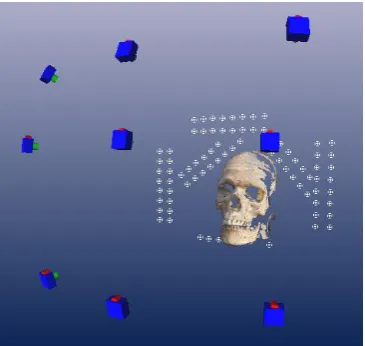
Figure 3.3 Skull showing location of camera stations. 25
Figure 3.4 Automatic Target Marking options window in Photomodeler. 26
Figure 3.5 Processing options window in Photomodeler. 27
Figure 3.6 Photo configuration and Create Dense Surface options in Photomodeler. 29 Figure 3.7 Export options in Photomodeler and resulting DXF file in AutoCAD. 30 Figure 3.8 Screen shot of Photomodeler showing the Measurements pane. 31 Figure 3.9 Screen shot showing measurements between selected targets. 32
Figure 4.1 Overall RMS for all three sets. 33
Figure 4.2 Maximum residuals for all three sets. 33
Figure 4.3 DSM coloured with photo texture and single texture with points coloured
with photo texture. 36
Figure 4.4 DSM with points coloured by depth, photo texture overlaid with point cloud, triangulated mesh and DSM showing close correlation with point cloud underneath.
36
Figure 4.5 DSM with comments. 37
x
List of Tables
Page
Table 2.1 A sample of papers which used PM in their research and stated the accuracy
achieved. 17
Table 3.1 Indicators of quality in the processing report. 28
Table 4.1 Calibration sets completed and comments. 33
Table 4.2 Camera calibration results showing parameters, Root Mean Squared (RMS) and
Maximum Residual 34
Table 4.3 Measurements taken on skull. 38
xi
List of Appendices
Page
Appendix A Project Specification 47
Appendix B Photomodeler Referenced Material 48
Appendix C Processing Report (Raw File) 49
xii
Nomenclature and Acronyms
2D Two Dimensional
3D Three Dimensional
CBCT Cone Beam Computed Tomography CCD Coupled Charged Diode
CMOS Complementary Metal-Oxide Semiconductor
CT Computed Tomography
CRP Close Range Photogrammetry MRI Magnetic Resonance Imaging
PM Photomodeler
1
1.0 Chapter One - Introduction
1.1 Outline of Study
This project involves testing the suitability and accuracy of low cost close range photogrammetry (CRP) for modelling a complex object, such as a human skull. Human skulls are important for the study of anthropology, archaeology, medicine, forensic identification to name a few applications. CRP is preferable to other methods of capturing data as it is low cost, accurate, non-invasive, non-contact, time efficient, photos and model are re-measurable, inaccessible spots can be photographed and able to be performed by professionals outside of the photogrammetry or spatial science field.
The project will assess the ease and simplicity of using Photomodeler to create a 3D model of a model human skull, as well as the accuracy attained. The Project Specification can be found in Appendix A.
1.2 Introduction
Low cost CRP is increasing in popularity as a method of capturing data to create accurate, true to scale 3D models of objects and scenes. There are a number of advantages of using CRP compared with other data capture methods, such as laser scanning. The advantages include:
High accuracy Low cost Ease of use Portability
Non-contact and non-invasive
The validity of the claims above as made by various research papers will be tested, by attempting to create a 3D model of a human skull using low cost CRP techniques, equipment and software, in which the following criteria will be assessed:
Accuracy of camera calibration
Quality of software processing(image to model quality)
Ease of use
Accuracy of the model
2
1.3 The Problem
Low cost CRP is becoming an increasingly widely used tool for capturing data for a range of applications. Photogrammetry software, such as Photomodeler, is marketed as being easy to use and can produce 3D models of high accuracy and quality. A complex object, such as a human skull, is an appropriate and real-world subject to test the ease at which a 3D model can be created using Photomodeler, as well as the accuracy which can be achieved by a non-professional (undergraduate student) using low cost equipment and basic photogrammetry techniques. There are difficulties in creating complex, 3D objects using CRP and methods for improving data capture are needed.
1.4 Research Objectives
Objective 1: Camera Calibration
Determine the most appropriate calibration for the task, including the coded target type, number of targets and discuss any differences between the two cameras.
Objective 2: Image Acquisition
Determine the optimal amount of targets to be used and configuration. Objective 3: Data Processing and Creation of 3D Model
Analyse the level of difficulty and note any problems in the creation of the 3D model from the images. Objective 4: Accuracy of Results
Assess the accuracy of the 3D model comparing measurements taken with callipers and tape.
1.5 Conclusion
3
2.0 Chapter Two - Literature Review
2.1 Introduction
The use of low cost CRP to create 3D models is a somewhat new tool, which has its roots in a longer history (Fryer, Mitchell & Chandler 2007, p. 1), that researchers in different professions are investigating the applications where CRP can be useful. CRP is becoming increasingly popular as a tool for data capture in fields outside of spatial science. For this reason it is important to investigate thoroughly how CRP has been used in a variety of applications and the appropriateness of the tool for the task. It is the role of spatial scientists to investigate technology and advise the professional community in the appropriate use and limitations of data.
The principles of photogrammetry involve the fundamental sciences of mathematics, physics, information sciences and biology. (Luhmann et al. 2006, p. 3) CRP has varied applications and a strong interdisciplinary character. (Luhmann et al. 2006, p. 3) A useful explanation of photogrammetry can be found in Luhmann et al. (2006, p. 2) and shown graphically in Figure 2.1 below:
[image:16.595.163.469.442.622.2]“The primary purpose of a photogrammetric measurement is the three dimensional reconstruction of an object in digital form (coordinates and derived geometric elements) or graphical form (images, drawings, maps).”
Figure 2.1 Taken from (Luhmann et al. 2006, p. 6) showing the principle of photogrammetric measurement.
4
2.1.1 Advantages of Close Range Photogrammetry for 3D Modelling
The advantages of using photogrammetry to capture data includes (Majid et al. 2005, p. 55):
Non-invasive - Photogrammetry is able to be performed without making contact with the object to be modelled. Examples include capturing rock art and carvings which are inaccessible (on a high rock face) or fragile (Sanz et al. 2010); capturing data for a crime scene (Randles et al. 2010) or archaeological dig in which minimal contact with the site is preferred. (Sanz et al. 2010)
Instantaneous - Processing time can be minimal depending on the task and skill of the operator. (Majid et al. 2005, p. 55)
High accuracy - CRP has greater accuracy than using laser scanning. Laser scanning provides rapid 3D modelling, whereas photogrammetry provides precise measurement. (Galantucci, Percoco & Di Gioia 2010, p. 186)
Real world colour and texture - Photogrammetry software produces colour and texture from the photograph. (Majid et al. 2005, p. 55)
Permanent record - An accurate, scaled digital record of an object is important to preserve the characteristics of the object, which may be destroyed or fragile, for example a footprint. (Majid et al. 2005, p. 55)
Re-measurement possible if needed - It is possible to re-measure an object from photos and create models which can be re-measured as much as necessary by photogrammetry. (Randles et al. 2010, p. 8)
Cost effective – Low cost CRP is more cost effective than using other forms of survey equipment and can match or improve the quality of survey equipment. (Majid et al. 2005, p. 55)
2.1.2 Potential Users of CRP for 3D Modelling
There are a number of applications that can benefit from the use of CRP. Some examples include:
Anatomical Research
5
Surgery, Medicine and Dentistry
There is a wide variety of medical applications for CRP, including monitoring for disease, post and pre surgery assessment, and studies of motion. Photogrammetry has been used in dentistry to allow accurate models of teeth to be created to study bite contact in the jaw and teeth. (Shigeta et al. 2013) Detailed examples of the use of low cost CRP in the medical field are discussed later.
Forensic Science
Vehicle accident reconstruction is another application (Randles et al. 2010) and also crime scene investigation. (Chong et al. 2004, p.17) Photogrammetry allows a record of a crash or crime scene to be kept and re-examined at any time. (Randles et al. 2010, p. 8) Randles et al (2010, p.8) make the comment that photogrammetry has advantages over using a total station in that potential mistakes can be more easily seen and fixed; and that points can be missed when measuring using a total station, which are not noticed until the data is downloaded, making corrections difficult.
Archaeology and Heritage
CRP has gained popularity in archaeological research for applications such as recording, analysis, and creating accurate models of artefacts and rock faces (Sanz et al. 2010) and recording burial sites. (Dellepiane et al. 2013) ‘Analogue’ recording of artefacts is limited in the knowledge that can be displayed, including the ability to re-examine if the artefact should be destroyed or lost. (Krajňák, Pukanská & Bartoš 2011, p. 337)
It has also become a concern to give the general public access to archaeological and historical objects and sites in 3D, especially in this age of web technology and virtual reality. (Guarnieri, Pirotti & Vettore 2010) and (Krajňák, Pukanská & Bartoš 2011) Photogrammetry could help to provide data for those applications.
Architecture
CRP has become a tool for monitoring and recording heritage buildings and has applications within architecture as well. (De Reu et al. 2013) Hernán-Pérez et al. (2013) have examined the usage of a smart phone camera and CRP for architecture students to help learning within their field.
Engineering
6
2.2 The Use of Close Range Photogrammetry for Human Body Mapping
There are a variety of parts of the human body which have been mapped by CRP and a variety of uses for this data. The following are a selection of examples of mapping different parts of the human body. 2.2.1 Cranium
Three-dimensional modelling of the human skull has become an essential tool for those professions which study the human cranium. (Katz & Friess 2014, p. 152) Conventional techniques for measuring the skull and collecting data include the use of callipers, measuring tapes, compasses, protractors and angle finders. (Majid et al. 2005, p. 53)
Malaysian Craniofacial Database
An example of use is the development of the Malaysian craniofacial database. (Chong et al. 2004, p. 16) Low cost but high accuracy facial and cranial models needed to be created particular to ethic groups in Malaysia – Malay, Chinese and Indian – to determine normal variation in those populations for medical, forensic, protective gear design and anthropologic uses. (Majid et al. 2005, p. 49) CRP was used to collect data, as well as other methods – laser scanning, cephalograms, dental casting and CT scans. (Chong et al. 2004, p. 17)
Skull Mapping
Katz and Friess (2014) studied the advantages of 3D modelling human skulls using photogrammetry and meshing the model with laser scanned data for anthropological purposes. CRP has the advantages of being low cost, portable, and quick and simple data collection possible but Katz and Friess (2014, p. 152) found that there were differences between the CRP and laser scanned models. It was also noted that finer details, such as teeth were problematic to model. (Katz & Friess 2014, p. 157)
Soft Tissue Facial Mapping
7
were photographed in a supine position, and also the eyebrows and eyelids had errors which may be associated with facial expressions. Ayoub et al. (2007, p. 243) comments that CRP proved fast and of acceptable accuracy for their application.
Cevidanes et al. (2010, p. S120) discusses the benefits of using cone beam CT to create 3D facial models to study soft tissue changes due to growth or treatment and they argue CRP and laser scanning are not suitable due to a lack of stable references for a changing face over time. Also, head position and facial expression cause difficulties, and light reflection from the eye lens interferes with the creation of the 3D model. (Cevidanes et al. 2010, pp. S120-S1) Cevidanes et al. (2010, p. S125) makes the comment that CT scans have a risk of exposure to radiation and risk of cancer, which CRP does not.
2.2.2 Teeth and Jaw
Photogrammetry has been used in dentistry to allow accurate models of teeth to be created to study bite contact in the jaw and teeth. (Shigeta et al. 2013) CRP has been demonstrated to be useful in monitoring normal and abnormal growth, malformations, surgical planning and evaluation of treatment in orthodontic surgery. (Galantucci, Percoco & Di Gioia 2010)
2.2.3 Foot
Modelling the foot can provide medical researchers and practitioners with valuable data for a variety of medical injuries and conditions. Al-Baghdadi et al (2011) examine the use of CRP to map the dorsal and plantar surfaces of the foot during weight bearing postures, which can be difficult to map. This information can be used in the design of foot wear and customised orthotics to suit the weigh bearing dynamics of the foot, which shows more accurately the shape and pressure areas of a foot than models developed from an immobile, non-weight bearing foot. (Al-Baghdadi et al. 2011, pp. 295-6) Chong (2011) investigated the suitability of CRP for monitoring the hands and feet of CMT (Charcot-Marie-Tooth) disease patients for signs of muscle loss and reduced touch sensitivity.
8
Another issue in measuring a static foot using other techniques, such as radiographs, anthropomorphic measurements and foot print measurements, is determining the amount of weight bearing which causes changes in the morphology of the foot arch over the duration of the gait. (Alshadli, Duaa et al. 2013, p. 89) A “force plate” was set up, which works by matching a selected weight bearing amount (in percentage) to synchronise with a number of camcorders and then relates to a particular frame number, in which the foot morphology can be analysed. (Alshadli, Duaa et al. 2013, pp. 95-6)
Gait and Foot Movement Mapping
Al-Baghdadi et al (2011) constructed a glass top platform to capture the plantar and dorsal surfaces of the foot during movement using low cost video cameras. The materials used to construct a glass top platform are relatively cheap and maintenance is low and cost effective. (Al-Baghdadi et al. 2011, p. 301) CRP is advantageous compared to laser scanning to capture the data for the 3D model, as photogrammetry acquires the photographs instantaneously, whereas a scanner needs tenths of a second to capture points. (Al-Baghdadi et al. 2011, pp. 296, 301) There are also advantages over using a “flatbed scanner” to model the foot, as CRP can model the foot during gait with greater accuracy. (Al-Baghdadi et al. 2011, p. 296)
In their study, Al-Baghdadi et al (2011, p.301) encountered a number of difficulties using their CRP techniques to foot movement and gait. Mapping individual toes and edges of the foot was unsuccessful, due to holes appearing in the 3D surface. (Al-Baghdadi et al. 2011, p. 301) Different skin colour also affected the image capture, in which body paint was used to control the effects. (Al-Baghdadi et al. 2011, p. 301) Al-Baghdadi et al (2011, p.301) techniques are limited to walking as opposed to running or fast movements due to the frame rate of the video cameras.
9 2.2.4 Hand
Hoevenaren et al. (2015) investigate the suitability of CRP for producing 3D models of the hand, and focus their study of the repeatability of results from two observers selecting particular land marks on the hand for the model. The uses of CRP generated 3D models of the hand include planning surgery and a resource for teaching purposes. (Hoevenaren et al. 2015, p. 714) There is a gap in the literature for determining a complete list of soft tissue land marks on the hand, therefore, a list was compiled from different literary sources for use in their study. (Hoevenaren et al. 2015, p. 713) Hoevenaren et al. (2015, p. 714) comment that the fact that individual fingers can move independently of each other, may account for variances in land mark placement, whereas a face is limited in the amount different features can move.
Hoevenaren et al. (2015, p. 714), like Cevidanes et al. (2010, p. S125), mentions that CT scans and MRI expose patients to some radiation, which can be avoided using CRP and is more patient friendly due to being non-invasive. Results can be available in a shorter time frame than using CT and MRI and has lower associated costs. (Hoevenaren et al. 2015, p. 714) Hoevenaren et al. (2015, p. 714) mentions that a database of soft tissue hand data is needed for medical purposes, which could be combined with CT data for a 4D perspective on the hand for surgery and education.
2.2.5 Spine
Chong et al. (2009) examine the suitability for CRP to measure changes in the spine’s contours by conducting a study to test the expected diurnal variation of the spine in a sample of 30 males using CRP. The results were then compared to data collected using a stadiometer presented in other studies. (Chong et al. 2009, p. 270)
10
2.3 Complete Body Mapping
2.3.1 Forensic Applications
Autopsy Records
Urbanová, Hejna and Jurda (2015) investigate the benefits of both CRP and laser scanning to document autopsies. Three dimensional modelling is useful for the documentation process as re-measurement and analysis can be made in the future. (Urbanová, Hejna & Jurda 2015, pp. 77-8) This is particularly relevant to being able to reassess body measurements, wounds, angles of penetration of weapons and so on. (Urbanová, Hejna & Jurda 2015, p. 78)
In their paper, Urbanová, Hejna and Jurda (2015, pp. 78, 83) commented that CRP in particular was appealing as it is simple, inexpensive with relatively trivial equipment needs and can be performed without “special training” or “prior experience.” However, when discussing the results of their case study, scanning and using CRP to create 3D models of two deceased individuals and one living person, a number of difficulties were encountered with both techniques. (Urbanová, Hejna & Jurda 2015, p. 84)
In regards to CRP, the model had “scrappy edges” where the bodies touched the autopsy table and in the living person’s model, there were differences due to body movement, such as breathing. (Urbanová, Hejna & Jurda 2015, p. 84) There were also some holes in the model due to body hair, depressions and body fluids, in regards to the images taken when the deceased bodies were opened for examination. (Urbanová, Hejna & Jurda 2015, p. 85)
Despite these challenges, the CRP derived models showed the entire surface of the body including areas of greater error, whereas the scanner algorithm will not generate those areas of high error. (Urbanová, Hejna & Jurda 2015, p. 85) CRP was also able to document in photo-realistic texture the skin, any blemishes, scars, injuries and tattoos, better than the scanner. (Urbanová, Hejna & Jurda 2015, p. 84) Urbanová, Hejna and Jurda (2015, p. 86) comment that CRP is a useful tool to document post mortems, but the amount of time needed to process a full body may not be desirable, and that CRP is better for documenting areas of interest on the body.
11
Further information can sometimes be required after the autopsy, which then is impossible to collect or re-measure, which is the reason CRP is beneficial to forensic applications, as a 3D model can be repeatedly re-measured and studied. (Slot, Larsen & Lynnerup 2014, p. 226) Slot, Larsen and Lynnerup (2014, p. 228) found that the differences between body measurements using a ruler and using photogrammetry were less than 1cm, which is in an acceptable range for body measurement purposes.
2.3.2 Height Estimation
A person’s height can be estimated using images and photogrammetry techniques and this is particularly useful in criminal investigations. Chong (2002) discusses a technique of calibrating surveillance cameras in situ using a portable target control frame to be able to extract measurements of suspect’s height, which can be used to identify a person. This technique is not limited to a person height; it can be used to measure other parts of a body, such as an arm or even a shoe to estimate shoe size. (Chong 2002, p. 758) Chong (2002, p. 758) writes that the average accuracy of using this technique was 23mm +/- 7mm.
Hoogeboom, Alberink and Goos (2009, p. 1365) examine the issue of differences between the real height of a person and the height derived from the images to examine what is the cause of these differences. In their paper they write that there is a correlation between the camera view side used to estimate height, the type of camera and the height calculated. (Hoogeboom, Alberink & Goos 2009, p. 1373) Hoogeboom, Alberink and Goos (2009, p. 1375) also comment that the stance of the person when the height measurements are calculated has an effect on the accuracy of the value.
2.4 Movement Mapping
Low cost video cameras are able to be used to capture human movement using photogrammetric techniques and software. (Chong 2006, p. 227) There are a wide variety of uses for this kind of data, including medical applications, such as the foot and gait during walk, discussed previously.
12
2.5 Camera Calibration
Calibration is one of the most debated problems in photogrammetry. (Galantucci et al. 2014, p. 279) Low cost, consumer grade, non-metric cameras are designed for the purpose of photography and need to be calibrated for photogrammetry usage. (Hassan, Ma'Arof & Samad 2014, p. 123) Calibration calculates parameters related to the position and rotation of each camera in the 3D space (external parameters), the focal length and position of the principal point on the sensor (internal parameters), lens distortion and non-symmetrical components. (Galantucci et al. 2014, p. 280) Another way of explaining basically what camera calibration aims to achieve, is to quote Hassan, Ma'Arof and Samad (2014, p. 124), “The purpose of camera calibration is to distinguish wholly the light rays when it was exposed when entering the camera.”
2.5.1 Camera Parameters
The geometric configuration inside a camera and its lens system is referred to as the interior orientation
of the camera. (Fryer 2001, p. 156) As a lens is never perfect, these imperfections result in a reduction of image quality and error in the location of the image. (Fryer 2001, p. 157) Radial and decentring distortion relate to the lens of the camera and affect the location of the image. (Fryer 2001, p. 157)
Format Size
A format size refers to the size (area) of a camera’s imaging chip (CCD or CMOS) which affects the imaging area of the camera. (EoS Systems Inc. 2015)
Focal Length
Photomodeler provides a simple and useful explanation of focal length, “…the distance between the imaging plane (e.g. the image chip in a digital camera) and a point where all light rays intersect inside the lens (the ‘optical centre’).” The principal distance relates to the focal length in that the focal length is the principal distance when the lens is focus is to infinity. (EoS Systems Inc. 2015)
Principal Distance
The principal point is the distance between the centre of the camera lens and image plane. (Fryer 2001, p. 158) According to Fryer (2001, p. 158), an approximation of the principal distance and a calculated value for the coordinates of the image and real world object are satisfactory to obtain the principal distance for the camera.
Principal Point
13
lens centre is often located imperfectly, thus the focal plane not truly perpendicular to the optical axis, in which the calibration process will determine the misalignment error and position of the principal point. (Fryer 2001, p. 158)
Radial Distortion
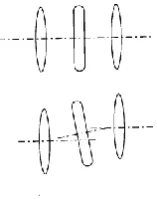
[image:26.595.225.366.255.317.2]Radial distortion can be described as barrel or pin cushion in nature, and can be best demonstrated by the shape of a rectangle which will appear distorted depending on whether it is located closer or further from the principal point. (Fryer 2001, p. 159) Figure 2.2 (below) shows the effect radial distortion has to the lens of the camera.
Figure 2.2 The effect of radial distortion on the lens (Yusoff et al. 2014, p.2)
Radial distortion can be calculated by the formula:
𝛿𝑟 = 𝐾1𝑟3 + 𝐾2𝑟5 + 𝐾3𝑟7+ ⋯
where K1, K2, K3 are coefficients and δr (radial distortion) is in micrometres (μm). (Fryer 2001, pp. 160-1)
Decentring Distortion
Decentring distortion refers to the vertical or rotational displacement of images caused by misalignment in the lens of the camera. (Fryer 2001, pp. 162-3) Figure 2.3 (below) shows what is meant by vertical misalignment of a camera lens. Decentring distortion is also affected by changes in pressure, vibrations or shock. (Fryer 2001, p. 164)
[image:26.595.254.333.606.706.2]14 2.5.2 Calibration Methods
There are a few methods of camera calibration, which include analytical plumb line, field calibration, system calibration and self-calibration. Traditionally, calibration was achieved by the use of coordinated targets measured and calculated using theodolites or images acquired from metric cameras, in a laboratory setting. (Fryer 2001, p. 165) As CRP has progressed, there is a need for practical, inexpensive and time efficient calibration methods. (Fryer 2001, p. 165)
Analytical Plumb Line
Analytical plumb line calibration can determine radial and decentring distortion but cannot determine the principal point or principal distance. (Fryer 2001, p. 168) Its usefulness is often seen as an independent check for other calibration methods or to ascertain lens distortion trial values for a bundle adjustment. (Fryer 2001, p. 168) Analytical plumb line calibration involves photographing straight lines, which may be constructed from fishing line for example, and examining the departure from this straight line in the image. (Fryer 2001, p. 168) This departure from object to image represents lens distortion. (Fryer 2001, p. 168) A number of points are observed and mathematical formulae are used to derive values for the parameters xp, yp, K1, K2, K3 and P1, P2. (Fryer 2001, p. 168) The obvious disadvantage of using analytical plumb line calibration is that it is incomplete on its own; it cannot solve for principal distance and the principal point.
Field Calibration
Field calibration (or sometimes referred to as ‘on-the-job calibration) involves placing targets which can be used for calibration around the object to be measured or modelled at the time of photo acquisition. (Fryer 2001, p. 166) Survey equipment is often utilised to ensure control targets are placed accurately. (Fryer 2001, p. 166) Field calibration can be advantageous to other calibration methods where the focus of the lens needs to be changed during the photo set. (Fryer 2001, p. 166)
System Calibration
15
Self-Calibration
Self-calibration is the most commonly used method of calibrating low cost, off the shelf, digital cameras for photogrammetry applications. (Udin & Ahmad 2011, p. 138) Alshadli, Duaa et al. (2013, p. 91) comment that self-calibration is the most effective technique, as coordinates of high accuracy are not necessary and, additionally, the bundle adjustment solves both the interior orientation parameters of the camera and the exterior position of each camera.
Calibration methods using 3D calibration objects produce more accurate results provided that the calibration object has targets placed in an optimal configuration. (Samper et al. 2013, p. 118) However, 2D calibration grids are easier to use and low cost compared to purchasing 3D complex objects, and, importantly, for many projects the accuracy that can be obtained by 2D grids is more than satisfactory for the application. (Samper et al. 2013, p. 118)
Self-Calibration Methodology
Udin and Ahmad (2011) examine the suitability of three different types of cameras for CRP applications by testing the accuracy and precision of each using the self-calibration bundle adjustment method. In their study, Udin and Ahmad (2011, p. 140) list a number of factors which can influence the results of a calibration: lighting, distance between the camera and calibration grid, position of the camera, camera resolution and pixel size. The camera should be rotated 90° to measure the principal point. (Udin & Ahmad 2011, p. 138)
Bundle Adjustment
A bundle adjustment is used to mathematically solve the calibration parameters. Alshadli, Duaa et al. (2013, p. 91) use simple terms to explain what a bundle adjustment does, “The bundle adjustment process involves taking multiple convergent images of a pre-calibrated targeted grid from different angles and views and the imaged targets are used to create a resection-intersection of the bundle of rays based on the co-linearity condition…” This process is performed during the processing of a calibration, such as using software such as Photomodeler or Australis for example.
2.6 Photomodeler
16
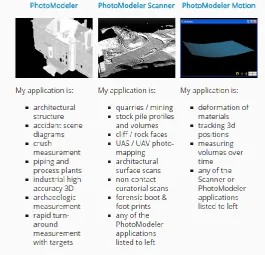
[image:29.595.164.430.204.459.2]information including the basics of how photogrammetry works, a ‘knowledge base’ of technical support and examples of how PM can be used for various applications. This information is all freely available online. A list of useful articles can be found in Appendix B. The software package also contains tutorials with videos which are simple and help to perform a calibration and create a Dense Surface Mesh (DSM) of an object or scene. Targets and calibration sheets can be printed using the program.
Figure 2.4 Range of Photomodeler software (EoS Systems Inc. 2015)
2.6.1 Accuracy of Photomodeler
Photomodeler states that the accuracy which can be achieved by PM is dependent of a number of factors, including (EoS Systems Inc. 2015):
Resolution of photos
Number of photos used for a model Angles between photos
Number of referenced points Quality of the camera
17
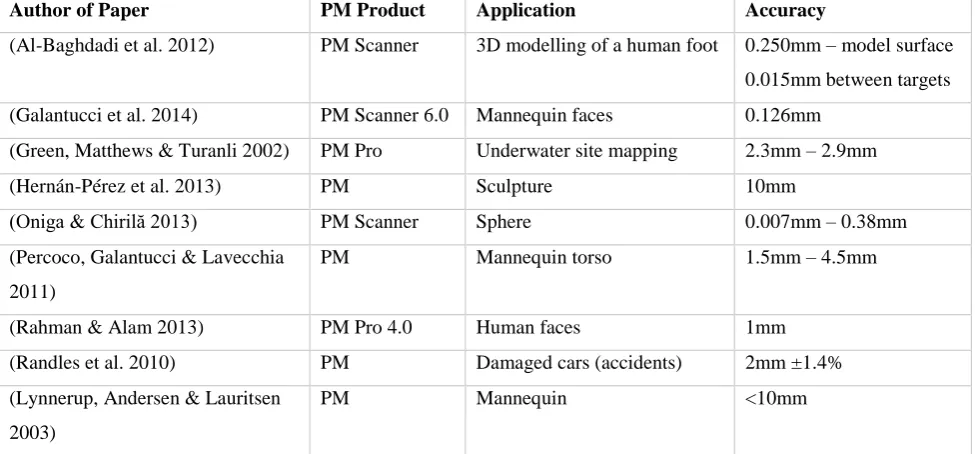
[image:30.595.55.543.204.431.2]The accuracy obtained by the selected papers in the literature using PM can be seen in Table 2.1 (Below). Differences between the accuracy results varies, however, it is important to acknowledge differences are dependent on the objects modelled, distances of the object to camera, the cameras used for each project and the skill and experience of the operators. Table 2.1 provides an overview of the range of accuracy which others have achieved using PM. As seen below, it is possible to achieve sub-millimetre accuracy using PM.
Table 2.1 A sample of papers which used PM in their research and stated the accuracy achieved.
There are also many papers in the literature which do not state the accuracy achieved through their research, and this is more common of researchers investigating the use of CRP for their particular applications who are new to the technology. This perhaps indicates that spatial professionals should be more involved in projects to advise non-spatial researchers how to use the technology appropriately and be able to assess the accuracy of their data.
2.6.2 Applications for Photomodeler Software
The applications for PM are widely varied and include (EoS Systems Inc. 2015): Accident Reconstruction & Forensics
Archaeology
Architecture & Preservation Biology
Engineering
Film, Gaming and Animation Geology
Author of Paper PM Product Application Accuracy
(Al-Baghdadi et al. 2012) PM Scanner 3D modelling of a human foot 0.250mm – model surface
0.015mm between targets
(Galantucci et al. 2014) PM Scanner 6.0 Mannequin faces 0.126mm
(Green, Matthews & Turanli 2002) PM Pro Underwater site mapping 2.3mm – 2.9mm
(Hernán-Pérez et al. 2013) PM Sculpture 10mm
(Oniga & Chirilă 2013) PM Scanner Sphere 0.007mm – 0.38mm
(Percoco, Galantucci & Lavecchia
2011)
PM Mannequin torso 1.5mm – 4.5mm
(Rahman & Alam 2013) PM Pro 4.0 Human faces 1mm
(Randles et al. 2010) PM Damaged cars (accidents) 2mm ±1.4%
(Lynnerup, Andersen & Lauritsen
2003)
18 Surveying
UAS / Drones
2.6.3 Advantages and Disadvantages of Photomodeler
Al-Baghdadi et al. (2011, p. 297) in their study of mapping the human foot chose to use PM Scanner to create 3D surface models of the foot because of PM’s capability for DSMs and the ability to export point clouds and triangulated meshes in a variety of formats for further analysis and manipulation. Al-Baghdadi et al. (2011, pp. 298-9, 302) made a number of observations about how PM performed for their study:
Black and white circular targets were captured by PM with greater accuracy than other colour combinations.
A depth range was assigned to allow quicker processing and matching of the images to create the DSM.
The foot needed to be painted with a matte red body paint to ensure uniform accuracy across the DSM.
Individual toes were difficult to map due to being close together.
Galantucci et al. (2014, p. 288) remarks that the algorithm used for sub-pixel marking (recognising points) in PM Scanner recognises these points by contrast. Points located laterally on a surface are marked with an ellipse which results in a loss of precision. (Galantucci et al. 2014, p. 289) However, for the application of clinical studies of body surfaces, PM provides a sufficient level of accuracy and reliability. (Galantucci et al. 2014, p. 290)
Some of the points mentioned above are common remarks throughout the literature about CRP in general and are not necessarily particular to PM software itself.
2.7 Summary
19
While there are many advantages to using CRP for human body mapping, there are some common problems in the literature, such as difficulty in modelling fine details, such as teeth and toes. Also, where an object or body area touches a surface, like a table, holes can form in the 3D model. Modelling hands or faces can produce inaccuracies due to movement of individual fingers or facial expressions. Some researchers had difficulty combining data from CRP with other data capture techniques, such as CT scans.
The calibration process is necessary for non-metric cameras designed for photography rather than photogrammetry. The parameters which need to be determined by calibration include format size, focal length, principal distance, principal point, radial distortion and decentring distortion. There are a few different calibration techniques which can be used. The most appropriate for a low cost, off the shelf digital cameras is self-calibration using a bundle adjustment to determine the parameters.
20
3.0 Chapter Three – Research Design and Methodology
3.1 Objectives
1. Camera Calibration
Determine the most appropriate calibration for the task, including the coded target type, number of targets and discuss any differences between the two cameras.
2. Image Acquisition
Determine the optimal amount of targets to be used and configuration. 3. Data Processing and Creation of 3D Model
Analyse the level of difficulty and note any problems in the creation of the 3D model from the images. 4. Accuracy
Assess the accuracy of the 3D model using measurements taken by callipers and tape.
3.2 Implications of Research
It is intended that the outcome of this project will add to the knowledge base of the uses and effectiveness of low cost CRP to model complex objects. Also, analysis and discussion of any difficulties will be useful to determine how easy it is to create an accurate model. It may help students and researchers in the future to determine if low cost CRP is suitable to apply to their particular task. The impacts of this project are negligible, especially since the decision was made to use a model human skull instead of a real one. If a real human skull was to be used, ethics would have needed to be considered.
3.3 Equipment
3.3.1 Cameras
The cameras selected for the task are both Nikon S3700 (20.1 Megapixels), which are commonly available and priced at $135.00 each at the time of purchase (May 2015).
3.3.2 Photogrammetry Software
21 3.3.3 Targets
Targets are available as part of the Photomodeler Scanner software package to be printed and used. 3.3.4 Skull
It was originally proposed to use a real human skull for the project, but it was not possible to arrange access. Alternatively, a high quality, cast model was used.
3.3.5 Callipers and Tape
A good quality Sidchrome digital calliper was purchased, 0-200mm, graduation: 0.01mm, model: SCMT26116. A good quality 3m Stanley tape was also purchased.
3.3.6 Miscellaneous
A number of materials are available for use in the lab to create an appropriate background for the photograph acquisition, such as black cardboard, frame, sticky tape etc. Also, other resources are available, such as measuring tapes, scale and tripod. A painted photo frame was used for a control target frame off campus.
3.4 Camera Calibration
A number of steps are required in the calibration process: 1. Select target type and size.
2. Choose method, single sheet or multi sheet calibration. 3. Decide position of camera and target sheet.
4. Capture a set of images.
5. Process the calibration using Photomodeler software. 6. Analyse the results.
3.4.1 Target Type and Size
22
Image 3.1 Calibration grid from Photomodeler
3.4.2 Calibration Method
A single sheet calibration method was used, which is recommended for small scale projects. (EoS Systems Inc. 2013, Ch.3)This involves photographing a single sheet (as pictured in Image 3.1)from different angles and camera orientations, as recommended by Photomodeler. (EoS Systems Inc. 2013, Ch.3)The Calibration Sheet was placed on the floor and fastened with sticky tape to remain flat and prevent movement.
3.4.3 Camera and Calibration Grid Position
[image:35.595.234.361.71.167.2]A total of twelve photographs were taken of the Calibration Sheet, see Figure 3.1 below. As seen from Figure 3.1, eight photographs were taken from each side of the sheet, four in portrait orientation and four in landscape orientation of the camera. An additional four were photographed from the corners, in either portrait or landscape orientation. This procedure is recommended by Photomodeler. (EoS Systems Inc. 2013, Ch.3)
There was a problem in the initial attempts of processing the calibration in PM at the USQ Laboratory, due to the organisation of the calibration photos. If the photos for each calibration set are not saved in separate folders, the calibration will experience problems which will only become evident when attempting to process photos for the model in PM. It is important that directories for calibration sets are kept separate and organised.
[image:35.595.222.375.608.784.2]23
3.5 Target Configuration
The placement of targets either around the object, on the object or both are an important consideration, as it does affect the outcome of the photograph processing. In the Photomodeler tutorials (EoS Systems Inc. 2013), there are examples of different objects being photographed. Some use only targets surrounding the object, while others place targets on the object.
Numerous configurations were trialled, both with targets surrounding the skull and targets stuck onto the skull. The success of the photo acquisition and DSM creation appears to be somewhat correlated with the number of targets used, among other factors (discussed later). The target configuration aims to orientate the image and provide a fixed point for the modelling.
A target frame was constructed using a photograph frame painted black and the targets were fixed onto the frame by sticky tape, as glue tended to make the target paper strips bubble. Even sticky tape caused the paper target strips to lose tension in time, which is an important consideration if a target frame is intended to be used over an extended period of time. The inspiration was taken from Majid et al (2005, p.57) and the result, shown in Image 3.2 below.
Target Type
The targets used were 12 bit coded targets, available for printing from the Photomodeler software. To create Coded Targets using PM, go to File – Create Coded Targets… (See Figure 3.2 below) These targets were selected due to the number of unique targets in the set (96), which were an appropriate number to be sufficient for the task. The colours selected were a white background with a black target, as this is easy to print and assumed easier for Photomodeler to recognise during the Automatic Target Marking function, as mentioned by Al-Baghdadi et al. (2011, p. 298).
24
Figure 3.2 Create Coded Targets window.
3.6 Image Acquisition
The success of the image acquisition is not known until the images are processed in Photomodeler. The specifics of the processing will be discussed later but this section will discuss various factors needed for consideration when photographing the object.
3.6.1 Texture of the Object
The texture of objects affects the success of the photo acquisition. The Photomodeler website contains an article which writes that smooth and matte textures, such as plasterboard, do not work well, whereas textures such as soil and rock, with random patterns and colours work the best. (EoS Systems Inc. 2015) The skull’s original texture was smooth and this is believed to have caused some difficulty. A successful DSM was created of the original texture but targets needed to be stuck onto the skull itself. To test whether texture was causing DSM creation problems, the skull was lightly tinted with a water-based acrylic paint (a red-brown colour). The DSM colour represents the painted colour more accurately than the unpainted skull.See Image 3.3 below.
25
Other methods of introducing texture to the skull were also tried, such as dusting with talcum powder, dirt and foundation powder make-up, but these were unsuccessful in creating a DSM. Powder and paint are recommended by Photomodeler (EoS Systems Inc. 2015) and Al-Baghdadi et al. (2011) also used paint for better results of creating DSMs of feet. Real bone textures, especially weathered or old specimens, would perhaps perform better due to having a more random surface texture.
3.6.2 Lighting
The lighting was considered as a possible cause of difficulties, as Alshadli, Duaa et al. (2013) had problems with glass and Cevidanes et al. (2010) with the iris of the eye. PM also recommends consistent lighting across photos to improve textures. (EoS Systems Inc. 2013, Ch.2-3) The aim of lighting is to decrease shadow and contrast between the image and the background to ultimately improve DSM results. The problem with photographing indoors is that the lighting is likely to be dull. Using lights often adds shadow to the photos and it proved difficult to press the button on the camera to take the photo without making shadows on the skull. Photographing in natural light appears to produce better quality, evenly coloured and realistic textured photographs without shadow.
3.6.3 Background
The background of the object is also important. When a background is not used, there are many unwanted points and noise captured in the photo. When the skull was photographed without a background, the Automatic Target Marking function in PM would mistakenly identify texture in the background as a target, especially if the image capture was outside (with trees and randomly textured earth in the background). A black background was used so that light would not be reflected and would not appear shiny, the skull would contrast with the background and the targets would be distinctive. A black background was used in CRP image capture of the skulls for the Malaysian Craniofacial Database. (Majid 2005).
3.6.4 Camera Position and Angles
26 3.6.5 Camera Settings
Another issue to consider is a particular camera’s default settings, which may come into effect each time the camera is switched on or off. For this project, each time the camera was used the flash was switched off and the zoom checked to ensure it was fully zoomed out, as the flash in particular automatically is enabled each time the camera is powered on and off.
3.7 Processing
Appendix Doutlines the steps taken to create the DSM model. This section will detail specific selected settings used for discussion.
3.7.1 Uploading Photos
Photos can be uploaded to Photomodeler and automatically oriented using the step by step process. It is important not to orientate, crop, or modify the photos in any way otherwise the project will not process. (EoS Systems Inc. 2013, Ch.5) For reasons unknown at this stage, the Red camera used to capture the photos for the model sometimes orientated landscape photos 90° and when modified to the correct orientation before uploading to PM, the processing was unsuccessful.
3.7.2 Automatic Target Marking
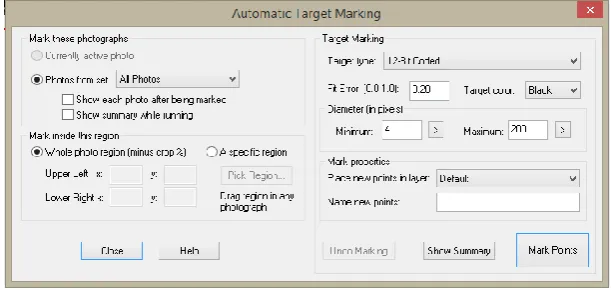
[image:39.595.207.390.71.244.2]The Automatic Target Marking function in PM recognises targets automatically in each photo. This process is able to be performed manually (EoS Systems Inc. 2013, Ch.5), however, the automatic function saves a significant amount of time, especially if there are many targets. Figure 3.4 below shows the various settings and options which can be selected for the operation.
27
Figure 3.4 Automatic Target Marking options.
Two issues occurred with this operation. Firstly, when targets are printed for use, they are unique and numbered accordingly, for example, in 12-bit there are 96 targets. If a few sets of targets are printed, it is important not to use two identical targets in the photo, as the photos will not be oriented and automatic targeting will not work. Secondly, targets may not be identified if there is too much shadow in the photo or if there are objects in the photo which may be confused with a target.
3.7.3 Processing
Default options were accepted and the project was processed. See Figure 3.5 below.
Figure 3.5 Processing options.
[image:40.595.198.392.442.612.2]28
Quality Indicator Result Comment
Number of photos oriented 9 Good result, all photos have been oriented
Bad Photos 0
Weak Photos 0
OK Photos 9 Good results, all photos are acceptable
Average Photo Point Coverage 50% 80% + is best
Point Marking Residuals
Overall RMS 0.819 pixels Satisfactory result, RMS <1.0
Maximum RMS 1.667 pixels
[image:41.595.178.420.427.607.2]Minimum RMS 0.324 pixels
Table 3.1 Indicators of quality in the processing report.
3.7.4 DSM Trim
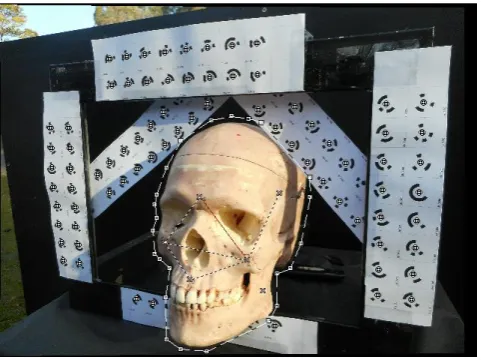
A DSM Trim is performed so that the process will be more streamlined, only creating DSM for the area in the selection; it is similar to cropping a photo. For this project, it was sufficient to trim reasonably close to the skull to create the DSM, similar to the steps outlined in Tutorial 2 of the footprint. (EoS Systems Inc. 2013, Ch.5) Some examples highlighted on the PM website trim as close to the object as possible. (See Appendix B, Animal Skull Scan)
Image 3.4 DSM Trim of the skull. (Lines surrounding skull)
3.7.5 Create DSM
29
example, Figure 3.6 (left) below shows the sequence in which the photos were taken. In this case, paired photos 1-2, 1-4, 2-3, 2-5, 3-6, 4-5, 4-7, 5-6, 5-8, 6-9, 7-8, and 8-9 would be selected for use.
Secondly, Auto depth range was de-selected, which allows a value to be entered which limits the depth used to create the DSM. A value of 700mm was entered, which was more than enough depth to contain the all parts of the skull. When Auto depth range was selected in the first attempts of DSM creation in the USQ laboratory, the auto depth calculated was too large and the background objects were causing difficulty to the DSM and also creating noise (unwanted points) in the model.
In all other options, default settings were accepted. As discussed earlier, the target configuration and image acquisition play a significant part in the success of the DSM. Mainly through trial and error and also consulting the literature, the problems could be solved.
3.8 Creation of the 3D Model
[image:42.595.88.513.120.431.2]The original plan for creating a DSM of the skull for this project was to create a complete 360° model through combining the DSM faces of the skull. However, due to the amount of difficulties experienced
30
during the project, which impacted on time, a single frontal face DSM was created. The single face is still able to be used for taking measurements and the accuracy assessed, which satisfies the project objectives. A drawback of having a single face is that the accuracy and ease of being able to combine different DSM faces of the skull cannot be assessed.
In earlier attempts of creating a DSM, particularly at the USQ Laboratory, there were a large number of unwanted points or noise in the DSM. Manual deletion of the unwanted points is the only option to remove them and this took a significant amount of time, which is the reason further attempts of improving the DSM were pursued. The final DSM using the tinted skull photographed in natural light had minimal amounts of unwanted points.
[image:43.595.142.457.456.717.2]The DSM and Points could be exported into a number of different file types, see Figure 3.7. The final DSM was exported to a DXF file type for use in AutoCAD. A number of options can be used to control what layers or objects are exported as part of the DXF file. In this case, the point mesh, DSM, targets and drawn lines (used for comparing measurements, discussed later) were exported successfully. Using AutoCAD in 3D Modelling was tiresome due to the limitations of the computer used. The program was slow and became unresponsive a number of times, especially when zooming, rotating or moving the model or attempting to select large areas of points. The model window in PM proved easier and quicker to use for taking measurements and showing a photo-realistic DSM.
31
3.9 Assessment of Accuracy
Both targets and points on the skull were used to assess the accuracy of the model. Points drawn on the skull prior to photo acquisition with pen were marked digitally in PM, using the Mark Points Mode
in the Marking menu. (See Image 3.5 below) All photos in which a particular point can be seen is marked on each photo. After the points were marked, lines can be drawn between the points and the length of lines can be displayed using the Measurements Pane. (See Figure 3.8 below)
[image:44.595.55.544.412.680.2]Image 3.5 Marking points on the skull for measurement.
Figure 3.8 Screen shot of PM, note the Measurements pane on the right.
32
The measurements taken digitally can then be compared to measurements taken externally; callipers and measuring tape. Using the callipers and tape to measure between targets worked very well, as the targets are flat. Most of target to target measurements could not be measured using the callipers, as the length exceeded the range of the calliper; >200mm.
[image:45.595.56.545.251.510.2]Measuring points on the skull was more difficult, especially using a tape measure. Using the tape to measure between points on flat parts of the skull was easier, however, estimating the measurement to a sub millimetre level is subject to observer error. Measurements of the skull points taken with the digital calliper are more useful than the tape, as the calliper can read to 0.01mm.
33
4.0 Chapter Four – Results and Discussion
4.1 Camera Calibration
Three calibrations (3 sets per camera) were performed using three sets of data to attempt to improve the calibration results, see Table 4.1. However, the best calibration (lowest maximum residual) was the first calibration performed in the USQ Laboratory. (See Table 4.2 for full results)
Calibration ID Comments
Red Set A
Blue Set A
The first calibration sets attempted at the USQ Photogrammetry Lab
Red Set B
Blue Set B
Calibration performed off campus. Camera settings adjusted and stronger lighting adopted.
Red Set C
Blue Set C
Calibration performed off campus. Camera settings adjusted and calibration grid set up closer
[image:46.595.53.542.197.316.2]to camera to improve photograph coverage with lighting adjustments.
[image:46.595.142.454.335.536.2]Table 4.1 Calibration sets completed and comments.
Figure 4.1 Overall RMS for all three sets.
[image:46.595.142.454.568.740.2]34 4.1.1 Results of Calibration
Calibration Set Focal Lth Xp Yp Fw Fh K1 K2 K3 P1 P2 Overall RMS Max Residual
Red Set A 1 4.80835500 3.31388800 2.42188200 6.48033000 4.86000000 0.00026690 0.00001061 0.00000000 -0.00117800 -0.00004575 0.390 0.983
Red Set A 2 4.79843800 3.30672200 2.42120800 6.47820300 4.86000000 0.00043960 0.00000000 0.00000000 -0.00107500 -0.00010890 0.400 1.285
Red Set A 3 4.79071600 3.29069800 2.43371200 6.47953600 4.86000000 0.00039550 0.00003105 0.00000000 -0.00075840 0.00012950 0.372 1.216
Blue Set A 1 4.85448000 3.34207300 2.43645400 6.48285000 4.86000000 0.00042980 -0.00005714 0.00000000 -0.00176300 0.00023960 0.416 1.214
Blue Set A 2 4.84141000 3.32898600 2.44414600 6.48173800 4.86000000 0.00023880 0.00000000 0.00000000 -0.00148700 0.00034540 0.410 1.557
Blue Set A 3 4.83674000 3.32833500 2.44518900 6.48078700 4.86000000 0.00037640 -0.00001739 0.00000000 -0.00150000 0.00037090 0.426 1.503
Red Set B 1 4.81893200 3.31501300 2.42588600 6.48541100 4.86000000 0.00089370 -0.00015700 0.00000000 -0.00103700 0.00000000 0.388 1.469
Red Set B 2 4.81756900 3.30777800 2.42346700 6.47852700 4.86000000 0.00214700 -0.00054510 0.00000000 0.00101800 0.00000000 0.665 3.442
Red Set B 3 4.81632700 3.31104700 2.43134900 6.48164700 4.86000000 0.00124000 -0.00024660 0.00000000 -0.00102700 0.00015140 0.370 1.404
Blue Set B 1 4.86034500 3.35882700 2.44206100 6.48086600 4.86000000 0.00178300 -0.00053790 0.00000000 -0.00196700 0.00033560 0.388 1.385
Blue Set B 2 4.86173700 3.32426600 2.43927200 6.48128200 4.86000000 0.00176200 -0.00057590 0.00000000 -0.00127200 0.00037350 0.368 1.097
Blue Set B 3 4.85623800 3.33053400 2.44701800 6.48155100 4.86000000 0.00182500 -0.00045190 0.00000000 -0.00150300 0.00046130 0.495 2.667
Red Set C 1 4.80913500 3.31721700 2.40963900 6.47650500 4.86000000 0.00055980 -0.00001529 0.00000000 -0.00134100 -0.00025130 0.463 1.509
Red Set C 2 4.80136000 3.28493700 2.42092100 6.47442800 4.86000000 0.00053720 -0.00001928 0.00000000 -0.00073040 -0.00014080 0.448 1.264
Red Set C 3 4.80185100 3.30448100 2.41131200 6.47408900 4.86000000 0.00052650 -0.00001570 0.00000000 -0.00114100 -0.00032120 0.482 1.747
Blue Set C 1 4.83451900 3.32712600 2.43492100 6.47441700 4.86000000 0.00023230 -0.00002782 0.00000000 -0.00158400 0.00019410 0.485 2.002
Blue Set C 2 4.84708300 3.33801200 2.42047200 6.47564400 4.86000000 0.00025480 -0.00002184 0.00000000 -0.00180600 -0.00004686 0.460 1.356
[image:47.842.76.776.76.376.2]Blue Set C 3 4.83597300 3.32679500 2.43544000 6.47601900 4.86000000 0.00022310 -0.00003413 0.00000000 -0.00160700 0.00020020 0.559 1.884
35 4.1.2 Discussion of Calibration Results
A number of difficulties were encountered during the calibration phase of the project, which is the reason a number of calibrations were performed to examine if the calibration results could be improved. The best result was the first calibration set (Red Set A 1), see Table 4.2 above, which was performed in the USQ Laboratory. As shown in Figure 4.1 and Figure 4.2, Red Set B 2 produced a spike in results, but Set A and C have closer similarity. The conditions in the laboratory differed to those off campus in the following ways:
Lighting
Lights (LED and halogen) were used off campus, which created some shadowing of the tripod and camera which was controlled where possible (e.g. placing the camera so that shadows did not fall across the calibration sheet). This could have created a poorer camera position geometry as the shadows were the concern, not the camera position. The lighting in the Laboratory was duller but did not cast shadows.
Percentage of calibration sheet in photo
36
4.2 Photograph Capture and Processing
The final model was produced off campus after tinting the skull with acrylic paint. The following (Figure 4.3 and Figure 4.4) are images from PM of the 3D model represented in different ways:
[image:49.595.126.470.149.358.2]
[image:49.595.98.500.405.721.2]
Figure 4.4 DSM with points coloured by depth (top left), DSM points coloured by photo texture overlaid with point cloud (top right), DSM shown as triangulated mesh (bottom left) and DSM showing close correlation with point cloud underneath (bottom right).
37 4.2.1 Discussion of Model Results
Figure 4.5 DSM with comments.
Figure 4.5 above shows the DSM with some comments on good and poor aspects of its appearance. There is some areas of lumpy appearance, which is an indicator of poor modelling. In earlier unsuccessful attempts of DSM creation the whole surface was lumpy. There are also some holes in the DSM which is a problem. These issues could perhaps be overcome if more sides of the skull were modelled and these sides combined to create a more complete model, as the camera angles could capture those areas which are lumpy and have holes. The teeth are also problematic, however, as mentioned in the literature, researchers have had problems modelling small details such as individual toes (Al-Baghdadi et al. 2011) or the sides of objects which are sitting against a surface, such as a table. (Urbanová, Hejna & Jurda 2015) This is perhaps a limitation of CRP which needs to be considered when one assesses the suitability of the technology for their application.
Some of the background has combined with the DSM, shown above (Figure 4.5). This could be trimmed away; the DSM shown has not be trimmed or modified, it is the direct result of the DSM
Lumpy appearance
Holes in the DSM
Teeth problematic
Background combined in the DSM of the skull
38
creation process. (See Appendix D) Despite these issues, there are areas of excellent detail. The processing and image acquisition are simple to perform; it is the awareness of all the separate issues which can affect the DSM which needs to be known and addressed if a 3D model is to be successful.
4.3 Measurements and Accuracy
The accuracy of the final model can be stated as being on average +/- 0.4mm across the project. 4.3.1 Skull Measurements
Measurement Calliper Tape Model Δ Model - Calliper Δ Model-Tape
Point 1 – Point 2 76.64 - 76.77 0.13
Point 1 – Point 3 44.48 44.5 45.12 0.64 0.6
Point 1 – Point 12 74.45 - 74.59 0.14
Point 1 – Point 15 59.60 59.5 59.60 0.00 0.1
Point 2 – Point 3 47.43 48.0 48.45 1.02 0.4
Point 2 – Point 5 68.95 - 68.57 -0.38
Point 2 – Point 15 63.34 63.5 63.60 0.26 0.1
[image:51.595.61.460.246.406.2]Mean 0.26 0.30
Table 4.3 Measurements taken on skull (millimetres).
[image:51.595.85.521.430.626.2]
39 4.3.2 Check on Accuracy
Measurement Calliper Tape Model Δ Model - Calliper Δ Model-Tape
Target 17 – Target 48 397.5 398.37 0.87
Target 1 – Target 41 344.5 344.95 0.45
Target 22 – Target 45 362.0 361.36 -0.64
Target 5 – Target 84 247.0 247.74 0.74
Target 40 – Target 33 151.62 151.21 151.98 0.36 0.77
[image:52.595.55.511.94.221.2]Mean 0.36 0.438
Table 4.4 Check measurements between targets (millimetres.)
4.3.3 Discussion of Results
The results of the accuracy of the model is acceptable and satisfactory for the project – overall a good result. The overall accuracy across the project is consistent with results mentioned in Table 2.1 of research papers which have used PM. The accuracy could certainly be improved by following the photo acquisition steps more rigorously – with careful attention to camera angles, lightin