The Missing Link: An Introduction to Web Development and Programming
The Missing Link
An Introduction to
Web Development and
Programming
<a href="">
The Missing Link
An Introduction to
Web Development and
Programming
by Michael Mendez
Open SUNY Textbooks
©2014 Michael Mendez
ISBN: 978-0-9897226-5-0
This work is licensed under a
Creative Commons Attribution-NonCommercial-ShareAlike 3.0 Unported License.
Published by Open SUNY Textbooks, Milne Library (IITG PI)
State University of New York at Geneseo,
Licensing
This text is published by the Open SUNY Textbooks project under the Creative Com-mons 3.0 license format (see full length legal text at http://creativecommons.org/licenses/ by-sa/3.0/):
You are free:
1. To share â to copy, distribute and transmit the work 2. To remix â to adapt the work
3. To make commercial use of the work
Under the following conditions:
1. Attribution: You must attribute the work in the manner specified by the author or licensor (but not in any way that suggests that they endorse you or your use of the work).
2. Share Alike: If you alter, transform, or build upon this work, you may distribute the resulting work only under the same or similar license to this one.
With the understanding that:
1. Waiver: Any of the above conditions can be waived if you get permission from the copyright holder.
2. Public Domain: Where the work or any of its elements is in the public domain under applicable law, that status is in no way affected by the license.
3. Other Rights: In no way are any of the following rights affected by the license: a. Your fair dealing or fair use rights, or other applicable copyright exceptions
and limitations;
b. The authorâs moral rights;
c. Rights other persons may have either in the work itself or in how the work is used, such as publicity or privacy rights.
Web development is an evolving amalgamation of languages that work in concert to re-ceive, modify, and deliver information between parties using the Internet as a mechanism of delivery. While it is easy to describe conceptually, implementation is accompanied by an overwhelming variety of languages, platforms, templates, frameworks, guidelines, and stan-dards. Navigating a project from concept to completion often requires more than mastery of one or two complementing languages, meaning todayâs developers need both breadth, and depth, of knowledge to be effective.
This text provides the developer with an understanding of the various elements of web development by focusing on the concepts and fundamentals through the examples within, providing a foundation that allows easier transition to other languages and a better un-derstanding of how to approach their work. The reader will be introduced to topics in a manner that follows most project development methods, from initial conceptualization and design through front end development, back end development, and introducing additional concepts like accessibility and security, while focusing on responsive design techniques. Each section of the text includes opportunities to practice the material and assess increased knowledge after examining the topics.
About the Author
Reviewerâs Notes
It is always a challenge to teach a course in web design or web programming. Systems that run on the World Wide Web must necessarily change with the emergence of any sort of new computer technology, creating a rapidly evolving landscape. The students that enroll in web development courses are a particularly diverse group; the subject attracts strong programmers with weak aesthetic design skills as well as those who are more aesthetically inclined with little knowledge of programming. Finally, the visibility and mission criticality of web platforms makes the design and security of these systems paramount.
The Missing Link attempts to bridge the gap between these conflicting educational de-mands. While most web development texts opt to delve deeply into one or two of the tools in the belt of a web programmer, the author of this text takes a broad approach to teaching web programming and development. The result is a single resource that integrates good design practices, modern technologies, and all of the programming tools that one would need to build a successful, dynamic web site.
Unlike many texts, this one begins by giving the readers a solid foundation in the tech-nology that runs the Internet along with a sense of what techtech-nology is currently coming of age. This is followed by both a process and pattern-oriented slant on web design that fo-cuses on the Model-View-Controller structure which underlies the rest of the text. HTML and CSS covered for the development of web interfaces. The PHP and JavaScript sections enable readers to develop the controllers for those interfaces. Finally, a concise introduction to databases and SQL allows for the development of robust data models.
In addition to the unique combination of content found in this book, the tone is also one of practicality. The author doesnât mince words and gets right to the point with ex-amples meant to be referenced quickly and often. Although this directness may put off some readers who prefer to read texts cover to cover, all software developers know that this is how texts are used in the real world.
In the end, the broad approach that The Missing Link takes to web design and pro-gramming combined with the textâs concise presentation of information makes this a web programming text unlike any other.
Open SUNY Textbooks is an open access textbook publishing initiative established by State University of New York libraries and supported by SUNY Innovative Instruction Technology Grants. This initiative publishes high-quality, cost-effective course resources by engaging faculty as authors and peer-reviewers, and libraries as publishing infrastructure.
The pilot launched in 2012, providing an editorial framework and service to authors, students and faculty, and establishing a community of practice among libraries. The first pilot is publishing 15 titles in 2013-2014, with a second pilot to follow that will add more textbooks and participating libraries.
Participating libraries in the 2012-2013 pilot include SUNY Geneseo, College at Brock-port, College of Environmental Science and Forestry, SUNY Fredonia, Upstate Medical University, and University at Buffalo, with support from other SUNY libraries and SUNY Press.
Table of Contents
About the Textbook
v
Preface
xii
Section 1: Web Development
1
Chapter 1: Brief History of the Internet 2
Chapter 2: Current Trends 4
Chapter 3: Web Servers 13
Chapter 4: Network Basics 19
Chapter 5: Website Design 25
Chapter 6: Development 38
Section 1 Assessments 54
Section 2: Document Markup
60
Chapter 7: Markup Languages 61
Chapter 8: Creating HTML Files 66
Chapter 9: Page Layout 68
Chapter 10: Text Layout 73
Chapter 11: Navigation 81
Chapter 12: Graphics 84
Chapter 13: Tables 88
Chapter 14: Forms 91
Chapter 15: Canvas 94
Chapter 16: Media Support 104
Chapter 17: Mobile Device Support 107
Chapter 18: Tags to Avoid 108
Chapter 19: Rule Structure 109
Chapter 20: Layout Formatting 119
Chapter 21: Font and Text Decoration 132
Chapter 22: Responsive Styling 136
Section 2 Assessments 142
Section 3: Scripting Languages
148
Chapter 23: Server-Side and Client-Side Scripting 149
Chapter 24: Creating PHP Files 152
Chapter 25: PHP Errors 153
Chapter 28: Data Manipulation 167
Chapter 29: Email 173
Chapter 30: File Interaction 176
Chapter 31: Structures 179
Chapter 32: Functions 186
Chapter 33: Objects and Classes 191
Chapter 34: JavaScript Syntax 194
Chapter 35: JavaScript Examples 198
Chapter 36: jQuery 202
Section 3 Assessments 205
Section 4: Persistent Data Storage
210
Chapter 37: Database Types 211
Chapter 38: Data Relationships 216
Chapter 39: MySQL Data Types 218
Chapter 40: Normalization 221
Chapter 41: MySQL CRUD Actions 231
Chapter 42: Advanced Queries 240
Section 4 Assessments 244
Section 5: Tying it Together
248
Chapter 43: Security 249
Chapter 44: Integration Examples 257
Chapter 45: Finishing Touches 267
Chapter 46: Now What? 270
Glossary of Terms
271
Index
274
Table of Figures
Figure 1 UNIVAC Computer System 2
Figure 2 Cloud Computing Styles 4
Figure 3 Virtualization Styles 7
Figure 4 10 Years of Known Cyber Attacks 9
Figure 5 Botnets 11
Figure 6 Web Server Software Structure 13
Figure 8 OSI 7 Layer Model 20
Figure 9 IP 4 Packet 22
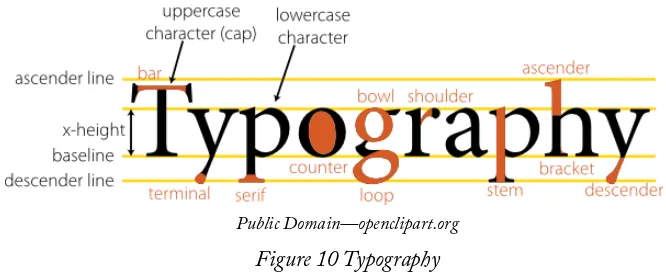
Figure 10 Typography 29
Figure 11 Site Map 31
Figure 12 Website Planning 32
Figure 13 Wireframe 35
Figure 14 Storyboarding 36
Figure 15 Scrum 40
Figure 16 Waterfall Diagram 41
Figure 17 Model View Controller 42
Figure 18 Code Formatting Examples 48
Figure 19 API Data Flow 53
Figure 20 Document Object Model 64
Figure 21 Table Structure 88
Figure 22 CSS Rule Structure 109
Figure 23 Document Markup 117
Figure 24 CSS Box Model 119
Table of Tables
Table 1 HTML Entities 78
Table 2 Anchor Targets 82
Table 3 Image Formats 85
Table 4 Border Styles 120
Table 5 Pointer Styles 131
Table 6 Media Types 141
Table 7 Java vs JavaScript 150
Table 8 PHP Errors 155
Table 9 PHP Variable Naming 158
Table 10 Character Escaping 161
Table 11 Comparison Operators 167
Table 12 Operator Precedence 168
Table 13 PHP File Methods 177
Preface
When I began creating course materials of my own, I carried with me an acute aware-ness of several things. First, the volume of free, online reference materials including video tutorials, community groups, and books (now including this text) is so far greater than what a single printed volume could handle, that the idea of creating a comprehensive source seemed laughably redundant. Second, many of the texts that march across my desk for review each semester focus primarily on the underpinnings of a particular language, while spending little time introducing or reinforcing the methodology and general practice of the language in question. While this allows those authors to delve deeper into limited topics, I have found that focusing on how languages relate and intertwine is often more beneficial, especially when just beginning to study web development. Studying languages independent of one another does little to prepare a programmer for complex systems involving multiple languages.
This text is meant to reduce the confusion brought about by integrating multiple languages into one site while at the same time providing an overview of the entire devel-opment process. Within, you will find information on a variety of topics involved in the overall process of planning, designing, and finally creating a website; this background will help you understand how these pieces fit together, so you are better able to understand and contribute to a project and work with others on your team.
As this is an introductory level text, the goal is not to exhaust the covered topics. Instead we will focus on familiarizing ourselves with each languageâs abilities and how to fuse those languages and methods together to create a responsive, well-developed site. You will frequently find links and keywords throughout the text, which you can use as a starting point to further research topics that interest you.
We will examine web development in a full stack approach; the premise behind the phrase âfull stack developerâ is that the person has an understanding of all of the elements necessary to create and run a website. The topics included below all lend themselves towards this goal by touching each aspect of the process.
Section 1: Web Development
A brief history of the development of the Internet along with current trends and emerging technologies such as virtualization, botnets, internet of things, and more.
Web Servers: Analysis of the components of servers from both a hardware and software perspective with introduction to LAMP software and alternative solutions. Introduction to basic networking topics to provide an understanding of device addressing and URL translation.
Development: Introduction to development models and best practices. Includes APIs, developing with or without others, and practices like pseudo code, code formatting, and variable naming conventions.
Section 2: Document Markup
HTML5: Introduction to HTML including features from the current specifications for HTML5. Covers tags and attributes, layout elements, forms, canvas, and more.
CSS: Introduction to CSS3 including selectors and rules, classes, responsive styling, positioning, and more.
Section 3: Scripting Languages
PHP: Introduction to PHP including debugging, arrays, email, file interaction, logic and control structure, and more.
JavaScript: A brief contrast of JavaScript to PHP, use of jQuery, and the document object model. Demonstration of how to complete basic page manipulation using JavaScript.
Section 4: Data Storage
MySQL: Primary and foreign keys, normalization and design, query design, and more.
Section 5: Tying It Together
Security: An introduction to risk management and examples of basic methods of se-curing elements of a site.
Advanced Examples: Examples of site features and methods, which combine the lan-guages and topics in the text.
Finishing Touches: Integration of common website elements that complete the user experience including search optimization, analytics, and important information.
Learning Features
Colored blocks of text provide additional notes, important reminders, or highlight useful features of a language.
ADDITIONAL NOTES
IMPORTANT REMINDERS
USEFUL FEATURES
end to give you an opportunity to test your understanding of the material. Assessments in-clude several small to medium sized assignments, discussion questions, and multiple-choice questions. Discussion questions are meant to encourage deeper examination of topics and will frequently require effort to find additional information beyond this text (hint: start with the following feature).
Select topics are followed by a âLearn Moreâ box (shown below), which identifies vo-cabulary and other sources you can use to delve deeper into the topic. Whenever possible, these external sources will also be openly published, free material.
LEARN MORE
Acknowledgments
I would like to thank my colleague and friend Robert Olson for his efforts in editing this work. I would also like to thank the Department of Computer and Information Sciences at SUNY Fredonia who not only served as my instructors, but also welcomed me back as a colleague. I would also like to thank Drs. Dan Berggren and Charles Telly whose infectious passion for academics has kept myself and countless others engaged in the field.
Finally, I would like to thank those students who participated in reviewing and com-menting on drafts of this text:
Dennis Adey Ankit Ahuja Julian Anjorin Brandon Artymowycz
Michael Barry Selin Bora James Fefes Marissa Forward
Melissa Grove Jenna Hume
John Iburg Marcello Miceli James Morrissey Brett Mueller Zachary Murray
Jarrett Parow Erik Pokornowski
Section 1:
Web Development
Section Contents
Brief History of the Internet
Current Trends
Web Servers
Network Basics
Website Design
Development
Learning Objectives
By the end of this section, you should be able to demonstrate: ⢠A basic understanding of the development of the Internet ⢠Awareness of current trends in web development
⢠An understanding of the components of a server ⢠Awareness of networking basics
⢠The ability to plan and design basic websites
Chapter 1
Brief History of the Internet
As far back as the early stirrings of the Cold War, the concept of a network connecting computers was under development by both government and university researchers looking for a better means to communicate and share research. The military at the time relied in part on microwave transmission technology for communications. An unexpected attack on some of these towers demonstrated how susceptible the technology was to failure of even small portions of the transmission path. This led the military to seek a method of commu-nicating that could withstand attack. At the same time, university researchers were trying to share their work between campuses, and were struggling with similar problems when their transmissions suffered drops in signal. Parties from both groups ended up at the same conference with presentations, and decided to collaborate in order to further their work.
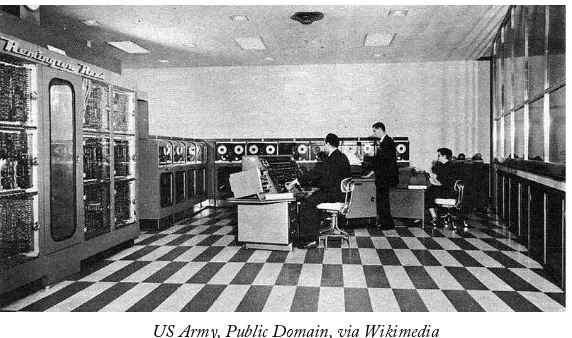
At the time, computers were far from what we know them as today. A single computer was a large, immobile assortment of equipment that took up an entire room. Data entry was done by using punched cards of paper, or the newest method of the time, magnetic tapes. Interacting with the computer meant reserving time on the equipment and traveling to where it was. Most machines were owned by universities, large corporations, or government organizations due to the staffing demands, size, and cost to acquire and maintain them. The image below depicts the UNIVAC 1, a system used by the United States Census Bureau and other large organizations like universities. One of the fastest machines at the time, it could perform roughly 1000 calculations per second.
[image:17.612.165.451.515.684.2]US Army, Public Domain, via Wikimedia Figure 1 UNIVAC Computer System
you reach for your dictionary or calculator, we will break that down. FLOPS stands for floating point operations per second, or in basic terms, the number of calculations the system can finish in one second. A petaflop is a numerical indicator of how many 1015 (10 with 15 zeroes after it) calculations are completed per second. So, 10 petaflops means the K computer can complete 1015 calculations ten times in one second. If we fed the UNIVAC 1 just a single petaflop of data the day it was turned on, it would still be working on the problem today. In fact, it would barely be getting started, just a mere 60+ years into a roughly 317,098-year task!
ADDITIONAL NOTES
You may have heard of Mooreâs Law, commonly defined as the tendency of
technologyâs capability to double every two years. Mooreâs actual prediction was that this would apply to transistors, an element of circuits, and that it would continue for ten years after seeing its trend from 1958 to 1964. His prediction
has shown to be applicable to memory capacity, speed, storage space as well as other factors and is commonly used as a bench mark for future growth.
As cold war tensions grew and Sputnik was launched, the United States Department of Defense (DoD) began to seek additional methods of transmitting information to supple-ment existing methods. They sought something that was decentralized, allowing better resiliency in case of attack, where damage at one point would not necessarily disrupt com-munication. Their network, Arpanet, connected the DoD and participating universities together for the first time. In order to standardize the way networked systems commu-nicated, the Transfer Control Protocol/Internetwork Protocol (TCP/IP) was created. As various network systems migrated to this standard, they could then communicate with any network using the protocol. The Internet was born.
Email was soon to follow, as users of the networks were interested in the timely trans-mission and notification of messages. This form of messaging fit one of their initial goals. As time progressed, additional protocols were developed to address particular tasks, like FTP for file transfers and UDP for time-sensitive, error-resistant tasks.
Ongoing improvements in our ability to move more information, and move it faster, between systems progressed at a rate similar to the calculative power of the computers we saw earlier. This brings us to where we are today; able to watch full-length movies, streamed in high quality right to our phones and computers, even while riding in a car.
LEARN MORE
Keywords, search terms: History of the Internet, Arpanet
A Brief History of NSF and the Internet: http://www.nsf.gov/od/lpa/news/03/fsnsf_internet.htm
Chapter 2
Current Trends
As important as it is to know how we reached where we are today, it is also important to stay current in web development. New products and innovations can greatly affect the landscape in a short amount of time. We can look to the rapid rise in Facebook, Twitter, and the myriad of Google services now relied upon around the world as examples of how fast new technology is embraced.
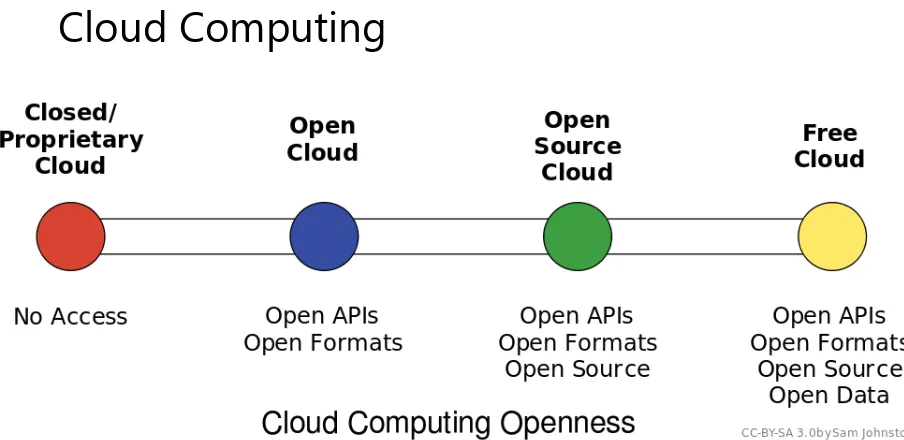
[image:19.612.79.531.330.550.2]Cloud Computing
Figure 2 Cloud Computing Styles
Cloud computing can be loosely defined as the allocation of hardware and/or software under a service model (resources are assigned and consumed as needed). Typically, what we hear today referred to as cloud computing is the concept of business-to-business commerce revolving around âCompany Aâ selling or renting their services to âCompany Bâ over the Internet. A cloud can be public (hosted on a public internet, shared among consumers) or private (cloud concepts of provisioning and storage are applied to servers within a fire wall or internal network that is privately managed), and can also fall into some smaller subsets in between, as depicted in the graphic above.
or software methods to act as though they are multiple smaller systems that add up to their capacity. This is referred to as virtualizing, or virtual servers. These systems can be âright sizedâ where they only consume the resources they need on average, meaning many systems needing little resources can reside on one piece of hardware. When processing demands of one system expand or contract, resources from that server can be added or removed to account for the change. This is an alternative to multiple physical servers, where each would need the ability to serve not only the average but expected peak needs of system resources.
Software as a Service, Platform as a Service, and the ever-expanding list of âas-a-serviceâ models follow the same basic pattern of balancing time and effort. Platforms as a service allow central control of end user profiles, and software as a service allows simplified (and/ or automated) updating of programs and configurations. Storage as a service can replace the need to manually process backups and file server maintenance. Effectively, each âas-a-serviceâ strives to provide the end user with an âas-good-if-not-betterâ alternative to managing a system themselves, all while trying to keep the cost of their services less than a self-managed solution.
ADDITIONAL NOTES
One of the best methods to keep current is by following trade magazines, industry leader blogs, and simply browsing the internet looking for new items or
site features you have not noticed before. Content aggregators like Zite, Feedly, and Slashdot are some of my favorites.
As a micro-scale example, imagine you and four friends are all starting small businesses. Faced with the costs of buying servers and software for data storage, web hosting, and office programs, each of you would invest funds into equipment and the staff to maintain it, even though much of it may get little use in the early stages of your company. This high initial investment reduces available funding that may have been used elsewhere, and your return on investment becomes longer. Instead, each of you would create an account with Amazonâs cloud services for file storage and website hosting, which are private to you, but physically stored on servers shared by other users. Since these services are managed offsite by Amazon staff, none of you need to hire IT staff to manage these servers, nor do you have to invest in the equipment itself. Just by not needing to hire a system administrator (estimated at $40,000 salary) you can pay for just over 3 years of Amazon service (calculated using Ama-zonâs pricing calculator1 for basic web services and file storage). When you combine the savings of that employeeâs fringe costs like health care, along with those of not purchasing your own hardware, this approach can make your initial investment last longer.
These lowered costs are attractive to small businesses and startups for obvious reasons, but are also attractive to large companies with highly fluctuating levels of need. For example, a football teamâs website sees far more traffic on game days than the off-season. They do not need the ability to serve the same amount of users all the time. Some tangible examples of âas-a-serviceâ tools you may already be using are file hosting services like Dropbox2 or Google Drive.3 Your files are kept on servers along with those from other users that you do not see (unless you share with them intentionally) and you can add or remove extra space
1 http://calculator.s3.amazonaws.com/index.html 2 http://www.dropbox.com
The Missing Link: An Introduction to Web Development and Programming Chapter 2
to your account whenever you like. Similarly, services like Amazon Web Services4 offer the ability to host your files, applications, and more to both home consumers and commercial clients.
Virtualization
Server virtualization is the act of running multiple operating systems and other software on the same physical hardware at the same time, as we discussed in Cloud Computing. A hardware and/or software element is responsible for managing the physical system re-sources at a layer in between each of the operating systems and the hardware itself. Doing so allows the consolidation of physical equipment into fewer devices, and is most beneficial when the servers sharing the hardware are unlikely to demand resources at the same time, or when the hardware is powerful enough to serve all of the installations simultaneously.
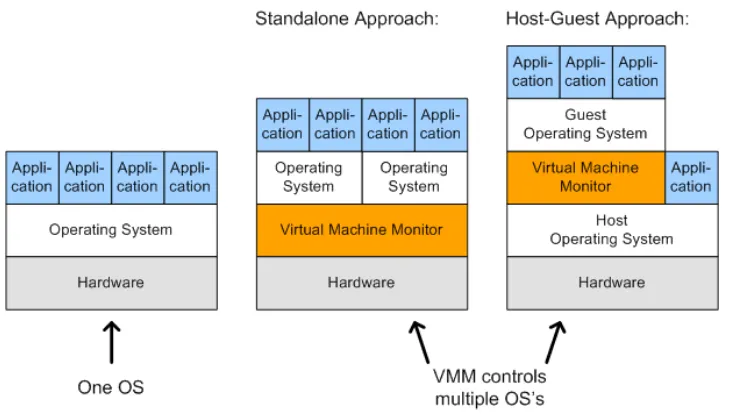
The act of virtualizing is not just for use in cloud environments, but can be used to decrease the âserver sprawl,â or overabundance of physical servers, that can occur when physical hardware is installed on a one-to-one (or few-to-one) scale to applications and sites being served. Special hardware and/or software is used to create a new layer in between the physical resources of your computer and the operating system(s) running on it. This layer manages what each system sees as being the hardware available to it, and manages allocation of resources and the settings for all virtualized systems. Hardware virtualization, or the stand alone approach, sets limits for each operating system and allows them to operate independent of one another. Since hardware virtualization does not require a sepa-rate operating system to manage the virtualized system(s), it has the potential to opesepa-rate faster and consume fewer resources than software virtualization. Software virtualization, or the host-guest approach, requires the virtualizing software to run on an operating system already in use, allowing simpler management to occur from the initial operating system and virtualizing program, but can be more demanding on system resources even when the primary operating system is not being used.
Ultimately, you can think of virtualization like juggling. In this analogy, your hands are the servers, and the balls you juggle are your operating systems. The traditional approach of hosting one application on one server is like holding one ball in each hand. If your hands are both âbusyâ holding a ball, you cannot interact with anything else without putting a ball down. If you juggle them, however, you can âholdâ three or more balls at the same time. Each time your hand touches a ball is akin to a virtualized system needing resources, and having those resources allocated by the virtualization layer (the juggler) assigning resources (a hand), and then reallocating for the next system that needs them.
By Daniel Hirschbach [CC-BY-SA-2.0 Germany] via Wikimedia Figure 3 Virtualization Styles
The addition of a virtual machine as shown above allows the hardware or software to see the virtual machine as part of the regular system. The monitor itself divides the resources allocated to it into subsets that act as their own computers.
Net Neutrality
This topic is commonly misconstrued as a desire for all Internet content to be free of cost and without restrictions based on its nature. In fact, net neutrality is better defined as efforts to ensure that all content (regardless of form or topic) and the means to access it, are protected as equal. This means Internet Service Providers (ISPs) like your cable or telephone company cannot determine priority of one site over another, resulting in a âpre-miumâ Internet experience for those able to pay extra. Additional concerns are that without a universal agreement, a government may elect to restrict access to materials by its citizens (see North Korea censorship5), and similarly that corporations controlling the physical con-nections would be able to extort higher prices for privileged access or pay providers to deny equal access to their competitors.
USEFUL FEATURES
Legislation continues to change regarding what is and is not legal or acceptable content on the internet. Laws change over time as well as across jurisdictions and
can greatly differ. Just because material is legal in your area does not mean it is in
others and you may still be in violation of laws applicable in the location of your server.
Existing laws vary around the world, some protecting the providers, some protecting the user. The United States received considerable attention in 2012 for anti-piracy bills
The Missing Link: An Introduction to Web Development and Programming Chapter 2
that were highly protested both with physical rallies and online petitions. Each bill drew debate over what affects the stipulations would have not only within the United States, but over the Internet as a whole. Even though SOPA6 (introduced by the House) and PIPA7 (introduced by the Senate after the failure of COICA8 in 2010) were not ultimately ratified, The United States and other countries had at that point already signed ACTA9 in 2011, which contained provisions that placed the burden on ISPs to police their users regardless of sovereign laws in the userâs location.
LEARN MORE
Keywords, search terms: Cloud computing, virtualization,
virtual machines (VMs), software virtualization, hardware virtualization
Xen and the Art of Virtualization: http://li8-68.members.linode.com/~caker/xen/2003-xensosp.pdf
Virtualization News and Community: http://www.virtualization.net
Cloud Computing Risk Assessment: http://www.enisa.europa.eu/activities/risk-management/files/
deliverables/cloud-computing-risk-assessment
Without formal legislation, judges and juries are placed in positions where they establish precedence by ruling on these issues, while having little guidance from existing law. As recently as March 2012 a file sharing case from 2007 reached the Supreme Court, where the defendant was challenging the constitutionality of a $222,000 USD fine for illegally sharing 24 songs on file sharing service Kazaa. This was the first case for such a lawsuit heard by a jury in the United States. Similar trials have varied in penalties up to $1.92 million US dollars, highlighting a lack of understanding of how to monetize damages. The Supreme Court denied hearing the Kazaa case, which means the existing verdict will stand for now. Many judges are now dismissing similar cases that are being brought by groups like the Recording Industry Association of America (RIAA10), as these actions are more often being seen as the prosecution using the courts as a means to generate revenue and not recover significant, demonstrable damages.
As these cases continue to move through courts and legislation continues to develop at the federal level, those decisions will have an impact on what actions are considered within the constructs of the law, and may have an effect on the contents or location of your site.
Cyber Warfare
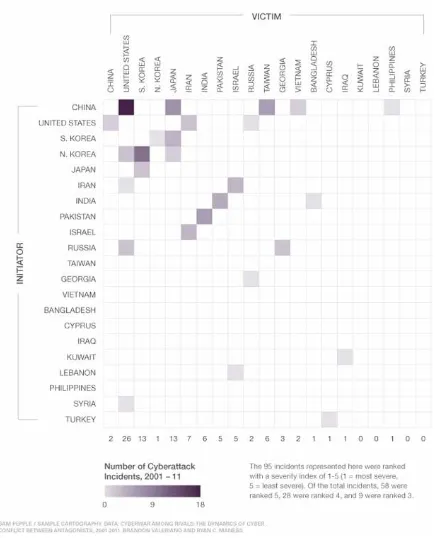
Intentional, unauthorized intrusion of systems has existed about as long as computers have. While organized, coordinated attacks are not new, carrying them out in response to geopolitical issues is now emerging, as was found in the brief 2008 war between Russia and Georgia. Whether the attacks on each countryâs infrastructures were government
sanc-6 http://thomas.loc.gov/cgi-bin/bdquery/z?d112:h.r.3261: 7 http://www.opencongress.org/bill/112-s968/show 8 http://www.govtrack.us/congress/bills/111/s3804/text 9 http://www.ustr.gov/acta
tioned or not is contested, but largely irrelevant. What is relevant is that these attacks will only continue, and likely worsen, in future disputes.
In the United States and other countries, equipment that controls aging infrastructure for utilities is increasingly connected, with control computers at facilities for electric, water, gas, and more being placed online to better facilitate monitoring and maintenance. How-ever, many of these systems were not developed with this level of connectivity in mind, therefore security weaknesses inherent in the older equipment can result in exploits that allow Hackers to cause real, permanent damage to physical equipment, potentially dis-rupting the utilities we rely on every day.
[image:24.612.199.417.339.608.2]Tehranâs uranium enrichment development facilities were targeted in late 2010 by a custom-created virus that focused on equipment used in the refining of nuclear material. The virus would randomly raise or lower the speed of the equipment in a manner that would not create alarms, but enough to strain the equipment. This would lead to equipment failures, after which the replacement hardware would be similarly infected. Eventually discovered, the virus had been running for many months, delaying the project and increasing its costs. This virus was intentionally designed to run in that particular environment and was based on the specific SCADA hardware involved, and in this case was such a sophisticated attack that it is widely believed to have been facilitated by the United States and Israel.
Figure 4 10 Years of Known Cyber Attacks
The Missing Link: An Introduction to Web Development and Programming Chapter 2
Botnets
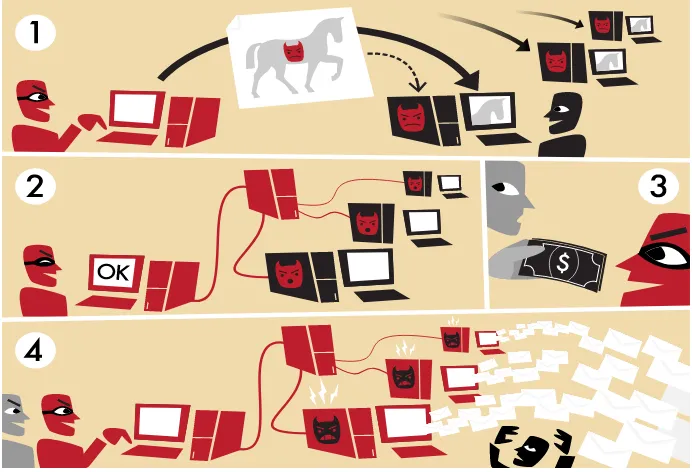
Botnets are not exactly a new threat to the Internet, but they remain one of the most persistent threats to the average user and their computer. The word botnet, an amalgama-tion of the words robot and network, is an accurate descripamalgama-tion of what it entails. Botnets are programs that use a network connection to communicate with each other to coordinate and perform tasks. Originally, botnets were created as part of programs for Internet Relay Chat (IRC) to help establish and control channels people would log into to talk to each other. They are still in frequent use today for a number of legitimate, non-malicious tasks.
We have also seen a rise in malicious botnets, designed to work undetected in the background of your computer. The controller (typically referred to as the command and control server) uses the infected machines to complete tasks that require large amounts of processing power and/or bandwidth to complete, like finding or exploiting weaknesses in networks or websites, or to âmineâ infected systems for personal data such as credentials, credit card numbers, and other information that can then be used or sold to others.
ADDITIONAL NOTES
It did not take long for the first virus to enter the internet. Just two years after the first systems were connected, The Creeper (a self-replicating script) was created in
1971, which did no harm but displayed âIâm the creeper, catch me if you canâ on
infected machines. It was immediately followed by The Reaper, the first anti-virus
program, which too self-replicated, removing the Creeper wherever it was found.
By Tom-B [CC-BY-SA-3.0], via Wikimedia Figure 5 Botnets
LEARN MORE
Keywords, search terms: Botnets, command and control system, malware, network security Build Your Own Botnet: http://howto.wired.com/wiki/Build_your_own_botnet_with_
open_source_software
Honeynet Project: http://www.honeynet.org/papers/bots/
Internet of Things
The Missing Link: An Introduction to Web Development and Programming Chapter 2
is not merely waxing philosophically, either. It has been demonstrated as a proof of concept11 backed by researchers funded by DARPA.
As more devices are introduced to the Internet, the amount of interaction with things as simple as small appliances is increasing. Comments like âWe have to stop by the store on the way home, the toaster report said we will need at least one loaf of bread for the weekâ seem silly to us now, but could eventually exist in the same breath as âThe fridge called, it ordered our groceries for the week.â For about $2,700 USD, Samsung already offers a fridge with interactive features similar to these ideas.
Items embedded with RFID tags contribute to the Internet of Things, as they can be tracked and provide information that can be aggregated and applied to processes. Shipping crates with RFID expedite taking inventory as their tags can be scanned automatically in transit. Access cards not only allow privileged access to restricted areas but also let us know where people (or, at least their cards) are located and where they have been. Home automa-tion systems allow lights, locks, cameras, and alarms to be managed by your smart phone to the extent that your lights can come on, doors unlocked, and garage door opened, when it detects that your phone has entered the driveway. All of these are itemsânot peopleâin-teracting with the Internet to fulfill a task, and are part of the emerging Internet of Things.
Proliferation of Devices
As reliance on the Internet and the drive for constant connection proliferate through our societies, and technology becomes more affordable and adaptable, we have not only left the age of one computer per home, but meandered even past the point where everyone in the house has their own device, and now the average consumer has multiple devices. The proliferation allows us to adjust technology to fit where we need it in our lives. I use my desktop for hardware intensive applications at home, or for doing research and web development where multiple monitors eases my need to view several sources at once. Out of the house, my tablet allows me to consume information and is easily slid into a keyboard attachment that allows it to operate as a laptop, turning it into a content creation device by reducing the difficulty of interacting by adding back a keyboard and mouse.
Improvements in software both in efficiency and ease of use allow older hardware to get second lives. My laptop, though ten years old, is still running happily (albeit without a useful battery life) and is still capable of browsing the internet and being used as a word processor due to a lightweight Linux operating system that leaves enough of its aging resources available for me to complete these tasks. When the average lifespan of a laptop is typically considered to be only three years, many older devices like mine have not left operation, and are still finding regular use in our growing set of tech tools.
Web Servers
While we could simply focus on how to create web pages and websites, none of this is pos-sible without the underlying hardware and software components that support the pages we create. Examining what these components are and how they interact helps us understand what our server is capable of.
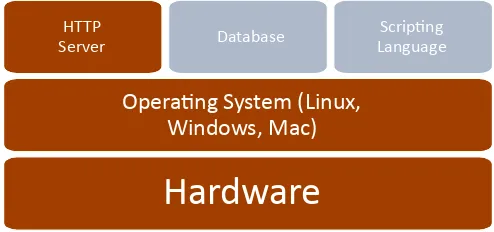
The diagram below represents the basic elements of a web server. Hardware, an oper-ating system, and an http server comprise the bare necessities. The addition of a database and scripting language extend a serverâs capabilities and are utilized in most servers as well.
Hardware
Operating System (Linux, Windows, Mac)
HTTP
[image:28.612.182.429.361.477.2]Server Database LanguageScripting
Figure 6 Web Server Software Structure
Hardware
The mention of phrases like data center, hosting provider, or even big name companies like Microsoft and Google can invoke mental images of large, sterile rooms full of tall racks of hardware with blinking lights and a maze of wires. Those more familiar with such rooms will also know the chill resulting from the heavily air conditioned atmosphere and droning whir of fans that typically accompany them. This, however, is not a requirement nor an ac-curate portrayal of a great deal of servers connected to the Internet. With the addition of the right software (assuming you are consuming this text
digitally), the device you are using to read this with could become an internet connected server. While it would not sustain the demands made of domains like Amazon.com or MSN.com, you would be able to perform the basic actions of a server with most of todayâs devices.
Even though we have reached this point, it is difficult
to forget the mental picture conjured by the thoughts
Hardware
Operating System (Linux, Windows, Mac)
HTTP
The Missing Link: An Introduction to Web Development and Programming Chapter 3
of the data center. In the current âtraditionalâ model, thin, physically compact servers are stacked vertically. These are referred to as rack mount hardware. Many rack mount systems today contain hardware similar to what we have in our desktops, despite the difference in appearance.
A number of companies, including Google, Yahoo, and Facebook, are looking to re-invent this concept. Google for instance has already used custom-built servers in parts of its network in an effort to improve efficiency and reduce costs. One implementation they have tried proved so efficient that they were able to eliminate large power backup units by placing a 9 volt battery in each serverâgiving it enough emergency power to keep running until the buildingâs backup power source could kick in. They have also experimented with alternative cooling methods like using water from retention ponds, or placing datacenters where they can take advantage of natural resources like sea water for cooling or wind and solar for energy.
ADDITIONAL NOTES
Take note! While all of the programs we refer to in our LAMP stack have free, open source versions, not all uses may be covered by those licenses (using them
for study and research purposes is covered).
Even small, low powered devices are finding demand as servers in part to enable the
Internet of Things. Devices like the Raspberry Pi12 and an explosion of similar products like âandroid sticksâ can be purchased for as little as $25 USD. These small, âjust-enough-powerâ devices are used to connect data from the environment or other devices to the Internet, leaving the data center behind and living instead at the source of the data itself.
Software
A typical web server today contains four elements in addition to the physical hardware. These are the operating system, web server, a database and a scripting language. One of the most popular combinations of these systems has been abbreviated to LAMP, standing for Linux, Apache, MySQL, and PHP, named in the same order. There are many combinations of solutions that meet these features, resulting in a number of variations of the acronym, such as WAMP for Windows, Apache, MySQL, PHP or MAMP, identical with exception of Mac (or, rightfully, a Macintosh developed operating system). Among the plethora of combinations, the use of LAMP prevails as the catch all reference to a server with these types of services.
All that is ultimately required to convey static pages to an end user are the operating system and HTTP server, the first half of the WAMP acronym. The balance adds the capability for interactivity and for the information to change based on the result of user interactions.
12 http://www.raspberrypi.org
Hardware
Operating System (Linux, Windows, Mac)
HTTP
Operating SystemâLinux
Hardware
Opera
ti
ng System (Linux,
Windows, Mac)
HTTP
Server Database LanguageScripting
Your operating system is what allows you to interact with the applications and hardware that make up your computer. It facilitates resource allocation to your applications, and communication between hardware and software. Typically, operating systems for servers fall under three categories: Linux-based, Windows-based, and Mac-based. Within each of these categories are more options, such as various version of Mac and Windows operating systems, and the wide variety of Linux operating systems. We will utilize Linux, the pre-dominant choice.
Developed by Linus Torvalds in the early 1990s while he was a student, Linux was cre-ated so Linus could access UNIX systems at his university without relying on an operating system. As his project became more robust, he decided to share it with others, seeking input but believing it would remain a more personal endeavor. What he could not have predicted was the community that would come together and participate in helping shape it into what is today. As the basis of a large number of Linux-based operating systems (or âflavorsâ of Linux), the Linux core can be found around the world, even in the server rooms of its competitors like Microsoft.
HTTP ServerâApache
Apache is an open source web server originally developed for UNIX systems. Now sup-ported on most platforms including UNIX, Linux, Windows, and Mac, Apache is one of the most utilized server applications. First developed in 1995, Apache follows a similar open source approach as Linux, allowing users to expand on the software and contribute to the community of users. The user group around Apache developed The Apache Foundation, which maintains a library of solutions for web services.
In a web server, Apache serves as the HTTP component, which compiles the results from scripting languages, databases, and HTML files to generate content that is sent to the user. Apache (or any web service) will track which files
on the server do and do not belong to the website, and also controls what options are available to the end user through its configuration files.
Apache and other HTTP servers allow us to share our webpages, scripts, and files with our end users. Any output from our database and scripting languages is turned into HTML output that the clientâs browser
displays as our webpage. While we can view HTML and
Hardware
Operating System (Linux, Windows, Mac)
HTTP
The Missing Link: An Introduction to Web Development and Programming Chapter 3
JavaScript files on a computer that is not a webserver, we need an http server to view them as a destination on a network.
Configuration Files
When we create a new system, settings may not be exactly as we want them, or the time may come where we want to add, remove, or change something about our server. To do this, we will need to edit the configuration files that control the different pieces of our system. Our actual web server config file is called httpd.conf. For PHP settings, we need to refer to php.ini, and for MySQL we refer to my.cnf. These files may be located in different places depending on the operating system, and the version in use, so it is best to use your systemâs file search tools to find where they are on your machine. Configuration (or setting) files are typically a plain text format file with one setting on each line with comments near each value describing the settingâs use. These files will also use the same commenting delimiter for their notes to enable or disable individual settings. Typically the delimiter used is a semi colon ; or pound sign #.
If you want to change settings about your server itself such as the port it listens on, what folder it looks for files in, its name, or other related features, look to the httpd.conf file. From the php.in file you can control elements like which modules are installed and enabled for your system, how much data scripts are allowed to consume, and more. Similarly your MySQL config file determines what port it listens on, which user it runs as on your server, what your admin accountâs credentials are, and more.
Changes to these files typically require you to restart your web server (in our case, for apache or PHP changes), or at least the service that you are changing (in our case, MySQL changes). This can be done using the control panel if you are using a combination program like Wamp 2, or by using your operating systemâs service tools or by using system commands at a command prompt. Restarting Wamp 2 in a GUI operating system like Windows can be done be right clicking on Wampâs icon in the tray. In a Cent OS server, the same effect can be achieved by typing âservice httpd restart.â If all else fails, you can always physically restart the machine (referred to as âbouncingâ), but this is something you will want to avoid on a live system as it will cause a much longer period of down time.
If you use installer packages, or a combo installer like Wamp 2, you will probably get by initially without making any changes to these files. Binary installers however will not know where or how to make changes to config files and you will need to follow the instructions to edit these files by hand to integrate all of your elements.
Why would I use a combination other than
Linux, Apache, My SQL, and PHP?
Given the popularity of this particular combination of four, it is easy to wonder why it has not simply become the system. However, needs and preferences may change why a par-ticular approach is selected. Perhaps you are in an all Windows environment and feel more comfortable with a Windows operating system. Maybe your data is already available in a flat file or XML format and you want a database that can use XML files, like MongoDB.13
Or, you might prefer the approach and packages available in Python to those found in PHP. Each system has its particular strengths and weaknesses, and should be chosen based on the needs of the project.
Open Source
At this point, you have come across many references to terms like free, free to edit, and open source throughout the text. In fact, all of the elements in our example LAMP are free, open source solutions. Open source means the provider of the software allows the end user access to the actual code of their software, allowing the end user to make changes anywhere in the program.
This differs from traditional software where you own a copy or license to use the program, but cannot extend or change elements of the program beyond what the developer allows. An executable in Windows for example is closed source. You cannot open the executable to read its code or make changes. If you wanted to change the program, the developer would have to provide you with the files used to create it (called source code) so you could make changes and compile your own, modified, executable program.
Open source is growing in popularity but the concept has existed for quite some time. Recently, larger governments have begun to embrace free, open source solutions as a means to reduce costs and achieve modifications that customize programs to fit their needs. His-torically open source was viewed as a security risk as anyone could submit changes to the project, and it was feared that vulnerabilities or malicious code would be inserted. In fact, with so many users able to view and modify the files, it has actually made those with malicious intent less able to hide their modifications (sometimes called the âmany eyesâ approach to reliability). Development time has also been reduced as the community of developers on a popular open source project can greatly exceed that of a closed source solution with limited development staff.
A popular acronym referring to these projects is FOSSâFree, Open Source Software. As not all open source programs are free in terms of purchasing or licensing, FOSS in-dicates solutions that are free of costs as well as free to change. These solutions may be developed entirely by a community of volunteers, or may come from a commercial company with developers dedicated to the project. While it is odd to think of a company giving away its creation for free, these companies generate revenue by building advertising into their software or offering premium services such as product support or contracting with clients to customize the product. Many companies will also offer only some tools as open source alongside other products they sell, or offer a âfreemiumâ model where the open sourced platform contains most of the features of their software. Here, additional features or add-ons beyond the open source package carry additional licensing and costs.
FTP
The Missing Link: An Introduction to Web Development and Programming Chapter 3
Network Basics
IP Addresses
An IP (Internet Protocol) address is a unique code that identifies a piece of equipment connected to a network. These addresses are used in messages between network devices like the network or wireless card in your computer, the equipment from your ISP (internet service provider), and all pieces of equipment between your machine and the one your computer needs to talk to.
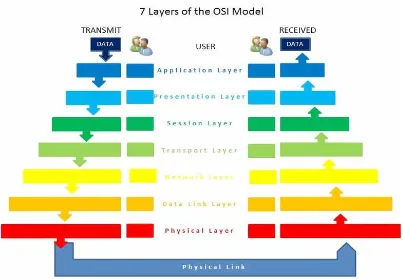
IP Addresses live in the network layer, which is one of seven layers in the protocol suite defined in the OSI Model. The OSI model stands for Open Systems Interconnection, and was created by the International Organization for Standardization, an international non-governmental group of professionals who strive to establish standards and best practices in a variety of fields. The OSI
Model for networking breaks the system of transmitting data into the layers show below in an attempt to delineate where certain actions should take place.
[image:34.612.269.490.435.694.2]The Missing Link: An Introduction to Web Development and Programming Chapter 4
[image:35.612.105.508.78.357.2]By MrsValdry [CC-By-SA 3.0] via Wikimedia Figure 8 OSI 7 Layer Model
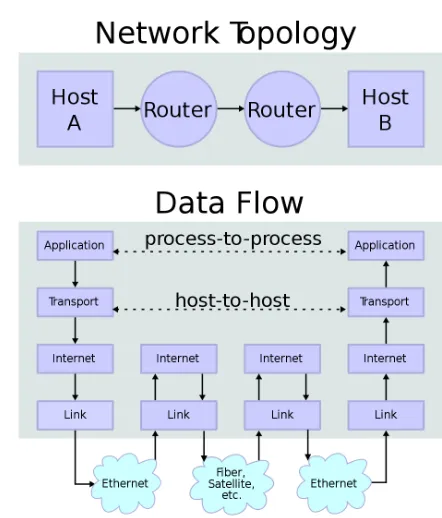
The seven layers depicted above make up the OSI bodyâs recommended protocol suite. In the diagram, transmission of data crosses two routers and over the Internet to reach its destination. By following the data along the arrows, we see it pass through various layers of communication and processing as it crosses the internal network, through the first router, across the public network (internet connection), into the recipientâs router, and then is reassembled into its original form.
Until recently, most network equipment has operated on IPv4, the fourth standard re-leased for IP addresses, which has been in place for about thirty years. Addresses in this format are typically represented as a pattern of four blocks of up to three digits separated by periods, with no block of numbers exceeding 255 such as 127.0.0.1 or 24.38.1.251. This is referred to as dot-decimal representation, and although it is not the only way to express an IPv4 address it is the most recognized form. Segments of the addresses within the ranges of 192.168.xxx.xxx, 172.16.xxx.xxx to 172.31.xxx.xxx, and 10.0.xxx.xxx to 10.255.xxx.xxx are reserved for private networks, meaning they are used within a network in your house, at work, or anywhere else where a group of computers share a connection to the internet.
This separation of networks was done to reduce the speed at which unique addresses were consumed. Although this scheme allows for almost 4.3 billion (accurately, 232) ad-dresses, the last one was officially assigned on February 4th, 2012. To sustain todayâs growing number of devices, IPv6 was created, which is depicted as eight blocks of four hexadecimal digits now separated by colons. These new addresses might look like 2001:0db8:85a3:0042 :1000:8a2e:0370:7334, and can support roughly 4 billion unique addresses. Since the new range is so staggeringly large, additional protocols were created that specify when certain values or ranges are used in addresses. This allows additional information about the device to be conveyed just from the address.
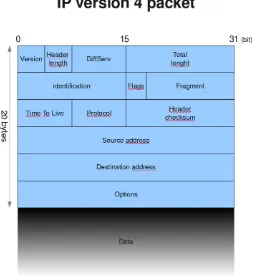
The actual messages sent between machines are broken down into multiple pieces. These pieces, called packets, are sent piece by piece from sender to recipient. Each packet is sent the fastest way possible, which means some packets may take different routesâpicture a short cut, or getting off a congested road to take a different one. This helps to ensure that the message gets from sender to receiver as fast as possible, but also means packets may arrive in a different order than they were sent.
ADDITIONAL NOTES
Hexadecimal is a number scheme that allows 0 through 9 and A through F as unique values, which means we can count to 15 with one character.
The Missing Link: An Introduction to Web Development and Programming Chapter 4
[image:37.612.180.436.92.371.2]By Nicolargo [ CC-BY-SA-3.0-2.5-2.0-1.0] via Wikimedia Commons Figure 9 IP 4 Packet
After the packets are reassembled, the receiving computer sends any necessary responses, and the process repeats. This all takes place in fractions of a second, beginning with the âhello,â or handshake packet to announce a communication request, to the last piece of the packet.
URL
Seeing as most of us would have a hard time remembering what IP address is needed to get to, say, Facebook (173.252.100.16) or the Weather Channel (96.8.80.132) we instead use URLs, universal resource locators. This allows us to use www.facebook.com and www. weather.com to get to where we want to go without referring to a long list of IP addresses. Specialized servers (called name servers) all around the world are responsible for responding to requests from computers for this information. When you type facebook.com into your address bar, if your router does not have a note of its own as to where that is, it will âaskâ a name server, which will look it up in its records and reply.
with the site, like www.facebook.com, and the resource id, or URI, is everything after that, which points to the particular file we want to see.
Ports
While an IP address and a URL will bring you to a particular web server, there may be more than one way you want to interact with it, or more than one thing you want it to do. Maybe you also want the server to provide email services, or you want to use FTP to update your files. These ports act as different doors into your server, so different applications can communicate without getting in each otherâs way. Certain ports are typically used for cer-tain activities, for example port 80 is the standard port for web traffic (your browser viewing a page), as opposed to ftp, which typically uses port 21. Using standard ports is not a rule, as applications can be configured to use any available port number, but it is recommended in most cases as firewalls and other security devices may require additional configuring to keep them from blocking wanted traffic because it is arriving at an unusual, fire walled, or âlockedâ port.
Hosting Facilities
If you are using a server that is not under your physical care, and is managed by an off-site third party, then you likely have an agreement with a hosting facility. Hosting facilities are typically for-profit companies that manage the physical equipment necessary to provide access to websites for a number of clients. Many offer web development and management services as well, but if you are still reading, then that tidbit is probably of little interest as you are here to build it yourself.
ADDITIONAL NOTES
Up Time is the average amount of time that all services on a server are
operational and accessible to end users. It is a typical measurement of a hosting companyâs ability to provide the services they promise.
The Missing Link: An Introduction to Web Development and Programming Chapter 4
Domain Registrar
Domain registrars coordinate the name servers that turn URLs into the IP addresses that get us to our destinations. These companies are where you register available names in order to allow others to find your site. One of the most recognized registrars right now is GoDaddyâyou may know them from their ads, which feature racecar driver Danica Pat-rick. Like many registrars, GoDaddy also offers other services like web and email hosting as well as web development in an effort to solve all of your website needs.
LEARN MORE
Keywords, search terms: Networking, network topology, OSI, network architecture Cisco Networking Example: http://docwiki.cisco.com/wiki/Internetworking_Basics
List and description of all top level domains: http://www.icann.org/en/resources/registries/tlds
Website Design
Website design is a topic of study often neglected until after a programming background has been developed. Worse, it may be entirely ignored or missed by computer science stu-dents when courses covering the topic are in other programs like graphic arts or media. This results in programmers trying to understand how to write code meant for layout and design elements without understanding design. By studying these elements first, we can develop a better knowledge of the concepts of web design before we write code. Progressing through the topics in this section during your site design will greatly ease your development efforts in the future, allowing stakeholders to understand the project and provide feedback early on, reducing (re)development time.
A number of factors affect design in web development, complicating what would oth-erwise appear to the end user to be a relatively simple process of displaying a picture or document. In truth, the development process involves not only the HTML and multimedia that make up the visual aspects of the page but also considerations of software engineering, human-computer interaction, quality assurance and testing, project management, informa-tion and requirement engineering, modeling, and system analysis and design.
Todayâs sites are now becoming more application centered than traditional sites. This further complicates our projects as we integrate with legacy software and databases, strive to meet real-time data demands, address security vulnerabilities inherent to the environ-ment we are working in, and ongoing support and maintenance typical of robust software applications.
In response to these advances in complexity and capability, web development has grown to embrace many of the same development processes of software development. We will consider some of these processes below, which you may wish to use depending on the size and complexity of a given project.
Planning Cycle
The Missing Link: An Introduction to Web Development and Programming Chapter 5
Starting early with programming during design planning can accelerate a project when the elements created early on are unlikely to be affected by later changes in the scope. When done carefully, early programming also allows an opportunity to test concepts before investing time into an idea that may not work. It is important to avoid aspects that are as-sumed to change, like visual layout or particular pieces of content, instead focusing on data structure, frameworks, and other components that are easily adapted to design changes.
While you are planning, keep an eye out for indicators that things are going off-track. Some of the more important flags that should be resolved include:
1. Vaguely defined use cases and inadequate project requirements 2. Overly broad or undefined scope of features
3. Unresolved disputes between stakeholders about project features 4. Unrealistic time table, budget, or inadequate resources
When considering your milestones, tasks, objectives, or whatever label you or your team place on objectives, a handy acronym to reference is SMART. SMART stands for Specific, Measurable, Attainable, Realistic, and Timely. The idea is to check all of your objectives against these criteria to determine if they are appropriate and well developed. By ensuring all of your objectives meet the SMART criteria, you will have a better chance of keeping your project on time and well planned.
Specific:
Is your objective specific enough to convey its full scope? While you do not want to specify implementation of the objective, you should convey enough specific information that the person assigned to the objective can begin their portion of implementation.
Good Example: Deliver our standard proposal with adjusted price quotes to reflect cus-tomerâs discount rate of 15%.
Bad Example: Deliver a proposal to the customer.
Measurable:
Your objective should have a clear indicator of when it is complete. Good Example: Complete the first 15 pages identified in the site plan. Bad Example: Complete the first 20% of the site.
Attainable:
Is it possible, at all, to complete the objective?
Good Example: Get the server to a FedEx store by close of business on delivery date. Bad Example: Drive the server from New York to California within 24 hours.
Realistic:
Bad Example: Have Bob the Intern complete 10 pages by tomorrow.
Timely:
Will the objective be useful if it is completed at (not near or before) its deadline? Assuming a proposal deadline of Friday morning:
Good Example: Have draft sitemap completed by the end of Wednesday to include in the proposal.
Bad Example: Have draft sitemap completed by the end of Friday to include in the proposal.
âBut, wait, Attainable and Realistic sound like the same thing!â Well, yes they are quite similar. However the difference lies in what else you know about the project, timeline, resources and objectives. In our Realistic example this is highlighted by specifying the resources available for the objective. While our example company could assign sufficient resources to complete 10 pages in a day, it could never drive a server from New York to California in a day no matter how many people it has or how fast their car is given current speed limits. In the same vein, the objective of creating 10 pages in a day is perfectly attain-able for our example company, but is not realistic if your company lacks enough manpower to complete the task.
While we broke these examples down to highlight the particulars of each element of our litmus test, real world objectives would contain all of these together in up to two or three brief sentences:
Team A will complete the customerâs proposal using our standard forms including their discount and a sample site plan by the 15th for delivery the 20th.
Now we need to test it. Is the objective specific? Yes. We are not left needing basic ques-tions asked before we could work on the objective. Is it Measurable? Yes. We have a deadline of the 15th of the month for a specific list of items. Is it Attainable? Yes. With appropriate resources there is nothing impossible about the objective. Is it Realistic? Assuming Team A has enough time and manpower to complete the task by the deadline, yes. Is it Timely? The work is due 5 days before delivery, allowing time for review, changes, or delays, and its deadline does not extend beyond its useful life, so yes, we have a SMART objective.
How do we come up with our objectives? We extract them as the âbig thingsâ that need to be done from the customerâs request, the mission statement, or other sources of informa-tion that define the scope of your project.
The Missing Link: An Introduction to Web Development and Programming Chapter 5
be terrible. They may derail the projectâs success if they are not completed. However, each of them will affect your timeline and resources. The tendency to squeeze in âone more ideaâ over and over again is called Feature Creep, as it creeps into your project and eventually eats away at your resources and profit.
LEARN MORE
Keywords, search terms: Website planning, web development plan, planning templates, project management
Good Planning Worksheet: http://www.goodworkmarketing.com/docs/WebsitePlanningGuide.pdf
BusinessBalls.com Guide to Project Management: http://www.businessballs.com/project.htm
The Fold
As we begin to develop our pages, we need to begin to consider where we want to place pieces of our content. If you look at newspapers, you will find that the most attractive story of the day (as decided, at least, by the publisher) is emblazoned in large letters near the middle or top of the front page, surrounded by the name of the paper, the date, and other pieces of information that quickly lend to your decision of whether or not to purchase a given paper. This is done intentionally, to make the paper attract your attention and get you to buy their edition over their competitors. In the printed news industry, the prime retail space in the paper is the top half of the front page, or what you see when the newspaper is folded normally at a newsstand. This is referred to as âabove the fold,â and is crucial to get-ting their audienceâs attention. This also applies to websites, except in our case, our âabove the foldâ is what the user sees on the landing page for our site, without having to scroll down or use any links.
What you typically find here is the name and or logo of the company, and what they feel is most important for you to see first. As you begin to analyze web pages in this light, you will find it very easy to determine what kind of site they are, or what they want or expect from you as their guest. News sites will typically follow a similar setting to a printed paper, leading with headlines and links to other sections. Companies will lead with a featured product or sale to attract your attention, and search engines will make the search bar promi-nent, usually with ad space close by to increase their revenue streams.
been created, or users would lose interest in following links. While I endorse âThe Foldâ as a useful approach to landing pages, I do not mean to imply that all of your pages should fit on only one, non-scrolling screen.
Recent trends on sites like Facebook and LinkedIn show us there are in fact places for scrolling. Indefinitely, as it were. Both sites now feature status pages where older content is continuously appended each time you near the bottom of the page. This is quite similar to the concept of paging, but instead of clicking a link to the next page, the content is simply written in at the bottom creating a never-ending feel to the page. Ultimately, your design phase will hel