International Journal of Advanced Research in Computer Science
RESEARCH PAPER
Available Online at www.ijarcs.info
User Authentication in LabVIEW Platform
Lalitha Saroja Thota, Lecturer
Dept of Computer ScienceCollege of Arts and Science, King Khalid University Khamis Mushayt-1,Abha, Saudi Arabia
Suresh Babu Changalasetty, Associate Professor
Dept of Computer EngineeringCollege of Computer Science, King Khalid University Abha, Saudi Arabia
Ahmed Said Badawy, Assistant Professor
Dept of Computer EngineeringCollege of Computer Science, King Khalid University Abha, Saudi Arabia
Wade Ghribi, Assistant Professor
Dept of Computer EngineeringCollege of Computer Science, King Khalid University Abha, Saudi Arabia
Mohammad Shiblee,
Assistant Professor
Dept of Computer EngineeringCollege of Computer Science, King Khalid University Abha, Saudi Arabia
Abstract:The increase in the information access terminals along with the growing use of information sensitive applications such as e-commerce, e-learning, e-banking, and e-healthcare and many more web applications have generated a real requirement of reliable, easy to use, and generally acceptable control methods for confidential and vital information. The person authentication is one of the most critical issues in contemporary societies. Accurate automatic personal identification is crucial to a wide range of application domains. It ensures that a system's resources are not obtained fraudulently by illegal users. So in any application the first stage is user authentication. King Khalid University (KKU) is a public university located at Abha in Asir region of Saudi Arabia. In this paper, we take a case study of KKU Department Administration system, a database application build in LabVIEW platform using database connectivity toolkit for authentication. The user supplies user name and password for authentication. If the user is a valid user then user is allowed further into the system otherwise not. The user authentication module is the backbone of any web based application.
Keywords:Authentication, LabVIEW, VI, Block diagram, Front panel, Database connectivity toolkit
I. INTRODUCTION
The concept of having to identify an entity before being allowed to perform any action is quite acceptable, and expected, and required in today’s wired world. The increase in information access terminals along with the growing use of information sensitive applications such as commerce, e-learning, e-banking, and e-healthcare and many more web applications have generated a real requirement of reliable, easy to use, and generally acceptable control methods for confidential and vital information. Many companies (ranging from commercial to multimedia and financial sectors) have moved or are moving their services to the Internet, including critical processes such as payments. As a result, the issue of ensuring the identity of the accessing counterpart becomes crucial. The escalating trend of moving data and services in web apps necessitates methodical planning to ensure secure access to authorized users over the internet. Hence person authentication is one of the most critical issues in contemporary societies. Accurate automatic personal identification is crucial to a wide range of application domains. It ensures that a system's resources are not obtained fraudulently by illegal users. So in any software application the first stage is user authentication.
Authentication is the process of identifying an individual, usually based on a username and password. The authentication is the act of confirming the truth of an attribute of a datum or entity. This might involve confirming the identity of a person or software program, tracing the origins of an artifact, or ensuring that a product is what its packaging and labeling claims to be. Authentication often involves verifying the validity of at least one form of identification. Security research has determined that for a positive authentication, elements from at least two factors should be verified. User authentication ensures identifying the user and verifying that the user is allowed to access some restricted services.
In this paper, we take a case study of KKU Department Administration system, a database application build in LabVIEW platform using database connectivity toolkit for authentication. The user supplies user name and password for authentication. If the user is a valid user then user is allowed further into the system otherwise not. Identification and authentication are used to establish a user's identity necessary to enter into any critical software applications.
II. BACKGROUND
In this section we provide background information involving authentication concepts and related works made in field of authentication. Authentication is the act of confirming the truth of an attribute of a datum or entity. This might involve confirming the identity of a person or software program, tracing the origins of an artifact, or ensuring that a product is what its packaging and labeling claims to be. Authentication often involves verifying the validity of at least one form of identification.
In art, antiques, and anthropology, a common problem is verifying that a person has the said identity, or a given artifact was produced by a certain person or was produced in a certain place or period of history. There are three types of techniques for doing this. The first type of authentication is accepting proof of identity given by a credible person who has evidence on the said identity, or on the originator and the object under assessment as the originator's artifact respectively. The second type of authentication is comparing the attributes of the object itself to what is known about objects of that origin. Attribute comparison may be vulnerable to forgery. The third type of authentication relies on documentation or other external affirmations
In security systems, the authentication is distinct from authorization, which is the process of giving individuals access to system objects based on their identity. Authentication merely ensures that the individual is who he or she claims to be, but says nothing about the access rights of the individual. The three factors of authentication highlighting the ways of authenticating a person are based on: something the person claims to be, something the person has (to claim for his identity), and something the user knows (to clear the authentication scheme). For a positive identification, security researches have determined at least two or all the three factors to be verified [1]. The above described three factors with some of its elements are as follows:
The ownership factors: Something the user or person has (e.g., Identity card, security and software tokens, cell phone s, etc.).
The knowledge factors: Something the user or person knows (e.g., an authentication password, a pass phrase, a personal identification number (PIN), a challenge-response (where the user needs to answer a question).
The inherence factors: Something the user or person is or does (e.g., fingerprints DNA sequences, retinal patterns, signature, facial and voice recognitions, unique bio-electric signals, or other biometric identifier).
The process of authorization is distinct from that of authentication. Whereas authentication is the process of verifying that "you are who you say you are", authorization is the process of verifying that "you are permitted to do what you are trying to do". Authorization thus presupposes authentication.
Identification and authentication requirements are found together throughout all evaluation classes. They are directly related in that "identification" is a statement of who the user is (globally known) whereas "authentication" is proof of identification. Authentication is the process by which a claimed identity is verified [2].
E-authentication is the process of establishing confidence in user identities electronically presented to an information system [3]. Systems can use the authenticated identity to determine if that individual is authorized to perform an electronic transaction. In most cases, the authentication and transaction take place across an open network such as the Internet, however in some cases access to the network may be limited and access control decisions may take this into account.
In an approach by Saddam Hussain et al., [4] the user at the time of profile creation is required to enter the password, minimum of 6 characters and a secret numeric PIN of minimum 4 digits. The user will be asked to enter the password as an answer to a random mathematical question displayed in front of him in the form of an image during subsequent login attempts.
Alessandro Campi [5] focuses on the security of the authentication procedure set up by a service provider (SP) using a solution/tool obtained by a technical security provider (TSP). The Internet user (IU) uses the solution to access an online service by means of a personal access device (AD) equipped with a web browser (e.g., PC, smartphone, tablet). The security system is beneficial for the organizations planning to introduce a strong authentication procedure with useful guidelines and warnings in view of achieving a higher level of protection.
David Chou [6] study indicate that digital identity fraud is still on the rise, with an increase in sophistication (that is, "phishing," "man-in-the-middle," DNS poisoning, malware, social engineering, and so forth) and an expansion of attack vectors (that is, unregulated financial systems, lottery and sweepstakes contests, healthcare data, synthetic identities, and so on). With the upward trend of moving data and services into the Web and cloud-based platforms, the management and control of access to confidential and sensitive data is becoming more than verifying simple user credentials at the onset of user sessions for one application, and with higher interconnectivity and interdependencies among multiple applications, services, and organizations.
Anil K. Jain [10] use biometric recognition method which authenticates a person based on his biological and behavioral (biometric) traits.
User authentication in wireless sensor networks (WSNs) is a critical security issue due to their unattended and hostile deployment in the field. A New User Authentication Protocol for Wireless Sensor Networks Using Elliptic Curves Cryptography was build by Wenbo Shi and Peng Gong [11]. To achieve high security measures, Shilpa Kaman et al., [12] proposed a system that gives highly secured two-factor authentication based on voice recognition technology.
III. METHODOLOGY
LabVIEW is graphical programming software that allows for instrument control, data acquisition, and pre/post processing of acquired data. With Graphical Programming Environment there is no need to write lines of program code. LabVIEW takes less time to develop software applications and thus minimize the cost and manpower. LabVIEW provides the flexibility of a powerful programming language without the complexity of traditional development environments. LabVIEW programs are called virtual Instruments (VI). Stress that controls equal inputs and indicators equal outputs. Each VI contains, front Panel – How user interacts with the VI and block diagram – code that controls the program [13].
The LabVIEW Database Connectivity Toolkit allows you to quickly connect to local and remote databases and perform many common database operations without having to know structured query language (SQL) programming. The Database Connectivity Toolkit provides one consistent API for numerous databases to save you the time of learning different APIs. The toolkit can connect to any database with an ADO-compliant OLE DB provider or ODBC driver, including all popular databases. The toolkit has much functionality such as connecting to a database, inserting data in to and selecting data from a database, executing SQL queries and many more [14].
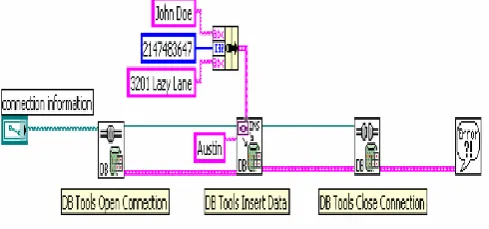
The Database Connectivity Toolkit has three “major” palettes of VIs, all located in the All Functions » Database palette. The High Level VIs in the Database Connectivity Toolkit allows access to the database without the use of any SQL statements. There are VIs to open and close connections to the database, insert and delete tables, insert and select records, and convert variants. The Advanced Palette gives you more flexibility in searching, modifying, and viewing data from a database. The Utility VIs are used to get and set connection and general information about the database. The basic database programming model is shown in Fig 1. Each of the three steps is discussed briefly below [14].
Fig 1: Basic Database Programming Model
Step 1: Connect to Database
The first step in doing database operations with the Database Connectivity Toolkit is to connect to the database. The DB Tools Open Connection VI is used to open connections to the database.
Step 2: Insert or Select Data
After the connection to the database is established, you can insert data into, or select data from, the database in a number of methods. The highest level inserts are done with the DB Tools Insert Data VI. If you want to select data from the database, use the DB Tools Select Data VI to select records.
Step 3: Close Connection
After you have completed all of the operations on the database, close the connection to the database. This operation is done with the DB Tools Close Connection VI. Once a connection to a database has been closed, no more operations can be done on that database from within LabVIEW until a new connection is established with a DB Tools Open Connection VI.
IV. EXPERIMENTSANDRESULTS
We take a case study of KKU Department Administration system, a database application a database application build in LabVIEW platform using, database connectivity toolkit for authentication. The application is build with three tier architecture, LabVIEW platform at presentation tier, logic tier and MS Access at data tier.
[image:3.595.307.566.487.764.2] [image:3.595.41.286.653.767.2]The MS Access database utilized at back end of system contains various tables. The user table contains attributes user-id, user-name, dept, cell, and password. Fig 2 presents user table with some data in MS Access database.
The users start KKU Department Administration system application and enter credentials user-id and password. The credentials are checked with the user data available in database. If the passwords are matched then user is allowed to enter into the KKU Department Administration system else an error message is displayed. The flow chart for user authentication is shown in Fig 3.
Fig 3: Flow chart for user authentication
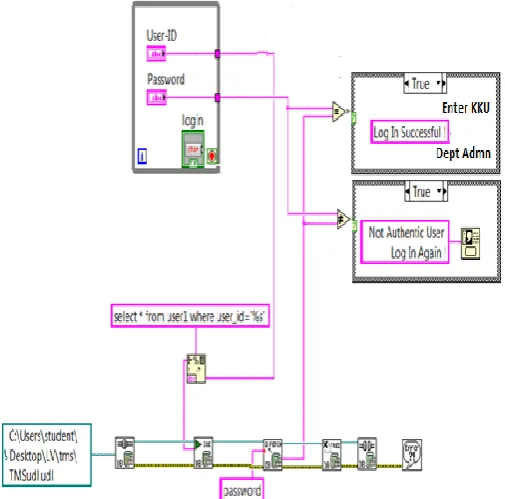
User clicks login.vi in LabVIEW to start KKU Department Administration system application. The front panel and block diagram of login VI is shown in Fig 4 and Fig 5. LabVIEW Database connectivity toolkit is utilized to build the VI.
[image:4.595.45.282.154.428.2]Fig 4: Block diagram of Login VI in LabVIEW for user authentication in KKU Dept Admn System
Fig 5: Front panel of Login VI in LabVIEW for user authentication in KKU Dept Admn System
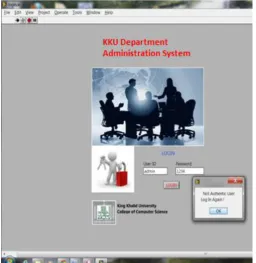
The user enters user-id and password in the front panel (shown in Fig 5). From the database user table (shown in Fig 2) corresponding record is fetched for the user. The passwords are matched. If password equal user password, user is successful login (shown in Fig 6) otherwise unsuccessful login with error message is displayed (shown in Fig 7)
[image:4.595.305.560.459.771.2] [image:4.595.39.292.509.758.2]Fig 7: User enter incorrect data and error message displayed
V. CONCLUSIONANDFUTUREWORK
In any application the first stage is user authentication. In this study, KKU Department Administration system a database application implemented in LabVIEW platform using database connectivity toolkit is utilized for user authentication. The user supplies user name and password for authentication. The system is tested for various valid and invalid users and is working well. Accurate automatic personal identification and authentication is critical to a wide range of application domains. The user authentication module is the backbone of any web based application. In future work, KKU Department Administration system can be extended from authentication module and other modules may be added. Some password-based authentication problems may be confronted by the incorporation of biometrics, graphical systems, pattern recognition and voice recognition technology in LabVIEW platform where an individual’s physical assets can be used as an identity.
VI. REFERENCES
[1] Katelin Bailey, Linden Vongsathorn, Apu Kapadia, Chris Masone, Sean W. Smith, TwoKind authentication: usable authenticators for untrustworthy environments, Proceedings of the Symposium on Usable Privacy and Security (SOUPS), Pages 169-170, 2007
[2] A Guide to Understanding Identification and Authentication in Trusted Systems, National Computer Security Center (NCSC-TG-017).
[3] Electronic Authentication Guideline v1.0.1, National Institute of Technology Special Publication 800-63 (NIST SP 800-63).
[4] Saddam Hussain, Ankur Sharma, Gaurav Gupta, Vijaishri Tewari, User Authentication System using Cryptography Involving Arithmetic Operations, International Journal of Computer Applications, Volume 70– No.6, May 2013
[5] Alessandro Campi, How Strong is Strong User Authentication? ISACA Journal, 2012
[6] David Chou, Strong User Authentication on the Web, The Architecture journal, Microsoft development network, July 2008
[7] Klimis Ntalianis, Nicolas Tsapatsoulis and Athanasios Drigas, Video-Object Oriented Biometrics Hiding for User Authentication under Error-Prone Transmissions, EURASIP Journal on Information Security, 2011
[8] L Lamport, Password authentication with insecure communication, Communications of the ACM 24(11), 770–772, 1981
[9] N Haller, The S/KEY one-time password system, Proceedings of the ISOC Symposium on Network and Distributed System Security, 151–157, 1994
[10] Anil K. Jain, Biometric authentication Scholarpedia, 3(6):3716, 2008
[11] Wenbo Shi and Peng Gong, A New User Authentication Protocol for Wireless Sensor Networks Using Elliptic Curves Cryptography, International Journal of Distributed Sensor Networks, Volume 2013
[12] Shilpa Kaman, K. Swetha, Syed Akram & G. Varaprasad, Remote User Authentication Using a Voice Authentication System Information Security Journal: A Global Perspective, Volume 22, Issue 3, 2013
[13] Introduction to lab view user manual, http://www.ni.com/ pdf/manuals/320999b.pdf
[14] LabVIEW Database Connectivity Toolkit user manual, http://www.ni.com/pdf/manuals/371525a.pdf
Short Biodata for the Authors
Lalitha Saroja Thota received Ph.D in Computer Science and Engineering from Acharya Nagarjuna Univeristy, Guntur, India. She has 6 years of teaching experience. Her research interests are bioinformatics and data mining. She is currently Lecturer in Dept of Computer Science, College of Arts and Science, King Khalid University, Khamis Mushayt-1,Abha, Saudi Arabia
Suresh Babu Changalasetty received Ph.D in Computer Science and Engineering from Acharya Nagarjuna Univeristy, Guntur, India. He has 14 years of teaching experience. His research interests are bioinformatics, image processing and data mining. He is currently Associate Professor in Dept of Computer Engg, College of Computer Science, King Khalid University, Abha, Saudi Arabia
Ahmed Said Badawy received Ph.D in Communication Engineering from Alexandria University, Egypt. He has 21 years of teaching experience. His research areas of interest include Digital Signal Processing, Signal separation, CDMA and Embedded systems. He is currently Assistant Professor in Dept of Computer Engg, College of Computer Science, King Khalid University, Abha, Saudi Arabia
Wade Ghribi received Ph.D degree from Computer Engineering Faculty, Kharkov National University of Radio electronics, Kharkov, Ukraine. He is currently Assistant Professor in Dept of Computer Engg, College of Computer Science, King Khalid University, Abha, Saudi Arabia