© 2014, IJCSMC All Rights Reserved 300
Available Online atwww.ijcsmc.com
International Journal of Computer Science and Mobile Computing
A Monthly Journal of Computer Science and Information Technology
ISSN 2320–088X
IJCSMC, Vol. 3, Issue. 7, July 2014, pg.300 – 309
RESEARCH ARTICLE
MOUSE CONTROL - A NEW ERA IN
HUMAN COMPUTER INTERACTION
Nibha, Vikram Nandal
M.Tech Student, Department of CSE, R.N. College of Engineering & Management Assistant Professor, Department of CSE, R.N. College of Engineering & Management
[email protected], [email protected]
Abstract: In the modern era, mouse control has become an important part of human computer interaction which becomes difficult for physically disabled people. This dissertation presents a system called as Vocal Mouse (VM). This device will allow users to continuously control the mouse pointer using words as well as sounds by varying vocal parameters such as vowel quality, loudness and pitch. Traditional method of using only standard spoken words was inefficient for performing continuous tasks and they are often recognized poorly by automatic speech recognizers. Now, VM will allow users to work on both continuous and discrete motion control. This includes commands given as words or regular sounds consisting of vowels and consonants. Low-level acoustic features are extracted in real time using LPC (Linear Predictive Coding). Pattern recognition is performed using a new proposed technique called “minimum feature distance technique”. This proposed technique is based on calculating distances between the spoken word and each stored word in the library during training process. Features from pattern recognition module are processed to produce output in the form of cursor’s 2-D movement. VM can be used by novice users without extensive training and it presents a viable alternative to existing speech-based cursor control methods. Keywords- LPC, VM, Speech recogniser
1. INTRODUCTION
© 2014, IJCSMC All Rights Reserved 301 programs. Many joint collaborative projects between computer companies and academic institutions are often funded by these research programs. There is a considerable growth in the number of HCI conferences, seminars and workshops due to strong link between academia and industry. The past 10 years have witnessed large scale development and progress in HCI and today HCI continues to expand, both in financial terms and in terms of the areas and disciplines it embraces.
The rest of this paper is organized as follows: section II summarizes related researches. Section III gives a brief introduction of Human computer interaction. Section IV describes our Vocal Mouse.
Section V describes Experimental results and analysis. In Section VI, we draw conclusion and give future work
2. RELATED WORK
The first speech recognizer appeared in 1952 and consisted of a device for the recognition of single spoken digits. Another early device was the IBM Shoebox, exhibited at the 1964 New York World's Fair. James R. Evans, Wayne A. Tjoland and Lloyd G. Allred in 2000 developed a voice recognition and speech synthesis system. This system was reliable and speaker independent. Operator training was not required. Any 32-bit Windows software, which has window messaging capability, can access this voice control system. Standard programming languages such as Borland or Microsoft C/C+ + and Visual Basic (VB) and commercial packages such as Lotus Notes and Microsoft Word support this system. Norma Conn and Michael McTear in 2000
worked on a project named SCRIBE. Its main aim was to increase employability and to provide educational opportunities for people suffering from dyslexia, visual impairment, hearing impairment and physical disabilities. Their project was carried out with a training and support program which involves training disabled people how to use available speech recognition software packages. Mu-Chun Su and Mina-Tsang Chung in 2001
designed a voice-controlled human-computer interface for severely handicapped individuals to operate a computer. Stephen Cook in 2002 presented a book for people interested in speech recognition work. Basically, it was targeted for beginners and middle-level users. It also explained the basic programming concepts of speech recognition that may help the developers. It contains a variety of SR techniques, and instead it has focused on the "HOWTO" aspect. Susumu Harada, James A. Landay in 2006 explained a system named Vocal Joystick for continuously controlling mouse pointer using vocal sounds. It was written in C++ and works on windows and Linux OSs. It needs no extra hardware other than sound card and microphone.
© 2014, IJCSMC All Rights Reserved 302 and pen-based gestures which is more natural and effective way of human-computer interaction. Jeff A. Bilmes, Xiao Li, Jonathan Malkin in 2010 presented system to continuously control cursor using vocal parameters of sound. This system was specially designed for people suffering from motor impairment. It uses acoustic-phonetic parameters like pitch, loudness, vowel quality, etc. for continuous movement of cursor.
Jing Liu, Manolya Kavakli in 2010 conducted a survey of speech-hand gesture recognition for the development of multi-model interfaces in computer games. They explained that hand gestures and speech constitute one of the most important modalities in human-to-human communication. Their focus of research was multimodal interfaces for speech and hand gesture recognition in human computer interaction (HCI).
3. Human Computer Interaction
Many researchers in the HCI field believe that although computer technology has made great advances over the past 30 years, the designer’s knowledge and understanding of the user has not significantly changed.
These undesirable effects can be produced in a number of ways. Following list shows some of the situations that lead to undesirable effects:-
Designers don’t properly understand the user’s needs and user’s working environment. Computer systems require users to remember to much information.
Computer systems are intolerant of minor errors.
Inappropriate interactional techniques (e.g: command language may be unsuited for use in a task that requires the production of graphics/pictures).
Resultant undesirable effects are:
Computer systems often don’t provide the required information or produce information in a form which is undesirable.
Computer systems can seem confusing to new users.
Computer systems sometimes don’t provide all of the functions that the user requires and more often provide functions that the user doesn’t need.
Computer systems force users to perform tasks in undesirable ways.
Computer systems can cause unacceptable changes in the structure and practices of organizations, creating dissatisfaction and conflict.
What is HCI?
It is the study of interactions between humans and computers. Human-computer interaction was mostly based on mouse and keyboard to control the computer. Therefore, human-computer interaction research and development is becoming an interest by many researchers in these recent years. In the new era, several new techniques are introduced in the area of human-computer interaction such as:-
Speech recognition Face recognition Gesture recognition
© 2014, IJCSMC All Rights Reserved 303 (VM) project by using both speech and non-speech characteristics of human voice to enable fluid hands-free computing.
Non-speech vocal sounds can be used along with command words as input to enable people (especially those with motor disabilities) to control computer interfaces effectively.
One of the major limitations of the current voice-based input recognition method is that they can give input only in the form of words as commands. User’s vocal utterances are processed at the word level, which results in discrete interaction. This discrete motion could not be used for performing tasks like scrolling, zooming etc which requires input in the continuous form for continuous motion. This limitation is being removed in Vocal Mouse as it works for both speech and non-speech sound inputs. So, it can produce both discrete and continuous motion depending upon the user task requirement.
Enhanced voice-based interaction will also give benefit to people without motor impairments who find themselves in impairing situations. In situations like driving or interacting with a wall-sized display, hands-free interaction can be more suitable than traditional manual input devices. In desktop applications such as computer aided design tools that demand multiple dimensions and simultaneous channels of input, voice input can serve as an additional input modality to augment the standard keyboard and mouse interaction for greater control.
4. Vocal Mouse 4.1 Problem Formulation
This dissertation will describe a new approach to implement the Vocal Mouse (VM) project by using both speech and non-speech characteristics of human voice to enable fluid hands-free computing.
Non-speech vocal sounds can be used along with command words as input to enable people (especially those with motor disabilities) to control computer interfaces effectively.
© 2014, IJCSMC All Rights Reserved 304
4.2 Objectives
The objective of this dissertation is to develop a system named Vocal Mouse (VM) which allows users to continuously control the mouse pointer using words as well as sounds by varying vocal parameters such as vowel quality, loudness and pitch. Traditional method of using only standard spoken words was inefficient for performing continuous tasks and they are often recognized poorly by automatic speech recognizers. Now, VM will allow users to work on both continuous and discrete motion control. This includes commands given as words or regular sounds consisting of vowels and consonants.
Given the potential benefits of speech-driven input and their current shortcomings, the need to explore ways to enhance voice-based computer interaction can be translated into the following high-level objectives:-
4.2.1. To make interactions with existing computer applications possible or more accessible for users with motor impairments:-This objective put more emphasis on the practical needs of physically disabled people who can’t use existing computer OSs and applications, which have been designed for keyboard and mouse input. Perhaps, Vocal Mouse may not provide the ideal solution from the interaction design perspective. Even then it will give benefit to people with motor impairments more than the alternative of not being able to access the functionality of computers at all.
4.2.2. To make interactions with existing computer applications more effective for general users:-The main aim of this objective is to use voice input can as an additional input modality to augment the standard keyboard and mouse interaction for greater control i.e. giving voice input parallel to the keyboard and mouse. The integration of multiple input modalities permits greater expressiveness from complementary information sources and greater reliability due to redundancies across modalities.
4.2.3. To design new interfaces and application environments optimized for voice-based control:-As an extension to the first two objectives, this objective seeks the ideal scenario in which voice input is given the highest priority from the input modality space, and focus is made to make the user interfaces more optimal.
Non-speech vocal input can be used on its own and in conjunction with other input modalities to enable people (especially those with motor disabilities) to control computer interfaces effectively.
Significance
The Vocal Mouse system has several key distinguishing features that provide benefits to its users:-
1) VM (Vocal Mouse) system is based on the recognition of the words and vocal sounds which is a very robust and accurate method as compared recognition of words using conventional speech recognition systems. This concept is shown diagrammatically in figure 3.1.
2) The instantaneous processing of every audio frame leads to much more immediate system response compared to systems that require a whole word or sequence of words to be recognized before an action is taken.
© 2014, IJCSMC All Rights Reserved 305 It requires minimal equipment at very low cost. There is no need of expensive, bulky hardware for getting the inputs. The only thing that is needed is microphone.
5) The proposed system can be used anywhere without need of any sort of supporting files and platform.
6) It can be used anywhere because it is platform independent.
7) The easy to understand working of the system makes it suitable for the new users. 8) This approach will be much helpful for the future purpose, in order to develop new applications with exciting and new features.
All these significant features of the proposed system make it suitable for the real time environment. The movement of the mouse cursor with the help of speech and non-speech vocal sounds makes it very much user friendly and flexible in nature.
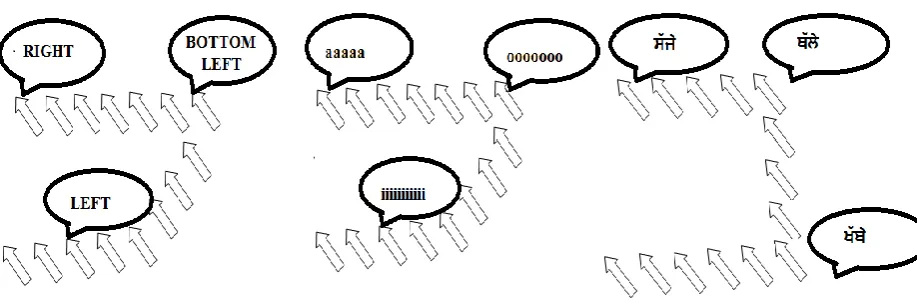
Fig 4.1: Vocal Mouse can use (a) speech English words (b) non-speech vocal sounds
(c) Punjabi words for pointer movement
4.3 Methodology
Methodology of constructing the proposed system will consists of various modules. Each module uses different techniques and algorithms to perform its specific tasks. After a particular module completes its task, its output will become input for the next module. In the end the combined effort of each module will be displayed. Flowchart for various modules of the proposed system is shown in figure 3.2.
Module 1:- Acoustic signal processing
Module 2:- Pattern recognition
Module 3:- Motion control
Steps of LPC(linear predictive modeling)
The basic idea of LPC is that speech signal at time n, s(n), is the linear combination of past k signals .
© 2014, IJCSMC All Rights Reserved 306
Where A1, A2, A3are constant coefficients
k
S(n)=∑ Ai. s(n-i) + G u(n) (2) i=1
Where
G is the gain of the excitation u(n) is the normalized excitation
Expressing the above in z-domain, we get k
S(z)= ∑ Ai. z^(-i). S(z) + G u(z)
i=1
Transfer function is H(z) = S(z) / G u(z) = 1/( 1-∑ Ai. z^(-i))
= 1/A(z)
5. RESULTS
The proposed system is being implemented using MATLAB. MATLAB is a programming environment for algorithm development, data analysis, visualization, and numerical computation. To do work on speech recognition, help of VOICEBOX package is taken. VOICEBOX is a speech processing toolbox consists of MATLAB routines. There is no need of any other expensive, bulky hardware. The only thing that is needed is good quality microphone.
Training Phase
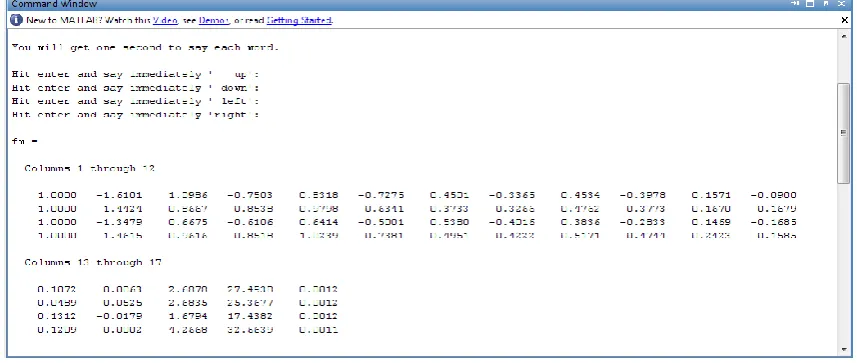
Vocal Mouse project starts with training phase. Get four words (up, down, left, right) from microphone and compute their features. Firstly, save the calculated features in a feature matrix and then store them in some other file. User is given 1 second to say each word. User will press enter and say the specified word in 1 second. Features of all the spoken words are stored in a feature matrix fw shown in figure 4.1. Matrix fw is a 2-D matrix with 4 rows (one for each word) and 17 columns (17 features are extracted).
© 2014, IJCSMC All Rights Reserved 307
Saving in ASCII Format
Consider the following points while saving .mat file in any of the ASCII formats:-
Variable that you are saving in .mat file must be a 2-Ddouble array or a 2-D character array. If you save a complex double array, imaginary part of the data to be lost because MATLAB cannot load nonnumeric data ('i').
.mat file can be read with the MATLAB load function. Before reading that file make sure all the variables must have the same number of columns. This restriction is not applied if you are using a program other than MATLAB to read the saved data.
Each MATLAB character in a character array is converted to a floating-point number which is equal to its internal ASCII code and written as a floating-point number string. There is no information in the saved file that indicates whether the value was a character or a number.
The values of all variables saved combine into a single variable. This takes the name of the ASCII file (minus any extension). Therefore, it is advisable to save only one variable at a time.
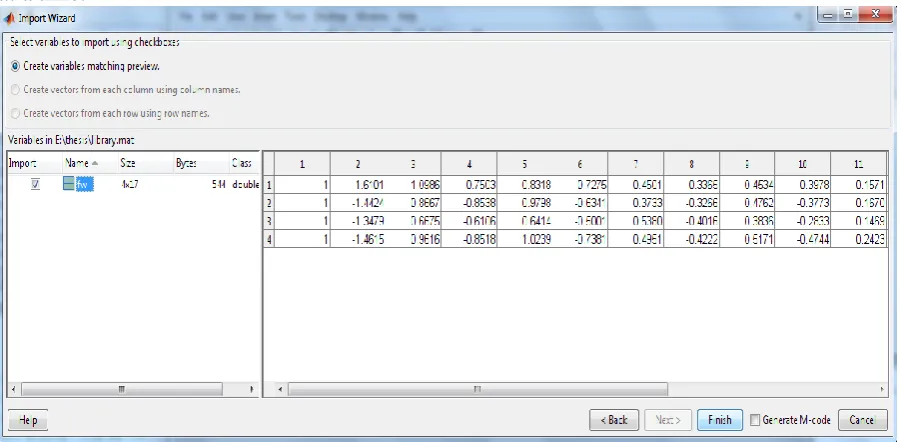
Fig 5.2: Contents of library data file for up, down, left, right
6. CONCLUSION
Voice input is a largely untapped interaction modality that holds promising potential both as an enabling technology for people with motor impairments as well as an enhancement for general users who can benefit from multimodal input for their tasks. In this dissertation, Vocal Mouse is demonstrated that works on the basic idea that:
Non-speech vocal sounds can be used along with command words as input to enable people (especially those with motor disabilities) to control computer interfaces effectively.
6.1 Various evaluations performed on the Vocal Mouse lead to the following conclusions.
6.1.1 More interactive and easy to use:-
© 2014, IJCSMC All Rights Reserved 308 interactive and easy to use interface as compared to previous cursor control techniques. Users feel more comfortable to work in two optional modes.
During the speech input mode, the user can issue any of the standard command to control the computer. When the user wishes to start controlling the mouse pointer, the command “switch” switches the user to the vocal mode. During the vocal mode, the user can use the vocal sounds to fluidly manipulate the mouse pointer.
Evaluations with novice users revealed that the Vocal Mouse can be effectively operated and that its performance beats existing speech-based cursor control methods.
6.1.2 Minimum training required:-
Novice users of the Vocal Mouse pointer control application need minimal training of five minutes to perform basic tasks. An evaluation is conducted which involves ten participants. Each participant is given five minutes of Vocal Mouse training. Results show that the average target acquisition times for the Vocal Mouse pointer control method is roughly three times faster than the Mouse Grid technique.
REFERENCES Reference to books:
Card, S. K., English, W. K., Burr, B. J. (1987) Evaluation of mouse, rate-controlled isometric joystick, step keys, and text keys, for text selection on a CRT, Morgan Kaufmann Publishers Inc.
Card, S. K., Newell, A., Moran, T. P. (1983) The Psychology of Human-Computer Interaction, Laurence Erlbaum Associates Inc., Hillsdale, New Jersey, USA.
Stephen Cook (2002) Speech Recognition HOWTO, Free Software Foundation Publishers.
Reference to Webpages:
http://en.wikibooks.org/wiki/Assistive_Technology_in_Education/Speech_Recog
nition_Software
http://unitedspinal.org/pdf/scd%20fact%20sheet.pdf
Reference to articles:
Bohan, M., Thompson, S., Scarlett, D., Chaparro, (2003) “Gain and target size effects on cursor positioning time with a mouse”, Human factors and ergonomics society, 47th annual meeting (pp. 737-740).
Dai, L., Goldman, R., Sears, A., Lozier, J. (2004)“Speech-based cursor control: a study of grid based solutions”, 6th international ACM SIGACCESS conference, ASSETS 2004,Atlanta, Georgia, USA.
Feng, J., Sears, A., Karat, C. (2006) “A longitudinal evaluation of hands-free speech-based navigation during dictation”, International Journal of Human-Computer Studies,64(6), 553-569.
Igarashi, T., Hughes, J. F. (2001)“Voice as sound: using non-verbal voice input forinteractive control”, 14th annual ACM symposium, Orlando, Florida, USA.
James R. Evans, Wayne A. Tjoland, Lloyd G. Allred, (2000) “Achieving a Hands-Free Computer Interface using Voice Recognition and Speech Synthesis”, IEEE AES Systems Magazine, January 2000.
© 2014, IJCSMC All Rights Reserved 309
Jing Liu, Manolya Kavakli, (2010) “a survey of speech-hand gesture recognition for the development of multi-model interfaces in computer games”, IEEE, 2010
Karimullah, A. S., Sears, A. (2002)“Speech-based cursor control”, 5th
international ACM conference, Edinburgh, Scotland.
K.Wendy Tang, Ridha Kamoua, Victor Sutan, Omer Faroo,(2004-2005) “Speech recognition technology for disabilities education”, Baywood Publishing Co., Inc.
M. Abdeen, H. Moshammad, M.C.E. Yagoub, (2008) “An architecture for multi-lingual hands free desktop control system for PC windows”, IEEE 2008.
Minh TU Vo, Alex Waibel, (2009) “A multi-lingual human-computer interface: combination of gesture and speech recognition”, Carnegie Mellon University Pittsburgh, PA 15213 3890, 2009, U.S.A.
M. Rahmani, N. Yousefian, A. Akbari, (2009) “Energy-based speech enhancement technique for hands-free communication”, ELECTRONICS LETTERS, 1st January 2009 Vol.45No. 1.