
Available online: https://edupediapublications.org/journals/index.php/IJR/ P a g e | 5582
Illumination Effect on the Human Performance in Hci
Environment
Taufeeque Hasan
Department of Mechanical Engineering, Amity University Haryana, Haryana, India
Abstract
Technological growth boasted the use of computers in almost every field, which keeps on
increasing. Today industrial survey, feedback, online teaching, the entrance exam, tutorial
became a very common trend. The online preparation for the entrance exam, tutorial and even
the competitive exam are also preferred to be done through on line by just clicking the option of
the multiple questions. In India most of the exams like PSUs, Bank Job, Railway recruitment
board, entrance exams etc are taking the online paper for job. The preparation of such
competitive exam needs devoting more time on computers for practicing online sample papers
[1]. The Human performance during HCI depends on many factor like sitting posture, design of
computer hardware used, display unit of computer etc. The display unit directly show the effect
on the human eye within few minutes which is normally felt by the user. The human eye gets
fatigue by continuous use of computer. In this study the focus is on the effect of illumination of
computer display unit on human eye and how ambience illumination affects human performance
in a human computer interaction environment. In general, visual performance increased with
increasing contrast ratio. Screen luminance combination also played an important role on visual
performance. Further, there might be interaction effect between screen luminance combination
and contrast ratio on visual performance. It is further concluded that the ambient illumination
required to satisfactorily carry out the work in conjunction with different human computer
interaction environment is found to be 300-500 lx.
Keywords:- Visual fatigue, Visual display unit, illumination, glare.
Available online: https://edupediapublications.org/journals/index.php/IJR/ P a g e | 5583 The uses of computer in modern society take a rapid growth. Over the past 20 years, the personal
computer has become widely used, both in the office and at home. People use computers to write
documents, maintain databases, manage finances, draw diagrams and graphics, make
presentations, compile mailing lists, search computer databases, write application programs, use
the internet and myriad other tasks. Both commercial and non commercial firm take the help of
online feedback and survey to know the reality regarding their product or their services by that
they can provide better services in the future or rectify their shortcoming so that they can stand
the competitive atmosphere. There are lots of online job available based on surveying, data entry,
form filling, and data analysis, research studies, problem solution, social awareness, learning etc.
Many of the house wife and other people are doing such jobs as their part time or full time job
[2]. The principal information output device and means to interact with the computer for the user
is the visual display or “monitor.” Display technology used for monitors has been the CRT,
LCD, VDT, TFT, Cathode ray tube (CRT). There are some drawbacks to this technology,
however. CRT monitors are bulky and very heavy, with sizable electrical power requirements.
The liquid crystal display (LCD) lower power consumption, lighter weight, and smaller physical
size. The LED backlight is a newer technology for LCD displays that uses light-emitting diodes
instead of a fluorescent lamp. The LED produces white light, but uses no mercury.
With the increasing use of computers at both work and home, the duration of use of the eyes is
increasing, but rest time for the eyes is becoming scarcer. Such prolonged viewing has been a
concern in the recent past and will continue to grow as a topic of importance to human factors
researchers [3]. Chi and Lin (1998) have reported that visual fatigue or computer vision
syndrome (CVS) is the most common complaint of video display terminal (VDT), sometimes
also referred to as a visual display unit (VDU) users and it is estimated that 50% of operators of
VDTs are affected by visual fatigue [4,5]. The advent of light-weight laptop computers has
further increased the application of computers in various applications which are very novel in the
industry. We cannot hope to cover the lighting implications of all these various situations, but the
general principles discussed here should be applied in most of the circumstances. It is
undoubtedly a matter of great concern and importance to have some literature survey of the
Available online: https://edupediapublications.org/journals/index.php/IJR/ P a g e | 5584 Benz et al. (1983) showed that 40% of VDT users prefer illuminance between 200 and 400 lx;
while 45% prefer illuminance between 400 and 600 lx [6]. A researcher recommended 150–500
lux for CRT work, while other recommends levels between 300-500 lx for reading [7].
2. Materials and Method
2.1 Light
Light, according to the Illumination Engineering Society (IES), is “radiant energy that is capable
of exciting the retina and producing a visual sensation”. The visible spectrum ranges from about
380-780 nanometer.
Consider a source of some luminous intensity emitting luminous flux in all directions. Imagine
the source as being placed inside the sphere. The amount of light striking at any point inside the
surface of the sphere is called illumination or illuminance. It is measured in terms of luminous
flux per unit area. Whereas 1 lumen per square meter is called lux(lx), an SI unit. One foot
candle equals 10.76 lx, whereas an accepted practice is to use 1fc = 10 lx.
Inverse Square Law: The amount of illumination striking a surface from a point source follows the inverse square law.
Illuminance (lx) = candle power (cd) D2
2.2 Concept of visibility
Visibility refers to how well something can be seen by the human eye. Both contrast and
luminance are important for visibility. Another factor is the size of the target and exposure time
to the target. Larger improvement in visual performance can be achieved by proper contrast and
illumination ratio. Subjects performed better with higher screen luminance combination on low
contrast ratio [6].
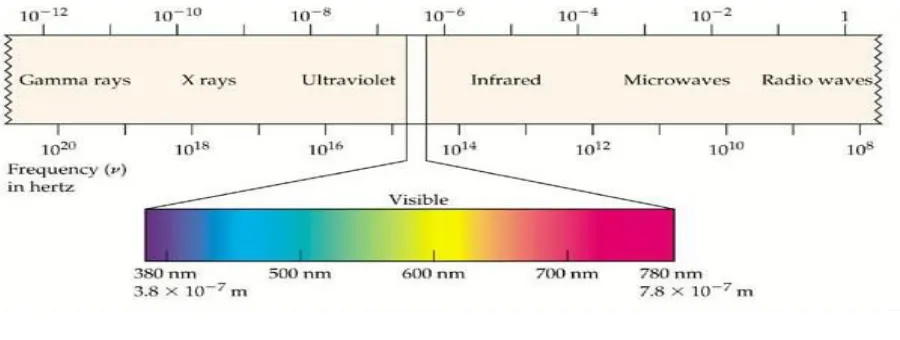
To the optical engineer, light is simply a very small part of the electromagnetic spectrum
between ultraviolet and infrared radiation. The visible portion of the electromagnetic spectrum
Available online: https://edupediapublications.org/journals/index.php/IJR/ P a g e | 5585 Fig 1.1
The radiation in this region is absorbed by the photoreceptors of the human visual system and
thereby initiates the process of seeing. Variations in wavelength within the visible spectrum give
rise to the perception of color. Violets being around 400 nm, blending into the blues around 450
nm, greens around 500 nm, the yellow-oranges around 600 nm, and the reds around 700 nm. The
eyes cannot see colors unless the ambient illumination is above the 3 candela per square meter.
2.3 Glare
Glare is produced by brightness within the field of vision that is sufficiently greater than the
luminance to which the eyes are adapted so as to cause annoyance, discomfort, or loss in visual
performance and visibility. Direct glare is caused by light source in the field of view and
reflected glareis caused by light being reflected by a surface in the field of view.
It is very important to establish viewing conditions that minimize stress to our eyes by
minimizing reflections, controlling ambient light, establishing a suitable surround, and
establishing a comfortable viewing distance, adjusting brightness, adjusting contrast and
Available online: https://edupediapublications.org/journals/index.php/IJR/ P a g e | 5586 The 50 subjects performing the same task on different visual display units for duration of one
hour are examined and questioned about their experience, stress, discomfort and problems while
performing the task. The observation was made on the basis of the experience faced by the
subjects. The effects of screen type, ambient illumination, and target/background color
combination on visual identification performance and subjective preference for visual display
terminal (VDT) screen characteristics. Visual performance was better under 450 lx ambient
illumination, versus, 200 lx. Though lower ambient illumination (200 lx) was rated slightly more
preferable (not statistically significant) than normal ambient illumination (450 lx), subjects
performed better under the latter condition, particularly for the TFT-LCD screen [9]. The effects
of ambient illumination and screen luminance combination on character identification
performance of thin film transistor liquid-crystal displays(TFT-LCD) monitors. Results showed
that character identification performance was not significantly affected by ambient illumination
at office levels. The results seem to indicate that character identification under relatively high
ambient illumination is more affected by background luminance of the screen than contrast ratio
or contrast sensitivity. Therefore, considering screen luminance combination and contrast ratio
simultaneously may be more appropriate than considering contrast ratio alone [11]. The effects
of light source, ambient illuminance, character size, and interline spacing on visual performance
and visual fatigue in using commercial electronic paper displays. The results were able to
provide some guidelines for consumers to choose a suitable electronic paper according to their
lighting conditions, ambient illumination at 700 lx and greater ambient illumination such as 1500
lx may be even better for E-paper. Accuracy was highest for 1500 lx ambient illumination [12].
The results indicated that the significant performance improvement of all subjects occurred at 52
lux on the search time and at 62 lux on the subjective visual fatigue. Therefore, the minimum
ambient illumination requirement for legible electronic-paper display can be synthesized at 62
lux. This minimum point of ambient illumination for the young and the elderly represents that
the reflective-type display started presenting its better legibility and the subjective visual fatigue
started decreasing [13].
Available online: https://edupediapublications.org/journals/index.php/IJR/ P a g e | 5587 From the above research it may be concluded that the ambient illumination required to
satisfactorily carry out the work in conjunction with different human computer interaction
environment is found to be 300-500 lx. Although some studies suggest that as we increase the
ambient illumination levels the ease of doing the work increases but up to some extent i.e. levels
upto which glare does not happens which may cause discomfort and erroneous work. People
expend additional effort at lower illumination levels to maintain their performance.
Higher screen luminance combination would be better on low contrast ratio and lower screen
luminance combination would be better on high contrast ratio.
REFERENCES
[1] Hasan, T., Zafar, M. F., Singh, L., and A. Singh. (2015). “Comparative study of different mouse design on human performance”. GE- International journal of engineering research, vol.3, no. 2, pp. 20-34.
[2] Hasan, T. (2018). “Effect of hand structure and mouse design on carpal tunnel pressure”.
International Journal for Research in Applied Science And Engineering Technology (IJRASET), 6(4), 3386-93.
[3] Dillon, T. W., and Emurian, H. H. (1996). “Some Factors Affecting Reports of Visual Fatigue Resulting from Use of a VDU”. Computers in Human Behavior. 12 (1), pp. 49-59
[4] Chi, C. F. and Lin, F. T. (1998). “A Comparison of Seven Visual Fatigue Assessment Techniques in Three Data-Acquisition VDT Task”. Human Factors. 40 (4), pp. 577-590.
[5] Lunn, R. and Banks, W. P. (1986). “Visual Fatigue and Spatial Frequency Adaptation to Video Displays of Text”. Human Factors. 28 (4), pp. 457-464
[6] Shieh, K. K., & Lin, C. C. (2000). “Effects of screen type, ambient illumination, and color combination on VDT visual performance and subjective preference”. International Journal of Industrial Ergonomics, 26(5), 527-536.
[7] Helander, M. G., Rupp, B.A. (1984). “An overview of standards and guidelines for visual display terminals”. Applied Ergonomics 15, 185–195
[8] Sanders, M.S., McCormick, E.J. (1993). Human Factor in Engineering and Design. McGraw-Hill, Singapore
[9] Shieh, K. K., Lin, C.-C. (2000). “Effects of screen type, ambient illumination, and color combination on VDT visual performance and subjective preference”. International Journal of Industrial Ergonomics 26 (5), 527–536.
[10] Lin, C.-C., Huang, K.-C. (2006). “Effects of ambient illumination and screen luminance combination on character identification performance of desktop TFT-LCD monitors”. International Journal of Industrial Ergonomics 36 ,211–218.
Available online: https://edupediapublications.org/journals/index.php/IJR/ P a g e | 5588 glare surface treatment, ambient illumination and bending curvature on legibility and visual fatigue of electronic papers” . Displays, 29(1), 25-32.
[12] Lee, D. S., Ko, Y. H., Shen, I. H., & Chao, C. Y. (2011). “Effect of light source, ambient illumination, character size and interline spacing on visual performance and visual fatigue with electronic paper displays”. Displays, 32(1), 1-7
![7 Chloro 2 [1 (4 methoxyphenyl)pyrazol 4 yl] 3,3 dimethyl 3H indole](data:image/gif;base64,R0lGODlhAQABAIAAAP///wAAACH5BAEAAAAALAAAAAABAAEAAAICRAEAOw==)