libvirt 0.8.7
Virsh Command Reference
libvirt 0.8.7 Virsh Command Reference
Edition 1
Author Justin Clift [email protected]
Eric Blake [email protected]
Nikunj A. Dadhania [email protected]
Zdenek Styblik [email protected]
Copyright © 2011 Red Hat, Inc.
Copyright © 2009-2010 Red Hat, Inc. and others.
The text of and illustrations in this document are licensed by Red Hat under a Creative Commons Attribution–Share Alike 3.0 Unported license ("CC-BY-SA"). An explanation of CC-BY-SA is available at http://creativecommons.org/licenses/by-sa/3.0/. The original authors of this document, and Red Hat, designate the libvirt Project as the "Attribution Party" for purposes of CC-BY-SA. In accordance with CC-BY-SA, if you distribute this document or an adaptation of it, you must provide the URL for the original version.
Red Hat, as the licensor of this document, waives the right to enforce, and agrees not to assert, Section 4d of CC-BY-SA to the fullest extent permitted by applicable law.
Red Hat, Red Hat Enterprise Linux, the Shadowman logo, JBoss, MetaMatrix, Fedora, the Infinity Logo, and RHCE are trademarks of Red Hat, Inc., registered in the United States and other countries.
All other trademarks are the property of their respective owners.
Preface vii
1. Document Conventions ... vii
1.1. Typographic Conventions ... vii
1.2. Pull-quote Conventions ... viii
1.3. Notes and Warnings ... ix
2. We Need Feedback! ... ix
1. Commands listed by group 1
2. Index of commands 11
2.1. attach-device ... 11
2.2. attach-disk ... 11
2.3. attach-interface ... 12
2.4. autostart ... 12
2.5. capabilities ... 12
2.6. cd ... 13
2.7. connect ... 13
2.8. console ... 14
2.9. cpu-baseline ... 14
2.10. cpu-compare ... 15
2.11. create ... 15
2.12. define ... 16
2.13. destroy ... 16
2.14. detach-device ... 16
2.15. detach-disk ... 17
2.16. detach-interface ... 17
2.17. domblkinfo ... 18
2.18. domblkstat ... 18
2.19. domid ... 19
2.20. domifstat ... 19
2.21. dominfo ... 20
2.22. domjobabort ... 20
2.23. domjobinfo ... 20
2.24. dommemstat ... 21
2.25. domname ... 21
2.26. domstate ... 22
2.27. domuuid ... 22
2.28. domxml-from-native ... 23
2.29. domxml-to-native ... 23
2.30. dump ... 24
2.31. dumpxml ... 24
2.32. echo ... 25
2.33. edit ... 25
2.34. exit ... 25
2.35. find-storage-pool-sources-as ... 26
2.36. find-storage-pool-sources ... 26
2.37. freecell ... 27
2.38. help ... 27
2.39. hostname ... 28
2.40. iface-define ... 28
2.41. iface-destroy ... 29
2.42. iface-dumpxml ... 29
2.43. iface-edit ... 29
2.44. iface-list ... 30
2.46. iface-name ... 31
2.47. iface-start ... 31
2.48. iface-undefine ... 32
2.49. list ... 32
2.50. managedsave-remove ... 33
2.51. managedsave ... 33
2.52. maxvcpus ... 33
2.53. memtune ... 34
2.54. migrate-setmaxdowntime ... 36
2.55. migrate ... 37
2.56. net-autostart ... 37
2.57. net-create ... 40
2.58. net-define ... 42
2.59. net-destroy ... 44
2.60. net-dumpxml ... 46
2.61. net-edit ... 47
2.62. net-info ... 49
2.63. net-list ... 51
2.64. net-name ... 52
2.65. net-start ... 53
2.66. net-undefine ... 56
2.67. net-uuid ... 57
2.68. nodedev-create ... 58
2.69. nodedev-destroy ... 59
2.70. nodedev-dettach ... 59
2.71. nodedev-dumpxml ... 60
2.72. nodedev-list ... 60
2.73. nodedev-reattach ... 61
2.74. nodedev-reset ... 61
2.75. nodeinfo ... 61
2.76. nwfilter-define ... 62
2.77. nwfilter-dumpxml ... 62
2.78. nwfilter-edit ... 63
2.79. nwfilter-list ... 63
2.80. nwfilter-undefine ... 64
2.81. pool-autostart ... 64
2.82. pool-build ... 65
2.83. pool-create-as ... 65
2.84. pool-create ... 65
2.85. pool-define-as ... 66
2.86. pool-define ... 66
2.87. pool-delete ... 67
2.88. pool-destroy ... 67
2.89. pool-dumpxml ... 68
2.90. pool-edit ... 68
2.91. pool-info ... 69
2.92. pool-list ... 69
2.93. pool-name ... 70
2.94. pool-refresh ... 70
2.95. pool-start ... 70
2.96. pool-undefine ... 71
2.97. pool-uuid ... 71
2.98. pwd ... 72
2.100. quit ... 73
2.101. reboot ... 73
2.102. restore ... 74
2.103. resume ... 74
2.104. save ... 74
2.105. schedinfo ... 75
2.106. secret-define ... 75
2.107. secret-dumpxml ... 76
2.108. secret-get-value ... 76
2.109. secret-list ... 77
2.110. secret-set-value ... 77
2.111. secret-undefine ... 78
2.112. setmaxmem ... 78
2.113. setmem ... 78
2.114. setvcpus ... 79
2.115. shutdown ... 79
2.116. snapshot-create ... 80
2.117. snapshot-current ... 80
2.118. snapshot-delete ... 81
2.119. snapshot-dumpxml ... 81
2.120. snapshot-list ... 82
2.121. snapshot-revert ... 82
2.122. start ... 82
2.123. suspend ... 83
2.124. ttyconsole ... 83
2.125. undefine ... 84
2.126. update-device ... 84
2.127. uri ... 85
2.128. vcpucount ... 85
2.129. vcpuinfo ... 86
2.130. vcpupin ... 86
2.131. version ... 86
2.132. vncdisplay ... 87
2.133. vol-clone ... 87
2.134. vol-create-as ... 88
2.135. vol-create-from ... 88
2.136. vol-create ... 89
2.137. vol-delete ... 89
2.138. vol-dumpxml ... 90
2.139. vol-info ... 90
2.140. vol-key ... 90
2.141. vol-list ... 91
2.142. vol-name ... 91
2.143. vol-path ... 92
2.144. vol-pool ... 92
2.145. vol-wipe ... 93
A. Revision History 95
Preface
1. Document Conventions
This manual uses several conventions to highlight certain words and phrases and draw attention to specific pieces of information.
In PDF and paper editions, this manual uses typefaces drawn from the Liberation Fonts1 set. The
Liberation Fonts set is also used in HTML editions if the set is installed on your system. If not,
alternative but equivalent typefaces are displayed. Note: Red Hat Enterprise Linux 5 and later includes the Liberation Fonts set by default.
1.1. Typographic Conventions
Four typographic conventions are used to call attention to specific words and phrases. These conventions, and the circumstances they apply to, are as follows.
Mono-spaced Bold
Used to highlight system input, including shell commands, file names and paths. Also used to highlight keycaps and key combinations. For example:
To see the contents of the file my_next_bestselling_novel in your current working directory, enter the cat my_next_bestselling_novel command at the shell prompt and press Enter to execute the command.
The above includes a file name, a shell command and a keycap, all presented in mono-spaced bold and all distinguishable thanks to context.
Key combinations can be distinguished from keycaps by the hyphen connecting each part of a key combination. For example:
Press Enter to execute the command.
Press Ctrl+Alt+F2 to switch to the first virtual terminal. Press Ctrl+Alt+F1 to return to your X-Windows session.
The first paragraph highlights the particular keycap to press. The second highlights two key combinations (each a set of three keycaps with each set pressed simultaneously).
If source code is discussed, class names, methods, functions, variable names and returned values mentioned within a paragraph will be presented as above, in mono-spaced bold. For example:
File-related classes include filesystem for file systems, file for files, and dir for directories. Each class has its own associated set of permissions.
Proportional Bold
This denotes words or phrases encountered on a system, including application names; dialog box text; labeled buttons; check-box and radio button labels; menu titles and sub-menu titles. For example:
Choose System → Preferences → Mouse from the main menu bar to launch Mouse Preferences. In the Buttons tab, click the Left-handed mouse check box and click
Close to switch the primary mouse button from the left to the right (making the mouse suitable for use in the left hand).
To insert a special character into a gedit file, choose Applications → Accessories → Character Map from the main menu bar. Next, choose Search → Find… from the Character Map menu bar, type the name of the character in the Search field and click Next. The character you sought will be highlighted in the Character Table. Double-click this highlighted character to place it in the Text to copy field and then click the Copy button. Now switch back to your document and choose Edit → Paste from the gedit menu bar.
The above text includes application names; system-wide menu names and items; application-specific menu names; and buttons and text found within a GUI interface, all presented in proportional bold and all distinguishable by context.
Mono-spaced Bold Italic or Proportional Bold Italic
Whether mono-spaced bold or proportional bold, the addition of italics indicates replaceable or variable text. Italics denotes text you do not input literally or displayed text that changes depending on circumstance. For example:
To connect to a remote machine using ssh, type ssh [email protected] at a shell prompt. If the remote machine is example.com and your username on that machine is john, type ssh [email protected].
The mount -o remount file-system command remounts the named file system. For example, to remount the /home file system, the command is mount -o remount /home.
To see the version of a currently installed package, use the rpm -q package command. It will return a result as follows: package-version-release.
Note the words in bold italics above — username, domain.name, file-system, package, version and release. Each word is a placeholder, either for text you enter when issuing a command or for text displayed by the system.
Aside from standard usage for presenting the title of a work, italics denotes the first use of a new and important term. For example:
Publican is a DocBook publishing system.
1.2. Pull-quote Conventions
Terminal output and source code listings are set off visually from the surrounding text.
Output sent to a terminal is set in mono-spaced roman and presented thus:
books Desktop documentation drafts mss photos stuff svn books_tests Desktop1 downloads images notes scripts svgs
Source-code listings are also set in mono-spaced roman but add syntax highlighting as follows:
package org.jboss.book.jca.ex1;
Notes and Warnings
public class ExClient {
public static void main(String args[]) throws Exception
{
InitialContext iniCtx = new InitialContext(); Object ref = iniCtx.lookup("EchoBean"); EchoHome home = (EchoHome) ref;
Echo echo = home.create(); System.out.println("Created Echo");
System.out.println("Echo.echo('Hello') = " + echo.echo("Hello")); }
}
1.3. Notes and Warnings
Finally, we use three visual styles to draw attention to information that might otherwise be overlooked.
Note
Notes are tips, shortcuts or alternative approaches to the task at hand. Ignoring a note should have no negative consequences, but you might miss out on a trick that makes your life easier.
Important
Important boxes detail things that are easily missed: configuration changes that only apply to the current session, or services that need restarting before an update will apply. Ignoring a box labeled 'Important' will not cause data loss but may cause irritation and frustration.
Warning
Warnings should not be ignored. Ignoring warnings will most likely cause data loss.
2. We Need Feedback!
Chapter 1.
Commands listed by group
These are the commands presently available in virsh.
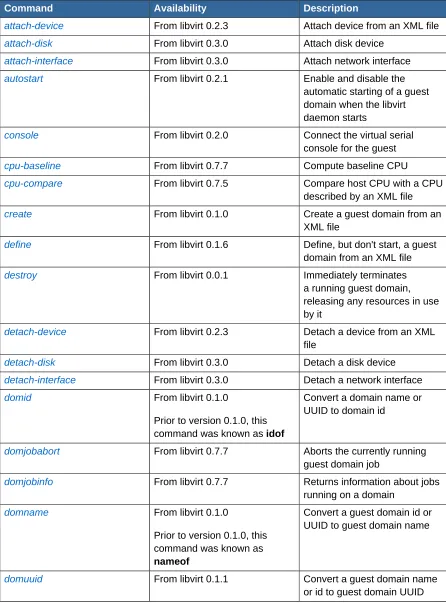
Table 1.1. Domain management commands
Command Availability Description
attach-device From libvirt 0.2.3 Attach device from an XML file
attach-disk From libvirt 0.3.0 Attach disk device
attach-interface From libvirt 0.3.0 Attach network interface
autostart From libvirt 0.2.1 Enable and disable the automatic starting of a guest domain when the libvirt daemon starts
console From libvirt 0.2.0 Connect the virtual serial console for the guest
cpu-baseline From libvirt 0.7.7 Compute baseline CPU
cpu-compare From libvirt 0.7.5 Compare host CPU with a CPU described by an XML file
create From libvirt 0.1.0 Create a guest domain from an XML file
define From libvirt 0.1.6 Define, but don't start, a guest domain from an XML file
destroy From libvirt 0.0.1 Immediately terminates a running guest domain, releasing any resources in use by it
detach-device From libvirt 0.2.3 Detach a device from an XML file
detach-disk From libvirt 0.3.0 Detach a disk device
detach-interface From libvirt 0.3.0 Detach a network interface
domid From libvirt 0.1.0
Prior to version 0.1.0, this command was known as idof
Convert a domain name or UUID to domain id
domjobabort From libvirt 0.7.7 Aborts the currently running guest domain job
domjobinfo From libvirt 0.7.7 Returns information about jobs running on a domain
domname From libvirt 0.1.0
Prior to version 0.1.0, this command was known as nameof
Convert a guest domain id or UUID to guest domain name
Command Availability Description
domxml-from-native From libvirt 0.6.4 Convert native guest
configuration format to domain XML format
domxml-to-native From libvirt 0.6.4 Convert guest domain XML config to a native guest configuration format
dump From libvirt 0.1.9 Core dump a guest domain
dumpxml From libvirt 0.0.1 Output the guest domain information as an XML dump to stdout
edit From libvirt 0.4.6 Edit the XML configuration for a
guest domain
managedsave From libvirt 0.8.0 Save and destroy a running guest domain, so it can be restarted from the same state at a later time. When the virsh
start command is next run for the guest domain, it will automatically be started from this saved state
managedsave-remove From libvirt 0.8.3 Remove an existing managed save state file from a guest domain
maxvcpus From libvirt 0.8.5 Show maximum number of virtual CPUs for guest domains on this connection
memtune From libvirt 0.8.5 Gets or sets the current
memory parameters for a guest domain
migrate From libvirt 0.3.2 Migrates a guest domain to another host
migrate-setmaxdowntime From libvirt 0.8.0 Set maximum tolerable downtime of a guest domain which is being live-migrated to another host
reboot From libvirt 0.1.0 Run a reboot command in a guest domain
restore From libvirt 0.0.2 Restore a guest domain
resume From libvirt 0.0.1 Resume a guest domain
save From libvirt 0.0.2 Save the running state of a
guest domain to a file
schedinfo From libvirt 0.2.3 Show or set scheduler parameters
Command Availability Description
setmem From libvirt 0.1.4 Change the current memory allocation in the guest domain
setvcpus From libvirt 0.1.4 Change the number of virtual CPUs in the guest domain
shutdown From libvirt 0.0.1 Run shutdown in a guest domain
start From libvirt 0.1.6 Start a guest domain, either from the last managedsave state, or via a fresh boot if no managedsave state is present
suspend From libvirt 0.0.1 Suspend a running guest domain
ttyconsole From libvirt 0.3.2 Output the device for the TTY console
undefine From libvirt 0.1.6 Remove the configuration for an inactive guest domain
update-device From libvirt 0.8.0 Update device from an XML file
vcpucount From libvirt 0.8.5 Returns the number of virtual CPUs used by a guest domain
vcpuinfo From libvirt 0.1.4 Returns basic information about a guest domains virtual CPUs
vcpupin From libvirt 0.1.4 Pin guest domain virtual CPUs to physical host CPUs
version From libvirt 0.0.1 Display the system version information
vncdisplay From libvirt 0.2.0 Output the IP address and port number for the VNC display
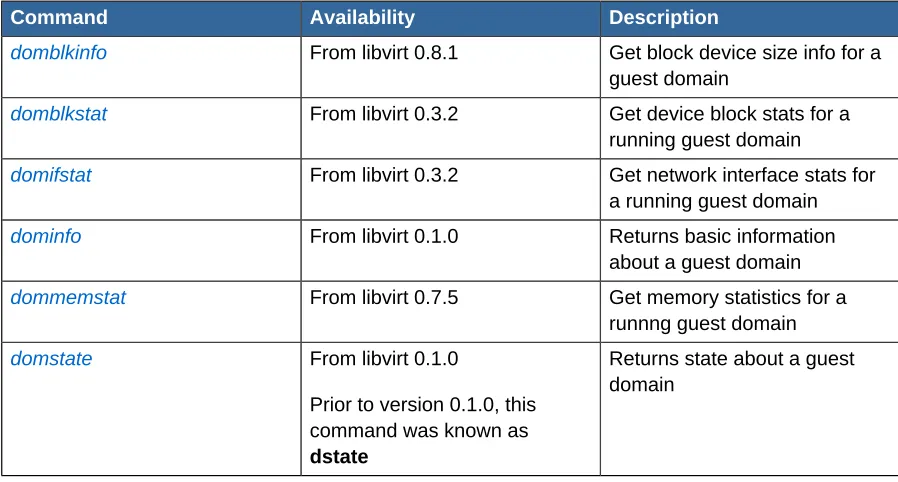
Table 1.2. Domain monitoring commands
Command Availability Description
domblkinfo From libvirt 0.8.1 Get block device size info for a guest domain
domblkstat From libvirt 0.3.2 Get device block stats for a running guest domain
domifstat From libvirt 0.3.2 Get network interface stats for a running guest domain
dominfo From libvirt 0.1.0 Returns basic information about a guest domain
dommemstat From libvirt 0.7.5 Get memory statistics for a runnng guest domain
domstate From libvirt 0.1.0
Prior to version 0.1.0, this command was known as dstate
Command Availability Description
list From libvirt 0.0.1 Returns a list of guest domains
Table 1.3. Host and hypervisor commands
Command Availability Description
capabilities From libvirt 0.2.1 Returns capabilities of hypervisor/driver
connect From libvirt 0.0.1 Connect to local hypervisor
freecell From libvirt 0.3.3 Display available free memory for a NUMA cell
hostname From libvirt 0.3.0 Display the name of the hypervisor host
nodeinfo From libvirt 0.1.0 Returns basic information about the node
qemu-monitor-command From libvirt 0.8.6 Qemu monitor command
uri From libvirt 0.3.0 Display the hypervisor
canonical URI
Table 1.4. Interface commands
Command Availability Description
iface-define From libvirt 0.7.0 Define a physical host network interface
iface-destroy From libvirt 0.7.0 Shut down and disable a physical host network interface
iface-dumpxml From libvirt 0.7.0 Output information for a
physical host network interface, as an XML dump to stdout
iface-edit From libvirt 0.7.0 Edit the XML configuration for a physical host network interface
iface-list From libvirt 0.7.0 Returns a list of physical host network interfaces
iface-mac From libvirt 0.7.0 Returns the MAC address for a physical host network interface
iface-name From libvirt 0.7.0 Returns the physical host interface name for a MAC address
iface-start From libvirt 0.7.0 Enables and starts a physical host network interface
iface-undefine From libvirt 0.7.0 Removes the configuration information for a physical host network interface
Table 1.5. Network filter commands
Command Availability Description
Command Availability Description
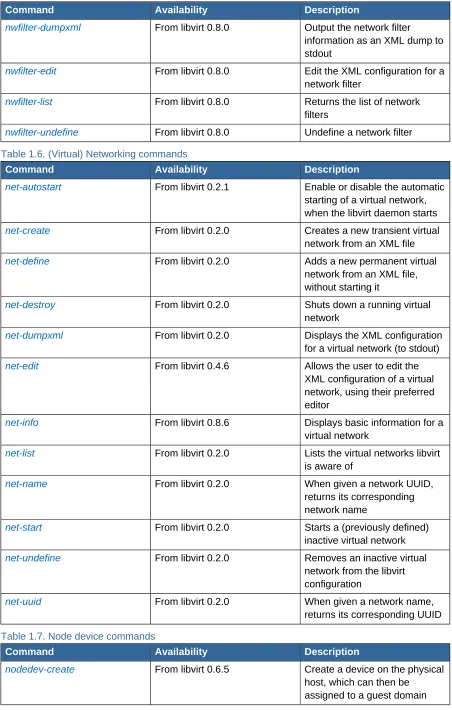
nwfilter-dumpxml From libvirt 0.8.0 Output the network filter information as an XML dump to stdout
nwfilter-edit From libvirt 0.8.0 Edit the XML configuration for a network filter
nwfilter-list From libvirt 0.8.0 Returns the list of network filters
nwfilter-undefine From libvirt 0.8.0 Undefine a network filter
Table 1.6. (Virtual) Networking commands
Command Availability Description
net-autostart From libvirt 0.2.1 Enable or disable the automatic starting of a virtual network, when the libvirt daemon starts
net-create From libvirt 0.2.0 Creates a new transient virtual network from an XML file
net-define From libvirt 0.2.0 Adds a new permanent virtual network from an XML file, without starting it
net-destroy From libvirt 0.2.0 Shuts down a running virtual network
net-dumpxml From libvirt 0.2.0 Displays the XML configuration for a virtual network (to stdout)
net-edit From libvirt 0.4.6 Allows the user to edit the XML configuration of a virtual network, using their preferred editor
net-info From libvirt 0.8.6 Displays basic information for a virtual network
net-list From libvirt 0.2.0 Lists the virtual networks libvirt is aware of
net-name From libvirt 0.2.0 When given a network UUID, returns its corresponding network name
net-start From libvirt 0.2.0 Starts a (previously defined) inactive virtual network
net-undefine From libvirt 0.2.0 Removes an inactive virtual network from the libvirt configuration
net-uuid From libvirt 0.2.0 When given a network name, returns its corresponding UUID
Table 1.7. Node device commands
Command Availability Description
nodedev-create From libvirt 0.6.5 Create a device on the physical host, which can then be
Command Availability Description
nodedev-destroy From libvirt 0.6.5 Destroys a device on a physical host
nodedev-dettach From libvirt 0.6.1 Dettach a node device from its device driver before assigning to a guest domain
nodedev-dumpxml From libvirt 0.5.0 Output the details for a node device as an XML dump to stdout
nodedev-list From libvirt 0.5.0 Enumerate devices on the host
nodedev-reattach From libvirt 0.6.1 Reattach a node device to its device driver, once released by the guest domain
nodedev-reset From libvirt 0.6.1 Reset a node device before or after assigning to a domain
Table 1.8. Secrets, commands for managing them
Command Availability Description
secret-define From libvirt 0.7.1 Define or modify a secret
secret-dumpxml From libvirt 0.7.1 Output attributes of a secret as an XML dump to stdout
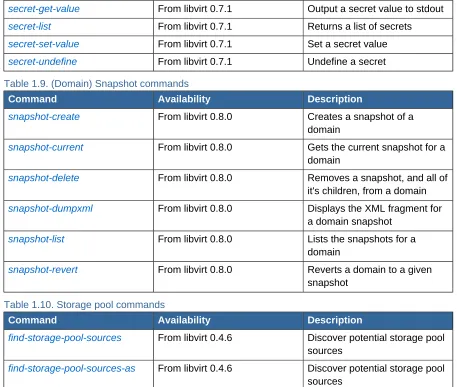
secret-get-value From libvirt 0.7.1 Output a secret value to stdout
secret-list From libvirt 0.7.1 Returns a list of secrets
secret-set-value From libvirt 0.7.1 Set a secret value
secret-undefine From libvirt 0.7.1 Undefine a secret
Table 1.9. (Domain) Snapshot commands
Command Availability Description
snapshot-create From libvirt 0.8.0 Creates a snapshot of a domain
snapshot-current From libvirt 0.8.0 Gets the current snapshot for a domain
snapshot-delete From libvirt 0.8.0 Removes a snapshot, and all of it's children, from a domain
snapshot-dumpxml From libvirt 0.8.0 Displays the XML fragment for a domain snapshot
snapshot-list From libvirt 0.8.0 Lists the snapshots for a domain
snapshot-revert From libvirt 0.8.0 Reverts a domain to a given snapshot
Table 1.10. Storage pool commands
Command Availability Description
find-storage-pool-sources From libvirt 0.4.6 Discover potential storage pool sources
Command Availability Description
pool-autostart From libvirt 0.4.1 Enable or disable the automatic starting of a storage pool, when the libvirt daemon starts
pool-build From libvirt 0.4.1 Build a storage pool
pool-create From libvirt 0.4.1 Create and start a transient
storage pool, that will not persist across system restarts, using settings from an XML file
pool-create-as From libvirt 0.4.1 Create and start a transient
storage pool, that will not persist across system restarts, using settings passed as options
pool-define From libvirt 0.4.1 Add a new persistent storage pool to the configuration, without starting it, using settings from an XML file
pool-define-as From libvirt 0.4.1 Add a new persistent storage pool to the configuration, without starting it, using settings passed as options
pool-delete From libvirt 0.4.1 Delete a storage pool
pool-destroy From libvirt 0.4.1 Shuts down a storage pool (from the libvirt point of view), releasing any resources in use by it
pool-dumpxml From libvirt 0.4.1 Displays the XML configuration for a storage pool (to stdout)
pool-edit From libvirt 0.4.6 Allows the user to edit the XML configuration of a storage pool, using their preferred editor
pool-info From libvirt 0.4.1 Returns basic information about a storage pool
pool-list From libvirt 0.4.1 Displays a list of the storage pools libvirt is aware of
pool-name From libvirt 0.4.1 When given a pool UUID, returns the name of the corresponding storage pool
pool-refresh From libvirt 0.4.1 Re-examines the storage in a storage pool, updating the internal list of volumes present and their details
pool-start From libvirt 0.4.1 Starts a (previously defined) inactive storage pool
Command Availability Description
pool-uuid From libvirt 0.4.1 When given a storage pool name, returns the corresponding storage pool UUID
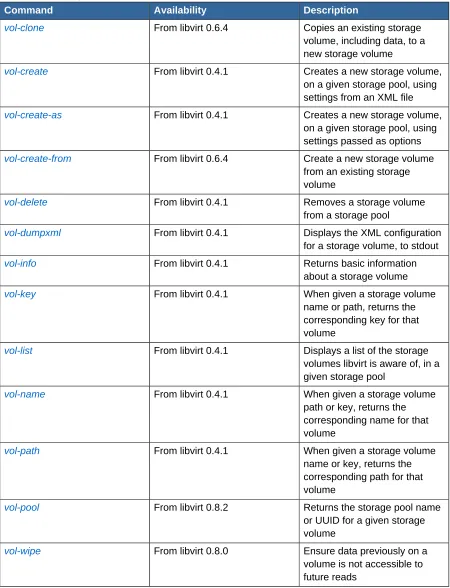
Table 1.11. Storage volume commands
Command Availability Description
vol-clone From libvirt 0.6.4 Copies an existing storage volume, including data, to a new storage volume
vol-create From libvirt 0.4.1 Creates a new storage volume, on a given storage pool, using settings from an XML file
vol-create-as From libvirt 0.4.1 Creates a new storage volume, on a given storage pool, using settings passed as options
vol-create-from From libvirt 0.6.4 Create a new storage volume from an existing storage volume
vol-delete From libvirt 0.4.1 Removes a storage volume from a storage pool
vol-dumpxml From libvirt 0.4.1 Displays the XML configuration for a storage volume, to stdout
vol-info From libvirt 0.4.1 Returns basic information about a storage volume
vol-key From libvirt 0.4.1 When given a storage volume name or path, returns the corresponding key for that volume
vol-list From libvirt 0.4.1 Displays a list of the storage volumes libvirt is aware of, in a given storage pool
vol-name From libvirt 0.4.1 When given a storage volume path or key, returns the corresponding name for that volume
vol-path From libvirt 0.4.1 When given a storage volume name or key, returns the corresponding path for that volume
vol-pool From libvirt 0.8.2 Returns the storage pool name or UUID for a given storage volume
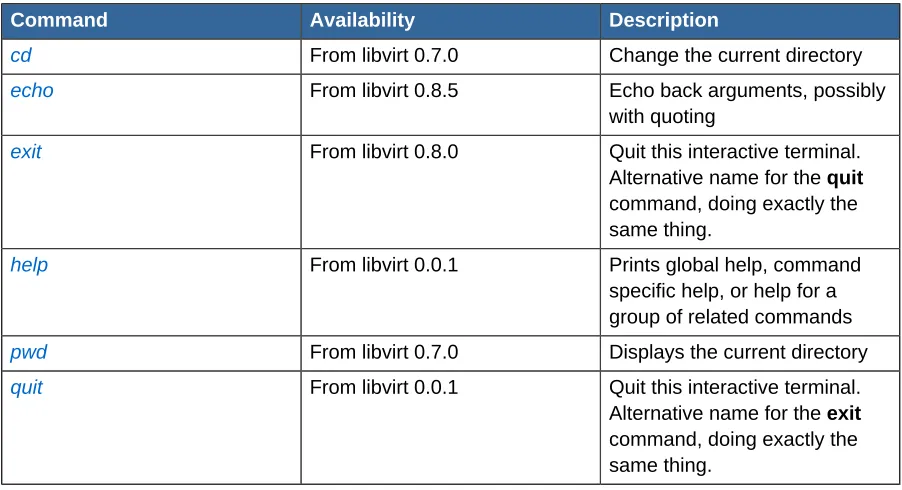
Table 1.12. Virsh commands
Command Availability Description
cd From libvirt 0.7.0 Change the current directory
echo From libvirt 0.8.5 Echo back arguments, possibly
with quoting
exit From libvirt 0.8.0 Quit this interactive terminal.
Alternative name for the quit command, doing exactly the same thing.
help From libvirt 0.0.1 Prints global help, command
specific help, or help for a group of related commands
pwd From libvirt 0.7.0 Displays the current directory
quit From libvirt 0.0.1 Quit this interactive terminal.
Chapter 2.
Index of commands
2.1. attach-device
Attach device from an XML file
Usage
attach-device
Options
Needs to be written
Availability
Available from libvirt 0.2.3 onwards
Platform or Hypervisor specific notes
None yet
Examples
Needs to be written
Example in context
Needs to be written
See also
Needs to be written
2.2. attach-disk
Attach disk device
Usage
attach-disk
Options
Needs to be written
Availability
Available from libvirt 0.3.0 onwards
Platform or Hypervisor specific notes
None yet
Examples
Needs to be written
Example in context
Needs to be written
See also
2.3. attach-interface
Attach network interface
Usage
attach-interface
Options
Needs to be written
Availability
Available from libvirt 0.3.0 onwards
Platform or Hypervisor specific notes
None yet
Examples
Needs to be written
Example in context
Needs to be written
See also
Needs to be written
2.4. autostart
Enable and disable the automatic starting of a guest domain when the libvirt daemon starts
Usage
autostart
Options
Needs to be written
Availability
Available from libvirt 0.2.1 onwards
Platform or Hypervisor specific notes
None yet
Examples
Needs to be written
Example in context
Needs to be written
See also
Needs to be written
2.5. capabilities
Returns capabilities of hypervisor/driver
Usage
cd
Options
Needs to be written
Availability
Available from libvirt 0.2.1 onwards
Platform or Hypervisor specific notes
None yet
Examples
Needs to be written
Example in context
Needs to be written
See also
Needs to be written
2.6. cd
Change the current directory
Usage cd
Options
Needs to be written
Availability
Available from libvirt 0.7.0 onwards
Platform or Hypervisor specific notes
None yet
Examples
Needs to be written
Example in context
Needs to be written
See also
Needs to be written
2.7. connect
Connect to local hypervisor
Usage connect
Options
Needs to be written
Availability
Platform or Hypervisor specific notes
None yet
Examples
Needs to be written
Example in context
Needs to be written
See also
Needs to be written
2.8. console
Connect the virtual serial console for the guest
Usage console
Options
Needs to be written
Availability
Available from libvirt 0.2.0 onwards
Platform or Hypervisor specific notes
None yet
Examples
Needs to be written
Example in context
Needs to be written
See also
Needs to be written
2.9. cpu-baseline
Compute baseline CPU
Usage
cpu-baseline
Options
Needs to be written
Availability
Available from libvirt 0.7.7 onwards
Platform or Hypervisor specific notes
None yet
Examples
cpu-compare
Example in context
Needs to be written
See also
Needs to be written
2.10. cpu-compare
Compare host CPU with a CPU described by an XML file
Usage
cpu-compare
Options
Needs to be written
Availability
Available from libvirt 0.7.5 onwards
Platform or Hypervisor specific notes
None yet
Examples
Needs to be written
Example in context
Needs to be written
See also
Needs to be written
2.11. create
Create a guest domain from an XML file
Usage create
Options
Needs to be written
Availability
Available from libvirt 0.1.0 onwards
Platform or Hypervisor specific notes
None yet
Examples
Needs to be written
Example in context
Needs to be written
See also
2.12. define
Define, but don't start, a guest domain from an XML file
Usage define
Options
Needs to be written
Availability
Available from libvirt 0.1.6 onwards
Platform or Hypervisor specific notes
None yet
Examples
Needs to be written
Example in context
Needs to be written
See also
Needs to be written
2.13. destroy
Immediately terminates a running guest domain, releasing any resources in use by it
Usage destroy
Options
Needs to be written
Availability
Available from libvirt 0.0.1 onwards
Platform or Hypervisor specific notes
None yet
Examples
Needs to be written
Example in context
Needs to be written
See also
Needs to be written
2.14. detach-device
Detach a device from an XML file
Usage
detach-disk
Options
Needs to be written
Availability
Available from libvirt 0.2.3 onwards
Platform or Hypervisor specific notes
None yet
Examples
Needs to be written
Example in context
Needs to be written
See also
Needs to be written
2.15. detach-disk
Detach a disk device
Usage
detach-disk
Options
Needs to be written
Availability
Available from libvirt 0.3.0 onwards
Platform or Hypervisor specific notes
None yet
Examples
Needs to be written
Example in context
Needs to be written
See also
Needs to be written
2.16. detach-interface
Detach a network interface
Usage
detach-interface
Options
Needs to be written
Availability
Platform or Hypervisor specific notes
None yet
Examples
Needs to be written
Example in context
Needs to be written
See also
Needs to be written
2.17. domblkinfo
Get block device size info for a guest domain
Usage
domblkinfo
Options
Needs to be written
Availability
Available from libvirt 0.8.1 onwards
Platform or Hypervisor specific notes
None yet
Examples
Needs to be written
Example in context
Needs to be written
See also
Needs to be written
2.18. domblkstat
Get device block stats for a running guest domain
Usage
domblkstat
Options
Needs to be written
Availability
Available from libvirt 0.3.2 onwards
Platform or Hypervisor specific notes
None yet
Examples
domid
Example in context
Needs to be written
See also
Needs to be written
2.19. domid
Convert a domain name or UUID to domain id
Usage domid
Options
Needs to be written
Availability
Available from libvirt 0.1.0 onwards
Prior to version 0.1.0, this command was known as idof
Platform or Hypervisor specific notes
None yet
Examples
Needs to be written
Example in context
Needs to be written
See also
Needs to be written
2.20. domifstat
Get network interface stats for a running guest domain
Usage
domifstat
Options
Needs to be written
Availability
Available from libvirt 0.3.2 onwards
Platform or Hypervisor specific notes
None yet
Examples
Needs to be written
Example in context
See also
Needs to be written
2.21. dominfo
Returns basic information about a guest domain
Usage dominfo
Options
Needs to be written
Availability
Available from libvirt 0.1.0 onwards
Platform or Hypervisor specific notes
None yet
Examples
Needs to be written
Example in context
Needs to be written
See also
Needs to be written
2.22. domjobabort
Aborts the currently running guest domain job
Usage
domjobabort
Options
Needs to be written
Availability
Available from libvirt 0.7.7 onwards
Platform or Hypervisor specific notes
None yet
Examples
Needs to be written
Example in context
Needs to be written
See also
Needs to be written
2.23. domjobinfo
dommemstat
Usage
domjobinfo
Options
Needs to be written
Availability
Available from libvirt 0.7.7 onwards
Platform or Hypervisor specific notes
None yet
Examples
Needs to be written
Example in context
Needs to be written
See also
Needs to be written
2.24. dommemstat
Get memory statistics for a runnng guest domain
Usage
dommemstat
Options
Needs to be written
Availability
Available from libvirt 0.7.5 onwards
Platform or Hypervisor specific notes
None yet
Examples
Needs to be written
Example in context
Needs to be written
See also
Needs to be written
2.25. domname
Convert a guest domain id or UUID to guest domain name
Usage domname
Options
Availability
Available from libvirt 0.1.0 onwards
Prior to version 0.1.0, this command was known as nameof
Platform or Hypervisor specific notes
None yet
Examples
Needs to be written
Example in context
Needs to be written
See also
Needs to be written
2.26. domstate
Returns state about a guest domain
Usage
domstate
Options
Needs to be written
Availability
Available from libvirt 0.1.0 onwards
Prior to version 0.1.0, this command was known as dstate
Platform or Hypervisor specific notes
None yet
Examples
Needs to be written
Example in context
Needs to be written
See also
Needs to be written
2.27. domuuid
Convert a guest domain name or id to guest domain UUID
Usage domuuid
Options
Needs to be written
Availability
domxml-from-native
Platform or Hypervisor specific notes
None yet
Examples
Needs to be written
Example in context
Needs to be written
See also
Needs to be written
2.28. domxml-from-native
Convert native guest configuration format to domain XML format
Usage
domxml-from-native
Options
Needs to be written
Availability
Available from libvirt 0.6.4 onwards
Platform or Hypervisor specific notes
None yet
Examples
Needs to be written
Example in context
Needs to be written
See also
Needs to be written
2.29. domxml-to-native
Convert guest domain XML config to a native guest configuration format
Usage
domxml-to-native
Options
Needs to be written
Availability
Available from libvirt 0.6.4 onwards
Platform or Hypervisor specific notes
None yet
Examples
Example in context
Needs to be written
See also
Needs to be written
2.30. dump
Core dump a guest domain
Usage dump
Options
Needs to be written
Availability
Available from libvirt 0.1.9 onwards
Platform or Hypervisor specific notes
None yet
Examples
Needs to be written
Example in context
Needs to be written
See also
Needs to be written
2.31. dumpxml
Output the guest domain information as an XML dump to stdout
Usage dumpxml
Options
Needs to be written
Availability
Available from libvirt 0.0.1 onwards
Platform or Hypervisor specific notes
None yet
Examples
Needs to be written
Example in context
Needs to be written
See also
echo
2.32. echo
Echo back arguments, possibly with quoting
Usage echo
Options
Needs to be written
Availability
Available from libvirt 0.8.5 onwards
Platform or Hypervisor specific notes
None yet
Examples
Needs to be written
Example in context
Needs to be written
See also
Needs to be written
2.33. edit
Edit the XML configuration for a guest domain
Usage edit
Options
Needs to be written
Availability
Available from libvirt 0.4.6 onwards
Platform or Hypervisor specific notes
None yet
Examples
Needs to be written
Example in context
Needs to be written
See also
Needs to be written
2.34. exit
Quit this interactive terminal. Alternative name for the quit command, doing exactly the same thing.
Options
Needs to be written
Availability
Available from libvirt 0.8.0 onwards
Platform or Hypervisor specific notes
None yet
Examples
Needs to be written
Example in context
Needs to be written
See also
Needs to be written
2.35. find-storage-pool-sources-as
Discover potential storage pool sources
Usage
find-storage-pool-sources-as
Options
Needs to be written
Availability
Available from libvirt 0.4.6 onwards
Platform or Hypervisor specific notes
None yet
Examples
Needs to be written
Example in context
Needs to be written
See also
Needs to be written
2.36. find-storage-pool-sources
Discover potential storage pool sources
Usage
find-storage-pool-sources
Options
Needs to be written
Availability
freecell
Platform or Hypervisor specific notes
None yet
Examples
Needs to be written
Example in context
Needs to be written
See also
Needs to be written
2.37. freecell
Display available free memory for a NUMA cell
Usage
freecell
Options
Needs to be written
Availability
Available from libvirt 0.3.3 onwards
Platform or Hypervisor specific notes
None yet
Examples
Needs to be written
Example in context
Needs to be written
See also
Needs to be written
2.38. help
Prints global help, command specific help, or help for a group of related commands
Usage help
Options
Needs to be written
Availability
Available from libvirt 0.0.1 onwards
Platform or Hypervisor specific notes
None yet
Examples
Example in context
Needs to be written
See also
Needs to be written
2.39. hostname
Display the name of the hypervisor host
Usage
hostname
Options
Needs to be written
Availability
Available from libvirt 0.3.0 onwards
Platform or Hypervisor specific notes
None yet
Examples
Needs to be written
Example in context
Needs to be written
See also
Needs to be written
2.40. iface-define
Define a physical host network interface
Usage
iface-define
Options
Needs to be written
Availability
Available from libvirt 0.7.0 onwards
Platform or Hypervisor specific notes
None yet
Examples
Needs to be written
Example in context
Needs to be written
See also
iface-destroy
2.41. iface-destroy
Shut down and disable a physical host network interface
Usage
iface-destroy
Options
Needs to be written
Availability
Available from libvirt 0.7.0 onwards
Platform or Hypervisor specific notes
None yet
Examples
Needs to be written
Example in context
Needs to be written
See also
Needs to be written
2.42. iface-dumpxml
Output information for a physical host network interface, as an XML dump to stdout
Usage
iface-dumpxml
Options
Needs to be written
Availability
Available from libvirt 0.7.0 onwards
Platform or Hypervisor specific notes
None yet
Examples
Needs to be written
Example in context
Needs to be written
See also
Needs to be written
2.43. iface-edit
Edit the XML configuration for a physical host network interface
Usage
Options
Needs to be written
Availability
Available from libvirt 0.7.0 onwards
Platform or Hypervisor specific notes
None yet
Examples
Needs to be written
Example in context
Needs to be written
See also
Needs to be written
2.44. iface-list
Returns a list of physical host network interfaces
Usage
iface-list
Options
Needs to be written
Availability
Available from libvirt 0.7.0 onwards
Platform or Hypervisor specific notes
None yet
Examples
Needs to be written
Example in context
Needs to be written
See also
Needs to be written
2.45. iface-mac
Returns the MAC address for a physical host network interface
Usage
iface-mac
Options
Needs to be written
Availability
iface-name
Platform or Hypervisor specific notes
None yet
Examples
Needs to be written
Example in context
Needs to be written
See also
Needs to be written
2.46. iface-name
Returns the physical host interface name for a MAC address
Usage
iface-name
Options
Needs to be written
Availability
Available from libvirt 0.7.0 onwards
Platform or Hypervisor specific notes
None yet
Examples
Needs to be written
Example in context
Needs to be written
See also
Needs to be written
2.47. iface-start
Enables and starts a physical host network interface
Usage
iface-start
Options
Needs to be written
Availability
Available from libvirt 0.7.0 onwards
Platform or Hypervisor specific notes
None yet
Examples
Example in context
Needs to be written
See also
Needs to be written
2.48. iface-undefine
Removes the configuration information for a physical host network interface
Usage
iface-undefine
Options
Needs to be written
Availability
Available from libvirt 0.7.0 onwards
Platform or Hypervisor specific notes
None yet
Examples
Needs to be written
Example in context
Needs to be written
See also
Needs to be written
2.49. list
Returns a list of guest domains
Usage list
Options
Needs to be written
Availability
Available from libvirt 0.0.1 onwards
Platform or Hypervisor specific notes
None yet
Examples
Needs to be written
Example in context
Needs to be written
See also
managedsave-remove
2.50. managedsave-remove
Remove an existing managed save state file from a guest domain
Usage
managedsave-remove
Options
Needs to be written
Availability
Available from libvirt 0.8.3 onwards
Platform or Hypervisor specific notes
None yet
Examples
Needs to be written
Example in context
Needs to be written
See also
Needs to be written
2.51. managedsave
Save and destroy a running guest domain, so it can be restarted from the same state at a later time. When the virsh start command is next run for the guest domain, it will automatically be started from this saved state
Usage
managedsave
Options
Needs to be written
Availability
Available from libvirt 0.8.0 onwards
Platform or Hypervisor specific notes
None yet
Examples
Needs to be written
Example in context
Needs to be written
See also
Needs to be written
2.52. maxvcpus
Usage
maxvcpus
Options
Needs to be written
Availability
Available from libvirt 0.8.5 onwards
Platform or Hypervisor specific notes
None yet
Examples
Needs to be written
Example in context
Needs to be written
See also
Needs to be written
2.53. memtune
Allows you to display or set the memory parameters for a guest domain
Usage
memtune --domain <domain-identifier> --hard-limit <limit> --soft-limit <limit> --swap-hard-limit <limit> --min-guarantee <quantity>
Options
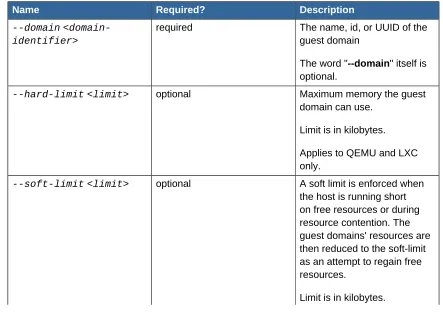
Table 2.1. Options
Name Required? Description
--domain <domain-identifier>
required The name, id, or UUID of the
guest domain
The word "--domain" itself is optional.
--hard-limit <limit> optional Maximum memory the guest domain can use.
Limit is in kilobytes.
Applies to QEMU and LXC only.
--soft-limit <limit> optional A soft limit is enforced when the host is running short on free resources or during resource contention. The guest domains' resources are then reduced to the soft-limit as an attempt to regain free resources.
memtune
Name Required? Description
Applies to QEMU and LXC only.
--swap-hard-limit <--swap-hard-limit>
optional Maximum swap memory the
guest domain can use.
Limit is in kilobytes.
Applies to QEMU and LXC only.
--min-guarantee <quantity>
optional Minimum amount of memory
required to start a guest domain.
Quantity is in kilobytes.
VMware ESX and vSphere only.
Availability
Available from libvirt 0.8.5 onwards
Platform or Hypervisor specific notes QEMU and LXC
The --hard-limit, --soft-limit, and --swap-hard-limit parameters are only used by QEMU and LXC.
VMware ESX and vSphere
The --min-guarantee parameter is only used by VMware ESX and vSphere.
Examples
Without flags the current settings are displayed:
virsh # memtune domain-id
This command sets the memory hard limit:
virsh # memtune domain-id --hard-limit kilobytes
This command sets the memory soft limit:
virsh # memtune domain-id --soft-limit kilobytes
This command sets the swap hard limit:
virsh # memtune domain-id --swap-hard-limit kilobytes
<memtune>
<hard_limit>131072</hard_limit> <soft_limit>65536</soft_limit>
<swap_hard_limit>262144</swap_hard_limit> </memtune>
Example in context
We run the memtune command giving only a guest domain first, to see what the present values for the domain are:
virsh # memtune lxcbb1 hard_limit : 131072 soft_limit : 65536 swap_hard_limit: 262144
This shows the value for hard_limit is 131072, which means 128MB of memory. To change it to 256MB, we run the memtune command again giving it the new value (256 x 1024 = 262144):
virsh # memtune lxcbb1 --hard-limit 262144
Then verify the change has taken effect:
virsh # memtune lxcbb1 hard_limit : 262144 soft_limit : 65536 swap_hard_limit: 262144
See also
• http://www.libvirt.org/formatdomain.html#elementsResources - Gives the details of the XML needed by memtune.
2.54. migrate-setmaxdowntime
Set maximum tolerable downtime of a guest domain which is being live migrated to another host
Usage
migrate-setmaxdowntime
Options
Needs to be written
Availability
Available from libvirt 0.8.0 onwards
Platform or Hypervisor specific notes
None yet
Examples
Needs to be written
Example in context
migrate
See also
Needs to be written
2.55. migrate
Migrates a guest domain to another host
Usage migrate
Options
Needs to be written
Availability
Available from libvirt 0.3.2 onwards
Platform or Hypervisor specific notes
None yet
Examples
Needs to be written
Example in context
Needs to be written
See also
Needs to be written
2.56. net-autostart
Enables or disables the automatic startup of a persistent virtual network, by the libvirt daemon.
Usage
net-autostart --network network-identifier --disable
Options
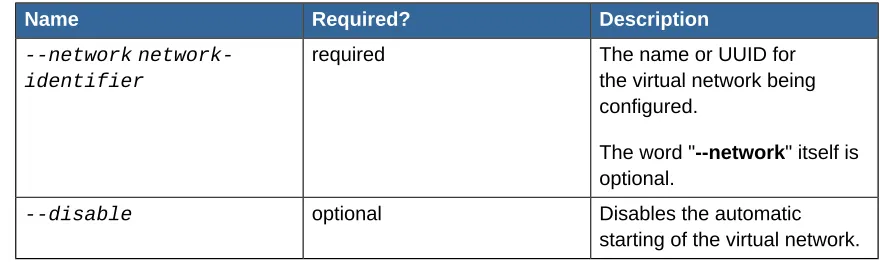
Table 2.2. Options
Name Required? Description
--network network-identifier
required The name or UUID for
the virtual network being configured.
The word "--network" itself is optional.
--disable optional Disables the automatic
starting of the virtual network.
Availability
Available from libvirt 0.2.1 onwards
Platform or Hypervisor specific notes
Examples
virsh # net-autostart default --disable
Stops the virtual network named "default" from automatically starting when the libvirt daemon starts.
virsh # net-autostart --network default --disable
Same as the above example.
virsh # net-autostart bfbc4c69-7d6a-cc9a-904c-09910ce179c0 --disable
Stops the virtual network with UUID "bfbc4c69-7d6a-cc9a-904c-09910ce179c0" from automatically starting when the libvirt daemon starts.
virsh # net-autostart --network bfbc4c69-7d6a-cc9a-904c-09910ce179c0 --disable
Same as the above example.
virsh # net-autostart default
Enables the automatic starting of the virtual network named "default", by the libvirt daemon when it starts.
virsh # net-autostart --network default
Same as the above example.
Example in context
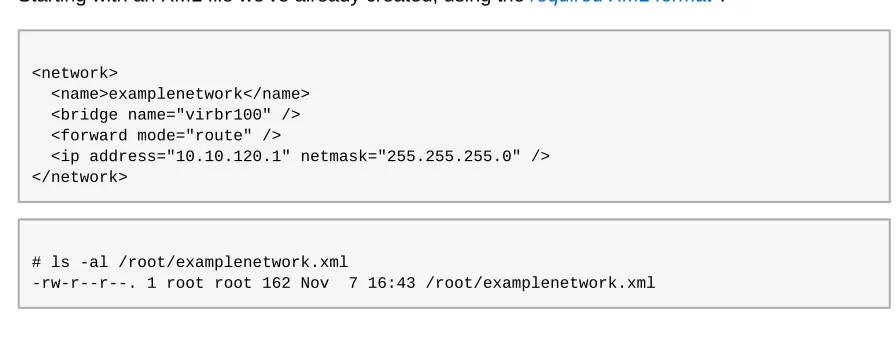
Starting with an XML file we've already created, using the required XML format1
:
<network>
<name>examplenetwork</name> <bridge name="virbr100" /> <forward mode="route" />
<ip address="10.10.120.1" netmask="255.255.255.0" /> </network>
# ls -al /root/examplenetwork.xml
-rw-r--r--. 1 root root 162 Nov 7 16:43 /root/examplenetwork.xml
We start virsh interactively, then define a persistent virtual network:
net-autostart
# virsh
Welcome to virsh, the virtualization interactive terminal. Type: 'help' for help with commands
'quit' to quit
virsh # net-list
Name State Autostart ---default active yes
virsh # net-define /root/examplenetwork.xml
Network examplenetwork defined from /root/examplenetwork.xml
Newly defined virtual networks aren't set to automatically be started, as can be seen here:
virsh # net-list --all
Name State Autostart ---default active yes
examplenetwork inactive no <-- this is the important piece
We enable automatic starting for it:
virsh # net-autostart examplenetwork
Network examplenetwork marked as autostarted
Checking, to make sure:
virsh # net-list --all
Name State Autostart ---default active yes
examplenetwork inactive yes <-- this is the important piece
From now on, whenever the libvirt daemon is started, it will automatically start this virtual network too (unless it's already running). If at some point we want to turn off automatic starting of the virtual network, we use the --disable option to the command:
# net-autostart --disable examplenetwork Network examplenetwork unmarked as autostarted
virsh # net-list --all
Name State Autostart ---default active yes
examplenetwork inactive no <-- this is the important piece
See also
• net-list - Lists the virtual networks libvirt is aware of.
2.57. net-create
Creates a running, transient virtual network, using settings from an XML file.
Usage
net-create --file file-name
Options
Table 2.3. Options
Name Required? Description
--file file-name required The full path (and file name)
to an XML file containing the
network settings required2
.
The word "--file" itself is optional.
Availability
Available from libvirt 0.2.0 onwards
Platform or Hypervisor specific notes
None yet
Examples
virsh # net-create /root/examplenetwork.xml
Creates a new, transient, virtual network using the settings from /root/examplenetwork.xml.
virsh # net-create --file /root/examplenetwork.xml
Same as the above example.
Example in context
Starting with an XML file we've already created, using the required XML format3:
<network>
<name>examplenetwork</name> <bridge name="virbr100" /> <forward mode="route" />
<ip address="10.10.120.1" netmask="255.255.255.0" /> </network>
# ls -al /root/examplenetwork.xml
-rw-r--r--. 1 root root 162 Nov 7 16:43 /root/examplenetwork.xml
net-create
We start virsh interactively, then create the transient virtual network:
# virsh
Welcome to virsh, the virtualization interactive terminal. Type: 'help' for help with commands
'quit' to quit
virsh # net-list
Name State Autostart ---default active yes
virsh # net-create /root/examplenetwork.xml
Network examplenetwork created from /root/examplenetwork.xml
Created. Now we confirm:
virsh # net-list
Name State Autostart ---default active yes
examplenetwork active no
We check the details of the created network from virsh. This shows us the generated UUID, and anything else that may be in effect (ie Spanning Tree Protocol).
virsh # net-dumpxml examplenetwork <network>
<name>examplenetwork</name>
<uuid>97ce3914-231e-4026-0a78-822e1e2e7226</uuid> <forward mode='route'/>
<bridge name='virbr100' stp='on' delay='0' />
<ip address='10.10.120.1' netmask='255.255.255.0'> </ip>
</network>
Then, after exiting virsh, we check how it appears to the host Linux OS:
# ifconfig virbr100
virbr100 Link encap:Ethernet HWaddr 02:95:C3:06:A5:BF
inet addr:10.10.120.1 Bcast:10.10.120.255 Mask:255.255.255.0 UP BROADCAST RUNNING MULTICAST MTU:1500 Metric:1
RX packets:0 errors:0 dropped:0 overruns:0 frame:0 TX packets:11 errors:0 dropped:0 overruns:0 carrier:0 collisions:0 txqueuelen:0
RX bytes:0 (0.0 b) TX bytes:2653 (2.5 KiB)
See also
• net-destroy - Shuts down a running virtual network, as started with net-create or net-start.
• http://libvirt.org/formatnetwork.html - Gives the details of the XML needed by net-create.
2.58. net-define
Adds a new persistent virtual network to libvirt, without starting it, using settings from an XML file.
You will need to manually start this virtual network when needed using net-start, unless you enable automatic starting for it. If you enable automatic starting, the virtual network will be started when the libvirt daemon starts.
To enable automatic starting of this virtual network, use the net-autostart command.
Usage
net-define --file file-name
Options
Table 2.4. Options
Name Required? Description
--file file-name required The full path (and file name)
to an XML file containing the
network settings required4
.
The word "--file" itself is optional.
Availability
Available from libvirt 0.2.0 onwards
Platform or Hypervisor specific notes
None yet
Examples
virsh # net-define /root/examplenetwork.xml
Creates a new, persistent, virtual network using the settings from the XML file /root/ examplenetwork.xml.
virsh # net-define --file /root/examplenetwork.xml
Same as the above example.
Example in context
Starting with an XML file we've already created, using the required XML format5:
<network>
<name>examplenetwork</name>
net-define
<bridge name="virbr100" /> <forward mode="route" />
<ip address="10.10.120.1" netmask="255.255.255.0" /> </network>
# ls -al /root/examplenetwork.xml
-rw-r--r--. 1 root root 162 Nov 7 16:43 /root/examplenetwork.xml
We start virsh interactively, then create the transient virtual network:
# virsh
Welcome to virsh, the virtualization interactive terminal. Type: 'help' for help with commands
'quit' to quit
virsh # net-list
Name State Autostart ---default active yes
virsh # net-define /root/examplenetwork.xml
Network examplenetwork defined from /root/examplenetwork.xml
Defined. Now we confirm:
virsh # net-list --all
Name State Autostart ---default active yes
examplenetwork inactive no
Newly defined virtual networks aren't automatically started, so we manually start it now:
virsh # net-start examplenetwork
Network examplenetwork started
virsh # net-list
Name State Autostart ---default active yes
examplenetwork active no
We check the details of the started network from virsh. This shows us the generated UUID, and anything else that may be in effect (ie Spanning Tree Protocol).
virsh # net-dumpxml examplenetwork <network>
<name>examplenetwork</name>
<forward mode='route'/>
<bridge name='virbr100' stp='on' delay='0' />
<ip address='10.10.120.1' netmask='255.255.255.0'> </ip>
</network>
If the virtualisation server is running Linux, we can check how it appears to the host OS:
# ifconfig virbr100
virbr100 Link encap:Ethernet HWaddr A6:45:97:AE:8E:08
inet addr:10.10.120.1 Bcast:10.10.120.255 Mask:255.255.255.0 UP BROADCAST RUNNING MULTICAST MTU:1500 Metric:1
RX packets:0 errors:0 dropped:0 overruns:0 frame:0 TX packets:11 errors:0 dropped:0 overruns:0 carrier:0 collisions:0 txqueuelen:0
RX bytes:0 (0.0 b) TX bytes:2653 (2.5 KiB)
See also
• net-autostart - Used to enable and disable the automatic starting of a virtual network.
• net-create - An alternative to net-define. Use this when you want a transient virtual network that will disappear when the host is rebooted or shutdown, rather than a persistent one created using net-define.
• net-destroy - Shuts down a running virtual network, as started with net-create or net-start.
• net-start - Manually starts a virtual network that isn't running.
• http://libvirt.org/formatnetwork.html - Gives the details of the XML needed by net-define.
2.59. net-destroy
Shuts down a virtual network, releasing any resources in use by it.
Usage
net-destroy --network network-identifier
Options
Table 2.5. Options
Name Required? Description
--network network-identifier
required The name or UUID of the
network to be shut down.
The word "--network" itself is optional.
Availability
Available from libvirt 0.2.0 onwards
Platform or Hypervisor specific notes Linux
If the virtualisation host is running Linux, the name the operating system uses for the network interface can be found using the net-dumpxml virsh command.
net-destroy
virsh # net-dumpxml examplenetwork <network>
<name>examplenetwork</name>
<uuid>b7005dec-be1a-fe9a-338a-0cb1301dfcfd</uuid> <forward mode='route'/>
<bridge name='virbr100' stp='on' delay='0' />
<ip address='10.10.120.1' netmask='255.255.255.0'> </ip>
</network>
Using ifconfig, or a similar tool such as ip, the virbr100 interface will be seen on the host when the virtual network is running:
# ifconfig virbr100
virbr100 Link encap:Ethernet HWaddr D2:43:D9:47:FA:AA inet addr:10.10.120.1 Bcast:10.10.120.255 Mask:255.255.255.0
UP BROADCAST RUNNING MULTICAST MTU:1500 Metric:1
RX packets:0 errors:0 dropped:0 overruns:0 frame:0 TX packets:7 errors:0 dropped:0 overruns:0 carrier:0 collisions:0 txqueuelen:0
RX bytes:0 (0.0 b) TX bytes:1553 (1.5 KiB)
After shutting down a virtual network with the net-destroy command, the Linux OS will no longer show this interface:
# ifconfig virbr100
virbr100: error fetching interface information: Device not found
Examples
virsh # net-destroy mynetwork
Shuts down the virtual network named "mynetwork".
virsh # net-destroy --network mynetwork
Same as the above example.
virsh # net-destroy bfbc4c69-7d6a-cc9a-904c-09910ce179c0
Shuts down the virtual network that has a UUID of "bfbc4c69-7d6a-cc9a-904c-09910ce179c0".
virsh # net-destroy --network bfbc4c69-7d6a-cc9a-904c-09910ce179c0
Same as the above example.
Example in context
virsh # net-list
Name State Autostart ---default active yes
examplenetwork active yes
The network is shut down by simply using the net-destroy command on it:
# net-destroy examplenetwork Network examplenetwork destroyed
The command now shows it as inactive:
virsh # net-list --all
Name State Autostart ---default active yes
examplenetwork inactive yes
See also
• net-create - Creates a running, transient virtual network, using settings from an XML file.
• net-list - Displays a list of the virtual networks libvirt is aware of.
• net-start - Manually starts a virtual network that isn't running.
2.60. net-dumpxml
Outputs the XML configuration for a virtual network, to stdout.
Usage
net-dumpxml --network network-identifier
Options
Table 2.6. Options
Name Required? Description
--network network-identifier
required The name or UUID of
the network whose XML configuration is to be displayed.
The word "--network" itself is optional.
Availability
Available from libvirt 0.2.0 onwards
Platform or Hypervisor specific notes
None yet
net-edit
virsh # net-dumpxml mynetwork
Outputs the XML configuration for the virtual network named "mynetwork".
virsh # net-dumpxml --network mynetwork
Same as the above example.
virsh # net-dumpxml bfbc4c69-7d6a-cc9a-904c-09910ce179c0
Outputs the XML configuration for the virtual network that has a UUID of " bfbc4c69-7d6a-cc9a-904c-09910